In fact, the rest of the room appears to have a constant illumination unrelated to the light entering. One of the basic precepts of Radiance is that scene geometry can be taken from almost any source. The similarity between the two images testifies to the accuracy of the luminance calculation, although no numerical values are shown.
This is because the inside is not visible from the outside.)1.
![Figure 1.1 An experimental comparison between Radiance calculations and real measurements under daylight conditions [Mar95].](https://thumb-eu.123doks.com/thumbv2/123dok_br/17617336.4193922/7.790.193.700.138.825/figure-experimental-comparison-radiance-calculations-measurements-daylight-conditions.webp)
Surface Materials
The disadvantages of using this type are its complexity and the fact that directional diffuse reflections are not calculated with Monte Carlo sampling as they are for integrated types. Most other material types are variations of those listed above, some using data or functions to modify the directional propagation component.
Lighting Simulation and Rendering
Each component has an associated (programmable) color and reflections can be different when viewed from either side of the surface. Other variations provide anisotropy (elongation) at key points for materials such as brushed aluminum and lacquered wood. This mechanism is very general and thus also serves as a source of confusion for users, so we will spend some time on the topic in the tutorial.
The details of the local and global illumination algorithms in Radiance are described in Part III, Calculation Methods, Chapters 10 through 15. An ambient light level (-av: . ambient value) is added, which can illuminate the shadow areas in the scene .oct- data set. The image is 512 pixels square and the program reports the status of the rendering progress every 30 seconds.
The input is the octatree of the scene (as for rview and rpict) plus the positions of the desired point calculations. Secondary sources are introduced in the tutorial at the end of this chapter and explored in detail in Chapters 6 and 13.). In the next section, we look at some other Radiance tools tailored specifically for image processing.
Image Manipulation and Analysis
In addition, there are many programs for converting to and from foreign image formats, such as AVS, PICT, PPM, Sun rasterfile, PostScript and Targa. These programs have names of the form ra_fmt, where fmt is the commonly used abbreviation or filename extension for the foreign image format. In most cases, reverse conversions (importing to Radiance) are supported by the same program with a -r option.
In other cases, not all representations within the defined format are recognized, such as TIFF, which contains almost too many data tags to count, including a crude type of FAX - data transmission sent over a telephone line.
Integration
It coordinates one or more processes on one or more host machines, juggles files within limited disk space and interpolates frames, even adding motion blur if desired. In addition to these tools within the UNIX Radiance distribution, there are a few other systems that integrate Radiance into CAD or other environments, and we should mention them here. ADELINE: A collection of CAD, simulation and visualization tools for MS-DOS systems, which includes a DOS version of Radiance.
Integration between components is of varying quality, but it does include a good translator of CAD files in DXF format, and it includes LBNL's SUPERLITE program in addition to Radiance. It was written by Georg Mischler and friends and is freely available on the website www.schorsch.com/autocad/radiance.html. It includes an earlier DOS version of Radiance and has a nice user interface for designing simple layouts with a large catalog of fixtures.
Other integrated systems have been created with Radiance, but we are not aware of any that are publicly available at the time of writing. Next, we present a short tutorial that demonstrates the essential commands and techniques of the system.
Scene 0 Tutorial
Input of a Simple Room
To get a more intimate understanding of the input to Radiance, we'll start without the benefits of a CAD program or an object library. TYPE is one of a finite number. predefined types, and the meaning of. the arguments that follow are determined by. The -av option specifies the amount of light that is globally present in the scene, so that parts of the scene that are not directly lit are visible.
Take the opportunity to try each of the rview commands as described in the manual. Let's put a box under the table and a rod to suspend the light from the ceiling:. the light from the ceiling:. After seeing this new arrangement, you can try changing some of the materials - here are a few examples:.
Note again that the definitions of the new materials must precede any references to them. materials for the floor and ceiling in the room are a little more difficult. The double arrow >> causes the output to be appended to the end of the file instead of overwriting its contents. Sending a continue signal now will cause rpict to report to the end of the specified error file.

Filtering and Displaying a Picture
The pcond program offers many advanced functions for reproducing scene visibility and we recommend that you refer to the manual page on the CD-ROM for more details.
Addition of a Window
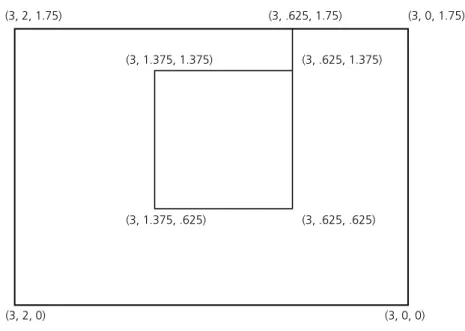
The front of the window should face our room, as it will act as a light source later and a light source will only radiate from the front. A special generator, gensky, creates a description of the sun and sky, which is stored in a separate file. We can now merge these elements into one octree file using oconv:. oconv outside.rad sky.rad window.rad room.rad > test.oct.
It is therefore necessary to change the order of the files so that skyfunc is defined before using it:. oconv sky.rad outside.rad window.rad room.rad > test.oct. Therefore, in order for the window to directly illuminate the room, it is necessary to change the type of material. An illumin will act as a light source for parts of the computation, but if you look directly at it, it will appear to be made of a different material (or disappear altogether).
Instead of changing the contents of window.rad, which is a perfectly valid description of a non-source window, let's create a new file that we can replace during octree creation, called srcwindow.rad:. visible glass type for illum:. skyfunc brightfunc window_dist 2 winxmit winxmit.cal. illum for window that uses 88% transmittance. window_dist illum window_illum 1 window glass. To view the scene, simply replace srcwindow.rad with window.rad in the previous oconv command, like this:. oconv sky.rad outside.rad srcwindow.rad room.rad > test.oct. You can look at the space at different times by modifying the gensky command used to create the sky.rad and regenerate the octree.
Automating the Rendering Process
The first definition is the normal glass type, window_glass, which is used for the alternative material for the illumin. Instead of running another rad command, we can get the same view functionality from rview using the L command. This command actually consults rad using the current control file to calculate the desired view.
The additional V command adds the current view to the end of the control file for later access and batch viewing. For example, you can put the default view into your control file using the rview commands:. Navigate through rview to find a few different views you like, and save them (with sensible names) to the control file using the V command.
If you make a mistake and save a view that you later decide you don't like, you have to edit the control file and manually remove the relevant line. If you look at the rad man page, you'll notice that there are a lot of variables in our simple control file that we've left undefined. If we want to create image files for selected views in batch mode, we can run.
Outside Geometry
Virtual light source material types should be used sparingly, as they can result in significant increases in computation. If we just replace it in our scene without changing the window's lighting description, the light distribution from the window will be slightly wrong because. The first is to treat the window as an ordinary window and rely on the default calculation of Radiance interreflection, and the second is to use the mkillum program to calculate the distribution of the window separately so that we can still treat it as a source illum light
The calculation takes a while to get started because it has to trace many rays initially to determine the contribution at each point from the window area. A more efficient alternative in this case is to use the mkillum program to create a modified window file that uses calculated data values to define its light output distribution. The -av value given to mkillum is appropriate for the exterior, which is much brighter, as suggested by the output of the gensky command stored in sky.rad.
The light from the window is taken care of by the mkillum output, but the solar patch is not. In most cases we strive to prevent direct sun from entering the room, and in the morning hours this applies to our model, but otherwise it is necessary to use the diffuse interreflection calculation to properly account for all contributions. Note that the interreflection calculation is automatically enabled when the QUALITY variable in the control file is changed to High.
Conclusion