The library is provided in ilocplex.lib and concert.lib files on Windows platforms, and libilocplex.a and libconcert.a on UNIX platforms, and uses the Callable Library (described below). The library is provided in the cplex70.lib and cplex70.dll files on Windows platforms and in libcplex.a on UNIX platforms.
What Is ILOG CPLEX?
What You Need to Know
In This Manual
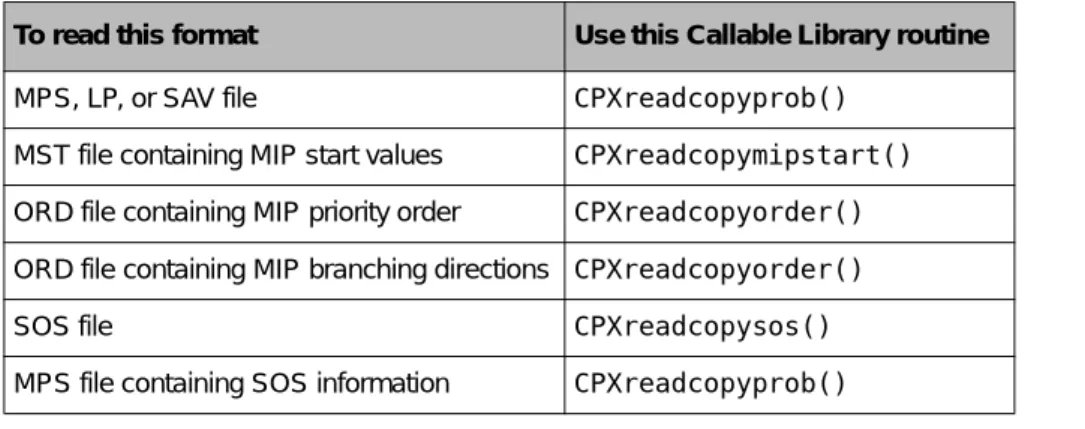
Appendix A, Interactive Optimizer Commands, lists the commands available in the ILOG CPLEX Interactive Optimizer with reference to examples of their use in this manual. Full program: ilomipex1.cpp on page 189 Full program: mipex1.c on page 190 mixed integer programming: reading MIP.
Notation in This Manual
Related Documentation
The CPLEX website at http://www.ilog.com/products/cplex/ provides product descriptions, press releases and contact information. The Design of CPLEX Concert Technology Library, including information about licensing and how to build and link your programs.
The Design of CPLEX Concert Technology Library
Creating an Application with CPLEX Concert Technology Library
Modeling an Optimization Problem with Concert Technology
The end() method must be called because, like most Concert Technology classes, the IloEnv class is a handle class. Usually, the data describing an optimization problem should be collected before or during the making of the Concert Technology representation of the model.
Solving Concert Technology Models with IloCplex
The shortcut uses the environment from the model to construct the cplex object before extraction. Once the model is extracted to the cplex object, you are ready to solve it.
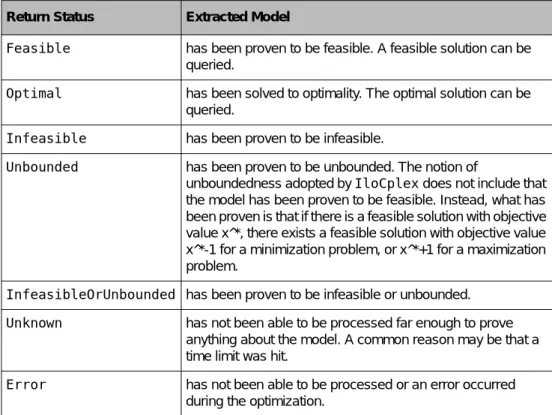
Accessing Solution Information
Calls allow you to control the resolution process based on information that is generated during the resolution process. Thus, the solution computed by the solve() method may actually slightly violate the bounds specified in the model for example.
Modifying a Model
A special type of modification is to delete a modeling object by calling its end() method. Instead, it is up to the user to ensure that these handles are not used after the deletion of the modeling object.
Handling Errors
This function creates and returns the current IloObjective object, which is added to the model with the mod.add() call. The following loop creates the problem constraints one at a time and adds them to the model.
Architecture of the CPLEX Callable Library
The Callable Library together with the ILOG CPLEX database forms the ILOG CPLEX core, as you can see in Figure 2.1.
Using the Callable Library in an Application
ILOG CPLEX gives you several alternative ways to enter data into an empty problem object (that is, populate your problem object). Call one of the ILOG CPLEX optimizers to solve the problem object you have.
ILOG CPLEX Programming Practices
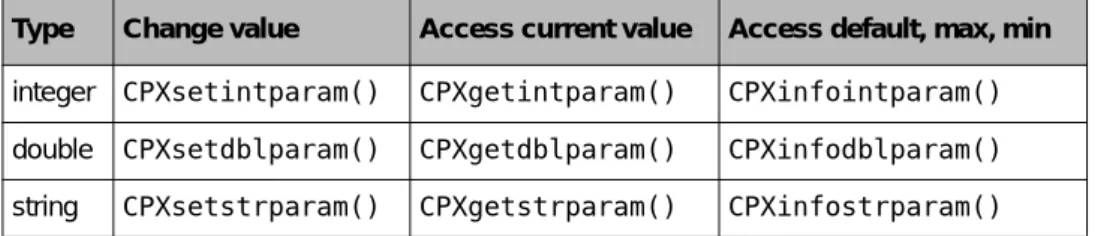
You can set many parameters in the ILOG CPLEX environment to control the operation of ILOG CPLEX. Several routines in the ILOG CPLEX Callable Library make it easier to work with strings.

Managing Parameters from the Callable Library
With this data, you create a variable that represents the amount you want to buy of the type of food and install it in the target function and constraints. The populatebyrow() routine works by first defining all the columns through a call to CPXnewcols() and then repeatedly calling CPXaddrows() to enter the constraint information. Note that CPXopenCPLEX produces no output, so the only way to see the source of the error is to use CPXgeterrorstring .
In this example, setting the CPX_PARAM_SCRIND parameter causes the error message to appear on stdout.
Tips for Successful Application Development
Part of this decomposition consists of determining which methods or routines from the ILOG CPLEX component libraries your application will call. The Interactive Optimizer in ILOG CPLEX (introduced in the manual ILOG CPLEX Getting Started) provides a reliable way to interactively test the ILOG CPLEX component of your application, especially if you are prototyping your problem model. Interactive testing through the Interactive Optimizer can also help you identify exactly which methods or routines from the component libraries your application needs.
From what you learn by experimenting with commands in the Interactive Optimizer, you can more easily choose which method or routine from the component libraries to call in your application.
Using the Interactive Optimizer for Debugging
SAV files contain the exact binary representation of the problem as it appears in your program, while MPS and LP files are text files. If you can reproduce the behavior in neither the SAV file nor the MPS file, the most likely cause of the problem is that your program has some kind of memory error. When solving a problem in MPS or LP format, if the Interactive Optimizer issues a message about a segmentation fault or similar ominous interruption and exits, contact CPLEX technical support to arrange for transfer of the problem file.
Make sure that the problem statistics and matrix coefficients reported by the Interactive Optimizer match those for the predicted model in your application.
Eliminating Common Programming Errors
Therefore, in parts of your application that delete parts of the problem, you need to look carefully at how dimensions and indexes are represented. This debugging trick can prove useful after your application loads a problem file or modifies a problem object. To check whether your application solves the problem you intended, use the Interactive Optimizer, which we suggest on page 90, and the diagnostic routines, as described on page 66.
This difference in numbering conventions can lead to unexpected results in terms of row and column indexes when your application modifies a problem or executes query routines.
Tell Us
If you delete a part of a problem, ILOG CPLEX changes not only the dimensions but also the indexes of the problem. If the behavior of the application changes when you change a local variable to global, then you can get a better idea of the source of the anomaly from it. If you are working in the Interactive Optimizer, we also suggest that you use the show problem statistics command to check the size of the problem.
We strongly recommend that you use the Fortran statement IMPLICIT NONE to help you detect any accidental type conversions, as such accidental conversions often lead to strange application behavior.
Choosing an Optimizer for Your LP Problem
Recent computational advances in the dual simplex method have made it the first choice for optimizing a linear programming problem. This is especially true for primal degenerate problems with little variability in the right-hand coefficients, but significant variability in the cost coefficients. With recent advances in the dual simplex method, the primordial simplex method is no longer the obvious choice for a first attempt at optimizing a linear programming problem.
Solving LP Problems with the Barrier Optimizer on page 129 explains this optimizer in more detail in the context of linear programming, and Chapter 7, Solving Quadratic Programming Problems covers this optimizer in the context of convex quadratic objective functions.
Tuning LP Performance
By default, ILOG CPLEX applies its aggregator once when it uses the LP optimizers. To treat your model internally as the dual formulation and have ILOG CPLEX return results in terms of your original formulation:. It is possible to control the way ILOG CPLEX builds an initial base using the crash parameter.
In the primal simplex optimizer, the crash setting determines how ILOG CPLEX uses the coefficients of the objective function to select the starting basis.

Diagnosing Performance Problems
ILOG CPLEX provides a base condition number to measure the sensitivity of a linear system to the problem data. ILOG CPLEX reports such actions to the log file (by default) and to the screen (if you are working in the Interactive Optimizer or if the message-to-screen indicator CPX_PARAM_SCRIND is set to 1 (one)). If ILOG CPLEX automatically interrupts your problem early in the solution process, you should consider starting the solution process itself with an interrupt.
The perturbation-limit parameter determines the number of iterations ILOG CPLEX tries before the problem is considered to be stuck.
Diagnosing LP Infeasibility
To increase the optimality tolerance in your problem in the Interactive Optimizer, use the set simple optimal tolerances n command, substituting a larger value for n. To invoke the impossibility finder and display a portion of its findings in the Interactive Optimizer, use the show iis command. If you want ILOG CPLEX to display this additional information on your screen in the Interactive Optimizer, use the set output only yes command.
The size of IIS reported by ILOG CPLEX depends on many factors in the problem model.
Solving LP Problems with the Barrier Optimizer
In the Interactive Optimizer, we recommend this way of working with the ILOG CPLEX Barrier Optimizer:. In the Interactive Optimizer, use the barrier command set to see a list of the parameters specific to the ILOG CPLEX Barrier Optimizer. This number is directly related to the time required per iteration of the ILOG CPLEX Barrier Optimizer.
Numerical problems can degrade the performance of the ILOG CPLEX Barrier Optimizer or even prevent convergence to a solution.

Sample: Stating a MIP Problem
Considering Preliminary Issues
In the Interactive Optimizer, to declare binary integers in the context of the enter command, type binaries on a separate line, followed by the designated binary variables. If you have a license to use the ILOG CPLEX Mixed Integer Optimizer, you will see additional display options in the Interactive Optimizer. When you enter a problem in the Interactive Optimizer, ILOG CPLEX determines the problem type based on the available information.
If you are licensed to use the ILOG CPLEX Mixed Integer Optimizer, you will see additional modification options in the Interactive Optimizer.
Using the Mixed Integer Optimizer
ILOG CPLEX cuts off nodes when the value of the objective function associated with the subproblem at that node is worse than the cutoff value. ILOG CPLEX will use the value of the best integer solution found so far, as modified by tolerance parameters. The cut-factor parameter controls the number of cuts ILOG CPLEX adds to the model.
In the Interactive Optimizer, the command set mip ordertype 1 will make the ILOG CPLEX variable branch with cost reduction.

Using Sensitivity Information in a MIP
ILOG CPLEX will accept the old TRE file if the basic dimensions of the problem have not changed, but the results it produces from it will likely be invalid for the modified model. Interpreting solution statistics on page 114 explains how to use the display command in the Interactive Optimizer to view post-solution information from the linear optimizers. However, due to the way integer solutions are generated, the display command only shows limited information from the MIP optimizer.
In fact, ILOG CPLEX generates integer solutions by solving subproblems that have different bounds than the original problem, so calculating solution values with the original bounds will usually not yield the same solution.
Using Special Ordered Sets (SOS)
Only one size can be chosen for the magazine; that is, at most one of the x variables in the solution can be non-zero. And there is an order relationship between the x variables (namely the measures) that can be used as weights. Use an SOS file (that is, one in SOS format, with a .sos file extension).
Conventions for declaring SOS information in MPS files are documented in the ILOG CPLEX Reference Manual.
Using Semi-Continuous Variables
Progress Reports: Interpreting the Node Log
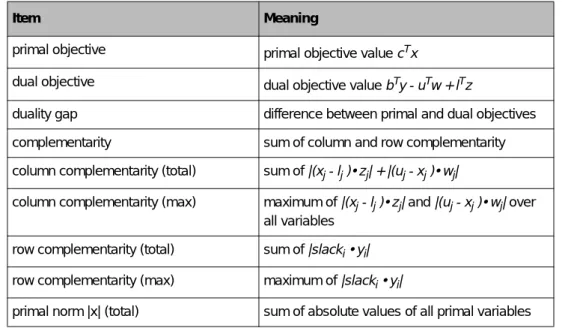
In general, ILOG CPLEX records a line in the node log about every node with an integer solution and about every n nodes solved, where n is controlled by the MIP interval parameter. In the next column, ILOG CPLEX records either the objective value at the node or a reason to see through the node. In the column labeled IInf, ILOG CPLEX records the number of integer-infeasible variables and specially ordered sets.
CPLEX also shows, in the node log file, every instance of a successful application of the node heuristic.

Troubleshooting MIP Performance Problems
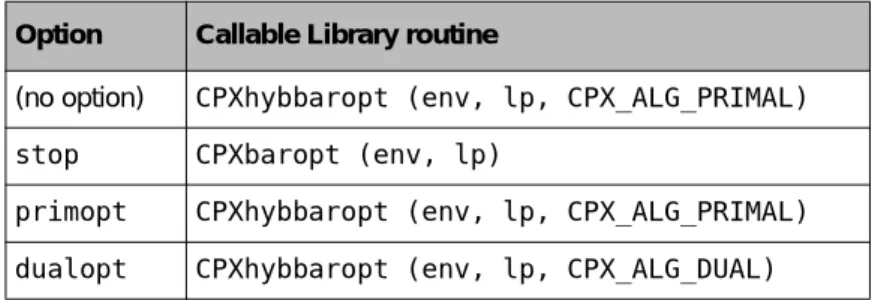
In the Interactive Optimizer, use the set mip strategy variable command, choose 1 or 4. ◆ Set the integer parameter VarSel in the Concert Technology Library. In the Interactive Optimizer, use the commands set mip cuts all -1 to turn off all cuts. In the Interactive Optimizer, use the command set mip-strategy start-algorithm with the value to specify the optimizer you want.
In the Callable Library, use the CPXsetintparam() routine with the CPX_PARAM_STARTALG parameter and the appropriate symbolic constant.