Oracle® Database Gateway for Informix
User’s Guide 11g Release 2 (11.2) E12066-01
July 2009
Oracle Database Gateway for Informix User's Guide, 11g Release 2 (11.2) E12066-01
Copyright © 2007, 2009, Oracle and/or its affiliates. All rights reserved.
Primary Author: Maitreyee Chaliha
Contributor: Vira Goorah, Juan Pablo Ahues-Vasquez, Peter Castro, Charles Benet, Peter Wong, and Govind Lakkoju
This software and related documentation are provided under a license agreement containing restrictions on use and disclosure and are protected by intellectual property laws. Except as expressly permitted in your license agreement or allowed by law, you may not use, copy, reproduce, translate, broadcast, modify, license, transmit, distribute, exhibit, perform, publish, or display any part, in any form, or by any means. Reverse engineering, disassembly, or decompilation of this software, unless required by law for interoperability, is prohibited.
The information contained herein is subject to change without notice and is not warranted to be error-free. If you find any errors, please report them to us in writing.
If this software or related documentation is delivered to the U.S. Government or anyone licensing it on behalf of the U.S. Government, the following notice is applicable:
U.S. GOVERNMENT RIGHTS Programs, software, databases, and related documentation and technical data delivered to U.S. Government customers are "commercial computer software" or "commercial technical data"
pursuant to the applicable Federal Acquisition Regulation and agency-specific supplemental regulations. As such, the use, duplication, disclosure, modification, and adaptation shall be subject to the restrictions and license terms set forth in the applicable Government contract, and, to the extent applicable by the terms of the Government contract, the additional rights set forth in FAR 52.227-19, Commercial Computer Software License (December 2007). Oracle USA, Inc., 500 Oracle Parkway, Redwood City, CA 94065.
This software is developed for general use in a variety of information management applications. It is not developed or intended for use in any inherently dangerous applications, including applications which may create a risk of personal injury. If you use this software in dangerous applications, then you shall be responsible to take all appropriate fail-safe, backup, redundancy, and other measures to ensure the safe use of this software. Oracle Corporation and its affiliates disclaim any liability for any damages caused by use of this software in dangerous applications.
Oracle is a registered trademark of Oracle Corporation and/or its affiliates. Other names may be trademarks of their respective owners.
This software and documentation may provide access to or information on content, products, and services from third parties. Oracle Corporation and its affiliates are not responsible for and expressly disclaim all warranties of any kind with respect to third-party content, products, and services. Oracle Corporation and its affiliates will not be responsible for any loss, costs, or damages incurred due to your access to or use of third-party content, products, or services.
Contents
List of Tables
Preface
... ixAudience... ix
Documentation Accessibility ... ix
Related Documentation ... x
Conventions ... x
1 Introduction
Overview... 1-1 Heterogeneous Services Technology... 1-1 Oracle Database Gateways... 1-2
2 Informix Gateway Features and Restrictions
Using the Pass-Through Feature... 2-1 CHAR Semantics... 2-2 Multi-byte Character Sets Ratio Suppression... 2-2 IPv6 Support... 2-2 Gateway Session IDLE Timeout... 2-2 Database Compatibility Issues for Informix... 2-2 ANSI SQL Standard... 2-3 Naming Rules ... 2-3 Rules for Naming Objects ... 2-3 Object Names... 2-3 Case Sensitivity ... 2-3 Data Types... 2-4 Binary, Byte and Text Literal Notation ... 2-4 Data Type Conversion... 2-4 Queries... 2-5 Row Selection ... 2-5 Empty Strings ... 2-5 Empty Bind Variables... 2-5 Locking ... 2-6 Known Restrictions ... 2-6 Transactional Integrity ... 2-6 Transaction Capability ... 2-7
COMMIT or ROLLBACK in PL/SQL Cursor Loops Closes Open Cursors ... 2-7 Pass-Through Feature... 2-7 Informix SMALLFLOAT and REAL Data Types ... 2-7 SQL Syntax ... 2-7 WHERE CURRENT OF Clause... 2-8 CONNECT BY Clause ... 2-8 Use of NULL Keyword in SELECT Statement ... 2-8 Subqueries in INSERT Statement ... 2-8 Subqueries in DELETE, INSERT, and UPDATE Statements... 2-8 ROWID ... 2-8 EXPLAIN PLAN Statement... 2-8 Callback Support... 2-8 SQL*Plus... 2-9 Database Links... 2-9 Gateway Data Dictionary Views... 2-9 Stored Procedures ... 2-9 CALLBACK links ... 2-10 Known Problems... 2-10 Encrypted Format Login ... 2-10 Informix BYTE and TEXT Data Types ... 2-10 Schema Names and PL/SQL... 2-11 Data Dictionary Views and PL/SQL... 2-11
3 Case Studies
Case Descriptions... 3-1 Distribution Media Contents... 3-1 Demonstration Files... 3-2 Demonstration Requirements... 3-2 Creating Demonstration Tables... 3-2 Demonstration Table Definitions... 3-3 Demonstration Table Contents ... 3-4 Case 1: Simple Queries ... 3-4 Case 2: A More Complex Query... 3-4 Case 3: Joining Informix Tables ... 3-5 Case 4: Write Capabilities... 3-5 DELETE Statement... 3-5 UPDATE Statement ... 3-5 INSERT Statement... 3-5 Case 5: Data Dictionary Query... 3-5 Case 6: The Pass-Through Feature... 3-5 UPDATE Statement ... 3-6 SELECT Statement ... 3-6
A Data Type Conversion
Data Type Conversion... A-1
B Supported SQL Syntax and Functions
Supported SQL Statements... B-1 DELETE ... B-1 INSERT ... B-1 SELECT ... B-1 UPDATE ... B-2 Oracle Functions... B-2 Functions Not Supported by Informix... B-2 Functions Supported by Informix... B-2 Arithmetic Operators ... B-2 Comparison Operators... B-3 Group Functions ... B-3 String Functions ... B-3 Pattern Matches... B-3 Date Functions... B-4 Other Functions... B-4 Functions Supported by the Gateway... B-4
C Data Dictionary
Data Dictionary Support... C-1 Informix System Catalog Tables ... C-1 Accessing the Gateway Data Dictionary ... C-1 Direct Queries to Informix Tables... C-2 Supported Views and Tables... C-2 Data Dictionary Mapping... C-3 Default Column Values ... C-4 Gateway Data Dictionary Descriptions... C-4
D Initialization Parameters
Initialization Parameter File Syntax... D-1 Oracle Database Gateway for Informix Initialization Parameters... D-2 Initialization Parameter Description... D-3 HS_DB_DOMAIN ... D-3 HS_DB_INTERNAL_NAME ... D-3 HS_DB_NAME ... D-4 HS_DESCRIBE_CACHE_HWM ... D-4 HS_LANGUAGE ... D-4 Character Sets ... D-5 Language ... D-5 Territory ... D-5 HS_LONG_PIECE_TRANSFER_SIZE ... D-5 HS_OPEN_CURSORS ... D-6 HS_RPC_FETCH_REBLOCKING ... D-6 HS_RPC_FETCH_SIZE ... D-6 HS_TIME_ZONE ... D-7 HS_TRANSACTION_MODEL ... D-7
IFILE ... D-8 HS_FDS_CONNECT_INFO ... D-8 HS_FDS_DEFAULT_OWNER ... D-8 HS_FDS_RECOVERY_ACCOUNT ... D-9 HS_FDS_RECOVERY_PWD... D-9 HS_FDS_TRACE_LEVEL... D-9 HS_FDS_TRANSACTION_LOG ... D-10 HS_FDS_FETCH_ROWS... D-10 HS_IDLE_TIMEOUT ... D-10 HS_NLS_LENGTH_SEMANTICS... D-10 HS_KEEP_REMOTE_COLUMN_SIZE... D-11 HS_FDS_REMOTE_DB_CHARSET ... D-11 HS_FDS_SUPPORT_STATISTICS ... D-12 HS_FDS_SQLLEN_INTERPRETATION ... D-12
Index
List of Tables
A–1 Data Type Conversions... A-1 C–1 Oracle Data Dictionary View Names and Informix Equivalents... C-3 C–2 ALL_CATALOG ... C-5 C–3 ALL_COL_COMMENTS ... C-5 C–4 ALL_COL_PRIVS... C-5 C–5 ALL_CONS_COLUMNS ... C-5 C–6 ALL_CONSTRAINTS... C-5 C–7 ALL_IND_COLUMNS ... C-6 C–8 ALL_INDEXES ... C-6 C–9 ALL_OBJECTS... C-8 C–10 ALL_SYNONYMS ... C-8 C–11 ALL_TAB_COLUMNS... C-8 C–12 ALL_TAB_COMMENTS... C-9 C–13 ALL_TAB_PRIVS ... C-9 C–14 ALL_TABLES ... C-10 C–15 ALL_USERS ... C-11 C–16 ALL_VIEWS... C-11 C–17 COLUMN_PRIVILEGES... C-12 C–18 DBA_CATALOG... C-12 C–19 DBA_COL_COMMENTS... C-12 C–20 DBA_OBJECTS ... C-12 C–21 DBA_TAB_COLUMNS ... C-13 C–22 DBA_TAB_COMMENTS ... C-14 C–23 DBA_TABLES... C-14 C–24 DICT_COLUMNS ... C-15 C–25 DICTIONARY ... C-15 C–26 DUAL... C-16 C–27 TABLE_PRIVILEGES ... C-16 C–28 USER_CATALOG ... C-16 C–29 USER_COL_COMMENTS... C-16 C–30 USER_COL_PRIVS ... C-16 C–31 USER_CONS_COLUMNS ... C-17 C–32 USER_CONSTRAINTS ... C-17 C–33 USER_IND_COLUMNS... C-17 C–34 USER_INDEXES... C-18 C–35 USER_OBJECTS ... C-19 C–36 USER_SYNONYMS ... C-20 C–37 USER_TAB_COLUMNS ... C-20 C–38 USER_TAB_COMMENTS ... C-21 C–39 USER_TAB_PRIVS... C-21 C–40 USER_TABLES ... C-21 C–41 USER_USERS... C-22 C–42 USER_VIEWS ... C-23
Preface
This manual describes the Oracle Database Gateway for Informix, which enables Oracle client applications to access Informix data through Structured Query Language (SQL). The gateway, with the Oracle database, creates the appearance that all data resides on a local Oracle database, even though the data can be widely distributed.
This preface covers the following topics:
■ Audience
■ Documentation Accessibility
■ Related Documentation
■ Conventions
Audience
This manual is intended for Oracle database administrators who perform the following tasks:
■ Installing and configuring the Oracle Database Gateway for Informix
■ Diagnosing gateway errors
■ Using the gateway to access Informix data
Documentation Accessibility
Our goal is to make Oracle products, services, and supporting documentation accessible to all users, including users that are disabled. To that end, our
documentation includes features that make information available to users of assistive technology. This documentation is available in HTML format, and contains markup to facilitate access by the disabled community. Accessibility standards will continue to evolve over time, and Oracle is actively engaged with other market-leading
technology vendors to address technical obstacles so that our documentation can be accessible to all of our customers. For more information, visit the Oracle Accessibility Program Web site at http://www.oracle.com/accessibility/.
Accessibility of Code Examples in Documentation
Screen readers may not always correctly read the code examples in this document. The conventions for writing code require that closing braces should appear on an
otherwise empty line; however, some screen readers may not always read a line of text that consists solely of a bracket or brace.
Accessibility of Links to External Web Sites in Documentation
This documentation may contain links to Web sites of other companies or
organizations that Oracle does not own or control. Oracle neither evaluates nor makes any representations regarding the accessibility of these Web sites.
Deaf/Hard of Hearing Access to Oracle Support Services
To reach Oracle Support Services, use a telecommunications relay service (TRS) to call Oracle Support at 1.800.223.1711. An Oracle Support Services engineer will handle technical issues and provide customer support according to the Oracle service request process. Information about TRS is available at
http://www.fcc.gov/cgb/consumerfacts/trs.html, and a list of phone numbers is available at http://www.fcc.gov/cgb/dro/trsphonebk.html.
Related Documentation
For more information, see the following documents:
■ Oracle Database New Features Guide
■ Oracle Call Interface Programmer's Guide
■ Oracle Database Administrator's Guide
■ Oracle Database Advanced Application Developer's Guide
■ Oracle Database Concepts
■ Oracle Database Performance Tuning Guide
■ Oracle Database Error Messages
■ Oracle Database Globalization Support Guide
■ Oracle Database Reference
■ Oracle Database SQL Language Reference
■ Oracle Database Net Services Administrator's Guide
■ SQL*Plus User's Guide and Reference
■ Oracle Database Heterogeneous Connectivity User's Guide
■ Oracle Database 2 Day DBA
■ Oracle Database Security Guide
Conventions
The following text conventions are used in this document:
Convention Meaning
boldface Boldface type indicates graphical user interface elements associated with an action, or terms defined in text or the glossary.
italic Italic type indicates book titles, emphasis, or placeholder variables for which you supply particular values.
monospace Monospace type indicates commands within a paragraph, URLs, code in examples, text that appears on the screen, or text that you enter.
1
Introduction
This chapter introduces the challenge faced by organizations when running several different database systems. It briefly covers Heterogeneous Services, the technology that the Oracle Database Gateway for Informix is based on.
To get a good understanding of generic gateway technology, Heterogeneous Services, and how Oracle Database Gateways fit in the picture, reading the Oracle Database Heterogeneous Connectivity User's Guide first is highly recommended.
This chapter contains the following sections:
■ Overview
■ Heterogeneous Services Technology
■ Oracle Database Gateways
Overview
Heterogeneous data access is a problem that affects a lot of companies. A lot of companies run several different database systems. Each of these systems stores data and has a set of applications that run against it. Consolidation of this data in one database system is often hard-in large part because many of the applications that run against one database may not have an equivalent that runs against another. Until such time as migration to one consolidated database system is made feasible, it is necessary for the various heterogeneous database systems to interoperate.
Oracle Database Gateways provide the ability to transparently access data residing in a non-Oracle system from an Oracle environment. This transparency eliminates the need for application developers to customize their applications to access data from different non-Oracle systems, thus decreasing development efforts and increasing the mobility of the application. Applications can be developed using a consistent Oracle interface for both Oracle and Informix.
Gateway technology is composed of two parts: a component that has the generic technology to connect to a non-Oracle system, which is common to all the non-Oracle systems, called Heterogeneous Services, and a component that is specific to the non-Oracle system that the gateway connects to. Heterogeneous Services, in conjunction with the Oracle Database Gateway agent, enables transparent access to non-Oracle systems from an Oracle environment.
Heterogeneous Services Technology
Heterogeneous Services provides the generic technology for connecting to non-Oracle systems. As an integrated component of the database, Heterogeneous Services can
Oracle Database Gateways
exploit features of the database, such as the powerful SQL parsing and distributed optimization capabilities.
Heterogeneous Services extend the Oracle SQL engine to recognize the SQL and procedural capabilities of the remote non-Oracle system and the mappings required to obtain necessary data dictionary information. Heterogeneous Services provides two types of translations: the ability to translate Oracle SQL into the proper dialect of the non-Oracle system as well as data dictionary translations that displays the metadata of the non-Oracle system in the local format. For situations where no translations are available, native SQL can be issued to the non-Oracle system using the pass-through feature of Heterogeneous Services.
Heterogeneous Services also maintains the transaction coordination between Oracle and the remote non-Oracle system, such as providing the two-phase commit protocol to ensure distributed transaction integrity, even for non-Oracle systems that do not natively support two-phase commit.
Oracle Database Gateways
The capabilities, SQL mappings, data type conversions, and interface to the remote non-Oracle system are contained in the gateway. The gateway interacts with
Heterogeneous Services to provide the transparent connectivity between Oracle and non-Oracle systems.
The gateway can be installed on any machine independent of the Oracle or non-Oracle database. It can be the same machine as the Oracle database or on the same machine as the Informix database or on a third machine as a standalone. Each configuration has its advantages and disadvantages. The issues to consider when determining where to install the gateway are network traffic, operating system platform availability, hardware resources and storage.
See Also: Oracle Database Heterogeneous Connectivity User's Guide for more information about Heterogeneous Services.
2
Informix Gateway Features and Restrictions
After the gateway is installed and configured, you can use the gateway to access Informix data, pass Informix commands from applications to the Informix database, perform distributed queries, and copy data.
This chapter contains the following sections:
■ Using the Pass-Through Feature
■ CHAR Semantics
■ Multi-byte Character Sets Ratio Suppression
■ IPv6 Support
■ Gateway Session IDLE Timeout
■ Database Compatibility Issues for Informix
■ Known Restrictions
■ Known Problems
Using the Pass-Through Feature
The gateway can pass Informix commands or statements from the application to the Informix database using the DBMS_HS_PASSTHROUGH package.
Use the DBMS_HS_PASSTHROUGH package in a PL/SQL block to specify the statement to be passed to the Informix database, as follows:
DECLARE
num_rows INTEGER;
BEGIN
num_rows := DBMS_HS_PASSTHROUGH.EXECUTE_IMMEDIATE@IFMX('command');
END;
/
Where command cannot be one of the following:
■ COMMIT
■ CREATE DATABASE
■ DROP DATABASE
■ ROLLBACK
■ ROLLFORWARD DATABASE
■ Informix tool commands
CHAR Semantics
The DBMS_HS_PASSTHROUGH package supports passing bind values and executing SELECT statements.
CHAR Semantics
This feature allows the gateway to optionally run in CHAR Semantics mode. Rather than always describing Informix CHAR columns as CHAR(n BYTE), this feature describes them as CHAR(n CHAR) and VARCHAR(n CHAR). The concept is similar to Oracle database CHAR Semantics. You need to specify HS_NLS_LENGTH_
SEMANTICS=CHAR gateway parameter to activate this option. Refer to Appendix D for more detail.
Multi-byte Character Sets Ratio Suppression
This feature optionally suppresses the ratio expansion from Informix database to Oracle database involving multi-byte character set. By default, Oracle gateways assume the worst ratio to prevent data being truncated or insufficient buffer size situation. However, if you have specific knowledge of your Informix database and do not want the expansion to occur, you can specify HS_KEEP_REMOTE_COLUMN_SIZE parameter to suppress the expansion. Refer toAppendix D for more detail.
IPv6 Support
Besides full IPv6 support between Oracle databases and the gateway, IPv6 is also supported between this gateway and Informix database. Refer to the HS_FDS_
CONNECT_INFO parameter in Appendix D for more detail.
Gateway Session IDLE Timeout
You can optionally choose to terminate long idle gateway sessions automatically with the gateway parameter HS_IDLE_TIMEOUT. Specifically, when a gateway session is idle for more than the specified time limit, the gateway session is terminated with any pending update rolled back. Refer to the HS_IDLE_TIMEOUT parameter in
Appendix D for more detail.
Database Compatibility Issues for Informix
Informix and Oracle databases function differently in some areas, causing compatibility problems. The following compatibility issues are described in this section:
■ ANSI SQL Standard
■ Naming Rules
■ Data Types
Note: It is recommended that you COMMIT after each DDL statement in the pass-through.
See Also: Oracle Database PL/SQL Packages and Types Reference and Chapter 3, Features of Oracle Database Gateways, of Oracle
Database Heterogeneous Connectivity User's Guide for more information about the DBMS_HS_PASSTHROUGH package.
Database Compatibility Issues for Informix
■ Queries
■ Locking
ANSI SQL Standard
The American National Standards Institute (ANSI) has established a set of industry standards for SQL. The gateway supports only Informix databases that comply with the ANSI standard. For more information about how to create or start up an
ANSI-compliant Informix database, refer to your Informix documentation.
Naming Rules
Naming rule issues include the following:
■ Rules for Naming Objects
■ Object Names
■ Case Sensitivity
Rules for Naming Objects
Oracle and Informix use different database object naming rules. For example, the maximum number of characters allowed for each object name can be different. Also, the use of single and double quotation marks, case sensitivity, and the use of
alphanumeric characters can all be different.
Object Names
Names of Informix database objects are limited to a maximum of 18 characters. An object name can be composed of these characters:
■ Numbers 0 to 9
■ Lowercase letters a to z
■ Uppercase letters A to Z
■ Underscore character (_)
Case Sensitivity
Informix handles letter case differently from Oracle. Informix uses these rules:
■ Table owner names default to uppercase letters, unless the name is surrounded by double quote characters
■ Column names, table names, view names, and so on, are always treated as lowercase letters
The Oracle database defaults to uppercase unless you surround identifiers with double quote characters. For example, to refer to the Informix table called emp, enter the name with double quote characters, as follows:
SQL> SELECT * FROM "emp"@IFMX;
However, to refer to the Informix table called emp owned by SCOTT from an Oracle application, enter the following:
SQL> SELECT * FROM "Scott"."emp"@IFMX;
See Also: Oracle Database Reference and Informix documentation.
Database Compatibility Issues for Informix
If the Informix table called emp is owned by SCOTT, a table owner name in uppercase letters, you can enter the owner name without double quote characters, as follows:
SQL> SELECT * FROM SCOTT."emp"@IFMX;
Or
SQL> SELECT * FROM scott."emp"@IFMX;
Oracle recommends that you surround all Informix object names with double quote characters and use the exact letter case for the object names as they appear in the Informix data dictionary. This convention is not required when referring to the supported Oracle data dictionary tables or views listed in Appendix C, "Data Dictionary".
If existing applications cannot be changed according to these conventions, create views in Oracle to associate Informix names to the correct letter case. For example, to refer to the Informix table emp from an existing Oracle application by using only uppercase names, define the following view:
SQL> CREATE VIEW EMP (EMPNO, ENAME, SAL, HIREDATE) AS SELECT "empno", "ename", "sal", "hiredate"
FROM "emp"@IFMX;
With this view, the application can issue statements such as the following:
SQL> SELECT EMPNO, ENAME FROM EMP;
Using views is a workaround solution that duplicates data dictionary information originating in the Informix data dictionary. You must be prepared to update the Oracle view definitions whenever the data definitions for the corresponding tables are changed in the Informix database.
Data Types
Data type issues include the following:
■ Binary, Byte and Text Literal Notation
■ Data Type Conversion
Binary, Byte and Text Literal Notation
Oracle SQL uses hexadecimal digits surrounded by single quotes to express literal values being compared or inserted into columns defined as data type RAW.
This notation is not converted to syntax compatible with Informix BINARY, BYTE and TEXT data types (a 0x followed by hexadecimal digits, surrounded by single quotes).
For example, the following statement is not supported:
SQL> INSERT INTO BYTE_TAB@IFMX VALUES (’Oxff’);
Where BYTE_TAB contains a column of data type BINARY, BYTE or TEXT. Use bind variables when inserting into or updating BINARY, BYTE or TEXT data types.
Data Type Conversion
Informix does not support implicit date conversions. Such conversions must be explicit.
For example, the gateway issues an error for the following SELECT statement:
Database Compatibility Issues for Informix
SQL> SELECT DATE_COL FROM TEST@IFMX WHERE DATE_COL = "1-JAN-2001";
To avoid problems with implicit conversions, add explicit conversions, as in the following:
SQL> SELECT DATE_COL FROM TEST@IFMX
WHERE DATE_COL = TO_DATE("1-JAN-2001");
Queries
Query issues include the following:
■ Row Selection
■ Empty Strings
■ Empty Bind Variables
Row Selection
Informix evaluates a query condition for all selected rows before returning any of the rows. If there is an error in the evaluation process for one or more rows, no rows are returned even though the remaining rows satisfy the condition.
Oracle evaluates the query condition row-by-row and returns a row when the evaluation is successful. Rows are returned until a row fails the evaluation.
Empty Strings
Oracle processes an empty string in a SQL statement as a null value. Informix processes an empty string as an empty string.
Comparing to an empty string
The gateway passes literal empty strings to the Informix database without any conversion. If you intended an empty string to represent a null value, Informix does not process the statement that way; it uses the empty string.
You can avoid this problem by using NULL or IS NULL in the SQL statement instead of the empty string syntax, as in the following example:
SELECT * from "emp"@IFMX where "ename" IS NULL;
Selecting an empty string
For VARCHAR columns, the gateway returns an empty string to the Oracle database as NULL value.
For CHAR columns, the gateway returns the full size of the column with each character as empty space (’ ’).
Empty Bind Variables
For VARCHAR bind variables, the gateway passes empty bind variables to the Informix database as a NULL value.
See Also: Appendix A, "Data Type Conversion" for more information about restrictions on data types.
Known Restrictions
Locking
The locking model for an Informix database differs significantly from the Oracle model. The gateway depends on the underlying Informix behavior, so the following possible scenarios can affect Oracle applications that access Informix through the gateway:
■ Read access might block write access
■ Write access might block read access
■ Statement-level read consistency is not guaranteed
Known Restrictions
If you encounter incompatibility problems not listed in this section or in "Known Problems" on page 2-10, contact Oracle Support Services. The following section describes the known restrictions and includes suggestions for dealing with them when possible:
■ Transactional Integrity
■ Transaction Capability
■ COMMIT or ROLLBACK in PL/SQL Cursor Loops Closes Open Cursors
■ Pass-Through Feature
■ Informix SMALLFLOAT and REAL Data Types
■ SQL Syntax
■ SQL*Plus
■ Database Links
■ Gateway Data Dictionary Views
■ Stored Procedures
■ CALLBACK links
Transactional Integrity
The gateway cannot guarantee transactional integrity in the following cases:
■ When a statement that is processed by the gateway causes an implicit commit in the target database
■ When the target database is configured to work in autocommit mode See Also: Informix documentation for information about the Informix locking model.
Note: If you have any questions or concerns about the restrictions, contact Oracle Support Services.
Known Restrictions
Transaction Capability
The gateway does not support savepoints. If a distributed update transaction is under way involving the gateway and a user attempts to create a savepoint, the following error occurs:
ORA-02070: database dblink does not support savepoint in this context
By default, the gateway is configured as COMMIT_CONFIRM and in this transaction mode it is always the commit point site when the Informix database is updated by the transaction.
If your Informix system does not use logging, then you cannot use the default transaction capability. It is strongly recommended that you enable logging in your Informix system. If you are not using logging, and have read only requirement, then set HS_TRANSACTION_MODEL=READ_ONLY_AUTOCOMMIT in the gateway
initialization parameter file. If you are not using logging, and you require to update the Informix database, then set HS_TRANSACTION_MODEL=SINGLE_SITE_
AUTOCOMMIT in the gateway initialization parameter file.
COMMIT or ROLLBACK in PL/SQL Cursor Loops Closes Open Cursors
Any COMMIT or ROLLBACK issued in a PL/SQL cursor loop closes all open cursors, which can result in the following error:
ORA-1002: fetch out of sequence
To prevent this error, move the COMMIT or ROLLBACK statement outside the cursor loop.
Pass-Through Feature
If the SQL statements being passed through the gateway result in an implicit commit at the Informix database, the Oracle transaction manager is unaware of the commit and an Oracle ROLLBACK command cannot be used to roll back the transaction.
Informix SMALLFLOAT and REAL Data Types
Informix SMALLFLOAT and REAL data types have a precision of 6.
SQL Syntax
This section lists restrictions on the following SQL syntax:
■ WHERE CURRENT OF Clause
Note: Oracle strongly recommends the following:
■ If you know that executing a particular statement causes an implicit commit in the target database, then ensure that this statement is executed in its own transaction.
■ Do not configure the target database to work in autocommit mode.
See Also: Appendix D, "Initialization Parameters" and the Oracle Database Heterogeneous Connectivity User's Guide for more
information about customizing the initialization parameter file.
Known Restrictions
■ CONNECT BY Clause
■ Use of NULL Keyword in SELECT Statement
■ Subqueries in INSERT Statement
■ Subqueries in DELETE, INSERT, and UPDATE Statements
■ ROWID
■ EXPLAIN PLAN Statement
■ Callback Support
WHERE CURRENT OF Clause
UPDATE and DELETE statements with the WHERECURRENTOF clause are not
supported by the gateway because they rely on the Oracle ROWID implementation. To update or delete a specific row through the gateway, a condition style WHERE clause must be used.
CONNECT BY Clause
The gateway does not support the CONNECT BY clause in a SELECT statement.
Use of NULL Keyword in SELECT Statement
The NULL keyword cannot be used in the select list of a SELECT statement because that syntax is not ANSI SQL.
For example, the following statement cannot be used:
SQL> SELECT NULL FROM . . .
Subqueries in INSERT Statement
Subqueries of INSERT statements cannot use multiple aliases for the same table. For example, the following statement is not supported:
SQL> INSERT INTO "emp_target"@IFMX
SELECT a."empno" FROM "emp_source"@IFMX a, "emp_source"@IFMX b WHERE b."empno"=9999
Subqueries in DELETE, INSERT, and UPDATE Statements
SQL statements in subqueries of DELETE, INSERT, and UPDATE statements cannot refer to the same table as specified in the outer query. This is because of the locking mechanism in Informix.
ROWID
The Oracle ROWID implementation is not supported.
EXPLAIN PLAN Statement
The EXPLAIN PLAN statement is not supported.
Callback Support
SQL statements that require the gateway to callback to Oracle database would not be supported.
See Also: Appendix B, "Supported SQL Syntax and Functions"
for more information about restrictions on SQL syntax.
Known Restrictions
The following categories of SQL statements will result in a callback:
■ Any DML with a sub-select, which refers to a table in Oracle database. For example:
INSERT INTO emp@non_oracle SELECT * FROM oracle_emp;
■ Any DELETE, INSERT, UPDATE or "SELECT... FOR UPDATE..." SQL
statement containing SQL functions or statements that needs to be executed at the originating Oracle database.
These SQL functions include USER, USERENV, and SYSDATE, and the SQL statements are in selects of data from the originating Oracle database. For example:
DELETE FROM emp@non_oracle WHERE hiredate > SYSDATE;
SELECT ename FROM tkhoemp@non_oracle
WHERE hiredate IN (SELECT hiredate FROM tkhoemp) FOR UPDATE OF empno;
■ Any SQL statement that involves a table in Oracle database, and a LONG or LOB column in a remote table. For example:
SELECT a.long1, b.empno FROM scott.table@non_oracle a, emp b WHERE a.id=b.empno;
SELECT a.long1, b.dummy FROM table_non@non_oracle a, dual b;
where a.long1 is a LONG column.
SQL*Plus
In SQL*Plus, the gateway does not support using a SELECT statement to retrieve data from an Informix column defined as data type BYTE.
You need to use double quotes to wrap around lowercase table names, for example:
copy from tkhouser/tkhouser@inst1 insert loc_tkhodept using select* from
"tkhodept"@holink2;
Database Links
The gateway is not multithreaded and cannot support shared database links. Each gateway session spawns a separate gateway process and connections cannot be shared.
Gateway Data Dictionary Views
Only the first 64 characters of the view definition are returned when querying ALL_
VIEWS and USER_VIEWS in the gateway data dictionary.
Stored Procedures
The gateway does not support the procedure feature that allows the execution of stored procedures in a non-Oracle database.
Known Problems
CALLBACK links
Oracle Database Gateway for Informix does not support CALLBACK links. Trying a CALLBACK link with the gateway will return the following error message:
ORA-02025: All tables in the SQL statement must be at the remote database
Known Problems
This section describes known problems and includes suggestions for correcting them when possible. If you have any questions or concerns about the problems, contact Oracle Support Services. A current list of problems is available online. Contact your local Oracle office for information about accessing the list.
The following known problems are described in this section:
■ Encrypted Format Login
■ Informix BYTE and TEXT Data Types
■ Schema Names and PL/SQL
■ Data Dictionary Views and PL/SQL
Encrypted Format Login
Oracle database no longer supports the initialization parameter DBLINK_ENCRYPT_
LOGIN. Up to version 7.3, this parameter’s default TRUE value prevented the password for the login user ID from being sent over the network (in the clear). Later versions automatically encrypt the password.
Informix BYTE and TEXT Data Types
The following restrictions apply when using BYTE and TEXT data types:
■ An unsupported SQL function cannot be used in a SQL statement that accesses a column defined as Informix data type TEXT.
■ You cannot use SQL*Plus to select data from a column defined as Informix data type TEXT when the data is greater than 80 characters in length. Oracle
recommends using Pro*C or Oracle Call Interface to access such data in a Informix database.
■ BYTE and TEXT data types must be NULLABLE for INSERT or UPDATE to work.
■ A table including a BYTE or TEXT column must have a unique index defined on the table or the table must have a separate column that serves as a primary key.
■ BYTE and TEXT data in a view cannot be accessed.
■ BYTE and TEXT data cannot be read through pass-through queries.
■ Data less than 32,739 bytes cannot be inserted into BYTE and TEXT columns using bind variables.
The gateway does not support the PL/SQL function COLUMN_VALUE_LONG of the DBMS_SQL package.
See Also: Appendix B, "Supported SQL Syntax and Functions".
Known Problems
Schema Names and PL/SQL
If you do not prefix an Informix database object with its schema name in a SQL statement within a PL/SQL block, the following error message occurs:
ORA-6550 PLS-201 Identifier table_name must be declared.
Change the SQL statement to include the schema name of the object.
Data Dictionary Views and PL/SQL
You cannot refer to data dictionary views in SQL statements that are inside a PL/SQL block.
Known Problems
3
Case Studies
The following case studies for Informix demonstrate some of the features of the Oracle Database Gateway. You can verify that the gateway is installed and operating correctly by using the demonstration files included on the distribution media.
The demonstration files are automatically copied to disk when the gateway is installed.
This chapter contains the following sections:
■ Case Descriptions
■ Distribution Media Contents
■ Demonstration Files
■ Demonstration Requirements
■ Creating Demonstration Tables
■ Case 1: Simple Queries
■ Case 2: A More Complex Query
■ Case 3: Joining Informix Tables
■ Case 4: Write Capabilities
■ Case 5: Data Dictionary Query
■ Case 6: The Pass-Through Feature
Case Descriptions
The cases illustrate:
■ A simple query (Case 1)
■ A more complex query (Case 2)
■ Joining Informix tables (Case 3)
■ Write capabilities (Case 4)
■ A data dictionary query (Case 5)
■ The pass-through feature (Case 6)
Distribution Media Contents
The distribution media contains the following:
Demonstration Files
■ Demonstration files
■ One SQL script file that creates the demonstration tables in the Informix database
■ One SQL script file that drops the demonstration tables from the Informix database
Demonstration Files
After a successful gateway installation, use the demonstration files stored in the directory $ORACLE_HOME/dg4ifmx/demo where $ORACLE_HOME is the $ORACLE_
HOME directory under which the gateway is installed. The directory contains the following demonstration files:
Demonstration Requirements
The case studies assume these requirements have been met:
■ The gateway demonstration tables are installed in the Informix database
■ The Oracle database has an account named SCOTT with a password of TIGER
■ The Oracle database has a database link called GTWLINK (set up as public or private to the user SCOTT) which connects the gateway to a Informix database as SCOTT with password TIGER2
For example, you can create the database link as follows:
SQL> CREATE DATABASE LINK GTWLINK CONNECT TO SCOTT 2 IDENTIFIED BY TIGER2 USING ’GTWSID’;
■ Oracle Net Services is configured correctly and running.
■ The Informix environment variable, INFORMIXDIR, is set correctly.
Creating Demonstration Tables
The case studies are based on the GTW_EMP, GTW_DEPT, and GTW_SALGRADE tables. If the demonstration tables have not been created in the Informix database, use the bldifmx.sql script to create them, as follows:
Set environment variable DELIMIDENT.
If you have the Bourne or Korn Shell, enter the following:
$ DELIMIDENT = y; export DELIMIDENT If you have the C Shell, enter the following:
$ setenv DELIMIDENT y
Demonstration Files Demonstration Files bldifmx.sql case4c.sql case1.sql case5.sql case2.sql case6a.sql case3.sql case6b.sql case4a.sql case7.sql case4b.sql dropifmx.sql
Creating Demonstration Tables
$ cd $ORACLE_HOME/dg4ifmx/demo
$ dbaccess database_name bldifmx.sql
The script creates the demonstration tables in the Informix database accordingly:
CREATE TABLE GTW_EMP ( EMPNO SMALLINT NOT NULL ENAME VARCHAR(10), JOB VARCHAR(9), MGR SMALLINT, HIREDATE DATETIME, SAL NUMERIC(7,2), COMM NUMERIC(7,2), DEPTNO SMALLINT) CREATE TABLE GTW_DEPT ( DEPTNO SMALLINT NOT NULL, DNAME VARCHAR(14), LOC VARCHAR(13)) CREATE TABLE GTW_SALGRADE ( GRADE MONEY,
LOSAL NUMERIC(9,4), HISAL NUMERIC(9,4))
Demonstration Table Definitions
The following table definitions use information retrieved by the SQL*PLUS DESCRIBE command:
GTW_EMP
Name Null? Type --- --- ---- EMPNO NOT NULL NUMBER(5) ENAME VARCHAR2(10) JOB VARCHAR2(9) MGR NUMBER(5) HIREDATE DATE SAL NUMBER(7,2) COMM NUMBER(7,2) DEPTNO NUMBER(5) GTW_DEPT
Name Null? Type --- --- ---- DEPTNO NOT NULL NUMBER(5) DNAME VARCHAR2(14) LOC VARCHAR2(13) GTW_SALGRADE
Name Null? Type --- --- ----
GRADE NUMBER(19,4) LOSAL NUMBER(9,4) HISAL NUMBER(9,4)
Case 1: Simple Queries
Demonstration Table Contents
The contents of the Informix tables are:
GTW_EMP
EMPNO ENAME JOB MGR HIREDATE SAL COMM DEPTNO --- --- --- --- --- --- ---- --- 7369 SMITH CLERK 7902 17-DEC-80 800 20 7499 ALLEN SALESMAN 7698 20-FEB-81 1600 300 30 7521 WARD SALESMAN 7698 22-FEB-81 1250 500 30 7566 JONES MANAGER 7839 02-APR-81 2975 20 7654 MARTIN SALESMAN 7698 28-SEP-81 1250 1400 30 7698 BLAKE MANAGER 7839 01-MAY-81 2850 30 7782 CLARK MANAGER 7839 09-JUN-81 2450 10 7788 SCOTT ANALYST 7566 09-DEC-82 3000 20 7839 KING PRESIDENT 17-NOV-81 5000 10 7844 TURNER SALESMAN 7698 08-SEP-81 1500 0 30 7876 ADAMS CLERK 7788 12-JAN-83 1100 20 7900 JAMES CLERK 7698 03-DEC-81 950 30 7902 FORD ANALYST 7566 03-DEC-81 3000 20 7934 MILLER CLERK 7782 23-JAN-82 1300 10 GTW_DEPT
DEPTNO DNAME LOC --- --- --- 10 ACCOUNTING NEW YORK 20 RESEARCH DALLAS 30 SALES CHICAGO 40 OPERATIONS BOSTON GTW_SALGRADE
GRADE LOSAL HISAL --- --- --- 1 700 1200 2 1201 1400 3 1401 2000 4 2001 3000 5 3001 9999
Case 1: Simple Queries
Case 1 demonstrates the following:
■ A simple query.
■ A simple query retrieving full date information.
The first query retrieves all the data from GTW_DEPT and confirms that the gateway is working correctly. The second query retrieves all the data from GTW_EMP including the time portion of the hire date because the default date format was set to DD-MON-YY HH24:MM:SS for the session by an ALTER SESSION command.
Case 2: A More Complex Query
Case 2 demonstrates the following:
■ The functions SUM(expression) and NVL(expr1, expr2) in the SELECT list.
Case 6: The Pass-Through Feature
■ The GROUP BY and HAVING clauses.
This query retrieves the departments from GTW_EMP whose total monthly expenses are higher than $10,000.
Case 3: Joining Informix Tables
Case 3 demonstrates the following:
■ Joins between Informix tables.
■ Subselects.
The query retrieves information from three Informix tables and relates the employees to their department name and salary grade, but only for those employees earning more than the average salary.
Case 4: Write Capabilities
Case 4 is split into three cases and demonstrates the following:
■ DELETE Statement
■ UPDATE Statement
■ INSERT Statement
DELETE Statement
Case 4a demonstrates bind values and subselect. All employees in department 20 and one employee, WARD, in department 30 are deleted.
UPDATE Statement
Case 4b provides an example of a simple UPDATE statement. In this example, employees are given a $100 a month salary increase.
INSERT Statement
Case 4c is an example of a simple insert statement that does not provide information for all columns.
Case 5: Data Dictionary Query
Case 5 demonstrates data dictionary mapping. It retrieves all the tables and views that exist in the Informix database that begin with "GTW".
Case 6: The Pass-Through Feature
Case 6 demonstrates the gateway pass-through feature which allows an application to send commands or statements to Informix.
This case demonstrates:
■ A pass-through UPDATE statement using bind variables
■ A pass-through SELECT statement
Case 6: The Pass-Through Feature
UPDATE Statement
Case 6a provides an example of a pass-through UPDATE statement with bind variables.
In this example, the salary for EMPNO 7934 is set to 4000.
SELECT Statement
Case 6b provides an example of a pass-through SELECT statement. The data that is returned from the SELECT statement is inserted into a local table at the Oracle database.
A
Data Type Conversion
This appendix contains the following section:
■ Data Type Conversion
Data Type Conversion
The gateway converts Informix data types to Oracle data types as follows:
Table A–1 Data Type Conversions
Informix Oracle Comment
BLOB LONG RAW -
BOOLEAN NUMBER(3)
BYTE LONG RAW -
CLOB LONG -
CHAR CHAR -
DATE DATE -
DATETIME YEAR TO DAY
DATE
DATETIME YEAR TO FRACTION
DATE
DATETIME YEAR TO SECOND
DATE
DATETIME HOUR TO SECOND
CHAR(15)
DATETIME HOUR TO FRACTION
CHAR(15)
DECIMAL NUMBER(p[,s]) -
FLOAT FLOAT(53) -
INT8 NUMBER(19)
INTEGER NUMBER(10) NUMBER range is -2,147,483,647 to 2,147,483,647
INTERVAL YEAR() TO YEAR
INTERVAL YEAR TO MONTH INTERVAL MONTH()
TO MONTH
INTERVAL YEAR TO MONTH
Data Type Conversion
INTERVAL YEAR() TO MONTH
INTERVAL YEAR TO MONTH INTERVAL DAY() TO
DAY
INTERVAL DAY TO SECOND INTERVAL HOUR() TO
HOUR
INTERVAL DAY TO SECOND INTERVAL MINUTE()
TO MINUTE
INTERVAL DAY TO SECOND INTERVAL SECOND()
TO SECOND
INTERVAL DAY TO SECOND INTERVAL SECOND()
TO FRACTION
INTERVAL DAY TO SECOND INTERVAL FRACTION
TO FRACTION
INTERVAL DAY TO SECOND INTERVAL DAY() TO
HOUR
INTERVAL DAY TO SECOND INTERVAL DAY() TO
MINUTE
INTERVAL DAY TO SECOND INTERVAL DAY() TO
SECOND
INTERVAL DAY TO SECOND INTERVAL DAY() TO
FRACTION
INTERVAL DAY TO SECOND INTERVAL HOUR() TO
MINUTE
INTERVAL DAY TO SECOND INTERVAL HOUR() TO
SECOND
INTERVAL DAY TO SECOND INTERVAL HOUR() TO
FRACTION
INTERVAL DAY TO SECOND INTERVAL MINUTE()
TO SECOND
INTERVAL DAY TO SECOND INTERVAL MINUTE()
TO FRACTION
INTERVAL DAY TO SECOND
LVARCHAR VARCHAR2 -
MONEY NUMBER(p[,s]) -
NCHAR CHAR -
NVARCHAR VARCHAR2 -
SERIAL NUMBER(10) NUMBER range is -2,147,483,647 to 2,147,483,647
SERIAL8 NUMBER(19) -
SMALLFLOAT FLOAT(24) Precision is 6
SMALLINT NUMBER(5)
TEXT LONG -
VARCHAR VARCHAR2 If a length is not specified as part of VARCHAR, the data type is converted to VARCHAR2(1) Table A–1 (Cont.) Data Type Conversions
Informix Oracle Comment
Data Type Conversion
In addition to the rules shown in the preceding table, if the maximum size for an Informix data type is smaller or larger than the corresponding Oracle data type, data might be lost. For example, if an Oracle table is defined with a column of
VARCHAR2(300) and you use the COPY statement to copy the Oracle table to the Informix table where the Informix column is defined as VARCHAR(255), the data might be truncated.
Data Type Conversion
B
Supported SQL Syntax and Functions
This appendix contains the following sections:
■ Supported SQL Statements
■ Oracle Functions
Supported SQL Statements
With a few exceptions, the gateway provides full support for Oracle DELETE, INSERT, SELECT, and UPDATE statements.
The gateway does not support Oracle data definition language (DDL) statements. No form of the Oracle ALTER, CREATE, DROP, GRANT, or TRUNCATE statements can be used. Instead, use the pass-through feature of the gateway if you need to use DDL statements against the Informix database.
DELETE
The DELETE statement is fully supported. However, only Oracle functions supported by Informix can be used. Also, you cannot have SQL statements in the subquery that refer to the same table name in the outer query.
INSERT
The INSERT statement is fully supported. However, only Oracle functions supported by Informix can be used. Also, you cannot have SQL statements in the subquery that refer to the same table name in the outer query.
SELECT
The SELECT statement is fully supported, with these exceptions:
■ CONNECT BY condition
■ NOWAIT
■ START WITH condition
See Also: Oracle Database SQL Language Reference for detailed descriptions of keywords, parameters, and options.
See Also: "Functions Supported by Informix" on page B-2 for a list of supported functions.
See Also: "Functions Supported by Informix" on page B-2 for a list of supported functions.
Oracle Functions
■ Subquery in HAVING clause
UPDATE
The UPDATE statement is fully supported. However, only Oracle functions supported by Informix can be used. Also, you cannot have SQL statements in the subquery that refer to the same table name in the outer query. Subqueries are not supported in the SET clause. Informix does not support table aliases in UPDATE.
Oracle Functions
All functions are evaluated by the Informix database after the gateway has converted them to Informix SQL.
Functions Not Supported by Informix
Oracle SQL functions with no equivalent function in Informix are not supported in DELETE, INSERT, or UPDATE statements, but are evaluated by the Oracle database if the statement is a SELECT statement. That is, the Oracle database performs
post-processing of SELECT statements sent to the gateway.
If an unsupported function is used in a DELETE, INSERT, or UPDATE, statement, the following Oracle error occurs:
ORA-02070: database db_link_name does not support function in this context
Functions Supported by Informix
The gateway translates the following Oracle database functions in SQL statements to their equivalent Informix functions:
■ Arithmetic Operators
■ Comparison Operators
■ Group Functions
■ String Functions
■ Pattern Matches
■ Date Functions
■ Other Functions
Arithmetic Operators
See Also: "Functions Supported by Informix" on page B-2 for a list of supported functions.
Oracle Informix
+ +
- -
* *
/ /
Oracle Functions
Comparison Operators
Group Functions
String Functions
Pattern Matches
Oracle Informix
= =
> >
< <
>= >=
<= <=
<>, !=, ^= <>
IS NOT NULL IS NOT NULL
IS NULL IS NULL
Oracle Informix
AVG AVG
COUNT COUNT
MAX MAX
MIN MIN
SUM SUM
Oracle Informix
||, CONCAT ||
ASCII ASCII
CHR CHR
LENGTH LENGTH
Oracle Informix
LIKE ’a%’ LIKE "a%"
LIKE ’a_’ LIKE "a_"
LIKE ’a\%’ ESCAPE ’\’ LIKE "a\%" ESCAPE "\"
NOT LIKE NOT LIKE
Oracle Functions
Date Functions
Other Functions
Functions Supported by the Gateway
If the Oracle function has no equivalent function in Informix, the Oracle function is not translated into the SQL statement and must be post-processed if the SQL statement is a SELECT.
The gateway, however, does support one function even though there is no equivalent in Informix. This function is the TO_DATE function:
TO_DATE(date_string | date_column) Where:
date_string is converted to a string with the following format:
yyyy-mm-dd hh:mi:ss.fff
Oracle Informix
date + number date + number
date - number date - number
date + date date + date
date - date date - date
Oracle Informix
ABS ABS
COS COS
EXP EXP
LOG10 LOG10
LN LOGN
LTRIM(char) TRIM(LEADING FROMchar)
MOD MOD
POWER (m,n) POW(m,n)
RTRIM(char) TRIM(TRAILING FROM char)
ROUND (with 1 argument) ROUND
SIN SIN
SQRT SQRT
TAN TAN
TRUNC (with 1 argument) TRUNC
Recommendation: Supply the date string with the same format as the result (that is, yyyy-mm-dd hh:mi:ss.fff).
Oracle Functions
date_column is a column with a date data type. It is converted to a parameter with a timestamp data type.
Oracle Functions
C
Data Dictionary
The Oracle Database Gateway for Informix translates a query that refers to an Oracle database data dictionary table into a query that retrieves the data from Informix system catalog tables. You perform queries on data dictionary tables over the database link in the same way you query data dictionary tables in the Oracle database. The gateway data dictionary is similar to the Oracle database data dictionary in appearance and use.
This appendix contains the following sections:
■ Data Dictionary Support
■ Data Dictionary Mapping
■ Gateway Data Dictionary Descriptions
Data Dictionary Support
The following paragraphs describe the data dictionary support of the Oracle Database Gateway for Informix.
Informix System Catalog Tables
Informix data dictionary information is stored in the Informix database as Informix system catalog tables. All Informix system catalog tables have names prefixed with
“sys”. The Informix system catalog tables define the structure of a database. When you change data definitions, Informix reads and modifies the Informix system catalog tables to add information about the user tables.
Accessing the Gateway Data Dictionary
Accessing a gateway data dictionary table or view is identical to accessing a data dictionary in an Oracle database. You issue a SQL SELECT statement specifying a database link. The Oracle database data dictionary view and column names are used to access the gateway data dictionary in an Oracle database. Synonyms of supported views are also acceptable. For example, the following statement queries the data dictionary table ALL_CATALOG to retrieve all table names in the Informix database:
SQL> SELECT * FROM "ALL_CATALOG"@IFMX;
When a data dictionary access query is issued, the gateway:
1. Maps the requested table, view, or synonym to one or more Informix system catalog table names. The gateway translates all data dictionary column names to their corresponding Informix column names within the query. If the mapping involves one Informix system catalog table, the gateway translates the requested
Data Dictionary Support
table name to its corresponding Informix system catalog table name within the query. If the mapping involves multiple Informix system catalog tables, the gateway constructs a join in the query using the translated Informix system catalog table names.
2. Sends the translated query to Informix.
3. Might convert the retrieved Informix data to give it the appearance of the Oracle database data dictionary table.
4. Passes the data dictionary information from the translated Informix system catalog table to the Oracle database.
Direct Queries to Informix Tables
Queries issued directly to individual Informix system catalog tables are allowed but they return different results because the Informix system catalog table column names differ from those of the data dictionary view. Also, certain columns in an Informix system catalog table cannot be used in data dictionary processing.
Supported Views and Tables
The gateway supports the following views and tables:
Note: The values returned when querying the gateway data dictionary might not be the same as the ones returned by the Oracle SQL*Plus DESCRIBE command.
Supported Views and Tables Supported Views and Tables
ALL_CATALOG ALL_COL_COMMENTS
ALL_COL_PRIVS ALL_CONS_COLUMNS ALL_CONSTRAINTS ALL_IND_COLUMNS
ALL_INDEXES ALL_OBJECTS
ALL_SYNONYMS ALL_TAB_COLUMNS
ALL_TAB_COMMENTS ALL_TAB_PRIVS
ALL_TABLES ALL_USERS
ALL_VIEWS COLUMN_PRIVILEGES
DBA_CATALOG DBA_COL_COMMENTS
DBA_OBJECTS DBA_TABLES
DBA_TAB_COLUMNS DBA_TAB_COMMENTS
DICT_COLUMNS DICTIONARY
DUAL TABLE_PRIVILEGES
USER_CATALOG USER_COL_COMMENTS
USER_COL_PRIVS USER_CONS_COLUMNS USER_CONSTRAINTS USER_IND_COLUMNS
USER_INDEXES USER_OBJECTS
USER_SYNONYMS USER_TAB_COLUMNS
Data Dictionary Mapping
No other Oracle database data dictionary tables or views are supported. If you use a view not on the list, you receive the Oracle database error code for no more rows available.
Queries through the gateway of any data dictionary table or view beginning with ALL_ can returns rows from the Informix database even when access privileges for those Informix objects have not been granted. When querying an Oracle database with the Oracle data dictionary, rows are returned only for those objects you are permitted to access.
Data Dictionary Mapping
The tables in this section list Oracle data dictionary view names and the equivalent Informix system catalog tables used. A plus sign (+) indicates that a join operation is involved.
USER_TAB_COMMENTS USER_TAB_PRIVS
USER_TABLES USER_USERS
USER_VIEWS
Table C–1 Oracle Data Dictionary View Names and Informix Equivalents
View Name Informix System Catalog Table Name
ALL_CATALOG systables
ALL_COL_COMMENTS systables + syscolumns
ALL_COL_PRIVS systables + syscolumns + syscolauth ALL_CONS_COLUMNS systables + sysconstraints +
syscolumns + sysindexes ALL_CONSTRAINTS systables + sysconstraints +
sysreferences
ALL_IND_COLUMNS systables + sysindexes + syscolumns
ALL_INDEXES sysindexes + systables
ALL_OBJECTS systables + sysindexes + sysprocedures + sysprocplan ALL_SYNONYMS systables + syssynonyms +
syssyntable
ALL_TAB_COLUMNS systables + syscolumns
ALL_TAB_COMMENTS systables
ALL_TAB_PRIVS systables + systabauth
ALL_TABLES systables
ALL_USERS sysusers
ALL_VIEWS systables + sysviews
COLUMN_PRIVILEGES systables + syscolauth + syscolumns
DBA_CATALOG systables
DBA_COL_COMMENTS systables + syscolumns Supported Views and Tables Supported Views and Tables
Gateway Data Dictionary Descriptions
Default Column Values
There is a minor difference between the gateway data dictionary and a typical Oracle database data dictionary. The Oracle database columns that are missing in an Informix system catalog table are filled with zeros, spaces, null values, not-applicable values (N.A.), or default values, depending on the column type.
Gateway Data Dictionary Descriptions
The gateway data dictionary tables and views provide the following information:
■ Name, data type, and width of each column
■ The contents of columns with fixed values
DBA_OBJECTS systables + sysindexes + sysprocedures + sysprocplan
DBA_TABLES systables
DBA_TAB_COLUMNS systables + syscolumns
DBA_TAB_COMMENTS systables
DICT_COLUMNS systables + syscolumns
DICTIONARY systables
DUAL (Defined in the Gateway)
TABLE_PRIVILEGES systabauth + systables
USER_CATALOG systables
USER_COL_COMMENTS systables + syscolumns
USER_COL_PRIVS systables + syscolumns + syscolauth USER_CONS_COLUMNS systables + sysconstraints +
syscolumns + sysindexes USER_CONSTRAINTS systables + sysconstraints +
sysreferences
USER_IND_COLUMNS systables + sysindexes + syscolumns
USER_INDEXES systables + sysindexes
USER_OBJECTS systables + sysindexes + sysprocedures + sysprocplan USER_SYNONYMS systables + syssynonyms +
syssyntable
USER_TAB_COLUMNS systables + syscolumns
USER_TAB_COMMENTS systables
USER_TAB_PRIVS systables + systabauth
USER_TABLES systables
USER_USERS sysusers
USER_VIEWS systables + sysviews
Table C–1 (Cont.) Oracle Data Dictionary View Names and Informix Equivalents
View Name Informix System Catalog Table Name
Gateway Data Dictionary Descriptions
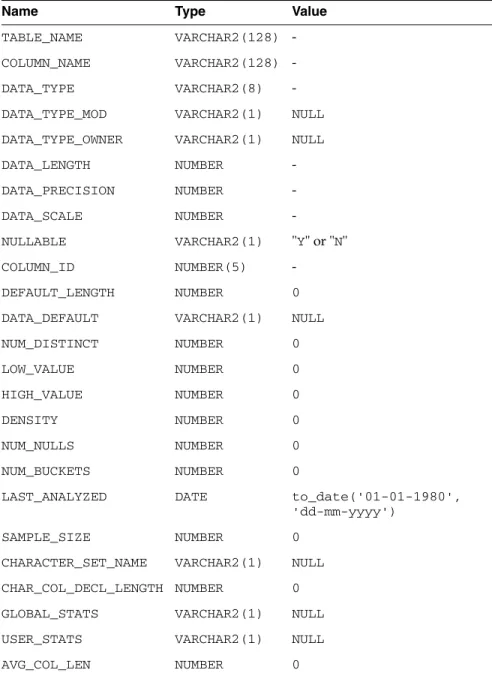
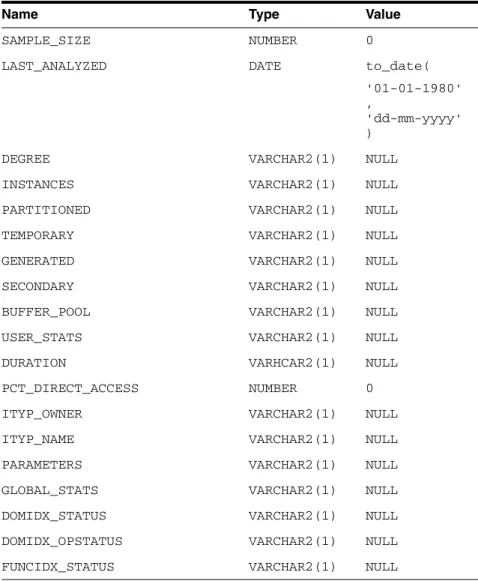
They are described here with information retrieved by an Oracle SQL*Plus DESCRIBE command. The values in the Null? column might differ from the Oracle database data dictionary tables and views. Any default value is shown to the right of an item, but this is not information returned by DESCRIBE.
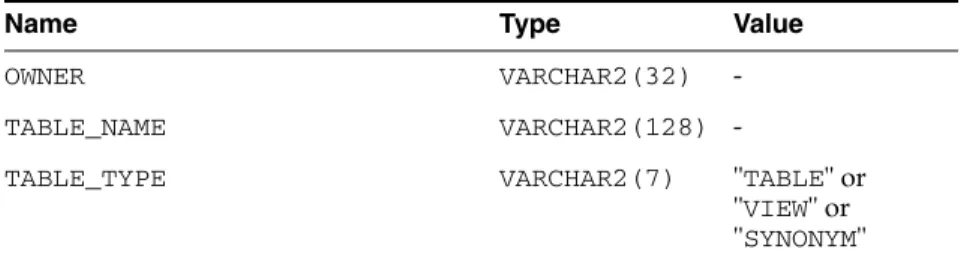
Table C–2 ALL_CATALOG
Name Type Value
OWNER VARCHAR2(32) -
TABLE_NAME VARCHAR2(128) -
TABLE_TYPE VARCHAR2(7) "TABLE" or
"VIEW" or
"SYNONYM"
Table C–3 ALL_COL_COMMENTS
Name Type Value
OWNER VARCHAR2(32) -
TABLE_NAME VARCHAR2(128) -
COLUMN_NAME VARCHAR2(128) -
COMMENTS CHAR(1) " "
Table C–4 ALL_COL_PRIVS
Name Type Value
GRANTOR VARCHAR2(32) -
GRANTEE VARCHAR2(32) -
TABLE_SCHEMA VARCHAR2(32) -
TABLE_NAME VARCHAR2(128) -
COLUMN_NAME VARCHAR2(128) -
PRIVILEGE VARCHAR2(10) "SELECT" or
"UPDATE" or
"REFERENCES"
GRANTABLE VARCHAR2(3) "YES" or "NO"
Table C–5 ALL_CONS_COLUMNS
Name Type Value
OWNER VARCHAR2(32) -
CONSTRAINT_NAME VARCHAR2(128) -
TABLE_NAME VARCHAR2(128) -
COLUMN_NAME VARCHAR2(128) -
POSITION NUMBER(10) 0
Table C–6 ALL_CONSTRAINTS
Name Value
OWNER -
Gateway Data Dictionary Descriptions
CONSTRAINT_NAME -
CONSTRAINT_TYPE "R" or "P" or "U"
or "C"
TABLE_NAME -
SEARCH_CONDITION " "
R_OWNER " "
R_CONSTRAINT_NAME " "
DELETE_RULE " "
STATUS " "
DEFERRABLE " "
DEFERRED " "
VALIDATED " "
GENERATED " "
BAD " "
RELY " "
LAST_CHANGE -
Table C–7 ALL_IND_COLUMNS
Name Type Value
INDEX_OWNER VARCHAR2(32) -
INDEX_NAME VARCHAR2(128) -
TABLE_OWNER VARCHAR2(32) -
TABLE_NAME VARCHAR2(128) -
COLUMN_NAME VARCHAR2(128) -
COLUMN_POSITION NUMBER(10) 0
COLUMN_LENGTH NUMBER(10) 0
DESCEND CHAR(1) " "
Table C–8 ALL_INDEXES
Name Type Value
OWNER VARCHAR2(32) -
INDEX_NAME VARCHAR2(128) -
INDEX_TYPE VARCHAR2(1) NULL
TABLE_OWNER VARCHAR2(32) -
TABLE_NAME VARCHAR2(128) -
TABLE_TYPE VARCHAR(5) "TABLE"
UNIQUENESS VARCHAR2(9) "UNIQUE" or "NONUNIQUE"
Table C–6 (Cont.) ALL_CONSTRAINTS
Name Value