This guide describes the Oracle Database Gateway for Adabas, which enables Oracle client applications to access Adabas data through Structured Query Language (SQL). For more information, visit the Oracle Accessibility Program website at http://www.oracle.com/accessibility/. Note: Before using this guide to install or administer a gateway, you must understand the basics of Oracle Database Gateways.
Overview
Oracle Heterogeneous Services
Oracle Database Gateways
Gateway Architecture
Gateway Process Flow
Setup Flow
See: Oracle Database Gateway for IMS, VSAM, and Adabas Installation and Configuration Guide for Microsoft Windows or Oracle Database Gateway for IMS, VSAM, and Adabas Installation and Configuration Guide for AIX 5L (64-bit), HP-UX Itanium, System Operating Solaris (SPARC 64-Bit), Linux x86 and Linux x86-64. This section describes the support methods that Oracle Connect for IMS, VSAM, and Adabas Gateways implements for normalizing non-relational data.
Overview of Normalizing Non-Relational Data
About Arrays
Representing Metadata
The tree in the Metadata view displays a normalized table view, as shown in Figure 2–3, where STUDENT_BOOK, STUDENT_COURSE, and STUDENT_COURSE_. STUDENT FIRST_NAME CHAR STUDENT LAST_NAME CHAR STUDENT DATE_OF_BIRTH CHAR STUDENT NUMOF_KURSE NUMO STUDENT NUMOF_BOOK NUMBER STUDENT_BOOK BOOK_ROWNUM STUDENT_BOOK NUMBER STUDENT_BOOK ISBTURCDOURCDOKD COURSE_ROWNUM STUDENT_COURSE_ID NUMBER COURSE_TITLE STUDENT_COURSE CHAR. STUDENT_COURSE INSTRUCTOR_ID NUMBER STUDENT_COURSE NUMOF_ASSIGNMENTS NUMBER STUDENT_COURSE_ASSIGNMENTS COURSE_ROWNUM NUMBER STUDENT_COURSE_ASSIGNMENTS ASSIGNMENTS_ROWNUM NUMBER STUDENTASSIGMENTSSTUDENT_COURSE_ASSIGNMENTS ASSIGNMENTS_ROWNUM NUMBER STUDENT_COURSE_ASSIGNMENTS ASSIGNMENTS_TITLE CHAR STUDENT_COURSE_ASSIGNMENTS SIGNMENTS DUE_DATE CHAR STUDENT_COURSE_ASSIGNMENTS CLASS NUMBER STUDENT_ST __LEVEL VARCHAR2 STUDENT_ST __SEQUENCE_ASSIGNMENTS NUMBER STUDENT_ST __SEQUENCE_SS NUMBER STUDENT_ST __SEQUENSE_WENDSSTNST ROWNUM NUMBER STUDENT_ST BOOK_ROWNUM NUMBER STUDENT_ST ID NUMBER STUDENT_ST FIRST_NAME CHAR STUDENT_ST LAST_NAME CHAR STUDENT_ST DATE_OF_BIRTH CHAR STUDENT_ST NUMOF_COURSE NUMBER STUDENT_ST NUMOF_BOOKS NUMBER STUDENT_ST COURSE_ID NUMBER STUDENT_ST COURSE_TITLE CHAR STUDENT_ST INSTRUCTOR_ID NUMBER STUDENT_ST NUMOF_ASSIGMENTSSTUDENT_TITLE CHAR STUDENT_ST DUE_DATE CHAR STUDENT_ST CLASS NUMBER IS STUDENT_ST ISBN CHAR STUDENT_ST RETURN_DATE CHAR 41 rows selected.
Virtual Views
For example, a parent table named STUDENT with an array named COURSE and a nested array named ASSIGNMENTS is represented by the virtual view STUDENT_COURSE_. In general, the query processor can design efficient access strategies because Oracle Connect for IMS, VSAM, and Adabas Gateways copies all relevant indexes from the parent to the virtual view. Oracle Studio for IMS, VSAM, and Adabas Gateways indicates virtual views by using a different-colored icon in the Metadata view, as shown in Figure 2–5.
Sequential Flattening (Bulk Load of Array Data)
For each array, an optional column named
Accessing IMS/DB Data
After the gateway is installed and configured, you can use the gateway to access IMS data, perform distributed queries, and copy data.
SQL Support
In terms of SQL support, the port supports a wide range of SQL capabilities, from basic SQL statements to statements that include advanced features such as linking data from multiple IMS sources, using subselects, and supporting data manipulation functions. In addition, the gateway optimizes query performance by supporting such advanced capabilities in where clauses, processing most of them before returning the data to Oracle. The gateway provides a complete normalization process that imports existing legacy metadata and produces a relational format that can be used by Oracle users.
A key consideration in the normalization process is taking care of the hierarchical data structures common in IMS, such as arrays. By going through the import process, the gateway translates the hierarchical structures and nested arrays into a relational model that maps the hierarchy to various tables. In addition, the process automatically generates the necessary foreign constraints that can later be retrieved with regular Oracle Data Dictionary queries.
As for the data dictionary, the gateway provides all the necessary information even though the actual data dictionary is not located in the Oracle database. The gateway supports standard data dictionary queries, making the interaction with the non-Oracle data completely transparent to the user, and takes care of translating the non-Oracle model into the Oracle standard data dictionary format, including connections across. While the typical use case only supports the retrieval of information using SELECT statements, the gateway also supports data manipulation using INSERT, UPDATE, and DELETE statements.
The following topics provide more information about specific SQL functions and their support by the gateway.
Naming Rules
Although SQL is supported by relational database management systems, it is not available for legacy, non-relational data such as IMS data. This means that Oracle Database Gateway for IMS goes beyond the functionality provided by other Oracle gateways that connect to relational databases, as they simply deal with the translation and delegation of SQL to the target database. Oracle Database Gateway for IMS takes care of the translation of the SQL statements into system- and file-specific access primitives and their execution in an optimized manner, effectively acting as the SQL processor for the non-relational system.
In summary, Oracle Database Gateway for IMS provides robust SQL support and relational access to non-relational, proprietary, legacy IMS data.
Rules for Naming Objects
Case Sensitivity
SQL Execution
Empty Strings
Empty Bind Variables
Handling Non-Relational Data
Hierarchical Modelling
Constructing DLI Commands from SQL Requests
Restrictions
SQL Restrictions
Unsupported SQL Functions
SQL Syntax
Transaction Capability
Transactional Integrity
Pass-Through Feature
Database Links
Stored Procedures
IMS/DB Restrictions
General IMS/DB Restrictions
Restrictions Specific to IMS-DLI
Restrictions Specific to IMS-DBCTL
Restrictions Specific to IMS-DBDC
Setting the Default Behavior for Array Handling
Modifying the Default Behavior During Metadata Import
Modifying the Array Handling Policy for a Specific Table
Generate Sequential View: Select this option if you want to map a non-relationship file to a single table. Generate Virtual Views: Select this option if you want an individual table for each array in the non-relational file. Include Row Number Column: Select this option if you want to include a column that specifies the row number in the virtual or sequential view.
Inherit all parent columns: Select this option if you want the virtual views to include all the columns of the parent record.
Conversion of Atomic Data Types
Where n specifies which bit (within a byte) to start from and m is the number of bits. If n is not specified, n defaults to 1 for the first occurrence of the field and its contiguous after.
Conversion of Non-Atomic Data Types
Conversion of Decimal Data Types
Conversion of Scaled Data Types
Supported SQL Statements
DELETE
INSERT
SELECT
UPDATE
Oracle Functions
Functions Not Supported by Adabas
Functions Supported by Adabas
Arithmetic Operators
Comparison Operators
Group Functions
String Functions
Other Functions
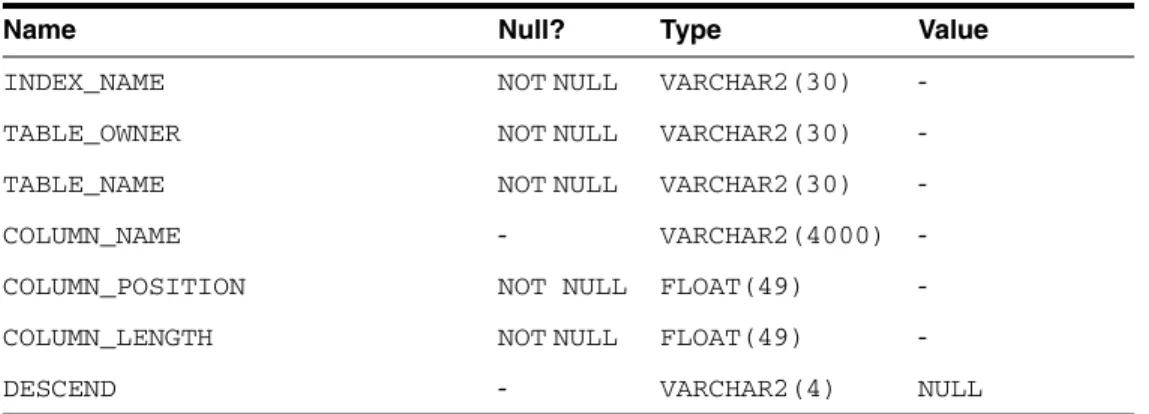
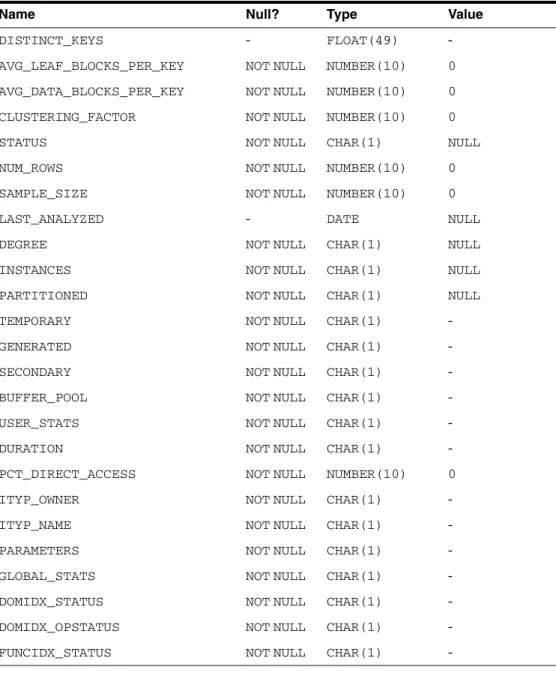
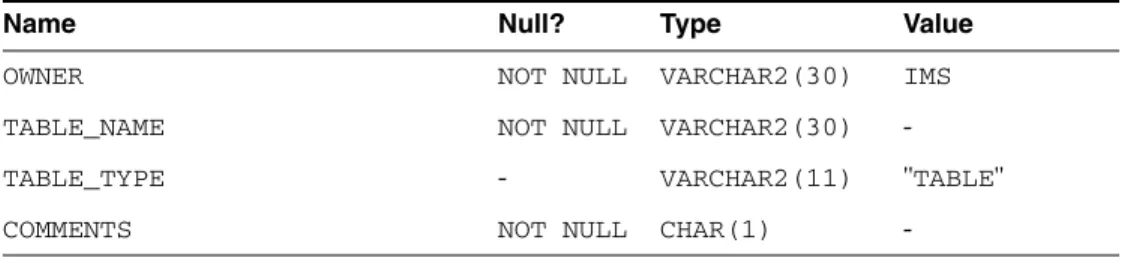
The Oracle Database Gateway for Adabas translates a query that references a data dictionary table on the Oracle database server into a query that retrieves the data from an Adabas data dictionary. You query data dictionary tables through the database link in the same way that you query data dictionary tables in the Oracle database server. The gateway data dictionary is similar in appearance and usage to the Oracle database server data dictionary.
Data Dictionary Support
Accessing the Gateway Data Dictionary
Can convert the retrieved data to give it the appearance of the data dictionary table of the Oracle database server.
Supported Views and Tables
If you use a view that is not in the list, you will get the Oracle database server error code for no other rows available. To select data dictionary views using SELECT FROM DBA_*, first connect as the Oracle SYSTEM or SYS user. ORA-28506: Parse error translating data dictionary for %s stored in %s Queries through the port of any data dictionary table or view beginning with ALL_ can return rows from Adabas even when access privileges for those Adabas objects are not provided.
When you query an Oracle database with the Oracle data dictionary, rows are returned only for those objects that you are allowed to access.
Default Column Values
Adabas Data Dictionary Descriptions
Character Set Terminology
A major aspect of globalization support in Oracle Connect for IMS, VSAM, and Adabas Gateways is recognizing different language-related characters and how they are encoded in different operating systems and data. For each supported language, a special definition file called a character set file is supplied, where all the information related to the language is stored. As a distributed product that accesses heterogeneous data sources on different platforms, Oracle Connect for IMS, VSAM and Adabas Gateways offers seamless text conversion between different character encodings used on different platforms.
Conversion between ASCII-based encoding on open systems and EBCDIC-based encoding on IBM mainframes and AS/400 machines. Converts old data stored using old character encodings (such as 7-bit encoding) to the current platform encoding standard. Getting this kind of seamless globalization support requires setting up character set definitions appropriately according to the type of encoding in use across different data sources and platforms.
This section discusses the various encoding schemes used, required character set definitions, and other aspects related to globalization support, and contains information on the following topics:.
Globalization Support Settings
COBOL Copybook Example
Hospital Database Example 1
FIELNAME=(WARDNO,SEQ,U),BYTES=2,START=1,TIPE=C FIELNAME=BEDAVAIL,BYTES=3,START=9,TIPE=C FIELNAME=WARDTYPE,BYTES=20,START=12 ,TIPE= C. SEGM NAME=TREATMENT, PARENT=PASIENT,BYTES=113 FIELNAME=(TRDATE,SEQ),BYTES=6,START=21,TIPE=C FIELNAME=TRTIPE,BYTES=20,START=1,TIPE=C. SEGM NAME=DOCTOR,OUER=PASIENT,BYTES=80 FIELD NAME=DOCTNAME,BYTES=20,START=1,TIPE=C FIELD NAME=SPESIALT,BYTES=20,START=61,TIPE=C.
SEGM NAME=FACILITY,PARENT=HOSPITAL,BYTES=26 FIELD NAME=FACT TYPE,BYTES=20,START=1,TYPE=C FIELD NAME=FACAVAIL,BYTES=3,START=24,TYPE=C. SENSEG NAME=HOSPITAL,PARENT=0 SENSEG NAME=WARD,PARENT=HOSPITAL SENSEG NAME=PATIENT,PARENT=WARD SENSEG NAME=SYMPTOM,PARENT=PATIENT SENSEG NAME=TREATMENT,PARENT=PATIENT SENSEG NAME=DOCTOR,PARENT=PATIENT =FACILITY ,PARENT=HOSPITAL.
Index