
Oracle Corporation and its subsidiaries disclaim any liability for any damages caused by the use of this software in dangerous applications. This software and documentation may provide access to or information about third party content, products and services.
Supplementary Information
For example, to use Oracle Database 11g table partitioning, you must have the Enterprise Edition and the Partitioning Option. For information about the differences between Oracle Database 11g Standard Edition and Oracle Database 11g Enterprise Edition and the features and options available to you, see Oracle Database New Features Guide.
Audience
Oracle Spatial Developer's Guide provides usage and reference information for indexing and storing spatial data and developing spatial applications using Oracle Spatial and Oracle Locator. It provides a subset of Oracle Spatial capabilities (see Appendix B for a list of Locator features) typically required to support Internet and wireless service applications and partner-based geographic information system (GIS) solutions.
Documentation Accessibility
To reach Oracle Support Services, you must use a telecommunications relay service (TRS) to call Oracle Support. An Oracle Support Services engineer will handle technical issues and provide customer support according to the Oracle service request process.
Related Documents
Conventions
What Is Oracle Spatial?
Oracle Spatial, often referred to as Spatial, provides SQL schema and functions that make it easy to store, find, update, and query collections of spatial features in an Oracle database. A topological data model for working with node, edge, and face data in a topology (described in the Oracle Spatial Topology and Network Data Models Developer's Guide).
Object-Relational Model
Operators, functions, and procedures for performing region-of-interest queries, spatial join queries, and other spatial analysis operations. Network data model for representing capabilities or objects modeled as nodes and links in a network (described in the Oracle Spatial Topology and Network Data Models Developer's Guide).
Introduction to Spatial Data
Geometry Types
Line strings are composed of one or more pairs of points that define line segments. Polygons are composed of connected line strings that form a closed ring, and the area of the polygon is implied.
Data Model
- Element
- Geometry
- Layer
- Coordinate System
- Tolerance
- Tolerance in the Geometry Metadata for a Layer
- Tolerance as an Input Parameter
For geodetic data (such as data identified by longitude and latitude coordinates), the tolerance value is the number of meters. The DISTANCE function returns the distance between cola_b and cola_d and does not specify the value of the tolerance parameter, the result depends on the SDO_TOLERANCE value of the layer.
Query Model
The purpose of the primary filter is to quickly generate a subset of the data and reduce the processing load of the secondary filter. The primary filter must therefore be as efficient as possible (i.e. selective but fast).
Indexing of Spatial Data
- R-Tree Indexing
- R-Tree Quality
The performance of an R-tree index structure for queries is roughly proportional to the area and girth of the R-tree's index nodes. The original ratio of the area at the root (top level) to the area at level 0 may change over time based on updates to the table; and if there is a deterioration in this ratio (that is, if it increases significantly), rebuilding the index can help execute queries.
Spatial Relationships and Filtering
CONTAINS: The interior and border of one object is completely contained within the interior of the other object. ON: The interior and border of one object are on the border of the other object (and the second object covers the first object).
Spatial Operators, Procedures, and Functions
The geometry on the right is a polygon with a hole: the large rectangle is the outer polygon ring and the small rectangle is the inner polygon ring (the hole). The dotted line outside the large rectangle is the buffer for the outer ring, and the dotted line inside the small rectangle is the buffer for the inner ring.
Spatial Aggregate Functions
- SDOAGGRTYPE Object Type
The first aggregation operation in Figure 1–8, where the tolerance is less than the distance between the rectangles, results in a compound geometry consisting of two rectangles. The second aggregation operation, where the tolerance is greater than the distance between the rectangles, results in a single geometry.
Three-Dimensional Spatial Objects
- Modeling Surfaces
- Modeling Solids
- Three-Dimensional Optimized Rectangles
- Using Texture Data
- Schema Considerations with Texture Data
- Validation Checks for Three-Dimensional Geometries
The SDO_GEOM.SDO_VOLUME function only applies to solid geometries, which are by definition three-dimensional; however, this function cannot be used with geodetic data. SDO_GEOM.VALIDATE_GEOMETRY_WITH_CONTEXT – SDO_GEOM.VALIDATE_LAYER_WITH_CONTEXT – SDO_GEOM.WITHIN_DISTANCE.
Geocoding
Thus, the volume of the external solid must be greater than zero, and the volume of any internal body must be less than zero. Zero Volume Intersections: Any intersection of solids in a composite solid must have a zero volume.
Spatial Java Application Programming Interface
Orientation: For all surfaces, the vertices must be aligned so that the normal vector (or surface normal or "normal") points outside of (away from) the external solid. For detailed reference information about the classes and interfaces in these packages, see the Oracle Spatial Java API Reference (Javadoc).
Predefined User Accounts Created by Spatial
Performance and Tuning Information
In addition, more spatial performance and tuning information is available in one or more white papers through the Oracle Technology Network (OTN). This information is often more detailed than is in this guide and is periodically updated as a result of internal testing and consultation with space users.
OGC and ISO Compliance
Spatial Release (Version) Number
Spatial Application Hardware Requirement Considerations
Spatial Error Messages
Spatial Examples
README File for Spatial and Related Features
You may find it helpful to read this example quickly before studying the detailed information about data types and metadata later in the chapter.
Simple Example: Inserting, Indexing, and Querying Spatial Data
Example 2–1 Simple Example: Inserting, Indexing, and Querying Spatial Data -- Create a table for the Coke (soda) markets in a. SELECT c.name, SDO_GEOM.VALIDATE_GEOMETRY_WITH_CONTEXT(c.shape, 0.005) FROM cola_markets c WHERE c.name = 'cola_c';. First, create the scoreboard.).
SDO_GEOMETRY Object Type
- SDO_GTYPE
- SDO_SRID
- SDO_POINT
- SDO_ELEM_INFO
- SDO_ORDINATES
- Usage Considerations
See Chapter 6 for information on coordinate systems. The SDO_POINT attribute is defined using the SDO_POINT_TYPE object type, which has X, Y, and Z attributes, all of type NUMBER. The next n triples in the SDO_ELEM_INFO array describe each of these polygon sub-elements.
SDO_GEOMETRY Methods
SDO_GEOMETRY Constructors
Example 2-3 shows SDO_GEOMETRY constructors that create geometry objects, insert the objects into a table, and display the objects that were added to the table.
TIN-Related Object Types
- SDO_TIN Object Type
- SDO_TIN_BLK_TYPE and SDO_TIN_BLK Object Types
CREATE TYPE sdo_tin AS OBJECT (base_table VARCHAR2(70), base_table_col VARCHAR2(1024), tin_id NUMBER. The attributes of the SDO_TIN_BLK object type are the same as the columns in the TIN block table, which are described in Table 2–5 in Section 2.5. 2.
Point Cloud-Related Object Types
- SDO_PC Object Type
- SDO_PC_BLK_TYPE and SDO_PC_BLK Object Type
NUM_POINTS NUMBER For point cloud data, the total number of points in the POINTS BLOB. The attributes of the SDO_PC_BLK object type are the same as the columns in the point cloud block table, which is described in Table 2–7 in Section 2.6.1.
Geometry Examples
- Rectangle
- Polygon with a Hole
- Compound Line String
- Compound Polygon
- Point
- Oriented Point
- Type 0 (Zero) Element
- Several Two-Dimensional Geometry Types
- Three-Dimensional Geometry Types
The end point of this line string is determined by the starting offset of the second line string, 3 in this case. The end point of this line string is determined by the starting offset of the second line string, 5 in this case.
Geometry Metadata Views
- TABLE_NAME
- COLUMN_NAME
- DIMINFO
- SRID
That is, DIMINFO contains 2 SDO_DIM_ELEMENT instances for two-dimensional geometries, 3 instances for three-dimensional geometries, and 4 instances for. Each SDO_DIM_ELEMENT instance in the array must have valid (non-null) values for the SDO_LB, SDO_UB, and SDO_TOLERANCE attributes.
Spatial Index-Related Structures
- Spatial Index Views
- xxx_SDO_INDEX_INFO Views
- xxx_SDO_INDEX_METADATA Views
- Spatial Index Table Definition
- R-Tree Index Sequence Object
Table 2–8 (Cont.) Columns in xxx_SDO_INDEX_INFO Views Column Name Data Type Purpose. Each R-tree spatial index table has an associated sequence object (SDO_RTREE_SEQ_ . NAME in the USER_SDO_INDEX_METADATA view, described in Table 2–9 in Section 2.9.1.2).
Unit of Measurement Support
- Creating a User-Defined Unit of Measurement
Table 2–11 lists the columns in the SDO_UNITS_OF_MEASURE table and the requirements and recommendations for each if you insert a row for a custom unit of measure. Table 2–11 (continued) SDO_UNITS_OF_MEASURE Table Entries for Custom Units Column Name Description.
ST_GEOMETRY and SDO_GEOMETRY Interoperability
SELECT c.shape.ST_INTERSECTS(cola_a_geom) INTO number returned FROM markets_cola c WHERE c.name = 'cola_b';. SELECT c.shape.ST_TOUCHES(cola_a_geom) IN number returned FROM markets_cola c WHERE c.name = 'cola_b';.
Tolerance Value with SQL Multimedia Types
Avoiding Name Conflicts
Annotation Text Type and Views
- Using the ST_ANNOTATION_TEXT Constructor
- Annotation Text Metadata Views
ANNOTATION_TEXT and inserts a row using the ST_ANNOTATION_TEXT constructor in the INSERT statement. USER_ANNOTATION_TEXT_METADATA contains metadata information for all annotation text in tables owned by the user (schema).
Bulk Loading
- Bulk Loading SDO_GEOMETRY Objects
- Bulk Loading Point-Only Data in SDO_GEOMETRY Objects
This process is used to load large amounts of data into the database and uses the SQL*Loader utility to load the data. CONTINUE NEXT IN TABLE POLY_4PT FIELDS TERMINATED BY '|' TRAILING NULLCOLLS (GID INTEGER EXTERNAL, GEOMETRY COLUMN OBJECT.
Transactional Insert Operations Using SQL
To perform transactional geometry insertions, you can create a procedure to insert a geometry and then call that procedure for each geometry to be inserted. Using the procedure created in Examples 4–4, you can insert data using a PL/SQL block, such as the one in Examples 4–5, which loads a geometry into the variable named geom and then INSERT_GEOM procedure to insert that geometry.
Recommendations for Loading and Validating Spatial Data
The GEOMETRY constructor within the INSERT transaction statement; however, geometry can be inserted using a host variable, and a host variable can be constructed using the SDO_GEOMETRY constructor with more than 999 values in SDO_ORDINATE_. Use the SDO_GEOM.VALIDATE_GEOMETRY_WITH_CONTEXT function or the SDO_GEOM.VALIDATE_LAYER_WITH_CONTEXT procedure for all spatial data loaded into the database.
Creating a Spatial Index
- Constraining Data to a Geometry Type
- Creating a Cross-Schema Index
- Using Partitioned Spatial Indexes
- Creating a Local Partitioned Spatial Index
- Exchanging Partitions Including Indexes
- Export and Import Considerations with Spatial Indexes and Data
- Distributed Transactions and Spatial Index Consistency
- Rollback Segments and Sort Area Size
If you do not specify the LOCAL keyword, a nonpartitioned spatial index is created on the data in all table partitions.). However, if the insert into the USER_SDO_GEOM_METADATA view fails (for example, if there is already a USER_SDO_GEOM_METADATA entry for the spatial layer), the spatial index is not built.
Querying Spatial Data
- Spatial Query
- Primary Filter Operator
- Primary and Secondary Filter Operator
- Within-Distance Operator
- Nearest Neighbor Operator
- Spatial Functions
- Spatial Join
- Data and Index Dimensionality, and Spatial Queries
Example 5–2 Primary filter with a transient instance of the query window SELECT A.Feature_ID FROM TARGET A. Example 5–4 performs both primary and secondary filter operations without inserting the query window into a table.
Terms and Concepts
- Coordinate System (Spatial Reference System)
- Cartesian Coordinates
- Geodetic Coordinates (Geographic Coordinates)
- Projected Coordinates
- Local Coordinates
- Geodetic Datum
- Transformation
The term coordinate reference system has the same meaning as coordinate system for Spatial, and the terms are used interchangeably. If the coordinate system is georeferenced, transformation may involve datum transformation: the conversion of geodetic coordinates from one geodetic datum to another geodetic datum, usually involving changes in the shape, orientation and center position of the reference ellipsoid.
Geodetic Coordinate Support
- Geodesy and Two-Dimensional Geometry
- Choosing a Geodetic or Projected Coordinate System
- Choosing Non-Ellipsoidal or Ellipsoidal Height
- Non-Ellipsoidal Height
- Ellipsoidal Height
- Geodetic MBRs
- Other Considerations and Requirements with Geodetic Data
Calculations involving large areas or requiring very precise accuracy must take into account the curvature of the Earth's surface. No polygon element can have an area greater than or equal to half of the Earth's surface.
Local Coordinate Support
In a line, the distance between two adjacent coordinates cannot be greater than or equal to one half of the circumference (great circle) of the Earth. To work with a line set greater than or equal to one half of the Earth's circumference, you can add one or more intermediate points per line so that all adjacent coordinates are less than half the Earth's circumference.
EPSG Model and Spatial
If no use case is specified and if a user-defined system-wide transformation has been created for the specified pair of source and target coordinate systems, that transformation is applied. If EPSG rules are created and if an EPSG rule is defined for this transformation, the EPSG transformation is applied.
Three-Dimensional Coordinate Reference System Support
- Geographic 3D Coordinate Reference Systems
- Compound Coordinate Reference Systems
- Three-Dimensional Transformations
- Cross-Dimensionality Transformations
A geographic three-dimensional coordinate reference system is based on latitude and longitude plus ellipsoidal height. For example, to transform a two-dimensional geometry into a three-dimensional geometry, the function SDO_CS.MAKE_3D is used.
TFM_PLAN Object Type
Coordinate Systems Data Structures
- SDO_COORD_AXES Table
- SDO_COORD_AXIS_NAMES Table
- SDO_COORD_OP_METHODS Table
- SDO_COORD_OP_PARAM_USE Table
- SDO_COORD_OP_PARAM_VALS Table
- SDO_COORD_OP_PARAMS Table
- SDO_COORD_OP_PATHS Table
- SDO_COORD_OPS Table
- SDO_COORD_REF_SYS Table
- SDO_COORD_REF_SYSTEM View
- SDO_COORD_SYS Table
- SDO_CRS_COMPOUND View
- SDO_CRS_ENGINEERING View
- SDO_CRS_GEOCENTRIC View
- SDO_CRS_GEOGRAPHIC2D View
- SDO_CRS_GEOGRAPHIC3D View
- SDO_CRS_PROJECTED View
- SDO_CRS_VERTICAL View
- SDO_DATUM_ENGINEERING View
- SDO_DATUM_GEODETIC View
- SDO_DATUM_VERTICAL View
- SDO_DATUMS Table
- SDO_ELLIPSOIDS Table
- SDO_PREFERRED_OPS_SYSTEM Table
- SDO_PREFERRED_OPS_USER Table
- SDO_PRIME_MERIDIANS Table
- SDO_UNITS_OF_MEASURE Table
- Relationships Among Coordinate System Tables and Views
- Finding Information About EPSG-Based Coordinate Systems
- Geodetic Coordinate Systems
- Projected Coordinate Systems
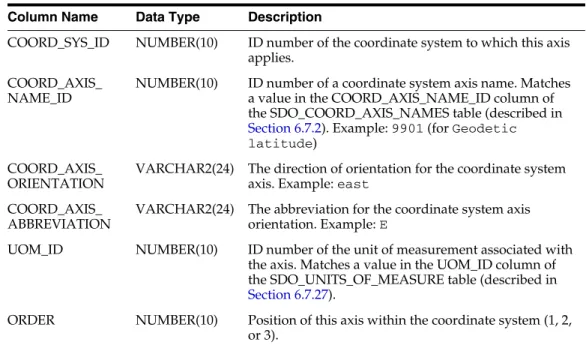
Matches a value in the COORD_OP_ID column of the SDO_COORD_OPS table (described in section 6.7.8). Example: EPSG Table 6–4 (continued) SDO_COORD_OP_PARAM_USE Table Column Name Data Type Description.
Legacy Tables and Views
- MDSYS.CS_SRS Table
- Well-Known Text (WKT)
- US-American and European Notations for Datum Parameters
- Procedures for Updating the Well-Known Text
- MDSYS.SDO_ANGLE_UNITS View
- MDSYS.SDO_AREA_UNITS View
- MDSYS.SDO_DATUMS_OLD_FORMAT and SDO_DATUMS_OLD_SNAPSHOT Tables
- MDSYS.SDO_DIST_UNITS View
- MDSYS.SDO_ELLIPSOIDS_OLD_FORMAT and SDO_ELLIPSOIDS_OLD_
The MDSYS.SDO_ANGLE_UNITS reference view contains one row for each valid angle UNIT specification in the well-known text description (WKT) in the coordinate system definition. The MDSYS.SDO_AREA_UNITS reference view contains one row for each valid area UNIT specification in the known text description (WKT) in the coordinate system definition.
SNAPSHOT Tables
MDSYS.SDO_PROJECTIONS_OLD_FORMAT and SDO_PROJECTIONS_OLD_
MDSYS.SDO_PROJECTIONS_OLD_FORMAT contains the new data in the old format (that is, the EPSG-based projection specifications in a table that uses the pre-10.2 format). MDSYS.SDO_PROJECTIONS_OLD_SNAPSHOT contains old data in the old format (ie projection specifications and table format prior to release 10.2).
Creating a User-Defined Coordinate Reference System
- Creating a Geodetic CRS
- Creating a Projected CRS
COORD_OP_PARAM_VALS table (described in Section 6.7.5), insert one row into that table for each new parameter. INSERT INTO SDO_COORD_OP_PARAM_VALS ( COORD_OP_ID, . COORD_OP_METHOD_ID, PARAMETER_ID, PARAMETER_VALUE, PARAM_VALUE_FILE_REF, UOM_ID).
