ANNALS OF THE UNIVERSITY OF ORADEA FASCICLE OF TEXTILES, LEATHERWORK
73
ADOBE ILLUSTRATOR AND GIMP - AN APPROACH TO
GARMENT DESIGN
INDRIE Liliana
1, BUZLE Marius
21 University of Oradea, Faculty of Energy engineering, Department Textiles, Leather and Industrial Management, 410058,
Oradea, Romania, E-Mail: [email protected]
2 ROMANOEXPORT Industry SA, Alexandru Vlahuta Str., no. 70, Oradea, 410086, Romania,
E-Mail:[email protected]
Corresponding author: Indrie, Liliana, E-mail: [email protected]
Abstract: Designing clothes has become easier with the use of clothing design softwares. One of the most popular and basic software made for garments design is Addobe Illustrator. It enables designers and small to medium businesses to create clothing designs with easy access to all assets, including images, colors, brushes, and type styles. While Illustrator has all the necessary elements and features that are ideal for creating designer clothing, GIMP provides basic set of tools for image editing. When used in combination with one another, these two programs provide just about all the tools an apparel designer needs to draw fashion design sketches, technical flat sketches, CAD presentations, graphic artworks, design embroideries etc. In this paper we show how to use the instruments of those two softwares in order to draw a woman jacket’s garments components and to fill with texture the jacket created. By utilising Illustrator’s Symbol we created libraries of jacket components (puller zipper, label), then the brushes to design the zipper detail. Finnaly, by a drag and drop we added the zipper, the zipper puller and the label. GIMP gave us access to precise fabric textures which make our output so realistic that you can almost touch the fabric.
Key words: drawing, garment components, jacket flat sketch, Illustrator’s Symbol, Illustrator’s Brushes, Patterns in GIMP
1.
INTRODUCTION
Adobe Illustrator and GIMP (GNU Image Manipulation Program) are two of the most powerful image-editing and illustration programs available. Due to their versatility and affordability, both of them are very popular in the fashion industry-graphic designers, illustrators, artists often use both the products to create professional-quality graphics.
Illustrator is a vector-based softwere ideal to create artwork which can be scaled and printed at any size and resolution while maintaining full detail and clarity. With proper tuition, it is possible to produce fashion flat sketches, CAD sketch presentations, fashion illustrations and other images that are commonly resized and rearranged in order to produce creative, accurate product designs.
GIMP is an image manipulation program which can be used to do design logos, crop and resize all kinds of photos, alter a photo's colors, combine and manipulate images, and even convert images between formats. GIMP comes with patterns to help to stitch together the interesting looking textures that are often seen in documents and on the Web.
ANNALS OF THE UNIVERSITY OF ORADEA FASCICLE OF TEXTILES, LEATHERWORK
74
tools an apparel designer needs to draw fashion design sketches, technical flat sketches, CAD presentations (rendered flat sketches), create and modify textile designs, repeats and colorways, design embroidery, graphic artwork etc.
2. DESIGNING THE JACKET MODEL
The present paper is a continuation of an idea which the authors presented extensively in an article previously published [1] and it shows how to use the instruments and working techniques for vector graphics from Adobe Illustrator program [2], [3] [4] in order to draw components of a woman’s jacket and GIMP program [5], to fill with texture the jacket created in Illustrator in order to visualize how the coat will look in the completed garment.
The model designed is a jacket for women, for the cold season, the material used is 100% wool. The product is smart casual, arched on the waist, without a bend, it could be worn both as an office outfit as well as a casual one.
The closing system for this jacket is an offset one – the closure is not done in the center of the front part, but it’s being shifted left. Both front parts of the product have leather inserts, the stich between these inserts and the front mark are unquilted. The zipper used is a metallic one of nickel finish type.
The jacket is collarless – it has no collar, the neck neckline is a little high just giving the impression of a very narrow collar.
The pockets are placed in the front stitch, each one with uncovered metal zipper, with the same finish as the one used for closing the front parts.
The sleeves are simple, the elbow stitch is unquilted and at its ending there is a zipper just like the one from the pockets.
The back of the product consists of four (4) parts – back (2) and gusset (2), the stitch between the back and the gusset mark being quilted.
The inside is lined without a pocket inside. 2.1. Creating the model in Adobe Illustrator
We started by making the model of the jacket using the instruments of Adobe Illustrator programme.
ANNALS OF THE UNIVERSITY OF ORADEA FASCICLE OF TEXTILES, LEATHERWORK
75
Illustrator’s Symbol offers the possibility to create libraries of garment components, (buttons, rivets, pockets etc.). We created the puller zipper and the label that can be called upon and added to any sketch using a drag and drop so these basic elements never have to be redrawn.[6]
Fig. 2:Library of zipper puller and label in Illustrator’s Symbol
Also, using brushes we created zipper detail.
Fig. 3: Use of Brushes to create clothing zipper
Then we added the zipper, the zipper puller and the label on the drawn model by a
drag and drop.
Fig. 4: Jacket flat sketch
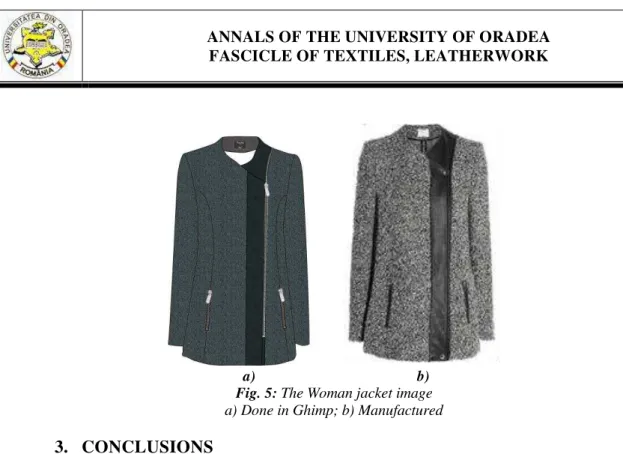
2.2. Importing the model in Ghimp to fill it with Herringbone texture
In order to visualize how the coat will look in a completed garment, we have
exported the model from Illustrator as a
.
jpg file to be colored in GIMP. To add a new
ANNALS OF THE UNIVERSITY OF ORADEA FASCICLE OF TEXTILES, LEATHERWORK
76
a) b)
Fig. 5: The Woman jacket image a) Done in Ghimp; b) Manufactured
3.
CONCLUSIONS
We wish to conclude by affirming that the use of llustrator and GIMP softwares makes the job a lot faster. The Illustrator is great for creating reusable components application; it allows the use of symbols and brush stroke libraries to create and store different silhouettes, basic garment shapes, useful accessories, stitches and trims. On the other hand, there are countless ways of creating interesting patterns in GIMP, using the wide variety of fabrics available on the Internet or by taking a picture of the material to be used for aking the garment.
REFERENCES
[1]. L. Indrie, L., M. Buzle, M. Suteu, M., Prichici, “Optimization of garment design using
specialised software, Economics Management Information Technology (EMIT)”, Vol IV, nr. 2,
2015, ISSN 2217-9011, e-ISSN 2334-653, Serbia, pp. 2-10
[2]. J. Hughes. (2013, August 19). Illustrator – Best Fit CAD for the Design Community. [Online]. Available: http://www.apparelthing.com/adobe-illustrator-best-fit-cad-for-the-design-community/
[3]. Adobe Creative Team, “Adobe Illustrator CS2”, Editura All, Bucuresti, 2008
[4]. C. Radulian, “Adobe Illustrator 9”, Editura Teora, Bucuresti, 2002
[5]. G.C. Manea, “Image Editing - GIMP 2.8”, Colectia: ECDL - Permisul European de Conducere a Computerului, Editura Euroaptitudini, Bucuresti, 2013
[6].v*** Herringbone fabric, [Online]. Available:
https://www.google.ro/search?q=herringbone+fabric+swatches&biw=1366&bih=667&tbm=isch&tb
o=u&source=univ&sa=X&ved=0ahUKEwibmJCQt5XMAhVpYJoKHf8xCdUQsAQIHA ,