Encounter Management
Jo˜ao Pedro Martins dos Santos de Carvalho Aradas
Report of Project
Master in Informatics and Computing Engineering
Supervisor: Eurico Manuel Elias Morais Carrapatoso (Professor Auxiliar)
Jo˜ao Pedro Martins dos Santos de Carvalho Aradas
Report of Project
Master in Informatics and Computing Engineering
Approved in oral examination by the committee:
Chair: Ant´onio Ernesto da Silva Carvalho Brito (Professor Auxiliar)
External Examiner: Carlos Manuel Azevedo Costa (Professor Auxiliar Convidado)
Historically the hospitals have made many efforts to make the correct management of their patients and the services provided to them. This management was not always an easy task due to a variety of factors. The most important is that every decision in a healthcare facility ultimately deals with human lives. Other factors include the large amount of data to be processed, organized and properly stored. These problems are worsened by the fact that the patient’s data is considered sensible information. The technology streamlined these processes facilitating this management.
The Encounter Management application is divided in two components. The compo-nent of infrastructure (backend) and another for interaction with the user (frontend) in which the user can perform activities for administratively admit, discharge transfer and also the management of encounter/visits between the patients and the healthcare facilities with the use of web forms. The backend is a database for storage of local information, HL7 communication with external entities, and other interactions with external entities, such as sources of identification and authentication. The frontend should provide an in-teraction with the user, rich content, providing useful information, being able to cover the requirements for the management of a encounter of a patient, both at the arrival of the patient, as at the time of his discharge.
One objective of this project was to develop this software using the most advanced management concepts of encounters and also the most advanced technologies in the mar-ket. Another objective was to develop this software in a modular, dynamic and adaptable way to all streams of work related to hospital management encounters.
To achieve the objectives, a combination of agile methodologies and a rigid process of documentation was used.
The results obtained by applying this methodology resulted in a systematized mod-elling of the concept of encounters and all the medical terms associated (episodes of care, episodes and encounters). This modelling led to the development of the Encounter Man-agement software for outpatient visits. This was properly modularized in frontend and backend.
Subsequently, it was concluded that to develop new modules, would only be necessary to add more workflows and the according user interfaces to the backend and frontend. The choice of a workflow engine to the software development has proved to be a right choice because it allows all new hospital workflows to be modelled correctly.
Desde sempre os hospitais se preocuparam em fazer uma correcta gest˜ao dos seus pa-cientes e dos servic¸os prestados a estes. Esta gest˜ao nem sempre foi uma tarefa f´acil devido a grande quantidade factores. O factor mais ´e importante deve-se ao facto de toda e qualquer decis˜ao numa unidade de sa´ude pode potencialmente afectar vidas humanas. Outros factores incluem a grande quantidade de dados a serem tratados, devidamente or-ganizados e guardados. Estes problemas s˜ao agravados pelo facto de todos os dados dos pacientes serem sens´ıveis. A tecnologia agilizou estes processos facilitando esta gest˜ao.
A aplicac¸˜ao de gest˜ao de visitas ser´a constitu´ıda por uma componente de infra-estrutura (backend) e outra de interacc¸˜ao com o utilizador (frontend), na qual ser´a poss´ıvel realizar actividades de admiss˜ao, transferˆencia e alta bem como uma gest˜ao integrada de encon-tros entre pacientes e as unidades de sa´ude com o recurso a formul´arios web. O backend ´e constitu´ıdo por uma base de dados para armazenamento da informac¸˜ao local, servic¸os de comunicac¸˜ao HL7 com entidades externas, e outras interacc¸˜oes com entidades externas, como sendo fontes de identificac¸˜ao e autenticac¸˜ao. O frontend dever´a disponibilizar uma interacc¸˜ao com o utilizador, rica de conte´udos, disponibilizando informac¸˜ao ´util, capaz de cobrir os requisitos de gest˜ao de uma visita de um paciente, tanto no momento da chegada deste, como no momento da sua alta.
Um dos objectivos deste projecto foi desenvolver este software utilizando os mais a-vanc¸ados conceitos de gest˜ao de visitas tal como as mais avanc¸adas tecnologias existentes no mercado. Outro objectivo foi desenvolver o presente software de uma forma modular, dinˆamica e adapt´avel a todos os fluxos de trabalho hospitalares relacionados com a gest˜ao de visitas.
Para atingir os objectivos foi utilizada uma combinac¸˜ao entre metodologias ´ageis e um processo de documentac¸˜ao r´ıgido.
Os resultados obtidos atrav´es da aplicac¸˜ao desta metodologia culminaram numa cor-recta modelac¸˜ao do conceito de gest˜ao de visitas e todos os termos m´edicos associados (epis´odios de cuidados, epis´odios e encontros). Esta correta modelac¸˜ao levou ao desen-volvimento do software de gest˜ao de visitas do m´odulo de consultas externas. Esta foi correctamente modularizada em frontend e backend.
Posteriormente, concluiu-se que para realizar o m´odulo de medicina interna e outros relacionados com fluxos de trabalho hospitalares, apenas seria necess´ario adicionar mais fluxos de dados ao backend e respectivas interfaces ao frontend. A escolha de um mo-tor de fluxos de dados para o desenvolvimento do software revelou-se acertada porque rapidamente qualquer nova situac¸˜ao hospitalar poder´a ser modelada correctamente.
First and foremost i would like to thank everyone at Siemens that make this internship possible. Special thanks goes to Ant´onio Martins and Daniel Ramos for guiding me continuously throughout the project. I would also like to thank the other internees at Siemens, Tiago Cac¸ador for the endless discussions on Silverlight and WPF, Nuno Silva for the help in the implementation and Pedro Gomes for the help in all HL7 issues. Also from Siemens I would like to thank Joaquim Matos and Ricardo Gomes for all the help and comments on my work.
From FEUP I would like to thank the professor Eurico Carrapatoso for his guidance and advices that helped throughout the project.
I would also like to thank all my friends for all the good moments, the support and their great laughter.
The most important, I would like to thank my Parents Daniel Aradas and Delfina Aradas and the best sister in the world Carolina Aradas for their never ending love and support.
Last, but not least, I would like to thank Patr´ıcia for the great moments. Jo˜ao Aradas
1 Introduction 1
1.1 About Siemens . . . 1
1.2 Context . . . 2
1.3 Project . . . 3
1.4 Motivation and Objectives . . . 3
1.5 Thesis Structure . . . 4
2 State of Art 5 2.1 International Healthcare Standards . . . 5
2.1.1 HL7 . . . 5
2.1.1.1 V2.X . . . 6
2.1.1.2 V3 . . . 7
2.1.1.3 HL7 Parser . . . 8
2.2 User Interface . . . 8
2.2.1 Rich Internet Applications . . . 8
2.2.2 Desktop Applications . . . 9
2.3 Back-End Technology . . . 9
2.3.1 Windows Communication Foundation . . . 9
2.3.2 Windows Workflow Foundation . . . 10
2.4 Object-Relational Mapping . . . 10
2.4.1 NHibernate . . . 11
2.4.2 Language Integrated Query . . . 11
2.5 Patient Administrative Management Implementations . . . 11
2.5.1 Integrating the Healthcare Enterprise - Patient Encounter Man-agement . . . 11
2.5.2 Global Patient Access (Siemens) - Encounter Management . . . . 12
2.5.2.1 Encounter . . . 13
2.5.2.2 Episode of Care . . . 13
2.5.3 ACSS - Sonho - The Portuguese Database . . . 14
2.5.3.1 Functional Description . . . 14
2.6 Planned Architecture . . . 15
2.7 Solutions on the Market . . . 17
2.7.1 Alert (Alert Life Sciences) . . . 17
2.7.2 E-Doctor (Hewlett-Packard) . . . 17
3 Problem Description 19 3.1 The Problem . . . 19 3.2 Project Requirements . . . 20 3.2.1 Encounter Management . . . 20 3.2.2 Workflow Builder . . . 23 3.2.3 HL7 Messaging Interoperability . . . 24
3.3 Schedules and Deliverables . . . 25
3.3.1 Priorities . . . 25 3.3.2 Schedule . . . 27 3.4 Conclusions . . . 28 4 Solution Specification 30 4.1 Medical Terms . . . 30 4.1.1 Episode of Care . . . 30 4.1.2 Episode . . . 31 4.1.3 Encounter . . . 33 4.1.4 Interactions . . . 35
4.2 Study of Architectural Solutions . . . 37
4.2.1 Windows Workflow Foundation . . . 37
4.2.2 Pageflow . . . 38
4.2.2.1 Navigation Architecture . . . 39
4.3 Prototype . . . 40
4.4 Conclusions . . . 42
5 Design and Implementation 43 5.1 Design . . . 43 5.1.1 He-ncounter Software . . . 43 5.1.1.1 Architectural View . . . 44 5.1.1.2 Process View . . . 45 5.1.1.3 Physical View . . . 45 5.1.1.4 Database View . . . 45 5.1.2 Workflow Builder . . . 46 5.1.3 HL7 Communication . . . 46 5.2 Implementation . . . 47 5.2.1 He-ncounter Software . . . 47 5.2.1.1 Workflow Instantiation . . . 48
5.2.1.2 Windows Presentation Foundation based Interface . . . 53
5.2.1.3 WPF Broker . . . 60
5.2.2 Workflow Builder . . . 62
5.2.3 HL7 Communication . . . 62
5.2.3.1 Sending Messages . . . 62
5.2.3.2 Receiving Messages . . . 64
5.2.4 Patient Check-in Workflow Implementation . . . 65
5.3 Development Methodologies and Tools . . . 66
6 Conclusions and Future Work 68
6.1 Success Evaluation . . . 68
6.2 Limitations . . . 69
6.3 Future Work . . . 69
References 72 A IHE Patient Encounter Management: Options of Triggers 73 A.1 Basic Subset of Trigger Events . . . 73
A.1.1 A01 – Admit inpatient . . . 73
A.1.2 A04 – Register outpatient . . . 73
A.1.3 A11 – Cancel Admit inpatient/Register outpatient . . . 74
A.1.4 A03 – Discharge patient/End visit . . . 74
A.1.5 A13 – Cancel Discharge patient/End visit . . . 74
A.1.6 A08 – Update patient information . . . 74
A.1.7 A40 – Merge patient identifier list . . . 74
A.2 Inpatient/Outpatient Encounter Management Option of Trigger Events . . 75
A.2.1 A05 – Pre-admit patient . . . 75
A.2.2 A38 – Cancel Pre-admit patient . . . 75
A.2.3 A06 – Change patient class to inpatient . . . 75
A.2.4 A07 – Change patient class to outpatient . . . 75
A.2.5 A02 – Transfer patient . . . 75
A.2.6 A12 – Cancel transfer patient . . . 75
A.3 Pending Event Management Option of Trigger Events . . . 76
A.3.1 A14 – Pending admit . . . 76
A.3.2 A27 – Cancel pending admit . . . 76
A.3.3 A15 – Pending transfer . . . 76
A.3.4 A26 – Cancel pending transfer . . . 76
A.3.5 A16 – Pending discharge . . . 76
A.3.6 A25 – Cancel pending discharge . . . 77
A.4 Advanced Encounter Management Option of Trigger Events . . . 77
A.4.1 A54 – Change attending doctor . . . 77
A.4.2 A55 – Cancel change attending doctor . . . 77
A.4.3 A21 – Leave of absence . . . 77
A.4.4 A52 – Cancel leave of absence . . . 77
A.4.5 A22 – Return from leave of absence . . . 77
A.4.6 3.1.4.6 A53 – Cancel return from leave of absence . . . 78
A.4.7 A44 – Move account information . . . 78
A.5 Temporary Patient Transfers Tracking Option of Trigger Events . . . 78
A.5.1 A09 – Patient departing – Tracking . . . 78
A.5.2 A33 – Cancel patient departing – Tracking . . . 78
A.5.3 A10 – Patient arriving – Tracking . . . 78
A.5.4 A32 – Cancel patient arriving – Tracking . . . 79
2.1 Before and After the HL7 . . . 6
2.2 Ideal Architecture Overview . . . 16
2.3 Workflow execution . . . 16
2.4 Architecture Separated by roles . . . 17
3.1 Encounter Management - High level . . . 21
3.2 Inpatient - Detailed Use Case . . . 22
3.3 Outpatient - Detailed Use Case . . . 23
3.4 Workflow Builder - Detailed Use Case . . . 24
3.5 HL7 Messaging Interoperability - Use Cases . . . 25
4.1 Flow of the patient in the Emergency Episode . . . 31
4.2 Flow of the patient in the Outpatient Episode . . . 32
4.3 Flow of the patient in the Inpatient Episode . . . 32
4.4 Flow of the patient in the Day Care Episode . . . 32
4.5 Flow of the patient in the House Care Episode . . . 33
4.6 Flow of the patient in the Continuous Care Episode . . . 33
4.7 Example of Episode of Care . . . 35
4.8 Relationship between the Medical Concepts . . . 36
4.9 Interactions of a workflow with 3 activities . . . 40
4.10 Administrative clerk log in screen . . . 41
4.11 Patient selection for check-in . . . 41
4.12 Patient selection for check-out . . . 42
5.1 Architecture of the He-ncounter Implementation . . . 44
5.2 He-ncounter Deployment Scenario . . . 46
5.3 The Database View . . . 47
5.4 Example of a Workflow . . . 48
5.5 Example of Activity Properties . . . 49
5.6 Welcome Screen with Log-In and Language Selection . . . 57
5.7 Patient Selection Screen with Scheduled Patients . . . 57
5.8 Patient Demographics Screen . . . 58
2.1 Hospital Workflow Example . . . 12
2.2 Example of Episode of Care Workflow . . . 12
3.1 Priorities for the General Use Cases for the Encounter Management . . . 25
3.2 Priorities for the Inpatient Use Cases for the Encounter Management . . . 26
3.3 Priorities for the Outpatient Use Cases for the Encounter Management . . 26
3.4 Priorities for the Workflow Builder . . . 27
5.1 Example of a variable definition in the workflow . . . 50
5.2 Example of the configuration File . . . 51
5.3 Starting a new Workflow . . . 53
5.4 Starting of an existing workflow . . . 54
5.5 Cancelling of a running workflow . . . 54
5.6 Suspending a running workflow . . . 55
5.7 Next action in a running workflow . . . 55
5.8 Previous action in a running workflow . . . 56
5.9 Getting a Activity Output from a Workflow Activity . . . 56
5.10 Example of localization usage in PatientDemographics.xaml . . . 58
5.11 Translation to English in Resources.resx . . . 59
5.12 Translation to Portuguese in Resources.pt-PT.resx . . . 59
5.13 Code that sets the culture according to user selection . . . 60
5.14 Multiple Workflow Definitions . . . 60
5.15 Changes in Page Mappings in Workflow Name . . . 61
5.16 Creation of HL7 Message . . . 63
5.17 Some values assignation . . . 63
This project was conducted in the area of Healthcare. Because of that, some of the terms that are going to be introduced in the present thesis aren’t of general knowledge. These terms that are presented in the following table are used throughout the document. For the full understanding of the project and this thesis it is necessary to acknowledge a few terms. In the following table it’s described a term in English, the correspondent translation to Portuguese and finally a brief description of the term.
English Portuguese Description
Administrative discharge
Alta administra-tiva
The hospital have to ensure that the patient is ready to go home, maybe he still need care, not from the hos-pital but from family, friends, or any one else. Social assistance will be involved if necessary.
Administrative encounter
Encontro Admin-istrativo
The personal contact between the patient and a health-care professional in which no patient health-care is rendered, e.g., scheduling an appointment.
Admission Admiss˜ao The process by which a patient becomes an inpatient in a healthcare facility. It consists of bed assign-ment, resource allocation for an inpatient stay, pro-cessing paperwork (clinical, administrative, and fi-nancial), and performing tasks required prior to the patient’s arrival and/or execution of the inpatient ser-vices. Includes clinical assessment of the patient and initiation of the plan of care.
Ambulatory Ambulat´orio Ambulatory care services normally include: visit, en-counter, consultation, treatment, and intervention us-ing advanced technology, equipment and procedures. The patient’s stay at the facility, from the time of reg-istration to discharge, occurs on the same calendar day.
Ambulatory surgery
Cirurgia de am-bulat´orio
This is a type of surgery that can be done to patient as outpatients, because it does not require that the patient stays in the hospital for more than 24 hours
Appointment Consulta Commitment of accomplishment a heath care service that has been previous scheduled.
Clinical dis-charge
Alta cl´ınica When a doctor says that patient is medical treated to go home.
Day-hospital Hospital de dia Medical care including diagnosis, observation, treat-ment and rehabilitation that is provided on an outpa-tient basis. Ambulatory care is given to persons who are able to ambulate or walk about. A well-baby visit is considered ambulatory care even though the baby may not yet be walking.
Encounter Encontro An encounter is the atomic activity that happens in-side a healthcare facility.
Episode Epis´odio An episode occurs over time, consists of one or more encounters, and covers health services to address one or more medical problems. It ends when no appoint-ments are made to address the medical problem. For example, chronic illness can give reason for uninter-rupted care - a lifelong episode. A series of events which is distinct in itself. For example, a period of fever, which disappears, may be an episode of fever within a continuous process, such as a chronic illness. Episode of care Epis´odio cl´ınico A continuous course of care administered to a patient by an healthcare provider for a specific medical prob-lem, condition, or reason. From an application’s point of view, an episode of care encompasses one or more related Encounters.
Hospital dis-charge
Alta hospitalar Similar to Administrative discharge.
Inpatient Internamento A patient whose care requires a stay in a hospital. As opposed to an outpatient. An inpatient on the other hand is ”admitted” to the hospital and stays overnight or for an indeterminate time, usually several days or weeks.
Lab An´alise Study or determine the nature and relationship of the parts of by analysis; usually : to examine by chemical analysis.
Medical Appoint-ment
Consulta m´edica This defines the act of assistance performed by a doc-tor to an individual. It can consist in clinical obser-vation, diagnostic, therapeutic prescription, counsel-ing or checkcounsel-ing the state of evolution of the patient’s health state.
Operation Operac¸˜ao A procedure performed on a living body usually with instruments for the repair of damage or the restoration of health and especially one that involves incision, ex-cision, or suturing.
Outpatient Consulta externa Is a patient who is not hospitalized overnight but who visits a hospital, clinic, or associated facility for diag-nosis or treatment. Treatment provided in this fashion is called ambulatory care.
Outpatient ap-pointment
Consulta externa Term related to a Schedule visit to a doctor in the hos-pital.
Patient Doente A person who requires medical care.
Person Pessoa Each kind of person, like visitor, health professional, physician, desk clerk, patient.
Primary care Cuidados prim´arios
Basic or general health care focused on the point at which a patient ideally first seeks assistance from the medical care system.
Primary Health Care Center
Centro de sa´ude Basic level of health care that includes programs di-rected at the promotion of health, early diagnosis of disease or disability, and prevention of disease. Referral Referenciac¸˜ao The concept that defines, if a person will need
Pri-mary care or Secondary care.
Small Surgery Pequena cirurgia Surgical operation with a value of K inferior to 50. Sonho Sonho System used in most of the Portuguese public
hospi-tals. This system is used for doing admissions, some clinical support and billing.
Subsequence ap-pointment
Consulta subse-quente
Next appointment for the same reason of a previous visit to a doctor in the hospital.
Surgery Intervenc¸˜ao cir´urgica
One or more surgical operations with the same thera-peutically objective and/or diagnostics, performed by one or more surgeon in one operating room within the same session, under anesthetics with or without an anesthetist.
Tranfer a patient Tranferir paciente Change patient location. For example: Urgency to inpatient.
Urgent appoint-ment
Consulta urgente A kind of appointment that only physicians can schedule because of it’s emergency.
ACSS Administrac¸˜ao Central do Sistema de Sa´ude ADT Admit, Discharge and Transfer
API Application Programming Interface ASP Active Server Pages
ASP.NET Microsoft platform for development of web applications CT Computerized Tomography
EM Encounter Management
GPA Global Patient Access
HIS Hospital Information Systems
IDE Integrated Development Environment
CMDT In Portuguese Meios Complementares de Diagn´ostico e Terapˆeutica, the English direct translation is Complementary Means of Diagnostic and Therapeutic
MPI Master Patient Index
MRD Medical Responsible Department MRI Magnetic Resonance Imaging ORM Object-Relational Mapping RFID Radio-frequency identification RIA Rich Internet Applications RUP Rational Unified Process SOA Service Oriented Architecture UI User Interface
US Ultrasound
VB Visual Basic
WCF Windows Communication Foundation WF Windows Workflow Foundation WPF Windows Presentation Foundation
WWW World Wide Web
Introduction
This chapter briefly contextualizes this internship project, presenting the company where it was developed, the context of the project, a small explanation of the project, the moti-vations and objectives and the thesis structure from this point on.
1.1
About Siemens
With 500 production centers in 50 countries and representation in 190 countries, Siemens is spread all over the world. In Portugal, Siemens S.A. encloses two factories, software research & development centers (Lisbon and Porto) and has a significant representation all over the country through its partners and company headquarters. Since 2008, the company is organized in three major sectors: Industry, Energy and Healthcare.
The Industry Sector and its solutions address Industry customers regarding produc-tion, transportation and building systems. This Sector is organized in five divisions: In-dustry Automation and Drive Technologies, Building Technologies, InIn-dustry Solutions, Mobility and OSRAM.
The Energy Sector offers products and solutions for generation, transmission and distribution of electrical energy. This Sector is organized in six divisions: Fossil Power Generation, Renewable Energy, Oil & Gas, Energy Service, Power Transmission and Power Distribution.
The Healthcare Sector stands for innovative products and complete solutions, as well as service and consulting in healthcare industry. This Sector is organized in three divi-sions: Imaging & IT, Workflow & Solutions and Diagnostics.
The Imaging & IT Division provides imaging systems for early diagnosis and inter-vention, as well as for a more effective prevention. These systems are networked with high-performance healthcare IT to optimize processes (such as hospital data systems like Soarian , image processing systems like SyngoR , and knowledge-based technologiesR
The Workflow & Solutions Division provides complete solutions for fields such as cardiology and oncology and neurology. This Division offers solutions for, e.g. women’s health (mammography), urology, surgery and audiology. It also provides turnkey solu-tions (including national health IT systems, complete solusolu-tions for health care providers), and consulting. In addition, Workflow & Solutions is responsible for the Sector’s service business and for managing customer relations. The Diagnostics Division covers busi-ness with in-vitro diagnostics, including immune diagnostics and molecular analysis. The Division’s solutions range from point-of-care applications to automation of large labora-tories.
First fully-integrated diagnosis company Siemens IT Solutions and Services, leader in Information Technologies services, works as a transverse business unit.
In Portugal, Siemens SA Healthcare Sector is a market leader in the health care area, known for its competence and innovation skills in diagnostic and therapy systems, as well as information technologies and systems’ integration.
Recent Milestones in Portugal
• Breast Pathology Service in Hospital de S˜ao Jo˜ao in Porto, Hospital da Luz in Lis-bon and Cl´ınica Dr. Jo˜ao Carlos Costa in Viana do Castelo – first total patient focus units, including all necessary technologies for the complete clinical process;
• Hospital da Luz in Lisbon – first hospital in Portugal with SOARIAN clinicalR
information system, becoming one of the most modern health care installations in Europe;
• Cl´ınica Quadrantes, in Lisbon – in-vitro diagnostics and information technology systems, which together with a PET/CT system, complemented the existing Siemens in-vivo diagnostic systems at the clinic;
• Universidade de Coimbra – 3 Tesla Magnetic Resonance Imaging System exclu-sively for neuroscience research. This unit is part of the Brain Imaging Network Grid, a scientific cooperation network which integrates the Universities of Coimbra, Aveiro, Porto and Minho.
1.2
Context
The application of technology in healthcare has a long history. These two separate areas have become evolved in many ways. In one hand the monitoring equipment and the diagnostics equipments (CT or MRI Scanners) have evolved with the latest achievements in technology research and on the other hand the software solutions that supports all the activities within a healthcare facility. This healthcare related software has many roles,
it helps provide electronic patient data information to the Hospital Information Systems (HIS). Today the operations inside a healthcare facility are all supported by some kind of software.
The healthcare facilities provide a variety of services to the patient. These services range from diagnostics, consults, exams, surgery and many others. All these services need a variety of support operations to happen. The software takes a relevant part in the monitorization of all these activities.
When these procedures start, the beginning of the process is generally preceded by an admission. Within the procedure, transfers can occur and in the end, within certain rules the patient is discharged thus completing the cycle. These basic administrative healthcare procedures are called Admit, Discharge and Transfer (ADT)
1.3
Project
An Encounter Management system allows to administratively process visits, admissions and encounters of a patient in a healthcare facility. Typically there are admissions in the emergencies, inpatient transfers or appointments all with the required discharges. During that period there are healthcare services that are provided to the patient like appointments, diagnostics or treatments. The objective of this application is to record and track these encounters. One component of the applications’ infrastructure implies sending special messages that reflect the events that are recorded by the application, so that other appli-cations can be informed of those records. To achieve that objective, HL7 messages of the ADT1type (among others that are sent to other HIS applications) of the international standard Health Level 7 (HL7) are used.
1.4
Motivation and Objectives
The evolution in the informatization of the healthcare facilities is paving the road for new approaches for the patient treatments and handling. The possibility to create an applica-tion that can unify the entire medical responsible departments (MRD) administrative task is motivating.
The program to be created has to be designed in a modular way so that a medical analysts can create his own workflows that support the various activities of the healthcare facility. This workflow would be created by selecting the desired features, setting the order between them and the transition conditions. All modules would work together to provide a sandbox in which the analyst can create the necessary workflows. A workflow is a set of functionalities that are ordered to achieve a certain objective.
1Type of messages in the HL7 standard that reflects the Admit, Discharge and Transfer operations inside a healthcare
The objectives of the project are:
• Project web page with authentication system;
• Validate, research and document the state of art on technologies and medical related standards regarding the type of the problems proposed and existing solutions for the problem or specific functionalities;
• Define an architecture that supports the Encounter concept; • Produce a prototype that supports the workflow philosophy; • Design and implement the Encounter Management;
• Use state of art technology when possible.
To pursue these objectives the Scrum Methodology is going to be used. In today’s soft-ware development requirements often change during the product development life cycle to meet shifting business demands, creating problems[1]. Scrum software development process addresses these concerns[2]. To assist in the documentation process the Rational Unified Process (RUP) is going to be used. This approach provides the best balance be-tween the working periods in Scrum and the well defined documentation that is necessary in RUP [3].
1.5
Thesis Structure
The thesis apart from the introduction contains 5 more chapters. In Chapter2, it is de-scribed the state-of-art and some existing applications. It is also detailed the used frame-works and why they were chosen. In Chapter3, it is presented a description of the prob-lem by giving a deeper understanding of what this project aims to accomplish. Chapter
4presents a high level solution of the problem that was described in the previous chap-ter. It starts with the clear definition of the used medical terms that were defined and adapted according to the needs of this project in particular and then shows and explains the framework that supports the system. In Chapter5the design of the applications is pre-sented and the implementation details of each module is described. In Chapter6reviews the project, draws the necessary conclusions, the achievements and some future work to further improve the project.
State of Art
This chapter starts by introducing the healthcare standards. Then it shows the existing technologies on the market that can help solve the problem that was briefly described in the last chapter. It also shows some guidelines that the healthcare industry is currently using in the various perspectives (Globally, in United States of America and in Portugal. Finally a few solutions to the Encounter Management issues are described.
2.1
International Healthcare Standards
This project is developed in the Healthcare area. This area requires the understanding of some existent International Healthcare Standards that the program must respect in order to be fully integrable with the existent platforms. In the next sections it will be described the standards that apply to the Encounter Management in particular. Such standards set the language, structure and data types required for seamless integration from one medical information system to another[4].
2.1.1 HL7
HL7[5] is a voluntary non-profit organization that is dedicated to the development of standards in the health industry. The name Health Level Seven(HL7) is a reference to the seventh layer of the OSI model. The name indicates that the HL7 clearly focus on the protocols of the application layer that is independent of the lower layers. The final purpose is the creation of coherent standards that allow the interoperability between all the medical information systems, allowing the experts in the healthcare area to participate in its development.
The HL7 develops conceptual specifications (e.g. HL7 RIM), documentation spec-ification (e.g. HL7 CDA), application specspec-ification (e.g. HL7 CCOW) and messaging specification (e.g. HL7 v2.x and V3.0). This last specification is of extreme importance
because it is what defines how the information should be grouped and communicated be-tween all the health related applications that are used in healthcare facility activities, thus allowing a much greater interoperability between medical information systems[5].
2.1.1.1 V2.X
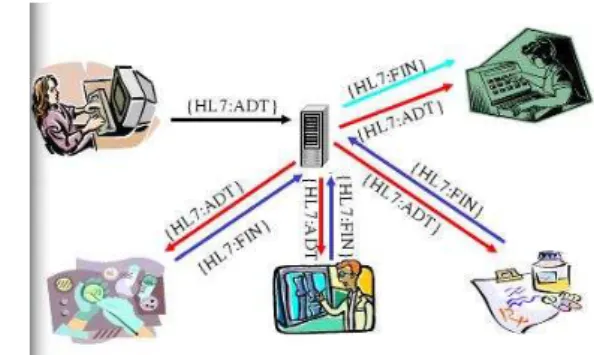
This version defines a series of electronic messages used to support not only clinical pro-cess but also administrative, logistics and financial. Since 1987 this specification was developed and was regularly updated, reaching from version 2.1 to version 2.6. The exis-tence of this new protocol allowed application to communicate using only one language, as it can be seen in figure2.1.
(a) Medical Information Systems Without Hl7 (b) Medical Information Systems With HL7
Figure 2.1: Before and After the HL7
Knowing which version is being used by an application is not crucial because all version 2.X are generally compatible with each other. The philosophy of this specification says that all new version must be compatible with the existing ones. Every time new data and message types are added, they are marked as optional elements, that means that recent version can process a message of an application that uses an older version and vice-versa. Although it exist a newer 3.0 version in the market, the version 2.X continues to be the most used and is still under development. Despite all the efforts, this standard still has a few problems:
• The lack of a consistent data model that implies that the storage of data done by an clinical application has a direct impact over the pieces of the message that can be implemented;
• Lack of formal methodologies to model the data elements and messages, this can cause inconsistencies within the specification and create problems in the way that each element of the message relates with the other elements;
• The good specification flexibility leads to a vague and less precise specification. There are no defined user roles for its usage, so the implementation of this standard can vary across applications.
Nonetheless, despite this disadvantages, this version was used in the project because it is the most used in the healthcare organizations. Besides, there are open source tools that implement this specification, it eases the development of the HL7 communication module.
This standard is supported by every major medical information systems vendor [5].
2.1.1.2 V3
Being this version of the HL7 specification that is based on a model, it is only logic to begin to explain the information model that supports the generation of the standards of this version: the Reference Information Model (RIM). This means that both the messaging standards in V3 and the docummentation standards in V3 (e.g. CDA, CCD, etc.) are all based in RIM.
RIM is the corner stone of the HL7 V3 development and a fundamental part of their methodology. This model express the necessary data in each clinical or administrative context and provides a representation of all the existing connections between the message fields.
We can say that, if HL7 is a language, the Reference Information Model is the gram-mar, that allows the creation of the correct phrases to the language in question and speci-fies the relation between words.
RIM appears to be pretty simple as it’s core is only made by just six classes:
• Act - Represents the actions that are executed and need to be catalogued when the services are provided;
• Participation - Represents the context of an act: who has done it, for whom it was executed, etc.;
• Entity - Represents the materials and physical beings that are of interest, and take part on the medical care;
• Role - Establishes the roles that the entities perform as participants in medical care services;
• Act Relationship - Represents the links between two acts, i.e., the relationship be-tween an order for an observation and the occurrence of said observation;
This standard defines, as the 2.x versions did, a series of electronic messages but in version 3 these messages are based on an XML encoding syntax. The complete shift in paradigm of the standard make it not backwards compatible. Switching to the new version of the HL7 is a very complex operation[6]
2.1.1.3 HL7 Parser
To make use of HL7 it’s necessary to create and parse a great number of messages. To do this manually would be time-consuming because of the number of existent HL7 messages (over 500[7]). To address this issue an API called NHapi will be used.
NHapi is a .Net Version of Hapi (an HL7 framework for java) used to build and decode HL7 V2.X messages. It acts as a parser of the HL7 messages. This object model allows for parsing and encoding HL7 2.X data to/from pipe(—) delimited or XML formats.
2.2
User Interface
The user interface is an essential part of the program. It presents information to the user as a form of output and it acknowledges the input from the user. This allows the system to indicate the effect of the users input and other information.
2.2.1 Rich Internet Applications
Rich Internet Applications (RIA) are web applications that have some characteristics of desktop applications. These similarities are in the interface and seamless communication. These applications support such as Ajax, web browser plug-ins (such as adobe flash and Microsoft Silverlight) and JavaScript, or via sandboxes or virtual machines.
Microsoft Silverlight
Microsoft Silverlight is a programmable web browser plug in that enables advanced fea-tures that characterize rich internet applications. Microsoft Silverlight user a familiar technique to go beyond the capabilities of standard web pages: a lightweight browser plug-in. Microsoft Silverlight was created to improve the way .NET developers create websites without ever needing to leave the same IDE1. This was developed to facilitate the creation of RIA content inside the .NET framework[8, page xxv]. Silverlight exists in two versions. The first version, Silverlight 1, is a relatively modest technology. It in-cludes several features but lack support for Common Language Runtime (CLR) and .NET languages, so any code written by the programmer has to be in JavaScript. Currently the second version, Silverlight 2 adds the .NET-powered features such as CLR and a subset of
.NET Framework classes, and a user interface model based on WPF[8, page xxvii]. A Sil-verlight version 3 Beta is under production and it will improve the SilSil-verlight capabilities even further[9].
Adobe Flash
Adobe Flash[10] is a popular multimedia platform that is used to add animation and in-teractivity to web pages. Flash is used for a variety of things, most recently, to develop rich internet applications[11] (RIA) using the web browser plug-in.
2.2.2 Desktop Applications
Desktop Applications run on top of the operating system and are not dependent on a browser or on the internet to start. Normally the program is by itself a client connected to a server using centralized databases and operations.
Windows Presentation Foundation
Windows Presentation Foundation (WPF)[12] is a graphical subsystem in .NET Frame-work 3.0 that uses a markup language (XAML) for the interface development. WPF provides a consistent programming model for building applications and provides clear separation between the user interface and the business logic. It enables several rational-ities in a single solution such as user interface, 2D and 3D drawing, fixed and adaptive documents, advanced typography, vector graphics, raster graphics, animation, data bind-ing, audio and video.
WPF is considered the successor of the Windows Forms and is promoted for line-of-business applications.
2.3
Back-End Technology
The back-end is related to the business logic of an application. It drives the user interface, providing and collecting all the necessary data for the program in question. It involves all the technology that is hidden from the end user.
2.3.1 Windows Communication Foundation
Windows Communication Foundation (WCF) is a programming framework used to build applications that inter-communicate. WCF unifies the various communication program-ming models supported in .NET 2.0, into a single model. Released in November 2005,
.NET 2.0 provided separate APIs for SOAP-based communications for maximum in-teroperability, binary-optimized communications between applications running on Win-dows machines, transactional communications, and asynchronous communications. WCF unifies the capabilities from these mechanisms into a single, common, general service-oriented programming model for communications[13].
WCF is designed in accordance with Service oriented architecture (SOA) principles to support Distributed computing where services are consumed by clients. Clients can consume multiple services and services can be consumed by multiple clients.
2.3.2 Windows Workflow Foundation
Windows Workflow Foundation (WF) is a framework for defining, executing, and manag-ing workflows. Workflows have several advantages over traditional programs[14, page 2]. They can handle long running work by persisting to a durable store when idle and load-ing again once there is new work to do, the instances of the workflows can be changed dynamically in run-time, they allow to declare business rules that are separated from the code making it easier future changes.
Pageflow
Pageflow if a specific implementation of the WF, it is designed with the objective of modelling the user interaction with an application using a workflow. Microsoft showed Pageflow at TechEd[15] and released it as a sample application. It implements a generic navigation framework that can support at the same time multiple UI (such as ASP.NET or WPF) Currently the Pageflow sample only supports one active workflow per instance and by default supports ASP.NET and WPF as UI on top of the workflow.
2.4
Object-Relational Mapping
The concept of Object-Relational Mapping (ORM) is a database abstraction layer is an application programming interface which unifies the communication between a computer application and databases. These communications are handled via an API that provides consistent calls to any database while hiding the database specifics as much as possible. There are many abstraction layers with different interfaces in numerous programming languages.
2.4.1 NHibernate
Nhibernate is a C# based ORM framework based on the original Hibernate for java that provides a abstraction layer between the database and .NET application. It provides pro-vides an abstraction that is important because it allows the use of a variety of relational databases while maintaining the same code in the application.
NHibernate was chosen as a Object-relational mapping framework because it provided out of the box compatibility with all the major relational databases vendors.
2.4.2 Language Integrated Query
Language Integrated Query (LINQ) is a Microsoft .Net Framework component that adds native data querying capabilities to .Net languages. LINQ can also provide a abstraction, like NHibernate, between the database and the back-end. It has many other functionalities that are out of the scope of this project.
2.5
Patient Administrative Management Implementations
2.5.1 Integrating the Healthcare Enterprise - Patient Encounter Management To develop Encounter Management (EM) software, an HL7 standard it’s needed. It is used to inform all the patient administrative events, enabling them to synchronize their application database with the latest information available. The group of messages that is sent from EM are the HL7 ADT messages (admission, discharge and transfer). The Integrating the Healthcare Enterprise (IHE)[16] creates profiles that support certain func-tionalities. To implement this profiles a set of HL7 messages need to be supported. These messages are called triggers, and there are triggers for every event that occurs in a hospital such as admit, transfer, discharge or even a change in the patient demographic informa-tion. These triggers represent actions that can be executed within the HL7 standard (more information in the appendixA). The most useful configuration for each trigger is going to be studied and analyzed to provide state-of-the-art HL7 compatibility.
The standard does not explicit a sequence in which these triggers can be called, but is quite clear that a patient has to be admitted before he can be transferred and discharged. In the appendix A are defined several subsets of trigger events[17] that are required to implement said features.
Typical Clinical Workflows Typical scenario:
1. Patient received at Emergency room by attending doctor U (The sent HL7 message is the ADT A04 – Register outpatient).
2. Doctor U admits de patient (The sent HL7 message is the ADT A06 – Change patient class to inpatient), into location BB, referring him to attending doctor X. 3. The patient is moved to location GG (The sent HL7 message is the ADT A02 –
Transfer), keeping X for attending doctor.
4. The patient is discharged and leaves de hospital (The sent HL7 message is the ADT A03 – Discharge).
These 4 real world events are expresses with 5 trigger events / messages, two of which occur at the same time (step2). Here the episode will be divided into 3 encounters as shown in table2.1 at page12. For more information on the sent HL7 messages refer to the appendixA.
Table 2.1: Hospital Workflow Example
2.5.2 Global Patient Access (Siemens) - Encounter Management
Global Patient Access is a software for Patient Management. It is going to be analysed only the part of the software related to the Encounter Management.
According to GPA – EM every independent visit to a healthcare facility can be grouped in episodes of care. In the table 2.2 at page 12 is an example of the episode of care workflow.
Episode of
Care Episode of Care Patient A Encounter Emergency
Encounter
Inpatient Encounter Outpatient Encounter Outpatient Encounter MRD Emergency Department Medical Responsible Department 1 Medical Responsible Department 2 Medical Responsible Department 3 Medical Responsible Department 3
ARHO Administratively Responsible Healthcare Organization Table 2.2: Example of Episode of Care Workflow
2.5.2.1 Encounter
Encounter replaces the usual concept of patient visit. Encounter is the smallest unit of the patient’s interaction within a healthcare organization. It is located in time: past, cur-rent, planned meeting or interaction. It takes place between a patient and one or more healthcare professionals. The encounters exist to provide health-related services or for assessing the health status of a patient.
The status of each encounter can be: • Checked Out;
• Cancelled; • Deleted; • Checked In; • Scheduled.
The encounters are assigned to an healthcare professional, such as admitting, attend-ing, and consulting. There are a few restrictions on these assignations and a history is retained of the changes.
The types of encounters that can occur within a hospital context are: • Inpatient; • Emergency; • Observation; • Outpatient; – Recurring; – Office/Clinic; – Day Surgery; – Pre-Admission Test; • Visitor. 2.5.2.2 Episode of Care
Episodes of care groups all the encounters for one patient. These episodes comprise a continuous contact with the patient by a Healthcare Organization. Episode of Care replace the concept of a master visit with sub-visits. An Episode of care may consist of multiple
encounters (such as Emergency Room to Inpatient, Medical, Surgical, and Neurology). Episodes of Care can also be linked (example, Mother → newborn baby) to another.
An Episode of Care belongs to one, and only one, administratively responsible health-care organization. The entire encounter in an Episode of Care must be time-continuous, with no time gaps. However, overlaps are permitted. Pending discharge indicator can only be true if the Episode of Care has an inpatient encounter with a status of checked in.
2.5.3 ACSS - Sonho - The Portuguese Database
The Administrac¸˜ao Central do Sistema de Sa´ude (ACSS) is the Portuguese government entity that manages the Portuguese Healthcare System. They have just released[18] a new specification of an application to integrate the Portuguese healthcare database named Sonho. This database is used in almost every Portuguese hospital or healthcare facility. The Glossary introduces some of the Portuguese concepts.
2.5.3.1 Functional Description
The following subsections show the various concepts that ACSS defines. There is a short description and a list of activities that are involved in each concept.
Emergency Episode
The main features of this module are: • Admission;
• Complete/Change case details;
• Associate an episode to a patient (error or other situations); • Discharge;
Outpatient Episode
The main features of this module are: • Pre-visit;
• Appointment Check-In; • Discharge of Appointment;
Inpatient Episode
The main features of this module are: • Admission;
• Complete/Change case details; • Discharge;
Ambulatory Episode
The main features of this module are: • Appointment/Session Check-In; • Discharge bulletin;
Surgery Episode
The main feature of this module is: • Transfer/Admit to surgery;
2.6
Planned Architecture
The ideal architecture for the EM system would be a distributed, heavily service oriented architecture (SOA).
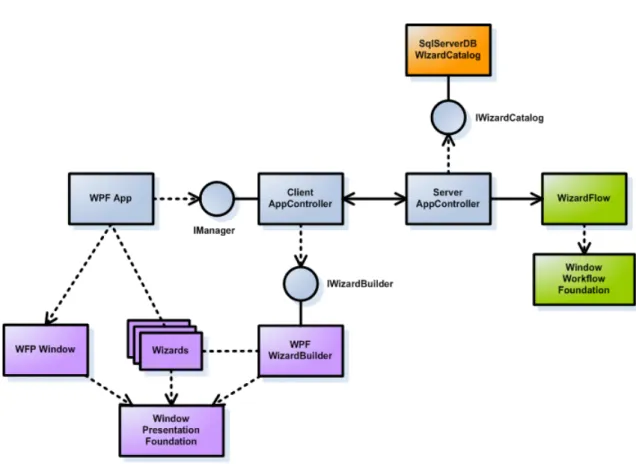
The figure 2.2 at page 16 shows this architecture and the way it implements all the services in a modular way. The client (WPF App) requests the next activity of the work-flow from the Client AppController and the XML for the XAML (User interface) would be downloaded from the IWizard Builder that generates the necessary XAML code to be used in the presenter. The available workflows are distributed by the Server AppCon-troller. This can be shown in any presenter (in this case Windows Presentation Foundation is used) and all the information can come from various related services.
An example of an application running can be seen in figure2.3at page16and clearly shows the workflow activity that runs inside the WPF Window. The window to be shown is built using a WPF Wizard Builder (or ASP.NET if it is a Web Page) and provided through an Event Broker that handles the communications between all the modules. The information of the window that is displayed comes from the App Controller that commu-nicates between the WF, the Wizard Builders and the Event Broker.
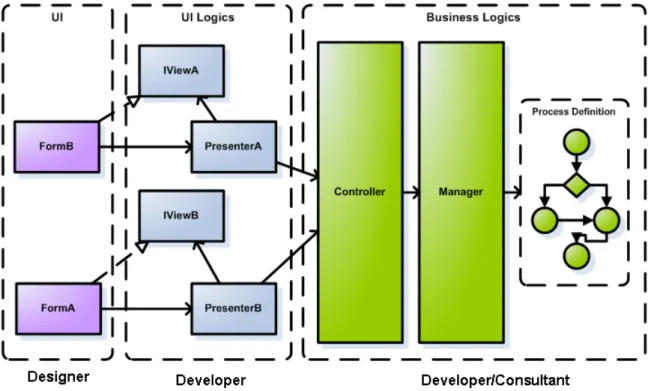
The final purpose of this architecture is the separation of work between the designer, the developer and the medical analyst. In the figure2.4at page17it is clearly shown the
Figure 2.2: Ideal Architecture Overview
Figure 2.3: Workflow execution
separations between the three roles. A designer can only work in the interfaces, the devel-oper can make the connections between the workflow and the interface, and the workflow can be build by a consultant from the healthcare facility and improve its accuracy with the models of the healthcare facility. This way the software becomes fully modular with role separation in the all stages of development.
Figure 2.4: Architecture Separated by roles
2.7
Solutions on the Market
2.7.1 Alert (Alert Life Sciences)
Alert is a Portuguese software house that develops software related to healthcare. The current interoperability policy makes alert compatible with IHE, HL7 and other medical related standards[19].
ADT functionality is spread across the modules that are related to ADT (such as Alert Outpatient, Alert Inpatient, Alert EDIS and Alert Oris)
2.7.2 E-Doctor (Hewlett-Packard)
This software was developed around the idea that paper is cumbersome and expensive. The thought that a digital record is far easier to manage and also cheaper is the foundation of this software. That said, the HP HIS relies on a proper infrastructure to provide its full functionality.
One of the innovation feature is the integration of RFID on surgery and on transfers. The identification of the patient can be made directly from the patient’s RFID.
2.8
Conclusions
This chapter started by presenting the existing healthcare standards, the advantages and disadvantages between them. It presented multiple options for user interface development and several back-end technologies. It detailed a few implementations of the healthcare standards. It also introduced the ideal architecture for the software and some solutions in the market.
The chosen technologies for the implementation of the Encounter Management are showed in section5.1.1.1.
There are a lot of studies in the healthcare standards. These provide critical informa-tion for the design phase that it is going to concern with concepts and the modelling of the solution. There are also a great number of technologies that can help the develop-ment process of this project. These technologies range from back-end frameworks (e.g Windows Workflow Foundation) and front-end frameworks (e.g. Windows Presentation Foundation). These frameworks help to speed up the developing process by enabling fast prototyping and providing rich APIs.
Problem Description
This chapter presents the problem that is presented by this project, the project require-ments and what it aims to achieve. Finally it includes priorities and a schedule for the task of the project.
3.1
The Problem
The problem that is presented by this project is tied to the need of hospital informatiza-tion[20]. This accounts for electronic patient data and to find a way to unify the health system so that is fully integrated and the information can be exchanged easily between medical responsible departments and ultimately between hospitals1. This leads to the need of standardization of the information.
The problem in the Encounter Management project involves a couple of steps. First it is necessary to define the architecture that supports these encounters in a way that would turn out to be flexible and adapted to all the medical activities that are performed in a healthcare facility. Then it is needed to implement the architecture defined earlier in a way that is flexible enough to be deployed in all the necessary scenarios, with localization so that the software can be available in different languages dynamically in a way that it does not need a completely separate program for each language. It is also necessary to develop the user interface that satisfies the end user.
The end-goal is to provide a set of abstract activities that are performed in the context of a healthcare facility. These activities can then be tied together so that they perform a workflow. These workflows are activities in a healthcare facility such as patient check-in (for inpatient, for emergency, for external appointments, etc), patient check-out, transfers, edition of patient’s demographics and other administrative tasks inside a healthcare facil-ity. These workflows have common activities2that are shared among them, reducing the
1According to current laws
number of needed interfaces and simplifying the construction of new workflows or the adoption of existent ones to new business rules.
Episode of Care, Episodes and Encounters
An essential step in defining this problem is a clear definition of each term. This definition has to be found and the relation of each of the terms completely defined so that a standard can be defined and the previously mentioned interactions can be accomplished.
The very name of the project, Encounter Management points to a focus in the en-counters3, the definition of those encounters are ambiguous because an encounter can be an interaction from a patient with a healthcare facility that endures through the day and also that each encounter is one individual interaction from that patient with the healthcare facility.
3.2
Project Requirements
An important step in software development is the Project Requirements. The Project Requirements are essential for a good project outcome[21]. In this chapter is going to be presented the use cases4needed to implement the Encounter Management.
3.2.1 Encounter Management
The workflow module is going to be the core of the entire system. It provides features that support the Encounter Management concept. It is going to provide an interface that follows the intentions of the users through the workflow. It provides useful features such as suspending a workflow in a certain state and resumes it later. It provides a workflow based interface to execute the desired Encounter Management Related Activity.
The features of the Encounter Management are separated in two main areas, the Inpa-tient (for PaInpa-tients that stay at the hospital for more than twenty four hours and are in the Inpatient state) and the Outpatient (for Patients that attend appointments, go to emergen-cies, hospital daycare staying in the hospital no more than twenty four hours and are in the Outpatient state).
The following use cases will show the most common solutions that suit a healthcare facility. Custom development can be made to meet the clients needs and published via the workflow builder that is presented in the next section.
3Encounters some times are called Visits
4A use case is a description of a system’s behaviour as it responds to a request that originates from outside of that
Use Cases
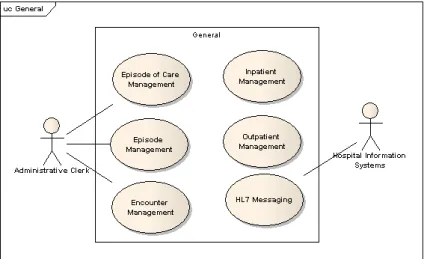
The use cases are divided in three areas. In the figure3.1at page21is showed the general use cases of the Encounter Management.
Figure 3.1: Encounter Management - High level
This figure shows the basic use cases for the system. The Encounter Management software needs a secure User Authentication system. It also needs to be able to perform the basic tasks referred as Episode Management (Creation, Changing, Delete and the other use cases in the figure). These use cases are the base for the Inpatient and Outpatient use cases. They allow that patients can be admited/checked in by adding patient episodes and discharged/checked out by changing a patient episode defining the end of the episode. Other particular systems can be developed and created using the workflow builder.
The figure3.2at page22shows the use cases for the Inpatient.
The Inpatient is a particular model of providing healthcare knowing that the patient is allays under healthcare surveillance. This surveillance extends to every patient care such as drug administration, critical care and bed tracking. In this figure, Patients can be ad-mitted to the system, using the patient listing, viewing and editing patient demographics. A bed management software handles the beds that have been booked through the admit process. This process can be cancelled through the Cancel Admit Patient. When neces-sary a patient can be discharged from the facilities ending the encounter. This action can also be cancelled. An Inpatient can also be transferred to another Medical Responsible Department (MRD) or other healthcare facility. This activity can be cancelled. There is a use case for a Pre-Admit Patient that is used when the patient needs to do exams prior to the actual Admit. This activity can also be cancelled. After each activity an HL7 Message can be sent to inform the registered systems.
Figure 3.2: Inpatient - Detailed Use Case
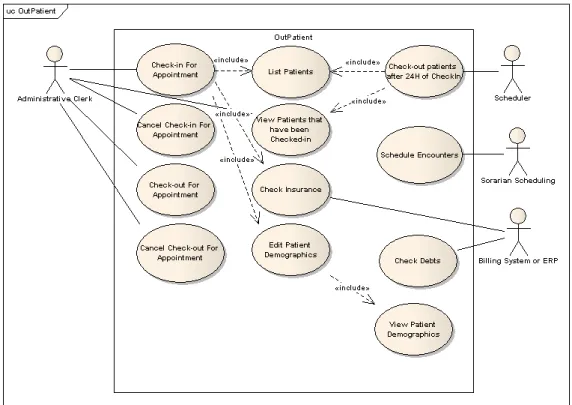
The Outpatient is a particular model of providing healthcare knowing that the patient isn’t under healthcare surveillance. The patient is not under constant surveillance, does not have an assigned bed and can only remain inside the healthcare facility for a duration no longer that twenty four hours. In this figure the patient can be checked in for ap-pointment that makes the patient available to attend the apap-pointment, this uses the patient list, checks the insurance for the appointment in question and can also view and edit the patient demographics. The check in can be cancelled if desired. The check-out is also available with the restriction that the patient has to be checked in to be checked-out. This activity can also be cancelled. All these four activities are followed by an HL7 Messaging system to all the registered systems.
Figure 3.3: Outpatient - Detailed Use Case
schedules the encounters that are inserted into the system. A Billing System or ERP validates the Insurance and checks the patients debts. A periodic scheduler checks if the patients stay in the healthcare facility longer that twenty four hours. If there is any patient in this condition a automatic check-out is made. This is made by checking the patient list and the patients that have been checked in.
3.2.2 Workflow Builder
The Workflow Builder is a separate application that builds and deploys the workflows for use in the Encounter Management. This allows the medical analyst to tweak existing workflows and seamlessly develop new workflows to support the new medical workflows that emerge in the needs of the healthcare facility. The creation of these workflows would be done by dragging existent activities (that were previously created by the development team) into the workflow and creating the connections between the activities. This al-lows for a complete independent platform building without the need of a programmer and without needing any programming knowledge. This allows the role separation that was mentioned in section2.6.
Use Cases
Figure 3.4: Workflow Builder - Detailed Use Case
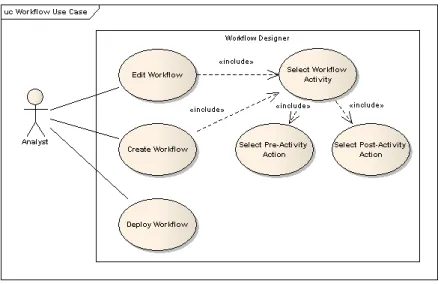
These workflow builder use cases is a workflow editor that can deploy workflows to the program. This feature allows medical analyst to adjust and create new workflows. The creation of the workflows is done by selecting the required activities and the correspon-dent Pre-Activity action (that executes when the workflow action is called before the user interaction) and the post-activity action (that executes after the workflow activity when the user has done the input for the required user interface).
3.2.3 HL7 Messaging Interoperability
The HL7 Messaging standard is need to provide the communication between the En-counter Management Software and other clients such as Master Patient Index (MPI). This communication is essential to accomplish the interoperability needed by this application.
Use Cases
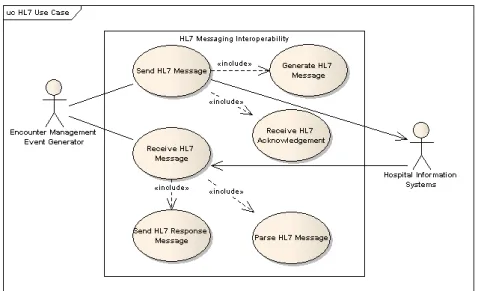
The figure3.5at the page25shows the use cases for the HL7 messaging interoperability. The HL7 messaging interoperability module represent the HL7 communication that is used across the application to notify all the required applications of the informations that are processed inside the Encounter Management. It Sends HL7 messages, that are re-quested by the EM. This needs to generate the HL7 message and to receive the respective HL7 response. It also has a standalone server that is waiting for incoming HL7 mes-sages. It receives these HL7 Messages, parses the HL7 message and then sends the right response again in HL7 format.
Figure 3.5: HL7 Messaging Interoperability - Use Cases
3.3
Schedules and Deliverables
The definition of a schedule and the priorities list for the use cases is one important step in every project. The milestones were already established in the beginning of the project, providing a good understanding and control over the project.
3.3.1 Priorities
The tasks in a project need to be prioritized, this step is very important to insure the correct focus of the developer.
There were several factors that were taken into account to decide the priority of each use case such as the developing difficulty, importance for the project to be developed and estimated task duration. The priority levels are Low, Medium and High were used.
The priority of the General Use Cases for the Encounter Management are shown in the table3.1at page25.
Name Priority
Episode of Care Management High
Episode Management High
Encounter Management High Inpatient Management Medium Outpatient Management High
HL7 Messaging High
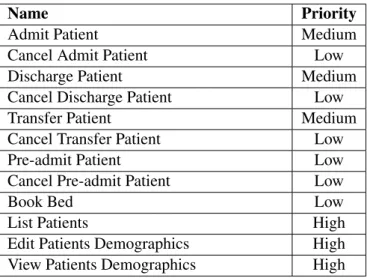
The priority of the Inpatient Use Cases for the Encounter Management are shown in the table3.2at page26.
Name Priority
Admit Patient Medium
Cancel Admit Patient Low
Discharge Patient Medium
Cancel Discharge Patient Low
Transfer Patient Medium
Cancel Transfer Patient Low
Pre-admit Patient Low
Cancel Pre-admit Patient Low
Book Bed Low
List Patients High
Edit Patients Demographics High View Patients Demographics High
Table 3.2: Priorities for the Inpatient Use Cases for the Encounter Management
The priority of the Outpatient Use Cases for the Encounter Management are shown in the table3.3at page26
Name Priority
Check-in For Appointment High Cancel Check-in For Appointment Medium Check-out For Appointment High Cancel Check-out For Appointment Medium
List Patients High
View Patients that have been checked-in High
Check Insurance High
Edit Patients Demographics High View Patients Demographics High Check-out patients after 24H of check-in Medium
Check Debts Low
Table 3.3: Priorities for the Outpatient Use Cases for the Encounter Management
The priority of the Use Cases for the Workflow Builder are shown in the table 3.4
Name Priority
Edit Workflow Medium
Create Workflow Medium
Deploy Workflow Low
Select Workflow Activity Medium Select Pre-activity Action Medium Select Post-activity Action Medium
Table 3.4: Priorities for the Workflow Builder
The priority of the Use Cases for the HL7 Messaging Interoperability are shown in the table3.5at the page27.
Name Priority
Send HL7 Message High
Receive HL7 Message Medium Send HL7 Response Message Medium Generate HL7 Message High Receive HL7 Acknowledgement High
Parse HL7 Message Medium
Table 3.5: Priorities for the HL7 Messaging Interoperability
3.3.2 Schedule
The schedule of this project was divided in 5 phases: 1. Validate existing outputs for the project; 2. State of Art study;
3. Implementation;
4. Development of necessary documentation; 5. Final Development.
In the end of each phase a milestone is achieved.
Validate existing outputs for the project
The validating phase took about one week (2 March - 6 March). It consisted on under-standing the problem, analysing existent documentation and to get familiarized with the medical terms. The result of this phase was a complete integration in the development
team, better understating of the company’s philosophy and the medical terms involved in the project. The milestone of this phase was the clear knowledge of the most important medical terms.
State of Art study
The State of Art study phase took about three weeks (9 March - 27 March). It consisted in the study of all the available technologies, international health standards, existing appli-cations and a prototype that identified the phases of some process in a healthcare facility. This phase resulted on the State of Art document and the Vision document, this phase also produced a presentation for the promotion of the project inside Siemens. The milestone of this phase was the state of art document.
Implementation
The implementation phase was the longest one with ten weeks (30 March - 6 June). It consisted in the implementation of the architecture that supported the application and the creation of some hospital workflows on top of the architecture. Some project related documentation was updated or adjusted to fit the time frame. The milestone of this phase was a working prototype.
Development of necessary documentation
This phase took about a month ( 8 June - 29 June). This time was reserved for the produc-tion of software related documentaproduc-tion and this thesis. The milestone of this phase was this thesis.
Final Development
This phase will take the remaining time, one month (30 June - 31 July). It will consist in the creation of the final presentations to be showed at FEUP and at Siemens. Small adjustments in the implementation and documentation could also be necessary until the end of the duration of this project (31 July). The milestone of this phase is going to be a reviewed thesis and a new version of the prototype.
3.4
Conclusions
This chapter began by presenting this project’s goal of creating an Encounter Management software. It presented the requirements of this software. It ended with the schedule and the deliverables.
This chapter clearly described the dimension of this project. The healthcare software Encounter Management is used in all the medical responsible departments (MRD) inside a healthcare facility needing a complete specification of the activities that can happen in each MRD. These activities were prioritized in order to focus on each MRD making the top priority the outpatient MRD.
Solution Specification
Based on the requirements for the project and on prototyping work done during the re-search and technology evaluation phase, a specification of the proposed solution was pro-duced.
4.1
Medical Terms
To define a solution for the problem, first it is necessary to correctly define the medical terms or concepts that are going to be used in the implementation. These definitions were defined based on extensive research of existing healthcare programs and the European and Portuguese legislation in the area of hospital administration and specific encounter terms.
4.1.1 Episode of Care
An Episode of Care acts as a container that holds Episodes (going to be explained in the next chapter). The episodes that are inside an Episode of Care are all tied to the resolution of a specific condition with the patient.
If the patient goes to the hospital because of a new problem then a new Episode of Care is opened for that condition in particular and then all the actions that are taken regarding that condition will be stored in that Episode of Care in particular.
This definition supports the idea that one Episode of Care contains every action that was made to improve a certain condition1 of a patient. This way a patient can have multiple Episodes of Care that are opened at the same time and are addressing different conditions. This definition provides the flexibility and adjustability that are necessary to support all the patients’ conditions.
An episode of care has these common properties: • Referral - Who referred to this episode of care;