Universidade do Minho
Escola de Engenharia Departamento de Informática
Jorge Miguel Sol Ferreira
Syntax-Directed Editor Generator
Universidade do Minho
Escola de Engenharia Departamento de Informática
Jorge Miguel Sol Ferreira
Syntax-Directed Editor Generator
Master dissertation
Master Degree in Computer Science
Dissertation supervised by
Professor Pedro Rangel Henriques
A C K N O W L E D G E M E N T S
First of all I would like to thank Professor Pedro Rangel Henriques for his support during the duration of this dissertation.
I would also like to thank my family for being always supportive and being always there for me.
A B S T R A C T
The goal of the master’s thesis work here reported is to develop a system capable of gener-ating a SDE for any given language definition. A SDE is a type of source code editor that knows the programming language grammar and uses this knowledge to guide the editing and the execution of a program. This type of editing ensures that a program is syntactically correct.
The editor is intended to provide both syntax-directed editing as well as manual text editing. A meta-language must be created to describe the grammar of the editor’s target language. The meta-language will provide annotations to change the display of the text in the editor. That specification, written in the referred meta-language will be the input to generate tem-plates for the syntax directed editor.
The SDE generator is available in a standalone JAR application as well as a web version.
R E S U M O
O objetivo do trabalho de mestrado aqui relatado é desenvolver um sistema capaz de gerar um editor dirigido pela sintaxe (SDE) para uma qualquer linguagem. Um SDE é um editor de texto que tem conhecimento da gramática da linguagem e usa esse conhecimento para guiar o utilizador na edição e execução do programa assegurando assim que o programa esteja sintaticamente correto.
O editor será capaz de dar ao utilizador a habilidade de editar o programa tanto através de comandos dirigidos pela sintaxe como digitando o programa. Para isso é preciso criar uma meta linguagem para descrever a gramática da linguagem-alvo do dito editor. A linguagem permite ao utilizador anotar a gramática de modo a mudar a aparência do texto no editor. Esta meta linguagem seria depois usada para gerar os templates necessários para o editor dirigido pela sintaxe.
O gerador de SDE está disponível numa versão JAR standalone e numa versão web.
C O N T E N T S
1 i n t r o d u c t i o n 1
1.1 Background 1
1.2 Research Hypothesis 2
1.3 Project Description, Objectives 2
2 s tat e o f t h e a r t 3
2.1 Text Editors 3
2.1.1 Editing Features 3
2.2 Syntax-Directed Editors 5
2.3 Text Editors Generators 7
2.3.1 Language Workbenches 7 2.3.2 SDE generators 12 2.4 Summary 21 3 s d e g e n e r at o r: design 22 3.1 Requirements 22 3.2 Architecture 22 4 s d e g e n e r at o r: development 24 4.1 Grammar 24 4.2 Templates 27 4.2.1 Grammar Template 28 4.2.2 Rules Templates 28 4.2.3 Productions Templates 29 4.2.4 Terms Templates 29
4.2.5 Lexer Regular Expressions 31
4.3 Structure of the Program Tree 32
4.4 Text Loading 32
5 s d e g e n e r at o r: web application 35
5.1 Architecture 35
5.2 Website 36
6 s d e g e n e r at o r: use of the system 37
6.1 Simple Editing 37
6.1.1 Multiple Productions 38
6.1.2 Quantifiers 38
6.1.3 Block Editing 39
Contents v
6.1.4 Editing Terminals 39
6.1.5 Comments 39
6.1.6 Helper Annotations 39
6.1.7 Swap Operations 41
6.2 Loading and Saving 41
6.2.1 Tree Saving and Loading 41
6.2.2 Text Saving and Loading 42
7 c o n c l u s i o n 43
L I S T O F F I G U R E S
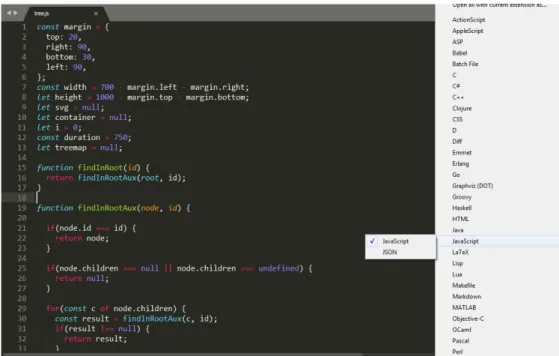
Figure 1 Sublime Text syntax highlighting options 4
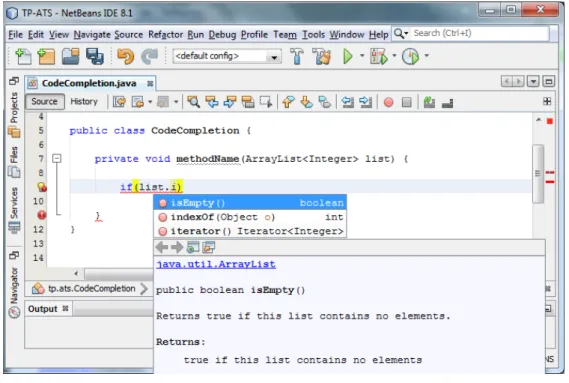
Figure 2 Netbeans code completion 5
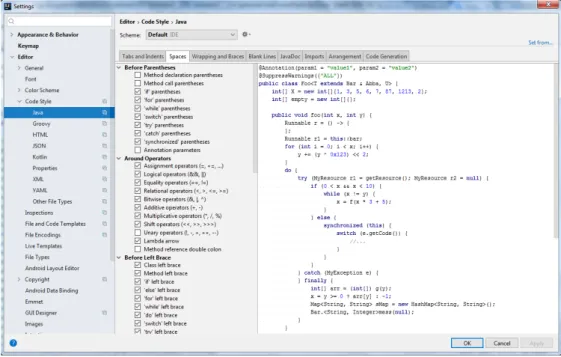
Figure 3 Coding Styling Settings in IntelliJ 6
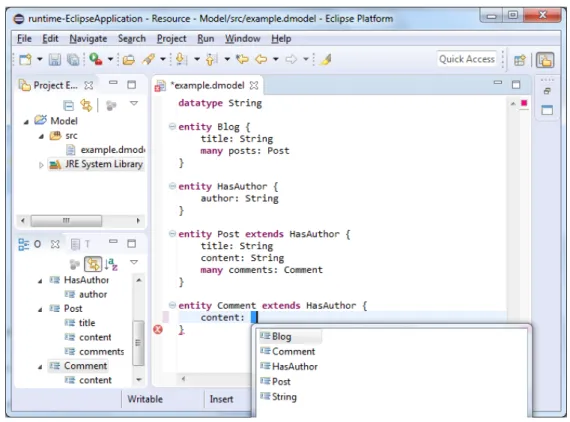
Figure 4 xText generated editor 9
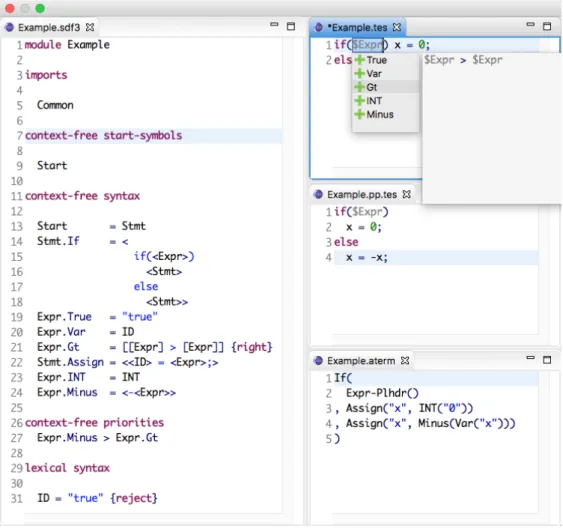
Figure 5 Spoofax Editor 10
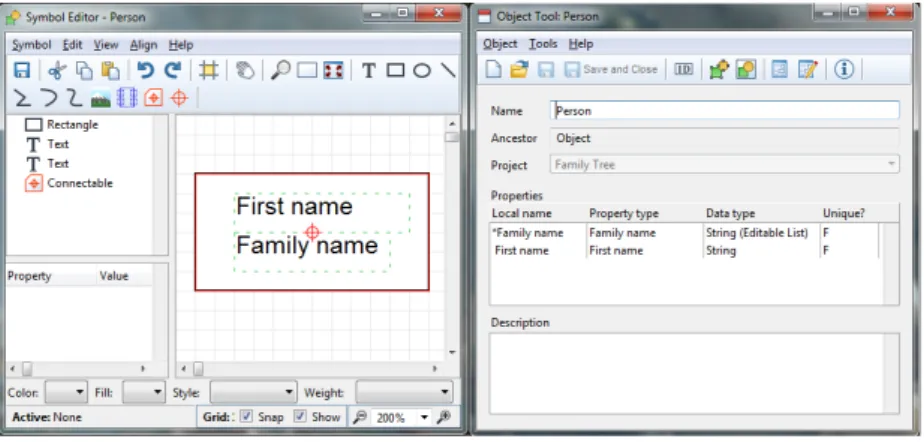
Figure 6 Object Definition in MetaEdit+ 11
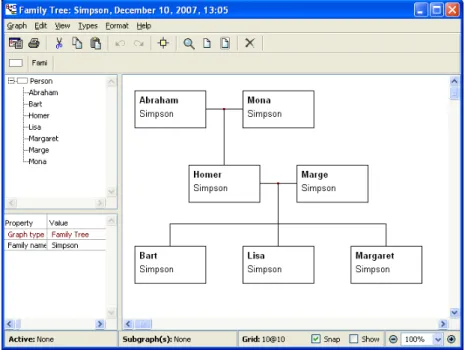
Figure 7 Diagram Editor in MetaEdit+ 12
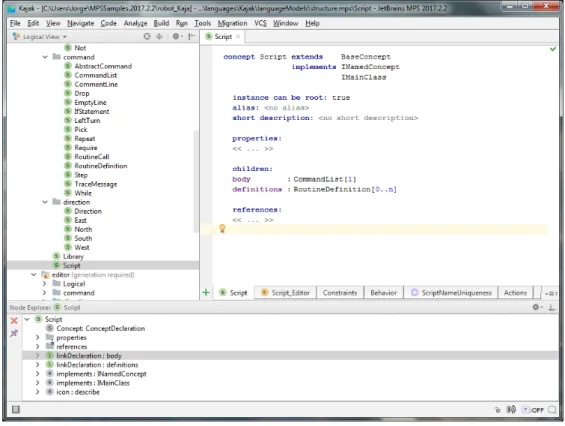
Figure 8 Concept Definition in MPS 13
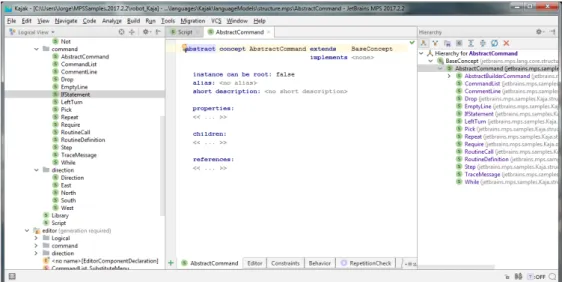
Figure 9 Abstract Concept in MPS 14
Figure 10 Editor Definition in MPS 14
Figure 11 MPS Resulted Editor 15
Figure 12 Resulted Editor 15
Figure 13 Synthesizer Generator Initial State 19
Figure 14 Item Selected 19
Figure 17 Final State 19
Figure 15 Simples Selected 20
Figure 16 Grupo Selected 20
Figure 18 Structure view in LISA 21
Figure 19 System Architecture 23
Figure 20 Editor without annotations 26
Figure 21 Editor with annotations 27
Figure 22 Text Syntax Tree 33
Figure 23 Loading a grammar 35
Figure 24 Loading a text file 36
Figure 25 Web Application 36
Figure 26 While condition in the editor 37
Figure 27 Multiple Productions in the editor 38
Figure 28 Valid terminal 40
Figure 30 Helper Annotation 40
Figure 29 Invalid terminal 41
L I S T O F TA B L E S
Table 1 Annotations table 27
L I S T O F L I S T I N G S
2.1 Example of a IF conditional template . . . 6
2.2 SDE . . . 6
2.3 Grammar defined in xText . . . 8
2.4 Lexemes . . . 16
2.5 Concrete Syntax . . . 16
2.6 Association Rules . . . 16
2.7 Unparsing Rules . . . 17
2.8 Attributes . . . 18
2.9 Language definition in LISA. . . 20
4.1 Changes in the ANTLR grammar. . . 24
4.2 Annotations in a grammar rule . . . 25
4.3 Annotations before grammar definition . . . 26
4.4 Multiple annotations in a grammar rule . . . 26
4.5 Grammar class. . . 28 4.6 ParserRule class . . . 28 4.7 LexerRule class . . . 28 4.8 ParserProduction class . . . 29 4.9 LexerProduction class . . . 29 4.10 ParserTerm class . . . 29 4.11 Terminal class . . . 29 4.12 Terminal class . . . 30
4.13 Rule with a block term . . . 30
4.14 Block class . . . 30
4.15 LexerTerm class . . . 30
4.16 LexerSimpleTerm class . . . 31
4.17 LexerBlock class . . . 31
4.18 Lexer Definition . . . 31
4.19 JSON Tree Structure . . . 32
4.20 Example Grammar . . . 33
6.1 While rule . . . 37
6.2 Inst rule . . . 38
List of Listings ix A.1 Complete Program Tree JSON. . . 46
A C R O N Y M S
AST Abstract Syntax Tree.
DSL Domain-Specific Language.
EMF Eclipse Modal Framework.
GOPPRR Graph-Object-Property-Port-Role-Relationship.
IDE Integrated Development Environment.
JSON JavaScript Object Notation.
SDE Syntax-Directed Editor.
SDF Syntax Definition Formalism.
SSL Synthesizer Specification Language.
TMF Textual Modeling Framework.
1
I N T R O D U C T I O N
This report describes the project carried out to fulfil the thesis requirement to conclude the
2nd year of the Master’s Degree in Software Engineering of the Department of Informatics,
School of Engineering, University of Minho.
1.1 b a c k g r o u n d
Developing good programs is a difficult task. It requires effort and time from the user to analyze the program, design the algorithm that solves it, and to effectively writing the pro-gram.
A simple text editor is not enough to provide the assistance required for such tasks. Devel-oping software using only a text editor is slow, tedious and error prone. We need editors to incorporate tools that make the development easier and less time consuming. These tools can range from the traditional debuggers to smart editors aimed to increase the readability of the program and to speed up their writing.
Manually typing is not the only way to develop. Syntax-directed editing, or structure edit-ing, is a mechanism that being aware of the language grammar provides the user with commands to edit the programs strictly following the underlying syntax. These commands offered by the editor interface ensures the syntactic correctness of a program. This type of editing is useful for the programmer and it is important to expand it.
Even though these language dependent editors are advantageous it is not practical nor easy to develop one editor for every existing language as right now there exists a considerable number of programming languages and there are always new ones being developed. This is why it is important to develop programs capable of generating such SDEs.
1.2. Research Hypothesis 2
1.2 r e s e a r c h h y p o t h e s i s
Given a programming language grammar written in a meta language it is possible to gen-erate a SDE for that language. The resulted editor will be intuitive and easy to use and will ease the target language learning process for a beginner user.
1.3 p r o j e c t d e s c r i p t i o n, objectives
The goal of this project is to create a system capable of generating a SDE for any program-ming language given its grammar.
This will be achieved by creating a meta-language. This meta-language will describe the programming language grammar.
The generator will then take the meta-language and will produce the respective templates to be used by the SDE.
The resulted SDE will allow the user to write the program by editing both the program text and the program tree.
Chapter 2 will describe what is a text editor as well as features that are usually associated with it. It will also present the notion of SDE and structure editing. Lastly it will define what are SDE generators and it will present several examples of SDE generators. In Chapter
3will be present the requirements of the SDE generator and its architecture. Chapter 4 will
describe the implementation. In Chapter 5 the web version of the SDE generator will be discussed. Finally Chapter 6 will present the use of the system.
2
S TAT E O F T H E A R T
In this chapter it will be presented the definition of source code editors. Next it will be discussed what a SDE is and how the edition is made in those editors. After it will be explained what is a language workbench and several examples will be displayed. Finally several examples of existing SDE generators will be show.
2.1 t e x t e d i t o r s
A text editor is a program used to write text files. It is used both for mundane tasks, such as simply writing an email, and for more complex ones, such as writing a program.
Source code editors are enhanced text editors designed to create and edit programs source code. To help the user to write code more efficiently source code editors provide many
features, such as syntax highlighting and code completion. Notepad++ 1
and Sublime Text
2
are examples of well-known source code editors.
A source code editor can be included in an IDE. This piece of software, in addition to edit source code, is also able to compile, deploy and debug software packages.
However the program representation and manipulation in these editors are still textual and the programming support supplies single features rather than making the impression of a
thoroughly designed, specialized tool for program editing (Minör,1992).
2.1.1 Editing Features
Features that allow the user to read, navigate and edit source code and that ease the pro-gramming task are so important that it is to be expected from a source code editor to provide them. The most common features present in source code editors are the following:
1 https://notepad-plus-plus.org/ 2 https://www.sublimetext.com/
2.1. Text Editors 4
Figure 1.: Sublime Text syntax highlighting options
Syntax Highlighting
Syntax highlighting allows faster reading of the code by highlighting keywords such as ’IF’ and ’WHILE’; identifiers and literals are usually printed in different colors. Syntax high-lighting also includes braces matching, i.e., it highlights the opening and the respective closing bracket. This allows an easier way to interpret nested instructions. Syntax high-lighting is expected to be provided by every IDE and source code editor. As keywords vary from language to language source code editors allow the user to choose the adequate
syntax highlighting (Figure1).
Code Completion
Code completion provides a list with valid options that the user can choose while he’s typ-ing. This speeds up the coding process as the user doesn’t have to write the full name. It also liberates the user from inspecting other files to lookup up the elements. For example, a user can see the available methods of a Java class after typing the class name. Docu-mentation can be present in the menu list alongside their respective method or function.
Figure 2 depicts how code completion works on Netbeans3. The user calls the code
completion by pressing ctrl+space4
then navigates to the option he wants to insert and then
3 https://netbeans.org/
2.2. Syntax-Directed Editors 5
Figure 2.: Netbeans code completion
presses enter to select it. If there is only one valid option, the list is not shown and the option is automatically inserted.
Code formatting
Some text editors offer an option to automatically format a program. This is a useful tool as consistent indentation in a program makes it comprehensible and easier to read and maintain. It is included in most IDEs which allow the user to define his own coding style, for example the user can choose the size of tabs, where to place spaces and define the brace
positioning (Figure3).
2.2 s y n ta x-directed editors
A SDE (Teitelbaum and Reps,1981;Lunney and Perrott,1988;Zelkowits,1984;Reps,1982)
is a type of source code editor that knows the programming language grammar and uses this knowledge to guide the editing and the execution of a program. This ensures that a program is always syntactically correct.
A program is constructed top-down by inserting either a template or a phrase on placehold-ers at cursor position.
2.2. Syntax-Directed Editors 6
Figure 3.: Coding Styling Settings in IntelliJ
These templates are predefined and correspond to the grammar rules of the language. Be-cause a template cannot be changed it ensures that it contains no error. The following example represents a template for the if conditional statement, where condition and state-ment are placeholders.
IF (condition ) T H E N statement E L S E statement
Listing 2.1: Example of a IF conditional template
These placeholders can be expanded to continue the writing of the program by choosing the next valid template or phrase to insert.
A phrase is a user typed piece of text, for example the name of a user-defined variable, a numerical value or a string.
All modifications of the program occur at the current position of the editing cursor. The cursor can only be positioned on a template or on a placeholder. Inside a phrase the cursor can be anywhere. p r o g r a m e x a m p l e { d e c l a r a t i o n s var - > b o o l e a n ; < v a r i a b l e - d e c l a r a t i o n > s t a t e m e n t s if ( a > 1)
2.3. Text Editors Generators 7 t h e n { < s t a t e m e n t - list -1 > } < s t a t e m e n t - list -2 > } Listing 2.2: SDE
In Listing 2.2, < statement-list-1>, <statement-list-2> and <variable-declaration> are
place-holders yet to be expanded. It can also be seen that a variable declaration template was fully expanded to var -> boolean as well as the the conditional statement in the if statement to a>1.
Usually in a SDE the program is internally represented as an AST.
Compared to text editors, a SDE requires less typing from the user as most of the writ-ing durwrit-ing programmwrit-ing is by typwrit-ing keywords and punctuation and these elements are included in the predefined templates. Another advantage of using a SDE is that a user is not required to extensively know the programming language syntax because the editing is guided by it.
2.3 t e x t e d i t o r s g e n e r at o r s
Even though source code editors and SDEs are powerful tools that eases the development of programs, it is not practical to develop them for every language as it can be time-consuming and error-prone. This is why it is important to develop language independent editors.
2.3.1 Language Workbenches
Language workbenches, a term coined by Martin Fowler (2005), are tools aimed to
im-plement new languages as well as theirs IDEs. In addition to ease the development of languages, they also make language-oriented programming environments practical.
According to Fowler, a language workbench needs to have the following characteristics: • Users can freely define new languages which are fully integrated with each other. • The primary source of information is a persistent abstract representation.
• A DSL is defined in three main parts: schema, editor(s), and generator(s). • The users manipulate the DSL through a projectional editor
• A language workbench can persist incomplete or contradictory information in its abstract representation.
2.3. Text Editors Generators 8
Language workbenches can be referred to as being textual (xText and Spoofax), graphical
(MetaEdit+ and DOME) or projectional (JetBrains MPS) (Erdweg et al.,2013).
In projectional language workbenches (Voelter and Pech, 2012; Fowler) all text, symbols
and graphics are projected. They manipulate the abstract representation of the program and offer the programmer ways to edit the abstract model structure directly. With this type of program editing, they resemble to SDEs.
xText
xText is a textual language workbench currently developed by Eclipse under the Eclipse TMF project.
It allows the user to specify a language (ranging from small Domain-Specific Languages to
full-blow General Purpose Languages (Eysholdt and Behrens, 2010)) and their respective
tools.
xText generates the following artifacts (Efftinge and Völter,2006):
• a set of AST classes represented as an EMF based metamodel
• a parser that can read the textual syntax and returns an EMF-based AST (model). • a number of helper artifacts to embed the parser in an openArchitectureWare
work-flow
• an Eclipse editor that provides syntax highlighting, code completion, code folding, a configurable outline view and static error checking for the given syntax.
g r a m m a r org . e x a m p l e . d o m a i n m o d e l . D o m a i n m o d e l w i t h org . e c l i p s e . x t e x t . c o m m o n . T e r m i n a l s g e n e r a t e d o m a i n m o d e l " h t t p :// www . e x a m p l e . org / d o m a i n m o d e l / D o m a i n m o d e l " D o m a i n m o d e l : ( e l e m e n t s += T y p e ) *; T y p e : D a t a T y p e | E n t i t y ; D a t a T y p e : ’ d a t a t y p e ’ n a m e = ID ; E n t i t y : ’ e n t i t y ’ n a m e = ID ( ’ e x t e n d s ’ s u p e r T y p e =[ E n t i t y ]) ? ’ { ’ ( f e a t u r e s += F e a t u r e ) * ’ } ’ ;
2.3. Text Editors Generators 9
F e a t u r e :
( m a n y ?= ’ m a n y ’ ) ? n a me = ID ’ : ’ t y p e =[ Ty p e ];
Listing 2.3: Grammar defined in xText
Figure 4.: xText generated editor
Figure4shows the editor that was generated for the language defined in Listing2.3. The
editor is based on the eclipse IDE and contains features such as syntax highlighting and code completion.
Spoofax
Spoofax5
is an Eclipse based workbench that provides syntax definition, program
trans-formation, code generation, and declarative specification of IDE components (Völter and
Visser,2010). In Spoofax the grammars are specified using the modular SDF. SDF grammars
are highly modular, combine lexical and context-free syntax into one formalism, and can define concrete and abstract syntax together in production rules. Spoofax uses the Stratego program transformation language to describe the semantics of a language.
2.3. Text Editors Generators 10
Figure 5.: Spoofax Editor
Figure5shows on the left side a language definition in Spoofax. On the right side shows
a program of that language being edited as well as its pretty printed version and its abstract syntax tree.
MetaEdit+
MetaEdit+ 6
(Tolvanen et al., 2007; Tolvanen and Rossi, 2003; met, b,a) is an environment
for developing and using domain-specific modeling languages. MetaEdit+ allows building modeling tools and generators fitting to specific application domains. It provides a meta modeling language and tool suite for defining the method concepts, their properties, as-sociated rules, symbols, checking reports and generators. MetaEdit+ uses the GOPPRR metamodeling framework. Each of the name of the GOPPRR is called a metatype.
2.3. Text Editors Generators 11
Figure 6.: Object Definition in MetaEdit+
• Graph: collection of objects, relationships, roles and bindings of these • Object: main elements of graphs
• Relationship: connection between two or more objects • Role: specifies how an object participates in a relationship
• Port: optional specification of a specific part of an object to which a role can connect • Property: describing characteristic associated with the other types, such as a name,
an identifier or a description.
First the user creates the objects of the modeling language. Figure6depicts the creation
of a object person and its symbol. A person object has two properties, first name and family name. It will be represented by a box with the first name and family name inside it.
The diagram editor is depicted in figure7
JetBrains MPS
JetBrains MPS7
(Pech et al.,2013) is a language workbench based on a projectional editor.
Firstly the user defines the abstract syntax of the language by creating concepts. This resembles object-oriented programming as the concepts are similar to classes. Each concept represents a node of the AST.
Figure 8 depicts the creation of the concept Script in MPS which, as well as the Library
script, can be the root of the language. It has one child of the concept type CommandList and can have zero or more children of the type RoutineDefinition. Concepts can also have properties, references to other concepts in the AST and alias, which is a string that will be recognized by MPS as a representation of the concept.
2.3. Text Editors Generators 12
Figure 7.: Diagram Editor in MetaEdit+
Just like classes, concepts can be defined abstract and other concepts can extend them. The CommandList concept can have one or more children of the abstract concept
Abstract-Command. The right side of the editor in Figure 9 shows the concepts that extend the
AbstractCommand concept.
After defining the structure of the language the user defines the editor for the concepts.
Here the user defines how the concepts are displayed in the editor. Figure 10 shows the
definition of the editor for the IfStatement concept. The cells delimited by % represents the children concepts of the concept. In the bottom of the editor the user defines the styling for each cell such as indent style and font size. The cell ?[- (...) -] represents that the cell is optional.
The resulted editor can be seen in Figure11. The user can continue the editing by either
typing or hitting ctrl+space and choosing the appropriate option.
2.3.2 SDE generators
Many syntax editors generators have been built in the past years:
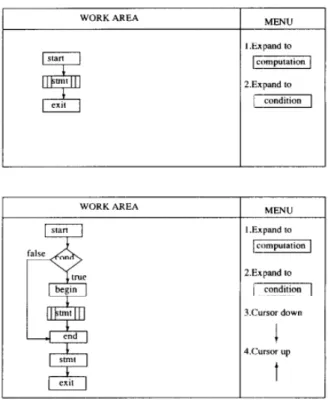
InArefi et al. (1990) is described a syntax directed editor generator for visual
program-ming languages. The user defines the syntax and semantics of the programprogram-ming language
and the generator will output its syntax-directed editor. Figure 12 depicts a generated
2.3. Text Editors Generators 13
Figure 8.: Concept Definition in MPS
ASF+SDF Meta-environment
The ASF+SDF Meta-environment (van den Brand et al., 2001) allows the user to write
lan-guage definitions. It provides the user with a parser, prettyprinter, syntax-directed editor, debugger, and interpreter or compiler for the language specification.
Synthesizer Generator
In the Synthesizer Generator (Reps and Teitelbaum,1984,2012) the user provides an
attribute-grammar specification that includes rules defining the abstract syntax, attribution, display format and concrete input syntax. This specification is written in the SSL. The editor gen-erated represents the program as an attributed derivation tree. The Synthesizer Generator has also been used to create proof checkers and text-formatting editors.
In Listing 2.4 the lexemes of the language are defined. The lexemes are defined in the
following form:
2.3. Text Editors Generators 14
Figure 9.: Abstract Concept in MPS
2.3. Text Editors Generators 15
Figure 11.: MPS Resulted Editor
2.3. Text Editors Generators 16
It declares that all strings generated by the given regular-expression are in the named phylum. W H I T E S P A C E : < [\ \ t \ n ] >; A G E N D A : < " A G E N D A : " >; END : < " END . " >; G R O U P : < " * ** ( " >; E N D G R O U P : < " *) " >; N U M E R O : < [ 0 - 9 \ . \ - \ ( \ ) ]+ >; T E X T O : < [ a - zA - Z \ / \ ~ \ : \ @ \.\ -\ _ \ ? \! 0 - 9 \ ]+ >; Listing 2.4: Lexemes
The concrete input syntax is displayed in listing2.5
AG ::= ( A G E N D A Id I t e m L i s t END )
{ $$ . t = A g e n d a ( Id . t , I t e m L i s t . t ) ;};
I t e m L i s t ::= ( I t e m ) { $$ . t = ( I t e m . t :: I t e m L i s t N i l ) ;} | ( I t e m I t e m L i s t ) { $$ . t =( I t e m . t :: I t e m L i s t $ 2 . t ) ;} ;
I t e m ::= ( ’ + ’ Id Num Num Mor EM U )
{ $$ . t = S i n g l e ( Id . t , N u m $ 1 . t , N u m $ 2 . t , Mor . t , EM . t , U . t ) ;} | ( G R O U P Id I t e m L i s t E N D G R O U P ) { $$ . t = G r o u p ( Id . t , I t e m L i s t . t ) ;} ; Id ::= ( T E X T O ) { $$ . t = I d e n t i f i e r ( T E X T O ) ;}; Mor ::= ( T E X T O ) { $$ . t = M o r a d a ( T E X T O ) ;}; EM ::= ( T E X T O ) { $$ . t = E m a i l ( T E X T O ) ;}; U ::= ( T E X T O ) { $$ . t = Url ( T E X T O ) ;}; Num ::= ( N U M E R O ) { $$ . t = N u m e r o ( N U M E R O ) ;};
Listing 2.5: Concrete Syntax
AG { syn ag t ;}; I t e m { syn i t e m t ;}; I t e m L i s t { syn i t e m l i s t t ;}; Id { syn i d e n t i f i c a d o r t ;}; Mor { syn m o r a d a t ;}; EM { syn e m a i l t ;}; U { syn url t ;}; Num { syn num t ;};
ag ~ AG . t ; i t e m ~ I t e m . t ;
2.3. Text Editors Generators 17 i t e m l i s t ~ I t e m L i s t . t ; i d e n t i f i c a d o r ~ Id . t ; m o r a d a ~ Mor . t ; e m a i l ~ EM . t ; url ~ U . t ; num ~ Num . t ;
Listing 2.6: Association Rules
The display form of a term is determined by unparsing declarations which determine the textual representation of the term, the selectable components of the term and the default editing modes of those selectable components.
ag : Agenda [ @ ::= "AGENDA: " @
" Registos: " itemlist.acount "%t%n" @ "%b%nEND." ];
itemlist : ItemListNil [ @ ::= ]
| ItemListPair [ @ ::= @ ["%n"] @ ];
item : ItemNull [ @ ::= "<item>" ] | Single [ @ ::= "--> " @
" : " @ " : " @ " : " @ " : " @ " : " @ ]
| Group [ @ ::= "*** [" @ "]%t%t%n" @ "%b%b%n***%n" ];
identificador : IdentNull [ @ ::= "<identificador>" ] | Identifier [ @ ::= @ ]
;
morada : MoradaNull [ @ ::= "<morada>" ] | Morada [ @ ::= @ ]
;
email : EmailNull [ @ ::= "<email>" ] | Email [ @ ::= @ ]
;
url : UrlNull [ @ ::= "<url>" ] | Url [ @ ::= @ ] ;
num : NumNull [ @ ::= "<numero>" ] | Numero [ @ ::= @ ]
;
2.3. Text Editors Generators 18
The grammar can be extended by associating attributes to a grammar production. The user defines the attributes in the following form:
phylumo {
synthesized type attribute-name ; inherited type attribute-name ; } ;
The keywords synthesized an inherited can be abbreviated as syn and inh respectively.
i t e m l i s t , i t em { inh INT b c o u n t ; syn INT a c o u n t ; }; ag : A g e n d a { i t e m l i s t . b c o u n t = 0; }; i t e m l i s t : I t e m L i s t N i l { $$ . a c o u n t = $$ . b c o u n t ;} | I t e m L i s t P a i r { i t e m . b c o u n t = i t e m l i s t $ 1 . b c o u n t ; i t e m l i s t $ 2 . b c o u n t = i t e m . a c o u n t ; i t e m l i s t $ 1 . a c o u n t = i t e m l i s t $ 2 . a c o u n t ; }; i t e m : I t e m N u l l { $$ . a c o u n t = $$ . b c o u n t ; } | S i n g l e { $$ . a c o u n t = $$ . b c o u n t +1; } | G r o u p { i t e m l i s t . b c o u n t = $$ . b c o u n t ; $$ . a c o u n t = i t e m l i s t . a c o u n t ; } ; Listing 2.8: Attributes
The previous definition of a grammar will produce a generator with an initial state
de-picted in Figure13.
After selecting the <item> placeholder (Figure14) we can either choose the context Simples
(Figure15) or the context Grupo (Figure16).
2.3. Text Editors Generators 19
Figure 13.: Synthesizer Generator Initial State
Figure 14.: Item Selected
2.3. Text Editors Generators 20
Figure 15.: Simples Selected
Figure 16.: Grupo Selected
LISA
The LISA system8
(Mernik et al.,2000;Henriques et al.,2005,2002) generates an interpreter
from an attribute grammar based language specifications. LISA generates two types of editors, a language knowledgeable editor and a syntax-directed editor LISA also generates inspectors, debuggers and visualizers for the given language definition.
l a n g u a g e R o b o t { l e x i c o n { C o m m a n d l e f t | r i g h t | up | d o w n R e s e r v e d W o r d b e g i n | end i g n o r e [\0 x0D \0 x0A \ ] }
a t t r i b u t e s int *. inx ; int *. iny ; int *. o u t x ; int *. o u t y ; r u l e s t a r t { S T A R T ::= b e g i n C O M M A N D S end c o m p u t e { S T A R T . o u t x = C O M M A N D S . o u t x ; S T A R T . o u t y = C O M M A N D S . o u t y ; 8 https://labraj.feri.um.si/lisa/
2.4. Summary 21 C O M M A N D S . inx = 0; C O M M A N D S . iny = 0; }; } ( . . . ) }
Listing 2.9: Language definition in LISA
Figure 18 shows the structure view of a program written in the language defined in
Listing 2.9. Even though it is said that LISA provides a syntax-directed editor it is not
present in the version available to download. It is only possible to view the structure of the program.
Figure 18.: Structure view in LISA
2.4 s u m m a r y
In the previous sections it was talked about the definition of source code editors as well as some of the features they include.
It was also presented the definition of a SDE and its advantages compared to a text-based source code editor.
It was also addressed the importance of having systems that generate text editors. Then the definition of language workbenches was introduced as well as several examples of SDE generators were presented. The Diagen system was considered but didn’t fit as a SDE gen-erator as it is a diagram gengen-erator.
3
S D E G E N E R AT O R : D E S I G N
The main goal of this master’s thesis is to develop a system able to generate syntax directed editors for any given language grammar. This grammar has to be defined in a meta lan-guage. The generated system shall provide a complete editing environment where the user can create and edit programs guided by the syntax tree of the language.
3.1 r e q u i r e m e n t s
The generated editor must have the following features: • Edit a program by syntax editing commands
• Edit a program by editing both the program tree and text without violating the syntax of the grammar
• Save and load valid text files to the editor
• Save and load the state of the edition without requiring the program to be syntactically correct
3.2 a r c h i t e c t u r e
The user starts by providing the grammar to the system. The system will then generate the required templates to be used by the SDE to build the program tree. The parser and the lexer of the grammar will also be generated. When a text file is loaded the parser and lexer will be used to build the abstract tree which with the grammar templates will be used to generate the program tree and display it on the editor.
3.2. Architecture 23
Figure 19.: System Architecture
Figure19 depicts the different components of the system. The Generator component is
used to generate the grammar templates the parser and lexer of the grammar. The Program Tree component represents the program in the editor and is modified by the user while editing. When loading a text file, the Program Tree Generator component will generate the program tree using the grammar templates and the text syntax tree.
The system was developed in Java and Javascript. The program tree was drawn using the D3.js1
library. ANTLR2
was used to generate the parser and the lexer.
1 https://d3js.org/
4
S D E G E N E R AT O R : D E V E L O P M E N T
This chapter will be used to describe the development of the SDE Generator. The develop-ment of the SDE generator was split unto four steps:
• Definition of the meta language • Generation of the grammar templates • Building the program tree
• Loading text files unto the editor
4.1 g r a m m a r
To generate the editor, the user has to supply a grammar defined in the meta language. This meta language is based on the ANTLR grammar definition with the particular feature that the user can annotate the production terms.
This annotations are optional so the system accepts pure combined ANTLR grammars.
Currently the generator supports ANTLR v4.7 grammars. Listing 4.1 shows the changes
made to the ANTLR grammar to support the annotations. The terms commentAnnot? and annotation* were added to the grammarSpec and element rules respectively.
g r a m m a r S p e c : D O C _ C O M M E N T * commentAnnot? g r a m m a r T y p e i d e n t i f i e r S E M I p r e q u e l C o n s t r u c t * r u l e s m o d e S p e c * EOF ; e l e m e n t : l a b e l e d E l e m e n t ( e b n f S u f f i x |) annotation* | a t o m ( e b n f S u f f i x |) annotation* | e b n f annotation* | a c t i o n B l o c k Q U E S T I O N ? annotation* ; 24
4.1. Grammar 25 a n n o t a t i o n : AT n e w l i n e | AT c o l o r | h e l p e r A n n o t ; h e l p e r A n n o t : AT h e l p e r ; c o m m e n t A n n o t : b e g i n C o m m e n t e n d C o m m e n t ? ; b e g i n C o m m e n t : AT BC S T R I N G _ L I T E R A L ; e n d C o m m e n t : AT EC S T R I N G _ L I T E R A L ; n e w l i n e : N E W L I N E ; c o l o r : C O L O R ; h e l p e r : H S T R I N G _ L I T E R A L ; N E W L I N E : ’ nl ’ | ’ nlt ’ ; C O L O R : ’ c ’ ’ = ’ Id ; BC : ’ bc ’ ’ = ’ ; EC : ’ ec ’ ’ = ’ ; H : ’ h ’ ’ = ’ ;
Listing 4.1: Changes in the ANTLR grammar
They can be placed either after a production term (Listing4.2) or just before the grammar
definition (Listing 4.3). The former type of annotation is applied to the production term
immediately preceding the annotation, while the latter is applied globally on the grammar.
A single production term can have multiple annotations (Listing4.4).
The annotations may have arguments. Those that don’t have arguments are written as @<annotation name> while the annotations with arguments are written as @<annotation name>=<argument> i n s t r : i f I n s t r u c t i o n | w h i l e I n s t r u c t i o n | f o r I n s t r u c t i o n | atr ’ ; ’ @nl ; i f I n s t r u c t i o n : ’ if ’ ’ ( ’ c o n d ’ ) ’ ’ { ’ @ n l t i n s t r s ’ } ’ @nl e l s e C o n d i t i o n ? ;
4.1. Grammar 26
atr : I D @ c = red ’ = ’ exp ;
Listing 4.2: Annotations in a grammar rule
@bc = ’ \* ’ @ec = ’ */ ’
g r a m m a r G r a m a t i c a ;
p r o g r a m a : i n s t r s ;
Listing 4.3: Annotations before grammar definition
w h i l e I n s t r u c t i o n : ’ w h i l e ’ ’ ( ’ c o n d ’ ) ’ ’ { ’ i n s t r s ’ } ’ @c = red @nl ;
Listing 4.4: Multiple annotations in a grammar rule
Without annotations, the text presented by the editor would be formatted as shown in
Figure20, while with the annotations presented in listing4.2the text is shown as in Figure
21.
Figure 20.: Editor without annotations
Table 1 displays all the annotations present in the meta language as well as their
4.2. Templates 27
Figure 21.: Editor with annotations
Annotation Argument Used to
@h Text to be displayed display a helpful tip on a tree node.
@nl None insert a new line in the right side of the editor.
@nlt None insert a new line followed by a tab.
@c Color name color a terminal node.
@bc Char sequence in single quotes define the beginning of a comment.
@ec Char sequence in single quotes define the ending of a comment.
Table 1.: Annotations table
The annotations @h, @nl, @nlt and @c are placed after a production term, while the @bc and @ec annotations are placed before the definition of the grammar.
If the @bc annotation is declared and the @ec annotation is not the generator will inter-pret as a single line comment. If both annotations are declared it will be interinter-preted as a multiline comment. The @ec annotation can only be declared if @bc is declared.
Note that the comment annotations must correspond to the lexer rule of the grammar. For example if a single line comment is defined in the lexer as
LineComment: ’//’ ~[\r\n]* -> skip; the @bc annotation must be declared as @bc=’//’.
4.2 t e m p l at e s
As referred previously, a SDE needs grammar templates to be able to build programs. In the SDE Generator the templates are built after the initial parsing of the grammar and are
4.2. Templates 28
defined in JAVA classes. Templates depicts the grammar structure, its rules, productions, terms and annotations.
4.2.1 Grammar Template
The main class is the Grammar class (4.5) which represents the whole grammar. It stores the
grammar name, the begin comment (@bc) and end comment (@ec) annotations as well as the parser and lexer rules templates.
p u b l i c c l a s s G r a m m a r i m p l e m e n t s S e r i a l i z a b l e { p r i v a t e S t r i n g n a m e ; p r i v a t e A r r a y L i s t < P a r s e r R u l e > p a r s e r R u l e s ; p r i v a t e A r r a y L i s t < L e x e r R u l e > l e x e r R u l e s ; p r i v a t e S t r i n g b e g i n C o m m e n t ; p r i v a t e S t r i n g e n d C o m m e n t ; // ( . . . ) }
Listing 4.5: Grammar class
4.2.2 Rules Templates
The ParserRule (4.6) and LexerRule (4.7) classes represent respectively a parser and a lexer
rule of a grammar and contains the rule name and its productions.
p u b l i c c l a s s P a r s e r R u l e i m p l e m e n t s S e r i a l i z a b l e {
p r i v a t e S t r i n g n a m e ;
p r i v a t e A r r a y L i s t < P a r s e r P r o d u c t i o n > p r o d u c t i o n s ;
// ( . . . )
}
Listing 4.6: ParserRule class
p u b l i c c l a s s L e x e r R u l e i m p l e m e n t s S e r i a l i z a b l e { p r i v a t e S t r i n g n a m e ; p r i v a t e S t r i n g r e g e x ; p r i v a t e A r r a y L i s t < L e x e r P r o d u c t i o n > p r o d u c t i o n s ; // ( . . . ) }
4.2. Templates 29
4.2.3 Productions Templates
Both ParserProduction (4.8) and LexerProduction (4.9) are simple classes that are only
com-posed by a list of the productions terms.
p u b l i c c l a s s P a r s e r P r o d u c t i o n i m p l e m e n t s S e r i a l i z a b l e {
p r i v a t e A r r a y L i s t < P a r s e r T e r m > t e r m s ;
// ( . . . )
}
Listing 4.8: ParserProduction class
p u b l i c c l a s s L e x e r P r o d u c t i o n i m p l e m e n t s S e r i a l i z a b l e {
p r i v a t e A r r a y L i s t < L e x e r T e r m > t e r m s ;
// ( . . . )
}
Listing 4.9: LexerProduction class
4.2.4 Terms Templates
ParserTerm
A parser term (4.10) is characterized by its quantifier and by the new line (@nl or @nlt),
color (@c) and helper (@h) annotations.
p u b l i c a b s t r a c t c l a s s P a r s e r T e r m i m p l e m e n t s S e r i a l i z a b l e { p r i v a t e S t r i n g q u a n t i f i e r ; p r i v a t e S t r i n g n e w L i n e ; p r i v a t e S t r i n g c o l o r ; p r i v a t e S t r i n g h e l p e r ; // ( . . . ) }
Listing 4.10: ParserTerm class
The parser term is divided into three types: terminal, non-terminal and block. The Terminal class, defined by its name
p u b l i c c l a s s T e r m i n a l e x t e n d s T e r m {
4.2. Templates 30
p r i v a t e b o o l e a n e d i t a b l e ;
p r i v a t e b o o l e a n l e x e r ;
// ( . . . )
}
Listing 4.11: Terminal class
The Nonterminal class is simply defined by its name which is a rule name.
p u b l i c c l a s s N o n t e r m i n a l e x t e n d s T e r m {
p r i v a t e S t r i n g n a m e ;
// ( . . . )
}
Listing 4.12: Terminal class The Terminal class, defined by its name
A block term is defined as a set of terms surrounded by parentheses. A block can be
separated into alternatives by a vertical bar. In 4.13 (attribute | function | ruleClauses) is a
block that has three alternatives.
f o r m : ( a t t r i b u t e | f u n c t i o n | r u l e C l a u s e s ) ’ . ’ ;
Listing 4.13: Rule with a block term
It is represented by the lst:blockClass where the alternatives are lists of lists of ParserTerm.
p u b l i c c l a s s B l o c k e x t e n d s T e r m {
p r i v a t e A r r a y L i s t < A r r a y L i s t < P a r s e r T e r m > > a l t e r n a t i v e s ;
p r i v a t e b o o l e a n l e x e r ;
// ( . . . )
}
Listing 4.14: Block class
LexerTerm
The LexerTerm class (4.15) is characterized by its quantifier and it is divided into
SimpleLex-erTerm and LexerBlock classes.
4.2. Templates 31
p r i v a t e S t r i n g q u a n t i f i e r ;
// ( . . . )
}
Listing 4.15: LexerTerm class
The LexerSimpleTerm class is defined by the name and by a boolean that checks if the term is non-terminal or not (if it points to a lexer rule or not)
p u b l i c c l a s s L e x e r S i m p l e T e r m e x t e n d s L e x e r T e r m {
p r i v a t e S t r i n g n a m e ;
p r i v a t e b o o l e a n t e r m i n a l ;
// ( . . . )
}
Listing 4.16: LexerSimpleTerm class
Just like the Block class the LexerBlock is defined by a list of lists of alternatives.
p u b l i c c l a s s L e x e r B l o c k e x t e n d s L e x e r T e r m {
p r i v a t e A r r a y L i s t < A r r a y L i s t < L e x e r T e r m > > a l t e r n a t i v e s ;
// ( . . . )
}
Listing 4.17: LexerBlock class
4.2.5 Lexer Regular Expressions
After generating the lexer terms and productions templates the the lexer rule template is completed by composing the whole regular expression. This is done by joining all pro-ductions and terms template names. If the name refers to another lexer rule its regular expression is returned.
The regular expression of the ID lexer defined in Listing4.18 rule will be:
([a-z]|[A-Z])(([a-z]|[A-Z])|[0-9])+
ID : L E T T E R ( L E T T E R | D I G I T ) + ;
4.3. Structure of the Program Tree 32
;
L E T T E R : ’ a ’ .. ’ z ’ | ’ A ’ .. ’ Z ’ ;
Listing 4.18: Lexer Definition
Since JavaScript is used in the SDE generator ANTLR regular expressions need to be transformed to JavaScript regular expressions, for example the ANTLR interval of charac-ters, ’a’..’z’, is transformed to [a-z].
4.3 s t r u c t u r e o f t h e p r o g r a m t r e e
The tree structure of the program built is represented in a JSON object where the structure
of each node of the tree is displayed in Listing 4.19.
{
" d a t a " : {
" n a m e " : <name of the node> , " t e r m " : <Java object of the term> , " q u a n t i f i e r " : <term quantifier> ,
" t y p e " : <type of the term, either normal or block> } ,
" h e i g h t " : 0 , " d e p t h " : 0 ,
" p a r e n t " : <id of the node> , " id " : <node id> ,
" c h i l d r e n " : <node children> }
Listing 4.19: JSON Tree Structure
When a tree node is left clicked the program checks if the tree node can be expanded. A node can be expanded if it isn’t a terminal or it has the + or * quantifier.
When an expandable non terminal node is clicked the program will search on the gram-mar templates for the rule with the same name as the node. When found, it will add to the node children the production terms as new nodes of the tree.
A complete example of the JSON built is depicted in listingA.1.
4.4 t e x t l oa d i n g
When the user loads a valid text file it has to be transformed into the JSON object described previously to be displayed in the program. To do that the syntax tree of the text is
gener-4.4. Text Loading 33
ated. Figure 22depicts the syntax tree of the following text: 2*(2-5)
g r a m m a r Exp ; e v a l : a d d i t i o n E x p ; a d d i t i o n E x p : m u l t i p l y E x p ( ’ + ’ m u l t i p l y E x p | ’ - ’ m u l t i p l y E x p ) * ; m u l t i p l y E x p : a t o m E x p ( ’ * ’ a t o m E x p | ’ / ’ a t o m E x p ) * ; a t o m E x p : N u m b e r | ’ ( ’ a d d i t i o n E x p ’ ) ’ ; N u m b e r : ( ’ 0 ’ .. ’ 9 ’ ) + ( ’ . ’ ( ’ 0 ’ .. ’ 9 ’ ) +) ? ;
Listing 4.20: Example Grammar
4.4. Text Loading 34
To generate the JSON program structure, firstly the node children will be compared with productions of the grammar rule that matched the parent node to find the adequate production. After finding it the process repeats for each child node.
A tree node and a grammar term match:
1. If the grammar term is non-terminal and the tree node name equals the term name
2. If the grammar term and the tree node is terminal and the term regular expression
matches the name of the tree node
When a term and a node match the following term and node are compared. When a term has the + quantifier or the * quantifier if there was a match in the first node the next nodes are compared with the same term until there is no match. A block term is compared to a node by comparing its alternative terms to the node, just like comparing a rule production. If a node doesn’t match with a term, the search breaks and starts over in the next rule production. When a term with the * quantifier or the ? quantifier doesn’t match with the node, the search doesn’t break and it is added an empty node to the JSON to represent zero occurrences. A set of nodes won’t match to a block term if it didn’t match to any alternatives of the block.
Using the example grammar and the text syntax tree previously defined the process of building the JSON object goes as it follows:
Firstly the first child node of the tree, the additionExp node, is compared with the first term of the first production of the start rule, the additionExp term. Since they match and there is no more nodes nor terms in the production to be compared the search will start over with the children of the additionExp node and the first production of the additionExp rule.
Next the multiplyExp node will be compared with the multiplyExp term and there is a match. The block ( ’+’ multiplyExp | ’-’ multiplyExp )* won’t match with anything since there are no more nodes to be compared.
Next the atomExp node will be compared with the atomExp term and there is a match. The following nodes will match with the first alternative of the block.
After the execution of the algorithm the JSON object (listingA.1) will be built and both
5
S D E G E N E R AT O R : W E B A P P L I C AT I O N
Since great part of the application was developed in JavaScript it made sense to develop a web version for the SDE generator.
In this chapter the architecture of the web application will be explained and the web appli-cation will be presented.
5.1 a r c h i t e c t u r e
The web server has two endpoints to interact with the client, one for uploading the grammar the other to upload the text file.
When uploading the grammar (Figure23) the client sends a post request with the
gram-mar file. The server then generates the templates and the gramgram-mar parser and lexer files. To distinguish the produced files from different grammars they are saved in a folder whose name is the SHA-1 hash of the grammar file. The server then responds to the client with the grammar hash and the grammar templates in JSON format.
Figure 23.: Loading a grammar
When uploading a text file (Figure24) the client sends a post request with the text file
and the hash of the grammar file received when uploading the grammar. The server locates the folder where the grammar parser and lexer are stored and generates the Text Syntax
5.2. Website 36
Tree. The server responds to the client with the syntax tree in JSON format which with the grammar templates will be used by the client to build the program tree.
Figure 24.: Loading a text file
5.2 w e b s i t e
The web application resembles the Java application. The user can load the grammar and a text file and edits the program the same as the Java version. The web application can be
accessed inhttps://sdegenerator.herokuapp.com/.
6
S D E G E N E R AT O R : U S E O F T H E S Y S T E M
In this chapter it will be presented the environment where the user edits the program. It will be listed the commands available to the user for the edition of the program. It will also be explained how the comment and helper annotations influence the edition of the program.
6.1 s i m p l e e d i t i n g
To edit the program the user just has to left click in the tree node and the respective pro-duction terms will appear in the level below. This type of editing is only possible if the rule has only one production.
w h i l e I n s t r u c t i o n : ’ w h i l e ’ ’ ( ’ c o n d ’ ) ’ ’ { ’ @ n l t i n s t r s ’ } ’ @nl ;
Listing 6.1: While rule
Figure 26.: While condition in the editor
6.1. Simple Editing 38
6.1.1 Multiple Productions
If the rule has more than one production the user instead of left clicking has to right click the node. After right clicking a list of available productions will be presented then the user
chooses the desired option and keeps on building. Figure27shows the resulting list of the
rule defined in listing6.2.
i n s t r : i f I n s t r u c t i o n | w h i l e I n s t r u c t i o n | f o r I n s t r u c t i o n | atr ’ ; ’
;
Listing 6.2: Inst rule
Figure 27.: Multiple Productions in the editor
6.1.2 Quantifiers
Productions terms may be followed by quantifiers. There are three types of quantifiers, the ’+ ’ quantifier (one or more occurrences), the ’* ’ quantifier (zero or more occurrences) and
the ’? ’ quantifier (zero or one occurrence). ’+’ Quantifier
To add more than one occurrence to a term the user simply has to click the tree node has many times as he wants.
6.1. Simple Editing 39
’*’ Quantifier
Just as the ’+ ’ quantifier the user clicks as many times as he wants. If the user pretends zero occurrences right clicking the node will show an option Empty that adds an empty node to the tree.
’?’ Quantifier
The user either left clicks the node or right clicks and chooses the Empty option.
6.1.3 Block Editing
Block editing is done the same way as editing rules with multiple productions where the right click list is composed by the block alternatives.
6.1.4 Editing Terminals
To edit the terminal terms the user clicks the pencil button next to the node and writes the terminal node. One of the features of this editor is the fact that it is also possible to edit the terminal node in the text.
If the text inserted isn’t valid the editor alerts the user marking the text red as show in
Figure29.
6.1.5 Comments
It is possible to assign comments to the tree nodes. To do that the user clicks in the comment button next to the tree node and writes the desired comment. If the @bc is defined, the comment will be written on the left side of the editor. Like editing terminals it is possible to edit the comments in both sides of the editor.
6.1.6 Helper Annotations
When the user defines the helper annotation to a term an exclamation point appears next to the correspondent tree node. When clicked displays the annotation. Unlike comments, it’s not possible to edit the annotation.
6.1. Simple Editing 40
Figure 28.: Valid terminal
6.2. Loading and Saving 41
Figure 29.: Invalid terminal
6.1.7 Swap Operations
It is possible to swap the position of the nodes that are children to the same node with the ’+’ or ’*’ quantifier. This allows the user to switch the order of the program.
6.2 l oa d i n g a n d s av i n g
There are two ways to save and load programs. The user can choose between saving the editing tree or saving as a text file.
6.2.1 Tree Saving and Loading
This option saves the tree state as a serialized JAVA object. The grammar templates, the parser and the lexer are also saved so the serializable object can be loaded without requiring the grammar to be loaded. This option allows the program to be saved without being a valid program.
6.2. Loading and Saving 42
6.2.2 Text Saving and Loading
The editor only allows valid text files to be loaded unto the editor. To save to a text file the editor firstly validates the text and if it is valid saves the program.
7
C O N C L U S I O N
By being aware of the language grammar, syntax-directed editing is a mechanism useful for a beginner user as it ensures the syntactic correctness of a program. Editors that al-low this kind of editing are import as it spares a new user from knowing extensively the programming language grammar.
In this master’s thesis it was developed a system capable of generating syntax-directed editors for a given language grammar. The grammar is written in a meta-language that allows the user to annotate the grammar to change the display of the program on the ed-itor. The generated editor is intuitive and easy to use to a user new to the programming language. The editor is capable of loading text files of a determined grammar previously loaded unto the editor as well as saving the program as a text file if the program is syntac-tically correct. If the program is not correct it’s possible to save the state of the edition to resume at another time.
Along this document it was documented the development of the SDE generator, from the definition of the meta language, used by the system to generate the SDE, to the generation of its templates and finally how these templates were used to allow the edition of the program. It was also described how the system is used.
The SDE generator is available both as a standalone Java application and as a web appli-cation.
B I B L I O G R A P H Y
Metaedit+ workbench evaluation tutorial. https://www.metacase.com/support/45/
manuals/evaltut/et-Title.html, a. Accessed: 2017-10-15.
Metaedit+ workbench user’s guide. https://www.metacase.com/support/45/manuals/
mwb/Mw.html, b. Accessed: 2017-10-15.
Farah Arefi, Charles E Hughes, and David A Workman. Automatically generating visual syntax-directed editors. Communications of the ACM, 33(3):349–360, 1990.
Sven Efftinge and Markus Völter. oaw xtext: A framework for textual dsls. In Workshop on Modeling Symposium at Eclipse Summit, volume 32, page 118, 2006.
Sebastian Erdweg, Tijs Van Der Storm, Markus Völter, Meinte Boersma, Remi Bosman, William R Cook, Albert Gerritsen, Angelo Hulshout, Steven Kelly, Alex Loh, et al. The state of the art in language workbenches. In International Conference on Software Language Engineering, pages 197–217. Springer, 2013.
Moritz Eysholdt and Heiko Behrens. Xtext: implement your language faster than the quick and dirty way. In Proceedings of the ACM international conference companion on Object ori-ented programming systems languages and applications companion, pages 307–309. ACM, 2010.
Martin Fowler. Projectional editing. http://martinfowler.com/bliki/
ProjectionalEditing.html. Accessed: 2016-11-12.
Martin Fowler. Language workbenches: The killer-app for domain specific languages. 2005. Pedro Rangel Henriques, Maria Joao Varanda Pereira, Marjan Mernik, Mitja Leniˇc, Enis Avdiˇcauševi´c, and Viljem Žumer. Automatic generation of language-based tools. Elec-tronic notes in theoretical computer science, 65(3):77–96, 2002.
Pedro Rangel Henriques, MJ Varanda Pereira, Marjan Mernik, Mitja Lenic, Jeff Gray, and Hui Wu. Automatic generation of language-based tools using the lisa system. IEE Proceedings-Software, 152(2):54–69, 2005.
TF Lunney and RH Perrott. Syntax-directed editing. Software Engineering Journal, 3(2):37–46, 1988.
Marjan Mernik, Mitja Lenic, Enis Avdicauševic, and Viljem Zumer. Multiple attribute gram-mar inheritance. Informatica, 24(3):319–328, 2000.
Bibliography 45
Sten Minör. Interacting with structure-oriented editors. International Journal of Man-Machine Studies, 37(4):399–418, 1992.
Vaclav Pech, Alex Shatalin, and Markus Voelter. Jetbrains mps as a tool for extending java. In Proceedings of the 2013 International Conference on Principles and Practices of Programming on the Java Platform: Virtual Machines, Languages, and Tools, pages 165–168. ACM, 2013. Thomas Reps. Optimal-time incremental semantic analysis for syntax-directed editors. In
Proceedings of the 9th ACM SIGPLAN-SIGACT symposium on Principles of programming lan-guages, pages 169–176. ACM, 1982.
Thomas Reps and Tim Teitelbaum. The synthesizer generator. ACM SIGSOFT Software Engineering Notes, 9(3):42–48, 1984.
Thomas Reps and Tim Teitelbaum. The synthesizer generator reference manual. Springer Sci-ence & Business Media, 2012.
Tim Teitelbaum and Thomas Reps. The cornell program synthesizer: a syntax-directed programming environment. Communications of the ACM, 24(9):563–573, 1981.
Juha-Pekka Tolvanen and Matti Rossi. Metaedit+: defining and using domain-specific mod-eling languages and code generators. In Companion of the 18th annual ACM SIGPLAN conference on Object-oriented programming, systems, languages, and applications, pages 92–93. ACM, 2003.
Juha-Pekka Tolvanen, Risto Pohjonen, and Steven Kelly. Advanced tooling for domain-specific modeling: Metaedit+. In Sprinkle, J., Gray, J., Rossi, M., Tolvanen, JP (eds.) The 7th OOPSLA Workshop on Domain-Specific Modeling, Finland, 2007.
Mark GJ van den Brand, Arie van Deursen, Jan Heering, HA De Jong, Merijn de Jonge, Tobias Kuipers, Paul Klint, Leon Moonen, Pieter A Olivier, Jeroen Scheerder, et al. The asf+ sdf meta-environment: A component-based language development environment. In International Conference on Compiler Construction, pages 365–370. Springer, 2001.
Markus Voelter and Vaclav Pech. Language modularity with the mps language workbench. In 2012 34th International Conference on Software Engineering (ICSE), pages 1449–1450. IEEE, 2012.
Markus Völter and Eelco Visser. Language extension and composition with language work-benches. In Proceedings of the ACM international conference companion on Object oriented programming systems languages and applications companion, pages 301–304. ACM, 2010. Marvin V Zelkowits. A small contribution to editing with a syntax directed editor. ACM
A
P R O G R A M T R E E J S O N { " d a t a " : { " n a m e " : " e v a l " , " t e r m " : null , " m u l t i p l i c i t y " : " " , " t y p e " : " n o r m a l " } , " h e i g h t " : 0 , " d e p t h " : 0 , " p a r e n t " : null , " id " : 1 , " c h i l d r e n " : [{ " d a t a " : { " n a m e " : " a d d i t i o n E x p " ," t e r m " : <Java object of the term> , " m u l t i p l i c i t y " : " " , " t y p e " : " n o r m a l " } , " d e p t h " : 1 , " h e i g h t " : 0 , " c h i l d r e n " : [{ " d a t a " : { " n a m e " : " m u l t i p l y E x p " ,
" t e r m " : <Java object of the term> , " m u l t i p l i c i t y " : " " , " t y p e " : " n o r m a l " } , " d e p t h " : 2 , " h e i g h t " : 0 , " c h i l d r e n " : [{ " d a t a " : { " n a m e " : " a t o m E x p " ,
" t e r m " : <Java object of the term> , " m u l t i p l i c i t y " : " " ,
" t y p e " : " n o r m a l "
47 } , " d e p t h " : 3 , " h e i g h t " : 0 , " c h i l d r e n " : [{ " d a t a " : { " n a m e " : " 2 " ,
" t e r m " : <Java object of the term> , " m u l t i p l i c i t y " : " " , " t y p e " : " n o r m a l " } , " d e p t h " : 4 , " h e i g h t " : 0 - 1 2 5 . 5 5 5 5 5 5 5 5 5 5 5 5 5 4 , " id " : 8 , " p a r e n t " : 5 - 1 2 5 . 5 5 5 5 5 5 5 5 5 5 5 5 5 4 } ] - 1 2 5 . 5 5 5 5 5 5 5 5 5 5 5 5 5 4 , " id " : 5 , " p a r e n t " : 3 - 1 2 5 . 5 5 5 5 5 5 5 5 5 5 5 5 5 4 } , { " d a t a " : { " n a m e " : " (* a t o m E x p | / a t o m E x p | ) " , " t e r m " : <Java object of the term> ,
" m u l t i p l i c i t y " : " * " , " t y p e " : " b l o c k " } , " d e p t h " : 3 , " h e i g h t " : 0 , " c h i l d r e n " : [{ " d a t a " : { " n a m e " : " (* a t o m E x p | / a t o m E x p | ) " , " m u l t i p l i c i t y " : " " , " t y p e " : " n o r m a l " } , " d e p t h " : 4 , " h e i g h t " : 0 , " c h i l d r e n " : [{ " d a t a " : { " n a m e " : " * " ,
" t e r m " : <Java object of the term> , " m u l t i p l i c i t y " : " " , " t y p e " : " n o r m a l " } , " d e p t h " : 5 , " h e i g h t " : 0 - 1 5 . 5 5 5 5 5 5 5 5 5 5 5 5 5 4 3 , " id " : 10 , " p a r e n t " : 9 - 1 5 . 5 5 5 5 5 5 5 5 5 5 5 5 5 4 3 } , { " d a t a " : {
48
" n a m e " : " a t o m E x p " ,
" t e r m " : <Java object of the term> , " m u l t i p l i c i t y " : " " , " t y p e " : " n o r m a l " } , " d e p t h " : 5 , " h e i g h t " : 0 , " c h i l d r e n " : [{ " d a t a " : { " n a m e " : " ( " ,
" t e r m " : <Java object of the term> , " m u l t i p l i c i t y " : " " , " t y p e " : " n o r m a l " } , " d e p t h " : 6 , " h e i g h t " : 0 , " id " : 12 , " p a r e n t " : 11 } , { " d a t a " : { " n a m e " : " a d d i t i o n E x p " ,
" t e r m " : <Java object of the term> , " m u l t i p l i c i t y " : " " , " t y p e " : " n o r m a l " } , " d e p t h " : 6 , " h e i g h t " : 0 , " c h i l d r e n " : [{ " d a t a " : { " n a m e " : " m u l t i p l y E x p " ,
" t e r m " : <Java object of the term> , " m u l t i p l i c i t y " : " " , " t y p e " : " n o r m a l " } , " d e p t h " : 7 , " h e i g h t " : 0 , " c h i l d r e n " : [{ " d a t a " : { " n a m e " : " a t o m E x p " ,
" t e r m " : <Java object of the term> , " m u l t i p l i c i t y " : " " , " t y p e " : " n o r m a l " } , " d e p t h " : 8 , " h e i g h t " : 0 , " c h i l d r e n " : [{ " d a t a " : {
49
" n a m e " : " 2 " ,
" t e r m " : <Java object of the term> , " m u l t i p l i c i t y " : " " , " t y p e " : " n o r m a l " } , " d e p t h " : 9 , " h e i g h t " : 0 , " id " : 20 , " p a r e n t " : 17 }] , " id " : 17 , " p a r e n t " : 15 } , { " d a t a " : { " n a m e " : " (* a t o m E x p | / a t o m E x p | ) " , " t e r m " : <Java object of the term> ,
" m u l t i p l i c i t y " : " * " , " t y p e " : " n o r m a l " } , " d e p t h " : 8 , " h e i g h t " : 0 , " c h i l d r e n " : [{ " d a t a " : { " n a m e " : " E m p t y " , " m u l t i p l i c i t y " : " " , " t y p e " : " e m p t y " } , " d e p t h " : 9 , " h e i g h t " : 0 , " id " : 21 , " p a r e n t " : 18 }] , " id " : 18 , " p a r e n t " : 15 }] , " id " : 15 , " p a r e n t " : 13 } , { " d a t a " : { " n a m e " : " (+ m u l t i p l y E x p | - m u l t i p l y E x p | ) " , " t e r m " : <Java object of the term> ,
" m u l t i p l i c i t y " : " * " , " t y p e " : " b l o c k " } , " d e p t h " : 7 , " h e i g h t " : 0 , " c h i l d r e n " : [{
50 " d a t a " : { " n a m e " : " (+ m u l t i p l y E x p | - m u l t i p l y E x p | ) " , " m u l t i p l i c i t y " : " " , " t y p e " : " n o r m a l " } , " d e p t h " : 8 , " h e i g h t " : 0 , " c h i l d r e n " : [{ " d a t a " : { " n a m e " : " - " ,
" t e r m " : <Java object of the term> , " m u l t i p l i c i t y " : " " , " t y p e " : " n o r m a l " } , " d e p t h " : 9 , " h e i g h t " : 0 , " id " : 22 , " p a r e n t " : 19 } , { " d a t a " : { " n a m e " : " m u l t i p l y E x p " ,
" t e r m " : <Java object of the term> , " m u l t i p l i c i t y " : " " , " t y p e " : " n o r m a l " } , " d e p t h " : 9 , " h e i g h t " : 0 , " c h i l d r e n " : [{ " d a t a " : { " n a m e " : " a t o m E x p " ,
" t e r m " : <Java object of the term> , " m u l t i p l i c i t y " : " " , " t y p e " : " n o r m a l " } , " d e p t h " : 10 , " h e i g h t " : 0 , " c h i l d r e n " : [{ " d a t a " : { " n a m e " : " 5 " ,
" t e r m " : <Java object of the term> , " m u l t i p l i c i t y " : " " , " t y p e " : " n o r m a l " } , " d e p t h " : 11 , " h e i g h t " : 0 , " id " : 26 , " p a r e n t " : 24
51 }] , " id " : 24 , " p a r e n t " : 23 } , { " d a t a " : { " n a m e " : " (* a t o m E x p | / a t o m E x p | ) " , " t e r m " : <Java object of the term> ,
" m u l t i p l i c i t y " : " * " , " t y p e " : " n o r m a l " } , " d e p t h " : 10 , " h e i g h t " : 0 , " c h i l d r e n " : [{ " d a t a " : { " n a m e " : " E m p t y " , " m u l t i p l i c i t y " : " " , " t y p e " : " e m p t y " } , " d e p t h " : 11 , " h e i g h t " : 0 , " id " : 27 , " p a r e n t " : 25 }] , " id " : 25 , " p a r e n t " : 23 }] , " id " : 23 , " p a r e n t " : 19 }] , " id " : 19 , " p a r e n t " : 16 }] , " id " : 16 , " p a r e n t " : 13 }] , " id " : 13 , " p a r e n t " : 11 } , { " d a t a " : { " n a m e " : " ) " ,
" t e r m " : <Java object of the term> , " m u l t i p l i c i t y " : " " , " t y p e " : " n o r m a l " } , " d e p t h " : 6 , " h e i g h t " : 0 , " id " : 14 ,