Faculdade de Engenharia da Universidade do Porto
A context-sensitive Augmented Reality Audio
system using personal or public online contents
Storytelling Application for Android exploring Augmented Reality
Audio and Image Classification
Ana Salomé A. V. B. Alves
Dissertation submitted for the degree of Master in Electro Technical and
Computer Engineering
Supervisor: Prof. Nuno Teixeira de Almeida
June2018
ii
iii
Abstract
The main goal of this project was to develop an application for mobile devices, exploring the potential of Augmented Reality Audio in children’s education.
In fact, interactive games and storytelling are two good and effective ways to teach children. Taking that into consideration, inspired by a theatre production for children, this project is a storytelling application which incentives a child to draw and to identify the respective intervenient personages. This interaction is made through drawings, pictures or objects selection, determining whether or not the story proceeds.
The application was developed using Android Studio environment and, to identify the personages, an image classifier based on Mobilenet model, implemented through Tensorflow libraries. This model is based on a convolutional neural network and is designed to run effectively on devices with computational limitations.
A set of tests were made with drawings, images and objects to evaluate the performance of the application when fed with different input images. The obtained results validate the chosen approach, leaving space for eventual further developments.
v
Contents
Chapter 1 ... 1
Introduction ... 1 1.1 – Context ... 1 1.2 – Objectives ... 1 1.3 – Structure ... 2Chapter 2 ... 3
State of the Art and Related Work ... 3
Chapter 3 ... 6
System Definition ... 6
3.1 - Main Objective ... 6
3.2 – System Requirements ... 7
3.3 – Available Tools and Techniques ... 8
3.4 – Chosen Tools for the System ... 11
Chapter 4 ... 14
Frameworks and Tools ... 14
4.1 - Anaconda Distribution... 14
4.2 - Python ... 15
4.3 - Tensorflow ... 15
4.4 – Tensorboard ... 16
4.5 - CUDA and cuDNN ... 16
4.6 - Android Studio ... 17
4.7 - Kotlin ... 17
4.8 – SQLite ... 18
4.9 – Other Tools ... 18
Chapter 5 ... 19
Image Classification with Tensorflow ... 19
5.1 - Machine Learning ... 19
5.2 - Neural Networks ... 19
5.3 - MobileNets ... 21
Chapter 6 ... 24
Developing Process ... 24
vi
6.2 - Deploying model to Android ... 28
6.3 - Developing Storytelling Logic on Android ... 29
Chapter 7 ... 32
Tests and Demonstration ... 32
7.1 – Running tests on the Laptop with retrained graph ... 32
7.2 – Comparison between retrained graph and optimized graph ... 37
7.3 – Running tests on Android device ... 38
7.4 – Results Discussion ... 39
Chapter 8 ... 41
Conclusion and Future Work ... 41
8.1 – Conclusion ... 41
8.2 - Future Work ... 41
vii
List of Figures
Figure 3.1 – Main Process ... 6
Figure 3.2 - Main functional blocks of the application ... 7
Figure 4.1 – Anaconda Navigator ... 14
Figure 4.2 – Tensorboard while the model is training ... 16
Figure 4.3 - Android Studio Development Environment ... 17
Figure 5.1 – Neural Network ... 20
Figure 5.2 –Convolutional Neural Network ... 21
Figure 5.3 – Standard convolution example diagram ... 22
Figure 5.4 – Depthwise separable convolution example diagram ... 22
Figure 5.5 – MobilNet Model ... 23
Figure 6.1 – NVIDIA CUDA installer ... 24
Figure 6.2 – Anaconda installer ... 25
Figure 6.3 – Command line code to create virtual environment with python 3.5 .... 25
Figure 6.4 - Command line code to install Tensorflow with GPU support ... 25
Figure 6.5 - Training and Validation Accuracy after training is finished ... 27
Figure 6.6 – Cross Entropy (Training and Validation) ... 27
Figure 6.7 – Application’s algorithm on Android ... 29
Figure 6.8 – Commands to create SQLite database and tables ... 31
Figure 7.1 – Classifier results, running on the laptop, with drawn bird as input.. ... 32
viii
Figure 7.3 - Classifier results, running on the laptop, with drawn girl as input. ... 33
Figure 7.4 - Classifier results, running on the laptop, with picture of a bird as
input. ... 34
Figure 7.5 - Classifier results, running on the laptop, with picture of a cow as
input. ... 34
Figure 7.6 - Classifier results, running on the laptop, with picture of a girl as
input. ... .35
Figure 7.7 - Classifier results, running on the laptop, with picture of bird (toy) as
input. ... 35
Figure 7.8 - Classifier results, running on the laptop, with picture of cow (toy) as
input. ... 36
Figure 7.9 - Classifier results, running on the laptop, with picture of girl (toy) as
input ... 36
Figure 7.10 – Retrained graph results, running on the laptop, with drawn bird as
input. ... 37
Figure 7.11 – Optimized graph results, running on the laptop, with drawn bird as
input. ... 37
Figure 7.12 - Classifier results, running on the android device, with draws of a bird,
a cow and a girl input. ... 38
Figure 7.13 - Classifier results, running on the android device, with pictures of a
bird, a cow and a girl input... ... 38
Figure 7.14 - Classifier results, running on the android device, with pictures of a
ix
List of Tables
Table 7.1 – Results on laptop and mobile device, with drawings as input. ... 39
Table 7.2 - Results on laptop and mobile device, with pictures as input. ... 39
Table 7.3 - Results on laptop and mobile device, with objects (toys) as input. ... 40
x
Abbreviations
AR Augmented Reality
CNN Convolutional Neural Network
CPU Central Processing Unit
cuDNN CUDA Deep Neural Network
EMT Educational Magic Toys
GPU Graphics Processing Unit
HUD Head-up Display
IDE Integrated Development Environment
NDK Native Development Kit
NN Neural Network
SDK Software Development Kit
TAR Tactical Augmented Reality
Chapter 1
Introduction
1.1 – Context
In the past few years, the field of Augmented Reality (AR) has grown exponentially. It no longer requires expensive and sophisticated equipment. It can be used with computers and mobile devices: phones, tablets and eyewear devices.
AR provides a way of enriching the surrounding environment and makes it more interactive. Although the main focus has been on visual content, sensory and audio elements are also being explored.
Exploring AR from an audio perspective brings the possibility to not only enrich the experience but also to extend it to the visually impaired population, from children to elders.
So far, AR has reached a variety of fields and applications: military, medical, gaming, maintenance and repair, advertising and promotion, navigation and education.
There is a lot that can be achieved by combining AR audio concept with gaming and education.
1.2 – Objectives
Because children learn best while playing, in this project, the combination of AR audio and storytelling is explored, with the goal of making an interactive application for Android mobile devices.
Inspired on a theatre production for children [1], this application stimulates children to draw, photograph or find the requested object so that the story can go forward.
Regarding the identification of the input images, in this project the chosen approach was to use an image classifier based on convolutional neural networks. It allows a wider range of identifiable images contrary to other techniques that use pre-defined targets.
1.3 – Structure
This work is presented in eight chapters.
The first chapter includes a global perspective of the benefits and applications of augmented reality, as well as the dissertation structure.
Chapter 2 is the state of the art. Summarizes several examples of AR applications on different areas, from surgery to education, exploring sense such as vision, audition, touch and smell.
The third chapter describes the logic behind the solution. The frameworks and tools used to achieve it are overviewed on chapter 4.
The concepts behind the solution design are addressed on chapter 5, where the technique for image classification is reviewed.
Chapter 6 includes the steps needed to achieve the solution. From environment setup to deployment of the final solution.
Demonstration scenarios and results are discussed on chapter 7.
Chapter 2
State of the Art and Related Work
Augmented Reality consists on overlaying virtual content with the real world. This concept allows the enrichment of the environment surrounding the user, enhancing the experience. Can be applied to all senses, vision, audio, touch and even smell.
An increasing number of applications using AR have been developed, over the last years, across a variety of fields.
The following projects are examples of AR applications relaying on visual content:
“SixthSense” is a wearable gestural interface constituted of a pocket projector, a mirror and a camera, coupled like a mobile device that the user wears like a pendant. The content is projected onto surfaces, walls and physical objects and the user can interact with it throw natural gestures. This prototype implements several applications, such as maps displayed on a nearby surface and live videos playing on a newspaper [2].
“HUNTR” system is a small eyepiece, used by the military. It overlays a map onto the soldier’s vision field, displaying both target and team members location. The application uses GPS data, helmet-camera data and inertial sensors to geo-locate the soldier [3].
“Touch Surgery” is an interactive platform for healthcare professionals. Its surgical simulator provides a realistic and detailed guide of the procedures. It is used for learning and training for surgery [4].
“Snapchat” augments the users pictures by overlaying fun content when some features are detected, such as faces, eyes and hair [5].
“Sydic” is a GPS navigation system which includes a Head-up Display (HUD) to project navigation graphics onto the windshield of the car. The application presents the best routes to escape traffic, information about fuel prices and warnings about speed limits and speed cameras [6].
“Leybold”, leader in the industry of vacuum pumps, developed Smart Service Assistant. An AR application making it possible for pump owners to follow the complex steps for maintenance and repair, without technical knowledge [7]. IKEA designed an application that allows customers to visualize furniture on their
houses, before purchase [8].
“Ingress”, developed by Niantic, is a story-driven multiplayer game. Most of the action takes place at museums, parks and places of interest [9].
“Pokemon-Go” is a very successful AR game, where the player’s environment is augmented depending on their location [10].
“Eno Hyde” is an AR application for iOS, which displays prismatic geometric shapes and skyscrapers pulsating, bouncing, disintegrating and reassembling as a vinyl record makes its revolutions [11].
Stepping into an audio approach of AR, there’s a few examples below, from games to applications to aid visually impaired:
“Toozla” is a global positioning system with audio tours, stories and local information. This audio travel guide allows users to record and publish their own content as well [12].
“TableDrum” turns the world into a drum set. Mapping environment sounds to specific drum sounds, the user can play drum anywhere with day to day objects [13].
“Bose AR” wearable places audio in the user surroundings. Recognizes head gestures, voice and taps on the wearable. Knows which way the user is facing and can connect that place and time with endless content. Among other possibilities, can be used for travel, music and learning [14].
“Soundscape”, developed by Microsoft, provides audio cues, as the user walks through an environment, using the 3D audio technology, which gives the effect of the cue being broadcast from where the object is located [15].
Less explored strands are AR applications involving tactile feedback and smell:
“REVEL” is an AR application equipped with tactile technology, allowing the user to feel different textures by applying a weak electrical current signal on the user’s
body. Using the principle of reverse electro vibration, the user perceives distinctive tactile textures just by sliding his finger on an object’s surface [16].
“Dead Men’s Eyes” is a system build with a smartphone, an Arduino microcontroller and Unity3D application. Thought for archaeological practice, aims to allow the user to see, hear and smell the past, from the place where it happened [17].
In the field of children education, there are several examples too:
In the nursery school Juana Alarco de Dammert, an AR application was developed for improving the learning of vowel usage and numbers on children. Constituted by several cards with pictures, vowels and numbers that when scanned display a 3d model [18].
“Educational Magic Toys” (EMT) has puzzles and cards to teach animals, fruits, vegetables, vehicles and shapes to children. Through AR, these toys are augmented with virtual content such as story animations or 3D objects [19].
“Math Ninja AR” overlays a Japanese-inspired village on the environment. Every map has a math question and the personages have numbers over their heads. The child has to pick the right personage to answer correctly [20].
“AR-Animals” is an AR book. When the smartphone scans a specific image, a 3D animation of the scanned animal appears [21].
“Catchy Words” is a game where the player needs to catch floating letters and arrange them so they make a word [22].
“Live coloring” is a painting app. There are several drawings available. When the phone scans the drawing, a 3D animation of the personage is displayed. As the user paints the drawing, the animation is painted as well [23].
“Anatomy 4D” is an application about human anatomy. When a printed version of the available diagrams is scanned, the application displays a 3D model of a human, allowing the user to interact [24].
AR can definitely be applied in a variety of fields. Specifically in education, it’s a powerful tool. Even though AR applications for children are mainly focused on visual content, it would be very interesting to take advantage of AR potential and develop applications focused on audio feedback.
Chapter 3
System Definition
3.1 - Main Objective
In this project, the main objective was the development of an AR Audio application for a mobile device.
Based on a theatre production for children, as mentioned before, the child is encouraged to draw, find an image or an object that represents the requested personage.
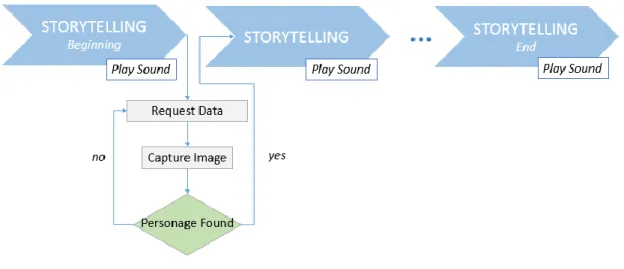
In order to move forward with the story, the user needs to iterate through some steps, providing the requested data, like suggested by the Figure 3.1.
3.2 – System Requirements
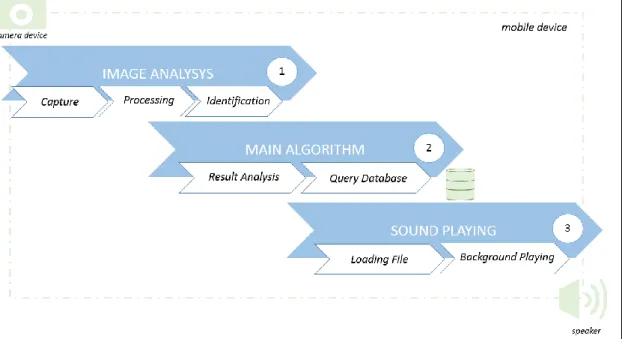
To fulfill the system purpose, there are three main functionalities needed, as shown on diagram of the Figure 3.2.
Figure 3.2 - Main functional blocks of the application
When requested by the application, the child has to take a photo of a drawing, an image or object representative of the personage. So, there has to be a camera and the pictures must be saved.
The image analysis function should be able to process and analyze the picture, so it can identify what the image represents.
The identification result should be evaluated by an algorithm that decides if the story moves forward or not.
There should be a mechanism to choose the sound file, according to the decision, so the application only loads the necessary files.
The sound file has to be played on a speaker or headphones.
Finally, if the application is closed and the story was not at the end, on next launch the story should resume and not start again.
3.3 – Available Tools and Techniques
3.3.1 – Available Mobile Devices
Semiconductor industry is constantly evolving, making cellphones, once used only for internet access and communication, powerful mobile devices. Equipped with multiple CPUs, several gigabytes of memory and storage, high quality speakers, high resolution cameras and screens. These devices are also capable of communicating through different wireless networking technologies [25]. Although underused by the owners, they have computing capabilities that researchers are beginning to use for image and signal processing, pattern recognition, complex numerical methods and even machine learning algorithms. Such devices are normally called smartphones.
Tablets are similar to smartphones. They have bigger screens, but less wireless communication capabilities. Most of them have built in cameras and quality speakers.
Wearable technologies are already a reality. For example, smart glasses. These devices are equipped with built in cameras, microphones for voice commands recognition, and jacks to connect headphones, onboard processors and wireless connectivity capabilities. They are being widely used for AR applications. They certainly don’t have the computing resources as smartphones have, but probably will in a near future.
Raspberry PI is a low-cost small device, originally created for education and prototype development [26]. It is a little computer capable of word processing, internet browsing and game playing [27]. Depending on the model, it comes equipped with wireless or an Ethernet connector, USB port, several inputs and outputs. Can be integrated with other modules, like cameras, sensors and speakers. So it is very suitable for customized projects.
3.3.2 – Possible Operating Systems
Hardware architecture determines the capabilities of a device. However, the operating system defines the available logical functionalities and interfaces for control and utilization [28]. The most popular operating systems for mobile devices are Android and iPhone OS.
Developed by Google, Android is widely used on all kind of devices. Android for smartphones and tablets, Wear OS for smartwatches and smart glasses, Android Auto for vehicles and Android TV for smart televisions [29]. There’s also Android Things for devices like Raspberry PI [30].
Exclusively for their devices, Apple developed iOS for smartphones and tablets, watchOS for smartwatches and tvOS for smart televisions [31].
3.3.3 – Image Analysis Tools
There are several tools available for image analysis focused on AR applications.
OpenCV is an open source library for computer vision and machine learning. It has Python,
Java, Matlab and C++ interfaces. Runs on Windows, Linux, Mac OS and Android.
It has more than 2500 optimized algorithms used to identify objects, classify human action in videos, extract 3D models of objects, track moving objects, detect and recognize faces, follow eye movements, matching images to a database, recognize targets and establish markers to overlay with augmented reality [32].
Vuforia is the most popular platform for AR development. Can be integrated with Android,
iPhone OS and Windows 10. It can be used on smartphones, tablets and eyewear. This platform offers multiple features, from image detection to object tracking. With Image Target is easy to recognize and track a pre-defined image and use it as a mark to overlay virtual content. These targets can be plan or cylindrical images (Cylinder Targets), or even a set of images in a defined arrangement (Multi-targets). The Object Target feature is useful for tracking intricate rigid objects. It is also possible to recognize objects based on 3D models, using Model
Targets [33].
Tensorflow is an open source machine learning framework. It offers many different models
for image classification, object detection and tracking.
Developers can use pre-trained models, retrain to add customized classes or even train the model from scratch. It is used to write applications in Python, on different operating systems: Windows, Mac OS and Ubuntu. But it also has libraries for use in other programming languages: Java, C and Android [34].
3.3.4 – Available Methods for Data Storing
On Android, there are several ways to save data, depending on the applications needs and if the data is supposed to be shared with other applications or not.
Shared Preferences is an interface for accessing and modifying primitive data, such as
booleans and strings. Allows sharing data between activities with strong consistency. It will persist between user sessions and even if the application is deleted. But it uses expensive operations which might turn the application slower [35-36].
It is possible to save data directly on the Internal Storage. The data will be private by default. Can’t be accessed by other applications or the user. And is deleted when the application is uninstalled [37].
On the other hand, data saved on External Storage is public, so it can be accessed by other applications and the user. Data can be saved on the device or on a removable storage like an SD card. This data will remain even if the application is deleted [38].
SQLite is a database engine compatible with Android. Databases are ideal for saving
repeating or structured data. Can be shared by different classes and activities, but is private to the application [39].
There is also the possibility of storing data on a server and access it via web. This way the device storage capacity is no longer an issue but it requires an internet connection [40].
There are similar ways to save data on iPhone OS.
SQLite, mentioned before, is also used on iPhone OS. Although it can be used to install a
separate database, iPhone OS already uses it by default on a saving data method called Core
Data [41].
NSUserDefaults is normally used to store user preferences and the settings of an application
[42]. These are shared across the application launches and are immediate to use. The space for it is limited and the access can be slow.
Key Chain method is the most reliable and secure method to store data. But requires as
complex procedure to implement it.
Property List is a very versatile storage technology that works best with small hierarchical
data. But is inefficient with large blocks of binary data, such as images.
It is always possible to store data directly on the File System. In this case, the data remains private to the application. Deleting, copying or moving operations are more complex comparing with others technologies. However, the file system is very useful for temporary caches containing data that is expensive to generate [43].
3.3.5 – Audio Player Frameworks
Media Player is the Android multimedia framework. Provides easy integration for audio,
video and images. Can access files from the application resources, filesystem or external content through an internet connection. It allows the developer to adjust the settings like the volume or set the audio to play on a loop and some operations such as pausing the audio.
ExoPlayer is an open source library for Android. It exposes the lower-level audio
components and allows the developer to add new ones [44].
For iPhone OS, the media framework, also called Media Player, provides developers with several ways to play media, but only on audio format. There is built-in music players that allow
the application to access the user’s library. If the developer wishes to use Apple Music is possible incorporating the MusicKit [45].
3.4 – Chosen Tools for the System
3.4.1 - Mobile Device
From the devices mentioned above, smart glasses would be a good choice but they are very expensive and don’t have the computing power of a smartphone or tablet.
Tablets are big and more suitable for applications with focus on visual content.
Raspberry PI would be useful if this project was aiming to develop some customized device. Almost everyone owns a smartphone, although they are not small, they are suitable to be manage by children with adult supervision. So the best choice would be the smartphone.
3.4.2 – Operating System
Regarding the operating system, iPhone OS only runs on Apple devices that are normally more expensive. Excluding those, Android runs on the majority of the mobile devices. Several phone companies have adopted this operating system.
Furthermore, there is a lot of available documentation and a big community that makes the development process cleaner and faster.
3.4.3 – Image Analysis Tool
The three image analysis tools mentioned above are compatible with Android.
Vuforia is very easy to use and is accurate. But it is based on pre-defined targets. For this project, it would mean that the drawings and images would have to be known before the application development is complete. Which means that the child couldn’t draw the personage or find an image representative of it. This would work if along with the application, the child was supplied with some cards with pictures, for example.
For object recognition would be necessary to define the objects that the application is supposed to recognize, like toys, and scan them with the Object Recognition application,
provided by Vuforia, to turn them into Object Targets. Or, in order for the detection to be more accurate, build a 3D model of the target.
Although working with pre-defined targets makes the recognition task less complex, it also limits the range of input images.
With OpenCV, the developer as total freedom building the image analysis algorithm. This is a great advantage because it allows to fine tune the process, adapting it to the specific needs of the application. On the other hand, it requires a lot more knowledge of computer vision and image processing. The learning process is much slower and the application would take a lot more time to develop.
Introducing the concept of Machine Learning and Image Classifier, Tensorflow fully satisfies the application requirements. It allows developers to teach the algorithm to classify an image into a class. Based on different images used for training, the application would be able to classify a drawing, image or object into the classes previously taught, even though it is a completely new image. These concepts are discuss on chapter 5.
3.4.4 - Data Storing Methods
There are different types of data that need to be saved.
To be able to close the application and resume the story on the next launch, some values have to be saved. For that it is enough to use shared preferences.
External Storage seems a good choice to save the captured pictures, so they can posteriorly be processed. There is no need for them to be private and this way the child can revisit them later.
There is no point on making the application dependent on an internet connection, so the sound files have to be saved locally on the application resources.
Finally, a SQLite database is useful to store the relation between the sound file name and the step where the story is. It is easy to add more data and complexity, if needed.
3.4.5 – Audio Player
The audio functions needed for this project are simple. Media Player satisfies the requirements.
To prevent the player from interfering with the user interface performance, this framework defines two classes: Media Session and Media Controller.
Media Session is responsible for all the communications with the player. The session
maintains information about the player’s state, such as if it is playing or paused and information about what is playing.
Media Controller isolates the user interface (UI). The UI only communicates with this class,
not the player itself. It translates control actions, like play or pause, and receives notifications from the Media Session whenever the state has changed.
Chapter 4
Frameworks and Tools
4.1 - Anaconda Distribution
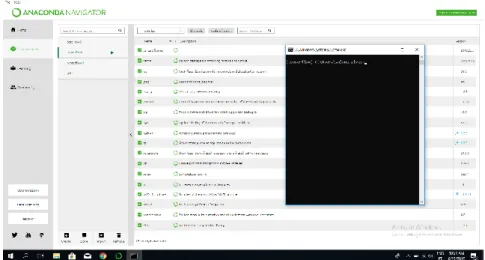
Figure 4.1 – Anaconda Navigator
Anconda Distribution, shown on the Figure 4.1, is an environment manager, package manager and Python distribution [46]. Runs on Windows, Linux and Mac OS.
It is constituted by three main elements:
Conda – allows the setup of independent virtual environments, the download and managing of conda packages.
Anaconda Data Science Libraries - more than a thousand open source libraries available for creating machine learning and deep learning, like Tensorflow.
Anaconda Navigator – graphical user interface to manage local environments, connect to Anaconda Cloud, install and launch applications and editors.
4.2 - Python
Python is an interpreted, interactive, object-oriented programming language. It incorporates dynamic high-level data types and classes, modules, exceptions, dynamic typing, interfaces for many system calls and libraries [47].
It is a powerful language with an elegant syntax, allowing programmers to write complex programs in a few lines of code. Runs on Windows, Mac OS and Linux.
Python is a high-level general-purpose programming language used worldwide on areas like Machine Learning, Computer Graphics, Data Mining, Email, Game Development, Web Development, Document Management, Traffic Control and Bioinformatics [48].
4.3 - Tensorflow
Tensorflow is an open source library for high performance numerical computation, specializing in machine learning applications [49]. This tool allows developers to build, among others, object recognition algorithms and image classifiers. The last one will be discussed on chapter 5.
Due to its flexible architecture, it allows easy deployment on several platforms (CPUs, GPUs) from mobile devices to desktops and server clusters [50].
4.4 – Tensorboard
Figure 4.2 – Tensorboard while the model is training
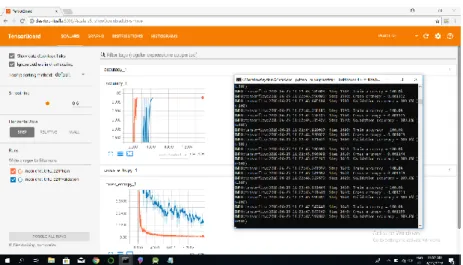
Tensorboard is a visualization tool to debug and optimize TensorFlow programs,
represented on the Figure 4.2. Allows the programmer to visualize the TensorFlow graph and observe additional data and plot quantitative metrics about the execution of the graph [51].
4.5 - CUDA and cuDNN
CUDA, developed by NVIDIA, is a parallel computing platform and programming model. The main purpose is increasing computing performance by exploiting the power of the graphics processing unit (GPU) [52].
The NVIDIA CUDA Deep Neural Network (cuDNN) is part of NVIDIA deep learning Software Development Kit (SDK). It is a GPU-accelerated library. Provides highly tuned implementations for standard routines such as normalization, forward and backward convolution, pooling and activation layers [53].
4.6 - Android Studio
Figure 4.3 - Android Studio Development Environment
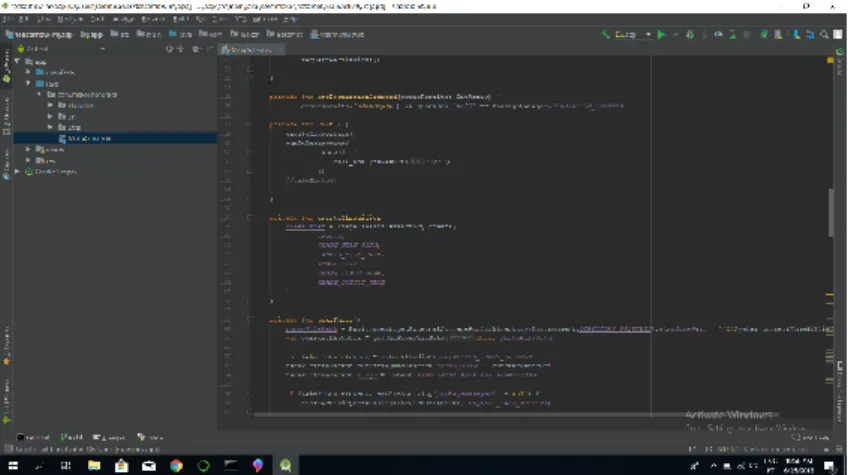
Android Studio, shown on the Figure 4.3, is an Integrated Development Environment (IDE) for designing Android applications. Suitable to develop for every Android devices.
Provides a Gradle based flexible compiler system, an emulator and tools for debugging, code checking and version compatibility [54].
Mainly written in Java, also supports Kotlin. Furthermore, the Android Native Development Kit (NDK) allows programmers to write C and C++ code and reutilize C and C++ libraries [55].
4.7 - Kotlin
Kotlin is statically typed programming language.
Used to build server-side, Android, browser and native applications.
Works across several platforms such as Windows, Linux, Mac Os, IOS and Android.
It is concise, drastically reducing the amount of code. Avoids entire classes of errors, like null pointer exception. Supports existing libraries. Can be used on IDEs or from the command line [56].
4.8 – SQLite
SQLite is a SQL database engine. It is a good choice for embedded devices and internet of things: cellphones, televisions, watches, kitchen appliances, airplanes, sensors, drones and robots. Also used on low to medium traffic websites, data analysis, and several more applications. https://www.sqlite.org/whentouse.html
Can be integrated with Android, Linux, Mac OS and Windows [57].
The command line shell for SQLite, for example on Windows, allows the creation and pre-population of the database, save it to a file that would be deployed to an Android application.
4.9 – Other Tools
Fatkun Batch Download is a Chrome plugin that allows mass image download.
Git is a very useful tool for version control. Comes with GitBash, a command line for Windows that runs Linux commands. Also helpful to easily clone github repositories.
GitHub is a development platform where is possible to host code, manage projects and build software [58].
Chapter 5
Image Classification with Tensorflow
5.1 - Machine Learning
Human brain makes vision seem easy. It is not hard for humans to differentiate a hand written seven from an eight. But for a computer is a hard problem to solve.
The field of machine learning has grown on the last few years and has achieved great results in this area.
Machine Learning is an area of artificial intelligence focused on giving computers the ability to learn. Traditionally, computers execute tasks by following a set of strict instructions. With Machine Learning, the computer is programmed to interpret a giving set of data using various mathematical and statistical models and learn to make decisions [59].
Tensorflow is specialized on Deep Learning, which is a sub sector of Machine Learning. This technique is inspired by the human brain, and mostly involves using artificial Neural Networks to solve these problems.
5.2 - Neural Networks
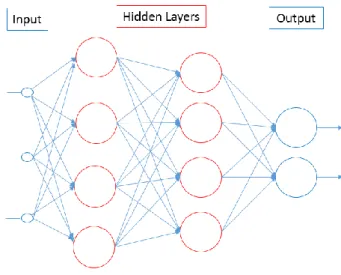
A Neural Network (NN) consists of many connected neurons distributed by layers. Input neurons get activated through sensors perceiving the environment. Other neurons are activated through weighted connections from previously active neurons. Some of them might trigger actions [60].
A diagram of a Neural Network is represented on the Figure 5.1.
Figure 5.1 – Neural Network
Neural Networks are capable of learning complex nonlinear relationships from sets of
training examples.
These properties makes them suitable for problems such as image classification [61]. A specific kind of Neural Network has proven to be essential on the progress achieved solving these problems, over the few years. These are referred to as Convolutional Neural
Network (CNN) [62].
Convolutional Neural Networks have Convolutional Layers as hidden layers, although they
usually also have non-convolutional layers as well.
A Convolutional Layer receives the input, transforms it through a convolution operation and feeds the output to the next layer.
One of the main characteristics of CNNs is the ability of detecting patterns on images. The detection occurs using Filters in the Convolutional Layers.
Filters, in the first layers, are design to detect simple features, such as edges, corners and
circles. Going deeper into the layers, filters are responsible for detecting more complex features like eyes, ears, feathers and hair. On even deeper layers, filters can detect a dog or a lizard, for example. Filters are small matrixes, with a chosen dimension (n by m) and initialized with random values [63].
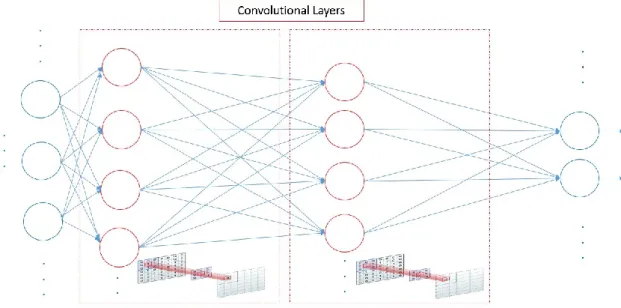
A representation of a CNN is show on the Figure 5.2.
Figure 5.2 –Convolutional Neural Network
In this case, the input are images.
So the Input Layer has one neuron for each pixel of the image. Each neuron keeps the greyscale value of the corresponding pixel.
The Output Layer has as much neurons as the possible classifications for the image. Each neuron has a number between 0 and 1 that represents how certain the system is that the image corresponds to that class, also called confidence level.
On the Convolutional Layer, the filter will convolve across each n by m block of pixels from the input and the dot product between them will be stored.
The output of this layer will be a new representation of its input, where each pixel is the dot product stored before. This will then be fed to the next layer that will repeat the process with another set of filters [64].
5.3 - MobileNets
There are several models based on CNNs, being MobileNets the family of Tensorflow models designed to maximize accuracy while maintaining efficiency. These are developed having in consideration the restricted resources of a mobile device.
Although they can be used for detection, embedding and segmentation, on this project, the focus is image classification [65].
The MobileNet model is based on Depth wise Separable Convolutions.
Standard Convolution filters and combines inputs into a new set of outputs only in one step,
as illustrated on the Figure 5.3.
On the contrary, the Depth wise Separable Convolution splits this into two steps, one for filtering and other for combining. It factorizes a standard convolution into a Depth wise
Convolution and a 1 by 1 convolution called a Pointwise Convolution. An example digram is
shown on the Figure 5.4.
The first one applies a single filter to each input channel. The second applies a 1×1 convolution to combine the outputs. This factorization has the advantage of reducing computation and model size [66].
The MobileNet structure is built on Depth wise Separable Convolutions layers, except the first layer which is a full convolution.
Figure 5.3 – Standard convolution example diagram [66]
Convolutional layers then typically apply Batch Normalization and a ReLU Activation
Function to the output to introduce nonlinearities into the model, except the final fully
connected layer.
Batch Normalization allows higher learning rates and achieves the same accuracy with
fewer training steps [67].
ReLU Activation Function only activates the positive response of the neuron [68].
Convolutional Layers are followed by Pooling Layers, which down sample the image data
to reduce the dimensionality of the feature map, in order to decrease processing time.
Max Pooling is a commonly used algorithm to extract sub regions of the feature map,
discarding all values except the maximum one.
The fully connected layer, also called Dense Layer, performs the classification on the extracted features. Every node in this layer is connected to every node in the preceding layer. The final dense layer applies a Softmax activation function to generate a value between 0 and 1 for each node. The sum of all these values is equal to 1.
An image representative of the MobileNet model is described on the Figure 5.3.
Figure 5.5 – MobilNet Model [69]
Concluding, MobileNet model is composed by convolutional modules. Each one consisting on a Convolutional Layer that performs Depth wise Separable Convolution to extract features, based on the defined filters and a Pooling Layer, for down sampling. The last convolutional module is followed by one or more dense layers that perform classification. The final one, contains a node or neuron for each possible class that the model can predict, with values that reflect how likely it is that the input image falls into each class [69].
Chapter 6
Developing Process
This process is divided into three main parts: training the model for the image classifier, deploying model to android and developing the storytelling logic on Android.
6.1 - Training the Model for the Image Classifier
6.1.1 - Setting up the environment and installing Tensorflow.
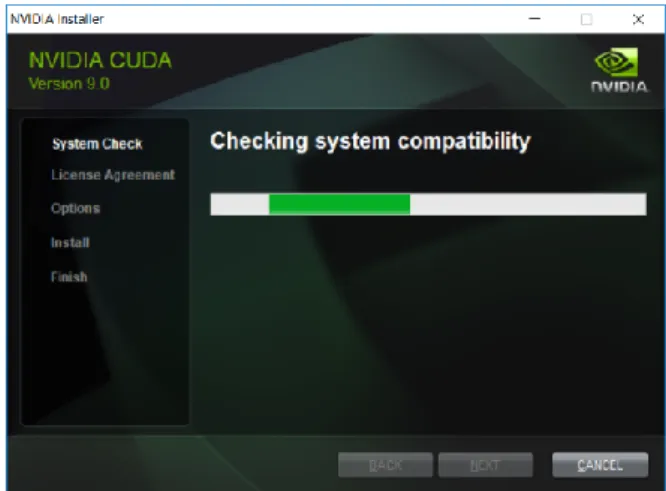
In order to be able to train the model faster [70], using Tensorflow with GPU support, CUDA and cuDNN must be installed. The installer is shown on the Figure 6.1.
Next, installation of Anconda Distribution is required. Through conda command line is possible to create a virtual environment with python 3.5. The installer and the command line are shown on Figure 6.2 and Figure 6.3, respectively.
Figure 6.2 – Anaconda installer
Figure 6.3 – Command line code to create virtual environment with python 3.5
Finally, to install Tensorflow with GPU support one line of code on the new environment terminal is enough, as shown on the Figure 6.4.
6.1.2 - Training the model
Training a model from scratch can take days, therefore it is common to use transfer learning instead of deep learning, which means that a pre-trained model is used [71].
There are several pre-trained models available for download on the “tensorflow-for-poets” repository. Besides that, also contains scripts to perform different tasks and a sample project to test the classifier on Android.
First step is to prepare the set of images.
The bigger and more diverse the image set the better the results. So, for this project, around five hundred images representative of the three classes were collected.
Since the goal is to recognize draws, pictures and objects, the images must be of these three types.
Draws and pictures were downloaded from the internet using the fatkun plugin. Regarding the objects, this model was trained on pictures of three specific toys.
Mobilenet is used for this project, as mentioned before.
There are two configurable parameters:
Input image resolution: although a bigger resolution takes more time to process, it produces better results, so the maximum resolution, 224px, was used.
The relative size of the model as a fraction of the largest MobileNet: 1.0 was chosen because in combination with the 224px resolution produces the best results [72]
On the mentioned repository, there is a script to train the model, which runs on python. Considering this is a pre-trained model, the script will only train a new top layer that can recognize other classes of images, while all the previous layers retain their already-trained state.
First, the script will analyze the image set and split the images into training, testing and validation.
Next, the script will load the bottleneck information. Bottleneck is the layer just before the final output layer that actually does the classification. Since the layers before the bottleneck are not being modified, their outputs can be cached and reused. This information is saved on the bottleneck files.
The script will then create a graph based on the pre-trained model. A graph is a computational representation of the model as a network of nodes [73]. Each node, also known as an operation, runs a function and returns zero or more tensors. A tensor contains the operation results on n-dimensional arrays [74].
Finally, it retrains the top layer to identify the new classes by adding the right operations to the graph.
To follow the training evolution and final results it is useful to use Tensorboard.
It is launched through the command line and accessed by a browser on the port 6006 of the localhost.
Training Accuracy is the percentage of images used to train that were labeled correctly. Validation Accuracy or precision is the percentage of correctly-labelled images on a randomly-selected group of images.
So, for both of these features, the closer to 1 the better.
Training and Validation Accuracy results for this project’s model are shown on the Figure 6.5.
Figure 6.5 - Training and Validation Accuracy after training is finished
Cross Entropy is a loss function that translates how well the learning process is going – lower numbers are good. Results for this model are presented on the Figure 6.6.
There is also a script that performs the image classification based on the graph generated before, it also runs in python.
This step is still performed on the laptop to test the performance an accuracy of the image classifier. If the results are not satisfactory, the image set must be adjusted and the model trained again.
Results for this project are addressed in the next chapter.
6.2 - Deploying model to Android
Mobile devices have significant limitations. Is worth considering any pre-processing to reduce app’s footprint [75].
6.2.1 – Optimize Graph
Before deployment, the graph must be optimized. There is a script available for this. The Tensorflow mobile library only supports a subset of operations. So this script removes all nodes that aren't needed for a given set of input and outputs. Also does a few optimizations that help speed up the model.
To ensure that the optimization didn’t affect the results, the classifer must be tested again. Results of retrained graph and optimized graph are discussed on the next chapter.
6.2.2 - Transferring graph to Android
To test the classifier on Android, the sample application provided in the repository can be used.
Graph and label files must be copied to the assets folder on the project.
In ClassifierActivity.java, the OUTPUT_NAME should be changed to “final_result”. Finally, the sample application is ready to run.
6.3 - Developing Storytelling Logic on Android
On the Figure 6.7 is shown the application’s main algorithm on Android. It consists on four main blocks: Main Activity, Default Camera App, Classifier and My Database.
The main functions inside these blocks are discussed in the next sections.
Figure 6.7 – Application’s algorithm on Android
6.3.1 – Main Activity
It’s responsible for launching the default camera application and playing the sounds. On MainActivity launching, the values of the Shared Preferences are evaluated so it can resume the last step. The application also checks if permission to access external storage is granted, so it can save pictures. If not, it asks for permission.
When the requested permissions are granted, creates an instance of the classifier and plays the sound for the first step [76].
Whenever a personage is requested, the user can click on the camera button and the default camera application is launched through an intent [77].
Every time the user takes the picture and saves it successfully, the image is resized and passed into the classifier.
When the results come back, they are displayed on the screen as the sounds are played accordingly.
When the image is recognized as the requested personage, the story moves on. Otherwise, the personage is requested again.
6.3.2 – Default Camera Application
This is a camera application already installed on the device.
Allows the user to take a picture and decide if should save it or not - Cancel or OK. If the user chooses OK, the picture will be saved on the gallery and its path sent back to
MainActivity.
6.3.3 – Classifier
The Classifier, as mentioned on the chapter 6, is based on the graph generated during the training phase. On Android, this class is an implementation of the same algorithm as before, but written on Kotlin.
This class receives the resized image and feeds its tensor to an instance of
TensorFlowInferenceInterface, which runs inference between the previously registered input
nodes and the requested output nodes. These can then be queried with the fetch methods. After processing the input information through all the operations according to the graph, the results are passed back to the Main Activity.
6.3.4 – SQLite Database
To organize the data and assure that this application is easily expandable to a larger scale, not only the relations between steps and sound files are stored, but the relation between step and corresponding correct classifications are saved as well.
Using the command line shell for SQLite, on Windows, the storydatabase is created with a simple command.
There will be two tables:
Sound, with three fields:
o an Integer representing the step;
o a Boolean that is 0 for the sound to be played if the image doesn’t represent the requested personage, and it is 1 for the contrary case;
o a String to store the sound file name. Result, with two fields:
o an Integer representing the step;
o a String with the expected classification result (label).
It is possible to insert all the rows through the command line, one by one, but it is also possible to import a csv file with the data [78].
Two csv files were created, one for each table. Those were imported and the database was saved to a file, typing the commands shown on the Figure 6.8 [79].
Figure 6.8 – Commands to create SQLite database and tables
To deploy the database file to Android it is only necessary to compress the file and copy it to the assets folder on the Android Project.
MyDatabase is a class extending SQLiteAssetHelper [80], defining:
the database file: storydatabase.db possible queries:
o getSound – to retrieve the sound file name, with the step and result as input; o getCorrectResult – to retrieve the correct label for the given step.
Chapter 7
Tests and Demonstration
The model was tested both on the laptop and on the mobile device. The results are presented and discussed on the next sections.
Tests that were performed on the laptop ran on Python and the images presented are representative of the command line running, the image input and the results obtained.
Tests for the mobile device ran on Android, and the input image and results can be seen on the pictures of the device screen.
The results are presented in the form of label and confidence level. Which means that the closest to 1 the result number is, the higher the confidence for the respective class.
The images used for testing were not used for training the model.
7.1 – Running tests on the Laptop with retrained graph
First, the model was tested against a drawing of a bird, as the Figure 7.1 suggests.
Next, the test was performed with a drawing of a cow. The results can be seen on the Figure 7.2.
Figure 7.2 - Classifier results, running on the laptop, with drawn cow as input.
Last drawing used for tests was a girl. The Figure 7.3 shows the results.
For testing against images, the first one used was a bird, with very good results, as the bird got a level of confidence of 1, as shown on the Figure 7.4.
Figure 7.4 - Classifier results, running on the laptop, with picture of a bird as input.
Second image used for testing was a cow. Again with very good result, similarly to the previous test. Results can be seen on the Figure 7.5 below.
Last image was a girl. As the Figure 7.6 shows, the result was almost good as the previous one.
Figure 7.6 - Classifier results, running on the laptop, with picture of a girl as input.
For testing against objects, pictures of little animal toys were used. First was a bird. The results are visible on the Figure 7.7.
For the object representative of a cow the results were as good as with the image of the same class, as it can be seen on Figure 7.8.
Figure 7.8 - Classifier results, running on the laptop, with picture of cow (toy) as input.
Finally, for the test with the girl toy, the results are shown on Figure 7.9.
7.2 – Comparison between retrained graph and optimized
graph
To ensure that the process of optimization, described on the previous chapter, doesn’t interfere with the results is advisable to test both graphs and compare the results.
These graph were tested against the same bird drawing. The Figure 7.10 shows the results for the retrained graph.
Figure 7.10 – Retrained graph results, running on the laptop, with drawn bird as input.
As explained on the previous chapter, the optimization of the graph should not affect the results. As shown on the Figure 7.11 the results for the optimized graph do not differ from the ones obtained with the retrained graph for the same input image.
7.3 – Running tests on Android device
For testing on the mobile device, similar images were used.
To test against the drawings, pictures of the drawings used before were taken. The results are shown below, on Figure 7.12.
Figure 7.12 - Classifier results, running on the android device, with draws of a bird, a cow and a girl input.
Similarly, pictures of the images used for testing before were taken and the results are presented on the Figure 7.13.
Figure 7.13 - Classifier results, running on the android device, with pictures of a bird, a cow and a girl input.
Lastly, pictures of the same toys as before were taken to test on mobile device. The results are shown next, on Figure 7.14.
Figure 7.14 - Classifier results, running on the android device, with pictures of a bird, a cow and a girl (toys) input.
7.4 – Results Discussion
Results obtained above are compared on the next three tables.
First one, Table 7.1, comparing the results obtained on the laptop and on android for the same drawing.
Table 7.1 – Results on laptop and mobile device, with drawings as input
Drawings
Laptop
Android
Input
Level of Confidence for the class
Cow
Girl
Bird
Cow
0,89437
0
0,10563
0,7487
Girl
0,00011
0,88127
0,11861
0,99755
Bird
0,00024
0,01713
0,98263
0,881672
Second, results from the laptop test and mobile device against the same images are compared on Table 7.2.
Table 7.2 - Results on laptop and mobile device, with pictures as input
Pictures
Laptop
Android
Input
Level of Confidence for the class
Cow
Girl
Bird
Cow
1
0
0
0,95213
Girl
0,00001
0,99999
0
0,96193
Bird
0
0
1
0,99999
Lastly, the Table 7.3 compares the results on the laptop and mobile device for objects.
Table 7.3 - Results on laptop and mobile device, with objects (toys) as input
Objects
Laptop
Android
Input
Level of Confidence for the class
Cow
Girl
Bird
Cow
1
0
0
0,9497
Girl
0,00141
0,99856
0
0,99774
Bird
0
0,00058
0,99942
0,99835
Overall, the classifier is accurate, the level of confidence of the correct class is significantly higher than the others, with every type of input. Although, when the inputs are drawings, the accuracy levels are lower than if the inputs are pictures or objects.
For the same input, bird drawing, the optimized graph produced a similar result to the retrained graph, as expected.
Comparing tests on laptop and mobile device, the difference is not significant, but on the mobile device, for the same input, the confidence level is lower. Despite the fact that the tests were made based the same drawings, images and objects, the input image fed to the classifier on the laptop is slightly different from the one fed to the classifier on Android. There is always difference on the image quality and lightning, which can cause the difference between the confidence levels, mentioned above.
Chapter 8
Conclusion and Future Work
8.1 – Conclusion
Combining the concept of Augmented Reality Audio and storytelling, an application was developed for Android mobile devices, envisioning to stimulate the children to draw, find images or objects representative of the personages. An image classifier was used to analyse the image input, so the main algorithm could decide to proceed with the story or not.
Several tests were made with objects, images and drawings to assess the application’s response when fed different input images. Although, there is space for further developments, the obtained results validate the chosen approach.
8.2 - Future Work
There’s always room for improvement.
Specifically regarding this application, in order to enrich the content the rest of the story and personages can be added.
To increase the accuracy of the image classifier, the model should be trained with more images. Besides the classes representative of the personages, new classes should be added to the model. If the model only knows three classes, it will try to categorize the input images into those three classes. The more classes are added to the model the better it can distinguish similar images. For example, if an image of a cat is fed to a model that was only trained with the classes car and dog, the result with higher confidence would be dog. But if the class cat is added to the model, it would be capable to distinguish a cat from a dog.
For future work, it would be interesting to build a platform where parents and teachers could customize the application’s content and, therefore, apply it to different curricular
subjects. This platform could be a web or desktop application, where educators could simply drag and drop function blocks and connect them to implement the logic. This approach could be applied, for example, to practice the identification of geometric shapes.
Taking advantage of the fact that the application not only has audio feedback but also recognizes objects, it could be of interest to complement it with voice commands, in order to make it more suitable for visually impaired children. In other words, for example, with the application running on smart glasses, given a set of toys, a visually impaired children would able to recognize the toys through touch and present them to the application when solicited.
References
[1] David Alves, No Bosque da Flores Plantamos Valores. Porto, Portugal, 2015, Cap. 2. [2] Pranavmistry. Available at: http://www.pranavmistry.com/projects/sixthsense/ . Accessed 05/June/2018.
[3] New Atlas. Available at: https://newatlas.com/army-heads-up-display-soldiers-tar/49726/ Accessed 05/April/2018.
[4] K. Sugand, M. Mawkin, C. Gupte, “Validating Touch Surgery™: A cognitive task simulation and rehearsal app for intramedullary femoral nailing”, Injury, vol. 46, pp. 2212-2216, Nov. 2015.
[5] Snapchat. Available at: https://www.adweek.com/digital/snapchat-introduces-3-new-capabilities-of-its-augmented-reality-lenses-with-shoppable-ar/. Accessed 05/June/2018
[6] Sygic. Available at: https://www.sygic.com/gps-navigation/add-ons/head-up-display . Accessed 17/April/2018.
[7] Re-flekt. Available at: https://www.re-flekt.com/portfolio-item/leybold-smart-service-assistant/ . Accessed 2/May/2018.
[8] Google Play. Available at:
https://play.google.com/store/apps/details?id=com.ikea.catalogue.android. Accessed 24/April/2018.
[9] Life Hacker. Available at: https://lifehacker.com/how-ingress-googles-real-world-smartphone-game-got-me-1710320867 . Accessed 03/May/2018.
[10] POKEMON GO. Available at: https://techcrunch.com/2017/12/20/pokemon-go-gets-a-new-and-improved-augmented-reality-mode-but-only-on-ios/ Accessed 24/May/2018.
[11] Creators. Available at: https://creators.vice.com/en_uk/article/yp5pm5/brian-eno-and-karl-hydes-augmented-reality-imagines-cities-on-hills . Accessed 24/May/2018.
[12] Digital Bridgend. Available at:
https://digitalbridgend.wordpress.com/2015/01/08/smartphone-applications-what-is-toozla/ Accessed 10/May/2018.
[13] Table Drum. Available at: http://www.tabledrum.com/ . Accessed 10/May/2018. [14] PR Newswire. Available at: https://www.prnewswire.com/news-releases/bose-introduces-audio-augmented-reality-platform-300611369.html . Accessed 03/May/2018.
[15] Apple insider. Available at: https://appleinsider.com/articles/18/03/02/microsoft-soundscape-app-helps-visually-impaired-iphone-users-navigate-with-3d-audio-cues . Accessed 04/May/2018.
[16] Disney research. Available at:.
https://s3-us-west-1.amazonaws.com/disneyresearch/wp-content/uploads/20141222202845/REVEL.pdf Accessed 04/June/2018.
[17] Dead Mens Eyes. Available at:. https://www.dead-mens-eyes.org/ Accessed 04/June/2018.
[18] E. Cieza, D. Lujan, “Educational Mobile Application of Augmented Reality Based on Markers to Improve the Learning of Vowel Usage and Numbers for
Children of a Kindergarten in Trujillo”, Procedia Computer Science, vol.130, pp. 352-358, Jan. 2018.
[19] Yilmaz, Rabia M., “Educational magic toys developed with augmented reality technology for early childhood education”, Computers in Human Behavior, vol.54, pp. 240-248, Jan. 2016.
[20] Arcritic. Available at: https://arcritic.com/440/math-ninja-ar-app-review/ . Accessed 10/May/2018.
[21] AR Animal. Available at: http://www.ar-animals.com/index_en.html . Accessed 10/May/2018.
[22] Arcritic. Available at: https://arcritic.com/132/catchy-words-game-review/ . Accessed 10/May/2018.
[23] Live Coloring. Available at: http://livecoloring.org/ . Accessed 10/May/2018. [24] Anatomy 4D. Available at: https://edshelf.com/tool/anatomy-4d/ Accessed 10/June/2018.
[25] Matias H. “Augmenting computing capabilities at the edge by jointly exploiting mobile devices: A survey”, Future Generation Computer Systems, June, 2018.
[26] Raspberry PI. Available at: https://opensource.com/resources/raspberry-pi . Accessed 11/June/2018.
[27] Raspberry PI. Available at: https://www.raspberrypi.org/help/faqs/#introWhatIs . Accessed 11/June/2018.
[28]Thomas S. “Operating Systems”. High Performance Computing, pp. 347-362, Jan, 2018.
[30] Android Things. Available at: https://developer.android.com/things/. Accessed 21/June/2018.
[31] Apple iOS. Available at: https://www.apple.com/pt/ios/ios-11/ . Accessed 21/June/2018.
[32] OpenCV. Available at: https://opencv.org/about.html . Accessed 15/June/2018. [33] Vuforia. Available at: https://library.vuforia.com/ Accessed 11/June/2018. [34] Tensorflow. Available at: https://www.tensorflow.org/ . Accessed 12/June/2018. [35] Android Developers. Available at:
https://developer.android.com/guide/topics/data/data-storage#pref . Accessed 18/June/2018.
[36] Android Developers. Available at:
https://developer.android.com/reference/android/content/SharedPreferences . Accessed 18/June/2018.
[37] Android Developers. Available at:
https://developer.android.com/guide/topics/data/data-storage#filesInternal . Accessed 16/June/2018.
[38] Android Developers. Available at:
https://developer.android.com/guide/topics/data/data-storage#filesExternal . Accessed 16/June/2018.
[39] Android Developers. Available at:
https://developer.android.com/guide/topics/data/data-storage#db Accessed 16/June/2018. [40] Android Developers. Available at:
https://developer.android.com/guide/topics/data/data-storage#netw . Accessed 23/June/2018.
[41] Brihaspatitech. Available at: https://www.brihaspatitech.com/blog/local-ios-data-storage-guidelines-for-ios-applications/ Accessed 16/June/2018.
[42] Apple Developer. Available at:
https://developer.apple.com/documentation/foundation/nsuserdefaults. Accessed 16/June/2018.
[43] Matteomanferdini. Available at: https://matteomanferdini.com/which-storage-technologies-are-available-in-ios-and-which-ones-you-should-use/. Accessed 16/June/2018.
[44] Android Developers. Available at:
https://developer.android.com/guide/topics/media/mediaplayer . Accessed 19/June/2018. [45] Apple Developer. Available at:
https://developer.apple.com/documentation/mediaplayer?language=objc Accessed 19/June/2018.
[46] Anaconda. Available at: https://www.anaconda.com/distribution/ . Accessed 18/May/2018.
[47] Python Software Foundation. Available at:
https://docs.python.org/3/faq/general.html#what-is-python . Accessed 16/May/2018. [48] Python Software Foundation. Available at:
https://www.python.org/about/success/#software-development . Accessed 16/May/2018. [49] Codelabs. Available at:
https://codelabs.developers.google.com/codelabs/tensorflow-for-poets/#0 . Accessed 20/May/2018.
[50] Tensorflow. Available at: https://www.tensorflow.org/ . Accessed 20/May/2018. [51] Tensorflow. Available at:
https://www.tensorflow.org/programmers_guide/summaries_and_tensorboard . Accessed 20/May/2018.
[52] NVIDIA Developer Zone. Available at: https://docs.nvidia.com/cuda/cuda-installation-guide-microsoft-windows/ . Accessed 25/May/2018
[53] NVIDIA Developer Zone. Available at: https://developer.nvidia.com/cudnn . Accessed 25/May/2018
[54] Android Studio Developers. Available at:
https://developer.android.com/studio/intro/ . Accessed 22/May/2018
[55] Android Studio Developers - NDK. Available at: https://developer.android.com/ndk/ . Accessed 22/May/2018
[56] Kotlin. Available at: https://kotlinlang.org/ . Accessed 22/May/2018
[57] SQLite. Available at: https://www.sqlite.org/download.html Accessed 02/June/2018 [58] GitHub. Available at: https://github.com/. Accessed 11/June/2018
[59] Towardsdatascience. Available at: https://towardsdatascience.com/intro-to-deep-learning-d5caceedcf85 Accessed 14/June/2018
[60] J. Schmidhuber, “Deep learning in neural networks: An overview”, Neural Networks, vol.61, pp. 85-117, Jan. 2015.
[61] Neural Network. Available at:
https://www.youtube.com/watch?v=aircAruvnKk&t=333s . Accessed 02/June/2018 [62]Colha GitHub. Available at: https://colah.github.io/posts/2014-07-Conv-Nets-Modular/. Accessed 05/June/2018
[63] Machine Learning. Available at: https://www.youtube.com/watch?v=YRhxdVk_sIs Accessed 05/June/2018
[64] Structured, time series, and language models. Available at: http://course.fast.ai/lessons/lesson4.html . Accessed 07/June/2018
[65] Depthwise separable convolutions for machine learning. Available at:
https://ai.googleblog.com/2017/06/mobilenets-open-source-models-for.html Accessed 09/June/2018
![Figure 5.4 – Depthwise separable convolution example diagram [66]](https://thumb-eu.123doks.com/thumbv2/123dok_br/18230664.878080/32.892.311.594.629.920/figure-depthwise-separable-convolution-example-diagram.webp)
![Figure 5.5 – MobilNet Model [69]](https://thumb-eu.123doks.com/thumbv2/123dok_br/18230664.878080/33.892.160.781.561.729/figure-mobilnet-model.webp)