UNIVERSIDADE DE LISBOA
FACULDADE DE CIÊNCIAS
DEPARTAMENTO DE INFORMÁTICA
VISUALIZATION OF FLIGHT PLANS SEQUENCED BY THE
AMAN/DMAN SUBSYSTEM
Pedro Miguel Côrte-Real de Menezes Luz
Mestrado em Engenharia Informática
Especialização em Sistemas de Informação
Trabalho de Projecto orientado por:
Prof. Doutor Francisco Cipriano da Cunha Martins
Eng. Manuel António Sousa Dias
ii
Acknowledgements
The completion of this work would not have been without the support of people who, in different way contributed to the conclusion of this stage of my life.
First, I would like to thank NAV Portugal for receiving me and for showing me the business world.
Second, I thank my thesis co-advisor from NAV Portugal, Manuel Sousa Dias, for not giving up on me and for all the support he gave me and for all the things he taught me during this project’s course.
I would like to thank professor Francisco Martins, my thesis advisor, for the availability, attention and all the advices given during this work.
To all my friends not only for our friendship but also for the support you gave me and for the great times we had either in our gaming sessions or when we hang out in a bar just to talk about what news we had to share about our lives, to talk about whatever topic we came up with in the moment or to simply have a good time laughing.
Lastly, but certainly not least, I would like to thank my family, notably my mom, dad, and my sisters. Thank you for helping me in the most difficult times where I thought I was lost but somehow you managed to guide me to the right path and helping me with the decisions I had to make throughout this thesis.
iii
Abstract
Air traffic control is a service provided by air traffic controllers (ATCO) to guide aircraft in their path as they fly in, out, and connecting airports.
Air traffic controllers make use of Air Situation Display Systems (ASD), as well as other auxiliary systems, to manage traffic inside the terminal manoeuvring area (TMA) during the landing process. The ASD provides surveillance information. Furthermore, systems such as arrival managers (AMAN) are being studied, developed and integrated on current air traffic management (ATM) systems for helping ATCO to build the arrival
sequence, thus, reducing their workload.
However, it is difficult to put in operation these systems because not only there are several variables to consider and the context they are inserted into but because most controllers tend to reject it. This happens because controllers have a lot of experience in managing aircraft, so they are familiar with what actions they should take in all the situations they encounter. The introduction of new equipment into the system triggers a change in the way they work. The problem, however, may not be the messenger but the way the message is presented.
The main goal of this work was to identify the relevant information for the ATCO and build a human-machine interface (HMI) with such information. The future work includes the integration of this component in the current ATM system. I used two methodologies, notably, E-OCVM for the validation of the operational concept and Scrum for developing a HMI prototype with the established operational concept.
The use of both methodologies was a good approach. On one hand, E-OCVM allowed me to define the operational concept and the characteristics (relevant information) that made it feasible. On the other hand, with Scrum I could translate the operational concept to a working HMI prototype. Finally, together with the participation of the ATCO, the client, in working sessions allowed to validate the proposed operational concept and reach a product with the desired maturity..
Keywords: arrival manager, human-machine interface, air traffic controller,
iv
Resumo
O controlo de tráfego aéreo é um serviço fornecido por controladores de tráfego aéreo (ATCO) para orientar as aeronaves no seu caminho enquanto voam para o aeroporto, descolam ou sobrevoam o mesmo.
Os controladores de tráfego aéreo usam Air Situation Display Systems (ASD), bem como outros sistemas auxiliares, para gerir o tráfego dentro da área terminal de manobra (TMA) durante o processo de aterragem. O ASD fornece informações de vigilância. Além disso, sistemas como arrival managers (AMAN) têm vindo a ser estudados, desenvolvidos e integrados nos sistemas atuais de gestão de tráfego aéreo (ATM) para ajudar os ATCOs a construir a sequência de chegada, reduzindo assim a sua carga de trabalho.
No entanto, é difícil implementar esses sistemas pois não só existem diversas variáveis a serem consideradas e o contexto em que estão inseridas, mas também porque a maioria dos controladores tende a rejeitá-la. Isso ocorre porque os controladores de tráfego aéreo têm muita experiência na gestão de aeronaves e, por isso, eles estão familiarizados com as ações que devem tomar em todas as situações que eles se deparam. A introdução de novos equipamentos no sistema desencadeia uma mudança na forma como eles trabalham. O problema, no entanto, pode não ser o mensageiro (AMAN), mas a maneira como a mensagem é apresentada.
O objetivo principal deste trabalho foi identificar as informações relevantes para o ATCO e construir uma interface homem-máquina (IHM) com essas informações. O trabalho futuro inclui a integração deste componente no sistema ATM atual. Utilizei duas metodologias, nomeadamente, a E-OCVM para validação do conceito operacional e a Scrum para o desenvolvimento de um protótipo HMI com o conceito operacional estabelecido.
O uso de ambas as metodologias foi uma boa abordagem. Por um lado, a E-OCVM permitiu-me definir o conceito operacional e as características (informações relevantes) que o tornaram viável. Por outro lado, com a Scrum, eu traduzi o conceito operacional para um protótipo de um HMI funcional. Finalmente, juntamente com a participação dos ATCOs, o cliente, em sessões de trabalho, permitiu-me validar o conceito operacional proposto e alcançar um produto mais maduro.
Palavras-chave: arrival manager, interface pessoa-máquina, controlador de
v
Resumo alargado
O controlo de tráfego aéreo é um serviço fornecido por controladores de tráfego aéreo (ATCO) para orientar as aeronaves no seu caminho enquanto voam para o aeroporto, descolam ou sobrevoam-no.
Os controladores de tráfego aéreo usam sistemas Air Situation Display (ASD), bem como outros sistemas auxiliares, para gerir o tráfego dentro da área terminal de manobra (TMA) durante o processo de aterragem. O ASD fornece informações de vigilância e tempo. Além disso, sistemas como arrival managers (AMAN) têm vindo a ser estudados, desenvolvidos e integrados nos sistemas atuais de gestão de tráfego aéreo (ATM) para ajudar os ATCOs a construir a sequência de chegada, reduzindo assim a sua carga de trabalho.
No entanto, é difícil implementar esses sistemas pois não só existem diversas variáveis a serem consideradas e o contexto em que estão inseridas, mas também porque a maioria dos controladores tende a rejeitá-la. Isso ocorre porque os controladores de tráfego aéreo têm muita experiência na gestão de aeronaves e, por isso, estão familiarizados com as ações que devem tomar em todas as situações que se deparam. A introdução de novos equipamentos no sistema desencadeia uma mudança na forma como eles trabalham. O problema, no entanto, pode não ser o mensageiro (AMAN), mas a maneira como a mensagem é apresentada.
O objetivo principal deste trabalho foi o de identificar as informações relevantes para o ATCO e construir uma interface homem-máquina (IHM) com essas informações.
A introdução do sistema AMAN será algo novo no sistema ATM atual da NAV Portugal. Como tal, para este trabalho, foi necessário recolher informação sobre como foi estudo este tipo de sistema e amadurecer o seu conceito operacional no contexto de empresa. Para isso foi preciso estudar qual o impacto desta introdução no sistema ATM com o auxílio da metodologia E-OCVM. Esta metodologia permitiu estruturar, ao longo do projeto, o amadurecimento do conceito operacional nas suas três fases: estabelecer uma base de comparação para o conceito operacional a introduzir, verificar o protótipo recorrendo a simulações de tempo acelerado e, por último, aumentar a maturidade do conceito operacional a introduzir recorrendo a simulações em tempo real. Para além desta metodologia, usei a metodologia Scrum para desenvolver o protótipo HMI, que foi alimentado pela informação que o sistema AMAN futuramente dará, usando o conceito operacional amadurecido.
vi
Para desenvolver o protótipo foi necessário entender o funcionamento da framework do Air Situation Display, desenvolvida pela equipa da NAV Portugal na linguagem Java, e quais dos seus componentes eram importantes para o desenvolvimento do protótipo. No decorrer do projeto foram dadas várias formações sobre os diferentes componentes e a sua conjugação com o resto da framework.
O protótipo do HMI seguiu o padrão de desenho MVC, visto ser muito usado no desenvolvimento de interfaces e porque era preciso manter a modularidade do programa caso fosse necessário realizar alguma alteração sem afetar o resto do software. No decorrer do projeto, realizei várias simulações para testar a viabilidade da interface. As várias simulações tinham objetivos diferentes com base no que se pretendia validar. Por exemplo, se a interface conseguia suportar poucos voos e muitos voos. Desenvolvi ainda um algoritmo simples de separação de aeronaves para a pista, para tomar o lugar do sistema AMAN, que foi usado nas simulações para verificar se as mudanças de posição das aeronaves seriam viáveis e intuitivas.
O uso de ambas as metodologias foi uma boa abordagem. Por um lado, a E-OCVM permitiu-me definir o conceito operacional e as características (informações relevantes) que o tornaram viável. Por outro lado, com a metodologia Scrum, traduzi o conceito operacional para um protótipo de um HMI funcional. Finalmente, juntamente com a participação dos ATCOs, o cliente, em sessões de trabalho, permitiu-me validar o conceito operacional proposto e alcançar um produto mais maduro.
Palavras-chave: arrival manager, interface pessoa-máquina, controlador de
vii
Table of Contents
LIST OF FIGURES ... VIII
CHAPTER 1 INTRODUCTION ... 1
1.1 MOTIVATION ... 3
1.2 PROBLEM STATEMENT ... 3
1.3 OBJECTIVES ... 5
1.4 DOCUMENT OVERVIEW ... 6
CHAPTER 2 STATE OF THE ART ... 7
2.1 AMAN INVENTORY ... 8
2.2 VERTIDIGI ... 11
2.3 USE OF ANIMATIONS AND SOUND ... 13
CHAPTER 3 WORK ENVIRONMENT ... 14
3.1 METHODOLOGIES ... 14 3.1.1 Scrum... 14 3.1.2 E-OCVM ... 16 3.1.3 E-OCVM + Scrum ... 18 3.2 TOOLS ... 19 3.2.1 Redmine ... 19 3.2.2 IntelliJ Idea ... 19 3.2.3 Git ... 20 CHAPTER 4 TECHNOLOGIES ... 21
4.1 AIR SITUATION DISPLAY FRAMEWORK ... 21
4.1.1 Architecture and design patterns ... 23
CHAPTER 5 PROJECT ... 25 5.1 DEVELOPMENT ... 25 5.1.1 Scope ... 26 5.1.2 Feasibility ... 31 5.1.3 Integration ... 39 5.1.4 Implementation ... 48
CHAPTER 6 CONCLUSION AND FUTURE WORK ... 58
BIBLIOGRAPHY ... 60
GLOSSARY ... 62
APPENDIX ... 64
REDMINE INSTALLATION ... 64
viii
List of Figures
Figure 1. Lisbon FIR ... 2
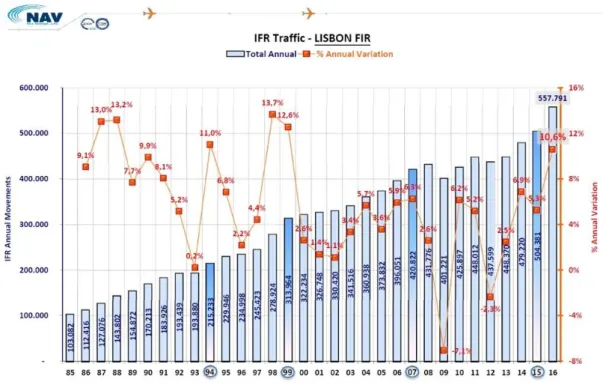
Figure 2. Evolution of total annual traffic in Lisbon FIR alongside the annual variation .. 3
Figure 3. Possible elements of a system incorporating AMAN ... 5
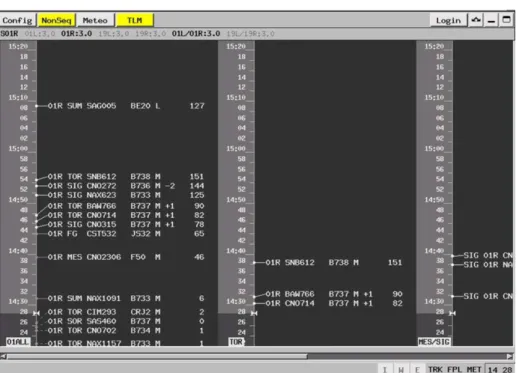
Figure 4. MAESTRO by Egis-Avia ... 8
Figure 5. OSYRIS by BARCO ... 8
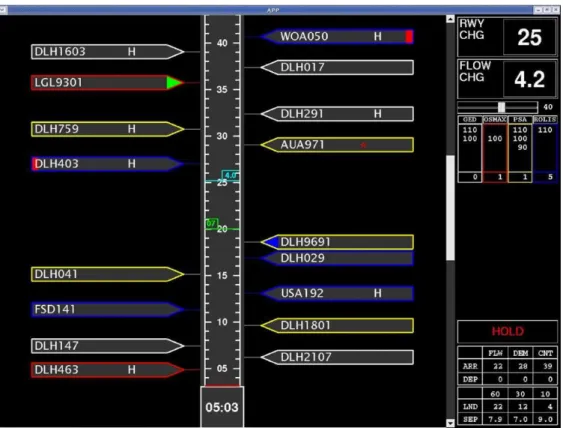
Figure 6. 4D Planner by DFS and DLR ... 9
Figure 7. IBP/SARA APP display by LVNL ... 9
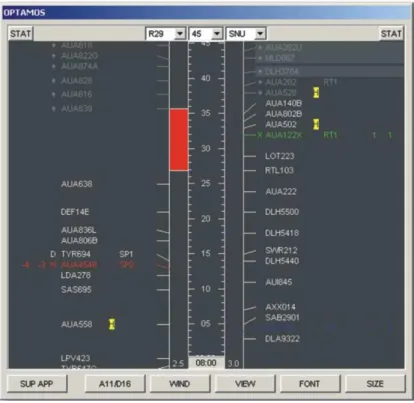
Figure 8. OPTAMOS by AVIBIT ... 10
Figure 9. SELEX AMAN by SELEC Sistemi Integrati ... 10
Figure 10. Vertidigi Interface ... 12
Figure 11. Display of an anomaly in the sequence ... 12
Figure 12. Scrum framework overview ... 16
Figure 13 Scope of the different cases along the CLM ... 18
Figure 14. E-OCVM + Scrum ... 18
Figure 15. Example of Redmine Interface ... 19
Figure 16. ASD architecture (simplified) ... 22
Figure 17. MVC Architecture Pattern ... 23
Figure 18. Initial prototype using AMAN guidelines only ... 26
Figure 19. Interface at the end of the Scope phase ... 31
Figure 20. Different controllers’ role depending on the flight phase ... 32
Figure 21. Lisbon’s TMA ... 34
Figure 21. Interface at the end of Feasibility phase ... 39
Figure 22. Step 1: The sequence given by AMAN is displayed to the ATCO ... 40
Figure 23. Step 2: The ATCO inserts a reserved block ... 40
Figure 24. Step 3: The ATCO separates each aircraft by 2 minutes ... 40
Figure 25. MULTI mode view ... 48
Figure 26. ArrivalManagerDisplay and its main basic components ... 50
Figure 27. ArrivalManagerDisplay and its main complex components ... 50
Figure 28. AirFlightPlan class ... 51
Figure 29. Label classes ... 52
Figure 30. ArrivalManagerLabelController class ... 53
Figure 31. Sequence for a label to be highlighted ... 54
ix
Figure 33. LabelListener class ... 55 Figure 34. Communication packages in a layered-oriented perspective ... 56 Figure 35. Flow of the messages from the server to the client ... 57
Chapter 1
Introduction
Air Traffic Management (ATM) is a complex system that encapsulates three main areas: Air Traffic Control (ATC), Air Traffic Flow Management, and Aeronautical Information Services. It combines humans, procedures, and equipment that assists an aircraft departing from an airport, while in transit, and when it arrives at the destination airport.
Air traffic control is a service provided by air traffic controllers (ATCO) with the goal of preventing collisions and ensuring enough separation between each aircraft so that they can travel safely. There are challenges, however, in managing air traffic. For instance, aircraft come from several locations of a country’s airspace, the Flight Information Region (FIR). The FIR is an area with fixed dimensions where air traffic service is provided. As an example, the Lisbon FIR is shown in Figure 1. Thus, if two aircraft have the same estimated time of arrival (ETA), a conflict occurs and it must be resolved. Therefore, coordination and communication are two key factors for managing the aircraft. Also, there are external factors, such as bad weather, that can affect the aircrafts’ flight, forcing them to change their original route, affecting the whole system.
The flight of an aircraft is divided in three steps since it departures until it lands. For that reason, air traffic controllers are also divided in three roles: En-route controller, approach controller (APP/TMA ATCO) and tower controller (TWR ATCO). The En-route ATCO is in charge for the aircraft that leaves the airport’s surrounding airspace, named terminal maneuvering area (TMA). Typically, the FIR is divided in multiple sectors. Every En-route controller is responsible for the aircrafts in his sector and communication and coordination is performed between sectors to ensure a safe management of the airspace. If an aircraft is close to enter the terminal maneuvering area, it is the En-route controller’s duty to pass the aircraft to the APP ATCO. The APP ATCO is responsible for receiving the aircraft entering the TMA and guide them to the airport’s runway. Their job is to build an arrival sequence to ensure a safe landing for all inbound aircraft. For that, they perform the following tasks: assign an absolute or relative arrival time at the runway threshold to each aircraft in the sequence; predict a trajectory for each aircraft that implements the assigned landing time and transform the trajectory into appropriate guidance instructions, transmitted to the pilot via voice or data link [1]. The approach controller turns the aircraft over to the tower controller when the aircraft is clear for landing. Lastly, the tower controller is responsible for moving vehicles (e.g., aircrafts,
Chapter 1. Introduction
2
follow-me) on the runways and taxiways. They also reserve blocks of time for departures and arrivals, in agreement with the APP ATCO.
Air traffic controllers rely on systems that provide several types of information coming from different sources, such as real time surveillance and flight plan information. Air traffic controllers need to be able to identify the aircraft through its callsign, the wake turbulence category (WTC), so they know its performance (e.g., maximum speed or maximum altitude) and the flight plan containing, among other information, the route that the aircraft should follow. Some of these systems are called Air Situation Displays (ASD) that provide the information previously mention but also information about the weather. In some cases, they also rely on written information, called flight strips, to keep a record of the instructions given to each flight [2]. Each flight strip is marked with a colour that can represent a departure, an arrival, if the flight is going over the airport, priority or non-priority flight. This is especially useful to approach controllers who use them to build the arrival sequence to the airport.
Chapter 1. Introduction
3
1.1 Motivation
In the recent years, the Lisbon FIR has seen an increase in the number of flights over the years (see Figure 2). The average en-route delay per flight increased from 17,4 seconds per flight in the Summer of 2014 to 44,4 seconds per flight in the Summer of 2015. Most the delays (68%) were due to ATC capacity, 12% from special events, 11% from ATC staffing, 8% from ATC equipment and 2% attributed to weather conditions. Demand for air traffic services in Portugal increased by 4.5% in 2015 and it is expected to increase from 0.6% to 4.3% in the next 4 years (2016-2020) [3, 4]. With this, it is expected an increase number of Instrument Flight Rules (IFR) (i.e., number of flights referenced by electronic signals instead of visual clues).
Air traffic controllers must manage flights with a high degree of precision and sometimes must work with heavy workload when the situation is not ideal (e.g., high traffic). This work has value and impact because the introduction of AMAN in the current systems can help the ATCO’s decision making process to be faster and simpler, therefore reducing the controller workload.
Figure 2. Evolution of total annual traffic in Lisbon FIR alongside the annual variation
1.2 Problem statement
ATCOs must have access to relevant and precise information to control the airspace such as weather, surveillance, and aircraft intention information. This process must be
Chapter 1. Introduction
4
done quickly and efficiently so that the requested demand is safely and timely delivered. At the same time, it increases their productivity allowing for more aircraft to fly in, out, and over of the airport.
ATCOs have the experience, gained over the years, to deal with situations (e.g., an aircraft needed to change from its assigned route and a new route should be given) that emerge when managing the air traffic. The introduction of a new software into the system is not a simple process as it can sometimes change ATCO normal workflow and may not give them the result they would expect. Thus, establishing a connection between the human and the software is challenging. Yet, the problem may not be the information the software delivers, but the way it is displayed and how it is integrated with the rest of the system. Prior to the implementation of the AMAN system, I need to study what has been done with the AMAN and what can be done in the context of Lisbon FIR.
The integration of an AMAN in an ATM system involves linking several modules and the reception of several inputs as illustrated in Figure 3. These inputs are the aircraft performance, the trajectory prediction, a sequencer, weather data, flight plans and radar data. For future development, a Monitoring Aids (MONA) system to help the controller monitoring the traffic from any unexpected situation and also a Medium-Term Conflict Detection (MTCD) to help to resolve separation conflicts. But, since ATM is such a complex system, the focus of this thesis is in a small, yet important, portion of it (indicated with a red rectangle on the figure below), which is about the interaction the ATCO has with the system. Notably, the problem that I addressed was: what information should the AMAN’s HMI have? How should it be displayed?
Chapter 1. Introduction
5
Figure 3. Possible elements of a system incorporating AMAN
1.3 Objectives
There were two goals with this project:
• To build a proposal of human-machine interface of AMAN for future integration with the current system;
• Find out if the two methodologies proposed (E-OCVM and Scrum) for the development of the project work together.
This work was developed in the NAV Portugal facilities. I had the support from experienced development team throughout the project’s life, including several trainings about the development process and software as well as the contribution of the air traffic controllers, the client, in sessions to validate the operational concept.
Chapter 1. Introduction
6
1.4 Document overview
This document is organized as follows: • Chapter 2
o Describes the state-of-the-art about AMAN and the research on this subject. • Chapter 3
o Presents the work environment and the methodologies and tools used in this project.
• Chapter 4
o Presents an overview of the ASD software framework. • Chapter 5
o Describes the work done in each phase of the project. Finally, • Chapter 6
Chapter 2
State of the art
Air traffic controllers use several tools, such as flight strips (pieces of paper or, more recent, through electronic means with written information about the state of each flight), to help constructing the optimal arrival sequence to safely land the inbound aircraft. These flight strips have several colours according to their meaning. For instance, if it is an inbound or outbound flight, priority flight or a non-priority flight. Research on more innovative systems has been done to help ATCO perform their job more efficiently. One of those systems is the AMAN. They have been in development since the late 1990s with the objective to aid Air Navigation Service Providers (ANSPs) with aircraft arrivals, especially during disruptive situations such as bad weather or runway closures.
AMAN is a system designed to provide electronic assistance to air traffic controllers in airflow management. Its main purpose is to give ATCO an optimal runway sequence in order to maximise the runway’s capacity and to help managing the incoming flights in the Terminal Manoeuvring Area (TMA). To achieve these goals, the AMAN system provides an expected or scheduled time for each flight at the runway or at certain relevant points such as runway thresholds or metering points. AMAN provides a Human-Machine Interface (HMI) to display this information. In this HMI, the ATCO can interact with the automated proposed sequence as well as input parameters to rearrange the sequence as necessary.
In Europe, each ANSP is developing its system to meet its needs. EUROCONTROL has published a survey in 2009 and 2010, the “AMAN Status Review 2009” [5] and the “AMAN Status Review 2010” [6], respectively. Also, these surveys proposed a set of guidelines [7] so that other ANSPs that wanted to add and develop their own AMAN HMI could have a baseline on how to start.
According to these guidelines, usually the AMAN interface consists of a timeline with time-management information, the aircraft callsign, and wake turbulence category. Moreover, the information can be colour-coded such as the time an aircraft should lose or gain in its course time to lose (TTL)/time to gain (TTG), route and speed advisories, among others. Although the information displayed is the same, the method of displaying is handled locally, which will depend on local context and the technology available.
Chapter 2. State of the art
8
2.1 AMAN inventory
Currently there are at least 6 suppliers that offer an AMAN product:
Figure 4. MAESTRO by Egis-Avia
Chapter 2. State of the art
9
Figure 6. 4D Planner by DFS and DLR
Chapter 2. State of the art
10
Figure 8. OPTAMOS by AVIBIT
Figure 9. SELEX AMAN by SELEC Sistemi Integrati
Each supplier offers a base product that can be configured in many ways. For instance, the ANSP can configure the airspace geometry, the airspace rules, and the TMA entry points. It is the ANSP job to configure an HMI that can present the information requested by the ATCOs and provided by the AMAN. For instance, both Figure 4 and Figure 5 show the interface with 3 distinct columns which represent multiple feeders in
Chapter 2. State of the art
11
the airspace. For example, Figure 5 has in the first column all the aircraft that are going to the airport’s runway and the next two columns are filtered to show only aircraft that are going through one or more feeders (TOR or MES/SIG). But in contrast with Figure 6, Figure 8 and Figure 9, only have one column with two views side by side.
However, these AMAN products all share common components and information. For instance, regarding the input components, AMAN use Flight Data Processing System (FDPS), containing flight plan information, Radar Data Processing System (RDPS), providing surveillance information and information on aircraft performance. The output that these AMAN produce are TTL/TTG values, possible indications of several advisories such as heading, holding and speed advisories, which all this information can be colour-coded. The sectors used are the APP with a dedicated AMAN manager/supervisor for managing the sequence and En-route and tower for consultation only. The general feedback received from the ATCO is positive when the system is fully used as it brings more stability to the air traffic control system.
Since the AMAN NAV Portugal has is from the OSYRIS company, my approach was related to the one represented in Figure 5, i.e., this AMAN not only can sequence and give TTL/TTG values to the controller but also can generate advisories according to the desired goal (e.g., minimum average delay). However, since the AMAN had not been implemented yet in the current ATM system, I had to gather information in order to evaluate and mature the operational concept.
2.2 VertiDigi
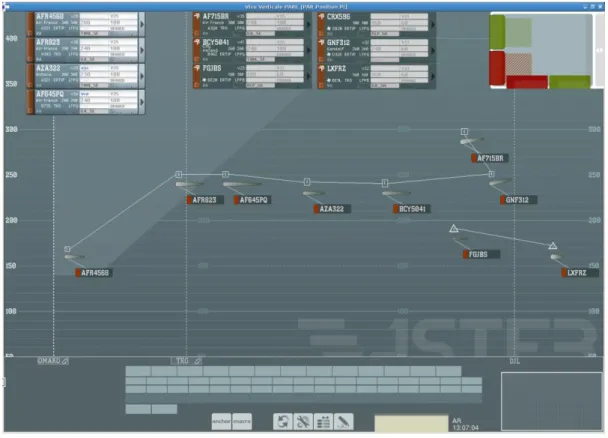
From the figures presented in Chapter 2, they all share a common base interface. However, there were attempts to improve such interfaces. For instance, VertiDigi was developed for the Maestro AMAN, a sequencing tool with arrival and departure management capabilities, owned by Thales Group [8]. It combines a vertical view with the controllers’ digital input. As such, the traffic is still represented in a vertical manner, as it goes in line with the terminal sectors constraints, but also the ATCO can use electronic strips to keep track of the progress of a flight instead of using the traditional paper strips. The sequence given by the AMAN of inbound aircrafts is shown as a line connecting each one with a corresponding number of the position that each aircraft has in the sequence as shown in Figure 10.
Chapter 2. State of the art
12
Figure 10. Vertidigi Interface
This line, according to the authors (Vincent Kapp and Morad Hripane), together with the vertical axis, representing the altitude of each flight, and the vertical lines with the feeder’s name below, makes the errors in the sequence clearly visible. For instance, in Figure 11, if the aircraft that is represented by number 3 in the sequence is behind the aircraft that is ranked number 4 (i.e., in the air, the aircraft number 4 is closer to the airport than the aircraft number 3), the problem is instantaneously perceptible in a simple glance. Seeing the proposed sequence, the ATCO can fix it by reordering.
Chapter 2. State of the art
13
2.3 Use of animations and sound
The ANIMS project [9] is a project carried out by EUROCONTROL CARE-INO research programme by IntuiLab that aims to demonstrate the potential of sounds and animations in HMIs for air traffic management. Particularly for AMAN timeline there are two cases in which sounds and animations can be applied. For example, the ATCO can gain a better situational awareness when:
● an animation is performed if the system changes the flight sequence either by just swapping two flights or by moving one flight along the timeline;
● a subtle sound is played before any changes to the sequence in order to notify the user.
When an ATCO changes the sequence, he can also gain the trust from the system and reduce his cognitive load:
● if all consequences of an immediate re-sequencing are animated; or
● if the re-sequencing requires a short delay, a sound can be played together with the appropriate animation to notify the result whether the system accepted or rejected it.
Chapter 3
Work environment
3.1 Methodologies
Two methodologies (Scrum [10] and E-OCVM [11]) were used to guide the project’s development. In the following we briefly describe each methodology and how we applied them to this work.
3.1.1 Scrum
Scrum is an agile framework for software development. It is a methodology that it is used when a project has requirements that emerge rapidly and adaptation is needed to account for these changes. This type of framework is ideal in the context of NAV Portugal. Since ATM is such a complex system, many iterations are necessary to build a component. Continuous and sudden changes can happen and the team must be able to handle those changes and shift the project’s course if needed. For instance, if the software does not allow to change the geometry’s airspace in which the ATCO operates or the feeder that the Estimated Approach Time (EAT) is given, the team can rapidly develop the extra functionalities as these changes gain relevance. The team must clearly understand the problems and solutions to be able to solve these changes efficiently. From this, the definition of “Done” must be well defined and shared among all members. This is an important aspect of this methodology because a product, after each iteration, relies on functionalities that are “Done” to have the best quality possible.
The Scrum team is composed by: a product owner, a scrum master and a development team. The first will be held by my advisor at NAV Portugal and I will develop the software.
Every project in Scrum must have a product backlog. A Product Backlog is an ordered list containing the user stories that captures the client functional and non-functional requirements. It is a dynamic list that grown and shrinks as the product evolves to satisfy the client’s needs. These user stories will be discussed with the client in meetings throughout the project’s life. User stories are refined in a way that the team understands them. This process includes adding details, estimating and ranking the items on the list – usually assured by the product owner, me again.
Chapter 3. Work environment
15
Several metrics can be used to determine the amount of effort each user story takes to complete such as story points or hours. Regarding the metric, they are used. In my case, I didn’t use a numeric value. Since I was the only one developing, I ended up doing things differently. At the beginning of each sprint, after writing the set of user stories, I planned how much of those I could do in one month, taking into account my previous experience. Then, I choose a subset of the user stories and developed those. User stories were written at the beginning of every sprint. They were written and groomed as I gathered information about certain terms. For example, I used flight label to explain each label in the interface, but I came to know that it confused the ATCO, thus, flight indicator was more appropriate.
Scrum is an iterative process, therefore, the development is divided in small iterations with a fixed duration called sprints. This means that in every sprint more functionalities are added to the software with the goal of delivering a shippable product at the end of each iteration. In this case, since the project’s duration is five months for developing – each sprint took one month totalling in five sprints. Each sprint is composed by the following tasks, in chronologic order, represented in Figure 12:
• the Sprint Planning: determine the set of features from the backlog to do; • Daily Scrums: short daily meeting to review what has been done in the last
daily scrum and plan the next 24 hours;
• Sprint Review: meeting with all the team and a demonstration of the product with the stakeholders;
• Sprint Retrospective: meeting to determine what went well and what did not go well and what can be improved in the next sprint.
Not all these tasks were done, at least in the way the methodology describes. For instance, I did not do the daily scrums because I was the only one developing. What I did, instead, was to recall the features I had developed and the texts or schemes I had written or drawn the days before and proceed from there. The Sprint Review meeting, which is usually done with the client, was only performed twice (5.1.2.3 and 5.1.3.4). There were other three meetings but only with the development team present.
Several metrics can be used to keep track of the development progress. One of them is the burndown charts that shows the work remaining over time. Once again, since I was the only one developing, I only needed to know that I finished the subset of user stories chosen at the start of each sprint. Therefore, I did not use any metrics.
Chapter 3. Work environment
16
Figure 12. Scrum framework overview
3.1.2 E-OCVM
ATM is a complex system that combines people, procedures, and equipment. For it to be operational these segments must work as one homogeneous structure so that one complements the other. When changes are to be made to one of these segments, the concept underlying must be studied in order to validate whether there are benefits associated with it and whether the changes to be made compromise the integrity of the system. To help structuring this kind of project I used European Operational Concept Validation Methodology (E-OCVM). This methodology aims at validating an operational concept [11]. It helps to identify key decisions to be made and gather evidence that these implementation decisions should be based on. To achieve this, validation and verification activities need to have a close connection. The concept must be clear to all involved to avoid misunderstandings; therefore, transparency is a key factor in this methodology. Also, the concept should be evaluated not only in a specific level, but also at a wider range. Prototyping is used throughout the life cycle of the concept to demonstrate its applicability.
E-OCVM is divided in several parts: the Concept Lifecycle Model (CLM), the Structured Planning Framework (SPF), and the Case-Based Approach (CBApp). During this thesis, I explore CLM due to time constraints (the thesis only last 9 months).
The Concept Lifecycle Model provides a model for the progression of a concept through various phases until it is ready to be used in an operational system. The model
Chapter 3. Work environment
17
is divided in 8 steps (represented in Figure 13). The focus of E-OCVM is the V1, V2, and V3 phases, but V0 is also important, since it identifies one aspect of the system to improve. A project stays in the same phase until there is evidence that there will be enough benefits to the system.
In the first phase, V0, I will identify the ATM needs, or Operational Improvements Identification. Here the objective is to gather the major ATM problems that need improvements. These problems are analysed to address both current and future situations. As described in the Motivation section, the Lisbon FIR has its traffic volume increased over the years, with the tendency to continue growing. The introduction of an AMAN system can help to mitigate it but with it brings the problem of choosing which type of information should the AMAN’s HMI show to the ATCOs. The ATM need is therefore identified: what information should the AMAN HMI have and how should it be displayed?
The second phase is V1 and it defines the Scope. One of the objectives of this phase is to get an initial definition of the operational concept so that the team can understand what are the needs to develop such concept. An initial prototype is done to show how the concept correlates with the services and the functions, and set the boundaries of the subject to be validated. Finally, one or more meetings will be done with the team to understand what should be performed in the next phases.
The Feasibility phase (V2) explores the concepts until they can be considered operationally feasible. Modelling and Fast Time Simulations are executed to evaluate and demonstrate the required feasibility.
The final phase (V3) is the Pre-Industrial Development & Integration. In this stage, even more refinements are added to the concept so that it can move from theory to practice. It is checked if the concept works together with the procedures, equipment and human actors to achieve the desired benefits and to assess if it can be integrated into the target ATM system. Assessments with pre-industrial prototypes are realised to test the concept into different contextual environments using Real time simulations.
Chapter 3. Work environment
18
Figure 13 Scope of the different cases along the CLM
3.1.3 E-OCVM + Scrum
The work will be developed following these two methodologies. Figure 14 shows how the combination of the two will work. Scrum will be applied in each E-OCVM step and the purpose is to evolve the product from a low maturity (M1) to a higher maturity (M3). There will be a delivery of each phase starting with a low fidelity prototype, to get the basic concept of the problem and to know the barriers that must be overcome; a product that will be tested using fast-time simulations only (M2) and, finally, a more robust product tested with real-time simulations (M3).
Chapter 3. Work environment
19
3.2 Tools
I used three tools throughout the project’s life cycle.
3.2.1 Redmine
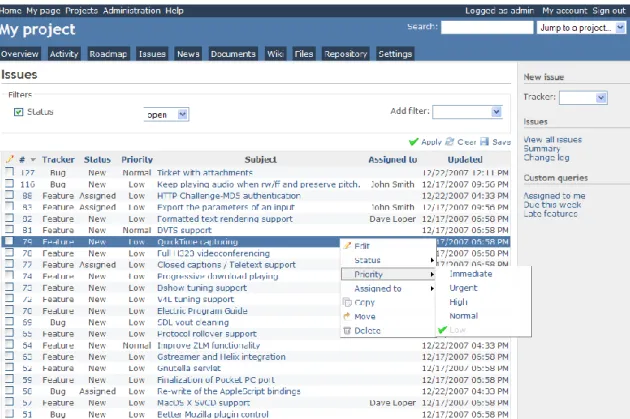
To support the followed methodology, it was essential to organise the project’s workflow. Redmine [12] is a free project management web application, written in Ruby, that supports the Scrum methodology. This application allows the creation of new projects, issues, calendar overview, documents, news and set a repository to name a few of its used functionalities.
Figure 15. Example of Redmine Interface
The installation was done on a Linux Mint 18 distribution. The installation process is described in appendix.
3.2.2 IntelliJ Idea
The project was developed using the Java integrated development environment (IDE) IntelliJ Idea. Besides being a platform to code, it also has a version software version control plug-in which allowed be to perform my all my tasks inside this program.
Chapter 3. Work environment
20
3.2.3 Git
It is important to keep track of the changes made to the project when developing software. Having a software version control tool is paramount to achieve this goal. This becomes more evident as the project and the team involved grows. A software version control tool allows the review of the software’s history but it is also a safeguard in case a piece of software breaks part or the entire project. The integrity of the project can, this way, be saved in a case of a disaster. The software version control tool I used was Git [13]. Git uses a branching model allowing a non-linear development, i.e., developers can create from the master branch, several branches that do not interfere with each other. This way, functionalities can be tested before integrating them into the main project.
Chapter 4
Technologies
4.1 Air Situation Display framework
Air traffic control is in constant evolution; therefore, requirements are always emerging. For that, NAV built its complex air situation display framework internally based on a plug-in architecture. The framework is built in Java and therefore, I built my interface using the Java programming language too and the GUI toolkit Swing.
A simplified version of the framework’s structure is shown in Figure 16. The framework is formed by several base plug-ins, implemented by Java classes (represented by yellow diamonds), which provide base and simple information (represented by the red squares in the second row of the Figure 16). This information can be a map with coordinates of the Lisbon’s FIR (I), surveillance data (J) and flight plan information (K), among others. On a second level (represented by the blue circles in the third row of the Figure 16), from the same plug-ins, other plug-ins can be developed into dedicated applications/interfaces. For instance, the Air Situation Display is used by the TMA and En-route ATCOs to visualize the flights that are being flown over the Lisbon’s FIR, which can use the three basic plug-ins information described before. At the same time, the Ground Situation Display (GSD) can use some of the same plug-ins that ASD uses, for example the flight plan information (K), but also use others not used by ASD (L). Furthermore, these big applications can be used as plug-ins for even more complex software. The three symbols in green marked with the H, M and Q letters in the Figure 16 illustrates the work I have done and it is explained later in section 5.1.4.2.
Chapter 4. Technologies
22
Figure 16. ASD architecture (simplified) This approach has several advantages:
• Extensibility: the core application can be extended by adding new plug-ins that are independent from the ones already implemented;
• Modularity: the ability to create different applications that use the different plug-ins developed. These applications can also be plug-plug-ins for other bigger applications;
• Parallel development: different features work as separate components; thus, different teams can develop in parallel;
My internship is a perfect example of a good use of this type of architecture:
• A new application (HMI) needed to be developed because new requirements have emerged;
• For that, I needed to create my own plug-in using core plug-ins already developed; and
• I did not interrupt the workflow of the team since I could develop the application alongside with the team.
Also for each application developed, there is a main application configuration file where it is defined:
• the environment, i.e., which folders have the configuration files that are used to store values and resource files that are used throughout the application; and • a list containing the main plug-in and the necessary dependencies (plug-ins).
Chapter 4. Technologies
23
4.1.1 Architecture and design patterns
The software is developed with the Model-View-Controller (MVC) [14] architecture pattern in mind. This architectural pattern is used for implementing user interfaces. It decouples the data (model) that is going to be represented from the way it is represented (view). Each of its three entities have their own specific task:
o The model accommodates the data and the logic applied to it; o The view is the output of the information in the model layer;
o The controller is responsible for receiving the input from the user gathered in the view layer and update the model. The view receives the updates from the model.
Figure 17. MVC Architecture Pattern There are advantages when using this architecture pattern:
o It enables multiple views from the same model.
o The view can be changed without the whole application being affected. This is a particularly important point here at NAV Portugal since, user interface requirements tend to change more often than system core elements. The framework was developed using several design patterns [15]:
• Command;
o Since there are several views with different needs for the same data, using this pattern we can choose what is our request and get the correspondent update.
Chapter 4. Technologies
24
o One of the main patterns used in conjunction with MVC. As seen in Figure 17, when the controller updates some value in the model, the model updates all the views that are observing it.
• Singleton;
o This pattern is useful when we need to have only one instance of a class. For instance, a logger that dumps log messages from several classes.
Air traffic Management systems are life critical. The software that air traffic controllers use must be functional and with no errors. Therefore, one key aspect that NAV Portugal values is continuous integration (CI). Continuous integration is a software practice that aims to prevent and anticipate integration problems. When NAV develops new functionalities onto the existing software, it must not break what was already functional. Thus, tests are made to the new software to see if inconsistencies are found in order to corrected them as soon as possible. NAV Portugal uses Jenkins [16] supporting its CI software process.
Chapter 5
Project
5.1 Development
As described in 3.1.3 E-OCVM + Scrum the project will consist of three phases. Plus, a first mock-up before the first phase. Once the mock was completed, a demonstration of the software was performed to the Air Situation Display development team. The objectives of this presentation were to demonstrate the software implemented, identify the elements present in the interface and establish a connection with the current AMAN guidelines [7]. The idea was not to re-invent the wheel, but to construct on top of what is already validated by the community.
An explanation of the information presented of the interface was given (see Figure 18). The interface consisted of a window with a “Now” button and a scrollable, up and down, viewport, divided into two zones. The right zone is a timeline, in the form of a ruler, which has a range of 1 hour and 30 minutes. The coloured zone (orange) represents the time that has passed since now and the other, in white, the future time. The area on the left is where the labels for the upcoming flights are placed. The connection of each label to the timeline represents the estimated time of arrival (ETA) at the airport. Each label is populated with several types of information. The information in label “TOR TAP123 B738 M 2 30” (from left to right):
● The Route the aircraft should follow; ● The Callsign identifying the aircraft;
● The Type of aircraft informing the model number of the aircraft according to a Base of Aircraft Data, BADA;
● The Wake Turbulence Category (WTC) - light (L), medium (M) or heavy (H);
● The TTL / TTG indicating the time the aircraft should lose or gain; and ● The Current Flight level (CFL) informing vertical altitude at standard pressure.
Chapter 5. Project
26
Figure 18. Initial prototype using AMAN guidelines only
5.1.1 Scope
The project began with the Scope phase after the mock-up being done. The goal of this first phase was to develop a low fidelity prototype. The interface was still raw and there was no documentation stating how the interface should be built, I needed to define a set of user stories to guide me during the development process. Particularly, the set of requirements for this project came in two parts:
● requirements offered by the community, together with other possible requirements that the experienced team would think the client would want;
● the first set of requirements refined with the information gathered from the client. I only did the former, since it was necessary to establish a baseline for future assessments. The objectives of this first part were to identify a set of requirements and build an interface with these requirements in mind. The first set of requirements came from the community [7, 17]. As such, the initial prototype only has implemented general concepts that an AMAN should have, without caring for the NAV Portugal context. For instance, it must have at least a timeline and labels connected to it for each inbound aircraft. Still in the first phase, the second set of requirements were created through brainstorming with the team where we put ourselves in the customer’s place and think of possible requirements the client would want that were not stated in the guidelines.
Chapter 5. Project
27
Since the requirements of each airport are different, other specific functionalities must be discussed with the client.
To follow the Scrum methodology, the requirements were translated into user stories. Each user story followed the classic format “As a <user role>, I want <goal/desire> so that <benefit>”. The set of user stories took several iterations to mature. A good characterization of the end customer was one of the changes made in writing the user stories. There are more than just one role of air traffic controllers. For instance, there is the tower controller that survey and manages flights on the runway, ensuring safe landings and departures. Another role is performed by the sector controllers: they provide separation in a specific sector (north, south, east and west) of the FIR. The third role is ensured by the TMA controller that acts as link between the previous two, managing the traffic inside the TMA.
The second change made to the user stories was the definition of acceptance criteria in all user stories. The acceptance criteria (AC) describes how the software works. Each AC followed an order that the team uses to standardize all user stories’ acceptance criteria:
1. Description of the presentation; 2. Description of the automatisms;
3. User interaction (query, input and feedback); 4. Others (e.g., interactions with other interfaces).
There was no sentence format associated with them as they were written in a plain technical way.
The last main change made to the user stories was the order in which the user stories appeared. For this the minimum viable product (MVP) concept was kept in mind. This means that with just the first 4 stories the product is viable and has the minimum requirements to prove the idea proposed. The whole set of user stories can be found in the appendix (User stories).
5.1.1.1 User stories
A first set of user stories was written following these aspects. Since some were based on the community information and others were defined by the team, they translate to the need of a timeline, the information contained in the flight indicator, the need for manipulating the sequence, among others. In the first sprint (January) ten user stories were written and prioritized, four of which were developed (US1, US2, US3, and US4).
Chapter 5. Project
28
As APP/TMA ATCO, I want to have on a timeline the scheduling of the aircraft, to be able to see the flow of the incoming flights.
AC:
• Past time presents a colour less conspicuous than that of the future time; • The scale has a graduation that represents the time, in hours and minutes; • As time advances, the scale moves from top to bottom automatically; • The operator can move the scale up and down manually;
• The operator can move the scale by scrolling or clicking with the mouse LB and dragging up (see future time) or down (see past time).
US2. Composition of the flight indicator
As APP/TMA ATCO, I want to visualize on each flight indicator the flight plan information and time management information to optimize the sequence.
AC:
• Each indicator’s flight is composed of: o Callsign – identifier of each flight;
o Feeder – point where the aircraft will go over;
o Type of aircraft – alphanumeric code of two, three or four characters; o WTC – wake turbulence category indicator (Light (L), Medium (M) and
Heavy (H));
o TTL/TTG – time the aircraft shall lose or gain;
▪ The presentation format should include minutes and seconds (mm:ss);
▪ If the value exceeds 5 minutes, the colour of this field will change to yellow;
▪ If the value exceeds 10 minutes, the colour of this field will change to red;
o Flight level – vertical altitude at standard pressure;
US3. Manual flight modification
As APP/TMA ATCO, I want to change the flights in the sequence to optimize the sequence.
AC:
• To change the sequence, the operator must drag the label the mouse LB and move it up to increase the ETA or down to decrease the ETA;
Chapter 5. Project
29
• After a change of a flight, it should keep its ETA updated to the corresponding time scale.
US4. Obtaining suggestions for actions
As APP/TMA ATCO, I want to get suggestions from the AMAN and visualize them in the interface to optimize the sequence.
AC:
• The actions are (with the respective symbols): o Speed changes (e.g., 300 or 200); o Direct to (DCT);
o Holding (HOLD);
• Each suggestion will appear, when available, in the first position of the label (before the callsign);
• When the operator accepts a suggestion, the text becomes green; • When the operator rejects a suggestion, the text disappears;
• To accept a suggestion, the operator clicks on it with the mouse LB to make a window appear and press the “ACCEPT ‘name of the suggestion’”;
• To reject a suggestion, the operator clicks on it with the mouse LB to make a window appear and press the “REJECT ‘name of the suggestion’”;
In the second sprint, one more user story was written and refinements were made to those already written. This time, five user stories (US6, US8, US9, US10, and US11) were chosen to be developed.
US6. Conspicuous visualization of flight interaction
As APP/TMA ATCO, I want to have the indication of the flight that I am interacting conspicuously, when I move a flight in sequence, to know which flight I am interacting with.
AC:
• When interacting with a flight, the indicator for that flight must have an outline and the timeline connection should turn blue as well.
Chapter 5. Project
30
As APP/TMA ATCO, I want to change the position of two flights at once so that I do not have to drag each individually on the time scale.
AC:
• When the first flight to be changed is selected, it is highlighted;
• To select the first flight to be changed, the operator clicks on the first flight indicator with the mouse LB, while pressing the "CTRL" key on the keyboard; • To select the second flight to be exchanged, the operator clicks on the second
flight indicator with the mouse LB.
US9. Visualization of the feeder of the airspace
As APP/TMA ATCO, I want to visualize the airspace point at which the proposed sequence is being provided to optimize the sequence.
AC:
• The point must be represented in the time scale at the current time.
US10. Insertion of reserved blocks
As APP/TMA ATCO, I want to insert reserve blocks for departures and revisions to optimize the sequence.
AC:
• There are two buttons, one for each block, on the top panel of the interface; • The buttons are identified by H (heavy) with the time of 4 minutes and M/L
(Medium / Light) with the time of 2 minutes.
• The blocks are inserted in the middle of the time scale being viewed;
• Blocks can be moved up or down with mouse LB and can be removed with mouse RB.
US11. Time associated with each aircraft
As APP/TMA ATCO, I want to visualize the time of passage at the point I'm viewing in the correct scale.
AC:
• The anchor connecting the labels to the time scale is given by: ETO + TTL / TTG. • A change in the label anchor in the time scale will change the TTL / TTG = ETO
Chapter 5. Project
31
At the end of this phase a meeting took place to look back what was done, discuss what problems arose and plan the next steps for the next phase. After the development of the user stories mentioned below, the interface got the look presented in Figure 19.
Figure 19. Interface at the end of the Scope phase
5.1.2 Feasibility
With a low fidelity prototype and a base operational concept defined, the project moved on to the next phase. The goal here was to refine even more the user stories as well as the interface and having a meeting with the client to gather their needs and define in more detail the operational concept, incorporating the specific needs of the applicable operating environment.
Prior to the presentation to the air traffic controllers, a meeting was done and refinements afterwards with the development team to understand how to conduct it and what information to take there. First and foremost, it was discussed which topics were going to be presented and the order of them. Since my focus was around a possible solution for the current ATM system, the first topic to address the ongoing problem and how there are several tools designed to help with such problem.
Chapter 5. Project
32
The next step was to talk about the idea that can help mitigate this problem even more – the arrival manager (AMAN). Here the focus was to explain what the AMAN is and what is the purpose of it and highlight that it is only one more tool to aid the ATCO and that the ATCO role is not completely automated, but may need to be redefined.
5.1.2.1 Role identification
A clear point following this discussion was the need to clear define which of the four roles in Figure 20 will use the AMAN system. At first, the two operators that were going to be involved were the supervisor and the APP/TMA ATCO, but the Supervisor role is to manage people, not to interact with the aircraft. As such, after some clarification, it was decided by the team and me that I would consider both the APP/TMA and the En-Route roles.
Figure 20. Different controllers’ role depending on the flight phase
To show how this idea works, the NAV Portugal team emphasised on telling a story on how the operation concept works before diving into more details. By telling this story, the client can have a better understanding of what is going to be talked about and how the process should go, at least in a more simplified perspective. The story was:
• Aircrafts come from several points in the airspace. To approach the airport’s runway, each of them must go in a specific order. Here, the problem is building the optimal sequence of aircraft as there are several constraints involved. AMAN can calculate this sequence and display it to the controllers. The process is done as follows: an aircraft approaches a horizon of 150-200 nautical miles, AMAN captures it, calculates its ETA and inserts it in the sequence along with the others already there. In the ACC, the TMA supervisor receives and validates the
Chapter 5. Project
33
sequence provided by the AMAN and makes the necessary changes as needed. The advisories (TTL/TTG, for example) that AMAN provides for each aircraft are transmitted to the en-route controllers so they communicate with the aircraft and apply the appropriate delays or time savings.
With the idea explained, the next step was to demonstrate what the community had already investigated. The two topics investigated were: who are the users involved and which software they use (how they interact with it) [7]. Regarding the users, two ATCO were identified. The first one is the APP/TMA which manages and validates the sequence proposed by the AMAN. It can be a dedicated ATCO, i.e., it only manages the AMAN sequence, or one ATCO can have the extra task of managing the AMAN sequence. The second user is the en-route ATCO. Their job is to apply the advisories that AMAN previously proposed validated by the person in charge of managing the sequence, the APP/TMA ATCO.
5.1.2.2 Functional prototype
The second topic about the software is also divided in two accordingly to the involved user. Each user has a specific interface. The APP/TMA must have at least an interface with a timeline, a time-management information, the aircraft’s callsign and the WTC. The En-route controllers will not, however, have the same interface. At most they will have something similar but without manipulation. They could just have an even simpler interface or have the advisories added to the radar display to avoid having one more window open on display.
Next, I explained the portion of the airspace covered. Since not all airspace is relevant to cover in the first iteration, we shrunk our scope to be between the last feeder and the runway. Figure 21 represents the Lisbon’s TMA with the three final feeders, EKMAR, ADSAD, and ODLIX. Thus, the sequence provided by the AMAN was directed to the feeders EKMAR+ADSAD and ODLIX as well as the runway. The feeders EKMAR and ADSAD were combined into one view because the distance from both feeders to the runway is relative the same. This way we can observe the more critical part of the prototype: the interaction between the APP/TMA ATCO with the interface, namely the validation of the proposed sequence and any necessary changes the user makes to it.
Chapter 5. Project
34
Figure 21. Lisbon’s TMA
In the first iteration of the implementation included the first set of requirements, based on what the community offered. These requirements were shown as user stories alongside with screenshots to evidence them in the interface. As I presented the user stories, the client would step in to give his feedback related with any possible questions about the current implementation and other procedures that would come up (e.g., how the two roles involved (APP/TMA and En-route) would interact).
I also got a training about the communication between the interface that I was developing and the flight plan server emulator. Upon realizing how this mechanism worked, the team and I realized that using my developed custom flight plan class would not work with the server. The problem was about the way the data coming from the server would be translated, through a processor, to the flight plan class. There were two options at this point: keep my flight plan class and developed my own custom processor or re-use the flight plan already implemented and add the extra attributes (TTL/TTG, for example) that I needed. Upon discussion, the decision was to select the second option as it would not take as much time and it was feasible.
Chapter 5. Project
35
5.1.2.3 Sprint Review Meeting
A discussion took place on the 28/03/2017 with the ATCOs I wanted to validate two aspects regarding both methodologies. With E-OCVM, I wanted to validate the base operational concept that came from the community as well as from the brainstorm sessions with the development team. Notably, if the topics Role identification and Functional prototype in the base concept are compatible with the context of NAV Portugal. Regarding Scrum, I wanted to show and validate the accuracy of my first set of user stories that came from the base operational concept and the resulting prototype. Finally, I wanted to gather other requirements the client could have so I could refine and improve the product.
The discussion followed the agenda below: • Presentation of the scope of the internship;
• Presentation of the current point of execution of the internship, that is, everything that had already been studied and synthesized to create the HMI for AMAN; • Presentation of the requirements together with the discussion of the current
status and of what is the operational concept and the perspective of evolution of the operational concept.
The discussion resulted in me having gathered a lot of information regarding the interface, the meaning of certain fields and what is the expectation of the client when using this system.
The changes noted were:
• The ATCO that manages and validates the sequence is called the AMAN supervisor;
• The colours of the HMI may not be the most appropriate, but it could also be because of the lighting conditions of the room as well as the panel where the presentation was being shown;
• The meaning of the TTL/TTG was discussed. It was concluded that it should have the same meaning that the community gives: TTL corresponds to a negative number, the aircraft should arrive later, and TTG a positive number, the aircraft should arrive sooner;
• The designation of “label” should be replaced by “flight indicator” as label is what the client is used to interact in the Air Situation Display.
Chapter 5. Project
36
o The field Current Flight Level should be removed as it does not have operational relevance;
o The field for the AMAN advisories should be removed because these suggestions may jeopardize the ATCO decision making process; o The field EAT will only appear when an aircraft has more than 10
minutes in its TTL/TTG field, its value will be the ETA plus the TTL/TTG value associated. Furthermore, this value is referred to the FAP (final approach fix) and will appear in all views regardless the feeder associated with.
• The proposed interface is more relevant to the TMA ATCO. For the en-route ATCO, it is more important to see the EAT and the TTL/TTG on each track label, in the surveillance screen;
• The interface should be configurable regarding the feeder that it is being represented. The user must be able to change the feeder based on his needs;
• The sequence given by the AMAN should be displayed in two modes: with the TTL/TTG applied and not applied. With the former, the supervisor can see the flights with the desired spacing and order. With the latter, he can see the flights that have conflicts so that he can make the appropriated changes. • The reserved blocks for landing, runway closures, etc are inserted by the tower ATCO but may also be inserted by the TMA ACTO. Coordination between these two roles is necessary.
• The insertion of the AMAN HMI window on the current ASD system must be evaluated, regarding its size. If it were to put it in the ASD interface as it is, it will cover a considerable part of the available canvas, not allowing the ATCO to see the tracks behind it. A possible solution is to put it in the Controller Auxiliary Display System (CADS), an auxiliary monitor besides the main monitor.
5.1.2.4 Simulations
Several scenarios were built to see how the interface would cope with several incoming flights. These simulations are fast simulations that the E-OCVM methodology proposes to do in this phase. These scenarios had data from flights that happened in the past. The information was taken from www.flightradar24.com.