Universidade Nova de Lisboa
Faculdade de Ciências e Tecnologia
Departamento de Informática
MSCC Dissertation in Computer Engineering 1st Semester, 2008/2009
Developing Persuasive Interfaces
Pedro Jorge Gonçalves Lobo
Supervisor: Prof. Teresa Romão
Lisbon 2009
Number of the student: 26509
Name: Pedro Jorge Gonçalves Lobo
Title:
Developing for Persuasive Interfaces
Keywords:
Attitude and behaviour change Persuasive computing
Ubiquitous computing
Acknowledgments
First and foremost, I would like to thank Professor Teresa Romão for her supervising on the elaboration of this master thesis. I could not forget to express my gratitude to Ydreams, in particular to José Carlos Danado and A. Eduardo Dias for their good advices and to David Palma for providing the sensors that allowed developing part of this work. Also, I would like to thank to all my family, friends and colleagues who helped me with their support in various ways, especially to Laetitia Mendes for her help with children’s tests and to Miguel Ângelo who provided the means for the realization of these same tests.
Resumo
Actualmente, os computadores são ferramentas indispensáveis para a maioria das pessoas. Dado que os computadores são desenvolvidos maioritariamente para facilitar as tarefas das pessoas, os sistemas deverão ser pensados e construídos com o objectivo de se tornarem cada vez mais úteis. Hoje em dia as pessoas ainda têm de passar por um processo de aprendizagem antes de conseguirem utilizar uma dada aplicação, mas espera-se que no futuro este processo não exista. Idealmente a tecnologia chegará a um ponto em que estará tão indetectável no ambiente que interagir com ela se torna natural, tal como com qualquer outro objecto.
Os computadores têm vindo a tornar-se parte activa do nosso dia-a-dia e tornaram-se indispensáveis na realização de grande parte das nossas tarefas. Esta tese de mestrado tem como objectivo estudar os computadores como tecnologia persuasiva. Na construção de sistemas persuasivos é importante considerar que as pessoas são únicas e diferentes umas das outras. É, então, intuitivo que quanto mais adaptado um sistema estiver às pessoas com quem está a interagir, menos intrusiva e mais agradável se tornará a interacção. Perante esta ideia, é essencial que o sistema consiga determinar o máximo de aspectos do meio ambiente que consiga.
De forma a alcançar uma boa solução para este conceito, foi realizado um estudo sobre sistemas persuasivos, que é apresentado neste documento. Foi desenhada uma arquitectura para fornecer uma infra-estrutura para o desenvolvimento de aplicações persuasivas. Foi também desenvolvida uma Authoring Tool que tem como objectivo permitir a criação de ambientes persuasivos a utilizadores sem conhecimentos de programação.
Além disto, foi também desenvolvido um protótipo de uma aplicação persuasiva como caso de estudo. Foram realizados testes para estudar a sua usabilidade de forma a perceber se o resultado pretendido para o protótipo, Smart Bins, fora obtido. Foram feitos outros testes de utilizadores com crianças, o público-alvo da aplicação, para avaliar a sua usabilidade e poder de persuasão. Uma descrição do Smart Bins, bem como os resultados desses testes são também apresentados nesta tese. Os resultados proporcionam uma melhor compreensão e novas perspectivas quanto ao uso de tecnologia persuasiva, nomeadamente para questões importantes como a preservação do meio-ambiente.
Abstract
Nowadays, computers are indispensable tools for most people. Since computers’ role is to make everyone’s life easier, systems can be built to be of even more assistance. While today people have to learn how to interact with computers, in the future, instead of having to do that, computer systems will be blended in our everyday things. It is expected that technology will come to a point where it is natural to interact with it like with every other object.
Computers have been gaining their space in our lives being considered machines that can do almost anything. This master thesis has the purpose of studying how computers can be used as persuasive technology. To build persuasive systems it is important to know that humans are very different from each other. Given this idea it is of extreme importance that the system is able to determine as much aspects of the surrounding environment as it can, to process that information and interact with people accordingly.
To achieve a solution that is effective for this concept, a study of persuasive systems is presented in this document. An architecture was developed in order to provide an infrastructure for the development of persuasive applications. An authoring tool was also implemented in order to allow the creation of context aware persuasive applications by users without programming skills.
Furthermore, a persuasive application prototype was developed as proof of concept for this study. Usability tests were performed to analyze if users could successfully create the application prototype, named Smart Bins, using the proposed framework. Further user tests were executed with children, the target users of the application prototype, to evaluate its usability and persuasiveness. A description of the Smart Bins application as well as the results of the user tests are presented in this thesis. The results provide further understanding and new perspectives regarding the use of persuasive technologies as interactive computer products, designed to change people’s habits, therefore helping to improve human’s attitudes and behaviours towards important matters like environmental preservation.
Index
1. Introduction ... 1
1.1. General Introduction and Motivation ... 1
1.2. Description and Context ... 2
1.3. Presented Solution ... 3
1.4. Main Expected Contributions ... 4
1.5 Structure of the Thesis ... 4
2. State of the Art ... 7
2.1. Persuasion ... 7
2.2. Computers as Persuasive Systems ... 8
2.2.1. Motivating Users to Modify their Behaviour ... 9
2.2.2. Social Awareness and Support ... 13
2.2.3 Credibility in Persuasive Systems ... 15
2.3. Ubiquitous Systems ... 16
2.3.1 User Aware Environments ... 17
2.3.2. Environment’s Context Detection ... 20
2.3.3. Persuasion in Ubiquitous Systems ... 22
2.4 Human-Computer Interaction ... 24
2.4.1 Human-Computer Interaction Goals ... 24
2.4.1 Interaction Design Principles ... 25
2.5 Child-Computer Interaction ... 27 xi
2.5.1 Motivation and Goals ... 27
3. Methodology and framework description ... 31
3.1 Framework Design Methodology ... 32
3.1.1 Framework Engine Design ... 34
3.1.2 Framework Application Design ... 35
3.1.3 Framework Class Diagram ... 37
4. Framework Implementation and prototype development ... 39
4.1 Framework Implementation ... 39
4.1.1 Engine Implementation ... 40
4.1.1.1 Sensor Processor ... 41
4.1.1.2 Camera Processor ... 41
4.1.1.3 Context Processor ... 42
4.1.2 Authoring Tool Implementation ... 42
4.2 Prototype Development ... 50
5. Evaluation and User Studies ... 53
5.1 Evaluation with User Participation ... 53
5.2 Framework Studies ... 56
5.3 Smart Bins Studies ... 60
5.3.1 Participants ... 61
5.3.2 Questionnaire ... 62
5.3.3 Results ... 62
6. Conclusions and Future Work ... 69
References ... 73
Annex A - Smart Bins Creation ... 77
Index of Figures and Tables
Figure 2.1 – Persuasion Types...8
Figure 2.2 – Behavioural effects in Persuasive Mirror project...11
Figure 2.3 – Clean Sink showing indicator (left), RFID reader (middle) and sink (right)...12
Figure 2.4 – Calorie tracker architecture...18
Figure 2.5 – Health Advisor runtime Architecture...19
Figure 2.6 – Public to Personal Interaction Model...20
Figure 2.7 – “Gossip Wall” Interaction Model...22
Figure 2.8 - Design Cycle……….………..26
Figure 2.9 – Boehm’s spiral model……….………26
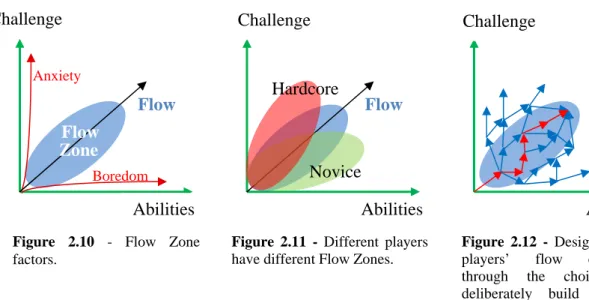
Figure 2.10 - Flow Zone factors………...28
Figure 2.11 - Different players have different Flow Zones……….……...28
Figure 2.12 - Designers adapt players’ flow experience through the choices they deliberately build into the experience……….28
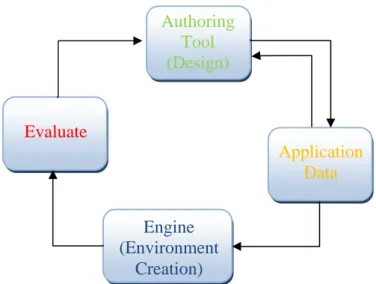
Figure 3.1 - Application Development process……….….33
Figure 3.2 - Framework Engine Architecture……….…34
Figure 3.3 – Elements evolution in the framework………....35
Figure 3.4 – Design Model for an Application………...36
Figure 3.5 – Framework’s Class Diagram………..37
Figure 4.1 - Application's General Settings………....43
Figure 4.2 – Application’s General Settings XML Schema………...44
Figure 4.3 - Frame edition………..45
Figure 4.6 - Frame Settings XML Schema……….…47
Figure 4.4 – Data Matrix list edition menu……….…48
Figure 4.5 – Data Matrix lists XML Schema……….….49
Figure 4.7 – Application’s Structure Preview……….………...50
Figure 4.8 - Smart Bins stand-by menu………..…....52
Figure 5.1 – Test results………..59 xiii
xiv
Figure 5.2 – Users that stood on the right place...63
Figure 5.3– Users that identified card on the camera...63
Figure 5.4 – Users that identified the objects...63
Figure 5.5 – Users inserting objects in the containers...63
Figure 5.6 – Smart Bins Environment………....65
Figure 5.7 – Users that stood on the right place (2nd day)...66
Figure 5.8 – Users that identified card on camera (2nd day)...66
Figure 5.9 – Users that correctly identified objects with the camera (2nd day)...67
Figure 5.10 – Users that inserted the objects in the container (2nd day)...67
Table 2.1 – Computers as Social Actors characteristics...13
Table 5.1 - Classification of experimental and query evaluation techniques……….53
Table 5.2 - Classification of observational evaluation techniques……….54
1. Introduction
1.1. General Introduction and Motivation
While computers are being developed at a hallucinating rhythm, its use is frequent at almost every time and place. With technology being as advanced as it is today, there is the possibility to use it to almost anything. The general idea of this work is to study how technology can be used to change people’s attitudes and behaviours, to help themselves, the others or the surrounding environment, using persuasive systems. The concept of having computers as persuasive technology to change people’s attitudes and behaviours is a very invigorating idea. People are getting accustomed to interact with new technology every day and it is now possible to use this relation between humans and computers to improve human´s behaviours.
The possibility of having computer systems interacting with people, detecting their characteristics and the ambient context allows creating adaptive software that fits people’s needs. Moreover, being blended on everyday things in the environment and at the same time not needing conventional user inputs brings another reality to Human-Computer interaction. People are allowed to interact with computer systems as they do with everyday things speeding up the learning process and making it simpler. Also, presenting messages at the right time and place can persuade people to adopt or change ideals and therefore changing their attitudes and behaviours.
This work intends to study how computer systems can be used as persuasive technology to change people attitudes and behaviour towards a sustainable environment. An architecture is proposed and has been developed, in order to provide an infrastructure for the construction of persuasive applications. Furthermore, a prototype was developed as proof of concept for this study. The prototype relates with the use of persuasive interfaces to promote recycling of 1
waste materials, preventing greater future damages in the environment. The results provide further understanding and new perspectives for the use of persuasive technologies as interactive computer products, designed to change what people believe and do, helping to improve human’s attitudes and behaviours. The motivation to develop this master thesis comes as a following idea of the problem presented above. Being concerned about the environmental problems that ruin our planet, the key idea of this work is to use technology to provide a system that allows the possibility to persuade people to change their behaviour.
1.2. Description and Context
This work has to do with the study of technology use to help people changing their attitudes and behaviours. This intention comes with the fact that sometimes people do not understand the problems of their inappropriate behaviours and they need to be reminded of that to change their current ideals and opinions that lead to different behaviour’s adoption.
Persuade persons to change their behaviour can be a very complex task, since the way people react is not linear as it has to do mostly with human psychology. People do not respond to the same stimuli, as everyone is different from each other. Nonetheless, the system has to be attractive and non-intrusive, capturing the characteristics of the surrounding environment, detecting user’s attitudes and responding accordingly. The challenge with interactive and persuasive systems is to understand how to create a model of interaction that captivates everyone who uses the system. One of the problems presented is the choice of proper messages (text, images, video, animations or audio) to provide, considering the person who is interacting with the system, and the right time to present them the information. Usually, people do not like being told what to do and that has to be taken in consideration. Besides, people will only change their behaviours if they feel that the information is credible. Given these facts, all the content displayed to the users has to be credible. The system should provide to users an approach to make them think about their current actions so they realize that they are not acting the way they should and they make the effort to change their behaviours.
As described in section 1.1, the proof of concept focuses on the issue of recycling. The idea is to build a prototype application that draws people’s attention for the need of recycling and teach them good recycling practices. Users must feel that they can help to make a
difference avoiding the degradation of the environment. To achieve this, one must provide the messages and stimuli that can influence them to form new ideals, which will lead them to adopt new positive behaviours.
This master thesis is related with the project SEEK (Strategic Experiences for Environmental Knowledge), whose first developments were published in Persuasive 2007 [1]. Previous (and on-going) work has been done in the scope of Joana Hipólito’s PhD thesis related with EcoDesign.
1.3. Presented Solution
The approach for the solution to the problem presented above involves the creation of a framework that allows the development of new persuasive ubiquitous environments. To change people’s behaviours, the system must be aware of the context in question (user, environment and situation) to be able to propose appropriate actions and guide the users through an entertaining and motivational experience.
The framework is supported by sensors to detect the context and users in the system’s surroundings. This way, the type of the messages to present and the interaction model can be chosen within that context. An authoring tool was also implemented in order to allow the creation of context aware persuasive applications to users without programming skills. Furthermore, a prototype application was developed as proof of concept in order to determine a possible result of the persuasion effects of this application developed with the use of this framework.
The prototype, Smart Bins, consists in an application to change people’s behaviours towards recycling. The intention is to provide social and environmental conscience, especially on children, so they can help to improve the environment in the future. The system detects user’s presence, starting the interaction from that moment on and providing an interaction model to teach and motivate children to recycle waste materials. During all the interaction, the system detects the ambient context and presents stimuli according to user interaction. Smart Bins assigns simple tasks for users to follow, in order to create a challenge to carry out and to stimulate them during the interaction. Furthermore, the application provides different stimuli to the users according to the objectives that they reach.
The authoring tool was created to support the architecture and the prototype application was created using the developed system. This application was tested by target users in order to evaluate its usefulness and usability.
1.4. Main Expected Contributions
This is expected to contribute to the development of new persuasive systems. This study and implementation provide a platform to develop new ubiquitous systems that help to improve people’s behaviours. The developed authoring tool allows the creation of ubiquitous persuasive applications to users without programming skills. It is also expected that this work provides a new vision of computer systems embedded in everyday objects, not only as tools to help people in their work, but also as entertainment and educational tools that could help users to adopt new positive behaviours.
With the application prototype, the ambition is to raise social conscience and environmental concerns, reducing pollution in order to obtain a healthier world. Furthermore, it is also relevant to study how people react to ubiquitous technology. The use of ubiquity is intended to provide unobtrusiveness between people and computer systems, so they can focus more on the message and tasks and less on learning how to use the system.
The results provide further understanding and new perspectives for the use of persuasive technology, as interactive computer products designed to change what people believe and do, helping to improve human’s attitudes and behaviours.
1.5 Structure of the Thesis
The remainder of this thesis is structured as follows.
Chapter 2 (“State of the Art”) is related with the background study of this work. Several related topics were studied and are presented in order to contextualize the followed approach and present this thesis related work. In Chapter 3 (“Methodology and framework description”) one introduces the methods followed and presents the current solution. In Chapter 4 (“Framework Implementation and prototype development”), the implementation of the framework and the proof concept application are analysed and described in detail.
Chapter 5 (“Evaluation and User Studies”) describes the evaluation methods and the user tests performed for both the authoring tool and the application prototype. Furthermore, the results of these tests are analysed and discussed in this chapter. Finally, in Chapter 6 (“Conclusions and Future Work”) conclusions are presented, followed by some orientations for future improvements.
2. State of the Art
2.1. Persuasion
Not everyone agrees on what persuasion exactly means. “Persuasion is a form of social influence. It is the process of guiding people toward the adoption of an idea, attitude, or action by rational and symbolic (though not always logical) means.”1 Fogg [2] defines persuasion as an attempt to change attitudes or behaviours (or both) without using coercion or deception. Persuasion tries to modify the way others think, feel, or act. Persuasion can be seen everywhere: at home, in the streets or at work. For instance, when parents encourage their children to develop better study habits or when politicians try to convince electors to vote for them. Everyone uses persuasion, intentionally or non-intentionally, more or less successfully. Some persuasion techniques are more efficient than others depending on the target users and the contextual situations.
Persuasion can be used to change people’s behaviours. For example, stimulating people with inappropriate behaviours, such as drinking, overreacting, smoking, driving recklessly, to change their habits and adopt beneficial behaviours. Persuasion can be applied in several contexts, including commerce, health, education, environment and safety. However, most applications of persuasive techniques are in the field of marketing and advertising.
To Harjumaa et al. [3] there are three types of persuasion: interpersonal persuasion, computer-mediated persuasion, and human-computer persuasion as shown in Figure 2.
1
Hhttp://en.wikipedia.org/wiki/Persuasion
Figure 2.1 – Persuasion Types
Interpersonal persuasion happens when a person persuades other using verbal or non-verbal communication. Computer-mediated persuasion occurs when someone uses technology to persuade a person, through e-mails for example. Human-computer persuasion, that is this study’s focus, is the use of persuasion through human-computer interaction.
2.2. Computers as Persuasive Systems
“Simply put, a persuasive computer is an interactive technology that changes person’s attitudes or behaviors.” [4]. In short, this means that a computational system can be used to change user’s ideas and habits. The difference between the two concepts given above, attitude and behaviour change, is the fact that attitude change is accomplished if one can change what people plan to do in a specific moment and behaviour change will only be consummated if someone changes his or her way to think about some subject, making the attitude become an habit.
The study of computers as persuasive technology is relatively new. Fogg [4] coined the term Captology, an acronym for the sentence “computers as persuasive technologies”. As stated by Fogg, Captology focus on the design, research, and analysis of interactive computing products created for the purpose of changing people’s attitudes and behaviours. In his book “Persuasive Technology” [2], he describes this research and presents several application examples.
As this work focuses on persuasion through Human-Computer interaction, one has to compare computers and people as persuaders. According to Fogg [2], when it comes to persuasion, computers have many advantages over humans:
- Are more persistent. Computers can repeat the same task over and over again.
- Have multiple output forms, such as graphics, videos and audio. Often people are influenced not only by the information itself, but by how it is presented.
- Store, access and manipulate great volume of data.
- Allow anonymity. People can interact with a system without anyone knowing. - Can be ubiquitous. Computers may even be in places that it is strange for people to be, like bathrooms or bedrooms, which allows them to intervene at the right time and place.
- Are easily scalable. If a system is good it can be reproduced; with humans it is not that easy as it involves training and skills.
Given the advantages of computers over humans concerning persuasion activities, the question in hand is how to have people changing their attitudes and behaviours.
2.2.1. Motivating Users to Modify their Behaviour
There are many ways to address people and try to convince them to do things, some more efficient than others. People can also be mislead, being convinced to do something with the expectation that it will help them and get disappointed at the end. Coercion can even be used to force people to change their behaviour, but persuasion, in the context of persuasive technology, should imply voluntary changes. Nevertheless, the border between coercion and persuasion is not very clear.
It is important to state that when dealing with people, human psychology should be taken in consideration. A significant aspect to have in mind is people receptivity to the system. People tend to dislike intrusive systems that are always telling them what to do. On the other hand, if after interacting with a computer, people realize that the consequences of their attitudes may help them or the community, then there is a great possibility that they will change their attitude and possibly their behaviour, sometimes being persuaded to change without even noticing. Given this fact, one has to think about appealing and non intrusive 9
interfaces that can make everyone realize the benefits in changing their attitudes and behaviour, creating new ideals for people to follow on time to come.
In his book, B.J. Fogg refers that there are many aspects to deem when using computational systems as persuasive tools. The concept of computers as tools comes with the fact that computers may provide ways to simplify user’s tasks and interaction according to people’s needs and system’s goals. Reduction, tunnelling, tailoring, suggestion, self-monitoring, surveillance and conditioning are the tools enunciated [2].
Humans always look for a way to simplify tasks. Using computational power will allow complexity reduction on user’s tasks to simplify the process, leaving the rest of the work to the computer. This is what reduction is all about.
The idea underlying tunnelling corresponds to the use of technology to guide a user through an experience following a predetermined sequence of actions, being able to use persuasion along the way. This means that while users interact with a system it can show them messages or content that suggests the user what to do, providing them the information that hopefully will make them change their minds. Also, even when the computer is performing other tasks, it still should be able to provide information to the users so they always keep their attention on the displayed contents. This way, no time will be wasted and users are always being provided with useful information.
People should sense that the information is tailored for them, which means that, for instance, if the interface is designed for different individuals, it should have multiple forms of display and interaction according to individual’s needs, interests, personality or usage context. Figure 3 shows a representative example of a persuasive technology project by A. Andrés et al. [5] using tailored information for leading the user to adopt a healthier lifestyle, like doing regular exercise or quitting smoking. Using video acquisition, this system detects users facing a mirror using two cameras, and uses face tracking algorithms to track faces in the collected images. After this process morphing techniques are applied to the captured face image to produce aging effects. This system provides information about future consequences of the user present behaviours. The results are tailored to each individual and the system uses image enhancement to provide each user with images of their aging process to persuade them to adopt healthier living styles.
Figure 2.2 – Behavioural effects in Persuasive Mirror project from [5], Figure 1
Choosing the right time for technology to make a suggestion is crucial. Studies show that just-in-time motivation messages are one of the keys to persuade people to change. Intille [6] stated that an effective strategy to motivate behaviour change is to present a simple message that is easy to understand, at just the right time, at just the right place, in a non-annoying way. This assumes the use of sensors and a way to provide different stimuli, to allow the selection of the most appropriate time to present relevant information given the context. Arroyo et al. [7] also propose the use of “just-in-time” prompts right at the point of behaviour in response to user’s activities, with the use of simple and explicit messages in a non annoying way. Although it is not easy to know and choose the exact moment to present a suggestion, people tend to be more predisposed to change their attitudes when they are in a good mood, when they find that their current view no longer makes sense and when they feel in debt because of a favour they received [2].
Furthermore, computers allow the possibility to provide self-monitoring or surveillance to the users. There are several products and prototypes using self-monitoring strategies. Toscos et al. [8] developed ChickClique. This system’s intent is to help teenage girls to change their exercise and eating habits. ChickClique helps girls to choose what to eat and provides them with the caloric values that they burn, by counting the number of steps they walk during the day. These calculi are compared to other girls’ results in a group of friends using ChickClique. This comparison between values provides healthy competition between the girls which helps to obtain better results. Another example is UbiFitGarden [9]. Using on body sensors, UbiFitGarden controls physical activities such as cardio, walking, 11
resistance training, or flexibility training. The system is able to schedule a weekly plan that can be consulted in a mobile device. While users perform their physical activities according to the plan, the system displays flowers blossoming in a garden until butterflies appear which signals that the program is complete. Self-monitoring applications are used mostly on health areas, monitoring user’s habits and establishing goals for them to improve their health condition.
While self-monitoring allows users to know the consequences of their own actions, surveillance is used to monitor others’ behaviours. People are more careful with their attitudes when they know they are being watched. This can cause changes in attitudes and/or behaviours. For instance, persuasive systems like CleanSink [7] use surveillance to persuade users to keep their hands clean. This system was designed for places that required employees with absolutely clean hands, like hospitals, restaurants or industrial clean rooms. CleanSink uses a camera to sense hands at the sink. The system is combined with an RFID card reader that logs the user’s identity and compliance to a central database. When the camera detects that user’s hands were under the sink long enough the RFID reader registers the compliance on the database.
Figure 2.3 – Clean Sink showing indicator (left), RFID reader (middle) and sink (right) from [7], Figure 3.
CleanSink was implemented in two different places, in a hospital and in an industrial clean room. In the hospital, the sink sensor was connected to the lights and the users had to wash their hands or they would not see the room clearly. In the industrial room the sensor was connected to the door and users had to wash their hands or they would not be able to leave the room.
The conditioning theory is based on the fact that humans are ambitious. Setting goals for the interaction and rewarding users with positive reinforcements motivates the users to perform well. Niebuhr et al. [10] presented a study that explores this kind of motivation technique. When users need to perform repetitive tasks it is usual that they get bored while performing it. When using an interface that displayed goals to be achieved on a simple task, like inserting elements in a database with the use of a form, users performed their task without distractions. This study reveals that even with the use of simple messages, such as displaying the number of tasks left to complete the work, users show a higher motivation to complete their work when they are aware of the goals previously set and their work progress.
2.2.2. Social Awareness and Support
When users interact with computer systems that appear to provide intelligent feedback to the actions they perform, computers resemble human characters and can be seen as social actors. Computers can have a social influence and people can relate to them as they would with a human being [2]. As social actors, it is important that when people are interacting with a computer system it reinforces compliance with positive feedback to keep people open to the new experience they are facing. There are many characteristics that computers may possess which can lead people to treat them as social actors as shown in Table 2.1.
Table 2.1 – Computers as Social Actors characteristics, based on [2], Table 5.1. , page 91 Characteristics Examples
Physical Face, eyes, body, movement
Psychological Preferences, personality, emotions
Language Interactive language use, spoken language, language recognition Social Dynamics Cooperation, praise for good work, answering questions
Social Roles Doctor, teammate, opponent, teacher, pet, guide
Persuasive system’s behaviours and interfaces can get closer to humans’, Baby Think It Over [11] has the form of a human baby and simulates babies behaviours to persuade teenagers not to get pregnant. Also, to increase social influence, it is reasonable to suggest that an attractive interface will have greater social influence than an unattractive one. Attractiveness can, therefore, be faced as a persuasive element [2].
Sometimes, computer software seems to have personality, emotions or preferences. The way messages are shown can make computers look polite or even angry. They can be programmed to react to some kind of interaction giving the impression that they look alive as they respond differently according to each situation.
Computer software can be very flexible, which allows having multiple language forms related to target users. With the use of the appropriate language, it is possible to reach each particular user, making it easier to persuade them. Likewise, it is a good politic to praise users when they do what they are supposed to do and help them through cooperation. “By offering praise, via words, images, symbols or sounds, computing technology can lead users to be more open to persuasion” [2]. Also, mixing praise with few non-praise messages increases the credibility of the first ones.
Applications can also assume social roles, being seen as having professions or character like persons do. Although it is not a persuasive system, “Tamagotchi” successfully demonstrated how interacting with a computer could be a social experience. For instance, McCalley et al. [12] developed a system that was directed to the elderly to create an emotional bound between them and a pet plant. The pot in which the plant was inserted responded to human stimulus. The Pet Plant system covered four experiment conditions:
• Control Plant: the system blinked in a random colour and intensity and did not respond to human presence or action.
• Light Plant: the system reacted to human touch and voice, changing its green colour intensity while users held the plant pot and turn into red and green simultaneously, creating a “blush” effect, if the users touched the plant’s leaves.
• Similar Plant and Dissimilar Plant: the system reacted the same way as the Light Plant with the difference that the first had a card describing it as being shy and the second had a card describing it as being extroverted.
The group of testers was randomly assigned to one of the four experiment conditions. The users were told to read the card before the interaction. Results revealed that the users attributed emotion to the plant, and more significantly in the last three experiment conditions, with Similar Plant having the best results. Also, Control Plant had the worst results when users were asked if they liked the plant. The other three experiment conditions had similar results, with Light Plant having slightly better results than the other two. This study reveals that when using the right interface the system can be seen has being alive and therefore having intelligence and feelings.
Simultaneously to the fact that computers can be seen as social actors, persuasive systems can develop social conscience on users. Reitberger et al. [13] developed a persuasive system, PerCues, intended to reduce pollution through the use of public transportation. If people choose to use the bus instead of the car, the system informs the user, through a mobile phone, about the consequences of their own choice. The information about all the users that individually had the same decision is gathered and the group of persons who had the same choice know from that moment on the impacts of individual and group action. Using individual actions to inform about group state can be a good form of persuasion because people relate to a more significant change with a simple action.
2.2.3 Credibility in Persuasive Systems
“Simply put, “credibility” can be defined as believability. In fact, some languages use the same word for these two English terms. The word credible comes from the Latin credere, to believe.” [2]. Persuasive systems have to be credible, only this way people will rely on the information which has the intent to persuade them. Also, Fogg defines credibility as having two dimensions: Trustworthiness and Expertise.
Trustworthiness is, in context of computers, a computer that is perceived to be truthful, fair and unbiased. One the other hand, “Expertise consists of those characteristics, skills and knowledge of a person (that is, expert) or of a system, which distinguish experts from novices and less experienced people.”2These two dimensions do not necessarily have to come together, but combining them leads to more credible sources. In computer systems the
2
Hhttp://en.wikipedia.org/wiki/Expertise
information can also be provided by credible third-party sources which will add credibility to the computing technology.
Fogg [2] also states that even though there are some cases where the credibility does not matter, there are others where credibility is essential in human-computer interaction. Credibility matters when computers:
• Instruct or advise users. • Report measurements.
• Provide information and analysis. • Report on work performed. • Report about their own state. • Run simulations.
• Render virtual environments.
To conclude this section, it is important to refer that the presented design principles for persuasive technology, that Fogg conceptualized, described in section 2.2.1, 2.2.2 and 2.2.3, have to be analysed as software requirements [14].
2.3. Ubiquitous Systems
“The most profound technologies are those that disappear. They weave themselves into the fabric of everyday life until they are indistinguishable from it.” [15]. This vision is being considered now more often than ever, technology advancing into the future being used on everyday things.
Since computers came into people’s lives, each one had to learn how to work with them, finding it often frustrating. Mark Weiser brought a new vision to Human-Machine Interaction residing on the idea that instead of one having to learn how to work with computers, it should be the opposite, computers should merge into human’s lives being as much invisible as possible. This concept was named “Ubiquitous Computing” and it has two main objectives:
- Detect and interact with people in the system’s surroundings. - Blend in the environment.
The concept of ubiquity is refreshing. People tend to find computers frustrating and intrusive, however if systems detect human presence and allow people to act like they normally do, the interaction arises naturally.
2.3.1 User Aware Environments
When developing persuasive environments, it is indispensable to analyse users’ behaviours to track changes and to evaluate if they are really doing what is expected they would do. Only this way it will be possible to conclude the product’s success. Nevertheless, it is essential to acquire information of people’s behaviour to determine their needs and build a system based on those. “Differences between expectations of how people will behave and how they actually do behave in the complexity of real settings contribute to product failures. Developers often make erroneous assumptions about the need for, use of, and reaction to new technologies.” [16]. Besides this, persuasion in ubiquitous environments can only be present if there is a way to analyse people’s behaviours. It is possible to do so using three different kinds of approaches:
• Gathering information through direct observation. • Having users submitting information.
• Using the system’s sensors to gather information.
Direct observation, can be very time consuming and by that fact it is most of the times considered the last approach to use.
Having users submitting information about their behaviours can be done, on regular or random time intervals and on system’s response to user initiative. To submit the information, one could have, for example, users responding to a questionnaire provided by the system. While gathering information on regular or random time intervals requires a timer, having the system responding to user initiative requires sensors to detect the right time to present the questionnaire. As for all these methods the questionnaire could interfere with the interaction, in case the system’s designer uses one of these kinds of approaches he has to put a lot of effort into the interaction model to keep users satisfied.
The most complex approach, but also the most effective one, as it does not distract the user from his main goal, is to use sensors that respond to user initiative and that can gather 17
information about their behaviours. The sensors used, where they are placed and the information to collect has to be chosen taking into account the behaviours to be changed and the environment in which the sensors will be applied.
Chi et al. [17] developed a Smart Kitchen with the intent to follow this last approach. This system’s purpose is to enable calorie awareness for families to have healthier meals. Smart Kitchen was developed with hybrid sensing to calculate the number of calories in the prepared food. To do so, the system has a weighing-sensing surface deployed on the kitchen counter and on the stove, and a camera to capture images to detect the food. Although it has some limitations, it has 92% recognition accuracy of the prepared food caloric values. The recommended calories for the meal and the calories used in each moment are displayed in front of the cookers, so they always have a perception of the current state and have a glance whenever they want. The tests for this prototype involved three participants who could choose the menu to cook. They prepared their meals with and without the system’s help. In all the cases the food preparation without the help of the system had higher values than the recommended. With the system’s help participants approached the recommended values for the number of calories on each meal. All the participants wanted to change their cooking behaviour and therefore the results were pretty satisfactory. This work’s implementation is based on an architecture presented on Figure 2.4 bellow.
Figure 2.4 – Calorie tracker architecture from [17], Figure 2
This architecture is based on hybrid sensing as it has a weighing-sensing surface and camera to detect the environment’s context. Ingredients’ weight is gathered by the weight-sensing surface, and the type of food present on the cooking area is provided with the use of images collected by the camera. After being determined the weight and the types of ingredients currently used, either by the Ingredient Inference Agent analysis on weight and food transfer or by an observer input that catalogues the food in use, the data is sent to Calorie Calculator. The calories present on the food in preparation are then determined and the results are shown to the user who is preparing the food, so that he has an idea of the caloric value when preparing a meal.
The system presented by Timothy Bickmore et al. [18] aims at helping people to obtain a healthier life style. This PDA-based health advisor provides real-time reminders and conversational counselling to help users to change their health behaviour. The architecture developed for this project (Figure 2.5) is the base to support real-time messages according to time and sensor data that manages user’s behaviour.
Figure 2.5 – Health Advisor runtime Architecture from [18], Figure 2
This system displays, on the PDA screen, an animated agent that simulates emotions and “intelligent behaviours” like facial expressions, head nods, eyebrow’s movement, posture shifts, eye gaze movements and a nonverbal conversational behaviour. User inputs are confined to multiple choice selections and time-of-day specifications. According to these settings, interaction dialogues are scripted in a XML-based state-transition network. The scripts consist on agent utterances, user allowed responses to each agent utterance, instructions to state transitions based on these responses and other system events like timers, and sensor inputs. The actions are controlled by a finite-state machine built at runtime and the messages are displayed consistently to what is defined in the XML script. During the time in which the script does not require agent actions, the system becomes idle and displays idle behaviours like eye blinks and posture shifts.
2.3.2. Environment’s Context Detection
The way to interact with users in ubiquitous systems is a big design concern. As people do not like intrusive systems, it is necessary to develop an interaction model that subtly increases users’ participation. Consequently, it is important to divide interaction in different phases and adequate messaging type for the context in question. Vogel et al. [19] proposed an interaction method for ambient that goes from implicit to explicit interaction and from public to personal displays, motivating users to get close enough to interact directly with system’s information.
Figure 2.6 – Public to Personal Interaction Model based on [17], Figure 2
The framework presented consists in four interaction phases, Ambient Display, Implicit Interaction, Subtle interaction, and Personal Interaction, being the order given the same to the system display proximity as shown above in figure 2.6.
In phase one, Ambient Display, an overview of the system is displayed using appealing information, being easy to identify the context of the system, without giving to much information. In the second phase, Implicit Interaction, the system should recognize that users are facing the screen, showing an abstract drawing of their faces. Also, personal or public information which is important for that moment is subtly shown since these techniques help to get users closer to the display. The next interaction zone is Subtle Interaction. When a user pauses for a moment in this interaction zone, features are displayed in more detail. Here users may select the information to investigate with simple hand gestures while other users can continue to see “their” part of the system. Since users are closer to the system, it can display personal information. This information has to be harmless, since it can be seen by others compromising user’s privacy. After selecting the information to manipulate, users reach the last phase, Personal Interaction. Here, information can be directly manipulated touching the screen and as the user’s body is in front of other users view, it can help to occlude personal information that could be presented. Nevertheless, all other information must be visible to users interacting in other phases giving the possibility to multiple simultaneous interactions. Furthermore, transitions between states are very important. These transitions must be discrete so users do not notice an abrupt change from one phase to the other, and at the same time, not too subtle that users do not realize that they reached a new state. In the first two phases, the system’s states change according to users’ movements like approaching the nearer interaction phases or facing the sensors. User’s actions become more explicit in the last two phases, choosing information to access with hand gestures in the Subtle Interaction phase and touching the screen to directly alter information in the Personal Interaction zone.
Another interaction method has been proposed by Streitz et al. [20]. “Gossip Wall” was designed for an office environment having particular information needs both at the collective level of the organization, and at the personal level of the worker. The interaction zone was divided in three phases: Ambient Zone, Notification Zone and Interaction Zone.
Figure 2.7 – “Gossip Wall” Interaction Model based on [20], Figure 1
While people are outside the system’s sensor range, Ambient Zone is displaying its message. The Ambient Zone messages are individual independent, which means that they are the same for all the users. When users reach the Notification Zone, Gossip Wall changes into a notification status and displays individual or group information in view of persons in system’s range. Users can browse, download or enter information, for further use, using a mobile device. While they get closer to the wall users reach Interactive Zone and they can interact directly with independent interactive pixels that store information sent throughout the mobile devices.
These phased interaction methods allow users to become more participative as they comply with system´s goals without feeling intrusiveness from it.
2.3.3. Persuasion in Ubiquitous Systems
One approach to follow in persuasive systems is described by Oinas-Kukkonen et al. [14]. The paper in question addresses the fundamental issues behind persuasive systems and the way to evaluate them. It defines seven ideals that need to be taken in consideration when developing a persuasive system:
- Information technology is never neutral. Information always influences people and so persuasion should be, if possible, a process instead of a single act.
-
People like their views about the world to be organized and consistent. In short, this relates to the fact that if users feel any kind of inconsistency in their reasoning they will reflect on their current views and probably will adopt an attitude change.-
Direct and Indirect routes are key persuasion strategies. In this information era it is difficult for people to process all the information they receive. This implies that only users that are really interested in the information provided by the system will pay their full attention and process all the information. For the others, the system could trigger memories represented by images, words or some kind of information that the system displays, assuming that the new information has an influence on user’s background.-
Persuasion is often incremental. This means that in certain situations, as it is not easy for a person to change habits from one day to the other, the tasks can be slowly increased, so its effect duration lasts for a longer period of time, permanently if possible.-
Persuasion through persuasive system should always be open. The information should always be truthful so it does not end-up misleading the user.-
Persuasive systems should aim at unobtrusiveness. User’s attention should be focused on their main tasks. Everything that comes in between can divert user’s concentration which will affect the persuasion effect.-
Persuasive systems should aim at being both useful and easy to use. If the system is hard to use, it can frustrate users and will result in a very negative aspect for persuasion. On the other hand, if the system is easy to use it could be used by almost everyone without much effort and it will help the persuasion process.As described above, a property desired for ubiquitous systems is to blend in the environment. There is a big tendency to develop persuasive systems with this principle, mainly because persuasive systems are normally designed to interact directly with persons but they should be seamlessly integrated in the environment, not significantly changing it.
2.4 Human-Computer Interaction
"Human-computer interaction is a discipline concerned with the design, evaluation and implementation of interactive computing systems for human use and with the study of major phenomena surrounding them." [21]. The obvious intervenient on this field are Humans and Computers, so one must [22]:
• Understand computers:
o limitations, capacities, tools, platforms
• Understand people:
o psychological, social aspects, human error
As it is not linear to design interactive systems, one has to know what Human Computer Interaction (HCI) aims at and the principles to achieve these goals.
2.4.1 Human-Computer Interaction Goals
A basic goal of HCI is to improve the interaction between users and computers by making computers easier to use and receptive to the user's needs. Jennifer Preece et al [23] identify two main types of goals for interactive design: Usability goals and User experience goals.
Usability goals are centered on the system’s use. Interactive system’s goals are: • Effectiveness – how good the system is doing what it is supposed to do. • Efficiency – the way system supports users in carrying out their tasks. • Safety – user protection on dangerous conditions and undesirable situations. • Utility – when systems provide the appropriate functionalities so users may
perform their tasks.
• Learnability – how easily users learn to use the system.
• Memorability – how easy the system is to remember how to be used once learned.
25 User experience goals are centered on users’ experience when using the system. The system should be:
•
Satisfying•
Enjoyable•
Fun•
Entertaining•
Helpful•
Motivating•
Aesthetically pleasing•
Supportive of creativity•
Rewarding•
Emotionally fulfillingThese goals are the guidelines to develop efficient interactive systems to minimize user’s difficulties and barriers on interaction.
2.4.1 Interaction Design Principles
When designing a new interactive system, there are many aspects to have in consideration. It is important to have in mind the following design principles [22]:
• Early user focus:
The users to whom the system is going to be developed for have to be studied in advance. When designing new interfaces it is indispensible to know who the users are, they probably don’t have the same interests and the abilities of the developers and it is important to watch them in action and determine their needs.
Empirical measurement:
One should watch the users in action. It is important to establish quantitative usability specifics such as the number of users performing the tasks, the time to complete the tasks, and the number of errors made during the tasks.
Iterative design:
After determining the users, tasks and requirements, the system design should follow a cyclic process allowing for the early detection of errors and their respective correction at reduced costs.
The iterative design process should be repeated until a sensible, user-friendly interface is created. This is a key process to develop interfaces. This cycle is represented below in Figure 2.8.
Figure 2.8 - Design Cycle based on [22]
Iterative design is the most used process for developing user interfaces. It is a specification of the spiral model (Figure 2.9) described by Boehm [24].
Figure 2.9 – Boehm’s spiral model from [24]
The designed software is improved at each cycle and following this spiral model, at each iteration one approach the operational prototype. The cost of each iteration step is directly proportional to the radial dimension of the spiral model.
2.5 Child-Computer Interaction
One intuitively may say that developing systems and applications for children is different than for adults as it has to do with child psychology and learning capabilities. Janet Read et al [25] define Child Computer Interaction has follows. “The study of Child Computer Interaction is a growing subfield of HCI. Child Computer Interaction encompasses traditional HCI but also specifically reaches out into the areas of child psychology, learning and play.” Hence, one has to understand what motivates children, to develop new systems according to their needs. Evaluation techniques should also be adapted to children specific characteristics. Janet Read has studied different techniques to measure children’s opinion of technology [26].
2.5.1 Motivation and Goals
Understanding what drives children to compel with their tasks is crucial when creating new interfaces. Motivation takes a decisive part in children’s learning process. Children lack the motivation for long and medium term objectives. Thus, short term objectives are essential when creating software directed to them. For this reason, immediate feedbacks are indispensible to motivate children to compel with their tasks. Instead of traditional learning process, like in school classes, which has no immediate rewards, a game creates the possibility of positive feedbacks when children accomplish their objectives. Bearing this in mind, each decision made in an application must have a well-defined inherent goal and respective feedback in order to increase their motivation and will to complete the tasks.
To produce enjoyable interfaces one has to first think about what users want. In the mid-1970s, in an attempt to explain happiness, Mihaly Csikszentmihalyi introduced the
28 concept of Flow. “Flow represents the feeling of complete and energized focus in an activity, with a high level of enjoyment and fulfillment” [27], which means that once experiencing this feeling, one is fully motivated and focused in what is being done. Csikszentmihalyi’s research and personal observations identified eight major components on Flow [28]:
• A challenging activity requiring skill; • A merging of action and awareness; • Clear goals;
• Direct, immediate feedback; • Concentration on the task at hand; • A sense of control;
• A loss of self-consciousness; • An altered sense of time.
Although there are eight major components on the Flow, it is not necessary to comply with all of them. Nevertheless, the experience should be immersive and cover as many of these components as possible. Reaching and maintaining the Flow is a big challenge. The graphics 2.10, 2.11 and 2.12 show how one may keep users in the Flow zone [28].
Abilities Flow Flow Novice Hardcore Challenge Challenge Abilities Challenge Anxiety Boredom Flow Flow Zone Abilities Figure 2.10 - Flow Zone factors.
Figure 2.11 - Different players have different Flow Zones.
Figure 2.12 - Designers adapt players’ flow experience through the choices they deliberately build into the experience.
The idea is to balance the challenge provided to the users with their abilities. Hence, one should:
1. Mix and match the components of Flow;
2. Keep the user’s experience within the user’s Flow Zone;
3. Offer adaptive choices, allowing different users to enjoy the Flow in their own way;
4.
Embed choices inside the core activities to ensure the Flow is never interrupted.
3. Methodology and framework description
This work focuses on the development of a framework to support the development of contextual aware persuasive applications. The achieved solution came as a result of the study presented in chapter 2. One found the need to develop an architecture that followed the line of persuasive technology. Hence, the architecture had to provide feedback to user’s actions in order to motivate their behaviour’s change. Furthermore, as the proposed solution aims at allowing the creation of new persuasive environments, that call for ubiquity, the architecture was created in such a way that the sensors are indispensable tools for user interaction. The architecture also allows for multimedia data output that can be configured according to the users’ actions.
In the scope of Human Computer Interaction, the necessity of providing a simple way to produce functional interfaces lead to the creation of an authoring tool of simple use, which grants to its users the possibility of having an effortless way to develop their applications. Thus, the developers can centre their attention more on the design and in the evaluation of the desired final result and less on the implementation details. Hence, an authoring tool was developed to support this feature. Although the main purpose of the authoring tool was to facilitate the creation of new applications, the prototype implementation is not directed to all users and one will further present the evaluation of this tool’s usability and the potential of this framework.
As a proof of concept, one designed an application, Smart Bins, which was developed to promote recycling. The purpose in the creation of this game environment was to teach children about this subject, motivate them to adopt a different conscience on this matter and encourage them to recycle. The idea to develop a game came with the intention of motivating children in short-term periods. In addition, one would also provide them with an amusing and easy way to learn more about recycling and therefore change their attitudes and behaviour about this theme. Moreover, this application was studied in terms of usability and to better 31
understand the potential persuasiveness effect of one such application created using this framework.
3.1 Framework Design Methodology
The framework developed in the scope of this master thesis aims at allowing the creation of ubiquitous persuasive applications with a minimal programming effort, so non-programmers can build context-sensitive persuasive applications. These applications are designed to be able to capture contextual information regarding the user’s behaviour or the surrounding environment and react accordingly, in order to persuade users to adopt a certain attitude or behaviour. In section 4.2, it is described one such application developed with this framework. However, this framework can be used to build a great variety of different ubiquitous persuasive applications, such as advertising installations or augmented physical objects. To design the framework the concepts of captology [4] and ubiquitous computing were combined, since the goal is to facilitate the authoring of non-intrusive persuasive applications that subtly guide the users through planned appropriate actions that change their attitudes or behaviours. The work of Oinas- Kukkonen and Harjumaa [14], which is based on the work of Fogg [2], was also taken in consideration. It defines persuasive design strategies and guidelines, listing techniques for persuasive system content and functionality.
The proposed architecture seeks to contribute to the study of how computer systems can be used as persuasive technologies to change people’s attitudes and behaviours. Sometimes people do not understand what they have done wrong and they need to be warned about their inappropriate behaviour, in order to be able to change their current ideals and attitudes, leading to the adoption of a different, more suitable behaviour. Nonetheless, a persuasive system has to be both attractive and non-intrusive, capturing the characteristics of the surrounding environment, detecting the user’s attitudes and distinctiveness in order to respond accordingly. This chapter describes the framework design, explaining the conceptual solution for this work. The proposed architecture is supported by sensors to detect users and their context in the system vicinity. The set of characteristics collected within the system vicinity is translated to different actions through the usage of an interaction model. Consequently, for distinct patterns detected by sensors, different multimedia resources can be
provided to users, also making the interaction model to change state according to the sensors’ pattern detected.
This framework consists in two distinct parts: an authoring tool to develop new persuasive applications for ubiquitous environments and an engine that builds these environments and manages user interaction according to what was defined when using the authoring tool to create these applications. Figure 3.1 shows the development process to create different persuasive applications using this framework. This process may be repeated as many times as users want and matured until the developers of the new applications are fulfilled with the result, since this authoring tool permits to easily edit the already created configuration files. Authoring Tool (Design) Application Data Engine (Environment Creation) Evaluate
Figure 3.1 - Application Development process
In order to explain the design of the proposed solution, this chapter is structured as follows. First, the framework architecture will be presented in section 3.1.1. Section 3.1.2 is reserved to explain how to design new applications with the use of the authoring tool. At last, in section 3.1.3, a diagram with the system’s classes will be presented and discussed.
3.1.1 Framework Engine Design
The proposed architecture relies on four main modules: Multimedia Display, Context Processor, Data and Sensors. The diagram shown in Figure 3.2 represents the different modules and shows how they exchange information between them.
Figure 3.2 - Framework Engine Architecture
This architecture allows the system to evolve through time given that the modules are independent, relying on common interfaces to exchange information between them. Therefore, new features can easily be integrated within each module to fit the needs of each application. The Context processor is the main module of this architecture as it has to manage all the information provided by the other framework modules. When the sensor processor and the camera processor receive the information from the sensors and camera respectively, both modules filter the data and send it to the Context Processor. Then, the Context Processor analyzes the data provided by the lower layers, accesses the application data to gather additional information and presents it through the Multimedia Display. Finally, the Multimedia Display is the module that provides the user with the result of each interaction with the system. Visual and audio stimuli are the primary output of the system. Output stimuli result from the analysis of contextual information, gathered by the sensors and the
camera. This analysis is performed within the context processor and, afterwards, that stimuli are shown to users within the multimedia display.
3.1.2 Framework Application Design
The engine described above is supported by an authoring tool that eases the development of new persuasive applications. The authoring tool explores the persuasiveness achieved by this framework and facilitates its usage in different contexts. During the usage of the authoring tool, files are configured so that engine’s modules may interpret the information. This information is added to the platform in order to be used within the new application, building the interaction model for that application. Moreover, existing interaction models can be further modified and adjusted to specific purposes. Therefore, while the framework can evolve over time, new applications can also evolve to integrate new features added to the framework. The authoring tool explores three major concepts: frames, resources and links. Figure 3.3 describes how the diverse framework elements evolve during the execution of an application. Each column shows the correspondence between the elements and how they evolve in order to persuade a user to adopt a new behaviour.
Stimuli Interaction Point Context Abstract Level
Link Frame Resources
Authoring Level Multimedia Display Context Processor Sensors Engine Level
Figure 3.3 – Elements evolution in the framework.
Frames correspond to the major interaction point in an application, since they reflect an application state within the interaction model. A frame aggregates the remaining two concepts: resources and links. Indeed, resources correspond to the media used to compose the frames and are able to provide the stimuli to the user within the application. Resources can be images, videos, texts, audios, animations or other media able to persuade the users. Links correspond to application state transitions. A link establishes a transition from one frame to another and defines the conditions (set of context variables) that activate that transition. When a specific sensor pattern, matching the condition to activate a link in the current application frame is achieved, the corresponding link is activated and the application automatically changes to the interaction frame defined by that link. While defining a frame, one needs to specify its media content and define the possible links to other frames.
In summary, the application design can be seen as an oriented-graph, where the nodes correspond to the frames, which contain the multimedia resources and the edges correspond to the links that can be followed from one frame to another. This way, Figure 3.4 represents an example of what could be an application design model using this framework.
1 2 5 3 4 7 6
Figure 3.4 – Design Model for an Application
If one thinks of this graph as the application model design at runtime, the red node represents the frame that corresponds to the current application state, and the green nodes represent the remaining possible frames of the application.
This framework is generic and allows the creation of multiple applications, but it requires that the user who is responsible for creating an application has a well formed idea of how the application will function. Moreover, all the multimedia contents for the frames have
to be available in advance. Otherwise, the authoring process must be interrupted in order to collect the required data.
3.1.3 Framework Class Diagram
Figure 3.5 – Framework’s Class Diagram
This class diagram represents the most important classes and methods that suit the framework’s best interests. The classes presented on the left side of the Database - Settings, Frame and DataMatrix – are the authoring tool’s components. On the right side of the

![Figure 2.2 – Behavioural effects in Persuasive Mirror project from [5], Figure 1](https://thumb-eu.123doks.com/thumbv2/123dok_br/19231609.967627/25.892.302.592.105.395/figure-behavioural-effects-persuasive-mirror-project-figure.webp)
![Figure 2.3 – Clean Sink showing indicator (left), RFID reader (middle) and sink (right) from [7], Figure 3](https://thumb-eu.123doks.com/thumbv2/123dok_br/19231609.967627/26.892.216.680.662.911/figure-clean-sink-showing-indicator-reader-middle-figure.webp)
![Figure 2.4 – Calorie tracker architecture from [17], Figure 2](https://thumb-eu.123doks.com/thumbv2/123dok_br/19231609.967627/32.892.141.753.706.995/figure-calorie-tracker-architecture-from-figure.webp)
![Figure 2.5 – Health Advisor runtime Architecture from [18] , Figure 2](https://thumb-eu.123doks.com/thumbv2/123dok_br/19231609.967627/33.892.313.627.600.1019/figure-health-advisor-runtime-architecture-figure.webp)
![Figure 2.6 – Public to Personal Interaction Model based on [17], Figure 2](https://thumb-eu.123doks.com/thumbv2/123dok_br/19231609.967627/34.892.237.657.808.1106/figure-public-to-personal-interaction-model-based-figure.webp)
![Figure 2.7 – “Gossip Wall” Interaction Model based on [20], Figure 1](https://thumb-eu.123doks.com/thumbv2/123dok_br/19231609.967627/36.892.216.677.106.452/figure-gossip-wall-interaction-model-based-figure.webp)
![Figure 2.9 – Boehm’s spiral model from [24]](https://thumb-eu.123doks.com/thumbv2/123dok_br/19231609.967627/40.892.181.711.708.1098/figure-boehm-s-spiral-model-from.webp)