Universidade Nova de Lisboa
Faculdade de Ciências e Tecnologia
Departamento de Engenharia Electrotécnica
Design and implementation of an autonomous, proactive, and reactive
software infrastructure to help improving the management level of
projects.
Por
João Pedro Dias Antunes
Dissertação apresentada na Faculdade de Ciências e Tecnologia da Universidade Nova de Lisboa para obtenção do grau de Mestre em Engenharia Electrotécnica e de Computadores
Orientador: Professor Celson Lima
II
IV
Acknowledgement
VI
Abstract
Over the years, collaboration between humans and organizations have been increasing and becoming vital to face new challenges and achieve the greatest common goals.
The development of new technologies and internet capabilities promoted the emergence of new collaboration types, i.e., collaboration using software connected through internet (Collaborative Workspaces software). The use of the internet amplifies the range of action and the speed of communication among the actors involved in a collaboration.
The collaboration amongst organizations is project-oriented (the common goal is to deal with projects) where several actors involved in the collaboration share their knowledge with each other. These actors are, indeed, the knowledge holders and the system which supports the collaboration has to collect and assess the knowledge from them. For this reason, this thesis aims to design and implement a software infrastructure to capture and capitalize the knowledge created over several projects.
VIII
Resumo
Ao longo dos anos, a colaboração entre humanos e organizações tem vindo a aumentar e a tornar-se vital para enfrentar novos desafios e alcançar os grandes objectivos comuns.
O desenvolvimento de novas tecnologias e capacidades da Internet fomentou o aparecimento de novos tipos de colaboração, ou seja, softwares de apoio à colaboração ligados através da internet. O uso da internet amplia o raio de acção e a velocidade de comunicação entre todos os actores envolvidos numa colaboração.
A colaboração entre as organizações é orientada para projectos (o objectivo comum é lidar com projectos) onde os vários agentes envolvidos na colaboração partilham o seu conhecimento uns com os outros. Na verdade, estes actores são os portadores do conhecimento e o sistema que suporta a colaboração tem de recolher e avaliar o seu conhecimento. Por isso, esta tese tem como objectivo projectar e implementar uma infra-estrutura de software capaz apreender e capitalizar o conhecimento obtido ao longo de diversos projectos.
Este software possuiu um comportamento autónomo, pró-activo e reactivo capaz de atender a todas necessidades dos utilizadores (human-centered). Tal software promove a sua própria aprendizagem de forma contínua e gradual, através da análise do comportamento dos seres humanos ao longo de vários projectos. Adicionalmente, baseia-se em serviços de mineração de dados e serviços semânticos, para fornecer uma contínua monitorização de todo o ciclo de vida de um projecto.
X
Acronyms List
BI– Business Intelligence
OLAP - Online Analytical Processing
KM– Knowledge Management
JADE - Java Agent DEvelopment Framework
WBI - Web Business Intelligence
KS– Knowledge Support
K-Elems– Knowledge Elements
CoSKS – CoSpaces Knowledge Support
CSF– CoSpaces Software Framework
FSC - Full Services Configuration
IMSC - Integrated Miner Services Configuration
XML - eXtensible Markup Language
BSCW - Basic Smart Cooperate Worldwide
IDE - Integrated Development Environment
ORM - Object-Relational Mapping
OSWAF - Open-Source Web Application Framework
RDBMS - Relational Database Management System
JSP - Java Server Pages
UML - Unified Modeling Language
JVM– Java Virtual Machine
XI
MCV - Model-View-Controller
API - Application Programming Interface
ERD– Entity-Relationship Diagram
UML - Unified Modelling Language
XII
Figures List
Figure 2.1 - Main Areas Involved in Knowledge Sharing ... 8
Figure 2.2 - Knowledge Management Topics ... 8
Figure 2.3 - Nonaka and Takeuchi model of knowledge conversion ... 10
Figure 2.4 - Nonaka and Takeuchi knowledge 3D spiral ... 11
Figure 2.5 - Integrated Knowledge Management model ... 12
Figure 2.6 - Business value and reduced action time ... 16
Figure 3.1 - The CoSKS within the CSF architecture ... 22
Figure 3.2 - CoSKS main requirements ... 23
Figure 3.3 - Conceptual Foundations of the work ... 25
Figure 3.4 - Project decisional gates ... 25
Figure 3.5 - KM process in the context of decisional gates ... 26
Figure 3.6 - CoSKS technical building blocks ... 28
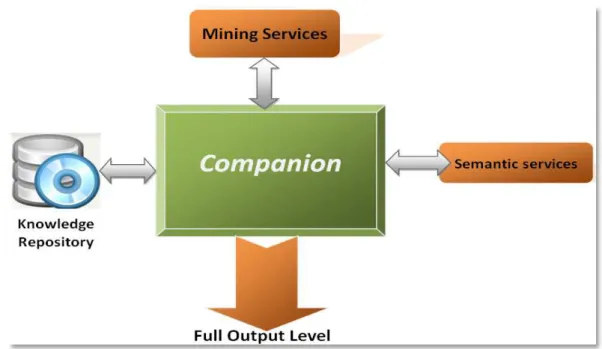
Figure 3.7 - Companion with Full Services Configuration ... 38
Figure 3.8 - Companion with Integrated Miner Services Configuration ... 39
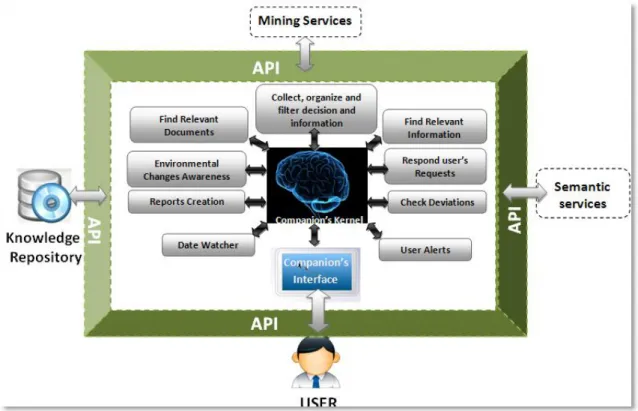
Figure 3.9 - The Companion services ... 40
Figure 4.1 - Use Cases Project Scenario (Project Manager) ... 48
Figure 4.2 - Use Cases Meeting Scenario (Project Manager) ... 50
Figure 4.3–Tasks & Issues Interactions Use Cases (Project Manager) ... 52
Figure 4.4 - Project Interactions Use Cases (Participants) ... 53
Figure 4.5 - Meeting Interactions Use Cases (Participants) ... 54
XIII
Figure 4.7 – ICE Class Diagram ... 55
Figure 4.8 - Project_Interface ... 56
Figure 4.9- Meetings Interface ... 57
Figure 4.10- Tasks Interface ... 57
Figure 4.11 - Issue Interface ... 58
Figure 4.12 - Project Control ... 58
Figure 4.13 – Meeting Control ... 59
Figure 4.14 – Task Control ... 59
Figure 4.15- Issue Control ... 59
Figure 4.16- Projects Entity ... 60
Figure 4.17 – Excerpt of the Companion DER (Project Connections) ... 61
Figure 4.18 - Meetings Entity ... 62
Figure 4.19 - Excerpt of the Companion DER (Meeting Connections) ... 62
Figure 4.20 - Tasks Entity ... 63
Figure 4.21 - Excerpt of the Companion DER (Tasks Connections) ... 64
Figure 4.22 - Issue Entity ... 65
Figure 4.23 - Excerpt of the Companion DER (Issue Connections) ... 65
Figure 4.24 - Actor profile and his/her interactions ... 66
Figure 4.25 – CoSKS User Interface ... 67
Figure 4.26 - User Interface (Project) ... 68
Figure 4.27 - User Interface (Meeting) ... 68
Figure 4.28 - User Interface (Tasks) ... 69
XIV
Figure 4.30 - Information About a K-Elem ... 70
Figure 4.31 - Additional information about the selected K-Elem ... 71
Figure 4.32 - Selection of a Task to See Important Information ... 71
Figure 4.33 - Important Information for Chosen Task ... 72
Figure 4.34 - Unsolved Issues Section ... 73
Figure 4.35- Actors Ranking Section ... 73
Figure 4.36 - Relevant Information About Similar and Previous Tasks section ... 74
Figure 4.37 - Task Report ... 74
Figure 4.38- Relevant and Used Knowledge Elements Section ... 75
Figure 4.39 - Detected Problems and Performed Solutions Sections ... 75
Figure 4.40- Important Information for Created Meeting ... 76
Figure 4.41 - Unsolved Issues Section ... 76
Figure 4.42 - Associate Actors to Meeting Section ... 77
Figure 4.43 - Two Possible Options after Creating an Issue ... 77
Figure 4.44 - Issue Information and Sequence of Tasks to Solve it ... 78
Figure 4.45 – Possible sequence of tasks to solve this issue Section ... 79
XV
Tables List
XVI
Index
Chapter 1 - Introduction ... 1
1.1 Rationale ... 1
1.2 Goals ... 4
1.3 Context ... 5
1.4 Structure of the Document ... 6
Chapter 2 - State of the Art ... 7
2.1 Main Areas Involved... 7
2.2 Knowledge & Knowledge Management ... 9
2.3 Behavioral Systems ... 13
2.4 Business Intelligence ... 14
2.5 Collaborative Workspaces ... 17
Chapter 3 - Requirements & Conceptual Model ... 19
3.1 Basic Terms Definitions ... 19
3.2 CoSpaces Project Requirements ... 21
3.3 Conceptual Foundations ... 24
3.4 The Decisional Gate Supporting Process ... 26
3.5 CoSKS Technical Foundations ... 27
3.6 Behavioral Capabilities within Companion ... 30
3.6.1 Autonomous Behavior ... 30
3.6.2 Proactive Behavior ... 31
3.6.3 Reactive Behavior ... 34
3.7 The Interactions of Companion ... 37
3.8 The Companion Behavioral Services... 40
Chapter 4
–
Implementation ... 45
XVII
4.2 The Companion Software Infrastructure ... 47
4.2.1 Companion Functional View ... 47
4.2.2 Companion Structural View ... 55
4.3 User Reference Manual... 67
Chapter 5
–
Conclusions ... 81
5.1 Synthesis of the Work ... 81
5.2 Contribution of the Research ... 82
5.3 Open Issues & Future Work ... 83
References ... 85
Appendix A- UML Class Diagram ... 89
Appendix B-Entity-Relationship Diagram ... 93
1
1 .
Chapter 1 - Introduction
1.1
Rationale
Collaboration among humans have always been vital to achieve some of the greatest conquers in human history. In fact collaboration is the oldest and simplest method of transferring and sharing knowledge among humans. Transferring and sharing knowledge allow a constant evolution and improvement of humans‟ capabilities, competitiveness, and decisions. However, “trust” is the key felling that enables and support the knowledge sharing among people, so it is necessary to create good collaboration conditions to promote the trust and the knowledge sharing.
Collaboration can be face-to-face, where people interact with each other in the same place at the same time or can be a remote collaboration, where people interact with each other using internet, telephone, e-mail, and they are geographically dispersed.
In the engineering universe, projects are the classical way of collaboration where geographically dispersed partners work together to achieve a common goal. Such a level of common understanding enables an effective and efficient collaboration among different partners. In fact people are the knowledge holders, who possess the relevant knowledge, and by working together in many projects they are able to leverage their knowledge by sharing and combining experiences with each other.
Knowledge is vital to capitalize and can be used as a key conveyor of business strategies, by aiming to improve organization capability, efficiency, and response. Sharing knowledge among project participants amplifies the knowledge accessibility and enhances the performance and quality of all decisions made during the project‟s life cycle. Nevertheless it is important to have some techniques to properly manage that knowledge.
2
and knowledge sharing, and to enable the adoption of experiences achieved. KM techniques can be used to help project participants.
Collaborative Workspaces (CW) can be used to handle the knowledge and to support its life cycle. CW are internet-based environments that intend to support the collaboration amongst people spread all over the world. Using Collaborative Workspaces project partners are able to interact with each other (e.g. sharing knowledge, projects, expediencies, etc.) through a single software or entity.
Over the years, we have witnessed a significant and sustained use of Collaborative Workspaces in several areas, which nowadays assumes a relevant role within companies‟ strategies. However, there is still some reluctance to use this technology due to the manager roles‟ division and hierarchy.
Collaborative Workspaces evolution depends on both ability to generate return on investment and the capability to enhance the performance of all participants engaged in a collaboration, reducing the time spent on projects‟ or tasks‟ life cycle.
It is important to integrate KM functionalities into CW, which are able to have “context awareness” over all running processes, analyze those processes, assess knowledge through them, make forecasts, and propose solutions to existing problems. These functionalities shall also be provided with proactive behavior, in order to detect and fulfill all needs of the users involved in collaboration and reduce their decision time.
In order to assist both CW and KM implementation, Business Intelligence (BI) refers to skills, processes, technologies, applications, and practices used to support better decision making.
The development of different Business Intelligence architectures and approaches have accelerated, improved, and facilitated all the processes existing on a CW (e.g. knowledge sharing, decision making, finding solution for problems, etc.). This fact reduced some stigmas associated with this type of collaboration and enhanced the KM techniques.
3
the decision making process, forecasts, accurate information of all existing entities (e.g. tasks, projects, meetings, and actors), offers relevant and important documents to users, provides performance enhancement, proposes solutions for problems, and has “context awareness” over all running processes.
4
1.2
Goals
This work targets the development of a software infrastructure to help improving the decision making process in Collaborative Workspaces.
Such general goal can be divided into the following specific objectives:
Observe all processes involved in a project (e.g. tasks, issues, meetings, actors selection, milestones, and deadlines) and detect possible deviations or problems that could jeopardize the project‟s success.
Offer a set of solutions to solve a particular problem or a pertinent and appropriate document to help the user, always regarding the performance and efficiency enhancement.
Provide a constant surveillance and monitoring of the work that is being carried out.
Offer personalized information to each user, according to their features.
5
1.3
Context
This thesis was developed within the CoSpaces Integrated Project, funded by the European Commission. Therefore this thesis a close relation between CoSpaces needs and this thesis objective.
The overall objective of the CoSpaces Project was to develop organisational models and distributed technologies that support innovative collaborative workspaces for individuals and project teams within distributed virtual manufacturing enterprises, so as to establish effective partnerships, collaborate, be creative, improve productivity, reduce the length of design cycles and take a holistic approach to implementing product phases.
The project aimed to achieve this through enhanced human communication, innovative visualisation, knowledge support and natural interaction. The framework supporting this thesis focuses on the knowledge-related dimension of CoSpace which is handled by the CoSpaces Knowledge Component. Such a component is, indeed, a set of ontology-enabled knowledge services (named CoSKS), which provides the appropriate functionalities to support the knowledge requirements identified as part of the operational scenarios of the project.
The Companion software infrastructure is part of the CoSKS and, as such, CoSKS is introduced here, through the description of the major conceptual axes guiding its development, the operational environment (or the context of work), the requirements guiding the development of CoSKS and, finally, the CoSKS conceptual architecture including also relevant topics for this discussion (e.g. the CoSpaces ontology, the knowledge items/objects, etc.).
6
1.4
Structure of the Document
This document is structured in six chapters. Chapter 2 describes the current state of the art of main areas involved in this work, namely Business Intelligence, Knowledge Web Business Intelligence & Collaborative Workspaces, and Context-awareness & Proactivity. Chapter 3 presents the conceptual model supporting the work. Additionally, it also provides a set of basic definitions used here, it describes the context of the work within the CoSpaces project, and it introduces the main conceptual elements behind the Companion and their applications.
Chapter 4 describes the Companion implementation, including technologies and tools used. Since UML was adopted in the Companion development, some diagrams such as, Use Cases, Classes Diagram, and DER Diagram are also presented here.
7
2 .
Chapter 2 - State of the Art
This chapter summarizes the current state of the art of the main areas involved in this work, divided into six different sections. Section 2.1 introduces the main areas involved in this work, namely Knowledge & Knowledge Management, Behavioral Systems, Business Intelligence, and Collaborative Workspaces which are discussed in sections 2.2, 2.3, 2.4 and 2.5, respectively.
2.1 Main Areas Involved
This work touches four main topics namely, Knowledge & Knowledge Management, Behavioral Systems, Business Intelligence, and Collaborative Workspaces.
Knowledge & Knowledge Management covers the management of the acquired knowledge and helping the decision making process. Behavioral Systems is related to systems with dynamic behavior and special behavioral features. Business Intelligence is a technology designed to help the decision-makers, by offering them accurate and reliable information. Collaborative Workspaces are virtual environments where people from geographically dispersed locations can work, interact, and share knowledge with each other.
8
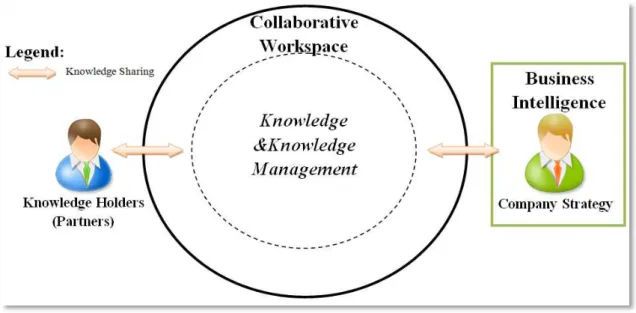
Figure 2.1 - Main Areas Involved in Knowledge Sharing
The knowledge holders use the collaborative workspace to perform projects and share their knowledge among themselves. This knowledge is transferred to Collaborative Workspaces, where it will be captured, capitalized, organized, and filtered in order to provide the project participants with updated knowledge.
It is important to refer that companies involved with a project define their own business strategy using Business Intelligence technologies, and share their knowledge using Collaborative Workspace, as well.
In the context of this work KM is seen as a type of three elements, namely Reasoning, Behavioral Systems, and Semantic Services & Ontology (Figure 2.2). Behavioral Systems are the key topic to be closely considered and explored throughout this document.
9
For the sake of clarity, it is important to define three basic concepts commonly referred in this area of work, namely: Data, Information, and Knowledge. The Table 2.1 shows those definitions.
Data Stored information to be examined and used to make decisions.
Information Facts or details about a specific topic, presented within a context that gives
them some meaning, relevance, and increase the context understanding [1].
Knowledge Understanding, awareness and skills acquired by a person through experience
or education [1].
Table 2.1 - Basic Concepts
2.2 Knowledge & Knowledge Management
As previously stated, knowledge sharing among partners engaged in a project may potentially enhance the decision making process. Decision making process is, indeed, the process that leads companies/collaboration groups to an action. Within a project based on a collaboration environment, typically most decisions are complex, difficult to make, and interdisciplinary sometimes resulting in conflicts among project participants. Decisions require several inputs from different knowledge sources, i.e., knowledge extracted from humans or from stored data. Nevertheless, the extracted knowledge needs to be tailored to the project participants needs.
In order to handle the acquired knowledge, KM techniques are widely used and its importance has been increasing. KM is a set of processes that identify, organize, collect, and create knowledge from a collection of data, and facilitate the communication between knowledge creator and those who will use the achieved knowledge and make a decision or an action [1].
The set of tools focused on the creation and management of knowledge have three characteristics in common: Accessible Information, Support in decision-making and Guidance to final user [2].
10
i.e., knowledge which is extracted from data (Data-driven knowledge). The later is achieved from collaboration with other people, knowledge created by an expert (Human-drive knowledge).
Broadly speaking, whilst quantitative knowledge provides better understanding of business/collaboration processes and more reliable decisions for decision-makers, qualitative knowledge is based on human‟s experiences, in order to make decisions quickly and promptly.
Nonaka and Takeuchi [1] classify tow different types of knowledge: Explicit Knowledge and Tacit Knowledge. Explicit Knowledge is described in details, formal, systematic and can be expressed in words and numbers. Tacit Knowledge is described as a knowledge built on experiences, and it is difficult to capture and share, because it is highly personal and not easily visible or expressed.
There are four processes of knowledge conversion involving those two types. [4]: 1) Socialization: From tacit knowledge to tacit knowledge.
2) Externalization: From tacit knowledge to explicit knowledge. 3) Combination: From explicit knowledge to explicit knowledge. 4) Internalization: From explicit knowledge to tacit knowledge.
These processes are described in the SECI model proposed by Nonaka and Takeuchi (Figure 2.3).
11
Socialization (tacit-to-tacit) happens through direct interaction of people, when tacit knowledge is freely exchanged. It is an experimental and active process that involves capturing and sharing knowledge in face-to-face and real-life situations.
Externalization (tacit-to-explicit) makes tacit knowledge explicit, i.e., transforms tacit knowledge into reliable and understanding knowledge. This process occurs when a person (or group) converts ideas, experiences or images into words, concepts or analogies. Once externalized, knowledge can be easily shared with others.
Combination (explicit-to-explicit) happens when discrete pieces of explicit knowledge are joined into a new form of explicit knowledge. Once we have different fragments of explicit knowledge, it is possible to convert and combine them into documents, email, databases, etc.. The combination makes the explicit knowledge more usable and transferable among groups across organization or collaboration.
Internalization (explicit-to-tacit) is the process for comprehending and absorbing explicit knowledge into tacit knowledge, in order to create or improve the mental knowledge model of individuals. This process transfers explicit knowledge to an individual worker, helping the workers to internalize the achieved knowledge from previous experiences.
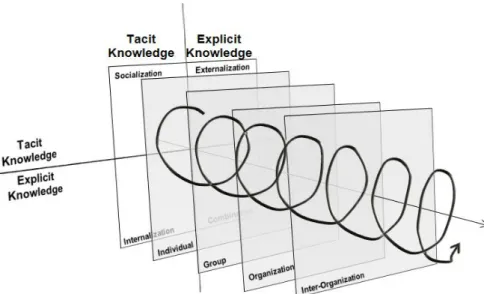
Nonaka and Takeuchi developed a knowledge spiral model, arguing that the knowledge creation process is a dynamic and continuous flow between tacit and explicit knowledge. Figure 2.4 shows the knowledge 3D spiral model where knowledge continuously flows in an evolving process that involves individual, groups of people, organization and groups of organizations.
12
The knowledge spiral model represents the knowledge transfer process as a spiral, in order to clearly show that knowledge evolves during the transfer process. It starts with tacit knowledge (socialization) that is externalized in the process of attempting to articulate it to someone else. The externalized knowledge is combined and internalized with the existing knowledge.
Relevant literature shows different KM models. However, Kimiz Dalkir [4] proposed an integrated model supported by the knowledge spiral model from Nonaka, which is structured in three phases: 1) Knowledge Capture and/or Creation; 2) Knowledge Sharing and Dissemination; 3) Knowledge Acquisition and Application. Figure 2.5 shows the interactions between those three phases.
Figure 2.5 - Integrated Knowledge Management model [4]
1) Knowledge Capture and/or Creation
In order to be used, knowledge competencies and experiences must be registered and formalized. The Knowledge Capture phase acquires and filters the captured knowledge, verifying its quality and preparing it for future storage.
2) Knowledge Sharing and Dissemination
13
knowledge is available to every worker inside an organization, who must be provided with updated knowledge.
3) Knowledge Acquisition and Application.
In this phase knowledge is used and applied to support decisions in order to increase company/collaboration benefits. To increase the knowledge management gain, is important to guarantee the application of relevant and trusted knowledge in real and adequate situations or problems.
2.3 Behavioral Systems
Behavioral Systems enrich software with dynamic behavior and specific behavioral features. With Behavioral Systems it is possible to create self-learning and self-adapting software in order to handle environmental changes. There are many types of behavior such as: conscious or subconscious, overt or covert, voluntary or involuntary, proactive, reactive and autonomous. Tools and frameworks like JADE or IBM Classification Module, provide software with dynamic behavior (self-learning and self-adapting), however build a proactive and autonomous software is still a challenge.
In the Collaborative Workspaces context, Behavioral Systems handles two main behaviors: Context-awareness (autonomy) and proactivity. With context-awareness the software is able to know and detect real-time changes, adapting its role and collecting important information to use in further problems solving. Thus, users‟ roles and permissions must be constantly adapted regarding changes of context and their intentions. However, previous research has found some difficulties to describe the main conditions for assigning roles, intentions and modifying permissions [5].
Since environmental changes might occur at any time, system definitions and requirements may become temporally obsolete, resulting in wrong information response [6]. In order to deal with this problem, reliable and fast context detection and adaptation is highly relevant to the decision-making process and to enhance the user interaction and experiences.
context-14
awareness, software has its own mechanisms and technologies to perceive the environment and act according to that. In infrastructure-support context-awareness, software achieves the context changes through an external hardware and software, associated with it [7]. It is possible to create a collaborative workspace with context-awareness capability, by exploring different technologies (e.g. virtual reality, sensors, voice microphone, ambient-noise, temperature sensors, light sensors, and cameras).
Proactive tools are essential to increase users‟ efficiency within collaborative workspaces environment, and to reduce time needed to find information and make proper actions. Through previous and relevant information and actions, those tools are able to supply project manager and participants with important files, reports, information about previous projects, and best practices. Instead of spending time in document searching and finding the best way of solving a problem, with proactive tools the user gets fundamental information and decisions to help him to solve the problems. Those tools increase the efficiency and performance of collaborative workspaces, by providing the users with possible solutions for problems and relevant/important documents related with tasks that are being performed.
Even so, it is particularly important to refer that a proactive tool does not make any decision without a “human” intervention. A proactive tool is just a decision-helper and not a final decision-maker.
2.4 Business Intelligence
15
In fact, Business Intelligence tries to improve decision-making process and solutions for problems, in order to reduce the costs and the data warehouses of the companies [5]. With the fast market and organizations‟ expansion and growth, companies across the world needed appropriate decision and knowledge support to face their new challenges.
BI mainly uses modern applications and information technology, such as Data Warehouse, Online Analytical Processing (OLAP), Data Mining, queries, and reports [2] in order to collect, manage, store, and analyze structured and unstructured data. BI applications could be divided in two categories, namely: Information Application and Knowledge Application [11]. Information Application processes original data and transform it into a set of acceptable and feasible information for decision-makers, focused on data queries, reports & charts, multi-dimensional analyze, and data visualization [11]. Knowledge Application refers to Data Mining technology and Data Warehouse to find implicit relation of data and to form and represent reliable and comprehensive knowledge for decision-maker.
Data warehousing represents the filtration, organization, storage, analysis, interpretation and consolidation of data. Typically, Data warehousing also includes data-mining modules and decision support modules [12] which enhance system‟s predictions and adaptability. The main drawback of Data Warehouse is its time-consuming process of collecting and transforming data. Thus, it causes time delays between the recognition of an event and its analysis, creating data latency and reducing the system efficiency. Data latency is frequently described by the time it takes to inform (either the system or the person in charge of data analysis) that new data is available to be analyzed [13].
16
OLAP is an important application used in BI which reduces the time needed for analysis and data‟s transformation, providing a powerful tool to help data transformation. However OLAP needs a fixed dimensional structure and that could be a problem in dynamic and flexible systems [13].
As mentioned before, latency problems are, indeed, an important concern in Business Intelligence research. BI handles a set of requirements to create, manage and enhance decision-making process and give flexibility and agility to an organization. This flexibility and agility increases the organization dynamic, natural competition, and fast response to new challenges and environmental changes, creating a high differentiation between organizations. It is important to reduce the gap of time between the occurrence of a business opportunity and organization action time. By reducing this gap, an organization can be ahead of other organizations and increase the likelihood of its success.
Figure 2.6 shows that the more action time an organization spends the less business value it gets, so a short action time is needed to get the highest business value from a business opportunity. Action time refers to three components: data latency, analysis latency, decision latency. [13]. Data latency is the time taken to collect and store the data. Analysis latency is the time needed to analyze the data. Decision latency is the time needed to make a decision.
17
2.5 Collaborative Workspaces
Project-based collaboration gained a new dimension within the Internet era. The sharing and capitalisation of knowledge within a project can be highly amplified through the use of Internet services, since it can reach a bigger audience in a more effective way.
With the exponential raising and development of internet, most organizations and companies have moved their approach to e-business where the internet is the main platform to interact with their customers. Collaborative Workspaces concept has emerged in order to handle this new challenge. Collaborative workspaces are virtual environments in which all the participants or teams, from geographically dispersed locations, can access and work in a common project and interact with each other through a single software/workspace.
Working on virtual and collaborative workspaces is a common reality among engineers and, more and more tools and software for this purpose have been developed (e.g. Microsoft Groove, IBM Lotus Notes, IBM Workplace, and e-Office). Even though, provide users with accurate information, important decisions, forecasts, have a proactive behavior, and context-awareness, is still uncommon on these software category.
Tools supporting collaborative workspace shall be adaptable, scalable, improve collaboration and productivity, make users/works‟ communication easier and provide venues, forecasts, and solution for problem solving. To meet all these requirements it is important to have a software framework built on advanced web services, context modeling technology, and context-awareness to support the collaboration life cycle [14].
19
3 .
Chapter 3 - Requirements &
Conceptual Model
This chapter explains the conceptual model that supported this thesis. It presents the basic terms definitions adopted in this work, the Conceptual Foundations of the work, the Decisional Gate Supporting Process, CoSKS Technical Foundations, Behavioral Capabilities within Companion (Autonomous, Proactive and Reactive behavior), the Companion’s Interactions, and the Companion Behavioral Services.
3.1
Basic Terms Definitions
For the sake of clarity, this section provides a short definition of the basic terms used in this thesis (Table 3.1).
Term
Definition
Project
It is a collection of linked tasks, carried out by actors/participants engaged in collaboration, with a defined start point and end point. The main goal of this
“linked tasks” is to achieve the results needed and expected by an organization or collaboration.
Meeting
It is an electronic or face-to-face conference among participants engaged in a project. Meetings are associated with a list of agendas which have specific and defined dates, duration and local.
Task
It is an activity that must be completed within a defined period of time, under responsible supervision. Tasks are carried out by actors and have a defined start date and end date.
Issue
It is a known deviation or problem that has happened and must be solved promptly. To solve an issue, a set of tasks are created by a project manager.
Agenda
20
Decisional Gate
It is a control point at some clearly defined stage in the project. This control point starts with a set of inputs (topics to be discussed) and produces a set of outputs.
Report
It is a document which compiles information about a specific project, task, meeting or issue. This information can be: a) A highlight of project‟s progress using Decisional Gates; b) A concise summary of ongoing project, task, meeting or issue; c) Information about finished relevant and similar projects, tasks, meetings or issues.
Deviation It is any uncertain or unplanned event that occurs during the project or task which can jeopardize its success.
Project Manager
It is the main responsible for the project work and success from its beginning until its closure. He or she is the key decision-maker of the project, i.e., select
project‟s team, allocate and monitor resources, solve problems, track project‟s
progress, etc..
Actor It is someone who is involved in a project and has a specific role.
Role It is the function or position that an actor or participant has or is expected to have in a specific activity.
Behavior
It is an action or reaction of a person or component in relation to environment or other person.
Autonomy
It is a feature of a system or component capable of self-management. It is the capability of making decisions by its own and using high-level policies, adapting itself to any environmental changes.
Context Awareness
It is the ability to be aware of what is happening around the system and to understand what that information means to the system.
Knowledge Element
It is a piece of knowledge focused on specific topics. It may include documents about lessons learnt, best practice, expert manuals and expert contact information. In the CoSKS context projects, templates, agendas, meetings, tasks, and issues are also considered knowledge elements.
Collaborative
Workspace
It is a web-connected environment in which all the participants in dispersed locations can access and interact with each other just as inside a single entity.
Companion
It is a proactive, reactive, and autonomous software infrastructure which enables interactions between users and the system, managing alerts, tracking project deviations and supporting the decision making process
21
3.2
CoSpaces Project Requirements
As already mentioned, the CoSpaces Project settled the context of development for this thesis. As such, this work targeted some CoSpaces needs, which are described in this section.
Knowledge dimension of CoSpaces is handled by the CoSpaces Knowledge Support component (CoSKS). CoSKS is part of the CoSpaces Software Framework (CSF), which is a collaborative engineering environment supporting real-time collaboration between geographically dispersed teams. The CSF uses advanced technologies including virtual reality, augmented reality, tele-immersive interfaces, mobile technologies, context awareness and web services, to create human-centric collaborative workspaces. The knowledge-related functionalities are to be ontology-enabled and combined with the data mining techniques in order to fully support the development of projects.
The CoSKS approach focuses two major dimensions: issues and decisions. Such approach intends to keep track of all the issues occurred during the project associated with the decisions that were made in order to solve those issues. The bottom line is to provide the project teams with a better understanding of common problems which occur frequently in projects and also the strategies (tasks and actions) that were carried out to overcome them. The goal is to improve the daily work of project teams by providing them with historical cases from previous projects and how these cases were solved, thus reducing the time looking for good options in specific situations. This can be done when a new project is about to be started (e.g., the project manager can get relevant knowledge about successful projects in the same area, such as deviations, major problems x solutions, etc.) or during the meetings themselves (participants could have a more accurate knowledge about the project, by knowing the risks associated to a given decision, considering the existing knowledge). Moreover, CoSKS also needs to keep track of important decisions made during the meetings, through the creation of template-based agendas (including topics to be discussed, participants, etc.) and minutes (issues raised, solutions proposed, and decisions made).
22
Cooperative Work) is a document management tool which is the place or repository where Knowledge Elements (K-Elems) will be stored or retrieved.
Figure 3.1 - The CoSKS within the CSF architecture [20]
K-Elem represents pieces of knowledge that can be captured, stored, published, shared, and reused among the project teams. K-Elem is the relevant knowledge to provide the proper support to e-collaboration in a given project. In addition to ordinary documents, some specific examples of K-Elems used here are: project, issues, solutions, agendas, minutes, tasks, participants, and project post-mortem. The K-Elems will strongly rely on ontological concepts, especially in terms of indexation and classification for future search and reuse.
Throughout the CoSpaces Portal the users (manager and ordinary users) might have access to the knowledge-related functionalities provided by CoSKS, through the element named
Knowledge Support Viewer (label ), which is a kind of knowledge entry door. Such a component provides management and exploitation of the knowledge produced in the CoSpaces collaborative environment.
The CoSpaces Knowledge Support (label ) is organized conceptually in three main parts, namely:
Setup & Config: handles the needs related to setup and configuration of the CoSKS component (e.g., creation of users/passwords, servers’ addresses, etc.);
23
Basic Knowledge-Services: the vital services for the normal operation of the CoSKS. Without them, the CoSKS cannot work properly. Some examples are: Knowledge Elements indexation, ontology-based search, calculation of semantic weights, browsing of CoSpaces ontology, store / retrieve Knowledge Elements, etc.; and
Advanced Knowledge-Services: intended to extend and enrich the CoSKS capabilities. They are built upon the Basic Knowledge-Services. These services can be considered a high level of knowledge services. Some examples are: management of “context awareness”, historical analysis of similar and relevant projects or tasks, lessons learned advisor, assesses knowledge through the processes, to forecast and propose solutions to possible or existing problems. The software infrastructure developed in this thesis is a part of these Advanced Knowledge-Services.
The knowledge support provided by CoSKS, during collaboration process, can occur either in an isolated way or as part of the development of a long project. Additionally, other requirements must be considered by CoSKS. Those requirements are shown in figure 3.2 categorized into three classes: Functional, Architectural and Technical requirements.
Figure 3.2 - CoSKS main requirements
Human-24
centered is something that interacts with people in an intelligent and cooperative manner; Push mechanism is a way of pushing the information to the user who would be interested in that, and Autonomous processes are processes able to execute a number of basic steps without human intervention in order to achieve a given goal and make proper decisions.
3.3 Conceptual Foundations
25
Figure 3.3 - Conceptual Foundations of the work [14]
The core idea of the conceptual foundations of this work is that projects are conducted through a series of meetings and every meeting is considered a decisional gate, a driving point where issues are raised and decisions are made in order to find the appropriate solutions to those issues (figure 3.4). Such decisions can, eventually, be transformed into tasks to be performed.
Each decisional gate is prepared (through the creation of agendas), and the events that occur during the meeting shall be recorded. Between two decisional gates there is a permanent monitoring on the execution of all tasks executed. After meeting closure, there is a need for a mechanism to enable the preparation the minutes easily, by highlighting the major decisions that were made during the meeting [14].
Figure 3.4 - Project decisional gates [14]
Knowledge Re a soning
26
The development of a platform providing applicable knowledge depending on the user‟s context demands the definition of context. It is easily understood that experts (from different areas of expertise) working collaboratively in a given product have different needs/visions about/on the knowledge used, which are strongly influenced by their backgrounds, roles, responsibilities, etc.. Additionally, different types of projects can give different uses to the same knowledge (e.g. knowledge about accessibility regulations used in public versus private project buildings). Going further, knowledge can be treated differently depending on the meeting it is captured/used (e.g. deviations and delays in different phases of the project have highly different meanings). In different tasks the same knowledge may have different uses. The issue to be solved also defines the relevance of a given knowledge. All the previously terms written in italic compose the preliminary list of valid contexts considered here.
3.4
The Decisional Gate Supporting Process
Sessions of active collaboration generally follow a defined workflow. Figure 3.5 shows how decisional gates are structured in this work [14].
Figure 3.5 - KM process in the context of decisional gates [14]
27
Individual Work phase covers the identification of an engineering problem, which comprehends a description of the problem using natural language and relates to asynchronous collaboration, where all individuals involved in the project are supposed to provide inputs to the undergoing tasks.
Initialisation phase (pre-meeting) relates to the preparation of the meeting agenda and the selection of the meeting participants. The agenda creation is a semi-automated process, where a set of pre-existing templates are used to ease the process. The meeting organiser (e.g. the project manager) may (easily) identify which are the major issues/problems to be discussed in the meeting as well as the best way to present and discuss them.
Collaboration/Meeting phase is the meeting itself where participants try to reach a common understanding regarding the issues from the agenda, using the right resources. This phase also considers the annotation of the decisions made during the meeting. Those decisions, including new tasks and new assignments of responsibilities, are to be captured and meeting participants must be supported in the decision making process, according to the context of the issue discussed.
The Closing/Clean-up phase (post-meeting) basically targets the creation of meeting minutes. It can be supported by a semi-automated process, which provides the meeting organiser with a set of conclusions based on the decisions made during the meeting. This process may also use a set of pre-existing templates as the basis for the meeting minutes. When the project finishes, the project manager should be able to generate a project summary (post-mortem) including all relevant indicators (issues/decisions, deviations, staff involved, etc.) that were collected during the project life-cycle. Such summary represents a K-Elem that can be reused in future projects helping to enhance performances, replicate good practices, and avoid known mistakes.
3.5
CoSKS Technical Foundations
28
Figure 3.6 - CoSKS technical building blocks [14]
In the Presentation layer, the User Interface supports the interaction with the CoSKS user, through the implementation of the CoSKS portal, which symbolizes the collaboration workspace environment where the users exchange and leverage knowledge, and update the status and results of their tasks.
Companion component, as previously described, implements both proactive and reactive behaviors of CoSKS.
Mining Services provide CoSKS with reasoning-related capabilities. Among other things, they feed the Companion with accurate information in the sense that they are used to discover useful knowledge aiming to identify patterns of problems and solutions and establish the relationships between them. These services are used to anticipate problems and find potential solutions to overcome them. The main capabilities provided by the mining services are:
Classification: arranges the data into predefined groups;
Clustering: finding and grouping facts not previously known;
Regression: attempts to find a function which models the data with the least error;
Association: looking for patterns where one event is connected to another event;
Companion Semantic Services Mining Services User Interface Knowledge Repository Ontology Presentation Layer
Behavioural Layer
Service Layer
29
Forecasting: discovering patterns in data that can lead to reasonable predictions about the future.
Semantic services provide the following functionalities to capitalise on the ontology supporting the CoSKS operation:
Semantic Context and Filtering: every K-Elem is represented by a set of keywords, which is semantically filtered in order to define its Semantic Context. A semantic context is built using many elements of reference related to the given K-Elem, such as issue, problem, actor skill, project type and phase, etc.. The semantic context behind a given query will determine the accuracy of the results provided. For instance, the same query launched by two experts (an architect and an engineer) can produce different results since their skills (and consequently, their interests) can be different when looking at the same issue (same query).
Semantic vector creation: every K-Elem is represented by a semantic vector, which is a collection of the most relevant ontological concepts that semantically express it. Semantic weights are assigned to the ontological concepts in the semantic vector according to the K-Elem relevance within a given context. The semantic vector is used to classify, compare, and retrieve K-Elems that are used to provide the best possible solution (the result) for a given issue (the query).
Semantic indexation and retrieval: new knowledge items are semantically indexed through the creation of their respective semantic vector. New issue/problem is issued to the system and taking into account that a query is also handled by the system as a K-Elem, it gets the respective semantic vector which is used to find similar semantic vectors of other K-Elems providing an answer/solution to the issue/problem.
The CoSKS ontology is developed to support and manage the use of expressions which contextualize a K-Elem within the knowledge repository. The ontology adds a semantic weight to relations among K-Elems stored into the knowledge repository. Every ontological concept has a list of „equivalent terms‟ that can be used to semantically represent such concept. These terms are, indeed, treated in both statistical and semantic way to create the semantic vector that properly indexes a given K-Elem.
30
3.6
Behavioral Capabilities within
Companion
Many researches revealed that Behavior is increasingly recognized as a key component in business intelligence and problem-solving [16]. Literature shows a long list of definitions for Behavior. The Oxford Dictionary describes behavior as “The way that somebody behaves, especially towards other people” [15]. For this work behavior is defined as “The way that the system behaves towards user’s stimulus and inputs”.
An important question took into account on this thesis was: When and why does the
system’s behavior make difference on Collaborative Workspaces?
Firstly, in many cases, system behavior acts as internal driving force to organization or collaboration success, making the decisions fastest and helping in problems solving. By understanding and investigating actors‟ behavior within project scenario and acting according to it, the system is able to enhance actors‟ performance and help the management level of projects.
Secondly, due to the geographic team‟s dispersion on a Collaborative Workspace, a system with an adequate behavior (proactive or reactive) for the project needs could make the collaboration achievable. The main idea is to increase the productivity or welfare of a user working on a CW.
Despite of existing various behavior types ( e.g. conscious or subconscious, overt or covert, and voluntary, involuntary, proactive, reactive, and autonomous ) in this study we focused on three of them, Autonomous, Proactive and Reactive behavior. These behaviors are supported by CoSKS through the Companion.
3.6.1 Autonomous Behavior
31
An autonomous system/software infrastructure tailored to work on collaborative workspace shall be human-centered, i.e., executing its mission with a minimum support from users. Those systems ought to recognize people as intelligent agents or intervenient by operating and cooperating with them. Both human and system can (must) exchange information with each other, in order to enhance the whole collaboration process.
An autonomous system needs to be sure that its behavior and intervention near the users is coherent, robust, and adequate for the given situation thus, system needs to be aware of its environmental changes and react quickly to those changes.
Context-Awareness is, indeed, one of the key characteristics of an autonomous system since it needs information about the environment in order to keep the system in equilibrium. Systems with context-awareness need to be prepared to a number of potential pitfalls or rapid environmental changes, in order to maintain appropriate levels of predictability. With Context-Awareness, the system is capable to detect (quickly) ongoing operations performed by users and the consequences of those operations on environment. Autonomous systems have to detect opportunities or anomalies where its intervention will be useful to the user. Those systems could have a Proactive or Reactive Behavior, as it will be explained in the following sections.
3.6.2 Proactive Behavior
Quoting Salovaara and Oulasvirta (2004) [19] “Proactive systems adhere to two premises:
1) working on behalf of, or pro, the user, and 2) acting on their own initiative.”
The relevance of proactive systems within collaborative project teams must be analysed according to three major capabilities: (i) detect unforeseen problems before they become critical; (ii) provide some solutions for detected problems and; (iii) supply the user with understandable reports and alarms.
32
Briefly, a proactive system is a system which: exceeds expectations, takes calculated risks, is an independent thinker, anticipates problems, seeks new solutions, questions/challenges and is multi-functional thinker [19].
In this sub-section it will be presented some situations1 where a proactive behavior can be useful in a Collaborative Workspace, with the purpose of improving the management level of projects.
The following examples illustrate some situations where Companion proactive behaviour facilitates the daily work of the teams involved in the project:
When a Project Manager is creating a new Project or Task, Companion offers the possibility to see some reports about finished and relevant projects/ tasks. These reports include similar projects/tasks, best practices, problems happened in similar projects/tasks, and solutions for those problems.
When creating a Project or Task, Companion proposes the best team to work on it. This team is formed through the assessment of the actor‟s profile, the projects or tasks that he/she has previously performed.
The Project Manager must be constantly and automatically informed about the
Project’s/task’s evolution. Real-time information can prevent the spreading of existing problems throughout the project.
When watching a project/ task, Companion seeks, collects and organizes relevant information about the project/ task. This relevant information can be an advice, document or warning that later on will be shown to the Project Manager or Actor.
Companion provides (automatically and when it is appropriate) important files or information that may help the Project Manager or Actor in a specific Project/Task.
When a Project is ongoing, Companion checks whether the team involved in the project is appropriate for the project’s needs2. If the team is unbalanced, Companion proposes
1
Notice that these situations are particularly related to the CoSpaces Project needs.
2
These needs were described when the project was created, i.e., the number of participants needed to
33
some actors to the Project Manager in order to balance the team. The choice of these actors is based on actor‟s profile and the number of similar projects that each actor is or was involved.
Companion is able to perform regular forecasts about Project or Task’s evolution, to detect possible future problems or deviations. If Companion detects future problems, it ought to inform the Project Manager or Actors.
After closing a Project or Task, the Companion systematizes all relevant information about it (project or task) and creates a report with that information. The report will be sent to the Project Manager for future analysis.
During the meeting, Companion has context-awareness about the topics that are being discussed and automatically presents information or relevant files, in order to help and enhance the discussion of those topics. This is one of the key benefits of a proactive software infrastructure. Its context-awareness makes possible the detection of what is happening and what kind of information the user needs to carry out his/her activity.
Example: During the meeting the users are discussing about roof leak related problems and at that time, Companion may provide documents or suggestions in order to help solving the problems.
Companion might also have context-awareness about the decisions made during the meeting. It is possible to install cameras, vocal sensors, microphones, and light sensors to record all decisions3.
When a meeting is completed Companion collects and organizes all the information and decisions made during the meeting or agendas. After that, the component will create a minute that contains the information collected, organized and filtered.
When the project manager is creating a new meeting, Companion informs the project manager about the current state of previous issues4. For each finished meeting the project manager gets a set of issues to solve. When he is creating a new meeting, Companion will inform the user about the state of those issues. This will help the Project Manager to be
3
These decisions can be a set of issues to solve and they will be very important when finishing or creating a new meeting.
4
34
alert to both unsolved and solved issues. The possible states could be “Planned5, Ongoing, Completed and Critical6”.
When creating an issue Companion shows all finished issues and proposes a set of tasks to solve that issue. These collection of tasks result through the assessment of previous solved issues.
When an Issue is completed Companion creates a report with all information and tasks that solved the issue. This information will help the Project Manager to organize the tasks that will solve the issue - in Creation Issue phase.
3.6.3 Reactive Behavior
Reactive behaviour provides the capability to answer to the requests performed by users. Project participants usually have several requests targeting the solution a particular issue. Therefore, the CoSKS, using Companion capabilities, shall be prepared to quickly and appropriately respond to users‟ requests.
However Companion has to maintain its proactive behavior even when it is responding to an user request. For instance, if the user requests a particular report about an activity (just to see the progress or other information) and Companion detects relevant information about that activity, it will proactively provide the user with that information.
The following examples illustrate some situations where Companion reactive behaviour is useful:
Companion is able to provide Project Manager and Actors with appropriate knowledge
about the project itself, task or issue’s evolution (forecasts or current state). Companion shall be prepared to respond promptly to all users‟ requests, with accurate information.
When a project manager is creating a new meeting, he/she can monitor the current state
of pending issues. Issues labelled “critical” are (semi) automatically included into the
decisional gate agenda by the Companion.This function is very valuable because it
5
Planned but has not been started, yet.
6
35
enhance the Project Manager‟s organization and makes the meeting‟s creation and planning easier.
Before creating a project, task or an issue the project manager can request the system to highlight some results, problems, and solutions about similar K-Elems that have been performed. In the proactive behaviour, the system only shows this information after the creation of a K-Elem and the information shown is related to finished and similar K-Elems In reactive behaviour, the system will only display information about (finished or ongoing) requested items.
When a task is completed, the Companion displays a list of K-Elems used during the task execution, in order to help the user to select the most relevant K-Elem. By selecting the most useful and relevant K-Elems, the actor will provide the system with more information about him/her. This information will increase the actor‟s ranking and the likelihood of be called in future projects.
36
CREATION EXECUTION COMPLETION
PROJECT
Important Inputs1. Show Similar Projects2.
Propose Actors3 to
handle the project.
Check for Problems/Deviations.
Propose and Provide Important Knowledge Elements4.
Keep all actors informed about evolution of
the project and provide some forecasts.
Inform all actors about the project‟s
changes5.
Similar Projects.
Create Issue.
Create a report6 with
all information7 about the
project.
Notify all actors about
the completion of the project and offer to the project manager the report created.
MEETING
Information8 about
previous tasks, related to previous meetings.
List of unsolved issues.
Create new issues.
Create an agenda9.
Create Free Topics10.
Propose important files about the
topic/agenda that is being discussed.
Collect, organize and filter all the
decisions that are being made.
Create a minute about
the meeting;
Show new issues,
updated issues and solved issues.
TASK
List of unsolved issues;
Create new issues.
Propose3 the best
Actors/Teams to handle the task.
Create Free Tasks11.
Show similar tasks.
Check for Problems/Deviations.
Propose and Provide Important
Knowledge Elements4.
Keep all actors informed of tasks evolution.
Inform all actors about the task‟s changes.
Show Similar Tasks.
Create a report with all
information about the task.
When all tasks – from
an issue - are completed the Issue is closed.
Show all used
Knowledge Elements and
update actor’s raking.
ISSUE Show information about
similar and relevant issues.
Create a report with all
information and tasks that solved the issue.
Table 3.2 - Component's Behavior During Project's Life Cycle
Legend:
1Problems, Deviations and Best Practices.
2
Reports about relevant and similar finished projects .
3
Classified by actor‟s: availability, geography, Knowledge Elements etc.
4
To enhanced problems solving.
5
Such as updates, new dates, related problems, etc.
6
These kind of report might contain graphics about the project‟s/task‟s evolution.
7
Including errors found, solutions, project‟s evolution, involved actors, etc.
8
Current state of each task: Ongoing, planned, completed and critical.
9
Always related to an issue.
10
Agendas not related to any issue.
11
Tasks not related to any issue;
Italic and underlined words– Both proactive and reactive behavior.
Italic words– Reactive behavior.
![Figure 2.3 - Nonaka and Takeuchi model of knowledge conversion [4]](https://thumb-eu.123doks.com/thumbv2/123dok_br/16573822.738123/28.892.207.709.804.1088/figure-nonaka-takeuchi-model-knowledge-conversion.webp)

![Figure 3.1 - The CoSKS within the CSF architecture [20]](https://thumb-eu.123doks.com/thumbv2/123dok_br/16573822.738123/40.892.246.660.227.491/figure-cosks-csf-architecture.webp)
![Figure 3.5 - KM process in the context of decisional gates [14]](https://thumb-eu.123doks.com/thumbv2/123dok_br/16573822.738123/44.892.226.696.712.1074/figure-km-process-context-decisional-gates.webp)
![Figure 3.6 - CoSKS technical building blocks [14]](https://thumb-eu.123doks.com/thumbv2/123dok_br/16573822.738123/46.892.268.648.147.502/figure-cosks-technical-building-blocks.webp)