
António Simões Ferreira
Bachelor in Computer ScienceIntegration of Visual Languages with SCS tools
in the Software Development Industry
Dissertation submitted in partial fulfillment of the requirements for the degree of
Master of Science in
Computer Science and Informatics Engineering
Advisers: Jácome Cunha, Assistant Professor,
University of Minho
André Pinto Vieira, Software Engineer, OutSystems
Co-advisers: João Ricardo Viegas da Costa Seco,
Assistant Professor, FCT-UNL
Hugo Lourenço, Software Engineer, OutSystems
Examination Committee
Chairperson: Miguel Jorge Tavares Pessoa Monteiro, Assistant Professor, FCT-UNL Raporteur: João Paulo Fernandes, Assistant Professor, University of Coimbra
Members: Jácome Cunha, Assistant Professor, University of Minho
João Ricardo Viegas da Costa Seco, Assistant Professor, FCT-UNL André Pinto Vieira, Software Engineer, OutSystems
Integration of Visual Languages with SCS tools in the Software Development Industry
Copyright © António Simões Ferreira, Faculty of Sciences and Technology, NOVA Univer-sity Lisbon.
The Faculty of Sciences and Technology and the NOVA University Lisbon have the right, perpetual and without geographical boundaries, to file and publish this dissertation through printed copies reproduced on paper or on digital form, or by any other means known or that may be invented, and to disseminate through scientific repositories and admit its copying and distribution for non-commercial, educational or research purposes, as long as credit is given to the author and editor.
This document was created using the (pdf)LATEX processor, based in the “novathesis” template[1], developed at the Dep. Informática of FCT-NOVA [2].
Ac k n o w l e d g e m e n t s
I would like to start by thanking the Faculdade de Ciências e Tecnologia da Universidade Nova de Lisboa (FCT-UNL), in particular to the Informatics Department, for providing me with all the necessary educational tools to start off my professional career. Also I would like to thank OutSystems for providing a scholarship for this dissertation. A big thanks to my advisers, Jácome Cunha, André Vieira, João Seco and Hugo Lourenço for mentoring me in this thesis. Their advice was really helpful and allowed me to constantly improve my work.
Also, a big thanks to all of my OutSystems friends: Francisco Cunha, David Mendes, Lara Borisoglebski, Joana Tavares, Miguel Loureiro, João Gonçalves, Miguel Madeira, Francisco Magalhães, Michael Silva, Nuno Calejo, Mariana Cabeda and Nuno Pulido, for all of the great and fun lunches, coffee breaks and conversations over the pool table.
Most importantly a huge thank you to my parents. Their unconditional support was vital and one of the main reasons why I was always capable of withstand the hard times in my journey and be where I am today. Also, a big thanks to my brother, for all of the times he distracted me from my work, which allowed me to clear off my mind for bit. Thank you Bolota for being the fluffy ball of fur that always wrecked havoc when running around the house.
And lastly, a big thanks to all of my close friends, whose names don’t need to be mentioned, because they know who they are. All of their support, conversations, and fun times we spent together is something that I am and always will be grateful for.
“Once I did bad and that I heard ever. Twice I did good, but that I heard never.” -Dale Carnegie
A b s t r a c t
Source Control Systems (SCS), also known asVersion Control Systems (VCS), help teams to organize and track changes in the software development process. These systems have become vital in the software development industry as the increased growth and geo-graphical diversity of teams, forced them to find solutions to deal with multiple people accessing the same pieces of software concurrently. Although for a whileSCSseemed to be coping well with the needs of software development, the rise of the low-code platforms andVisual Programming Languages (VPLs)brought a new challenge to version control: how to manage visual artifacts without losingSCSfunctionalities? The biggest cause of this challenge is the fact thatSCSare mostly oriented to work with text-based program-ming languages. Thus text-orientedSCSare (in general) incapable of dealing with visual artifacts as well as they do with text. So, to cope with the loss ofSCSfunctionalities in
VPLsprojects, teams either accept and work with this loss or are forced to come up with a solution of their own to tackle a specific version control problem. These issues can be found in the OutSystems platform, which is our case study.
To solve this problem, we propose a system, termed OSGit, that acts as a man-in-the-middle between the low-code platform and the designatedSCS. The proposed system will translate the requested version control operations from the low-code platform to native operations of the givenSCS. In operations that require visual artifacts to be managed - like applying blames - we propose the creation of metadata files. The metadata files contain the needed information about the visual elements used to build applications in the low-code platform. This information is thus a compacted representation of the visual elements through text. Therefore, using metadata files will allow theSCSto correctly handle the required visual artifacts while integrating this system with a low-code platform or aVPL.
The produced system obtained auspicious results in the usability tests that were per-formed and that featured ten OutSystems developers. They showed great satisfaction when using OSGit and also gave suggestions for future improvements. OSGit bridges the gap between text-basedSCSand visual artifacts, which proves the possibility of integrat-ing these systems in the world ofVPLwith a high-level of user satisfaction.
Keywords:Source Control Systems, Version Control Systems, Visual Programming Lan-guages, Low-Code, OutSystems
R e s u m o
Os Source Control Systems (SCS), também conhecidos como Version Control Systems
(VCS), ajudam equipas a organizar e a localizar mudanças no código de um software durante a sua construção. Estes sistemas tornaram-se vitais na indústria de desenvolvi-mento de software que, devido ao crescidesenvolvi-mento e à diversidade geográfica das equipas, levaram-nas a procurar soluções para lidar a existência de várias pessoas a trabalhar concorrentemente no mesmo projecto. Contudo, a ascensão das plataformas low-code e
das linguagens de programação visuais, trouxeram um novo desafio às metodologias de controlo de versões: como gerir artefatos visuais sem perder as funcionalidades dosSCS? Este desafio emerge com o facto da maioria dos SCSfornecerem apenas funcionalida-des para software construído apartir de linguagens de programação baseadas em texto. Agora que a integração e o uso das linguagens de programação visuais na indústria de desenvolvimento de software emergiram, osSCSdesenvolvidos para texto, são (no geral) incapazes de lidar com os artefatos visuais da mesma forma que o fazem com elementos textuais. Para lidar com a perda de funcionalidades dosSCSem projectos que usemVPLs, as equipas podem optar por duas vertentes: aceitar as perdas; ou serem forçadas a criar uma solução para lidar com o problema de controlo de versões em artefactos visuais.
Para resolver este problema, propomos um sistema, denominado OSGit, que atua como umman-in-the-middle entre a plataforma da OutSystems e oSCSescolhido. Este sistema traduzirá as operações de controlo de versões usadas na plataforma para ope-rações nativas doSCSescolhido. Em operações que exigem que artefatos visuais sejam manipulados, propomos a criação de ficheiros de meta dados. Estes ficheiros contêm in-formações sobre elementos visuais usados para criar aplicações em OutSystems. Estes meta dados são então uma representação destes elementos através de texto. Desta forma oSCSmanipulará corretamente os artefatos visuais presentes na plataforma.
O sistema proposto obteve resultados bastante favoráveis nos testes de usabilidade realizados. Nestes testes participaram dez programadores da OutSystems. Estes partici-pantes mostraram grande satisfação em relação ao OSGit, dando também sugestões para melhorias do mesmo. O OSGit colmata assim, a lacuna entre oSCSe os artefatos visuais, o que comprova a possibilidade de integrar estes sistemas no mundo dasVPLscom um alto nível de satisfação dos utilizadores.
Palavras-chave:Sistemas de Controlo de Versões, Linguagens de Programação Visuais, Low-Code, OutSystems
C o n t e n t s
List of Figures xvii
List of Tables xix
Listings xxi Acronyms xxiii 1 Introduction 1 1.1 Motivation . . . 2 1.2 Proposed Solution . . . 3 1.3 Key Contributions . . . 4 1.4 Structure . . . 5
2 Low-Code Software Development 7 2.1 Low-Code Software Development . . . 7
2.2 OutSystems. . . 7
2.2.1 Service Studio . . . 8
2.2.2 The OutSystems Application Files . . . 10
3 The Different Shapes of SCS 11 3.1 Source Control Systems . . . 11
3.2 Source Control in Low-Code Platforms . . . 11
3.2.1 Versioning in OutSystems . . . 12
3.2.2 Versioning in Mendix . . . 14
3.3 Source Control in IDEs . . . 15
3.3.1 Source Control in Unreal Engine 4 . . . 15
3.3.2 Source Control in Unity . . . 16
3.3.3 Summary . . . 16
3.4 Source Control in Modeling Languages . . . 17
3.4.1 Summary . . . 18
3.5 Source Control in Spreadsheets . . . 18
3.6 Source Control in Text-Based Languages . . . 19
C O N T E N T S
3.7.1 Mercurial Vs. Git . . . 22
3.7.2 The Chosen Git Operations . . . 23
4 Integrating Git with OutSystems 25 4.1 Overview . . . 25
4.2 Representing Visual Objects as Text . . . 26
4.2.1 Generating the Metadata Files . . . 28
4.2.2 Deleting an Element . . . 30
4.2.3 The Metadata Directory . . . 31
4.3 The Settings Screen . . . 31
4.3.1 The Account Configuration Box . . . 32
4.3.2 The Git Configuration Box . . . 33
4.3.3 The Repository Configuration Box . . . 34
4.3.4 Saving settings. . . 34
4.4 The Commit Operation . . . 35
4.4.1 The Operation Implementation . . . 37
4.4.2 The Repository State . . . 39
4.5 The Blame Operation . . . 40
4.5.1 The Operation Implementation . . . 42
4.6 Additional Operations . . . 44
4.6.1 The Fetch Operation . . . 44
4.6.2 The History Operation . . . 45
5 Evaluation 47 5.1 Experiment Design . . . 47 5.2 Participants. . . 48 5.3 Execution . . . 49 5.4 Results . . . 49 5.4.1 The SUS . . . 53 5.5 Analysis. . . 54 6 Conclusions 57 6.1 Final Observations. . . 57 6.2 Future Work . . . 58 Bibliography 61 A Post-Test Questionnaire 65
B SCS User Acceptance Exercise 71
C SCS User Acceptance Exercise 73
C O N T E N T S
L i s t o f F i g u r e s
1.1 Schema of the current state of version control in the OutSystems platform. . 2
1.2 Schema of the proposed solution that establishes the communication between the OutSystems Service Studio, the chosen SCS and its external repository. . 4
2.1 The OutSystems Platform components, with an emphasis on the Service Studio and the Platform Server [38].. . . 8
2.2 Service Studio overview while editing an application’s User Interface (UI). . 9
2.3 Service Studio overview while editing an application’s logic.. . . 9
2.4 Service Studio overview while editing an application’s database. . . 10
3.1 Merge situation, where the developer can visually compare two versions and merge them manually [26]. . . 12
3.2 Merge conflict situation between two versions of a Cascading Style Sheets (CSS) file [9]. . . 13
3.3 Merge conflict situation between two versions of an action [9]. . . 13
3.4 Number of repositories of each SCS as of July 2019 [10]. . . 22
4.1 Detailed schema of the proposed solution that establishes the communication between the Service Studio and a GitHub repository. . . 25
4.2 The ESpace tree elements of the interface that form theBookings application. 27 4.3 An example of the metadata information that is stored for each ESpace tree element. . . 27
4.4 The web screens metadata file, where all application’s web screens metadata is stored. . . 29
4.5 The user actions metadata file content. . . 30
4.6 The user actions metadata file content, with a deleted metadata entry. . . 30
4.7 An example of the generated metadata files directory. . . 31
4.8 The mockup of the Settings menu, from where the users can configure the Git repository and authenticate to GitHub. . . 32
4.9 TheGit Credential Manager GitHub authentication window. . . . 33
4.10 The implemented version of the Settings Screen UI.. . . 35
4.11 The commit message input, for the user to introduce his commit message. . . 36
L i s t o f F i g u r e s
4.13 The implemented commit message input. . . 38
4.14 The implemented commit feedback dialog. . . 39
4.15 The GitHub repository content. . . 40
4.16 The Blame result for the “Bookings” web screen. . . 41
4.17 The output of the used blame command. . . 43
4.18 The implemented blame screen. . . 43
4.19 The Fetch operation feedback. . . 44
4.20 The History result, which shows the full commit history of the repository. . . 45
5.1 An example of an Action content. These four elements that constitute this action are called action nodes. . . 55
C.1 Participants answers to question one of the post-test questionnaire.. . . 73
C.2 Participants answers to question two of the post-test questionnaire. . . 74
C.3 Participants answers to question three of the post-test questionnaire. . . 74
C.4 Participants answers to question four of the post-test questionnaire. . . 74
C.5 Participants answers to question five of the post-test questionnaire. . . 75
C.6 Participants answers to question six of the post-test questionnaire. . . 75
C.7 Participants answers to question seven of the post-test questionnaire. . . 76
D.1 State diagram of the source control workflow, while UE4 using Perforce. . . . 77
D.2 State diagram of the source control workflow in Unity, while using Git. . . . 78
L i s t o f Ta b l e s
3.1 Availability of the most used features of the studied model and text-based SCS. 20
3.2 An extra set relevant features and information regarding the studied model and text-based SCS. * - Perforce’s only releasedP4CLI and P4Web tools [41] as open source.
?- We could not find enough information, to be able to either confirm or deny
the existence of the specified data.. . . 21
5.1 Demographic information of the ten participants. . . 48
5.2 The mean of the answers the first seven questions of the “About our Tool” section of the post-test questionnaire (Appendix A). . . 50
5.3 Participants’ answers to question eight of the post-test questionnaire. . . 50
5.4 Participants’ answers to question nine of the post-test questionnaire. . . 51
5.5 Participants’ answers to question ten of the post-test questionnaire. . . 52
5.6 The mean of the answers for each of the System Usability Scale (SUS) questions. 53 5.7 The various SUS scores with their acceptability and ratings [4] . . . 53
L i s t i n g s
4.1 The algorithm that fetches the metadata information . . . 28
4.2 Settings Screen User Stories. . . 31
4.3 Commit Operation User Stories. . . 35
4.4 Blame Operation User Stories. . . 40
4.5 Fetch Operation User Stories. . . 44
Ac r o n y m s
AMOR Adaptable Model Versioning. API Application Programming Interface. CDO Connected Data Objects.
CLI Command-Line Interface. CSS Cascading Style Sheets. CVS Concurrent Versions System. DSL Domain Specific Language. EMF Eclipse Modeling Framework.
IDE Integrated Development Environment. OML OutSystems Modeling Language. SCCS Source Code Control System. SCM Source Control Management. SCS Source Control Systems. SQL Structured Query Language. SUS System Usability Scale. SVN Subversion.
UE4 Unreal Engine 4. UI User Interface.
UML Unified Modeling Language. VCS Version Control Systems. VPL Visual Programming Language. XML eXtensible Markup Language.
C
h
a
p
t
e
r
1
I n t r o d u c t i o n
Since development teams started to grow in size, the usage ofSource Control Systems
(SCS) is highly required in order for developers to organize, collaborate and track changes in their projects throughout their development process. Most importantly, SCSgive a vision overwhat was changed in a project, why it was changed, and who changed it. This
allows for a controlled and efficient management of the life cycle of a project [27]. There are some alternative terms that can be used to refer toSCS, naming: Version Control Systems (VCS), Source Control Management (SCM)andSource Code Control System (SCCS).SCMis the same asVCS.SCCSwas the main “source code control on Unix platforms for many years” [20], but the term can still be used to refer toSCS. For the sake of simplicity and coherence, the term that will be used from now on will beSCS.
Although having many advantages,SCSare mainly text-based tools, i.e., mainly built to manage text-based files (source code). This raises a problem when these systems need to handle visual artifacts, usually in the form of binary files: they start to lose their source control functionalities, such as changelogs, file comparisons, blames, among others. As these files are approached as black boxed atomic parts, any change that is done to them will not be well interpreted by regular source control operations, because most of these files require a visual representation of the modifications done to them instead of the plain binary text visualisation, which most of the times, is not readable by the user.
This problematic ofSCShandling visual artifacts, emerged with the rise ofVPLin the software development industry. VPLare often associated with low-code platforms, which have also been growing in popularity in the past years, as software development teams are in constant pressure to quickly deliver a better, more efficient and reliable software.
C H A P T E R 1 . I N T R O D U C T I O N
As Nigel Warren states [31]:
“Web and mobile development demand is booming, challenging IT departments to keep up despite limited resources. As a result, IT is on the hunt for app devel-opment solutions that can overcome this challenge. Hence the rapidly increasing adoption of low-code application development platforms over the last two years.”
This leads us to the foundation of this thesis which is to integrateVPLwith SCSin the software development process - in this case, to integrate aSCSwith the OutSystems platform - as OutSystems is looking for new ways to improve collaboration between devel-opers that use the platform. To achieve this, we intend to leverage on the current power ofSCSby bringing them to the OutSystems environment, thus re-utilizing the already provided operations by theseSCS. Furthermore, software development in OutSystems is done recurring to the OutSystemsVPL, thus raising the same problems described before, aboutSCSmanagement of visual artifacts, which is widely common in software produced withVPLs.
1.1
Motivation
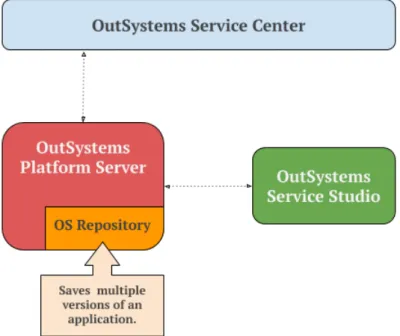
The current version control scenario provided by OutSystems is shown in figure1.1.
Figure 1.1: Schema of the current state of version control in the OutSystems platform. As we can obverse, OutSystems is already able to store versions of a project, in the
OS Repository that resides in the OutSystems Platform Server. Furthermore, OutSystems
already provides a few source control operations that the developers can use during the 2
1 . 2 . P R O P O S E D S O LU T I O N
course of their project’s development, namely, version history, version tagging, merging and compare facilities. Despite of the project’s versions storing, OutSystems does not have the concept of commit. Only the compiled and executable versions are stored, which prevents storing versions that do not compile or execute yet. Moreover these operations were developed by OutSystems from scratch, in order to suit its needs when managing the OutSystems application files, which are binary files.
One downside of the current OutSystems approach, is the fact that the number of operations is rather limited, and here is where OutSystems intends to innovate and bring more value to their product. An integration with an existingSCSwould allow OutSys-tems to harness theSCSoperations’ power, thus increasing the number of the operations available in the platform. This would also increase the possibilities of collaboration be-tween OutSystems developers, as they would have a more complete set of operations to use in their software development workflows.
Many of these developers are already familiarized with the world of source control and its benefits in projects management, thus started to advise OutSystems to incorporate the required source control functionalities, in order to suit their needs. For instance, Carlos Ardiles, an OutSystems developer, says in a forum thread that [57]:
“(...) A blame tool would be useful for specific Client/Server Actions.
To be able to right click on an action and click on a blame option. A pop up like the “open another version” window could appear in the screen with the users and the
changes made to that specific element.”
This feedback message sent by the OutSystems community, reveals the space for im-provement in the area ofSCSfor the platform. In addition, the fact that this user suggests the incorporation of one operation - the blame operation - that is already provided by most of theSCS, reveals that the best approach to tackle these requests is to complement the platform by integrating it with an existingSCS.
1.2
Proposed Solution
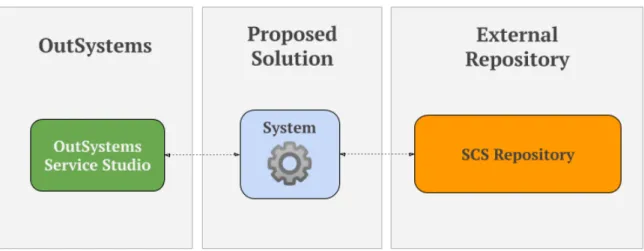
Our goal is to enhance the OutSystems platform with an existingSCS, while addressing the associated problems when integrating text-based SCS with VPL: the OutSystems language. To do this, we must develop a solution that prevents the chosen SCS from losing its functionalities while handling visual artifacts produced by the OutSystems platform. Therefore, we propose a system that will act as aman-in-the-middle between
the OutSystems Service Studio, the developing environment, and the chosenSCS, like it is shown in figure1.2.
In contrast to figure1.1, figure1.2shows the new addition to OutSystems platform. The source control operations will be called from the Service Studio, where they will be forwarded to our System. The System’s job is to process these operation requests,
C H A P T E R 1 . I N T R O D U C T I O N
Figure 1.2: Schema of the proposed solution that establishes the communication between the OutSystems Service Studio, the chosenSCSand its external repository.
originated in the Service Studio, and execute the associated source control operations of the chosenSCS. Some of these operations, that are requested by the user from the Service Studio, can be directly translated to the nativeSCSoperations. For example the commit or push operations, because these operations only transfer data. However, operations that modify data or require visual constructs to be displayed, such as, solving merge conflicts or applying blames, are the kind of operations that need to be addressed differently and cannot be directly translated into native source control operations. To tackle this problem, a textual representation of the visual constructs will be used, so that theSCScan function with these constructs. Also, the communications with the external repository will be handled by our system. This means that any information that is sent or received from the Service Studio and from external repository, will be interpreted and processed by our system and forwarded accordingly to their respective recipients.
1.3
Key Contributions
With the conclusion of this thesis, there is a state of the art specification ofSCS- described in this document - with their extensibility and integration capabilities. We produced a proof of concept for the configuration and integration of GitHub with OutSystems, namely the OutSystems Service Studio. This proof of concept is a system that provides someSCSoperations and a connection to an external repository through an intuitiveUI. Lastly, this work will contribute to the scientific community as a case study of a SCS
integration with a visual software development tool: OutSystems. Because OutSystems is in the domain ofVPLs, integrating a text-orientedSCS- Git - proves to be an interest-ing challenge if we want to preserve its functionalities while correctly handlinterest-ing visual artifacts.
1 . 4 . S T R U C T U R E
1.4
Structure
The remaining chapters of this document are organized as follows:
• Chapter 2 - SCS and Low-Code Software Development: in this chapter key con-cepts aboutSCSand the low-code software development are discussed, followed by background information about OutSystems.
• Chapter 3 - The Different Shapes of SCS: this chapter showcases the state of the art of someSCS, with an emphasis on their integration capabilities with external systems, operations provided and ability to manage visual artifacts.
• Chapter 4 - Integrating Git with OutSystems: in this chapter a detailed explana-tion of the implementaexplana-tion and architecture of the developed proof of concept is described.
• Chapter 5 - Evaluation: this chapter describes the evaluation process of the devel-oped system by showcasing the user tests performed and discussing the obtained results.
• Chapter 6 - Conclusions: in this chapter a discussion of the work developed through-out the course of this thesis, is presented. Also a few insights abthrough-out the future work are discussed.
C
h
a
p
t
e
r
2
L o w - C o d e S o f t wa r e D e v e l o p m e n t
In this chapter, we will introduce the low-code software development concept. An overview of OutSystems as a company and as a product, will also be presented.
2.1
Low-Code Software Development
Low-code is the design and development process of a software system by using minimal hand-written source code [45]. Low-code development techniques usually recur to visual components as a way to mask and automatically generate source code, thus allowing developers to quickly build a piece of software. As Matthew Revell says [45]:
“Developers skip all the infrastructure and re-implementation of patterns that can bog them down and go straight to the unique 10% of an application.”
i.e., developers start working on the specific part of their software that actually represents the value and the uniqueness of the product they are building. Furthermore, the low-code approach allows people that are not familiarized with writing source code, to actually partake on a software development project, as the hand-writing source code is kept to a minimum.
2.2
OutSystems
OutSystems1is a software company that is primarily focused on improving developers efficiency whilst developing software on their daily basis. OutSystems is capable of achieving this by providing developers with methodologies that accelerate, abstract and ease the majority of software development tasks.
C H A P T E R 2 . L O W- C O D E S O F T WA R E D E V E L O P M E N T
OutSystems’ product is a low-code platform that accelerates the software develop-ment process. The OutSystems platform allows developers to build, deploy and manage, platform-independent mobile and web applications. By being in a low-code environment, building an application becomes a fast and productive process [1].
Figure 2.1: The OutSystems Platform components, with an emphasis on the Service Studio and the Platform Server [38].
Figure2.1shows the two OutSystems platform components that are going to be ap-proached next: the Service Studio and the Platform Server.
2.2.1 Service Studio
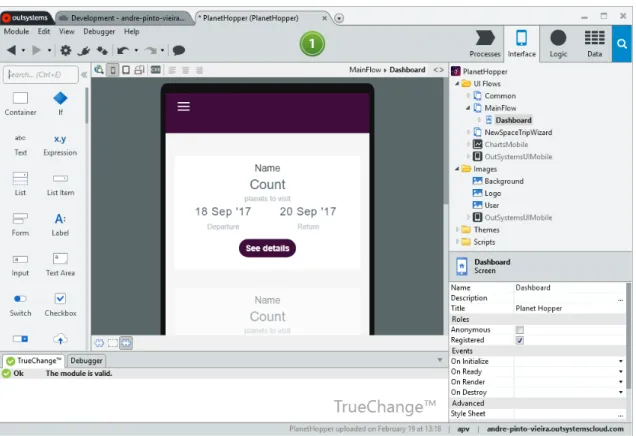
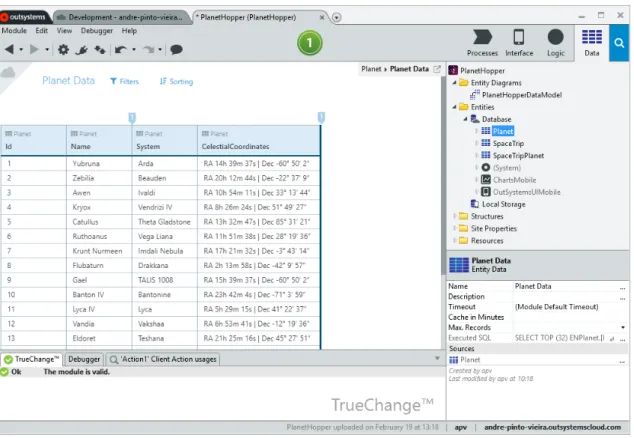
The Service Studio is the OutSystems visual development environment [38]. It is where the developers build applications in adrag-and-drop style. With the Service Studio,
devel-opers can create:
The application’sUI Built through a composition of visual widgets, like buttons or text boxes, like it is represented in figure2.2.
The application’s logic Built through the composition of visual widgets, like variable assigns or conditional and loop primitives. This composition is aggregated in a graph-like structure that represents the step-by-step operation workflow, graph-like it is shown in figure2.3.
The application’s database modeling Where the applications’ databases are modeled through the creation of entities and static entities, like it is displayed in figure2.4.
2 . 2 . O U T S Y S T E M S
Figure 2.2: Service Studio overview while editing an application’sUI.
C H A P T E R 2 . L O W- C O D E S O F T WA R E D E V E L O P M E N T
Figure 2.4: Service Studio overview while editing an application’s database.
2.2.1.1 Platform Server
The Platform Server is the core of the OutSystems platform. It is responsible for generat-ing, optimizgenerat-ing, compiling and deploying the applications built in the Service Studio [38]. To deploy an application, the Service Studio sends the applications’ models to the Platform Server, where as figure2.1illustrates the applications are:
• Versioned, by using the OutSystems versioning system - identified by the number1
-Versioning, in figure2.1- which will be approached in detail in section3.2.1; • Compiled into .NET and optimized for performance and security reasons -
identi-fied by the number2 - Code Generator, in figure2.1;
• Deployed to the front-end OutSystems servers, which establish the contact between the user and the application.
2.2.2 The OutSystems Application Files
All of the applications that are built in the Service Studio, are transported and stored as
OutSystems Modeling Language (OML)files. TheOMLsare binary files that have an un-derlyingeXtensible Markup Language (XML)specification [30]. ThisXMLspecification can later be extracted to a file with the aid of an internal OutSystems tool, that decodes theOMLstoXML.
C
h
a
p
t
e
r
3
T h e D i f f e r e n t S h a p e s o f S C S
In this section, we will introduce Source Control Systems (SCS) and approach source control methodologies in software systems, with a variety ofSCSbeing presented.
3.1
Source Control Systems
The need to organize and track changes in a project exists for as long as people started thinking about collaboration and the concept ofversioning: to store and manage multiple
copies of a project, since its creation until its completion [50]. The possibility of tracking and review changes or the possibility to restore a previous version, are also motivations that lead to the creation ofSCS[27]. These systems are intended to provide a way for de-velopers to work concurrently on the same project, while helping them in the endeavour of managing the project’s source code. Nowadays, in the software development industry, the concept of source control has become associated with ways to track code changes, allow the revision of the code history, provide the ability to revert to previous versions, provide merge and comparison facilities of distinct versions of a project and to allow the collaboration of multiple individuals on the same project [27,59]. Even though different
SCSmay provide complementary operations, they all try to respect and follow these basic guidelines as to what aSCSshould be.
3.2
Source Control in Low-Code Platforms
Besides the OutSystems appearance in the low-code development world, innovations in the low-code area are rising, thus another promising competitor emerges: Mendix. The Mendix use-case is the closest for the study of source control in low-code platforms besides OutSystems, and will both be introduced next.
C H A P T E R 3 . T H E D I F F E R E N T S H A P E S O F S C S
3.2.1 Versioning in OutSystems
OutSystems currently supports version control through an internally developed version-ing system that is able to provide some version control operations namely, comparversion-ing and merging, version history, version tagging, rollbacks to previous versions, and developer sandboxes [26,53]. Moreover, OutSystems does not integrate with any existingSCSthat already partake in the software development of its users. This is a limiting factor when it comes to the source control operations available in the current versions of the Out-Systems platform, and because users cannot use the same source control methodologies when working with OutSystems..
Lastly, OutSystems keeps the versions of the applications in a central repository that resides in the developer’spersonal environment1. Each time an application is published, i.e. when the developer uploads the application to his personal environment, a new version is stored and made available for everyone with access to it.
Compare and Merge
When a developer wants to merge two versions of an application, the OutSystems Ser-vice Studio will automatically perform the merge or, if the developer requests or there were any conflicts detected, it allows to manually perform the merge. The OutSystems Service Studio provides three ways to compare and see differences of two versions of an application: in a widget tree view, like it is observed in figure3.1, in a text view, like it is displayed in figure3.2and in a graph-like view, like it is shown in figure3.3.
Figure 3.1: Merge situation, where the developer can visually compare two versions and merge them manually [26].
1The personal environment is the cloud-based version of the OutSystems platform. For more
information refer to https://success.outsystems.com/Support/Personal_Environment/What’s_an_
OutSystems_personal_environment%3F.
3 . 2 . S O U R C E C O N T R O L I N L O W- C O D E P L AT F O R M S
The widget tree view is the default view for a merging situation. Like we can see in figure3.1, the changed application widgets appear highlighted and displayed in a tree.
Figure 3.2: Merge conflict situation between two versions of aCSSfile [9].
The text view is really simple and it is widely used as the mean of showing differences in most of theSCS. It is where changes are seen through the comparison of lines of text, like we can see in figure3.2. This view is only shown for the comparison of text artifacts that are used when programming with OutSystems, like Structured Query Language (SQL)statements,Cascading Style Sheets(CSS) and JavaScript files.
Figure 3.3: Merge conflict situation between two versions of an action [9].
Lastly, the graph-like view is shown when the developer needs to visualize differences between two versions of an action2. Figure 3.3 shows a merge conflict between two versions of an action in the value assigned to the variablesection.
2Actions are a part of the logic elements of the OutSystems language, allowing developers to describe
C H A P T E R 3 . T H E D I F F E R E N T S H A P E S O F S C S
Version Tagging
Version tagging [26] in OutSystems is intended to facilitate developers with the ability to tag a specific version of the application, as astable state of the application was obtained
or a set of objectives were fulfilled. By tagging the versions of the application during its development process, developers can easily deploy it to production when a certain goal is achieved or, if needed, return to a previous state that was stable.
Version History and Rollbacks
In OutSystems, as every publish or version of an application is stored with the information of the date and author of the publication, it is possible to retrieve and rollback to any of these previously saved versions.
Developer Sandbox
Developer sandboxes [26] are private areas of an OutSystems application, where develop-ers can concurrently work on the same application without interfering with each othdevelop-ers work, by publishing their versions to this private area. One can think of developer sand-boxes as a branch of the public version of the application. When their work is concluded, then they can publish and merge it with the public version of the application.
3.2.2 Versioning in Mendix
Mendix is a low-code platform that provides a fast and easy development, management and deploy processes for web and mobile applications [33,49]. These applications are also built through a drag-and-drop style like we saw with OutSystems. Mendix adopted the centralized version control workflow, as itsSCSis built on top ofSubversion (SVN), which is a centralized SCS. Mendix integrates with SVNas a way to benefit from the existing operations provided by this system, while also granting a familiar workflow to the users that already worked withSVN[54].
Mendix also provides its ownSVNrepository hosting service, called Mendix Team Server. However, some companies policies require their software to be stored in servers on their premises. To tackle this issue, Mendix also provides a way for users to configure their own repositories, thus allowing them to oblige to their company policies [56].
Despite the fact that Mendix is able to directly harness most of SVN’s operations,
SVN’s merge operation cannot be used in the model files, which are the Mendix’s large binary files. This lead Mendix to create an internal algorithm, that is responsible for auto-matically merge changes or, if conflicts emerge, allow the users to manually merge them [54]. This custom merge algorithm consequently lead to the creation of a differentiation
algorithm as well, which calculates differences between model files and feeds them to the merge algorithm, while being the backbone structure for showing differences when the user is manually performing a merge of model files [56].
3 . 3 . S O U R C E C O N T R O L I N I D E S
Finally, the Mendix use case revealed to be an interesting case study as it enables a text-based source control (SVN) integration with a visual programming language (Mendix).
3.3
Source Control in IDEs
Integrated Development Environments (IDEs)provide facilities for developers to build software, and since its coexistence withSCS, the latter revealed to be a great complement to the IDEs range of functionalities. The integration ofSCS with these environments, eases the software development process, as developers can follow the source control workflows from within theIDEthey are working with.
There are a lot of examples regarding SCSintegration withIDEs, for example, the integration of Git, Mercurial or Perforce with Visual Studio or evenSVN, Git or Mercurial integration with Eclipse. We chose the Unity andUnreal Engine 4 (UE4) IDEsuse cases because the matter of integrating aSCSwith these two systems, are case studies that fall under the topic of aSCShandling visual artifacts, as these twoIDEsmanage binary files and visual assets.
3.3.1 Source Control in Unreal Engine 4
Unreal Engine 4(UE4)3[46] supports by default twoSCS: SVNand Perforce. Neverthe-less, developers are free to choose which system they want to use, as the engine provides the same built-in interface regardless of the chosen SCS[47]. However, the operations that this interface allows developers to perform, may not be the complete set of oper-ations that are provided by the SCS itself, i.e., there may be some operations, like the visualization of branches in a tree, that are not displayed in theUE4 IDE. Nonetheless, such operations can still be concurrently used with the respective SCSclient or via the
Command-Line Interface (CLI).
Large binary files are very common to exist in projects developed withUE4, as they are usually used to describe compositions of visual artifacts. Therefore, while using Perforce, UE4 recurs to file locking [52], to lock binaries that are being edited by one user, so that others cannot concurrently change it. This lock is later released when the developer finishes his work by committing his changes.
Figure D.1 illustrates the source control workflow of Perforce. It briefly describes the control and communication flow, between calls of source control operations and the engine’s response. To use the source control operations, the user is provided with two choices: to use the integrated operations that are available via UE4 UI, or to use the operations directly via Perforce’s client. There is only one setback regarding the usage of the integrated source control operations, and that is the fact that the available operations 3UE4is a set of tools that allows creators to build applications, animations and high-quality games. For
C H A P T E R 3 . T H E D I F F E R E N T S H A P E S O F S C S
are limited. So, if one intends to use Perforce to its full potential, one will eventually need to recur to Perforce client.
3.3.2 Source Control in Unity
Unity4 [51] integrates with two version control systems: Perforce and PlasticSCM, by featuring an interface for both of these SCS. This interface is integrated in the Unity
IDE and allows for the basic source control operations to be performed: add, commit, push, pull. More complex operations like branching, showing logs or visualizing differ-ences, although they can be called from within Unity, in the case of showing differences and branches in PlasticSCM, they are, however, displayed in PlasticSCM’s client, where proper visualization techniques are implemented. The usage of differentSCSlike Git or Mercurial is also possible in Unity. There are two ways to tackle this: either by using an externalSCSclient or theCLI, to perform any of the version control operations required; or by using Unity plugins that integrate with theIDE. Furthermore, among others, these plugins are intended to provide a way to integrateSCSlike Git,SVNor Mercurial, with the UnityIDE.
Using theGitHub for Unity [19] plugin as an example, it enables the integration of Git with the UnityIDE, while using GitHub as the hosting service. The plugin provides the followingSCSoperations [19]: initialize a repository, fetch, push and pull from the repository, add and commit to the local repository, create and switch branches, showing changes and history, and file locking.
Figure D.2 illustrates the source control workflow of using Git operations via the pluginGithub for Unity. This workflow is very similar to the one represented in figureD.1, where the user is also able to choose whether or not he/she intends to use the integrated source control operations or remain with the classicCLIor source control client to use them. Once again, other source control operations, like rebase, grep or tagging in Git, can still be used side-by-side withGitHub for Unity plugin, although they can only be called
viaCLIor a specific Git client.
3.3.3 Summary
TheSCSintegration with theUE4and UnityIDEsdemonstrated the possibility of inte-grating a text-orientedSCSwith systems that manage visual artifacts. Unity has a textual representation for all of its files, thus not showing great problems when integrating and usingSCS. UE4, however, suggests the usage of file locking to handle modifications in visual artifacts. This prevents conflicts and any merge necessity over these visual files, thus enabling the version control workflow to proceed smoothly. Essentially,UE4solves the issue of handling visual artifacts, by not causing disruptions among the versioned visual files.
4Unity is a technology that allows creators to build games, animations and virtual prototypes. For more
information refer tohttps://unity3d.com/.
3 . 4 . S O U R C E C O N T R O L I N M O D E L I N G L A N G UAG E S
3.4
Source Control in Modeling Languages
Modeling Languages like theUnified Modeling Language (UML)are within the world of
VPLs, which make them an interesting case study whenSCSare used to manage models that were built with them. Thus, we will discuss some of the existing tools. Furthermore, in addition toUMLmodels, some of these tools provide source control facilities toEclipse Modeling Framework (EMF)5models.
Note that some of the tools that will be presented are not necessarilySCSas a whole. Some of them are just tools that implement one or more operations that are in the world of source control, for instance the compare and merge operations, while others can be
hubs for other tools.
EMFStore It is an integrated tool in Eclipse, designed specifically forEMF-based models. It provides compare, merging, branching, tagging and history facilities, featuring anUI
where conflicts, branches and history are displayed in a visual manner. EMFStore recurs to the EMFCompare tool to provide the merge and compare functionalities [15] and has its own repository server architecture, prepared for EMF models, where users share and commit their models [28,58].
Connected Data Objects (CDO) It is an integrated tool in Eclipse, as it is built on top of theEMF. CDO, provides comparison, merge, branching and history functionalities, while supporting a way to change history, that is, to change previous commits. Also, the comparison feature provided byCDOrecurs to the EMFCompare tool in order to provide an efficient compare editor. Lastly,CDOprovides two manners to work offline: repository cloning, where the user holds an entire copy of the repository - the full commits history and branches - and a lightweight approach, where it is possible for the user to checkout a copy of a specific branch point, so that he/she holds a small chunk of the repository at a given time [7]. This repository is dependent of theEMF[8].
Adaptable Model Versioning (AMOR) AMORprovides merging and comparison
fea-tures by innovating in the following topics: i) in precise conflict detection, by avoiding undetected and wrongly identified conflicts, ii) in intelligent conflict resolution, by pro-viding techniques for the representation of conflicts and suggesting resolution strategies. The comparison feature requires that a previously defined comparison method is pro-vided: the authors recommend the usage of EMFCompare. SoAMORis somewhat depen-dent on existing software, in order to reach its full potential. In this case, with the usage of EMFCompare, the user is restricted to work on top ofEMFmodels [2].
ModelBus It is a tool integration framework, based on a service oriented architecture. It features: the integration of software tools, construction of integrated and automated tool chains and supports collaboration of developers (viaVCS). ModelBus already features the integration ofSVNand Git as some of its core technologies. It was designed for managing 5EMFis a modeling framework and code generation tool that works upon data modelsEMF. For more
C H A P T E R 3 . T H E D I F F E R E N T S H A P E S O F S C S
complex development processes with the need to integrate a variety of tools working together [36].
3.4.1 Summary
These systems provide very particular solutions that are grappled to specific problems. For instance, the first three tools - EMFStore,CDOandAMOR- work withEMFmodels and propose solutions to handle these specific model types, which are structured XMI files. The other tool - ModelBus - provides a tool integration environment. Thus, these tools are not acceptable candidates to perform the integration with the OutSystems platform. Despite OutSystems files being structure asXMLfiles, as described in section2.2.2, an approach where the solution would work with the underlyingXMLspecification, instead of the raw binary files that the users can see, would present two problems. The first problem is linked to the file structure privacy, that must remain concealed to final users. That is why the application files are obfuscated through a binary representation. The second problem is related to the amount of time the current tool takes to transform a binary file into itsXMLspecification, which is a time-consuming deed. Furthermore, most of the model-basedSCSstudied are Eclipse plugins, which discards the big necessity for these tools to be standalone software solutions, to be able to integrate with any external systems.
3.5
Source Control in Spreadsheets
Regarding source control in spreadsheets, there is an interesting case study that needs to be mentioned: the SheetGit tool [32,37]. SheetGit provides a Git integration with Excel through an intuitiveUI. This tool provides operations such as: compares, merging and the creation of new versions. Also, SheetGit uses BitBucket as the repository host.
SheetGit uses an interesting approach to tackle the problematic of the version control operations loss: the usage of metadata files. These metadata files contain the list of changes done in each commit, the parent commit of the current commit and the current working branch. So, for every commit, the spreadsheet file and the related metadata file containing the said information, are stored in the remote repository for each commit [37]. Thus using an operation-based approach, where the operations made to the spreadsheet files are store in the repository as well.
This work is similar to the proposed solution for this thesis, as discussed in section1.2, where SheetGit fulfills the gap between theVPLsrepresented by Excel spreadsheets and aVCSportrayed by Git. Furthermore, the metadata approach appears again in SheetGit, thus revealing to be a promising solution to tackle the version control problem when dealing with visual artifacts.
3 . 6 . S O U R C E C O N T R O L I N T E X T- BA S E D L A N G UAG E S
3.6
Source Control in Text-Based Languages
Text-basedSCSneed to be mentioned because they will be the foundation of the integra-tion we intent to provide to the OutSystems platform. A selecintegra-tion of the widely known text-basedSCSwill be described, with a description of their main functionalities, opera-tion extension capabilities and integraopera-tion with external systems.
Git Is an open source distributed SCSthat is designed to be lightweight with a focus on performance and scalability while handling large sized projects [16]. Furthermore, Git features the widely used operations like: comparing and merging, branching, history revision and version tagging, with a special emphasis on operations such as [16]: File Locking, to ensure that only one user has access to a given file; A Staging area, that acts as a provisional space that holds the modified files before committing, whilst allowing the user to review them; And Stash, that stores the state of adirty working directory (that
is not yet committed) back to a clean working directory state that matches the current commit in the repository.
Lastly, Git can be easily integrated with external systems, as we can obverse with the Git integrations done with VSCode [55] or Unity [19], while also providing the facility of adding custom source control operations.
Bazaar ThisSCS[5] has the particularity of allowing for both centralized and distributed workflows to be used. Also Bazaar innovates in the centralized workflow by introducing
bound branches, that verify if the local repository is up-to-date with the central repository
before committing. If the verification is successful, the central commit is performed before the local one, thus ensuring the atomicity of the operation.
Besides the commonSCSoperations - like merges, compares, branches and history review - it also provides tagging and shelve operations. The shelve operation is the same as Git stash one but with a different name. Lastly, Bazaar also provides the ability to add custom operations via plugins as a way to extend its core functionalities.
Mercurial Is a distributedSCS[34] that has the particularity of providing the ability to either modify or extend existing operations and create new ones, in a very intuitive and easy way, via the creation of plugins. Furthermore, besides the common source control operations, Mercurial provides [34]: version tagging, file locking, staging area, like we saw in Git that goes by the nameDirState and shelve (or stash). Lastly, Mercurial can be
integrated with external systems, as VSCode [25] and Eclipse [35] do.
Concurrent Versions System (CVS) ThisSCSdeserves an honorable historical mention, as it was one of the precursors of modern eraSCS. CVSfeatures operations such as [11,
12]: merging and comparison of source code, branching, history revision and version tagging.
SVN Originally designed as an improvedCVS,SVN[3] is a centralizedSCSbuilt to be reliable and simple to use. SVNprovides operations such as [3]: compares and merges,
C H A P T E R 3 . T H E D I F F E R E N T S H A P E S O F S C S
branching, history revision and version tagging, a staging area known asChangelists and
file locking. Regarding SVN’s integration with external systems, the Eclipse [14] and IntelliJ [48] use cases, illustrate the flexibility this tool has, to be complemented with other software.
Plastic SCM This SCS also allows for distributed and centralized workflows to be adopted, with an emphasis on the fact that both of these workflows can be used by di ffer-ent users concurrffer-ently. Apart from text, Plastic SCM innovates with an image differffer-entia- differentia-tion algorithm that allows users to visually compare two versions of an image. Features that Plastic SCM provides besides the usual source control operations, are [42]: version tagging (named as version labels), changelists (also know as staging area), file locking
(named as exclusive checkout), and shelve. All of these operations are performed and displayed in a simple and intuitiveUI. Plastic SCM’s integration with external systems is restricted as existing integrations, like the Unity [43] and Microsoft Office6[44] cases, are created when new versions of Plastic SCM are launched.
Perforce HelixCore is the the Perforce’s SCS software [40], often designated as just Perforce, which leverages from an intuitive and user-friendlyUI. Perforce provides source control operations like: merging, branching, history, version labels, also known as tagging,
changelists or staging area, file locking and lastly, shelve [39]. Perforce is able to integrate with almost any system due to its own plugins and open API [24], as we can see in the examples of the integrations done with Visual Studio [23] and Unity [22]. Also, it is possible to extend operations’ functionalities through triggers, which are custom
programs that are called when specific source control operations are used [21].
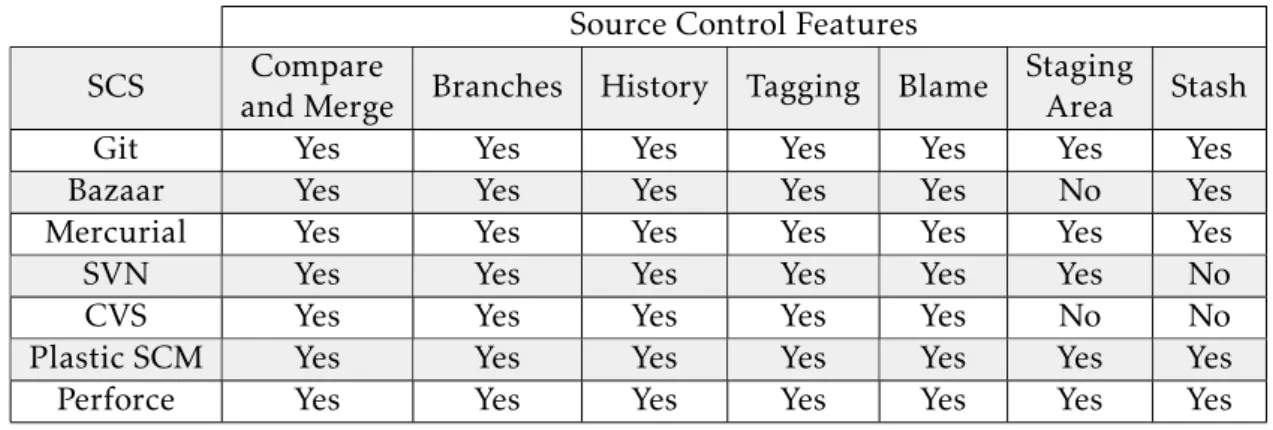
Tables3.1 and3.2 are a compacted way to visualize and compare, the studied text-basedSCS. TheseSCSrevealed to be the ones of utmost interest, because they are flexible and offer the largest number of functionalities.
Source Control Features
SCS Compare
and Merge Branches History Tagging Blame
Staging
Area Stash
Git Yes Yes Yes Yes Yes Yes Yes
Bazaar Yes Yes Yes Yes Yes No Yes
Mercurial Yes Yes Yes Yes Yes Yes Yes
SVN Yes Yes Yes Yes Yes Yes No
CVS Yes Yes Yes Yes Yes No No
Plastic SCM Yes Yes Yes Yes Yes Yes Yes
Perforce Yes Yes Yes Yes Yes Yes Yes
Table 3.1: Availability of the most used features of the studied model and text-basedSCS.
6Only in the Microsoft Office Word, Excel and Powerpoint. 20
3 . 7 . C H O O S I N G T H E S C S T O I N T E G R AT E W I T H O U T S Y S T E M S
SCS Open Source Extensible Integration with external systems
Latest Version Release
Git Yes Yes Open 2018-12-15
Bazaar Yes Yes Open 2016-01-31
Mercurial Yes Yes Open 2018-01-07
SVN Yes ? Open 2018-10-30
CVS Yes ? Open 2009-09-03
Plastic SCM No ? Open 2019-01-11
Perforce Yes* Yes Open ?
Table 3.2: An extra set relevant features and information regarding the studied model and text-basedSCS. * - Perforce’s only releasedP4CLI and P4Web tools [41] as open source. ?- We could not find enough information, to be able to either confirm or deny the existence of the specified data.
3.7
Choosing the SCS to integrate with OutSystems
Table 3.1features a set of known SCSoperations. These operations were chosen from a list ofSCSoperations that were internally discussed at OutSystems, as operations of interest. As the table shows, the representedSCSare able to provide the essential and most common source control operations: compare, merge, branching, history revision and version tagging. However, it is in the last three functionalities that a noticeable discrepancy rises between them. Git, Mercurial, Plastic SCM and Perforce are able to hold their positions as theSCSthat are able to provide all of the considered functionalities, whereas Bazaar,SVNandCVScannot provide the same functionalities as the otherSCS. To elect a tool between Git, Mercurial, Perforce and Plastic SCM, it is necessary to gather additional information about these systems. As it is displayed in table3.2, information regarding the extensibility of SCS operations, the possibility of SCS integration with external systems, the latest released version and the availability of theSCSsource code to the public, is described.
By taking into consideration this new information, our goal is to find aSCSthat can easily be integrated with external systems and provide an easy way to add or extend its functionalities. As the software development industry is in constant growth, it is also important to favor a SCSthat is regularly updated. Also, a software that is Open Source is preferred as it can be easily edited to fit any project’s needs, while relying on a large number of people that inspect the code base looking for possible bugs. Considering these last four factors, that are represented in table3.2, we can exclude Plastic SCM and Perforce. Moreover, these systems operations extension capabilities are not very easy and fast to use. That leaves us with Git and Mercurial - that are very much alike - which will be compared in the following section.
C H A P T E R 3 . T H E D I F F E R E N T S H A P E S O F S C S
3.7.1 Mercurial Vs. Git
Mercurial and Git are both powerful SCS, with several similarities. Both are able to provide operation extension facilities, which allow the creation of new operations or the extension of the existing ones - like the diff and merge operations, where one can change the default algorithm - as one sees fit. It is noticeable that Mercurial’s syntax is simpler than Git’s, thus revealing to be a weak point of Git, especially because new Git users may have difficulties while learning and using it. Such simplicity also comes with the cost of having fewer available operations when compared to Git, which provides a wider range of source control operations. Moreover, Git’s popularity has risen, and became the most usedSCSwith much bigger community than Mercurial’s, as we can see in figure3.4. Thus, we choose Git.
Figure 3.4: Number of repositories of eachSCSas of July 2019 [10].
3 . 7 . C H O O S I N G T H E S C S T O I N T E G R AT E W I T H O U T S Y S T E M S
3.7.2 The Chosen Git Operations
According to the operations described in table3.1in section3.6, we intend to provide: compare and merging, history and blame. Moreover, the blame operation was highly requested by some employees when we discussed our solution with OutSystems. The commit and fetch operations also need to be provided, despite not being mentioned in the table, because these two operations are elementarySCSoperations that transfer data and are present in everySCS.
The decision to include these five operations resides in the fact that these operations are enough to provide an intermediateSCS usage workflow. This means that the user will be allowed to perform the basics of source control, which consists of doing commits, fetch changes, or see history. Also, the user will still be able to perform more complicated operations, such as compare and merges to solve possible conflicts or applying blames. The branching operation could be interesting to incorporate, however it was discarded because it created a new problem that is outside the scope of this thesis, and that is related to the database architecture of the OutSystems applications.
C
h
a
p
t
e
r
4
I n t e g r a t i n g G i t w i t h O u t S y s t e m s
In this chapter, a description of the system development and architecture will be dis-cussed, focusing on design decisions, solutions to the problems found and operations descriptions.
4.1
Overview
As discussed in section1.2, we proposed a system that acts as aman-in-the-middle between
the OutSystems Service Studio and an external repository. As the chosenSCSis Git, we selected GitHub as the hosting service for the Git repositories. We term our system OSGit.
Figure 4.1: Detailed schema of the proposed solution that establishes the communication between the Service Studio and a GitHub repository.
C H A P T E R 4 . I N T E G R AT I N G G I T W I T H O U T S Y S T E M S
OSGit, as figure4.1shows, establishes and coordinates the communications between the OutSystems Service Studio and an external GitHub repository. TheSCSoperations will be invoked from the Service Studio along-side any necessary configurations. OSGit will then interpret and translate theSCSoperations invoked from the Service Studio to native Git operations, which are going to communicate with the external GitHub repos-itory as needed. As previously described, some operations that modify data or require visual constructs to be displayed, need to be addressed differently and cannot be directly translated into native Git operations. Thus the way these operations are used need to be different from the direct usage of the native Git operations mentioned before. This is where OSGit also innovates and is in charge of providing a way to customize the native Git operations calls over visual artifacts that otherwise would not be usable. The external repository, as mentioned, is a GitHub repository created by the user, which will contain the OutSystems application files and the metadata files. OSGit’s main purpose is to pro-vide an abstraction layer from what is happening at a lower level, where the Git operation calls and the GitHub communications take place, and any extensions to Git operations are thus made invisible and covered by OSGit.
To enable the abstraction layer, OSGit provides anApplication Programming Interface (API), that resides in the core code of the product - in the core of Service Studio - and provides a set ofSCSoperations, that use Git in its core. These operations provided by our API will not necessarily be a direct match of the chosen Git operations described before. Some operations consist of one or more Git operations. Also, to assist in the implementation of some of the Git operations, the LibGit2Sharp [29] library was used. This library provides anAPIfor some of the Git core operations, thus providing a way to avoid using Git operations directly from the command line and parsing their result.
TheAPI, by itself, would not be able to provide any interaction for a user that is using the Service Studio to build his application. So to fill this gap, OSGit also has a simple
UI implemented in Service Studio interface, that provides the user with all of theSCS
operations available in theAPI. So to better understand how to incorporate anUIwith Service Studio, we produced design mockups of theUI, that shows how the user interacts with theSCSoperations, and the type of feedback he/she receives while using them. We also created user stories for every operation available in theUI, that describes the type of user, what they want and why.
Lastly, the technology used to build the back-end section of this integration - theAPI
- was C#, while the front-end part is built with React, TypeScript, and SCSS.
4.2
Representing Visual Objects as Text
To build an application with OutSystems, the user must compose and structure a chain of different elements. The application development is done in the Service Studio, and the elements composing the application are displayed on the right-hand side of the screen in the form of a tree, as illustrated in figure4.2, termed ESpace.
4 . 2 . R E P R E S E N T I N G V I S UA L O B J E C T S A S T E X T
Figure 4.2: The ESpace tree elements of the interface that form theBookings application.
The ESpace tree contains all of the elements that form an application built with Out-Systems. For instance, figure 4.2 presents the elements that form the interface of an application. These elements include web screens, like theBookings and Home screens, or
actions, like theCheckIn action that executes a certain logic when the check-in button in
the Home screen is pressed. These elements are the building blocks of an OutSystems
application, and to integrate them with a traditionalSCS, we need to represent them in a textural manner.
In order to represent the OutSystems visual elements as text, some attributes of these elements are thus extracted and stored in a file. Figure 4.3 shows an example of the metadata extracted from a web screen and saved in a metadata file.
Figure 4.3: An example of the metadata information that is stored for each ESpace tree element.
The extracted metadata is composed of four pieces of information that are split by a vertical bar “|”. The first piece of information in the metadata example depicted in figure4.3is the element’s name:Home. This name is the name given by the user when the
element was created. The next bit of information is the tag name: Flows.WebScreen. The tag name indicates the type of each element, for example, in figure 4.2, there are three more web screens:BookingDetail, Bookings, CheckOut. All of these three elements have the
same tag names: Nodes.WebScreen, because they are all web screens. The tag name will be crucial in grouping the elements of the same type in the metadata files. The third bit of information is very significant. It is the key of the element: TT8tufF_XU6OSMds7eIOgg,
C H A P T E R 4 . I N T E G R AT I N G G I T W I T H O U T S Y S T E M S
which will serve the purpose of aiding in the element’s searching in the metadata file. The last piece of information is one element property called LastModifiedByCommand: efd0ee6e-c8db-410c-84be-a4a954470396. This property indicates if an element was modified, and each time a modification occurs in the element, this property changes its value. Thus, the element’s modification will be reflected as a modification in this line.
4.2.1 Generating the Metadata Files
The metadata files, contain all the metadata of a given element type, i.e., all of the meta-data of the elements that are web screens. For the generation of metameta-data files, all infor-mation referred before - name, tag name, key, and the LastModifiedByCommand property - must be acquired from each element present in the ESpace tree. The ESpace tree is
essen-tially ann-ary tree, where the nodes are the elements of the ESpace. Listing4.1contains the algorithm used to transverse the tree and to fetch the metadata for each element.
1 GenerateMetadataMap ( treeNode , metadataMap ) { 2 if ( treeNode . HasChildren ) {
3 foreach ( child in treeNode . Children ) { 4 if ( child . hasLastModifiedByCommand ) { 5 tagName = child . TagName ;
6 List objectsList ;
7 if (! metadataMap . ContainsKey ( tagName )) {
8 objectsList = new List ();
9 } else {
10 objectsList = new List ( metadataMap [ tagName ]);
11 }
12 objectsList . Add (
13 child . Name + "|" + child . TagName + "|"
14 + child . Key + "|" + child . LastModifiedByCommand
15 );
16 metadataMap [ child . TagName ] = objectsList ;
17 }
18 GenerateObjectsMetadataMap ( child , metadataMap );
19 }
20 }
21 return metadataMap ; 22 }
Listing 4.1: The algorithm that fetches the metadata information
When traversing the tree, the algorithm visits each node and checks for the existence of the property LastModifiedByCommand. If the node contains the LastModifiedBy-Command property, all of the four pieces of information - name, tag name, key, and the property itself - are saved in a HashMap for further processing. The map’s content
4 . 2 . R E P R E S E N T I N G V I S UA L O B J E C T S A S T E X T
is already structured very similarly to the structure the individual files have when the metadata information is copied to them. The map’s key is an element’s tag name, while the value is a list of strings that represent the structured element’s metadata, i.e., one line of the file, as seen in figure 4.3. So, for every map entry, there is a list of all metadata elements of the same type, which is how the metadata directory is structured.
Now that all the metadata information is contained in a structure, we proceed to saving it to the respective files remains to be done. This process has three distinct cases:
1. Nor the file or the element metadata exist;
2. The file exists, but the element metadata has not been added yet;
3. Both the file and the element metadata exist, but the element has been modified. The first case represents the scenario where a new element is created, and another element of its type does not exist as well. Thus, this is the base case, where both the file and a new file entry containing the element’s metadata must be created. The file is created with the same name as the tag name of the element. This helps to maintain an organized file structure, where all of the elements of the same type are in the same file. Notice in figure4.4, that there are eight metadata entries describing elements of the same type: Nodes.WebScreen. All new element’s metadata entries are added at the end of the
file, so that they are ordered by insertion. This “anchors” each entry to a specific line, which will be useful when using the blame operation, as will be seen later.
Figure 4.4: The web screens metadata file, where all application’s web screens metadata is stored.
The second case is similar to the first one, but this time there are already elements of the same type in the metadata file, where the new element’s metadata is going to be saved. Thus, there is only the need to insert the new element’s metadata entry at the end of the file, just like it is done in the first step.
The third and last case happens when both the file and the metadata entry in the file, already exist. This occurs when an existing element is modified, and to be able to point out this modification, the LastModifiedByCommand property changes, and must be reflected in the element’s metadata as well. This time the element’s metadata is already present in the respective metadata file. This means that only the property LastModifiedByCommand needs to be saved, as the remaining information is the same. Next, the corresponding file needs to be found in the metadata directory. Using the tag name present in the
![Figure 2.1: The OutSystems Platform components, with an emphasis on the Service Studio and the Platform Server [38].](https://thumb-eu.123doks.com/thumbv2/123dok_br/15196493.1017499/32.892.235.637.301.602/figure-outsystems-platform-components-emphasis-service-studio-platform.webp)
![Figure 3.1: Merge situation, where the developer can visually compare two versions and merge them manually [26].](https://thumb-eu.123doks.com/thumbv2/123dok_br/15196493.1017499/36.892.244.648.723.1023/figure-merge-situation-developer-visually-compare-versions-manually.webp)
![Figure 3.3: Merge conflict situation between two versions of an action [9].](https://thumb-eu.123doks.com/thumbv2/123dok_br/15196493.1017499/37.892.236.655.649.986/figure-merge-conflict-situation-versions-action.webp)
![Figure 3.4: Number of repositories of each SCS as of July 2019 [10].](https://thumb-eu.123doks.com/thumbv2/123dok_br/15196493.1017499/46.892.230.570.467.736/figure-number-repositories-scs-july.webp)
