Guido Herrmann
Martin
J.
Pearson
Alexander Lenz Paul Bremner
Adam Spiers Ute Leonards
(Eds.)
0\
M
N
00
g
Social Robotics
5th International Conference, ICSR2013
Bristol, UK,October 2013
,...
A Low-Cost Classroom-Oriented Educational
Robotics System
Mário Saleiro", Bruna Carrno+, Joao M.F. Rodrigues", and J.M.H. du Buf1 1 Vision Laboratory, LARSyS, University of the Algarve, 8005-139 Faro, Portugal, 2 Escola Superior de Educação e Comunicação, University of the Algarve, 8005-139
Faro, Portugal
{masaleiro,jrodrig,dubuf}~ualg.pt, b.santos.carmo~gmail.com http://w3.ualg.pt/-dubuf/vision.html
Abstract. Over the past few years, there has been a growing interest in using robots in education. The use of these tangible devices in combin-ation with problem-based learning activities results in more motivated students, higher grades and a growing interest in the STEM areas. How-ever, most educational robotics systems still have some restrictions like high cost, long setup time, need of installing software in children's com-puters, etc. We present a new, Iow-cost, classroom-oriented educational robotics system that does not require the installation of any software. It can be used with computers, tablets or smartphones. It also supports multiple robots and the system can be setup and is ready to be used in under 5minutes. The robotics system that will be presented has been successfully used by two classes of 3rd and 4th graders. Besides improving mathematical reasoning, the system can be employed as a motivational tool for any subject.
Keywords: Education, Robotics.
1
Introduction
In the last few years, the use of robots in education has become a very popular wayof providing arr interdisciplinary, project-based leaming activity, witll special focus on STEM (science, technology, engineering and mathematics) areas
[
16
].
Robots offer major new benefits to education at alllevels [6]. Long-term experi-ments that involve robots in classrooms have resulted in an increase of students enrolled in such classes, as well as an improvement in generallearning, increased motivation and higher performance [5]. Considering the current shortage of stu-dent interest in STEM topics, increasing attention has been paid to developing innovative tools for improved teaching of STEM, including robotics
[
16
]
.
Espe-cially kids from elementary schools(6-10
years) tend to show a big interest in robots, making it an excellent motivational tool for low-grade education [9,15]. Moreover, it is a current belief that getting kids in touch with robotics will spark interest in natural sciences, engineering and compute r science [15,19]. The sue-cess of educational robotics has attracted so much attention in some countries that robotics can officially be a part of a primary school's curriculum[14
]
.
G. Herrmann et aI. (Eds.): ICSR 2013,LNAI 8239, pp. 74-83, 2013.A Low-Cost Classroom-Oriented Educational Robotics System 75
Much effort in introducing robots in classrooms is focused on introducing
robot technologies to the student and underestimate the role of pedagogy. How
-ever, robots can be used as an educational tool [17].They must also be seen
as potential vehicles of new ways ofthinking about teaching, learning and edu
-cation at large. In this perspective, teachers can stop functioning as an intel -lectual "authority" who transfers ready knowledge to students, but rather act as an organizer, coordinator and facilitator of learning for students by raising
the questions and problems to be solved and offering the necessary tools for the students to work with creativity, imagination and independence [6].
Using robotics in classrooms is also a good way of teaching programming,
since kids are able to view the result oftheir command sequences in the real
world. Success inteaching programming to kids has been reported using Scratch (a virtual programming environment by blocks) with the WeDo kits, enabling
children to program simple robotic models [18].
Several robotics systems for education, like the LEGO NXT kits, have been widely used in classrooms aliover the world [10,17]. However, they can be quite
expensive, they require the installation ofspecific software and the configuration
of the programming connections. This can bedifficult for teachers without proper training [16].When it is not possible to buy ready-to-use robotics kits, some
kil!ed teachers find a way of making their own robot kits [8,13]or buy cheap
modules, easily available at online shops, and modify them to better suit their
needs [7]. The growing popularity ofelectronic boards likeArduino [1],R.aspberry Pi [3]and tools like 3D printers inthe past few years has enabled more and more
persons to create robots for purposes like education.
The system that we present here aims at enabling young students, starting
a 8 years, to control the behaviour of a tangible model by means of a virtual
environment, so that it can be used to learn programming and also as a mo
-ivational element when teaching other subjects. With such an approach, kids
develop mathematical reasoning and creativity and also become interested in
o her subjects, as long as knowledge in those areas is embedded in the activity
a requirement for the robot to complete a task. The system that wil! be de -- ribed is low cost, it does not require the installation of any specific software,
. can be used with computers, tablets orsmartphones, it can be setup in under
;)minutes, and it isextremely easy to use. Moreover, young kids need at most 5
minutos to get acquainted with the robotics system. The main difference between
me system that will be presented and other commercial systems isthat profess -and educators can use them without spending too much time in preparing
- e activities and they do not need to know anything about robotics.
This paper isorganised asfollows. Section 2describes the hardware and so
ft-=are of the complete educational robotics system. Section 3 describes two ex
-periments using the system in 3rd and 4th grade classrooms and the educational :omponents involved. Section 4 addresses conclusions and further work.
.
~
e
.
2
The Educational
Robotics System
market. The customumentation support cost. For line following ensors (O.15€ each . an HC-05
Blueto
oth
could findoFor the """,..••.•...,..,_---= terials like expanded _ the building materiais each robot cost aba and to put the fir t0_ -tested, the otherrequire 4 AAA barreri
., _ I.Saleiro et ai.
The system that is going to be presented in this section was designed to be extremely simple to use and fast to set up. When it was designed we had two major criteria in mind: if it cannot be set up in under fiveminutes, it will not
be suitable for teachers, and if it cannot be explained to children in under five
minutes, it will not be suitable for kids. AIso, the system has been designed to have an extremely low cost. The system is composed of five robots which
were named "Infantes" and a single multi-robot controller. This architecture (see Fig. 1) allows the robots to be built with simple and cheap components,
while maintaining the usability ofa web-based graphical programming interface through aWi-Fi connection. This architecture also makes the system extremely easy to useat science fairs and exhibitions, allowing visitors to interact with the
robots with their own smartphones or tablets.
I)
Bluetooth'~
rr,.
InfraredThe robots are very small, each one fitting ina box with size7.5 x 7.5 x7.5 em, which makes them ideal to work on table tops (see Fig. 2). They are differential drive robots, with two motorised wheels and a ball caster. Having the minim-isa ion of cost in mind, we used the cheapest RC servos on the market (SG90 9g ervos, ::::::1.80€each) and modified them for continuous rotation, which is
a imple process that consists of replacing the internal potentiometer conn
ec-tions with two resistors. The wheels were scavenged from old printers, but cheap
wheels can alsobe bought without a major increase in price. Concerning the el
ec-tronics, we designed a custom board with a PIC16F88 microcontroller (::::::1.80€ per microcontroller), which is also one ofthe cheapest microcontrollers on the
2.2
r
r,
.
As mentioned a to followlines and be used on a grid of be the "roads" for -firmware thatt
a
k
es
kids do not have ais o contains a íng forward, rotate 90 " . the programming ;'r~ ••..;.:.... -build sequences ofro:=:::::::;::::". time the robot d proceeds to execu e -Fig. 1. Architecture of the educational robotics system, composed ofInfante robots,a multi-robot controller, a web-based programming interface that can be accessed by
any device with aWi-Fi connection, and a Javascript-enabled web browser
2.1 The Infante Robots
The multi-robot co...~~_.. and also as a hub
running Raspbian
-A Low-Cost Classroom-Oriented Educational Robotics System 77 market. The custom board could be replaced by an Arduino for a better doe -umentation support and easier expandability, but this would also increase the
cost. For line following and crossings detection we added 4TCRT5000 infrared
sensors (0.15€ each), and forcommunications with the main controller we used
an HC-05 Bluetooth module (4.5€ each) which was also the cheapest that we
could findo For the structure ofthe robot, we used cheap and easy to work ma
-terials like expanded PVC and plexiglass. We estimate that taking into account the building materials and some other discrete components, the parts to make
each robot cost about 15€, although some work was required to develop them
and to put the first one together. However, once the first robot wasdesigned and
tested, the others were assembled rather quickly. As power source, the robots require 4 AAA batteries.
Custam PIC16F88 Board HC·05Bluetooth Module
Fig. 2. Infante robot and its electronic parts
As mentioned above, the robots have four infrared sensors which allow them
to follow lines and detect line crossings. This is because they were designed to
be used on a grid of black lines on a white background, which are considered to
be the "roads" for the robot to navigate. The PIC microcontroller has simple
firmware that takes care ofdriving the motors and reading the sensors, so that kids do not have to worry about the low-level part of the robot. The firmware
also contains a single communication protocol with only three commands: go
forward, rotate 90 degrees to the left, and rotate 90 degrees to the right. Using the programming interface that will be described inSection 2.3,kids are able to build sequences ofcommands and send the whole sequences to the robot. Every time the robot detects a line crossing, it concludes the current action and it proceeds to execute the action that corresponds to the next command.
2.2 The Multi-robot Controller
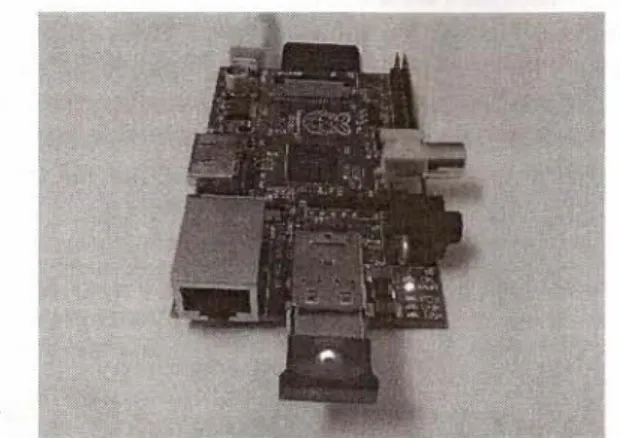
The multi-robot controller is an electronic system that acts as a hub for robots and also as a 11Ubfor users. It consists ofa Raspberry Pi mini computer (35€) running Raspbian Wheezy installed on an SD card, with Bluetooth and Wi-Fi dongles (see Fig. 3). The Raspberry Pi isconfigured to act as a wireless access
.i@
I
.
1I
78 M. Saleiro et ai.point, creating an open Wi-Fi network that users can connect to using their laptops, tablets or smartphones. Besides that, the Raspberry Pi also runs a web server, providing the web-based robot programming interface at a specific address.
The use of a web-based interface is a big advantage over other existing educ a-tional robotics systems, since it allows the users to program the robot using any device with a Wi-Fi connection and a Javascript-enabled web browser, without having to install any additional software.
The programming interface is based on Blockly [2],a google project that allows one to make short programs by dragging and dropping programming blocks to interact with virtual objects on the computer screen. It is similar to Scratch, but works in a web-browser, Since Blockly is an open-source project, we adapted it to contain only three basic operations: go forward, rotate 90' to the left, and rotate 90' to the right (see Fig. 4).
Mathematical reasoning
cipates while interacting
this kind of activiti s.
der to reach a certain
problem
[
11].
In order ;-:,
a
~
'"
activities that allow(b) be encouraged to••.•.".•'-..,. test them and provide
own and others' reR<;I1~~~"",,, deductive, inductive
Fig.4. Example oftbe p::-.::;::=:IIIIIII
tions translate into rea. with Portuguese chil
Fig. 3. The multi-robot controller, which consists ofaRaspberry Pi mini computer, a Bluetooth dongle, a Wi-Fi dongle and a power supply
This limitation of -young children who . duct. We also enabl by using a Python 7?
mentioned. Apart to the interface in0_ The web server being used is based on Tornado [4], which is a Python web
framework with asynchronous networking library. By using non-blocking network I/O, Tornado can maintain tens of thousands of open connections, making it ideal for long polling, WebSockets, and other applications that require a long-living connection to each user. Since it is a Python framework, it is rather easy to establish a data flow between the web server and the Bluetooth serial connections to the robots. Whenever a user sends a sequence of actions to a specific robot, the rnulti-robot controller establishes the Bluetooth serial connection to the desired robot, sends the action sequence and exits the connection. This allows to use multiple robots with a single controller. When only a few robots are used, the Bluetooth serial connections to the robots may be kept alive to avoid the delays due to the establishment of the connections.
3
Results
In this section we p _
were used in ela
4th graders from an
e
'1
:~:::::;
a!I.
developing mathema
features an actívity also in Faro, in which -waste by using the r -
-2.3 Web-Based Robot Graphical Programming Interface 3.1 Developing _\1ac21iC!J:IlIIIIIII.
-A Low-Cost Classroorn-Oriented Educational Robotics System 79 Fig.4. Example of the programming interface based on blockly and how the instruc -tions translate into real robot actions. 'I'he interface isinPortuguese, since it was used with Portuguese children. This limitation of the instructions was adopted to make it suitable for the young children who would participate inthe experiments that weplanned to co n-duct. We also enabled Blockly to interact with real devices, the Infante robots, by using a Python web server based on the Tornado framework, as previously mentioned. Apart from these modifications, we also added a simple input box o the interface in arder to select the number ofthe robot to be programmed.
3
Resu
lt
s
.nthis section wepresent the results oftwo different situations inwhich robots +ere used in classrooms. The first case concerns an activity with a class of -=~hgraders from an elementary school in Faro, Portugal, with the objective of eveloping mathematical reasoning while teaching geography. The second case • tures an activity with a class of 3rd graders from another elementary school,. 50 in Faro, in which they were taught about recycling and reusing electronic
ste by using the robots .
.1 Developing Mathematical Reasoning in Geography
zhematical reasoning may be understood as an activity where a pupil parti
-eswhile interacting with others in solving a mathematical problem [20].In
- s kind of activities, pupils must be guided to explain their reasoning in or
-~ o reach a certain conclusion or to justify the way ofapproaching a specific
lem [11]. In order to develop this kind of reasoning, professors must provide
ities that allowthe pupils to (a) develop methods of mathematical thinking,
encouraged to explore, try and make mistakes, (c) formulate hypotheses,
- rhem and provide arguments about their validity, and (d), question their
and others' reasonings. This kind of activities leads to the development of
_I. eiro et alo
Having the development ofthis kind ofthinking and reasoning in mind, we
designed an activity with several tasks where the pupils would have to plan the
paths ofa robot, on a grid, in order to reach certain goals, taking into account that in some tasks there are some restrictions. For example: goto mountain A,
pass bymountain B but avoid mountain C.This activity alsoincludes geography,
since the goals were always mountains from Portugal. This way,the pupils learn the relative positions of the major Portuguese mountains without even being aware of it. Teaching this kind of things is usually achieved by repetition and memorisation.
By
using the robots wewere able to get the pupils actually inter-ested and motivated to learn the locations by themselves, since they wanted the robot to complete all the tasks. how to program the ro but all pupils loved it an
3.2
ln the activity that we de:::o::.3!IIj the ease with which 4th c-further to test the syste Fig. 6). The activity was -them aware of recycling givento groups of5 to 6 wereplaced in the robo 's also placed in the grid. .1.~ that was then placed on -We left them again to the previous activity the regardless of the prograrnzzzz; problems occurred: no the same place, confusing of view ofthe robot. Ho were working as a group. other whythey thought could fixit. Once more. - -tasks rapidly and then irroc-:>~"'" robots until the class enFig. 5. 4th graders using the robots. Left: one pupil explains the programming se
-quences while another uses a computer to program the robot. Right: pupils use a
tablet computer to program the robots.
To perform the activity, the class was split into groups of 5to 6pupils, with one robot for each group. After ashort setup and explanation, the groups were
left to work on their own foran hour and a half, during which weobserved their reactions, discussions and explanations. Aswe already expected, getting started with the robots was no problem for them, irrespective of using a laptop or a
tablet. We noticed that, at start, most of them could not distinguish left from right. They also forgot to make the robot go forward after a rotation, making it spin around, therefore questioning the programming they had just made in order to find out what was wrong. Another problem that wenoticed at start was that the pupils had some difficulty in assuming the point ofview ofthe robot
in order to to decide the correct turns. However, after some brief discussions, as one or two of them had already learned how to do it, they taught each other,
justifying their way ofsolving that problem (see Fig. 5). We also noticed that,
whenever something did not work as expected, they discussed with each other to try to find the errors, explaining their thoughts. Ifthere wereseveral solutions to
complete a task, they would discuss which path to follow, either preferring the
shortest path for easier programming, ar by choosing a more challenging path,
using their creativity. The pupils were so motivated that they finished all tasks
sooner than weexpected and autonomously. They then used their creativity to invent new tasks themselves and kept playing with the robots. Bythe end ofthe
activity, all the pupils knew the relative positions ofthe mountains, they knew
Fig. 6. Third graders usinz ;-~="--"
-carrying the Iamp to the p
the robot while others anaiys
programming sequence.
4
C
onclusions
a
n
d
Confirmed bythe activities
ALow-Cost Classroom-Oriented Educational Robotics System 81
howto program the robots, and they could justify their options. [eedless to say,
but all pupils loved it and did not want the class to end.
3.2 Teaching Pupils about Recycling and Reusing Electronic Waste In the activity that we described in the previous section, we were amazed by
the ease with which 4th graders used the educational robot system. So,we went
further to test the system with a class of 3rd graders from another school (see
Fig. 6). The activity was similar to the previous one, but was designed to make
them aware of recycling and reusing electronic waste. Again, a list oftasks was
given to groups of5 to 6pupils and some electronic parts likelamps and batteries
were placed in the robot's navigation grid. The corresponding recycling bins were
also placed in the grid. The tasks were to make the robot reach a specific item,
that was then placed on top of the robot, and then carried to the proper bin.
We left them again to work on their own and observed their behaviour. As in the previous activity, the pupils learned how to use the system very quickly
regardless of the programming device used. We verified that the same initial
problems occurred: not making the robot go forward, making it spin around at
the same place, confusing left with right, and not being able to assume the point
ofview ofthe robot. However, like in the other activity, after a short time they
were working as a group, trying to pinpoint their mistakes, and explaining each
other why they thought the robot was not doing what they wanted and how they
could fixit. Once more, the pupils were extremely motivated. They finished the
tasks rapidly and then invented their own tasks and kept on programming the
robots until the class ended.
Fig. 6. Third graders using the robots. Left: pupils use alaptop to control the robot in
carrying the lamp to the proper recycling bin. Right, apupil uses atablet toprogram
the robot while others analyse the solution and say which commands to put in the
programming sequence.
4
Conclusions and Furth
e
r
W
ork
Confirmed by the activities that we realised with 3rdand 4th graders, we conclude
82 M. Saleiro et al.
A Low-Cost setup and which is extremely easy to use has been achieved. The setup time was
very short and the pupils learned how to use the robots very quickly. The low-cost
robots executed the commands that were sent to them as expected, and the com -munication between them and the multi-robot controller also worked without any
problems. The system proved to bereliable and very easy touse in noisy classroom environments.
As we already mentioned, our objective was also to create a platform that would allow the robots to be used as a tool in teaching any other subject, and not to focus on the process of robot building. Throughout our experiments, we verified that the deployment of robots can be so motivating that pupils actually
want to learn things they consider difficult and boring to memorise. Also, pu
-pils perceived the robots as toys and harmoniously played together, confidently
discussing how to tackle the challenges and problems they were facing.
We also verified that, regardless of the subject being taught inthe activity in which the robots were used, there was a constant development of mathematical
reasoning, deductive, abductive aswell as inductive. This is extremely important since it enables pupils to formulate hypotheses, to test them, to find out what's wrong, and then formulate new hypotheses that may solve a problem. It also encourages them to work in a group, discussing with each other and communic
-ating their hints to the other group members, who can learn through positive and negative feedback. The development ofspatial relations between objects also
helps to build mental representations of the world and to use these in reason
-ing. By deploying the robots as a motivational learning tool in teaching other subjects, the pupils become interested in learning them, since they feel a need to learn to accomplish the tasks that are given to them. By designing activities with robots where there are multiple correct solutions pupils are stimulated to deploy their creativity in pursuit of a solution for a given problem.
As further work we intend to make some improvements of the robots, like changing the power source to Li-ion batteries and adding more features to the communication protocol embedded in the robot's firmware. Adding some dis -tance and other sensors, or a small gripper might also be an option to allow for more creative uses and to increase the user's motivation. We also intend to extend the graphical programming interface by re-adding all the programming
blocks that Blockly originally had, such that the system can be more challenging and be used by persons of any age. 5.Alemany, J., Cervera. L:-_r a case study. ln: Proc. 3rd Czech Republic, pp. 15--' 6. Alimisis, D.: Roboti in technology to pedagogy, 2012), Prague, CzechRe~::LlI 7. Balogh, R.: Acrob - an Magazine 10(2), 6-9 (20~ 8. Balogh, R.:Educational on Robotics inEducatio 9. Botelho, S.S.C., Braz. LG_ with an accessible educa o Education (RiE 2012). Pra= 10. Butterworth, D.T.: T Proc. 3rdlnt. Conf.onR pp. 61-65 (2012) 11. Carmo, B.: Promovendo o um exemplo no 4.Q ano -Educação para Alunos do (2013) 12. Carmo, B., Guerreiro. Ao: do ensino básico. ln: Proc atividade dos 3 aos 12 13. Carcía-Saura, C., GonzáJez using open-source 3DpIE:: -ofEducation, Research 14. Ilieva, V.: Robotics in onSimulation, Modellinz Germany, pp. 596-605 (" _ 15. Jeschke, S., Kato, A., to primary schoolchildren.. pp. 1058-1061 (2008) 16. Matari, M.J., Koenig, oo•• ~ and stem education. In: Venues:Resources for AI 17. Miglino, O., Lund, H.H.. C ive Learning Research 10 18. Olabe, J.C., Olabe, ~1.A.o -ics with Scratch inprimar}"
=
-Technological World: Co nological Efforts, pp. 356 -19. Wyffels, F., Hermans, ~L students into an engin Education (RiE 2010), Bra 20. Yackel, E., Hanna, G.: Heas Companion to Principl National Council ofTeachers Acknowledgements. This work was partially supported by the PortugueseFoundation for Science and Technology (FCT) project PEst-OE/EEI/LA0009/ 2011 and by FCT PhD grant to author SFRH/BD/71831/2010.
Ref
e
r
e
nc
e
s
1. Arduino homepage, http://YWTN.arduino. cc/ 2. Blockly: a visual programming editor, http: //code. google .com/p/blockly / 3. Raspberry Pi homepage, http://YWTN.raspberrypi. org/A Low-Cost Classroom-Oriented Educational Robotics System 83
5. Alemany, J., Cervera, E.:Appealing rabo as ameans toincrease enrollment rates:
a case study. In: Proc. 3rd Int. Conf. on Robotics inEducation (RiE 2012), Prague,
Czech Republic, pp. 15-19 (2012)
6. Alimisis, D.: Robotics in education & education in robotics: Shifting focus from
technology to pedagogy. In: Proc. 3rd Int. Conf. on Robotics in Education (RiE
2012), Prague, Czech Republic, pp. 7-14 (2012)
7. Balogh, R.: Acrob - an educational robotic platform. AT&P Journal Plus
Magazine 10(2), 6-9 (2010)
8. Balogh, R.: Educational robotic platform based on Arduino. In: Proc. 1stInt. Conf. on Robotics in Education (RiE 2010), Bratislava, Slovakia, pp. 119-122 (2010) 9. Botelho, S.S.C., Braz, L.G., Rodrigues, R.N.: Exploring creativity and sociability
with an accessible educational robotic kit. In: Proc. 3rd Int. Conf. on Robotics in
Education (RiE 2012), Prague, Czech Republic, pp. 55-60 (2012)
10. Butterworth, D.T.: Teaching C/C++ programming with lego mindstorms. In: Prac. 3rdInt. Conf. on Robotics inEducation (RiE 2012), Prague, Czech Republic, pp. 61-65 (2012)
11. Carmo, B.: Promovendo o raciocínio matemático através da robótica educativa: um exemplo no 4.º ano de escolaridade. In: Proc. II Encontro Nacional TIC e
Educação para Alunos do Ensino Básico e Secundário, Lisbon, Portugal, pp. 7-12
(2013)
12. Carmo, B., Guerreiro, A.: Robótica educativa eraciocínio matemático no l.Pciclo do ensino básico. In: Proc. Encontro Ensinar e Aprender Matemática com C
ri-atividade dos 3 aos 12anos, Viana do Castelo, Portugal, pp. 89-101 (2013)
13. García-Saura, C., González-Gómez, J.: Lowcost educational platform for robotics, using open-source 3D printers and open-source hardware. In: Proc. 5th Int. Conf.
of Education, Research and Innovation (iCERi 2012), pp. 2699-2706 (2012)
14. Ilieva, V.: Robotics in the primary school - How to do it? In: Proc. Int. Conf. on Simulation, Modelling and Programming for Autonomous Robots, Darmstadt,
Germany, pp. 596-605 (2010)
15. Jeschke, S., Kato, A., Knipping, L.: The engineers oftomorrow -teaching robotics
to primary school children. In: Proc. 36th SEFI Annual Conf., Aalborg, Denmark,
pp. 1058-1061 (2008)
16. Matari, M.J., Koenig, N., Feil-Seifer, D.: Materiais for enabling hands-on robotics and stem education. In: Proc. AAAI Spring Symposium on Robots and Robot
Venues: Resources for AI Education, Paio Alto, California, pp. 99-102 (2007)
17. Miglino, O., Lund, H.H., Cardaci, M.: Robotics as an educational too!. J. Interact
-ive Learning Research 10(1), 25-47 (1999)
18. Olabe, J.C., Olabe, M.A., Basogain, X., Castario, C.: Programming and robot -ics with Scratch in primary education. In: Mendez-Vilas, A. (ed.) Education in a
Technological World: Communicating current and Emerging Research and Tech
-nological Efforts, pp. 356-363. Formatex (2011)
19. Wyffels, F., Hermans, M., Schrauwen, B.: Building robots as a tool to motivate
students into an engineering education. In: Proc. 1st Int. Conf. on Robotics in Education (RiE 2010), Bratislava, Slovakia, pp. 113-116 (2010)
20. Yackel, E., Hanna, G.: Reasoning and proof. In: Ki!patrick, J. (ed.) A Research
Companion to Principies and Standards for School Mathematics, pp. 227-236. National Counci! ofTeachers of Mathematics (2003)