InHand – Mobile Professional Context and Location Aware Tool
Paulo A. C. S. Neves
1,2,3, David J. M. Ferreira
3, Daniel Esteves
3, Daniel R. M. Felix
3,
Joel J. P. C. Rodrigues
1,31Institute of Telecomunications, Networks and Multimedia Group, Portugal
2Department of Informatics Engineering, Polytechnic Institute of Castelo Branco, Castelo Branco, Portugal 3Department of Informatics, University of Beira Interior, Covilhã, Portugal
[email protected], [email protected], [email protected], [email protected], [email protected]
Abstract: A travel book salesman needs current information that
leads to the development of an information system about costumers, supplies, orders and the books themselves. Such scenario demands maximum mobility and rapid information retrieval that points to a mobile application. The paper presents an application developed for local and remote use, called InHand, that is context-aware, presenting information related to the current user context and provides location-aware support through the use of the Global Positioning System (GPS). The location system keeps track of a client’s location, schedules client visits for a given day, help user navigate through a map using real-time position acquisition, and gather the pathway followed by a user on a given day. The application has two channels: server and mobile client. The mobile client can synchronize data with the server, and relies on a local database to minimize wireless traffic to a minimum. We use Remote Data Access and Web Services to access remote data in a convenient way. Although the application is designed with book selling in mind, the concept is perfectly extendable to other fields of application.
1. INTRODUCTION
Mark Weiser predicted a new way of computing back in 1991 [1], however back then the hardware was not available to realize Weiser’s vision. Nowadays the hardware is clearly available, for instance through Personal Digital Assistants (PDAs) that are becoming pervasive, with a plethora of interfaces and functionality, such as Wi-Fi, Bluetooth, and 3.5G (HSDPA).
In terms of processing power, processor speeds of 400MHz are common now and some devices feature a generous 128MB RAM. In terms of persistent storage, 8GB flash cards (even for the smaller microSD standard) are becoming readily available. Satyanarayanan [2] clearly points Mobile Computing as an area that gathers mobile information access, mobile networking, adaptation, energy-aware and location sensitivity. A traveling salesman can effectively benefit from a mobile application, allowing rapid information retrieval. Such application should provide remote data access with minimal cost, context-aware information and gather location data in behalf of the user.
Software development companies pay attention to the potential of mobile platforms to provide added services to their customers [3, 4]. More than just entertainment through Java or flash games, companies are paying attention to the
mobile side of applications, as a means to satisfy costumer desire for mobility.
Using a Personal Digital Assistant (PDA), powered by Windows® Mobile®, Global Positioning System (GPS – internally or through Bluetooth® connection) and a wireless connection (Wi-Fi, 3G/GSM) we developed a complete software solution that allows almost instant access to information: the InHand application.
InHand presents two channels: a server application with full access to local databases and a mobile application that enables access to a subset of the database. Each mobile professional has a mobile device with a part of the database that relates to its costumers and related data.
The remainder of the paper is as follows. Section 2 presents the development context of the application and requisites and section 3 describes the system architecture. Section 4 elaborates on some of the most important system features, and, finally, section 5 concludes the paper.
2. DEVELOPMENT CONTEXT
A company that sells books has a work force of several persons that span over a given country. Each professional must visit current costumers, generating demand through demonstration of products, build a costumer profile, accept orders and enhance revenues. An increase in the current costumer database is also desirable, so the mobile application should benefit from on-site costumer profile creation.
The use of mobile application scenarios clearly benefit e-comerce applications [5]. The system development is centered on book selling, although it can be extended to other fields of commerce.
2.1 Application requirements
A mobile application should be pro-active, shield the user from the technological aspects, human-centered, and help the user on the selling process and data manipulation and acquisition [6].
The application should be able to gather location data in parallel to normal operation, related to mobile professional pathway. Selling companies see advantages in such approach as to monitor sales performance by gathering relevant data
on-site. Changes to the mobile database are replicated to the main database (server) and when accessed data must be consistent at all times. The application should manage location coordinates data in an appropriate way.
The mobile application should provide enough information about the items available (the books). This implies a large collection of data, with several fields by item. Since the mobile device is memory limited, not all records will be present locally. With traffic efficiency in mind, one must also access the data that is not stored locally, not bounded by book description.
In terms of orders, the system must allow the placement of an order (location information must be used to automatically select the costumer in behalf of the user), and order status retrieval. For the most recent status, the mobile application must connect to the server and traffic charges may apply. As a result, the application should be able to minimize remote data exchange between the mobile device and the server.
2.2 Application design and tradeoffs
Application design must be bound to the device architecture and available interfaces. One should take into account the screen size and resolution, the proximity of the device to the user, the main input interface (a stylus), the battery life, the usual absence of a physical keyboard. These features greatly dictate the functionality of a given approach.
The vertical orientation of the screen, opposite to the 16:10 ratio of modern monitors, forces different design considerations. With typical screen size of 2.8 inches, the amount of information presented on screen must be bound. One of the “tricks” is to use tabbed browsing of information, limit the visible data, or even shift screen orientation. We opted for tabbed browsing together with a context-aware approach that limits amount of data, for instance visualization of only the current visited costumer’s data.
We realize that the mobile application by itself is not the panacea for every mobile professional requirement. If a mobile professional wants to perform a presentation of large amounts of books it should clearly create a presentation on a personal computer. The goal of this application is to provide relevant, context-aware and location-aware operation that may be enough for many situations.
2.3 Application technologies
We decided to use Microsoft® development solutions for maximum efficiency on the mobile device, that is more sensible to performance issues. Also, full compatibility is expected between the client and server side.
Java flags with device independence, however the majority of PDA devices feature Windows Mobile and the current application targets devices with touch screen capability. Also,
from other projects that some authors are involved in, this promise in the mobile world is far from reality.
Another approach could be the use of the Symbian Operating System. It is also an open platform to developers, however screen sizes are tipically significantly smaller than the PDA platform. Another issue is the lack of touch screen capability.
3. APPLICATION ARCHITECTURE
The application has a server (InHand server) and a client component (InHand mobile). The server has an administration front-end that enables system configuration, database manipulation (add clients, update client data, order satisfaction and status, among other operations) and Web Server (contains the Web Service). In terms of database engines the SQL Server 2005 was used for the server and SQL Server Mobile for the mobile device.
Initially the mobile device only has an empty local database. An initial synchronization implies a relatively large amount of data (depending on number of costumers and orders that a given professional has) and a local connection is advisable, such as Bluetooth®. After this initial setup, the system is up and running, given the GPS support is present.
In Figure 1 we present the InHand system architecture. In the server side, we use an Internet Information Services World Wide Web server (WWW server) to provide the Web Service, and SQL Server 2005 to maintain the main application database. In terms of mobile, InHand uses GPS location, the Web Service consumption component, and SQL Server Mobile for the local database. InHand mobile connects to the server database using Remote Data Access (RDA) that also enables local storage of main database subset.
Figure 1 – InHand system architecture (server and mobile). The GPS system in InHand takes advantage of the NMEA 0183 [7] standard, defined by the National Marine Electronics Association. Commercial solutions typically range from 4’800bps to 19’200bps. The standard also defines that the system may have a single talker, but many listeners. However, the software must give such functionality.
4. APPLICATION HIGHLIGHTS
This section provides highlights on some of the main aspects of InHand. These include Visual highlights and usability, Wireless traffic optimization, Web services,
Context-aware information, Location support and one of the advantages of InHand mobile when compared to other approaches: InHand GPS.
4.1 Visual highlights and usability
A mobile application must take into account usability requirements. The screen size and the input method are massively identified as the main concerns when developing the interface of a mobile application. Although difficult to generalize, one can count on a 240x320pix screen and a stylus, although more and more PDA’s benefit from hardware keyboard. As a result, the interface should be vertical and not horizontal as one expects in a Personal Computer (PC), and the number of stylus operations must be absolutely minimized, even more than mouse clicks on a PC application. InHand mobile uses context-aware information such as current costumer to provide easy access to the required information. This lowers the number of stylus operations that must be performed, especially on order status confirmation and new order placement.
Figure 2 – InHand mobile application interface. Figure 2 presents the InHand mobile application interface. Consistent with InHand server, the interface provides immediate information on the synchronization status of the system through a semaphore-coded color scheme. We provided the application for field tests to some staff and everyone enjoyed the fresh look of the interface, away from the conventional boxes that they were used too. Also, some referred the color schemes and the rapid resemblance with server application functionality.
4.2 Wireless Traffic Optimization
Data are present in the mobile device and in the server. The mobile device must take into account it has low processing power and limited memory. Moreover, since a given user will cover a specific area with specific costumers,
it will not need other user’s data. As a result, the database on the mobile device contains only a subset of the server database.
When a given record is missing on the mobile device, updated or added, InHand can synchronize databases upon request using RDA technology. RDA allows access from a mobile application to remote database tables, enabling local storage of information, powering the desired disconnected operation.
4.3 Web Services
InHand uses Web Services [8] under the .NET framework [9]. Web Services are a mean to transparently communicate between systems, using XML and port 80 (Hypertext Transport Protocol – HTTP, protocols HTTP-GET and HTTP-POST) connections that are firewall-friendly. The Web Service in InHand provides remote access to data in the server that for space or freshness (change of order status after the first synchronization) reasons is not present in the mobile device.
The Web Service provides many methods for information retrieval, namely search and retrieval of Costumer details, Order details and Book details.
For verification purposes, the Web Service also has a method that simply returns a predefined message, as the common “Hello World” example in programming. To consume the Web Service, the mobile device can use any http-enabled connection such as GPRS/3G/3.5G or Wi-Fi.
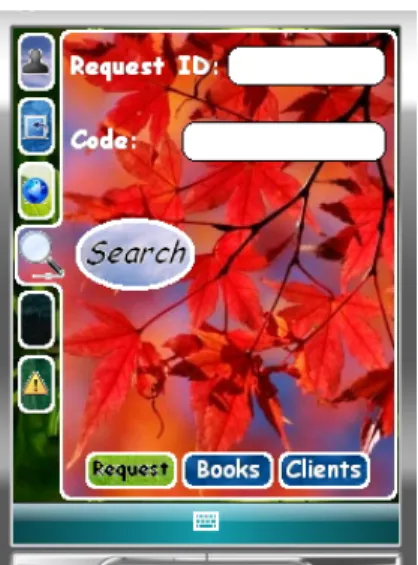
Figure 3 presents the interface for searching orders based on order number (Request ID) or identification (Cod). Access to the current order status is possible, since the Web Service has access to the current state of the database when the request is processed (if requested). However, the Web Service is not able to modify the contents of the database, only to perform queries. To enable mobile update the user must issue synchronization.
The Web Service is also capable of sending information about new costumer’s visit request. The new requests can be consulted and added when the InHand mobile user has time left for extra visits for instance. This greatly improves the functionality of the system, becoming more flexible.
4.4 Context-aware information
Efficient access to information depends on information quality and speed of access itself. The operational speed depends greatly on the interfaces. An interface that allows efficient information access must take advantage of context. If the user is with a given costumer, it must primarily check data related to that specific costumer, related to orders for instance. If the mobile professional wants to present a new product, it is a good idea to check on the costumer’s record of orders to trace a costumer’s profile. A costumer likes to be remembered and sometimes it is very difficult to do so, since
a mobile professional can have several dozens of costumers backup info is always at hand.
Figure 3 – InHand Web Service comsumption interface example.
4.5 Location Support
We use location information through the GPS system to account the distance and pathway that a given collaborator made at the end of a workday, to enable a scheduling of costumers to visit in the best way possible based on current costumer’s location, and present information related to the currently visited costumer. Also, we developed a component of the InHand mobile application that helps the user to follow its current position inside a map, the next costumer to visit location, and company head office location.
The application features a real time monitoring of the worker position, in order to build pathway record information of the places that were visited. In addition, the mobile application adds GPS coordinates information to the costumer record when the costumer is first inserted on the database.
The GPS system is based on geodesic coordinates under the WSG84 system, so an conversion is needed to project the degrees, minutes and seconds in decimal coordinates, in order to use, for instance, Google maps [10].
InHand also enables the use of stored maps, and shows the current user position, the position of the next costumer to visit and, the position of the professional office (if visible in the current view). InHand is also capable of, when requested, perform an auto-tracking based on the current map and GPS coordinates, similar to commercial applications. Current speed and total distance information is also available on the GPS part of the InHand interface.
The GPS system has 24 satellites surrounding the earth. Each one takes 12 hours to perform a complete turn around
earth, and the system investment is around 12 billion dollars. Each GPS receiver builds a stream and compares it with the stream sent by a given satellite. This allows distance calculation. With three locked satellites, the receiver can calculate its position in a 2D space and with four or more, it can determine position with altitude information.
The GPS coordinates need conversion since the earth is round and not planar. We apply the Haversine [11] conversion to calculate the distance between two GPS coordinates.
4.6 InHand GPS
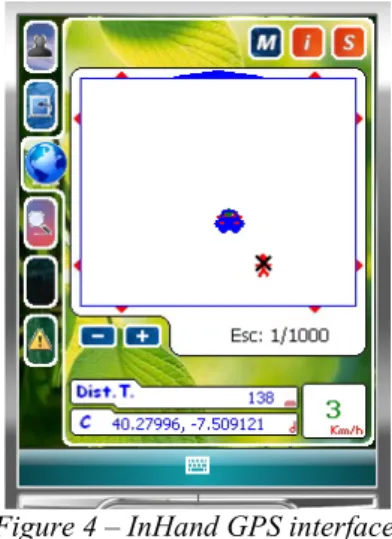
Figure 4 shows an example of InHand mobile GPS screen. A map occupies the larger portion of the screen, where the current position is shown as a car in blue and an X marks the next costumer to be visited. Box marked with 1 shows the current movement speed of the user (3Km/h), box 2 presents the distance to the next costumer, box 3 illustrates the current location coordinates (something that is missing on some of the commercial software proposals, where one must access another screen to check this). Button 4 accesses the submenu map, button 5 accesses the submenu clients to visit, and, finally, button 6 allows InHand GPS setting.
The map can be browsed in the mobile device, and zoom support was added. The zoom function is controlled by the plus and minus buttons on the InHand GPS interface. The map has eight displacement points around it, marked by arrows that enable map browsing. The big arrow on one of the sides of the map (in Figure 4 it points up) indicates the current direction of movement.
By selecting a given costumer’s location in the map, a detailed information screen appears with costumer’s data. This enables preparation of the meeting in advance, costumer profile access before the actual meeting takes place.
The map provides the user with information on current location. For simplicity, the map must be loaded on the mobile device. However, a solution based on Google maps is also possible. The majority of commercial software vendors such as TomTom®, Route® 66 or Destinator® provide maps to be stored in a flash card, sometimes the flash card itself is provided. Another approach, such as Wayfinder®, that rely on remote maps, use GPRS traffic. That may be the reason why it is not so known as the other solutions.
In the settings area, the user can select the GPS settings: COM port (the GPS hardware communicates via serial link), and some visual settings, like switch on or off the following features: storage of pathway, visualization of pathway, visited costumer’s location on map, costumers to visit location on map, points of interest on map.
Several classes were defined in InHand GPS. The Application_engine is the superclass that derives from class Form. The Application_Data class manages connection to the
local database, stores user information, and stores status information such as current map, cover radius, GPS signal retry interval, GPS communication port, and number of retries.
Figure 4 – InHand GPS interface.
The class GPS_background connects and parses GPS data, and sends them to the subscribers. Uses Application_Data to save values to the database. The class GPS_Info contains information relative to a RMC message. GPS_Transform calculates coordenate transformation and distance. The class Info_Dot_Pathway contains information about a dot in the pathway. The class Point_Interest stores the name of a point of interest and its location. The class Next_Costumer stores GPS information about the next costumer to visit. Finally, Last_Received_Dot stores information about the last valid coordinate of the GPS system. Among other applications, this information is used to calculate distances and verify if the user is in motion or not.
5. CONCLUSIONS
This paper proposed and described a new mobile application, called InHand. The proposed application provides functionality valuable to a mobile salesman and the company it represents. Instead of searching through paperwork, the system easily and rapidly presents the user with the information it needs. The awareness of InHand mobile, both in terms of location and context provide important time-cutting advantages over other similar approaches.
The up-to-date technologies used, enable InHand to run on almost every Pocket PC-enabled PDA (Windows® Mobile® version 5 or 6). We believe that the use of a PDA instead of a portable computer greatly improves mobility, while providing enough information to the user for an effective visit to a client.
The added GPS functionality provides even more information and a natural scheduling of visited and to visit
costumers; and provides a natural means to schedule visits based on minimal distance. InHand mobile even has the ability to store traffic tickets and based on car fuel consumption estimate the transportation costs. To the best of our knowledge no application on the market provides this plethora of functionalities, and the uses of GPS system clearly focus on travel guidance.
ACKNOWLEDGEMENTS
Part of this work has been supported by the Group of Networks and Multimedia of the Institute of Telecommunications – Covilhã Lab, Portugal, and by the Euro-NF Network of Excellence of Seventh Framework Programme of EU.
REFERENCES
[1] M. Weiser, "The Computer for the 21st Century", Scientific American, vol. 265, pp. 94-104, September 1991. [2] M. Satyanarayanan, "Pervasive Computing: Vision and Challenges", IEEE Personal Communications, pp. 10-17, August 2001.
[3] YDreams, URL:
http://www.ydreams.com/ydreams_2005/index.php?page=39, Accessed in October 2008.
[4] Qulix Systems, URL:
http://www.qulix.com/Mobile_Technology.html?gclid=CIbv gdrU8I8CFQ4FEgod9ElPLw, Accessed in October 2008. [5] A. Atkins, A. H. N. P. H. Ali, and H. Shah, "Extending e-business Applications Using Mobile Technology", in 3rd International Conference on Mobile Technology, Applications & Systems, Bangkok, Thailand, 2006.
[6] W. M. Lim, "Towards More Usable Mobile Application Development", in 2nd International Conference on Mobile Technology, Applications and Systems, Guangzhou, China, 2005, pp. 1-6.
[7] NMEA 0183 protocol standard page, URL:
http://www.nmea.org/pub/0183/index.html, Accessed in September 2008.
[8] Web Services Architecture, URL:
http://www.w3.org/TR/ws-arch/#introduction, Accessed in May 2008.
[9] J. Sharp, Microsoft Visual C# 2005 Step by Step: Microsoft Press, 2005.
[10] Google Maps, URL: http://maps.google.com/, Accessed in May 2008.
[11] Haversine conversion, URL: http://www.movable-type.co.uk/scripts/latlong.html, Accessed in September 2008.