UNIVERSIDADE DE LISBOA FACULDADE DE CIÊNCIAS DEPARTAMENTO DE INFORMÁTICA
SECURITY CHALLENGES
WITH VIRTUALIZATION
João Carlos Carvalho dos Santos Ramos
MESTRADO EM SEGURANÇA INFORMÁTICA
UNIVERSIDADE DE LISBOA FACULDADE DE CIÊNCIAS DEPARTAMENTO DE INFORMÁTICA
SECURITY CHALLENGES
WITH VIRTUALIZATION
João Carlos Carvalho dos Santos Ramos
Orientador Hans Peter Reiser
MESTRADO EM SEGURANÇA INFORMÁTICA
Resumo
Virtualização é uma palavra em voga no mundo das tecnologias de informação. Com a promessa de reduzir o constante crescimento das infra-estruturas informáticas dentro de um centro de processamento de dados, aliado a outros aspectos importantes como disponi-bilidade e escaladisponi-bilidade, as tecnologias de virtualização têm vindo a ganhar popularidade, não só entre os profissionais de tecnologias de informação mas também administradores e directores. No entanto, o aumento da adopção do uso desta tecnologia expõe o sistema a novas preocupações de segurança que normalmente são negligenciadas.
Esta tese apresenta o estado da arte das soluções actualmente mais usadas de virtualização de servidores e também um estudo literário dos vários problemas de segurança das tecno-logias de virtualização. Estes problemas não são específicos em termos de produto, e são abordados no âmbito de tecnologias de virtualização. No entanto, nesta tese é feita uma análise de vulnerabilidades de duas das mais conhecidas soluções de virtualização: VM-ware EXS e Xen. No final, são descritas algumas soluções para melhorar a segurança de acesso a banco online e de comercio electrónico, usando virtualização.
Abstract
Virtualization is a hype word in the IT world. With the promise to reduce the ever-growing infrastructure inside data centers allied to other important concerns such as availability and scalability, virtualization technology has been gaining popularity not only with IT profes-sionals but also among administrators and directors as well. The increasingly rising rate of the adoption of this technology has exposed these systems to new security concerns which in recent history have been ignored or simply overlooked.
This thesis presents an in depth state of art look at the currently most used server virtua-lization solutions, as well as a literature study on various security issues found within this virtualization technology. These issues can be applied to all the current virtualization tech-nologies available without focusing on a specific solution. However, we do a vulnerability analysis of two of the most known virtualization solutions: VMware ESX and Xen. Fi-nally, we describe some solutions on how to improve the security of online banking and e-commerce, using virtualization.
Acknowledgments
This thesis represents a lot of hours of searching, reading and writing. However, my effort would be useless without the priceless support from some people.
First, I would like to thank my advisor, Professor Hans Peter Reiser for his support, his precious insight, his knowledge and endless patience.
I would also like to all my colleges who directly or indirectly help me to accomplish this journey. I am truly grateful.
Many thanks to Keith Adams for his knowledge, valuable time and support. To Martim Carbone, Hezi Moore and Benjamin Vetter who kindly gave me a little of their time, helping me with their knowledge.
I would like to thank John Van Berkum and Jason Koltes for their patience in reviewing this thesis.
To my closest friends for their support and understanding on my absence in important moments of their life during this master.
And last but not least, my special thank to my parents for their support, comprehension, patience and love. I will never forget.
Contents
1 Introduction 1 1.1 Motivation . . . 1 1.2 Contributions . . . 2 1.3 Document Structure . . . 3 2 Background 5 2.1 History . . . 5 2.2 What is Virtualization . . . 72.3 Popek and Goldberg . . . 8
2.4 CPU Virtualization . . . 9
2.5 Memory Virtualization . . . 15
2.6 Device and I/O Virtualization . . . 17
2.7 Types of Virtualization . . . 18 2.7.1 Server Virtualization . . . 18 2.7.2 Storage Virtualization . . . 20 2.7.3 Network Virtualization . . . 20 2.7.4 Application Virtualization . . . 21 2.8 Benefits of Virtualization . . . 22 3 State of Art 25 3.1 VMware . . . 25
3.1.2 VMware ESXi . . . 28 3.2 Xen . . . 29 3.3 KVM . . . 33 3.4 QEMU . . . 35 3.4.1 KQEMU . . . 36 3.5 Microsoft Virtual PC . . . 37 3.6 Microsoft Hyper-V . . . 37 3.7 VirtualBox . . . 41
3.8 Virtualization Solutions Comparison Matrix . . . 42
3.9 Conclusion . . . 42
4 Security of Virtual Machines 45 4.1 Some Important Concepts . . . 45
4.1.1 Isolation . . . 47
4.1.2 Controlling VMs from the Host . . . 47
4.2 Analyze of Security Vulnerabilities in Virtualization . . . 48
4.2.1 Attacks from the Guest to the Host . . . 48
4.2.2 Remote Management Vulnerabilities . . . 49
4.2.3 Denial of Service . . . 50
4.2.4 Virtual-Machine-Based Rootkit (VMBR) . . . 50
4.2.4.1 Blue Pill . . . 51
4.2.4.2 SubVirt . . . 53
4.2.4.3 Detecting VMBR and Ways to Protect Against These At-tacks . . . 54
4.2.5 The Intrusion Detection/Prevention Approach . . . 55
4.2.6 The Revert to Snapshots Problem . . . 56
4.2.7 Vulnerability Analysis of VMware ESX and Xen . . . 57
5 VM Solutions for Online Banking and e-Commerce 65
5.1 The Three Colors Solution . . . 67
5.1.1 Design of the Solution . . . 68
5.1.2 Setup of the Solution . . . 69
5.1.2.1 Creating the Red VM . . . 70
5.1.2.2 Creating the Yellow VM . . . 74
5.1.2.3 Creating the Green VM . . . 75
5.1.3 Running the R/Y/G VMs . . . 79
5.1.4 Taking Snapshot . . . 80
5.1.5 Using the Three Color Solution . . . 82
5.1.6 Security Analyses of this Solution . . . 82
5.2 The Read-Only Bootable Media Solution . . . 85
6 Conclusion and Future Work 89 6.1 Conclusion . . . 89
6.2 Future Work . . . 90
6.2.1 Virtual Machine Security . . . 90
6.2.2 The Virtual Machine Read-Only Bootable Media Solution . . . 91
List of Figures
2.1 Privilege rings of the x86 architecture. High privilege:0; Low privilege: 3 . 10
2.2 The two types of Hypervisors/VMMs . . . 11
2.3 ESX server memory mapping . . . 16
2.4 The binary translation approach to x86 virtualization used by VMware . . . 19
3.1 VMware ESX server release history . . . 26
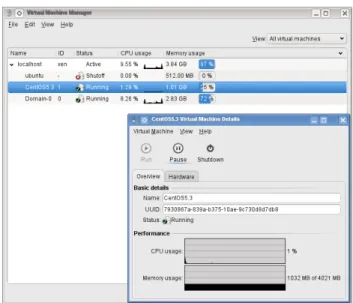
3.2 OpenSUSE’s virtual machine manager running CentOS on DomU . . . 34
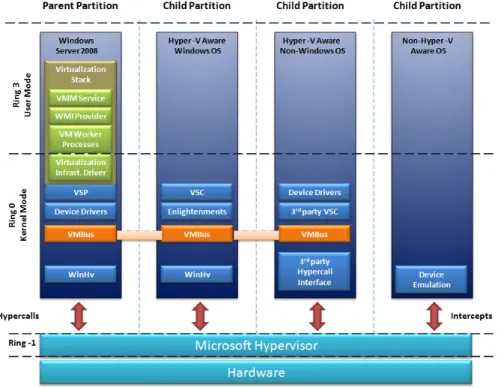
3.3 Overview of hypervisor architecture . . . 38
4.1 The traditional vs new threat model . . . 46
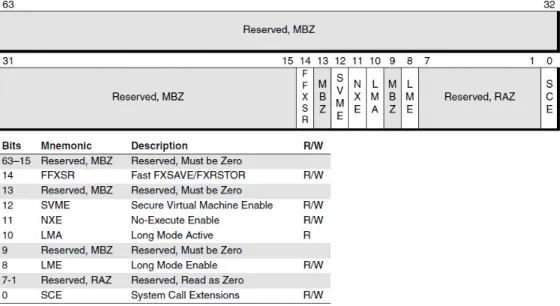
4.2 Extended feature enable register (EFER) . . . 52
4.3 Workflow of the host and guest mode . . . 53
4.4 The Blue Pill idea (simplified) [1] . . . 53
4.5 Severity of the vulnerabilities reported . . . 58
4.6 VMware ESX CVSS severity from 2003 until 2009 . . . 60
4.7 Xen CVSS severity from 2003 until 2009 . . . 62
List of Tables
3.1 Comparison of the features and performance of the various virtualization
technologies available . . . 43
4.1 VMware ESX CVSS severity analysis from 2003 until 2009 . . . 59
4.2 Analysis of each VMware ESX CVE reported . . . 61
4.3 Xen CVSS severity analysis from 2003 until 2009 . . . 62
4.4 Analysis of each Xen CVE reported . . . 63
5.1 Resume of the purpose of the three virtual machines . . . 67
5.2 Comparison of different solutions . . . 68
5.3 Security problems of the three colors solution . . . 85
Abbreviations
ADM-V AMD Virtualization
API Application Programming Interface ARP Address Resolution Protocol AVI Attack, Vulnerability, Intrusion
BT Binary Translation
CD Compact Disc
CMS Conversational Monitor System COS Console Operating System CPU Central Processing Unit
CVE Common Vulnerabilities and Exposures CVSS Common Vulnerability Scoring System DHCP Dynamic Host Configuration Protocol DLL Dynamic-link library
DMA Direct Memory Access
DMZ Demilitarized Zone
DNS Domain Name System
DoS Denial of Service
DR Disaster Recovery
DVD Digital Versatile Disc
EPT Extended Page Tables
HIPS Host Intrusion Prevention System
I/O Input Output
IDS Intrusion Detection System IF Interrupt-enable Flag
Intel VT Intel Virtualization Technology IOMMU I/O Memory Management Unit IPS Intrusion Prevention System ISA Instruction Set Architecture
IT Information Technology
KVM Kernel-based Virtual Machine
LUN Logical Unit
MMU Memory Management Unit
MS Management Services
NPT Nested Page Tables
OS Operating System
PAE Physical Address Extensions PKI Public Key Infrastructure
POPF Pop Flags
QEMU Quick Emulator
RAID Redundant Array of Independent Disks SATA Serial Advanced Technology Attachment SVM Secure Virtual Machine
SVME Secure Virtual Machine Enable TLB Translation Lookaside Buffer TPM Trusted Platform Module VIP Virtual Internet Protocol VLAN Virtual Local Area Networks
VM Virtual Machine VM86 Virtual 8086 mode VMM Virtual Machine Monitor VPN Virtual Private Network VSC Virtualization Service Clients
VT-d Virtualization Technology for Directed I/O
x86 Family of instruction set architectures based on the Intel 8086 XSS Cross-site Scripting
YaST Yet another Setup Tool
Chapter 1
Introduction
1.1 Motivation
Virtualization has profoundly changed the information technology (IT) industry in different areas such as network, operating systems, applications or storage. Virtualization is no lon-ger a subject only IT people know about it. It has gained space on the administrators and directors vocabulary. Companies have realized that most of their systems were running at ratios of 10 percent or less of utilization, yet these systems continue to require space, po-wer and cooling system as any other machine. Reducing these requirements would have a direct impact in reducing the IT budget and environment cares as the carbon footprint. Vir-tualization technology was the solution found by many companies, moving this technology into the mainstream. According to a recent IDC survey [2], companies that have deployed virtualization could see a return of investment of 472 percent in less than a year. The increa-sed utilization and consolidation of x86 architectures had an important role for this as well. Many companies use this architecture because it has lower cost compared with others in the market. However, this architecture had historically hardware support issues for virtua-lization which significant degrade the performance of the virtual machine (VM) comparing with the same system running on a physical host. In order to solve this problem, Intel and AMD implemented architectural extensions to directly support virtualization in hardware. This overcomes the classical virtualization limitations of the x86 architecture, improving important aspects such as performance and scalability making x86 server virtualization a keystone of most IT consolidation projects.
The increasing investment and implementation of virtualization is comparable to the imple-mentation of internet in companies at the end of the last decade. However, in the same way,
security was not the top priority, although IT administrators are now more sensible to this subject. The risks of this new technology are something discussed almost only at security events such as Black Hat and it continues to be out of the focus of many references and consultant companies that implement this technology. Virtualization has been presented to companies as an out-of-the-box solution that companies do not have to worry about, as if it was physical machines with the advantages that the hardware virtualized does not “crash” as the physical ones. There are still some myths to break when talking about virtualization security and these myths happen because, as other myths, there is not much information about it. Some people assume that having, for instance, 4 virtual machines running on a physical machine is the same as having 4 physical machines and so the concerns should be the same (e.g. only install patches on the operating system inside the virtual machine). Per-haps this myth exists because there is a common sense that hypervisors are impenetrable, which is false as we are going to see later in this thesis. Some IT directors are not aware of the security level while using virtualization. For instance, with virtualization it is possible to pause or take a snapshot of a virtual machine that has sensible information as cryptogra-phic keys or password in memory and most companies do not look to these snapshots as critical assets as the running virtual machines.
This thesis presents a study about virtualization, focusing in security problems as the ones described on the previous paragraph. It covers both server and desktop environments and virtualization software. Regarding servers, we have conducted a vulnerability study, com-paring two virtualization solutions, while for the desktops we have made a study about how virtualization can be used to improve security for online banking and e-commerce.
1.2 Contributions
Our contributions are as follows:• We create a document with detailed information regarding virtualization concepts
that can be used as reference in courses such as Secure Software Systems. Currently there exist much documentation about virtualization, but normally it focuses only on specific product.
• We analyze the different aspects of virtualization security. There are few books and
documents dedicated to this subject and our contribution is to add more value on this subject.
• We make a vulnerability study of two of the most used enterprise virtualization pro-ducts and compare them in the number of vulnerabilities and the impact those vulne-rabilities have.
• We study some solutions which demonstrate that virtualization products can help people facing some of the current security threats such as phishing attacks. Accor-ding to the website PhishTank, in June 2009 there were validated more than 6000 new phishing attacks [3]. With our contribution, the user would not be affected by these types of attacks and would increase the security of online banking and e-commerce.
1.3 Document Structure
The outline of the remainder of this thesis is as follows: in Section 2 we describe the background of virtualization, doing a resume of its history and describing each component, types and benefits of virtualization; in Section 3 we present the state of art, describing the most current used virtualization products; in Section 4 we do an analysis of security vulnerabilities in virtualization, presenting some of the security breaks that can happen in virtualization and doing a vulnerability analysis of two currently used enterprise virtualiza-tion products (VMware ESX and Xen); in Secvirtualiza-tion 5 we present two soluvirtualiza-tions for phishing attacks and future directions for a third solution that could be implemented by the banks; finally, Section 6 concludes.
Chapter 2
Background
2.1 History
"Virtual machines have finally arrived" [4], said Robert P. Goldberg in 1974. Although this is, in fact, our current reality, it seems to have been the reality of the last 35 years with the slow adoption of virtual machines. Back in 1960s, virtualization was better known as time-sharing. Christopher Strachey, Professor of Computation at Oxford University and the first director of the Programming Research Group published a paper titled “Time Sharing in Large Fast Computers” [5]. His paper, as he refers later in a letter, “was mainly about multi-programming (to avoid waiting for peripherals) although it did envisage this going on at the same time as a programmer was debugging his program at a console. I did not envisage the sort of console system which is now so confusingly called time sharing." [6]. The multi-programming technique allows different users to execute jobs simultaneously. This was possible for one job to take advantage of the CPU, while another is not using the CPU, because it is waiting for an I/O device to store or retrieve data. From among some computers that took advantage of this technique, two are considered part of the evolutionary lineage of virtualization: Atlas and IBM’s M44/44X.
The Atlas computer [7] project was run by the Department of Electrical Engineering at Manchester University and funded by Ferranti Limited. It became operational in 1962 and it was considered the fastest computer in the world, until the release of the CDC 6600 in 1964. The Atlas Computer was the first supercomputer to take advantage of time-sharing, multi-programming and shared peripheral control. It introduced a component called super-visor [8], which managed important resources, such as the processing time of the computer and passed special instructions called extracodes, which would help it to manage the
com-puter environment for the user program’s instruction. The name supervisor remembers the actual name hypervisor, and in fact, we can consider supervisor as its roots. Trying to compete with Atlas Computer, IBM created the M44/44X at the IBM Thomas J. Watson Research Center in Yorktown, New York. The central principle of its architecture was a set of virtual machines, one for each user. The M44, the real machine, was a modified version of IBM 7044 and the 44X was each virtual machine with an experimental image of the 7044 [9, 10]. However, the incomplete implementation of the underlying hardware simu-lation by the M44/44X virtual machine made this project to fail, but soon IBM released its System/360 mainframe.
Virtualization is best known to have been started with the development of the System/360 mainframe, by IBM Corporation. One of the problems presented at the time was the high cost of the machines, which were inefficiently used by people. The main operations were made by using key punches and submitting batch jobs. Engineers were trying to let multiple users to come into the system, by making these batches more interactive. Implementing a time-sharing system at the time for multiple users was not an easy thing to do. For that very reason, IBM’s engineering team in Cambridge, Massachusetts presented an idea that would provide each user a virtual machine (VM), with a simple operating system, which only has to support one user. Robert Creasy and Les Comeau from IBM started to developed CP-40 in 1964. This operating system was designed for the System/360 mainframe and was the first step to create virtual machines on these systems. It could support up to fourteen simultaneous virtual machines.
Each virtual machine ran in a mode called “problem state”, where privileged instructions (e.g. I/O operations) would cause exceptions, which were intercepted by the control pro-gram and simulated. It was replaced in 1965 by CP-67 with the System/360 model 67. This new hypervisor was the first fully virtualized virtual machine operating system and because of this, it is referred in many documentation as the beginning of virtualization. It provided CMS to each mainframe user. CMS stands initially for Cambridge Monitor System, then it was designed as Console Monitor System, but at the end it was renamed to Conversatio-nal Monitor System. This CSM was a lightweight single-user operating system supporting time-sharing capabilities. The S/360-67 had a new component called the "Blaauw Box" (designed by Gerrit Blaauw) which implemented virtual memory. CP-67 had the func-tionality of memory sharing across VMs while providing each user with his own virtual memory space. The advantages were impressive. It was possible to implement test plat-forms for software development and testing in a much more efficient way. In addition, it increased the debugging efficiency, since it was possible to analyze the virtual memory when the application failed. VM technology stayed as an internal project inside IBM until
1972, when it became a commercial product. One year after, Madnick and Donovan [11] released the first security analysis about virtual machines.
Even so, during these years, VM technology was an important technology in the mainframe world. IBM continued its VM technology on the System/360 and System/370, which ap-peared in 1970. Nowadays, it continues on the IBM’s 64-bit z/Architecture with their z/VM. Until late 90’s, some companies released their Virtual Machine, but none with conti-nuous success. In 1998, in California, it was founded VMWare. Their first product was released one year after and has remained one of the most used products on the market, VM-Ware Workstation [12]. In 2001 their first server edition of VMware ESX 1.0 (Elastic Sky X) was released. Beside VMware, some other companies, such as Sun, Microsoft, Parallels and Citrix, have released their virtualization products that have wide acceptance, some of them as a commercial product, other as an open source solution.
2.2 What is Virtualization
Defining virtualization is not an easy task because as we will see later, there are different types of virtualization and a definition that would be adequate for all is not easy to achieve. Singh [13] describes virtualization as “framework or methodology of dividing the resources of a computer into multiple execution environments, by applying one or more concepts or technologies such as hardware and software partitioning, time-sharing, partial or complete machine simulation, emulation, quality of service, and many others”. However, this defini-tion leaves out cases as network virtualizadefini-tion, applicadefini-tion virtualizadefini-tion or storage virtua-lization. Kiyanclar [14] describes virtualization as “the faithful reproduction of an entire architecture in software, which provides the illusion of a real machine to all software run-ning above it”. Most of the definitions are correct if we only consider server virtualization, nevertheless, I adapted Singh’s definition saying that:
Definition. Virtualization is as a framework dividing the resources of the device from the execution environment, allowing environment plurality by using one or more techniques such as time-sharing, emulation, partitioning.
2.3 Popek and Goldberg
The classical requirements for virtualization provided by Popek and Goldberg, in 1974, on their article “Formal requirements for Virtualizable Third Generation Architectures” [15] is considered the most common qualitative benchmark and can be used as a criterium to judge virtualization variants.The original analysis by Popek and Goldberg was for third-generation computer systems, such as the IBM System/370, the Honeywell 6000, and the Digital PDP-10, but it still holds for present-day machines. On the article, the authors generalized the requirements that the software that provides the abstraction of a virtual machine must guarantee. These requirements can be divided in three:
• Efficiency: The majority of operations must be performed on actual resources rather than being intercepted by the virtualization layer. Sometimes this is referred to as Performance.
• Resource Control: The virtualization layer should be in complete control of the virtualized resources. It should be impossible to bypass the virtualization without control. Sometimes this is referred to as Safety.
• Equivalence: A program running on a virtual resource must exhibit identical behavior as if it was running on the actual resource. Sometimes this is referred to as Fidelity. According to Golberg et al., the problem at the time that virtual machine monitor (VMM) developers must deal with is to conceive a VMM that would satisfy the three previous conditions when operating within the characteristics of the Instruction Set Architecture (ISA) on the target hardware platform. The ISA can be classified into three groups of instructions:
• Privileged: Instructions that trap only if the processor is in user mode and has no trap
if it is in supervisor mode.
• Control Sensitive: Instructions that try to change the configuration of actual resources
in the hardware platform
• Behavior: Instructions where the configurations of resources will have an effect on
the behavior or results.
VMMs must work with each group of instructions while guaranteeing the three initial re-quirements of efficiency, resource control and equivalence. In Popek and Goldberg termi-nology, a VMM should satisfy all three properties, however some of the current VMMs (as
type 2 hypervisor, described in Chapter 2.4 on page 11 ) only satisfy the Equivalence and Resource Control properties. Moreover, they do it by taking advantage of the emulation, isolation, allocation and encapsulation functions of the VMMs in order to manage the guest operating system and hardware platform.
Emulation represents an important component for a guest operating system that will run on the VM. The VMM has to supply a complete hardware environment (e.g. CPU, Memory, disk) designated as virtual machine. The goal would be that any VM should be available for any application or operating system running inside and should be the most transparent to them, make it unaware that they are sharing hardware resources. Emulation is an important component to satisfy the equivalence requirement.
Another important function of a VMM is to allocate platform resources in an unfailin-gly way to all the VMs that it manages. In order to have an optimize performance and correct service levels as it is required, platform resources (e.g. network I/O, processing, memory) must be balanced correctly. Allocation is an important component to satisfy re-source control and since it is also related with performance then it can be considered as a component to satisfy the efficiency requirement. Isolation, by the other hand, ensures security and reliability of the environment, by making each virtual machine separated and isolated using hardware abstraction. This allows total independence and isolation to each VM from operations on other virtual machines. A fault on one of the VMs should not affect the others on the same VMM, allowing a high level of security and availability.
The Popek and Goldberg requirements did not address encapsulation, which is a com-ponent of the VMM process. Encapsulation enables the portability of each software stack (operating system and application), allowing it to be copied or moved from one hardware platform (running the VMM) to another. With this function, it is possible, for instance, to do live migration of running VMs [16].
2.4 CPU Virtualization
The x86 architecture is the most used CPU architecture in enterprise datacenters today, and virtualization can take benefits of that. The Intel 80286 chipset, introduced on February 1982, was the first of the x86 family to provide two main methods of addressing memory: real mode and protected mode. Later, in 1985, with the 80386 chipset, a third mode was introduced called virtual 8086 mode (also called virtual real mode, V86-mode or VM86). The VM86 allowed multiple real mode processes to be run simultaneously while taking full
advantage of the 80386 protection mechanism. Real mode soon became obsolete because it had some disadvantages, such as it was limited to a one megabyte of memory and only one program can be run at a time. The same way, virtual mode was locked in at 16-bit and became obsolete with the high use of 32-bit operating system. Protected mode, by the other hand, is the natural 32-bit environment of the 80386 processor providing many features in order to support multitasking, such as hardware support for virtual memory and segmenting processor.
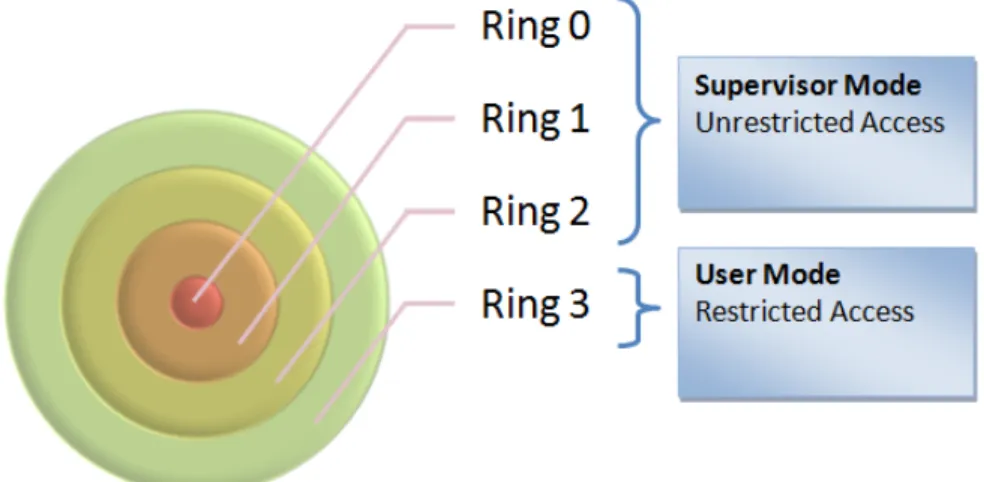
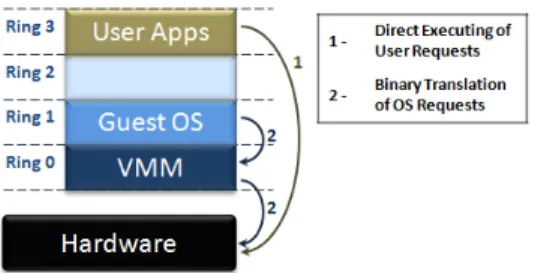
Protected mode in the x86 family uses 4 privilege levels, numbered from 0 to 3. Sometimes these levels are designated as rings, and the term comes from the MULTICS system [17], in which privilege levels were illustrated as a set of concentric rings. We are going to use the term “ring” as level, because it is a terminology more used. System memory is divided into segments and each segment is assigned and dedicated to a particular ring. The processor uses the privilege ring to decide what actions can be done with the code or data within a segment. As it shows in the Figure 2.1, Ring 0 is considered the innermost ring, which has total control of the hardware while Ring 3 is the outermost ring and has restricted access.
Figure 2.1: Privilege rings of the x86 architecture. High privilege:0; Low privilege: 3
The supervisor mode is the execution mode on an x86 processor with unrestricted access, which enables the executions of all instruction, including I/O and memory management operations, which are privileged instructions. Operating system runs on this supervisor mode, normally on the ring 0. However if this ring is compromised, it will have direct impacts on the ring 3 (user mode). The idea of having isolated ring 0 for each virtualized guest is that if one of the ring 0 of a virtualized guest is affected by, for instance, a failure it will not have impact the ring 0 of others virtualized guest. In order to do this, it is necessary to make this ring 0 closer to the guest, residing in either ring 1 or ring 2 for x86
architectures. However, the further it goes from the real ring 0, the more distant is from executing direct hardware operations, resulting in a loss of performance and independence. Virtualization moves ring 0 up one level in the privilege rings model and places the virtual machine monitor in the next higher privilege ring. This will be the ring 0 and it is upon this the guest operating systems runs, while the VMM handles the interaction with the underlying hardware platform. VMMs can be classified in two types:
• Type 1: This type is also called as native or bare-metal because the hypervisor
soft-ware runs on top of the host’s hardsoft-ware on the real ring 0 (Figure 2.2a). A guest operating system thus runs on another level above the hypervisor, allowing for true isolation of each virtual machine. This is the classic VM architecture. An example of this implementation is the VMware ESX Server and Xen.
• Type 2: This type is also called hosted VMM because the hypervisor software runs within a normal host operating system already installed, usually in ring 3 (Figure 2.2b). This type of VMM has a lower performance than the other type because factors as calls to the hardware must traverse many diverse layers before the operations are returned to the guest operating system. Examples of this implementation include VMware Workstation, Sun VirtualBox and Parallels Workstations.
(a) Type 1 Hypervisor/VMM (b) Type 2 Hypervisor/VMM
Figure 2.2: The two types of Hypervisors/VMMs
It is important to clarify that the term Hypervisor has the same meaning as VMM.
Privileged instructions trap when they are called from user mode. When called from super-visor mode (kernel mode), they do not trap. A trap passes control to a trap-handler, located in the kernel, so that processor mode changes. A sensitive instruction is an instruction
that reads from or writes to memory locations or sensitive registers. All sensitive instruc-tions have to trap on a virtualizable architecture and therefore, in this context, sensitive instructions can be seen as subset of privileged instructions. A VM cannot access hard-ware directly without passing the hypervisor, which is responsible for maintaining control over sensitive instruction and the hardware. When a VM tries to access sensitive data, the instruction is trapped and control is passed to the hypervisor. This happens because VMs runs in user mode but if the guest OS attempts to access sensitive data, a trap will occur. Then, the hypervisor, which is running in supervisor mode, it will catch this trap, inspect the state of the guest OS that cause it and emulate the behavior that would occur if the guest OS was running on a real machine. The hypervisor will then resume the VM, allowing the executing to continue. This method is called “trap and emulate”.
The Popek & Goldberg requirements are satisfied by this approach as long as the processor is guaranteed to trap whenever any privileged operation is attempted in user mode. Howe-ver x86 architectures does not guarantee this, since there are 17 sensitive non privileged instructions that disables “trap and emulate”. The control is not passed to the hypervi-sor when these sensitive instructions are called and so, the hypervihypervi-sor cannot emulate the expected behavior.
According to Smith and Nair [18], the 17 sensitive non privileged instructions fall into two categories:
• Protection system references: These instructions reference address relocation system, memory system or storage protection system. The problem is the possibility of a vir-tual machine to access locations outside its virvir-tual memory. An example presented by the authors is the MOVE instruction, which moves a value from general-purpose register to the CS register, the control register that specified the current privilege ring number in bits. An instruction such as move ax,cs, when executed in the user mode disallows the CS register to be loaded. This happens to offer some protec-tion, but which makes it not well virtualizable is that instead of generate a trap, the instruction generates a no-op. The instructions in this category are:
CALL: Call procedure JMP: Jump
INT n: Software Interrupt LAR: Load access rights LSL: Load segment limit
MOV: Move data between general-purpose registers or between memory and purpose/segment registers. It can also move immediates to general-purpose registers
POP: Pop off of stack PUSH: Push onto stack RET: Return
STR: Store task register
VERR: Verify segment for reading VERW: Verify segment for writing
• Sensitive register instructions: These instructions read or change resource-related registers and/or memory locations, such as a clock register or interrupt registers. The authors detail the example of the POPF instruction. POPF pops the flag registers from a stack held in memory. One of the flag registers is the interrupt-enable flag (IF), which can only be modified in privilege mode. The problem happens when the guest OS requires that the IF bit be changed and since it is running in the user mode under the VM, then the IF bit cannot be changed. This can lead the guest OS to take erroneous action because the flag bit was not set as expected. These instructions are:
PUSHF: Push EFLAGS onto stack POPF: Pop EFLAGS from stack
SGDT: Store global descriptor table register SIDT: Store interrupt descriptor table register SLDT: Store local descriptor table register
On the paper, the authors describe 18 instructions, which are the ones specified above and SMSW (store machine status word). However, in literature about virtualization it is only mentioned 17 sensitive, unprivileged instructions are considered. We believe the SMSW instruction was deprecated since it is only provided for backwards compatibility with the Intel 286 processor.
On the x86 architecture, the operating system normally runs in ring 0, because it is the highest privilege level, which provides total access to platform resources, like CPU and memory. Individual applications usually run in ring 3 in User Mode, with restricted access. When we add virtualization on this scheme, what normally happens is that VMM runs in
ring 0, since it must have privileged control of platform resources and the guest operating system goes to ring 1 or ring 3.
In order to overcome the limitation of implement CPU virtualization on x86 architectures, some techniques such as direct execution combined with fast binary translation and para-virtualization [19].
Binary translation (BT) is not a new technique and can be use for various purposes such as migrations between different architectures [20, 21]. The combination of direct execu-tion with BT was an idea developed by VMware to be used for CPU virtualizaexecu-tion. This technique allows running supervisor mode code controlled by the binary translator. The translator replaces the privileged code into a similar block, patching the sensitive, unpri-vileged instructions. This translated block can then run directly on the CPU and they are cached by the BT system in a trace cache so they can be used on subsequent executions. Using BT, only the sensitive instructions like POPF are replaced while the normal instruc-tions are executed unchanged. This binary translation is only applied when the code first executes [19].
Paravirtualization uses a different approach to overcome the x86 virtualization issue. With paravirtualization, the nonvirtualizable instructions are replaces with virtualizable equiva-lent ones. This requires the guest OS to be changed although most of the normal applica-tions remain unchanged. One difference with the BT approach is that in paravirtualization, the guest OS knows that it is running in a virtual environment, while using BT the guest OS have the illusion that is running on a real machine. The paravirtual hypervisor is smaller and easier to implement containing only a small interface for the 17 sensitive, unprivileged instructions and then is more trustworthy than one using BT and similar to a VMM using “trap and emulate”.
The second generation of hardware virtualization (Intel VT [22] and AMD-V [23]) was designed with the goal of eliminate the need for BT and paravirtualization on the x86 architecture. The CPU creates containers and introduces new modes of operations that can distinguish if the CPU is real or virtual. VMM runs the highest privilege container which is commonly designed as ring -1. Guests run within a lower privileged container, although conceptually is considered a ring 0. This allows guest OS to run at their normal ring and only leaving when the guest tries to execute a privilege or sensitive instructions which will trap to the VMM. This can be seen as “trap and emulate” and therefore, all security issues related with it can be also applied to hardware virtualization.
2.5 Memory Virtualization
Normal operating system use page tables to translate virtual addresses into physical ad-dresses. Virtual machines brought new challenges regarding memory virtualization since memory is going to be shared although isolation as to be guaranteed. We can consider three classes of addresses on a virtualized system:
• Virtual addresses, which are the same as the ones used by a conventional OS
• Guest physical address • Machine memory
Guest operating systems maintain page tables that translate from virtual to pseudo-physical addresses, and hypervisor maintains separate shadow page tables that translate from virtual addresses to machine addresses [24].
The recent x86 CPUs support memory in hardware. Translation from virtual to physical addresses is performed by the memory management unit (MMU) and the most used parts of the page tables are cached in the translation lookaside buffer (TLB). Guest OS sees page tables, which run on an emulated MMU. These tables provide the guest OS with the illusion that it can translate the virtual guest OS addresses into real physical addresses, but it is the hypervisor that deals with it. The real page table is the shadow page table used to translate the virtual addresses of the guest OS into the real physical pages.
The classic implementation of hypervisors maintains a shadow page table, which allows to control what page of the machine’s memory is available to a virtual machine. Just like in a traditional operating system’s virtual memory subsystem, when the memory allocated to VMs exceed the host physical memory size, the hypervisor can page the VM to the disk. This way, the hypervisor can dynamically control how much memory each VM receives. However, the hypervisor’s virtual memory system does not have the perception of which pages are good for paging out but the guest OS should have because it can identify, for instance, that the process that created a page has exited and so nothing will access to that page. This page would not be a good candidate for paging out, but since the hypervisor’s virtual memory system has no clue about that, it might page out that page.
To deal with this problem, VMware’s ESX Server created a mechanism which allows the hypervisor to ask to the guest OS for the pages it can swap out, using a balloon process [24]. A balloon process runs inside a guest OS and communicates with the hypervisor.
Figure 2.3: ESX server memory mapping
When the hypervisor needs to take memory away from the VM, it communicates with the balloon process to “inflate” the process, allocating more memory. This will force the guest OS to select the pages to give to the balloon process, which will be passed to the hypervisor for reallocation, but also it will force the guest OS to page memory to the virtual disk. VMware engineers also develop a mechanism that would decrease the memory used by several VMs running the same version of an operating system. They identify that different virtual machines running the same operating system will produce redundant copies of code and data stored in memory that could be shared among them. To address this, they have designed a content-based page sharing system, analyzing if the contents of physical pages are identical. When such content is identified, the hypervisor modifies the VM’s shadow page table to point to only a single copy and freeing the redundant copy. If the content is changed, then the hypervisor provides the VM with its own copy of the page, in a copy-on-write page-sharing scheme [19]. However, this can have some drawbacks. In order to detect duplicate pages, it is necessary to periodically scan the memory and build a list of page fingerprints, which will be used to compare page contents. VMware ESX scans frequency is set by default to once an hour (with the maximum of six times per hour [25]), but this means that short-lived sharing opportunities will be missed [26].
Without shadow pages, it would be necessary to translate guest virtual memory into guest physical memory and then translate this one into the real machine memory. The shadow page table avoids the double bookkeeping by making the MMU work with the guest virtual memory to real physical memory page table.
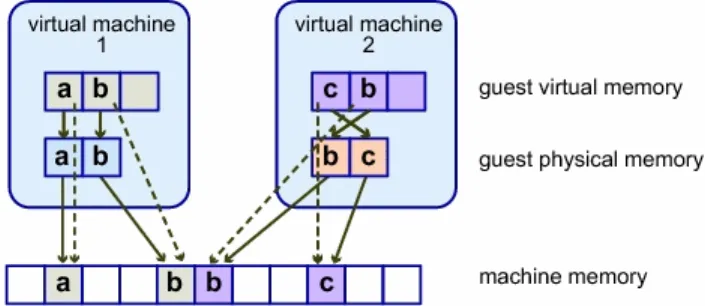
Figure 2.3 illustrates the VMware ESX server implementation of memory virtualization. In this figure, the boxes represent the pages and the arrows show the different memory mappings. As we can see, there are arrows from the guest virtual memory to the guest physical memory which represents the mapping maintained by the page tables in the guest OS. The arrows from guest physical to machine memory represent the mapping maintained by the hypervisor, while the dashed arrows show the mapping from guest virtual memory
to machine memory in the shadow page tables which is also maintained by the hypervisor. Nevertheless, there is a performance issue because each update of the guest OS page tables forces a shadow page table bookkeeping. The second generation of hardware virtualization (Intel VT and AMD-V) partly solves this problem with their AMD’s Nested Page Tables (NPT) and Intel’s Extended Page Tables (EPT).
When using nested paging, the CPU caches both guest virtual and physical memory as the guest physical memory to real physical memory transition in the TLB. The TLB has a new tag called Address Space Identifier (ASID) which allows to keep track of which TLB entry belongs to which VM. This way, entries of different virtual machines can coexist in the TLB at the same time. Using nested paging has an increment importance if there is being used multiple virtual CPU per VM, because they have to sync the page tables many times with direct impact on the shadow page table update. With NPT, the CPU only has to synchronize TLBs as it would happen in a non-virtualized environment.
2.6 Device and I/O Virtualization
The VMM virtualizes the physical hardware and allows each virtual machine a set of cus-tomizable virtual devices. Most of this virtualized I/O requires software drivers that run on the host operating system to access the real hardware. If it is a type 2 hypervisor, then it will use the device drivers already in the host OS, otherwise it may be necessary to de-velop its own device drivers for the hardware on the machine, like in the case of VMware ESX. Emulation is normally used for a VMM to handle I/O devices, and it is the VMM the responsible to implement a software model of the I/O device, making believe the guest OS that it is communicating to a hardware device, when is communicating with a software model. The I/O virtualization may provide to the guest, virtual hardware that does not exist in the real hardware, for instance, emulating an IDE hard disk when the real hardware is SATA. The direct memory access (DMA) has problems when used with virtual machines. The DMA controller can write to the entire physical memory instead of only the memory assigned to the guest OS. In order to deal with this problem, Intel and AMD added I/O Me-mory Management Unit (IOMMU). With IOMMU it is possible to restrict which physical address a device may access.
2.7 Types of Virtualization
When people talk about virtualization, normally they are talking about server virtualization. However, information technology has other forms of virtualization commonly known and used by other groups of people. For some, virtualization means storage virtualization, or network virtualization or even application virtualization. Although my thesis will only concern about server virtualization, I will do a brief explanation of each one.
2.7.1 Server Virtualization
There are many different implementations of server virtualization on, and for a big range of CPU platforms and architectures. Informally, server virtualization can be seen as creating many virtual systems within a single physical system. To accomplish this, we can take three approaches: physical layer, virtualization layer and OS layer. Hardware partitioning divides a single physical server into partitions where each partition is able to run an operating system while hypervisor places a layer of software between the physical hardware and the multiple operating systems that will share the same physical hardware.
Physical layer:
• Hardware partitioning: The server is physically segmented into distinct smaller sys-tems that will act as a physically independent and self-contained server. Normally each of these smaller systems has their own CPUs, OS, boot area, memory and net-work resources. The implementation of this technique includes Static Hard Partitio-ning, vPar, nPar among others [27].
Virtualization layer: Hypervisor technology can be organized in some distinct categories:
• Full virtualization: Allows virtual infrastructures to run unmodified operating sys-tems in isolation. The operating system running inside the virtual machine is called guest operating system. This approach was pioneered in 1967 with IBM CP-40 and CP-67, predecessors of VM family. In order to implement full virtualization, it is necessary a full combination of hardware and software, however not all architectures have hardware to support virtualization. It was not possible on IBM System/370 until 1972 and it was not natively possible in the x86 architecture [28] until 2005 when Intel and AMD added the hardware virtualization extensions (Intel VT and AMD-V respectively). Nevertheless, many companies tried to accomplish full virtualization
on x86 architecture even before Intel VT and AMD-V additions. VMware uses a combination of direct execution with binary translation techniques [29] to accom-plish full virtualization of an x86 system. This provides full disassociation of the guest OS from the underlying hardware by the virtualization layer. As depicted in Figure 2.4, the OS requests that needs to interact with the hardware are needs to be translated by the VMM, replacing nonvirtualizable instructions with new sequences of instructions, which have the same result on the virtual hardware , while the user’s applications are directly executed on the processor for high performance virtualiza-tion.
Figure 2.4: The binary translation approach to x86 virtualization used by VMware
• Paravirtualization: modifies the guest kernel system in order to purge the necessity of
binary translation. It has the advantage of higher performance but has the drawback of needing a modified operating system kernel. The fact the virtual platform is not identical to the real hardware, it makes necessary for the operating system to be ported to the abstracted machine interface. This could be seen as a violation of the Goldberg’s equivalence requirements, because the architecture-dependent part of the operating system kernel needs to be changed [30]. The non virtualizable instructions are replaced with hypercalls that communicate directly with the virtualization layer hypervisor. The architecture independent part and the entire user mode software stack stay unmodified.
• Emulation: Sometimes people confuse emulation with full virtualization. Although both run unmodified guest operating systems, they are both very different. In emu-lation, the virtual machine simulates the entire hardware set needed to run the un-modified guest OS normally for a completely different hardware architecture. There are some utilities for this technique. For instance, it allows to develop programs and operating systems for new hardware design before the hardware is physical avai-lable. It also allows, as we are going to see later, to run an unmodified version of
Microsoft Windows in Power PC architecture. Emulation does not satisfy Popek and Goldberg’s efficiency requirement.
Operating System layer:
• Operating System-Level Virtualization: This is a technology that virtualizes servers at the OS (kernel) layer. The physical server and instance of the OS is virtualized into multiple isolated partitions. Each of them will look like a real server, from the point of view of its owner. The OS kernel will run a single OS and provide its functionality to each of the partitions. On Unix systems, this technology can be seen as an advanced extension of the standard chroot mechanism. Operating system-level virtualization has the disadvantage that strong isolation is difficult to implement. The implementation of this technique include Solaris Container/Zone, FreeBSD Jails, Aix Workload Partitions, Parallels Virtuozzo Containers, Linux VServers and OpenVZ.
2.7.2 Storage Virtualization
Storage virtualization has been around for a number of years. It has beginning with the use of redundant array of independent disks (RAID). Using RAID it is possible to logically group physical disks and present those groupings as a virtual disk to the OS. Using storage virtualization it is possible to merge physical storage from many devices which will appear as a single storage pool. This storage can be classified as direct attached storage (DAS), network attached storage (NAS) and storage area network (SAN). They can be linked using Fibre Channel, Fibre Channel and Internet Small Computer Systems Interface (iSCSI), Fibre Channel on Ethernet or Network File System (NFS). Storage virtualization it is not a requirement for server virtualization but its use provides benefits since it can rely on the assignation of a logical unit (LUN) of storage, but provisioning it only when needed. For instance, if we have a LUN of 500 GB but we are only using 20GB, then only 20GB of actual storage is provisioned. This reduces the cost of storage, since we only use what is needed. Storage virtualization brings also help to the storage administrator, since it is easier to manage tasks as backup, archiving or recovery.
2.7.3 Network Virtualization
When people talk about network virtualization, probably the first thing that comes to their minds is Virtual Private Network (VPN) or perhaps Virtual Local Area Networks (VLAN).
However there is more when we talk about network virtualization. The most used network virtualizations are:
• Virtual LAN (VLAN): Defined in the IEEE 802.1Q standard, is a method of creating independent networks using a shared physical network. They are used to logically segment broadcast domains and control the interaction between different network segments. VLANS is a common feature in all modern Ethernet switches, allowing to create multiple virtual networks, which isolates each segment from the others. All the available resources are segments and allocated to each of these segments. Therefore, VLAN is a safe method of creating independent or isolate logical networks within a shared physical network.
• Virtual IP (VIP): A VIP is an IP address that is not associated to a specific computer
or network interface, but is normally assigned to a network device that is in-path of the network traffic. Incoming packets are sent to the VIP but are redirected to the actual network interface of the receiving host or hosts. It is used in solutions like High-Available and Load-Balancing, where multiple systems have a common application, and they are able to receiving the traffic as redirected by the network device.
• Virtual Private Network (VPN): It is a private communication network that uses
pu-blic network, such as Internet. Its purpose is to guarantee confidentiality on an un-secured network channel, from one site to another. It is normally used as a means of extending remote employee home networks to the company network. This is nor-mally done by using special software (as Cisco VPN Client), but after the connection being established, all the interaction with the other resources on the network is hand-led as if the computer was physically connected to the same network, although this depends of the way security policies are applied.
2.7.4 Application Virtualization
Desktop applications have always been a headache for administrators. There were always problems with missing or wrong versions of DLLs, or wrong registry keys or other pro-grams (like antivirus software) that would interfere with their behavior. The web appli-cations and dynamically updated appliappli-cations have been very popular, because it can be a workaround to most of desktop application problems. However, not everything can be converted into a web application, and sometimes it is necessary to run application on the
user side. Application virtualization tries to solve the desktop application problem by en-capsulating a virtualization layer and all resources needed for the application to be run on a user’s desktop. The virtualization layer is the one responsible to make the channel between the application and the operating system, and so, it is possible to have many isolated ap-plications running, and even different versions of the same application without interfering between them[31]. Java Virtual Machine is an example of Application Virtualization.
2.8 Benefits of Virtualization
Nowadays, virtualization is in the vanguard, helping companies to take advantage of two important properties of virtualization: scalability and management. It can bring many benefits and there are many reasons for its application. We are going to see some of the keys benefits of virtualization.
One of the benefits of virtualization has historical reasons and is related with the misused of servers, mainly because of Microsoft Windows NT Server. This operating system started to be used in datacenters back in 1990 although it was a hard battle in the beginning to be accepted as a good operating system for enterprise datacenters. Today we know it was a battle won and Microsoft has it share on most datacenters. However, Windows NT was a monolithic OS and when an application freeze it would often freeze the OS causing the well known Blue Screen of Death. Administrator started to apply the philosophy of single-purpose servers, running a single application per server. This would prevent that if one application fails, causing the operating system to fail, it would not disrupt any other application running on another server. For these reason, each time it was necessary a new business application, it was also necessary another server to be used. Over time, Microsoft solved the monolithic problem but administrator’s habits were already created. However, it is not only Microsoft’s fault. Many software vendors required their application to be isolated so they can support them. In addition, security taught us that the less application we have installed in a machine, the smaller will be the attack surface.
For this reason, companies have realized that most of their systems were running at ratios of 10 percent or less of utilization, yet these systems continue to require space, power and cooling system as any other machine. Instead of having some servers for their principal services (e.g. email, stock programs), they can invest in a better server and consolidate all those services in separated virtual machines. With that, they gain scalability, since they can upgrade their virtual machine without necessary upgrade the physical machine. They gain security, since they have a more control environment and easier to backup and restore,
which also is related with management. However there is a drawback which has to be balanced. Since all the main services of the company are installed on one only server (or few), this is considered a single point of failure.
High availability is essential for corporate environment where availability of their services is crucial to the success of their business. One of the advantages of using virtual machines is that it can be restored very easily (one or very few files) and so, if updated backups exists, then the IT manager can simply restore that file on another machine. Normally, it is recommended hot standby virtual machines with at least two servers. Taking the example of email server and stock programs, on the server A would be installed the email server running on a VM (VM.A.1.ori) and an updated offline copy of the VM (VM.B.1.bck) with the stock program running on the server B. And the opposite on server B, which would be an update offline backup of the email server that is running on server A (VM.A.1.bck) and the stock program running on a VM (VM.B.1.ori). If any problem happens to one of the servers, there would be another server that could temporary support both VMs. This example shows also another benefit of virtual machines, which is disaster recovery (DR). Some companies have their disaster recovery center in another geographic location and applying a hot standby allows them to easily replicate the VM to their DR center and when needed, be able to quickly make the services available. Another advantage of virtualization on disaster recovery is when facing an exploit that can compromise a server, be able to use a VM trustworthy (i.e. not infected) baseline installation of the affected system, patch them and turn into production, leaving the infected system for analysis and evaluation.
Virtual machines offer a perfect environment for development and research. According to Silberschatz et al. [32], changing an operating system is a difficult task because they are complex programs and since they executes in kernel mode, the impact of changing a pointer can destroy the entire file system. Therefore, it is necessary to test all changes to the operating system. With virtualization, the system programmer can have their own virtual machine and system development or test is made on those virtual machines instead of on a physical machine. This reduce the system development time and cost, increasing the productivity.
Another benefit of virtualization is the possibility of having multiple operating systems running, even those systems that are obsolete and cannot be utilized by the newer hardware resources, may be supported to run on a virtual machine.
It is also useful for testing software solutions. Using virtualization, a company can try some solutions without the necessity of using many real servers. The same way it is useful for software developers to simulate the production environment the best they can using
virtual machines, and that way, debugging their application in an almost real environment. In addition to testing new solutions, virtual machines are useful to test new patches before applying them into production systems.
Virtual Machines are also very useful for forensic team research. It is possible to clone a potentially compromised host into a VM and do further investigation without the need of the physical machine. The investigation team can also take advantage of snapshots to return to a previous state. The same can be said for malware investigation team. It can be very useful to use a VM since it guarantees isolation and to have the ability to use the snapshot function. However, malware does not always have the same behavior inside a VM as on a real machine.
There are other benefits of using virtualization. Honeypots or honeynets [33, 34] are intrin-sically related with server virtualizations and are normally used by organizations to attract possible attackers. Honeypots can be described as servers with fake information in an isola-ted network, simulating a real DMZ or Intranet in order to analyze the attackers’ behavior. The logs generated on these systems is much less than the generated every day on other security systems as firewalls, IDS and IPS alerts or even system logs, but their value is normally high, because it include most likely scans, probes and attacks [35]. Detect intru-sions using hypervisor is purposed on some papers [36, 37, 38, 39, 40] as a way to alert for rootkits running on the guest OS.
Chapter 3
State of Art
According to a study from Gartner [41], in August of 2009 about 16 percent of workloads are running in virtual machines, where VMware has 89% of the installation base followed by Microsoft with 8%. Analysts expect that the installed base of virtual machines will grow 10 times in the next four years. However, the expectation is that VMware will lose some of the market for Microsoft, Citrix and Red Hat. In the same study, Gartner expects that, in 2012, VMware only has 65% of the installation base, while Microsoft would achieve 27 percent of market followed by Citrix with 6 percent.
In this chapter we present the most current used virtualization products, describing the main components of each one and how they work.
3.1 VMware
Founded in 1998 by Diane Greene and Dr. Mendel Rosenblum along with two students from Stanford University and a colleague from Berkley, VMware is a well known company on the x86 virtualization market. In October of the same year, these five founders filed for a patent regarding new virtualization techniques. These techniques were based on a project called SimOS conducted at Stanford University. The U.S. Patent 6,397,242 was awarded on May 28, 2002 [42].
Their first product was VMware Workstation with the first version being released on Fe-bruary 8, 1999 for Windows and Linux. This is one of the most successful products from VMware for desktop and stays as a commercial product with its current version 6.5.x. VM-ware Workstation is a type 2 hypervisor, supported on top of a Host OS – either Windows
or Linux – and able to create virtual machines for a variety of guests OS, such as Solaris x86, Netware, FreeBSD, Windows and Linux.
In late 2000, they released their first version of the server virtualization platform called VMware GSX Server. As in the case of VMware Workstation, this GSX Server needs to be installed on top of an existing Windows or Linux operating system. In 2006, VMware GSX Server was renamed to VMware Server and it is now released as freeware.
In 2001, VMware release their first version of Elastic Sky X (ESX) [43]. This is their first server product with an approach different to that of the workstation version. In this case, VMware ESX does not require a host OS, but instead it has its own native hypervisor on a bare-metal system. This had the drawback to support less hardware but had the advan-tage of requiring less overhead to host each virtual system. On May 2009, it was released VMware ESX v.4.0. Figure 3.1 shows the many releases of VMware ESX Server. The in-terval between the major releases and the minor release has been growing, from 14 months between v.1.0 and v.1.5 to 26 months between 3.0 and 3.5. This is normally due the fact minor releases are the accumulation of many patches released since the major release, but also with added features.
Figure 3.1: VMware ESX server release history
3.1.1 The ESX Platform
The core of VMware ESX has three main modules capable of regulating CPU affinity, memory allocation and oversubscription, network bandwidth throttling and I/O bandwidth control. Along with these, Virtual Machine File System completes the VMware ESX base platform. The three primary components of VMware ESX are:
Physical Host Server: This is related with the physical host server where VMware ESX runs on. VMware had a Hardware Compatibility List (HCL) that includes some of
the main servers’ brands on the market, such as Dell, Hewlett-Packard, IBM among others. For support reasons, it is convenient to use ESX only on the servers reported on HCL.
VMkernel: The VMkernel is the center of the VMware ESX hypervisor, and it is a high performance operating system developed by VMware to run on the ESX host server. Although it has some similarities, it is not a Linux kernel. It does not share the Linux data structures or symbols neither depend on the Linux kernel for any services. The VMware ESX has a modular approach, loading various system modules. However, the version 3.x presents some innovations regarding this modular approach, such as allowing new devices to be added without the need of recompile the VMkernel [44]. The Console Operating System (COS): The service console has been upgrade from being
based on a variant of Red Hat version 7.2 with ESX 2.x to Red Hat Enterprise Linux 3, Update 6 for ESX 3.0 [45] and Update 8 for ESX 3.5 [46]. The COS does not interact with system hardware, that is a job made by VMKernel. The COS function is to provide the executing environment for monitoring and administrating ESX. On versions before ESX 3.0, VMkernel would only load after COS was fully booted. In ESX 3.0 this was changed and now VMkernel runs before than COS. In fact, COS runs within a specialized VM with more privilege than the normal VMs.
Some other important components of VMware ESX are:
Virtual Machine File System (VMFS): The VMFS is a high performance cluster file sys-tem created by VMware. VMFS has many advantages compared to conventional file system. One of those is the fact that up to 32 ESX Servers [47] can concurrently read and write to the same storage by using per-file lock. It has some other important security features such as the fact that it allows live migration of powered-on virtual machines from a host server to another and by using distributed journaling, it is pos-sible to recover VMs faster and more reliable in a case of a server failure. However, according to Scott Davis [48] from VMware, the choice between VMFS and NFS will depend of what type of storage infrastructure the organization is familiar with. If it uses block based storage, then it is recommended to use VMFS, but if it is al-ready using a Network-attached storage (NAS), then it would be recommended to use NFS instead.
VirtualCenter: The VMware VirtualCenter is the management console used to control the virtualized enterprise environments. Is provides services such as access control, performance monitoring, and configuration.
On December 28, 2004, VMware submitted VMware ESX Server 2.5.0 and VirtualCen-ter 1.2.0 Target Of Evaluation (TOE) to Common CriVirtualCen-teria for Evaluation Assurance Le-vel (EAL) 2 conformance certification under the Operating Systems category. On March 27, 2006, Common Criteria confirmed the certification at EAL2. The evaluation was car-ried out in accordance with the US Common Criteria Evaluation and Validation Scheme (CCEVS) process. The criteria was judged as described in the Common Criteria for Infor-mation Technology Security Evaluation, Version 2.2 and International Interpretations. The TOE is Common Criteria 2.2 Part 2 extended and Part 3 conformant.
On May 20, 2008, VMware VI3 (ESX Server 3.0.2 & VirtualCenter 2.0.2) achieved Com-mon Criteria certification at EAL4+ under the Canadian ComCom-mon Criteria Evaluation and Certification Scheme (CCS). EAL4+ is the highest assurance level that is recognized glo-bally by all signatories under the Common Criteria Recognition Agreement (CCRA) and achieved the lever at which it is likely to be economically feasible to retrofit to an existing product line. VMware is the only company having an x86 virtualization product to suc-cessfully complete the Common Criteria certification process. Currently, VMware ESXi 3.5 and VirtualCenter 2.5 and VMware Infrastructure 3.5 (VMware ESX Server 3.5 and VirtualCenter 2.5) are in process of certification.
Although it was not possible to confirm, there are some informations on the Internet re-porting that VMware ESX 2.0 and ESX 3.0 have 100,000 lines of code. During my thesis research, I have questioned some of the key people in the virtualization world. One of the person I have exchanged emails regarding VMware was Keith Adams, an ex Senior Staff Engineer at VMware currently working on Facebook. I have questioned Keith Adams about if he thinks this is an approximated number. In his own opinion, he believes the line count for the VMkernel is higher, since it includes drivers for many storage and networking devices. Nevertheless, he could not confirm me this number, because it was information he did not have.
3.1.2 VMware ESXi
VMware ESXi was announced during VMworld 2007 and it is an integrated version of VMware ESX but without the COS. This is important in terms of security. VMware ESXi had RHEL-based COS replaced with BusyBox, which is a single binary that provides a minimal set of services. Many of the security patches for VMware ESX where related with security vulnerabilities on the Service Console (e.g. 1185, CVE-2009-0034, CVE-2009-0846). It is tempting to say that removing this component from VMware

![Figure 4.4: The Blue Pill idea (simplified) [1]](https://thumb-eu.123doks.com/thumbv2/123dok_br/15493120.1042475/73.918.243.734.539.859/figure-the-blue-pill-idea-simplified.webp)