Managing Team Work Submissions in Large Moodle
Courses in Order to Generate Course Portfolios
Armando Sousa
INESC TEC (formerly INESC Porto) and Faculty of Engineering, University of Porto
Porto, Portugal [email protected]
Rodolfo Matos Computer Centre (CICA)
Faculty of Engineering (FEUP), University of Porto Porto, Portugal
Abstract— Massification of higher education institution promotes the importance of peer education and team work as important educational tools. As such, teams frequently produce several deliverables that should be organized and evaluated throughout a given course. Some submissions should then be attributed to the team rather than the individual and searching for a given type of deliverable from a given team becomes an important concern in terms of organization and ease of usage in evaluating assignments. The course “Projeto FEUP”, used as case study and surely many others benefit from an at-least partially automated production of an organized set of all deliverables from a given course in a given year – a course portfolio, a task made easier by the usage of the presented ideas and the prototype implemented in the Moodle Learning Management System. This article shows details of the implementation and the lessons learned. The prototype was tested in the mentioned test course that has about one thousand students enrolled and a course portfolio was successfully created.
Keywords- Massification; Large Courses; Learning Management Systems; Assignment creation; Moodle; File Submission; Team Work; Portfolio; Course Portfolio
I.I
NTRODUCTION AND CONTEXTTeaching large courses presents several challenges that are more and more frequent in current days. Team works are also essential to present day to all Engineering degrees and are thought of as an interesting method to promote soft skills and peer learning. Team works are also essential to cope with large courses because otherwise the (manual) evaluation of submissions would be unthinkable – as would the number of deliverables to grade manually the number of students enrolled in the course divided by average team size.
The work presented here was inspired in a single very large, cross program course named “Projeto FEUP”, at Faculty of Engineering of the University of Porto, Portugal [1]. The test occurred in the first (fall) semester of school year 2012/13 and the course had about 1020 students split into 146 groups of 6 or more students.
Given such massified courses, Learning Management Systems (LMSs) are essential to help educational efforts by providing static and interactive data to the students. Such data and activities may range from individually accessing (viewing) a video or completing a quiz or maybe an educational (serious)
game.
There are many learning management systems (LMS) available. However, in 2012 the market is dominated [2,8] by BlackBoard (44.8%), Moodle (20.1%), Desire2Learn (11.1%) and Sakai (6.1%). LMSs typically offer both pedagogical and evaluation capabilities in the same package. This integration of functionality presents several benefits. Firstly, users become more familiar with the user interface for both systems – as the same interface is used for both teaching and examinations, this makes it easier and less stressful for students to complete examinations and more likely that staff will not make errors when constructing examinations. Secondly, operational costs (due to installation, maintenance and licensing) are generally less for a single software package than for two packages. Finally, by integrating pedagogy with evaluation, it should be simpler to monitor the progress of students and so better target future teaching resources.
One of the most useful and used LMSs is Moodle [2, 3, 8] that is free, open, and its code is released under a well-known GPL v3 (in other words, a free copyright license). Other features include ease to expand, web interface, data protection, user class, student groups and groupings of groups, etc. Moodle is the de facto standard solution for inexpensive LMS and features a variety of pedagogic activities and methods [4, 9] that are very interesting for large courses. Furthermore, the test course would be altogether unthinkable without the aid of LMSs – in this case, the Moodle platform as quizzes would quickly become impracticable or awkward or simply excessively time consuming.
submissions is very time consuming for very large courses as the test course, where the presented ideas are essential.
II.PROBLEM STATEMENT
While LMSs and particularly Moodle are essential to support large courses like the mentioned ones, Moodle itself could benefit from the improvements proposed and partially prototyped here.
A.Needs
As mentioned the test course has about 150 groups and each team submits 3 deliverables at the end of the course, while some other activities are individually graded.
As mentioned, the aim is to make the production of the course portfolio easier and it is also very interesting, at reading and or grading time, to have an adequate listing of the deliverables (turned in or missing), respective on-schedule status and other relevant observations.
B.Requirements analysis
The following requirements were established for submission of deliverables:
• Support for large number of students
• Integration with school's information system
• Flexible number of students over teams
• Changing groups over time
• Changing teams along the evaluation period
• Safe, confirmed submissions of (large) files whilst keeping the up-loader’s identity, timestamp, etc.
• Ability to easily manage multi-format received deliverables (allowed and not allowed list – example: by listing admissible MIME content)
• Ability to generate and or limit allowable file/database entry submission names (name of the file where the deliverable will be kept and can be searched for):
o Automatically generate name from a given
set of rules involving: deliverable format type, Moodle activity name, Moodle group name, Moodle grouping name, Moodle
course name (/id/shortname),
submitter_name
o Restrict allowable names to a given list (for
example, coming from an external text file)
o Ability to check for validity given a set of
rules the name must comply with and not offend
• Support for version and feedback comments
• Multiple deliverables (of several deliverable_type) submitted by teams
• Ease to use plug-ins regarding plagiarism detection Moodle version 2.X manages groups and groups of teams in an interesting way: “groups” (of students) are organized in “groupings” (of groups). A student may be in any given number of groups but can only be in one group of a grouping which allows the student to work in different challenges with different colleagues simultaneously or sequentially over time.
C.Views for stakeholders (actors)
LMSs and particularly Moodle clearly identify roles in the course such as: Teachers, Non-Editing-Teachers and Students. These roles are given specific capabilities in the course enabling them to submit, view or edit activities or resources. Aside from roles, there is the notion of group that shares a given submission. The Moodle LMS platform already implements this issue adequately as it is possible to have any number of simultaneous (or not) team works where students may work in different teams on different activities.
Naturally teachers and non-editing teacher should be able to see all submissions and students may or may not be allowed to view submissions other than that of their own team(s).
For simplicity, there was a choice of not addressing the issue of students of a given year being able to retrieve submissions from a previous year because this issue would most likely be better suited to be treated in an external repository (as data from previous years become static data). The problems with such endeavor are a number of concerns regarding completeness, accuracy, permission of access, data safety (integrity), etc.
When taking into consideration large courses with several submissions, it is most likely interesting to consider that each interested party (stakeholder) will be interested in a different, specific view of the listing of the submissions.
For any kind of teacher / administrator, it should be possible to search / list / download:
• (All) submissions of a given course
• Submissions of a given student
• Submissions of a given group
• Configurable subset of submissions (example classes X to Y)
For students, a course administrator should be able to configure any of the following:
• Access all submissions made by the student
• Access all submissions of the teams of the student
• Freely access all submissions of other teams of a given deliverable_type
• Access a subset of the submissions
limit, it would be possible, for instance, to list all submissions of a given student throughout his or hers academic journey that would be the foundation for an automated portfolio of the student.
III.PROTOTYPE
As hinted in the requirements, the general strategy for the prototype is to limit or automatically generate file names to predictable fields, thus making the name of the file submitted by the student regular, predictable and easy to find (and thus
generating automated listings). The advantage of this strategy is that the management of the existing “files” (that were allowed to be submitted) is straightforward and no additional information is kept on the file itself but rather all relevant information is clearly displayed in the actual file name. Additionally, all modifications are enclosed in a single place and overall course modifications are minimized. Naturally, all subsequent queries and code involving these “files” will work without modifications.
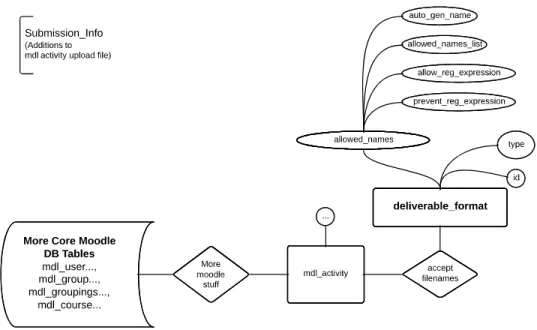
Figure 1. E-R Model of the relevant data to be added to Moodle
It should be mentioned that internally, Moodle 2.x transforms files into database entries. The word “file” in this article relates to the functional idea of a user file being submitted in answer to a Moodle assignment and, as such, is not related to any technological mean of archiving the response (inside Moodle).
A.Data Model
The proposed data model, shown in Figure 1, is additional to what is inherent to a common LMS and specifically the images shown and the prototype produced is based on Moodle version 2.3 [6,7].
In order to enforce correct filenames, it is necessary to add configuration data that must be asked to the user at the time of the creation of the activity. The data to be added is related to the type of restrictions allowed to the file name in the submission process. It can be seen that data model is related to the requirements previously shown: the type attribute selects the types of restrictions to check at submission time; there is a listing of allowed filenames; there is the set of rules to automatically generate filename for a person/group/course
(etc.), and there is the possibility to allow for mandatory parts of the filename as well as to prevent certain names. The data to be stored is interpreted at run time and no extra relations are needed.
B.Implementation
The prototype presented here uses the foundations of a core Moodle activity named “Assignments (2.2) / Upload Single File” and builds upon that PHP code that needs to be patched to include the ideas presented.
The new activity is shown in the usual list, shown after pressing the familiar Moodle “+Add an activity or resource” link. The chosen name of the new activity is “Submission”.
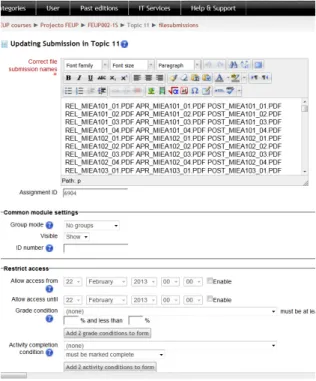
As mentioned earlier, the “Submission” prototype is based on the “Assignments (2.2) / Upload Single File”. The prototype that was used in the fall (1st) semester of year 2012/13 only worked to enforce that the file name should be in a list given by the Moodle teacher at configuration time.
admissible file names are listed separated by white-spaces (please see section 4). During the implementation of this prototype, the Moodle platform was already in production state, meaning that modifications to the code that was being used elsewhere were not allowed. The only workaround was to have students check the validity of the submitted file names manually, after completing the submission process – although admittedly not the best solution, it was the only possible solution at the time of opening the prototype to general production usage. A better solution would be either to automatically generate the submission filename or at least restrict it to a valid range of options (as mentioned in the requirements section).
Figure 2. Configuration page for the prototyped “Submission” activity listing allowed file names
When the activity is configured and open to students, the actual submission process is shown in Figure 3 (show in its original, Portuguese language). The instructions simply tell the students to submit 3 PDF files on the root directory, with the shown prefixes according to submission type set and the group name as the rest of the filename, ending with the “.PDF” suffix.
Figure 3. Instructions for submissions (for students)
One of the issues of the current implementation is that a given user (student) may submit a file that complies with a name that is not destined to him or his group. If this was done on purpose with wrongful intentions, ethical issues would be at stake but unfortunately, with such many students, a student accidentally exchanging his group name is not unthinkable (and has, in fact, happened). Naturally the author of the wrong upload was displayed clearly and was asked to remove the submission with the wrong filename (relating to a wrong group).
Regarding the prevention of wrong filename and mistakes, such issues are solvable by the proposed automatic generation of filenames. The test course was unable to use such strategy because Moodle groups, although interesting, were not used – the listing of groups were instead stored in the university's information system.
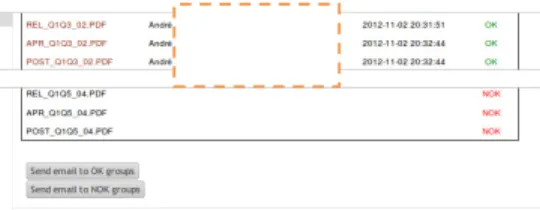
Figure 5 shows the sample screen of the submitted files. Filenames in the list are hyper linked to the actual file under Moodle, with the security and permissions as Moodle implements. The link is found with a query inside the Moodle database.
Figure 4. Sample listing of Submissions classified as OK and NOK
C.Generation of the listing of student's submissions as a part of the course portfolio
The listing of 5is essential to easily access all links to the files on the same page, in an organized fashion. Since HTML syntax inherits XML interesting characteristics, it is possible to use XML techniques to convert among listings.
To produce the relevant listing of submitted files, the uploader's names and times and NOK files were removed because such details are not relevant in terms of course portfolio.
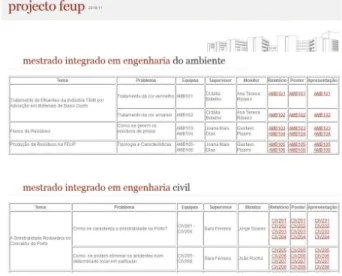
The listing shown in Figure 5 was first produced by a specific code in PHP language because it was found to be interesting to group submissions with the same 3 letter prefix into columns of a line. At the listing generation time, the rest of the lines are clear of information except for file links. In order to prepare the listing shown in Figure 5, semi-automated tricks were used to gather information from the university information system and some other information added (manually). The full listing of the course submissions would be 146 groups long across the 9 involved engineering degrees. The information shown is of course part of a much bigger listing, accessible via [10].
Figure 5. Sample screen shot of the listing of submissions, organized into a web page - the listing shown is a part of the course web page and will be a
part of the course portfolio (sample from [10])
IV.PLANNED FEATURES AND FUTURE WORK
The prototype is being extended to deliver all the features mentioned in section IIB and the planned interface is shown in Figure 6. The shown interface is thought to be self-explanatory, to be used at activity configuration time. The plan is to have the new submission accept only a single file, thus resulting in fine tuning requirements. At activity configuration time, the teacher is given the choice to: automatically generate the filename for the submission of the student; enforce that the filename will be one of the listed allowed names (chosen at submission time by means of a dropbox that the uploader student must choose from); ask the uploader student to supply a filename that is tested for rules that the filename must comply with and optionally must not offend. The proposed codes will be interpreted at submission time in the context of the student and its group and grouping. Provision must be made to eventually allow not using Moodle groups.
Figure 6. Submission activity configuration screen showing new configuration area
In order to easily implement a “gentle pressure” over students to comply with deadlines, easy emailing is to be implemented over the listing of OK and NOK files, as suggested in Figure 7.
Figure 7. Buttons to send email to all users in the groups that submitted successfully and that did not do so
V.CONCLUSIONS AND LESSONS LEARNED
As mentioned, the prototype was used in a test course with 1020 students and 146 groups under several programs. Due to the dimension of the course, Moodle groups were not used. Each group should submit 3 files submissions near the end of the course. Although the authors were unable to perform a full grown user (student and teacher) survey, sample student users from different programs had very different attitudes toward such a guided submission task: users from the informatics program were used to such tasks (guided submissions) and complied easily with the requirements. Users from other programs had varying experiences but a number of issues were learned: student users are not always aware of trailing extensions and gave the pdf extension to the filename and did not understand that the filename became filename.pdf.PDF (by default the Windows operating system hides extensions); student users were also not used to filenames being case sensitive (even if warned about it, some users tend to minimize the issue); generalized teacher feedback was that it was easier to find submissions in the listing (using browser text search, for example) than in regular Moodle platform – meaning that this effort is also interesting at grading time; it was also mentioned that this listing made it easy to compare submissions (plagiarism concerns among students sharing similar work topics).
Moodle security was found to be adequate because file access within the course is authorized by normal Moodle permissions system: on clicking the off line version of the listing produced by the prototype (shown in 5), a Moodle file is requested and delivered depending on log-in and course authorizations, which is very convenient. For public access, the Moodle course would have to be viewable to guests or the files would have to be removed from the server. In the test course case, the latter is the chosen solution as files are to be kept freely accessible in a web server (and do not need to overburden the Moodle database).
Additional feedback is that some teachers felt that they needed a tool to communicate with students under their supervision and did not comply with the submission process. Unfortunately, as Moodle does not support that information (groups under the supervision of a given professor), that feature is, for the time being, not easy to implement.
The experience from using the prototype proves the importance of this “guided” submission process, much more so for the production of public submissions listings of the course.
The presented prototype successfully generated the list of submitted files in the course (even though Moodle groups were not used) and after having manually inserted missing information, the web page that lists all students’ works is available at [1,10]. This information will be included in the course portfolio.
ACKNOWLEDGMENT
This work is partially financed by the ERDF – European Regional Development Fund through the COMPETE Programme (operational programme for competitiveness) and by National Funds through the FCT – Fundação para a Ciência e a Tecnologia (Portuguese Foundation for Science and Technology) within project «FCOMP - 01-0124-FEDER-022701».
REFERENCES
[1] Institutional page of “Projeto FEUP” course at university’s information
system – Available:
https://sigarra.up.pt/feup/pt/UCURR_GERAL.FICHA_UC_VIEW?pv_o correncia_id=274042 (accessed April 9, 2013)
[2] Open-source community-based tools for learning [Web Page]. Available: https://moodle.org/community/ (accessed April 9, 2013)
[3] M. Dougiamas and P. Taylor, "Moodle: Using Learning Communities to Create an Open Source Course Management System," presented at the World Conference on Educational Multimedia, Hypermedia and Telecommunications 2003, Honolulu, Hawaii, USA, 2003.
[4] D. Burgos, C. Tattersall, M. Dougiamas, H. Vogten, and R. Koper, "A First Step Mapping IMS Learning Design and Moodle," Journal of Universal Computer Science, vol. 13, pp. pp. 924, 931, 2007-07-28 2007.
[5] P. E. Hutchings, "The Course Portfolio: How Faculty Can Examine Their Teaching To Advance Practice and Improve Student Learning. The Teaching Initiatives" ed: American Association for Higher Education, One Dupont Circle, Suite 360, Washington, DC 20036-1110; 1998. [6] Moodle Data Model:
http://docs.moodle.org/dev/images_dev/5/5a/Moodle2erd.png (accessed April 2, 2013).
[7] Moodle data model: Groups and groupings detail:
http://docs.moodle.org/dev/images_dev/e/e6/Groups_erd.png (accessed April 2, 2013).
[8] Campus Computing 2012: Mixed Assessments for IT Effectiveness http://www.campuscomputing.net/item/campus-computing-2012-mixed-assessments-it-effectiveness (accessed April 2, 2013).
[9] Watson, W.R. "An Argument for Clarity: What are Learning Management Systems, What are They Not, and What Should They Become?" Tech Trends 51(2) (2007) 28-34 available:
http://hal.archives-ouvertes.fr/docs/00/69/20/67/PDF/Watson-2007.pdf [10] Listing of student Submissions for “Projeto FEUP” for year 2010/11