ISSN: 2310-0036 Vol. 1 | Nº. 10| Ano 2019
Simone Mura
Universidade Católica de Moçambique [email protected]Juleca Faquira
Universidade Católica de Moçambique [email protected]A PERSPECTIVE ON THE ACCESSIBILITY
OF E-GOVERMENT SITES IN
MOZAMBIQUE
_____________________________________________________Abstract This article aims to assess the level of implementation of accessibility standards for e-government web sites in Mozambique, in order to identify the problems that accessibility has shown so that they can be corrected. The methodology used was a quantitative approach and the websites of seventeen ministries as well as the main public companies and state institutions were analyzed: FIPAG, INSS, EDM and Taxation Authority. The essential characteristics are detailed, starting from a study, using the recommendations of the document the "Accessibility Guidelines for Web Content 2.0" (WCAG 2.0) of the W3C, with classification level A, AA and AAA. As instruments of automatic analysis, the AccessMonitor website developed by the ACCESS Unit of the Foundation for Science and Technology and the PowerMapper SortSite software were used. For specific cases, the Color Contrast Analyzer software was used to check the contrast between the color of the text and the background. After the tests, it was observed that the level of accessibility of e-government sites in Mozambique is not within the recommended minimum level of the W3C. The results obtained demonstrate that the main problems, in accessibility, are found in images, links, tables and in the level of contrast between the color of the text and the background. Keywords: Web accessibility; Web evaluation; e-government, guidelines. _____________________________________________________________________________
Rua: Comandante Gaivão nº 688 C.P.: 821 Website: http://www.ucm.ac.mz/cms/ Revista: http://www.reid.ucm.ac.mz Email: [email protected] Tel.: (+258) 23 324 809 Fax: (+258) 23 324 858 Beira, Moçambique
Introduction
In the last decade of the 20th century, we have witnessed a new phenomenon linked to globalization which is the World Wide Web (WWW or simply Web), one of the services offered by the Internet. Worldwide, the internet is a global network where information is available and can be accessed from anywhere in the world. Today, it is increasingly difficult to find a human activity that is not influenced by the Web, whether at work, in business or in education.
It is in this modern world, characterized by the massive use of Information and Communication Technologies (ICTs), that governments seek to improve the provision of quality public services by making relevant information available through Electronic Portals (Matos, 2008; José, 2014). The Mozambican government, through initiatives of the E-Government or Electronic Government, is constantly looking for ways to improve the services provided to the public, using ICT to respond to the needs of the public in order to achieve its objectives with a high level of quality. One of the first steps was the approval of a new Informatics Policy through Resolution No. 28/2000, December 12 (Council of Ministers, 2000) with one of its specific objectives being "providing universal access to information for all citizens" (p.19) to promote and support “the production of content for the internet that reflects the reality and national interests” (p.20). Therefore, the government is looking for ways to offer, through electronic portals, relevant information about services to the public, making “the presence of central state bodies and departments on the internet mandatory” (CONSELHO DE MINISTROS, 2000, p.24).
According to Mauricio and Dalmolin (2008) in addition to the question that information is available to everyone, another perspective must be analyzed, which is whether everyone can access the information made available. To guarantee this right, several countries have passed several laws for all their citizens, among which are Italy with the Stanca Law of 9 January 2004 (Italian Parliament, 2004), the United States of America with the Law of Rehabilitation of 1998 (Gonçalves, Bandeira, Pereira, & Peixoto, 2015), Brazil with Law No. 13,146 called the Brazilian Law for the Inclusion of Persons with Disabilities of 6 July 2015 (Mauricio & Dalmolin, 2008), and Portugal with resolution of Council of Ministers (RCM) No. 97/1999 of 26 August (Dominguinhos, 2016).
Portugal was the first country in Europe and the fourth in the world, after Canada, the United States of America and Australia. The law was the consequence of a civic movement that in 1998, through an electronic petition, obtained 8,721 signatures, which for the first time in Portuguese history the Assembly of the Republic (AR) accepted as valid (Dominguinhos, 2016).
The European Parliament has published Directive (EU) 2016/2102 (European Parliament, 2016) which requires Member states to ensure that public sector bodies' websites and mobile applications comply with accessibility requirements.
In Mozambique, there is a lack of a law to protect web accessibility to websites and, therefore, the authors began the study with the following question: what is the level of implementation of web accessibility of the various Mozambican e-government sites? The general objective of this study is to analyze the level of implementation of web accessibility of the various Mozambican e-government sites. The methodology used was based on the quantitative approach and the websites of seventeen ministries, of the main public companies and state institutions were analyzed: FIPAG, INSS, EDM and the Taxation Authority. The essential features are detailed, based on a study using the recommendations of the document the W3C's “Accessibility Guidelines for Web 2.0 Content” (WCAG 2.0), with classification levels A, AA and AAA. As
instruments of automatic analysis, the AccessMonitor website developed by the ACCESS Unit of the Foundation for Science and Technology and the PowerMapper SortSite software were used. For specific cases, the Color Contrast Analyzer software was used to check the contrast between the color of the text and the background.
2. Theoretical framework
2.1 Web accessibility
The International Convention on the Rights of Persons with Disabilities (United Nations, 2006), in its article 9, establishes, on accessibility, that:
States parties will take appropriate measures to: [...] g) promote access for persons with disabilities to new information and communication systems and technologies, including the Internet (p. 6).
According to Web inventor Tim Berners-Lee "the power of the web is in its universality. Being accessed by everyone, regardless of disability, is an essential aspect." (HORIZONTE and FERRAZ, 2013, p. 22)
The European Commission (2010) defines accessibility as the possibility that people with special needs are able to access facilities and services on an equal basis with other citizens, and, in particular, web accessibility broadens the concept of the possibility that each a person must be able to visit and interact with any website, fully understanding the information presented there (DIAS, 2003, cit. in Mauricio & Dalmolin, 2008).
According to Barbosa (2010, cit. in Rodrigues, 2013), we cannot ignore people with disabilities, and this makes the web an important factor in their daily lives. However, for the web to be accessible, it requires some care. The lack of monitoring on some pages imposes obstacles to many users. Users who have physical or perceptual limitations (such as visual, hearing and motor disabilities), mental or learning limitations (such as full and functional literavy) may encounter many barriers that hinder or prevent them from interacting with the system.
The importance of accessibility lies in the fact that it helps people with disabilities and shows the possibility of using the web efficiently. Maia, Turine, Sandim and Paiva (2010) emphasize that, in addition to the limitations mentioned above, there are others such as: languages, incompatible hardware and/or software, problems in the environment where the user is, and also the level of knowledge and experience of the user. According to Ali, AlBalushi and AlBadi (2017), it is important that in the process of developing a web site, people with disabilities are involved to guide developers.
The World Wide Web Consortium (W3C) is an international consortium that develops protocols and guidelines for the World Wide Web, with the aim of improving and guaranteeing its long-term growth (W3C Brasil, 2012). According to the W3C (W3C Brasil, 2012), to understand the complexity of the concept of accessibility on the Web, some specific aspects must be considered:
a) The importance, scope and universality of the web;
b) Reciprocity: accessibility is not only enjoying existing information or services, but also being able to contribute with your own ideas;
c) The multiplicity and diversity of factors involved: the W3C identifies seven components: i) content, ii) browser typology, iii) Support technology, iv) user knowledge and experience,
v) authors, designers, programmers, vi ) software used to create the website, vii) assessment tools;
The W3C (W3C Brasil, 2012) identifies the following recipients of web accessibility: a) Visually impaired: i) Blind, ii) Color blind, iii) Low vision;
b) Hearing impaired; c) Disabled people; d) Temporary disability; e) Beginning learning; f) Advanced age; g) Reduced displays.
In 1997, W3C created the Web Accessibility Initiative (WAI), with the aim of developing strategies and recommendations to make the web more accessible (W3C Brazil, 2012).
In 1999, the first version of the Web Content Accessibility Guidelines was launched, WCAG 1.0 (Web Content Accessibility Guidelines) and accessible pages are classified into three levels, with “A” being less accessible and “AAA” being more accessible (W3C Brazil, 2012).
In December 2008, WAI launched the second version of the Web Content Accessibility Guidelines, WCAG 2.0 and these were developed in coordination with several international organizations with the aim of being the only standard for web content (W3C Brazil, 2012). The latest version 2.1 of the WCAG was published on the 5th of June 2018 (W3C, 2018), but is not part of this study because the tools are not yet updated with the new guidelines. The new criteria introduced are in the areas of:
• Mobile accessibility;
• People with reduced visibility;
• People with cognitive and learning disabilities.
A study conducted by Schmutz, Sonderegger and Sauer (2017) showed that the implementation of accessibility guidelines is not only “useful" for users with visual impairments, but also for those who do not have any disabilities. According to the authors, a website with high levels of accessibility also brings with it better usability and therefore easier access to functionalities and information for all users. For these authors, the perception of the guidelines should be changed from an accessibility approach for users with disabilities to an inclusive design approach.
According to the authors mentioned above, Godoy, Ferreira and Cinelli (2019) are of the opinion that it is important that there is a coordination between accessibility and usability.
2.2 Web 2.0 Content Accessibility Guidelines (WCAG)
According to Alonso, Fuertes, González and Martínez (2010), the guidelines for Web Content Accessibility (WCAG) 2.0 have two main objectives: the application in different Web technologies, and the ability to be testable in evaluations carried out by human beings as well as by automatic tests.
As described by W3C (2008b), there are different levels of approach to WCAG 2.0 that were developed as a result of the different profiles (of people or organizations) that use WCAG. These levels are:
• Four principles which are the base of the accessibility of the Web: perceptible, operable, understandable and robust;
• Twelve guidelines which present the basic objectives that must be achieved for the content to be accessible;
• Success criteria: for each guideline, testable criteria are provided, and three levels of compliance are defined: level A (the lowest), AA and AAA (the highest);
• Sufficient and Advisable techniques: this is the part of the documentation that must be considered in the development of web pages. The techniques are divided into sufficient, to satisfy the success criteria, and advisable.
All of these levels of approach work together, providing guidance on how to make web content more accessible.
The four fundamental principles are characterized by (W3C, 2008b) are:
• Perceptible: content linked to elements such as graphics, images, sounds, multimedia and equivalents must be presented to users in a way that they can perceive;
• Operable: refers to the components of the user interface, navigation and information manipulation;
• Understandable: the contents must be presented in a way that is understandable to users;
• Robust: refers to the need to adopt accessible and compatible technologies so that the content can be interpreted by a wide variety of users, including Assistive Technologies (AT).
In order to demonstrate the relationship between the various levels of approach, an example is presented in Table 1.
Table 1: Principles, guidelines and success criteria of WCAG 2.0
Principle 1: Perceptible
The information and components of the user interface must be presented in ways that can be perceived by the user.
Guideline 1.1: Text Alternatives
Provide textual alternatives to any non-text content Success criteria: 1.1.1 Non-Text Content
l
All non-text content that is displayed to the user has a textual alternative that serves an equivalent purpose.
Source: Mauricio e Dalmolin (2008, p. 4) adopted from W3C (2008b) 3. Methodology
In this study we opted for a positivist approach with a quantitative methodology with the use of descriptive methods and conformity assessment techniques.
According to Power, Freire and Petrie (2009), the assessment of the conformity of a website consists of checking its implementation characteristics with the aim of measuring the level of satisfaction of the accessibility recommendations such as WCAG 2.0. Accessibility comprises several areas: internet access programs; browser and page planning on the site considering the presentation of the content, structure and format. (Ignácio & Carvalho, 2008).
Conformity assessments can be performed using manual test assessments and automated tools. The latter were developed to efficiently and quickly assess accessibility issues on web pages and according to Tangarife and Mont'Alvão (2005, cit. in Rodrigues, 2013) the detailed reports they produce should be used to correct the site to make itaccessible.
To undertake this research, the methodology used was divided into two stages:
1. A literature review on the topic of Accessibility Guidelines for Web Content having as reference the guidelines for Accessibility of Web Content 2.0 of the W3C;
2. Conformity assessment of seventeen ministries, and the main public state companies and state institutions: FIPAG, INSS, EDM and the Tax Authority.
For the collection of quantitative data, the evaluation tools chosen were three, and the first two tools are automatic:
• The AccessMonitor web site; • PowerMapper SortSite software; • Color Contrast Analyzer software;
This software detects the HTML code of a web page on a web site and analyzes its content, based on the guidelines of an accessibility model, such as WCAG.
The AcessMonitor index is an automatic validator for WCAG developed by the ACCESS Unit of FCT-Foundation for Science and Technology (2012), accessible at http://accessmonitor.acessibilidade.gov.pt/amp/. The validator's own evaluation unit synthesizes and quantifies the level of accessibility achieved, ranging from 0 to 10. All tests are based on WAGC WCAG 2.0 (Fernandes & Cardoso, 2013).
The SortSite software, which was developed by PowerMapper (2018), allows you to automatically analyze an entire website, creating various reports, including: accessibility, corrupt addresses, optimization for search engines (SEO), etc.
For manual analysis of cases of contrast between the text color and the background, the Color Contrast Analyzer 2.5.0 software developed by The Paciello Group (2018) was used.
All of these tools process the information entered (addresses or image) and return reports with the various errors linked to the three classifications A, AA and AAA. Once having run this report, website administrators can check for problems that must be corrected. The reports for each error always refer to the documentation of the guidelines and the ways of meeting each principle, guideline and success criterion.
4. Analysis and Discussion of Results
The current study was undertaken between May and July 2018 and subjected to evaluation the websites of eighteen Mozambican ministries as well the three public state companies, FIPAG, EDM, and the Taxation Authority making a total of 22 websites in all.
O presente artigo decorreu no período de Maio à Julho 2018, e foram postos à avaliação os sites de dezoitos ministérios e das empresas públicas FIPAG, INSS, EDM e da Autoridade Tributária, somando um total de 22 sites.
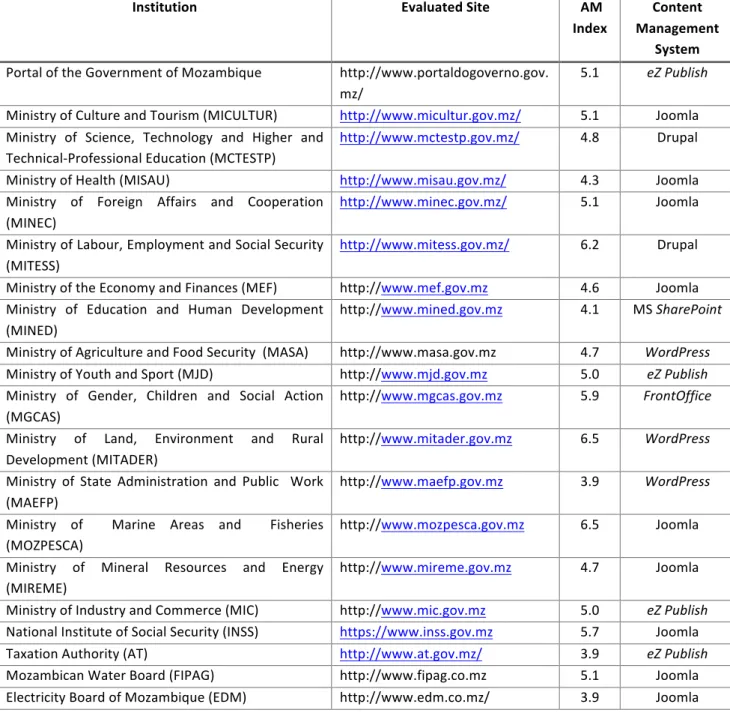
A preliminary report was done on each site by using AcessMonitor with the objective of first measuring the level of accessibility. Table 1 presents the websites which were analyzed and presents the classified value given by Access Monitor (AM).
Table 1: Web Sites under analysis
Institution Evaluated Site AM
Index Content Management System Portal of the Government of Mozambique http://www.portaldogoverno.gov. mz/ 5.1 eZ Publish
Ministry of Culture and Tourism (MICULTUR) http://www.micultur.gov.mz/ 5.1 Joomla
Ministry of Science, Technology and Higher and Technical-Professional Education (MCTESTP)
http://www.mctestp.gov.mz/ 4.8 Drupal
Ministry of Health (MISAU) http://www.misau.gov.mz/ 4.3 Joomla
Ministry of Foreign Affairs and Cooperation (MINEC)
http://www.minec.gov.mz/ 5.1 Joomla
Ministry of Labour, Employment and Social Security (MITESS)
http://www.mitess.gov.mz/ 6.2 Drupal
Ministry of the Economy and Finances (MEF) http://www.mef.gov.mz 4.6 Joomla
Ministry of Education and Human Development (MINED)
http://www.mined.gov.mz 4.1 MS SharePoint
Ministry of Agriculture and Food Security (MASA) http://www.masa.gov.mz 4.7 WordPress
Ministry of Youth and Sport (MJD) http://www.mjd.gov.mz 5.0 eZ Publish
Ministry of Gender, Children and Social Action (MGCAS)
http://www.mgcas.gov.mz 5.9 FrontOffice
Ministry of Land, Environment and Rural Development (MITADER)
http://www.mitader.gov.mz 6.5 WordPress
Ministry of State Administration and Public Work (MAEFP)
http://www.maefp.gov.mz 3.9 WordPress
Ministry of Marine Areas and Fisheries (MOZPESCA)
http://www.mozpesca.gov.mz 6.5 Joomla
Ministry of Mineral Resources and Energy (MIREME)
http://www.mireme.gov.mz 4.7 Joomla
Ministry of Industry and Commerce (MIC) http://www.mic.gov.mz 5.0 eZ Publish
National Institute of Social Security (INSS) https://www.inss.gov.mz 5.7 Joomla
Taxation Authority (AT) http://www.at.gov.mz/ 3.9 eZ Publish
Mozambican Water Board (FIPAG) http://www.fipag.co.mz 5.1 Joomla
Electricity Board of Mozambique (EDM) http://www.edm.co.mz/ 3.9 Joomla
The results in Table 1 show that none of the websites under analysis are able to reach the value of 10 or approximate and reveal a lack of conformity regarding the fulfillment of the accessibility criteria defined in the WCAG 2.0 of the W3C (Fernandes & Cardoso, 2013).
Graph 1 shows the histograms of the percentages of the scores based on the AccessMonitor (AM) index presented in Table 1.
Graph 1: Percentage distribution of the AccessMonitor index
It is observed that of the twenty two web sites, 46% (10 sites) do not reach Value 5 of the AM index and 82% (18 sites) do not reach Value 6.
One of the causes of these “negative” values is the use of Content Management System (CMS) to create all the sites under analysis, as shown in Table 1. The CMS is responsible for generating most of the HTML code on a page and this influences the level of accessibility. Without particular attention from the person in charge of the website, the CMS can limit the accessibility of the website, for example, with the use and abuse of Javascript and Ajax (Andrade, 2017). After the initial analysis made with AcessMonitor, a more in-depth analysis was made with SortSite that allows detailing the errors by typology (A, AA and AAA).
Graph 2: Number of errors per site and priority level - WCAG guidelines
According to W3C (2008b) accessibility levels (A, AA, AAA) are reached when a web site meets the following criteria:
• Level A - zero errors related to type A;
• Level AA - have level A and zero errors related to type AA;
• AAA level - having AA level and zero errors related to AAA typology;
Graph 2 shows that out of the twenty-two sites, none of them fully meets the criteria because there are constant errors of all types (A, AA and AAA). From the perspective of W3C, none of the web sites can claim to be accessible, even at the lowest level of A (W3C, 2008b).
Failure to meet accessibility criteria can often prevent people with disabilities from being able to access information in the way it was planned (Ponte, Salvatori, & Sonza, 2012).
It should be noted that for Schmutz et al. (2017), a low accessibility also leads to a low usability of the website, which will compromise and hinder access to services and information for all users, delegitimizing the goverment website which should have as main objective to provide e-quality government services (Mateus, 2008).
The website with the highest number of errors refers to the Ministry of Education and Human Development (MINED) and the website with the fewest errors refers to the Ministry of Labor, Employment and Social Security (MITESS).
Table 2 shows the errors of the most frequent WCAG guidelines found in the analysis of the sites with the PowerMapper SortSite software. For each type of error, the error code, type, description and percentage of presence on the websites are available.
Table 2: Main types of errors in the WCAG guidelines found on the websites
Error code Type Description (W3C, 2008b) Percentage on
websites 3.2.5 AAA Change on Request: changes of context, such as the opening of new windows, should be made only at the user's request and not automatically. . 100%
4.1.2 A Name, Function, Value: for all components of the user
interface: the name and function can be programmatically determined; the states, properties and values that can be defined by the user can be programmatically defined; and notification of changes to these items is available to user agents, including assistive technologies. 95,5% 2.4.6 AA Headings and Labels: headers and labels should describe the topic or purpose. . 90,9%
2.4.9 AAA Link Purpose (Link Only): Information is available to allow the purpose of each link to be identified from the link text only.
90,9%
1.3.1 A Information and Relationships: the information, structure
and relationships transmitted through presentation can be determined programmatically or are available in the text.
2.4.2 A Title Page: Web pages have titles that describe the topic or
purpose
77,3%
4.1.1 A Analysis: in the content implemented using markup
languages, the elements have complete start and end marks; the elements are fitted according to the respective specifications; elements do not contain duplicate attributes and all IDs are unique, except where specifications allow for these characteristics 72.7% 1.1.1 A Non-Textual Content: all non-textual content, such as image, video, audios, multimedia, must have a text alternative that presents itself with the same information. 68,2% 1.4.6 AAA Contrast (improved): the visual presentation of text and text images have a contrast ratio of at least 7: 1 54,5% 1.4.4 AA Resize text: Except for captions and text images, text can be
resized without assistive technology up to 200 percent without losing content or functionality 50% 2.4.1 A Ignore Blocks: A mechanism is available to ignore blocks of content that are repeated on multiple web pages. 45,5% As can be seen, the error 3.2.5 is present on all sites under analysis and for some sites, the error is present on all pages, for example, the website of the Government Portal, of the Ministry of Culture and Tourism ( MICULTUR) and the Ministry of Agriculture and Food Security (MASA), as shown in Table 3. For the Portal do Governo website, the error is found in the "Useful links" menu at the top of the page, and below in the "Follow us on social networks" menu. The purpose of criterion 3.2.5 is to provide users with complete control of changes in context (W3C, 2008a), in contrast to opening new windows without warning which can create problems with reading systems for visually impaired users, the Technology Support (TA) and also on mobile phones. Some screen readers and mobile devices do not indicate that a new window has been opened. One of the solutions is to add the title attribute to the HTML element of link “A” with a text that informs you that the content will be opened in a new window. The second most frequent error is 4.1.2, which is also present on all pages on the Government Portal websites. This error is linked to the lack of tags in the control of HTML forms and in the case of the Portal do Governo website it is present in the request form of the email to receive news or updates. The purpose of this criterion is that the TA can control the status of the various forms controls (W3C, 2008c) and the solution is to add an HTML label element.
Code error 2.4.6 is similar to the previous one. It consists of the lack of the LABEL element or its incorrect use; it must be unique in the document so as not to create conflicts in the reading systems. Code error 2.4.9, as for error 3.2.5, is an incorrect use or the lack of the assigned title in the HTML element of the link that creates problems for TA. Looking at table 2, it can be deduced that in addition to the first four errors presented, all the most frequent error codes are linked to problems in the use of TA. Thinking about users with total or partial visual impairment (blind and partially sighted), it is essential that clear and objective descriptions of all non-textual elements are always present (Ponte et al., 2012). Without that, that universality is lost, which for Tim Berners-Lee is fundamental on the WEB (HORIZONTE and FERRAZ, 2013). Via table 3, it is possible to observe the distribution of the most frequent errors on the websites under analysis. Table 3: Demonstration of the amount of each error per site
Error Code WCAG
Sites 1.1.1 1.3.1 1.4.4 1.4.6 2.4.1 2.4.2 2.4.6 2.4.9 3.2.5 4.1.1 4.1.2 PG 1 72 0 1 1 0 1 72 72 18 72 MICULTUR 0 0 2 2 0 0 49 49 11 9 52 MCTESTP 13 8 0 1 0 18 6 5 33 0 0 MISAU 64 65 72 0 0 1 66 8 64 0 64 MINEC 1 14 70 2 0 0 46 4 60 16 64 MITESS 0 3 0 0 0 0 59 60 1 10 59 MDN 0 1 3 1 0 35 0 1 60 10 0 MINT 84 84 0 1 0 13 84 84 84 8 2 MEF 40 49 49 0 0 16 49 0 49 0 49 MINED 2 78 9 0 0 20 78 28 77 27 2 MASA 3 8 0 67 5 2 52 3 67 19 71 MJD 0 53 2 1 1 2 3 53 53 15 53 MGCAS 5 68 0 1 5 42 0 0 85 5 68 MITADER 1 6 56 0 1 3 22 30 5 4 60 MAEFP 2 0 53 43 1 2 34 40 40 0 32 MOZPESCA 2 46 0 0 2 0 48 1 48 13 46 MIREME 0 0 19 0 19 48 19 2 9 8 6 MIC 0 56 0 1 1 1 4 3 56 16 55 INSS 0 14 1 0 0 10 8 58 58 0 15 AT 60 9 0 0 0 5 6 86 87 10 1 FIPAG 15 2 0 1 48 1 48 12 48 14 48 EDM 72 72 0 0 0 12 72 71 72 0 72
Finally, special attention is drawn to code error 1.4.6, present in 50% of the sites, which refers to the contrast between the color of the text and the background.
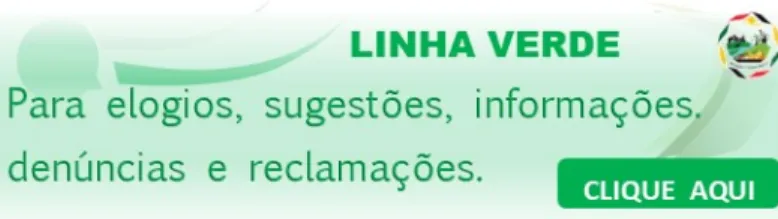
This error is often due to the website's graphic choices, which if not properly managed, negatively influence the entire website, such as the Ministry of Agriculture and Food Security (MASA) website, which often uses green as a background and other shades similar in the text.
Figure 1: Example of code 1.4.6 error
The image in Figure 1, has a contrast level of 1.4: 1 when the minimum contrast should be 7: 1 (W3C, 2008b).
Thinking about users with low vision, it is necessary to use a good contrast between the background and the foreground, so that they can read the information easily and without the risk of failures (Ponte et al., 2012).
Another important aspect with the images is that the description must always be present and must be neutral and without spelling errors (Ponte et al., 2012). This concern is linked to error 1.1.1, which, as illustrated in Table 2, is present in 68.2% of web sites.
Based on the analysis of the results collected in this study, some suggestions were identified with the aim of increasing accessibility and, consequently, improving the experience of using citizens, namely:
• Use of the most updated version of the CMS, with a template that certifies that it is accessible; • Web designers must know and consider the latest WCAG guidelines;
• All pages must have a title appropriate or compatible with the overall semantics of the text; • Creation of a structure with hierarchical titles;
• Formatting the menus as unordered lists; • In forms, associate labels to the editing fields; • Identification of the headings of the data tables;
• Subtitling of all links with the description of its action; • Subtitling of all images and multimedia content;
• Limiting the use of texts in images and when subtitling images with the same texts and checking the contrasts of the colors of the texts with the backgrounds;
• Use of sizes related to texts that adapt to all screens;
Conclusions
The theme of accessibility of Web content has been the subject of worldwide attention by several reference entities, such as the W3C consortium, which in 1999 presented the first version of Web Content Accessibility Guidelines 1.0. During the survey period, version 2.0 that was released in December 2008 was available. The latest version at 2.1 was published in June 2018.
The main objective of accessibility is to help people with disabilities to use the web efficiently and to allow them to have access to services and information on an equal basis with other citizens.
The purpose of this study was to verify the level of accessibility on Mozambican e-government websites. The results indicate that no website meets the W3C accessibility criteria completely. The various analysis tools showed that 100% of the sites do not exceed the most basic level of A. Regarding the analysis of errors, it is evident that the most frequent ones are linked to problems in the use of Assisted Technologies or access by people with total or partial visual impairment. The risk is that these people will be deprived of a very important right, which is access to any and all types of information. It is important and necessary to remember that an e-goverment site should always allow all its visitors, including those with any special needs, to have access to all information and resources and at the same time to interact in a simple way.
It is evident that the importance of Web Content Accessibility Guidelines is not limited to access for users with disabilities, but there is a link directly proportional to usability that can lead to a better or worse experience for any user when accessing an e-government web site
The scenario presented shows the need for greater attention, on the part of the government of Mozambique in the development of e-government websites. The current Government Informatics Policy, enacted through Resolution No. 28/2000, December 12 (Council of Ministers, 2000), does not regulate the accessibility of public web sites.
In the hope of legislation that regulates the accessibility and applicability of WCAG, it is advisable to take some actions that raise awareness of the real need to use these guidelines. As presented in the suggestions in the last chapter, most errors are easy to solve, such as adding a correct caption to the image and links. This alone will improve the accessibility of web sites. The study was based mainly on data obtained from the analysis with automatic tools. Therefore, it is proposed to conduct a survey with users with special needs, to assess the difficulties in accessing digital content.
References
Ali, S., AlBalushi, T., & AlBadi, A. (2017). Guidelines and Deployment of Accessibility-Aware Framework Approach. International Journal of Web Information Systems, 13(2), 114–139. http://doi.org/10.1108/IJWIS-08-2016-0043
Alonso, F., Fuertes, J. L., González, Á. L., & Martínez, L. (2010). On the testability of WCAG 2.0 for beginners. Proceedings of the 2010 International Cross Disciplinary Conference on
Web Accessibility (W4A) - W4A ’10, 1. http://doi.org/10.1145/1805986.1806000
Andrade, W. (2017). A questão da acessibilidade para os CMS. Obtido 28 de Maio de 2019, de https://fatorw.com.br/cms-acessivel/
COMISSÃO EUROPEIA. (2010). Estratégia Europeia para a Deficiência 2010-2020:
Compromisso renovado a favor de uma Europa sem barreiras. Bruxelas.
Conselho de Ministros. (2000). Resolução no 28/2000. Política de Informática. Maputo, Moçambique: Imprensa Nacional de Moçambique: 3o Suplemento do Boletim da República,
I Série – Número 49.
Dominguinhos, N. R. F. (2016). Plataforma e-Learning da Escola Superior de Tecnologia da
Saúde de Lisboa e Hospital de Faro: Análise da Acessibilidade Web, da Arquitetura de Informação e Usabilidade. Dissertação de mestrado, Universidade de Lisboa, Faculdade de
Ciências, Lisboa, Portugal.
Fernandes, J., & Cardoso, C. C. (2013). Estudo sobre o estado da Acessibilidade dos sítios Web
dos Estabelecimentos de Ensino Superior. Lisboa, Portugal. Obtido de
http://www.acessibilidade.gov.pt/estudos/2013_ensinosuperior/es2013.html
Fundação para a Ciência e a Tecnologia. (2012). AccessMonitor: o que é? Obtido 3 de Maio de 2018, de http://www.acessibilidade.gov.pt/accessmonitor/nota_tecnica.html
Godoy, L. De, Ferreira, M. G. G., & Cinelli, M. J. (2019). Usabilidade e acessibilidade: heurísticas de usabilidade em projetos destinados a pessoas com deficiência. Projetica,
10(1), 9. http://doi.org/10.5433/2236-2207.2019v10n1p9
Gonçalves, R., Bandeira, J. L., Pereira, J., & Peixoto, C. (2015). AcessWeb – Uma Perspetiva Sobre a Acessibilidade Web em Portugal. Revista de Ciências da Computação, (March 2016). Obtido de https://www.researchgate.net/publication/296639477
Ignácio, E. A., & Carvalho, J. O. F. de. (2008). Avaliaçao da Acessibilidade de Sites Oficiais de Pesquisa no Brasil por pessoas com deficiência. Revista eletrônica de biblioteconomia e
ciência da informação, 13(26).
José, M. L. (2014). GOVERNO ELECTRÓNICO DE MOÇAMBIQUE: Uma Análise do Grau de
Implementação. Dissertação de mestrado, Universidade Eduardo Mondlane, Faculdade de
Letras e Ciências Sociais, Maputo, Moçambique.
Maia, L. S., Turine, M. A. S., Sandim, H. da C., & Paiva, D. M. B. (2010). Um Modelo para o Desenvolvimento de Aplicações Web Acessíveis. WebMedia - XVI Brazilian Symposium on
Multimedia and the Web, 235–242.
Mauricio, J. L., & Dalmolin, L. C. (2008). ACESSIBILIDADE NA WEB : Avaliação de
Acessibilidade dos Sites Municipais do Alto Vale do Itajaí. Bela Vista, Brasil. Obtido de
http://www.ceavi.udesc.br/arquivos/id_submenu/787/jose_luis_mauricio___acessibilidade_ na_web__avaliacao_de_acessibilidade_dos_sites_municipais_do_alto_vale_do_itajai.pdf Organização das Nações Unidas. (2006). Convenção sobre os direitos das Pessoas com
Deficiência. Obtido de
http://www.inr.pt/uploads/docs/direitosfundamentais/convencao/ConvTxtOfPort.pdf
Parlamento Europeu. (2016). DIRETIVA (UE) 2016/2102. Jornal Oficial da União Europeia,
2014(2), 1–15.
Parlamento Italiano. (2004). Lei n.4 Disposizioni per favorire l’accesso dei soggetti disabili agli strumenti informatici de 9 janeiro 2004. Rome, Itália: Gazzetta Ufficiale. Obtido de http://www.camera.it/parlam/leggi/04004l.htm
Ponte, M. D., Salvatori, T., & Sonza, A. P. (2012). Material digital acessível para deficientes visuais: ampliando o acesso à informação. Revista Benjamin Constant, 53. Obtido de http://revista.ibc.gov.br/index.php/BC/article/view/393
Power, C., Freire, A. P., & Petrie, H. (2009). Integrating Accessibility Evaluation into Web Engineering Processes. IJITWE, 4, 54–77. http://doi.org/10.4018/jitwe.2009100104
PowerMapper. (2018). SortSite Desktop. Obtido 3 de Maio de 2018, de https://www.powermapper.com/products/sortsite/
Rodrigues, S. S. (2013). Estudo sobre a acessibilidade do portal de uma instituição de Ensino
Superior. Monografia, Universidade Federal de Lavras, Lavras, Brasil.
Schmutz, S., Sonderegger, A., & Sauer, J. (2017). Implementing Recommendations From Web Accessibility Guidelines: A Comparative Study of Nondisabled Users and Users With Visual Impairments. Human Factors The Journal of the Human Factors and Ergonomics
Society, 59(3), 956–972. http://doi.org/10.1177/0018720817708397
The Paciello Goup. (2018). Colour Contrast Analyser. Obtido 5 de Maio de 2018, de https://developer.paciellogroup.com/resources/contrastanalyser/
http://www.acessibilidade.gov.pt/w3/TR/UNDERSTANDING-WCAG20/consistent-behavior-no-extreme-changes-context.html
W3C. (2008b). Directrizes de Acessibilidade para o Conteúdo da Web (WCAG) 2.0. Obtido 23 de Março de 2018, de http://www.acessibilidade.gov.pt/w3/TR/WCAG20/
W3C. (2008c). Nome, Função, Valor: Noções sobre o CS 4.1.2. Obtido 20 de Julho de 2018, de http://www.acessibilidade.gov.pt/w3/TR/UNDERSTANDING-WCAG20/ensure-compat-rsv.html
W3C. (2018). Web Content Accessibility Guidelines (WCAG) 2.1. Obtido 1 de Agosto de 2018, de https://www.w3.org/TR/WCAG21/
W3C Brasil. (2012). Cartilha de Acessibilidade na Web do W3C Brasil – Fascículo I – Introdução. Sao Paulo, Brasil: W3C Brasil. Obtido de http://www.w3c.br/pub/Materiais/PublicacoesW3C/cartilha-w3cbr-acessibilidade-web-fasciculo-I.html