Physical Rehabilitation based on Kinect Serious
Games-ThG Therapy Game
Diogo Veiga Ferreira
Supervisor: Professor Octavian Adrian Postolache
ISCTE-IUL
Co-Supervisor(a):
Professor Raúl Oliveira
Abstract
This thesis presents a serious game platform developed using Unity 3D game Engine and Kinect V2 sensor as a natural user interface. The aim of this work was to provide a tool for objective evaluation of patients’ movements during physiotherapy sessions as well as a pleasant way that may increase patient engagement on training motor rehabilitation exercises.
The developed platform based on Kinect V2 sensor detects 3D motion of different body joints and provides data storage capability in a remote database. The platform for patient’s data management during physiotherapy process includes biometric data, some data relevant for physiotherapist related to patient’s clinical history, obtained scores during serious game based training and values of metrics such as the distance between feet during a game, left and right feet usage frequency and execution time for imposed movement associated with game mechanics. A description of technologies and techniques used for development of the platform and some results related to usability of the platform are presented in this thesis.
Keywords: objective physiotherapy evaluation, Kinect sensor, serious game, limbs rehabilitation, virtual reality.
Resumo
Esta tese apresenta uma plataforma de jogo séria desenvolvida usando o motor de jogo Unity 3D juntamente com o sensor Kinect V2 como uma interface natural de utilizador. O objetivo deste trabalho foi fornecer uma ferramenta para avaliação objetiva dos movi-mentos dos pacientes durante as sessões de fisioterapia, bem como uma maneira agradá-vel que possa aumentar o envolvimento do paciente nos treinos de reabilitação motora. A plataforma desenvolvida baseada no sensor Kinect V2 deteta o movimento 3D de dife-rentes articulações do corpo e fornece capacidade de armazenamento de dados em uma base de dados remota. A plataforma que gere só dados do paciente durante o processo de fisioterapia inclui dados biométricos, alguns dados relevantes para fisioterapeuta relacio-nados com o historial clínico do paciente, pontuações durante o treino e valores de métri-cas, como a distância entre os pés durante o jogo, o uso do pé esquerdo e direito, frequên-cia e tempo de execução do movimento assofrequên-ciado à mecânica do jogo. A tese apresenta a descrição das tecnologias e técnicas utilizadas para o desenvolvimento da plataforma, e alguns resultados relacionados com o uso da plataforma.
Acknowledgements
I would like to thank Professor Octavian Postolache for all the hard work in providing all the necessary conditions/materials and ideas for the realization of this thesis. Also, I like to thank to Professor Raul Oliveira for showing interest in the project and for providing feedback related to ideas presented.
Contents
Abstract ... 2
Resumo ... 3
Figures ... 7
Acronyms and abbreviations ... 9
1 Introduction... 1 1.1 Motivation ... 2 2 Related Works ... 4 2.1 Serious Games ... 4 2.2 Wii sensing ... 5 2.3 Kinect ... 6 2.3.1 Kinect tests ... 6 2.4 Smartphones ... 7
2.4.1 Android Mobile Applications ... 8
3.1 Kinect sensor ... 8
3.2 Game Engine ... 10
3.3 Tests ... 12
3.4 The Game Environment ... 13
3.4.1 First Scene – Initializer ... 13
3.4.2 Second Scene – Menu (UI) ... 13
3.4.3 Gaming Scenes ... 14 3.4.4 Game Feedback ... 27 3.5 Conclusions ... 28 4 Database ... 28 4.1 Database Management ... 28 4.2 Database Structure ... 29 4.2.1 Users Data ... 29 4.2.2 Game Data ... 30 4.3 Conclusions ... 31
5 Scripting and Connections ... 32
5.1 Conclusions ... 37
6 Mobile Application ... 38
6.1 Structure ... 38
6.3 Graphs ... 43
6.4 Conclusion ... 44
7 Results ... 45
7.1 Step the Tile ... 45
7.2 Leaning Game ... 47
7.3 Infinite Runner ... 48
7.4 Hit Wall ... 48
7.5 Usability Tests ... 50
8 Conclusion and Future Work ... 52
8.1 Conclusion ... 52
8.2 Future Work ... 52
9 References ... 53
Appendices ... 58
Appendix – Application Manual ... 58
Appendix B – Game Application Manual ... 67
Figures
FIGURE 1.KINECT V2SENSOR CHARACTERISTICS ... 9
FIGURE 2.KINECT V2 JOINT MAP ... 10
FIGURE 3.KINECT V2FIELD VIEW REPRESENTATION ... 10
FIGURE 4.UNITY LOGO ... 10
FIGURE 5.UNITY LOGO ... 10
FIGURE 6.UNITY WORK INTERFACE ... 11
FIGURE 7.KINECT V2 AVATAR TEST CONTROL ... 12
FIGURE 8.GAME APPLICATION LOGIN MENU ... 13
FIGURE 9.ADMIN PERMISSIONS FLOW CHART ... 14
FIGURE 10.PATIENT PERMISSIONS FLOW CHART ... 14
FIGURE 11.THERAPIST PERMISSIONS FLOW CHART ... 14
FIGURE 12.GAME APPLICATION REGISTER INTERFACE ... 14
FIGURE 13.LEANING GAME CUSTOMIZATION INTERFACE ... 16
FIGURE 14.LEANING GAME PLAY SCENE ... 16
FIGURE 15.LEANING GAME FLOW CHART ... 17
FIGURE 16.CODE PART REPRESENTING LEANING LEFT GESTURE ... 18
FIGURE 17.REPRESENTATION OF VECTORS THROUGH WHERE LEAN ANGLES ARE CALCULATED ... 18
FIGURE 18.STEP THE TILE PLAY INTERFACE ... 19
FIGURE 19.STEP THE TILE FLOW CHART ... 20
FIGURE 20.VECTORS USED THE LEG ANGLES ARE CALCULATED ... 20
FIGURE 21.CODE PART REPRESENTING ANGLE CALCULATION ... 21
FIGURE 22.CODE PART REPRESENTING DISTANCE CALCULATION ... 21
FIGURE 23.CODE PART REPRESENTING VELOCITY CALCULATION ... 21
FIGURE 24.INFINITE RUNNER PLAY INTERFACE ... 22
FIGURE 25.INFINITE RUNNER FLOW CHART ... 23
FIGURE 26.PERSON KINECT V2 JOINT DISPLAY ... 23
FIGURE 27.CODE PART REPRESENTING LEFT ARM ANGLE CALCULATION ... 24
FIGURE 28.CODE PART REPRESENTING RIGHT ARM ANGLE CALCULATION ... 24
FIGURE 29.CREATE HIT MAP INTERFACE ... 25
FIGURE 30.HIT GAME FLOW CHART ... 25
FIGURE 31.MAP PATH DISPLAY ... 26
FIGURE 32.CODE PART REGARDING PLAYER POSITIONS ... 26
FIGURE 33.CODE PART FOR PATH DISPLAY ... 27
FIGURE 34.CODE PART FOR PATH DISTANCE CALCULATION ... 27
FIGURE 35.CODE PART FOR PLAYER VELOCITY ... 27
FIGURE 36.USER DATA MODEL... 30
FIGURE 37.GAME DATA MODEL ... 31
FIGURE 38.GAME AND MOBILE APPLICATION CONNECTION FLOW CHART ... 32
FIGURE 39.PHP SCRIPT TO INSERT NEW PATIENT ... 33
FIGURE 40.PHP SCRIPT TO INSERT STEP THE TILE GAME DATA ... 34
FIGURE 41.PHP SCRIPT TO RETRIEVE PATIENT INFORMATION ... 34
FIGURE 42.PHP SCRIPT TO DELETE USER FROM DATABASE ... 35
FIGURE 43.STRING ADDRESS URL FOR INSERT USER PHP SCRIPT ... 35
FIGURE 44.UNITY CODE PART FOR REGISTER PATIENT IN THE DATABASE... 36
FIGURE 45.CODE PART FROM ANDROID STUDIO FOR PATIENT DATA RETRIEVAL... 36
FIGURE 46.MOBILE APPLICATION FLOW CHART... 39
FIGURE 47.MOBILE APPLICATION LOGIN INTERFACE ... 40
FIGURE 48.USER AREA INTERFACE ... 40
FIGURE 49.PLAN INFO INTERFACE ... 41
FIGURE 50.GAMES STATS INTERFACE... 42
FIGURE 51.STEP THE TILE GAME DATA INTERFACE ... 42
FIGURE 52.STEP THE TILE GRAPH INTERFACE ... 43
FIGURE 53.HIT GRAPH INTERFACE ... 43
FIGURE 55.ANGLE PER STEP GRAPH ... 46
FIGURE 56.STEP DISTANCE PER STEP GRAPH ... 46
FIGURE 57.STEP VELOCITY PER STEP ... 46
FIGURE 58.LEANING LEFT/RIGH GRAPH INTERFACE ... 47
FIGURE 59.INFINITE RUNNER ANGLE PER OBJECT CAUGHT GRAPH ... 48
FIGURE 60.GAME PATH IMAGE DISPLAY ... 49
FIGURE 61.VELOCITY PER GAME TIME GRAPH ... 49
FIGURE 62.PATH TRAVELLED DISTANCE ... 49
FIGURE 63.MOBILE APPLICATION LOGIN INTERFACE ... 58
FIGURE 64.USER AREA INTERFACE ... 59
FIGURE 65.PATIENT PROFILE INTERFACE ... 60
FIGURE 66.PATIENT PLAN LIST INTERFACE ... 60
FIGURE 67.THERAPIST CREATE PLAN INTERFACE... 61
FIGURE 68.GAME STATS INTERFACE ... 62
FIGURE 69.STEP HORIZONTAL GRAPH INTERFACE... 63
FIGURE 70.STEP HORIZONTAL GAME STATS INTERFACE... 63
FIGURE 71.INFINITE RUNNER GRAPH INTERFACE ... 64
FIGURE 72.INFINITE RUNNER GAME STATS INTERFACE ... 64
FIGURE 74.LEANING GAME STATS INTERFACE ... 65
FIGURE 73.LEANING GRAPH INTERFACE ... 65
FIGURE 76.HIT WALL GAME STATS INTERFACE ... 66
FIGURE 75.HIT WALL GRAPH INTERFACE ... 66
FIGURE 77.UNITY GAME LOGIN PANEL ... 67
FIGURE 78.ADMIN MENU PANEL ... 68
FIGURE 79.REGISTER THERAPIST PANEL ... 69
FIGURE 80.REGISTER PATIENT PANEL ... ERROR! BOOKMARK NOT DEFINED. FIGURE 81.THERAPIST MENU PANEL ... 70
FIGURE 82.GAME STATS PANEL ... 71
FIGURE 83.GAME FOCUS PANEL ... 71
FIGURE 84.LOWER LIMB GAME PANEL ... 72
FIGURE 85.SUPERIOR LIMB GAME PANEL ... 73
FIGURE 86.STEP THE TILE CUSTOMIZATION PANEL ... 74
FIGURE 87.STEP THE TILE HORIZONTAL GAME SCENE ... 75
FIGURE 88.STEP THE TILE VERTICAL GAME SCENE ... 75
FIGURE 89.LEANING CUSTOMIZATION PANEL ... 76
FIGURE 90.LEANING GAME SCENE ... 77
FIGURE 91.INFINITE RUNNER CUSTOMIZATION PANEL ... 77
FIGURE 92.INFINITE RUNNER GAME SCENE ... 78
FIGURE 93.HIT WALL CUSTOMIZATION PANEL ... 79
FIGURE 94.HIT WALL GAME SCENE ... 80
FIGURE 95.CREATE HIT MAP SCENE ... 81
FIGURE 96.OTHER MALE CHARACTER ... 82
FIGURE 97.FEMALE CHARACTER ... 82
FIGURE 98.MALE CHARACTER ... 82
FIGURE 99.CHOSE CHARACTER SCENE ... 82
FIGURE 100.WIN MENU PANEL ... 83
FIGURE 101.GAME OVER MENU PANEL ... 83
FIGURE 102.PAUSE MENU PANEL ... 83
Acronyms and abbreviations
DBMS - Database management system SDK – Software Development Kit VR – Virtual Reality
HIT - Health Information Technology OS – Operating System
3D – three dimensions
eCAALYS - Enhanced Complete Ambient Assisted Living Experiment IT - Information Technology
GPS – Global Portuguese Scientists IR- InfraRed
RGB – Red blue green UI – User Interface 2D – two dimensions
MS-SDK – Microsoft Software Development Kit QR code – Quick Response code
RDBMS – Relational Database Management System MySQL – My Structured Query Language
1 Physiotherapy (in Europe) or physical therapy (terminology used outside Europe) has an important role in rehabilitation of different types of musculoskeletal or neuromuscular impairments (e.g. those resulted from accidents or stroke). The physiotherapists also are assuming leadership roles on health maintenance, wellness, and fitness of their patients. To increase the effectiveness of physiotherapy sessions, physiotherapists tend to engage their patients by helping them knowing their physical condition but also providing them feedback on rehabilitation process by using measurements instruments for body functions (e.g. body segments movements). Electronic devices can store data and compare with historical data, for evaluation of the patient motion capabilities [1] or to predict future motor behavior.
The physical rehabilitation process for patients who suffered stroke events, is characterized by a long period of physical training and is associated with high costs for patients and society. The rehabilitation is strongly dependent to the frequency and effectiveness of the physical rehabilitation sessions, and in these conditions the remote physiotherapy by self-training at home represents a complementary and successful solution, that contributes for reduction of the rehabilitation period.
Training based on classical rehabilitation processes always require professional supervision and the use of equipment for therapy that doesn’t provide any type of information regarding the rehabilitation process [2]. In the last decade the physiotherapists’ community and the users of physiotherapy services have increased interest for novel solutions that apply information technologies in the physical rehabilitation field. Firstly proposed in 2002 [3] has nowadays many definitions, but as different authors refer to this as the usage of computer games for purpose other than pure entertainment, actually represent the common accepted definition for serious games. Latest developments in the serious games field are expressed by the serious game for therapy (Theragames) that are reported in the literature, including Kinect Theragames refers to the usage of the Kinect sensor [4][5].
This type of game developments is linked to Kinect 3D sensor release in 2010 and also of the Software Development Kit (SDK) in 2011. A boom on serious game based on natural user interface by capturing human motion in a non-intrusive way took place, with many contributions in all kinds of areas. Kinect v2 that was release in 2015 is reported
2 having high accuracy in human body detection. The use of Kinect v2 as a natural user interface for physical rehabilitation scenarios, provide data related to patient joints position that can be analyzed in correlation with the applied rehabilitation game. The Kinect based games can provide training localization flexibility - the patients may train at home or at the physiotherapy institution - and may contribute to reduce the physiotherapists’ efforts, and to extend the capability to follow their patients everywhere by recurring to mobile applications connected to Kinect serious game frameworks [6]. Other benefit of this technology is the capability to increase the user motivation during the rehabilitation process based on more innovative and enjoyable trainings [7].
In this work, the Unity 3D game engine was used to develop different virtual reality scenarios adapted to different types of patients. The interaction with the implemented VR environment is based on the use of the Kinect v2 motion sensing sensor that allows to track the patients’ motion, and to use the patient detected motion as game action.
The virtual reality scenarios presented in the literature provides the possibility to the user under rehabilitation to make exercises that work by imitation of the action performed by an avatar, or to play a game that will train specific parts of the body depending on the type of rehabilitation. The data recording functionality implemented on framework level and data analysis of the stored data, the evolution of the motor capabilities of the patients can be easily analyzed by physiotherapists.
1.1 Motivation
Nowadays technology is applied to almost everything to improve or facilitate people’s lives. One great impact that it has been showing throughout the years, it’s in the medicine [8].
In motor rehabilitation is a great need for improvement and application of new technologies, so the patients can have a better and more documented progress in their sessions. The technology may bring an easier and careful way for the resolution of their problems as well as for the monitoring and attention needed by physiotherapists [9]. Physical rehabilitation is often related to stroke events. Many people are unsatisfied with the level of rehabilitation provided in the years following the stroke. Exercises are often tedious or unpleasant leading to patient’s tolerance towards the exercises to decline, with consequences in their process of recovery [10].
3 The use of Kinect not only provides adherence to treatment by adding fun and entertainment processes to rehabilitation processes but also reduces the high cost associated with traditional rehabilitation making it more accessible and affordable [11]. It is expected that with this work and research of new technologies for the physical therapy area, in this particularly case the development of serious games, will have a positive impact on the life of people that need motor rehabilitation of superior and inferior limbs, but also to provide new and better tools for the physiotherapists, so they can give services for a better and faster evolution of their patient’s well-being.
4
2 Related Works
Health information technology (HIT) it´s an application where the information is retrieved by using technology that can help and improve the patient’s treatments (e.g., providing faster rehabilitation). HIT include data storage, data retrieval, data sharing and usage of health information for the best decision making [12].
An information system was designed in this work based on mobile technology – software application for smartphone and tablet for physiotherapy process management, and serious games with natural user interface based on Kinect sensor, for physiotherapy process improvement.
2.1 Serious Games
Through the years video games have shown to be of more use than just for fun and entertainment. Studies have shown that serious games can be applied in different areas such as the military, education, and healthcare systems. Their main advantages that are related to intuitive interface, affordability, environments that cover a wide range of both educational and training applications, capacity to provide faster results on players and also instant gratification and rewards, are very important on creating a feeling of satisfaction on players [13].
In the motor rehabilitation there is a great need for improvement and application of new technologies, so the patients can have a better and more documented progress in their sessions. This will bring an easier and careful way for the resolution of their problems as well as for the monitoring of patients by physiotherapists [14].
In [15] authors test a set of commercial games with a group of therapists to identify the best game design for rehabilitation purposes. They reach the conclusion that meaningful play, where the patients actions reflect on the game results led to increase interest and motivation of patients. By challenging the patient through different sessions, and displaying instant results the patient will notice a skill increase, that lead him to take a higher challenge in the game to continue enjoy playing.
Authors in [16] discuss the impact these games might have in patients by categorizing the benefits by three criteria. The first criteria is related to effectivity and efficiency, the
5 second to social impact, physiological, psychological, and sensory motor factors, and the third is the quality of the results produced. By having these three criteria, they concluded that games can bring substantial benefits to a set of patients, however they suggest researchers to adjust and evaluate the different settings to accommodate every patient with different characteristics, as the ones defined on the second criteria in order to achieve sustainability.
Learning from games can be viewed by two types: motor or affective learning. In [17] we can identify some features that are optimal when creating a serious game play environment. Such as:
Different experiences and practices that keep challenging the learner and reinforce expertise
Continuous monitoring of progress, and use the retrieved information to diagnose performance and keep adjusting patients level of mastery
Clear goals
In [18] have shown that the use of Kinect not only provides adherence to treatment by adding fun and entertainment processes to rehabilitation processes but also reduces the high cost associated with traditional rehabilitation making it more accessible and affordable.
2.2 Wii sensing
Through the advance of technology, interactive computer gaming technology has gained more attention due to the components it provides to help in the rehabilitation process. Monitoring technologies have proven to be successful in bringing a different environment regarding the rehabilitation sessions, relieving the stress, and bringing encouragement around the patients.
The use of gaming technology such as Nintendo Wii, allows therapists to do more targeted treatments by taking advantage of the motion sensing controllers. Also, known as Wii-Hab, this approach helps patients to confront and engage their problems in a more active and enjoying way, making them more inclined to continue to do it. [19]
6 In [20] the author implements 7 stroke rehabilitation games using both webcams and Wii remotes. They attached the Wii remotes to patients’ arms to make use of the accelerometers of the Wii remotes for detection of upper limb motions.
As mentioned in [21], the Wii console and its accessories have been a very practical and helpful tool for physiotherapists, having a wide variety of games for a different set of patients. Although Wii has a great games variety, there are some limitations they bring. Authors mention that not every game is ready to accommodate a patients need, thus they experienced some lack of precision in monitoring while playing certain games, because they were mainly developed to be used by healthy users and do not take in consideration the possibility of a user with some kind of disability. The lack of metrics is also another problem described, which were proven to be insufficient to continuous patient’s evolution monitoring.
Although some Wii games give positive reports to patients and their evolution through sessions, there is a problem that still needs to be addressed, that Wii gaming technology can’t offer, which is game interaction without the need of game controllers or any type of body accessory. As mentioned in [22] the patients require a controller provided with accelerometers that are sensitive to changes of direction and speed, which allow the communication/interaction with the game.
2.3 Kinect
2.3.1 Kinect tests
Kinect device was firstly released onto the market in 2011, bringing important contributions to all kinds of areas. The device may have great impact in the physiotherapy area, allowing to capture human motion in a non-intrusive way, to adjust physiotherapy intervention to each patient need and to give them more freedom of movement during sessions.
According to [23] after some feedback and data collected from patients it was proven that this natural user interface brought an increase in motivation during rehabilitation sessions, by engaging the patients with more innovative and enjoyable sessions.
7 As mentioned in [24], after testing different Kinect-based applications with a different set of patients in different rehabilitation conditions and situations, the Kinect sensor presented a detection rate of more than 80%, not reaching 100% due to auxiliary accessories used by the patients, like wheelchairs and crutches.
Nowadays there are other kind of technologies that can quantify motion. Some of them are Leap motion and Soft Kinect.
Soft Kinect provided with gesture recognition capacity, can be applied to different areas like consumer electronics, health and fitness and serious game industries. Equipped with two types of sensors, one for near range detection, directed to hand and face tracking, between a range of 0,15 to 1 meter and other for near-far range directed to full body tracking between ranges of 1.5 and 4 meters. The drawback of this equipment comparing, is the cost, not being as affordable as the Kinect v2 sensor. [25]
Developed by a startup called Leap Motion, was designed to be included into laptops and mobile devices. This tracking sensor achieved a high popularity nowadays, mainly because of its size and accurate tracking. As Kinect and Soft Kinect, it allows the user to wireless interact with a computer by moving their segments of body in a 3D space. However, it only works for small ranges (2,54 cm to 50,4 cm) and is only able to track hands and finger joints. Regarding that, it possesses a field of view of 150 degrees. Having a higher accuracy than Kinect sensor, this sensor is more suited to use at desk range, displaying lots of possibilities like handwriting recognition, virtual keyboards and more precise hand gesture controls. [26]
2.4 Smartphones
Nowadays smartphones are increasingly viewed as handheld computers, due to their powerful capability of computing, capacious memories, large screens, and open operating systems that encourage the develop of different mobile applications related to different work areas, one of them being the healthcare. [27]
8
2.4.1 Android Mobile Applications
Android OS platform is one of three most used operating systems in mobile phones, being one of the most used, because of its virtue of being an open source system. The use of android applications to read and collect data from IT applications has been proven to be a reliable and practical tool. It allows access of data from everywhere. This may permit to the physiotherapists to have a closer following in patient’s sessions and evolution by maintaining a constant “eye” through the data collected and display on the mobile app. The eCAALYS Mobile application is being developed as part of a project named (Enhanced Complete Ambient Assisted Living Experiment) which aims at developing a remote monitoring system for older people with chronic diseases. The main functionality is to act as intermediary between wearable health sensors, used by the older patients to provide information regarding measurements obtained and the geographic location of the user via smartphone GPS. Additionally, the mobile applications were built for detection of anomalies in patients’ health such as tachycardia and signs of respiratory infections, based on established medical knowledge [28].
3 Serious game for Physical
Rehabilitation
A “serious game” also called “applied game” is a game designed for more than pure entertaining. Serving other purposes like education, scientific exploration, engineering, health care, among others. Nowadays serious games have more than one meaning. Appliances, sensors like Kinect to detect body motion without the use of wearable sensors. Connected to healthcare “Theragames” were created to address therapy games. With these advances, new approaches came up improving and enhancing the classical rehabilitation processes and their approach to patients.
3.1 Kinect sensor
Kinect known as a motion-sensing device, was developed for Microsoft Xbox 360 gaming console. A feature that stands among others, that allows the replacement of the
9 traditional game controller, is the possibility to play the game by the use of the user’s body motion, position and voice that allow interaction with the game.
The human joints are captured in unobtrusive way during the physical rehabilitation exercises using Microsoft Kinect sensor that allows the acquisition of IR (Infrared), RGB and depth image with high frame rate (30fps). Today there are currently two versions of the Kinect sensor (V1 and V2). The Infrared emitter and an Infrared depth camera (640x480 pixel for Kinect V1 and 512*424 for K.V2) allow extraction of depth information. The IR laser emitter delivers infrared light beams and the depth sensor reads back the IR beams reflected back to the sensor. An RGB camera that stores three channel data in 1280x1024 pixels resolution for Kinect V1 and 1920x1080 for K. v2.
The most recent version of the Kinect was used for this project and its sensors are represented in Figure 1.
The values of depth distance change from V1 to V2 while V1 as a maximum and minimum distance of 4 and 0.8 meters, the V2 as 4.5 meters of maximum and 0.5 of minimum depth distance (Figure 2). Kinect V2 sensors have a wider angle of view comparing to Kinect V1 making possible to come closer to the sensor and thus decreasing overall space requirements [29][30].
10 The number of joints that can be tracked is also bigger, Kinect V2 allows 25 skeleton joints (Figure 3) and Kinect V1 only 20, thus contributing to a better gesture recognition [31].
3.2 Game Engine
A game engine consists in a cross-platform game engine, mainly used to develop video games and simulations either for computers, consoles or mobile devices. There are a wide variety of game engines able to support 2D and 3D makes graphics, each one provided with different features. Some examples are, Unreal Engine 4, Unity3D and CryEngine. We opted to choose the Unity3d game engine, because of his intuitive work interface, a complete set of tools and a rapid workflow. It is also able to support multiple languages like C# and JavaScript what makes the developers work easier given the semantic similarity between the two. As mentioned before it as a very intuitive editing interface with all kinds of tools, and very powerful documentation that supports and helps the developers to have a better integration with the engine. Also, it is provided with third party solutions for Audio and Physics systems.
Figure 5.Unity Logo
Figure 3. Kinect V2 Field View Representation Figure 2. Kinect V2 joint map
11 In the asset store, there are many types of assets like objects, scripts, textures, UIs and more that can be accessed and integrated into the project, some free, some paid. Also, there is a very good community where developers can expose, and answer questions related to the projects they are developing. It also makes publishing into different platforms like mobile, PC, PS4 easy. Those were the leading factors that made us choose Unity3D [32].
The user game interface of Unity 3D can be presented in various ways, being most of the tabs represented, movable. In Figure 5 is represented a possible one. Unity Dinterface is composed by various working tabs. Represented with number one is the scene tab where the developer can deal with all sort of objects, by drag and drop them into the scene, scaling, rotating, changing textures and format (1). It also as an area where it’s possible to see the changes made in real time preview represent by the tab “Game” (2). Next to the game tab there is a Console tab where the user developer can see the errors detected in the game code and print Debub messages. A hierarchy tab is also provided, where all the scene elements are represented and can be dealt with (3).
When selecting a game element in the hierarchy or directly in the game scene, the details of that element will be presented in the Inspector tab (5), which provides information of what is attached to that object. It can vary from scripts that add certain functions, to a rigid body element that gives the object attached physic properties.
12 The user can also see and manage its project in the project tab (4) that gives the user a tree vision of the resources, scenes, sounds, scripts and other elements needed for the game development.
3.3 Tests
When starting with Unity 3D and the Microsoft Kinect sensor, the first thing to be done was to understand how to connect and interact with the Kinect sensor within the game engine. We made use of an asset available in the Unity 3D asset store named “Kinect v2 Examples with MS-SDK” [33] that facilitated the learning and integration between Kinect and Unity3D.
Figure 7.Kinect V2 avatar test control
To really understand how the Kinect and unity function together and how it get to track the human body, some examples provided by the asset acquired before were run and some avatars were added to see how accurate and reliable the user body movement was compared to the avatar controlled.
After running other examples regarding other Kinect aspects like the use of gestures to control objects, some gaming tests tutorials were made to familiarize with the unity interface and its components. These tutorials are in the unity web site under tutorials [ 33]
13
3.4 The Game Environment
3.4.1 First Scene – Initializer
After some tests made and some problems found regarding the Kinect manager, the scene was created only containing an empty Game Object named “KinectController” with a script attached named “Kinect Manager” that serves to initialize the game and turn the Kinect sensor On. This is the only game object of the game that as the Kinect Manager script attached.
3.4.2 Second Scene – Menu (UI)
This second scene is automatically opened when the first scene is Initialized, presenting the user with the Login panel as shown in the Figure 7.
The Login could be done by three types of users: Patient, Physiotherapist, and Admin. The Patient Login gives the user access to the games and his stats. Physiotherapist Login gives access to patient’s stats and games. The Admin can add new physiotherapists. Their permissions and functions within the game, are explained in figures 8 and 9.
Patient register is possible through the Login panel and should be done in presence of a physiotherapist. Physiotherapist register is only allowed upon Admin Login [Appendix B – figure 75]
14 After the information required is provided in the register panel (figure 11) a QR code is generated for each user and saved on the local host of this game, which can be used to login instead of typing the username and password credentials.
Another set of panels also composes the Menu scene [Appendix B] regarding the UI where the user can navigate and play the different games within. Before the scene games, all games must be customizable in the respective interface. Both the customization and game play will be addressed in the next section.
3.4.3 Gaming Scenes
Figure 9.Admin permissions flow
chart Figure 11. Therapist permissions flow chart Figure 10. Patient permissions flow chart
15 Each game is represent by a different scene, a different customization panel where input need to be provided by a physiotherapist or by a companion, provided with a therapist prescription/plan, in order to configure the game. After every game is played, data is collected both for the patients and therapist observation. There are two types of data the gameplay provides: Front data and back data both will be discussed in the sections following.
Before the Play button is pressed it is imperative that the patient must be in Kinect field of view, to be detected and assume control of the player.
Data
Related angle data, a first approach was trying to obtain the angle between joints by using the dot product properties formula, represented below, but after some research, simplified unity was realized by creating a function that calculates the angle between two three dimensional vectors represent by the bullet point sequence below.
𝐴𝐵
⃗⃗⃗⃗⃗ . 𝐵𝐶⃗⃗⃗⃗⃗ = ‖𝐴𝐵⃗⃗⃗⃗⃗ ‖‖𝐵𝐶⃗⃗⃗⃗⃗ ‖ cos 𝜃 ⇔ 𝜃 = cos−1( 𝐴𝐵⃗⃗⃗⃗⃗ . 𝐵𝐶⃗⃗⃗⃗⃗ ‖𝐴𝐵⃗⃗⃗⃗⃗ ‖‖𝐵𝐶⃗⃗⃗⃗⃗ ‖)
Vector3 1 = A – B Vector3 2 = B - C
Angle = Vector3.Angle(Vector 3(1), Vector 3(2)
3.4.3.1 Leaning Game
This scene regarding the Leaning game, is where the player will train their lower limbs by applying some pressure on the leg and leaning to the respective side he wants the player to move, to avoid /catch the different set of tokens.
Before playing, as mentioned before, the game needs to be customized, providing input to configure the different set of options of the game - as the ones represented on the figure 12 where (1) represents game information that may be helpful for the user and (2) the different game variables to configure the game.
16 The player of this game is represented by a “stretched cube” (3)(parallelepiped) where the patient takes control of it by leaning to the side he wants the player to move. With this, the main objective is to collect objects that give points and avoid the ones that take, to reach the established score upon customization. There are other types of objects within the game that impose challenge or help the patient during gameplay. By adding different objects, the physiotherapist may understand some cognitive capacities of the patient, observing which ones he prefers to avoid and to catch.
Figure 13. Leaning game Customization interface
17
3.4.3.1.1 Data collection
As mentioned before there are two to types of data. The front data that consists in data that can be seen by all three types of users, displayed for the patient and companions. These are the final score, input fields provided upon customization, number and name of the objects caught and win or loss of the game. These can be display on the game in stats panel or in the mobile application. The second type of data is directed only for the physiotherapist analysis and consulting. It is gathered during game, while the patient controls the player.
In this case, a script named “gesture listener” (Appendix – C) is constantly “listening” to the leaning gesture (Figure 15), every time a leaning is detected the time period of the leaning movement is saved as well as the leaning side and angle progression during that period of time.
18
Figure 16. Code part representing Leaning Left Gesture
The angles are calculated recurring to two vectors depending on the leaning side. One vector common to both sides is the z axis vector that remains static and other that goes from the hip to the shoulder as shown in Figure 16.
3.4.3.2 Step the Tile
This game was made with the aim of providing a tool for working patient’s reaction and flexibility on the lower limbs. The game is customizable to the point of challenging the patient even more, by providing different game inputs if the game does not pose challenge to the patient.
Figure 17 .Representation of vectors through where lean angles are calculated
19 Before playing the game, the physiotherapist must evaluate the patients’ movements and start with easy game inputs. While customizing the game the physiotherapist is given two options, if the patient is to perform side steps or front and back ones by selecting “Horizontal” or “Vertical” [Appendix B- Figure 83] .
On Start the patient will have control of the avatar placed in game. The avatar must be on the platform like represented in Figure 17 (1). Two types of tiles will be spawned, the green ones (2) that gives one point and the red ones that take points if stepped.
3.4.3.2.1 Data Collection
Regarding the data collected in this game, the inputs provided before gameplay and number of steps taken with each foot are also stored at the end of each game as well as the number of tiles stepped.
20
Figure 19. Step the tile flow chart
Movement can be understood by starting on the initial position with both feet inside the platform (1) doing a step and come back to the original position.
For the physiotherapist analysis the angle between legs is calculated after stepping a tile. Step distance is also calculated every time each tile is stepped, attached to movement execution time and movement velocity.
21 The formulas used to calculate equation referred before are represented as follows. Angle scripting calculations:
Distance:
Time taken to performed the movement is calculate by starting a time variable when the movement starts (when the avatar starts moving out of the platform) and finishes the movement by getting back to position.
The movement velocity is calculated by first multiplying the step distance by two in order to have the full movement distance, and divide it by time of execution as can be seen in figure 22.
Velocity calculation:
Figure 21. Code part representing angle calculation
Figure 22. Code part representing distance calculation
22
3.4.3.3 Infinite Runner
Referring to the upper body members, the game was manly made for the patient to gain flexibility and dexterity on the upper members by collecting the objects in the scene with his hands.
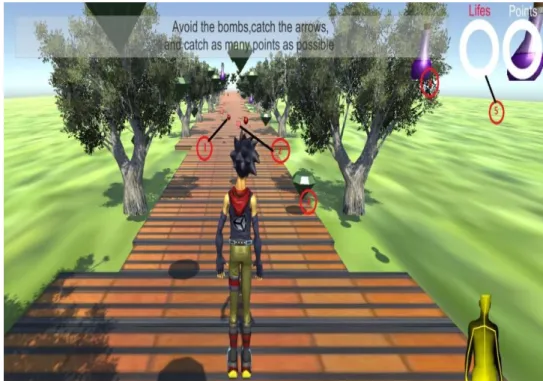
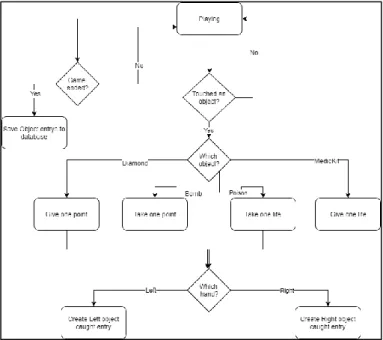
On start, the avatar controlled by the patient will move forward in the map at a certain speed defined by the therapist. The patient will have completely control of the avatar from the waist up. While moving forward the patient will have to avoid the bombs (1) objects placed on the game ground, meant to take points, and try to hit the medic Packs (2) in order to gain lives (3), to do that he will have to control the avatar by leaning to the desired side and stand straight to make the avatar move straight.
The game objective is also to reach a certain score stipulated by the physiotherapist, by gaining points, hitting the objects placed on hands reach. Score increases by hitting a diamond object (4) (gains points) that are placed on both avatar sides and top when the game starts. The player also must be aware of poison objects (5) that take lives and spawns on the same areas as the diamonds.
With this the physiotherapist can have a better notion how the cognitive part of the patient is responding according to the objects he catches during the game.
23
Figure 25. Infinite Runner flow chart
3.4.3.3.1 Data collection
The game has the same type of data for patient view as the leaning game, counting the number of objects caught.
One vector is parting from the hip joint [18,19] to shoulder joint [4,5] and the other from the shoulder joint [4,5] to the hand joint [14,15] respectively (Figure 25).
24 Moreover, as the patient collects an object with his hand, the angle when the object caught is calculated. The scripting game calculation can be seen in Figures 26 and 27, making use of two vectors depending on which side the object is caught.
Figure 27. Code part representing left arm angle calculation
Figure 28. Code part representing right arm angle calculation
3.4.3.4 Hit Wall
This game focused also on the upper limbs. It, having a set of different game scenes which correspond to four different levels for each hand, levels which were created manually. A different approach was taken where it only exists one scene, and the different maps/levels are loaded on game start from a xml file.
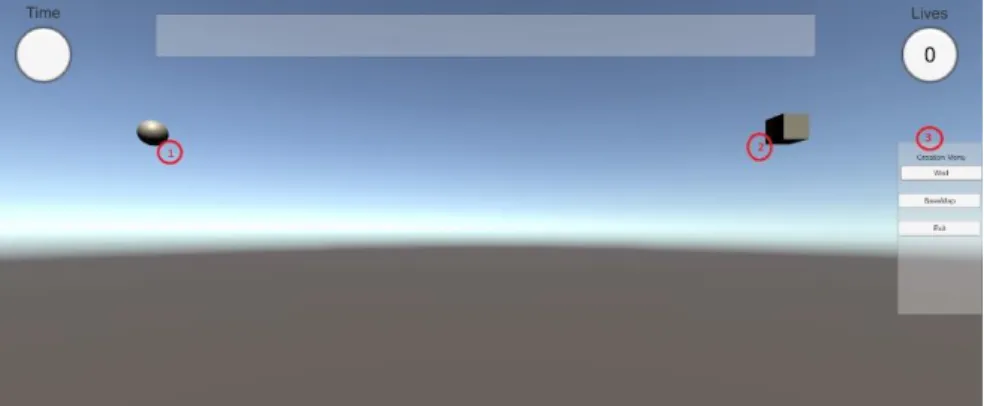
In this game we wanted to turn the game even more flexible, than just have premade levels, so in customization game window, before starting a new game, there is a possibility for the therapist to create his own map, leading to an editing window represented by Figure 28, where is possible to instantiate wall game objects to define the path. Player and finish point game objects must be placed on the desired positions to have a better space perspective. When the game map is saved, a screenshot of the map is taken, so when the map created is selected in the customization menu the map is displayed so the therapist can know which one is selecting.
25 With this, the therapist can try a wider variety of maps with different formats and definitions in order to test the patient and challenge him as he advances in his sessions. During gameplay the patient should try and simulate grabbing (1) that is represented on the canvas by controlling the pointer hand format that is connected to the patient’s hand tracked joint, and reach the finish game object (2) without touching the map walls. A life is lost each time the player touches the wall.
For better performance within the game, it’s better for the patient to have only the hand is using in Kinect field of view to avoid conflict detections of the opposite hand while controlling the object.
Figure 30. Hit game flow chart Figure 29. Create hit map interface
26 3.4.3.4.1 Data collection
In this game, the collected data the patient might consult is the time it took to complete the course and the input fields on the custom menu before play.
After the end of each game, an option appears for the physiotherapists that is named “Display map”. By clicking it, a set of dots tracing the way the patient took to complete the course are set on the screen, each dot represents each player position every frame during gameplay as seen in Figure 30.
Figure 31.Map path display
By having that, the path distance was calculated by measuring each dot to dot distance, represented in Figure 33, and sum it up. The medium velocity during the course was calculated by dividing the distance to the time taken from one dot to another.
27
3.4.4 Game Feedback
For keeping the player motivated and interested during training based on serious game, feedback actions were considered.
Thus, different elements were added, like audio and text message feedback. For each game the audio feedback varies, but the idea was to play comfortable sounds whenever, the player catches an object that gives them points, when enhances the game player or when a game is won/lost. Also, feedback is provided when the player interacts with objects that take lives or points like in the case when the user through his avatar steps a red tile in the “Step Tile” game. The message feedback, works in the same way as the sounds. Motivating messages pop up whenever the user interacts with a good object.
Figure 33. Code part for path display
Figure 34. Code part for path distance calculation
28 Figure 38 on Appendix-B is represented an example of message that might appear in the message panel.
3.5 Conclusions
The serious games may have an important role for future rehabilitation sessions. Increasing patient’s motivation and engagement in their training sessions. To be able to achieve future expectations this game must be flexible to accommodate all kinds of users and collect all type of relevant data given the patient’s condition. This data will be helpful for therapists to analyze and to give closer attention to patient’s progression. A sensing device like Kinect combined with powerful game engine tool Unity 3d give more flexibility for acquiring patient motion data.
4 Database
A database is a group of accumulated data that is typically organized and is understood as a way of modeling aspects of reality aiming to support processes requiring information. When a system that deals with large amounts of data is developed a well-defined and structured database is essential for a good functioning of the system.
4.1 Database Management
For this project we used a Database Management System (DBMS)[35], known as a special software designed for user interaction and managing databases. Its purpose is to allow users to create, retrieve, update and manage data, but essentially it serves as an interface between users or between the applications and the databases. Between the different types of DBMS, we opted to choose the relational model (RDBMS) named MySQL which is a popular choice for web-based applications.
MySQL uses a programming language designed specially to manage data held in databases.
Initially, a free integrated front-end tool named MySQL Workbench was used, which gave us the possibility of visually design, manage and create databases. It is also provided
29 with a feature that enables developers to forward and reverse engineering on database allowing to export a graphically designed database to a SQL file that can be used to replicate the database everywhere.
For the visually design part MySQL was very helpful, but due to some restraining we switched to phpMyAdmin that is a free software tool written in PHP, that as the same purpose of MySQL, which is to handle the administration of MySQL but over the web. This tool is also provided with and intuitive web interface that enable to export and import data.
4.2 Database Structure
For better understanding of the created database, the same was divided in two parts. The first type related to users namely patients and therapists, and the second type related to data collected by the Kinect sensor during game play. The database allows storing and management of data on users – patients and therapists, and data collected by the Kinect sensor during game play.
4.2.1 Users Data
Different type of users were considered thus, the first one is the admin, that is defined within the game and his only function is to register therapists in the database. The second type with the highest permissions, is the therapist, that as the right to register the patients. The patients will be associated to the therapist that registers them. Therapist can see every type of data patients can see, and are also able to interact with the system regarding certain events, like to establish training plans via android application, register patients, and delete patients profile in case they are no longer needed. The second profile is the patients, which have the lower permissions. Patients can have a different set of training plans created by their therapists. Every time the game is logged by each patient, a different session is associated to that same patient. To each session, a set of different games can be associated (Figure 35).
30
Figure 36.User data model
4.2.2 Game Data
During each session, that is provided with a time stamp when it’s created, all games the patient plays without logging out will be associated to the session in task. Thus, the therapist is able to access all patient’s data in an organized way. All sessions are also provided with an identifier. As represented in the figure below there are four possible games, which collect two types of data. The first type is related to game customization inputs before each game, objects caught, steps taken. The second type is data collected from the Kinect sensor and is used to produce more technical results, that will be collected, stored and presented in the android application for therapist viewing and analysis.
31
Figure 37.Game data model
4.3 Conclusions
To construct an organizational database system able to store all kinds of information, regarding the data collected directly, either from users input or indirectly from the Kinect sensor, an approach to accomplish that is presented. The advantages of tools like MySQL and phpMyAdmin where explained Description of data organization to facilitate future analysis and consulting is also presented.
32
5 Scripting and Connections
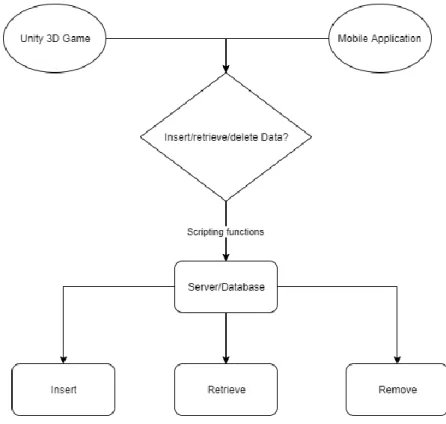
To establish connection to the server where the developed mobile application and the unity game were included and to manage the data collected, some connections and scripting had to be made both on the game side and mobile application, as is represented on the flow diagram below.
A WampServer was used to establish the connections needed, in order to apply the different actions (represented in the flow chart above), by using a large set of PHP scripts, every script with their specific function.
WampServer is a Windows web development environment that makes possible to create web applications with Apache2, PHP and MySQL database, alongside we can also Using this tool also is easy to manage databases in PhpMyAdmin, and to receive support on using local PHP scripts on Windows system [36].
33 WampServer provides support on using PHP scripts locally. For that a virtual machine was accessed via remote desktop were the WampServer was installed and the PHP scripts allocated.
From the game application view, were the main goal was to retrieve data from the Kinect sensor and allocate the same in the database, a set of scripts were created. In Figure 38 and Figure 39 are represent two of them regarding the algorithms for inserting two types of data in the database, the first figure regarding user registration inputs and the second the Step the Tile joint treated data.
A large set of scripts with less instructions were created instead of fewer ones with more commands to have a better code organization.
A set of common points between the different scripts are commented below, related to the variables needed to establish connection to the database. The connection to database and the SQL query allow to insert, retrieve, or delete information from the database.
34 The two scripts described above represent actions regarding inclusion of data in the database. The one represented in Figure 40 represents a retrieval of information, in this case regarding the user. This type of information is then treated and displayed, as in the bellow example, on the profile activity of the mobile application.
Figure 41 illustrates a script where data is removed from the database, in this case all the user related data.
Figure 40. PHP script to insert step the tile game data
35 While creating all the scripts, the same were called from both game and mobile application when needed. To call the different scripts the URL of each script had to be presented in the following way either on the mobile application or the Unity 3D game
1 - Server Ip address
2 - Folder located in the WampServer install folder containing all the PHP scripts created
3 - Php script
Figure 42. PHP script to delete user from database
36 In the Unity game, after the script was provided, a representation of the function described in Figure 43, is called.
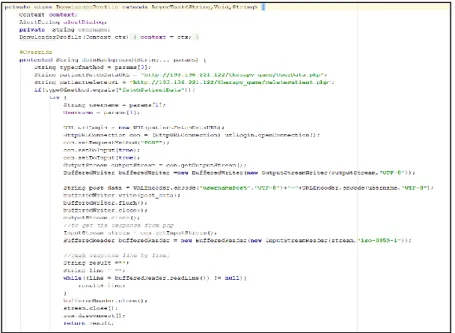
In Figure 44 is represented a class called from the android application side, when some interaction with database is needed. This type of class also extends an Async Task. An AsyncTask enables proper and easy use of the User Interface thread.
Figure 44.Unity code part for register patient in the database
37 This class allows to perform background operations and publish the results on the UI thread without having to manipulate threads or/and handlers.
5.1 Conclusions
In this chapter we discussed the different tools required to have access to the remote therapy database. It was also approached the different scripting interactions with the database and explained how they were called both in the application and Unity Game. The structure of the PHP scripts was explained as well.
38
6 Mobile Application
A mobile application is important in this system, serving as an interface between the data collected during sessions and the therapist. The importance of a mobile application is to allow users to access data from everywhere. For the therapist it’s a very important tool, allowing him to keep track of each patient by recurring to a practical and simple system. Through this the therapists will be able to give more attention on patients and possibly provide better feedback on how the patients’ sessions are going. For the patient, can also be a motivating tool, by allowing to keep track of their game results, and see their constant evolution during each game.
6.1 Structure
This mobile application was developed to embody the interface between the users and the game system. Figure 45 emphasizes the structure of the mobile application for easier comprehension of it. In mobile application, the therapists and patients, as was mentioned before, each one has different permissions. Upon Therapist Login, a list of associated patients is presented allowing him to take a set of actions towards each one. Some actions like create training plans for the patient where detailed information can be inserted regarding each game and its game play. Consult patients profile may contain helpful information for the rehabilitation process. Deleting patients from the database, erasing all their records within the database when therapists see their records are no longer needed. These are secondary tasks. The main task is actually the visualization of patient’s data sessions, where data will be presented in graphs. It is intended that with the sessions’ progression, physiotherapists can observe a clearer evolution on patient’s medical state. If the logged user is a patient, their permissions regarding certain features are revoked, as is represented in Figure 47. The patients might access their plans to see the therapist inputs and comments and if the training plan is completed. Physiotherapist can also check that option, updating the database. The patients can also have access to their own profile and game stats from each individual session they took. However, they don’t have permission to consult the graphs, but only the scores, game configuration inputs and so forth.
39
6.2 Graphical User Interface
The user interface is one of the most important aspects of a mobile application [37]. So, a clear and easy interface was thought and developed in order to achieve the best possible interaction between user and displayed data. Displaying simple and direct data for users to interact was also a careful viewpoint while building this app.
In Figure 46 is illustrated the Login display, where each user can enter their credentials in order to prepare the app considering the user type.
40 Figure 47 illustrates the user area after successful login. The user area displayed is a therapist area, where features are activated after Login in, such as number two, three and four represented in the figure below and mentioned in the previous section. Marked with numbers 1 and 5 are the common features for both patient and therapist in this activity, being number 1 the placeholder for logged user and number 5 the three different card views leading to other mobile activity regarding patient’s data.
Figure 47.Mobile application login interface
41 The therapist has the option of creating a training plan that will be consulted by the patient or his responsible. Figures 48 illustrates the create plan activity where the therapist is free to configure the patients plan wherever he likes. The use of free fields will allow therapist to insert a plan info for patients, depending on the patient and using the type of language one would understand.
Regarding to game stats, this activity is illustrated in Figure 49. After changing from the user area activity to the one represented below, the patient’s correspondent sessions will be automatically displayed on the first spinner, passing that, the therapist/patient chooses witch game wants to consult. After selecting a game, the last spinner will be filled with the game ids regarding the game choice. Finally, the displayed data could be seen as in Figure 50. Figure 50 illustrates, an example of game data displayed after a game is selected. As can been seen at the bottom of the figure is a button called graphs, that is one of the features only displayed to therapists. By clicking on this button are presented graphs, relating to different data collected by the Kinect sensor while playing the game in question. Depending on the type of data collected there are different types of graphs that can be displayed as could be seen in the section that follows.
42
Figure 50.Games stats interface
43
6.3 Graphs
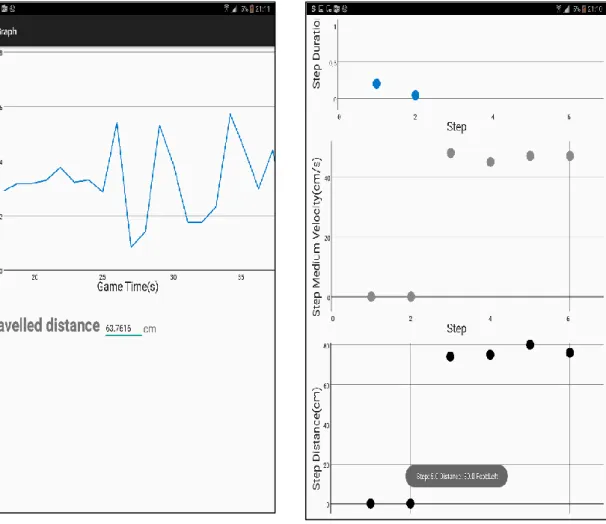
The data that should be displayed it is important to be clear, synthesized and objective, for the therapist and patient understanding, and have access to it. Regarding the graphs, for the therapist consulting a graph view library was used that provide two types of graphs, Line graphs and Point graphs. Line graphs mostly used to display data during certain periods of time, like player velocity during hit wall game – as is represented in Figure 52 and Point graphs to illustrate fixed points events, like catching an object or stepping a tile as is shown in Figure 51. By touching each data point, this information is displayed dynamically through a TOAST message, displaying, in this case, step number, distance reached, and the foot used to do so regarding the activity, where a line graph is represented. It also presents the traveled movement distance registered during the play time.
Figure 53. Hit graph interface Figure 52. Step the tile graph interface
44
6.4 Conclusion
In this chapter an overview of the mobile application structure is explained. The different UIs are explained and the different features each one of them present as well as their permissions towards the type of user. It is also presented the different types of data and the means to display it in order to give the user a better experience.
45
7 Results
In this section are presented the results associated to the set of tests made with the Kinect Sensor for all the four games within “The Serious Game”.
For each section, a range of results related to each game will be presented. Displaying, data input and output data results, presented in graph form. All game results are associated with one Male subject.
7.1 Step the Tile
The game results presented next, are based on the following inputs and on the Step Horizontal game, having the Vertical side of the game presented similar results.
Time: 50
Score Objective: 6 Tile Speed: 3 Fire Rate: 2
In Figure 53 is represented the numbers of steps made as well as the distance reached by the test subject. For a more detailed data the therapist has the option of selecting each data point to have access to it. Normalized data regarding the step duration, and the foot used to do so are displayed.
46 Figure 54 present the angle made by each step and foot associated to it. More detailed on the importance of angle representation can be found in Game related section.
Figure 55 illustrates the step distance related to each step made by the patient.
Figure 55. Angle per Step graph
Figure 56. Step Distance per Step graph
47 The graph illustrated in Figure 56, displayed for this game type, the relation between each data point with the velocity, when the subject effectuate each step. By analyzing these graphs is expected that the therapists obtain conclusive data related to the patient step range, mobility and their evolution through each session.
7.2 Leaning Game
This game, focus mainly on body balance and the lower limbs movements. In Figure 57 is represented some results of the game playing. To obtain this results the following set of inputs were used:
Time: 50 Player Speed: 3 Points Required: 2 Object Spawn Range: 2 Fire Rate: 2
48 Observing Figure 57, we can conclude that during most of the game time, the patient tended to lean more to the left side. Not any big values variation is notice when it comes to right side leaning. The therapist can observe which side of the patient’s body is more comfortable for patient by regarding the data presented.
7.3 Infinite Runner
In Figure 58 are displayed data points related to patients caught objects. By clicking in each data point the therapist can see a more detailed information related to each data point, display of the arm used and angle value. As we can see the tested subject caught objects from a range of 80 to 160 degrees. Just based on this data we can assume the patient has a good left/right arm mobility, capable of reaching a set of different ranges taking into account that the higher angles are always most difficult to reach
7.4 Hit Wall
The game inputs used for testing this game are the following: Lives :5
Time :50 Lives Left: 2
49 Score Objective:4
Hand Used: Left
Figure 59 illustrates the path trace by the player (catching the sphere). This was achieve by saving each player position since it began to move until the arm movement is stopped (game ended). The image that can be accessed by therapists and can be used as auxiliary material for the analysis of the graph is represented in Figure 58.
Figure 60. Game path image display
Figure 61. Velocity per game time graph
50 In Figure 59 is displayed the path, referring to the path travelled distance represented in Figure 61.
Observing the graph in Figure 60, and complementing with Figure 59 we can conclude the patient has a good left arm mobility. This information is derived from the time it took to complete the game (13 seconds). By also consulting the game image we can observe where in the course, he has gone faster.
7.5 Usability Tests
Evaluation of the developed software was realized. The usability tests were conducted using a Portuguese translation of the Questionnaire for User Interaction Satisfaction (QUIS). This questionnaire developed by a multi-disciplinary team of researchers in the Human-Computer Interaction Lab (HCIL) at the University of Maryland at College Park, assess users' subjective satisfaction with specific aspects of the human-computer interface. The QUIS is highly reliable across many types of interfaces. The QUIS questionnaire was included in the questionnaire developed by the team of research project, financed by Fundação para a Ciência e a Tecnologia, TailorPhy – Smart Sensors and Tailored Environment for Physiotherapy. The questions of TailorPhy questionnaire address the emotion that the application produced (by using validated Portuguese questionnaire of PANAS-VRP, Positive and Negative Affect Schedule), the arousal, and the socio-demographic data. The questionnaire for therapists and the questionnaire applied to other type of participants in usability tests (healthy volunteers or physiotherapy patients) has 23 questions among these 13 (those related to QUIS, PANAS-VRP, and arousal scale) are equal in both questionnaires.
The tests of developed theragames were realized with 9 participants (3 therapists and 6 healthy volunteers). In the preliminary results the participants greatly appreciated the Step
the Tile game. For all games the participants positively appreciate the facility of games
configuration, the tailoring of the games to the user needs and preferences as well as to the type of therapy. The game ideas, aim of game, scenes, colors, sound included in games as feedback, help messages, variety of games, games interaction was described as the most three positive things in the application. Some problems were identified but the results were inconclusive because it was not clear for what game these problems were registered. The team of research project proposed that other tests should be realized in the
51 future for each of the game in order to better identify and correct the application features that subjectively the participants found as inconsistent with the game purpose and user need. General opinions on the application were good and the participants consider that this tool may increase the motivation of patients for training movements for motor rehabilitation. [38][39]
52
8 Conclusion and Future Work
8.1 Conclusion
Theragames are having great importance for physical rehabilitation. Microsoft Kinect sensor is an important tool for Theragames, because it allow a different, and yet appropriate, patient examination and evaluation during rehabilitation sessions. By integrating Microsoft Kinect with Unity 3D game engine, permitted us to integrate real life movements into different game environments, giving to the patient a completely different approach of a rehabilitation session. The developed software based on Kinect and Unity 3D was complemented with a mobile application in order to have a user-friendly tool for therapists manage the patient’s data through each session.
8.2 Future Work
In the future, is intended to focus more on the game environments and movement precision, so the therapist can have better quality data, to provide better support for their patients. Also, is planned to improve the application interface as well as the data display to provide more meaningful data and to turn the application in one with more easy interaction.
The game has many ways of improvement. The Kinect, allow more gestures to be configured, and thus more games can be set up, with different environments and characters that could be tailored to the need of a wider set of patients.