2018
UNIVERSIDADE DE LISBOA FACULDADE DE CIÊNCIAS DEPARTAMENTO DE INFORMÁTICA
VIRTUAL TUTOR: INFORMATION RETRIEVAL IN MOODLE AND
PARAMETRIZATION VIA A BACKOFFICE APPLICATION
Ricardo Jorge Correia Costa
Mestrado em Engenharia Informática
Especialização em Arquitetura, Sistemas e Redes de Computadores
Trabalho de projeto orientado por:
Prof.ª Doutora Ana Paula Boler Cláudio
I would first like to thank my thesis advisors doctor professor Ana Paula Boler Cláudio and doctor professor Maria Beatriz Duarte Pereira do Carmo for allowing me to be a part of this project, for motivating me to achieve a better outcome and the integral part they had in the development of the project.
To the professors at Universidade Aberta for the help provided during the pro-ject, with an emphasis on the help provided by doctor professor Vítor Rocio.
I would like to thank the volunteers of the performed tests, the data received was invaluable, thank you for the time taken to perform the tests.
To my colleagues from Faculdade de Ciências da Universidade de Lisboa and my friends that accompanied me for the duration of the Bachelor and Masters degree, most notably Paulo Antunes, Inês Gouveia, Joaquim Afonso, Henrique Mendes, Ion Cornei, Tomás Peixinho, Telmo Santos, Tiago Santos and Miguel Falé for everything they shared or gave me, every helping hand and every listening ear meant the world to me. I would like to thank especially my project colleague Catarina Alves for being an amazing colleague and providing amazing moments that made the experience of working in the project unforgettable.
I would like to thank my family and my girlfriend for the endless support and encouragement provided every day throughout the years that gave me the ability and motivation to achieve my goals and finish writing this thesis. Without their support, this feat would not have been possible. Thank you.
This work is supported by UID/MULTI/04046/2013 centre grant from FCT, Portugal (to BioISI - Biosystems & Integrative Sciences Institute) and by PTDC/IVC-PEC/3963/2014 project grant (VIRTUAL TUTORING – the virtual tutor as lear-ning mediating artefact in online university education) also from FCT. I would like to thank everyone that works at these institutions for enabling me to work on this project.
As plataformas de e-learning como o Moodle são sistemas online que permitem a criação de unidades curriculares para armazenar e mostrar uma vasta quantidade de material que auxilia no período de aprendizagem e criar uma ponte de interação entre os alunos e o professor. Alunos que previamente não tinham possibilidade de aprenderem, com estes recursos têm a possibilidade de entrar em cursos e aprender conteúdos novos sem a presença física em aulas. Estes benefícios levam a que uma quantidade sempre crescente de estudantes adquira interesse em cursos online. Con-tudo, estes modelos de aprendizagem dependem de uma quantidade significativa de informação que tem de estar na página da unidade curricular. A quantidade de in-formação combinada com a possível baixa frequência de acesso à página da unidade curricular pode sobrecarregar um aluno.
Com o número de alunos inscritos a aumentar e tendência de substituir activi-dades presenciais com versões presentes online, torna a capacidade de um professor supervisionar e aconselhar todos os alunos cada vez mais difícil, o que leva a que alunos se possam sentir sozinhos e sem acompanhamento, criando situações em que o seu desempenho é inferior ao desejado ou que, no limite, desistem.
Este trabalho insere-se no projeto de investigação “TUTORIA VIRTUAL – o tutor virtual artefacto mediador de aprendizagem no ensino superior online”, finan-ciado pela FCT, com referência PTDC/IVC-PEC/3963/2014 que envolve investi-gadores de 3 instituições: a Universidade Aberta de Lisboa, o Instituto Superior Técnico de Lisboa e a Faculdade de Ciências da Universidade de Lisboa.
Neste trabalho desenvolveu-se uma solução tecnológica na forma de uma apli-cação WebGL com um tutor virtual antropomórfico implementada na plataforma Moodle que fornece suporte síncrono ao aluno como complemento a experiência de aprendizagem. A aplicação designada Virtual tutor application, tem como objec-tivo criar uma relação de empatia com cada aluno que a utiliza durante o período de duração do curso usando texto e expressões faciais do avatar, motivando-o a ter um melhor desempenho e a não desistir. A aplicação foi desenvolvida usando a plataforma Unity e envolve dois componentes, o componente de interface com o nome InterfaceManager (desenvolvido no contexto de outra tese) e o componente de aquisição e organização de dados, WebManager, que é descrito nesta tese.
longo da experiência de aprendizagem do aluno em todas as unidades curriculares, o componente descrito nesta tese embora não esteja ainda integrado nesta aplicação, possui a capacidade de distinguir a plataforma (móvel ou WebGl) e operar da forma desejada, no caso da aplicação Android requisitar informação sobre todas as unidades curriculares e na aplicação localizada no Moodle requisitar a unidade curricular com base no identificador fornecido.
O componente WebManager foi desenvolvido na forma de um plugin que pode ser incorporado em qualquer aplicação Unity com relativa facilidade e possui a capa-cidade de comunicar com o Moodle e uma base de dados externa através de pedidos web. Deste modo é possível adquirir e guardar informação sobre o aluno e a unidade curricular crucial para a interação com o aluno.
A aquisição desta informação permite que o componente InterfaceManager tenha a capacidade de mostrar ao aluno informações sobre a estrutura da unidade curricu-lar e os seus componentes, sobre as novidades na página desde o seu último acesso sem que o aluno seja sujeito a navegar a vasta informação disposta na página da unidade curricular e apresentar conselhos e indicações com base no estado do aluno na unidade curricular, este estado é calculado com base no desempenho acadêmico na unidade curricular, assiduidade na página e as interações na mesma, que, no caso de um curso online funciona como uma turma virtual. A expressão de conselhos e indicações é feito com base em frases criadas com o auxílio da equipa pedagógica da Universidade Aberta baseadas na atividade do aluno com o propósito de melhorar a experiência de aprendizagem na duração do curso.
O plugin é capaz de adquirir informação relativa à unidade curricular e ao aluno através do uso de serviços web nativos à plataforma Moodle e a serviços web de-senvolvidos no contexto desta tese localizados no servidor que contém a base de dados externa, os serviços web desenvolvidos extraem informação de uma combina-ção de tabelas da base de dados externa que contém uma réplica da tabela de logs do servidor Moodle. A informação requisitada pelo plugin envolve, mas não está limitado a: notas do aluno, que materiais acedeu na unidade curricular, quantos dias já acedeu a unidade curricular ou quantos posts já fez sem a necessidade de criação de componentes adicionais no Moodle. O uso de serviços web existentes no Moodle permite o uso do plugin com versões base do Moodle desde que sejam versões iguais ou superiores a presente no projeto devido a existência dos serviços web está dependente da versão.
A comunicação com a base de dados externa é realizada recorrendo ao uso de serviços web contidos em ficheiros php para oferecer um intermediário capaz de interpretar as variáveis fornecidas pela aplicação e fornecer informação com base
de passos para filtrar e autenticar as variáveis como medidas de segurança.
Complementando o Webmanager, uma aplicação Back Office foi desenvolvida em Unity que permite ao professor da unidade curricular definir e guardar parâmetros na base de dados externa, esses parâmetros são depois adquiridos pelo componente WebManager e usados como base dos cálculos de avaliação do estado do aluno que irão ajudar a parametrizar o empenho posto pelo aluno e informar o InterfaceMana-ger das falas e informação para definir as expressões faciais que o avatar deve usar, levando a uma melhor experiência de aprendizagem dos alunos.
Para garantir o funcionamento correto durante a duração de uma unidade cur-ricular, testes de operação foram realizados pela equipa da Faculdade de Ciências da Universidade de Lisboa em unidades curriculares criadas especificamente para o efeito na duração de dez dias com contas de alunos teste desenvolvidas para este propósito divididas entre todos os participantes. Durante este período de tempo, os participantes seguiram as ações definidas nas tabelas presentes no anexo que envol-veram a entrega de componentes de avaliação e interações nos fóruns, permitindo assim verificar as possibilidades consideradas.
Pela realização de testes de carga ao servidor usando uma aplicação desenvolvida em Python para identificar objectos no ecrã e contar o tempo entre ciclos, foi possível encontrar uma desvantagem associada com o uso do plugin: O tempo significativo que demora a aquisição da informação desejada do Moodle e da base de dados externa. A causa principal para a existência deste problema deve-se à quantidade de pedidos que são necessários para obter a informação e a necessidade de ordenar determinados pedidos. Este tempo está também dependente do tempo de resposta da plataforma, combinando este tempo com a organização forçada certos pedidos com a limitação da plataforma WebGL que não tem acesso a sockets para uma comunicação mais rápida impede a implementação de várias alternativas com o objectivo de melhorar o desempenho do componente.
A acompanhar as limitações de desempenho do componente WebManager, a aplicação reside num bloco HTML na página da unidade curricular e a sua iniciali-zação e operações associadas a abertura e carregamento da página. Esta associação causa restrições à aplicação como não estar acessível em páginas que não contém o referido bloco e ser inicializado sempre que a página é carregada, isto é, não é pos-sível manter um estado facilmente adquirido sempre que muda a página forçando a aplicação a requisitar e organizar toda a informação de novo e realizar os cálculos outra vez.
Testes com professores foram realizados para obter uma opinião de alguém expe-riente no ensino online e confortável com o uso da plataforma Moodle. Nestes testes
numa unidade curricular de testes usando contas de utilizadores com estados de alu-nos diferentes. Após realizarem tarefas básicas foram convidados a responder a um questionário. Com base nos questionários realizados foi possível concluir que a mai-oria destes professores concordaram que as capacidades fornecidas pela aplicação, como o acesso mais rápido ao material de ensino na página da unidade curricular são uma vantajosas para o ensino. Contudo muitos afirmam que é necessário melhorar o desempenho em termos do tempo de carregamento da informação antes que se torne viável a sua utilização em unidades curriculares reais.
Palavras-chave: Tutoria virtual, Moodle, Tutor Virtual , Tutor online, Sistemas
de tutoria inteligentes
With the ever-increasing number of students taking online courses, combined with the overbearing amount of information present that overwhelms students, a large group of students become demoralised and can, ultimately, decide to give up on the course.
This work is funded by the research project “VIRTUAL TUTORING - the virtual tutor as learning mediating artefact in online university education”, ref-erence PTDC/IVC-PEC/3963/2014 which involves researchers from three institu-tions: Universidade Aberta de Lisboa, the Instituto Superior Técnico de Lisboa and Faculdade de Ciências da Universidade de Lisboa.
In this thesis, we present a complement to the learning experience with the goal of accompanying the student: an application with an anthropomorphic virtual tu-tor(avatar) implemented in the Moodle environment that can provide synchronous support to the student, support is done in the form of text presented in the appli-cation and the facial expressions.
The Virtual Tutor informs the student of changes in the course page without the need to check the vast information in the page, offer feedback to the performance of the student and create an empathy relationship over the course duration to improve the learning experience while motivating the student to continue working towards a good grade in the course. The solution involves two major components: an inter-face component that displays information alongside the avatar to the student and an information storage and retrieval component, by the name WebManager, that gathers information from Moodle and from an external database and provide it to the interface component. Tests with professors were made to receive the opinion of someone experienced in online teaching.
A Back Office application was developed to enable a professor to define specific parameters to adapt the behaviour of the Virtual Tutor to a specific course, leading to an experience more aligned with the goals of the specific for the students.
Keywords: Virtual tutoring, Moodle, Virtual Tutor, Online tutor, Intelligent
Tutoring Systems
List of figures xvi
List of tables xix
Abreviations xxi 1 Introduction 1 1.1 Motivation . . . 2 1.2 Objectives . . . 2 1.3 Contributions . . . 2 1.4 Work plan . . . 3 1.5 Document structure . . . 4
2 Concepts and Related Work 5 2.1 Concepts . . . 5
2.1.1 E-learning . . . 5
2.1.2 Learning Management System (LMS) . . . 6
2.1.3 Web service . . . 6 2.1.4 External service . . . 6 2.1.5 Token . . . 6 2.1.6 Module . . . 7 2.2 Related Work . . . 7 2.2.1 Virtual Tutors . . . 7 2.2.2 Additional analysis . . . 10 2.3 Conclusion . . . 11
3 Virtual tutor - WebManager and Back Office 13 3.1 Introduction . . . 13
3.2 Project Environment . . . 14
3.3 State of the Student . . . 15
3.3.1 Evaluation . . . 16
3.3.2 Attendance . . . 17 xi
3.4.2 External Communication . . . 25
3.5 WebManager Plugin . . . 26
3.5.1 Communication . . . 27
3.6 Back Office Application . . . 30
3.6.1 Main Screen . . . 30 3.6.2 Attendance Screen . . . 31 3.6.3 Evaluation Screen . . . 32 3.7 External Database . . . 32 3.7.1 Parameters table . . . 33 3.7.2 Logins table . . . 33
3.7.3 Student performance table . . . 34
3.7.4 Tutor selection table . . . 34
3.7.5 Questions table . . . 34 3.7.6 Falas table . . . 35 3.7.7 Event Logs . . . 36 3.7.8 PHP Files . . . 37 3.8 Conclusions . . . 38 4 Tests 39 4.1 Test environment . . . 39 4.2 Operation Tests . . . 40
4.2.1 Two folio course Tests . . . 41
4.2.2 Three folio course Tests . . . 41
4.2.3 Results . . . 43
4.3 Stress Tests . . . 43
4.3.1 Sequential Tests . . . 43
4.3.2 Parallel Test . . . 44
4.3.3 Results . . . 44
4.4 Tests with Experts . . . 45
4.4.1 Environment . . . 45
4.4.2 Preparation . . . 45
4.4.3 Results . . . 46
4.5 Conclusions . . . 49
5 Conclusions and future work 51 5.1 Conclusions . . . 51
5.2 Future Work . . . 52 xii
A.2 Webmanager Plugin . . . 53
A.3 Moodle web services . . . 54
A.4 How to install plugin . . . 54
A.5 Working with the plugin . . . 56
B UML class diagram 57 C Phrases stored in Database 79 D Attendance Tables for the tests 81 E Expert test questionnaires 85 E.1 end questionnaire . . . 86
Bibliography 97
3.1 Performance chart. . . 16
3.2 Virtual Tutor application components. . . 21
3.3 Communication flow of the plugin with Moodle. . . 24
3.4 Communication flow of the plugin with External database. . . 25
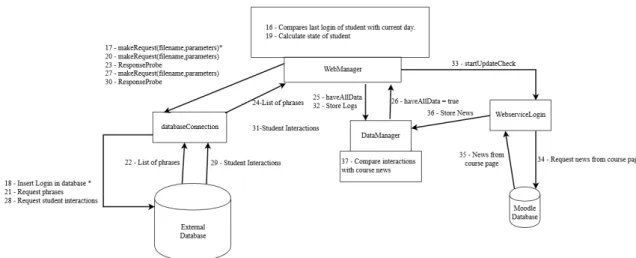
3.5 Communication flow of the WebManager plugin - Top-down view . . 26
3.6 Communication flow of the WebManager plugin - phase 1 . . . 27
3.7 Communication flow of the WebManager plugin - phase 2 . . . 29
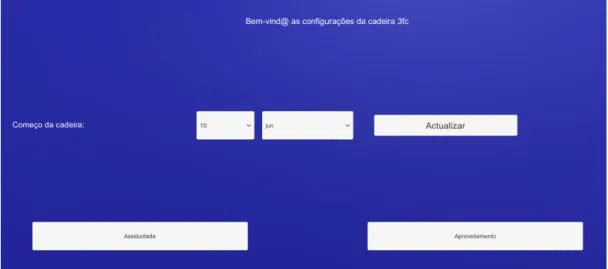
3.8 Start menu of back office. . . 30
3.9 Attendance menu of back office. . . 31
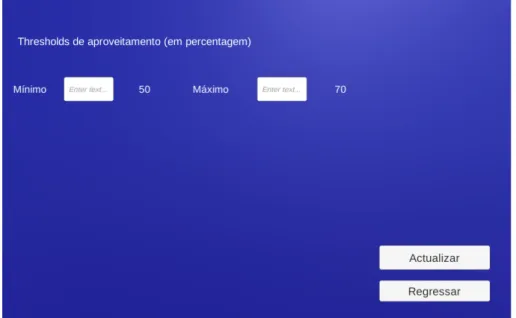
3.10 Evaluation menu of back office. . . 32
3.11 Parameters table. . . 33
3.12 Logins table. . . 33
3.13 Student performance table. . . 34
3.14 Tutor selection table. . . 34
3.15 Questions table. . . 35
3.16 Falas table. . . 35
3.17 Event Log table. . . 36
4.1 Interface of the Virtual Tutor application. . . 39
4.2 Average of start time regarding number of logins. . . 44
4.3 Age group of participants. . . 46
4.4 Gender division of the experts. . . 46
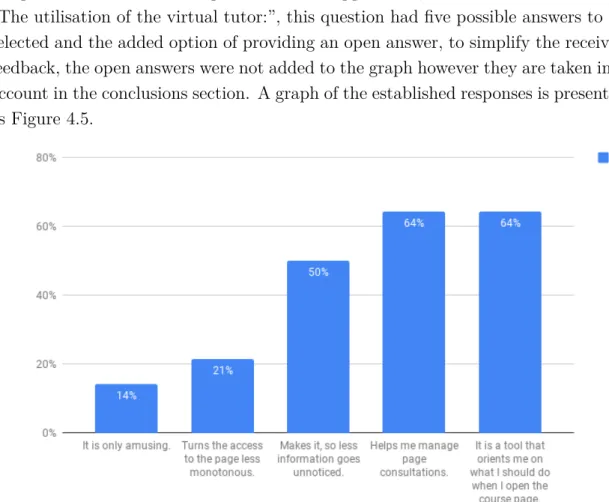
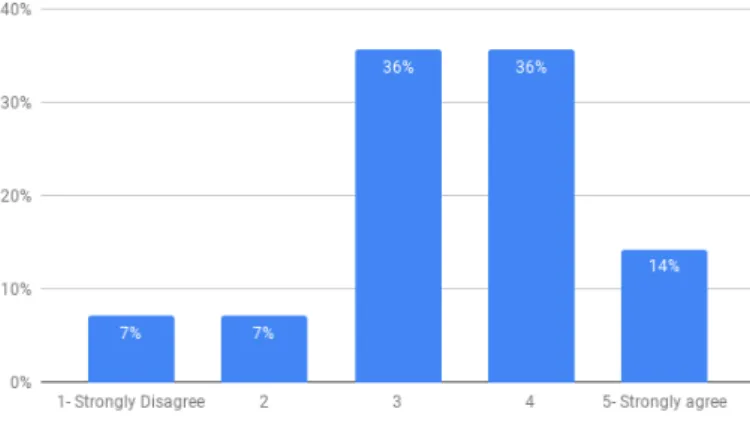
4.5 Opinions on the utilisation of the virtual tutor by the experts. . . 47
4.6 Statistics regarding the statement “The Virtual Tutor, in a general sense, corresponded to my expectations”. . . 48
4.7 Statistics regarding the statement “The indication in the yellow “post-it” helped me identify news in the course”. . . 49
A.1 How to import a plugin . . . 54
A.2 Import window . . . 55
A.3 Drag prefab . . . 55
B.1 Simplified structure of plugin classes. . . 58 xv
B.4 WebManager plugin Class Diagram - Course Data . . . 61 B.5 WebManager class. . . 62 B.6 DataManager class. . . 63 B.7 WebserviceLogin class. . . 64 B.8 DatabaseConnections class. . . 65 B.9 UserData class. . . 65
B.10 Fields of the Course class. . . 66
B.11 Methods of the Course class. . . 67
B.12 WebManager plugin Class Diagram - Notes . . . 68
B.13 JsonValues Class Diagram - structures from Moodle . . . 69
B.14 JsonValues Class Diagram - Notes . . . 70
B.15 JsonValues Class Diagram - Structures from External Database . . . 71
B.16 Back office Class Diagram - Screen information retrieval . . . 72
B.17 Back office Class Diagram - Communication . . . 73
B.18 Back office Class Diagram - Information Storage . . . 74
B.19 Basic Information Class. . . 75
B.20 Slider Changes class. . . 76
B.21 Assid Thresh Texts class. . . 76
B.22 aprov Fill Class. . . 77
C.1 Falas in database. . . 80
2.1 Comparison table . . . 9
3.1 Web services used in the plugin - short description . . . 25
3.2 Web services - usage in the plugin . . . 25
4.1 Evaluation for test students of e-fólio 2 course. . . 42
4.2 Evaluation for test students of e-fólio 3 course. . . 42
D.1 Events and student action in e-fólio 2 course . . . 82
D.2 Events and student action in e-fólio 3 course, part 1 . . . 83
D.3 Events and student action in e-fólio 3 course, part 2 . . . 84
AI Artificial Intelligence. 8 GB GigaByte. 53
HTML Hypertext Markup Language. 68
ICGI International Conference on Graphics and Interaction. 2 ID Identifier. 21
IP Internet Protocol. 16, 20
ITS Intelligent Tutoring System. 9 JSON JavaScript Object Notation. 34 LMS Learning Management System. 5, 12
Moodle Modular object-oriented dynamic learning environment. 1–3, 5–12, 15–26,
34, 39, 44, 48, 50, 53, 56, 57, 65, 67–70
MyST My Science Tutor. 9
PHP PHP: Hypertext Preprocessor. 6, 20, 30, 34, 49 RAM Random-Access Memory. 53
SQL Structured Query Language. 20, 49 VCAT Virtual Cultural Awareness Trainer. 8 VLE Virtual Learning Environment. 11 VT Virtual Tutor. 10
WebGL Web Graphics Library. 16, 18, 20, 21, 46, 65, 67
Introduction
Learning management systems like Moodle are popular platforms to host pages that contain a vast volume of study material for a specific subject or course. This type of systems allows various kinds of students to complete courses that were pre-viously impossible due to constraints, enabling students to acquire more knowledge. However, this model relies heavily on a significant amount of information being available on Moodle, that coupled with the possible reduced frequency of login from the student, can be overwhelming, this can demoralise the student and possibly lead to the student ultimately dropping the course.
This thesis fits into the investigation project “TUTORIA VIRTUAL – o tutor virtual artefacto mediador de aprendizagem no ensino superior online” that has the goal of developing a Virtual Tutor application capable of accompanying the student during the course duration. In this thesis, in particular, the primary goal was to create a technological solution capable of retrieving and storing information from Moodle with the purpose of providing a Virtual Tutor application (that provides an avatar playing the role of tutor in the course) information necessary to accompany the student during the course duration, enhancing the learning experience, informing the student of new content and supporting the learning experience.
Additionally, to improve the versatility of the Virtual Tutor application, a back office application was developed to give the professor of the course the ability to define specific parameters of the Virtual Tutor.
With the use of the Virtual Tutor, we can understand the impact that such an application has added support to e-learning.
1.1
Motivation
A course structured learning environment like Moodle relies heavily on displaying a significant amount of information. The large quantity of information requires constant observation for the student to keep up to date with the program which can be overbearing when combined with the limited time that students have to study, this pressure can demoralise the student, leading to worse grades or causing the student to give up.
Depending on the situation, a student can have limited communication with the professor, reducing the feedback received regarding the work performed, leaving the student without a grasp regarding his/her performance in the course.
The problems indicated previously provide a determent for the student that hinders the learning experience.
1.2
Objectives
The primary objective of this thesis is the creation and development of a compo-nent that is capable of retrieving and storing relevant information from the Moodle server and an external database server to the Virtual tutor application located in a course page developed by the team at Faculdade de Ciências da Universidade de Lisboa and the Virtual Tutor application for Android developed by the team at Instituto Superior Técnico de Lisboa. The solution must be able to:
• Gain access to the information about the Moodle course and determine if alterations occurred to the course page since the last saved login.
• Evaluate the student according to the parameters defined by the professor and offer positive feedback to create a strong bond with the student.
• Keep a coherent and up-to-date record of the student with the help of an external database.
The proposed solution combined with the back office application enables an application to inform the student of alterations in the course such as the creation of new content or posts in the forum, and the ability to evaluate the student depending on the parameters defined by the professor and the performance of the student.
1.3
Contributions
The main contributions of this thesis are:
(i) A Unity plugin capable of communicating with a Moodle server and an exter-nal server enabling a Virtual tutor application to accompany the student.
(ii) A Back office application developed alongside the Unity plugin with the pur-pose of allowing a professor to configure essential parameters for the correct operation of the Virtual tutor application and store said parameters in the external database.
(iii) Formulas were developed to assess the state of the student using variables defined by the professor of the course and the interactions the student performs in the course page to provide feedback relative to the experience of the student. (iv) Tests performed with professors from Universidade Aberta to receive the
opin-ion of someone experienced in online teaching.
Additionally, a scientific paper was produced and submitted for publication as a long paper in the International Conference on Graphics and Interaction 2018 (ICGI 2018).
1.4
Work plan
From the 1st of October to the 30th of June:
• Development of the necessary processes for the access and register of informa-tion of each user on Moodle.
• Development of the Back Office application. • Perform operation tests to fine-tune the solution.
• Perform stress tests to analyse the impact the application has on the Moodle platform.
• Test developed work with professors from Universidade Aberta. From 1st of July to 30th of July:
• Write the final report.
• Contribute in the writing of the paper for publication. Situations that caused delay:
• Moodle not responding due to insufficient RAM, in this situation the server had 1 GB of RAM for the Moodle platform, currently it contains 8 GB of RAM.
• The creation of the external server that hosts the external database that was necessary as an alternative that did not create additional tables in the Moodle database.
1.5
Document structure
This document is organized in the following order: • Chapter 2 – Concepts and Related Work
The chapter presents concepts related to e-learning and Moodle, as well as works related to virtual avatars with a comparison of the final product with the one offered in this work, and works that detail advantages that virtual tutors can bring to a course.
• Chapter 3 – VirtualTtutor - Plugin and Back Office
The chapter describes the environment used for the development of the Unity plugin and the back office application, detailing every component existent in the developed work and explaining the formulas created and the tables in the external database.
• Chapter 4 - Tests
The chapter describes tests made with the purpose of evaluating the applica-tion and presents the results and conclusions derived from these tests.
• Chapter 5 - Conclusions and future work
The chapter presents the conclusions made after the development of the project, followed by suggestions for future work.
Concepts and Related Work
In this chapter concepts related to e-learning and Moodle are presented, as well as works related to virtual avatars with a comparison of the final product with the ones offered in this project, and works that detail advantages that virtual tutors can bring to a course.
2.1
Concepts
In this section, a short description is made regarding a set of concepts that are considered essential for the understanding of the current project and the develop-ment environdevelop-ment.
2.1.1
E-learning
Although e-learning lacks a precise definition universally accepted by researches, Arkoful et al.[14] proposes the following description focused on the current project: e-learning refers to a learning system based on formalised teaching combined with the use of electronic technologies such as the internet to improve the learning experience. Such learning systems rely on access to a vast amount of information that can help a student learn more efficiently and more comfortably and at their own pace. Additionally, the existence of a virtual environment shared by some individuals can motivate the student not only to learn but to interact with professors and peers.
The e-learning platform used in the duration of the project is Moodle and is considered to be internet-based learning, this is due to having the content available on the internet, increasing the availability of the learning material further.
2.1.2 Learning Management System (LMS)
Learning management systems is a software application that provides a virtual environment that enables the management and delivery of e-learning courses[10].
The essential functions provided by an LMS for the administration of a course are the creation, organisation and distribution of content. The LMS used for the duration of the project is Moodle provided by Universidade Aberta.
Moodle (modular object-oriented dynamic learning environment) is an open-source learning management system written in PHP. The flexibility provided by Moodle combined with the ability to add plugins efficiently make it not only capable of implementing additional features efficiently but also the prime candidate to create and develop an application capable of accompanying a student during the learning process.
2.1.3 Web service
A web service is an online service that transforms a request from a user into an operation that can communicate with several applications to obtain a response[2][9]. The web services used on the project are either supplied by Moodle or custom-made. In Moodle web services, it is necessary that a valid token is supplied with the parameters and name of the function when making a request, as it provides authentication of the user to the service. The custom-made web services were used to communicate with the external database.
2.1.4
External service
An external service is a service created on Moodle that contains a set of web services[4].
Users are required to be associated to take advantage of the web services. Users must also have the necessary capabilities and permissions to use these web services.
2.1.5
Token
A token is a key given by Moodle that allows access to an external service, this enables a user to gain access to the available web services[6]. Administrators can create tokens or users with the capability “moodle/webservice:createtoken”. In the spectrum of the project, communication with Moodle is vital to acquire data about the student, and the course. The usage of a token enables a user to continue to use an external service even though the service might have suffered alterations.
2.1.6 Module
A module[3] represents and contains information about one of the activities and resources found on the course page. In Moodle, a structure called topic serves as a container and displays of a selection of modules.
The module is an essential component of the course page, as it allows the repre-sentation of various types of learning materials. The plugin requests limited infor-mation of each module, expanding the request for assignments and forums.
2.2
Related Work
This section presents the review of papers done during the project duration. On the first part, the analysis of a set of virtual tutors is made and compared with the two applications created in the current project.
2.2.1
Virtual Tutors
A tutor in a virtual environment can be of various types. A human tutor using an avatar in a virtual environment like Second Life or AI can constitute a virtual tutor. Regarding virtual tutors, a series of papers are analysed taking account several types of virtual tutors and compared to the current project. At the end of this subsection, we present a table comparing the approaches.
Development of a Virtual Assistant for Alerts and Notifications in a Learning Environment
Amaral et al.[13] continued the development of a Moodle integrated virtual as-sistant developed by Maciel et al.[21]. This paper describes the developed Android application that could provide the alerts and notifications of the aforementioned virtual assistant. This version can engage pro-actively with the student, prompt-ing him to do specific tasks or to make a study plan in proximity to an exam or other kinds of evaluations that might be imminent without the need of accessing a browser.
VCAT: Virtual Cultural Awareness Trainer
Johnson et al.[18] developed the VCAT training model used by the military ser-vices. It is a web-based course that incorporates interactive games as a way to introduce trainees to information in order to acquire basic operational intercultural competence, by questionnaires and role-playing examples, this helps learns to asso-ciate knowledge gained to a situation.
STEVE: An Animated Pedagogical Agent for Procedural Training in Vir-tual Environments
Johnson et al.[19] created STEVE. It acts as an instructor and assistant that explains what is needed and how to do it without disrupting the user on a virtual world. STEVE is considered a virtual body (hand or full body as examples given) that the user can see and watch it interact with the world increases the sense of presence of the user, keeping the user focused.
Desenvolvimento de um Assistente Virtual Integrado ao Moodle para Suporte a Aprendizagem Online
Maciel et al.[21] describe their implementation of an avatar into Moodle which can assist the student learning by relating pertinent information given by the pro-fessor via voiceover, stating that a student can become overwhelmed with the data in Moodle, demoralising him. This paper is of particular relevance since it aligns perfectly well with the context of our Virtual Tutor.
Cognitive Intelligent Tutoring System based on Affective State
Rajkumar et al.[23] propose a new framework for an Intelligent Tutoring Sys-tem (ITS) that also aims to understand the emotions that lay beyond the spoken words and take this to contextualise the interaction better. The tutor processes the persons emotional state by utilizing Active Appearance Model for facial feature extraction, a Camshift technique is used to track the hand pose and orientation, lastly, speech features were extracted from continuous speech and produced utiliz-ing a Natural Language Processutiliz-ing unit to generate the proper phonetic forms by analysing text and predicting prosodic information. The virtual tutor has a data model that represents its beliefs, intentions, knowledge and desires and plans its behaviour by explicitly handling these models. By utilising this information, the tutor becomes able to assess the needs and purposes of the student.
My Science Tutor: A Conversational Multimedia Virtual Tutor
My Science Tutor(MyST) is an ITS developed by Ward et al.[24] that was de-signed to assist elementary school students in science-related subjects via an interac-tive multimedia environment. Students interact with an always present virtual 3D character via natural spoken dialogue. The tutor can ask open questions related to animations, illustrations or interactive simulations shown on the screen. For added realism, the avatar produces visual speech, synchronising both head and face move-ment with her speech. MyST utilises media to facilitate interaction, by providing multimedia the student is better able to think and reason about the question. The
tutor also analyses the spoken explanations to be able to determine what the stu-dent knows to formulate new questions. The avatar is designed to behave like an effective human tutor to promote rapport between the virtual tutor and student.
Comparison
Regarding this project, two applications of the Virtual tutor application were created, they are both interactable applications and use the same avatars however they serve different purposes. The variants will be referred as VT Moodle for the application developed by the team at Faculdade de Ciências na Universidade de Lisboa (FCUL) and VT Android when referring to the variant developed by the team from Instituto Superior Técnico (IST).
VT Moodle is a virtual tutor that resides in the course page, notifying the student of news and giving information regarding the performance on the course, the application retrieves data about the student and the page. The student can, through the use of buttons, navigate the information presented in Moodle.
VT Android app aims to accompany the student during the course duration in a mobile application, providing dialogues for increasing empathy with the student all the while incentivising the student to keep a study plan to improve academically.
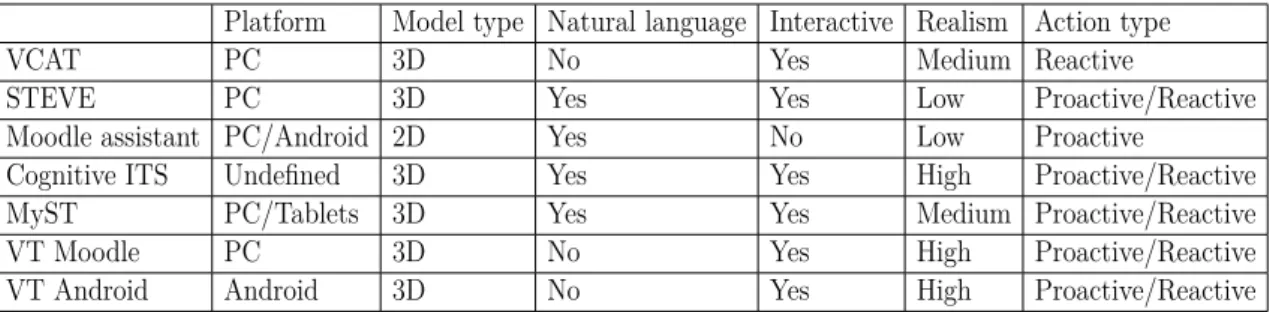
Table 2.1 compares the virtual tutors analysed with the two applications created during the project regarding platform that the virtual tutor runs, dimensionality of the environment/avatar, projection of text using text-to-speech, if the virtual tutor can be interacted with by the user, realism of the environment and if the virtual tutor is capable of acting according to player actions (reactive) and or if it can operate without previous interaction of the user (proactive).
Platform Model type Natural language Interactive Realism Action type
VCAT PC 3D No Yes Medium Reactive
STEVE PC 3D Yes Yes Low Proactive/Reactive
Moodle assistant PC/Android 2D Yes No Low Proactive
Cognitive ITS Undefined 3D Yes Yes High Proactive/Reactive MyST PC/Tablets 3D Yes Yes Medium Proactive/Reactive
VT Moodle PC 3D No Yes High Proactive/Reactive
VT Android Android 3D No Yes High Proactive/Reactive
Table 2.1: Comparison table
Comparing the existing virtual tutors with the ones developed in the current project we can verify that a vast majority of examples are in a 3D environment or use 3D objects, this seems to have an association with the interactivity of the application with the user. The only case that is neither 3D nor interactive is the Moodle assistant as it mostly serves as a message relayer from student to professor.
2.2.2 Additional analysis
The following papers although not presenting a virtual tutor are essential for the project nonetheless, referring to the importance of critical factors to consider when developing a virtual tutor in Moodle.
Virtual Learning Environments
The paper of Dillenbourg et al.[16] starts by stating that a virtual learning environment (VLE) is not limited by supporting virtual reality technology nor by the scope of age or level of the target audience. VLEs have multiple features such as being a social space for users to act upon it in a manner acceptable and logical. Users can also be from various geographical origins. The environment must also integrate multiple technologies and pedagogical approaches and must have virtual counterparts for physical objects. The authors state the effectiveness virtual learning environments have in improving education by reducing educational system costs and improving the quality of education, however, virtual media is viewed by professors mostly as a tool to use not a substitute.
The Impact of Avatar Realism and Eye Gaze Control on Perceived Qual-ity of Communication in a Shared Immersive Virtual Environment
Garau et al.[17] present a study to measure how vital are the realism of the avatar and the kind of visual contact it establishes with the users. To test this, an experiment in which an avatar of lower quality (without defined gender) and two avatars of higher realism (with defined gender) along with two different types of eye gaze. The authors state that a certain consistency is required, a lower fidelity model should exhibit a low fidelity behaviour. We would argue that this results in an uncanny valley effect, in which the fact that a less realistic model shows a more “human” behaviour causes a certain feeling of eeriness and disgust with the user.
Intelligent Tutoring Systems and Pedagogical Experience Manipulation in Virtual Learning Environments
In this paper Lane et al.[20] expose some of the nuances and the differences between human and virtual tutoring, some solutions to improve Virtual Learning Environments (VLEs) such as incorporation of a pedagogical agent to serve as an entity for the learner to “bond” with or altering the educational experience to a more subtle and manipulative way.
The paper also states the importance of what kind of tutor and what kind of feedback we want him to give, as well as the realism of the environment that helps the learner immerse and ultimately improve the learning experience.
Evaluating the Impact of Interface Agents in an Intelligent Tutoring Sys-tem
Moundridou et al.[22] make emphasis on the presence of a virtual agent in an intelligent tutoring system which increases the easiness and enjoyment of users, however it does not increase the learning incomes nor attentiveness significantly, and users feel more comfortable interacting with a virtual agent of similar status, such results might prove useful for our work. This work serves a certain proof-of-concept of what we are trying to achieve. The main conclusion from this study is that the existence of a pedagogical agent does, in fact, improve the learning experience of the student.
2.3
Conclusion
In this chapter, several projects have been analysed that focus on the represen-tation of a virtual tutor with the objective of assisting an interested party in the learning experience, some projects that focus on the impact that such virtual tutors can have in the learning experience and analysed critical concepts in the developed project. As shown in the displayed projects, only one set of them revolve around a virtual tutor assisting in a Moodle platform, however, the analysed projects merely deliver information requested by the professor to the students as opposed to the features in the Virtual Tutor project that aim to assist the student with the content presented in the course page and create empathy.
Virtual tutor - WebManager and
Back Office
3.1
Introduction
The project created by Universidade Aberta (Uaberta) aims to create a mediator, with an anthropomorphic representation, between the student and the professor in a curricular unit, with the primary goal that the student feels more support and becomes motivated towards improving grades. The project is being developed by three institutions: Universidade Aberta de Lisboa, the Instituto Superior Técnico de Lisboa and Faculdade de Ciências da Universidade de Lisboa. The project is divided into two parts:
• The teams from the three institutions worked together on the requirements gathering phase for identification of use cases and subsequent creation of cru-cial components necessary for the interaction with the student, for example, phrases used by the virtual tutor.
• The creation and development of a mediator for the online learning man-agement system Moodle and a mediator for mobile devices running with the operating system Android. The team from Faculdade de Ciências na Uni-versidade de Lisboa (FCUL) was in charge of implementing the mediator for the Moodle platform, while the team from Instituto Superior Técnico (IST) developed the solution for the Android system.
The mediator developed by FCUL is composed by three modules: A inter-face module created by Catarina Alves (Master student in computer engineering of FCUL); An artificial intelligence module developed by Ana Marisa Salgueiro(Master student of Faculdade de Letras da Universidade de Lisboa); An information retrieval and storage module that will be described in this chapter.
During the creation and development of the information retrieval module, a Unity[7] plugin was produced. The plugin is capable of communicating with the
Moodle server and an external server both provided by Universidade Aberta in a WebGL or Android environment. Accompanying the mentioned plugin a back office application in Unity was developed as an interface that allows professors to define the parameters that influence the calculation of the state of the student by inter-acting with the external database, the Back Office application offers a temporary solution while the integrated back office application is in development by the team of UAberta.
This chapter will discuss the developed work regarding the information retrieval and storage module produced during the project duration, the environment of the project, approaches possible to each option and the reasoning for the chosen path, followed by a section dedicated to explaining the operation of each component.
3.2
Project Environment
Unity was the game engine decided to develop the Virtual Tutor application. This cross-platform game engine allows for the creation of an application that can present and animate the avatars that serve as a representation of a human tutor. In the supported platforms that Unity is capable of producing, WebGL (Web Graphics Library) is the platform that can present the application in a Moodle course page. Using WebGL as a solution for the implementation of the application enables the usage of a HTML block to contain the compiled application without the use of plug-ins.
To make the processes of communication with Moodle as adaptable as possible to Unity, C# is the language used to develop the solution and the web services supplied by Moodle 3.4 as the source of information from the server.
The WebGL Virtual tutor application was established to run in the Moodle envi-ronment more specifically when the student access the course page, in that scenario, authentication of the student was complete. In contrast, the Android virtual tutor application was expected to run in an environment where access to the internet is limited or non-existent, creating the possibility of the application initialising with-out the ability to retrieve information from the Moodle server. Authentication is required at the start of the Android application, this can be prevented by storing credentials on the device, removing the necessity of requesting them to the user on each start.
Communication in Unity WebGL is restricted. The use of sockets to maintain a constant connection with the server is disabled due to browsers not having direct access to IP sockets, reducing the available methods to communicate via the func-tions WWW and UnityWebRequest. For simplicity of usage, the chosen function was WWW.
To use the WWW function in Unity, it is necessary to run the function inside a coroutine. Despite coroutines virtually not having a performance overhead, the only form to guarantee that a coroutine as finished is to yield for the return, this, in turn, stops the function that calls the coroutine until it completes. In the current project, a function calls multiple coroutines that handle different requests, combined with the inherent delay in web communications means that yielding for a coroutine means delaying the entire process of information retrieval. The chosen approach for communication is the same for Android and WebGL.
3.3
State of the Student
The values collected from the back office application contribute to the evaluation of the state of the student. The WebManager plugin retrieves these thresholds and calculates the state of the student, the values are a combination of two values:
1. Evaluation that depends on the grade of the student in each e-folio; 2. Attendance that depends on:
(i) The frequency of logins made by the student on the page of the discipline; (ii) The number of posts made by the student in the forums.
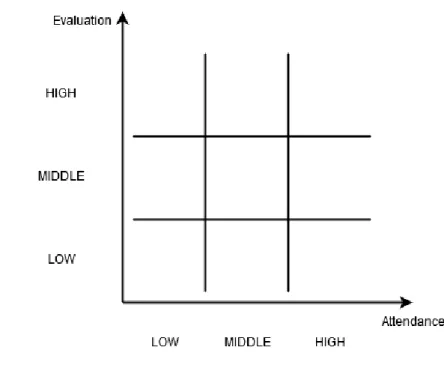
With this, it is possible to position the student in one of nine sectors of perfor-mance as presented in the graph contained in Figure 3.1.
Concerning Evaluation, the professor defines a minimum threshold and a maxi-mum threshold. Taking into account these two thresholds, there are three regions: below the minimum, above the maximum and between the two values. In the case of Attendance, the professor defines a minimum and maximum thresholds for the frequency of logins, the number of posts in the forums and also assigns a weight to frequency and posts in the calculation of the attendance. The combination of these parameters also defines a minimum and a maximum threshold for the attendance, also defining three regions. So, combining Evaluation and Attendance, there are nine regions, as illustrated in Figure 3.1.
Figure 3.1: Performance chart.
The behaviour of the avatar (expressed by facial expressions and text) is gener-ated according to the region where the state of the student is locgener-ated in. The phrases requested from the external database take into account the calculated region. The professor defines all the thresholds and weights in the interface of the back office and allows him/her to somehow customise the behaviour of the avatar in the discipline.
3.3.1
Evaluation
Evaluation measures the performance of the student in the course. Equation 3.1 and Equation 3.2 have the purpose of putting the student in one of three regions depending on the grades of the student and the thresholds defined by the professor:
• HIGH for a student that is considered to have great grades;
• MIDDLE for a student that is considered to have mediocre grades; • LOW for a student that is considered to have low grades.
Only the evaluated assignments of the student count for the calculation.
EvaluationV alue =
∑
student grades of the e-fólios given ∑
Evaluation(EvaluationV alue) =
HIGH, for EvaluationValue≥ Aprov_High
M IDDLE, Aprov_Low≤ EvaluationValue < Aprov_High
LOW, for for EvaluationValue < Aprov_Low (3.2) Where:
• Aprov_Low - the Minimum threshold for evaluation, defined in the back office application, has a value between 0 and 100 and marks the border between a low and middle Evaluation.
• Aprov_High - the Maximum threshold for evaluation, defined in the back office application, has a value between 0 and 100 and marks the border between the middle and high Evaluation.
3.3.2
Attendance
The resulting value is between 0 and 100 and comparing it with the attendance values defined in the back office allows for the restriction of attendance to three cases, low, middle and high as shown in Equation 3.4.
AttendanceV al = LoginImp∗ V alLogin + P ostImp ∗ V alP osts (3.3) Where:
• ValLogin - Value of the Login, calculated in Equation 3.5. • ValPosts - Value of the Posts, calculated in Equation 3.6.
• LoginImp - Weight of Login, defined in the back office application and has a possible value between 0 and 100, the sum of this value and PostImp is one hundred.
• PostImp - Weight of Posts, defined in the back office application and has a possible value between 0 and 100, the sum of this value and LoginImp is one hundred.
Attendance(AttendanceV al) =
HIGH, for AttendanceVal≥ Assid_high
MIDDLE, Assid_low≤ AttendanceVal < Assid_high LOW, for for AttendanceVal < Assid_low
(3.4) Where:
• Assid_low - the Minimum threshold for attendance, defined in the back office application and lower than Assid_high, has a value between 0 and 100 and marks the border between a low and middle Attendance.
• Assid_high - the Maximum threshold for attendance, defined in the back office application and higher than Assid_low, has a value between 0 and 100 and marks the border between a middle and high Attendance.
Logins
Equation 3.5 is used to calculate a number between 0 and 1 to measure the assiduity of the student in terms of the login frequency. Later this value is used in combination with the importance of the logins defined in the back office to make the login portion in the attendance Equation 3.3.
V alLogin(AvgLogin) = 1, for AvgLogin≥ 1 TLMin 0, for AvgLogin < 1 TLMax
M ax(0, AvgLogin× T LMin), for 1
TLMax ≤ AvgLogin < TLMin1
(3.5) Where:
• AvgLogin - Relative frequency of the logins made during the course duration, the number of days the student used the application in the course stored in the external database divided by the days since the start of the course. The number of days since the start is calculated by obtaining the difference between the value saved in the database defined in the back office application and the current day.
• TLMin (ThresholdLoginMinimum)- the Minimum threshold for login, defined in the back office application and lower than TLMax, marks the border be-tween a middle and high frequency of login.
• TLMax (ThresholdLoginMaximum)- the Maximum threshold for login, de-fined in the back office application and higher than TLMin, marks the border between a low and middle frequency of login.
Posts
Equation 3.6 calculates a value between 0 and 1 to measure the intervention of the student in terms of the number of posts made by the user in the course.
The calculations take into account every post made by the user regardless of utility and content because the content of the post is not evaluated. Later the value is used in combination with the importance of posts defined in the back office to
make the post portion in the attendance Equation 3.3.
V alP osts(nP osts) =
1, for nPosts≥ TPostMax 0, for nPosts < TPostMin
nP osts
M ax(nP osts,T P ostM ax), for TPostMin ≤ nPosts < TPostMax
(3.6) Where:
• ValPosts - Value of the Posts
• nPosts - Nr. of posts made by the student since the beginning of the course. • TPostMin (ThresholdPostMinimum)- the Minimum threshold for posts,
de-fined in the back office application and lower than TPostMax, marks the bor-der between the low and middle number of posts.
• TPostMax (ThresholdPostMaximum)- the Maximum threshold for posts, de-fined in the back office application and lower than TPostMax, marks the bor-der between the middle and high number of posts.
3.4
Virtual Tutor Application Architecture
There are two major components of the architecture of the virtual tutor appli-cation in Moodle:
• InterfaceManager: it is responsible for representing the interface and the avatar, access the information stored in the WebManager component to in-form and interact with the student, this component was developed by my colleague Catarina Alves.
• WebManager: Component that requests and stores information about the student and the course for the duration of the interaction. This component is described in this chapter.
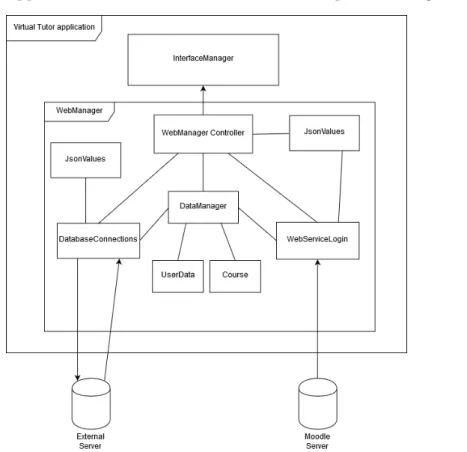
The necessary information is provided by the Moodle server that hosts the ap-plication and an external server responsible for housing information regarding the student and the virtual tutor. The application inserts this information into the ex-ternal server during the interaction with the student. The information is stored in dedicated classes (UserData and Course), and can be accessed via the DataManager
class that is available in the WebManager controller class. The interaction of the components of the application and the external servers are depicted in Figure 3.2.
Figure 3.2: Virtual Tutor application components.
WebManager
The WebManager controller class acts as a controller of the other classes in the plugin, receives the credentials and coordinates the operations of communication with the servers.
This class is responsible for interpreting the responses for the external database and calculates the state of the student as well as store captures the information from the external database.
DataManager
The DataManager class holds the UserData and Course classes, manages the information retrieved and removes collisions in the Course components.
The classes WebManager and WebserviceLogin access DataManager to store, deliver and access information about the user and the courses. For each component type that has received all the information by WebserviceLogin, a boolean is set to true to signify the information about the component type is replicated in Course. When all the components are retrieved, DataManager performs a collision removal function and associates the news received with the respective object of the course.
WebserviceLogin
The WebserviceLogin Class receives the credentials from WebManager and re-trieves the information of the student and course and sends it to the DataManager class for management.
The class uses coroutines to retrieve the information and interprets it using the nested classes in JsonValues class. As discussed previously, to guarantee the completion of a coroutine it is necessary to yield for the return. In the project, not all the information is required to inquire further information, for example, getting the information about the forums should not make the request for the grades to wait. Yielding only for the return of mandatory requests such as acquiring the names and identifiers of the courses as opposed to yielding for all the requests can reduce the information retrieval process from 9 to 5 seconds.
Previously, when retrieving the information about the forums, the contents were requested, this would imply a request for each discussion and the posts contained inside which in turn would cause a performance impact, an alternative method was reached using the external database to only request the number of posts made by the student.
DatabaseConnections
The DatabaseConnections class is responsible for preparing the requests of the plugin to the external database based on the parameters received.
The DatabaseConnections class contains the URLs of the PHP files that contact with the external database. The methods prepareRequest and prepareRequests receive the parameters necessary to get the information from the database and run coroutines that execute the makeRequest and makeRequests respectively.
The URL created to communicate must send the variables to the corresponding PHP file, the formula for the URL goes as such:
U RL = location + f ilename + variables + hash
• Location is hardcoded in the class, and the choice of using the normal or secret one is stated as a parameter
• Filename is a variable given to the method and corresponds to the name of the file in the database, the name of the files and a description of their function is detailed in subsection 3.7.8.
• Variables are sent to the external server in the alphabetical order to construct the same hash as the one that is a part of the URL.
• Hash is obtained by the MD5 hashing algorithm by the concatenation of the variables sent and a secret key shared with the external database.
UserData
The UserData class receives and contains the necessary information about the student to allow identification.
Course
The Course class serves as a container for the information about the course after the information retrieval ends. It contains the topics of the course as well as the components that are inside, the e-fólios and forums. Information is stored in nested classes to simulate the structure of the course page.
The class also verifies the information received by the grade report and detects the assignments that exist in the category “e-fólios”. If a student has received the grade for all these assignments and is part of the group “Avaliação Continua”, the variable checkGradeReport is set to true. When this occurs, the student is incen-tivised to check the grade report to know if it is possible to take the “p-fólio”.
JsonValues
This class serves to contain the possible formats of the responses received. For better readability, the received format from both the Moodle and the external database PHP files is JSON. For Moodle to provide this format, the following text needs to be in the request: “&moodlewsrestformat=json”. The PHP files in the external database are programmed to supply only in the JSON format or a string of error. The diagram of the class is decomposed into Figure B.13, Figure B.14 and Figure B.15, present in the appendix.
3.4.1
Moodle communications
To access the web services is necessary to provide a valid token with permissions for the requests, it is required to supply Moodle an account username and password that is allowed to access a service that contains the web services to acquire a token. A web service communication is illustrated in Figure 3.3.
Figure 3.3: Communication flow of the plugin with Moodle.
For an account to be allowed to use a service, it is necessary to add the account manually to the list of permitted accounts.
With this in mind, there were two approaches:
• Associate the student with the service and get a token for the student; • Associate a non-student account to the service and get the token for that
account.
In the WebGL environment, not only would it prove to be cumbersome to gain a valid token without making the student input the account password every time the application started, as it would implicate that one communication with the username and password of the student would go unprotected. Android could circumvent both the request for credentials from the user and the token acquisition for a one-time retrieval and storage of the token.
Considering the scenario in which the students have access to the service, it would make so that each student that uses the Virtual Tutor would also need access to the service, requiring students to possibly have the permissions that are not supposed to have the ability to make the requests. In contrast, using a non-student account allows the management to be more straightforward and removes the worry of managing permissions for each student.
Using the scenario involving the non-student account, it is required to have access to the student information while using the account. However, the clearance level was insufficient with the role of a “student” as information specific for the student would be out of reach for the account, requiring the role in the course to increase to “manager” or “teacher”. This approach would also face the same problem of transmitting the credentials unprotected in addition to them being hard-coded into the program if token requisition makes part of the communication process. For an alternative, the account would not have a traditional login instead opting to make it only operate with web services, removing the chance of hijacking the account for malicious intents although in this case, the token now has to be hard-coded instead of the credentials.
• Table 3.1 describes the web services and the Moodle version they became available;
• Table 3.2 indicates the number of times the web services are used during the information retrieval process and the time they are requested.
Web service Moodle Version Description
core_user_get_users 2.5 Used to retrieve information about the user.
core_enrol_get_users_courses 2 Retrieves the information of the courses the student attends. core_course_get_contents 2.2 Retrieves the course topics.
mod_assign_get_assignments 2.4 Gives the information about the assignments (e-fólios). mod_assign_get_grades 2.4 Gives the grades of the assignments.
gradereport_user_get_grade_items 3.2 Gives the information about the grade report. mod_forum_get_forums_by_courses 2.5 Gives the information of the forums.
mod_forum_get_forum_discussions_paginated 2.8 Gives the information about discussions contained in a forum. mod_forum_get_forum_discussion_posts 2.7 Gives the information about posts contained in a discussion. core_course_get_updates_since 3.3 Checks the new information of a course regarding a timestamp. core_group_get_course_user_groups 2.9 Gives the list of groups the student is a part of.
Table 3.1: Web services used in the plugin - short description
Web service When Used Number of Times Used
core_user_get_users When student Id is received Once core_enrol_get_users_courses After core_user_get_users and when course Id is received in WebGl Once core_course_get_contents After received Courses x Nº of Courses mod_assign_get_assignments After received Courses x Nº of Courses mod_assign_get_grades After received Assignments x Nº of Courses gradereport_user_get_grade_items After received Assignments x Nº of Courses mod_forum_get_forums_by_courses After received Courses Once mod_forum_get_forum_discussions_paginated After received Foruns x Nº of Foruns mod_forum_get_forum_discussion_posts After received Discussions x Nº of Discussions core_course_get_updates_since After receiving the list of the user logins x Nº of Courses core_group_get_course_user_groups After received Courses x Nº of Courses
Table 3.2: Web services - usage in the plugin
3.4.2
External Communication
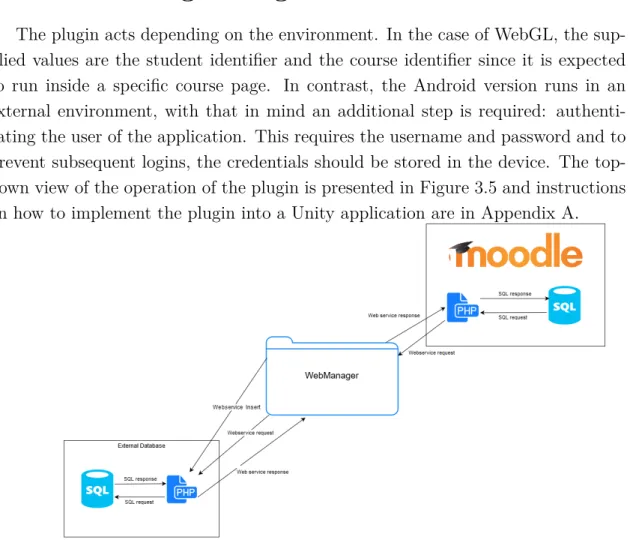
Unity in a WebGL environment does not have access to IP sockets, prohibit-ing the direct connection with the SQL database located in the external database. With the direct approach impossible, the alternative chosen to allow communication was the usage of PHP files as intermediates in the communication as depicted in Figure 3.4.
This approach came with additional benefits, such as control over the format received and the possibility of using coroutines to communicate with the external database.
Rejected alternative
An alternative approach considered would not require the use of an external database. It would use the Moodle tools named Notes, this alternative would store the information on text files and could be accessed via the existing web services of Moodle. This notes could be divided in personal or course related, the course related would keep information regarding the interaction of the student and the course while the personal notes can be used to store information regarding the interaction between the application and the student.
Figure B.14 shows the structure created in the plugin to support the alternative. However, the usage of such an approach would incur in a performance penalty, the more extended the data saved, the higher the penalty since reading a more extended text file would imply a higher waiting period.
3.5
WebManager Plugin
The plugin acts depending on the environment. In the case of WebGL, the sup-plied values are the student identifier and the course identifier since it is expected to run inside a specific course page. In contrast, the Android version runs in an external environment, with that in mind an additional step is required: authenti-cating the user of the application. This requires the username and password and to prevent subsequent logins, the credentials should be stored in the device. The top-down view of the operation of the plugin is presented in Figure 3.5 and instructions on how to implement the plugin into a Unity application are in Appendix A.
3.5.1 Communication
The communication flow with Moodle and the external database needs to follow specific steps to ensure proper functionality, between the ordered steps, exists addi-tional steps that only require that the previous mandatory steps be completed, this is done to retrieve information faster. It is possible to divide the communication flow into two phases, a first phase dedicated to retrieving core information, and a second phase that acts accordingly to the information received in the first part.
First phase: Acquisition of core information
The plugin manages communication with the Moodle server and an external server as depicted in Figure 3.6 for the retrieval of pertinent information for further interactions.
Figure 3.6: Communication flow of the WebManager plugin - phase 1 As depicted in Figure 3.6, for the retrieval and storage procedure to begin, it is required to supply the credentials and request the start to the WebManager class. The plugin after receiving the credentials communicates with Moodle to retrieve the information required to identify the student and the course and the environment of the course page that consists of:
• The structures that constitute the course page, the topics and modules con-tained in each topic;
• The Assignments and the grade attributed to the student; • The name of the forums;
After receiving this information, the plugin communicates with the external database and retrieves the information about:
• The identifier of the tutor the student chose for the course; • Parameters defined by the professor for the course;
• Logins made by the student; • State of the student in the course;
• Phrases that the avatar uses to communicate with the student; • Activity of the student on the replicated logs of Moodle;
The steps 8 and 13 are a part of a probing procedure done by WebManager that runs on the update method with the purpose of verifying if specific information was retrieved and act upon this knowledge to begin communications with the external database. The update[8] method is a built-in method from the MonoBehaviour class and is called in every frame. The MonoBehaviour[5] class is the base class from which every Unity script derives.
Additionally, a design difference between DatabaseConnections and Webser-viceLogin is the class that receives the content: in the case of WebserWebser-viceLogin, the information is sent to DataManager for storage as opposed to DatabaseCon-nections that stores the received information in a hash table to be later accessed and retrieved by the WebManager class. The reasoning behind the design difference comes down to the type of information collected. In WebserviceLogin, the informa-tion obtained from Moodle regards only the course and student, so storage in the appropriate class is in order. The information retrieved from DatabaseConnections relates to the student, course and avatar. This information can implicate changes in operation such as no chosen tutor for the course, making it more suitable to be first viewed by WebManager.
Second phase: Calculation and specific requests
After the first batch of information is obtained, the plugin acts depending on the captured information to perform additional actions, such as, calculate the state of the student, confirm if the student has previously entered the course and used the application today and verify which updates occurred in the course page that the student did not view yet. The depiction of the process can be viewed in Figure 3.7.