UNIVERSIDADE
DE
LISBOA
FACULDADE DE CIÊNCIAS
DEPARTAMENTO DE INFORMÁTICA
DATA FLOWS OF CLASSIFIED DOCUMENTS
Benjamim Gomes da Silva Durães
Mestrado em Segurança Informática
Janeiro 2010
UNIVERSIDADE
DE
LISBOA
FACULDADE DE CIÊNCIAS
DEPARTAMENTO DE INFORMÁTICA
DATA FLOWS OF CLASSIFIED DOCUMENTS
Benjamim Gomes da Silva Durães
Tese orientada pelo Prof. Dr Hyong S. Kim
e co-orientada por Prof. Dr Miguel Nuno Dias Alves Pupo Correia
Mestrado em Segurança Informática
Janeiro 2010
I
Resumo
Nos dias de hoje à medida que a evolução dos produtos e serviços acelera cada vez mais, significa que a informação é hoje uma das mais valiosas propriedades de qualquer empresa. Quanto mais “imaterial” é o produto, tais como serviços, propriedade intelectual e media (vídeo, música, fotografia) mais importante é a questão. Este ciclo de vida acelerado torna a sua exposição maior do que em épocas anteriores, onde o desenvolvimento mais lento permitiu um maior controlo sobre eles e sua exposição. Outros factores são a participação de um número crescente de colaboradores que acedem às informações confidenciais. A crescente digitalização da informação e conectividade entre as diversas entidades num mundo ligado de uma forma rápida faz com que a segurança da informação seja um assunto mais complicado de lidar do que em épocas anteriores.
Vários métodos e técnicas foram desenvolvidos para proteger a confidencialidade, integridade, autenticidade e autorização de acesso. Menos atenção tem sido dada para detectar de forma estruturada onde e por quem a segurança da informação pode estar sendo comprometida.
Neste projecto propõe-se a usar alguns métodos para marcar e controlar o uso de informações confidenciais no interior das instalações da empresa. Devido à natureza de algumas das técnicas utilizadas, algumas preocupações com a privacidade podem ser levantadas, mas como este é apenas para uso com dados sensíveis que pertencem à companhia essas preocupações poderão ser devidamente contra-argumentadas. Neste trabalho o tipo de documento considerado é o da Microsoft Office Word 2007 que implementa um novo tipo de ficheiro que tem uma natureza aberta ao contrário de versões anteriores de formato binário e fechado. Uma vez que esta é uma ferramenta amplamente utilizada dentro das corporações, justifica-se assim a sua escolha. Outros casos possíveis seriam os ficheiros do Excel e do PowerPoint que também têm uma arquitectura aberta a partir do Office 2007. Fora do mundo do Office, o caso mais significativo são os ficheiros PDF, mas estes requerem uma abordagem completamente diferente devido a uma estrutura também ela muito diferente. Além disso existe para o Office algumas ferramentas que facilitam a implementação da solução.
Esta solução destina-se a uma grande empresa de telecomunicações que preenche as considerações iniciais - que comercializa produtos imateriais - Serviços e media possui um considerável volume de propriedade intelectual devido ao seu contínuo apoio na investigação sobre novos produtos e serviços. Esta solução no entanto poderia ser concretizada em qualquer outro tipo de empresa que tenha o seu funcionamento apoiado em dados digitais, como é o caso da grande maioria das empresas de hoje em dia.
Palavras-chave: classificação da informação, fuga de informação, detecção, metadados,
II
Abstract
The present acceleration of the evolution of products and services makes information one of the world’s greatest assets. The more "immaterial" is the product such as services, intellectual property (IP) and media the more important is the matter. This accelerated life cycle makes the exposure of information to threats bigger than in the past, when the slower development permitted a tighter control over the information itself and its exposure.
Another contributing factor is the involvement of an increasing number of company collaborators in accessing sensitive information. The increasing digitalization of data and connectivity between entities in a connected and accelerated world makes the security of the information a more complicated subject to deal with than in previous eras.
Several methods and techniques have been developed to protect information’s confidentiality, integrity, authenticity and access authorization. Less attention has been given to detect in a structured way where or by whom the information may be leaking out of the company.
This project aims to contribute to the solution of this problem of detecting the leakage of sensitive data. For that purpose, the project proposes methods to tag and control the use of sensitive information within the company premises. Due to the nature of some of the techniques proposed, privacy concerns may rise, but since the techniques are for use only with sensitive data that belongs to the company, those concerns are possible to be argued with.
In this work the considered document type is Microsoft Office Word 2007 which implements a new file type that has an open nature as opposed to previous binary and closed format versions. Since this is a widely used tool within corporations its choice is well justified. Other possible cases would be Excel and PowerPoint file types that also have an open architecture starting from Office 2007. Outside of the world of Microsoft Office the most prominent case is the pdf files, but those will require a completely different approach as the Office files have some well built tools to implement the intended features.
This solution is aimed at a major telecom company that has the concerns mentioned above: it commercializes intangible products - services and media and owns considerable IP due to its ongoing support for the investigation of new products and services. This could nevertheless be deployed in any other type of company that supports its operation by way of electronic data, as is the case in the large majority of today’s enterprises.
III
Acknowledgments
This thesis represents a lot time and work. My effort would be useless if not for the support from some people who helped me overcome all obstacles.
I would like to thank my former chief João Martinho and director António Talefe for their help to get me into this post-graduation course.
To Professor Hyong Kim for his guidance and suggestions. His vision was important to do a relevant work for the company.
To Professor Miguel Pupo Correia for the support and critical observations on the final document.
To the CMU class of 2009 all the companionship throughout the course.
To my family and friends, who suffered the most during this project. I will try to make up for my absence in the last 16 months.
A special thanks to my wife Ana Cristina for her support, comprehension and patience. My success will always be yours too.
IV
Table of Contents
1 Introduction ... 1
1.1. Related Work ... 2
1.2. Main Challenges and Scope ... 4
2 Motivation, Environment and Adversary model ... 7
2.1. Environment and Background ... 8
2.2. Adversary and threat model... 9
2.3. Real cases of metadata tracking ... 10
2.3.1. Dennis Rader – Serial Killer [11] ... 10
2.3.2. David Lee Smith – Melissa Worm writer [12] ... 11
3 System solution ... 13
3.1. Metadata ... 14
3.2. Tracking ... 15
3.3. Content... 17
3.4. Word Office behavior ... 20
3.4.1. Track changes on ... 20
3.4.2. Recovering Undo Information ... 20
3.4.3. OpenXML specific tracking changes features ... 21
3.5. Time stamps ... 24
4 Technical aspects and platform... 27
4.1. OpenXML ... 27
4.2. Visual Studio and Visual Studio Tools for Office (VSTO) ... 30
5 Implementation ... 33 5.1. Metadata ... 33 5.2. Tracking ... 33 5.3. Content... 34 6 Future Work ... 35 7 Conclusion ... 37 8 References ... 39
V
List of Figures
Figure 1 – Deployment of IDS to track sensitive documents ... 15
Figure 2 – Web Bug - embedded object in a document and is invisible but allows checking that a user has viewed the page ... 17
Figure 3 – Non visible Embedded tags ... 19
Figure 4 – rsid usage... 22
Figure 5 – Word OpenXML with timestamps and other custom properties ... 25
Figure 6 – Microsoft Office OpenXML architecture diagram ... 28
Figure 7 – DOCX internal structure ... 28
Figure 8 – Visual Studio 2008... 30
VI
List of Tables
Table 1 – Present solutions to inside threat ... 7
Table 2 – Adversary level classifications... 9
Table 3 – Project main aspects ... 13
Table 4 – Information hiding ... 14
VII
“In a time of turbulence and change, it is more true than ever that knowledge is power”
1
1 Introduction
In present times the competitive pressure of the markets increases every day and the pressure on companies to focus on short-term profit is significant. Nowadays fast results and continuous operation is a demand made on every company. Those demands require companies to attain any edge they can over the competition including sensitive information about their competitors. The ease with which information can be manipulated, which in the most part is in digital format, brings great benefits in terms of the above mentioned requirement for productivity. However it also increases the threat against information to the same extent. Industrial espionage is not the only purpose for sensitive information leakage as other motivations (disgruntled, revenge) could also trigger such behavior from employees. The project is not aimed to study the motivation but a method to help detect the actions that may compromise information security.
Today information is one of the greatest assets and must therefore be properly protected. Historically the first approach to protect information has been symmetric encryption to assure its confidentiality, and is still the first approach taken when thinking about information security. Several methods and techniques have been developed to protect not only confidentiality but also integrity, authenticity and access authorization. Thus those applications are today well served in terms of available tools – Encryption, protocols, HMAC (Hash-based Message Authentication Code), digital signatures etc. Development in terms of detecting information leakage has not been undertaken on a similar level.
This problem of slower development in information leakage is not a unique problem but the whole security field suffers from it. A while ago the available resources were mainly directed to performance and usability. Security on the other hand typically complicates both of these in everyday use without perceived value as the other two. Thus its deployment has been limited and minimized.
Despite these difficulties security necessity becomes evident to everyone and its use is now a widespread reality. The investigation and deployment of security has been mostly centered on the fields of confidentiality, integrity, authenticity and access authorization. This project aims to prevent the disclosure of information against unauthorized parties. The mechanisms studied and proposed are of little use against misbehaving of authentic and authorized parties that have rights to access the sensitive information, and there seems to be little work available to address the insider threat problem. It is already known that the biggest threat comes from the inside and the potential effect is greater than that from outside attackers [1]. This is because the internal attacker does not need great technical knowledge to achieve it and because most of the times they are already working with it on a daily basis. To address this problem of inside threat the state-of-the-art seems to be still driven by forensics analysis after an attack. Technologies that prevent, detect, and deter insider attacks are still in a very embryonic phase.
2
Information leakage is a problem in every enterprise, and the bigger the company the worse is the case. This is due to the fact that the sensitive information travels through a higher number of employees. When we talk about information leakage we mean a broad field where there are two very different cases - intentional and unintentional. We aim with this project at the first case but we still approach indirectly the second.
Although the first case is pretty straightforward, the second case is not. The second case happens when an employer inadvertently permits sensitive information to leave the enterprise perimeter unknowingly. Examples are the default metadata / hidden text / comments of documents that are sent to clients and partners that are then disclosed in a simple way, or when a virus/worm/Trojan is installed on the PC of the user.
The main focus of this work is on Microsoft Office Word 2007 file types. This is due to the fact that the previous versions dominate de facto the document format within most enterprises. Here we try by means of using the latest office format files – OpenXML – to make some tracking on the operations done on the document and identify the users’ that have done it. The mechanisms that permit unintentional leakage will be used to insert instead our own information inside the document. That information will be about the usage of that same document.
The insider threat remains one of the most serious problems in computer security. A number of approaches have been proposed to detect malicious insider actions including user modeling and profiling techniques, policy and access enforcement techniques, and misuse detection. In this work we focus on the detection property and tracking defense mechanisms and a deployment platform for addressing the problem of insiders attempting to leak and use sensitive information. These include mechanisms to insert data in non-visible way to the end user with metadata, hidden fields, custom files (XML - Extensible Markup Language files). Mechanisms to verify the content changes were implemented as data hashes and logs stored inside the document itself as hidden data. Tracking was implemented with web bugs (although agents could be deployed on the desktops that belong to the company). Some of the goals were successfully implemented on a prototype.
1.1.Related Work
Some investigation about this theme exists but typically in an isolated topic of investigation. Not much has been done that considers all of those topics in coherent solution. In the following we discuss some of those topics.
As mentioned above, metadata is an important vector for information leakage. Extensive work regarding metadata exists in both the academic and non-academic worlds, and it has had also some media coverage in recent years. Typically these works focus mainly on the negative aspects of metadata utilization, such as confidential information disclosure and its use by hackers; or on its use for data organization and classification such as mp3 files with all the data about the music inserted within the file itself.
3
As metadata, data hiding through steganography techniques is another extensive field of study and investigation. Steganography consists in writing hidden messages in such a way that no one, apart from the sender and intended recipient, suspects the existence of the message, but it is embedded in unsuspicious file such as an image. Steganography may serve as a vector for information leakage but we do not consider it in the project.
Some work regarding forensics using the new format of the Office documents has been done, but this is still a new field of investigation and as such there are not any significant solutions with this scope with the exception of the default mechanisms of Office itself. Despite the fact that OpenXML specification has been submitted to standards bodies by Microsoft, few investigation have been done about details of the new XML Document file formats, and virtually nothing has been published about their forensic implications. Garfinkel and Migletz [2] did some work regarding the new file of Office 2007 (Open XML) and their potential for forensics utilization.
Related to information hiding, deception and decoy some relevant works are the following. Bell and Whaley [3] described the structure of deception as a process of hiding the real and showing the false. They introduce several methods of hiding that include masking, repackaging, and overwhelm, and on the other side methods of showing that include mimicking, inventing, and decoying. Yuill et al. [4] expanded this work and characterize deceptive hiding in terms of how it defeats an adversary’s discovery process. They describe an adversary’s discovery process as taking three forms: direct observation, investigation based on evidence, and learning from other people or agents. Their work offers a process model for creating deceptive hiding techniques based on how they defeat an adversary’s discovery process.
For tracking purposes outside of the institutional premises some active tracking is needed. An important area of work in this field are the so called Web bugs. These are a class of silent embedded tokens which have been used to track usage habits of web or email users [5]. This work has been associated to aim users privacy by its use through spammers, spyware and others. In the project we use a similar technique to embed a non-visible white image located in a server to track Microsoft Word documents (though it is also possible with other Office formats) [6].
A very recent work that combines the previous approaches is the Bowen et al. [7], where the authors use web bugs in decoy documents to track potential misbehaving users. This work is considerably close to this one, but here we use the techniques inside the legitimate documents themselves and decoys are not used. They also use dummy content within the documents with false logins accounts that are monitored by external means. Whenever access is made to these accounts it means that the document has been used irregularly. Computer forensics is presently a major area of security deployment, and although useful it has some limitations. It cannot unequivocally relate the misuse with the leaked data and typically is done after the incident to determine what happened. This work aims to raise the actual level to verify what is happening at the moment that it is occurring.
4
1.2.Main Challenges and Scope
The objective of the thesis is to present a solution to detect information leakage by means of sensitive documents sent or open outside the company premises. This is not a trivial objective as the ease of manipulation of digital data and connected world that we live in permits a faster exchange around the globe in few seconds.
The following list presents challenges of this project:
Documents: The solution here described will not prevent that if the file is outside
the premises of the institution it will be possible to prevent any kind of information manipulation… but that is also the case of the software copies. Several commercial software products employ several mechanisms to prevent their abuse but nevertheless they are broken every time, so it cannot be expected to achieve better results with a passive file. A somewhat similar case would be the digital rights management (DRM) protection of media files, but this are to be used by a large audience in a restrained way (attached to specific media players).
Security by obscurity: This is obviously a limitation as historically security by
obfuscating the method to secure the target items typically does not work well. This is a scenario even worse than protecting software as here the documents are a more passive identity. Nevertheless some techniques can be deployed within the files to permit some tracking although it requires that the potential attacker is not aware of them;
Opponents: For security by obscurity to work it is required that the opponents are
not technically gifted or aware of the defense mechanism. If the solution is to be used widespread through all entities its exposure to such opponents is more likely. Thus the deployment of such a solution must be done within a confined and private space such as a company. If the solution becomes known, some solutions to overcome its effectiveness may be developed outside by a rival company to help the perpetrator to overcome this scheme. Some secrecy regarding its deployment and operation is necessary. By limiting its use to a controlled environment (such as the company internal network) the level of exposure is somewhat diminished and thus its effectiveness will increase. If the company has several technicians and engineers it is not expected if they become aware of the mechanism that this become effective anymore. Since a large majority of the internal collaborators do not have hacker level knowledge, it might be possible to derive some significant forensics information from the documents.
Privacy concerns: By inserting control methods some privacy concerns regarding the
tracking of the documents may be raised. Thus the pre-marking of selected documents is necessary to permit to track only the sensitive information. It can be argued that confidential documents are the company’s property and thus it has the right to track them.
5
Data transformation: Some of the mechanisms are dependant of how tracking data
is inserted the document. Thus by saving the document in Office 2003 format will remove or change some of the data. If the document is transformed in other format the case is even worst, as this implies a whole new structure for the file (jpg, pdf, txt…).
Variety of documents: The enterprises use several types of files for their operation,
and the more types the more difficult is the implementation and operation of the system. This is due to the fact that different file types have different structures where data can be inserted or the tracking beacon can be implemented.
Data validity: If the information is highly volatile, i.e. its usefulness is very time
limited then the use of this project may not be at all justifiable for that particular type of information. In current times this is increasingly truer in the markets world.
Default behavior: Some of the techniques here use the default behavior of the
application that opens the document (Microsoft Word). If this behavior is changed or another application used instead (e.g. OpenOffice) than this expected functionality may not be available and the developed technique might not work.
Accountability: Computer forensics cannot with 100% certainty determine who did
the non-authorized action with the document. It can only give some degree of certainty about the action and the possible responsible. Judicially it may have no value in court.
The Problem of Scale - One of the biggest obstacles to rapid response in digital
forensics is scale. As the generation of digital content continues to increase, so does the amount of data that is generated. The tracking information assembled from several documents could potentially be overwhelming. Each particular document has relevant information regarding its own path, e.g. if a particular document is used by 500 users, and each user has 3 copies on average, then that particular document will originate 1500 tracking logs.
Forging: The new XML–based formats also make it easier to change unique IDs,
making it easier to maliciously implicate an innocent computer user or create the appearance of a false correlation.
Metadata removal tools: MS Office 2007 provides new features to remove hidden
data from documents. So a lot of the information may be lost by a more careful user regarding its privacy (even if he is unaware of this system).
7
2 Motivation, Environment and Adversary
model
As previously mentioned the intellectual property and other intangible assets of companies are nowadays an increasingly valued property. Competitive advantage comes from the constant innovation and the advantage in both research and development (R&D) as well as from other relevant information (price plans, deals, contracts…). As this increased valued information circulates through a higher number of employees, the bigger is its risk of being leaked to non-authorized parties.
Insiders are nowadays one of the main threats, which have even overtaken viruses and worm attacks as the most reported security incident according to a report from the US Computer Security Institute (CSI) [1]. The annual Computer Crime and Security Survey for 2007 surveyed 494 security personnel members from US corporations and government agencies, finding that insider incidents were cited by 59 percent of respondents, while only 52 percent said they had encountered a conventional virus in the previous year. Although this refers to the whole internal incident problems and not only information leakage, it shows that it is internally where security is more problematic.
At the present moment the biggest solutions to inside threat regarding information leakage seems to be [7]:
Level Description
Policy and access enforcement
This category of solutions is essentially prevention and deterrence through formal access control policies, such as Bell-LaPadula [8] and the Clark-Wilson models [9]. This is the implementation of the company policy to enforce appropriate access to its employees and other personal that need to access the relevant information.
User modeling and profiling techniques
To detect behavior deviation and thus possibly misuse detection. By making a profile of resource utilization by the users the theory is that it is possible to detect misuse through the occurrence of actions that are not supposed to happen in the context of the users competence (e.g. night access to a server with information or a deviation in behavior from the previous months). Thus following monitoring for abnormal behaviors that exhibit large deviations from this baseline [10] may mean a potential insider attack.
Forensics analysis
After an attack / leakage situation. Here through the analysis of logs and other sources of information of the occurrence of some relevant situation that some measures are taken. This does not prevent occurrences per se, but permits to improve the methods used to avoid repetition of the methods used for the detected misuse.
8
These approaches have their merits but also have their limitations. The policy and access enforcement specifies who accesses what and cannot restrain their behavior once that access is granted. In many cases security policies are incomplete or they are purposely ignored in order to get business goals accomplished.
The user modeling and profiling searches for unusual behavior, but those behaviors may occur without ill intentions and thus false alarms may occur with high probability.
Forensics analysis suffers from the problem that there are different amounts of logs and few resources are used to analyze them, and those few are used to ignoring them in their normal daily operation.
With this project it is tried to complement these approaches with solutions that proactively detect and track an insider attack at the moment of occurrence when insiders attempt to exfiltrate and use sensitive information. By exfiltration we mean unauthorized copying and transmission of information by any means of digital replication. Physical copies of documents, indiscrete conversations and any other non-digital means of information transfer are not considered here.
2.1. Environment and Background
The environment considered in this project is the internal IT structure of a major Portuguese Telecom enterprise. This company has several thousand employees and as a service provider it is highly dependent on the non-disclosure of some of its information to competitors (price plans, intellectual property, contracts…).
This is a potential scenario for sensitive information leakage (either intentional or unintentional). Several commercial proposals are made every day to several clients with different price plans according to client profiles. Several new services are being constantly developed to permit the company to maintain its edge over the competition – mobile, web portal, IPTV and others – both in the domestic market as well as abroad with an important presence in several countries. This internationalization raises the scope of importance in information leakage as foreign competition tends to be even more ferocious.
The large majority of the sensitive information is in digital format and sometimes also in physical format (such as signed client contracts) and the normal operation is highly dependent on the normal operation of its Information technology (IT) infrastructure.
With all this digital information circulating within the company through several employees the conditions for disclosure are thus created. This leakage may not be intentional as accidents happen (e.g. sending an e-mail with prices for a client sent to another, or forwarding a document to the wrong recipient). These unintentional leakages are recurrent events that are better dealt with if identified than continuing in ignorance. By detecting accidental violations a warning to the users and organizations about such violations will help achieve a higher degree of non-disclosure.
9
2.2. Adversary and threat model
It is well known that the several defense techniques are constantly being defeated when skilled opponents are involved. These opponents are typically referred to as hackers in the Internet and computing context. Some well know cases regarding virus writing, system intrusion, phishing, software and media DRM unlock among others are constantly being advertised by the media. These individuals have several reasons to act – personal achievement, money, recognition – when faced with those challenges. And the more mediatic are these challenges the bigger is their motivation.
An intuitive notion is that the bigger the audience to which a system is exposed the bigger the probability that a very skilled adversary will appear. Thus if we are dealing with a population of thousands the probability that a skilled opponent to appear is significantly lower than when dealing with populations of millions of individuals as is the case of the Internet.
A classification of the adversaries in several levels is provided in [7]:
Level Description
Low level
Expected to be the most common type. Typically unaware of the informatic tools possibilities. Observation is the only tool they are capable of using to detect any trap within the documents. Since the documents to be surveilled are authentic there should be no suspicion from them that they are being tracked. It is expected to detect this level of adversary with high probability with the several techniques deployed on the documents.
Medium level
A more thorough investigation can be performed by the insider; decisions based on other, possibly outside evidence, can be made. Such adversaries will require that the surveillance mechanisms are kept secret, otherwise they will take measures to overcome such mechanisms, and possibly with the help of outside advisors.
High level
Access to the most sophisticated tools is available to the attacker (e.g., some detail regarding metadata, other informed people who have organizational information). The main difference from the medium is that they can easily defeat the surveillance system if aware of its use.
Highly Privileged
The most dangerous of all is the privileged and highly sophisticated user. Such attackers might even be aware that the system is in operation and will employ sophisticated tools to try to analyze, disable, and avoid them entirely.
10
Within the constrained universe of the enterprise it is expected that the large majority of the adversaries fall into the two first categories, which are good news. High level adversaries are also expected to appear occasionally, but their numbers are typically insignificant and nevertheless as long as the system is unknown it can still be effective.
Other reasons to be optimistic are that these type of individuals are employed in more operational tasks and not so much involved with sensitive documents.
Of course exceptions occur and once a skilled adversary is aware of the surveillance mechanisms we cannot expect to achieve any relevant effectiveness of the solution.
2.3. Real cases of metadata tracking
Several cases of metadata tracking have been extensively reported in the media due to its misuse by the hackers and their utilization against user’s privacy. But some of the uses this hidden information was also positive as it permitted to capture some criminals that used Office Word.
In the following two important cases regarding the tracking of criminals by using metadata are described. The first one is a serial killer that used Word documents to communicate with the police. This shows the possible outcome against the general case of a person who don not have great technical knowledge regarding the computers. Although the first case surprises due to the importance of the crimes involved, the second one is even more surprising because this time involves a person with considerable informatics knowledge. This second case reports the hacker responsible for the creation of the Melissa worm who was capture with the help of metadata that uniquely identified its computer.
2.3.1. Dennis Rader – Serial Killer
The first case reports the capture of Dennis Lynn Rader (born March 9, 1945), an American serial killer who murdered 10 people in Kansas, between 1974 and 1991 [11]. This is thus prior the divulgation of the Internet and much of the information then was through the traditional media such as mail. During this time he became notorious as the BTK killer (or the BTK strangler), which stands for "Bind, Torture and Kill" and describes the methods used by him on the victims. He had sent several letters describing the details of the killings to police and to local news outlets during the period of time in which the murders took place.
From 1991 to 2004 he suspended any more communications with anyone regarding the murders. He resumed sending letters in 2004 and the police corresponded with him in an effort to gain his confidence. In one of his communications with police, Rader asked them if it was possible to trace information from floppy disks. The police replied that there was no way of knowing what computer such a disk had been used on, when in fact such ways
11
existed. To notice that by this time the metadata misuses were already known, which shows that the killer was not exactly a computer expert.
Dennis Rader then sent his message and a floppy disk to the police, which checked the metadata of the Microsoft Word document. In the metadata, they discovered that the document had been made by a man who called himself Dennis. They also found a link to a Lutheran Church. When the police searched on the Internet for “Lutheran Church Wichita Dennis”, they found his family name, and were able to identify a suspect: Dennis Rader, a Lutheran Deacon. The police also knew that he killer owned a black Jeep Cherokee from previous investigations. When the officers drove by Rader's house they noticed a black Jeep Cherokee parked outside.
2.3.2. David Lee Smith – Melissa Worm writer
Because the already discussed fragility of the solution based on the insertion of information within the document itself, one could think that against a more skilled adversary this type of mechanisms would not be useful [12]. This next case shows exactly that is still possible to defeat this type of opponents, as long as they are not aware of this possibility.
Some of the Microsoft Word metadata is not visible except through an external analysis of the file, such as is done in forensics investigations. The creator of the Microsoft Word-based Melissa computer virus in 1999 was caught due to the inserted metadata that uniquely identified the computer used to create the original infected document.
The Melissa worm was written by David Lee Smith and named after a lap dancer he encountered in Florida. The creator of the virus called himself Kwyjibo, but was shown to be identical to macrovirus writers VicodinES and Alt-F11 who had several Word-files with the same characteristic Globally Unique Identifier (GUID), a serial number that was earlier generated with the network card Media Access Control (MAC) address as a component. Until Smith's arrest Thursday night, VicodinES was suspected to be Melissa's author. That connection was made after Melissa was found to contain the same electronic fingerprint - the Global Unique Identifier or GUID - as two other viruses created by code writers with the handles ALT-F11 and VicodinES.
This is an example of the use o metadata tracking a well knowledge adversary, but unaware of the potential use of metadata tracking possibilities.
13
3 System solution
The operations tracking defense system described in this work is of a proactive nature, intended to whenever possible provide information about where a document is, with whom it has been with and if has been manipulated.
The solution proposed to obtain tracking information involves multiple overlapping mechanisms to be embedded in the documents. Since the attacker may have varying levels of skill, a combination of techniques is used within the documents to increase the likelihood that one will succeed in generating relevant information.
To implement these several mechanisms with the documents, a local agent installed in each PC will be the simplest approach to do the document control inside the company premises. Thus this is what the developed prototype aims to.
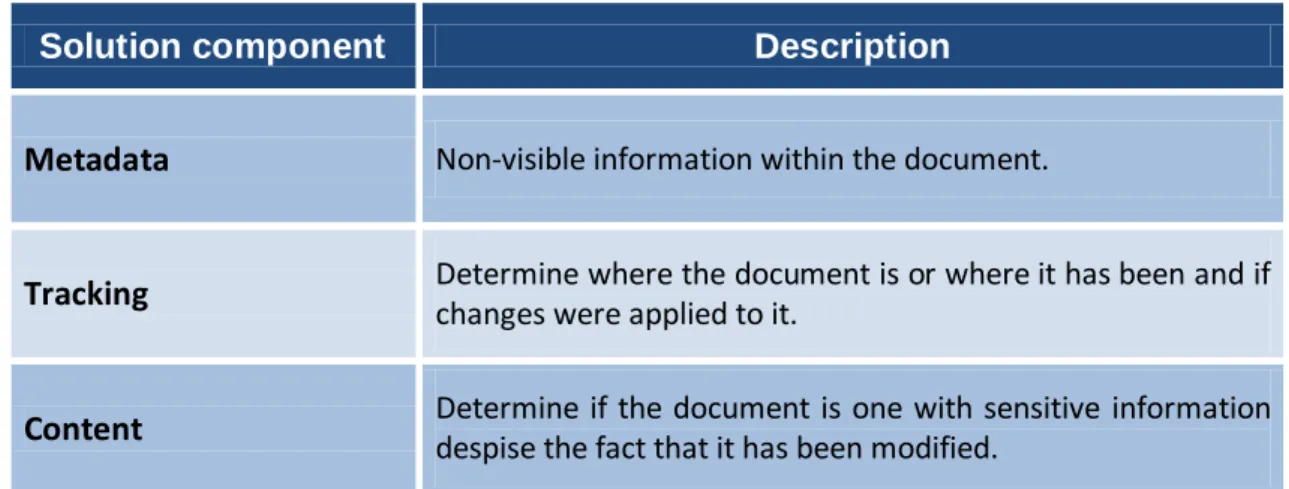
For this project three main aspects were considered for tracking the documents with sensitive data:
Solution component Description
Metadata Non-visible information within the document.
Tracking Determine where the document is or where it has been and if
changes were applied to it.
Content Determine if the document is one with sensitive information despise the fact that it has been modified.
Table 3 – Project main aspects
In the following each one of the previous subjects will be discussed with some detail, including the several designed means for detecting their misuse.
14
3.1. Metadata
This aspect is related to where of where to store information regarding the document manipulation within the document itself. Metadata is the insertion of data inside the document in such a way that it will not be visible in a direct way. Classical metadata can be used to help organize files (such as the mp3 within the iPod players), identify authors of the documents and file modification among other possibilities.
With this work with Microsoft Word files we want metadata to be as discrete as possible. Several possibilities about where to insert our system’s metadata exist:
Technique Description
Classic Metadata Medium difficulty access by a user. There exists several tools to clean a document metadata;
Hidden fields File format specific, but in Word it somewhat overlaps the metadata functions
Comments
In word sometimes comment fields are inserted in a document so the several users can see others considerations regarding the text/subject of the document. Not very useful as it is very easily accessible for a user
Custom XML
In the new format of the Microsoft Office this is a place that is not to be displayed to the end user and can contain arbitrary information. It is considered a great advantage of this format as it is possible to insert auxiliary information within the document in a standard format
Steganography
(when images are present)
It is useful when images are part of the document, and some mechanism exist to insert/update the information there contained
Arbitrary files inside OpenXML
OpenXML supports the containment of arbitrary files, even if they are not relevant for the document structure.
Appended file fields Useful for image files as formats like JPEG can be padded with
data that is not displayed when viewing the image Table 4 – Information hiding
Other possibilities include that since docx is essentially a zip package we could simply use it to insert comments within the fields that the zip format provides. However these fields are completely stripped down when the files are written back with the Word 2007.
15
3.2. Tracking
By document tracking we mean two different actions that are two be deployed regarding the documents:
Document location: Where the document is and where has it been previously. It will be
discussed in this subsection.
Document changes: If the document has been changed and/or its content copied to
another place. This will be discussed in 3.3, the content section. The problem of document location can be further divided depending of the document’s location. Thus we have the following:
Document inside the company premises in a computer owned and configured by the company.
Document outside the company premises in a personal computer owned and configured by someone other than the company.
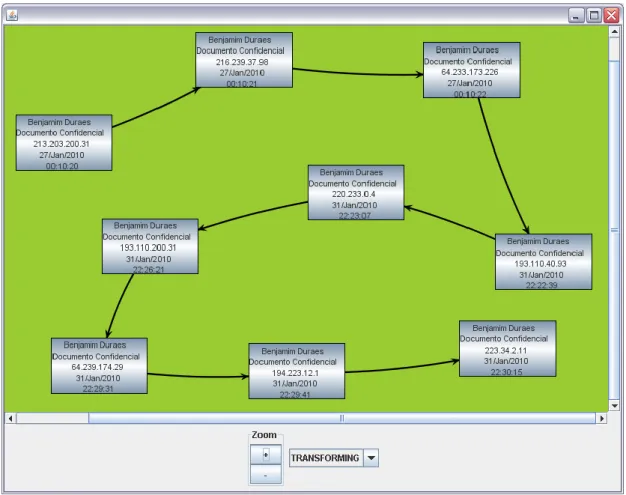
If the document with sensitive information is located within the company premises then the local agent that is expected to be installed in the working desktops / laptops will report its location (and user that has it) to a central server. 1
Other possibility is to insert a distinguishable data field in the zip package that permits to detect the document in transit in the network by using the installed firewalls / IDS’s (intrusion detection systems).
Figure 1 – Deployment of IDS to track sensitive documents
1
The laptop outside the company premises is a border case that we will treat as within the enterprise because nevertheless the agent is supposed to be running.
16
This approach has some problems regarding the new Microsoft file format. Docx is essentially XML files within a zip package. Because all text is compressed, it is no longer possible to find text by scanning for strings within document images without unzipping it. Another limitation is because XML allows strings to be coded in hex or even interrupted by comment characters (e.g. str<--! ignore-->ing), and thus any scanning tool that takes shortcuts in decoding the ZIP archive or implementing the full XML schema may result in false negatives when performing searches [2]. To overcome this limitation the external package must be tagged with appropriate information so the IDS can check them. This raises again the problem that outside data (inserted in the zip package) is always discarded whenever the document is saved. This requires that the agent re-writes the document whenever it is closed due to discard behavior of the word regarding these fields. This procedure is somewhat redundant and requires the coordination with the systems’ administrators when configuring those equipments. Anything that is not automatically done is always prone to deviate from the pretend behavior.
If the document is outside the company in a computer that is not a working tool than the document itself must report its location to the server. This second case requires a more subtle approach as now the document is outside the enterprise premises and in a computer over which we have no control. Thus any action taken is without the owner awareness and consent. In this case we will adopt some infamous techniques developed by hackers.
One of the approaches is the insertion of code within the document itself [13], but its effectiveness may be limited by the anti-virus typically present in most computers now. Even if an anti-virus or any other detection mechanism is present this procedure is not very stealthier and will probably alert the user of its existence. Because the document importance is certainly know by the user any strange behavior by the application will alert the user. Thus any developed code to be inserted within the document must behave in very discrete way.
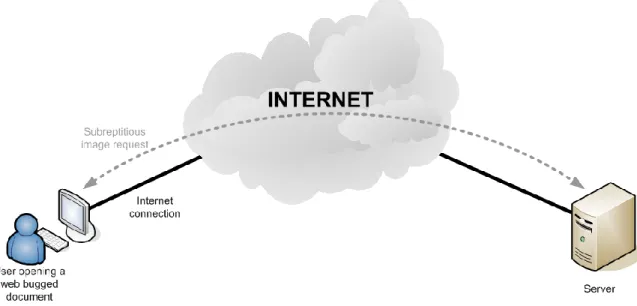
Another approach is the insertion of a “Web Bug” [5] [6] within the document. This “Web Bug” is essentially an imperceptible image (e.g. 1X1 white picture) that is inserted within the document and is loaded automatically from a remote site whenever the document is open. By default the Microsoft Word behaves this way, and we can use this default behavior to use it to track the document. This can also be used with Excel and PowerPoint files. When this request arrives to the server it can contain information in the URL that permits the identification of the document and allows the sender to note when and where the web bug was viewed.
17
Figure 2 – Web Bug - embedded object in a document and is invisible but allows checking that a user has viewed the page
The mechanism is very discrete in the sense that even if the load of the web bug fails the user will not notice it. If succeeds still is a very lightweight procedure and the user will not sense it, except if there is a personal firewall that prevents Office Word to access the Internet.
This procedure may be consider to violate the privacy of the documents’ users. Therefore, some care shall be taken to apply the system only to documents that are property of the company. Furthermore, the legal implications of these mechanisms have to be carefully considered, which is outside of the scope of the project.
3.3. Content
Another important aspect of tracking sensitive documents is their content and its changes during their life cycle. The content analysis is a complex subject as the spam control on mailboxes shows, as there are always some mails that go through the filters. Although this could possibly be used on documents it is an approach too complex for the scope of this project.
A simple and scalable solution is required for this project
One of the simplest available tools for content analysis is the hash of a file to get a unique ID that can be used to uniquely identify that document. It is a very simple procedure that could be used to track the document. Presently it is routinely used to validate data integrity and identify known content. This method is attractive because the simplicity of procedures and the efficiency of hash operations (computation, throughput, memory) and provide a method to obtain a unique ID in a straightforward manner.
18
A hash function takes an arbitrary stream of data (that could be any file) and produces a fixed size output often called a digest. The purpose of these functions is that given a set of different inputs, the hash function will map them to different outputs. A hash function is collision resistant if finding two different inputs with the same output is computationally infeasible. Assuming that the probability of two different files will produce the same digest by accident is arbitrarily small it is feasible to assume that two documents having the same digest are the same. Today’s common use hashes (MD5, SHA-1, SHA-256, SHA-512 and others) are explicitly designed to be collision resistant and to produce large 128- to 512-bit strings (at the time of their design they were considered secure, but new attacks are developed everyday and MD5 is a notorious case of such evolution ).
Another way to look at this property is that we have a compression mechanism with information loss by which we can generate a unique, fixed-size representation for data objects of any size. This is of course an irreversible computation because we cannot recover the original object from the digest due to the information loss on the hash calculation. These assumptions holds true if we have a very small number of documents when comparing with the possible number obtained in a digest. Since 2128 (which is the number of possible outcomes in a 128 bit hash) is much bigger than the number of documents at any company, this is a very reasonable assumption. For perspective 2128 gives a total of 5,68 × 1028 numbers for each person on earth presently.
With these features, a hash database could be used to uniquely identify which documents are confidential. The agent present in the user’s desktops would calculate for each Word file open by the user its hash and confirm through the database consultation that the document is or not a sensitive one.
This procedure although very simple has several serious problems, especially if dealing with malicious adversaries:
A simple character change within the document would simply destroy this identification mechanism.
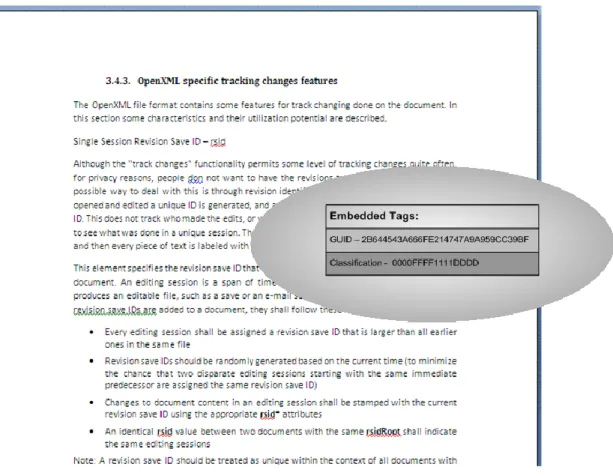
A hash operation is needed for every single document present within the desktop. Instead of analyzing the content due the complexity required, we propose a pre-tagging of the document with information that permits this analysis. These tags would be in the form of a string inserted in the metadata in a format that it is not recognized outside the control system.
One tag would be a unique identification of the document that would maintain the same regardless the content changes made by the users. This would permit to identify the document no matter how many editions were made. Fortunately such tag already exists natively in Microsoft Word documents in the form of GUID. This document ID is constant regardless the users changes made on the document itself through the Word.
Another tag would be importance classification such as reserved, confidential and secret. This would be a new tag that is created for that purpose only. This tag exists because the need to scale the system to expected need of documents to be tracked. If the company
19
produces thousands of different sensitive documents it is preferable to tag them as important with a single mark (or a low number of different marks) so the agents and network monitor equipments have a small database of tags to be tracked. The GUID would nevertheless be useful so a particular document can be identified and so its information.
Figure 3 – Non visible Embedded tags
This solution raises some problems that require some coordination among the involved entities.
First, a centralized management must be made so the GUID and importance tags are properly recorded. It is important that the sensitive documents are tagged at the time they are created and it is known that they will contain sensitive information. Although the tagging information is permanent, it is necessary to apply it at the creation time of the document.
Users frequently create new documents by re-using an old one and changing simply the contents. This may be a problem if a non-sensitive document contains the identification of a sensitive one. This will waste resources in tracking non-relevant documents or raising non justified suspicions regarding the information disclosure. These tags can be easily changed by knowledge adversary if he is aware that they are being used to track the content of the document.
The size of inserted information must also be considered. For instance, if the inserted hashes for tracking content changes are MD5, than one hash is 128 bits = 16 bytes. A hash for each
20
change implies that a word document that is changed a 1000 times will have uncompressed 16KB of data being stored. Considering that a change bigger than 100KB in the size of a medium size document might raise suspicions a 20.000 editions would be the limit considering a 2/3 reduction in size (OpenXML is zip packed). If the size of the hash is reduced to 32 bits = 4 bytes, the collision resistance can still be considered enough (1/232) and the number of editions with the above considerations raises to about 40000 editions.
These hashes will only be done on the content of xml files that have the content that is displayed for the user. Other data should not be considered due to its dynamic nature (time stamps, counters and any other possible value changing field).
3.4. Word Office behavior
The Microsoft Word editor by itself already does some tracking functions and stores it in the document itself. In this section we describe a few that are useful for the task of information tracking.
3.4.1. Track changes on
Since Office 97 that the Microsoft Office has been storing a wealth of important information about who made / changed the document. For instance, if the document was modified with Track Changes turned on, you can retrieve a lot of data out of the document and see what has been done on it. The file stores who made modifications and all the content that was ever included in the document, even if it was deleted, plus information about the filenames and to whom the document was e-mailed. This can be incredibly useful in the process of re-creating a timeline. Of course that the one identified is the login or the PC ID of the machine where the document was modified.
3.4.2. Recovering Undo Information
Although this is a feature of Word 2003 binary file format, its relevance is high due to the widespread use of it within the enterprises. Another retrieving information function is the Quick Save turned on. If a Word document is saved with Quick Save turned on, you can extract the undo information from the document. Quick Save function exists because when a document gets larger, it can be very time-consuming to save the whole document due to tying up resources with the final consequence of slowing down the whole system.
With Office’s Auto Save feature, saving can become distracting and time-consuming while the users are working. So Quick Save was created to save documents quickly and without any performance complications with minimum interference to the user. This is achieved by
21
not making changes to the body of the document but instead it appends the changes, and information about where the changes appear goes at the end of the document. Once a certain file size is exceeded, the save goes back, incorporates all the changes into the main body of the document, and shrinks the file size back down. From a forensic investigation standpoint, this can be a great thing because data that a user thinks is deleted actually still exists in the document.
3.4.3. OpenXML specific tracking changes features
The OpenXML file format contains some features for track changing done on the document. In this section some characteristics and their utilization potential are described.
Single Session Revision Save ID – rsid
Although the "track changes" functionality permits some level of tracking, changes quite often, for privacy reasons, people don not want to have the revisions tracked in their documents. A possible way to deal with this is through revision identifiers (rsids). Every time a document is opened and edited a unique ID is generated, and any edits that are made get labeled with that ID. This does not track who made the edits, or what date they were made, but it does allow you to see what was done in a unique session. The list of RSIDS is stored at the top of the document, and then every piece of text is labeled with the RSID from the session that text was entered.
This element specifies the revision save ID that was associated with a single editing session for a document. An editing session is a span of time that begins and ends with any event that produces an editable file, such as a save or an e-mail send, and contains no such event. When revision save IDs are added to a document, they shall follow these rules:
Every editing session shall be assigned a revision save ID that is larger than all earlier ones in the same file
Revision save IDs should be randomly generated based on the current time (to minimize the chance that two disparate editing sessions starting with the same immediate predecessor are assigned the same revision save ID)
Changes to document content in an editing session shall be stamped with the current revision save ID using the appropriate rsid* attributes
An identical rsid value between two documents with the same rsidRoot shall indicate the same editing sessions
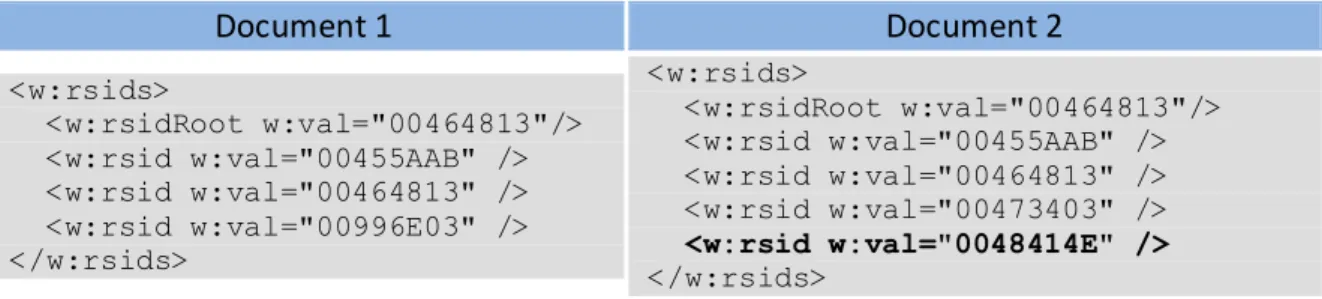
Note: A revision save ID should be treated as unique within the context of all documents with the same rsidRoot value. Although in practice it is possible for two independent sessions to result in the same value, this outcome is extremely rare as the values are based on the current time. However, the meaning of two revision save IDs is not defined for documents with a different rsidRoot. Applications may use this information as desired. Consider the following fragments from two Word OpenXML type document settings:
22 Document 1 Document 2 <w:rsids> <w:rsidRoot w:val="00464813"/> <w:rsid w:val="00455AAB" /> <w:rsid w:val="00464813" /> <w:rsid w:val="00996E03" /> </w:rsids> <w:rsids> <w:rsidRoot w:val="00464813"/> <w:rsid w:val="00455AAB" /> <w:rsid w:val="00464813" /> <w:rsid w:val="00473403" /> <w:rsid w:val="0048414E" /> </w:rsids>
Figure 4 – rsid usage
The rsid elements are identical for the first three editing sessions for both documents, indicating that these documents, although they are now separate, originated from the same document. The documents were then separated and the first was saved once afterwards; and the second, twice.
Some of instantiations of rsid are especially relevant for track changes such as the revision identifier for paragraphs (rsidP and rsidR).
These identifiers are used to identify the editing session in which a paragraph was added to a main document, to aid in word’s “compare documents” feature. The specification of OpenXML states that the rsidR values should be unique within a document: instances with the same value within a single document indicate that the regions were modified during the same editing session.
These “unique” identifiers can be used to track changes done on a document. By using these numbers it is possible to show that one file probably resulted from editing another file (the probability that two numbers regarding unrelated editing sessions are equal is a 1 in 232). One disadvantage of these new XML–based formats is that also make it easier to change the IDs, making it easier to maliciously implicate an innocent computer user or create the appearance of a false correlation. But again it is necessary that someone is aware of the use of these mechanisms to track content change.
In the following table we have a description of the several types of rsid that can be find within a Microsoft Word2007 OpenXML file type:
23 Attributes Description rsidDel (Revision Identifier for Paragraph Deletion)
Specifies a unique identifier used to track the editing session when the paragraph was deleted from the main document.
All rsid* attributes throughout this document with the same value, if present, must indicate that those regions were modified during the same editing session (time between subsequent save actions).
A producer may choose to increment the revision save ID value to indicate subsequent editing sessions to indicate the order of the modifications relative to other modifications in this document.
rsidP
(Revision Identifier for Paragraph Properties)
This attribute specifies a unique identifier used to track the editing session when the paragraph's properties were last modified in this document.
All rsid* attributes throughout this document with the same value, if present, must indicate that those regions were modified during the same editing session (time between subsequent save actions).
A producer may choose to increment the revision save ID value to indicate subsequent editing sessions to indicate the order of the modifications relative to other modifications in this document.
rsidR
(Revision Identifier for Paragraph)
This attribute specifies a unique identifier used to track the editing session when the paragraph was added to the main document.
All rsid* attributes throughout this document with the same value, if present, must indicate that those regions were modified during the same editing session (time between subsequent save actions).
A producer may choose to increment the revision save ID value to indicate subsequent editing sessions to indicate the order of the modifications relative to other modifications in this document.
rsidRDefault
(Default Revision Identifier for Runs)
This attribute specifies a unique identifier used for all runs in this paragraph which do not explicitly declare an rsidR attribute. This attribute allows consumers to optimize the locations where rsid* values are written in this document.
All rsid* attributes throughout this document with the same value, if present, must indicate that those regions were modified during the same editing session (time between subsequent save actions).
A producer may choose to increment the revision save ID value to indicate subsequent editing sessions to indicate the order of the modifications relative to other modifications in this document.
rsidRPr
(RevisionIdentifier for Paragraph Glyph Formatting)
This attribute specifies a unique identifier used to track the editing session when the glyph character representing the paragraph mark was last modified in the main document.
All rsid* attributes throughout this document with the same value, if present, must indicate that those regions were modified during the same editing session (time between subsequent save actions).
A producer may choose to increment the revision save ID value to indicate subsequent editing sessions to indicate the order of the modifications relative to other modifications in this document.
24
These identifiers can have two immediate uses for the forensic analysis:
It is possible to retrieve the document’s editing history even if change tracking is not enabled. This permits to overcome the measures that a more cautious normal user might do when he disable the feature with the normal procedure.
It is possible to generate a database of RSIDs that have appeared in documents distributed by an organization under investigation. Such a database could be used by an automated forensic analysis tool to generate an alert whenever documents with such an RSID were discovered on captured media or observed over traveling over a network. This hypothesis was verified in [2], where it the following experience was done: IT was created and saved a Word 2007 document with three paragraphs. The package was re-opened, added another paragraph, and the document saved under a new name. This process was repeated to create a third document. By examining the differences within the ZIP archives, they found that the rsidR values remained consistent for the common paragraphs in each document.
These RSIDs can be disabled by users in the Word 2007’s well-hidden “Trust Center” by unclicking the option “Store random number to improve Combine accuracy.”
3.5. Time stamps
For tracking purposes it is convenient to be able to see when the changes were done. This pose a problem regarding the reliability of time stamps obtained. The document itself cannot have an independent clock source and has to obtain that information from another place. The obvious choice is the host computer where the document is being open. This clock of a suspect’s computer cannot be trusted but considering that the offender is not aware of documents mechanisms for tracking we can assume that it is often correct and no intentional misinformation is being actively done. Besides, if the attacker was aware of the tracking mechanisms there were other options for him to deal with the document than actively changing its clock. The correctness and precision of these clocks is commonly high if these set their time automatically over the Internet.
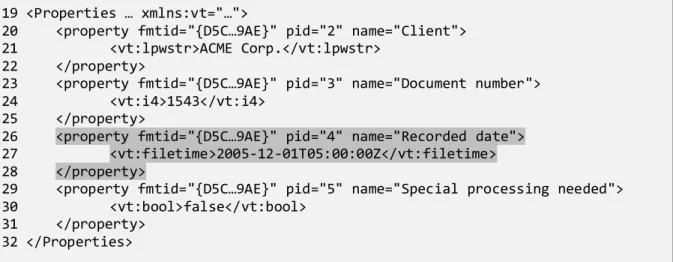
The new Microsoft Office Word file type contains natively several internal timestamps fields indicating the time that documents were created or modified. Timestamps are present in the outside package (ZIP archive) itself, in the internal XML files, and potentially in other embedded objects (for example, in the headers of embedded images) [2]. They can also be inserted by the agent within the user PC to permit a more custom time tracking if the default ones are not enough for the security objectives. One time stamp can be inserted with the hashes for the content changes permitting this way a value and time tracking.
Most of these time stamps are not displayed by the Word editor to the user, and thus they are maintained in a surreptitious manner. It would be necessary to open de OpenXML package and edit the corresponding XML file that contain those time stamps.
25
With this information a more complete picture of the information manipulation can be done, and thus helping ordering the relevant events. Even if this does not add any useful information to the forensic analyses it can help eliminating some irrelevant information if what is being analyzed happened within time frame that is not according to what is within the documents. This will help in to scale up the solution.
In the next section the OpenXML will be explained with some detail, but nevertheless in the following figure it is shown some content markup from a Word OpenXML document, which contains four custom properties: Client, having a text value of "ACME Corp."; Document number, having a numeric value of 1543; Recorded date, having a date/time value of 2005-12-01; and Special processing needed, having a Boolean value of false:
Figure 5 – Word OpenXML with timestamps and other custom properties
19 <Properties … xmlns:vt="…">
20 <property fmtid="{D5C…9AE}" pid="2" name="Client"> 21 <vt:lpwstr>ACME Corp.</vt:lpwstr>
22 </property>
23 <property fmtid="{D5C…9AE}" pid="3" name="Document number"> 24 <vt:i4>1543</vt:i4>
25 </property>
26 <property fmtid="{D5C…9AE}" pid="4" name="Recorded date"> 27 <vt:filetime>2005-12-01T05:00:00Z</vt:filetime> 28 </property>
29 <property fmtid="{D5C…9AE}" pid="5" name="Special processing needed"> 30 <vt:bool>false</vt:bool>
31 </property> 32 </Properties>
27
4 Technical aspects and platform
In this chapter a brief overview regarding technical aspects involved in the project. First it will be described the file format. The tools used to develop the solution will also be discussed.
4.1. OpenXML
Most Microsoft Word versions stored documents in binary file formats. Recently that trend has been changing as Microsoft, Sun, and other developers migrated to new XML-based formats for document files.
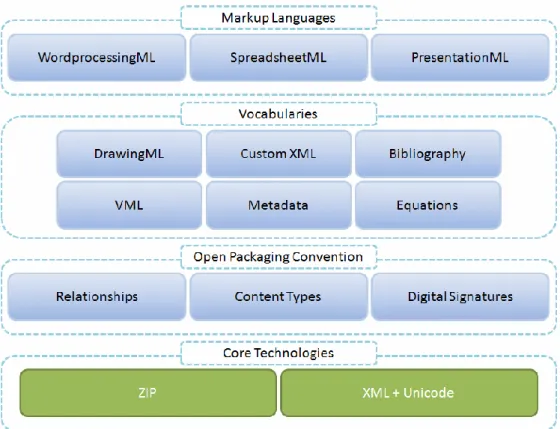
In 2006 Microsoft introduced new files formats with the new Microsoft Office 2007 suite to replace the up until than binary formats. The main programs of the suit received a new format (Word, Excel, and PowerPoint) and these can now be easily examined without the need of the Office. These new formats were standardized between December 2006 and November 2008, first by the ECMA International consortium, where they became ECMA-376, and subsequently by the ISO/IEC's where they became ISO/IEC 29500:2008 [14] [15] [16] [17] [18].
Office Open XML documents are stored in Open Packaging Convention (OPC) packages, which are ZIP files containing XML and other data files, along with a specification of the relationships between them. Depending on the type of the document, the packages have different internal directory structures and names. An application will use the relationships files to locate individual sections (files), with each having accompanying metadata, in particular MIME metadata.
A Word file (which is the main focus in this work) with the extension DOCX is actually a compressed archive (Zip) of some XML files. These files are inter-related with relations. In the following figure it is shown the OpenXML general architecture, not only for DOCX but also for Excel and PowerPoint file types: