Faculdade de Engenharia da Universidade do Porto
ANALYSIS OF PULMONARY AIRFLOW ON A
SMARTPHONE APPLICATION
André Miguel Pinheiro Costa
Mestrado Integrado em Bioengenharia
Ramo de Engenharia Biomédica
Orientador: Prof. Dr. Luís Filipe Pinto de Almeida Teixeira
Co-orientador: Prof. Dr. João Almeida Fonseca
ii
iii
Resumo
A asma e a doença pulmonar obstrutiva crónica (DPOC) são geralmente reconhecidas como patologias diferentes, embora ambas partilhem algumas características em comum como a limitação da passagem de ar, inflamação, e remodelação de tecidos. Tradicionalmente têm origem diferentes, a asma tipicamente aparece na infância e está associada com alergias e eosinófilos; o seu melhor tratamento é atacar a inflamação. Contudo, o DPOC aparece em adultos que fumam, envolve neutrófilos, e o seu melhor tratamento é com broncodilatadores e evitando fatores de risco. Ambas podem resultar numa respiração superficial, num severo decréscimo na qualidade de vida e, no caso do DPOC, morte, se não for detetada e tratada devidamente.
Esta dissertação é um seguimento do trabalho desenvolvido pelo João Teixeira na sua Tese de Mestrado “Classification of Lung Function on a Smartphone App”. Assim sendo, o principal objetivo é produzir uma aplicação móvel capaz de classificar a função pulmonar usando a combinação dos melhores métodos de processamento de sinal e de aprendizagem computacional. Ao completar este objetivo, a prevenção e deteção de anomalias na respiração serão mais antecipadas, fornecendo uma solução pequena e portátil, que transporta um sistema capaz de monitorizar doenças pulmonares.
Os resultados mostram que o sistema implementado parece ser melhor que os anteriores, tendo uma alta exatidão e sensibilidade (> 94 % em ambos os casos).
A aplicação foi construída para correr em diversos dispositivos com sistemas operativos diferentes, desde computadores a smartphones.
A aplicação mostra claros sinais de que é fácil de usar como os questionários de Usabilidade de Sistemas o demonstram, com um resultado médio de 83 em 100.
Ainda há margem para melhorias no sistema e na aplicação, considerando que os modelos de aprendizagem utilizaram um conjunto de dados algo reduzido. No entanto, é visível que este projeto é algo promissor e que pode ter um futuro bastante positivo.
v
Abstract
Asthma and chronic obstructive pulmonary disease (COPD) are usually recognized as different diseases, although they share some common characteristics such as airflow limitation, inflammation, and tissue remodeling. Traditionally they have different origins, asthma typically appears in childhood and is associated with allergies and eosinophils; its best treatment is targeting the inflammation. However, COPD arises in adults who smoke, involves neutrophils, and is best treated with bronchodilators and the removal of risk factors. Both of them can result in shallow breathing, a severe decrease in quality of life and, in case of COPD, death, if not spotted and properly managed.
This dissertation is a follow-up of the work developed earlier by João Teixeira on his Master Thesis “Classification of Lung Function on a Smartphone App”. Likewise, the main goal is to produce a mobile application capable of classifying the lung function using the combination of the best signal processing and machine learning methods. By accomplishing this, the prevention and detection of abnormalities in the airflow will me more anticipated, providing a tiny and portable solution, carrying a system capable of monitoring pulmonary diseases.
The results show that the system implemented is looking better than the previous ones, having a high accuracy and recall (> 94 % in both cases).
The application is built to run on diverse devices with different operative systems, ranging from desktop to smartphones. It is easy to use as the System Usability Scale (SUS) questionnaires have shown, scoring 83 out of 100, on average.
Still, there is room for improvement in the system and application, considering that the models used for the learning used a reduced dataset.
vii
Acknowledgments
In the first place I would like to thank professor Luís Teixeira for this opportunity of working under his guidance, for his precious advices and for trusting me to fulfill the goal of this project.
I would like to thank João Teixeira for all the help he gave me in this project and the guidance through his previous work. I can say, without any doubt, that without him, I wouldn’t be able to finish this work. It was a pleasure to work with him, always helpful and available when needed.
Thanks to professor João Fonseca for the good piece of advice and considerations about the project. Also thanks for the availability to help me and for getting me the needed resources to work (PC at CINTESIS) when it was necessary.
Thanks to Ricardo Ferreira, a good friend, always there to support and encourage me to go further, working by my side.
Thanks to João Silva for testing the application and for pointing out the inconsistencies within it.
Thanks to Kivy support team that helped me through the IRC (kovak, inclement, and many others), through the questions about the framework and how to solve some problems that appeared alongside the development of the application.
Thanks to Bernardo Pinho for working alongside me at CINTESIS, and for some good advice. Thanks to my parents, for always being there for me, for the encouragement and for their interminable support.
Thanks to my closest friends for having the patience to hear me complaining about the problems that seemed unsolvable while developing the application.
Finally, thanks to Sofia, for the endless support and love, for the force she imbued into me through this journey and for helping me in the hardest moments.
ix
Index
Chapter 1 ... 1
Introduction ... 1 1.1 Overview ... 1 1.2 Main goal ... 2Chapter 2 ... 3
Literature Review ... 3 2.1 Spirometry ... 3 2.1.1 Background ... 32.1.2 Indications for Spirometry ... 4
2.1.3 What is Spirometry?... 4
2.1.4 Spirometric Tests and Interpretation ... 6
2.1.5 Fundamentals for obtaining useful results ... 7
2.2 Bio Feedback ... 7
2.2.1 Definition ... 7
2.2.2 Bio Feedback as a step in the solution ... 8
2.3 Software framework development ... 9
2.3.1 Android platform overview ... 9
2.3.2 Different frameworks available for development ... 9
2.4 Software solution review ... 13
Chapter 3 ... 15
Classification of Lung Function ... 15
3.1 Signal Processing ... 15
3.1.1 Automatic Signal Segmentation ... 15
3.1.2 Signal Preprocessing ... 16
3.1.3 Envelope Generation ... 17
3.1.4 Linear Predictive Coding ... 18
3.1.5 Post-processing ... 19 3.1.6 Parameter Extraction ... 20 3.2 Machine Learning ... 20 3.2.1 Regression Phase ... 20 3.2.2 Classification Phase ... 21
Chapter 4 ... 23
Implementation and design of the mobile application ... 23
4.1 Kivy’s architecture ... 23
4.2 Design ... 24
x
4.3.1 Obtaining the signal ... 34
4.3.2 Pre-cropping the signal ... 35
4.3.3 Processing ... 35
4.3.4 Machine Learning model ... 36
4.3.5 Saving the results ... 37
Chapter 5 ... 39
Results and Discussion ... 39
5.1 Dataset... 39
5.2 Regression Results ... 40
5.3 Classification Results ... 41
5.4 Usability of the application ... 43
Chapter 6 ... 45
Conclusions and Future Work ... 45
6.1 Final Conclusions ... 45
6.2 Future Work ... 46
6.2.1 Automatic cropping improvement ... 46
6.2.2 Enhance the speed of the processing ... 46
6.2.3 Improve the machine learning models ... 47
6.2.4 Implementing breathing exercises in the application ... 47
xi
List of Figures
Figure 2.1 - Normal spirogram and flow-volume curve showing the conventional
measurements made. Taken from (Pierce, 2005). ... 5
Figure 2.2 – Comparison between normal and obstructed airflow (Times, 2011). ... 6
Figure 2.3 – Cordova Architecture, diagram from ("Architectural overview of Cordova platform - Apache Cordova," 2016). ... 12
Figure 2.4 - Interface and configurations used on data collection. Taken from (Larson et al., 2012). ... 13
Figure 3.1 – Automatic Cropping. Top Image - Original recording. Bottom Image - Recording after the two crops. ... 16
Figure 3.2 – Pre-processing conversion models’ results (J. P. F. Teixeira, 2014). ... 17
Figure 3.3 – Block diagram model for the generation of a speech signal. ... 18
Figure 3.4 – Final Signal Processing Architecture (J. F. Teixeira, Teixeira, Fonseca, & Jacinto, 2015) ... 19
Figure 4.1 – Kivy’s architecture ("Architectural Overview â” Kivy 1.9.2-dev0 documentation," 2016). ... 24
Figure 4.2 – Home Screen of the application. ... 25
Figure 4.3 – Navigation Drawer. ... 26
Figure 4.4 – Dark theme. ... 27
Figure 4.5 – Snackbar showing information to the user. ... 27
Figure 4.6 – User’s profile screen. ... 28
Figure 4.7 – Recording Screen. ... 29
Figure 4.8 – Set of images that appear before starting the manoeuvre... 30
Figure 4.9 – Start of the processing. ... 31
Figure 4.10 – Results Screen for a normal state. ... 32
Figure 4.11 – Splash screen before the application loads all its dependencies. ... 33
Figure 4.12 – Recorder class. ... 34
xii
List of tables
Table 5.1 – Distribution of recordings. ... 40 Table 5.2 – Binary distribution of the classification. ... 40 Table 5.3 – Comparison between regression error average and standard deviation for
clinical parameters (testing task). ... 41 Table 5.4 – Confusion matrix from (J. P. F. Teixeira, 2014). ... 41 Table 5.5 – Confusion matrix from current work. ... 42 Table 5.6 – Classification percentage error, precision and recall regarding (J. P. F.
Teixeira, 2014). ... 42 Table 5.7 – Current Classification percentage error, precision and recall. ... 42
xiii
Symbols and Abbreviations
Abbreviation list
APK Android Package
CISC Complex Instruction Set Computing COPD Chronic Bronchitis and Emphysema CPU Central Processing Unit
DSP Digital Signal Processing FRC Functional Residual Capacity FEF25-75 Forced mid-Expiratory Flow FVC Forced Vital Capacity FEF75-85 Forced end-expiratory Flow
FEVt Forced Expiratory Volume in the first t seconds FPS Frames per Second
JSON JavaScript Object Notation PEFR Peak Expiratory Flow Rate TLC Total Lung Capacity
RISC Reduced Instruction Set Computing
RV Residual Volume
SDK Software Development Kit SUS System Usability Scale
1
Chapter 1
Introduction
1.1 Overview
An ounce of prevention is worth a pound of cure.
Benjamin Franklin (1730–1774)
Asthma is a very common condition, occurring in 5 % to 10 % of the world population. Formerly, asthma was thought to be the result of bronchospasm (sudden constriction of the muscles in the walls of the bronchioles) alone, but it is now recognized to be primarily an inflammatory disorder, with bronchospasm being secondary to the underlying inflammation. When a susceptible person inhales a trigger (e.g., pollen), inflammatory cells rush into the airways, releasing a multitude of cytokines, leukotrienes, and other humoral substances (substances found in the humours, or body fluids) that induce bronchospasm. The most well-known of these substances is histamine [1].
The patient suffering an acute asthma attack is usually easy to recognize. The classic presentation includes shortness of breath, wheezing, and coughing. Triggers include allergens, heat or cold, a host of occupational irritants, and exercise.
The most recent revised global estimate of asthma suggests that as many as 334 million people have asthma, and that the burden of disability is high. The historical view of asthma being a disease of high-income countries no longer holds: most people affected are in low- and middle-income countries, and its prevalence is estimated to be increasing fastest in those countries. Ongoing monitoring is needed to follow the epidemic of asthma and its management [2].
Chronic obstructive pulmonary disease (COPD), is a progressive disease that makes it hard to breathe. "Progressive" means the disease gets worse over time. COPD can cause coughing
Introduction
that produces large amounts of mucus (a slime like substance), wheezing, shortness of breath, chest tightness, and other symptoms. Cigarette smoking is the leading cause of COPD. Most people who have COPD smoke or used to smoke. Long-term exposure to other lung irritants—such as air pollution, chemical fumes, or dust—also may contribute to COPD [3]. According to WHO [4] estimates, 65 million people have moderate to severe chronic obstructive pulmonary disease (COPD).
1.2 Main goal
The main goal of this dissertation is to continue the work developed earlier by João Teixeira on his Master Thesis [5]. The objective is to create a totally functional mobile application that can help to diagnose the user condition regarding respiratory airflow, using the signal processing and machine learning methods developed on his Master Thesis. While everyone can use this application, the solution might have particular relevance in less developed countries where the medical facilities are not as developed or accessible as in other countries. Despite this reality, there is an incredible fact underlying these countries; a good portion of the population has access to a smartphone. Indubitably the popular smartphones are going to be low-tier or mid-tier range, but this is not problematic, since this application will not be very demanding at resources, the minimum requirement will be a working microphone. Since it does not need any extra smartphone attachments or sensors, this will be a very low-cost solution. The users will follow the on-screen instructions, holding their smartphone about arm's-length away and breathe in deeply. Then, they exhale as fast and forcefully as they can. As they blow away, the application records the sound it hears through the phone's microphone. Afterward, the app searches the recorded audio signal for segments associated with reduced lung capacity.
3
Chapter 2
Literature Review
This chapter presents the essential literature considered for the development of this work. The goal is to introduce the vital theoretical concepts that are used throughout this thesis and review the main research conducted on its subject.
Section 2.1 will present a brief description of the medical science behind respiration and
spirometry, how to perform a manoeuvre in order to analyse the pulmonary function and how to interpret the results brought by this procedure.
Section 2.2 is dedicated to give a general overview of Bio Feedback, and how it can be
used as a step for the final solution.
Finally, Sections 2.3 and 2.4 describes briefly the Android platform and review some frameworks available to develop the app, followed by a small analysis of an existing application capable of evaluating lung function and spirometry.
2.1 Spirometry
2.1.1 Background
The determination of lung volumes began in 1800 with the measurement of residual volume by Davy using a hydrogen gas dilution technique. However, the practical origin dates from the inspiring work of the Reverend John Hutchinson in 1844 [6]. He not only projected the first spirometer but also designated the expiratory vital capacity and developed normal standards based upon approximately 2,000 assorted English persons. He recognized the positive correlation with height and the negative relationship with age, excessive weight and pulmonary diseases. Dynamic lung volume measurements were deferred for a century until
Literature Review
the valuable studies at Bellevue Hospital by Cournand, Richards and their colleagues in the 1940's [6]. Around 1950, Gaensler perceived that, for healthy individuals, roughly 80% of the FVC (volume of air that is forcedly blown out after full inspiration, measured in liters) was expired in the first second and the FVC in 3 seconds. This established a reference point for comparison between obstructed and unobstructed airways [7].
In the 1960s, Wright and McKerrow spread the concept of monitoring asthmatic patients using the Peak Expiratory Flow rate (PEF or PEFR). PEF tests, referred as bronchial challenge or bronchial provocation tests, consisted of performing forced expirations before and after the inhalation of bronchodilator. The analysis was based on the percentage of change. The PEF also became important for a simpler tracking of intra-daily specific change patterns in respiratory function, such as those that occur for general and occupational asthmatics [5].
2.1.2 Indications for Spirometry
Pulmonary function analysis should be particularly indicated for persons with complaint of shortness of breath. In any person, particularly cigarette smokers or asthmatics, spirometry will provide a baseline performance value for comparison with results of future tests. The impact of air pollution on nonsmokers may be detected by such comparison. Specific indications for ventilatory function testing include the following [6]:
To measure the extent of pulmonary function impairment;
To help determine the type of impairment, such as restrictive, obstructive or a combination;
To study possible effectiveness of bronchodilator therapy and the degree of air obstruction reversibility;
For preoperative evaluation, especially for surgical procedures on the chest or upper abdomen;
To follow the course of a patient's disease; To establish baseline ventilatory function;
2.1.3 What is Spirometry?
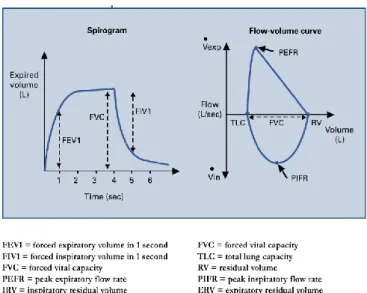
Spirometry is the timed measurement of dynamic lung volumes and capacities during forced expiration and inspiration to quantify how effectively and quickly the lungs can be emptied and filled [8](left panel Figure 2.1). Measurements usually made are:
2.1 Spirometry
5
• The vital capacity, either forced (FVC) and/or unforced (VC) • Forced expiratory volume in one second (FEV1), and
• The ratio of these two volumes (FEV1/FVC).
Figure 2.1 - Normal spirogram and flow-volume curve showing the conventional
measurements made. Taken from [8].
Furthermore, one can measure the maximum expiratory flow over the middle 50% of the vital capacity (FEF 25–75%), which is a delicate index of small airway function. Corresponding maximal inspiratory measures are the FIV1 and the FIVC. The FEV1/VC ratio is the most sensitive and explicit index to recognise airflow obstruction. The lower limit of normality for this index centres around 70% but decays marginally with age [8].
On the other hand, the FEV1/FEV6 from a 6 second forced expiration can be used, since generally 6 seconds are enough to comprise the complete expiration. The FEV1 percent predicted is used to classify severity of ventilator defects. Usually a small FVC with a normal or high ratio signals a restrictive ventilatory imperfection.
Measures of forced maximal flow during expiration and inspiration can be also made either absolutely, eg. peak expiratory flow rate (PEFR), or as a function of volume consequently producing a flow-volume curve, the shape of which also comprehends information of diagnostic value. The flow-volume curve of a normal subject is presented in the right panel of Figure 2.1. Its typical shape results from the fact that during expiration, shortly after peak flow is attained, maximal flow becomes independent of effort and drops linearly with lung volume. Alternatively, during inspiration maximal flow is effort dependant and predisposed by the strength of contraction of the diaphragm and chest wall muscles and the patency of the upper airway.
A further spirometric measure undergoing renewed interest is that of inspiratory capacity (IC) which is the maximum volume of air that can be inspired from the end of quiet expiration
Literature Review
(functional residual capacity [FRC]) to total lung capacity (TLC). Inspiratory capacity is reduced when hyperinflation is present or develops dynamically, eg. during exercise in patients with COPD [8].
2.1.4 Spirometric Tests and Interpretation
Air flow obstruction, whether acute or chronic, will decrease the FEV1 by increasing the airway resistance to expiratory flow. In chronic air flow obstruction, the chronic resistance can lead to chronic hyperinflation of the lungs.
Figure 2.2 – Comparison between normal and obstructed airflow [9].
Due to premature closing of the airways on expiration, the FVC will also decrease but not as much as the FEV1. The ratio FEV1/FVC will drop. The flow/volume graph has a concave form (Figure 2.2.1). The volume/time graph will illustrate a line that upsurges slowly to reach its highest point, finalizing the full expiratory manoeuvre (Figure 2.2.2).
When a forced expiration is executed with severely obstructed airways, there may be more failure of them, resulting in a larger concave form (Figure 2.2.3). More air can typically be exhaled from the lungs when the manoeuvre is relaxed and the expiratory time is prolonged, measuring the vital capacity (VC) of the lungs. In these cases, the VC will be higher than the FVC, and the FEV1/VC ratio will give the best results for that person.
An FEV1/FVC of <0.7 (70%) is diagnostic of air flow obstruction and it is a confirmation of an obstructive disease. Still, a lower than normal FEV1/FVC may not be abnormal for an asymptomatic older person. The FEV1 does not have to be < 80 % predicted for a diagnosis of
2.2 Bio Feedback
7
airflow obstruction. If the FEV1 is ≥ 80 % predicted value with an FEV1/FVC of < 0.7 % (70%), a diagnosis of COPD should only be made in the presence of respiratory symptoms such as breathlessness or cough. This would be categorized as stage 1 (mild) COPD [9].
2.1.5 Fundamentals for obtaining useful results
To achieve optimal results, the FVC manoeuvre must be performed with great effort. Immediately following a full inspiration, the patient seals his/her lips around the mouthpiece and blasts the air out as fast and as far as possible until the lungs are absolutely empty, then breathes in again as forcibly and fully as possible (not all spirometers will measure inspiration). Demonstration to the patient of the procedure and the maximal effort required is helpful before starting. For the measurement of IC (the IC is the volume that can be inspired from FRC up to TLC), scrutiny of the stability of FRC during a short period of tidal breathing before full inspiration is necessary. For PEFR, only the first 1 or 2 seconds of maximal expiration is required. It should be noted that, particularly in airflow obstruction, it might take several seconds for the patient to fully expire. Resting for recovery between repeat tests, an erect seated position and the usage of a nose clip are suggested. Cautious examination of each spirogram or flow-volume curve for acceptability, reproducibility and correction of results to body temperature and pressure (saturated) conditions is needed. Measurement of spirometry in children requires animation to capture the child’s attention and effort, and can usually be achieved in those 5 years of age and over [8].
2.2 Bio Feedback
2.2.1 Definition
Biofeedback is a mind–body technique in which individuals learn how to adjust their physiology for the purpose of improving physical, mental, emotional and spiritual health. Much like physical therapy, biofeedback training requires active participation on the part of patients and often regular practice between training sessions. Clinical biofeedback might be used to manage disease symptoms as well as to improve overall health and wellness through stress management training.
Research has shown that biofeedback interventions are efficacious in treating a variety of medical conditions. Clinical biofeedback training is growing increasingly popular in the world, as many people are seeking out relatively new approaches to healthcare [10].
Literature Review
2.2.2 Bio Feedback as a step in the solution
Biofeedback therapy is a process of training as opposed to a treatment. Much like being taught how to walk or how to hold a spoon, individuals undergoing biofeedback training must take an active role and practise in order to develop the skill. Rather than passively receiving a treatment, the patient is an active learner. It is like learning a new skill. When a patient comes in for clinical biofeedback therapy, an emphasis is placed on education. As sensors are placed on the patient, the therapist explains what each sensor will be measuring, assuring the patient that the sensors do not cause any pain or shock but rather are simply recording signals from the body and displaying those signals on the screen [10].
For instance, Biofeedback has been a useful tool in helping individuals with urinary incontinence regain bladder control by controlling the muscles used in urination. Sensors are placed in the vaginal or anal canal to help individuals learn when the muscles are properly contracted. A recent study found that this type of biofeedback treatment was safe, effective, and well-liked by women patients 55 years and older [11].
On this particular case the aim is to evaluate the patient condition regarding a respiratory deficiency or malfunction without the aid of a technician, only using the smartphone as guidance. The goal is to use their smartphone in order to get the information and process it at an early stage so the user can be prompted with a warning if they need to get checked by a doctor to further evaluate more deeply the condition. It is possible to gather information about the parameters for this evaluation such as FEV1 and FVC using the smartphone’s microphone to record the breath/cough of the patient. But the way the phone is handled/positioned is a key point to get a clean and useful recording. With that in mind, the application has every bit of instruction needed on-screen, at every stages of the process, with the maximum detail possible. The users will be “trained” in order to have the maximum efficiency acquiring the data to the smartphone memory. For example, COPD patients are required to do certain kinds of rehabilitation exercises in order to learn how to get the most air out of every breath [12]. The application functions differently on these cases. It could help the patient by providing all the information required for him to be capable of using pursed-lip breathing technique in order to slow their exhalation and make his breath longer; it could also provide tips how to use a diaphragmatic breathing technique consequently increasing the amount of inhaling and exhaling air.
2.3 Software framework development
9
2.3 Software framework development
2.3.1 Android platform overview
Currently, for development, the only resources available are for Android, so the focus of this overview is Android, although it is possible to build the application for other platforms.
Most Android apps are written in the Java programming language. The Android SDK tools compile the code, along with any data and resource files into an APK: an Android package, which is an archive file with an apk suffix. One APK file comprehends all the contents of an Android app and is the file that Android-powered devices use to install the app. Once installed on a device, each Android app exists in its own security sandbox [13]:
The Android operating system is a multi-user Linux system in which each app is a different user;
By default, the system allocates each app a unique Linux user ID (the ID is used only by the system and is unknown to the app). The system sets permissions for all the files in an app so that only the user ID assigned to that app can access them;
Each process has its own virtual machine (VM), so an app's code runs in isolation from other apps;
By default, every app runs in its own Linux process. Android starts the process when any of the app's components need to be executed, then shuts down the process when it's no longer needed or when the system must recover memory for other apps;
This way, the Android system implements the principle of least privilege. That is, each app, by default, has access only to the components that it requires to do its work and no more. This creates a very secure environment in which an app cannot access parts of the system for which it is not given permission [13].
2.3.2 Different frameworks available for development
A while back the only option to develop for android was based on Java language. However recently this paradigm “shifted” and there are other options available. In this section the main options are presented.
Literature Review
Kivy Language
Kivy is a very promising open source Python library capable of developing mobile apps and other multi-touch application software with a natural user interface (NUI). It can run on Android, iOS, Linux, OS X, and Windows.
The framework contains all the elements for developing an application such as:
Extensive input support for mouse, keyboard, TUIO (open framework that defines a common protocol and API for tangible multi-touch surfaces), and OS-specific multi-touch events;
A transitional language (KV) that helps to effortlessly project custom Widgets; An extensive variety of Widgets that support multi-touch;
A graphic library operating only OpenGL ES 2, and established on Vertex Buffer Object and shaders;
Kivy exhibits some features that should be looked upon [14]: Fast
Kivy is fast. This applies to both application development and application execution speeds. The framework was optimized in many ways. The implementation of time-critical functionality on the C level to leverage the power of existing compilers. More importantly, intelligent algorithms were used to minimize costly operations. The GPU is also used wherever it makes sense in the context. The computational power of today’s graphics cards surpasses that of today’s CPUs by far for some tasks and algorithms, especially drawing. That is why Kivy tries to let the GPU do as much of the work as possible, thus increasing performance considerably.
Flexible
This framework is flexible. This means it can be run on a variety of different devices, including Android powered smartphones and tablets. It supports all major operating systems (Windows, Linux, OS X). Being flexible also means that Kivy’s fast-paced development allows it to adapt to new technologies quickly. Lastly, the flexibility is shown when it is possible to use it in combination with a great number of different third-party solutions.
Focused
Kivy is focused. It is possible to write a simple application with a few lines of code. Kivy programs are created using the Python programming language, which is incredibly versatile and powerful, yet easy to use. In addition, it possesses his own description language, the Kivy
2.3 Software framework development
11
Language, for creating sophisticated user interfaces. This language allows to set up, connect and arrange the application elements quickly.
Funded and free to use
This platform is actively developed by professionals in their field. Kivy is a community-influenced, professionally developed and commercially backed solution. It’s not a small, vanishing student project that will fade away. Kivy is free to use even if the application is generating profit or being sold.
Although Kivy has all these overwhelming features, it also holds some downsides:
Since it is a new framework, there is not a lot of documentation available.
It is not native opposed to Java for example. It uses Python wrappers and can affect overall performance of the application.
The application takes some seconds to boot up, since it has to wait for Python modules to be loaded.
The size after compiling the APK is usually much bigger than native compilation (using the android SDK), since the APK has to include some “bundles” for the interpretation of Python.
QT for Android
Qt is a cross-platform application framework that is broadly used for building application software that can be executed on numerous software and hardware platforms with tiny or no change in the underlying codebase, while having the power and speed of native applications. The following list summarizes what is achievable with Qt for Android [15]:
Run Widget and QML applications on the device or emulator; Support for native Android style with Qt Quick Controls; Handle Multimedia content in Qt Quick 2 applications; Get sensor readings and react to the changes;
Retrieve current position data using satellite and network information; Establish a serial connection to other Bluetooth devices;
Develop secure applications using OpenSSL library;
Literature Review
Cordova
Apache Cordova is an open-source mobile development framework. This technology gives the option to use standard web technologies - HTML5, CSS3, and JavaScript for cross-platform development. Applications execute within wrappers targeted to each platform, and rely on standards-compliant API bindings to access each device's capabilities such as sensors, data, network status, etc. [16]
Figure 2.3 – Cordova Architecture, diagram from [16].
Probably this project could be done in any of these frameworks, but the framework that best suits the needs of this application is Kivy. One of the major features is using Python as the main programming language, which is known to be used for scientific purposes. Furthermore, the code in [5] was developed on the Matlab platform, that shares some resemblances with Python. Signal processing and scientific libraries are prominent too in Python, which benefits the development of the application.
2.4 Software solution review
13
2.4 Software solution review
This segment summarizes briefly a software solution implemented to tackle the problem described on the first chapter. The main focus is to observe how the software is implemented, and how the feedback is presented to the user.
This application is named SpiroSmart. It is a mobile phone based platform that allows for the analysis of common lung function measures (FEV1, FVC, PEFR). By analyzing lip reverberation, it is possible to monitor pulmonary ailments such as asthma, chronic obstructive pulmonary disease, and cystic fibrosis.
SpiroSmart uses a custom data collection application to record the users’ exhalation sounds using the built-in microphone (at 32 kHz) and provides feedback to the user, coaching them through the spirometry manoeuvre. The users using this application were coached with textual prompts on the screen and only with gestures—oral prompts would have interfered with the audio recording (Figure 2.4).
Figure 2.4 - Interface and configurations used on data collection. Taken from [17].
It also calculates a real-time estimate of flow, and displays the measure as a real-time visualization, a ball displaced vertically in a cylinder proportionally to the strength of the exhalations. After the initial burst, the ball drops slowly to the bottom of the cylinder, signifying the end of the test. However the best way to perform the forced expiratory manoeuvre is not explained within the application [17].
In the pilot study of SpiroSmart, it was observed that participants unintentionally varied the distance at which they held the phone as well as lip posture, potentially introducing unwanted variability. Therefore, they asked participants to perform the test in four configurations, in random order: with a mouthpiece (to maintain lip posture), with a sling (to maintain distance), with neither attachment; and with both attachments (Figure 2.4). This test was performed on 52 subjects, showing that the mean error when compared to a clinical spirometer is 5.1% for common measures of lung function [17].
Since it is not available a public APK to test, due to being in prototype stage, it is not clear how accurate and precise the instructions are.
15
Chapter 3
Classification of Lung Function
The present chapter describes the signal processing and machine learning methods chosen during the work to address the proposed problem. The main goal of the project is to build an application where the input is only the smartphone’s microphone (no additional sensors) and with that input being able to perform a coarse triage. The first section will describe how the processing of the recording is performed. The second section focus on the details related to machine learning, and how the model was built using recordings from a data set. This section can still be divided in two other sub-sections: one for the regression phase and other for the classification phase.
3.1 Signal Processing
3.1.1 Automatic Signal Segmentation
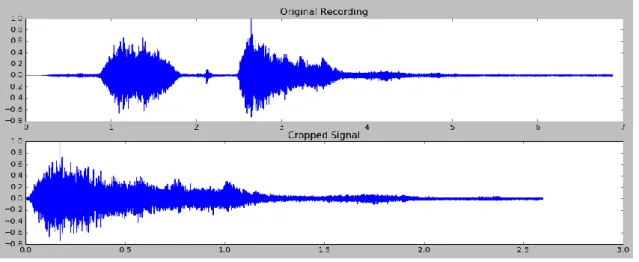
The audio input was firstly segmented to get rid of non expiration sounds, for instance the inspiration segment of the manoeuvre and the ambient noise. The definition and cropping the beginning of the recording was achieved operating a modified version of the Back-Extrapolation algorithm [7].
Primarily, an LPC envelope of the signal is acquired (see section 3.1.4 Linear Predictive Coding), then the envelope is subtracted of an arbitrary ratio of the maximum flow value (9% of PEF) in order to retrieve the two zero-crossings immediately before the PEF, this initial segment is discarded leading to the removal of the most relevant inspiration. Later, the zero-time back-extrapolation is performed by finding the moment corresponding to the envelope's
Classification of Lung Function
peak (PEF time), computing the Time-Volume curve, drawing the tangent at the PEF time and finding where the tangent crosses the abscissas, which is the initial instant.
The ending at noise level was detected applying a sliding window algorithm (5% of signal's length, 25% overlap) based on the magnitude ratio threshold of the maximum value (2%).
Figure 3.1 – Automatic Cropping. Top Image - Original recording. Bottom Image - Recording
after the two crops.
3.1.2 Signal Preprocessing
In contemplation of avoiding any saturation of the microphone the patients have to perform the expiratory manoeuvre at an arms length. A Spirometer measures the airflow that comes directly from the mouth whereas using the smartphone’s microphone some pressure is lost. Consequently, there should be employed some sort of compensation method, between the lips (plips) and smartphone (p). This is achieved using an Inverse Radiation Model [17],
according to height and gender of the patient. Additionally, this model also takes into account the reverberation effect from sound reflections around a person's body. After that,
plips was transformed to airflow at the lips (ulips), using a Pressure to Flow Conversion Model
(
3.1) [17].𝒖𝒍𝒊𝒑𝒔 (𝒕) ~ 𝟐𝝅𝒓
𝟐𝒍𝒊𝒑𝒔
√𝟐𝒑
𝒍𝒊𝒑𝒔(𝒕)
(3.1)
3.1 Signal Processing
17
Figure 3.2 – Pre-processing conversion models’ results [5].
3.1.3 Envelope Generation
After the preprocessing it was necessary to obtain an envelope based on a time domain. The method was based on Shannon curves [18], consisting at calculating the Shannon Entropy and Energy envelopes of the signal. Shannon envelope (the normalized average Shannon energy) is known as a common technique to extract an envelope of cardiac sound signals [19].
Shannon Energy: 𝐸 = −𝑥2(𝑡). log 𝑥2(𝑡) (3.2)
Shannon Entropy: 𝐸 = −|𝑥(𝑡)|. log|𝑥(𝑡)| (3.3)
The equations (3.2) and (3.3) focus on different features. Shannon energy emphasizes the medium intensity signal and attenuates the effect of low intensity signal in a greater way than that of high intensity signal, while Shannon entropy attenuates the effect of low value noise that makes the envelope too noisy to read. Shannon energy is good at shortening the
Classification of Lung Function
difference of the envelope intensity between low and high intensity sounds [20]. This shortening makes the finding of low intensity sounds easier [18]. On the final system, only Shannon Energy was used because of the above, and since it is the least complex envelope generator is more efficient to compute.
3.1.4 Linear Predictive Coding
LPC speech model is tremendously popular in speech analysis and synthesis. Various of the methods used for speech compression and feature extraction have the foundation on the LPC model and/or attempt to capture the deviations from it. Regardless of its popularity, there should be emphasized that the LPC speech model is an attempt to mimic the speech construction apparatus, and does not directly relate to the way the speech is perceived.
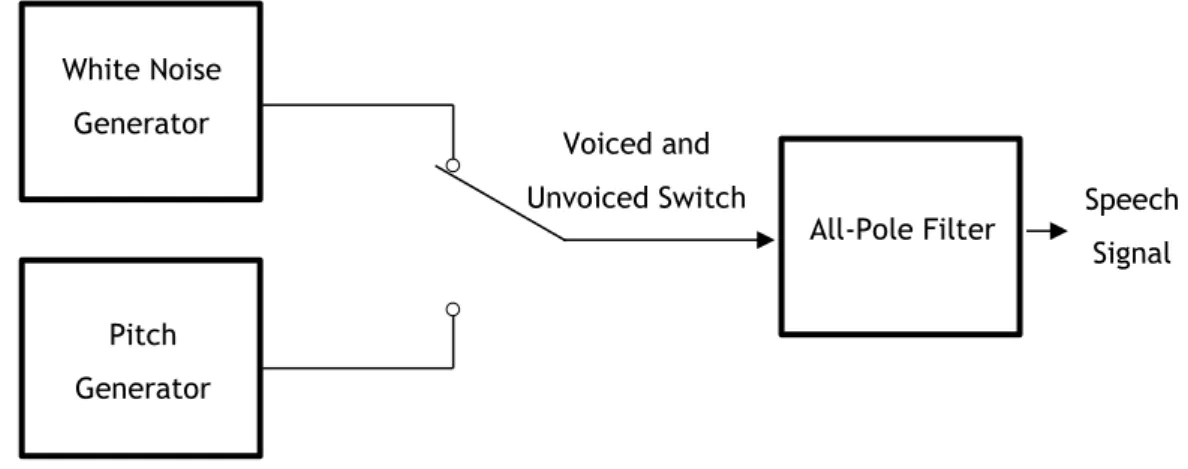
For voiced speech the vocal chords create a series of pulses at a frequency known as the pitch. This excitation goes through the vocal tract, which resonates at certain frequencies known as formants, and hence amplifies the pitch harmonics that are near these frequencies. For unvoiced speech the vocal chords do not vibrate but the vocal tract remains untouched. Since the vocal tract mainly emphasizes frequencies (the zeros are neglected in the spectrum caused by the nasal tract) it can be modeled it by an all-pole filter [21].
Figure 3.3 – Block diagram model for the generation of a speech signal.
In this case, the breathing procedure comprises two concepts very similar to LPC: a vocal tract which can be modeled as a varying width tube; and the exhalation, working as the power source of the expiration sound. This tube model can be represented by (3.4) and the power source can be modeled as white noise [5].
𝑦(𝑛) = ∑ 𝑎𝑖𝑦(𝑛 − 1) ± 𝐺𝑥(𝑛) 𝑝 𝑛=1 (3.4) All-Pole Filter White Noise Generator Pitch Generator Voiced and
Unvoiced Switch Speech
3.1 Signal Processing
19
3.1.5 Post-processing
The envelopes obtained were smoothed by a regular low pass filter (LPF) and, in parallel, were also approximated by a 4th order polynomial. The non-approximated envelopes were also further processed using a Savitzky-Golay Filter (SG) with order 3 and size 11. Savitzky and Golay wanted to smooth noisy data acquired from chemical spectrum analyzers, and they verified that least squares smoothing diminishes noise while preserving the shape and height of waveform peaks [22], so it seemed like a good approach to use at the end of the post-processing.
Classification of Lung Function
3.1.6 Parameter Extraction
The spirometry parameters were computed from each of the final envelopes. The measurements obtained were PEF, FVC, FEV1 and FEV1/FVC (TIFF). The envelopes are regarded as Flow-Time curves, characteristic of spirometer reports. PEF is defined as the Peak Expiratory Flow or the global maximum of the audio envelope. By integrating the envelope with respect to time the Volume-Time curve can be acquired. FVC is defined as the total volume expired of a FEM. FEV1 is the total volume expired during the first second.
3.2 Machine Learning
The dataset is represented by a very unbalanced quantity of observations. There are much more cases of normal lung behavior than cases showing anomalies. The total of usable recordings is 101.
There are two phases regarding the machine learning architecture: the regression and the classification. In the regression, the parameters are extracted from the curves to get an approximation of the corresponding clinical values, like the output of a spirometer. The classification, formulates models that can distinguish between the two possible diagnosis: normal or abnormal lung function. The approaches picked for these two distinct stages (regression and classification) were based on [23] best results.
3.2.1 Regression Phase
Several envelopes are generated and every one of them is manipulated to extract clinical parameters. With that data, it is possible to attain a good estimation of the respective spirometer clinical parameter. The corresponding spirometer measurements operated as ground truth or regression targets.
Analysing the results of[23], the best method was Random Forest. In the end, both Bagging and Random Forest presented similar results, but Random Forest could reduce overfitting and shorten regression time, therefore this method was the chosen one. The number of trees in the ensembles and their depth was 10 and it was used a 5 fold cross-validation.
Random Forests: The random forest algorithm lean towards producing quite accurate
models because the ensemble reduces the instability that can be observed when single decision trees are built. This can frequently be demonstrated solely by removing a very small number of observations from the training dataset, to see quite a change in the resulting decision tree.
3.2 Machine Learning
21
Random forests treat underrepresented classification tasks quite well. This is where, in the binary classification task, one class has very few (e.g., 5% or fewer) observations compared with the other class [24]. The randomness operated by a random forest algorithm is in the choice of both observations and variables. It is this randomness that brings considerable robustness to noise, outliers, and overfitting, when compared with a single-tree classifier.
Random Forest number of determining features typically are one third of the total number, for regression, and the square root of the total number, for classification.
3.2.2 Classification Phase
On this stage, the regressed parameters were the input of the learning models. Analysing the results for the classification stage, it is clear that the best performance comes from Tree Bagging and Random Forest. Since the library (discussed later) available for Android only offers the Random Forest Model, the choice for classifying continued on this model (same parameters, 10 trees with depth of 10).
23
Chapter 4
Implementation and design of the mobile
application
The current chapter describes how the application was implemented and designed, what paths were chosen and the inner reasons behind those decisions. In the beginning of the chapter there is a brief explanation about how the platform chosen (Kivy) works. Afterwards, it is presented the thought process designing the application. Finally, it is discussed how the implementation was made, and what hurdles emerged upon development.
4.1 Kivy’s architecture
In Chapter 2 were listed some advantages and disadvantages of this framework. In this section the goal is to explain how does Kivy works. This platform of development usually uses two files to operate. One of them is written in Python and it is the core of the application, this file is named main.py (Kivy looks for this specific name to search for the app class) and usually holds the logic of the application. The other one holds the Kv extension and it has the name of our app class. Kivy offers a design language specifically geared toward easy and scalable GUI (Graphical User Interface) design. The Kv language splits the interface design from the application logic, sticking to the separation of concerns principle, where the application logic remains in Python and the design remains in the Kv language [25]. Usually the Kv file is populated by a hierarchy of widgets (a widget tree), where the outer widgets are higher in the hierarchy than the inner ones. This way is easy to read the design and structure of the application. The term widget is frequently used in GUI programming circumstances to define some part of the program that the user interacts with. In Kivy, a
Implementation and design of the mobile application
widget is an object that receives input events, even though it does not necessarily mean that it has to show a visible representation on the screen.
Figure 4.1 – Kivy’s architecture [26].
4.2 Design
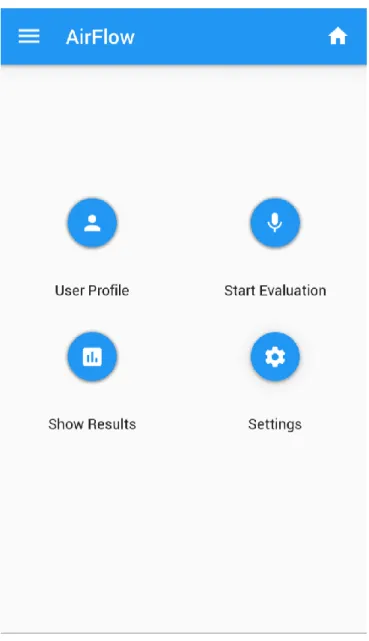
The application was designed thinking on simplicity and functionality. The application has four main screens. The home screen gives access to all of them. The design strictly follows Google guidelines for Material Design [27].
4.2 Design
25
Figure 4.2 – Home Screen of the application.
Looking to Figure 4.2 and starting from the top of the screen it is possible to perceive a toolbar with the application’s name. This toolbar is a common element throughout all the screens, to ensure the possibility to return the to the home screen by clicking the home button and to access the navigation drawer.
Implementation and design of the mobile application
Figure 4.3 – Navigation Drawer.
This navigation drawer slides from the left side and with the height of the screen (Figure 4.3), with everything behind it discernible but darkened by a scrim [28]. Taking a look closer there are two options within the drawer, the first option will render everything in a dark theme, some users prefer this option and it is also a great way to save some battery, specially if the screen is AMOLED. This type of screen emits light individually to the pixels opposed to a LCD that lights the entire display panel. So if any of the pixels are black, it just turns off the light on those pixels, as a result that portion of the screen is pitch black, thus saving energy (Figure 4.4). The other option is to change the language of the interface. This is a feature for the future, in case the application reaches other markets.
4.2 Design
27
Figure 4.4 – Dark theme.
Under the main toolbar there are four major floating buttons [29], each one leading to a different screen. On the first launch of the application only the first and fourth buttons (User Profile and Settings respectively) are available. If the user tries to access the other two, he will be presented by the a snackbar [30], for instance, if he clicks on “Start Evaluation”:
Implementation and design of the mobile application
This pops up because it is mandatory to have the user profile filled before proceeding, because the pre-processing uses parameters such height and gender (3.1.2 Signal Preprocessing). If the user tries to press “Show results” before any evaluation was made, it also warns him about this situation.
After pressing the “User Profile” button, this screen shows up:
Figure 4.6 – User’s profile screen.
This screen exhibits a card [31] in the center that holds all the elements to be filled by the user. The first information to be filled is the gender, this is accomplished by picking a radio button [32] which is the gender of the user. Shortly after there are three text fields [33], one to filled by the name and the others with the height and age. The last two of them are restricted to a numeric input. There are multiple checks to all these fields. If the user fails to fill any of them, a snackbar appears warning him what fields are still missing to be satisfied. After completing the profile, the “Save Profile” raised button [34] has to be pressed, representing that the user want to store this information in the internal storage of the
4.2 Design
29
application (even though this info can be modified anytime he wishes to). Afterwards a new snackbar appears stating that the profile was saved successfully. After this step, it is possible to start the first evaluation.
Figure 4.7 – Recording Screen.
In this screen there is a set of images in loop under the main toolbar and above the record button:
Implementation and design of the mobile application
Figure 4.8 – Set of images that appear before starting the manoeuvre.
The Figure 4.8 a) presents the distance needed for a clean recording (an arm’s length approximately). The next image portrays how the smartphone should be handled, facing directly into the patient’s face, making a 90º degree angle. The final image just shows that now it is the time to make the expiratory manoeuvre, by pressing the record button and exhaling with the maximum effort. After pressing the record button, this element is greyed out (disabled), the progress bar [35] starts moving towards the 8 second mark (4.3.1 Obtaining the signal) and a downsampled real time graph starts being drawn (this downsampling occurs in order to avoid FPS drop). The Y axis automatically adjusts its value depending on the exhalation. This graph is not very meaningful; it is just to have an idea if the microphone/device is working properly. When the progress bar reaches the end, the
4.2 Design
31
processing of the recorded signal begins, the label of the button changes to “Processing” and a blue spinner [35] appears illustrating that the user should wait until the processing is done:
Figure 4.9 – Start of the processing.
After the processing is completed, it is revealed the final screen of the procedure. This screen presents two graphs, one showing the cropped signal and the other one the Flow Vs Volume graph, generally shown in the spirometer. Under the last graph it is also depicted the diagnostic of the patient, whether he has a normal lung function or not (using the machine learning models referred at 3.2 Machine Learning).
Implementation and design of the mobile application
Figure 4.10 – Results Screen for a normal state.
In Figure 4.10 it is observable that the expiratory manoeuvre was performed by a person without any abnormalities in the lung function.
It was needed a splash screen before the application booting up completely, so the main toolbar color was used as background and the iconic element is represented by a set of lungs. The final result can be observed at Figure 4.11.
4.3 Implementation
33
Figure 4.11 – Splash screen before the application loads all its dependencies.
4.3 Implementation
The implementation of the system was not trivial, since this solution is multi-platform. This means that majority of the libraries available will work under Windows, Linux and Macintosh but some of them will not function at Android/iOS. This section will describe how the implementation was made and also what hurdles had to be overcome in order to succeed in mobile development. Most of the barriers are tied within the processor architecture, since the libraries have to be built for a specific platform. Usually the CPUs running under the hood of the smartphone are based on ARM technologies (RISC). In the other hand, desktop processors typically are x86 or x64 (CISC). This difference makes some libraries unattainable (at least for now), regarding the smartphones. Fortunately, one of the biggest scientific libraries has a recipe to be built in the ARM environment, without this library (Numpy [36]) would be impossible to continue further.
Implementation and design of the mobile application
4.3.1 Obtaining the signal
In order to record the audio, it was created a class called Recorder.
Figure 4.12 – Recorder class.
Since this is the class handling the capture of the audio from the microphone, it is needed to set a buffer size, encoding and sample rate. Since the latency in this case is not a problem (it is irrelevant if the audio comes with a delay or not, since the main goal is to process it), it is better suited a larger buffer size (in this case it is 4096), because it has more time to process the audio and thus is less demanding for the system. The sample rate was fixed at 16000 samples per second. It should not be very high on mobile environment, due to the limitation of the CPU. Although this setup should work in most of the cases, the code has a caveat if the system is not able to use 16k in the sample rate. In this case the sample rate is changed to 44.1k, since it is the standard for most of the microphones. The encoding was set to 16. Furthermore, it was decided that the optimal time for performing the manoeuvre was 8 seconds. This time seems perfectly sufficient to do the exhalation and it takes into account the possible hesitations of the patient before exhaling and the portion that contains the inhalation.
Recorder
4.3 Implementation
35
4.3.2 Pre-cropping the signal
When trying to pre-crop the signal to obtain only the exhalation part it was required to use LPC envelopes as described in 3.1.1 Automatic Signal Segmentation. When searching for the solution, most of the libraries that surfaced were written in C or C++. For Python was a struggle to find something that could do this job. The first library that appeared was from
scikits.talkbox [37] and it seemed like a good candidate. Unfortunately later on, it was
noticeable that it had dependencies on SciPy [38] so it had to be discarded. This was the first one of many libraries that would fail because they were dependent on SciPy (mostly Scipy.signal). In the end of this project, it became clear that the major libraries are dependent on SciPy. This is observed because it is the main reference on Python for digital signal processing (DSP) and probably, the most efficient, reliable and complete library regarding this subject. It works fine for desktop environments, unfortunately it has many dependencies on Fortran libraries, that it is impossible to make a recipe able to convert it to the ARM architecture. The other candidate that emerged was the library AudioLazy by Danillo Bellini [39]. It is pure Python, so it would work out of the box on mobile. The major problem of being pure Python is the speed for obtaining the LPC envelope.
4.3.3 Processing
After acquiring the three different pre-processing signals (p, plips, ulips), each of them was
processed by the system.
In the code there was a downsample factor applied to the recorded signal, because earlier on the sample rate was higher (first tests were made on the standard sample rate value, see class audiostream.AudioInput [40]). The downsample factor is 1 (there is no downsampling). The sample rate on the beginning of the tests was set as 44100 samples per second but after some testing it came to realisation that there were too many samples to process in a mobile environment. The first problem that emerged was filtering the signal in order to get the Shannon envelope. There was a necessity to get the coefficients for two Butterworth filters. In this case there were no alternatives to the Scipy library. After studying the Scipy source code, a specific module was noticed. This module was able to get the coefficients for the Butterworth filters, by removing some special dependencies (and thus slower execution of the code, since they were low-level optimizations in another language), and adapting the source to work after that removal.
Three dependencies were removed: sigtools, special and optimize; after the code was adapted to avoid the usage of those. It was not an optimal way, but it is a method that works for this proof of concept. Although it was possible to apply this method in order to obtain the
Implementation and design of the mobile application
coefficients, this would not be successful in the module that applies the filter, since there were involved irreplaceable dependencies. The solution was to implement the filter in Python for an infinite impulse response (IIR) filter of order 2 or lower (4.5).
𝑦[𝑛] = 1 𝑎0 (∑ 𝑏𝑖∙ 𝑥[𝑛 − 𝑖] 𝑃 𝑖=0 − ∑ 𝑎𝑖 𝑄 𝑗=1 𝑦[𝑛 − 𝑗]) (4.5)
For Savitzky-Golay filtering the same problem appeared as Butterworth filtering, but in this case it was impossible to use Scipy. After some research, astroML module seemed to possess a different implementation from Scipy. This implementation was tested (available at [41]), and it functioned quite well. In the end of the processing it was expected as output to have 6 different curves, given that each pre-processing signal would generate two different curves (Figure 3.4).
4.3.4 Machine Learning model
This phase of the project was the most complex to finish, not due to the complexity of the subject, but due to the lack of compatible libraries for mobile. Scikit-learn module [42] had all the necessary tools to accomplish the goal. But as previous solutions for processing it was reliable on Scipy. After ruling out Scikit, another possible solution was found, the milk
module [43]. Unfortunately, it runs under Python 3, and this project is developed in Python 2,
so it was impossible to use this one as well.
The possibility of uploading the results and classifying them under a server machine was becoming the apparent fate of the application. This would not be very pleasant, since the mobile phone would have to be connected to the internet, and the user would be relying on his connection and the server to get the results. Plus, it would be necessary to deal with network code and the necessity to have a machine running 24 hours per day to deal with multiple requests from users. Fortunately, this scenario was avoidable by using the Open Source Computer Vision (OpenCV) library from Intel. As the name suggests, it is a library primarily aimed towards real-time computer vision so the machine learning portion it is a feature of this library, unlike the other libraries mentioned that were strict machine learning libraries. As mentioned in 3.1.6 Parameter Extraction, this library does not have implemented the Tree Bagging method, so the Random Forest method was used for the regression and classification models.
4.3 Implementation
37
4.3.5 Saving the results
After the classification is made, the results are saved. For each recording it is created a JSON file in the folder “Airflow/logs” and a wave file containing the expiratory manoeuvre. This JSON file stores every clinical parameter such as FVC, PEF, FEV1, TIFF. This is an important step if the patient shows any anomalies in the lung function, because this way the doctor has more tools to do the analysis. In the future, this storage can be helpful in improving the machine learning models.
39
Chapter 5
Results and Discussion
In the current Chapter the machine learning methods (3.2 Machine Learning) are evaluated and compared to the results of the previous work [23]. Unfortunately, there were some problems testing the application on patients. The goal was to evaluate the application results versus a spirometer, however the application data is not available, thus rendering a comparison impossible. So, the dataset used for the evaluation is from [5].
5.1 Dataset
The dataset contains 101 recordings from 61 patients performing the forced expiration manoeuvre, facing directly a smartphone (Samsung GT-I9000), at an arm’s length in order to record the audio with the microphone’s device.
The ground truth clinical values were obtained using the spirometer devices displayed in the following table:
Results and Discussion
Table 5.1 – Distribution of recordings. Number of
recordings Location Spirometer
14 Aveiro - ICAR Spirodoc - MIR
17 Coimbra - ICAR Spirodoc - MIR
18 ICP Jaeger IOS – Carefusion
2 HCP Jaeger IOS – Carefusion
10 Vila Real - ICAR Spirodoc - MIR
9 Viseu - ICAR Spirodoc - MIR
15 Loulé - ICAR Spirodoc - MIR
16 Portimão - ICAR Spirodoc - MIR
The patients’ minimum age was 18 years old and the maximum age was 82. The binary distribution of the classification can be seen on Table 5.2.
Table 5.2 – Binary distribution of the classification. Normal Abnormal
71 30
5.2 Regression Results
The results of the regression test are shown in Table 5.3, comparing the system implemented here to P2 (second pipeline) from [23]. The Random Forest method was employed using 5-fold cross validation, 10 trees of depth 10, running 1000 iterations. Unfortunately, it is not possible to get the training error, since it is only available as a class method in C++ (see [40] for more information) and the oob_error (out-of-bag data) does not exist in Python. Consequently, the task is about testing the trained model.
![Figure 2.2 – Comparison between normal and obstructed airflow [9].](https://thumb-eu.123doks.com/thumbv2/123dok_br/19177862.944002/22.892.152.697.419.757/figure-comparison-normal-obstructed-airflow.webp)
![Figure 2.3 – Cordova Architecture, diagram from [16].](https://thumb-eu.123doks.com/thumbv2/123dok_br/19177862.944002/28.892.113.743.347.842/figure-cordova-architecture-diagram-from.webp)
![Figure 2.4 - Interface and configurations used on data collection. Taken from [17].](https://thumb-eu.123doks.com/thumbv2/123dok_br/19177862.944002/29.892.228.710.538.695/figure-interface-configurations-used-data-collection-taken.webp)
![Figure 3.2 – Pre-processing conversion models’ results [5].](https://thumb-eu.123doks.com/thumbv2/123dok_br/19177862.944002/33.892.199.728.248.616/figure-pre-processing-conversion-models-results.webp)
![Figure 3.4 – Final Signal Processing Architecture [23]](https://thumb-eu.123doks.com/thumbv2/123dok_br/19177862.944002/35.892.227.750.389.1064/figure-final-signal-processing-architecture.webp)
![Figure 4.1 – Kivy’s architecture [26].](https://thumb-eu.123doks.com/thumbv2/123dok_br/19177862.944002/40.892.145.671.225.681/figure-kivy-s-architecture.webp)