Project Report
Master in Mobile Computing
AR Kart: Towards an Adaptable Solution For Virtual
Elements and Real World Interaction in Mobile
Applications
Dian Wang
Project Report
Master in Mobile Computing
AR Kart: Towards an Adaptable Solution for Virtual
Elements and Real World Interaction in Mobile
Applications
Dian Wang
Report developed under the supervision of Doctor Gustavo Reis, professor at the School of Technology and Management of the Polytechnic Institute of Leiria. Leiria, March 2019Acknowledgements
Abstract
Mobile devices entered its booming era in augmented reality with the launch of Apple’s ARKit (September, 2017) and Google’s ARCore (Preview in August, 2017). Both frameworks provide developers with solution, which doesn’t need external devices for AR experience. Common mobile devices are able to deliver AR effects with built-in back and/or front facing camera. For this master project report, the possibility of creating an interactive AR experience will be discussed. Approaches including successes and failures will be examined and the elected solution will be presented.
The first step will consist of hardware designing and related software approaches. For this project the goal is to take advantage of common objects in everyday life without evolving any complicate customised hardware and make the project able to be duplicated by anyone who is interested in it. Due to the fact low cost Arduino and toy car chassis was selected as potential candidates.
The core of the project is to use real world objects to interact with virtual object created in augmented reality while the theme of the project is car racing. In this case the user controlled toy car is expected to interact with virtual game objects such as goal, checkpoints and / or specific game characters. To facilitate the interaction the car is supposed to be recognised and tracked by the game. In other words the user controlled car is expected to be recognised as a part of the AR Kart game instead of being separated from the game like other irrelevant objects in user’s real world environment. Once the tracking reaches satisfactory performance a demo game scene will be created in the application. The game scene plays the role of stage for demonstrating interactive AR gaming experience. Further usage of such solution will also be discussed.
List of figures
Figure 1: Mario Kart VR Prototype 9
Figure 2: Desired Effect Of Real World Toy Car With AR Effect Attached To It 10
Figure 3: The AR Reference Image 12
Figure 4: Anchor Placement Method For 3D/2D Objects Detected 14
Figure 5: YOLO’s Workflow 15
Figure 6: Labeled Smart Car From Training Data Set 16
Figure 7: Smart Car Motor Base 21
Figure 8: Smart Car With Arduino Extension Board And Power Pack 22
Figure 9: Fully Assembled Smart Car With ArUco Tracking Cube 22
Figure 10: Smart Car With 2d Marker 23
Figure 11: ARKart Game Scene 25
Figure 12: ARKit Framework Overview 26
Figure 13: Tracker For Plane Detection 26
Figure 14: Initialization Of The Game Scene 27
Figure 15: Cube Tracking 28
Figure 16: Target Box’ Physics Body And Bit Masks Setting 29
Figure 17: Collision And Scoring 29
Figure 18: Car Cover Configuration 30
Figure 19: Camera Parameters 31
Figure 20: markerSize Parameter 31
Figure 21: Feeding ArUco With Image Updates From ARKit 31
Figure 22: Pixel Interpreter 32
Figure 23: OpenCV Wrapper Class Definition And Protocol Part 32
Figure 24: The Tracking Box 34
Figure 25: Smart Car Hardware Overview 36
List of tables
Table 1: Mainstream AR SDKs 2
List of
acronyms
2D Two Dimensions
3D Three Dimensions
API Application Programming Interface
AR Augmented Reality
BLE Bluetooth Low Energy
CNN Convolutional Neural Network
FPS Frames per second
IDE Integrated Development Environment
IoT Internet of Things
OpenCV Open Source Computer Vision Library
OS Operating System
SDK Software Development Kit
SLAM Simultaneous Localization and Mapping VIO Visual Inertial Odometry
VR Virtual Reality
WWDC Worldwide Developers Conference
Table of Contents
ACKNOWLEDGEMENTS ... iii
ABSTRACT ... v
LIST OF FIGURES ... vii
LIST OF TABLES ... ix
LIST OF ACRONYMS ... xi
TABLE OF CONTENTS ... xiii
1. INTRODUCTION ... 1 2. BACKGROUND ... 4 2.1. Augmented Reality ... 4 2.2. AR Frameworks and Libraries ... 5 2.2.a ARToolKit ... 5 2.2.b ARKit ... 5 2.2.c OpenCV ... 7 2.2.d ArUco ... 7 2.3. Hardware ... 7 3. RELATED WORKS ... 8 3.1. Adrian Rosebrock’s Ball Tracking Project ... 8 3.2. VR Mario Kart ... 9 4. APPROACHES ... 10 4.1. Attempt #1: Image Detection ... 10 4.2. Attempt #2: 2D Image Tracking ... 11 4.3. Attempt #3: Machine Learning ... 13 5. DESIGN ... 18 5.1. Software Design ... 18 5.2. Hardware Design ... 21 6. IMPLEMENTATION ... 25 6.1. ARKit ... 25 6.2. SceneKit ... 28 6.3. ArUco ... 30 6.4. Conjunction of ARKit and ArUco ... 32 6.5. Tracking Box ... 33 6.6. The Smart Car ... 35 7. EVALUATION ... 37 8. CONCLUSION ... 41 8.1. Summary ... 41 8.2. Future Work ... 42 REFERENCES ... 44
1. Introduction
In the year of 2017 with the launch of ARKit (iOS) and ARCore (Android), two major mobile devices’ platforms have been provided with their dedicated augmented reality (AR) SDKs. Creating AR enabled applications, including games, is officially supported by the industry’s leaders. Together with the new SDKs, Apple’s Xcode with iOS 11 and Google’s Android Studio with Android bridges the AR features in a smooth manner, which gives developers the ability to build immersive objects with plane detection [1], dynamic lightening and physical collision systems. The created virtual objects are inserted directly into the device’s camera feed.
Checking out different popular AR apps and games available on App Store and Google Play, it appears that the majority of the works follow the ‘Screen - Camera feed’ pattern that allows users to interact with AR objects / game scenes on the device’s screen. This means that despite offering an apparent immersion in an augmented reality world, there is still a strong separation between the AR world and real world. The application / game has no ability to recognise collision or other forms of interaction between virtual objects and real world or real objects. In short, a player’s touch on the AR objects he sees on the screen will result in nothing. This project’s goal is to challenge this limitation by creating a way of interaction between real world objects and virtual objects.
Previous to ARKit and ARCore, there have been solutions developed and open sourced such as ARToolKit [2], ArUco [3], as well as commercial solutions such as Vuforia [4] and Wikitude [5]. Similar to ARKit and ARCore, these solutions provide AR plane detection, object / scene rendering, environment effects simulating (eg. Light estimating and particle system) and some levels of object / image tracking. Compared to virtual reality technologies, AR SDKs and solutions don’t commonly offer developers direct interaction with the virtual objects and / or scenes created by the AR enabled applications. Table 1 shown below provides a clear comparison between popular AR SDKs.
This table reveals some common features of popular AR SDKs that are SLAM (Simultaneous Localization and Mapping, “a technology which understands the physical world through feature points” [6]) supported, Unity supported and Smart glasses supported. One noticeable fact is that ARKit is the only free SDK that supports all the features. As expected, mainstream AR SDKs are focusing on displaying virtual contents rather than providing first person interaction with the virtual environment. None of the SDK offers direct solution to interaction between real world objects and virtual world objects. Another noticeable fact is the trend of enabling object tracking, starting from Apple’s launch of ARKit 2. 3D object recognition and image tracking has been added as new features to this SDK [7]. The addition of object tracking / recognition indicates that a company in a leading position in the field started making effort in enhancing the interaction between users and AR environment. Indeed, the tracking function is the first step towards greater immersive experience, which will eventually lead to more interaction between real and virtual.
This project, as discussed above, aims at ‘creating a way of interaction between real world objects and virtual objects, which has the potential to contribute to the next level of augmented reality applications’ development. This is where the project starts and develops a possible prototype with simple components and public-released SDK. In this project, the Arduino smart car ‘AR Kart’ is the real world object in the game app while the player’s goal is to drive the car to gain points by hitting virtual cubes in a limited time. AR objects including waypoints and special object (explosive) play the role of interactive virtual objects.
Table 1: Mainstream AR SDKs Source: [57]
According to the skill and specialty of the developer, ARKit was selected as the candidate SDK for the project, which is an iOS only SDK. Unfortunately ARKit alone is not able to support the necessary fast moving object tracking (Tracking of the smart car in this case), based on its current development. This problem aside, the strong point of ARKit is its robust environment understanding ability, which includes vertical and horizontal plane detection, swift anchor placing and mature particle, physics systems by utilising Apple’s SceneKit alongside. Because of this, using ARKit remained the best solution, but it became necessary to find a solution to fit the necessity of fast tracking. The project’s prototype being a mobile device application, ArUco code, which is based on OpenCV, was eventually selected as the assistance method. A smart car that carries a printed ArUco code was built in order to maintain an acceptable object tracking performance. After this stage the smart car is ‘covered’ by an AR node that follows the car’s movements. Based on a well-tracked smart car, the game scene is constructed by ARKit and reacts to the interaction between the car and virtual objects. As a result, a user interactive AR app solution is created. To reach the final solution briefly introduced above, the project has gone through multiple stages with several attempts that involve different technologies. Details of each stage and the development of the final solution will be discussed in the following chapters. Discussion on the further usage of the project’s final solution as well as the implication for future research on this topic will be carried out at the end of this report.
2. Background
This chapter presents the key elements related to this project. As expressed in the introduction, this work is based on Augmented Reality technology. Therefore, we will first explore the concept of Augmented Reality. Then we will specifically introduce the more specific topics of Marker-based Augmented Reality and ARKit. In a last part, we will present the various technologies and tools used to build the smart car (Arduino, Bluetooth low energy…).
2.1. Augmented Reality
Azuma stated, "Augmented Reality is a variation of Virtual Reality" [8]. While Virtual Reality allows users to immerse themselves in a fully virtual environment, Augmented Reality offers the possibility to integrate virtual elements in a real life environment. Furthermore, the Gartner IT glossary more specifically defined AR as "the real-time use of information in the form of text, graphics, audio and other virtual enhancements integrated with real-world objects" [9].
Still according to Azuma’s definition, AR not only introduces virtual elements in a real environment, it is also interactive and three-dimensional. In this case, AR is not solely limited to head-mounted structures, but can also be applied to any device that offers the opportunity to provide an immersive experience that combines real and virtual [8].
The term "Augmented Reality" was first coined in 1990 by Thomas Caudell and David Mizzel [10], but L. Frank Baum writings back in 1901 are the earliest reference to a type of Augmented Reality technology. Indeed, the author of the famous book The Wizard of Oz’ introduced his ‘character marker’: a pair of spectacles allowing the user to see data overlaid on reality - here letters places on each person’s forehead [11] which perfectly fits Gartner’s definition.
Harvard Professor Ian Sutherland developed the first head mounted display in 1968, but History shows that Augmented Reality really kicked off in the 1990s. Indeed, "Louis Rosenberg at the U.S. Air Force’s Armstrong Laboratories […] developed the first immersive AR system" [12]. This system, called Virtual Fixtures, allowed a person to remotely effectuate tasks by using a helmet that provided guidance through digital overlays and controllers connected to robotic arms [13]. This system provided better 3D perception of the remote environment, therefore achieving better accuracy.
In the 2000s, AR started to be more prominent in the civilian scene. Quake AR, the first Augmented Reality game, was launched in 2000 [14]. The problem with early Augmented Reality technology was its lack of mobility: the first mobile solutions dating back from 1997, required to travel around with a large backpack style computer, which was not very convenient [15]. However, in 2005, Augmented Reality was brought to mobile devices: AR Tennis, a duo player game was built for Nokia’s S60 series mobile phones [16]. Suddenly, Augmented Reality technologies became available in the palm of the hand. The following year, Nintendo introduced the WII, a console using a motion-sensitive controller that gave players the most immersive experience in video games at the time [16].
Since then, AR technologies have been widely adapted to different industries, from gaming and entertainment to medicine and security. In fact, spending in AR and VR are expected to pass the 20 billion dollars mark worldwide this year, a clear indication of the popularity of this technology [17]. The application of AR to games has been researched since the end of the 1990s. For example, Magerkurth et al. created AR KnightMage, an
adventure AR game using rear projection to place the AR environment on a horizontal surface. The dices and avatars interact with the AR world [18,19]. This is of course only one example of the multiple articles that have been written on he topic.
The development of AR applications in the 2000s was also made easier by the release of the ARToolKit, the first open-source framework providing engineers and developers with the necessary tools to build real-time AR applications with the use of markers [20].
2.2. AR Frameworks and Libraries
As stated earlier, first ‘mobile’ AR devices were in fact extremely bulky and inconvenient to move around. However, with the arrival of the smartphone, AR found a new vehicle, and technology had to be adapted to fit such small devices.
2.2.a
ARToolKit
The ARToolKit is celebrating its 20th anniversary this year, as it was created in 1999 by Hirokazo Kato. In 2005, it became the first AR SDK to be ported on a mobile OS - Symbian OS - in order to achieve adequate performance in further gaming development [15]. Nokia’a AR Tennis took advantage of ARToolKit and S60 mobile operation system to deliver a brand new experience for AR gaming [15].
Indeed, Anders Henrysson developed a “highly-optimized version of the ARToolKit library for the Symbian platform", which he then used to build the AR Tennis game [21]. In 2008 it was running on the iPhone 3GS and in 2010 on Android. Nowadays it is not only available on mobile (iOS, Android) but also on Mac OS, Linux and Windows. Furthermore it is integrated in Unity as a plugin, and it is still widely used by developers nowadays. However, its limitations in terms of tracking are such that new frameworks and libraries are now offering better options for more mobile work.
Nowadays however, while ARToolKit remains a pioneer in the field of marker based AR technology, other frameworks are being developed to fit developers needs.
2.2.b
ARKit
Apple released the first version of its ARKit API on June 5, 2017. It was conceived as a tool for developers dealing with augmented reality and virtual reality in the development of native applications. When it was introduced, the demonstration showed that “ARKit had the potential to place complex scenes on a surface within the view of an iPad, and that Apple had solved some of the tougher problems developers had working within AR” [22]. Until the introduction of the ARKit, iOS developers lacked a native tool to implement augmented reality function in their app. With this toolkit, developers now can rely on a technology that does a lot for them, including the analysis and mapping of the environment, such as suitable surfaces and lighting. “ARKit lets developers place digital objects in the real world by blending the camera on the screen with virtual objects, allowing users to interact with these objects in a real space” [23]. ARKit technology was compatible with “iOS device that runs on Apple's A9, A10 or A11 Bionic processors. That includes the iPhone 6s and 6s Plus, iPhone 7 and iPhone 7 Plus, all iPad Pro models, the
9.7-inch iPad released in 2017, the iPhone 8, 8 Plus and iPhone X” [24].
ARKit allows both “world tracking” and “face tracking”. World tracking “create AR experiences that allow a user to explore virtual content in the world around them with a device's back-facing camera” while face tracking “uses the front-facing TrueDepth camera to provide real-time information about the pose and expression of the user's face for you to use in rendering virtual content” [25].
The first version of ARKit focuses mainly on horizontal surfaces such as floors or table, to place 3D virtual objects into the real world. Thanks to its environment texturing tools, the virtual objects can be better integrated in the real world through good analysis of the lighting for instance. ARKit can also recognize 3D objects: once the object has been analyzed and its featured recorded, ARKit will have the ability to recognize it when mapping the environment [25].
Since Apple first introduced the ARKit in June 2017, there as been two major updates, ARKit 1.5 and ARKit 2.0:
ARKit 1.5 brought a new big feature, which is using vertical surfaces to help map the environment. Furthermore, it improved the ability to recognize objects of weird shapes and 2D objects (posters, for example), with better tracking speed and accuracy. ARKit 1.5 also provides images of the world with a better resolution (1080p rather than 720p) [26]. With iOS 12 being revealed this year, ARKit also gets a second version. Three main changes can be identified. The main one is the possibility to for several devices to interact in the same AR app. This means that two players can evolve in a same AR environment, just like a multiplayer mode. At the WWDC on June 4, 2018, this function was demonstrated by LEGO’s director of innovation, Martin Sanders, through an original app allowing up to 4 people to join in the same AR environment. The players’ actions were visible by the others, allowing them to interact both among themselves and with the environment [27].
Another update brings persistent tracking, which means that once a 3D object has in placed in the AR environment, it will stay there. The player or other players will be able to see it and interact with it at a later time as long as they enter the environment [28].
ARKit 2 comes with an app called Measure, which will allow greater accuracy in measuring and detecting real objects. Measure uses the camera to determine the size of objects with great accuracy, all the user has to do is place points to delimitate the object [29]. Compared to the first version of ARKit, this “lets the framework know when it's looking at something that's got more than two sides” [28].
For ARKit 2, Apple worked alongside Pixar to create a new file format, USDZ, which will allow sharing AR objects among the platforms. “This could greatly expand the reach of AR experiences; image saving and sharing something you created over Messages, then mailing it to a friend who can view it and start manipulating it through their phone” [28]. The functionalities and performance of ARKit are being completed and improved by Apple constantly. Considering the importance of AR and the current trend, the future of ARKit and the technology itself can be predicted as promising according to the market response and the passion from users’ choices.
For this project however, ARKit revealed many drawbacks, hence it needed to be complemented with a library called OpenCV, and more specifically ArUco, to achieve the tracking and marking necessary.
2.2.c
OpenCV
OpenCV means Open Source Computer Vision Library. Created in 2000 in the Intel Labs, it has grown since its birth to become the “de facto library for computer vision development” [30], and indeed many large companies are relying on it to build their software, including big names like Intel, IBM, Google, Microsoft [31]…
It was “built to provide a common infrastructure for computer vision applications and to accelerate the use of machine perception in commercial products” [31]. The library offers thousands of algorithms that can be used by developers working in Computer Vision, which therefore can be applied to augmented reality, in particular because “OpenCV was designed for computational efficiency and with a strong focus on real-time applications” [32], which is crucial for a real-time immersive augmented reality application. Algorithms available in the OpenCV library “can be used to […] identify objects, […] track camera movements, track moving objects, […] recognize scenery and establish markers to overlay it with augmented reality” [31]. It is compatible with most platforms (Linux, Microsoft, iOS…) and available in several languages (C++, Python…).
2.2.d
ArUco
ArUco, according to its official page on the University of Cordoba’s website, is a “minimal library for Augmented Reality applications based on OpenCV” [3]. Thanks to the ArUco library, it is not only possible to detect square markers but also to estimate the camera pose, which allows greater efficiency in implementing augmented reality elements. “ArUco is very robust and can detect markers in a very wide range of situations” [33].
2.3. Hardware
We talked about the background for the software part, and now we will quickly introduce the main hardware elements that went into building the smart car, for future reference. First, the car functions with an Arduino Uno REV3. Arduino boards are microcontroller boards that are able to receive instructions and be used for many DIY projects. “Arduino was born at the Ivrea Interaction Design Institute as an easy tool for fast prototyping” [34]. By adding different modules and tools, developers can use it for a large variety of functions, from robotics to smart objects [34].
The Arduino Uno is the most commonly used board, adaptable to many creative ideas and therefore a good place to start for any project [35].
Another essential element is the Bluetooth Low Energy board HC-08. Bluetooth Low Energy is “a wireless technology which […] is intended to provide considerably reduced power consumption and lower cost [compared to Bluetooth], while maintaining a similar communication range with the devices” [36]. BLE can run for years with extremely small energy consumption, making it particularly useful for IoT, robotics or other smart devices projects [37].
3. Related Works
There are two large research areas that are related to this project. They are computer vision and virtual reality. There are works from both fields which inspired and assisted the development of the project. This chapter is going to discuss the impact of related works on project AR Kart.
3.1. Adrian Rosebrock’s Ball Tracking Project
Computer vision isn’t a fresh field. Good amount of works and contributions have been done and many of them are shared with the public through open source on the network. During the development process of the project, computer vision related works have not only provided inspiration to the developer but also directly assisted the compilation of the project. OpenCV, a real-time computer vision library originally developed by Intel, who decided making it open source with BSD license [38] demonstrated a robust real-time object-tracking feature. Among the showcases of OpenCV’s efficiency are projects such as Adrian Rosebrock’s ball tracking project, which is a particularly good example of object tracking. It is a simple look OS X application that tracks a green ball in the developer’s hand and draws red movement tracks on the screen [39]. The project uses OpenCV’s colour tracking function that captures the RGB colour range changes in the video feed. In this case, the developer sets the upper and lower boundaries of the colour green in the HSV colour space thus detect the location of the green ball in the video file. The project showcased the robust performance of OpenCV’s object tracking and the stability of the tracking. Compared to the previous solutions including ARKit’s native image tracking or neural network assisted tracking, this project shows that continuous object tracking is possible by integrating OpenCV library.
The inspiration from ball tracking project leads to the final solution of the AR Kart project which is using ArUco with ARKit which will be discussed in later chapters. Adrian’s ball tracking project didn’t only showcased OpenCV library’s ability in high performance object tracking it also brought further questions to the project.
• Weather it is possible to use such library to track the smart car itself as a complicated object?
• If it is impossible to track the whole smart car then will it be any options to perform the tracking feature?
• Will the performance be satisfactory or acceptable for players to experience an AR game on minimum hardware configuration according to Apple’s guidance for ARKit compatible devices (iPhone 6s/SE with A9 chip) [40].
The questions laid the foundation and starting point to introduce ArUco solution to the project and it was eventually selected to be the solution for AR Kart’s iOS application development.
3.2. VR Mario Kart
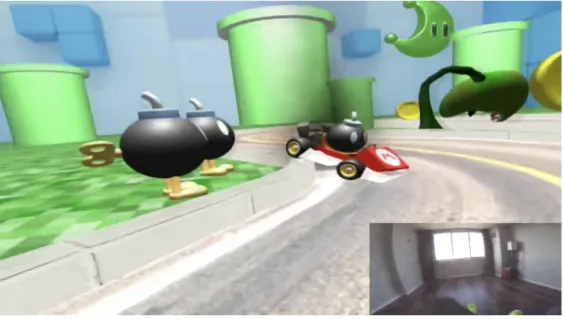
New York based researcher/founder at Onirux Labs Asier Arranz’s VR Mario Kart prototype project is another important inspiration [41]. This project built a prototype of VR Mario Kart experience by using real hoverboard, Lenovo Mirage headset and Android phone. The goal of the game is to capture as many coins as possible while avoiding obstacles such as the ‘bombs’ and other vehicles. The player himself sits on a battery-powered hoverboard that is the real world version of ‘Mario Kart’. All other objects players can find in Mario Kart will be projected by the VR headset, which also plays the role of screen.
Figure 1 shows the virtual game scene viewed from the headset and the real room scene.
Mario Kart VR demonstrates the basic theory of indoor virtual reality game. The developer Asier Arranz made good use of the immersive gaming environment created by VR technology. The player himself is the camera, and together with the virtual scenes, objects around, it brings a truly immersive experience similar to first person shooting games. This design takes into consideration the fact that the player will be ‘driving’. First person view is no doubt the best way to simulate the real car driving experience and brings the original Mario Kart’s item-capturing feature to the game in a natural way. Our project AR Kart adopted Mario Kart VR’s game theory and a similar idea of creating unique scene as a ‘map’ for the player.
In contrast to the related work, project AR Kart has its own set of available resources, which are different to the OpenCV ball tracking and the Mario Kart VR. Compared to the traditional OpenCV tracking, AR Kart has the support from ARKit, which allows the developer to create lifelike 3D models with real-time light estimation and different rendering effects. Rather than having a simple green ball the AR Kart is able to have any creative 3D contents on the top or surrounding the smart car. Powered by ARKit the background/game scene of the project can be rendered in a professional manner, which isn’t available to traditional OpenCV based computer vision works. In the meantime the project’s goal is to create an interactive AR experience with inexpensive hardware, which
Figure 1: Mario Kart VR Prototype Source: [61]
4. Approaches
The project AR Kart has experienced a series of attempts, which include successful ones and failed ones, which led us to finally decide on the final result. This chapter will discuss solutions that have been tried in order to reach the final goal and analyse each of their pros and cons.
4.1. Attempt #1: Image Detection
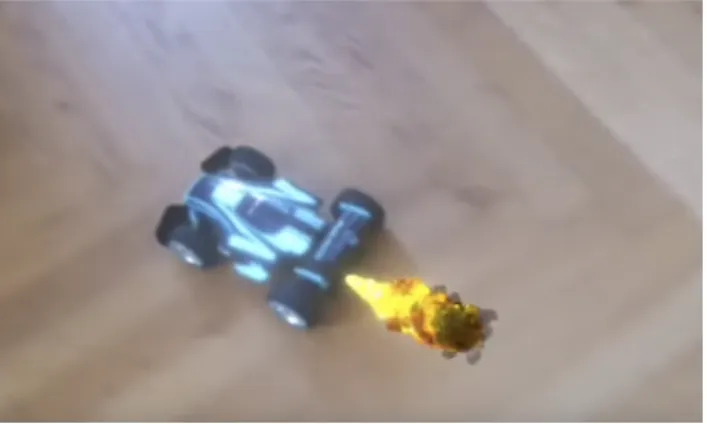
At the very beginning of the project, the first attempted solution was to use ARKit’s image detection feature to realise the tracking of the smart car, thus bringing the smart car into the AR game scene and interact with other virtual objects. In detail, this solution tried to use smart car’s picture for image detection. Once the image of the smart car has been recognised by the ARKit, a customised 3D model will be placed over the smart car. The desired outcome will be an effect similar to what Figure 2 illustrates. Once an AR node has been attached to the car, other related game objects and logics can thus be applied to the game and interact with the smart car. The idea behind this is to make use of the physical collisions and effects provided by Scenekit, which are often used together with ARKit. Actual collisions happen between the node to the car and all other game objects. The player is driving the smart car and sees the ‘car’ performs real world alike physical actions such as ‘hitting an object’, ‘running over objects’ or ‘crashing into objects’, etc. which generates AR effects visible on screen.
The idea was promising but when it was executed during development process several problems appeared immediately.
Apple has provided exact explanation of its ARKit’s image detection feature as an ‘add-on’ feature for world-tracking AR sessions [42]. It uses known 2D images in the user’s environment to enhance a world-tracking session [25]. ‘Known 2D images’ refers to the images of objects from the real world that the developer intends to detect. Image detection/recognition is a sub feature of world tracking. The goal of image detection is to place (visualise) the developer desired virtual content above or around the target image. The first attempt tried to use this feature. After taking pictures of the smart car, a test
Figure 2: Desired Effect of Real World Toy Car With AR Effect Attached To It
application was built using the car’s pictures as reference image and placing a 3D star model on the car’s ARImageAnchor which on the screen will result in a virtual 3D star hovering above the smart car. While this solution worked fine when the car was static, the problem occurred once it started moving. Indeed, the 3D model was placed at the car’s first detected position but it didn’t follow the car at all. In this case it is impossible for the car to activate any effects with other virtual objects in the game scene. At the time of this first attempt, ARKit was at its fresh launch stage. Looking into Apple’s documents there are the following elements that limited this feature’s application to still images only.
I. The image is detected only once during the application’s life circle. This means the ARAnchor that tells the ARKit where to place virtual object is generated once from the first detection of the image till the termination of the application.
II. The reference can only be images on flat surfaces otherwise the image might not be recognised or might create an image anchor at wrong location [42]. In this project’s case, the smart car is the detection target. Being a 3D object in real world has limited the ability for the smart car to be detected by ARKit although pictures of the car were used as reference pictures.
It is clear from the document image that ARKit detecting feature may not fit the project requirement. However, as an attempt to solve this issue, the image detection function was forced to run on every camera frame. The result was negative. Test application crashed after exceeding the device’s memory capacity.
Pros of the attempt:
I. The speed of image detection is satisfactory. According to the test app’s result the average detection time was around 1.5 seconds in good lightning condition. The performance went down to approximately 4 to 5 seconds or even longer when the lighting condition wasn’t good (For example, dimmed light, uneven surface lighting and sudden lighted up spots in the scene involving the target)
II. The angle of image detection is wide. From 40 degrees to the best angle 90 degrees towards the surface the reference image can be detected according to the test.
Cons of the attempt:
I. The ARAnchor was misplaced due to the fact our detection target is a 3D real object instead of 2D image.
II. AR 3D model didn’t follow the smart car’s movement at all. As mentioned above, the 3D model was projected around the smart car but stayed at the first detection position without following the car.
III. The success of image detection relies heavily on the lighting condition, contrast, details of the reference picture(s) and the angle of how the image is placed.
4.2. Attempt #2: 2D Image Tracking
Together with the launch of iOS 12, ARKit received a second version update in June 2018. ARKit 2.0 brought image tracking to developers’ toolset. Similar to Vuforia’s marker tracking feature, ARKit is able to track certain patterns/images. A distinct difference from traditional marker tracking is that ARKit 2 tracks any user input images which satisfies certain requirements [43]. The image-tracking feature of ARKit 2.0 provides can be
• Once the ARKit detects the reference image(s), an AR anchor is attached on the surface of the image and follows the movement of reference image.
• Developer can set up a 3D model or any other types of media, for example a video player. The additional media content will follow the AR anchor that is attached to the reference image.
• There is certain degree of motion tracking feature, which will enable the projected media content to follow the oblique of the reference image. If the reference image’s oblique degree exceeded ARKit’s tracking performance limit (+/- 40 degree towards the plane, data acquired during the project’s test runs) the image-tracking feature will automatically stop functioning, which results in the disappearing of the projected media. The attempt of using image tracking to track the smart car is described as follow:
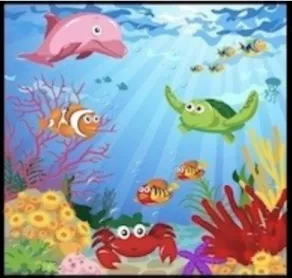
Step 1. Searching and printing an image that fits the requirements of ARKit’s image tracking feature. According to the WWDC’s presentation, the picture used as reference picture should meet three requirements that are: ‘Distinct features’, ‘Well textured’ and ‘Good contrast’. As a result Figure 3 was selected as the reference picture.
Step 2. Attaching the printed reference image on the top of the smart car. The image was attached on the top of the car in order to achieve a better tracking angle and adequate lighting.
Step 3. Loading the image to the application and putting a virtual 3D cube on the top of reference image. As a tracking performance indicator the virtual cube can directly demonstrate the tracking performance in real time.
Step 4. Using an iPhone (6s and greater. In this case the test device is an iPhone 6s) with the application installed to test the tracking performance.
The result shows a robust tracking performance when the car with picture attached is moving in a well-lighted room on low speed (around 0.1 m/sec). The chance of losing tracking increases dramatically with the increasing of the car’s moving speed.
Lighting is the second element affecting the tracking performance. The smart car has to move in a room with even lighting. Reflections from metallic objects around and sudden white balance change cause immediate loss of tracking.
The distance between the iPhone and smart car is the third element affecting the tracking: the maximum distance is around 1 meter from the smart car. The player who holds the iPhone has to keep bowing while trying to track the car. ARKit achieves the best tracking performance when the player holds the iPhone from approximately 50 centimeters above the smart car.
As a result ARKit 2.0’s image tracking feature isn’t suitable for this project due to the following reasons:
• Tracking performance requires strict steady lighting, flat ground and low object moving speed. These requirements can’t meet the project’s features, which are fast moving object, unsteady lighting and unsteady camera angles.
• The distance limit makes the player/user bow down in order to get better tracking. The user experience is affected by the specific posture.
• Due to the fact that the image tracking feature has no support from machine learning modules when it is used alone, the tracking has low tolerance to differences between the captured camera frames and the reference picture(s). This means that any kind of background changing, lighting changing and integrity of the captured camera frame will cause tracking loss.
Pros of the attempt:
I. Tracking is robust in limited conditions II. No specific tags/images are required
III. Wide range of media contents can be ‘put’ on the tracked image (Video, image, 3D model)
Cons of the attempt:
I. The limitations of the environment are strict
II. Tracking algorithm has low tolerance to differences between the reference picture and camera frames
III. As a combination the player loses tracking of the smart car constantly due to the limits and requirements
4.3. Attempt #3: Machine Learning
The previous attempts can be summarised as using purely image processing functions and features from ARKit. The methods and features are fixed without any further learning ability and the only input to the application is the camera frame, which results in picky tracking requirements. The failures that resulted from the two previous attempts indicates the need for a hybrid solution, which still relies on ARKit’s virtual objects creating ability but integrating some machine-learning feature, which allows the application to adapt to various changes in both environment and player’s posture.
Apple launched its own machine-learning framework CoreML during the 2017 WWDC (Worldwide Developer Conference). The framework simplifies the process of integrating machine learning models into iOS applications [44]. CoreML also creates easy to use interface for integrated model that allows the developer to use the model like a common class. Apart from integrating trained models, CoreML also provides its own tool (Playground from Xcode) for model training. During the first solution development two sets of pictures were used for model training. One set was named ‘CarModel’ while the other set of pictures was named ‘TestImage’. This pattern follows the 80% training data set and 20% test data set rule. The amount of training set has the amount 200 pictures of the smart car from different angles, lighting conditions and backgrounds. 40 test pictures were taken from different scenarios with the smart car inside of the pictures. The model was then trained by using Playground and integrated into the application. This version of the test app passes each camera frame to the CoreML model. The model then analyses camera frames and determines whether the current camera frame contains the smart car. The camera frame will then be forwarded to the ARKit so that the 3D model can be added. The 3D model is supposed to ‘follow’ the smart car if the frame is classified as containing the car. If the current camera frame wasn’t classified as containing the car then the process will be paused until the next positive result is reached.
Combined with the machine-learning model, the ARKit was supposed to have satisfactory rate of detecting the tracking target (smart car) and track it with smoother performance.
The solution didn’t make it to the actual testing stage due as it was later found out the playground trained CoreML model doesn’t provide location information such as bounding boxes and/or coordinates of the tracking target. The only function it provides is to determine whether the current camera frame contains the training result. In this case the tracking feature isn’t available from this solution.
At this stage of the research it was clear that ARKit has a major flaw, which is its inability to track real world objects. It has been introduced by Apple in its developer documents that ARKit 2.0 supports 2D image detection, tracking and 3D objects detection [25]. Figure 4’s code block below demonstrates an important and common mechanism for both 2D/3D object detection.
It is clear from the code that each time an AR anchor is placed on the tracked object, it is detected once and such function isn’t executed every camera frame, which only makes it able to detect and track still or slowly moving objects/images. This feature also determines that ARKit is unable to place virtual object and keep updating the virtual object’s position according to the movement of the tracked real world object.
The realisation of ARKit’s robust 3D object tracking would be composed with the following components:
Figure 4: Anchor Placement Method For 3D/2D Objects Detected Source: [59]
• Fast object recognition
• Frequently updated object location data (eg. Coordinates or bounding boxes) from camera frames
• Fast 3D model rendering
ARKit has fulfilled the last requirement with its swift virtual object rendering, but needs help with the two other components. Tiny YOLO is a lightweight machine-learning framework that has the potential to meet the other two requirements thus it was chosen as the solution after the previous failure with CoreML. Tiny YOLO is an optimised version of its parent work the YOLO neural network.
YOLO refers to ‘You only look once.’ Which is a short definition of the neural network developed at University of Washington by Joseph Redmon and etc. The developers presented it as “a single neural network [that] predicts bounding boxes and class probabilities directly from full images in one evaluation” [45]. In a simple way, YOLO neural network analyses the image at one time only and pipelines the workflow. Based on the YOLO’s single pass network structure, it can be optimised end-to-end to achieve higher performance.
The main theory of YOLO is to predict a (7, 7, 30) tensor by building a Convolutional Neural Network (CNN). The spatial dimension is then reduced to 7 X 7 with 1024 output channels at each location with the help of CNN. There are two fully connected layers in YOLO for performing linear regression. As a result 7 X 7 X 2 sized boundary box predictions are generated. The final prediction/result is made based on the scoring of the box confidence. The ones with greater than 0.25 confidence scores will be kept and used as final predictions.
Figure 5 illustrates YOLO’s workflow:
Features that make Tiny YOLO stand out from other machine learning options are straightforward: lightweight structure (three times less layers than full YOLO v2) allows models running smoothly on mobile devices with limited computing power and storage; extra support from the A12 Bionic chip which includes Apple’s next-gen Neural Engine when deployed to the latest iPhone models (XS and XS Max) Tiny YOLO.
Integrating Tiny YOLO to the project’s mobile application went through four stages:
Figure 5: YOLO's Workflow Source: [60]
Stage 1: Taking pictures of the target (smart car) from different angles, lighting conditions and backgrounds. 300 pictures were taken of the car together with 100 pictures in randomly switched background and 100 pictures that are not relevant to the project. This setting tries to balance the outcome (model) between being over naive or over negative by feeding the training data set with the same object in complex background and irrelevant ‘noise’. Test data set consists of 150 smart car pictures taken from completely different environment and location.
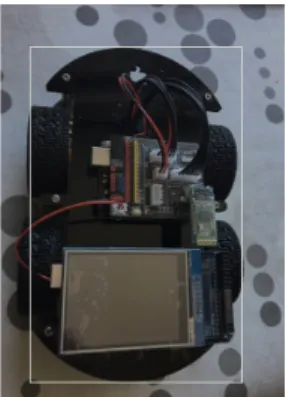
Stage 2: The training data set was annotated manually by using an open source tool ‘Simple image annotator’ from Github [46]. The smart car was labelled as ‘car’ in each training data picture as shown below:
Stage 3: The labelled training data was then trained using python and Apple’s custom machine learning model-training toolkit ‘Turi Create’ by following the instructions on its developer page [47]. The weight for this model was left using default settings due to the hardware limitation and time limitation for this project.
Stage 4: The trained model was then plugged into the mobile application by using CoreML as a bridge. The application was then able to give predictions from each camera frame and output bounding box location data.
The result of the test application has accurate object detection but its performance on test device, iPhone 6s and iPhone XS was at average 17 FPS (iPhone 6s) and 28 FPS (iPhone XS). For a game application it affects the player experience when the FPS is lower than 30 FPS. Apart from the low performance on real test devices, the solution has no potential of being used as a generic solution to ARKit object interaction. The nature of model training makes models for recognising/tracking specific object unique while popular universal models such as Place205-GoogLeNet, ResNet50 detects wide ranges of objects but there is no guarantee these models can detect customised objects like the the smart car. There is also no way to determine what class label the model will give to certain customised object once it is detected. As a summery, developers have to train different models for each specific task which is extremely time consuming and resource demanding. This solution was then eliminated from the candidate list due to its low performance, high development cost and lack of potential for future universal usage.
Pros of the attempt:
I. Relatively high accuracy in customised object detection/tracking
II. Able to detect and track customised object with noise from background (lighting, other objects and view angles)
III. Significantly reduced computing power requirements compared to traditional full YOLO neural network. Mobile devices are expected to run it smoothly
Cons of the attempt:
I. Tiny YOLO is designed for mobile devices and promises a swift performance but the performance for this particular project wasn’t satisfactory. Further development and adjustment for the model will be necessary but it is out of this project’s budget in both time and cost
II. The trained model isn’t universal for other projects while project AR Kart aims at creating a universally adaptable solution
5. Design
Project AR Kart’s goal as mentioned in the introduction is to create a way for virtual objects from augmented reality world to interact with real object from the real world. Breaking it down to the scenario of using ARKit as SDK, this project’s priority goal is to fill the gap of ARKit’s incomplete object tracking feature. Prior to ARKit 2.0 object tracking was a blank field for ARKit. Apple launched 2.0 version of the SDK but it only covered 2D object, precisely speaking, image tracking. 3D object tracking function is currently left blank with a slightly relevant function which is ‘3D object detection’ presented by Apple in the 2.0 version of ARKit [7]. As it has been discussed in previous chapters, a developer can theoretically force the application to run 3D detection and anchor relocating at every camera frame in order to simulate object tracking visually but the limitation of memory usage and heavy computing power will cause the application to crash. Indeed, iOS memory managing mechanism will detect the extra memory usage and eventually force the application to stop. Clearly it is impossible to reach a universal solution for 3D object tracking purely relying on ARKit’s native functions or other SDKs, tools from Apple (CoreML, Turi Create etc. as discussed).
As it is mentioned in the project’s title and also in many parts of the report, this project is aiming at creating solution for augmented reality applications/games. The development of the project focuses on the iOS platform with ARKit and native Swift as programming language. This choice was made to fit the developer’s own skills and experience, as he is specialised in iOS development with strong knowledge of swift, as well as Objective-C and C++. Using a familiar platform is cost efficient and provides better understanding and analysis, which allows going more in depth in the problem.
In this case the project design can be split into two sections: The first section contains the design of an iOS application, which functions as the game itself and also tracks the smart car. The second section contains the hardware design of the smart car and tracking module attached to it.
5.1. Software Design
ARKit’s advantages and disadvantages have been discussed through the report in multiple chapters. To summarise, below are the pros and cons of ARKit without any other external SDK assistance.
Advantages:
• The world tracking performance is satisfactory in terms of plane detecting speed, speed of re-detecting plane after losing tracking and anchors tracking precision. In short, ARKit does a good job at detecting, re-detecting plane and keeping every AR anchor in its exact position when the user moves the camera around.
• Precise object motion tracking. Thanks to the VIO (Visual Inertial Odometry) technology used in iPhone 6s (and later) with M9 and above core motion coprocessor, ARKit has access to processed camera and motion data from VIO, which helps the application developed using ARKit understand how the device is moving in space relative to landmarks it sees [48].
• Assistant features such as feature points, world origin, add desirable functions for developers to get a better grasp of the application’s current working condition. Feature points are the raw feature point cloud and they are used to track objects in the real world. The feature points are positioned on detected solid surface of both objects and planes. With the assistance of feature points the developer has a clear view of the 3D environment and how well ARKit is working in it. When world origin debug option is enabled, the developer is able to determine whether objects are placed in expected location relevant to the ground.
• Similar model rendering quality compared to certain paid framework like Wikitude.
Disadvantages:
• Strict lighting and surface condition requirements. Ideally ARKit enabled applications work well in a room with bright and evenly distributed light source in comparison to bright but centralised light source. Any types of light reflection can interrupt the AR experience. The surface suitable for ARKit to work on should be flattened and filled with certain features such as marble or natural wood.
• ARKit alone lacks ability to track moving 3D objects as it has been analysed previously. Image tracking is the feature closest to 3D objects tracking. Even though its performance relies heavily on the environment condition and object’s motion changes. For this project to succeed, it became evident that the priority was to find a suitable object-tracking framework that would be efficient but also co-op with ArKit in the same mobile application in a smooth manner.
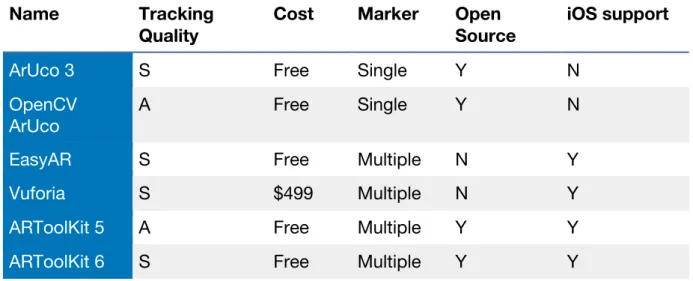
Luckily thanks to the inspiration from the related work ‘Ball tracking with OpenCV’ the path of development was set; the first step towards a successful solution therefore required seeking and testing several available object-tracking frameworks. Marker and non-marker tracking frameworks are both included in the candidate pool. Each candidate framework was tested by building up a sample application from its own website with official guidance and code in order to reflect the base performance of the framework. To be straightforward a table comparison is shown below with the test results.
Table 2 illustrates the candidates and relevant elements in decision-making:
Name Tracking Quality
Cost Marker Open Source
iOS support
ArUco 3 S Free Single Y N
OpenCV
ArUco A Free Single Y N
EasyAR S Free Multiple N Y
Vuforia S $499 Multiple N Y
ARToolKit 5 A Free Multiple Y Y
ARToolKit 6 S Free Multiple Y Y
* ’S’ refers to ‘Satisfactory performance’. ‘A’ refers to ‘Average performance’
Initial selection of the SDKs was based on the availability and cost. The project intends to be built with the lowest cost possible with both software and hardware components available to the public. In this case only SDKs that are popular and public released are selected and tested. Apart from the cost factor, tracking quality is the most import factor in the decision making process. It is expected to have at least acceptable (average 25 FPS) smooth tracking performance without frequent glitches. Marker tracking ability is taken into consideration because the variety of makers accepted has potential of boosting the tracking performance and/or potential to create innovative tracking methods. Open source affects the selection because open sourced SDK allows the developer to customise its code, which is an essential feature when integrated with ARKit. The last factor ‘iOS support’ indicates whether the SDK provides direct sockets, interfacing methods to be integrated to iOS applications.
Vuforia had excellent performance during the test with the build of its official sample application for iOS [49]. Unfortunately due to the strict budget, the cost to afford a Vuforia developer account makes it unsuitable for this project.
ARToolKit 5 [2] had tracking performance at 20 FPS or lower in some scenes and frequent glitches when the tracked object started moving. The framework was not considered due to the performance issue.
The rest of frameworks, ARToolKit 6, EasyAR [50], ArUco 3 and OpenCV ArUco met both performance and cost requirements. At early stage of the development, a problem arose: both ARKit and candidate frameworks require exclusive camera access. Fortunately the access to raw image data of the last frame is available to multiple frameworks at the same time, which makes it possible to attach another framework to ARKit and work together with it. In this case the frameworks included in this project’s application has to follow a frame-by-frame architecture. Easy AR and ARToolKit 6 were crossed out from the list due to the fact that neither of them supports frame-by-frame input. The option left is ArUco. ArUco’s tracking performance isn’t the best among all candidates but its features suit the project needs the best. ArUco supports frame-by-frame input and it is an open sourced framework, which means it is possible for the developer to implement and customise its functionalities according to the project. The issue with ArUco lies in its software architecture. It is available in X64 architecture without any mobile end arm 64 support. The language used to build ArUco is C++ which makes it unusable directly in Swift built iOS application. Because of that, the framework’s build configuration files were modified. As a result, an iOS compatible ArUco framework is ready for the project although the implementation of the new framework requires using the mixture of Objective-C and C++, which was named ‘Objective C++’.
At the time of building the first ArUco plus ARKit solution, ArUco 3 was also discovered and tested with satisfactory results. Compared with the original OpenCV ArUco, ArUco 3 offers a visually better performance, with an average of 30 FPS on iPhone 6s test device. With the promising tracking performance and standalone clear structure (compared to the old version’s OpenCV plugin structure) ArUco 3 was selected as the co-op framework to assist ARKit.
The final product is expected to be user friendly and offers the ability to be further developed as an adaptable solution to the field of AR and real world object interaction. The user/player won’t need specific knowledge in using AR applications to enjoy the
interactive AR experience. To realise the expectation, the app is designed to have initial screen instructions with point-and-play feature which the user only needs to follow and point the device camera at desired tracking target to start the game/interaction.
5.2. Hardware Design
The hardware part of the project consists of an Arduino Uno powered smart remote control car and a printed 3D ArUco cube.
Although the project has the expectation of being a universal solution and should be adaptable to work with any common models of remote controlled toy car, the reason for using and building a smart robot car is mainly for future development of the project. With the Arduino Uno development board installed on the car, it is possible to expand the car’s functionality at any time. For example, the car’s speed and obstacles around can be detected by accelerometer and ultra-sound sensor that can be soldered to the Arduino board. With the assistance of a bluetooth module the smart car will be able to communicate with mobile application. This feature adds various development ideas and potentials to the project.
The smart car’s main body is a plastic chassis with two layers structure that host motors, motor control board (Model: L298N). On the top layer, Arduino Uno board and an Arduino extension board were mounted. The battery pack contains two rechargeable batteries and is located at the rare part of the top layer. Additionally at the front of the top layer board there is a slot for ultra-sound sensor installation but it is left empty due to the fact that at the current stage of development of the project it is pointless.
Figure 7 presents the lower layer board of the smart car with motors and motor control board, L298N.
As one can see, each wheel (not seen here but located in the 4 slots on the side of the layer) is equipped with a motor, which is then connected to the motor board.
Figure 8 shows the upper layer with Arduino Uno board, Extension board and battery pack.
The upper layer is the ‘brain’ of the smart car; it feeds the motors with energy and instructions. The Arduino board is safely mounted on the upper layer of the car and is therefore visible.
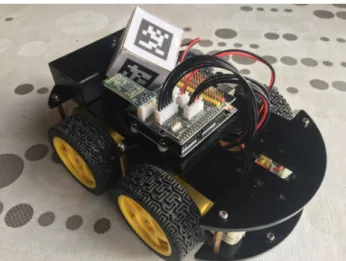
Figure 9 shows the fully assembled smart car with the ArUco tracking cube mounted on the top of it.
As said previously, here one can see the Arduino board clearly visible on the upper layer, while the motors and motor board are hidden in the middle. The ArUco cube is placed between the battery pack and the Arduino board.
The smart car is connected to an Android device via a Bluetooth low energy board (HC-08). Player can easily control the car with one hand by holding the android device using gesture or virtual joystick. Although in the initial design the car was supposed to be
Figure 9: Fully Assembled Smart Car With ArUco Tracking Cube
controlled by hand gesture with the support of accelerometer, extra Arduino and Bluetooth parts attached to the player’s hand, the attempt was given up for this prototype because of time and cost considerations. Considering the main focus of this project is not to build a motion controlled car, this feature was considered secondary and therefore the use of an android device as the remote was elected as a temporary solution, in order to remain focused on the real topic here, which is AR and real world interaction. The development of the motion control remains a future objective, but not as a part of this project.
A noticeable feature of the smart car is the tracking cube mounted on the top of it. ArUco is very good at tracking markers’ motion and location but inevitably it loses tracking of the marker when any part of the marker moves out of the camera view or the tracking angle is at around 30 degrees to the ground (Data gathered from this project’s tests). Furthermore, the virtual cover (a transparent 3D model) around the smart car is also supposed to follow the car without any affection of tracking angles, yet the first design of the smart car with ArUco marker uses a flattened printed marker, which causes the miss-placement of the smart car’s virtual cover.
Figure 10 presents the first design with 2D marker.
Here the marker is a simple flat square fixed on the battery pack. Because of its 2D structure, the tracking was complicated, with a specific angle required for good performance and higher risk of tracking loss.
The problem with such design as discussed above is placing the 3D model (the transparent cover for the car in this case) in undesired positions while the car is moving. ArUco is likely to project the 3D model according to the marker position relative to the camera. In the game scenario if there is a target on the right of the car while the car’s 3D cover is projected on the left, the player will find his smart car does nothing when it collides with the target on the right. By using a cube with 6 surfaces it is ensured at least one marker is detected at any camera angle. When more than one marker is detected, the application will perform calculation and output a middle point for anchor placing thus the smart car’s 3D cover can always be accurately placed on top of it. The theory of ArUco tracking cube will be discussed in depth in the next chapter.
For the sake of lowering cost and fast prototyping, the tracking cube is currently made with cardboard and printed ArUco code markers that are glued to each surface of the cube.
6. Implementation
In Figure 11, the car can be seen evolving in the virtual environment. Once it reaches the location of the small boxes, the car “hits” them and the player gains point. Furthermore, the red bar at the top represents the player’s “life”. If the physical car touches a virtual wall, the life decreases. These are the effects this project sought to create, and this chapter will explain how it was done.
Figure 11: ARKart Game Scene
In this chapter the details of the project’s implementation will be discussed including the following topics:
• The implementation of ARKit • The implementation of ArUco • Integration of ARKit and ArUco • Implementation of tracking box
6.1. ARKit
The project’s mobile app was created using Swift language with Apple’s Xcode as IDE. Starting point of the application was the boilerplate ‘single view app’ template provided by Xcode. The advantage of using empty template is the freedom of designing the UI with AR scene view in the background. When building the app there were two choices: using Metal with ARKit or SceneKit with ARKit. Metal is a low-level development kit that gives the developer more control over the hardware while the price is the higher complexity of the finished product. SceneKit is at higher level, which means it provides more ready to used 3D rendering functions and simpler software structure. As a result SceneKit was selected for the sake of clear structure and taking into consideration the developer’s previous experience. As previously mentioned, Swift was used as development language. At the time of development the Swift version was 4.0. The app will require upgrade when the later Swift version is launched in order to support future iOS.
ARSession is the most important class in term of accessing raw camera frames. Besides that, the ARSession class also has members of two tracking configurations, which are ARWorldTrackingConfiguration and ARImageTrackingConfiguration. In this project ARWorldTrackingConfiguration was chosen because of the need for plane detection. AR Scene is a class for creating AR scene that usually contains the AR contents displayed on the screen. In this project the game scene has been pre-built and stored as an object of ARScene named ‘gameSCN.scn’. In order to place the game scene exactly on the ground or any other user desired solid location the app runs plane detection first and presents the player with a ‘tracker’ to indicate a suitable plane has been detected and the game is ready to start as shown by Figure 13.
The screen clearly displays the Tap to Start button, which shows when solid plane has been found.
Thanks to the up-mentioned plane detection feature from ARKit the player can avoid putting virtual object in the middle of the air if the application performs plane detection prior to placing any nodes.
At the bottom of Figure 12 sits the key class ARFrame, which has access to each camera frame processed by ARKit while the SDK also allows other framework to access the raw
Figure 12: ARKit Framework Overview
![Table 1: Mainstream AR SDKs Source: [57]](https://thumb-eu.123doks.com/thumbv2/123dok_br/18369220.891592/18.892.92.808.96.609/table-mainstream-ar-sdks-source.webp)