THE DIGITAL TRANSFORMATION ROADMAP IN ERASMUS
MOBILITY APPLICATION PROCEDURES: TRANSFORMING
PAPER-BASED WORKFLOWS INTO WEB-PAPER-BASED INTEGRATED
APPLICATIONS
Abílio Cardoso
1, Isabel Seruca
21Universidade Portucalense, IJP & REMIT (PORTUGAL)
2Universidade Portucalense, REMIT & Univ. do Minho, Centro Algoritmi (PORTUGAL)
Abstract
In the process of organising exchange mobility, students and higher education staff members must conclude trilateral Learning Agreements (LA) that are the basis for the recognition of academic qualifications obtained abroad. While LA documents may be considered essential to an adequate organisation of credit mobility, there are several issues that hamper their preparation. In fact, the interlocutors involved are often not clearly defined, the information needed to build the agreements is rarely available online and in up to 75% of the cases, students need to change their learning agreements after their arrival at the receiving Higher Education Institutions (HEI). Furthermore, as the process is mainly paper-based, it is error prone and time consuming.
This paper describes the ongoing project developed by the authors aiming to develop a web-based software platform to automate the process of submitting applications for UPT students exchange and UPT academic and non-academic staff exchange (STA and STT) within the Erasmus+ programme. The project addresses the dematerialization of the process of organising exchange mobility, transferring a paper-based workflow, which is reliant on timely postal deliveries for signature purposes, into an online system that will allow students and staff to gain considerable time when preparing their studies or work abroad and induce a greater degree of flexibility and efficiency when needing to revise the LA.
Keywords: Digital transformation, paper-based workflow, Erasmus mobility applications, systems integration.
1 INTRODUCTION
Most organisations recognise that digital transformation is key to gaining business advantage in today’s rapidly changing marketplace. Digital transformation can, thus, be seen as a deep and accelerating transformation with regard to processes, activities, competencies and models, in order to take advantage of the changes and opportunities offered by the inclusion of digital technologies into an organization [1].
By embracing digital transformation, organisations in all business sectors can capitalise on new opportunities and optimise existing operations to achieve significant business improvement. To achieve this, there is a need for a two-pronged approach of proactively digitalising paper-based processes and leveraging workflow automation technologies and platforms [2].
In the process of organising exchange mobility, students and higher education staff members must conclude trilateral Learning Agreements (LA) that are the basis for the recognition of academic qualifications obtained abroad. According to the PRIME (Problems of Recognition in Making Erasmus) survey, conducted by the Erasmus Student Network in 2010-11 [3], while LA documents may be considered essential to an adequate organisation of credit mobility, there are several issues that hamper their preparation. In fact, the interlocutors involved are often not clearly defined, the information needed to build the agreements is rarely available online and in up to 75% of the cases, students need to change their learning agreements after their arrival at the receiving Higher Education Institutions (HEI), usually due to changes in their study plans abroad. Furthermore, as the process is mainly paper-based, it is error prone and time consuming.
This paper describes the ongoing project developed by the authors aiming to develop a web-based software platform to automate the process of submitting applications for UPT students exchange and UPT academic and non-academic staff exchange (STA and STT) within the Erasmus+ programme.
Initial outcomes of the project are described in [4] and were obtained with the contribution of two Postgraduate Erasmus students, while the work was conducted in the context of Erasmus+ Student Mobility for Placements (SMP) at Portucalense University (UPT). The medium-run objective of the project is to allow the web-based software platform to be integrated and accessed through the UPT academic portal, so as to automate the process of submitting applications for UPT students exchange as well as for UPT academic and non-academic staff exchange (STA and STT) within the Erasmus+ programme.
The software application should consider the preparation of all the necessary documents online as well as their update along the application process. For instance, for students’ exchange, the application allows the LA to be prepared online by the student, and the connection with the coordinators of the sending and receiving HEIs for the update of the document, enabling them to fill their own sections, and further approve and sign the document online.
This process therefore transfers a paper-based workflow, which is reliant on timely postal deliveries for signature purposes, into an online system that will allow students and staff to gain considerable time when preparing their studies or work abroad and induce a greater degree of flexibility and efficiency when needing to revise the LA
Beyond the dematerialization of the process, it is also envisaged that the online software application, which we termed “ErasmusOnlineLAapp” will allow HEIs to better manage the workflows of the learning agreements, rendering the process of approving and managing these documents more efficient, and thus freeing up time for staff members to work on other activities, while improving the quality of the mobility process.
This paper is structured as follows: Section 2 provides an overview of related work on the theme and issues targeted by this project. Section 3 presents the design and rationale for the architecture of the software solution to be developed. In Section 4 the development of ErasmusOnlineLAapp is generally depicted, through the identification of the functional requirements, the presentation of the system modelling, and the interface considered for the two main scenarios of application use. Finally, Section 5 concludes with some considerations on the main challenges addressed, the current stage of the project and future steps to be undertaken.
2 RELATED WORK
In the literature review performed, we tried to identify tools and applications that could solve part or the whole process of dematerialization of the paper-based flow related with submitting applications. Generically there are a set of software tools that address workflow automation, providing online software solutions that automate form based, approval driven workflow and enhance the way information flows between data and systems [5]. While browsing these tools enhanced our insights for envisaging the ErasmusOnlineLAapp interface, all these contributions are more oriented for commercial businesses purposes and do not address the specific issues of the Higher Education Sector.
We also surveyed other Portuguese HEI academic portals [6], [7], [8], [9] seeking to identify whether they provided integrated software solutions for Erasmus mobility applications; to our knowledge none of these portals offer this type of solution.
Although we didn’t found any approaches with exactly the same features and addressing the same issues as ErasmusOnlineLAapp, the Online Learning Agreement (OLA) project [10] was considered a useful source of ideas for our development.
The OLA tool has been developed by the European University Foundation and the Erasmus Student Network for the 21st century mobile student. It allows the LA to be prepared online, shared with both the home and host universities and be signed using a touchscreen. The platform was developed with the support of Erasmus+ Strategic Partnership project funding (2015-2017) and is now being further upgraded in the second project cycle (2017-2020) by a consortium of university partners and university networks.
In comparison to our application “ErasmusOnlineLAapp”, the OLA application has, however, the following shortcomings:
• HEIs’ information (departments, responsible persons, etc.) are not available to be used within the application;
• Only one option to sign the document is available - drawing interface (missing option to upload a signature as an image);
• Cannot be integrated directly with the SIUPT system, or other similar HEI’s academic portals.
3 SOLUTION DESIGN
3.1 Envisaging the architecture
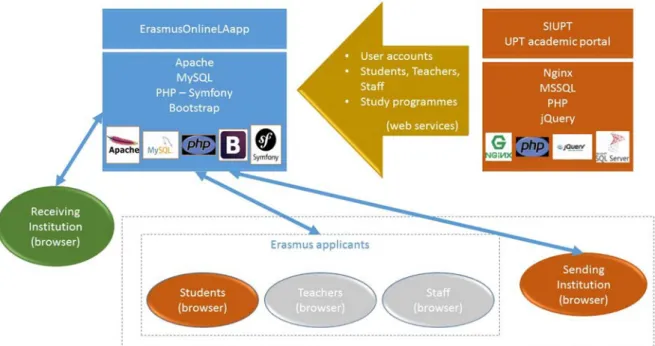
The envisaged architecture for ErasmusOnlineLAapp is depicted in Fig. 1. In the following subsections we detail the main components and features of the overall architecture.
Figure 1. ErasmusOnlineLAapp architecture. 3.1.1 Target Users
ErasmusOnlineLAapp is intended to be used by students, teachers and staff from UPT or other sending HEIs. On top of that, it also targets responsible persons of related receiving institutions, involved in the update and signature of the Erasmus application documents.
3.1.2 The SIUPT system
SIUPT is the UPT academic portal. It is mainly designed for publishing public and internal information about the university, study programmes, students, schedules as well as for managing all academic activities and procedures.
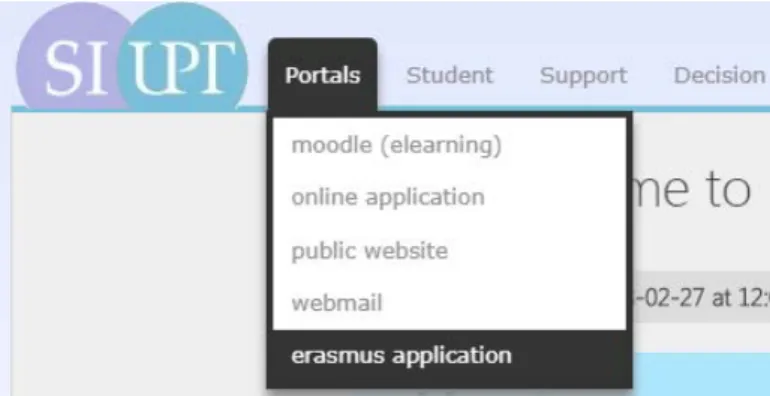
Access to the SIUPT system is done through an authentication process, allowing a user to login or logout from the portal (Fig. 2). There are three types of user roles (Teacher, Staff, Student), with corresponding access rights. After a user successfully logs in SIUPT, he/she gets relevant information on the portal according to the assigned role.
SIUPT is available in two languages. The main language is Portuguese, while the English version of the portal offers the most important features. In the English version, used within the development of the project, the main menu includes the following options: Portals, Student, Support, Decision (Fig. 2). ª Portals
The option “Portals” redirects the user to other online applications such as the moodle elearning platform. The newly developed application called “ErasmusOnlineLAapp” will be located here. After
clicking on the option ‘erasmus application’ the user will be redirected to the login page of the application.
Figure 2. The SIUPT system main menu – access to ErasmusOnlineLAapp
ª Student
This option offers basic information related with students’ study purposes (class schedules, evaluation calendars, new enrollment, normal, reset and special period exam enrollment, class enrollment) as well as students’ personal information (personal data, enrolled curricular units and grades).
ª Support
This section contains useful support information for students, staff and teachers, such as information about helpdesk, restaurant, student cards, etc.
3.1.3 ErasmusOnlineLAapp
The software application allows the digitalization of the whole process of a student or academic and non-academic staff application for a stay abroad within the Erasmus programme and the connection with the relevant parties for the updating of the document. With the application implemented and integrated in SIUPT, there is no need to scan the LA document multiple times in order to collect all the required signatures.
Besides that, the whole process is significantly speeded up and improved, as all the information needed to complete the entire document is available within the application.
3.1.4 Integration with SIUPT and Backend and Frontend Development
A requirement set for the software application, was its integration, exchange of information and access through the SIUPT system. Web services were envisaged for the transfer of information between SIUPT (or other academic portals) and ErasmusOnlineLAapp; due to the standardized nature of the pieces that implement a web service they solve many issues related to intersystem communication. For the back-end development of the application, the PHP Symfony open-source web framework and a MYSQL database were used, while for the front-end development the Bootstrap framework was used. The usage of these technologies for the back-end and front-end development of the application, rather than the ones used within SIUPT will allow ErasmusOnlineLAapp to be integrated with other HEI’ academic portals as well.
3.1.5 Information to be transferred
As a consequence of the integration requirement, the following information was identified to be transferred from the SIUPT system to ErasmusOnlineLAapp:
• Authorization process (Login; Password; Account type) • Information about users (Students, Staff, Teachers)
o Account type (Student, Staff, Teacher) o User id number
o First name; Last name; Nationality; Date of birth; Sex (M/F); Email; Phone number o Study cycle; Academic year; Field of education
• Information about the Sending Institution (UPT)
o Name; Erasmus code; Address; Country; Faculty/Department; Contact person name, e-mail, phone
• Components (from UPT study programmes): Component code; Component title; Semester; Number of ECTS credits
• Responsible person at the Sending Institution (UPT)
4 ERASMUSONLINELAAPP DEVELOPMENT
4.1 Specification and Modelling
This section contains a summary of the application textual specification targeting the requirements, mostly identified through the study of Erasmus+ documentation for applicants [11], [12] and through the information collected in meetings with the UPT International Office staff, as well as the associated modelling of the system.
4.1.1 Textual Specification
• Login for UPT users (teacher, staff, student) through SIUPT • Login for receiving institution generated within the application
• Four types of access and rights: Student (UPT – Sending institution); Teacher (UPT – Sending institution); Staff (UPT – Sending institution); Receiving Institution (Generated access to application, not by SIUPT)
• Four types of state for the LA: Editable; Committed; Approved by sending; Approved by both • Two types of LA: Before mobility; During mobility
• Generated account will be used for the responsible person at the receiving institution to login into application in order to sign and approve the learning agreement
• Access information will be sent to the responsible person of receiving institution just once through an ‘Invitation email’; afterwards he will just be notified about new LAs or changes to them
• Sending institution profile (staff, teachers) will be able to manage, sign and approve all LAs committed by students. They can edit, export or remove them.
• Sending institution accounts will have access to the administration section of the application and will be able to manage data about institutions and responsible persons from UPT
• A Receiving institution account will be able to view those LAs where a responsible person’s email matches the logged in user’s one. This type of account cannot edit LAs except signing and approving them.
• A user will be able to sign the LA using digital drawing or by uploading his signature.
• A student is able to edit a LA until it is committed. Once it’s committed, he is no longer eligible to make any additional changes to the LA.
• After the LA is approved by the sending institution, status changes to ‘Approved by Sending’. • After the LA is approved by the receiving institution, status changes to ‘Approved by Both’. • Committed LA can be edited or deleted only by a sending institution account.
• After a LA is ‘Approved by Both’, student can create a During mobility section of LA.
• A During mobility section containing exceptional changes to the original LA has to be signed by all parties and approved by both institutions once again.
• A student will be able to add components from SIUPT related to his study programme. • User (student) information will be retrieved from SIUPT.
• It will be possible to export a fully approved learning agreement to PDF.
4.1.2 Modelling of the system
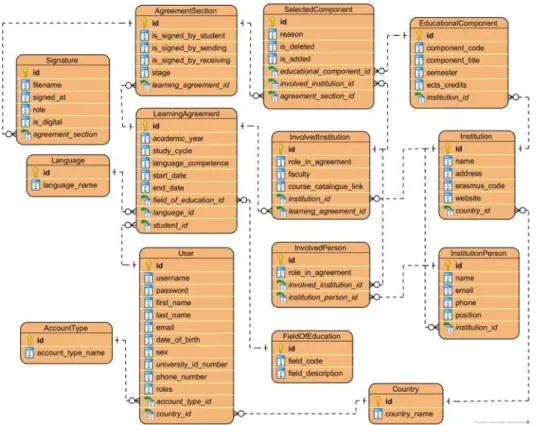
Fig. 3 shows the Use Case diagram related to the system, while the relational database model (MySQL) developed for the system is shown in Fig. 4.
Figure 3. Use Case Diagram for ErasmusOnlineLAapp
Figure 4. Database model for ErasmusOnlineLAapp
4.2 ErasmusOnlineLAapp Interface
4.2.1 Before the Mobility
This scenario is concerned with the stage “before the mobility” of the application process, where the student fills the LA document with his personal information, the information about the Sending and Receiving Institutions and the composition (list of components/subjects) of the study programme at the Receiving Institution, as well as the recognition at the Sending Institution of the study abroad, in terms of credits gained and corresponding components. After all this information is gathered, the LA document must be signed by the 3 parties involved (Student, Responsible person at the Sending Institution, Responsible person at the Receiving Institution).
The profiles involved in this stage of the process are listed below together with the description and illustration of the sequence of steps involved using the screens of ErasmusOnlineLAapp.
ª Student profile:
• Student creates a Learning Agreement document;
• Student has to fill all the required 6 sections (steps) in LA (Fig. 6);
• If all the sections are fulfilled, student can sign the LA document and commit it;
• Status of LA is then changed to ‘Committed’ and will show up in the list of LAs that can be seen by profiles with higher access roles (teachers, staff from UPT). From that point, student is no longer entitled to make any further changes;
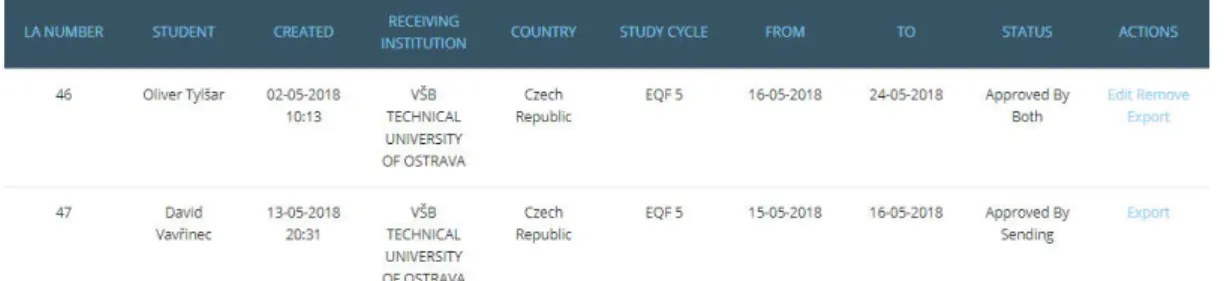
• After the LA document is signed and approved by both sending and receiving institutions, it is possible to export the LA document to PDF (see LA 46 in Fig. 5);
• Status of LA is then changed to ‘Approved by both’.
Figure 5. Before the mobility LA screen
ª Sending Institution profile (teacher, staff):
• Sending Institution can manage all the at least committed learning agreements (edit, remove, export);
• Sending Institution can approve LA in section Approval in LA detail;
• LA document can be signed using digital drawing interface or by uploading signature as image; • After a LA is approved by the Sending Institution, access rights are generated and automatically
Figure 6. Before the mobility LA steps screen
ª Receiving Institution:
• As stated before, access for the receiving institution is automatically generated by the application after a LA is approved by the sending institution;
• Access information is sent to the email of the responsible person of a receiving institution; • The receiving institution can manage all learning agreements. By clicking the button ‘View’ he
can review all the sections of a LA and then sign and approve it in section Approval; • Signature options stays the same – signature as image or digital signature;
• After approval by the receiving institution, the LA is fully completed and its status is changed to “Approved by both” (LA 46 in Fig. 7).
Figure 7. Before the mobility detail of LA screen 4.2.2 During the Mobility
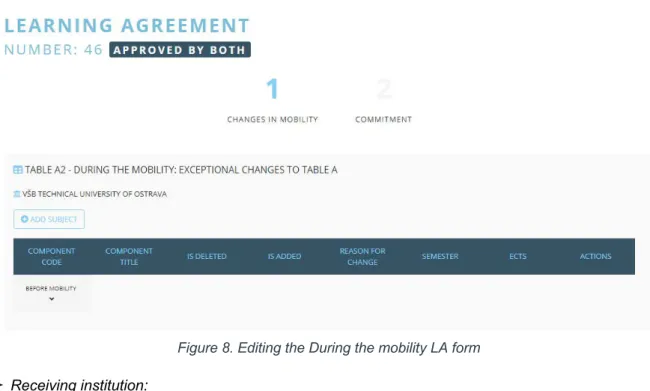
This scenario is concerned with the stage “during the mobility” of the application process, where the student may change the list of components of his study plan at the Receiving Institution. In that case, for each component change, the student must provide the deleted and the added components, as well as choose an item of a list of options regarding the reason for change. This updated study plan must be approved and signed by both sending and receiving institutions as well as by the student.
The profiles involved in this stage of the process are listed below together with the description and illustration of the sequence of steps involved using the screens of ErasmusOnlineLAapp.
ª Student profile:
• Student can create a “LA During mobility” form only if the “LA Before mobility” is “approved by both”;
• Student can add or delete components (subjects) previously stated in the “LA Before mobility” (Fig. 8);
• For one “LA Before mobility” form, he can only create one “LA During mobility” form;
• If any changes are committed by the student, the “LA During mobility” form has to be approved and signed by sending and receiving institutions once again.
ª Sending institution profile:
• Sending institution can manage LA_During mobility (edit, remove, export);
• Sending institution can approve LA_During mobility in section “Approval” of the document; • Signature options are the same – signature as image or digital signature.
Figure 8. Editing the During the mobility LA form
ª Receiving institution:
• If an account from a receiving institution is related to the LA (responsible person from the receiving institution), it is possible to view the document in the list of Learning Agreements; • The receiving institution can approve the LA_During mobility in section “Approval” of the
document;
• Signature options are the same – signature as image or digital signature.
5 CONCLUSION AND FURTHER WORK
In this paper we presented our approach to digitally transform the Erasmus Mobility application procedures undertaken at UPT. The whole process formerly based on paper-based workflows and reliant on timely postal deliveries for signature purposes, being, therefore, error prone and time consuming, is now transferred into a collaborative web-based system.
Besides the dematerialization of the process, it is envisaged that ErasmusOnlineLAapp will allow UPT and other HEIs involved to better manage the workflows of the learning agreements, rendering the process of approving and managing these documents more efficient, and thus freeing up time for staff members to work on other activities, while improving the quality of the mobility process. Summary reports on the LAs tackled by the HEIs involved will also be more easily generated as well as the related data analysis.
It is worth noticing that the digital transformation undertaken did not simply replaced paper-based workflows with digital alternatives but removed the inefficiencies of information silos and disconnected processes. The web-based workflows now integrate different information types such as structured and unstructured content (e.g. digital signatures images), as well as, in the near future, information from other systems (e.g. SIUPT).
As web services for the SIUPT system are currently under development, ErasmusOnlineLAapp is, at present stage, working with its own authentication system; the results of the tests performed so far are promising and the integration with the SIUPT system is planned for the short term. Furthermore, there is already a web service for authentication purposes through SIUPT that is currently functioning for a document management system used at UPT. Other web services were also implemented to feed the UPT website with study programmes’ information.
The support of ErasmusOnlineLAapp for the process of submitting Erasmus applications for UPT academic and non-academic staff exchange (STA and STT) is yet to be developed. However, we do not foresee a major development effort for this extension of the software application as the semantics for these types of mobility exchange are similar to students exchange and requiring again the update
and approval of all the parties involved; the main distinguishing feature lies in the contents of the application documents involved.
Finally, it is worth noticing that the usage of technologies for the back-end and front-end development of the application, other than the ones used within SIUPT allows ErasmusOnlineLAapp to be integrated with other HEI’s portals as well. Therefore, the experiences gained with this digital transformation process can be shared with and the knowledge transferred to other HEIs.
REFERENCES
[1] IDC, “Third platform,” 2019, Retrieved from: http://www.idc.com/promo/thirdplatform.
[2] Quocirca, “Digital transformation: Bridging the paper and digital gap”, 2016. Retrieved from: https://www8.hp.com/h20195/V2/getpdf.aspx/4AA6-5375ENW.pdf.
[3] I*ESN-International Exchange Erasmus Student Network, “PRIME 2010”, Retrieved from: https://www.esn.org/prime/2010
[4] O. Tylšar, D. Vavřinec, A. Cardoso, I. Seruca, Z. Neustupa, “Digital Transformation in Erasmus Mobility Application Procedures: Transforming a Paper-Based Workflow into an Online System”, Proceedings of the 13th International Technology, Education and Development Conference (INTED 2019), Valencia, Spain, 11-13 March, pp.1725-1734, 2019.
[5] FinancesOnline Reviews for Business, “15 Best Workflow Management Software Solutions”, 2019. Retrieved from: https://financesonline.com/top-15-workflow-management-software-solutions/
[6] SIGARRA, 2019. “University of Porto’s SIGARRA Information System”, Retrieved from: https://sigarra.up.pt/up/en/web_page.Inicial [Accessed 15-Jan-2019].
[7] PACO, 2019. “University of Aveiro Academic Portal”, [Online], Available: https://paco.ua.pt/ [Accessed 15-Jan-2019].
[8] UMinho, 2019. “University of Minho Academic Portal”, [Online], Available: https://alunos.uminho.pt/EN [Accessed 15-Jan-2019].
[9] UCoimbra, 2019, “University of Coimbra Academic Management Services”, [Online], Available: http://www.uc.pt/en/academicos [Accessed 15-Jan-2019].
[10] European University Foundation, “Online Learning Agreement+”, 2019. Retrieved from: https://www.learning-agreement.eu/start/index.php.
[11] European Comission, “Learning Agreement”, 2019. Retrieved from: https://ec.europa.eu/ programmes/erasmus-plus/resources/documents/applicants/learning-agreement_en
[12] European Comission, “Guidelines on how to use the Learning Agreement for Studies”, 2019. Retrieved from: https://ec.europa.eu/programmes/erasmus-plus/resources/documents/guidelines-how-use-learning-agreement-studies_en