U
NIVERSIDADE DE
L
ISBOA
Faculdade de Ciências
Departamento de Informática
MOBILE SYSTEM-WIDE ASSISTIVE
TECHNOLOGY
André Filipe Pereira Rodrigues
DISSERTAÇÃO
MESTRADO EM ENGENHARIA INFORMÁTICA
Especialização em Sistemas de Informação
U
NIVERSIDADE DE
L
ISBOA
Faculdade de Ciências
Departamento de Informática
MOBILE SYSTEM-WIDE ASSISTIVE
TECHNOLOGY
André Filipe Pereira Rodrigues
DISSERTAÇÃO
MESTRADO EM ENGENHARIA INFORMÁTICA
Especialização em Sistemas de Informação
Trabalho orientado pelo Prof. Doutor Tiago Guerreiro
Acknowledgements
In one year my life turned upside down. From the student that relies on his parents for tuition and support, to the researcher, part-time teacher, student and independent individual. I would like to thank first are foremost my thesis adviser Doctor Professor Tiago Guerreiro for taking me under his wing and guiding me through this journey that is the master degree. My family for supporting me throughout the years, by providing stability and the opportunity to pursue my desires. They were always a motivational force in my life and will always be. I own them my drive to accomplish any goals I set out to. To Ana my girlfriend that accompanied me throughout my academic journey for being there whenever I needed. I thank her for making me growth for giving me the occasional motivational “slap” that I needed and for dragging me out of the house ever so often. To my colleagues that through the year check up on me and help me with my academic pursuits. Five years ago I made a choice to enrol in FCUL and I do not regret a moment of it. A thank you to the institution for being the perfect place for my first five years of my academic course. Thank you to the Lasige research group that received me with open arms and provided me with the tools and opportunities to succeed. To the friends that went out of their way to check up on me and help me clear up my head and enjoy myself over the year. Last but not least, to the Fundação Raquel and Martin Sain, in particular to Dr. Carlos Bastardo, Miguel and his parents for without them this work would not be possible.
Resumo
Hoje em dia o uso do telemóvel é fundamental em diversos aspetos da nossa vida. Tornou-se uma ferramenta essencial para a comunicação, convívio, consulta de informação e até mesmo para o entretenimento. Os telemóveis tornaram-se mais do que simples ferramentas para fazer chamadas e receber mensagens. Eles são os nossos assistentes pessoais, são a forma como nos mantemos em contacto com os nossos amigos e colegas, e muito mais.
Infelizmente, os sistemas operativos destes dispositivos ainda apresentam muitas debilidades em termos de acessibilidade. No entanto, as suas capacidades representam uma enorme oportunidade na criação de tecnologias assistivas. Os sistemas operativos móveis não são suficientemente adaptáveis e configuráveis para pessoas com múltiplas deficiências poderem usufruir deles. Na verdade, nas últimas versões dos sistemas operativos móveis mais populares (iOS e Android) tem sido feito um esforço para incluir mais opções de acessibilidade. No, entanto ainda não são o suficiente para suportar todo o tipo de necessidades.
Uma das abordagens possíveis para permitir o uso das aplicações por pessoas com deficiências passa pela criação de aplicações acessíveis. No entanto, esta abordagem não é escalável e enfrenta graves problemas. Ao fazermos apenas a aplicação acessível estamos a limitar o utilizador a apenas essa aplicação, em vez de estarmos a criar as ferramentas que permitem o controlo e acesso total do sistema á semelhança de um utilizador sem deficiência. Estas aplicações têm usualmente preços elevados, justificados pelo longo desenvolvimento em tecnologias que não serão usadas pelas massas. O problema das aplicações acessíveis é a especificidade da aplicação. Quando tornamos uma aplicação acessível a utilizadores cegos não estamos a torná-la acessível a utilizadores com deficiências motoras. O problema cresce quando começamos a ter em consideração utilizadores com múltiplas deficiências. A nível aplicacional é extremamente dispendioso criar uma aplicação acessível a utilizadores com múltiplas
II
deficiências. A preocupação é: ao tornamos uma aplicação acessível vamos torná-la acessível a que conjunto de deficiências ou pessoas? Devido à enorme variedade de requisitos de acessibilidade, é necessário todo um sistema configurável e adaptável.
Existem muitos estudos na área das tecnologias assistivas, a maioria delas tem como foco a acessibilidade do Desktop. É fundamental para a integração de pessoas com algum tipo de deficiência o acesso a um computador. Hoje em dia é necessário mais do que isso, é também necessário permitir o acesso ao telemóvel. Os smartphones têm imensas possibilidades de uso como tecnologias assistivas. Podem permitir desde o acesso á internet, ao controlo de uma cadeira de rodas, ou até ser um controlo remoto do ambiente em volta do individuo (televisão, ar condicionado, eletrodomésticos, etc).
Atualmente, se desenvolvermos periféricos com o objetivo de controlar um
smartphone vamos deparar-nos com uma enorme quantidade de restrições. Para
desenvolver tecnologias assistivas realmente usáveis e abrangentes, é necessário ter acesso a dois níveis de controlo, nível aplicacional e nível de sistema. No entanto, nos dispositivos móveis não temos acesso ao nível de sistema, apenas os produtores do Sistema Operativo (SO) o têm. É necessário criar uma camada intermédia que consiga de alguma forma ter acesso a informações de sistema de forma a possibilitar um controlo preciso e fino sobre todos os eventos de entrada e saída de dados.
Esta dissertação encontrou motivação no caso do Miguel. Miguel é um individuo com múltiplas deficiências que enfrenta severas dificuldades para interagir com o seu telemóvel. O trabalho desenvolvido foi em grande parte motivado pelas dificuldades diárias que ele enfrenta em manter-se socialmente ativo e com o maior nível de independência possível. Com as tecnologias atuais, o Miguel está debilitado e não consegue usufruir de todas as capacidades do seu dispositivo. Assim, estabelecemos como objetivos criar uma tecnologia que permitisse: controlo total a nível de sistema dos mecanismos de entrada; desenvolvimento ágil de tecnologias assistivas; suporte a utilização de tecnologias assistivas externas; criação de soluções extensíveis e adaptáveis; controlo sobre o conteúdo e navegação a nível de sistema.
Nesta tese apresentamos SWAT, uma biblioteca extensível e adaptável que permite o acesso ao nível de sistema aos conteúdos e à informação dos eventos de entrada. A biblioteca foi desenvolvida para Android e providencia uma plataforma estável sobre
III
a qual é possível estender e adaptar as suas capacidades. Com SWAT, os programadores têm a possibilidade de aceder a eventos de baixo nível e a funcionalidades que não teriam de outra forma. Este controlo permite superar as barreiras impostas pelo tradicional sistema operativo móvel e abre as portas à criação de tecnologias assistivas mais adaptáveis e baratas. A Biblioteca possui uma API (Interface de Programação de Aplicações) simples que providencia tudo o que é necessário para um fácil acesso a estas funcionalidades.
Esta tese tem como principais contribuições:
Biblioteca SWAT: permite a criação de tecnologias assistivas de forma rápida e eficaz, com controlo sobre o conteúdo e eventos de entrada de baixo nível.
Macros assistivas: uma aplicação que permite gravar e reproduzir macros num sistema operativo móvel;
Logger: um mecanismo de gravação a nível de sistema;
Auto-Nav: um protótipo aplicacional que permite varrimento automático das opções disponíveis num telemóvel de forma a permitir o acesso via interruptor;
Leitor de ecrã multi-toque: um leitor de ecrã que permite feedback auditivo de vários pontos em simultâneo.
Com o objetivo de validar a biblioteca criada, apresentamos dois casos de estudo onde reportamos duas aplicações criadas recorrendo à mesma. A primeira tem como foco o caso do Miguel, um utilizador com múltipla deficiência. À data da introdução desta nova aplicação o Miguel apenas conseguia aceder a uma aplicação desenhada especificamente para ele e nada mais. Neste caso de estudo reportamos a tecnologia desenvolvida para permitir ao Miguel aceder a qualquer aplicação do sistema assim como uma avaliação informal com ele e os seus pais. No segundo caso de estudo validamos a biblioteca pela criação de um leitor de ecrã multi-toque a nível de sistema. Foi feito um estudo com 30 utilizadores cegos numa tarefa de entrada de texto onde resultados foram analisados e reportados. Os resultados obtidos sugerem que pessoas cegas podem beneficiar de interfaces que aproveitem de forma mais eficiente os ecrãs multi-toque e que aproximem o seu uso do já realizado em interfaces físicas (teclado tradicional).
Com este trabalho, demonstramos as limitações impostas pelos sistemas operativos móveis na área de tecnologias assistivas. Desenvolvemos uma Biblioteca para dar resposta a estas restrições providenciando uma base de trabalho para futuras aplicações e tecnologias assistivas. Com os casos de estudo, mostrámos as capacidades do sistema
IV
desenvolvido. SWAT é uma biblioteca prometedora oriunda deste trabalho e começa a ter ramificações nesta e outras áreas de desenvolvimento.
V
Abstract
Mobile devices are a fundamental tool in different aspects of our lives. In the last decade, we have witnessed an explosion of the capabilities of our mobile devices. With these improvements, they became more valuable to us than the old house phones. They no longer serve only the purpose of making/receiving calls and text messages. They are our personal assistant, our way to connect to the social media, our multimedia entertainment and much more. Indeed, they are also, and increasingly more so, the prevalent communication artifact at one’s disposal. Mobile operating systems have evolved to provide increasing accessibility capabilities. However, mobile application developers are still restricted to deploy custom-made accessible applications or to extend limited and stereotyped accessibility services. In current mobile devices if we develop an external peripheral to control the device we will face several restrictions since there is not a system-wide service that a developer can access to create its own input method. A regular user has the ability to navigate and explore the device without limitations. In order to truly give disabled people the same features as other users have, we need to create a system-wide accessibility service that allows users to freely navigate and interact with their devices. Motivated by the limitations described above we set out to provide more control over the system input and output mechanisms to allow the creation of powerful system wide assistive technologies. We developed SWAT (System-wide Assistive Technologies) for the Android platform. To validate our system we performed one case study with a multi-impaired person and another one with 30 blind users. Results showed that SWAT enabled the creation of application tailored to their needs and thus fostering their inclusion.
VII
Content
Chapter 1 Introduction ... 1
1.1 Motivation ... 1
1.2 Mobile Accessibility ... 2
1.3 Mobile System-Wide Assistive Technologies ... 5
1.4 Contributions ... 7
1.5 Publications ... 7
1.6 Document Overview ... 8
Chapter 2 Related Work... 9
2.1 Assistive Technologies ... 9
2.2 Control interfaces ... 10
2.2.1 Touch ... 11
2.2.2 Speech ... 12
2.2.3 Switches and keyboard ... 12
2.3 Adaptable Interfaces ... 12
2.4 Mobile accessibility solutions ... 13
2.4.1 iOS Accessibility ... 14
2.4.2 Android... 15
2.5 Interaction Logging ... 17
2.6 Discussion ... 18
Chapter 3 Enabling Mobile System-Wide AT ... 21
3.1 Use Case Scenarios ... 21
3.2 Android Operating System ... 23
3.3 SWAT ... 25
3.3.1 System Requirements ... 25
3.3.2 System Architecture ... 26
3.3.3 Specific Components: ... 32
VIII
3.3.5 Using SWAT ... 40
Chapter 4 Multi Impairment Case Study ... 45
4.1 Previous solution: Easy Phone ... 45
4.2 Our solution: Auto-Nav ... 46
4.2.1 Navigation ... 46 4.2.2 Notifications ... 47 4.2.3 Call management ... 47 4.2.4 Text-Entry ... 47 4.2.5 Filtering ... 48 4.2.6 Assistive Macros ... 48 4.3 Leveraging SWAT ... 49 4.3.1 Content ... 49 4.3.2 IO input ... 50 4.3.3 External Control ... 50 4.3.4 Notifications ... 50 4.3.5 Control Interface ... 50 4.3.6 SWAT Keyboard ... 51 4.4 Case Study ... 51 4.4.1 Procedure ... 51 4.4.2 Tasks... 53 4.4.3 First Session ... 53 4.4.4 Second Session ... 55
4.5 Conclusion and Future directions ... 56
Chapter 5 SWAT Screen Reader ... 59
5.1 SWAT Reader ... 60
5.1.1 Limitations ... 62
5.1.2 Leveraging SWAT ... 64
5.2 Study – Bi-Manual text entry evaluation ... 66
IX
5.2.2 Evaluation... 68
5.2.3 Participants ... 68
5.2.4 Apparatus ... 69
5.2.5 Procedure ... 69
5.2.6 Design and Analysis ... 71
5.2.7 Results ... 71
5.2.8 Discussion ... 76
5.3 Conclusion and Future Directions ... 76
Chapter 6 Conclusions ... 79 6.1 Other Applications ... 81 6.2 Limitations ... 81 6.3 Future Prospects ... 82 Chapter 7 Bibliography ... 83 Appendix – Tutorials ... 87 7.1 Adapt Tutorial ... 87 7.2 Content Tutorial ... 88
7.3 IOReceiver Interface Tutorial ... 89
7.4 Receivers Tutorial... 90
XI
Figure List
Fig. 1 - Switches ... 10
Fig. 2 - iOS accessibility settings ... 14
Fig. 3 - Mobile Accessibility app ... 16
Fig. 4 Tecla Overlay ... 16
Fig. 5 - Android Architecture ... 23
Fig. 6 - Talk Back accessibility service ... 24
Fig. 7 -SWAT package View ... 26
Fig. 8 - Core Controller preview ... 28
Fig. 9 - SWAT Accessibility Service ... 29
Fig. 10 - Content Update Sequence Diagram ... 29
Fig. 11 - Control Devices Architecture ... 31
Fig. 12 – Starting the monitoring process ... 31
Fig. 13 - Monitoring sequence ... 32
Fig. 14 - Raw data ... 32
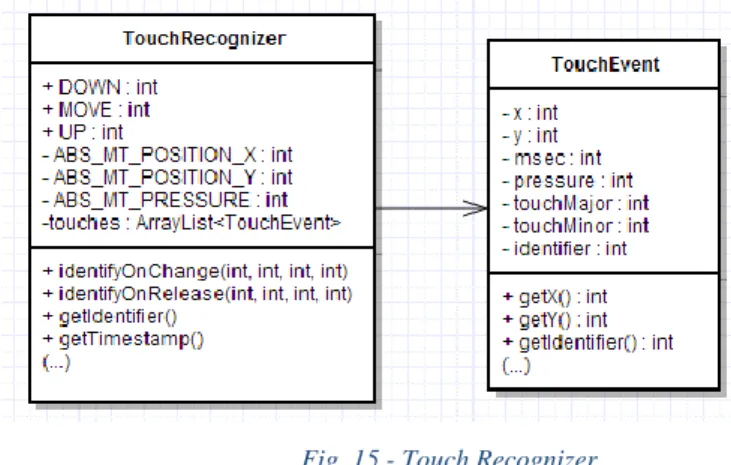
Fig. 15 - Touch Recognizer... 33
Fig. 16 - SWAT Keyboard ... 34
Fig. 17 - SWAT Observers ... 34
Fig. 18- Control Interface... 36
Fig. 19 - Logger class ... 37
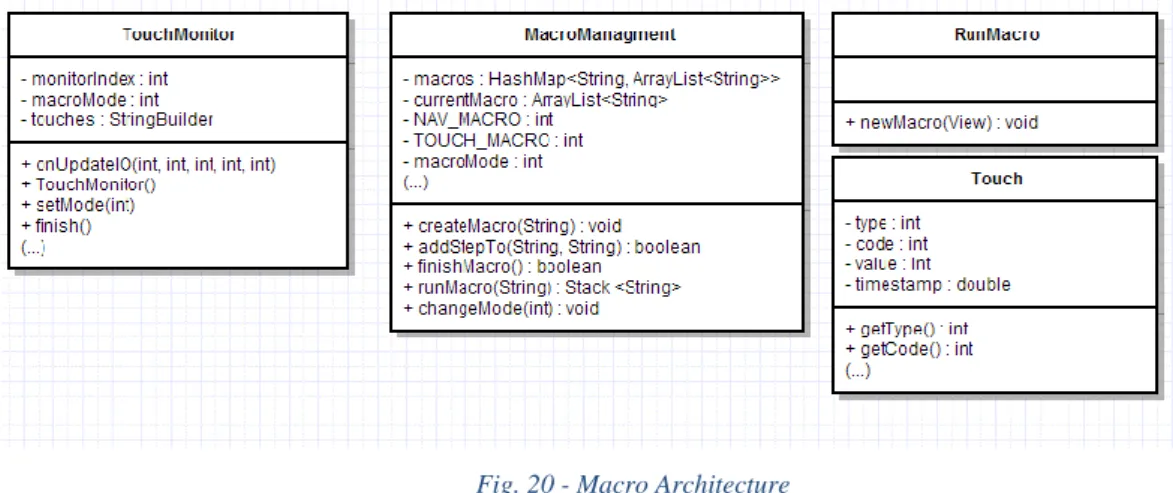
Fig. 20 - Macro Architecture... 39
Fig. 21 - Macro recording process ... 40
Fig. 22 - Service preference configuration ... 41
Fig. 23 - On receive SWAT init ... 41
Fig. 24 - Initialising the Touch Controller ... 42
Fig. 25- Using the TPR ... 42
Fig. 26 - Handle touch ... 43
Fig. 27- Auto-Nav system ... 46
XII
Fig. 29 - Miguel interacting with a smartphone with a mouse controller working as
a single switch. ... 52
Fig. 30 - Home screen ... 53
Fig. 31 - SWAT Reader implementation ... 64
Fig. 32 – Touch recognition process ... 64
Fig. 33 - Text entry application ... 66
Fig. 34 - User experience with QWERTY text entry method on a touch device ... 68
Fig. 35- User experience with QWERTY text-entry method ... 69
Fig. 36 - Words per Minute ... 71
Fig. 37- Words per minute evolution ... 72
Fig. 38 - MSD Error Rate... 72
Fig. 39 - Average time with 1 or 2 active points... 73
Fig. 40 - Number of active touches in the multi touch session ... 73
Fig. 41 - Number of active touches in a multi touch session ... 74
Fig. 42 - Touch distribution 1 ... 74
Fig. 43 - Touch distribution 2 ... 74
1
Chapter 1 Introduction
Mobile devices are a fundamental tool in different aspects of our lives. In the last decade, we have witnessed an explosion of the capabilities of our mobile devices. With these improvements, they became more valuable to us than the old house phones. They no longer serve only the purpose of making/receiving calls and text messages. They are our personal assistant, our way to connect to the social media, our multimedia entertainment and much more. Indeed, they are also, and increasingly more so, the prevalent communication artifact at one’s disposal.
1.1 Motivation
In the latest years we have witnessed the growth of the market share of smartphones. From the 6 billion mobile subscriptions worldwide, 1 billion are smartphones and it was estimated that in 2013 1 billion smartphones were sold, meaning that one-third of the mobile subscriptions are smartphones1 (i.e. sold devices normally replace old ones).
Users are greatly empowered when they have full access to such device. Being deprived of such commodity can have a negative impact in ones’ social life. This is an extremely important factor especially if we focus on users with some kind of impairment. Conversely, acquiring access to such devices can empower their users in so many ways going beyond the frontiers of the device (e.g., controlling other devices).
Mobile devices are now coupled with a set of input, output and communication capabilities that can potentially allow for the adaptation to their users’ capabilities and needs. Unfortunately, the Operating Systems (OS) of these devices suffer from a lack of accessibility options. They do not provide enough customizations to allow different types of disabled people to properly interact with the devices. Mobile operating systems have
2
evolved to provide increasing accessibility capabilities. However, mobile application developers are still restricted to deploy closed custom-made accessible applications or to extend limited and stereotyped accessibility services. This is especially true when developing for people with multiple impairments [23].
We already faced a similar problem when the personal computer became a mainstream technology. Nowadays personal computers are almost fully accessible given the right set of assistive technologies. The main issue with mobile devices is the lack of support for the creation of system-wide solutions. The personal computer (PC) already went through the process of providing system-wide tools that allow assistive technologies to have full system-wide control over the system. They can, for example, emulate the mouse and keyboard behaviour in order to control all applications on the desktop. Such is still not possible in mobile OS.
Studies about mobile accessibility stress its limitations compared with the desktop. One particular study delves deep into the problem behind it focusing on people with multiple disabilities [22]. In this study the main problem reported is the lack of interoperability and extensibility of the mobile OS. Unlike desktop OS, mobile ones only have system-wide assistive technologies that are created by manufacturers. This means that developers are only given the chance to develop assistive technologies at an application level which lacks the proper permissions to take over the input and output systems. It is argued that mobile OS lack the proper system-wide layer in order to permit people with multiple disabilities to properly parameterize the device to their specific needs.
1.2 Mobile Accessibility
Currently there are two major approaches towards mobile accessibility. Creating a custom-made application or resorting to a system-wide solution. Custom-made applications seek to replace all the look and feel of the device. This is the case of applications like Mobile Accessibility2 or the one reported by Nicolau et al [22]. These types of solutions have the advantage of being tailored specifically for a target audience, which guarantees to a certain degree an improved user experience to those that fit the
3
aimed stereotype. However, they lack the extensibility and adaptability to cover users with a different set of (dis)abilities. By creating a single or a set of applications specifically designed for a group of users we are consciously neglecting all other users with different abilities. Developing applications to users with different abilities from scratch is a costly and time consuming process. Furthermore, in a time where new applications are available every day, creating custom-made access tools is too restrictive for the user as novel versions of the access tool are needed every time a new functionality is desired.
The first steps in mobile accessibility were taken by feature phones, for example, Nuance Talks3 is a screen reader with zoom option that allows blind and low-vision
impaired individuals to take advantage of the same applications sighted people use. Blind users had now the opportunity to buy a wide variety of phone models and were no longer restricted to the expensive custom-based solutions. With the shift from feature phones to smartphones it is crucial to continue research and development in the accessibility area. Smartphones provide a different set of challenges then its ancestor. While feature phones possess physical keys that usually have navigational keys (e.g. up, down) the same cannot be said about smartphones. The lack of physical cues and navigational keypad are the one of the first challenges of smartphone accessibility that especially blind users face.
In the quest for mobile accessibility system-wide solutions, the advent of Apple’s iPhone is a relevant mark. Since the introduction of the system-wide screen reader by Apple (i.e. VoiceOver4), all the major mobile operating systems have started taking advantage of the device’s potential and have been coupled with successful accessibility features (e.g., Zoom3, TalkBack5, Switch Control6, Narrator7). These are all services
developed by the OS developers.
Only a couple of accessibility solutions are not, in fact create by them. As an example, TeclaAccess is an input method that is able to provide a different navigation mechanisms (i.e. it allows up/down/left/right navigation scheme paired up with a switch controller). Despite these solutions success and possible parameterizations, they are
3http://www.nuance.com/for-individuals/mobile-applications/talks-zooms/index.htm , Last visited in 26/08/2014 4 https://www.apple.com/accessibility/ios/ , Last visited in 26/08/2014
5http://developer.android.com/design/patterns/accessibi lity.html , Last visited in 26/08/2014 6http://support.apple.com/kb/HT5886 , Last visited in 26/08/2014
4
heavily stereotyped making assumptions about their possible users. They tend to focus on one kind of disability which leads them to neglect users with multiple disabilities.
Other developers are restricted in their approaches towards mobile accessibility. They can create custom-made solutions that replace the device core applications and have full control of the system, but by doing so, they limit the device use to those applications. Unlike the iOS (Apple mobile OS) and Window Phone 8, Android developers are able to develop Input Methods which relies on making existing applications accessible by providing different means of navigation and input. Unfortunately they are restricted to simple types of navigation and do not possess on screen content information. Developers can also create their own system-wide accessibility services. In Android 4.0+ systems, one can implement an accessibility service and adapt the way in which the content is presented to the user. The accessibility services provide the much needed content information. As an example, TalkBack allows a blind person to painlessly explore the screen by touching it. Selection is made by double-tapping or split-tapping, or by releasing the finger from the screen in advanced mode.
Accessibility services can access the onscreen view hierarchy, accessibility events and perform system wide actions through the accessibility APIs (e.g. back, click on an icon). They operate in between application and system levels, and by doing so, allow developers to be aware of system-wide context changes (i.e. changes that trigger accessibility events). For example, every touch triggers an accessibility event, all the registered accessibility services will be notified of the event. Through this event we are able to access all the view objects.
Unfortunately accessibility services still present several drawbacks. One major issue is they are still largely unexplored. This leads to a lack of support for the creation of technologies that take full advantage of the services capabilities. Accessibility APIs are complex and are nothing short of a challenge when trying to develop any kind of assistive technology. For example, to access the current on screen content, the accessibility service created will receive an accessibility event. Through this event we are able to get the source node, through this node we are able to get both its parent and its children. By navigating through these nodes we are able to create the full hierarchical view of the screen. This type of information should be easily attained through the APIs and not through a multiple step process.
5
Accessibility services are difficult to master and are mostly focused on the contents presented: the relationship between content and input control is overlooked. TalkBack provides little control over input. It is mostly a single touch interface with a handful of pre-conceived gestures that trigger special events. One problem is that the set of gestures we are able to detect through an accessibility service are predefined. As such, it restricts the developer options when it comes to input. They are only able to redefine the command associated with the gesture and not the gesture itself. They have no control over touch events, they cannot monitor, block or inject them system-wide. Touch events are only available at an application level for developers which makes it conventionally impossible to create system-wide solutions that require touch adaptation. For example, developers are not able to create multi-touch accessibility services at will. As an example, why should not developers be able to create a multi-touch screen reader? A screen reader that could simultaneously read multiple selections. Or create a system-wide gesture recognizer? As another example, although several adaptation models for touch screens have been devised [3, 5]) these limitations make it impossible for them to be deployed system-wide in a mobile device.
1.3 Mobile System-Wide Assistive Technologies
Miguel is a multi-impaired users that faces severe limitations when interacting with a mobile device; his case is reported in Chapter 4. Motivated by his struggle and the limitations described above we set out to provide more control over the system input and output mechanisms to allow the creation of powerful system wide assistive technologies. We developed SWAT (System-wide Assistive Technologies) for the Android platform due to its open source nature, system wide capabilities and market share. In order to achieve our goal we focused in creating a Library that would accomplish the following objectives:
Full system wide control of input mechanisms (e.g. touch screen);
Easy and fast development of assistive technologies tailored to the user’s capabilities and needs;
External assistive technology support;
Creation of inexpensive and adaptable solutions;
6
SWAT is a library that aims to be the go to tool for system wide applications with a special focus on assistive technology development. The struggles of developers when faced with a situation such as Miguel, where the only solution was the creation of custom made applications, are no longer. With SWAT, developers are able to access low-level events and functionalities; this access allows developers to create system wide assistive technologies that overcome the limitations described in the previous section. Combining this with a simple to use API greatly improves the development process. SWAT works as an Accessibility Service in order to have control over current onscreen content.
This is the basis for the creation of system-wide solutions. SWAT is coupled with some key modules/features that are possible by using the combining power of accessibility services and low level event information:
System Wide logging mechanism
o Logging navigation steps - what was touched (e.g.
“Settings/Applications”)
o Logging user interaction - where did the user touched (e.g. “down x:50 y:50”)
Control Interfaces – provides fundamental navigation mechanisms for the creation of assistive technologies (i.e. touch icon, highlight icon, navigate to next )
External Device Control – provides the tools to navigate the device relying on an external;
Assistive Macros – recording and automation of user interactions system-wide These modules will be described in depth the third chapter.
SWAT8 is an Android Library, this enables developers to develop based on the
framework, extending its contributions. We provide a couple of interfaces that ensure full and easy control of the system. By extending these interfaces developers are able to customize and adapt their solutions. At its core it is an extensible library that strives to allow complete control over input and content.
7
1.4 Contributions
Users are greatly empowered when they have access to smartphone. There is a lack of system-wide approaches to mobile accessibility due to some severe OS restrictions. More so the assistive technology field tends to approach accessibility in a disability by disability case with custom solutions to specific users, this leads to an inflation in cost and the neglecting of users with multiple disabilities. Our main contributions with this dissertation are:
SWAT Library: an extensible library for developers that enables the creation of solutions with an extreme focus on assistive technology, by proving a finer control over input and content on a system wide basis. With a simple API that accelerates the development and the cost effectiveness of integrating and creating new assistive technologies;
Assistive Macros: an application rooted in the SWAT library that enables the recording, reproduction and management of macros on a mobile device. Through it we can create shortcuts that can overcome accessibility barriers of some interfaces;
Logger: a system wide logging mechanism that allows third party developers to rely on SWAT for all the logging needs. Its system wide capabilities allows the logging across all application and menus, with the ability to log touches and context;
System-Wide Scanning Control Prototype: using SWAT we developed an auto scanning system that enables a multi impaired user to navigate any and all applications on a smartphone using an external device;
Multi-Touch Screen Reader Prototype: using a spatialized audio library [15] in conjunction with SWAT, we developed a multi-touch screen reader with simultaneous feedback. It is an exploratory system with multiple layout divisions and audio feedback options that was used to perform a multi touch text-entry study on a tablet device;
1.5 Publications
The contributions provided in this dissertation were accepted for publication in one international peer-reviewed conference:
8
André Rodrigues, Tiago Guerreiro, “SWAT: Mobile System-Wide Assistive
Technologies”, HCI 2014 - 28th International British Computer Society Human
Computer Interaction Conference, SouthPort, UK, September, 2014 (CORE A conference)
1.6 Document Overview
Assistive technology has great potential use when coupled with a mobile device. In this dissertation we focus our attention developing a library that allows the creation of system wide assistive technologies in mobile devices. In the next chapter we report the different kind of control interfaces with a closer look at the ones used in the latter chapters. We review the state of the art of accessibility features of the current top 2 market shareholders in the mobile device space with a detailed analysis on the Android platform for which our system was developed. We also report solution in the adaptable interface and logging interaction fields as groundwork for the system features and discussions that ensue in the later chapters. The amount of information acquired both at the presentation and input level along with the capability to simulate and inject events into the OS pave way for several scenarios where SWAT can be useful for application developers and researchers. In the fourth chapter we will present SWAT followed by two studies made possible only through the use of SWAT. This chapter presents the library developed with a detailed description of its architecture and features, it serves as introduction to developers who wish to work with SWAT and understand its underlying mechanisms. From it we understand the baseline from which the two system developed for the studies spawned. In section 4.4 we present the case of the Multi-Impaired user that motivated this dissertation. We did a formal evaluation of the system developed that motivated us to pursue the approach, refine it and use it in different accessibility fields. Chapter 5 we report the use of SWAT to create an exploratory multi-touch screen reader. The system was used to evaluate blind user performance in a text-entry task. We conclude with Chapter 6 where we look how SWAT is being used in other research fields, we discuss the limitations associated with our approach and outline steps for future research.
9
Chapter 2
Related Work
Mobile assistive technology is still in its early stages when we compared it with the desktop one. In this chapter we make a brief introduction to the concept, range and consequences of assistive technologies. Control interfaces are a fundamental part of these technologies, as such, we take a closer look at several types namely touch, speech and switch and how they are being used in the mobile context. We cannot mention assistive technology and overlook the work done with adaptable interfaces. They are one approach towards an inclusive design that takes into account user abilities. We then review the state of the art of accessibility features of iOS and the Android platform. Interaction logging is a crucial problem of any HCI research, assistive technologies are no different. The problem grows when we take into account the limitations developers have in logging and simulating these technologies actions. We conclude the chapter with a discussion of the current deficiencies of the mobile OS’ and how they can be met.
2.1 Assistive Technologies
Assistive technologies (AT) come is many different sizes and shapes. They can be everything from a walker or a cane to a computer controlling a wheelchair. AT is a concept that includes assistive, adaptive and rehabilitation devices. All these devices have two things in common, they all have the same goal: to promote user independence, self-esteem and over-all quality of life; and they are aimed at people with some sort of impairment, either permanent or temporary. These impairments or deficits can be physical, mental or emotional. There are hundreds of assistive technology devices available, each has its own purpose and target audience.
The increasing availability of mobile technologies provides a more affordable assistive technology solution for many people with disabilities. Nowadays mobile devices are extremely powerful, with them we are able to virtually do everything a personal computer was able to do a few years ago. The ability to operate a computer is crucial, especially to people with disabilities. If they can properly control a computer it means they can do everything a computer allows them to do. Smartphones and tablets are nothing less than a small powerful computer.
10
When developing an assistive technology that allows disable people to properly operate a smartphone we are in fact giving them a tool that is a jack of all trades. They will be able to access the Internet, send/receive calls and text message, access social networks, listen to music, watch a movie, play games, with the appropriate adaptations, even use them as environmental controllers around the house or even controllers for a powered wheelchair. Using a mobile device instead of a PC to provide all this features to a disable individual has obvious benefits in terms of mobility.
2.2 Control interfaces
“According to (Cook and Hussey, 2002), the human/technology interface is
composed by three elements that contribute to the operation of the device: the control interface, the selection set and the selection method.” [10]
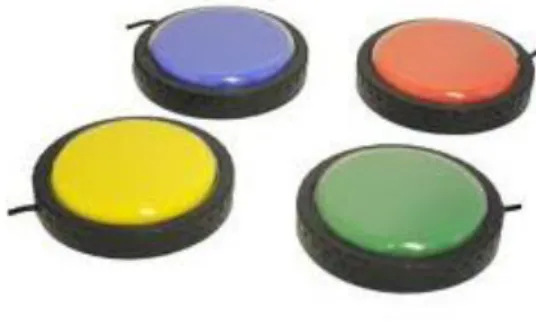
The control interface is the hardware used to interact with the device (e.g. keyboard, mouse, switch Fig. 1), the selection set is the list of selectable items while the selection method or interface scheme is how the user selects using the control interface.
There are two types of interfacing schemes: direct selection and indirect selection. Direct selection is the one we normally use to interact with an interface. There is a one to one correspondence between what we input and what it is selected on the screen. Clear examples of this are the mouse and the keyboard. This method is usually faster and more accurate than its counterpart. Direct selection relies on the user to properly operate the control interface in order to be accurate. This poses a problem if an individual has some sort of physical impairment that inhibits his ability to use the control interface to its full potential.
11
Indirect selection provide us with alternatives for people that cannot properly operate a direct selection interface scheme. It relies on techniques such as scanning and coded access in order to provide the user with all selection alternatives.
Scanning offers a solution to those who are only able to operate a switch. The selectable items are sequentially focused and can be selected by pressing the switch (i.e. in a one switch, auto scanning setup). Scanning is an interaction method that mostly addresses people with severe motor impairments. It can be used across many different context such as personal computers, mobile devices, and environmental control for smart homes and ambient intelligence environments [23].
2.2.1 Touch
With the rise of touchscreens different problems and opportunities emerged. Traditional input methods (e.g. keyboard, mouse, and keypad) require some strength in order to be operated and provide great precision when handled properly. Due to its properties, touchscreens are a lot less physically demanding than keypads. However, touchscreens suffer from a lack of relief, which makes it harder for people to accurately select their targets, particularly disable people [28]. The accessibility of mobile devices depends on the correct use of the touchscreen. The touchscreen provides us with a platform less physically demanding than traditional input methods and opens a door for new systems that may benefit people with motor disabilities that lack both strength and control on their upper limbs [14]. Touchscreens lack the physical cues physical keyboards provide but the lack of a physical input also presents itself as an advantage. If input is not reliant on physical key it means we can adapt it, as an example, we can personalise keyboard layout and use classification models to interpret key presses in order to dynamically adapt to each user’s typing patterns [6]. Part of the problem is to understand each user’s needs and adapt accordingly. In a study by Guerreiro et al [16] it is showed “that tetraplegic users are likely to benefit from a better understanding of their abilities
and challenges”. Allowing the customization of input would not only improve
accessibility of simple tasks like navigation but would also have impact on complex ones like playing a game [17]. As an input method, touchscreens should be customizable and personalisable. We should be able to adapt and configure its properties across the system. Currently that is only possible at an application level.
12
2.2.2 Speech
There are two major approaches to speech interfaces, one is to have a speech recognizer that allow the user to directly select by saying the proper command to that particular selection. The second it tries to mimic the mouse and/or keyboard [5, 28, 19]. An effective speech-based interaction must provide both support for text entry and cursor control.
Although a speech-based solution is a valid input mechanism, it is still in many ways inferior to the traditional keyboard/mouse or to touch input. It is slower than keyboard input [19] and it is not adequate for navigation-oriented activities if other control interfaces can be used [25, 26].
Speech provides nowadays a powerful solution for feedback. Text-to-Speech (TTS) systems are a fundamental part of accessibility. Most smartphones now provide a TTS system that allows blind users and users that are temporally impaired from looking at the screen to interact with the device.
2.2.3 Switches and keyboard
When choosing a control interface for people with disabilities, therapists will always choose the simpler, more conventional solutions with minimal modifications. Using a conventional keyboard is always the first priority [29]. The problem is most people with disabilities cannot access a conventional keyboard, being it a physical one or a soft keyboard (in smartphones), due to lack of coordination or motion range of upper extremities. To use the keyboard some users require special devices that allow them to press only one key at a time, switches. Switches are usually pressure activated devices. Due to the wide variety of user disabilities, switches come in many different ways, they range from simple button switches to head, foot or even breath controlled ones (e.g. Physiological). In section 2.4 we will describe mobile technologies that take advantage of switch interfaces (e.g. HouseMate, Switch Control and TeclaAccess).
2.3 Adaptable Interfaces
Interfaces can be difficult to navigate, especially for users with some kind of disability. Designing interfaces that are usable and accessible to everyone is a tough
13
challenge. One approach to improve accessibility is to change the underling interface adapting it to each user.
The variety of individual capabilities among users is massive, especially when we considering people with multiple disabilities. Due to such variety it is not practical or scalable to manually design an interface for each [27, 12, and 9]. As such there are systems that tackle the issue by automatically generating tailored interfaces or adapting them. In one particular system, the researchers studied if it was better to generate interfaces based on the users’ preferences or by doing a test to assess their abilities. The users were 26.4% faster and did less 73% errors on interfaces generated based on their capabilities. Both forms of generating adaptable interfaces had better results than the baseline interface [7].
One proposal to improve accessibility of the mobile touchscreen technology is to create a shared user model to be used across applications and devices. This solution collects information about the user during application usage and continually updates the model. The interfaces generated are then created accordingly with the updated model. Bearing in mind that accessibility needs may change across a session, it is fundamental to continually collect user interactions. With all the touchscreen data collected it is possible to calculate optimal properties for objects on a per user basis across screen locations within the device [20].
Supple [8] is a system developed with the purpose to adapt UI controls on runtime in order to provide a personalised view of the contents on a pc. The system allows users with motor impairments to have their interface adapted accordingly with their specific needs.
2.4 Mobile accessibility solutions
Currently, the smartphone market is dominated by Android with a staggering 80% market share followed by Apple iOS with 14.4% in the third quarter of 20139. The usage
of smartphones by the disabled community has also seen a large increase in the latest years. This is supported by a series of 4 surveys done about their preferred screen reader. They were made over a span of nearly 3 and a half years. One of its remarkable findings
14
is the increase from 12% in 2009 to 72% in 2012 in the use of screen readers on a mobile device10. This data suggests a shift from “feature phones” to smartphones. Feature phones
have a closed OS, it is developed by the manufactures of the device and all of its functionalities come out of the box. Normally, this type of device does not allow the creation of third party software. Due to the open creation of third party software in smartphones, we focused our attention in these devices. In this section, we will discuss some of the more relevant accessibility functionalities of the iOS and Android due to their dominating position on the market and a clear trend in the adoption of smartphones.
2.4.1 iOS Accessibility
The iPhone as the first truly successful exclusively touch screen interface faced many accessibility challenges. Apple, with the advent of the iPhone 3GS model in 2007 made a step forward towards mobile accessibility. It introduced Voiceover, the screen reader that was previously used exclusive in the Mac OS. Voiceover was more than a copy from its desktop counterpart, it came with a unique set of touch gestures to control the mobile interface. Using Voiceover, we can explore the screen by tapping elements or moving over them, when we do so, audio feedback is provided from the element we touched. A user can also do flick motions to navigate between next and previous content without any knowledge of the on screen location of the content. To select an item the user simply has to double tap the screen. Voiceover was the first accessibility feature introduced in the iOS. Since then, Apple has continually improved its device with new features (e.g. Fig. 2). Here are some of the most relevant features:
10http://webaim.org/projects/screenreadersurvey4/, Last visited in 26/08/2014
15
Zoom11– it is a built-in magnifier that works system wide, by doing a
double tap with three fingers a user can instantly zoom screen content. Zoom can be adjusted anywhere from 100 to 500 percent;
Siri12– it is a speech recognition system that allows you to retrieve and
create information through speech;
Switch Control13 – allows you to control the OS using a single switch or
multiple switches. It has three basic methods: item scanning (i.e. auto navigation of the items until the switch is pressed), point scanning (i.e. crosshair to select a screen location), and manual selection (i.e. manually navigate items, needs more than a single switch). One of its key features is the ability to use different switches, from the use of the touch screen as a switch to the use of external Bluetooth popular switches.
Accessibility in the iOS relies greatly on built-in features. Third party developers are heavily restricted by the control they can achieve over the system.
2.4.2 Android
Android is an open-source mobile operating system developed by Google. Android, much like the iOS, provides a couple of built-in accessibility features. One big difference is the approach towards mobile accessibility. While Apple focused on providing themselves all the accessibility solutions, the Android OS allows the creation of accessibility solutions. In Android, accessibility solutions can be designed in one of two ways: custom made solutions or system-wide solutions that can be divided into accessibility services or input methods.
11https://www.apple.com/accessibility/ios/, Last visited in 26/08/2014 12https://www.apple.com/ios/siri/, Last visited in 26/08/2014 13http://support.apple.com/kb/HT5886 /, Last visited in 26/08/2014
16
As mentioned in section 1.2, custom made applications seek to replace all the look and feel of the device. One example of this is a commercial screen access package, Mobile Accessibility (Fig. 3). It consists of a set of 10 applications that provide an alternative to Android core applications. It has a screen reader and supports braille displays and input via several control interfaces (e.g. keyboard, trackball, touch screen gestures). ClickToPhone is an application that, paired up with HouseMate14 hardware, creates an
accessible solution for physical impaired users to control their mobile devices and the environment surrounding them. HouseMate is a Bluetooth switch controller and environmental controller. It communicates the switch presses to the ClickToPhone application. The ClickToPhone is an Android app that has been custom made for switch access. Much like Mobile Accessibility, this solution focus on one particular set of users. Another example of a custom made solution is EasyPhone [22]. The application was created to enable to performing simple tasks (e.g. make calls, clock, battery) to a user with multiple disabilities. This study raised several issues of current mobile OS shortcomings in respect to “system-wide” accessibility options, at both a user and developer level.
TeclaAccess is an android input method that can be paired with a switch controller (Tecla Shield) to enable external switch access to Android. “The Tecla Shield DOS™ is
a wireless device that lets you control a smartphone, tablet or computer (PC & Laptop) using your external switches or the driving controls of your powered wheelchair”.
TeclaAccess provides automatic scanning, manual scanning, inverse scanning, adjustment of the scanning speed, navigation on-screen keyboard, typing on-screen, system-wide voice assistance and it is multi-platform. To scan and allow navigation on
14http://click2go.ie/wp-content/uploads/2013/04/housemate_5pages.pdf, Last visited in 26/08/2014
Fig. 4 Tecla Overlay Fig. 3 - Mobile Accessibility app
17
the Android platform Tecla controls the device by emulating a keyboard. Navigation can be done in four directions through an on screen keyboard overlay (i.e. Fig. 4), it increases the keyboard capabilities by adding specific functions to access system wide options (e.g. voice assistance, back). Tecla Shield is a solution that costs 349$15, it allows the use of
all applications on an Android as long as they are prepared to be accessed via keyboard which, many times, is not the case, while in iOS Tecla Shield can be used as an external switch.
One Android accessibility service is TalkBack. Originally, TalkBack was a service that gave audio feedback of the results of the actions performed, notifications and events. TalkBack was only able to announce results of nodes that gained focus through a keyboard or a four-way direction pad. With the release of Android 4.0, users saw its functionality expanded through Explore by Touch. This option of TalkBack allows the user to explore the contents of the screen in a very similar way as VoiceOver does. A recent contribution to mobile accessibility was made by the accessibility service JustSpeak [30]. JustSpeak is a voice control solution that enables non-visual access to the Android OS. The service creates a set of available voice controls based on the content descriptions retrieved from the screen application context. It has a speech recognizer that processes the voice command and matches it with one of the current content descriptions. One of its novel features is the ability to do multiple commands using a single utterance.
2.5 Interaction Logging
Being able to record interactions system wide is a key feature to provide researchers with the capabilities to do repeatable HCI evaluations. Input observer [2] is a system that quietly observes user interaction with a personal computer. The popularity of mobile technologies and interactions has led to an increase of app development and HCI research for these devices. Despite the prevalent nature of these technologies, the platforms are lacking in guidance and tools to support testing and simulation of user interactions. It is critical to develop a solution that allow the creation of similar systems to WebAnyWhere ABD [3]. This system permits the recording of accessibility problems at the time user experience them. This in conjunction with the ability to reproduce the problem can
18
provide a powerful tool for testing and simulation. Lookback16 is a simple recording
interface that can be installed into developers’ applications. Currently is only available for iOS and provides developers with the capability of recording the user experience (i.e. screen capture and recording user reaction through the iPhone camera). There is clearly a need to reproduce user experiences in mobile settings in order to perform HCI evaluations.
2.6 Discussion
Mobile accessibility has been improving over the years, with the introduction of smartphones and tablet devices new challenges and opportunities arouse. For example, we can take advantage of these devices by creating a multitude of control interfaces or developing adaptable interface. The iOS and Android both have similar fundamental accessibility features, like screen readers, speech recognition and zoom. The iOS has great built-in accessibility features, unfortunately third party developers are heavily restricted in their control over the system. Custom made applications are the only approach available to them. However, Android open source nature empowers developers, they are able to create input methods, accessibility services and also custom made applications. These third party custom applications aim to replace core system applications like phone, contacts, calendar, with custom made accessible ones. The key word here is for who? Depending on the target user group, these applications will be different. These solutions are costly and time consuming to develop. Input methods although they possess system wide capabilities they greatly relied on the application being accessible via keyboard directional pad and also overlook the content that is being navigated. Accessibility services are a step in the right direction, unfortunately they provided limited control over input and the relation between content and it is severely overlooked. Navigation and selection methods should always be customizable in order to address specific user needs with. Creating system wide control interfaces as a third party developer is a massive challenged due to all the restrictions.
Adaptive interfaces is one way to improve accessibility. The key is to adapt to every single different user which could benefit immensely user with disabilities. The answer is
19
to develop these interfaces automatically with some sort of user ability record. Unfortunately, current OS only allow the customization of interfaces of your own developed applications and not across third party or stock ones. Another issue is how to record user performance on interfaces and adapt accordingly if we cannot have input control outside our applications. Interaction logging is currently lacking in the mobile context when we compared to the apparatus and procedures already found on its pc counterpart. There needs to be a simple way to record and simulate interactions on a mobile device in order to further the field of HCI research.
21
Chapter 3 Enabling Mobile System-Wide AT
The previous chapter review the current state of the art in assistive technologies in a mobile context. We discuss their shortcomings by analysing the top 2 OS systems of the markets and reporting their capabilities and deficiencies. In this chapter we will present SWAT a system wide library that targets the development of assistive technologies. We describe several use case scenarios that inspired the creation of SWAT. To contextualize our application we discuss the Android OS architecture and capabilities, since our library will take advantage of it. We delve into the SWAT library with a detailed view of the system requirements, architecture, components, features and uses.
3.1 Use Case Scenarios
Miguel was one of the inspirations for this project, he has limited neck movement and only has residual arm movement. Miguel had an accident that left him blind, tetraplegic and with a stutter speech.
Miguel wants to send a message.
Miguel is sitting in his chair and wants to contact his friend André. He wishes to send him a message wishing him good luck for his thesis defence. He is not sure of hour of the defence and as such he does not want to call and risk interrupt it. He starts by pressing a switch which enables the auto-scanning of the options on his smartphone, every time a new option is focused an auditory feedback is provided. He waits for the option Message to be read to press the switch. He then auto navigates the Message menu and since he has traded messages with André before he presses the switch when André name is read. Next he selects the “Write message” and a keyboard is enabled. The keyboard is navigated automatically and Miguel presses the switch whenever the letter he wants is read. After writing it he closes the keyboard, navigates to the send message option and completes his wish.
Miguel’s wants to use a new contact application that his friend told him about.
Miguel friend came over and told him about this great application on the play store that he is using, that organizes the contacts in a way that is much quicker to access then.
22
Miguel asks his friend to install this application on his phone since this task requires a little digging and a lot of menu navigation. His friend stops the auto-navigation, gets to the play store and installs the new application. He then resumes the auto-navigation for Miguel to try it out. Miguel travels through the menus and selects the new contact application. The system reads in a row-column scheme the options available on application. After a week of use Miguel’s feels comfortable using this new application and his able to quickly navigate the new menus and contact whoever he wishes faster.
Miguel wants to listen to radio on his smartphone.
Miguel is tired of listening to the TV he much prefers to listen to a radio station. He decides to try the radio application installed on his smartphone. He starts the auto-navigation and selects the radio application. With the auto-scanning he is able to travel through different channels and choose a desire station to start playing. After a while he gets tired and decides he wants to close the radio station and listen to the TV since its news time. He navigates through all the menus but cannot find the stop or close radio station. Unfortunately the stop button is embedded in an inaccessible section of the application. He calls for his mother to try and resolve the issue. Knowingly he might want to turn the radio on for latter, his mother instead of simply turning of the radio, she records the action of her stopping the radio. As expected latter on Miguel enables the radio station again. It is football game time and Miguel wants to stop the radio, since he knows his mother recorded her action he navigates through the list of recorded actions and selects the radio off option and is now ready to watch the game.
Miguel’s mother notices he takes a while when he wants to send a message to his friend Rui.
This week Miguel has a lot of stuff arranged with Rui. Rui is in Portugal for the week and he is not a usual contact for him. Every day for the whole week Miguel would contact Rui during the day several times. Miguel’s mother noticed Miguel took a long time to start writing a message to Rui since he had to go through several screens with many options. She took his phone, pause the automatic navigation and recorded the whole process from the home screen until the “write a message to Rui” screen. Miguel had now an icon on his home screen called “Write to Rui” upon pressing it he would quickly face
23
the task of writing a message, overcoming the otherwise tedious process of getting to this stage.
3.2 Android Operating System
In order to understand the library developed it is important to have a mental model of where it is operating. The Android OS consists of different stacked layers, where each layer provides services to the layer above.
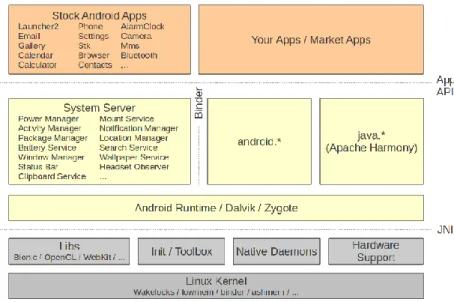
As we can see in Fig. 5 on the top layer we have the Stock Android apps and the third party developed ones. Both share the same capabilities so any developer can create applications that serve as an alternative to stock ones or simply design new ones, always relying on the layers bellow. The System Server layer is composed of the components that handle applications cycles, manage data sharing between applications and so on. The Android Runtime layer is where the Dalvik Virtual Machine (e.g. a JVM) runs applications, this JVM allows multiple instances to be created simultaneous providing among others: isolation, security and memory management. The Libraries layer consists of the native Android libraries. These libraries are crucial for the system and some of them are: OpenGL (e.g. graphical rendering) and SQLite (e.g. database engine). The layer bellow is the Linux kernel where the Android OS is built upon.
24
“Android is a privilege-separated operating system, in which each application runs with a distinct system identity”17. The Linux, thereby isolates each application from one
another and from the system itself. Together with a permission system that enforces restrictions on specific operations, these systems are the core of security in Android. Each Android application operates in a process sandbox, they can only share data and resources if they explicitly do it. This sandbox is created across all types of applications developed being it Java, native or hybrid.
The Android NDK allows developers to create solution that resorts to native-code of the device. This can be extremely useful since it allows developers to reuse native libraries not available otherwise. Normally applications that take advantage of such setup are CPU-intensive ones. Using the Java Native Interface (JNI) we are able to through our Android Java application interact with native code developed.
Apart from the Activities developers are also able to create Services. A Service is in fact a component of an application that can perform long-running operation in the background without relying in a user interface. The Services can run even if the application that initialize it is out of focus. They can be used to perform network transitions, perform file I/O among others.
Accessibility Services although they share the tag service they are a different species. Unlike a simple service, an Accessibility one can be a standalone version or bundled with a normal application. They were designed to provide alternative navigation feedback to the end user. An accessibility service has the permission to communicate with the user on the application’s behalf, it can provide text to speech, or haptic feedback. Starting on API level 14, the accessibility services can perform actions on behalf of the users (e.g. they
17 http://developer.android.com/guide/topics/security/permissions.html, Last Visited in 26/08/2014
Fig. 6 - Talk Back accessibility service
25
can change the input method, perform selection). The range of as been expanding actions (e.g. scrolling list, interacting with text fields) since its methods creating a richer environment for accessibility developers. Through the accessibility services we are able query the view hierarchy for more context. Since API level 14 we have the ability to query the view whenever an AccessibilityEvent that we are listening for is triggered. Through the event we able to retrieve the UI component that generated it and from it we can gather its parent, children, bounds, available actions, text and. Android provides information to the accessibility services mostly through the onAccessibilityEvent() call-back method that passes an AcessibilityEvent object. This object has information about the event that was triggered and its UI source, possible events include:
TYPE_VIEW_CLICKED: represents the event of clicking in a View;
TYPE_NOTIFICATION_STATE_CHANGED: event showing a
notification;
TYPE_VIEW_TEXT_CHANGED: triggered when an EditText is changed; When an accessibility service is developed and installed in a system it must be manually enabled through the accessibility option on the system settings. Examples of this are services like TalkBack or JustSpeak.
3.3 SWAT
SWAT is a system wide Android library that empowers the development of assistive technologies, but due to its capabilities it enables the creation of powerful system wide services. At its core it provides developers with a control of the system that normally they would not have at a system level.
3.3.1 System Requirements
The development of this library was preceded by this list of requirements.
Cross application view Hierarchy access: access view hierarchy across all applications and system windows;
Low level input access: enable monitoring, blocking and injecting of all the system internal devices (e.g. touchscreen, keypad, accelerometer);
External control of the device: fully control the device through an external interface;
26
Easy coupling and development: simple coupling of new control interfaces;
Output parameterization: different adaptable output options, namely sound, TTS and visual;
Adapting content: the ability to personalize content, independently ownership of the application across both system and third party ones;
Adapting input: the ability to in real time monitor input and adapt it, for instance using touch adaptive models;
Navigational control: ability to navigate all device applications programmatically and easily create new navigation methods;
Perform actions system-wide: be able to perform actions independently of the current application in focus, action such as back, home, select, scroll, slide and text-entry;
3.3.2 System Architecture
From reading the section 3.2 we understand the restrictions imposed on the cross application access and manipulation. SWAT is built upon an accessibility service, as such it is able to retrieve and disseminate all view hierarchical information.
With the accessibility services we overcome it in regards with content information, but there is one missing link, input. Through the accessibility services we are able to