Dissertation supervised by Php Andrés Muñoz Zuluaga Php Francisco Ramos Romero Php Roberto Henriques
March 2013
Master’s Degree in Geospatial Technologies
UJI SPATIAL
NETWORK
Development of a pedestrian spatial network for the University Jaume I of Castellón (Spain)
Author: Roberto Mediero Martí E-mail: [email protected]
i ACKNOWLEDGMENTS
The author wishes to thank to Andrés Muñoz Zuluaga who made it possible for the development of this project and who also assisted me greatly in the practical and semantic aspects of the work involved.
ii UJI SPATIAL NETWORK
Development of a Pedestrian Navigation Network within the University Jaume I of Castellón (Spain)
ABSTRACT
The author of this document has been working in a project called “UJI SPATIAL NETWORK”. It consists of the development of a Pedestrian Navigation Network within the campus of the University Jaume I of Castellón (Spain), combining an Outdoor Network and an Indoor Network of the pedestrian navigable routes. A spatial network offers a huge amount of possibilities of study within a determined area, such as studies of service areas, route calculations, finding closest facilities and studies about location-allocation of new facilities. The main objective of this project is to publish geoprocessing services into the ArcGIS server of the university to solve network problems such as routes, service areas, closest facilities and location\allocation. These services are offered to developers of web mapping and mobile applications for solving network problems on their futures works.
A project called ViscaUJI, which consists in the development of a mobile application employing Smart City features offering a wealth of facilities to the university community inside of the campus, is carrying out. This thesis could give an useful and great service to the developers of this Smart Campus.
During the report, the author exposes a brief literature review about spatial networks. The motivation and objectives of this project are explained. Also, the author talks about the research of resources and technologies used and the workflow followed to achieve the final services.
iii KEYWORDS
Spatial Network
Pedestrian Network Navigation Geographical Information Systems ESRI’S ArcGIS 10.1 Software Network Analyst extension of ESRI 3D Analyst extension of ESRI Geoprocessing services Routing
Service Area Closest Facilities Location-Allocation
iv ACRONYMS
2D Two Dimensional
3D Three Dimensional
ESRI Environmental Systems Research Institute
GIS Geographical Information System
LYR Layer
MXD Map Document
UJI Universidad Jaume I
ViscaUJI Virtual Smart Campus for the University Jaume I
TI ESTCE Computing and Mathematics Module
TD ESTCE Docent Module
TC ESTCE Experimental Science and Technology Module
CD Library
UB Espaitec 2
RR0 Rector and central services
v INDEX OF TABLES
Table 1: Fields, data types and description of the Attribute table of Outdoor Network Table 2: Fields, data type and description of the Indoor feature class attribute table.
vi INDEX OF FIGURES
Figure 1: Physical Network of the exterior walkways within the University Campus. Figure 2: Filling FT_MINUTES field with Field Calculator
Figure 3: Work area ready to start the digitizing of indoor walkways Figure 4: Attribute table view of the TD Zero floor
Figure 5: Elevation approach for Stairs and Intermediate floors Figure 6: Attribute table of Stairs Feature Classes
Figure 7: Attribute table for Intermediate Floor Feature Classes Figure 8: 3D view of the Outdoor and Indoor Network
Figure 9: Routing solution for the UJI Network dataset showing route directions Figure 10: Workflow of the routing standard model with emergency exit restrictions Figure 11: Workflow of the Handicapped Model
Figure 12: Workflow of the emergency evacuation model
Figure 13: 3D view of a route solution for the Handicapped Model
INDEX OF ILLUSTRATIONS
Illustration 1: View of a Web mapping application using geoprocessing services Illustration 2: Workflow of 3D Routing Model built on Model Builder
Illustration 3: Workflow of Closest Facility Model built on Model Builder Illustration 4: Workflow of Service Area Model built on Model Builder Illustration 5: Workflow of Location-Allocation Model built on Model Builder Illustration 6: Workflow of Emergency Evacuation Model built on Model Builder
vii
TABLE OF CONTENTS
ACKNOWLEDGMENTS ……….i ABSTRACT……….ii KEYWORDS……….iii ACRONYMS……….ix INDEX OF TABLES……….x INDEX OF FIGURES……….xi 1. INTRODUCTION………1-2 1.1. Theoretical Framework……….1 1.2. Objectives………..1 2. LITERATURE REVIEW……….3-11 2.1. What is a spatial network…...32.2. Different kinds of spatial networks………..3
2.3. Usage (Applications)………..6
3. METHODOLOGY………12-33 3.1. Foreword……….12
3.2. Documentation………13
3.3. Resources and Technologies chosen………13
3.3.1. Resources……….13
3.3.2. Technologies chosen………13
3.4. Outdoor Network………..14
3.5. Indoor Network………18
3.6. Converting 2D features to 3D………24
3.7. Network Dataset Creation………25
3.8. Designing Models with the Model Builder………..26
3.9. Visualization process………32
3.10.Publishing geoprocessing services………33
4. CONCLUSION………35-36 4.1. Results………35
viii 4.2. Future works and improvements………36
5. BIBLIOGRAPHIC REFERENCES………..37 6. ATTACHMENTS………..39
1 1 INTRODUCTION
1.1 Theoretical Framework
The needed of mobile navigation systems increases induced by the growing market of mobile computing devices (B.Elias). In recent years, Navigation has become a very active research area. There are many network navigation types such as car navigation, pedestrian navigation or multimodal navigation. However, most of the navigation systems created until now are designed for car navigation purpose and don’t work correctly when are used as pedestrian navigation systems.
The emplacement of this thesis project is on the University Jaume I of Castellón, Spain. The Institute of New Imaging Technologies (INIT) placed in this university is working in a project called ViscaUJI or UJI Smart Campus, which consist in the development of mobile applications adopting smart city features. With the aim to contribute in this project with useful services, this thesis plans to develop a pedestrian spatial network to achieve an outdoor/indoor navigation around the university campus. It offers a huge amount of solutions for networks problems such as finding the closest facility or route calculations between points. Developers can use the UJI Spatial Network and its services in the implementation of their future applications related with the UJI Smart Campus.
1.2 Objectives
The aims of this project are to learn about the ESRI’s ArcGIS 10.1 Network Analyst extension, the creation of a spatial network in a university campus and the investigation of the Networking Analysis possibilities for 3D routing information of outdoor and indoor environments, services areas, closest facilities and location-allocation of facilities.
The University Jaume I of Castellón (Spain) is the emplacement of the development of this project. A pedestrian spatial network with the 3D model of the outdoor and indoor buildings of the campus will be created employing the
2 functionalities of the Network and 3D Analyst tools of ArcGIS Desktop suite. The digitalization of the walkways, the construction of the network and the following analysis will be created with ArcMap application. ArcScene will be used to visualize the results in a 3D view.
A spatial network offers a huge amount of possibilities of study of the covered area.
The main goal of this project is to offer this spatial network to developers so they can use it to develop web mapping or mobile applications to calculate routes, service areas, closest facilities and location-allocation geoprocessing services.
3 2. LITERATURE REVIEW
2.1 What is a spatial network?
Networks form the infrastructure of the modern world. Networks are in our daily life, the human movements, the transportation and distribution of goods and services, the delivery of resources and energy, and the communication of information all occur through definable network systems. The form, capacity and efficiency of these networks have an important relevance on our standard of living. And affect our perception of the world around us and allow us to measure, model and predict outcomes of policy (ESRI).
A spatial network is defined like a connectivity graph of junctions and their connecting edges, where each junction and edge is associated with a feature with point or line geometry respectively. (Erik G. Hoel, Wee-Liang Heng, and Dale Honeycutt, 2005).
Networks analysis is the technique employed to determine and calculate locations and relationships in networks.
2.2 Different kinds of spatial networks
Three common applications of networks are in transportation, for the use of rivers, and in utility networks.
A geodatabase has two main network models. The network dataset, optimized for undirected flow, generally for transportation, and the geometric network model, which performs directed flow systems for activities like utility lines and river networks.
A geometric network uses custom networks features, such as complex edges, edges and junctions, to model the components of a network. Complex edges are used to model a compound set of edges and junctions. Usually, these kinds of networks are used to represent utility and river networks.
4 Network datasets are well suited to model transportation networks. Usually, Geographical Information Systems (GIS) are used to generate this kind of networks. GISs offer powerful tools for data management, analysis, presentation and visualization of geospatial data. Transportation networks are created from source features, which can include simple features (lines and points) and turns, and store the connectivity of the source features. The network dataset allows the incorporation of turns and rich attribute information such as costs, hierarchies and restrictions.
The network dataset incorporates an advanced connectivity model that can represent complex scenarios such as multimodal transportation networks. This enables users to efficiently model multiple forms of transportation across a single dataset by using points of coincidence, such as rail stations or bus stops that form the linkages between different forms of transportation. An example of a multimodal network dataset could be the development of trip planners; it can be created combining multiple forms of transport, such as rail and bus.
Urban environment is a significant challenge in transportation analysis and geographic information science (J.Thill, T.H.D.Dao, Y.Zhou, 2011). The complexity of urban environments is a very interesting field into the GIS community. Many researches and developments have been carried out from the GIS community into navigation, even the implementation of GIS for disaster management.
Urban movement not only takes place on the streets, on sidewalks, or on board transit buses, but it also extends inside buildings. For instance, personal of business building is moving across various floors within the multi-scale structure. A GIS data model designed to support route planning in an urban environment must be able to model these situations to be effective (J.Thill, T.H.D.Dao, Y.Zhou, 2011).
Indoor networks are more complex than road networks, for this reason, different methodologies for interpretation and creation are employed for their implementations. A network inside buildings is intrinsically three-dimensional (3D), thus requiring to model vertical connectivity between floors (D.Mandloi and J.Thill, 2010).
5 A 3D network dataset is a current or multimodal network in which is incorporated height ‘Z values’ in features allowing a more intricate representation and analysis of a network. This kind of networks are useful to represent building interiors of multi-leveled structures connected by vertical passages such as stairs and elevators.
Many researches about Geographic Information Systems and 3D indoor networks combine both of them to achieve an indoor navigation; and realize studies of emergency scenarios inside buildings with the aim to improve emergency response times. A well example is a study realized by Chia-Hao Wu and Liang-Chien Chen (2007) in which describe the development of a 3D geometric network model from 2D building plans. The target area is a restaurant with thirteen floors which is located in Taiwan. Three different fire scenarios were analyzed using the 3D geometric model to perform shortest path analysis within the buildings with the objective to improve the navigation and reduce the response time to an accident.
On the University of New York at Buffalo (USA) a project was developed using a 3D spatial network with multi-modal features. It consists in the Object-oriented data model to represents a multi-modal transportation network of the university campus, which can be employed to perform network analysis such as route planning and navigation using GIS software tools. The transportation network is divided into main parts, indoor network and outdoor network. The indoor network is used to modeling navigable routes inside buildings. The vertical connectivity between floors, like stairs and elevators ways, is required; therefore this network has 3D features with Z values. 3D indoor network was modeled combining the existing 2D data structures and 3D visualization techniques available by commercial GIS software. The outdoor network models movements outside buildings using multiple modes. (D.Mandloi and J.Thill, 2010).
6 2.3 Usage (Applications)
A spatial network analysis allows solving common network problems, such as finding the best route between a set of locations, identifying a service area around a location, realizing a study for choosing the best location of a new facility, or finding the closest facilities.
Route
The most common network problem is the route calculations. It consists in finding the best route between two locations or one that visits several locations. But ‘best route’ could be understood by different things in different situations. It depends of the impedance chosen. If the impedance is time, the best route is the quickest route. However, if the impedance is length, the best route is the shortest route. Any valid network cost attribute can be used as the impedance when determining the best route. Consequently, the best route can be defined as the route that has the lowest impedance, where the impedance is chosen by the user.
The ArcGIS Network Analyst extension uses the well-known Dijkstra’s algorithm to find the best route on a network dataset. One of the main reasons for the popularity of Dijkstra’s algorithm is that it is one of the most important and useful algorithms available for generating optimal solutions to a large class of shortest path problems. To find a shortest path from a starting location to a destination location, this algorithm maintains a set of junctions (S), whose final shortest path from the starting point has already been computed. The algorithm repeatedly finds a junction in the set of junctions that has the minimum shortest-path estimate, adds it to the set of junctions (S), and updates the shortest-shortest-path estimates of all neighbors of this junction that are not in S. The algorithm continues until the destination junction is added to S. (M.Sniedovich, 2006).
The well-known Google Maps web mapping service application offers street maps, a locator for urban businesses and a route planner for travelling by foot, bike, car or public transportation in several countries around the world. The google route
7 planner uses an algorithm based on the Dijkstra’s algorithm to calculate the optimal route like the ESRI’s Network Analyst extension.
Oracle Transportation Operational Planning is another software that supports transportations moves from point to other point to multi-modal, multi-leg and cross-docking operations. This software uses optimization techniques to determine the best way to service transportation needs. Contrary to Google Maps and ESRI’s software, Oracle uses the Breadth-first search algorithm to determine the shortest path between two nodes. Given a graph G and a starting vertex s, a breadth first search proceeds by exploring edges in the graph to find all the vertices in G for which there is a path from s. The remarkable thing about a breadth first search is that it finds all the vertices that are a distance k from s before it finds any vertices that are a distance k+1. One good way to visualize what the breadth first search algorithm does is to imagine that it is building a tree, one level of the tree at a time. A breadth first search adds all children of the starting vertex before it begins to discover any of the grandchildren.
To improve performance, network dataset can model natural hierarchy in transportations systems (Hierarchical routing). In which driving on interstate highways is preferable to driving on local roads with the aim to minimize the impedance while favoring the higher-order hierarchies present in the network.
There are many project related with this field. An example is the development of a Building Indoor Navigation for effective emergency evacuations in the Campus of the Indian Institute of Technology in Bombay (Smita Sengupta, 2011). There a similar project to the UJI Smart Campus had been developed.
Closest Facilities
Another common network problem to solve is the searching of the closest facility or facilities from a determinate location. The closest facility solvers make measures of the cost of travelling between facilities and incident locations to determine which are closest to one other. Then, the best routes between facilities
8 and incidents are displayed reporting directions and travel costs. A good example of a closest facility problem could be the searching of nearest fire stations from a fire incident to achieve quickest responses to emergency calls.
The ESRI’s Network Analyst extension uses a origin, multiple-destination algorithm based on Dijkstra’s algorithm. This means, multiple closest facility analyses can be performed simultaneously. Also, it allows users to define how many facilities to find, if the direction of travel is toward or away from them, cutoff impedance beyond which the algorithm won’t search for facilities, and which restriction attributes should be respected while solving the analysis.
Service Area
A network service area is a region that includes all accessible streets that are within a specified impedance around a location. It can be used to identify the quantity of facilities, population, area or anything information more within the neighborhood or region calculated. An example is a service area of a network that includes all the streets that can be attained within ten minutes walking or driving from a determined point on the network.
Generating a buffer or service area around a feature is a very basic command of a Geographic information system. However, most existing methods for doing so create simple distance-bounded geometric buffers working in the network itself. (C.Upchurch, M.Kuby, M.Zoldak, A.Barranda, 2004).
The service area solver of ESRI’s Network Analyst extension is based on Dijktra’s Algorithm too. The main aim of this algorithm is to return a subset of connected edge features which are inside the specified cost cutoff or network distance. Additionally, it can return the lines classified by a set of break values that an edge may fall within. This ESRI’s solver can generates lines, polygons including within them these lines, or both. Putting the geometry of the lines traversed by the Service Area solver into a triangulated irregular network (TIN) data structure, the polygons are generated. The network distance along the lines serves as the height of the locations inside the TIN.
9 The network dataset also offers the realization of studies geographical accessibility of rural services in developing countries using Location-Allocation Models (Gerard Rushton, 1984).
Origin-Destination Cost Matrix
The Origin-Destination matrix represents the traffic flows between various points of the network. Assigning an OD matrix to a transportation network means that the demand for traffic between every pair of zones is allocated to available routes connecting the zonal pairs. (T.Abrahamsson,1998)
The Origin-Destination (OD) matrix is important in transportation analysis. The OD cost matrix finds and measures the least-cost paths along the network from multiple origins to multiple destinations. The number of destinations to find and a maximum distance to search can be specified in the configuration of the OD cost matrix analysis.
An OD cost matrix is a table that contains the network impedance from each origin to each destination. Additionally, it ranks the destinations that each origin connects to in ascending order based on the minimum network impedance required to travel from that origin to each destination.
The OD matrix cost solver of ESRI’s Network Analyst uses a multiple-origin, multiple-destination algorithm based on Dijkstra's algorithm. It has options to only compute the shortest paths if they are within a specified cutoff or to solve for a fixed number of closest destinations. The OD Cost Matrix solver is similar to the Closest Facility solver but differs in the output and the computation speed. OD cost matrix generates results more quickly but cannot return the true shapes of routes or their driving directions.
10 Location-Allocation
The location of new facilities and allocation of demand point to them on a determined zone is other common network problem. The goal is to locate new facilities supplying most efficiently the demand points of a neighborhood or determined area. The objective may be to minimize the overall distance between demand points and facilities, maximize the number of demand points covered within a certain distance of facilities, maximize an apportioned amount of demand that decays with increasing distance from a facility, or maximize the amount of demand captured in an environment of friendly and competing facilities.
Private and public sector organizations use this technology for their own benefits. The public sector organizations, such as hospitals, fire stations, schools, and police stations can offer a well quality service to the community when a good location is chosen. Furthermore, private sector organizations, such as multinational companies with distribution centers or small companies with a local clientele, can employ location-allocation solvers to find the best locations with high accessibility that help them to keep fixed and overhead costs.
The Location-Allocation solver chooses which facility location from a set of facilities is the best location based on its potential interaction with demand points. This works choosing a subset of facilities from a set of candidate facilities, such that the sum of the weighted distances from each demand point to the closest facility is minimized.
The Location-Allocation solver of ESRI’s Network Analyst extension combine an edited Origin-Destination cost matrix, semirandomized initial solutions, a vertex substitution heuristic, and a refining metaheuristics to produce optimal results. It starts by generating an Origin-Destination matrix of shortest path between all the candidate facilities and demand points along the network. Then, the Hillsman editing process is employed to build an edited OD cost matrix. Continuously, the solver generates a set of semirandomized solutions and creates a group of good solutions applying to them the Teitz and Bart vertex substitution heuristic. Finally, a metaheuristics combine this group of good solutions to create better solutions, and
11 returns the best solution found. Heuristics are strategies using readily accessible information to control problem solving in machines.
The best location is not the same for all types of facilities. For instance, the best location for a fire station that needs a location with a high-efficient response time is not the same than the best location of warehouses that tries to reduce transportation costs.
The location-allocation solver has options to solve a variety of location problems such as to minimize weighted impedance, where facilities are located such that the sum of all weighted costs between demand points and solution facilities is minimized (i.e. location of warehouses to reduce the transportation costs); maximize coverage, where facilities are located such that as many demand points as possible are allocated to solution facilities within the impedance cutoff (i.e. the location of Emergency Response Center to achieve a efficient response time); maximize capacitated coverage, where facilities are located such that as many demand points as possible are allocated to solution facilities within the impedance cutoff, taking in account the capacity of the facilities; minimize facilities, where facilities are located such that as many demand points as possible are allocated to solution facilities within the impedance cutoff; additionally, the number of facilities required to cover demand points is minimized; maximize attendance, where facilities are chosen such that as much demand weight as possible is allocated to facilities while assuming the demand weight decreases in relation to the distance between the facility and the demand point; maximize market share, a specific number of facilities are chosen such that the allocated demand is maximized in the presence of competitors trying to capture as much of the total market share as possible; and achieve a target market share that selects the minimum number of facilities necessary to capture a specific percentage of the total market share in the presence of competitors. (ESRI)
12
3. METHODOLOGY
3.1 Foreword
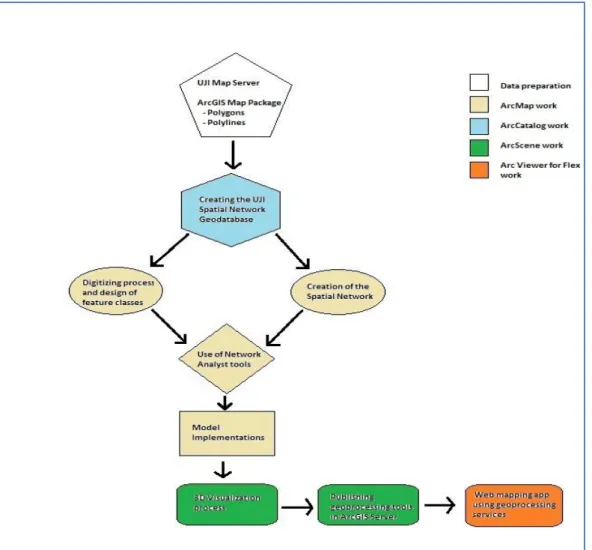
This chapter explains the techniques that have been employed in the design of the spatial network for the university campus. Firstly, a description of the previous documentation needed to carry out the development of the project. Secondly, a justification of the technologies and approach chosen for the system is given. Afterward, a detailed methodology on the construction and data preparation involved for the Outdoor and Indoor Network for pedestrians is described. Also, the conversion of 2D Features to 3D and Network Dataset creation. Continuously, the visualization techniques used in the analysis for the results interpretation are mentioned. Concluding, the last section give details of the software and procedure followed to publish geoprocessing services and create a web mapping application.
13 The figure depicted above summarizes the methodology workflow followed to achieve the final results of the thesis project.
3.2 Documentation
The UJI Spatial Network project requires previous knowledge in spatial networks and 3D analysis fields. For this reason, the study and realization of the Network Analyst and 3D Analyst tutorials were needed. Those tutorials are provided by ESRI in the web page ArcGIS Resources.
3.3 Resources and technologies chosen
3.3.1 Resources
A connection to the GIS Server of the University Jaume I with map servers of the Campus and an ArcGIS Map Package were provided by the Institute of New Imaging Technologies (INIT) to help in the digitizing tasks, and in the posterior services publication.
The ArcGIS Map package includes two feature classes, Building Floor Publish and Building Interior Spaces. The first one is a polyline layer of detailed architectural drawings with information about the distribution of the building interiors of the university campus like location of doors, stairs, etc. The second one is a layer of polygons, it has information about each room, classroom or office of each building like floor number, code, building name where are located and description of the space.
3.3.2 Technologies chosen.
UJI Spatial Network will be related with the Smart Campus project that, actually, is developing in the university. This project uses an ArcGIS platform of ESRI. ESRI’s ArcGIS 10.1 is powerful software with the availability of tools like Network Analyst and 3D Analyst very useful for the realization of the 3D Network Dataset.
14 Consequently, the strong binding between projects and the important relevance of ArcGis in the Spatial Network field are the reasons to choose this software for the project development.
ArcGIS applications such as ArcMap, ArcCatalog, ArcScene and ArcGlobe have been employed in different phases of the workflow development.
The creation of an own geodatabase with its respective feature datasets and feature classes, digitalization of the UJI network and performance of the spatial network were made using ArcCatalog and ArcMap.
ArcScene and ArcGlobe were used for the visualization in 3D of the results analysis, and for the publication of geoprocessing services into the ArcGis Server of the University.
Finally, ArcGIS Viewer for FLEX makes use of the published geoprocessing service to create a web application. It shows how the creation of web and mobile applications is possible using the service created in the project.
3.4 Outdoor Network
The project beginning will be possible once the ESRI’s ArcGIS 10.1 for Desktop is correctly installed with the Network Analyst and 3D Analyst extension licensed.
Every network datasets require a source features to be created. Source features are line and point features that compose the physical network, which doesn’t have topology embedded within the features (GISC, 2009). In the case of the University Campus, there isn’t a physical network created previously, so the first step to follow is the digitalization of the UJI physical network within the study area.
Foremost, working in ArcCatalog a new geodatabase has been built, is named ‘SpatialNetworkUJI’. Also, a feature dataset named UJI_Network_OutIndoor has been created choosing the WGS 1984 Web Mercator Auxiliary Sphere coordinate system for XY coordinates and WGS 1984 Geoid for Z coordinates for this data. The
15 set of features classes needed to build the spatial network will be generated on it. At the moment, a line feature class named UJI_Outdoor_Network is generated including Z values for the coordinates. On this feature class, the digitalization process will be realized. However, a basemap is needed for the digitalization. In this point of the project, the connection with the GIS Server of the university is required. Once the connection is completed, a map server called ‘ViscaUJI_desaturado’ can be added to ArcMap as a base map. The feature class ‘UJI_Outdoor_Network’ is added to the table of contents and the digitalization of the physical network has been possible using the editor toolbar. The snapping toolbar helps to avoid connectivity mistakes in the digitalization of the walkways.
Figure 2: Physical Network of the exterior walkways within the University Campus.
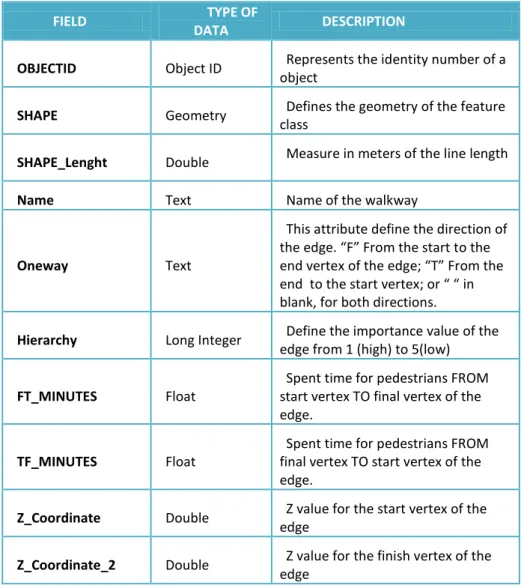
The next step is the data preparation for the Outdoor Network. A set of fields have been added to the attribute table of this feature class. The fields are exposed in the follow table.
16
FIELD TYPE OF
DATA DESCRIPTION
OBJECTID Object ID Represents the identity number of a object
SHAPE Geometry Defines the geometry of the feature class
SHAPE_Lenght Double Measure in meters of the line length Name Text Name of the walkway
Oneway Text
This attribute define the direction of the edge. “F” From the start to the end vertex of the edge; “T” From the end to the start vertex; or “ “ in blank, for both directions.
Hierarchy Long Integer Define the importance value of the edge from 1 (high) to 5(low)
FT_MINUTES Float
Spent time for pedestrians FROM start vertex TO final vertex of the edge.
TF_MINUTES Float
Spent time for pedestrians FROM final vertex TO start vertex of the edge.
Z_Coordinate Double Z value for the start vertex of the edge
Z_Coordinate_2 Double Z value for the finish vertex of the edge
Table 3: Fields, data types and description of the Attribute table of Outdoor Network
As this project is focused on a pedestrian spatial network within the UJI Campus, there is a set of premises that determines the data to fill on each attribute column of the attribute table. These premises are:
- Name: This field will be populated with the zone name where the edge is located or with the standard name ‘Exterior Walkway’.
- Oneway: Pedestrians can walk in any direction. So, generally, the Oneway fields will be in blank (“ “) determining edges of both directions. However, in case of edges crossing emergency exits used for emergency evacuations of buildings, these are described like edge of oneway.
17 - FT_MINUTES and TF_MINUTES: The spent time for pedestrians will be calculated assuming an average speed of 3km/h. The formula to obtain this value is:
FT_MINUTES= SHAPE_Lenght*60/3000
- Z_Coordinate and Z_Coordinate_2: At the moment, the Z values for the start and finish vertex of the edge will be 0. The Z Values will be modified to connect correctly outdoor with indoor edges on buildings entrances avoiding connectivity errors. That is, some main entrances have different Z value than the outdoor network.
- HIERARCHY: The hierarchy values will be applied taking into account the next classification: Value 1 for main walkways on the campus; value 2 for walkways around buildings; and value 3 for secondary or difficult accessibility walkways
With the aim to find optimal solutions avoiding strange routes with to many turns, a condition is presumed. It’s defining an average speed of 4km/h for walkways with hierarchy value 1.
All the fields have been populated using the Field Calculator from the attribute table windows. Also, they could be filled turning on the editor toolbar.
The next figure shows the Field Calculator while the FT_MINUTES is being calculated.
18 The data preparation of the Outdoor Network finishes once all the fields of its attribute table have been populated correctly.
3.5 Indoor Network
The methodology adopted in this part of the project sees the development of a 3D model of the walkways inside of buildings, from the 2D architectural building plans of the ArcGIS Map Package provided by the INIT.
Digitizing from the greater detailed architectural drawings as new feature classes has been a more time efficient and preferred option.
Actually, the ArcGIS Map Package doesn’t have the information about all the building of the UJI Campus. Only the buildings that are digitalized and enabled to create their corresponding 3D pedestrian navigation network are: ESTCE Module Computing and Mathematics (TI), ESTCE Docent Module (TD), ESTCE Experimental Science and Technology Module (TC), Library (CD), Espaitec 2 (UB) and Rector and central services (RR0)
The methodology employed and the followed procedure for the digitalization of the indoor network will be the same for each building.
Continuously, the digitizing process for the indoor environment of ESTCE Docent Module (TD) building is exposed in the below lines.
The steps to follow are very similar to the Outdoor Network. Firstly, a feature dataset named TD_Building has been created with the same coordinate systems than UJI_Network_OutIndoor feature dataset. Then, the linear features classes for each floor have been generated enabling Z geometry to allow the modeling of different height values. All the previous steps are realized in ArcCatalog. Continuously, the ArcGIS Map Package and the features class of the 0 Floor are added in the table of contents of ArcMap. Using the Definition Query from the layer properties of the polylines (BuildingFloorplanPublish) and polygons
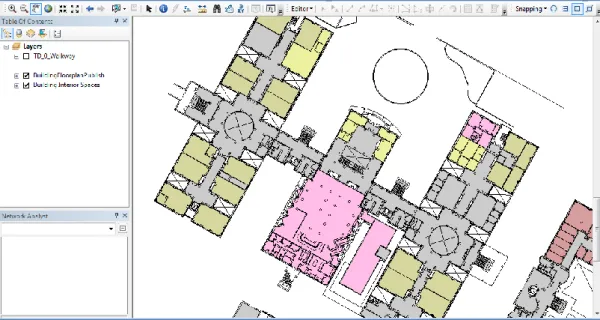
19 (BuildingInteriorSpace) layers and typing FLOOR=’0’, only the 0 floor of the buildings will be displayed. The work area will be ready for the manual digitalization doing zoom to the TD building as it shows the figure 3.
Figure 4: Work area ready to start the digitizing of indoor walkways
With the work area ready to work on it, the manual digitizing of the navigable routes inside the building is possible using the editor toolbar and drawing lines over the building layers. Using snapping toolbar, linear features have been connected by ending vertices of the previous line with the new one.
Once the digitization process has been ended, the data preparation starts. With the aim of make easier the population of data, a join data of based on spatial location of the linear feature class from the BuildingInteriorSpace layer is executed. The reason of this is that the layer of interior spaces has a lot of information useful for the attributes of the linear features classes such as Building Name, Floor, SpaceID (Number ID of each room) and Description of the space. Carrying out the spatial join, each line acquires the attributes of the polygon on which is located.
Continuously, a set of fields with their corresponding attributes have been added to the attribute table of the linear features class. The fields without
20 relevance are deleted and new fields needed have been added like in the Outdoor Network.
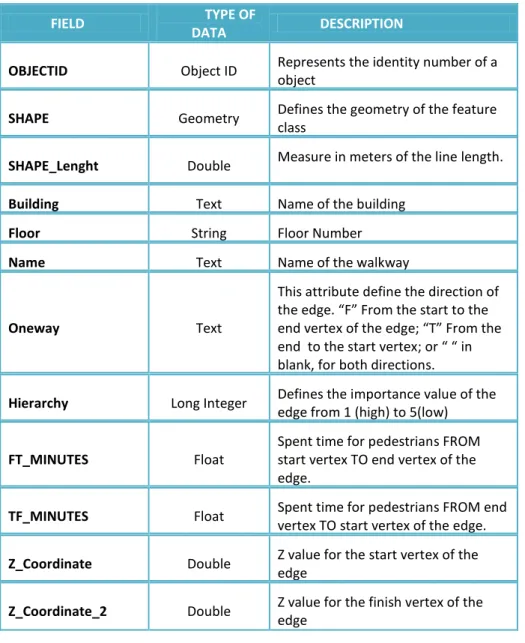
The result fields, data type and description of the attribute table of the Indoor walkways feature class is illustrated in the next table.
FIELD TYPE OF
DATA DESCRIPTION
OBJECTID Object ID Represents the identity number of a object
SHAPE Geometry Defines the geometry of the feature class
SHAPE_Lenght Double Measure in meters of the line length. Building Text Name of the building
Floor String Floor Number Name Text Name of the walkway
Oneway Text
This attribute define the direction of the edge. “F” From the start to the end vertex of the edge; “T” From the end to the start vertex; or “ “ in blank, for both directions.
Hierarchy Long Integer Defines the importance value of the edge from 1 (high) to 5(low)
FT_MINUTES Float
Spent time for pedestrians FROM start vertex TO end vertex of the edge.
TF_MINUTES Float Spent time for pedestrians FROM end vertex TO start vertex of the edge. Z_Coordinate Double Z value for the start vertex of the
edge
Z_Coordinate_2 Double Z value for the finish vertex of the edge
Table 4: Fields, Data type and Description of the Indoor feature class attribute table.
21 The population of each field will follow the premises listed below:
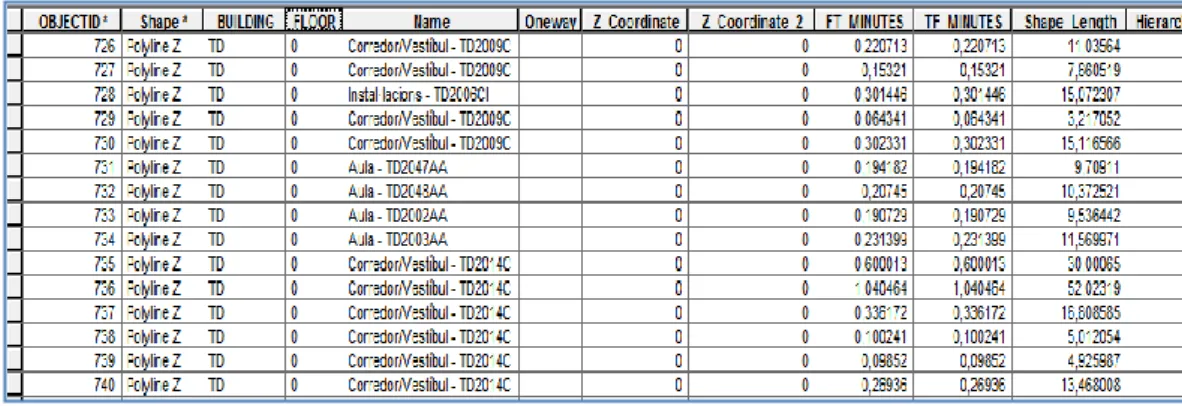
- BUILDING: Building name. This field was created and populated in the spatial join process. For this building all the rows will have the same name ‘TD’.
- FLOOR: Also, this field was created and populated in the spatial join process. The row values will be 0 because the Zero floor is being implemented.
- Name: Edge name. This field will be employed to create route directions. This field has been created using two fields of the Building Interior Space layer SPACEID (Room code) and DESCRIPTION (Information about the room or space). For instance, if the digitized line would be located in the corridor TD2009CP, using the Field Calculator and typing; Name = *DESCRIP++” - “+*SPACEID+ the Name field is filled with a text like Corredor/Vestibul – TD2009CP.
- Oneway: As in Outdoor Network, pedestrians can walk in any direction. So, generally, the Oneway fields will be in blank (“ “) determining edges of both directions. However, in case of edges crossing emergency exits used for emergency evacuations of buildings, these are described like edge of oneway.
- FT_MINUTES and TF_MINUTES: The spent time for pedestrians has been calculated assuming an average speed of 3km/h. The formula to obtain this value is:
FT_MINUTES= SHAPE_Lenght*60/3000
However, the FT_MINUTES values for elevator ways have been calculated differently assuming an average speed of 6km/h.
- Z_Coordinate and Z_Coordinate_2: The assignation of the Z values for this building has been assuming a height value of 4 meters for each floor, starting for the plant floor with a value of 0 meters. Consequently, all the rows of these fields in the Zero floor feature class will be populated with 0 meters.
- HIERARCHY: The hierarchy values for the walkways of the buildings have been filled with a value 5. It tries to avoid routes solutions crossing the building interiors when a route between two exterior points is solved.
22 At this moment, the preparation of data for the Zero Floor of the TD building has been done and the attribute table of this feature class looks like in the figure 4.
Figure 5: Attribute table view of the TD Zero floor
The ESTCE Docent building has four floors. So, the next step is continuing with the digitizing of the remaining floors following the procedure realized for the plant floor. In order to project the navigable routes for all the different floors of the building, Z coordinate and Z_coordinates_2 of line vertices were modified accordingly to the floor elevation.
Once the building floors are digitized and their fields of the attribute table are filled, the connection between floors has to be implemented. A set of linear feature classes with Z geometry have been created to represent the stairs and the intermediate floors.
In total, eight stairs and four intermediate floors features classes have been created. The next step is to digitalize the walkways over the stairs and intermediate spaces with the same methodology used for the building floors.
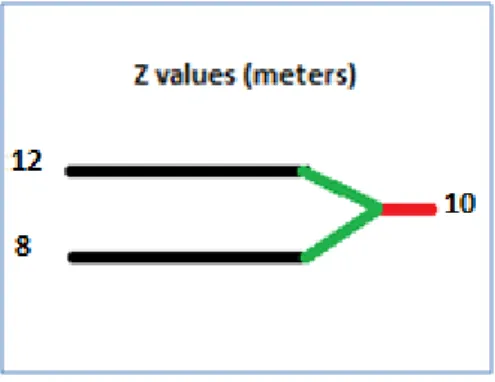
To populate the fields of Z_Coordinate and Z_Coordinate_2 in these Features classes a different approach has been taken. The stairs of the building connect floors with intermediate floors located between them. These intermediate floors acquire the average elevation of the connected floors. In the case of stairs Z_Coordinate and Z_Coordinate_2 differs. It’s consequence of the height variation
23 between the start and end vertices of the line. This height variation will be appreciated in the 3D view of the model.
Figure 6: Elevation approach for Stairs and Intermediate floors
The final attributes tables of the stairs and intermediates floors features classes are depicted in the figures below.
Figure 7: Attribute table of Stairs Feature Classes.
Figure 8: Attribute table for Intermediate Floor Feature Classes
Finally, the last step to achieve the physical network of the building is to employ the Merge tool from Data Management folder in ArcToolbox to combine all the created feature classes in a single feature class called TD_BuildingFloors_Merge.
24 The same procedure used to obtain the TD building physical network has to be followed for the remaining buildings.
3.6 Converting 2D features to 3D
The 3D geometry model serves primarily for a visualization aid. In this part of the project, the features classes Outdoor and Indoor Network have been converted to a 3D feature classes. It is achieved by the Feature to 3D by Attribute tool located in the 3D Analyst tools folder of ArcToolbox.
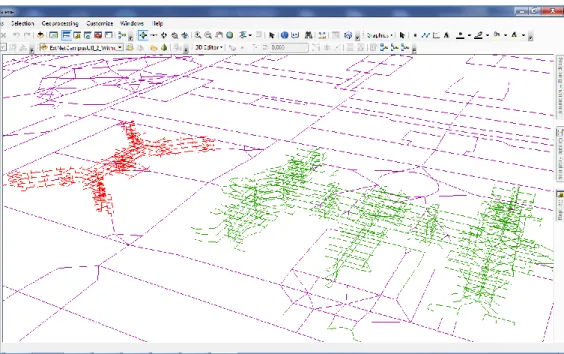
The new 3D feature classes called Outdoor Network 3D and Indoor Network 3D have been added to the table of contents of ArcScene application. The 3D visualization of those 3D features classes are depicted in the figure 8.
Figure 9: 3D view of the Outdoor and Indoor Network
Previously, the digitalization of the elevator ways wasn’t possible because ArcMap works in two dimensions. At this moment, using the editor toolbar is possible to draw the elevators ways have been and fill their attribute fields with the corresponding data.
Once all the physical networks of the UJI building are implemented, converted to 3D and their elevator ways are digitized on them, the Merge tool has been
25 employed to combine all of them in a single features class named Indoor_Network. It will make easiest the future creation of the 3D network dataset, in which only two feature classes will be used one for the Outdoor Network and other one for Indoor Network.
3.7 Network Dataset Creation
The network dataset can be thought of as the logical network, which does embed the topological relationships needed to perform network analyses (GISC, 2009).
In this phase of the project, a Network Dataset has been developed based upon the manually created topological model features, consisting of the navigable routes of the campus and the building interiors, and converted to 3D feature classes.
ArcCatalog application has been employed to generate the UJI Network Dataset. Doing right click in the feature dataset in which is located the Outdoor and Indoor Network 3D features class, the option of creating a new Network Dataset is available.
The Network Dataset wizard allows selecting the features classes and modeling turns, connectivity, elevation and directions of the network features. Also, it’s possible to specify the attributes for the Network dataset.
In the case of the UJI Network:
- Outdoor and Indoor Network 3D feature classes have been selected. - The model of turns isn’t selected.
- The edge connectivity will be for any vertex.
- Using Z Coordinate Values from Geometry has been generated the elevation of the network features.
26 - The UJI Network attributes are Length (measure of the lines), Minutes (Pedestrian Time), Oneway (Restriction) and Hierarchy.
- The Walkways directions have been established for the Name field of Outdoor and Indoor Network.
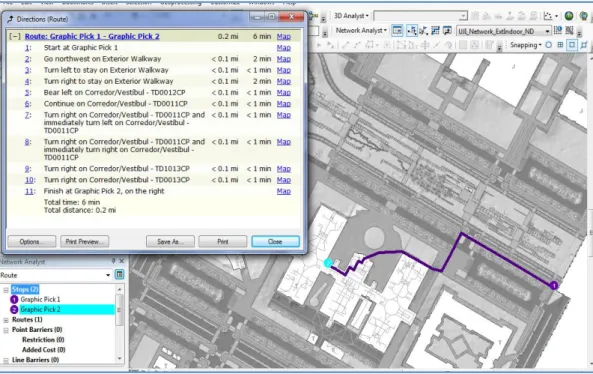
With the Network dataset created, a test of how the network works has been realized in ArcMap. In this case the 3D visualization isn’t possible because ArcMap doesn’t allow tridimensional view. The figure 9 shows the results of the test.
Figure 10: Routing solution for the UJI Network dataset showing route directions.
3.8 Designing Models with the Model Builder
Model Builder is an ArcGIS application used to create, edit, and manage models. Models are workflows that string together sequences of geoprocessing tools, feeding the output of one tool into another tool as input. Model Builder can also be thought of as a visual programming language for building workflows. (ESRI)
27 The aim of this project is to offer a spatial network to developers so they can use it to develop web mapping or mobile applications by geoprocessing services built previously during the development of this project. The management of models for geoprocessing tools like solving routes, service areas, closest facilities and location/allocation of facilities has been needed to achieve this aim.
The Network analyst tools from the ArcToolbox have been employed in the developments of the different models.
There are five models to solve geoprocessing problems in different environments:
o A Routing Model for the calculation of the best route between two points or a set of points.
o A Closest Facility Model for analyzing the nearest facility or facilities from a determined location on the network.
o A Service Area Model for finding the services area around a location on the network.
o A Location/Allocation Model for analyzing the best location for a new facility within the UJI Spatial Network.
o An Emergency Evacuation Model for studying evacuation plans for each building of the University Campus.
Routing Model
The objective of the development of this model is to achieve the calculation of the best route within the university campus, including paths inside the building. It has created for pedestrian paths allowing users chose routes for handicapped or not handicapped persons. In this manner, the routes will be calculated avoiding the possible obstacles on the path for handicapped persons or not, depending of the selection of the user. However, the routes crossing emergency exits always are avoided; consequently, the paths will be solved crossing main entrances of the buildings.
28 In the development of this model some premises have been chosen. Firstly, the impedance cost attribute selected for the calculation is the pedestrian time (minutes). Trying to find the optimal route between more than two points, the reorder of stops is allowed preserving the start and end points. On the analysis, the hierarchy is used and the oneway restriction is active. Also, additional restrictions such as the emergency exits are added in the model. It has been added creating, previously, a new point feature class and digitizing the emergency exits on it. Then, the emergency exits have been added like restrictions using the Add location Tool on the model builder. In the other hand, a point features class has been created to digitalize on it the possible obstacles on the path for handicapped persons, such as stairs or steps. Also, it has been added to the model like restrictions with the Add Locations tool. A Boolean variable called ‘Are you handicapped?’ has been created to allow users choosing the whished route calculation. This Boolean variable is used like precondition for adding handicapped obstacles on the model.
An important tool used in the model is the Add Locations for input locations. This tool determines the way to add stops on the map for the subsequently route solution. A set of operation are defined in the Input Locations properties, such as selecting the variable contains like a single value, the data type like a feature set and importing a points schema from a point feature class designed previously. This configuration allows to users to add locations doing click in any space on the map. Also, the developers of mobile applications could add locations only giving a set of coordinates to the service.
Once the add location process finishes, the Solve tool is added to the model for running the geoprocessing tool, it returns the route solution as a layer.
Directions tool is executed in the model too. This tool is linked with the resulted layer from the Solve tool, and it returns a XML file with the route directions information and it’s saved in a directory. It can be interpreted and used by the web mapping and mobile developers with the aim to show directions in their applications.
29 The workflow of the routing model is illustrated on the illustration 2 in the attachments section.
Closest Facility Model
The aim of this model is to find the nearest facility or facilities such as restaurants, medical centers, libraries and whatever facility possible to find within the university campus, from a specified location on the UJI Spatial Network. Also, it pretends to allow users add by themselves the location from which begin the facilities searching, select the facility type and number of facilities to find; and choose between route solutions for handicapped or not handicapped persons.
Some premises have been taken for the configuration of this model. As in the routing model, the impedance cost attribute will be the pedestrian time (minutes). Also, the hierarchy attribute is used for solving the routes. The oneway restriction is activated and U-Turns are allowed because this model is created for pedestrians.
The selection of facility type by users is achieved following the next steps. A new variable as string, a facilities layer, Calculate Value and Select Layer By Attribute tools are needed. Firstly, the string variable called ‘Facility’ is created, and a standard facility type is tipped on it like ‘Restaurants / Eating Establishment’. Continuously, in Model Properties from Model Tab of Model Builder, the ‘Facilty’ parameter is configured as a value list and all the facility types are tipped. The result of this procedure is a dropdown with the possible facility types to choose. The next step is to create a SQL query to select the wished facility type for the closest facility solver using Calculate Value. This tool uses the Facility parameter chosen by users and returns a SQL expression. Select Layer By Attribute tool uses this SQL expression and the facilities layer to create a single layer including the facilities chosen on the dropdown Finally, the created facilities layer is added to the model as Facilities employing Add Location tool.
Many tools have been employed to implement the model. Some of them equals than the tools used in the routing model, such as in the procedure for
30 choosing route solutions for handicapped or not handicapped persons, adding stops and restrictions; and executing the model to obtain the route solution and Directions.
The workflow of the Closest Facility model is showed on the illustration 3 in the attachments section.
Service Area Model
The main goal of this model is to obtain a region inside the university campus that includes all accessible streets that are within a specified impedance (minutes or meters) around a location. It can be used to identify the quantity of facilities, population, area or anything information more within the region calculated. The model allows users to add manually the point or points around which the accessible streets within a default break values (i.e. 5 or 10 minutes) are calculated. Also, they can define one or more default break values for the generation of service area polygons. Even, the service area solver can returns solutions for handicapped or not handicapped persons.
The premises chosen for the model are: The impedance attribute is pedestrian time (Minutes), Travel From Facility, it indicates that the services area starts form the location added by user); the standard default break value will be 5 minutes, however it has been model as parameter and the user can define one or more default break values to obtain the corresponding polygons around the location. Hierarchical service areas only generate generalized polygons, not detailed polygons. Owing to detailed polygon models the service area more accurately, it’s selected for the polygon generation. Therefore, the use of hierarchy in the model is avoided. On the restrictions section, oneway restriction is selected and U-Turns are allowed.
The possibility to choose solutions for handicapped or not handicapped persons is implemented by the same way than routing and closest facility models.
31 The workflow of the service area model is depicted in the illustration 4 on the attachments section.
Location-Allocation Model
The objective of this model is to help users to analyze which facility location from a set of facilities is the best allocation based on its potential interaction with demand points. It can answer questions such as which is the best emplacement to allocate a new restaurant in the university campus.
The Location-Allocation solver allows users to define model parameters such as the number of facilities to find, the Location-Allocation problem to solve (i.e. Maximize Attendance), and an impedance cutoff value.
A feature class has to be created as a demand point layer. In this feature class are digitized the building centroids, in which have been added population data about students and university personal of each building. This data has been invented taking account the number of students of the university and doing an approximation of the possible workers for each building. Then the feature class has been added to the model as demand points using Add Locations tool.
The addition of facilities manually by users, and the execution of the model have been implemented using the same tools than the models described above.
The premises taken in this model are: The impedance attribute will be Pedestrian time (Minutes), the calculations will be solved from Demand points to Facility.
The workflow of the Location-Allocation model is depicted in the illustration 5 on the attachments section.
Emergency Evacuations Model
The aim of this model is to offer an optimizing emergency management of buildings of the University Jaume I. It allows to property personalities and fight
32 fighter to perform better emergency planning, analysis and modeling of emergency scenarios in the university buildings
This model has been created as a Closest Facility solver where all the exits, emergency exits as well main entrances, have been included in the model as Facilities, employing Add Locations tool. Users can add incidents manually like in the models described above. In this case, the incident will be the location from which starts to find the closest exit.
When an emergency situation occurs, the use of elevators is forbidden. For this reason, the entrances to elevators have been digitized on a new point feature class. Trying to find route solutions avoiding elevator ways, it has been added like restrictions in the model by the same way of the others models.
The premises taken for this model are: the impedance attribute is pedestrian time (Minute) for quickest route solutions. The route returns a solution from incident to facility (closest exit). And the oneway restriction is not activated in this model because pedestrians can walk down any path.
The workflow of the Emergency Evacuation model is showed in the illustration 6 on the attachments section.
3.9 Visualization process
Arc Scene is the application employed for the 3D visualization of the spatial network of the University Jaume I, and the solutions for geoprocessing tools created using Model Builder in previous sections.
Adding the Outdoor and Indoor Network 3D feature classes in the table of contents is possible to see the 3D view like in the Figure 8. However, the visualization of the route solutions of the previous created models is possible running the models in ArcScene. When a model is executed, it shows a window where the stops for the whished route are ordered. Continuously, the stops have to be located in some location of the 3D view of the spatial network previously
33 opened. Once the points have been located, doing click OK the model returns the route solution as it’s depicted in the figure 13.
Figure 11: 3D view of a route solution for the handicapped persons.
In the solution, it’s possible to observe how the route has avoided handicapped obstacles like stairs.
The directions window isn’t visible in ArsScene. A XML file is returned by the model and it’s saved in a directory.
3.10 Publishing geoprocessing services.
Geoprocessing services are the powerful analytic capabilities of ArcGIS to the world-wide web. These contain geoprocessing tasks, that is to say, geoprocessing tools running on a server and their execution and outputs are managed by the server. When a geoprocessing result is shared as a geoprocessing service, a geoprocessing task is created from the tool that created the result.
The last phase of the project is the publication of geoprocessing services into the ArcGis Server of the university. An administrator or publisher connection to ArcGIS Server is needed to carry out this task.
34 During the development of this project five geoprocessing tools have been created, these are: calculation of routes, services areas, location-allocation, closest facilities and emergency evacuation finding the closest exit. To publish a tool, is needed to run it in ArcScene. Executing the tool, a result has been created in the Results window. Doing right-click in the result, the option to Share As appears. Geoprocessing service has to be selected for opening a wizard that defines the service and the initial task within the service. This initial task is the same as the tool that created the result. Each result becomes a task within the service.
Five different geoprocessing services have been published, one for each geoprocessing tool created in the chapter 3.8. All of them are available in the ArGIS server of the University Jaume I.
A development of a simple web application has been realized using ArcGIS Viewer for FLEX with the aim to show the possibility to develop web mapping application and how the geoprocessing services created work.
35 4. CONCLUSIONS
4.1 Results
The spatial network developed in this project aimed to create a useful service for the future studies and development of web mapping and mobile application of the University Jaume I. The research has been focused upon utilizing the network analysis functions in ArcGIS 10 .1 Desktop to perform a 3D network analysis. The main attention has been centered on the development of a 3D model with an Outdoor and Indoor Network of pedestrian navigable routes, the creation of geoprocessing tools which calculate routes, services area, closest facilities and location-allocation of facilities, and the publication of geoprocessing services into an ArcGIS server from the geoprocessing tools created previously.
The most difficult and laborious processes have been the construction of the Outdoor and Indoor physical networks and their data preparation. The Network dataset creation, the implementation of geoprocessing tools and the publication of these tools in ArcGIS server were complicated, but not so much laborious like the previous steps.
The solution is well organized with use of a geo-database for the management of the model and network features that allows an easy understanding of the structure for users of any GIS experience. However the network analysis element requires an individual of adequate experience and good familiarity with the ArcGIS software suites.
4.2 Future works and improvements
The developed project is an useful tool that offers infinity of study possibilities on the university campus. However, the fully digitizing of the navigable routes inside the buildings has been impossible because not all the buildings are digitalized in the ArcGIS Map Package provided by INIT. So a recommended future improvement is the digitalization of the remaining buildings when their digitizing would be ready.
36 Modeling the directions window could be another future enhancement in the spatial network. It offers to add pictures, symbols and more possibilities in the routes directions. For instance, if the pedestrian is crossing a door, a door symbol could be appearing in the direction indication.
Also, the modeling of time could be a future work. The time model allows add restrictions at determinate time of the day. For example, the schedule of opened and closed entrances doors of buildings could be defined. It determines the period of the day in which a route solution could be solved crossing determined building entrances.
The improvement of the Location-Allocation geoprocessing service will be required. The modification of the supposed population data for the real students and workers number of each demand point is needed for accurate solutions.
Actually, there is a project called UJI Place Finder carrying out at the university. It consists in the development of a mobile application used to find determinate places within the university campus, like professor offices or classrooms, searching by name, title, telephone number or room code. This mobile application could use the geoprocessing tool for routes calculation offering to the users a routing service. The developer only should to assign coordinates for points on the geoprocessing services, and it solves the route and shows the path to arrive to the searched location.
Using the published geoprocessing services, applications for finding the closest facilities within an area determinate by walk time; and service areas calculations could be developed. Also could be possible a study of the better emplacement of a new facility, for example a new cafe, using the location/allocation geoprocessing service.
Other possible future work is to join the UJI Spatial Network with the road network of Castellón. It should be develop as a multimodal network combining driving, cycling (bicicas), urban transportations and pedestrian routes achieving routes solution from any location of Castellón to any location within the UJI.
37 All the same, developers can start employing the UJI spatial network and its geoprocessing services for the development of their web mapping or mobile applications from this moment.
38 5. BIBLIOGRAPHYC REFERENCES
1. GISC, 2009. University of California, Berkeley.[online] Available at: <http://www-laep.ced.berkeley.edu/classes/tool_time/Network_Analysis/network_analysis.html> 2. Ger J. Devlin, Kevin McDonnell, Shane Ward; “Timber haulage routing in Ireland: an
analysis using GIS and GPS”; Journal of Transport Geography, Volume 16, Issue 1, January 2008
3. J.Thill, T.H.D.Dao, Y.Zhou; “Travelling in the three dimensional city application in route planning, accessibility assessment, location analysis and beyond”; Department of Geography and Earth Sciences, University of North Carolina at Charlotte, Charlotte, NC 28223, United States ; Journal of Transport Geography, Volume 19, Issue 3, May 2011
4. Smita Sengupta ;“GIS-based Smart Campus System using 3D Modeling”;. GISE Advance Research Lab.IIT Bombay, Powai ; January, 2011.
5. C.Upchurch, M. Kuby, M.Zoldak, A.Barranda; “Using GIS to generate mutually exclusive service areas linking travel on and off a network”; Department of Geography, Arizona State University; March 2004
6. T.Abrahamsson; “Estimation of Origin-Destination Matrices Using Traffic Counts – A Literature Survey”; International Institute for Applied Systems Analysis of Laxenburg, Austria. IR-98-021/May.
7. Mandloi.D and Thill.J;”Object Oriented Data Modeling of an Indoor/Outdoor Urban Transportation Network and Route Planning Analysis”. Geospatial Analysis and Modeling of Urban Structure and Dynamics GeoJournal Library, Volume 99, 2010, pp. 197-220.
8. Gerard Rushton ;“Use of Location-Allocation Models for Improving the Geographical Accessibility of Rural Services in Developing Countries”; International Regional Science Review; Volume 9, nº 3 December 1984.
9. Birgi Elias “Pedestrian Navigation - Creating a tailored geodatabe for routing”; ikg-institute of Cartography and Geoinformatics, Leibniz University of Hannover.
10. Network Analyst tutorial available at: <http://resources.arcgis.com/en/home/>
11. Sniedovich, M. (2006) "Dijkstra’s algorithm revisited: the dynamic programming connection"; Journal of Control and Cybernetics 35 (3): 599–620.
39
12. Chia-Hao Wu and Liang-Chien Chen,.”3D Geo-Information for the rescue route analysis of inner buildings”. National Central University, Taiwan; 2007; Available at