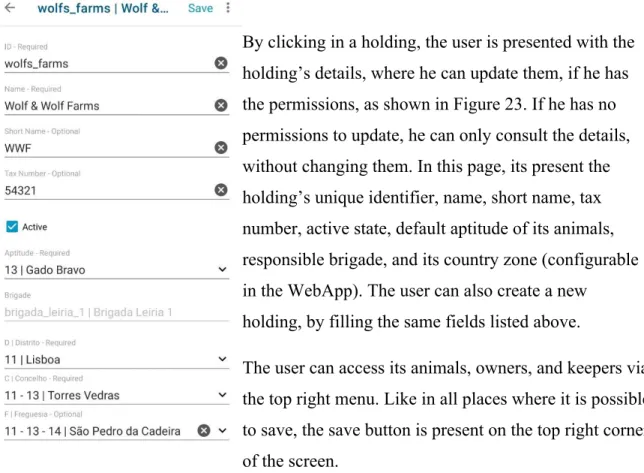
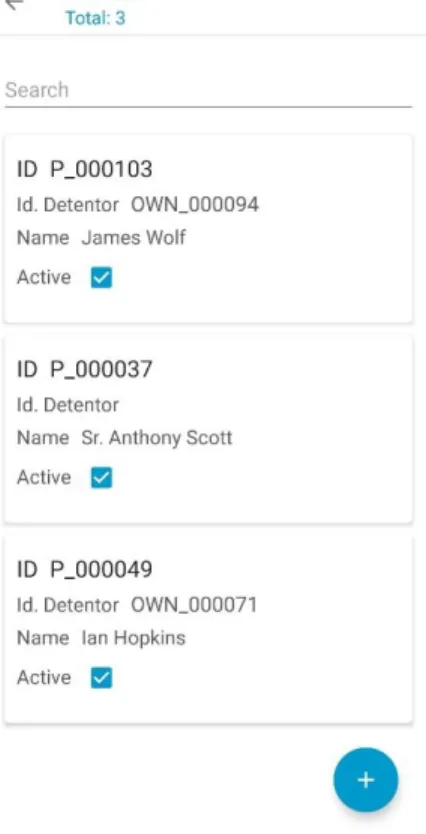
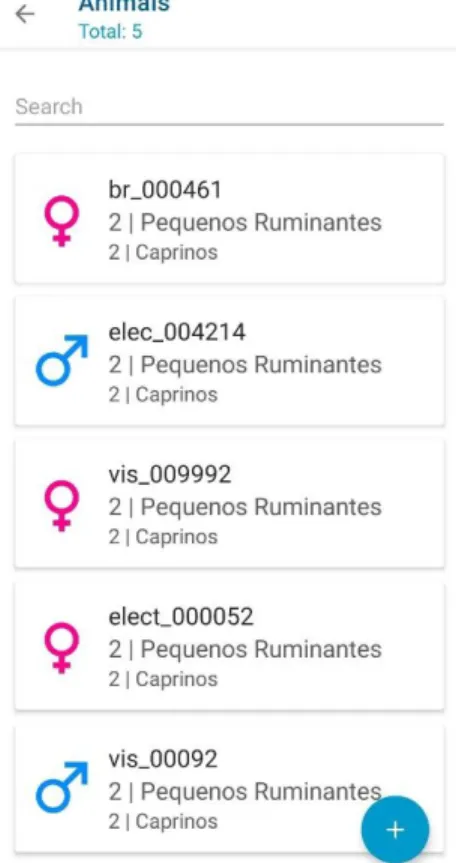
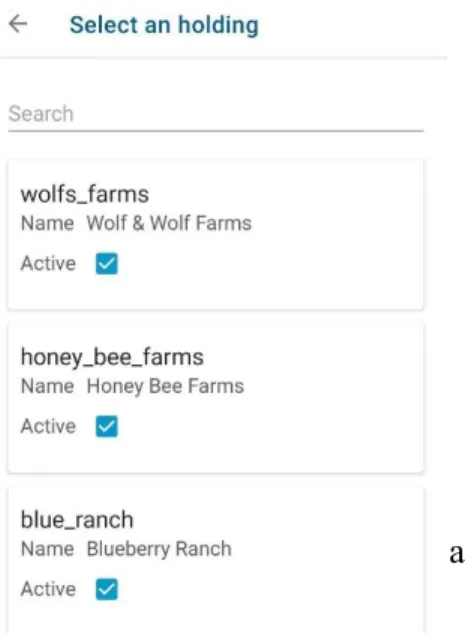
– a case study mobile implementation based on a
generic architecture for livestock management
Master’s degree in Computer Engineering - Mobile Computing
João Pedro Dias da Rosa
– a case study mobile implementation based on a
generic architecture for livestock management
Master’s degree in Computer Engineering - Mobile Computing
João Pedro Dias da Rosa
Internship Report under the supervision of Professor Catarina Isabel Ferreira Viveiros Tavares dos Reis, PhD in the Computer Science Department of the School of Technology and Management of the Polytechnic of Leiria, and José Góis from Digidelta Software. Leiria, July of 2020This internship report is original, made only for this purpose, and all authors whose studies and publications were used to complete it are duly acknowledged. Partial reproduction of this document is authorized, provided that the Author is explicitly mentioned, as well as the study cycle, Master degree in Computer Engineering - Mobile Computing, 2019/2020 academic year, of the School of Technology and Management of the Polytechnic of Leiria.
First, I would like to thank my company, Digidelta Software, for allowing me to do the internship in a project from the ground, giving me freedom to test and choose technologies and ideas. I would like to thank Professor Catarina Reis, for accepting to be my advisor, for the continuous support, motivation, and advice along this thesis. Last, but not least, I would like to thank my friend and colleague, José Góis, for his continuous help and interest, for showing me that any time is a good time to learn, and that knowledge is better when is shared.
In a constantly growing market, the ability to provide quick, reliable solutions is becoming more and more important. Companies want to spend less time build the base of the project and more time in what makes it unique, perfecting it to the client’s wishes. It is not surprising that a company ends up reusing the base of an old project and adapting it to new ones. As this goes on, it becomes clearer that a base project with a well-defined generic architecture would benefit the companies that do this. Based on previous applications developed by the company, a set of requirements were defined that would need to be included in the generic architecture, such as offline mode, communication with RFID devices, and synchronization. This thesis purposes a solution, based on the recommended guidelines, of how this can be achieved, the technologies it uses, and how they interact with each other to achieve a flexible, adaptable solution. Keywords: Android, Generic Architecture, Kotlin, Mobile
Originality and Copyright... iii
Acknowledgments...iv
Abstract... v
List of Figures... ix
List of Tables...xii
List of Abbreviations and Acronyms...xiii
1. Introduction... 1
2. Internship Programme... 2
2.1. Characterization of the company... 2
2.2. Methodology... 5
2.3. Preliminary study – Technology Selection...8
3. Related Work...10 4. Core Architecture...15 4.1. Presentation Layer... 17 LiveData... 18 ViewModel... 18 Data Binding...19 Material Design 2... 20 Navigation... 21 Dependency Injection with Dagger 2... 22 Devices Library... 22 4.2. Business Layer... 23 RxJava and RxKotlin...24 4.3. Data Layer... 25
DAO...26 Coroutines...27 Retrofit...28 Work Manager...29 4.4. Requirements...32 4.4.1. Functional requirements...32 4.4.2. Non-functional requirements... 33 5. DLITS...35 5.1. Login...35 5.2. Dashboard... 37 5.3. Holdings... 39 5.4. Owners/Keepers... 41 5.5. Animals...42 5.6. Services...44 5.6.1. Setup...44 5.6.2. Service...46 5.6.3. Action types list...47 5.6.4. Intervened animals... 49 5.6.5. Non-intervened animals... 51 5.6.6. Connecting to devices... 52 5.6.7. Reading identifications...53 5.7. Summaries... 54 5.8. Synchronization...56
6. Critical analysis and improvement measures proposal... 57
7. Conclusion...59
Appendix A - Technology Selection... 68 Appendix B - Kotlin vs Java... 72 Appendix C - Functional Requirements – User Stories and Acceptance Criteria 85 Appendix D – Usability Tests Questionnaire... 93
Figure 1 - Organizational chart of Digidelta Software... 3 Figure 2 - a- Electronic identifiers b - RFID reader... 5 Figure 3 - Gantt Diagram... 7 Figure 4 - Catching a click event in Java... 13 Figure 5 - Catching a click event in Kotlin... 13 Figure 6 - MVVM... 15 Figure 7 - Architecture diagram... 16 Figure 8 - One-way data binding...19 Figure 9 - Two-way data binding... 20 Figure 10 - Navigation example... 21 Figure 11 - A Dagger2 module...22 Figure 12 - Example of a DAO... 27 Figure 13 - Coroutine example...28 Figure 14 - AnimalApi example...28 Figure 15 - AnimalWorker dummy implementation...30 Figure 16 - Request using AnimalWorker...30 Figure 17 - Login...35 Figure 18 - Select entity/brigade... 36 Figure 19 - Dashboard... 37 Figure 20 - Seeding database...37 Figure 21 – Main side menu... 38 Figure 22 - Holdings list...39 Figure 23 - Holding's details... 40 Figure 24 - Owners list... 41 Figure 25 - Owner's details...41 Figure 26 - Animals list... 42 Figure 27 - Animal's details...43
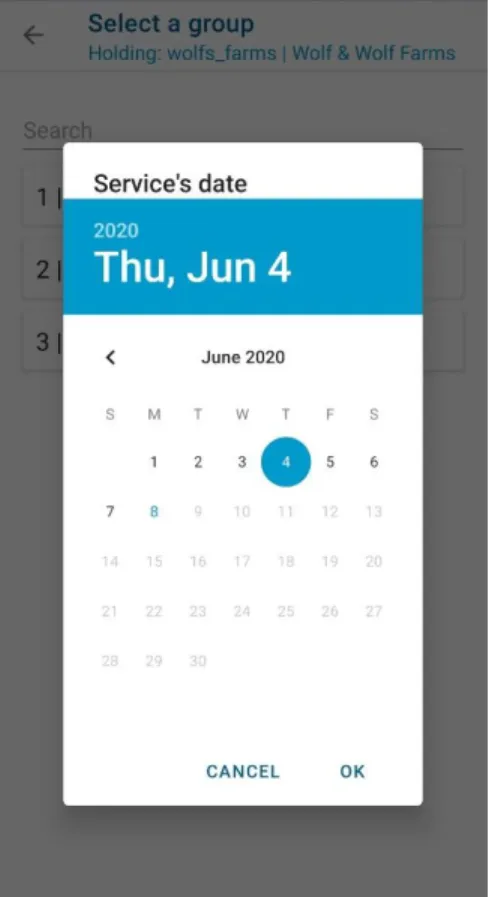
Figure 29 – Select the service’s group... 45 Figure 30 - Select the service's date... 45 Figure 31 - Ask user if he wants to continue the service...46 Figure 32 - Action types list... 47 Figure 33 - Incompatible action types... 48 Figure 34 - Options to intervene animals... 49 Figure 35 - Actions being applied to animal... 50 Figure 36 - Actions available to apply to an aninal...50 Figure 37 - Non-intervened animals...51 Figure 38 - Selecting animals to intervene... 51 Figure 39 - Devices available to connect... 52 Figure 40 - Asking to create an animal from reading...53 Figure 41 - Summaries... 54 Figure 42 - Services performed... 55 Figure 43 - Notification of data being downloaded to the application...56 Figure 44 - A class in Java... 73 Figure 45 - A class in Kotlin... 73 Figure 46 - Initialization of Person using Java... 74 Figure 47 - Initialization of Person using Kotlin...74 Figure 48 - Constructors in a Java class... 75 Figure 49 - Constructors in a Kotlin class... 76 Figure 50 - Accessing a resource from the GUI layout using Java... 77 Figure 51 - Accessing a resource from the UI layout using Kotlin...77 Figure 52 - Catching a click event in Java... 78 Figure 53- Catching a click event in later versions of Java...78 Figure 54- Catching a click event in Kotlin... 78 Figure 55- Java method that throws an exception... 79 Figure 56 - Using a method that throws an exception in Java...79 Figure 57 - Ternary operator in Java... 80
Figure 59- If else with extra operations...81 Figure 60- An extension in Kotlin...81 Figure 61- Usage of an extensions in Kotlin... 82 Figure 62- Java delegation...82 Figure 63- Safe call in Kotlin... 82 Figure 64- Non-null assertion in Kotlin... 83 Figure 65- Smart cast in Kotlin... 84 Figure 66 – First page of the usability questionnaire... 93 Figure 67 – Dashboard page of the usability questionnaire... 94 Figure 68 - Holdings page of the usability questionnaire...95 Figure 69 – Owners/Keepers page of the usability questionnaire... 96 Figure 70 – Animals pags of the usability questionnaire... 97 Figure 71 – Services page of the usability questionnaire... 98 Figure 72 – Summaries page of the usability questionnaire...99
API Application Programming Interface BLE Bluetooth Low Energy CRUD Create, Read, Update and Delete CSS Cascading Style Sheets DAO Data Access Object DLITS Digidelta Livestock Identification and Traceability System ESTG School of Technology and Management FAO Food and Agriculture Organization of the United Nations GPS Global Positioning System GUI Graphical User Interface HTML Hyper Text Markup Language HTTP Hypertext Transfer Protocol ICAR International Committee for Animal Recording JSON JavaScript Object Notation JVM Java Virtual Machine MVVM Model-View-ViewModel OS Operating System PoC Proof of Concept RFID Radio-Frequency Identification URL Uniform Resource Locator UX User Experience
1.
1. Introduction
The complexity of creating reusable systems is something that has been acknowledged by designers and engineers for a long time. Although the process of designing something reusable is expensive, both in time and in money, is it the key speed up future developments of similar systems. This design is even more challenging in mobile applications, as the technologies and guidelines are being built and updated every day, and an architecture can become obsolete in a not long time. As the world becomes more and more mobile, the focus in mobile development is increasing, speeding up this evolution of technologies and guidelines. This thesis will show how a generic, native Android architecture was created, which technologies were used, their purpose, and how they interact with each other to achieve the purposed goal. A library to abstract the communication with RFID devices was also developed, which will also be used in future applications. This thesis is divided in three major areas: the introduction to the thesis, company where the internship was performed, and the internship programme; the research performed previous to the official start of the internship, where a short study of the possible technologies to use and target market was done, the technologies used and how they interact with each other, and the final result; the critical analysis, where it is reported what went well, what went wrong, what can be improved in the future, and lastly, the conclusion of the thesis and the internship. The initial proposal was to develop a native Android application to support brigades working in the field using RFID devices. The application is called Digidelta Livestock Identification and Traceability System mobile (DLITS mobile), the mobile version of DLITS, supporting, amongst other functionalities, offline mode, interaction with RFID devices, intervention of animals, and automatic synchronization. The proposal also included the development of a generic architecture that would, not only, be used in this mobile application, but also serve as base for future similar Android projects, speeding up the development and delivery of said projects.2.
2. Internship Programme
The internship proposal was signed-off by Digidelta Software and required the
development of a mobile application for Android or iOS, using, either a native or a cross-platform approach to its development. The application’s name is DLITS mobile and is intended to help brigades identify animals and perform actions to them, providing offline mode, automatic synchronization, interaction with RFID devices, amongst others.
2.1.Characterization of the company
The internship took place in Digidelta Software [1]. Digidelta Software is a multi-disciplinary software development and consulting firm with long-time experience in creating tailor-made innovative solutions for various business sectors, with special focus on applications for animal health, breeders, fund management communities, and livestock management.
Digidelta Software was created in 1989, in Torres Novas. Its first major project, Programa Informático de Saúde Animal (PISA), was an information system capable of
managing the livestock of Sociedade de Agricultores de Torres Novas. In 1990, the Ministry of Agriculture started using PISA, and after an initial test, a new version was created and eventually expanded through the entire country, making it the official livestock health system in Portugal [2]. After several name changes, the company eventually settled in Leiria under the current name, Digidelta Software.
Digidelta Software
aims to be a worldwide reference in the development of tailor-made information system regarding livestock management. To fulfil this, Digidelta Software develops information systems using innovative methodologies and technologies
for state and private entities in a market without borders.
Digidelta Software can be divided in seven departments, as seen in the organization
chart in Figure 1.
Although each department is responsible for a specific set of tasks, they all work together and constantly intercommunicate. Costumer support - Responsible for interacting directly with the customers. It serves as a filter and bridge between the customers and the developers, allowing the developers to work without as many interruptions and helping the customers in smaller tasks that do not require the interaction of a developer. This department is also responsible for preliminary usability tests before allowing actual clients to test the software. Developers - Responsible for the entire project development process since the requirement analysis to the delivery. Marketing - Responsible for promoting the company’s projects, finding new projects, and managing its image to the outside. Design - Responsible for designing mock-ups (which greatly reduce the development process time), improving the application’s user interface and user experience. Sales - Responsible for finding customers for already developed applications (such as Wezoot). Financial - Responsible for handling the company’s money, such as employee’s payments. IT Support - Responsible for providing and maintaining the infrastructure that the company uses, such as the hardware (computers, keyboards, servers, internet) and the software (such as Microsoft licences), allowing each department to focus on their respective tasks. As a developer, my main interaction was with other developers, either to help with business logic questions or opinions based on their experience on previous related projects. Since the project is not yet being tested by Customer Service or used by clients, my interactions with the Customer Service department was not as much as it would be otherwise. However, since they serve as usability testers and often know the concerns of clients, they were very important in the development in matters regarding the user’s usage of the application.
Digidelta Software’s clients can vary between small livestock owners and country’s
governments. Smaller clients usually use a common platform, shared by other small clients, while bigger clients, like country’s governments have tailor-made systems to fit their specific needs. Although most of its clients are in Portugal, Digidelta Software has
developed for other countries’ official entities, such has Morocco ( SNIT.maroc) and
Botswana (BAITS.botswana), amongst others.
To help keep track of the livestock, Digidelta Software’s systems interact with a lot of hardware. Understanding and working with such hardware is critical to the vast majority of the software development done at the company. Some examples are visual and electronic earrings, RFID scanners, scales, and animal sorting sleeves. Digidelta Software has a
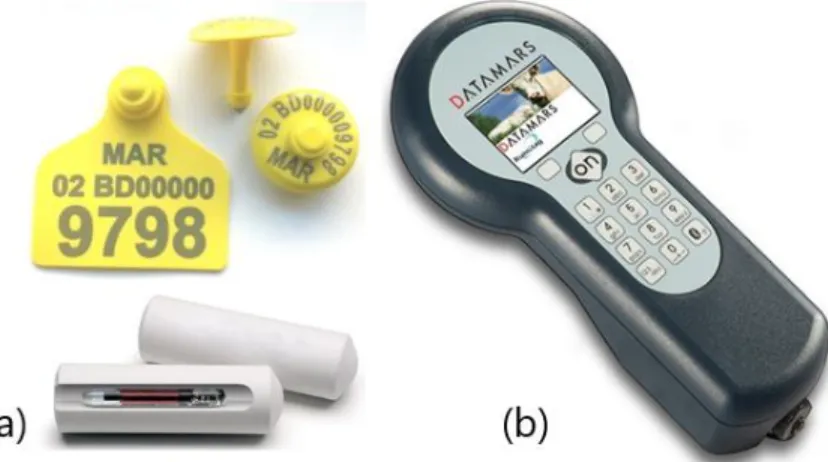
partnership with DataMars, a livestock management and animal health company that, amongst other things, supplies earrings and RFID scanners [3]. This partnership is helpful to allow Digidelta Software and DataMars to enter international grant funding, since most of the time they involve the earrings and scanners suppliers, such as the ones presented in Figure 2. This is helpful for both sides, since Digidelta Software provides the software, and DataMars provides the hardware. Identified as “(a)”, we can see electronic earrings (with a yellow color) that can be read with a RFID reader [4], [5]. Below the electronic earrings, we can see the ruminal bolus, a device ingested by bigger ruminants (such as cows) that stays in their stomachs. Like the electronic earrings, it can be read using a RFID reader. Recently Digidelta has been involved in multiple new projects. One of those projects is a system to digitalize the livestock markets, collecting business data to later inform of strategic decisions for trade and markets. It was tailor-made to Amfratech and named (by
the client) Mifugo Data (which means Livestock Data in Swahili) [6]. A WebApp and a mobile application were both developed. Digidelta Software has also been developing a tailor-made system to help manage maternities to produce clam larvae called Oceano Fresco (the final name is not yet assigned). The software will interact with sensors capturing temperature, salinity, phytoplankton levels, amongst others, and alert the staff to adjust the levels, or adjust them automatically if possible. Digidelta Software is currently a medium sized company. Everyday a world of opportunities rises, and the industry market is becoming more demanding than ever with new businesses appearing. To fulfil the ever-growing market requests, the company is growing with it.
2.2.Methodology
When it comes to requirements. the user must be able to list the holdings associated with the previously selected entity, register new holdings, and update existing ones. A holding is a local (such as a farm) that can have multiple owners (the people who own the holding), keepers (the people who take care of the holding and its animals) and animals, following the FAO and ICAR guidelines [7], [8]. The user must be able to check a given holding’s owners, keepers, and animals. When it comes to owners and keepers, the user must be able to list the ones related with a given holding, create new ones and edit existing ones. The user must be able to list the animals present in each holding, create new ones, and edit existing ones. As for services, the user must be able to register multiple actions to multiple animals at the same time, identifying the animals either manually or with RFID readers. The user must be able to consult previously made services and edit them if they are yet to be finished. The user should also be able to consult the summaries of the current session, that includes, amongst other things, the services made. The application must be able to work offline, saving the operations performed, except the login and entering an entity, which must be performed online. The application should regularly upload the user’s data to the remote API, so it becomes available to other users. Data relevant to the user should also be regularly updated so he uses up-to-date data.The application should be able to handle a high amount of data and users, while still performing well. The application should also be intuitive, allowing users to use it without much troubles. Lastly, the application should be easy to modify and adapt to different scenarios. The application’s goal is to be used both for online and offline scenarios. Amongst other things, the proposal required skills in Kotlin and Android, Swift and iOS, mobile cross-platform frameworks, and Git, as the source code versioning management system. One of the purposes of the internship was to develop a generic architecture to be adapted to future projects, speeding up the applications’ development process in the future. This necessity comes from having multiple applications with the same common requirements, difficulties, and functionalities, such has synchronization and integration with external devices. Finding a way to standardize these processes and use them in future applications will bring value to the company, far beyond the application’s value by itself. In the beginning of the internship, a preliminary version of the work plan was made. During the period of the internship and evolution of the work, the plan suffered minor adjustments reflected in the Gantt Chart presented in Figure 3. The first month of the internship was dedicated to the definition of the methodology where responsibilities were assigned, the Scrum artifacts and events were defined (Sprints, PBIs, Tasks, etc…) and the Git workflow was defined. The professional contact with previous academic courses where Scrum (and other software development methodologies) and Git were used, smoothed the integration in the team and in the process. It was only necessary to adapt the knowledge previously acquired to the company’s work methodology rather than learning everything from scratch. This phase was very important, since a good 26
and conflicts. Therefore, this phase affected the whole project and allowed a much smoother transition into later phases. The next month of the internship was the phase of developing the core architecture. Multiple versions of the architectures were tested until the team accepted one. The goal of the architecture was to make the application reactive, rather than proactive. This phase was crucial since the entire development of the application and all its processes are grounded on the generic architecture. A change in the architecture could require a great amount of time and effort since it involves the entire application. The development of a generic architecture to be used in multiple projects was the goal, and accepting an architecture known to be flawed would mean that either its flaws would be replicated through multiple applications or each new application would need to fix its flaws, failing the task of creating a generic architecture. Therefore, it was necessary to test multiple architectures until one was discovered that could fit both the application’s needs as well as envisioning the requirements for future applications. Although we knew the architecture would have to receive small improvements as the application grew and new challenges appeared, we were confident that no major changes would be required. The next phase was the development of the application’s core functionality, the launch of services. Several minor improvements were made to the architecture, to better accommodate the requirements. First, a proof of concept (PoC) was developed; to test the idea we had designed for the functionality was feasible and accurate. The PoC included the setup of the service and the actual service along with a device’s module integration. Around the beginning of March, due to the pandemic outbreak, the company started working remotely, maintaining the normal work schedules. This created a few setbacks. The Devices Module development stopped since it needed specific devices (such as the RFID readers) to test and that were left in the company, which was isolated for two months. In addition, the lack of presential communication difficulted the usability tests by the users (other company employees). After that, the focus was automatic synchronization. Synchronization was necessary to make sure the work done on the application is integrated with the remote API, and that the application is using the most recent data present, in the remote API.
The final step was the publish of the application to the Google Play, where a beta version was published and given access to a closed group of testers. The testers were given a questionnaire, where they could rate how hard it was to perform certain tasks. An area to leave comments on each section was also provided, allowing the testers to explain why they had difficulties doing something or leave suggestions of improvements. The questionnaire can be consulted in Appendix D – Usability Tests Questionnaire.
2.3.Preliminary study – Technology Selection
Previously to the start of the internship, it had to be decided which technologies would be used in the application. As stated before, there were several options available: native (for Android and iOS) or cross-platform (using a hybrid development framework that served those two operating systems by providing both with specific binaries generated from the same source code). Since I was already a member of the company before the internship, I was able to take part on this phase, helping in the decision of the technologies. The result of this preliminary study is presented in a resumed way in chapter 3 – Related Work and can be consulted with more details in Appendix A – Technology Selected and Appendix B – Kotlin vs Java. To help with the decision process, four versions of the same demo application were developed: a native version for Android with Kotlin, an hybrid version developed with Ionic, an hybrid version developed with NativeScript and lastly, an hybrid version developed with React Native. To assure that a good comparison was made, the demo application provided the same functionalities that were implemented in all versions: a master-detail view of animals and interaction with Bluetooth devices. Considering the team’s previous experience with Android (using Java) and with Angular (Ionic and NativeScript), React Native was the less-known technology by the developers. After a few tests, it was decided to exclude it since it would bring a greater learning curve than what it was intended. After that, the other three versions were presented to the company. The team presented them without sharing the information of which technologies were behind each version, to prevent biased opinions. Both the aspect and usability of the versions were considered, and the selection led to the one that had a more natural feeling to its usage.
After the study and presentations, the team decided that native Android with Kotlin would be used. The study can be read in further detail in appendix X.
3.
3. Related Work
Mobile app development is the process of developing apps for mobile devices, such as smartphones and smartwatches. With the increase in numbers of mobile devices per user, there are more and more mobile devices which can support mobile applications. The need for said applications grows and, with it, the need for standards to help develop them. Looking at similar applications can give a good idea of how they work, what they did right and what can be improved. We started looking at some of the company’s applications, and then to some external ones. Pisa Mobile Despite being developed for laptops in Windows Forms, and not exactly smartphones, it is considered a mobile application as it has the functionalities that this kind of mobile applications have: offline capabilities and connection to external devices, such has stick readers and printers [9]. It is used for applying actions animals in the field. DLITS services are based on this functionality . This versionis used usually in larger holdings, where its more practical to sit and register the interventions with multiple people working on it.
It has a simpler interface compared to its desktop version (Pisa.NET). It works with a manual synchronization mechanism. It was developed by Digidelta Software.
Pisa Pad [2]
Pisa Pad, developed by Digidelta Software , is the Android version of the current Pisa, Pisa.NET. Its and Android application with offline functionalities. To synchronize its data, Pisa Pad uses a manual file system, importing a file to seed the local database before starting to work, and exporting it at the end of the work. Like Pisa Mobile, it can connect with RFID stick readers and portable tag prints to place on test tubes with blood samples, via whether Bluetooth or Wi-Fi. It has the same purpose as Pisa Mobile, allowing the users to choose which platform they prefer to work on, choosing the version that better suits them. Wezoot [10]
Wezoot, developed by Digidelta Software , is an Android application designed for livestock producers, to help ease their work and increase productivity. It supports connection with external devices, such as draft gates and scales, which was one of
the main motivations for developing the Devices Library. Unlike Pisa Mobile and Pisa Pad, Wezoot’s synchronization system is automatic. DLITS synchronization
system is based on this functionality.
Amongst other things, Wezoot offers an alert system paired with a task manager to help producers stay on time. Yagro Yagro is an input management ordering tool that connects farms directly to their suppliers, helping farmers manage their input costs and boosting their productivity [11]. It has as main functionalities: o Receiving quotes directly from UK’s leading suppliers o Real-time visibility of the costs o Online marketplace for farm products Herdwatch Herdwatch is a livestock recording and management app that registers animal births, manages breeding-cycle information, stores animal movements and holds individual health records [12]. Amongst other functionalities, it has: o Automatic synchronization o Paperless movements and permits o Fast calf registration o Weight recording Farmwizard Beef Manager Farmwizard is an app that enables farmers to record breeding data, herd health, cattle movements and field records [13]. It connects with supported Bluetooth scales to retrieve the animal’s weight. It has offline mode and synchronizes the data via internet when available. In Table 1 we have a comparison between the relevant features of the applications.
Application/Feature DLITS Pisa Mobile Intervention of animals Offline mode Connection to external devices Pisa Pad Manual synchronization Wezoot Automatic synchronization Yagro Live updates of data Herdwatch Paperless movements Fast animal registration Farmwizard Beef Manager Digitalization of processes To help with the decision process on the technology to use, four versions of the same demo application were developed: a native version for Android with Kotlin, a hybrid version developed with Ionic, an hybrid version developed with NativeScript and, lastly, an hybrid version developed with React Native. To assure that a good comparison was made, the demo application provided the same functionalities that were implemented in all versions: namely, a master-detail view of animals and a connection to Bluetooth devices. Considering the team’s previous experience with Android (using Java) and with Angular (Ionic and NativeScript), React Native was the less-known technology by the developers. After a few tests, it was decided to exclude it since it would bring a greater learning curve than what it was intended. After that, the other three versions were presented to the company. The team presented them without sharing the information of which technologies were behind each version, to prevent biased opinions. Both the aspect and usability of the versions were considered, and the selection led to the one that had a
more natural feeling to its usage: native Android. A more detailed study can be read in Appendix A – Technology Selection. After the presentations, it was needed to decide between using Java or Kotlin as the development language. A study was made to decide which language, Java or Kotlin, would be a better fit. Amongst other things, some of the factors evaluated were the functionalities, the conciseness of the syntax and the amount of boiler-plate code necessary. In Figure 4 we see the code necessary to catch a click event in a button using Java, and in Figure 5 the same functionality in Kotlin. Although the difference might not seem much, it’s a good example of the conciseness of Kotlin, which was a deciding factor. This study can be read in further detail in Appendix B – Kotlin vs Java. After the studies and
presentations, the team decided that native Android with Kotlin would be used. After choosing the technology to be used and analyzing the previous applications developed by Digidelta Software, what worked for them and what we know that could be improved, both in usability and in their core technologies and architecture, it was decided the application would follow a generic architecture, using automatic synchronization, and an external devices library being developed as a separate module . This way not only would the application support and improve the development of future applications, but also allow room for customization on itself, being able to adapt with relative ease to changes new customers might need.
Figure 4 - Catching a click event in Java
4.
4. Core Architecture
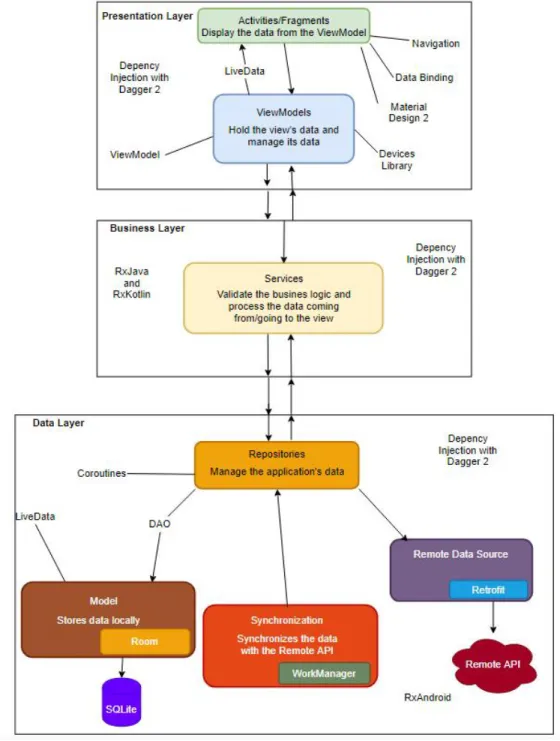
This chapter will present different components of the architecture developed and how they work together to fulfill the application’s requirements as well as explaining how the architecture can be used for future applications with similar requirements. This application follows Model-View-ViewModel (MVVM), a software architecture pattern recommended by Android. One of MVVM’s benefits is the separation of the development of the view from the development of the business logic. Between the views and the model, there is the ViewModel, which is responsible for exposing the data from the model in a way that is easy to present by the view. The ViewModel can control most of the view’s display logic and acts as a mediator, organizing the access to the backend. In Android, the Activities, Fragments, and their layouts represent the View. The ViewModel are the ViewModels, which merge data from multiple places to expose it properly formatted to the view. The Model is made by the services and repositories, which enforce the business logic and handle data. In Figure 6 we have a simplified representation of MVVM, based on Android’s architectural common principals [14]. In the application’s architecture, each layer has a specific function, following the separation of concerns: The Model Layer retrieves and formats the data properly; the ViewModel Layer merges and exposes multiples data sources to satisfy the view’s needs; and the View Layer displays the data to the user. Each layer has its responsibilities, and changes in one layer may not need to be applied to other layers (depending on the changes). Figure 6 - MVVMBased on the best practices and the guidelines reported by the Android development community, an architecture diagram was drawn, with the layers and their respective technologies, shown in Figure 7.
4.1.Presentation Layer
The views and the respective ViewModels that manage their data compose the Presentation Layer. A view is an Activity or a Fragment that is responsible for the interface in which the user will interact with the application; it is therefore known as the top layer of an application [15], [16].According to the separation of concerns, no business logic should be implemented in an Activity of Fragment; it should be implemented in the view’s ViewModel. The view should listen to changes in the ViewModel and react accordingly. Android suggests Single Activity Application, which is an app that has an activity to serve as an entry-point and uses fragments to create the entire GUI. However, to better organize the flow of the application, it was decided that the app would consist of multiple activities, one per area. Once in a certain area, for example, Animals, fragments are used to display, create, and edit the data. Initially, each activity would have a ViewModel that would hold all the data shared by the activity’s fragments. That ViewModel would store and manage the GUI-related data. The ViewModel is also used to communicate between fragments. However, this approach would prove to be unpractical, since there would be a repetition of operation every time a fragment was used in a different place (since it was the activity’s ViewModel that would implement the logic). This would cause some ViewModels, especially those of activities with multiple fragments, to be overwhelming and complex. This code repetition and complexity would prevent scalability, since no one would be able to improve the code, and the addition of a single fragment could bring a lot of work. Ideally, each fragment would have its own ViewModel to hold and manage its data, preventing the repetition of operations every time the fragment was used in a different activity. For example, a fragment to list animals would fetch its animals and display them. However, this would prevent the fragment from being reused, since we might want to display different animals in different contexts. For example, we might want to display all the animals of an entity in one place, and only the animals of a certain holding in other place. This would mean that a different fragment was necessary every time the source of the data was different, which would cause a big repetition of code and reduce standardization (since we want to list animals always the same way, with the same behaviors). To fix these problems, a third approach was made, a merge between the first, which allows the reusability of fragments, and the second, that give fragments independence and greatly reduces code repetition. This approach consists of each fragment having two ViewModel. One ViewModel (the ViewModel of the activity) is used to make the
communication fragments-activity and serves as the control point for all the fragments in it. The other ViewModel implements that specific fragment’s logic, its behaviors, etc. For example, the fragment that lists animals has a search functionality, which is implemented in the ViewModel of the fragment. When an animal is clicked, the fragment communicates it to the ViewModel of the activity, which, depending on the activity, might signal the activity to navigate to that animal’s details. On other activity, something else might be done when an animal is clicked. The important part is that the fragments do not perform outside actions (such has navigation to other fragments), allowing them to be reused. Now, we will explain the technologies being used in this layer, and how they interact with each other to create the GUI. LiveData LiveData is a lifecycle aware, event-based, stream of data, which means it respects the lifecycle of the components listening, such as activities, fragments, and other lifecycle owners [17]. Besides preventing memory leaks and handling of components lifecycle, LiveData allows to have constantly updated data across the entire application (especially when used with Room) and react to configuration changes (when used with ViewModel), such has the rotation of the screen, making it fundamental for any application that handles lots of data. ViewModel ViewModel is a class responsible for preparing, holding, and managing data for one or multiple activities or fragments. In this case, it also handles the communication between the respective component and the business logic classes (such as the services) [18]. The ViewModel will be alive until the view (activity or fragment) is destroyed. Contrary to the view, the ViewModel will not be destroyed for configuration changes (e.g. the screen is rotated), maintaining its data intact. When the view is recreated, it connects to the same instance of the ViewModel, receiving the data that was stored in it. This works particularly well with Room and LiveData. ViewModels can hold LiveData that is listened by one, or multiple views, allowing them to communicate between each other.
To allow the reusability of fragments, the fragment data source is defined ty the controlling activity, so that the same fragment can display different data, according to the context. Fragments are unaware of anything outside their ViewModel, therefore certain operation, such as navigation between fragments, must be implemented by the activity when reacting to the activity’s ViewModel. Fragments also have another, internal ViewModel, that makes operations the fragments need to work properly, preventing the repetition of the same code everywhere the fragment is used. For example, in the fragment that holds a holding’s details, the generic ViewModel passes the holding’s id to the fragment, and the fragment’s specific ViewModel will take that id and fetch all the data necessary to show/edit the holding. Data Binding Data Binding is a library that allows the binding of GUI components in the layout to data sources [19]. This will cause the GUI components to update when the data source updates. It is possible to bind variables, events (such has clicks), amongst other things. Shown in Figure 8, we can see that the component’s enabled state is bonded to the object’s (called “premises”) active state, using one-way data binding (“represented by the “=” before the “@”). The component’s state will change when the object’s “active” property changes. This object is present in the ViewModel, which is not necessary, but recommended since it is the ViewModel that should hold the view’s data.
It also supports two-way data binding, which means that not only the GUI updates as the data source changes, but the source changes when the GUI changes, allowing to keep the GUI and the data source synchronized [20]. In Figure 9 we can see a custom component to encapsulate a specific behaviour, in this case, an edit text with extra behaviours. Although custom components do not come with data binding implemented by default, it is possible to implement it and customize it, allowing great flexibility. Material Design 2 Material Design is a set of guidelines that illustrate the classic principals of good design[21]. They tell how an application’s components should interact, in either a broad, or a detailed perspective. Amongst other things, the guidelines talk about colors, which components to use and how they should react, motions, transitions, icons, etc. Material Design 2 is a direct upgrade of Material Design 1, both developed by Google. They are used not only to make good looking applications, but also intuitive. Although they are not specific for Android, there is a specification for it [22]. There is a great need to make the application as simple and clean as possible, allowing its users to figure out what they need to do and how to do it with as few clicks as possible. Considering most users might not be tech-fluent, a complicated interface will cause them to easily give up on doing what they were trying to achieve. Following the Material Design 2 guidelines means shortening a lot of user-acceptance work, since we did not need to test some of the design choices as they were previously tested and therefore
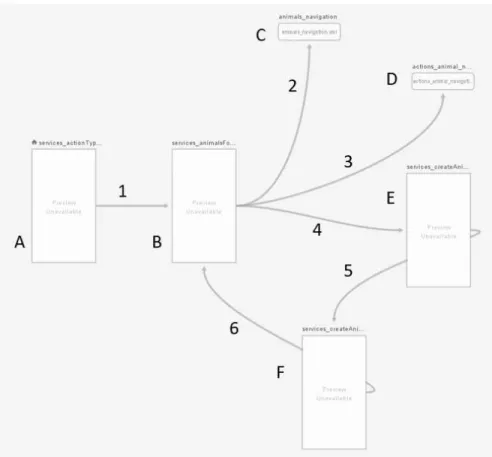
recommended by Google. Although there is no solution that fits every user, we can assume a good majority will be satisfied. Navigation Navigation is an Android library that facilitates handling the navigation between different pieces of content in the application [23]. It can help implement navigation from simple events, such as a button click, or more complex events, such as app bars and navigation drawers. It also assures a consistent and predictable user experience, according to Android’s navigation principles [24]. With Navigation we can create navigation graphs (called navGraphs) which define the interaction between fragments (or activities) and their animations. We can also have nested navGraphs inside another navGraph, to better isolate certain processes (for example, the master-details view of animals). In Figure 10 we have a navigation graph. Each letter is a fragment, except “C” and “D” which are nested navigation graphs, that represent master-detail views. Each number
represents an action: number “1” is the navigation between fragment “A” and fragment “B”, and so on. Each navigation (between fragments) can have different animations, but for consistency, similar navigations should have similar animations.
Dependency Injection with Dagger 2
Dagger is a compile-time dependency injection framework for both Java and Android [25]. The earlier version was developed by Square and is now maintained by Google. Dagger is a replacement for the common Factory classes that implement dependency injection design patterns, without the need to write all the boilerplate code. It helps the developer focus on how the classes work, rather than how to get their dependencies satisfied. Using Dagger, we can create simple modules that provide a certain area (for example, Aptitudes, shown below) and inject it wherever it is necessary. New instances of the injected classes are created every time they are injected somewhere, which means that two places using the same modules will have different instances of the same classes. Because of this, it is important that those classes are stateless, which means they should not have a state, rather just perform operations. However, it is possible to mark methods of a module as Singletons, meaning that always the same instances are injected. In Figure 11 we can see a Dagger2 module, in this case, AptitudeModule, which provides the AptitudeApi and AptitudeRepository.
Devices Library Devices Library is an internal library being developed to abstract the communication with external devices, whether via Bluetooth, BLE or Wi-Fi [26], [27]. The purpose of this library is, not only support this application, but also support other company’s applications, standardizing and abstracting the way the applications interact with devices. This library can be used outside the application, since it was developed as a separate module, that can be integrated in other applications. The devices the application will communicate with can vary from small stick readers to large draft gates. The library is be able to detect nearby devices and connect to them, abstracting from the application the way the connection and communication is made (regardless of the device and its communication type). Depending on its usage by the user (and if the device allows it), the readings from the devices can either be done one by one (a reading is performed and emitted) or in batch, called sessions (multiple readings are done and emitted all at once). The library must handle both scenarios. Some devices have non-standard data protocols, which means that they send data in a non-standard format. To deal with this, a generic implementation is made (that handles how most devices work), and a specific implementation is made for that specific devices. The API provided must be the same, regardless of the devices since the purpose of the library is the abstraction of the procedures. In chapter 5 - DLITS, we will see interactions of the application with this library. Together, ViewModel, LiveData, Data Binding, Material Design 2, Navigation, Dagger 2 and the Devices Library create the GUI. ViewModel holds and manages multiple instances the view’s LiveData, presenting it in an updated, easy-to-read manner. Using data binding, we can bind the LiveData directly from the ViewModel to the GUI, using either one-way or two-way data binding, according to the necessity. With Material Design 2, we can create a clean, easy to use GUI for the user, promoting better usability. With Navigation, we can navigate between views, such as fragments, with standardized
animations, in an easy to implement way. With Dagger2, we can make sure every ViewModel has its dependencies fulfilled, allowing us to focus on the implementation.
4.2.Business Layer
The Business Layer acts as a middleman, between what the user does (in the Presentation Layer), and what is saved to be synchronized (in the Data Layer), enforcing the business logic. This layer is composed by multiple services that validate the requests they receive before performing a certain operation. Each service is responsible for managing a section of the data. For example, the AnimalService is responsible for managing requests related to animals, such as creates, updates, reads, amongst others. A service might have access to multiple services, to fetch data from different areas to validate the requests performed (for example, the creation of an animal). If the request is valid, it forwards it to the respective repository (in this case, AnimalRepository), that will create the animal, not validating it, since it is already validated. This layer allows for standardization of the processes; since the same operation can be performed in multiple contexts, we want to make sure it is processed the same way every time. ViewModels do not have direct access to repositories, only via services, so we can guarantee that when the implementation of an operation (like a create) changes, only the service needs to change, and the ViewModels remain the same. This layer is also responsible for handling the user’s permission. Each user has a role associated with him in each entity he is associated with. Depending on the user’s permissions, the Presentation Layer might disable/hide some options and functionalities. In this layer, the technologies used are RxJava, RxKotlin and Coroutines.RxJava and RxKotlin RxJava and RxKotlin are part of Reactive Extensions (shortened to ReactiveX), a library for composing asynchronous and event-based applications. ReactiveX operates on discrete values that change over time [28]. Instead of getting the current state of an object, it observes its state, and allows the application to react to it. By using Observables, we can treat streams of asynchronous events with simple, easy-to-read, and less error-prone code. RxJava is Java’s implementation of Reactive Extensions [29]. RxKotlin is a lightweight library that adds convenience functions to RxJava. Although RxJava can be used out-of-the-box with Kotlin, RxKotlin makes the usage of those feature more Kotlin-like [30]. They are used to sometimes communicate with the Data Layer, such as in data validations, that are not directly GUI-related. However, most of the communication between the Business Layer and the Data Layer is made via LiveData. Like in Presentation Layer, Dagger2 is used to fulfil dependencies, in this case, the service’s dependencies. Together, RxJava, RxKotlin, and the application of the business logic create the Business Layer. This layer is does not rely very heavily on technologies, since its work is business validation. Most of it are requests to the Data Layer to make sure the requests coming from the Presentation Layer are valid. After a request is deemed valid, it is processed and sent to the Data Layer.
4.3.Data Layer
The Data Layer is made by the repositories (each responsible for handling data of a certain area), the local database (supported by Room), the synchronization (with Work Manager) and the communication with the remote API (with Retrofit, integrated in each respective repository). This layer responsible for managing the application’s data. It has no business logic implemented; its only concern is making sure the data is valid. This layer is responsible for, amongst other things, serving as an entry point to the remote API and Room. Itconverts the objects coming from the remote API to application’s models to be inserted in Room and merges Room requests to facilitate its exposure to the other layer. When the Business Layer makes a request to create, for example an animal, it provides a model used to display it in the Presentation Layer, which might not be the same model as the one saved in Room. After the Business Layer validated the animal, it requests its creation to the Data Layer, which assumes its already valid, and won’t validate it again. It will transform that object into the different appropriate models, and insert them into the necessary tables, creating/updating the relations, if any. The Data Layer is also responsible for keeping track of the data that is yet to be synchronized. Each object that can be created/update in the application (such has Holdings, Animals, Owners, Keepers, amongst others that the user doesn’t create/update directly, such as relations), has two flags that annotate the object as either new (“isNew”) or updated (“isUpdated”). Any object that has either of these flags set to “true” needs to be synchronized. After its synchronization, the objects flags are set to “false”. The technologies used in this layer are Room, DAO, Coroutines, Retrofit, Work Manager, RxAndroid, LiveData and Dagger2. Room Room is a persistence library from Android’s Architecture Components that provides an abstraction layer over SQLite to allow for a more robust database access [31]. It has all the functionalities of SQLite, being a relational database with Primary Keys, Foreign Keys, and relation validations. Room’s models were generated via T4 Text Template [32]. Room serves as a cache database, allowing for the application to work while offline and is used as the single source of truth, working very well with LiveData. Single source of truth means that all data used in the application comes from Room, never directly from other places, such as the remote API. Even though some repository’s methods are responsible from fetching data from the remote API, that data will be put into Room, and not passed to the application directly. Only repositories interact directly to Room via DAOs (Data Access Object) [33].
DAO DAOs are the classes where we can define the interactions with the database, in this case, Room. A DAO is an interface marked as DAO with the @Dao annotation. Each method has an SQLite query annotated above, representing the query it will run against Room. Also, we must specify the return type of the method. Although the type of the object must match the SQL query (for example, if we say the method returns an Animal, the query must return an Animal), we can specify if it comes as LiveData, regular objects, as we can see in Figure 10. Coroutines Coroutines are light-weight threads [34]. Coroutines help make asynchronous requests feel more fluid, and avoid multiple call-backs inside each other, which could create a normally called “call-back hell”. Coroutines give a more synchronous feel to asynchronous programming, making the application easier to develop and maintain. Since LiveData with Room was used to fetch the data, there is no need to use coroutine to access Room (which should only be access asynchronously) for normal GET methods. However, when validating the data (for example, to create/update an animal), we need to implement the business logic against the database. In these cases, coroutines were used to make simples GETs, fetching as little data as possible, since making an asynchronous request synchronous still takes time.
Coroutines can use dispatchers [35]. A CoroutineDispatcher determines what thread or threads the coroutine uses for its execution. It can confine the coroutine to that thread, assign it multiple threads or let it run unconfined. There are four dispatchers: Unconfined, IO, Default and Main. Unconfined: The coroutines uses whatever thread the calling function is using, without confining to any specific thread. IO: This dispatcher is optimized to perform disk or network I/O outside of the main thread. Examples of good usage of this dispatcher include using Room, reading from/writing to files, and performing network operations. Default: This dispatcher is optimized to perform CPU-intense operations outside the main thread. Examples of good usage of this dispatcher include sorting lists and serializing/deserializing data. Main: This dispatcher should be used to perform operations that interact with the GUI. and, therefore, should be performed on the main thread. This dispatcher should only preform quick work, since it could block the main thread, blocking the GUI. Shown in Figure 13 is a coroutine with dispatcher Default.
Retrofit Retrofit is a type-safe REST client for Android and Java by Square [36][37]. This library provides a framework for interacting with remote APIs and making network requests with OkHttp (an efficient HTTP and HTTP/2 client for Android and Java applications) [38][39]. Retrofit also facilitates the deserialization of JavaScript Object Notation (JSON) objects to Plain Old Java Objects (POJO), which must be defined for each “resource” in the response. A Retrofit service is an Interface with methods annotated as Http methods (can be @GET, @PUT, @POST, etc…), and the respective paths, as seen in Figure 14. Since we only need one instance of Retrofit, we can declare it in the AppModule to make it a Singleton. To create a Retrofit instance, we can use its builder, give it the base URL of the remote API it is consuming and, the converter factory, which is the factory used to deserialize the responses from JSON to POJO. In this case we are using Gson, Google’s parser [40]. Work Manager Work Manager’s purpose is to reliably schedule deferrable, asynchronous tasks that are supposed to run even if the app exits or the device restarts [41]. Amongst its functionalities, Work Manager allows to: add constraints to requests (for example, available internet connection, the device being idle) chain tasks (one task running after other successfully finishes) schedule repetitive tasks to be ran after a certain period Work Manager is not supposed to be used if the purpose is to run the tasks on an exact moment; its purpose is to make sure a task runs, even tasks schedule to run immediately
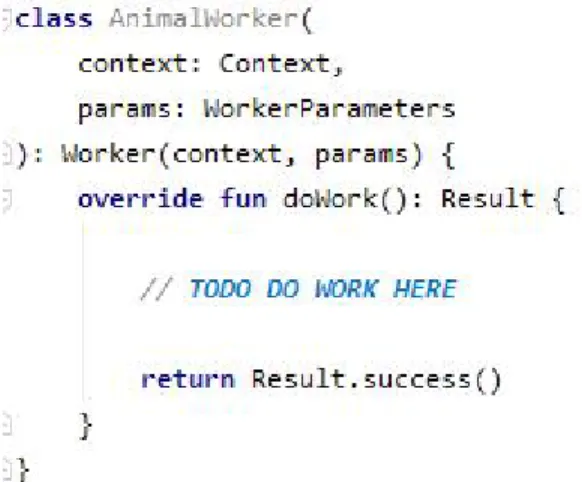
might take a while to start, since it’s the operating system that handles them. There is no way to force a task to run when we want, only in a certain time frame. All these functionalities make it ideal for synchronizing the data with the remote API. To make API requests, we need to make sure we have internet connection. We can even constraint the connection to make sure it only syncs the data using an unlimited data connection, to avoid performing such a big data transfer using limited data plans. We can also constraint the requests to not run when the device has low battery, to prevent its unexpected shutdown (user see device has enough battery, synchronization runs without user being aware and drains the battery). Work Manager is used to both download the data from the remote API and to upload the data changed to the remote API. To create a Work Manager, simply create a class that extends Worker, then implement “doWork()”, as seen in Figure 15. If we want our worker to use coroutines, extend CoroutineWorker instead. After creating the worker, we need to create a request that uses it, shown in Figure 16. There are two types of requests, periodic requests (will run periodically), and one-time request (runs only one time). In the image above, we created a periodic request. First, we defined the constraints (having internet connection and the device being idle). Next, we 51
Figure 15 - AnimalWorker dummy implementation
Lastly, we enqueued the request. A request can have multiple workers, and a worker can be used on any type of request, since it is unaware of the request type, it only performs a certain operation. Ideally, we would have multiple workers, where each worker would be responsible for a certain area, and we would chain the workers to run periodically (for example, first we upload the holdings, if it succeeds, we upload the owners and keepers, and so on). Initially, we had four download workers, DownloadConfigsWorker, DownloadHoldingsWorker, DownloadPeopleWorker and DownloadAnimalsWorker (and similar for upload workers). The goal was to chain them and run them periodically. However, it is not possible to chain periodic request, only one-time requests. Since it is crucial both for the downloading and uploading data that the requests stop running if the previous worker fails, to prevent inconsistent data, we had to use other approach. For example, if the order of the workers is DownloadConfigsWorker -> DownloadHoldingsWorker -> DownloadPeopleWorker -> DownloadAnimalsWorker, and the DownloadHoldingsWorker fails, if DownloadPeopleWorker runs and succeeds we would have people associated with a holding that does not exist (in the local database), which is not possible (i.e., invalid data). To fix this problem, the download workers and upload workers were merged into two workers: DownloadWorker and UploadWorker. Instead of a (Work Manager) request having chained workers, each worker chains the API requests internally, which simulates the initial approach. However, this way we can run the Work Manager requests periodically and still stop running if any of the API requests fails, ensuring data consistency. Together Room, DAOs, Coroutines, Retrofit, and Work Manager work together to form the Data Layer. With Room, we can have a local database, allowing the user to work while offline, also providing many useful functionalities, such as live updates of the data displayed. With DAOs, we can access Room in an intuitive way. With Coroutines, we can process CPU-heavy requests and I/O requests (such as certain Room accesses) asynchronously, in a synchronous way making the app easier to develop and maintain. With Work Manager we can synchronize (both download and upload) the user data to and
from the remote API, making sure the user is working with the most updated data, and that his data is being uploaded so other users can use it. Dagger2 is used to fulfil the repositories and service’s dependencies. LiveData is the main communication form between the Data Layer and the Business Layer, and when used with Room, we can make sure the user is presented with the most updated data.