Department of Information Science and Technology
Gaze-Directed Gameplay in First
Person Computer Games
João Eiras Antunes
A Dissertation presented in partial fulfillment of the Requirements
for the Degree of
Master in Computer Science
Supervisor
Prof. Pedro Santana, Assistant Professor
ISCTE-IUL
The other 10% will become possible with the passage of time and technology"
Resumo
A utilização de sistemas de rastreamento ocular em jogos de computador ainda se encontra numa fase embrionária. Aparelhos de rastreamento ocular comerciais e pesquisas na área têm-se focado em jogabilidade à base da atenção visual como uma alternativa a métodos de entrada tradicionais. Esta dissertação propõe-se a investigar as vantages e desvantagens do uso destes sistemas em jogos de com-putador. Para isso, invés de se usar rastreamento ocular apenas como um método directo de entrada, é proposto usá-lo para controlar a atenção do personagem do jogo (e.g., se o jogador reparar num obstáculo, a personagem também repara e desvia-se do mesmo) assim como afectar a geração procedimental do jogo (e.g., gerar obstáculos no lado oposto ao qual o jogador tem a sua atenção focada). Para demonstrar o valor desta proposta, foi desenvolvido e aqui apresentado o jogo de tiros em primeira pessoa Zombie Runner. Os testes demonstraram que a implementação cumpre os requisitos técnicos estipulados e que, apesar de ainda carecer de melhorias em termos de precisão e robustez, a tecnologia para rastrea-mento ocular pode ser utilizada com sucesso para tornar a experiência do jogador mais imersiva e desafiante.
Palavras-chave: jogos de computador, rastreamento ocular, jogabilidade à base da atenção visual.
Abstract
The use of eye tracking systems in computer games is still at an early stage. Commercial eye trackers and researches have been focusing in gaze-oriented game-play as an alternative to traditional input devices. This dissertation proposes to investigate the advantages and disadvantages of the use of these systems in com-puter games. For it, instead of using eye tracking as a simple direct control input, it is proposed to use it in order to control the attention of the player’s avatar (e.g., if the player notices an obstacle in the way, the avatar will notice it too and avoid it) and the game’s procedural content generation (e.g., spawn obstacles in the opposite side of the screen to where the player’s attention is focused). To demonstrate the value of this proposal, it was developed and is herein presented the first-person shooter Zombie Runner. Tests showed that the implementation meets the stipulated technical requirements and that, although it still needs im-provements in terms of precision and robustness, eye tracking technology can be successfully used to to make the player experience more immersive and challenging.
Acknowledgements
I would like to acknowledge my parents, Zé and Maria João, for all the support they gave me throughout this endeavour. To my supervisor, Professor Pedro Santana, for his unmeasurable help in the conclusion of this thesis. To my sister Sofia, who hopelessly tried to explain me how to use Excel by (re)teaching me statistics. To Karolina, for the daily words of support, for making everything seem easier and for listening to all my complaints about late nights spent working. To Sebastian Nowak, for showing me that game development was what I wanted to do with my life. To Miniclip, for their comprehension and support which was vital in this moment of my life. To all my family and friends, for all the times they asked how this thesis was going along and made me feel I wasn’t alone in it.
Contents
Resumo v
Abstract vii
Acknowledgements ix
List of Figures xiii
Abbreviations xv 1 Introduction 1 1.1 Context . . . 1 1.2 Motivation . . . 2 1.3 Research Questions . . . 4 1.4 Objectives . . . 5 1.5 Research Method . . . 5 1.6 Document Structure . . . 6 2 Literature Survey 7 2.1 Visual Attention . . . 7
2.1.1 Mechanisms: Bottom-Up vs. Top-Down . . . 8
2.2 Eye Tracking . . . 10
2.2.1 Eye Tracking in Video Games . . . 12
2.3 Procedural Content Generation . . . 14
2.4 Player Experience Tests . . . 19
3 System Overview 23 3.1 The Game . . . 23
3.2 Setup . . . 27
4 Development and Implementation 31 4.1 Game Logic . . . 31
4.1.1 Design Decisions . . . 32
4.1.2 Rules and Mechanics . . . 33
4.1.3 Flow . . . 34
4.2 Development in Unreal Engine . . . 38
4.2.1 C++, Blueprints and Algorithms . . . 38
4.2.2 Ray casting, gaze detection logic and bounding boxes . . . . 41
4.2.3 User Interface . . . 44
4.3 Game art . . . 45
4.3.1 Enemy animations . . . 46
4.3.2 Procedurally generated game world . . . 47
4.3.3 The noticed effect . . . 48
4.4 Eye Tracker Integration . . . 49
5 Evaluation and Discussion 53 5.1 Evaluation Method . . . 53
5.1.1 Setup . . . 54
5.1.2 Test Sessions . . . 55
5.2 Results . . . 58
5.2.1 Eye Tracker Calibration Process . . . 58
5.2.2 Play Sessions . . . 60
5.2.3 Informal Questions . . . 64
6 Conclusions and Future Work 69 6.1 Conclusions . . . 69
6.2 Future Work . . . 71
6.3 Dissemination . . . 71
Appendices 75
A Test session questionnaire 75
List of Figures
1.1 Tobii’s 4 focal points . . . 3
2.1 Appliances of the study of visual attention . . . 9
2.2 Bottom-up Mechanism . . . 10
2.3 Yarbus’ The Unexpected Visitor . . . 11
2.4 Early PCG Games . . . 15
2.5 No Man’s Sky’s Procedurally Generated Fauna . . . 16
2.6 Spelunky’s Procedurally Generated Levels . . . 17
2.7 Experience-Driven Procedural Content Generation . . . 17
2.8 Super Mario Bros levels generated through EDPCG . . . 18
2.9 Mean GEQ ratings for the two types of input . . . 20
3.1 Game Menus . . . 24
3.2 Enemy getting killed . . . 25
3.3 Behaviour when approaching an obstacle . . . 26
3.4 Death Screen . . . 27
3.5 Hardware Setup . . . 28
4.1 Main game flow diagram . . . 35
4.2 Game flow interactions diagrams . . . 36
4.3 Storyboards for obstacle interaction . . . 37
4.4 Tile generation flow chart . . . 40
4.5 Screen division for player attention tracking on obstacle generation 41 4.6 Enemy and obstacle spawning flow chart . . . 42
4.7 Sideview of obstacles and their bounding boxes . . . 43
4.8 Sideview of enemy and its bounding box . . . 44
4.9 Zombie Runner ’s Main Menu . . . 46
4.10 Enemy’s Animation Blueprint . . . 47
4.11 Procedurally generated tiles . . . 48
4.12 3D assets spawned with a tile . . . 49
4.13 Material evolution of a rock being noticed . . . 49
4.14 Gazepoint Control Interface . . . 50
5.1 The setup for the test sessions . . . 54
5.2 The age distribution of the test group . . . 55
5.3 Histogram relative to the testers’ perception of their experience with video games . . . 56
5.4 Histogram relative to the testers’ experience with eye tracking tech-nology . . . 56 5.5 Histogram relative to the testers’ experience with gamepads in FPS
games . . . 57 5.6 Gazepoint Control’s screen to test the calibration results. . . 59 5.7 Gaze movement of a tester during a play-through of Zombie Runner 60 5.8 Histogram relative to the amount of eye tracker calibration tries per
tester . . . 60 5.9 Graph relative to the ratio between enemies killed with the total
amount of enemies during the three play sessions . . . 61 5.10 Graph relative to the ratio between enemies and objects noticed
with the total amount of enemies and objects during the three play sessions . . . 62 5.11 Graph relative to the amount of deaths experienced by the player
during the three play sessions . . . 62 5.12 Graph relative to the testers openness to eye tracking technology
Abbreviations
FPS First Person Shooter (see page 3) VR Virtual Reality (see page 7)
GEQ Game Experience Questionnaire (see page 19) UI User Interface (see page 44)
Chapter 1
Introduction
1.1
Context
With eye tracking dating back from the XVIII century [1], many have been the ap-plications for this technology, like medicine (eg. to analyse perceptual dysfunction in schizophrenia [2]), robotics (eg. to aid in the control of a robotic prosthetic [3]), advertising (eg. to measure the attendance of adolescents to warnings in cigarette advertising [4]) and, most recently, video games [5].
In the past decade, studies in video game research tried to compare traditional input (mouse and keyboard or controller) vs. eye tracking input in terms of perfor-mance with mixed results, with some studies claiming that the use of eye tracking contributed to better task completion [6] while others claiming that traditional input devices still provided better overall results [7]. Most publicly available stud-ies focus on asking for players to compete against each other using different input methods, or ask of a user to complete a task using one method and then the other, trying to pinpoint which input method wins in different parameters like accuracy or responsiveness.
Commercially, Tobii is currently among the most recognized eye tracker man-ufacturers among gamers, having recently sponsored Global Game Jam 2017, the world’s biggest on-site game jam, where more than 7000 games were produced in
48 hours, some with eye tracker support. Tobii, besides producing hardware, does not position its technology as a substitute of traditional input forms but rather as a complement to them [8]. This approach may explain the 57% market share that Tobii held in 2013 [9] and suggests that gamers prefer this kind of philosophy when it gets to eye tracking integration. Currently, more than 75 titles support Tobii’s hardware [10], integrating Tobii’s 4 focal points [8] (Figure 1.1) : (1) Immersive Graphics, that provide directional sound, dynamic depth of field and dynamic light exposure according to the player’s attention; (2) Natural Targeting, that offers a range of possibilities related to aim assistance; (3) Gaze Awareness, where objects and other characters interact with the player if attention is focused on them; and (4) Infinite Screen that follows the player’s gaze and head to shift the game camera in the desired direction.
1.2
Motivation
Despite the many studies and papers [11] [5] [12] [7] [6] written about eye tracking integration in video games, we found a lack of studies that approached the mea-surement of enjoyability and adaptability of the end user to this integration or lack thereof in the same game, instead focusing on comparing these parameters in a scenario where traditional input is used vs. a scenario where eye tracker input is used.
The discrepant results found in different studies, as described in Section 1.1 of this dissertation, suggest that the kind of game and the tasks generated by the eye tracking usage have to be taken into account when wanting to create a good overall experience to the player. To spark a serious discussion about the impact of this technology in a game, lessons from both academic studies and Tobii’s success story have to be taken into account, mainly: (1) Do not just replace traditional input for eye tracking input; and (2) think about meaningful ways about how eye tracking can make a game better. With these lessons in mind, we think one can
Figure 1.1: Implemented examples of Tobii’s 4 focal points [8]. (1) Immersive Graphics – the light dims to adjust to the focused light source; (2) Natural Targeting – when pressing the aim button, the avatar will aim at the player’s attention point; (3) Gaze Awareness – the door opens when the player’s gaze interacts with the switch; and (4) Infinite Screen – the camera shifts up when
the player’s visual attention shifts to the top of the screen.
go one step further and actually include eye tracking in a core game mechanic, coexisting with traditional input, towards providing a more enriching experience. The game here presented, Zombie Runner, is an endless runner First-Person Shooter (FPS) that utilizes visual attention as one of the game’s core mechanics. It tries to encapsulate all these lessons in order to create what we believe is a
meaningful experience while keeping eye tracking at the centre of gameplay. We propose to use eye tracking in order to control the attention of the player’s avatar and the game’s procedural content generation. This use of eye tracking is focused in mapping the mental state of the player and her/his avatar, which we believe to be much more natural and useful than controlling a pointer with the eyes, which has no mapping to real life. With Zombie Runner, we aim to integrate gaze tracking in a natural, not forced manner, expecting the player to smoothly interact with the system - as what happens with most of Tobii’s supported games.
1.3
Research Questions
Given the fact that eye trackers are still not widely adopted by the video game industry and taking into account the mixed results presented in the past and what kind of games and mechanics were used in those tests, Zombie Runner was developed in an attempt to answer the following research questions:
1. Is eye tracking integration more or less satisfying to the player? 2. Is eye tracking integration more or less comfortable for the player?
3. Does controlling the game’s environment generation through eye tracking integration result in a more challenging experience?
4. Is the approach of using the player’s gaze in a core mechanic a positive contribution for a more immersive game experience?
These questions shaped the development process in a way that the player’s overall experience had to be taken into account at all times. The decisions on game mechanics, flow and test cases were affected by these questions too.
1.4
Objectives
The main objective of this project is to elaborate and develop a game that aims to achieve a gaze tracking integration solution in a video game that is engaging and at the same time comfortable for the player. This integration shall result in a core gameplay mechanic, in contrast to approaches that generate auxiliary interactions [8] or that simply swap traditional input methods by vision guided ones [6]. This core gameplay mechanic shall be representative of how to success-fully integrate eye trackers as video game input with the technology’s strengths and weaknesses in mind. Along with the extensive use of procedural generated content, the game aims to better represent the player’s actions in the game, thus contributing to a more immersive experience.
The final game shall be able to be played by anyone owning a computer, a gamepad and any low-end eye tracker camera, as it represents the easiest attainable technology by the common player.
1.5
Research Method
For the purpose of this project, the Design Science Research (DSR) [13] method-ology was used. This method is divided in the steps: (1) Awareness of Problem; (2) Suggestion; (3) Development; (4) Evaluation; and (5) Conclusion.
Sections 1.1 and 1.2 of this document explain the problem at hands regarding eye tracking in video game in both research and commercial fields and are the result of applying the first step of DSR methodology. The second step of the methodology is answered by section 1.4, which documents the game that is going to serve as the proposed solution. Chapters 3 and 4 describe the features of the implemented system so as to meet the third step of the methodology. The fourth step is covered by Chapter 5, which details the evaluation process and its results. Finally, Chapter 6 discusses the conclusions of this project, according to the last last step of the methodology.
1.6
Document Structure
This document presents all aspects of the implemented project, from the initial system concept to the implementation and evaluation. It is structured by chapters as follows:
• Chapter 2 reviews the efforts made through time in previous projects that use eye tracking as an input form in video games, as well as progress made in the fields that make this kind of integration possible.
• Chapter 3 describes the proposed system, its principles, features and design, while also overviewing the hardware and software used to implement it. • Chapter 4 explains how the system was actually implemented.
• Chapter 5 details the evaluation process that was used to validate the project and the results obtained from tests with target users.
• Chapter 6 presents the conclusions of this project and pinpoints some fea-tures that could be implemented at a later time.
Chapter 2
Literature Survey
The study of visual attention has branched into a lot of different areas since its early steps. While the initial applications had in mind more serious fields like psychology and advertising, nowadays we see a growth in the adoption of this kind of technology in the entertainment field. The main industry that is driving this technology adoption is video games, through the use of eye tracker cameras or gaze tracking within Virtual Reality (VR) systems.
To better understand the inner workings of this technology and its relevance in video games, one must first understand how the human eye works and how visual attention is driven according to the scene that is presented to an individual. The following subsection explains this thematics in finer detail.
2.1
Visual Attention
Visual attention is the coordinated action between the voluntary and involuntary processes in the brain that allow the human being, in a fast and efficient manner, to find and focus in relevant information [14].
The work of A.M. Treisman and G. Gelade, “Feature Integration Theory of Attention” [15], is in the basis of most visual attention models. In it, Treisman and
Gelade identified the important visual features of a scene and how these features combine between them to get the human eye visual attention in search tasks. When an object or region highlights itself from its neighbours in a scene, we can say that that object is characterized with saliency. This concept is generally associated to bottom-up approaches [16] [17], a visual selection mechanism described in Section 2.1.1. Since then, a considerable number of visual models, each with their strengths and weaknesses, were proposed. The main goal of any visual attention model is to identify the how, when, and why of relevant area selection in an image [18].
There are many applications to the study of visual attention. Figure 2.1, taken from the paper [18], illustrates some of the appliances in different areas like vision and graphics, robotics, marketing, and medicine.
One can also state that visual attention is the general concept that covers all factors that influence the different visual selection mechanisms. These mecha-nisms, that determine the focus of the visual attention, are further analysed in the following Section.
2.1.1
Mechanisms: Bottom-Up vs. Top-Down
Visual attention mechanisms divide themselves in two categories: bottom-up and top-down [19]. For this study, we will focus on a top-down approach. Still, it is important to understand both mechanisms and their differences.
Bottom-up mechanisms are classified as scene-driven. This means that the user behaviour is affected by the image itself and the different stimuli it transmits [20]. A simple example of the use of a bottom-up mechanism in a testing environment would be to ask the subject to memorize an image, take it away from the subject and then ask questions about it. The attention in this mechanism is classified as fast and involuntary [21]. For it to happen, it is necessary that the regions of interest in the scene are sufficiently distinguishable in relation to their neighbours. A good example that shows this kind of attention in action is a scene consisting
Figure 2.1: Table with the many appliances of the study of visual attention in different areas [18].
of several vertical bars and only one horizontal bar, where one’s visual attention will immediately shift to the horizontal bar [15], as illustrated in Figure 2.2.
Top-down mechanisms are classified as expectation-driven. This means that the user behaviour is affected by a previously defined goal or previously acquired knowledge. A simple example of the use of a top-down mechanism in a testing environment would be to ask the subject to search for a certain object in an image while the image is available to the subject. The attention in this mechanism is classified as slow and voluntary [22]. One of the most famous and most studied examples of the use of this kind of mechanism is an experiment by Yarbus in 1967 [23]. Yarbus asked different individuals to watch the same video (consisting
Figure 2.2: As the more horizontal bar is clearly distinct from the rest, which results in it having more saliency in the scene, the visual attention will be
im-mediately focused in it.
in a room with a family, with an outside character arriving later) with different goals, such as: telling the age of the people in the room; memorizing the clothes worn by the people; memorizing the positions of people and objects in the scene; or even to analyse the scene freely. The results of each experience were completely different, with the individuals gaze drawing different paths across the scene, as Fig 2.3 shows.
Yarbus concluded that the task given to a subject largely affects the gaze movement, establishing a direct connection between eye focus and the subject’s interest in the scene.
2.2
Eye Tracking
Eye tracking is the process of estimating one’s gaze direction, identifying the object in which the visual attention is focused [24] [25]. The eye tracking technique dates from the XVIII century. In 1792, Wells used persistent images to describe the human eye movements [26]. In the following century, Javal introduces the concept of saccades, jumps that the human eye performs between points of interest [1]. Lamar, in 1892, describes a method of counting the number of saccades during the process of reading, through an intrusive apparatus that allowed the listening of the
Figure 2.3: Yarbus gave 7 different tasks to test subjects before showing them a short movie [23]. These tasks were: (1) Free examination; (2) Estimate material circumstances of the family; (3) Estimate the ages of the people; (4) Describe what the family was doing before the arrival of the visitor; (5) Remember the clothes worn by the people; (6) Remember positions of people and objects in the room; and (7) Estimate how long the visitor had been away from the family.
sounds produced by the muscles of the human eye [27]. In the XX century, Dodge and Cline performed the first eye movement measures through a non-intrusive method using photographs and light reflections [28]. This method, however, was only capable of registering horizontal eye movements.
We would have to wait till 1939 to be introduced to a method that could mea-sure both horizontal and vertical movements. Jung used electrodes applied near the eyes that were capable of measuring the electric fields of the eyeball [29]. This method, called ElectroOculoGraphy, presented the first possibility for real-time eye tracking. In the 80s, with the evolution of computing capacity, it became possible
to perform real-time eye tracking with access to video, what opened the possibil-ity of human-machine interaction [30]. This method, called Video-OculoGraphy, is the same that is still used today in commercial eye trackers. With increasingly more accessible prices [31] [32], the use of eye trackers increased, for study pur-poses, in areas like marketing [4] and psychology [2], and for ludic purpur-poses, like eye tracking integration in video games [5].
2.2.1
Eye Tracking in Video Games
There are studies that explore the use of eye tracking in video games as an alter-native to traditional input methods, like mouse or keyboard [11] [5]. These studies are relevant because they present a viable alternative for physically handicapped players where the use of eye tracking can facilitate the input control. Per David Smith and Nicholas Graham [5], the use of eye tracking has many benefits, such as: being a highly natural, quick and effortless form of input; the sense of vision giving context to other forms of interaction; the technology being mature and well developed; and the low price of components.
By testing gaze input vs. mouse input in three different games, Smith and Graham [5] concluded that the use of eye tracking can provide a more immersive experience to the player. Table 2.1 shows which subjective measures led to this conclusion while also showing that the game that was chosen affects different pa-rameters like enjoyability, adaptability and usability, with test subjects preferring eye tracking in the games where its integration felt more natural and easier to learn.
Isokoski and Martin [12] conducted a preliminary study on the use of eye tracker in First Person Shooters. Each participant player in the test was asked to play the same game using three different input method schemes: mouse, keyboard and eye tracker; only mouse and keyboard; or an Xbox 360 controller. The conclusions were not exactly encouraging, suggesting that the performance with the eye tracker was quite inferior to the other two. Still, Isokoski and Martin attributed these results
Question Quake 2 Neverwinter Nights Lunar Command Eyes (%) Mouse (%) Eyes (%) Mouse (%) Eyes (%) Mouse (%) Which did you enjoy playing with more? 42 58 83 17 42 58
Which was easier to learn? 33 67 67 33 33 67 Which was easier to use? 8 92 50 50 8 92 With which did you feel more immersed in the gaming world? 83 17 83 17 92 8 For which did the controls feel more natural? 25 75 67 33 42 58 Which would you prefer to use in the future? 33 67 67 33 42 58
Table 2.1: Subjective measures analysis by Smith and Graham [5]. The test subjects were asked to indicate which input method they preferred for 6 different
criteria.
to the players’ greater knowledge and contact with the traditional input methods, suggesting that this scenario could change with more training and getting used to the eye tracker by the players.
Other studies achieved similar conclusions. Leyba and Malcolm [7] created a simple test that asked the player to eliminate twenty-five balls that moved around the screen with different velocities. The player would move the pointer using the mouse or the eye tracker and would eliminate the balls by clicking on them with the mouse. This test could have a time limit or not. The results showed that precision and time to complete the task without a time limit, and percentage of balls eliminated with a time limit were worse while using the eye tracker than when using a mouse.
Michael Dorr et al. [6] achieve totally opposite results. After creating and adaptation of a clone of the classic game Breakout [33], it was asked of twenty players to participate in a tournament. Players were separated in pairs. The two players of the pair would then play against each other: one controlling with the mouse and the other controlling with the eye tracker. Each pair would play two rounds against each other, switching the input methods in each round. The results showed that the players who used the eye tracker achieved higher scores and won more rounds. The players also stated that using the eye tracker was highly enjoyable. These discrepant results suggest that the type of game and development method of the same game are really important to achieve a satisfying final result. Perreira da Silva et. al used eye tracking in a system that reacts dynamically
through the observation and analysis of the player’s gaze [34]. For instance, when-ever a player looked away from the screen, a game action would occur to refocus the player’s attention. This approach proved positive in increasing the player’s immersion on the game.
In commercial terms, it is safe to state that there is not yet a serious push for the use of eye trackers in games. In its website, Tobii, the most well know commercial eye tracker manufacturer, only has close to 75 games supporting its eye trackers and software. Still, the development of new applications goes on, with support for more recent games like Deus Ex: Mankind Divided [35], Watch Dogs 2 [36] or Steep [37].
Bearing the limitations of using eye tracking as a simple direct control input in mind, we propose to use it in order to control the attention of the player’s avatar and the game’s procedural content generation. This use of eye tracking is focused in mapping the mental state of the player and her/his avatar, which we believe to be much more natural and useful than controlling a pointer with the eyes, which has no mapping to real life.
2.3
Procedural Content Generation
Procedural Content Generation (PCG) concerns all creation of game content (sounds, levels, objects, characters, textures, etc.) through an algorithm, with limited or indirect stimuli from the user [38]. These algorithms often generate completely random results. However, these results must be validated. Validation guarantees that these random results are sufficiently interesting for the solution. To get these interesting results, restrictions are applied to the initial results. This way, the end results appear to be completely random but are in fact random within a strict set of rules and restrictions.
The use of PCG in games dates from the beginning of the 80’s, being integral part of game development almost since its infancy [39]. The use of this method
appeared as a necessity due to the memory limitations at the time [40]. The first game that is considered as the first successful case of good PCG use was Rogue [41] from 1980. In Rogue, a dungeon crawler, every dungeon is randomly generated through algorithms. Other examples of notable games that made use of PCG while in its infancy are Elite [42], that generates entire galaxies in a procedural way, and Tetris [43], which picks the next piece randomly. The appearance of these three games can be seen in Figure 2.4
Figure 2.4: From left to right: Rogue [41], Elite [42] and Tetris [43] were pioneers in the implementation of PCG and are still considered landmarks in
video game history.
With the advance of technology, this memory limitations became inexistent. The use of PCG became a way of improving the player experience and expand the overall value of a game, improving its replay value. Diablo [44], that besides generating all the dungeons in the game in a procedural way also generates the features of every item in the moment of its creation, was the game that popularized PCG and that best showed its capacities.
In the notable examples from the last decade are included Dwarf Fortress [45], considered by many the most complex game ever and the prime example of the use of PCG, Minecraft [46], with more than 24 million copies sold only for PC/Mac, that generates its entire game world through procedural algorithms, and No Man’s Sky [47], the most recent example of a big game with PCG at its core, being capable of generating 18,4 quintillion different planets, each with their unique fauna and flora, targeting to create a unique experience to each player. For an example of how PCG works in this game, see Figure 2.5.
An excellent example of the use of PCG can be found in the game Spelunky [48]. Through the generation of a solution path, it guarantees that the player can finish
Figure 2.5: Examples of different species generated by the PCG algorithm of No Man’s Sky [47].
the level. In the areas of the level that do not belong to this path, it generates new areas that can (but do not have to) be interesting in the context of the level. Besides all this, the areas that are generated affect the placement and type of objects and enemies in the level [49]. This ultimately contributes to the creation of uniquely different levels in each play session, which makes each experience different and challenging.
Figure 2.6 shows three possible levels that can be generated by Spelunky’s PCG algorithm. Each area is identified with a number that describes its type: 0 – it’s an area that is not part of the solution path; 1 to 3 – areas that are part of the solution path, with 1 being an area that is guaranteed to have a left and a right exit, 2 an area that is guaranteed to have as many exits as 1 with the addition of a bottom exit, and 3 a room that has as many exits as 1 plus one exit on the top; and 7 to 9 – areas that constitute a snake pit, a pit full of enemies in the form of snakes and treasures, being that 7 marks the beginning of the pit, 9 the end and 8 the space in between.
Besides the more traditional use of PCG, some investigators proposed that, through the analysis of the interaction between player and game, PCG could be
Figure 2.6: Examples of distinct levels generated by Spelunky [50].
used to create a playing experience that adapts itself to the player [51] [52] [53]. This way, future interaction could be modelled in accordance to inputs and actions from the player in the present time.
Yannakakis and Togelius [54] proposed a new approach to PCG called Experience-Driven Procedural Content Generation (EDPCG) that considers four main com-ponents. The Player Experience Module, which consists on modelling the game experience as a result of the game content and the player, which is characterized by playing style, and responses to gameplay, both cognitive and affective. The Content Quality, which is an assessment made on the quality of the generated content which is linked to the Player Experience Module. The Content Represen-tation aims to maximize efficacy, performance and robustness of the procedural algorithm. Finally the Content Generator, tries to generate content that opti-mizes the overall player experience. Figure 2.7 illustrates how these components are linked with one another.
Through this framework, it is possible to generate levels that are adapted to the strengths and limitations of the player, in an attempt to maximize the fun factor. Many studies propose that the fun and challenge factors are directly linked [55] [56] [57] [58] [59] [60] [61], which means that to tweak the fun factor one often has to tweak the challenge factor. Yannakakis and Togelius used this framework to personalize level creation in Super Mario Bros, gathering information from hundreds of players, through questionnaires asking to compare two levels to metrics that accounted for the number of jumps, and running and shooting frequencies. The model was then used to generate different levels optimized for particular players. Two of these levels can be seen in Figure 2.8., where (a) presents a more unpredictable placing of gaps to optimize the fun value for the human, whereas (b) presents larger and more challenging gaps in order to optimize the same value but for the Super Mario AI Champion of the time.
Figure 2.8: Levels generated in Super Mario Bros for two different players through the use of EDPCG [54].
We aim to integrate PGC with gaze tracking. This way, we can deliver an experience tailored to the individual user and their form of playing. We believe this will contribute for augmenting the immersion feeling by stimulating the player’s vision, having multiple elements on the scene competing for its attention. In order to compare the impact of this integration (and of the use of eye tracking in itself), we need a way to measure the player experience. An overview on the previous work done in this subject is presented on the following section.
2.4
Player Experience Tests
Ijsselteijn et al. tried to find a standard way to evaluate the player’s experience through the "applicability of traditional usability metrics to user-centred game design, and highlight two prominent concepts, flow and immersion, as potential candidates for evaluating gameplay" [62]. From this discussion, the Game Expe-rience Questionnaire (GEQ) was spawned.
GEQ consists of three modules: (1) The core questionnaire, which aims to assess game experience; (2) The Social Presence Module, which examines the player’s psychological and behavioural relationships with other social entities; and (3) The Post-game module, which examines how the player felt after the game session is over [63]. All these modules should be filled by the player right after the game session is over and consist of a series of items that focus on the player’s feelings that have to be rated on a scale of 5 levels, starting from 0 ("not at all") to 4 ("extremely"). After all items are given a score, the component scores are then retrieved from averaging two or more item scores. As there is no social side to this dissertation, we will disregard the optional Social Presence Module in our tests.
The core questionnaire evaluates a total of 7 components: (1) Competence, which is the ability of the players to successfully and efficiently fulfill the tasks the game asks of them; (2) Sensory and Imaginative Immersion, which is sensory and imaginative involvement of the players with the game; (3) Flow, which is the balance between difficulty and the players’ abilities; (4) Tension/Annoyance, which is how tense and/or annoyed the players’ feel when playing a game, which can either arise from high difficulty levels or game design decisions; (5) Challenge, which measures the challenge the game provides to the players; (6) Negative affect, which measures how negatively the game behaviour affects the player experience; and (7) Positive affect, which measures how positively the game behaviour affects the player experience.
The Post-game module evaluates a total of 4 components: (1) Positive expe-rience, which evaluates the degree in which the experience was positive or not; (2) Negative experience, which evaluates the degree in which the experience was negative or not; (3) Tiredness, which measures how tired and weary the player felt after playing the game; and (4) Returning to Reality, which measures how difficult it was for the players to turn themselves away form the game world and return to the real one.
In regards to the impact of controllers in the player experience, Gerling et al. [64] conducted a study that aimed to address if there was any reported difference in the overall player experience of the player when playing a FPS game with mouse and keyboard vs. a gamepad. GEQ was used in this study to try and answer the aforementioned problem, with players playing the game while using the platform they were most comfortable in as well as the one that was most unfamiliar to them. The results showed that there were no differences in terms of user experience and that the more usability issues appeared when players were forced to use an unfamiliar platform, as seen in Figure 2.9.
Figure 2.9: The mean GEQ ratings for each platform suggest higher usability problems for players adapting to new platforms [64].
activ-were asked to play 3 different FPS games in random order, while their heart rate and electrodermal activity were monitored. The results showed that the player’s gameplay experience correlates with the physiological measures attained in that gameplay run.
Perreira da Silva et. al used GEQ to evaluate the gameplay experience on a gaze tracking based game [34]. They concluded that this new kind of interac-tion improved the player’s immersion into the virtual world, increasing the player interest as it provided for a richer and more fun gameplay.
By using GEQ, we intend to evaluate if the use of eye tracker and its integration with our game are enjoyable and confortable for the player. We intend to pinpoint possible advantages and disadvantages of the technology in the way it impacts the overall experience of the player and its relationship with the game, comparing the player experience with and without eye tracking.
Chapter 3
System Overview
Identifying the lack of studies that try to pinpoint the advantages and disad-vantages of eye tracking integration in games, as well as the discrepant results obtained in different studies regarding eye tracking as a form of input, we propose a game which removes the main focus from the eye tracking input and uses it in a more natural way, thinking and designing from the ground up a form of interaction with the game using the player’s gaze attention instead of using this attention to replace another input form. The objective of this approach is trying to assert if the integration of eye tracking as a gameplay mechanic in a traditional video game genre, like FPS, is beneficial or not for the final user in terms of enjoyability and comfort. This section gives an overview of the system and all its components.
3.1
The Game
The system implemented in this project is constituted by a game made in Unreal Engine 4, which was named Zombie Runner, an Xbox 360 controller, and also an eye tracking camera. The eye tracker captures all the player’s eye movements which are read by the game to identify where the player’s overt attention is focused on. The controller is used to control the player’s avatar aim and to shoot.
Zombie Runner is an endless runner first person shooter game, that uses pro-cedural algorithms to generate part of its content (e.g., obstacle placement). The game asks the player to survive for as long as possible, by killing enemies and avoiding obstacles. The player attention is taken into consideration to assert if both enemies and obstacles are noticed, and different in-game actions result of it (e.g., aiming accuracy adjustment and obstacle avoidance). When an enemy or obstacle is noticed, a visual effect is played which renders the object blue.
The main menu gives access to the game and various options. These options are both concerned with technical performance (e.g., game resolution and graphical quality), so the game can run with systems with various specifications, as well as gameplay options (e.g., disable visual effects when obstacles and enemies are noticed, automatically avoid all obstacles), used mainly for testing purposes. The overall look and different options available can be seen in Figure 3.1.
Figure 3.1: On the left, the main menu provides the navigation to the other important areas of the game, like the Display Options menu presented on the
center and the Game Options menu shown on the right.
By choosing to play the game, the player is presented with their own avatar running down an endless corridor where both enemies and obstacles will be proce-durally generated. A bar on the screen’s top left corner presents the current state of the player’s health.
As stated before, two things are asked of the player: to kill as many enemies as possible and to avoid as many obstacles as possible. All this will contribute to the player surviving for a longer period.
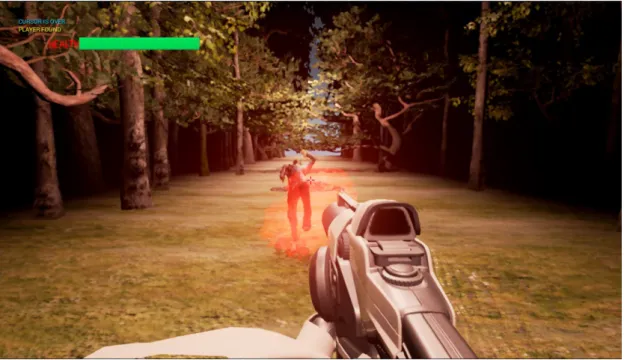
towards the player. When an enemy is hit, it either dies instantly if it was noticed by the player before - in more technical terms, if the player’s gaze was focused on the enemy for long enough time - or dies only after two hits in case it was not. This aims to simulate the better aim capability that results from a more detailed perception. If an enemy manages to reach the player without dying, the player will either suffer damage if the enemy was noticed before or die instantly in case it was not. When the enemy is killed, a blood splatter effect informs the player of this occurrence, as demonstrated in Figure 3.2.
Figure 3.2: An enemy getting killed by the player. Enemies have various dead animations according to their movement speed. A blood splatter tells the player
that the zombie is dead and constitutes no threat.
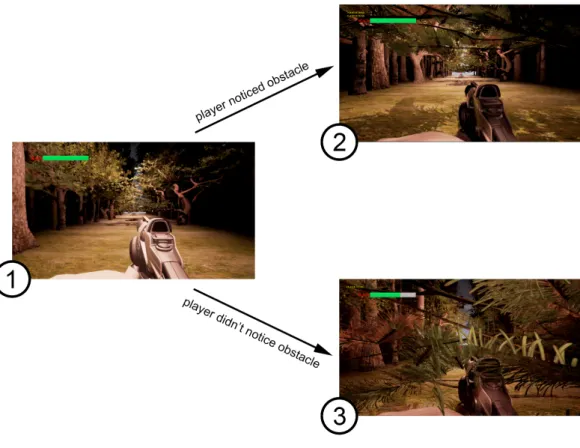
For obstacles, the player is required to notice them in order to avoid them. This mechanic tries to mimic the real-world where a threat needs to first be ac-knowledged for a reaction to take place, given that in this case this reaction is automatic. In case a player notices an obstacle, the player’s avatar will automat-ically avoid it once it gets close enough to it. If an obstacle is not noticed, the player sustains some damage. This behaviour can be seen in Figure 3.3.
Figure 3.3: In (1), we see that the player is approaching an obstacle, in this case a tree. In case the player notices the obstacle, he ducks under the tree, effectively avoiding the obstacle and suffering no damage, as shown in (2). If the player did not notice the obstacle in time, they crash into the obstacle, blood splatters appear on the screen along with an audio cue and the health bar is
depleted as demonstrated in (3).
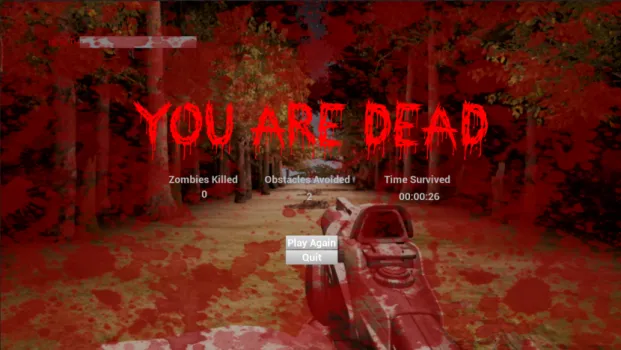
In order for a game run to end, the player health has to be depleted to zero. In Zombie Runner, the player can either instantly die or sustain damage in the value of one third of its maximum health. This damage value was decided upon the basis that instantly being killed at every single blow would be too frustrating for the player and that having to be hit three times in order to die gives space for the player to learn what he did wrong in two previous occasions, thus reducing frustration and promoting the system’s learning. When the player suffers damage, a visual effect is played along with an audio cue, and the health bar is depleted. In case the player dies, a final message with different playthrough stats like time survived, enemies killed and obstacles avoided is presented, as seen in Figure 3.4.
Figure 3.4: The death screen shows playthrough information both relevant to the player and for test purposes like the amount of enemies killed, the number of obstacles avoided and the total time survived, which represents the total
playthrough time.
3.2
Setup
In order to track the player’s input, a traditional controller and a capable way of registering the player’s gaze movements were required by the solution. Zombie Runner is designed to accept any eye tracker that can convert the gaze focus point into the computer’s mouse position. Regardings controllers, the game accepts any XInput compatible controller.
For this project, a Xbox 360 controller was used as it is a widely owned con-troller among PC users. Regarding the eye tracker, the Gazepoint GP3 was used as it is a commercially available product with a lower cost than higher-end eye trackers usually used in human-computer interaction, which we believe is more representative of the kind of eye tracker that will be more adopted in the future. A system’s hardware setup schematic can be seen in Figure 3.5.
Figure 3.5: Typical hardware setup for the system. The player’s stance is close to this one, directly facing the eye tracker while holding the controller. Alternatively, a laptop can be used to run Zombie Runner instead of the screen
and computer.
Given that the software developed is in fact a game, a decision was made to use a game engine for its implementation. After some research, we were split between the use of two game engines:
• Unity Developed by Unity Technologies Languages supported: C# and Javascript • Unreal Engine Developed by Epic Games
Languages supported: C++
Unity Unreal Engine C# and Javascript C++
No visual scripting system Blueprint visual scripting system
Best option for mobile games Best option for AAA PC and Console games Less used for photorealistic projects Widely used with photorealism in mind Easier to find free assets Free assets are few and hard to find Is used more for 2D development Is used more for 3D development
Table 3.1: Comparison between Unity and Unreal Engine features
With this comparison in mind, we decided that Unreal Engine would better suit the project, as the game had to be in 3D and with photorealism in mind to achieve better testing results.
Besides the game engine used to support and develop the game, a software had to be used to actually convert the captured data from the eye tracker into something the game could understand. For this, Gazepoint Control [55] that was bundled with the Gazepoint GP3 was used to transform the captured data into a position in the screen and control the computer’s mouse through it.
Chapter 4
Development and Implementation
The process of developing Zombie Runner can be divided in three major steps: (1) the definition of the game logic, which comprises concepts such as rules, game flow and mechanics; (2) the actual technical implementation using Unreal Engine; and, finally, (3) the integration of the eye tracker hardware into the game. Although this integration is the last step presented in this section, all the other steps were shaped from the ground up with in in mind so as to facilitate this final step whilst producing a competent solution.
4.1
Game Logic
Before starting any technical production of Zombie Runner, an initial set of rules, mechanics, and overall feeling of the game had to be defined. This initial set ended up shaping across time (to meet ideas that we deemed were better or to circumvent technical limitations) and ended up on what is going to be presented in the following subsections.
4.1.1
Design Decisions
Very early on we knew that the game we were going to produce had to integrate gaze tracking in the implementation of a core mechanic. It was also decided that this integration should produce a more interesting end solution if it was concurring with another more traditional input device. With this decision, we wanted to produce what we believe could be a superior way of integrating this technology in video games. At the same time, having two input methods concurring for the player’s attention was something we felt was not explored enough in previous works [11] [5] [12] [7] [6]. Having this initial scenario, we had to envision a system with this two forms of interaction in mind.
With eye tracking, we wanted to diverge from previous integrations [11] [12] and try and produce a 1:1 relation between the real-world action of the player looking around and the in-game action of the avatar looking around - wherever the player was looking at in the screen, that is where the avatar was looking at too. This decision came from the belief that to integrate this kind of technology one needs to create new forms of interaction instead of trying to interact in the same way the player did before but using other input methods.
Regarding the traditional input form, the choice reclined on a gamepad instead of mouse and keyboard for the fact that the integration of the eye tracker would be much facilitated if the mouse pointer was free to be controlled by the player’s gaze. This decision did not limit the end solution in any way, instead producing a more focused approach to the further decisions made in regards to the integration of the gamepad. We wanted to limit the amount of different inputs the player could provide through the gamepad so as to minimize the amount of adaptation time and any frustration that could arise from complicated control schemes that could taint the test results. These limitations are further explained in the following subsections.
To better analyse the advantages and disadvantages of the use of eye tracking in games, we should focus ourselves in game genres where the player’s visual
attention has to be shared between different elements in the scene under tight temporal restrictions, where the eye tracking use is more central and challenging. With all the above considerations in mind and looking for a common game genre (of high impact), we opted for a FPS game. We then decided to add to it the endless runner component in order to automatize the movement inputs, thus reducing the number of actions the player had to memorize and control.
4.1.2
Rules and Mechanics
A game is defined by its rules and mechanics, and Zombie Runner is no exception. The rules herein presented represent the final rules set in the game. The defini-tion of this rules was shaped by the design decisions presented in the previous subsection, by the technical development process and by informal tests carried throughout this process. The gameplay in Zombie Runner is shaped by eight core mechanics:
• Noticing objects - The object is tagged as noticed by the player; • Noticing enemies - The enemy is tagged as noticed by the player; • Aiming - The gun aim is moved around;
• Shooting - A bullet is fired from the gun;
• Hurting enemies - An enemy loses half its overall health; • Killing enemies - An enemy dies collapsing on the floor;
• Losing health - The player loses one third of the overall health; • Dying - The player dies.
These mechanics interact with each other in the set of rules defined by the game. These rules can be divided and listed as follows, highlighting the mechanics in play in each rule:
• The main objective of the game is to survive for as long as possible. This can be achieved by killing enemies and noticing obstacles.
• The player is required to look around the scene and notice obstacles and enemies by looking at them for a sufficient amount of time.
• If the player’s avatar approaches a previously noticed obstacle, it will avoid said obstacle. If this obstalce was not noticed before, the player’s avatar will crash onto it losing health.
• The player is asked to aim and shoot enemies in order to kill them. • When the player shoots an enemy, it will die instantly if it was noticed before
or if it was already hurt. If not, it will be hurt instead.
• If an enemy approaches the player’s avatar, it will attack, causing the player to lose health if this enemy was previously noticed. If it was not previously noticed, it will cause the instant death of the player.
• If the player loses health enough times to deplete the overall health, the player dies
• When the player dies the game is over.
This set of rules and mechanics are the basis to define the flow of the game, the array of possible interactions from the beginning till the end of a play session.
4.1.3
Flow
An ideal game flow is when the balance between the player’s abilities and the challenges set by the game is such that the game provides an experience that is not hard enough to cause anxiety on the player, nor easy enough to cause boredom. This balance is dictated by the sequence of actions in the game. Due to the procedural nature (check Section 4.2) of Zombie Runner an absolute game flow is hard to define for this game. However, an approximation can be extracted
when approached with a higher level of abstraction. Fig. 4.1 shows the expected game flow for any Zombie Runner play session. In the initial scene generation, no obstacles or enemies are generated, so that the player can enter the game without immediately being requested for input, which could result in undesired interactions that could cause frustration. Whenever the player dies, a game over screen is presented and the player can choose to play again or quit the game.
Figure 4.1: The high level diagram for Zombie Runner ’s game flow. The arrows indicate state transitions and the text in them the conditions for the
transition to occur.
The harder part to define is the game loop, due to its unexpected player-game interactions. The game loop of Zombie Runner works as an array of short-term interactions. These short-term interactions can be of three kinds: (1) the player shooting an enemy, (2) the player approaching an obstacle, and (3) the player getting hit by an enemy. Whenever these interactions result in the player’s death, the game loop ends. The flow charts for this interactions are directly related to the rules of the game. Fig. 4.2 shows the state diagrams for the three mentioned interactions. When the player shoots an enemy, it will instantly die if it was previously noticed. If not, the enemy will get hurt, losing health, which can also result in its death if its health is fully depleted. When the player approaches an obstacle, it will be avoided if it was previously noticed. If not, the player will lose health. If the player’s health is fully depleted, the player will die. Finally, when the player approaches an enemy, it will instantly kill the player if it wasn’t previously noticed, only hurting the player otherwise. This can also result in the player’s death like before, as the player loses health when hurt and the player’s health can be fully depleted.
Figure 4.2: State diagrams for when a player shoots and enemy (A); when a player approaches an obstacle (B); and when an enemy approaches the player (C). The arrows indicate state transitions and the text in them are the conditions
necessary to trigger another state of the interaction.
In addition to the flow chart definition, some initial storyboards were drawn to better illustrate some details of gameplay as well as general look of the game. These storyboards were valuable in the technical implementation of the game as they draw a much clear picture of the same information contained in the flow charts. Fig. 4.3 shows the storyboards for the player approaching two types of obstacles, a rock and a tree branch.
Figure 4.3: Storyboards for the interaction with obstacles; a rock on top and a tree branch on the bottom.
4.1.4
Verbs and actions
Before introducing the verbs and actions of Zombie Runner, it is important to explain what these two concepts mean in video game design.
Verbs are the player’s physical interactions with a physical input component, such as pressing a button on a gamepad or dragging the player’s finger on a phone’s touch screen. On the other hand, actions are the game-world consequences to the aforementioned verbs, such as the player’s avatar jumping or running. This way, we can say that a verb, or a sequence of verbs, in the real world will translate into an in-game action. These two terms differ from the previously mentioned game mechanics in the sense that they are more objective and are not concerned with the game’s inner workings but rather with what is absolutely apparent that occurs.
In Zombie Runner, all verbs except for one have a 1:1 ratio with in-game actions, meaning one verb produces one action. The only verb that produces multiple actions is the verb of "looking". The position of the player’s gaze spawns a large array of actions, as Table 4.1 shows, along with the other pairs of verbs
and actions in the game. These actions and their reasoning are further explained in Section 4.2.
Verb Action
Pressing shooting button Shoot
Moving the right thumbstick Move the aim around
Looking at obstacle or enemy Change the material of the obstacle or enemy Looking at obstacle or enemy for a combined time of 0.5 seconds or more Tag the obstacle or enemy as noticed
Looking at the same side of the screen for two consecutive tile spawns Spawn obstacles or enemies on the opposite side
Table 4.1: Verbs and corresponding actions of Zombie Runner
4.2
Development in Unreal Engine
After the game logic definition was stabilized after the initial iteration, the tech-nical implementation started. As mentioned in previous sections, Unreal Engine was chosen to develop Zombie Runner. In the following subsections, the imple-mentation process will be described in detail, spanning from the programming in C++ to more art oriented tasks.
4.2.1
C++, Blueprints and Algorithms
The programming of Zombie Runner was split between C++ and Blueprints, Unreal’s visual scripting language. C++ was used for bigger algorithms while Blueprints was used to program actor behaviour, like enemies and obstacles. The game is based on Unreal’s FPS template, which already implements the expected behaviour for a generic game of the genre, like shooting, walking, and aiming mechanisms.
In Unreal, Blueprints can extend C++ classes, allowing the definition of entity properties to be done in a C++ class, allowing tasks like collision triggering and interaction with other Blueprint actors to be greatly facilitated by doing their implementation with the use of Blueprints. While a game can be fully implemented in Blueprints, the use of C++ is still recommended as it lowers the computation
time for more complex tasks. In Zombie Runner, all classes were defined first in C++, with most being extended in Blueprints later.
The most challenging task, and the biggest one of using C++, was to code a procedural generation algorithm to take care of the generation of the path, obstacles and enemies. The general idea followed was that this algorithm had to generate tiles in succession in order to create a path. These tiles should be destroyed after the player had passed by them while at the same time spawning a new tile in to extend the path. This logic would all be concentrated in the Spawn Volume class, with tiles calling its methods upon destruction.
According to the logic specified in the previous section, 15 tiles are initially generated by the Spawn Volume. After the 8th tile is spawned1, obstacles or enemies can start being spawned with them. After this initial generation, which happens when the game starts, all tile generation is handled by the tiles themselves. Fig. 4.4 shows the flow from the moment a tile is generated till its destruction.
A new tile is spawned with the rotation and location of a transform variable held by the Spawn Volume, which then has its location updated by adding the size of the tile, now representing the spawn point for the next tile. If the tile count of the Spawn Volume is above 8, methods for checking the player’s visual attention and to spawn an obstacle or enemy will be called. The first method registers the player’s attention on the screen in the moment of the tile spawning and can shape the outcome of the second. The screen is divided in three zones, one for each possible position for obstacle and enemy spawning (left, centre and right) and each with the dimension of one third of the total screen size. If the player’s attention happens to fall in the same third of the screen for two tile spawns in a row, the algorithm will force the obstacle or enemy spawning to occur in a different third of the screen. This decision was made to force the gameplay to provide the player with a challenging outcome, forcing the attention to be in constant movement. Fig. 4.5 shows how the screen is split and which areas are tracked in this algorithm.
1This value was achieved by trial and error and produces an initial tile generation that gives enough time for the player to settle in and prepare for the incoming obstacles and enemies.
Figure 4.4: The tile generation flow. The arrows indicate state transitions and the text in them the conditions for the transition to occur.
Obstacle or enemy spawning has a one-third chance of occurring. If it does occur, there’s a 50-50 chance for either spawning an obstacle or an enemy. The obstacle or enemy can be spawned in three different positions in the tile: centre, left, or right. If the previous spawned obstacle or enemy was spawned in either left or right, the new one will be spawned in the centre to add variety to the game and avoid same type objects too close to each other. Otherwise, the outcome of the method which tracks the player’s attention will be taken into account. Lastly, this position can be decided randomly if none of the previous conditions occur.
A spawned enemy has a 20% probability of being spawned as a runner, which has double the speed of a walker, the default behaviour of an enemy. At every frame, the enemy’s position is shifted towards the player’s position, resulting in the distance between both getting reduced. Fig. 4.6 shows the explained behaviour for enemy or obstacle spawning in a diagram.
Figure 4.5: How the screen is split to track the player’s gaze towards generating a more varied set of obstacles and enemies
The final step on a tile’s life cycle is its destruction, which is handled with Blueprints. Every tile possesses a trigger box at its ending point that when in collision with the player sets the tile’s destruction to happen in 2 seconds2. When
the tile is destroyed, it calls Spawn Volume to generate a new one and so the path is procedurally and continually generated till the gameplay session is over. This behaviour stops whenever the enemy gets killed by the player.
To make the player’s avatar run across the path, movement input had to be disabled. Instead, a constant forward movement is applied to make the avatar run forward in line. Other tweaks on the default avatar behaviour were the aiming sensitivity and the bullet speed, both to give a better feeling to the game.
4.2.2
Ray casting, gaze detection logic and bounding boxes
In order to track the player’s gaze, it was deemed convenient and effective to allow it to control the mouse pointer. This way, ray casting3 between the player’s
vision and interactive objects in the scene could be done using the Blueprint
2This value was decided to safely assure that no tile would be destroyed without the player fully escaping it.
3Ray casting is done by tracing a ray (an unbounded linear component) and checking inter-sections between it and other objects of the environment. It is often used for line-of-sight tests and for artificial intelligent decision-making.
Figure 4.6: The flow chart for the spawning of obstacles and enemies. This behaviour has a one-third chance of occurring each time a tile is generated. The arrows indicate state transitions and the text in them the conditions for the
transition to occur.
events OnBeginCursorOver and OnEndCursorOver. As their names imply, the first method is called whenever the mouse cursor is moved over an object and the second one when it is removed from that object.
The objects that have the OnBeginCursorOver and OnEndCursorOver events enabled are the obstacles and the enemy. Both events call the same methods in
all objects. OnBeginCursorOver will call a method on the object that starts (or resumes if already started) a timer that when reaching 0.5 seconds4 marks the object as noticed, while OnEndCursorOver will pause this timer.
Obstacles contain a bounding box, the Noticed Box, in front of them that captures the player’s gaze, triggering the aforementioned events. Besides this bounding box, obstacles also contain two other bounding boxes. The Interaction Box is right before the 3D model of the obstacle and is used to trigger interactions with the player, such as making the player’s avatar avoid said obstacle. The De-struction Box sits behind the same 3D model and is used to trigger the deDe-struction of the obstacle after 2 seconds, in order to destroy it at the same time as the tile that contains it. Fig. 4.7 portrays the disposition of these three boxes for each type of obstacle.
Figure 4.7: The two types of obstacles with their bounding boxes. (A) The Noticed Box is the box that captures the player’s sight, (B) the Interaction Box is the box that triggers the interaction with the avatar, and (C) the Destruction
Box is the box that sets the obstacle to be destroyed.
In order to interact with the Interaction Box, the player has a Ray Caster component. At every frame, Ray Caster will trace a line and see if any actor is hit. If this actor is an obstacle that has not been interacted with before, the player will interact with it, by either avoiding the obstacle if it was previously marked as noticed, or by crashing onto it which will cause the player to get hurt.
4This value was achieved through informal tests that showed that it produced no false positives or situations where the player felt he had noticed an obstacle and the system did not.
The enemy also contains three bounding boxes, but the only it has in common with the obstacle is the Destruction Box. The other two boxes are the Attack Box and the Hit Box. The first one is a trigger that fires an attack event when the player enters it and if the enemy has been previously noticed. The second one is the collision box that collides with the shots fired by the player, while also handling the player’s attention like the obstacle’s Noticed Box. Fig. 4.8 shows the box setup for the enemy with the three mentioned bounding boxes.
Figure 4.8: The enemy with its bounding boxes. (A) The Attack Box is the box that triggers the attack on the player, (B) the Hit Box is the box that handles both the player’s sight and the bullets, and (C) the Destruction Box
that sets the enemy to be destroyed.
4.2.3
User Interface
The User Interface of Zombie Runner has its functionality based on the use of a Game Instance Blueprint. A Game Instance Blueprint is a persistent glob-ally available object that is not destroyed between levels and can hold whatever information needed, making it also persistent. This facilitated greatly the com-munication between Zombie Runner ’s two levels: the Main Menu5 and the actual
game level.
5Although the Main Menu is nothing more than a menu without actual gameplay, it resides in a different level within the Unreal project, which greatly facilitates the UI flow and the transitions between the Main Menu and the game.
![Figure 1.1: Implemented examples of Tobii’s 4 focal points [8]. (1) Immersive Graphics – the light dims to adjust to the focused light source; (2) Natural Targeting – when pressing the aim button, the avatar will aim at the player’s attention point; (3) Ga](https://thumb-eu.123doks.com/thumbv2/123dok_br/18673049.913974/19.893.184.730.120.781/implemented-examples-immersive-graphics-natural-targeting-pressing-attention.webp)
![Figure 2.1: Table with the many appliances of the study of visual attention in different areas [18].](https://thumb-eu.123doks.com/thumbv2/123dok_br/18673049.913974/25.893.203.746.127.706/figure-table-appliances-study-visual-attention-different-areas.webp)
![Figure 2.3: Yarbus gave 7 different tasks to test subjects before showing them a short movie [23]](https://thumb-eu.123doks.com/thumbv2/123dok_br/18673049.913974/27.893.162.782.121.654/figure-yarbus-different-tasks-subjects-showing-short-movie.webp)
![Figure 2.5: Examples of different species generated by the PCG algorithm of No Man’s Sky [47].](https://thumb-eu.123doks.com/thumbv2/123dok_br/18673049.913974/32.893.149.707.123.443/figure-examples-different-species-generated-pcg-algorithm-man.webp)
![Figure 2.6: Examples of distinct levels generated by Spelunky [50].](https://thumb-eu.123doks.com/thumbv2/123dok_br/18673049.913974/33.893.166.788.124.275/figure-examples-distinct-levels-generated-spelunky.webp)
![Figure 2.9: The mean GEQ ratings for each platform suggest higher usability problems for players adapting to new platforms [64].](https://thumb-eu.123doks.com/thumbv2/123dok_br/18673049.913974/36.893.194.663.683.966/figure-ratings-platform-suggest-usability-problems-adapting-platforms.webp)