Faculdade de Ciências
Departamento de Informática
Citation Impact Discerning Self-Citation:
Improving User Interaction
Tiago Alberto Paiva de Sousa
MESTRADO EM ENGENHARIA INFORMÁTICA
Especialização em Sistemas de Informação
Faculdade de Ciências
Departamento de Informática
Citation Impact Discerning Self-Citation:
Improving User Interaction
Tiago Alberto Paiva de Sousa
PROJECTO
Projecto orientado pelo Prof. Doutor Francisco José Moreira Couto e co-orientado pelo Prof. Doutor Paulo Jorge Esteves Veríssimo
MESTRADO EM ENGENHARIA INFORMÁTICA
Especialização em Sistemas de Informação
I would like to thank my advisors for the help, trust and guidance provided, LaSIGE for providing me a great environment to work and a scholarship, co-workers for their com-panionship and sharing their knowledge with me and everyone who, direct or indirectly, helped me doing this thesis.
CIDS (Citation Impact Discerning Self-Citations) é uma ferramenta web que usa o Google Scholar como repositório dados de publicações, para calcular o impacto de citações das mesmas. Existem outros repositórios de dados que poderiam ter sido usados, como por exemplo, Scopus e Web of Science, mas uma vez que têm uma cobertura de publicações inferior à do Google Scholar, o CIDS usa este último.
Muitas métricas foram propostas para medir o impacto das citações, tais como o h-index e o g-h-index. Essas métricas têm em conta um conjunto de publicações que nor-malmente pertencem a um autor e, no caso do h-index e g-index, produzem um número discreto. Este número é uma medida quantitativa do impacto das citações feitas por um autor. Para automatizar o cálculo das métricas, várias ferramentas foram desenvolvidas, tais como a HPP, o Microsoft Academic e o CIDS. O CIDS diferencia-se dos outros por discernir auto-citações. De acordo com o HPP, uma auto-citação é uma citação em que pelo menos um dos autores de uma publicação é também autor da publicação citada, que é precisamente a definição utilizada pelo CIDS. A versão do CIDS (3.0) que me foi en-tregue, embora fosse mais rápida que a versão antecessora e com a possibilidade de filtrar publicações, não permite que um utilizador tenha em simultâneo mais de um resultado de impacto de citações, isto é, se o utilizador tem dois grupos de publicações e gostava de ver o resultado do impacto de citações calculado para cada um desses conjuntos, tal não é possível. Essa versão também não permite a filtragem de citações de publicações, não tem um mecanismo de cálculo do impacto de citações de grupos usável, e também não funciona no navegador Internet Explorer, um dos browsers mais populares na internet.
O meu objetivo com este trabalho foi criar uma nova versão do CIDS (3.1) que su-perasse alguns dos problemas acima descritos e ainda ter mais algumas funcionalidades. As funcionalidades projectadas são as seguintes: a atribuição de uma área privada para o utilizador para que possa consultar o progresso das suas interrogaões de pesquisa do Google Scholar, o utilizador com mais controle sobre seus resultados finais, ajudar o uti-lizador em tarefas repetitivas através da detecção de padrões do seu uso, e corrigir o CIDS para que possa ser executado em todos os navegadores de internet (também apelidado de compatibilidade cross-browser). Uma funcionalidade já existente no CIDS anterior (3.0), a análise bibliométrica de um grupo de autores, também seria renovada e extendida, fi-cando mais automatizada e permitindo ao utilizador poder ser notificado quando os seus
a ser desenvolvidas: compatibilidade cross-browser (embora tenha havida esforço nesse sentido) e a ajuda em tarefas repetitivas, devido a restrições no tempo de desenvolvimento. Ainda assim, a implementação das restantes funcionalidade propostas tornou, na minha opinião, o CIDS numa ferramenta mais capaz e fácil de usar. Através de um esforço ex-tra, o CIDS é agora uma ferramenta que consegue saber quando é que o Google Scholar o bloqueia e como reagir a esse evento (ligando/desligando o acesso, conforme a resposta obtida). Também permite filtrar citações, bem como alterar o seu tipo (de citação própria para não-própria e vice-versa), o que permite ao autor corrigir dados erróneos que possam advir do repositório de publicações do Google Scholar. E, para além de permitir ao uti-lizador poder ter várias queries de pesquisa em simultâneo, devido a uma reestruturação efectuada, a análise de grupo de autores, que outrora necessita de três passos incómodos para ser realizada, agora necessita apenas de um, e ainda notifica o utilizador quando é que essa análise de grupo termina.
Palavras-chave: Citação, Bibliometria, Impacto, CIDS, h-index
CIDS (Citation Impact Discerning Self-Citation) is a web tool that uses Google Scholar as a publication database, to calculate citation impact. Others databases also exist, such as Scopus and Web of Science, but their coverage is lower than the coverage of Google Scholar, so CIDS uses the latter. Many metrics were proposed to measure citation impact, such as h-index and g-index.
These metrics take into account a set of publications, usually belonging to one author, and, in case of h-index and g-index, output a single discrete number. This number is a quantitative measure of citation impact. To automate multiple metrics calculus, several tools were developed, such as HPP, Microsoft Academic and CIDS. CIDS differentiates itself from the others, by discerning self-citations. According to HPP, self-citation occurs when at least one of the publication’s authors is also author of the cited publication. The version of CIDS that was delivered to me, albeit faster than its predecessor and with a manual publication filtering process available, did not allow a user to have more than one citation impact result, that is, if the user had two groups of publications and wanted citation to be impact calculated for each one, that was not possible. It also does not allow filtering citations of publications, does not allow several queries calculus simultaneously for one user nor it works on Internet Explorer, a popular web browser. My work objective was to create a new version of CIDS that overcome the issues previously mentioned and with more functionalities. These new functionalities consisted in assigning a private area to the user for his queries, user having more control over his final results, help the user in repetitive tasks by detecting patterns in his usage and fix CIDS so that it can execute on all major browsers (cross-browser compatibility). Previous CIDS’s team functionality would also be enhanced to help the user performing group analysis faster. Even though some of the functionalities stated before - cross-browser compatibility and the help on repetitive tasks - were not implemented, the remaining ones were and, in my opinion, contributed to a better tool, perhaps a reference in citation impact tools.
Keywords: Citation, bibliometrics, Impact, CIDS, h-index
1 Introduction 1 1.1 Motivation . . . 1 1.2 Objectives . . . 2 1.3 Methodology . . . 2 1.4 Contributions . . . 4 1.5 Document Structure . . . 4 2 Related Work 7 2.1 General concepts and state of the art . . . 7
2.1.1 Bibliometrics . . . 7
2.1.2 Self-citations . . . 10
2.1.3 Publication collections . . . 11
2.1.4 Citation Impact Tools . . . 12
2.1.5 CIDS . . . 13 2.2 Planning . . . 14 3 Architecture 17 3.1 Database . . . 18 3.2 Queue of Requests . . . 20 3.3 Web-services . . . 21 3.4 Front-end . . . 25 3.4.1 Query Creation . . . 25 3.4.2 Publication Filtering . . . 27 3.4.3 Bibliometrics Result . . . 28 3.4.4 Group Analysis . . . 31
3.5 Applet and Server (Daemon) . . . 32
3.6 Client Browser . . . 33
4 Work Done 35 4.1 User Profile . . . 35
4.1.1 Rationale on Database . . . 36 xiii
4.2.1 Database . . . 48
4.2.2 Queue of Requests . . . 53
4.2.3 Web-Services . . . 53
4.2.4 Applet and Server . . . 54
4.2.5 Front-End . . . 58
4.2.6 Client Browser . . . 59
4.3 Group Analysis Updated . . . 60
4.3.1 Front-End . . . 60
4.3.2 Applet and Server Daemon . . . 61
4.4 Auxiliary functionalities . . . 63 4.4.1 Security . . . 63 4.4.2 Cross-Browser . . . 65 4.5 Miscellaneous Work . . . 66 4.5.1 Maintenance of CIDS 3.0 . . . 66 4.5.2 Pro-activity . . . 67 4.5.3 Complementary API . . . 68 5 Results 69 5.1 Data Verification . . . 69 5.2 User Profile . . . 71
5.3 Group Analysis Updated . . . 72
5.4 Miscellaneous Work . . . 72
6 Conclusion 75 A List of Web-services 79 B Map of dependencies of scripts 83 C SQL Queries 89 D Installation and configuration guide 101 D.1 Introduction . . . 101
D.2 Server requirements . . . 101
D.3 Installing and configuring CIDS 3.1 . . . 102
Glossary 107
Biliography 110
2.1 The h-index graphically . . . 8
2.2 Comparison between h-index and g-index . . . 9
3.1 CIDS architecture and its interaction with external components . . . 17
3.2 Database class diagram in UML . . . 18
3.3 CIDS homepage . . . 26
3.4 Publication Filtering . . . 27
3.5 CIDS bibliometrics . . . 28
3.6 CIDS graphic bar . . . 29
3.7 CIDS publications result . . . 29
3.8 Publication in red - no resources have been processed . . . 30
3.9 Publication in yellow - some resources have been processed . . . 30
3.10 Applet for aiding in calculus . . . 30
3.11 CIDS administration interface . . . 32
4.1 Updated UML class diagram with the new classes highlighted. . . 38
4.2 User profile registration form . . . 40
4.3 User registration error when providing a incorrectly formatted email address 40 4.4 First email sent to user during registration . . . 41
4.5 Final email sent to user during registration and reset password . . . 41
4.6 User profile login form . . . 42
4.7 User login failing . . . 42
4.8 User profile password reset form . . . 43
4.9 First email sent to user during password reset . . . 43
4.10 Final email sent to user during registration and reset password . . . 43
4.11 User profile cockpit, displaying user queries and their respective informa-tion. . . 45
4.12 Email field is hidden in the query creation interface for a CIDS user . . . 46
4.13 UML class diagram with classes related to Data Verification highlighted. . 50
4.14 Old publication filtering revamped . . . 58
4.15 An example of list of citations . . . 58
4.16 Warning box after inserting an e-mail . . . 59 xvii
4.19 Percentage and indication of team calculus . . . 61
5.1 Old publication filtering table . . . 70
5.2 New publication filtering table . . . 70
5.3 A zoom in the list of citations . . . 70
5.4 User profile cockpit, displaying user queries and their respective data. . . 72
5.5 Modified CIDS homepage for creating queries . . . 73
5.6 Login form. . . 73
5.7 The new team upload interface . . . 74
5.8 The group’s calculus progress. . . 74
5.9 CIDS displaying a warning sign when Google Scholar blocks . . . 74
5.10 CIDS source code on Google Code. . . 74
B.1 First image of map of functions . . . 84
B.2 Second image of map of functions . . . 85
B.3 Third image of map of functions . . . 86
B.4 Fourth image of map of functions . . . 87
B.5 Fifth image of map of functions . . . 88
2.1 List of citation impact tools categorized by type of computation . . . 12 2.2 The milestones for this work . . . 14 3.1 Database tables and fields. . . 19 3.2 Small list of web-services . . . 22 4.1 Matrix showing the new functionalities and with which CIDS
architec-tural components their development coped with . . . 35 4.2 Accesses to CIDS by browser, in August 2011 . . . 66
Introduction
1.1
Motivation
The increasing use of citation impact for evaluation and comparison, not only of indi-vidual researchers but also of institutions, universities and even countries motivated the development of bibliometrics, which are becoming an easy and balanced way to compare and rank scientists and research units.
To facilitate the visualization and calculation of these bibliometrics, several tools were developed, such as HPP1, Microsoft Academic2and CIDS3(Citation Impact Discerning Self-citations). However, only one of them, CIDS, previously developed in my research lab (LASIGE), allows visualization of those bibliometrics while discerning self-citations. Since the number of self-citations can reach up to 30% of the total number of citation count, it is important to, at least, be able to discern them when calculating the bibliomet-rics.
In the past, a couple of versions of CIDS were developed, each one addressing a specific issue for improving the data retrieval from interfacing with Google Scholar, its publication and citation database. One of those versions, 3.0, created a mechanism that in-creased the rate of requests to Google Scholar, which greatly diminished the user waiting period in CIDS. In spite of its distinct feature - discerning self-citations - version 3.0 still has some limitations in user interactivity. For instance, even though it is possible to filter publications, the same is not true with citations, which, after all, are of greater importance for this subject. Also, users cannot perform two search queries simultaneously; currently, the user has to wait for the first one to finish, in order to begin the second one. It also has some security problems, since it does little input sanitation. Moreover, it does not work on a major web-browser, Internet Explorer. A critical feature was also left incomplete in CIDS, the group analysis. This functionality enables a user to calculate and visualize bibliometrics results for a group of people (i.e. research units), instead of just one person.
1http://www.harzing.com/
2http://academic.research.microsoft.com/ 3http://cids.di.fc.ul.pt/
These limitations are somehow very restrictive and I believe if they were fixed, it would make CIDS a richer tool and perhaps a world-wide reference when discerning self-citations is required.
1.2
Objectives
To address the problems described above, a new CIDS version - 3.1 - is to be created, which is the main objective of this work, and it constitutes the developing of the following functionalities:
User profile: A private area where a user can perform several search queries running at the same time, each one with its own bibliometrics results (currently, only one query is possible). It will also be possible to visualize the progress of those search queries;
Data validation: Allows the user to validate and correct bibliometrics results, by en-abling manual filtering citations of publications;
Data verification: Automatic filtering publications and citations by analyzing citation patterns using data mining and cleaning techniques;
Group analysis: A user will be able to manage one or more groups of people, each one (person) with a single query. A user will also be able to add or remove users from groups. This is an extension on previous CIDS’s team/upload feature. This step will also be more automated, freeing user from having to wait for each step involved in these operation.
Security: Since CIDS receives user input, security measures are required to prevent a malicious user to corrupt data or gain access to other users’ information. Whereas previous version of CIDS does not perform any input filtering, the new features in new CIDS version will;
Cross-browser compatibility: Internet Explorer, one of the major web-browsers known to general population, is currently not supported by CIDS due to Javascript incom-patibility, but the new features will be supported.
1.3
Methodology
Before performing the functionalities mentioned in the objectives, I have first analyzed how previous CIDS operated, by sketching work-flows of how different technologies present in CIDS interacted with each other. Only after thinking that I had grasped its inner-workings, I started thinking about how to fulfil the objectives, described next:.
User Profile This objective was fulfilled by first performing a rationale on how it would be implemented on existing system structure and then creating a user access mech-anism composed of three modules: registration, login, and reset password.
The rationale done was required because current CIDS structure did not allow a user to have multiple queries simultaneously but for this functionality, it was required. The approach taken was keeping existing CIDS structure and extend it, rather than trying to modify it, because the latter choice was proved to not work.
The registration module was done for users to become known to the system, so that they could login and access the restricted area afterwards. The reset password was done to enable users to be able to login again after forgetting their passwords. Each of these modules required new interfaces to interact with user. After creating this mechanism, I then integrated it with existing code, to enable user navigating between old and new interfaces seamlessly;
Data validation This objective was performed by first modifying the database to accom-modate citations. After that, almost all CIDS code was analyzed to integrate the citation concept in it. Then, new web-services were developed to enable the sev-eral CIDS components view and modify citation content. Also, due to the nature of CIDS - accessing Google Scholar to obtain the data it needs - the component responsible for contacting Google Scholar was modified so that citations could be obtained from Google Scholar;
Data verification This objective was not performed due to time constraints. The ap-proach that would be taken to perform this objective would fall in, first, researching and then using tools that detect patterns on data provided. The data in this case would be user preferences on publications and citations (for instance, filtering and changing citation type). What would be expected in using these tools would be pre-dicting user preferences based on past ones. Visually, this would be the user having automatically selected for him some publications and citations and others not; Group Analysis This objective was performed by first finding the existing steps that
formed a group analysis task. After that, a program was created to execute those steps sequentially, without requiring any user interaction. The interface was also modified to receiving input from the user, so that he could receive notification af-terwards;
Security This component, albeit different from previous ones because it’s nature is more supportive than functional, was implemented by using a PHP framework that al-ready had security tools built-in to prevent many attacks web applications are tar-get. The security component was focused on User Profile functionality, because it is where user interaction was more concentrated. The security measure taken, besides
using the framework mentioned that blocks common attacks such as SQL Injection, was basically using a token on the communication between user and server. This tokenprevented, to some extent, impersonation attacks by a malicious user;
Cross-Browser This objective, that also has a similar supportive nature like previous one, was performed by using a Javascript framework, jQuery, that abstracts Javascript native functions that only work on some browsers. By using jQuery’s functions, it is assured that those will work on all browsers, such as, Firefox, Internet Explorer and Chrome. Since previous CIDS code was not cross-browser compatible and was created using another Javascript framework Prototype, my first thought was try to convert it to jQuery. However, because there were functions that only existed in Prototype and not on jQuery, adding the fact that rewriting all existing Javascript code could take a very long time, I decided to only to use jQuery on the development of the new functionalities. This approach means that only the new functionalities implemented became cross-browser compatible;
1.4
Contributions
This work contributions are the following:
• An upgraded CIDS’s website with new features;
• A repository of CIDS in Google Code, for future development. • An walk-through on how to use CIDS.
• Evaluation of team LASIGE.
1.5
Document Structure
This document is structured as follows:
Chapter 2 Explains concepts that help understand the bibliometrics subject and also the state of art of bibliometrics tools. In the end, the work plan is shown and compared to the preliminary report;
Chapter 3 Shows and explains each component of CIDS 3.0 architecture; Chapter 4 Describes in detail the work that I have done;
Chapter 5 Presents results of new CIDS working; Chapter 6 Shows conclusions and future work;
This work was done entirely inside the facilities of Faculty of Sciences of University of Lisbon, for the research unit LASIGE (Large-Scale Informatics Systems Laboratory).
Related Work
2.1
General concepts and state of the art
When a scholar or researcher needs background information (conclusions or results) to support his work, he or she usually includes a reference to that publication. This action is called citing, which is formally described as the process of acknowledging or citing the author, year, title, and locus of publication (journal, book, or other) of a source used in a published work1. If a publication gets mentioned several times, its number of citations
increases and, probably, because made a positive impact on the scientific community and it would be useful if he could measure it. The metrics used for measuring citation impact are called bibliometrics.
The following subtopics explain the main concepts behind citation impact subject, and the state of the art in each one of them.
2.1.1
Bibliometrics
The word “metric” means a discriminatory number used to measure something. The number of citations, or publications, are two examples of the several metrics that can be used to assess the impact of an author/academic. Metrics used for this type of assessment - determining the quantitative value of the impact of one or more author - are called bibliometrics, or informetrics.
The simplest form for assessing the citation impact of an academic is by counting all of his citations and cited papers. This form of assessing impact is rather naive because it can not differentiate an academic senior with many papers and an academic with a “one hit wonder” paper[7] (that is, a paper that got highly cited).
To combine these two facets of publishing – quality (that is, the productivity or the number of published papers ) and quantity (the impact, that is, the number of citations) -Hirschintroduced a metric, called h-index[8]. An academic only has high h-index if he has these two facets high. Formally, the h-index is defined as follows:
1http://en.wikipedia.org/wiki/Citation_impact
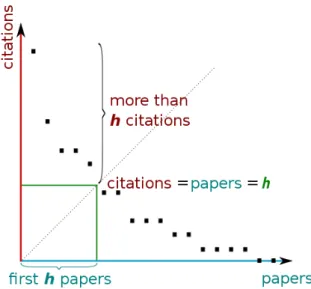
Figure 2.1: The h-index graphically. By plotting the number citations of papers in de-creasing order, and then intersect that with the line with equation y=x, we can obtain the h-index.
A scientist has index h if h of his Np papers have at least h citations, and the others (Np
- h) papers have no more than h citations each. Npis the total number of papers.
For instance, an academic with h-index equal to 20 means that he/she has 20 papers that have, at least, 20 citations each. The h-index can determined by plotting a graphic the publication citations counts (Fig. 2.1). The graph is created by simply plotting the number of citations in decreasing order and a line with equation y=x that is, a line where the number of publications and citations are the same)2. The number of papers "before" (that is, in left of) the intersection of the lines mentioned before, is the h-index[13]. In Fig, 2.1, this value is five.
There are, however, some limitations3 when using only h-index to assessing citations
impact:
1. It is not appropriate for junior academic, due to the difficulty in increasing the h-indexin yearly stages;
2. Once a paper belongs to the top h pages (the "left" side of the 45 degree line), its subsequent citations no longer count ;
3. It does not decline (academics that retire stay with the same h-index);
4. It does not take into account the number of authors on a paper (co-authoring);
2Or, if the axis are in same scale, a forty five degree line from the origin. 3http://www.harzing.com/pop_hindex.htm
To overcome the first limitation, a modified h-index was proposed, also by Hirsch, called m. This metric is the result of dividing h by the author’s years of publishing, resulting in a more fairer comparison between junior and senior academics However, due to the nature of its calculus, m may vary greatly during the first years of an academic; it only stabilizes later on the academics career. Even so, it still is a useful alternative to h-indexwhen comparing juniors and seniors academics.
To overcome the second limitation, a variant of h-index was proposed, the g-index, by Leo Egghe[4], defined as follows:
[Given a set of articles] ranked in decreasing order of the number of citations that they received, the g-index is the (unique) largest number such that the top g articles received (together) at least g2citations.
Fig. 2.2 shows a comparison between h-index and g-index. Whereas the h-index uses the individual count of citations (red figures) on its calculus, g-index uses the accumulated citations count (green figures). The g-index in this figure is the number of symbols in left of g-index reference line, which is eleven (green diamonds), and the h-index is the number of red symbols in left of h-index reference line, which is six (red diamonds). Leo Egghe’s says that g-index inherits all h-index good properties, and, in addition, it better takes into account the citation scores of the top articles. Although this is just an example, it can be seen that, for a set of citations, g-index is always either bigger than or equals to h-index, meaning it has bigger discriminatory power.
Figure 2.2: Comparison between h-index and g-index
In spite of not used much, g-index appears to be a great complement to h-index. To overcome the third limitation, Sidiropoulos4 suggested a contemporary h-index.
This metric purpose is to add weight to paper’s age: the more recent, the more impact it has, and the more older, the less impact it has. The consequence of this reasoning, is that, for juniors, their classic and contemporary h-indexes will be very similar, but for seniors, they can differ greatly. As such, when comparing h-index involving two age classes, both metrics should be used to complement each other.
Regarding the fourth limitation, Hirsch suggested partitioning citations among co-authors.
In spite of its limitations, h-index is still the most used bibliometric around citation impact subject. Nevertheless, in order to be used in decision making, we think it should be complemented with others, such as g-index, also the reason why we have it in CIDS.
2.1.2
Self-citations
Self-citation is usually defined as a citation where the citing and cited paper share at least one author [2] or co-author [14]. CIDS uses the definition of CiteSeer, where a citation is considered a self-citation if at least one of the author’s names (in the citing paper) is located in the header of the cited paper. Depending on research area, the self-citation count percentage can make up between 10 to 30% of total citation count [1] [9].
There are reasons for an author to resort to self-citation [2]:
• To connect past and present work the of author and discussing previous findings without too much repetition;
• It is easier to cite a paper he knows well, which is also a reason for citing colleagues' papers of the same department, research group or university, instead of others; But there are also less legitimate uses of self-citation [2]. For starters, it gratu-itously increases one citations' count. Although neglected by Hirsch himself, some studies showed that the h-index decreases when we account only self-citations (from 12% to 1% [11][3]). This means that papers near h-index are obvious candidates for self-citing (for instance, the paper number seven in graphic 2.2, if added one more citation, it would in-crease the h-index). There is even an browser plug-in5 that indicates how many citations
are needed to increasing the h-index value by one.
Care should be taken when comparing authors from different areas of research due to the very nature of publishing: nature science academics tend to publish more (and smaller) papers/articles, while Social Sciences publish less (and bigger) papers/books[9].
4Generalized Hirsch h-index for disclosing latent facts in citation networks 5https://addons.mozilla.org/en-US/firefox/addon/scholar-h-index-calculator/
Some say that self-citation does not influence the quality of the publications[5] and it is a necessary action when there is no previous research in the area[6]. I think that, ultimately, it is better to have this discerning process than none at all: if we can have both data separately, we can compare it and, depending on the situation, draw conclusions.
As it will be mentioned below, currently, to the best of my knowledge, the only citation impact tool that does the task of discerning self-citations in its bibliometrics is CIDS. This discerning is done by advanced querying Google Scholar.
2.1.3
Publication collections
In order to have the most completeness publication and citation count possible in biblio-metrics’ results, it is necessary to have access to a large publication (and citation) collec-tion, as well as easy methods to retrieve that information. Known publication collections include the following: CiteSeerX (former CiteSeer), Institute for Scientific Information (ISI) and Google Scholar (GS). Only the latter, which is used by CIDS, crawls the entire web (CiteSeer does not6) and does not have restrictions on its content (ISI has7). Both
CiteSeerX and Google Scholar have public web interfaces that allows searching for pub-lications and citations. Although, upon searching, CiteSeerX displays immediately the self-citations count, with Google Scholar, one has to perform advanced querying to be able to retrieve that information. There are also three downsides that we have found in Google Scholar:
• It does not have an API for easy and quick data retrieval;
• It temporarily blocks access when receives to many requests (from the same loca-tion) in a short period of time;
• Recent studies[10][12] showed that Google Scholar has ghost authors, that possibly influence the result of bibliometrics and because of that, it should not be used for citation impact analysis;
CIDS has managed to work around the three problems described. The first problem was resolved by parsing the HTML pages returned by Google Scholar and the second one by using applet technology, which shifts the origin of requests to the client. Regarding third problem, the disbelief in Google Scholar is due its crawler, which, firstly, invents author names and, secondly, inflates publication and citation count. According to those studies, the first situation (inventing authors) occurs when the crawler searches inside pub-lications, for authors, titles and date information. Since the location and nomenclature of
6http://citeseerx.ist.psu.edu/about/bot
7http://thomsonreuters.com/products_services/science/free/essays/
Type of computation Example of tools that use Google Scholar collection On-line computation • INRIA Lille9 • QuadSearch10 • CIDS Script • MATLAB11
• Harzing Publish or Perish12, also known as HPP, computes H and G index and other statistics. HPP service requires downloading a program, which is available to Windows and Linux formats.
• Citations-Gadget13
Browser extension
• Scholarometer14 is a cross-platform browser extension to
help evaluate the impact of an author’s publication.
• Scholar H-Index calculator15 is a lightweight Firefox ex-tension which computes citation indexes for the submitted query on Google Scholar.
Table 2.1: List of citation impact tools categorized by type of computation
this information are not standardized, the crawler can inadvertently create artificial au-thors - the ghost auau-thors - for those publications. The second situation (inflating publica-tion and citapublica-tion count) occurs when the same citapublica-tion or publicapublica-tion is found in different places but counted separately, inflating both publication and citation count. Although this critics severely discredits Google Scholar fidelity, CIDS has some functionalities that can help alleviate this situation, such as the possibility to discard publications and, thanks to this work, also citations.
2.1.4
Citation Impact Tools
At the time of this writing, there are several tools that compute both h-index and g-index using Google Scholar as the publication data. These tools use different approaches to cal-culate those indexes, namely, using on-line computation, scripts or browser extensions8. Table 2.1 shows the tools categorized by the type of computation involved.
There are also other ways of computing h-index and g-index using other databases
ilar to Google Scholar. Some examples16 are: Web of Science17, which uses previously
mentioned ISI publication collection, Scopus18, Microsoft Academic19and Odysci20. This type of tools scrap the internet for publications and citations, each one having its own re-strictions, saving the findings in their corresponding database, and present citation impact results. In terms of public access, all mentioned tools, except Odysci, are subscription based, that is, either its database or the journals/articles included are not open for public use. In terms of bibliometrics results, none of them discern self-citations.
It seems that Google is investing in citation analysis. Although it is in a limited launch, they have recently announced their new tool called Google Scholar Citations21. If they
finish this tool and release it to the public, I believe CIDS will not be able to make a stand: they are the ones who hold the data. Their citation analysis would be faster, more reliable and with Google brand on them. In spite of this, CIDS still has the publication (and soon, citation) filtering functionality, as well as the group analysis, as leverage on this. Nevertheless, CIDS was a pioneer on citation analysis subject and it is always nice to see our work being acknowledged when big companies such as Google start to develop tools with similar behaviour like ours.
2.1.5
CIDS
As for CIDS v3.0, it is a tool that uses both on-line and off-line computation, but it does not require the user to install any special software. The only requirement is to have installed a valid Java Runtime Environment22 (JRE) to have the capacity to run applets.
Even this is an optional feature, if users do not want to use applets, no JRE is required on client side.
The difference between CIDS and the other tools, is that it calculates citations dis-cerning self-citations, meaning that the results can sometimes be more accurate, as the number of citations and the h-index is sensitive to self-citations at the individual level[2], so if this can be in some way filtered from the results it can help improve accuracy.
CIDS, in its essence, is cross-platform because it only needs a browser with Javascript (JS) enable to work, meaning that CIDS also has more advantages when comparing to other tools that require the user to download software for these tools to work, or tools that only works on certain operating systems. Unfortunately, due to difficulties in performing Asynchronous Javascript And XML (AJAX) requests with a component used in CIDS
16http://en.wikipedia.org/wiki/Academic_databases_and_search_engines 17http://apps.isiknowledge.com/ 18http://www.info.sciverse.com/scopus/ 19http://academic.research.microsoft.com/ 20http://www.odysci.com/ 21http://googlescholar.blogspot.com/2011/07/google-scholar-citations.html 22http://www.java.com/en/download/faq/whatis_java.xml
Date Milestone Completed? September 2010 Familiarization and evaluation with previous
CIDS architecture and code Yes
October 2010 Preliminary report Yes
November 2010 Data verification Yes
December 2010 Data validation No
February 2011 User profile Yes
April 2011 Assessment Yes
July 2011 Demonstration of CIDS to LASIGE advisory
board23 Yes
July 2011 Writing of thesis Yes
Table 2.2: The milestones for this work
v3.0, the web browser Internet Explorer (IE) is no longer supported; a trait that CIDS v3.1 inherited.
When comparing CIDS with browser extensions to calculate indexes, we think that it is up to the users to choose if they like to use this kind of tools or if they prefer a more robust application, but even on this field CIDS has the advantage that not all browsers support extensions like the major browsers, limiting this type of tools to stay confined to a few browsers.
None of the tools mentioned above allows citation filtering, a functionality that CIDS v3.1 (this work) introduces. I believe that it will help authors filter incorrect citations (inherited from Google Scholar’s database) from their publications, as well as adding missing ones, thus improving accuracy.
Finally, CIDS v3.1 has also the group analysis functionality, that enables the visual-ization of bibliometrics results for a group of authors. We think this feature is useful for comparing the impact of different research units, and perhaps promote competitiveness between them.
2.2
Planning
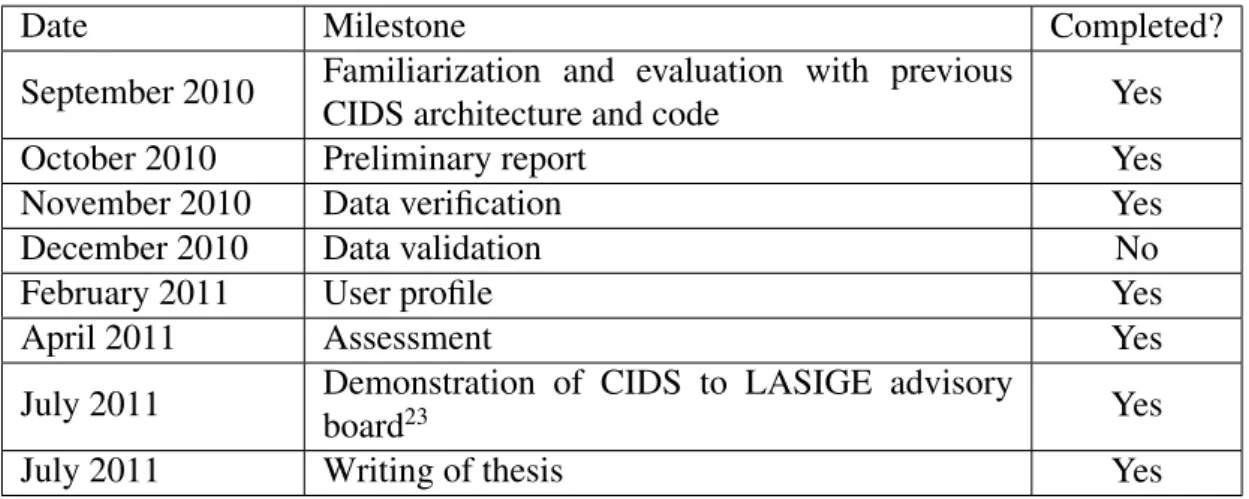
The planning for this work can be seen on Table 2.2.
The actual plan deviated from the original one because, in the first semester, I was not fully committed to this work due to two postponed course units from last year. As such, the functionalities planned for that semester took longer time to complete which inevitably pushed forward the ones that followed. Near the end, I arrived to a situation where I had to choose, between user profile and data validation (the most time-consuming features), which functionality was to be done using the available time. I decided to implement the feature user profile, due to its higher feasibility; the data validation feature required a
more thorough analysis on the modus operandi of the available tools (Weka24 or Bow
Toolkit25), followed by their respective integration with CIDS.
24http://www.cs.waikato.ac.nz/ml/weka/ 25http://www.cs.cmu.edu/ mccallum/bow/
Architecture
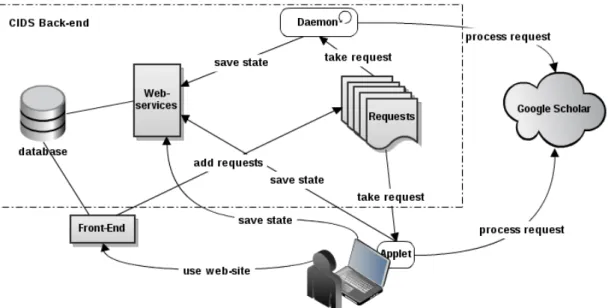
This chapter shows current CIDS architecture, by presenting its components and how they communicate with each other. In following chapters, each new functionality (men-tioned in Section 1.2) will describe which and in what way this work has modified these components.
Figure 3.1: CIDS architecture and its interaction with external components The main components that constitute CIDS (Fig. 3.1) are the following:
• Database
• Queue of requests • Web-services • Front-end
• Applet and Server (Daemon)
• Client
Each one of these components and to whom they interact, will be explained in the next sections.
3.1
Database
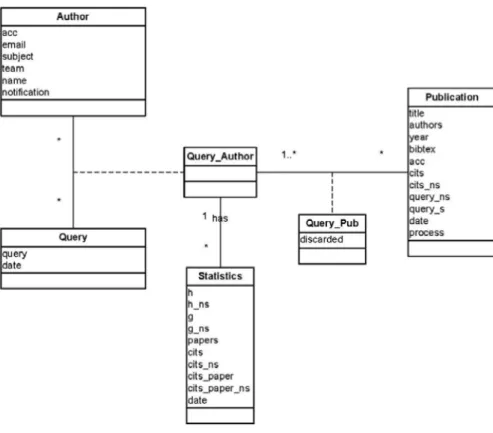
CIDS uses a database1 to save data in a persistent manner. The database’s schema2 at-tempts to mimic the reality on how things relate to which other. In CIDS case, it tries to model how authors, queries, publications, citations connect to each other. CIDS current database schema can be seen on Fig.3.2.
Figure 3.2: Database class diagram in UML
Each box in Fig. 3.2 represents a class. Each class can have properties, represented by field names inside each box, and relations/connections, represented by the lines that connect each box. Table 3.1 explains what each field of each table means.
For the sake of simplicity, the reference keys are not shown in database schema (Fig. 3.2). After analyzing Fig. 3.2, one can see that an author has many queries and a query can have many authors. This, however, it is not entirely true: first, a query only belongs to one author, second, though an author can have many queries, he only has one at a given
1organized collection of data
Class Table Field Purpose
Author
acc
It means "accession number"and represents an unique identifier to each author/user of the system. email The user email to where
notifica-tions are sent. subject
Options introduced by the author to help filtering the results ob-tained from Scholar.
team The team of the author, if he has one.
name The name of author on the team, if he has one.
notification
Boolean field that allows the user to indicate the system weather he/she wants to receive email no-tifications or not.
Query query
The search query that will be used to fetch citations from Google Scholar.
date The date when the query was per-formed.
Statistics
Bibliometric values: h, g, papers, cits, cits_paper
h: h-index ; g: g-index ; papers: number of papers; cits: number of citations ;
cits_paper: number of citations per paper
h_ns, g_ns, cits_ns, cits_paper_ns
The above bibliometrics, but dis-cerning self-citation on their calcu-lus.
Publication
title, authors, year The title, authors and year of the publication.
bibtex A bibtex entry.
acc An unique identifier to each publi-cation
cits and cits_ns Number of citations and self-citations of a publication.
query and query_ns The search queries used to fetch all citations and non-self citations. date The date this publication was
fetched
process
The state of retrieval of this publi-cation. Can have two values: draft or full. Publication with draft information is a publication with-out bibtex, query_ns and query_s parameters and/or without cits_ns parameter ; full is a publication with all parameters defined
Query_Pub
discarded Stores whether a publication of a query was discarded or not. Table 3.1: Database tables and fields.
time; the others queries are kept for historical reasons. What one should understand and conclude from this relation is that, a query belongs to only one author, and an author only has, at a given time, one query.
The association of a query and an author, which is stored in Query_Author, can have many publications, and each one of these can belong to many queries. This is easy to understand, since two queries can generate two groups of publications that can intersect each other. One can also see that the connection class, Query_Pub, has the discarded property. This property is used to know if some user has discarded some publication in some query. Due to publications being shared among queries, it is not feasible to have the discarded property related only to the publication. If that would be the case, some user preferences would be overwritten by others.
We can also see that Query_Author can have many statistics, which are calculated over time (hence the date field in Statistics table).
3.2
Queue of Requests
Since Google Scholar temporarily blocks access to a machine after receiving too many requests in a short period of time from the same location, CIDS required a structure that could schedule its requests to Google Scholar. The structure that was crafted to overcome this problem was a global queue of requests, used by both Server Daemon and Applet (more on this in Sec. 3.5).
The requests are added to the queue directly from CIDS front-end (the website) or when other components need it, via web-services. These requests basically encapsulate direct calls to Google Scholar. This encapsulation allows CIDS to schedule its requests, making more difficult for Google Scholar to block them.
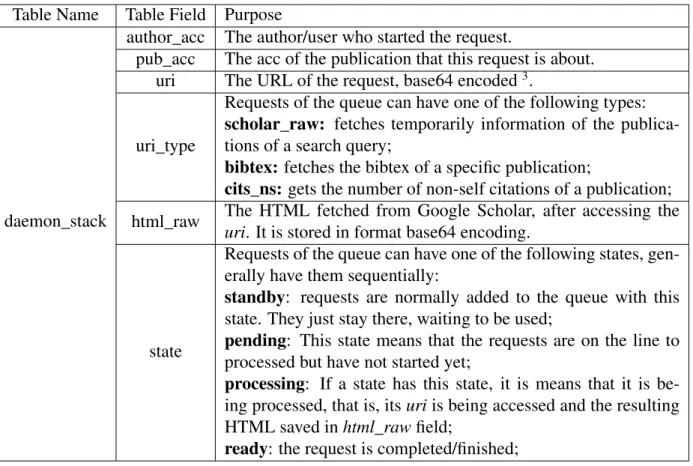
The requests of the queue are saved to a database table named daemon_stack. This table is composed of the following fields:
Table Name Table Field Purpose
daemon_stack
author_acc The author/user who started the request.
pub_acc The acc of the publication that this request is about. uri The URL of the request, base64 encoded3.
uri_type
Requests of the queue can have one of the following types: scholar_raw: fetches temporarily information of the publica-tions of a search query;
bibtex: fetches the bibtex of a specific publication;
cits_ns: gets the number of non-self citations of a publication; html_raw The HTML fetched from Google Scholar, after accessing the
uri. It is stored in format base64 encoding.
state
Requests of the queue can have one of the following states, gen-erally have them sequentially:
standby: requests are normally added to the queue with this state. They just stay there, waiting to be used;
pending: This state means that the requests are on the line to processed but have not started yet;
processing: If a state has this state, it is means that it is be-ing processed, that is, its uri is bebe-ing accessed and the resultbe-ing HTML saved in html_raw field;
ready: the request is completed/finished;
CIDS intervals requests with a 40-60 seconds delay. This is a empiric tested duration number which ensures that CIDS can make requests to Google Scholar without being blocked4.
3.3
Web-services
Since CIDS is composed of components that were created using different technologies (PHP, Javascript, Java) and each one needs to access or alter CIDS state, that is, use the database, services were created to centralize and mediate this access. A web-service is a software technology that enables different applications to send and receive data in XML (extensible markup language)5. This allows different software systems to
communicate with each other, regardless of the technology used. CIDS uses web-services to mainly unify operations to be done to the database.
A service is triggered when accessed by its respective URI – the location of web-service on the internet. By sending a request6 to that URI, it activates it and then some
4During the time I was working on CIDS, it kept being constantly blocked by Google Scholar. I can only
presume that Google Scholar has decrease the rate of the number of request per minute before restricting automated accesses to their resources.
5http://en.wikipedia.org/wiki/Web_service
6By “sending a request”, I mean when someone accesses the URI on the browser (or accesses the port
operation is performed. To add more functionality to the web-service, it typically receives a list of parameters, whose format, like the URI, is known in advanced.
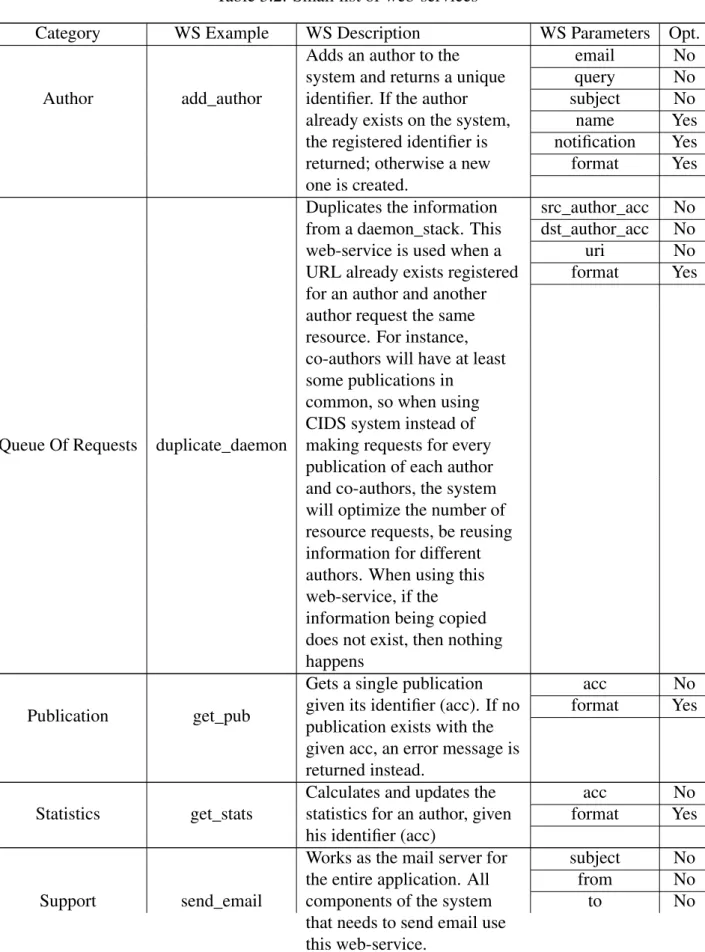
Table 3.2: Small list of web-services
Category WS Example WS Description WS Parameters Opt.
Author add_author
Adds an author to the system and returns a unique identifier. If the author already exists on the system, the registered identifier is returned; otherwise a new one is created. email No query No subject No name Yes notification Yes format Yes
Queue Of Requests duplicate_daemon
Duplicates the information from a daemon_stack. This web-service is used when a URL already exists registered for an author and another author request the same resource. For instance, co-authors will have at least some publications in
common, so when using CIDS system instead of making requests for every publication of each author and co-authors, the system will optimize the number of resource requests, be reusing information for different authors. When using this web-service, if the information being copied does not exist, then nothing happens src_author_acc No dst_author_acc No uri No format Yes Publication get_pub
Gets a single publication given its identifier (acc). If no publication exists with the given acc, an error message is returned instead.
acc No
format Yes
Statistics get_stats
Calculates and updates the statistics for an author, given his identifier (acc)
acc No
format Yes
Support send_email
Works as the mail server for the entire application. All components of the system that needs to send email use this web-service.
subject No
from No
msg No format Yes
Web-services can be used in several ways (7):
RPC Invokes operations on remote objects;
Service oriented Instead of operations, like RPC, its main unit is messages, which are sent over the network, commonly in XML. These messages are sent to existing services (like printing service) which then respond accordingly;
RESTful Attempts to transfer state of entities by using the HTTP protocol, using it’s methods: GET for fetching information, POST for posting information, PUT for updating information and DEL to delete information);
The web-services present in CIDS are an hybrid of "Service Oriented" and "RESTful" approaches. They transfer state of objects using GET and POST methods of HTTP (the REST aspect) and use messages in XML to perform the transfer of state of entities, which is the "Service Oriented" aspect).
Given the many web-services CIDS has, I have categorized them into groups, accord-ing to the object/entity they operate on. This categorization can be seen on Table 3.2. For each category, an example of corresponding web-service is given, followed by its description and the parameters it receives and if these are optional or not.
CIDS web-services' URL's are constructed as follows. The start of the URL is with “http://” followed by SERVER_URL, whose value depends of the name given to CIDS website. Then, it is concatenated with “/api/?”, followed by the name of the web-service and respective parameters, using “&” for separating them and “=” to assign values to them. For instance, if one were to access the URL:
http://SERVER_URL/api/?add_author&[email protected] &query=author:my query “Lisbon or Lisboa”
-author:remove-name&subject=eng or soc&format=xml
, it means that he was accessing the add_author web-service with the following pa-rameters:
email: [email protected]
query: author:my query "Lisbon or Lisboa" -author:remove-name subject: eng or soc
format: xml
Every web-service returns something. CIDS web-services returns a XML string, if “format” parameter is provided with value “xml”. In previous example, CIDS would return something similar to:
<?xml version="1.0"?> <cids_api> <add_author> <result>OK</result> <type>INSERT</type> <acc>43092305071101185146</acc> </add_author> </cids_api>
The rest of web-services are used in a similar manner, differentiating only in the name of the web-service and its parameters.
Since the front-end engine (discussed in Section 3.4) resides on server-side, it can access the database directly, without using web-services. This may seem a violation in CIDS architecture, because I previously mentioned that the web-services’ purpose was to unify the access to the database and now I am stating that front-end does not use them. The reason for this to happen is due to the same location and technology that front-end engine and web-services share: both reside in server-side and are written in PHP. The only difference in them is what they output: front-end engine outputs user interfaces and a web-service outputs XML strings (similar to example mentioned before). Plus, if front-end engine would use web-services to access database, it would be rather inefficient. An analogy of this inefficiency would be having two brothers living in the same house corresponding with each other using the local post office, rather than just talking with each other.
The rest of CIDS components, however, need to use web-services.
The Daemon and Applet components (presented in Sec. 3.5) mainly use web-services that are related about changing the requests within the Queue of Requests, namely, re-quests' state and content.
The client (through AJAX8 calls) mainly use web-services to change publication dis-carding state.
The rest of the web-services are used by programs written in JAVA language that are invoked during user interaction with CIDS.
It is usually named Web API (Application Programming Interface) to a group of web-services that allows the access and alteration of a system state, without revealing its im-plementation. In CIDS case, the web-services are for internal use only, though anyone could use them as they see fit.
3.4
Front-end
The front-end is the interface between the user the rest of the system (back-end). The front-end is, typically, a set of web-pages, usually created using markup language, such as HTML, and stylized with CSS. Additionally, Javascript9 can be used to add more
in-teractivity. The front-end engine is the application logic that outputs those interfaces. CIDS it essentially composed of three interfaces/pages, created using these program-ming languages. The first interface is about providing the query search, the second about publication filtering and the last one about presenting the results. Only in the first two (Fig. 3.3 and Fig. 3.4 ) pages it receives input from the user.
To understand how these interfaces are related, I am going to provide a walk-through on how to use CIDS.
3.4.1
Query Creation
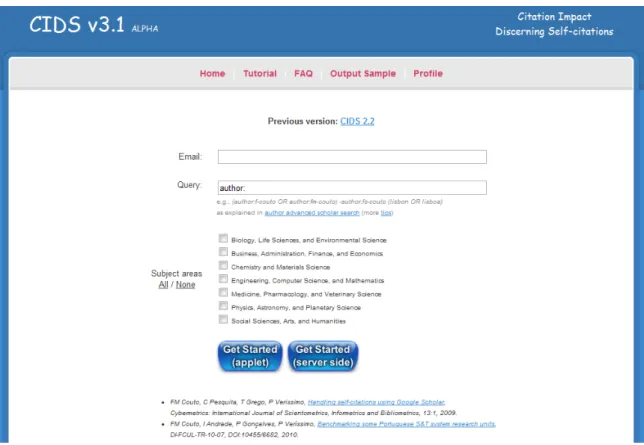
When accessing CIDS, the user is presented with the screen of similar to Fig. 3.3
In the top section on this screen, there is a form with fields email and query. The first is used for notification purposes and the second is for inserting a search query of an author, using Google Scholar format10.
9Javascript is a scripting language that resides on the client-side, inside the web page and typically adds
more interactivity on user experience. It should not be confused with Java.
10Search queries tips can be seen here: http://scholar.google.com/intl/en/scholar/
Figure 3.3: CIDS homepage
In the middle section of this page, user can specify which of the following subject areas of interest he wants regarding previous search query:
• Biology, Life Sciences, and Environmental Science • Business, Administration, Finance, and Economics • Chemistry and Materials Science
• Engineering, Computer Science, and Mathematics • Medicine, Pharmacology, and Veterinary Science • Physics, Astronomy, and Planetary Science • Social Sciences, Arts, and Humanities
There are also two shortcuts that enable the user to either select or discard all areas subjects in one click.
In the bottom on the screen, there are two buttons. In order to get started, user must click on Server or Applet button. Server queues user’s requests in a global queue, common to every user. If the user chooses this method, he will have to wait more time to have his request processed. If, instead, he chooses Applet, that waiting period is reduced (this is explained in Section 3.5). Whichever method chosen, both do the same thing: fetch publications from Google Scholar.
3.4.2
Publication Filtering
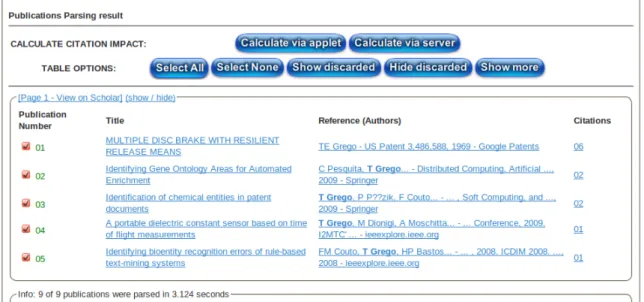
After pressing one the buttons mentioned, some status messages will show up and then, if everything works normally, a screen similar to Fig. 3.4 is presented.
Figure 3.4: Publication Filtering
This interface (Fig. 3.4) is constituted primarily by a table of publications, which are related to previous search query. These were fetched from Google scholar in a first sweep. The information presented for each publication is the following:
number: The order which appeared in Google scholar; title: The title of the publication;
reference (authors): The authors of the publication. This text is only a draft because it is the result of parsing search results. Later, CIDS is going to correct it by parsing the specific publication's bibtex;
citations: The total number of citations;
If user encounters a wrongly fetched publication, in this interface he has the oppor-tunity to discard it. This action enables the user to select which publications he wants to be included during final calculus. It is also possible to select or discard all publications at once. After this, the user has again to choose between Server or Applet (Section 3.5 ). But, in this case, if he chooses Applet, then he will have the opportunity to contribute to citations calculus, by, in conjunction with CIDS server, resolving requests to Google Scholar. Should he chooses Server, he must wait for his requests to be resolved by CIDS server, just like any other user.
3.4.3
Bibliometrics Result
The final interface is divided in three sections (Figure 3.5, Figure 3.6, and Figure 3.7). If citations calculus is in progress, shown by a progress bar between the second and third sections, all results shown in each section are not definitive. The entire page reloads itself from time to time, until calculus is complete.
On top of CIDS results (Figure 3.5), bibliometrics of the author, accounting only publications previously chosen, are presented:
Figure 3.5: CIDS bibliometrics
• h-index (with and without accounting for self-citations) ;
• g-index (with and without accounting for self-citations) ;
• number of cited papers ;
• number of citations (with and without accounting for self-citations) ;
• number of citations per paper (with and without accounting for self-citations).
In the middle of the page, there is a graph (Figure 3.6) that shows the number of citations an author had over the years, discriminating self-citations in each one. The bars indicate the number of citations on the respective year; the darker blue only accounts for non-self citations, while the other one accounts for all citations.
Figure 3.6: CIDS graphic bar
At the bottom of CIDS results (Figure 3.7) there is a table, with the following fields:
Figure 3.7: CIDS publications result title: Publication title;
year: The year the publication was published; citations: Total number of citations of publication; nonself: Number of non-self citations;
self: Number of self citations;
If publications calculus is not yet completed, it will be reflected on the background of publication’s title. If it is shown in red (Figure 3.8), it means that no requests to Google Scholar (of that publication) has been resolved.
Figure 3.8: Publication in red - no resources have been processed
If yellow (Figure 3.9) , then some requests have been resolved, but there are still some left. Finally, if gray (Figure 3.7), then all publication’s requests have been resolved.
Figure 3.9: Publication in yellow - some resources have been processed
If user has chosen “APPLET” in previous page (Fig. 3.4), then a section similar to Fig. 3.10 appears on the top of results page.
The applet - a software program embedded on the page - mimics server behavior by resolving requests, but here, the source of the requests is the user’s machine, not CIDS (more on this in section 3.5).
Most of the web-services that exist are used during this step. When passing from Fig. 2 to 6, a different web-service is invoked. This web-service invokes a program written in Java, which, in turn, invokes more web-services. It is in these Java programs that most of the web-services are used. In analogous manner, the passing from Fig. 6 To Fig. 4 also invokes another program in Java which in turn invokes other web-services.
3.4.4
Group Analysis
There is another interface whose access is both hidden and restricted (by password) to the regular user (Fig. 3.11). This interface allows the administrator to control and accom-pany the cycle of requests. For instance, it can change the state of a request which, for some reason, got stuck in “processing” state, to “pending” or “ready”. It also allows the administrator to calculate bibliometrics for a group of authors. He just needs to upload a correctly formatted comma-separated-value (.CSV) file. For instance, the following text, saved in a file with extension .CSV is considered correct:
Email,Query,Subject,Team,Name,Notification
[email protected],author:ivan ricardo„Andrade,Ivan,no
[email protected],author:josé vieira andrade„Andrade,Ivan Andrade,no
Here are the rules that the file must obey: 1. Use double-quotes instead of single-quotes; 2. Use comma (“,”) to separate values;
3. These fields are mandatory: email, query, team and notification;
4. The remaining fields, Subject and Name, should stay in blank, if they are not needed;
The current modus operandi for starting bibliometrics calculus for a group of authors requires many manual steps. After uploading the comma-separated-value file, one must must wait for each “first_req” request (of each member) to finish. After that, one has to search for the team's name in the “ready” pile of requests to retrieve those “first_req” requests. Then, one has to select them and click on a button so that the system creates the publication requests of each individual member. Finally, in the “standby” pile of requests, for each member, one has to search for its requests and change their state to from “standby” to“”pending”, for later processing.
This functionality will be revised (section “team analysis” ) and it will become more automated: it will only need the step of file uploading.
Figure 3.11: CIDS administration interface
3.5
Applet and Server (Daemon)
There are two components that have very similar behavior but need to be in distinct loca-tions on CIDS architecture: the applet and the server daemon. The reason for this will be explained next.
By definition, a daemon is a computer program that runs in the background, rather than direct control of the user, and it is usually initiated during the operating system start-up.11
CIDS has a program with similar characteristics - runs in the background - reason why it was named daemon. This daemon is located on server-side and its main responsibility is to fetch requests with pending state from the queue of requests, and process them, until there are none. It has the additional responsibility of sending notification email to a user after all his requests are finished.
An applet12 is a small application program that is included in web pages that are
display on user's browser. CIDS' applet shares daemon's main responsibility.
The reason for having a program with similar behaviour of daemon's in client-side, is due to a restriction measure of Google Scholar's that prevents automated access to its resources. As mentioned before, when Google Scholar detects a machine performing multiple requests, it temporarily blocks its access. This is why CIDS applet needs to have daemon's behavior on client-side: since requests origin are done from a different machine
11http://en.wikipedia.org/wiki/Daemon_(computing)
12When “applet” is mentioned, I am referring to the Java applet, that is, a program written in Java that is
- technically, it is from a different IP13 - it virtually increases the rate of requests, per
period of time, CIDS can do.
One important note to consider is that CIDS only uses the applet on a user's browser to work on requests initiated by him, not by others.
Both daemon and applet are programmed in Java language.
3.6
Client Browser
Besides enabling applet usage, the client's browser also has another important role in CIDS. Through AJAX calls14, it is possible for the browser to communicate with server without needing to refresh the page. This makes possible for the user to select/discard publications (Fig. 3.4)) and have their state immediately15saved on the server's database. This results on a more seamless experience for the user. There are others scenarios where AJAX is used: automatic publications state update(Fig. 3.7), bibliometrics (Fig. 3.5) and graphic bar (Fig. 3.6), during final calculus.
13IP (Internet Protocol) is the public address of a computer on the internet.
14AJAX (asynchronous Javascript and XML) calls allows browser to send requests to server for
process-ing, and receive response, without refreshing its current page.
Work Done
This chapter is divided in several sections, each one describing the work done on each new functionality described in Section 1.2. For each new functionality, I present the architectural components, shown in Section 3, that required modification (see Table 4.1 for an overview) and also how and why I have accomplished that. I have also added to this chapter the work done on auxiliary functionalities (functionalities with a supportive role) (Section 4.4) and also some unplanned work (Section 4.5).
Functionality Database Front-End Queue of Requests Applet & Server Web-Services Browser User Profile x x Data Verification x x x x x x Group Analysis x x
Table 4.1: Matrix showing the new functionalities and with which CIDS architectural components their development coped with
4.1
User Profile
User profile is a restricted area where a user can visualize all its search queries, as well as keep track of their progress. In order to a new user to access this area, he first has to complete two steps: register and authenticate on the website. If the user is already registered, he only has to authenticate. Should he succeed, he enters in his restricted area. If the user does not remember his password, he can perform a password reset, and a new password is sent to his email.
The objective is to give to users the possibility to administer multiples queries simulta-neously. The problem with this is that it implies changing a core property of CIDS: rather one query, having many queries per author. Like has been mentioned in Section 3.1, it is on the database component where the relationship between authors and queries is defined. As such, this component was the first one to be analyzed. Furthermore, new interfaces are
also required to interact with user, for instance to present all his queries, meaning that the front-endcomponent, which is responsible for creating those interfaces, was also subject of review. Both components are discussed next.
4.1.1
Rationale on Database
First Approach
My first approach involved modifying in how CIDS internally operated. In order to show some arbitrary bibliometrics results, the system needs only an identification of the author, because it can infer his query. But it is this act of inferring that complicates the implemen-tation of this functionality; it binds author and query and there is no way of outputting the bibliometrics result of an arbitrary user, other than his latest one. This problem is illustrated by the following pseudo-code:
Require: $author_id
1: $query_id ← get_most_recent_query_of _author ($author_id)
2: $results ← get_bibliometric_results_f rom_query ($query_id)
3: print_results($results)
This pseudo-code purpose is to output bibliometrics results of an author. We can see that, first, it receives the identification of the author (line 0), it then gets author’s most recent query (line 1), then gets the results that query (line 2) and finally displays them (line 3). The problem evidenced before is evidenced on lines numbered 0 and 1. Ideally, we would like to have something similar to the next pseudo-code, where, instead of passing the identification of the author, we pass the identification of the query, thus not binding author and query:
Require: $query_id
1: $results ← get_bibliometric_results_f rom_query ($query_id)
2: print_results($results)
In order to do this, it would be necessary to first, find all occurrences where $query_id is inferred by $author_id and, second, try to inject $query_id into the same context, dif-ferently. To help pinpoint which functions, on CIDS’ code base, had this problem, I developed a map of dependencies of functions. This map was conceived by performing a string search all over CIDS’ source code, containing either query_id or q_id, then I searched on the functions that mentioned previous ones, and so on, until there were no more to reference. My findings can be seen on Appendix B and resemble a horizontal tree, where functions in scripts are bound to other ones on others scripts.
The visualization of the flux of information of illustration in Appendix B made me perceive that, when Server Daemon (Section 3.5) is processing a request from the queue of requests, it does not (and it cannot) know to which query the request is related to, because it only has knowledge (besides it’s specific information such as its type) of the