Faculdade de Ciˆencias
Departamento de Inform´atica
R2WEB: REPAIRING AND EVALUATING RICH WEB
APPLICATIONS ACCESSIBILITY
Ana Sofia Batista Neves
DISSERTAC¸ ˜AO
MESTRADO EM ENGENHARIA INFORM ´ATICA
Especializac¸˜ao em Sistemas de Informac¸˜ao
Faculdade de Ciˆencias
Departamento de Inform´atica
R2WEB: REPAIRING AND EVALUATING RICH WEB
APPLICATIONS ACCESSIBILITY
Ana Sofia Batista Neves
DISSERTAC¸ ˜AO
Projecto orientado pelo Prof. Doutor Luis Manuel Pinto da Rocha Afonso Carric¸o
MESTRADO EM ENGENHARIA INFORM ´ATICA
Especializac¸˜ao em Sistemas de Informac¸˜ao
In the first place, i am most grateful to Prof. Luis Carric¸o for this opportunity, for the patience and for the support and guidance throughout this last year. To my coworker N´adia, i want to say that i recognize and thank, the valuable advices given to me from her experience.
Secondly it must be said to all those true friends who accompanied me until here, those who listened, those who cared, those who gave me support and taught me new things, those who got me away from my work when i really needed, i honestly appreciate you and what you did for me. Without you there would be no thesis at all. Thank you.
To my Mom, i want to show my appreciation for the unquantifiable support and for all the other unimaginable things only a Mom could give. I also thank you for the food, though it was me who cooked it.
To my Dad, i want to say thank you for the many things, only now, am i able to understand and value.
Finally, but not the most important, i want to say thank you to every single person that made this year unbearable. I most definitely have to say that if not for you, i would not have learned some important life lessons.
A Web ´e hoje em dia a plataforma mais utilizadas para partilha de conhecimento e divulgac¸˜ao de servic¸os. A sua crescente importˆancia nota-se aos mais diferentes n´ıveis da nossa sociedade. Universidades, governos, empresas e outras entidades todas aproveitam da facilidade de chegar ao destinat´ario atrav´es da Web.
No entanto, o problema surge dado o facto de que nem todos aqueles, a quem este conhecimento e estes servic¸os se destinam, tˆem as mesmas capacidades, cognitivas ou f´ısicas. Grupos sociais de indiv´ıduos com dificuldades cognitivas e f´ısicas acabam por ficar `a margem destas potencialidades da Web.
Apesar de existirem j´a in´umeras tecnologias de ajuda para estas pessoas, como leitores de ecr˜a, etc., para que estas funcionem corretamente, ´e necess´ario que a informac¸˜ao seja disponibilizada adequadamente formatada. De forma a colmatar estas e outras situac¸˜oes existe a necessidade de normas cujo objectivo seja estandardizar conte´udos desenvolvidos para a Web.
A acessibilidade Web ´e uma preocupac¸˜ao da qual surgem os princ´ıpios de inclus˜ao social. E grac¸as `a qual, in´umera documentac¸˜ao e tecnologias, tˆem surgido de forma a col-matar este problema. Entre elas, tecnologias autom´aticas de avaliac¸˜ao e at´e de reparac¸˜ao de Acessibilidade Web.
Contudo, muitas dessas tecnologias ainda n˜ao conseguem colmatar dificuldades que surgem do desenvolvimentos tecnol´ogico da Web. Novas tecnologias, como Javascript, tornam os conte´udos Web em mais do que simples apresentac¸˜oes de texto. Conte´udos Web passam a ser dinˆamicos, grac¸as `a execuc¸˜ao de chamadas aos servidores, paralelas `a apresentac¸˜ao das p´aginas Web. Estas interac¸˜oes com o servidor permitem a alterac¸˜ao dos conte´udo nas p´aginas Web.
A avaliac¸˜ao da acessibilidade destes novos conte´udos dinˆamicos, n˜ao pode ser verifi-cada utilizando os mesmos padr˜oes usados at´e agora. Caso isto acontec¸a estes avaliadores de conte´udos est´aticos, podem levar a conclus˜oes incompletas que podem mesmo ser in-corretas.
esta ferramenta permite avaliar aplicac¸˜oes Web dinˆamicas.
Avaliac¸˜oes de acessibilidade realizadas por esta ferramenta seguem normas internaci-onais WCAG 2.0 grac¸as `a implementac¸˜ao de um modulo de t´ecnicas HTML. No entanto existe ainda espac¸o para expandir o ˆambito desta ferramenta. As normas WCAG 2.0 en-globam n˜ao apenas o HTML mas tamb´em um conjunto de outras tecnologias de entre as quais o CSS.
Sendo que, com o crescimento da Web e da quantidade de conte´udos dispon´ıveis online, maior atenc¸˜ao tem sido atribu´ıda `a utilizac¸˜ao de estilos que possibilitam aos de-velopers desenvolver conte´udos mais apelativos. Por este motivo a sua utilizac¸˜ao tem aumentado e os CSS s˜ao hoje em dia, considerados como uma das tecnologias mais im-portantes para a Web. Data esta importˆancia, este trabalho pretende expandir o funcio-namento de ferramenta QualWeb, introduzindo lhe novas capacidades an´ıvels dos CSS. Para isso inclu´ımos um modulo de avaliac¸˜ao e reparac¸˜ao de CSS. Esta avaliac¸˜ao, tal como a j´a existente avaliac¸˜ao de HTML, segue as t´ecnicas CSS WCAG 2.0.
N˜ao s´o nos preocup´amos em manter a modularidade da ferramenta, mas tamb´em nos preocup´amos em torna-la ainda mais flex´ıvel. As avaliac¸˜oes de HTML seguiam uma determinada forma de execuc¸˜ao de comprometia a flexibilidade da apresentac¸˜ao de resul-tados ao developer. Foi por este motivo que decidimos tamb´em alterar a perspectiva de apresentac¸˜ao dos resultados,. Esperamos assim melhorar o workflow do developer bem como, a sua experiencia com a nossa ferramenta.
Considerando que a complexidade das p´agina Web tem vindo a aumentar, o tempo que um developer poder´a eventualmente despender, analisando os seus conte´udos, segundo padr˜oes de acessibilidade, pode ser consider´avel. De forma a mantermos os developers interessados nestes temas, sem que considerem estas verificac¸˜oes cansativas, ´e importante tornar a sua experiencia t˜ao simples quando poss´ıvel.
´e com este objectivo que surgem ferramentas de reparac¸˜ao de acessibilidade. No entanto, se j´a as avaliac¸˜oes de acessibilidade podem ser algo amb´ıguas, esta situac¸˜ao agrava-se na reparac¸˜ao. Reparar uma p´agina Web requer um conhecimento relativamente da p´agina bem como uma vis˜ao geral que muitas vezes as ferramentas autom´aticas n˜ao possuem. Por este motivo o que propomos neste trabalho s˜ao sugest˜oes de reparac¸˜ao, apresentadas ao developer, de forma a que a ferramenta de fornec¸a toda a informac¸˜ao necess´aria para reparar a acessibilidade dos seus conte´udos.
Neste trabalho procedemos ao desenvolvimento de um m´odulo de reparac¸˜ao para as t´ecnicas CSS desenvolvidas. O objectivo ´e acima de tudo, mostrar ao developer que pode
De forma a que toda esta informac¸˜ao possa ser divulgada, ´e necess´ario melhorar a in-terface da ferramenta QualWeb, desenvolvida paralelamente a este projecto. Desenvolveu-se paralelamente a este trabalho uma interface para esta ferramenta, no entanto esta in-terface tem como objectivo apresentar uma vers˜ao anterior do QualWeb. De forma a conseguir disponibilizar todos os conte´udos desenvolvidos foi necess´ario melhorar essa interface introduzindo lhe novas funcionalidades.
Todas estas componentes desenvolvidos, foram verificadas atrav´es de um corpus de teste. Para a avaliac¸˜ao desenvolvemos testes individuais, por t´ecnica, e globais que simu-lavam a complexidade de uma p´agina Web real. Para a reparac¸˜ao, procedemos a reparac¸˜ao de algumas das mais utilizadas p´aginas Web, o que nos permitiu fazer uma analise cri-tica `as nossas implementac¸˜oes. Por fim, de forma a validar a interface e as reparac¸˜oes, procedemos a testes com utilizadores.
Estes testes foram cruciais para o refinamento da nossa ferramenta, bem como para obtermos algumas conclus˜oes interessantes no nosso trabalho.
No final, conseguimos, como pretend´ıamos, melhorar a ferramenta QualWeb, tor-nando a ainda mais competitiva nesta ´area. Conseguimos tamb´em validar toda a implementac¸˜ao realizada dos diferentes componentes e tir´amos conclus˜oes bastante interessantes. No-meadamente que o conhecimento de ferramentas deste g´enero, a n´ıvel de estudantes de universidade n˜ao ´e muito elevado e que estas ferramentas podem desempenhar um papel interessante para alterar esta situac¸˜ao.
Este trabalho ajudou tamb´em a pavimentar caminho para novas melhorias desta ferra-menta de avaliac¸˜ao de Acessibilidade Web.
Palavras-chave: Web, Acessibilidade, Ferramenta de Avaliac¸˜ao, Ferramenta de Reparac¸˜ao, CSS
QualWeb is an existing tool that evaluates Web pages’ compliance with WCAG 2.0 HTML techniques. We wanted to enhance this tool’s functions by adding a CSS module. For this we intend to create a CSS module, to extend the evaluation process, so that it evaluates HTML and stylesheets, but also to present the user solutions for every evaluation problem.
In this report we present the different development stages that our CSS evaluation and repair module went through. We describe how we interpreted the WCAG 2.0 techniques and how we turned them into code; how we processed every CSS rule in a .html document and how we established the connection between the different HTML elements and their CSS rule; how we build the repair process itself and how we managed to present it in an online user interface.
One of this stages includes an experimental study where we presented to a set of twenty Web developers, with different levels of HTML knowledge, our developments in order to obtain some feedback on how we were doing. In the corresponding chapter we describe our study and show how presenting repair suggestions for accessibility problems, helps users feel less lost and more self-assured when using our tool.
These findings will build ground for a future complete repair module for QualWeb and open way for further enhancements of this Web Accessibility evaluation tool.
Lista de Figuras 9
Lista de Tabelas 11
1 Introduction 13
1.1 Motivation . . . 13
1.2 Objectives . . . 14
1.3 Contributions and Publications . . . 15
1.4 Planning . . . 16
1.4.1 Tasks . . . 16
1.4.2 Project schedule . . . 17
1.5 Document Structure . . . 18
2 State of the Art 19 2.1 Technologies . . . 19
2.1.1 HTML . . . 19
2.1.2 CSS . . . 20
2.1.3 Browsers . . . 24
2.1.4 Headless Browsers . . . 29
2.1.5 NodeJS and JavaScript . . . 31
2.2 Web Accessibility . . . 32
2.2.1 Accessibility Support . . . 32 1
2.3.1 AChecker . . . 37 2.3.2 aDesigner . . . 38 2.3.3 WAVE . . . 39 2.3.4 HERA . . . 40 2.3.5 QualWeb . . . 41 2.3.6 CSS Evaluation Tools . . . 41 2.4 Repair Tools . . . 42 2.4.1 HTML Tidy . . . 43
2.4.2 The Social Accessibility Project . . . 44
2.5 Tool Summary . . . 45
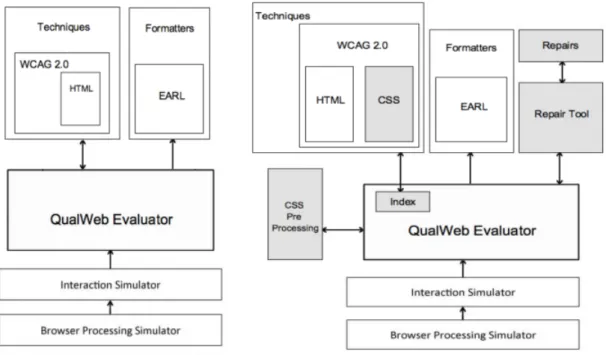
3 Architecture 47 3.1 Modules . . . 48
3.1.1 The WCAG 2.0 CSS Techniques . . . 48
3.1.2 CSS Pre-Processing . . . 49
3.1.3 Index - Integration of Evaluations . . . 49
3.1.4 The Repair . . . 50
3.2 Module Interactions . . . 51
4 Gathering the CSS 53 4.1 CSS pre-processing . . . 53
4.1.1 <link>CSS or External .CSS Files . . . 53
4.1.2 <style>CSS or Internal CSS . . . 55
4.1.3 Structuring the CSS . . . 55
4.1.4 Postponing CSS Full Processing . . . 57
4.2 Inline CSS . . . 57 2
5 Evaluating the Web 59
5.1 Interpreting WCAG 2.0 CSS techniques . . . 59
5.1.1 Tecniques . . . 60
5.1.2 Triggering CSS techniques . . . 66
5.2 The Evaluation . . . 67
5.2.1 Inputs . . . 67
5.2.2 Process . . . 67
5.2.3 Retrieving element’s information . . . 68
5.2.4 Finding the CSS that matches the element . . . 70
5.2.5 Technique Error Reporting . . . 72
5.3 CSS and HTML evaluation coming together . . . 74
5.3.1 Retrieving element’s information . . . 74
5.3.2 Altering the HTML techniques . . . 75
5.3.3 Return Results in a different perspective . . . 77
5.4 Testing the CSS implementation . . . 77
6 Repairing the Web 79 6.1 Analysis . . . 79
6.2 Repair Process . . . 80
6.2.1 Error Types . . . 80
6.2.2 NCSS type of Errors . . . 80
6.2.3 IE and E type of Errors . . . 81
6.2.4 Errors Identified by Technique . . . 81
6.3 Repairing CSS Return Types . . . 84
6.4 Setbacks . . . 91
6.4.1 Types and Repairs . . . 91 3
6.5 Evaluating the Repair Process . . . 94
6.5.1 Test pages . . . 94
6.6 Critique . . . 97
7 QualWeb Interface 101 7.1 Previous User Interface . . . 101
7.2 Rationale for the new User Interface . . . 102
7.2.1 Design . . . 102 7.2.2 Final Result . . . 104 7.3 User Testing . . . 106 7.3.1 Test scenario . . . 106 7.3.2 Test Tasks . . . 107 7.3.3 Task 1 . . . 108 7.3.4 Task 2 . . . 108 7.3.5 Task 3 . . . 109 7.3.6 Task 4 . . . 109
7.3.7 Test Task Observations . . . 110
7.4 SUS Results . . . 113
7.5 Other feedback . . . 115
8 Conclusions & Future Work 117 8.1 Lessons Learned . . . 117
8.2 Future Work . . . 119
A Diagrams 121
B Papers Written 125
Bibliografia 147
1.1 Mapping of the Initial Schedule . . . 17
1.2 Mapping of the Revised Schedule . . . 18
2.1 CSS structure example . . . 21
2.2 CSS double selector example . . . 22
2.3 CSS ID selector example . . . 22
2.4 CSS Class selector example . . . 22
2.5 CSS Compound selector example . . . 22
2.6 CSS Compound selector example . . . 23
2.8 Browser Rendering Process . . . 24
2.7 Web Browsing Resource Processing . . . 25
2.9 Steps to render an HTML page in Gecko . . . 26
2.10 Steps to render an HTML page in WebKit . . . 26
2.11 WebKit CSS parser . . . 27
2.12 Context Tree (Left) and Rule Tree (Right) . . . 29
2.13 New state in dynamic applications . . . 30
2.14 aChecker problems sections . . . 38
2.15 aDesigner simulation example . . . 39
2.16 A CSS color contrast check by WAVE . . . 39
2.17 HERA Pass result . . . 40
2.18 HERA Fail, Not applicable and Needs further verification . . . 40 7
2.21 Tidy options . . . 44
2.22 The Social Accessibility Project . . . 45
3.1 QualWeb’s architecture before and after this work . . . 47
3.2 Input & output requirements for CSS techniques . . . 48
3.3 DOM execution before this work and how we are going to changed it . . 50
3.4 Two examples of algorithms applied in the repair process . . . 51
3.5 Implementation Diagram . . . 52
4.1 Pre processing of the CSS . . . 54
5.1 Styled List (Left) Same list without CSS(Right) . . . 60
5.2 DOM tree of elements . . . 69
5.3 Variable with list of elements . . . 69
6.1 Repair Type NCSS . . . 81
6.2 Repair Type IE example . . . 81
6.3 Repair Type E example . . . 81
6.4 Youtube Webpage before (left) and after (right) repairs . . . 95
6.5 Wikipedia Webpage before (left) and after (right). . . 95
6.6 Amazon Webpage before (left) and after (right) repairs. . . 96
6.7 Yahoo! Webpage . . . 97
7.1 QualWeb Interface Prototype . . . 101
7.2 QualWeb Interface Results Previously to this work . . . 102
7.3 Results by technique and attributes prototype . . . 103
7.4 QualWeb’s results page . . . 105
7.5 QualWeb’s results page . . . 105 8
7.8 H3 element view for control group . . . 109
7.9 c15 result to be repaired . . . 109
7.10 c21 result to be repaired . . . 110
7.11 c21 not repaired vs repaired . . . 110
7.12 Misleading description . . . 111
7.13 Extended URL file name . . . 111
7.14 Element and attributes in Task 4 . . . 112
7.15 Element and attributes other example . . . 112
7.16 Repair steps and educational notes . . . 112
7.17 User testing SUS Results . . . 113
7.18 User testing SUS Results . . . 114
A.1 UML Class Diagram . . . 122
A.2 UML Colaboration Diagram . . . 123
2.1 Techniques summary description . . . 37 5.1 Techniques activation by tag . . . 66 5.2 Technique Inputs for the Evaluation . . . 67 5.3 Description of the Error Reporting Structure . . . 73 5.4 Description of the altered HTML Techniques . . . 76 6.1 Outcome Type Description . . . 80 6.2 Outcome Type Description . . . 84 6.3 Description of the Repairs applied . . . 91 6.4 Description of the Repairs initially planned . . . 93
Introduction
1.1 Motivation
Being an open platform, the Web is a great place to share knowledge, for it allows people and organizations to easily make information available, in a variety of different formats, to other people and organizations. Examples of this are: Students that now benefit from e-learning; online shopping that has become a way to get home deliveries; Governments which have made several official services available on the Web.
The problem in this model is that not all people can perceive or understand information the same way. Different types of disabilities, ranging from low eyesight or even total blindness, to cognitive difficulties in reading, can affect the way a person accesses the content of a Web page.[1] Because our world is moving more and more online, we need to see that this content is accessible, so that we ensure that people with disabilities are not excluded from society.[2]
”As the Web community grows and its members diversify in their abilities and skills, it is crucial that the underlying technologies be appropriate to their specific needs. HTML has been designed to make Web pages more accessible to those with physical limita-tions.(...)”[3]
Web accessibility shows up as the practice, which has the purpose of making Web content available to everyone, regardless of possible limitations. It implies that Web de-velopers and Web designers should make their products accessible to these people with disabilities. Though nowadays most people with disabilities have access to assistive tech-nologies[4], for these to function correctly, content needs to be correctly organized.
The Web Accessibility Initiative (WAI) is one answer to this increasing demand for inclusive Web sites. As part of its work, the WAI published several guidelines, some of them known as the Web Content Accessibility Guidelines (WCAG) 1.0 and 2.0,[5].
Together with accessibility guidelines, automated accessibility evaluators have been appearing all over the Web. Their objective is to verify the accessibility of a Web page in an easy way, signaling problems and potential problems. Developers are expected to use these tools to scrutinize their Websites, instead of making verifications manually, so that they can confirm the accessibility of their Website without spending too much time. This should be done during the developing cycle and should be granted as much importance as usability testing.[6]
Awareness of the need for inclusive Web content and accessibility issues is increasing among developers and these tools for developer’s aid, do not go unnoticed anymore[7]. However their use is still considered cumbersome. Issues such as ”lack of time” and ”lim-itations in technology” were the main limiting factors found in a study by Shari Trewin et all[7]. Also, establishing the importance of accessible Web pages to management, who seemingly show favour to pleasing sites instead, has proved difficult.[8].
1.2 Objectives
An automated evaluation tool runs specific accessibility guidelines on a HTML input, producing a error report as a result which will include a list of infringements identified. There are already several evaluation tools online developed by different countries and entities. One of these tools is QualWeb an HTML WCAG 2.0 technique based evaluation tool for RIA. As we will describe ahead in greater detail, QualWeb already presents an interesting breakthrough comparing to other evaluation tools.
When studying the automated tools for accessibility available nowadays, we come across some tools that go beyond informing users what incorrect thing they have done. There are some tools that introduce the concept of automated repair. Known as repair tools, they perform evaluations, but then go further, by correcting specific situations iden-tified as problems. There are some repair tools available online and in the next chapter we will talk more about them. However these tools are still limited and as we will see, do not deal with specific guidelines.
With this work we propose to expand QualWeb with some new functionalities that can be summarized as the following projects objectives.
• Our first objective is to implement WCAG 2.0 CSS techniques, allowing QualWeb to perform evaluations of stylesheet accessibility. This will include some subtasks such as:
– Implementing the CSS techniques.
• The second objective is developing a repair module for QualWeb. This module will receive the evaluation results and will suggest specific repairs, for the developer to apply.
• During this work a Web interface was developed for QualWeb. However this inter-face was developed only with the current version of QualWeb in mind. The Third Objective of this project is to extend the QualWeb interface, in order to allow the presentation of both CSS evaluation results and the suggested repairs developed. • It is necessary to develop several tests, with the objective of verifying the
imple-mentation of these components.
1.3 Contributions and Publications
During the development of this project, we made several changes to the functioning of the existing automated accessibility evaluation tool QualWeb. When we started, QualWeb was already an amazing tool for evaluating Rich Internet Applications, using phantom.js as a headless browser to obtain dynamic content. Still, this project enriched the tool by:
• Adding CSS WCAG 2.0 techniques to the evaluation process.
• Optimizing the running and triggering of both CSS and HTML techniques • Developing a new module that gathers all CSS in the given Web page. • Developing another module that creates the repairs to be suggested.
• Enhancing the meanwhile developed QualWeb interface, by adapting it to show the CSS results as well as the correspondent suggested repairs.
During this process, the following papers were published:
• N´adia Fernandes, Ana Sofia Batista, Daniel Costa, Carlos Duarte, and Lu´ıs Carric¸o. 2013. Three web accessibility evaluation perspectives for RIA. In Proceedings of the 10th International Cross Disciplinary Conference on Web Accessibility (W4A’13). ACM, New York, NY, USA, Article 12 , 9 pages.
• Daniel Costa, N´adia Fernandes, Sofia Batista, Carlos Duarte and Lu´ıs Carric¸o. 2013. Web Accessibility in Africa: a Study of Three African Domains. INTER-ACT’13
1.4 Planning
1.4.1 Tasks
1. Related Work Study
Study and understanding of Web accessibility concepts as well as some work done in this area such as evaluation and repair tools. This will help delineate what we should do in order to make QualWeb even more competitive. It should accompany the entire project as concepts and tools should constantly be studied and used for comparisons.
2. Requirement Analysis
Gathering of all the requirements for the different modules to be developed. 3. Writing the Preliminary Report
Writing of a preliminary report, that summarizes the knowledge obtained in the previous steps, as well as work already finished and work to be done in the future. 4. System design
Design the architecture, the modules and the interface as well as comparing Qual-Web’s architecture before and after this work.
5. Implementation
(a) Gathering all CSS
Developing CSS pre-processing algorithm for obtaining all types of CSS and organizing them into a single iterable structure.
(b) Coding the CSS Techniques
Implementing and including onto QualWeb’s evaluation process, the CSS tech-niques in the WCAG 2.0 webpage.
(c) Coding the Repairs
Implementing and including the repair module onto the QualWeb execution process.
(d) Coding Optimizations
Taking advantage of the opportunity to review and optimize the QualWeb’s execution process, after all the previous modules are added to QualWeb. (e) Coding the Interface Enhancements
Preparing the interface for the user testing stage. Proceed to the enhancement of the QualWeb online Interface, by including all the necessary components, in order to present the CSS evaluation results and the repair suggestions.
6. User Testing and Result Analysis
Establishing test tasks and gathering test individuals in order to evaluate the in-terface, the evaluations and matching repairs. After the tests this also includes proceeding with the analysis of the results obtained.
7. Improvement of the overall code
Refining, after the user testing task, all previous implemented modules in order to adjust and repair problems identified during the tests.
8. Writing of the Final Report
Writing the final report of the project. This task, just as the first one, must be constant during the whole duration of the project, although most of it will be done in the last couple of months of the schedule.
1.4.2 Project schedule
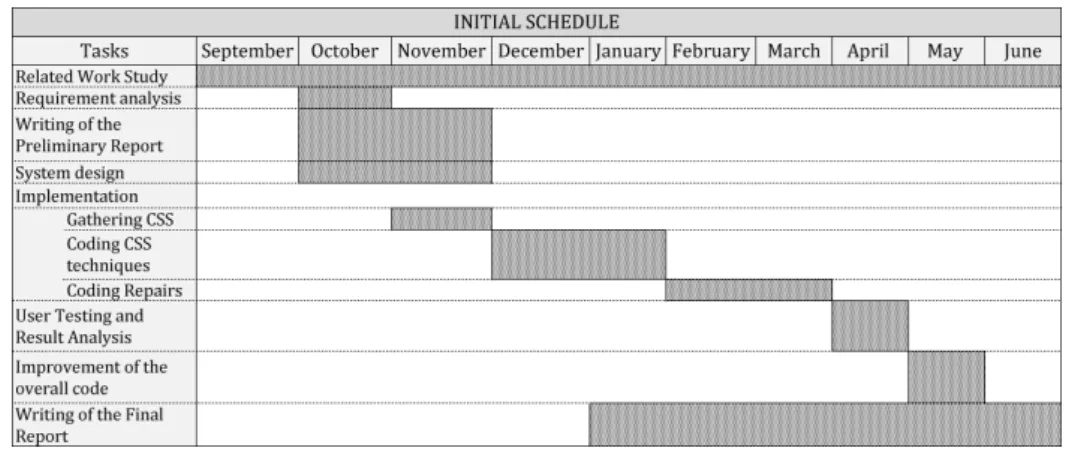
This project was planned to last from September until June and for this period all tasks, described in the previous section, were defined and scheduled. In figure 1.1 we introduce the initial planning for these tasks, including how long they were initially planned to last. Figure 1.2 on the other hand, presents the actual duration of each task.
Figure 1.1: Mapping of the Initial Schedule
Comparing both schedules we can observe how some tasks seem to prolong beyond the period they were planned for. This happened as tasks in question, were not given due credit and turned out more challenging than was expected. We can also point out that new tasks were added to the revised schedule. These tasks were needed to improve the overall functioning and coherence of the QualWeb structure and as preparation for the User Testing.
Figure 1.2: Mapping of the Revised Schedule
1.5 Document Structure
This document is organized into seven chapters.
• Chapter 2 - State of the Art - Presents a detailed study of the State of the Art of Web Accessibility and other related technologies.
• Chapter 3 - Architecture - Introduces the QualWeb evaluation tool and explains, in detail, all the modules that were added with this work.
• Chapter 4 - Gathering the CSS - Accounts for the process of retrieving and process-ing CSS
• Chapter 5 - Evaluating the Web - Explains all the different steps of the evaluation process.
• Chapter 6 - Repairing the Web - Details the entire repair process and the difficulties we faced during this development stage.
• Chapter 7 - QualWeb Interface - Reports the process of developing the enhance-ments of QualWeb’s user interface. It also details the user testing method and the results we obtained.
• Chapter 8 - Conclusions & Future Work - Outlines our conclusions, lessons learnt during this project and in what ways this work can be continued.
State of the Art
As the Web grows and increasingly becomes the best place to share information, not only more people want to obtain information, also more people want to distribute it. However because of this, we are now being confronted with a growing number of resources, devel-oped by all kinds of people, with and without developer background. One example of this is public services that have now become available online. The problem is that people do not perceive things the same way, some have low eyesight some are blind, some cannot use a mouse or a keyboard.
So, in order to make sure this information is distributed in a way that can be perceived by all, Web developers, with experience or without, must be instructed of the best ways they should develop their contents.
2.1 Technologies
This section focuses on the technologies used during the development of this work. We focus on the Hyper Text Markup Language (HTML), Cascade Style Sheets (CSS) and Javascript since they play a major role in the developments of Web contents.
We also refer Browsers and Headless browsers since they are of great importance to our work. While Browsers are responsible for rendering content, which may or may not have accessibility problems, headless browsers are of great use for tools such as QualWeb.
2.1.1 HTML
Web contents are mainly developed in the Hyper Text Markup Language (HTML) with decorations done through Cascade Style Sheets (CSS). HTML is a language based on markup tags which describe the document structure, introducing areas such as headings,
paragraphs, links, inputs, and so on. Inside these tags plain text can be added to supple-ment content to the docusupple-ment structure. Tags are keywords surrounded by angle brackets <html>and that often come in pairs, start tags <html>and end tags </html>delimiting their content.
The structure of a HTML document is composed of at least three parts:
1. A doctype instruction for the Web browser containing what version of HTML the page is written in.
2. A header section (delimited by the HEAD element), instruct the browser where to find style sheets, provide meta information.
3. A body which contains the contents of an HTML document, such as text, hyper-links, images, tables, lists, etc.
<!DOCTYPE HTML PUBLIC ”-//W3C//DTD HTML 4.01//EN” ”http://www.w3.org/TR/html4/strict.dtd” >
<HTML > <HEAD >
<TITLE >My first HTML document </TITLE > </HEAD > <BODY > <P >Hello world! </P > </BODY > </HTML >1
2.1.2 CSS
In order to create greater aesthetics in Webpages, web developers have been using CSS to style elements in markup languages tags. This styling enhances presentation, turning contents in Web pages more than just static and plain information. The use of CSS to introduce these decorative elements has provided a way for developers to separate HTML contents form their decorations. This separation has allowed for several things, among which, one is to develop more compelling Web pages and other is to allow greater acces-sibility since users can adapt the presentation of content to their needs.
Types of CSS
There are different ways to introduce CSS specification in a Web page. CSS can be presented inline, internally and externally.
• Inline: As the value of the style attribute of the element:
<p style=”color:sienna;margin-left:20px” >This is a paragraph.</p > • Internal: if it is between style tags, generally on the head section of the Web page
<head> <style> hr {color:sienna;} p {margin-left:20px;} body background-image:url(”images/back40.gif”); </style> </head>
• External if it is introduced in the HTML structure with a <link >tag <head >
<link rel=”stylesheet” type=”text/css” href=”mystyle.css”> </head>
CSS can also be introduced into a Web page inside scripts. When the page is loaded and these scripts executed, the new CSS are added to the already existing CSS. The place where these CSS are added to, depends only on the script that is executed.
CSS Rules
Figure 2.1 2 shows that CSS rules follow a specific structure. This structure is divided
into two parts, the selector and the declaration. Selectors are used to specify which tag the style applies to and declarations consists of the CSS properties and values.
Figure 2.1: CSS structure example
Selectors
Selectors are the beginning of any CSS rule and are used for specifying to which tag the declaration applies to. They can be specified in three different ways.
• Elements of a specific type. (Figure 2.23for all headings of level 1 and level 2)
Figure 2.2: CSS double selector example
• Elements identified by attributes such as ID or Class (figures 2.3 and 2.4 3 ). For
these CSS to be correctly applied to the HTML tag. The HTML tags must be declared with these attributes :
– <h1 id=”Hid”>
Figure 2.3: CSS ID selector example – <h1 class=”Hclass”>
Figure 2.4: CSS Class selector example
• Elements placed relative to or nested within others. CSS in Figure 2.53 would be
applied to any heading of type H1, inside any div, inside the element with the id ”main”.
Figure 2.5: CSS Compund selector example
Pseudo-classes
Selectors can be enhanced further by adding other characteristics. These characteristics are called Pseudo-classes and are included in order to add special effects to the elements.
• a:link color:#FF0000; —>unvisited link • a:visited color:#00FF00; —>visited link • a:hover color:#FF00FF; —>mouse over link • a:active color:#0000FF; —>selected link Declarations
The declarations are CSS properties which are to be applied to the selector. CSS rules can have several declarations inside, as can be seen in figure 2.1. Tags of headings of level 1 will all inherit both declarations in that CSS rule.
Declarations are composed of properties and values. There are several CSS properties which can take several values. Although we do not specify all properties in this report, they can be found here http://www.w3schools.com/CSSref/default.asp.
Priorities
Since CSS for an element can be specified in different ways, priorities for rendering have been established.
1. Inline CSS takes priority over any other type;
2. CSS with specific selectors such as ID and Class, take priority over general CSS; 3. General CSS come last, and also depend on the order they are defined.
2.1.3 Browsers
Web browsers are applications used to locate, retrieve and present HTML Web pages, applications, JavaScript, other content hosted on Web servers and files in file systems. In order to locate these resources a Uniform Resource Identifier (URI) is used. This URI enables users to interact with the resources since it uniquely identifies a specific resource. Some of these resources are the HTML documents that may or may not be styled with CSS. Web browsers also allow users to do numerous tasks with these resources. For example, login and register, view and hear multimedia, print, send and receive email, among many others.
Retrieving Resources
To retrieve a resource a sequence of communication steps between the browser and the Web server occurs as can bee seen in figure 2.7[9].
• Web page refers to the resource identified by the URI. It defines the skeleton of the content that will be presented in the Web browser;
• Resources are complementary assets such as multimedia resourcers, stylesheets and scripts that are explicitly specified in the Web page’s structure (within the proper HTML tags);
• AJAX request refers to the asynchronous communications done between the Web browser and the Web server. This kind of communication, transmitted without in-terfering with the display and behaviour of the Web page and allows web pages to became dynamic instead of just static displays of content, based only on CSS and HTML.
Browsers Rendering Engine
There are several HTML/CSS web browser rendering engines, depending on the browsers. For this report the reference Browsers will be Firefox which uses gecko, while Safari and Chrome use WebKit. Figure 2.84
Figure 2.8: Browser Rendering Process
Figure 2.7: Web Browsing Resource Processing
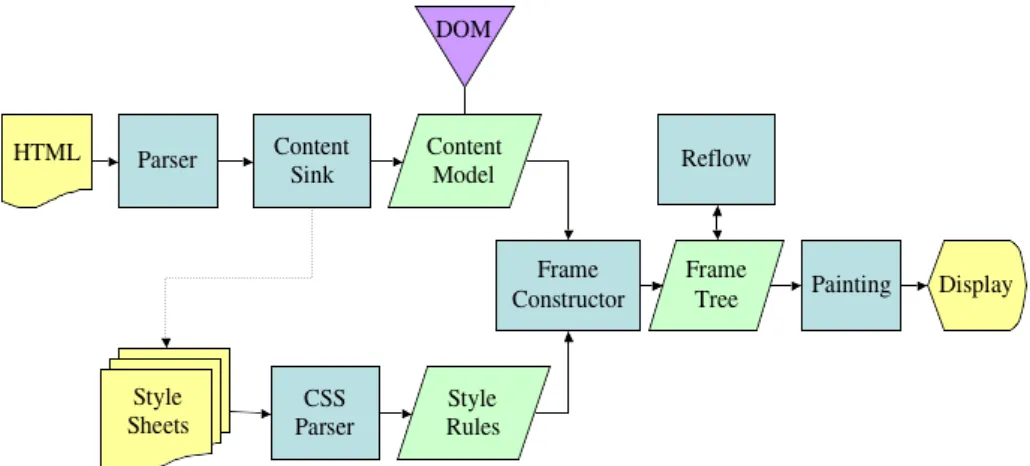
1. The first step will be to start parsing the HTML document and turn the tags to DOM nodes in a tree called the ”content tree” and parse the styles.
2. The style information together with visual instructions in the HTML will be used to create another tree, the render tree. This structure contains rectangles, in the order to be displayed, with visual attributes like color and dimensions.
3. The layout process includes giving each node the exact coordinates where it should appear on the screen.
4. During the painting stage render trees will be traversed and each node painted.
This is a gradual process. The rendering engine will try to display contents, as soon as possible and it will not wait until all HTML is parsed before starting to build and layout the render tree. Parts of the content will be parsed and displayed, while the process continues with the rest of the contents that keeps coming from the network.
Figures 2.9 and 2.104illustrate the rendering process according to the different Browser
Figure 2.9: Steps to render an HTML page in Gecko
Figure 2.10: Steps to render an HTML page in WebKit Parsing
The HTML resource obtained is written in a somewhat human understandable language. For it to be machine oriented it needs to be transformed into something a machine can understand and use. We call a parser something that does this.
For a parser to be correctly used, it requires that the language the document was writ-ten in, has a deterministic grammar, consisting of vocabulary and syntax rules such as CSS.
The DOM
HTML is not a language that can be parsed using a conventional parser since it allows you omit certain tags which are implicit, for example the end of certain tags.
pro-grams and scripts to dynamically access and update the content, structure and style of documents5. When parsed into a DOM the HTML is formatted into a tree structure,
where tags and contents are kept in nodes and branches establish the connections between these tags and contents.
Parsing Style Sheets
Unlike HTML, CSS is a context free grammar and so can be parsed. Indeed we have shown already how CSS follow a specific grammar.
To parse CSS Webkit uses bottom up shift-reduce parser while Firefox uses a top down parser written manually. In both cases each file is parsed into a CSS object, containing selector and declaration objects. Figure 2.114 gives an example of how WebKit parses
CSS.
Figure 2.11: WebKit CSS parser Render Tree and Frame Tree
These names both refer to the same thing, a structure with every element that is to be displayed as well as its placement. It contains visual elements in the order in which they will be displayed as a visual representation of the document. The purpose of this tree is to enable painting the contents in their correct order.
Non visual elements, will not be inserted. An example is the ”head” element and elements whose display attribute has value ”none”, since they will not appear in the tree.
The objective of keeping a visual representation of the document is to enable styling the contents in their correct order.
Firefox calls the elements in the frame tree, ”frames”, while Webkit uses the term renderer tree and render objects. Each renderer consists of a rectangular area and contains geometric information like width, height and position.
Computing Style Sheets
Building the render tree requires calculating the visual properties of each element. This is done by obtaining and matching all the CSS properties of each element. However creating this matching between every CSS and elements can be a heavy computation process.
Firefox keeps two threes, one the context tree and the rule tree. The context tree keeps the structure of the visual elements as the DOM would. The rule tree, on the other hand, keeps all the style information organized in a hierarchy organized by elements, classes and ids.
To apply the CSS rules to elements in the context tree we just need to compute the paths from the context tree in the CSS rule tree. For example6:
Considering the Rules:
1. div {margin:5px;color:black} 2. .err {color:red}
3. .big {margin-top:3px}
4. div span {margin-bottom:4px} 5. #div1 {color:blue}
6. #div 2 {color:green}
Lets interpret the context and rule trees for this set of items:
In this image we can see that, for our better understanding, the context tree already has letters that refer to the rule tree. We can see how we can easily find the CSS that are chosen for each element from the rule tree. It is interesting to notice first, that for paragraph and body there are no CSS, second, that span tags inherit properties from above in the rule tree. Inherited properties are properties that unless defined by the element, are inherited from its parent. Thirdly span siblings can and will share the same CSS.
After being parsed both WebKit and Firefox, add the CSS rules to one of several hash maps, according to the selector. There are maps by id, by class name, by tag name and a general map for anything that does not fit into those categories. If the selector is an
Figure 2.12: Context Tree (Left) and Rule Tree (Right)
id, the rule will be added to the id map, if it’s a class it will be added to the class map etc. Manipulating CSS this way improves the matching process of rules.
As an example, the CSS: p.error {color:red}, will be inserted into the class map. Then in the HTML, when we have an instruction as: <p class=”error”>an error occurred </p >, the Browser will first try to find rules for the p element in the class map.
Rendering Priority
CSS for a single element can be defined in several different style sheets and several times inside a style sheet. For this reason it is important to specify the order by which they will be applied. Several priorities have been established such as:
1. User important declarations signaled by !important 2. Author important declarations signaled by !important 3. Author normal declarations
4. User normal declarations 5. Browser declarations
2.1.4 Headless Browsers
So far we have seen that Browsers are used for people to access the Web and its resources. We have also seen how they process HTML and CSS in order to render pages. However, there are also tools, whose functioning is similar to that of a Browser, but still are not to be used by people. These machine oriented tools do not have a graphical user interface and are used to provide the content of web pages to other programs.
One example of their importance is the execution of JavaScript, as a normal browser would. Scripts in a Web page can be executed, in order to render the Web page as the user would visualize it. CSS specified inside scripts, can only be accessed after the execution of these scripts.
This is very important for this work, as an accessibility evaluator tool can perform more detailed evaluations by obtaining this version of the page.
Dynamic Web and States of a Web page
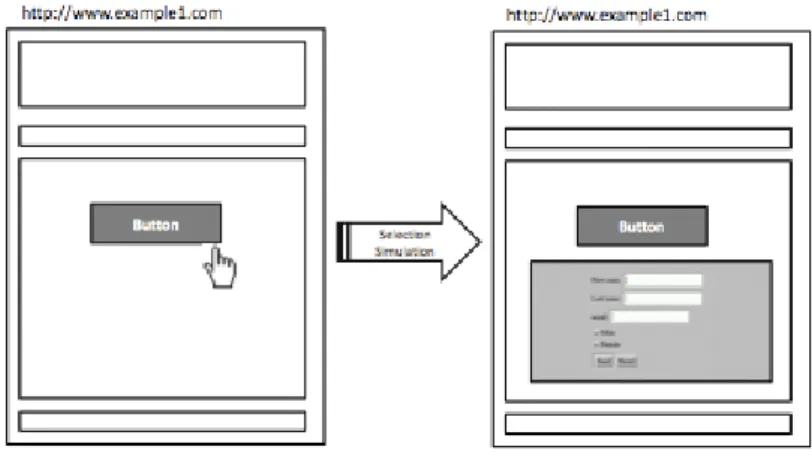
A Rich Internet application (RIA) is a Web content that has many of the characteristics of a desktop application. It can be delivered by a browser plug-in, extensive use of JavaScript and others. In RIAs new contents can be obtained using Javascript/AJAX, without re-freshing or loading a new page. A user interaction (Figure 2.13[9]) can easily, through Javascript, modify visible elements without requesting data from a server. Alternatively an AJAX request to the server, can fully modify the presented content. In both cases a new version of a page will be available without changing the URI [10].
Figure 2.13: New state in dynamic applications PhantomJs
In order to capture these RIA events, QualWeb takes advantage of the headless browser PhantomJS. A browser with WebKit engine and with a JavaScript API that gives access to Web pages from the command line while nothing gets displayed to the screen.
The usage of PhantomJs is crucial for the correct evaluation of a Web page. As eval-uators obtain documents with written code, in HTML, CSS and JavaScript, for example, it obtains the documents as they were written but not as they are displayed to the user. This implies leaving many things unverified. For example, scripts that allow Web pages
to change their contents, will generate new HTML or CSS code to be inserted on the Web page without reloading it. This new code will not be evaluated since it is kept inside a script tag and not inside an HTML one, as they would be after the script’s execution. This is heavily connected to what we mention before regarding Dynamic Web and States of a Web page.
2.1.5 NodeJS and JavaScript
NodeJS
NodeJs is a server side software tool for developing scalable internet applications, outside the Browser, specifically web servers. Tools are written on the server side in JavaScript using asynchronous I/O to allow scalability and reducing processing time. Also Node.js, already contains a built-in HTTP server library, which allows for running a web server without the use of external software, such as Apache. It also provides useful modules, for example, something that outputs a string on the console7. Node.js enables developers to
create an entire web application in JavaScript, both server-side and client-side.
Javascript
NodeJS also provides an asynchronous environment where the developer can program using JavaScript. JavaScript is a programming language used on the Web by the majority of the Web pages and interpreted by all Browsers[11]. It allows Browsers to use client-side scripts to communicate asynchronously with the server, and alter displayed document content. Recently it has also become common for game development.
This work relates to Javascript in two ways. First, since it is used in the majority of Web pages and allows for the injection of new code, without reloading the Web page. This is the reason, Web evaluation tools need to take advantage of headless Browsers. As we mentioned before, pages evaluated when scripts have not been executed cannot, in reality, check Web pages as they are presented to the user. Which can cause several problems to escape detection. Second, this work will be developed inside the node environment and thus implemented in JavaScript language.
2.2 Web Accessibility
Through the process of developing Web contents, we are encouraged to think of the user we are developing for. However we tend to visualize users according to our own stan-dards. As we are not all equal, we do not possess the same capabilities, nor the same characteristics and especially not the same limitations. This leads us to misunderstand others and consider specific things as irrelevant. Why does a blind programmer produce visually messy code?
Even if each individual is different and has different necessities, the fact is that he will want or need to use the things others are using too. One of these things will probably be Web. So with this in mind, the Web can keep on being even more creative, innovative and extravagant than it is, but still it must also not exclude anyone, Thought must go to the uncommon user of contents. Web Accessibility focuses on this, on the inclusion of each specific individual.
2.2.1 Accessibility Support
A specific group that more easily suffers from Web exclusion is that of people with disabil-ities. When Web applications and Web tools are badly designed, they can create barriers that exclude people from using the Web. With them in mind, several tools, called assistive technologies, have been already developed, with the purpose of enabling them to access contents on the Web.
Assistive technologies
Assistive technologies are devices or tools for people with disabilities. They promote greater independence by enabling them to perform activities they would not be able to do otherwise, or by allowing them to perform faster than they would normally. They provide enhancements or a different way of interacting with what people need, in order to accomplish a task. A few examples of assistive technologies are :
• Screen reader software can read out, using synthesized speech, what is being dis-played on the monitor or everything that is happening on the computer.
• Braille terminals consist of a Refreshable Braille display which renders text as Braille characters, by means of raising pegs through holes in a flat surface.
• Screen magnification software enlarges what is displayed on the computer monitor, making it easier to read for vision impaired users.
• Speech recognition software are tools that can speak commands to the computer, or turn dictation into grammatically correct text, for people who have difficulty using a mouse or a keyboard.
• Keyboard overlays can make typing easier and more accurate for those who have motor control difficulties.
• Access to subtitled or sign language videos on the Internet for all deaf people
Accessibility guidelines
The problem arises when these tools need contents to be organized and structured in a specific way, such as screen readers, and this does not happen. In order to make sure Web developers do not perpetrate as many accessibility mistakes, as it is usual, several accessibility guidelines have been developed. The guidelines are textual descriptions of good practices, developers should follow in order to make their content accessible. Also they should check the contents of their Web pages, with theses guidelines, in order to verify that they are indeed accessible.
2.2.2 WAI and WCAG
The World Wide Web Consortium (W3C) is an international community where Member organizations and the public work together to develop Web standards. The objective is to ensure the long-term growth of the Web8by trying to enforce compatibility and agreement
among industry members.
Web Accessibility Initiative
One area of efforts of the W3C is Accessibility. The Web Accessibility Initiative (WAI) is an effort to bring consensus to the Web and ensure the inclusion of everyone by making Web pages Accessible. For this it has developed strategies, guidelines, and resources to help make the Web accessible to people with disabilities. By concerning itself with Web pages accessibility, the WAI also includes accessibility for mobile devices in its scope. This is important since mobile devices have limited resources.
Web Content Accessibility Guidelines
There are several Web accessibility guidelines as different countries and entities have established different guidelines. An example of these guidelines are the American Sec-tion 508, the Italian Stanca Act, the German BITV1 and the Web Accessibility Initiative guidelines.
Known nowadays as the Web Content Accessibility Guidelines (WCAG) 1.0 and 2.0, these are some of the guidelines established by the WAI. This work only focuses on these guidelines specifically the WCAG 2.0. The reason for this is that these guidelines were developed through cooperation with the objective of establishing a single standard for Web accessibility with an international focus.
WCAG 1.0 and Priority Levels
WCAG 1.0 comprised a total of 14 guidelines and numerous checkpoints, organized into 3 priority levels, used to determine the accessibility of a Web page.
• Priority 1 or Level A Conformance with basic requirements for some groups to be able to use web contents.
• Priority 2 or Level AA Indicated better accessibility and removal of significant bar-riers to accessing content.
• Priority 3 or Level AAA Checkpoints provided improvements to web content ac-cessibility.
This was a verification very HTML focused and as time passed and technologies im-proved checkpoints became less relevant and the development of WCAG 2.0 began. WCAG 2.0 and Success Criterions
The WCAG 2.0 starts where the previous were left and introduces some significant changes. A shift in philosophy is noticeable since guidelines are now principle-centered rather than technique-centered. This change allows more flexible approach towards technological changes9.
This version is composed of twelve guidelines, each one with some success criterion defined. These success criterions are passed or failed depending on the results of the
different techniques they comprise. Failing one technique however, does not necessarily mean that the criterion will fail. Techniques, especially from different technologies, can make up for the failing of each other.
Techniques refer to, or are applicable to, different technologies such as HTML, CSS, Flash, PDF and others. In total there are eleven different types of techniques:
• General techniques
• HTML and XHTML techniques • CSS techniques
• Client-side Scripting techniques • Server-side Scripting techniques • SMIL techniques
• Plain Text techniques • ARIA techniques • Flash techniques • Silverlight techniques • Pdf techniques
These guidelines were initially created for manual verification, but nowadays they have been coded as part of evaluation tools. These are known as accessibility automated evaluation tools and their purpose is to simplify the accessibility check process. There are several evaluation tools available nowadays and, although each follows specific guidelines and shows the results in a specific format, they all follow the same principle. As input, they receive a file or an active url, for the evaluation, they all run the coded version of the guidelines they employ and in the end, they present the results.
WCAG 2.0 CSS techniques
As nowadays the use of CSS is increasing developers are expected to separate HTML markup structure from their presentation in CSS files. As this happens, greater aesthetics in Webpages also appear, while at the same time, reducing the use of decorative images and, as consequence, download times[9]. This separation also provided flexibility, to control the presentation, but also style coherence, as multiple pages, shared the same style files.
However this increasing use of CSS did not necessarily result in an improvement of accessibility. One example of this, is when the developer defines styles that cannot be override and affect the styles defined by the user on the Browser[12]. Also functionalities provided by CSS properties misuse can lead to difficulties, an example of this is the use
of absolute units in the different properties making sizes unrealizable10.
WCAG 2.0 establishes manual evaluation steps by technique in order to ensure CSS properties are correctly used. There are a total of twenty three CSS WCAG 2.0 tech-niques. Each represents a specific good practice that should be used by developers. For the evaluation stage, these techniques were individually studied and coded to produce a standardized return result. WCAG 2.0 CSS techniques include:
Techniques DOM Elements
C6 Positioning content based on structural markup C7 Using CSS to hide a portion of the link text
C8 Using CSS letter-spacing to control spacing within a word C9 Using CSS to include decorative images
C12 Using percent for font sizes C13 Using named font sizes C14 Using em units for font sizes
C15 Using CSS to change the presentation of a user interface component when it receives focus
C17 Scaling form elements which contain text
C18 Using CSS margin and padding rules instead of spacer images for layout design
C19 Specifying alignment either to the left OR right in CSS
C20 Using relative measurements to set column widths so that lines can av-erage 80 characters or less when the browser is resized
C21 Specifying line spacing in CSS
C22 Using CSS to control visual presentation of text
C23 Specifying text and background colors of secondary content such as banners, features and navigation in CSS while not specifying text and background colors of the main content
C24 Using percentage values in CSS for container sizes
C25 Specifying borders and layout in CSS to delineate areas of a Web page while not specifying text and text-background colors
C26 Providing options within the content to switch to a layout that does not require the user to scroll horizontally to read a line of text
C27 Making the DOM order match the visual order C28 Specifying the size of text containers using em units
C29 Using a style switcher to provide a conforming alternate version
C30 Using CSS to replace text with images of text and providing user inter-face controls to switch
Table 2.1: Techniques summary description
As we will see ahead in this document, some of these CSS techniques have a highly visual implementation and because of this we decided not to implement them.
2.3 Evaluation Tools
In order to simplify the accessibility verification process, guidelines and success criterions have been coded as part of accessibility automated evaluation tools. These tools are given an URL as input to be verified according to the guidelines, and then produce an output with the result of this evaluation.
Although the process is always the same, different tools, perform evaluations accord-ing to different guidelines and thus produce different outputs. Together with the presenta-tion of the final results to the user, this is what distinguishes these tools from each other.
In this section we introduce several tools developed by different identities and their characteristics.
2.3.1 AChecker
AChecker [13][14] Is a well known online tool, that evaluates HTML pages conformance with the BITV 1.0, Section 508, the Stanca Act and the WCAG 1.0 and WCAG 2.0 distributed in levels A, AA and AAA.
This tool is a semi-automated evaluator as it cannot verify all problems. To solve this errors are divided into three groups as can be seen in the image11.
Problems in the Likely Problems section include the problems aChecker can not be sure and require the developer to make a decision.
Errors are presented by Success Criteria, identifying what is wrong and how the prob-lems can be solved.
Although the tool has an option for showing CSS rules, CSS evaluation is provided by an external tool and does not present results according to guidelines, nor success criteria,
Figure 2.14: aChecker problems sections
nor techniques.
2.3.2 aDesigner
aDesigner [15] was developed by IBM and is available for download for WindowsXP or Vista. It checks Webpages according to the Section 508, the WCAG and the JIS (Japan Industrial Standard) guidelines.
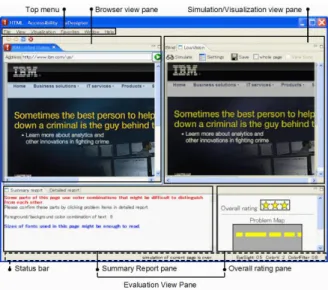
It distinguished itself, from other tools, by doing something different. aDesigner sim-ulates how low vision users see the Web pages by using ”low vision simulation” modes, and how blind users listen to and navigate through the pages by using ”blind visualiza-tion”. This simulation mode, allows developers to experience their Webpage as it would be perceived by other people.
An example of this simulation can be seen in the following figure12.
Relating to CSS, aDesigner allows for a detection of potential usability issues in color contrast, font sizes, images and page links alternate text and makes recommendations.
Figure 2.15: aDesigner simulation example
2.3.3 WAVE
WebAim, an organization that provides accessibility solutions such as articles, certifica-tion, consulting and this online evaluation tool known as WAVE[16].
For an evaluation result, WAVE presents a visual representation of the page being evaluated with yellow notifications. Notifications on the right side indicate accessibility problems. On the left side (Figure 2.16) a summary of the problems found is shown. This lateral report reviews the number of errors and possible errors and respective explanation.
The closest thing to CSS verification that WAVE performs is a check of the contrast ratio of the colors in the webpage. This can be seen in the previous figure13.
2.3.4 HERA
Hera[17] is a Web-based and multi-lingual system that performs an evaluation with the WCAG 1.0 guidelines. First the user shown the results organized by guideline and inside each guideline, by success criterion.
These criterion results are colored accordingly to the result type. There are four result types, all can be seen in the two following figures 14. Blue indicates checkpoints that
need further manual verification, while green and red show final results for pass and fail respectively and grey signals criterions that were not applied.
Figure 2.17: Pass result
Figure 2.18: HERA Fail, Not applicable and Needs further verification
HERA also provides instructions on how to perform the tests, such as: ”There are 1 images without alternative texts. There are also 2 images that have an alt atrtibute. Check that the text included is a suitable replacement for the image.”
13http://wave.webaim.org 14http://www.sidar.org/hera/
This tool is very interesting since the display by guideline and then criteria, makes the structure of WCAG very easy to understand. Still regarding CSS evaluation, there is no specification of an evaluation being performed.
2.3.5 QualWeb
QualWeb[18] [19] is an accessibility evaluator tool for Rich Internet Applications (RIA). It uses the headless Browser PhantomJs from inside the NodeJs environment, in order to generate a post processing version of the Web page to be evaluated.
By evaluating this post processing of the Web page, it can deal with, and perform evaluation on, pages in their final state, after all scrips executions. This means evaluations are made over a Web page, as it would normally be viewed by the user, and not as it is in the source code. Doing this grants access to more elements, inserted by scripts, that would be inaccessible otherwise.
So far, QualWeb is a command line based evaluation tool, which implements 20 WCAG 2.0 HTML techniques. Relating to style sheets, QualWeb, also until now does not check CSS WCAG 2.0 techniques’ compliance.
2.3.6 CSS Evaluation Tools
Online together with the previous tools mentioned there are also available a few solely CSS evaluation tools. These are mostly available online, some as browser extensions others as online tools that receive an url as input.
Currently although the use of CSS is increasing and thus increasing their relevance, few tools actually do heavy checking of CSS conformance. Also tools that are indeed available, are limited and mostly cover only basic color contrasts and color brightness checks.
The following are some examples of these tools.
• AccessColor15 a free online tool which analyses the internal and external CSS of a
web page to test the color contrast and color brightness between the text and back-ground colors. An example of an evaluation can be seen in the following image16: 15http://www.accesskeys.org/tools/color-contrast.html
Figure 2.19: AccessColor example of repair
• CSS Analyser17That verifies color contrast and if sizes are specified in relative unit
• Color Contrast Analyser verifies the contrast ratio of two colors and classifies the pass or fail according to different level of guidelines. This is illustrated in the following figure18.
Figure 2.20: Colour Contrast Analyser Interface example
The problem is that none of these tools really do a complete style sheet checking according to specific guidelines.
2.4 Repair Tools
As a way to simplify automated accessibility evaluation, alongside Web evaluators, repair tools have started to appear. An automated repair tool has the purpose of repairing the
ac-17http://juicystudio.com/services/csstest.php
18 http://www.visionaustralia.org/business-and-professionals/digital-access/resources/tools-to-download/colour-contrast-analyser-2-2-for-web-pages
cessibility problems found by an evaluation tool, that would otherwise need to be repaired manually.
The purpose of these tools is to repair, as many as possible, problems already identified by the evaluators, relieving developers of some work derived from the use of evaluation tools. Despite this these tools are not as common as evaluation tools probably because the repair process is not as smooth as the evaluation.
Techniques are textual descriptions of manual procedures, evaluation tools have to deal with ambiguous situations that sometimes can only be solved by human intervention. These situations are even more complicated to solve by a repair tool as few evaluation results can actually be repaired with certainty.
These repair tools follow specific guidelines, depending on the evaluation process, because in order to repair we need to first identify errors.
Some tools available online that we will mention here in this project are: HTML Tidy and The Social Accessibility Project by IBM.
2.4.1 HTML Tidy
The first, HTML Tidy, is a free tool capable of automatically fixing simple HTML prob-lems, indent sloppy markup generated by editors and also identify some potential accessi-bility problems[17]. Developed by Dave Raggett of W3C (World Wide Web Consortium), Tidy is now a conjunct work of volunteers that are part of an open source community at Source Forge and users are encouraged to report bugs.
HTML Tidy allows input HTML in three forms: as a URL, as direct HTML code written or pasted into the text area, or as an uploaded file. Also the tool allows the user to select several options as setting for the repairing process.19.
These options are of three types(Figure 2.21): HTML / XHTML, pretty print, and encoding. Options in the HTML / XHTML allow minor repair at the HTML level as well as the XHTML level, and some of them are:
• Break before BR - To output a line break before each <br >element. • Drop empty paras - Removes empty p tags
• Fix Uri - checks attribute values that carry URIs for illegal characters
• Fix backslash - replaces backslash characters in URLs by forward slashes ’/ ’. After uploading the HTML code and selecting the ”Tidy” option, the repairs are done. The tool afterwards allows the user to either view or download the repaired page, presents
Figure 2.21: Tidy options
some summary information related to the repairing done; presents the repaired Web page itself and lists in yellow the warnings, all identified by a reference number.
Greater detail can be found at http://tidy.sourceforge.net/docs/quickref.html
2.4.2 The Social Accessibility Project
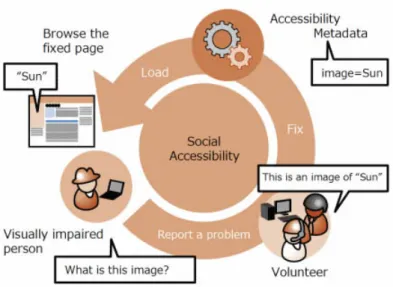
Another project relating to Web page repairing is the Social Accessibility Project by IBM Research Team at Tokyo[18], its main idea resides in the principle of communication between the user and the developer. Whenever a user has a difficulty on a webpage, he has the possibility of communicating it to the developer, with the expectation that the developer will correct the situation. The problem resides in the fact that most times this communication presents results very slowly and burdens developers.
The main purpose of this project is to help these users with difficulties while brows-ing, without going through Web developers. This Social Accessibility Project, presents a new model, in which the difficulties can be communicated and solved by a community of members. Who, on a volunteer basis, can discuss, create and publish the necessary metadata to solve the exposed problem. This way not only developers, but also users and community members, are able to improve accessibility by collaboratively authoring the accessibility metadata. The cycle of information can be completely understood in the figure 2.22, obtained from the IBM project webpage20
In this community there are users and supporters. Users are provided, after registering, with a client-side code, a plug-in. This plug-in will ensure the user’s browser is able to open a dialog box for inputting the necessary text to describe the problem and to submit it. Whenever the User presses the send button in the plug-in installed, three things are sent to the community: the text written by the user, a snapshot of the screen with all
Figure 2.22: The Social Accessibility Project
inputs blurred, the reading position in the browser window and the XPath notation for that reading position.
Supporters, and authors of metadata, are provided with a browser extension sidebar. This extension makes notifications whenever someone sends a request for clarification. After pressing the ”start fixing it” button, the page in question is loaded with specific coloring to point out some obvious problems, to signal already corrected mistakes as well as headings.
Changes made by supporters are kept in a specific server to which the user is directed every time he tries to access the Web page repaired.
2.5 Tool Summary
The tools presented in section 2.1 are an example of the evaluation tools available online. We can understand so much from observing how they work, what guidelines they imple-ment, how they implement them, how they present their results and how they deal with the same limitations that we faced and will face.
With this work we intend to expand QualWeb evaluator’s functionalities. As de-scribed, QualWeb already has great potential, however still lacks WCAG 2.0 CSS tech-niques implementation.
As we have seen in previous sections, despite growing use of style sheets, current eval-uation tools and repair tools, still lack a true CSS WCAG 2.0 implementation. Enhancing QualWeb will make it even more competitive.