Arrange, Assign &
Sign!
Patrícia Raquel Vieira Sousa
Mestrado Integrado em Engenharia de Redes e Sistemas Informáticos
Departamento de Ciência de Computadores 2016
Orientador
Prof. Dr. Luís Filipe Coelho Antunes, Professor Auxiliar, FCUP
Coorientador
O Presidente do Júri,
Digital archive: Arrange, Assign &
Sign!
Departamento de Ciˆ
encia de Computadores
Faculdade de Ciˆ
encias da Universidade do Porto
Digital archive: Arrange, Assign &
Sign!
Disserta¸c˜ao submetida `a Faculdade de Ciˆencias da
Universidade do Porto como parte dos requisitos para a obten¸c˜ao do grau de Mestre em Engenharia de Redes em Sistemas Inform´aticos
Orientador: Prof. Dr. Lu´ıs Filipe Coelho Antunes Co-orientador: Eng. Pedro Vasconcelos Castro Lopes Faria
Departamento de Ciˆencia de Computadores Faculdade de Ciˆencias da Universidade do Porto
I want to thank my advisor Professor Lu´ıs Antunes for the support in all this time of work, for all suggestions that improved my thesis and for this opportunity.
I also want to thank my co-advisor Pedro Faria for all dedication, support, patience and guidance that made all this work possible. Thanks for innovative ideas and the security knowledge transmitted during this thesis.
I also want to thank Professor Manuel Eduardo Correia for the interest that has always shown for this thesis work and for all the support and ideas.
For all the people of Healthy Systems, specially to Ricardo Gon¸calves for the team work in the development of digital signatures application.
I want to thank my best friends for their patience, for their support and also the moments of happiness during some difficult hours.
To my parents, because without them would never be where I am and would not be what I am today.
Finally, last but not the least, for my love Jo˜ao Resende, for all the support not only this thesis but in all my life. For all the patience and for all unconditional love.
Existem alguns obst´aculos para evitar o papel num escrit´orio (paperless office). Um dos obst´aculos ´e a recolha de assinaturas, visto que, segundo um estudo, metade do papel que ´e impresso ´e para as pessoas fazerem assinturas, visto que n˜ao conhecem uma maneira ou n˜ao confiam nas maneiras que existem para efectuar assinaturas digitalmente. As assinaturas digitais tˆem o mesmo valor legal que as assinaturas manuscritas, desde que tenham um certificado emitido por uma entidade certificadora. Nesta disserta¸c˜ao, propomos uma plataforma para gest˜ao de workflows de assinaturas digitais que integra um token seguro baseado em assinaturas digitais com um gestor documental empresarial como o Alfresco, onde cada utilizador pode associar um con-junto de cart˜oes inteligentes no seu perfil para assinar documentos. Os documentos podem ser assinados com um cart˜ao de cidad˜ao ou outro cart˜ao inteligente que tenha a capacidade de fazer assinaturas digitais. Implementamos um m´odulo no Alfresco que nos permite explorar muitas t´ecnicas de workflow para simular uma tarefa real de assinaturas, como as pessoas fazem, por exemplo, quando passam um documento de papel entre v´arios departamentos para o papel ser assinado. Como os utilizadores podem ver o estado corrente de um documento que est´a a ser assinado, durante o processo inteiro de assinatura no workflow, s˜ao preservadas algumas propriedades im-portantes de seguran¸ca, como a confian¸ca no sistema. Nesta disserta¸c˜ao descrevemos um servi¸co web externo de valida¸c˜ao, que fornece uma forma dos utilizadores validarem um documento assinado. O servi¸co de valida¸c˜ao mostra propriedades de seguran¸ca importantes do documento, como marcas temporais (timestamps), certificados do cart˜ao e destaca a integridade do documento, com base nas assinaturas digitais, que foram feitas durante os workflows definidos pelo m´odulo do Alfresco desenvolvido no ˆambito deste trabalho.
There are some obstacles, towards a paperless office. One of them is the collection of signatures, since nearly half of all documents are printed for the sole purpose of collecting them. Digital signatures can have the same legal evidential validity as handwritten signatures, provided they are based on certificates issued by accredited certification authorities and the associated private keys are stored on tamper proof token security devices like smart cards. In this work, we propose a platform for secure digital signature workflow management that integrates secure token based digital signatures with the Enterprise Content Management Alfresco, where each user can associate a set of smart cards to his account. The documents can then be signed with the citizen card or other smart card that has digital signatures capabilities. We have implemented an Alfresco module that allows us to explore several workflow techniques to implement real task secure digital signatures workflows, as people for example do when they pass a paper document between various departments to be signed. Since all users can see the current state of the documents being signed during the entire signage process, important security properties like system trust are preserved. We also describe an external validation web service, that provides a way for users to validate signed documents. The validation service then shows to the user important document security properties like timestamps, certificates attributes and highlights the document integrity in face of the digital signatures that have been collected in the workflows defined by our module in Alfresco.
AATL Adobe Approved Trust List AES Advanced Encryption Standard
AIIM Association for Information and Image Management AIO All-in-One archetype
AJAX Asynchronous Javascript and XML AMP Alfresco Module Package
AOP Aspect-Oriented Programming API Application Programming Interface ASP Active Server Pages
BPM Business Process Management
BPMN Business Process Model and Notation CA Certification Authority
CAdES CMS Advanced Electronic Signatures CAS Content Application Server
CMS Content Management Systems
CMIS Content Management Interoperability Services CDS Certified Document Services
CRL Certificate Revocation List
DES Data Encryption Standard DLP Discrete Logarithm Problem DM Document Management
DMS Document Management System DSA Digital Signature Algorithm EAL Evaluation Assurance Level ECM Enterprise Content Management EDM Electronic Document Management ElGamal ElGamal Encryption
FIPS Federal Information Processing Standard FTL FreeMarker Template Language
HTML HyperText Markup Language HTTP Hypertext Transfer Protocol
HTTPS Hyper Text Transfer Protocol Secure IDE Integrated Development Environment IT Information Technology
IIS Internet Information Services IV Initialization Vector
JAR Java ARchive
JDK Java Development Kit JS JavaScript
JSP JavaServer Pages
JSON JavaScript Object Notation
MAC Message Authentication Code
MIME Multipurpose Internet Mail Extension MMT Module Management Tool
MVC Model View Controller
NPAPI Netscape Plugin Application Programming Interface PKCS Public Key Cryptography Standards
PAdES PDF Advanced Electronic Signature PC Personal Computer
PDF Portable Document Format PKI Public Key Infrastructure PIN Personal Identification Number PO Page Object
QR Quick Response
RAD Rapid Application Development REST Representational State Transfer RFC Request For Comments
RM Records Management
RSA Rivest-Shamir-Adleman Cryptosystem SaaS Software as a Service
SOAP Simple Object Access Protocol SDK Software Development Kit TDD Test Driven Development TOE Target of Evaluation
UI User Interface
URI Uniform Resource Identifiers URL Uniform Resource Locator USB Universal Serial Bus VA Validation Authority
WAR Web application ARchive WCM Web Content Management
XAdES XML Advanced Electronic Signatures XML eXtensible Markup Language
YUI Yahoo! User Interface
Resumo 5 Abstract 6 List of Tables 15 List of Figures 18 1 Introduction 19 1.1 Motivation . . . 20 1.2 Proposed Solution . . . 21 1.2.1 Objectives . . . 22 1.2.2 Features . . . 22 1.3 Contributions . . . 23 1.4 Outline . . . 23 2 Related Work 24 2.1 Document Management System . . . 24
2.2 Enterprise Content Management . . . 25
2.2.1 Alfresco . . . 26
2.2.2 Nuxeo . . . 27 11
2.2.4 DocuWare . . . 29
2.2.5 LogicalDOC . . . 29
2.3 Comparison of DMS/ECM systems . . . 30
2.4 The choice - Alfresco . . . 32
2.4.1 Web Scripts and Surf Framework . . . 34
2.4.2 Aikau Pages . . . 37
2.4.3 All-In-One Archetype . . . 38
2.4.4 Rapid Application Development . . . 40
2.4.5 Workflows . . . 41
2.4.6 CMIS . . . 42
2.5 Digital Signatures Workflow Systems . . . 43
2.5.1 SecuredSigning . . . 43
2.5.2 SigningHub . . . 44
2.5.3 DocuSign . . . 44
2.6 Comparison of digital signature workflow systems . . . 45
2.7 Enterprise Content Management (ECM) systems with Digital Signatures 46 2.7.1 Independent systems . . . 46
2.7.2 Digital Signatures Alfresco add-ons . . . 47
2.7.3 Comparison of digital signature systems for Alfresco . . . 48
2.8 Redaction systems . . . 49
2.8.1 Redaction Alfresco add-ons . . . 50
3 Security and Privacy Mechanisms 52 3.1 Electronic Signature vs Digital Signature . . . 52
3.1.1 Combining Digital Signatures with Electronic Signature . . . 53 12
3.1.3 Cryptography Concepts . . . 55
3.1.4 Security properties . . . 56
3.1.5 Public-Key Certificate (X.509) . . . 56
3.1.6 Digital Signature Scheme . . . 57
3.1.6.1 ElGamal Encryption . . . 58
3.1.6.2 Digital Signature Algorithm . . . 59
3.1.6.3 RSA Algorithm . . . 60
3.2 Smart Cards vs. Software Certificate . . . 62
3.2.1 Citizen Card . . . 63
3.2.2 U.Porto Card . . . 65
3.3 Redaction . . . 66
3.4 QR-Codes . . . 68
4 Implementation 70 4.1 Digital Signatures Application . . . 70
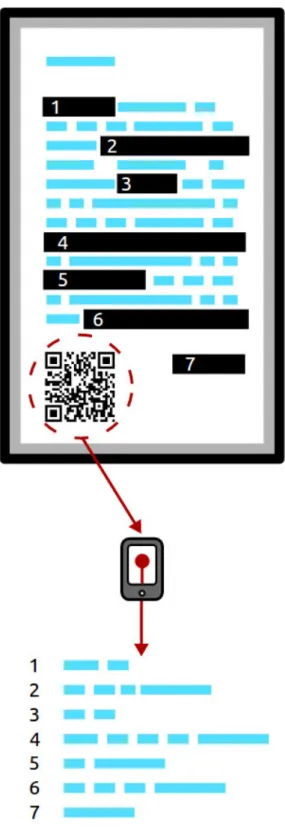
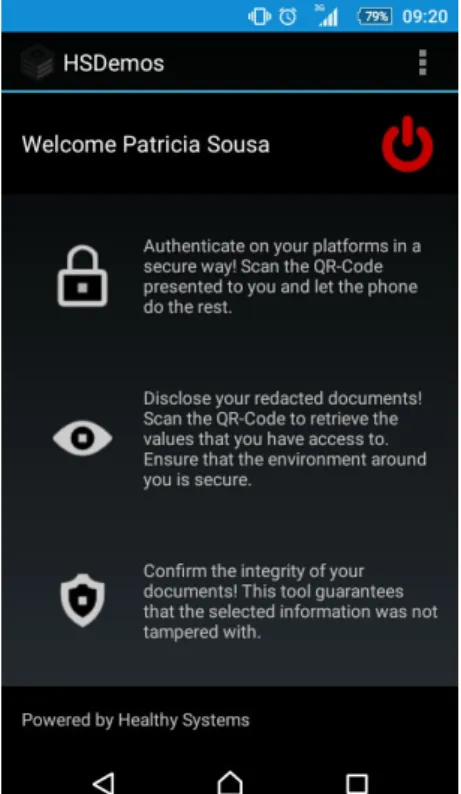
4.2 QR-Redactor Application . . . 72
4.2.1 QR-Redactor practical use . . . 73
4.3 Alfresco . . . 79
4.3.1 Alfresco Modules . . . 81
4.3.2 Web Scripts . . . 81
4.3.3 Document Library Action . . . 82
4.3.4 Workflow Management . . . 83
4.3.5 Configure e-mail . . . 92
4.3.6 Validation Service . . . 93
4.4 Middleware - Communication between components . . . 98 13
5.1 Research Summary . . . 101
5.2 Current implementation limitations . . . 102
5.3 Future Work . . . 102
5.4 Conclusion . . . 103
A Development notes 104 A.1 Programming languages used . . . 104
A.2 Software used . . . 104
B Manual 106 B.1 Login Process . . . 106
B.2 Workflow signatures process . . . 107
B.3 Associate card process . . . 115
B.4 Validation signature process . . . 117
References 120
2.1 Comparison of DMS/ECM systems - (E-Enterprise Version, C-Community
Version) . . . 30
2.2 Comparison of digital signature workflow systems . . . 46
2.3 Independent digital signature systems for Alfresco . . . 49
2.4 Add-ons for Alfresco . . . 49
2.5 Redaction systems for Alfresco . . . 51
2.1 ECM document lifecycle management . . . 26
2.2 Alfresco system [1] . . . 32
2.3 Components of a web script . . . 36
2.4 Alfresco Web Applications . . . 37
3.1 Citizen Card example . . . 63
3.2 U. Porto Card example . . . 65
3.3 Redaction example . . . 66
3.4 Bar-code example . . . 68
3.5 Quick Response (QR)-code example . . . 68
4.1 QR-Redactor Android Application . . . 75
4.2 QR-Redactor Android Application (Initial menu) . . . 76
4.3 QR-Redactor Android Application (Scan new file menu) . . . 76
4.4 First page of the redacted document . . . 77
4.5 Last page of the redacted document . . . 78
4.6 QR-Redactor Android Application (Hidden data menu) . . . 78
4.7 Dashboard Alfresco . . . 79
4.8 Actions of a folder . . . 82
4.9 Business Process Model and Notation . . . 83 16
4.11 Example of a signature in a document . . . 87
4.12 No card associated to profile notification . . . 89
4.13 No card inserted . . . 90
4.14 Incorrect card inserted . . . 90
4.15 Example of email notification default . . . 92
4.16 Example of email notification adapted . . . 93
4.17 Validation action button . . . 95
4.18 Pop-up example with signatures validation status . . . 96
4.19 Pop-up example with more information of validation . . . 96
4.20 Pop-up example with number of fields created/signed . . . 97
4.21 Pop-up example with no fields created . . . 97
4.22 Communication between components . . . 98
B.1 Login page . . . 106
B.2 User dashboard . . . 107
B.3 Actions of the Portable Document Format (PDF) files . . . 108
B.4 Select workflow page . . . 109
B.5 Start workflow page . . . 110
B.6 Task notification in the dashboard . . . 111
B.7 Review task . . . 112
B.8 Review signature task . . . 113
B.9 Task details . . . 113
B.10 Workflows I’ve Started page . . . 114
B.11 My tasks page . . . 115
B.12 Task details . . . 116 17
B.14 User profile page . . . 117
B.15 Validation action . . . 118
B.16 Pop-up example of signature validation status . . . 118
B.17 Pop-up example with more information of signature validation . . . 119
Introduction
Documents which are in printed format have been used for many years, such as books, papers, forms, contracts and any related materials [2]. Nowadays, there are a lot of reasons why people might choose to paperless environments, including reduction of the environmental harm of paper consumption and the economic cost of paper production, transfer and storage. Digital environments release people or companies from the location and physical constraints of paper and provide better support for updating, archiving, and searching of documents [3].
With the evolution of Information Technology (IT) and computer systems, the doc-uments have been managed by computer-based document management systems. A Document Management System (DMS) can be defined as a computer system that is used to store, manage, and retrieve electronic/digital documents on a closed clien-t/server architecture network [4].
However, DMS were interested in the file and storage/indexing/retrieval mechanisms to allow the user to classify and retrieve documents. They were initially concerned only with the file as a container. But, as market needs changed, the DMS focus shifted from file management to content management. For example, if we have a Web site, it is composed of HyperText Markup Language (HTML), eXtensible Markup Language (XML), or Active Server Pages (ASP) pages that need to be managed. For this reason, the name of the system was changed to ECM [5].
According to the authors of documents [6] [7], going paperless is condemned to failure soon. Despite of many efforts which have been done to consume less paper, companies still use large amounts of paper. There are some obstacles towards a paperless office such as: read on screen is difficult for some people especially mid aged people it was
not that easy to adapt to computer and Internet, who don’t like to read on monitors and prefer to read in paper; the risk of losing data and document due to software or hardware failure; the people have fear because despite electronic storage be safer than having data on paper, some people do not trust the authenticity or security of online tools. Signatures is another obstacle towards a paperless office and according to the authors of 1, nearly half of all documents are printed for the sole purpose
of adding signatures, so, we want to focus on a solution to this. Also, we want to innovate in terms of security and protection data, so, we think in one solution that has the possibility of redact the document. With this possibility, users can hide some information in a document and protect sensible and confidential data for all users that has access to the document and a restrict user list that can access to the hidden data. This way, we can protect data from undesired users that may have access to the document. Furthermore, these features are important for paperless and, no longer necessary for these tasks using printers, scanners, pens and papers. Additionally, with a signature, and even with the redaction, the papers can be damaged, and it may take more work for people involve in the task. In the case of signatures, we may need the users back to sign a document or be falsifications. In the case of the redaction, the people that can receive the documents redacted not know who changed the file or also be falsified and people can damage the documents scratching with pens.
1.1
Motivation
There are two methods of transforming a company into paperless office. One of the methods is by automating the processes that normally use paper as an essential tool. There are several technologies to make this: enterprise data automation software that is used to integrate forms and data with systems that processes them; Form Technology that is used to design various types of forms; databases device that is used to replace the function of a filing cabinet, i.e., data is made into digital form and then stored in a database with sufficient security technology and finally, digital signature allow evidence of signature in digital form. Papers are generally used as business evidences. This is required in business transactions to generate legal binding between two or more parties and workflow platforms technology that is a processes flow of an office. Normally, paper documents are used to transfer a data to other departments so that it can continue doing what is needed next (for example, one document is transferred to
1
ALA’s Legal Management: www.arx.com/files/uploads/2014/11/CoSign ALA Legal Manage-ment.jpg, 2014. [Online; Accessed 2015-12-17]
other department to be signed). This flow of work can be documented and transferred in digital form, using the workflow platforms.
The second method of transforming a company into paperless office is data storage transformation. In a general office, the data is normally stored and protected in a filing cabinet. This turns out to fill offices full of useless paper. Using the ”Paperless Office” technology, all this data can be transformed to a digital form very easily. Some of the tools available to support this process: Scanners, book copiers, photo scanners, fax to PDF converter and more. One of the most important tools are ECM systems [8]. This two methods of transforming a company into paperless office leads us to a solution that could combine the technologies to automate processes that typically use the paper an essential tool, with a tool to store digital information, for example a ECM system, as stated above.
1.2
Proposed Solution
The work detailed in this thesis aims to provide companies a way to be able to automate their signatures processes to avoid transferring a printed data between departments. This type of transferring can result in loss of important documents or falsification of documents/signatures using printed paper. We want that companies to be able to involve several people in the automated process of signatures, safely in a ECM system. This leads companies to also benefit from a printed paper reduction and reduction of the loss of important documents due to the Internet advantages. We will focus in integrating a digital signatures systems with an ECM system. This allows users to sign documents in a document manager, so users can also save their documents online, in digitally format. We take advantage of the workflow feature that some ECM systems have. Thus, we provide users a way to create a workflow signatures in a ECM system, so multiple users may sign the same document and can see the state of the document. We provide a secure way to users sign documents, through a smart card. The middleware to the Citizen Card was not in the dissertation goals so, we used a module that already existed in the Healthy Systems company. We also want to include the possibility of redaction in the signatures workflow, providing the way to users redact a document for inviting some users to sign this document that can contained confidential or sensible data that has to be hidden for confidentiality reasons. This way, provide the user the creation of a workflow with selected people
allowed to see the hidden data.
1.2.1
Objectives
The main goals of this thesis is to develop an extension for an ECM system capable of signing documents with a legally binding value for multiple users. We have the following objectives:
• Technology Research: Identifying the current state of the art ECM systems and digital signature workflow systems. Understanding the way the different systems interact and what can be improved with this two systems integrated. • Improving: Developing and improving of a digital signature application. • Implementing: Developing of an extension to the ECM system that provides
a custom workflow for the users sign documents. This way, we make integration of the digital signature with an ECM system for complex and simple cases. • Testing: Deploy our system implementation in a real large use case scenario
(like universities or companies, that can put their users to sign documents that have to be signed by multiple users, using this system) and analyse the opinions of the users, for possible improvements of the system.
1.2.2
Features
The main features of our proposed system are as follows:
• Workflow Management: Our system allows the creation of sequential, parallel and group workflows. This way, the system adapts to various user needs and can simulate a real task signature, when users pass a hand-in-hand document to be signed.
• Validation Service: The information about the signatures of a document, is given by the validation service. The users can validate a document, any time, seeing information like timestamps, integrity, certificates and signed fields of an specific selected document.
• Online data access: Documents can be accessed anytime and anywhere by the users, as they are in a enterprise content management. Users are advised to have a document to sign by email and have a direct link to be able to sign without having to be looking for the document in the enterprise content management. • Compatibility with smart cards: Users can sign a document with their
personal Citizen Card, which facilitates the use of service, requiring only that the user has their signature PIN and smart card reader.
1.3
Contributions
During this project development, a paper was accepted and will be published in ”5thInternational Conference on Electronic Government and the Information Systems
Perspective” to be held in Instituto Superior de Engenharia do Porto (ISEP), in Porto, Portugal.
1.4
Outline
This work is divided into 5 Chapters. The current chapter presents an introduction to all the work of this dissertation.
The next chapters of the thesis are organized as it follows:
Chapter 2 presents a brief overview of the current state of the art on DMS/ECM, the digital signature workflow systems as well as a series of integrations of both, with independent systems or add-ons for Alfresco, a resume about Alfresco and redaction systems. Some security and privacy mechanisms: smart cards, digital signatures, redaction and QR-codes are detailed in Chapter 3. In Chapter 4 we present the implementation details and approaches used, specifying some Alfresco properties that helped in deployment. Lastly, the Chapter 5 presents some final remarks and lays the ground for future work.
Related Work
In the following sections, we present an overview of a set of DMS/ECM to understand their features and to see which best fits our goal. We also present an overview of a set of digital signatures workflow systems describing their features. This information can help us to improve our system with some features that we still not have or where we can innovate. As our goal is to integrate these two systems, we also present an overview of similar existing solutions, i.e., digital signature systems (with or without workflows) integrated with an ECM, and an overview of the features/benefits. We also analyse some redaction add-ons to Alfresco so, we can see where we can explore this component, when we made the integration into Alfresco.
2.1
Document Management System
The DMS allows multiple users to store and retrieve documents on a closed clien-t/server architecture network. Many of these systems also allow the user to manipulate documents and share documents with other system users [9].
Most systems incorporate many procedures, such as storage location, security, access control and version or revision control. One of the benefits of maintaining electronic files is the ability to keep a record of who accessed the content, whether it was downloaded, when was it accessed or viewed.
For companies, a tracking and monitoring system of documents, specially, the version or revision control, plays a very important role, as it helps in protecting the integrity and authenticity of digital information, as it provides a mechanism to the system see
the old versions. Another benefit of these systems is the group approvals, such as a contract document, for example. Without these systems, these approvals can take unexpected number of days that may lead to delay in the progress of a project. With these systems, the electronic version of the document can be shared ensuring that the correct people review the document and can create an audit trail that allows everyone in a group to see another edits while also preserving the document in its original form [10].
However, DMS were interested in the file and storage/indexing/retrieval mechanisms to allow the user to classify and retrieve documents. They were initially concerned only with the file as a container. But, as market needs changed, the DMS focus shifted from file management to content management. For example, if we have a Web site, it is composed of HTML, XML, or ASP pages that need to be managed. So, the name of the system was changed to ECM [5].
2.2
Enterprise Content Management
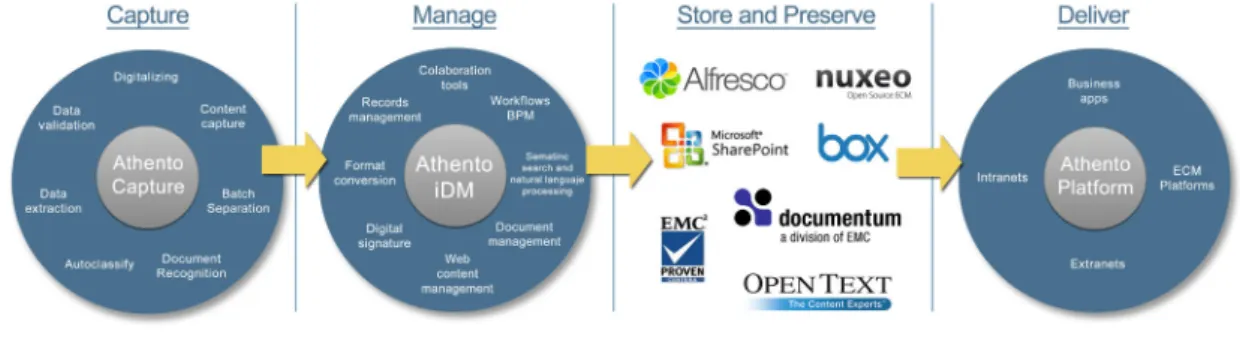
ECM is an integrated approach to managing an organisations information including paper documents, data, reports, web pages, and Digital Asset Management (DAM) [11]. DAM is any text item or media file that has been formatted into a binary code carrying embedded their rights of usage. A digital file without copyright is not a DAM [12]. ECM is defined by Association for Information and Image Management (AIIM) as the strategies, methods and tools used to capture, manage, store, preserve and deliver content and documents related to organisational processes. The capture of the content creates opportunities to identify document types, extracts data and validates indexed data against back-end applications. All content is in electronic form and it is a big benefit. The content can be managed to provide search capabilities; security and access controls; Records Management (RM) that ensures that access to documents is controlled and logged at all times; workflow and business processes; collaboration and analytics. Then, the content is available to be delivered to the right person, at the right time and in the right format. With this, we can ensure a smooth and efficient process. Finally, the archiving can specify how long a piece of content should be retained, where it should ”live” and when it should be destroyed, ensuring user
stays compliant at all times [13]. The figure 2.1 1 illustrate a document lifecycle
management.
Figure 2.1: ECM document lifecycle management
One of the biggest tools of the ECM are Business Process Management (BPM) and Workflow. These tools move content through an identified business process, such as claims processing. BPM solutions are framework used to develop, deploy, monitor and optimise multiple types of process automation applications, including processes that involve both systems and people like workflows. Workflow can be seen as a task that have a initial and final state. An workflow handles approvals and prioritises the order documents are presented. The decisions of workflow are based on predefined rules developed by system owners [5].
We now proceed to describe open source DMS solutions that may fall within this category.
2.2.1
Alfresco
An example of an open source ECM system is Alfresco. This system incorporates the major applications of ECM: documents, images, Web Content Management (WCM), RM, and DAM. Alfresco system stands out in its services and controls that manage the content and features. The most important features of this system are the workflows, versions control, metadata management and search.
1
Enterprise Content Management lifecycle:
http://www.athento.com/site_media/imagenes/web/captura/ECM-components.png/, 2014. [Online; Accessed 2015-12-1]
For a business, for example, this system has the most important features to support the content requirements of a number of business critical processes and uses. Office work, search and discover is supported by the Document Management (DM) tools. The businesses also needs workflow management capabilities that includes case man-agement, review and approval. The creation and refinement of content and documents are supported by the collaboration applications. The scalable WCM services support the delivery and deployment of content from the enterprise to its customers. One of the most important value of this system is the capability of RM, that provides an affordable means to capture and preserve records based upon government-approved standards. The standards-based platform also provides access to applications that use these standards, such as publishing, image, and email management [1].
For a developer, the system has a benefit, the add-ons. Users can develop an Alfresco add-on to improve the capabilities of an Alfresco product. The users can make integrations with external systems, package customisations, system administration tools and community maintained language packs.
This software has a community version that is free unlike other systems. The paid version of Alfresco is Alfresco One that enterprises should consider if they require enterprise-class capabilities such as content encryption, clustering or simplified ad-ministration. That version has wide range of modules and add-ons including content encryption, RM and media management.
2.2.2
Nuxeo
Nuxeo is an open-source ECM designed by developers for developers 2. This system
has different options, such as the Nuxeo Platform that is a highly customisable and extensible content management platform for building business applications. This platform is open source and users can download it to implement, DM, DAM and case management, for example. Nuxeo Platform is composed of small software parts that can be assembled together to build an application: Services, that provide features to manage the users information; Components provided to implement, configure and extend the services; and Presentation framework and User Interface (UI) building blocks that provide the user interface on top of the service stack [14]. The principal feature of Nuxeo Platform is allow a developer to expand and configure extensions to
2
Nuxeo Platform: https://www.nuxeo.com/products/content-management-platform/, 2014. [Online; Accessed 2015-11-25]
that platform.
For developers, Nuxeo Studio, despite being paid, may be very convenient when designing workflows, for example. It could save hundreds of hours in development. The authors of the white paper3 say that users who use the services (Studio, support,
consultants) will have extra help to be able to complete their projects.
2.2.3
eFileCabinet
eFileCabinet is one of most popular DMS 4. As the name implies, this system is
a virtual office(cabinet) with cabinets, drawers, folders and files. eFileCabinet has features like: easy scanning, capturing and management of client information, search for documents quickly and security for the business-critical files because they are in a secure database at all times 5.
This system provides a complete suite of ECM that include four plans: eFileCabinet Desktop is an Electronic Document Management (EDM) solution to store and man-age important business documents; eFileCabinet Online is a hosted EDM solution; eFileCabinet SecureDrawer allows users to access their documents anytime, anywhere in an online client portal/file sharing service and eFileCabinet Concentsus is an on-line backup service to protect documents via a secure onon-line remote location, so its retrievable.
These systems also have access controls, archiving and retention, collaboration, compli-ance management, document conversation, delivery and indexing, electronic signature, email management, full text search, print management and version control. Despite many features that often customers/companies are interested, have a major drawback and limitation for some clients/companies, the high cost of the systems and of the features. In addiction to the monthly cost, which can be rather substantial depending on how many employees the business have and the plan of the system that the business
3
Nuxeo Studio Overview and Concepts:
https://doc.nuxeo.com/display/Studio/Studio+Overview+and+Concepts, 2015. [Online; Accessed 2015-11-26]
4
Top Document Management Software:
http://www.capterra.com/document-management-software/#infographi, 2015 [Online; Accessed 2015-11-24]
5
choose 6.
2.2.4
DocuWare
DocuWare is an non-open source Professional ECM. The authors of the online docu-mentation [14] refers to this system as state-of-the-art DMS software for Professional ECM. This system uses a centralized document pool, this means that all documents (correspondence, records and email, for example) can be stored, shared and managed, simply and securely. The documents can be managed according to their preferred categories, labels, priorities and search terms 7.
This system provides tools for efficient ECM and the major features of this system are: document lifecycle management, RM; workflow functionality; web access and universal integration features. This software has a DocuWare On-Premise version that is free and has DocuWare Cloud version which can have benefits for some enterprises like: the documents are transmitted encrypted and stored in the data centre, that provides more security; requires no installation, just a Uniform Resource Locator (URL). The client runs on all established browsers, so, people can access anytime and anywhere and just need an Internet connection; and the users only pay for what they need. The system provides flexible licensing options that gives to the client the full range of features, tailored to the number of users and documents they require [14].
This system has a limitation for developers. The users can expand the DocuWare feature set individually with add-on modules. But, for example, if a user want integrate DM for storage and searching in other applications, and implement extremely demanding document workflows, the user has to purchase an additional add-on licence to set the expanded feature available to all users in an organisation 8.
2.2.5
LogicalDOC
LogicalDOC is a platform DMS with ECM features. This system has an open source version community that has some DM features like: Full-text indexing, metadata
6
eFileCabinet-Document Management Website Provides Cloud and Desktop Flexibility: http://www.marketwired.com/press-release/efilecabinet-document-management-website-provides-cloud-and-desktop-flexibility-1662566.htm, 2012. [Online; Accessed 2015-11-24]
7
DocuWare vs. Alfresco One: http://www.itqlick.com/Compare/docuware/alfresco-one, 2016. [Online; Accessed 2016-3-27]
8
and templates, version control, document searching, bookmarking, multi-language support. This version has security, users, groups and task manager too.
For enterprises, the system has interested features, in the Enterprise and Business ver-sion, from users and developers which stand out: Drag and Drop from desktop, multi workspace, PDF creation, online editing, digital signature (with digital certificate) that allows multiple signatures on a document by multiple users, and professional workflow 9.
2.3
Comparison of DMS/ECM systems
To compare the different systems analysed and choose the best system to use, we decided to do a comparative table with the main features that we need in the system. Based on [1] [14] [15], we construct the following table:
Table 2.1: Comparison of DMS/ECM systems - (E-Enterprise Version, C-Community Version)
Alfresco C Alfresco E Nuxeo DocuWare eFileCabinet
Open Source LGPLv3 - LGPLv2.1 - -Add-ons Workflows PDF Support Txt/binary support Users/Groups support Digital Signatures - - - - -Electronic Signatures - - -Record management -Redaction - - - - -9
LogicalDOC -Product features: https://www.logicaldoc.com/product/features.html, 2015. [Online; Accessed 2015-11-27]
LogicalDOC C LogicalDOC E Open Source LGPLv2.1 -Add-ons Workflows -PDF Support Txt/binary support Users/Groups support Digital Signatures -Electronic Signatures - -Record management -Redaction -
-We analyse some of the most popular ECM systems. -We are interested in open-source systems as well as to have full control over the system and be able to create free add-ons. We also have security guarantees seeing the system code and adapt it to all our needs. We analysed some non open source systems as they could have some the features we wanted and see what we can do to innovate.
The non open source systems are Nuxeo, DocuWare, eFileCabinet and the enterprise versions of Alfresco and LogicalDOC. Within the non open source, we try to see those in which there exists signatures or workflows, as they are our principal focus. The enterprise version of Alfresco and LogicalDOC have workflows. eFileCabinet has work-flows too. LogicalDOC enterprise version has digital signatures unlike the community version. DocuWare combines workflows with electronic signatures but do not have digital signature. Therefore, within the non open source, we have none combining the workflows and digital signatures options. On the open sources systems, we seek a solution that has the ability to create extensions to the developer of the ECM. After that, we look for systems Open Source that have workflows, so, LogicalDOC community is not an option. Among others, Alfresco community and Nuxeo community the choice was more complicated, but beyond Alfresco have more users, it also has much more online communities, more tutorials and help documents.
2.4
The choice - Alfresco
We choose Alfresco to make the integration of the digital signature workflow because, first of all, as we described in section 2.6, the only option alongside the Alfresco was the Nuxeo, but in comparison of both, we see that Nuxeo is more used in industry and companies and, perhaps for this reason, there is more documentation available for Alfresco and mutual aid communities.
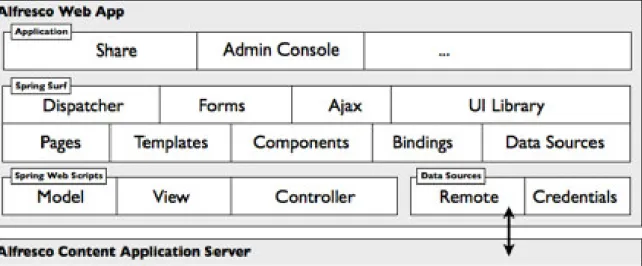
Many ECM systems looks such as the figure 2.2. However, Alfresco was relatively recently created, so, it has a more modern architecture compared to other ECM systems.
Figure 2.2: Alfresco system [1]
Alfresco is an ECM system and provides ECM capabilities as data services and user interfaces and applications.
At the core, there is a repository supported by a server that persists content, metadata, associations and full text indexes. Alfresco supports multiple programming languages and protocols, that can be used to create custom applications and solutions. Out of the box applications provides standard solutions such as DM, RM, DAM, WCM and search. It is scalable to big industry and big companies. Each service and features
of the Alfresco is made to scale in terms of size of data set, processing power and number of users. Therefore, the Alfresco architecture has a modular approach in which capabilities packaged in modules whose implementation can be changed if needed. Aspect-Oriented Programming (AOP) allow the changes and optimisation of an ECM solution.
Alfresco ECM allows the choice of the operating system, database, application server, browser and authentication system to use when deploying Alfresco. Developers can choose how to package Alfresco, for example, as a web application, a portlet 10 or an
embedded library.
The Spring platform, at the core, provides Alfresco the ability to modularise features such as version, security and rules. The portion of architecture called Web scripts, provides Alfresco support scripting to simplify developing new features and new pro-gramming interfaces.
Alfresco system is highly compatible with every systems that can run Java Enterprise Edition, since Alfresco was created as an entirely Java application.
Alfresco applications are built upon the Content Application Server (CAS) and rely on the CAS to manage, query, access and persists content. This applications exist to provide the basic capabilities that users need to manage content. The two main applications are Alfresco Share and Alfresco Repository (Explorer).
The Explorer is the application to manage content. This application allows the users to browse the repository, set up rules and actions and manage metadata, associations and classifications of the content. It has many capabilities for managing the repository and it is considered a system administrator tool. It is becoming obsolete with the arrival of Alfresco Share. However, many extensions and language packs have been built for Alfresco Explorer. Alfresco Share is the new UI built with the Alfresco web script technology. Alfresco Share provides content management capabilities with simple UI, with tools to search and browser the repository, content like thumbnails and associated metadata or preview using flash renditions of content, for example. It is organized as a set of sites that can be used as a meeting place for collaboration. Alfresco Share was the reason of the creation of Alfresco RM [1]. Alfresco Share provides a rich web-based collaboration environment for managing documents, wiki content, discussions
10
Portlet is an independent visual component that can be used to provide information within a Web page.
and blogs 11.
In the Alfresco Share page, users have an Alfresco toolbar, that has: Home, opens the dashboard of the users; My Files that opens the My Files area, where users can store the personal content; Shared Files, where users can share files with other users without adding it to a site; Sites, that has options to open a recent/favourite site, create a site and view all the sites that user is member or Site Finder page where users can search for sites; Tasks, where users can see the workflows that they create and can manage tasks; People, where users can search for other users; Repository that opens the Alfresco repository which shows all the content stored in Alfresco; User Menu, where users can update the own status, can access to the own profile, change password, open the user help and log out; and Search that is used to find files, sites and people.
We made some tests in some ECM systems, and we were interested in many of Alfresco features in terms of usability and interface, even if some were already also present in other systems. The features that we highlight is the possibility to use a dashboard with notifications to see the new tasks, new documents and new activities, without requiring the user to navigate all menus to see the new changes. Another interesting feature is a notification in each document that warns the user that exists a workflow active, in the correspondent document, that is not yet completed. Alfresco has the possibility of some document actions (buttons with features), that interest us to make actions in the document and display information/options about the file. We can see the properties of the file, if there are workflows active in this file and a version history. With the version history, we can see all the older versions of the file and who modified the file.
2.4.1
Web Scripts and Surf Framework
The user interfaces capabilities are provided by application components using Alfresco web tier and Surf 12. The Web Scripts are important for this, allowing the creation of
a REST-based Application Programming Interface (API), providing a fastest/easiest
11
Alfresco architecture
-https://docs.alfresco.com/community5.0/concepts/alfresco-arch-about.html[Online; Accessed 2016-4-14]
12
Surf is a toolkit for develop web applications and web sites. Surf is developed as a faster way to develop content applications using scripting and Representational State Transfer (REST) architecture.
way to extend Alfresco standard services. The Web Script Framework is designed aiming to make easy and quick as possible the creation of new web scripts in order to construct a RESTful interface to the Alfresco CAS. The REST web architecture is based on Hypertext Transfer Protocol (HTTP) requests and responses, Uniform Resource Identifiers (URI)s, and document types. Web scripts let developers imple-ment their own RESTful API with minimal tooling required or Java knowledge. Web scripts are implemented using lightweight scripting languages such as JavaScript (JS) and FreeMarker Template Language (FTL), so their development is not restricted to only those who know the Java language. This approach to developing an Alfresco API means that web scripts offer many advantages over existing technologies, such as Simple Object Access Protocol (SOAP), including ease and speed of development and flexibility in API design.
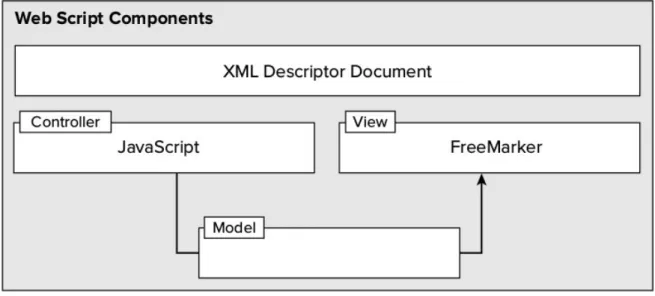
To develop a web script, developers need to know the following programming languages: XML, JS and FTL technologies. XML for the description of the web script -it is URI, HTTP method, authentication and transactional needs. JS is used for the logic of the web script - here, developer may query or perform actions against content residing in the Alfresco content repository. The output of the JS is a model to process in the web script response. In the JS we can get, for example, the URI used to invoke web script, the currently authenticated user, the properties of this user (with a person object), and more. FTL is used for the response of the web script (such as HTML in a web page). The format of the response can be generated in HTML, XML or JavaScript Object Notation (JSON).
Figure 2.3: Components of a web script
This mode of development, the web scripts, has become very attractive to the Alfresco community, making web scripts a preferred approach to extend Alfresco, interact and integrate with Alfresco. It is very useful to allow developers to map arbitrarily the content in the repository to resources on the web. Otherwise, developers can use an out-of-the-box web scripts that already encapsulate many of the mapping. The Alfresco Content Management Interoperability Services (CMIS) implementation was built using web scripts [1] 13.
Sometimes, developers prefer and need to use Java to build applications or extend the Alfresco Share. Developers can use Surf, the web runtime framework, to extend Alfresco Share and construct web applications. As Alfresco Share was built using Surf, developers can build their extensions as a combination of Java programming and web scripts or only Java. Java is used to access or change pieces of code of Alfresco, CAS or Alfresco Share by using the Spring platform.
13
Alfresco - Web scripts: https://docs.alfresco.com/4.0/concepts/ws-architecture.html [Online; Accessed 2016-3-30]
Figure 2.4: Alfresco Web Applications
Some features of the Alfresco Surf, as we can see in the figure 2.4, include a site dispatcher to easily create pages; templates for defining a page layout; the pages can be develop using FTL, JavaServer Pages (JSP), HTML or Java; the support to UI library containing reusable UI components comprising back-end application logic and front-end presentation code that can be bound into regions (or slots) within a page or template; the Asynchronous Javascript and XML (AJAX) can be used as a support for integration with the Yahoo! User Interface (YUI) library and forms can be used for rendering and collecting data. The features include also pages that users can render in multiple formats, such as PDF and format to mobile devices for example.
Alfresco 5.0 included a new UI framework constructed on Alfresco Surf - the Aikau. Aikau provides a modern higher-level approach to developing custom UI applications and provides an easiest way for creating pages and widgets. New pages with standard widgets can be created through JSON code and then, can be extended as needed using JS.
2.4.2
Aikau
Pages
The main goal of Aikau is to provide a library of widgets that can be assembled into a web application for accessing an Alfresco repository. The Aikau page came to replace the Surf pages. The principal goals of the Aikau pages are:
• Reduce complexity of the Surf pages by removing page, template and component configurations and replace them with pages defined by an easily customisable
JSON model in the JS controller of a single web script;
• Provides a solution that allow an easy customisation and a rapid development; • Allow the dynamic creation of pages for and within the running UI and render
them without restart any servers 14;
To build an Aikau page, it is needed to add an XML web script descriptor, an FTL web script template, a JS web script controller with page layout or model and a widget to display the content. It is also necessary to choose which Surf Page who wants to use the basis, such as: dp, hdp or rdp. hdp for example, is used to put in the custom page the header and footer of the Alfresco application. In resume, it is possible to easily create pages with a defined template, for example and, create web scripts.
2.4.3
All-In-One Archetype
This archetype takes advantage of the powerful capabilities of Alfresco Software Devel-opment Kit (SDK) 15 to customise and run the full Alfresco platform embedded with
all components. This is a multi-module project. To run this archetype, it does not requires additional downloads, like Alfresco installer and provides a good starting point for more complex and big projects where the final artifacts should be the customized alfresco.war and share.war.
The All-in-One archetype (AIO) is useful for some cases such as:
• The programmer is going to start an Alfresco extension project that should produce the final customized Alfresco Web application ARchive (WAR) and Share WAR artifacts.
• The project needs to access to the full regression testing suite for the Alfresco Share UI.
• The project needs to access to the functional testing based on the Alfresco Share Page Object (PO) library.
14
Introducing Aikau: https://docs.alfresco.com/5.0/concepts/aikau-intro.html [Accessed; 2016-3-30]
15
Alfresco SDK 2.2.0: https://docs.alfresco.com/5.1/concepts/alfresco-sdk-intro.html [Online; Accessed 2016-3-30]
• When the project is tested with the Rapid Application Development (RAD) features (we will describe this process in the next chapter), the programmer needs Solr 16 to be running.
The principal features of the AIO archetype are:
• Alfresco Module Package (AMP) packaging; • AMP dependency management in Maven;
• Automatic installation of AMPs into Alfresco WAR and Share WAR; • Easy to include extra AMPs and have them included in the WARs; • Out-of-the-box Alfresco extensions such RM, Media Management, etc...; • AMP Unit Testing support, just running mvn test;
• Alfresco Testing - the programmer does not have to write tests to protect against regression in out-of-the-box Share UI functionality, just have to use the -Prun,regression-testing profiles.
• Run a full Alfresco stack (alfresco.war, share.war, solr4.war ) embedded in tom-cat using the H2 database for demo purposes (-Prun), rapid applitom-cation devel-opment and integration testing;
• Support for (remote) Junit and integration testing and RAD. This uses spring-loaded. Projects can easily be launched for this scenario using run.sh;
• Integrated Development Environment (IDE) Integration with Eclipse and Intel-liJ IDEA. 17
16
Solr is a popular search platform for Web sites because it can index and search multiple sites and return recommendations for related content based on the search querys taxonomy. Solr is also a popular search platform for enterprise search because it can be used to index and search documents and email attachments.
17
All-in-One archetype:
https://docs.alfresco.com/5.0/concepts/alfresco-sdk-archetypes-aio.html[Online; Accessed 2016-3-28]
2.4.4
Rapid Application Development
RAD and Test Driven Development (TDD) are big goals for the Alfresco SDK. The SDK is designed to support the modification of JS, FTL and Java code with hot reloading of code, via Spring Loaded. The purpose of this is the changes take effect without having to restart Alfresco Tomcat and without having to click the Refresh Web Scripts or restart anything. The hot reloading saves the time of the developing. No need to wait around Alfresco Tomcat restarts to see the effect of the changes of the code.
In the SDK project, programmers can change test code, re-run the test and the results are displayed immediately, allowing TDD18.
The Alfresco SDK is designed to work well with IntelliJ IDEA and Eclipse. This support includes the ability to import existing SDK projects (created via the command line) into IntelliJ IDEA and Eclipse.
For the two IDEs, there are three components that work together to enable the best RAD experience:
• Spring Loaded: takes care of hot reloading of changes of any Java class files; • Refresh Repository Script: This is a script that will POST a request to the
Alfresco repository web application (that is, alfresco.war ) telling it to refresh the repository (repo) web script container, so any changes to files related to web scripts will be picked up;
• Refresh Share Script: This is a script that will POST a request to the Alfresco Share web application (that is, share.war ) telling it to refresh the Surf web script container, so any changes to files related to Surf web scripts will be picked up. This script will also clear the resource dependency caches, so JS changes, for example, are also picked up 19 20.
18
RAD: https://docs.alfresco.com/5.1/concepts/alfresco-sdk-rad.html [Online; Accessed 2016-3-30]
19
RAD in IntelliJ IDEA (Hot reloading):
https://docs.alfresco.com/5.1/tasks/alfresco-sdk-rad-intellij-hot-reloading.html [Online; Accessed 2016-3-30]
20
RAD in Eclipse (Hot reloading):
https://docs.alfresco.com/5.1/tasks/alfresco-sdk-rad-eclipse-hot-reloading.html [Online; Accessed 2016-3-30]
This tool is an important feature to the time that Alfresco takes to do restart the tomcat with the RAD functionality. With this tool, we can make changes to the code in seconds. Without the RAD it takes at least more than two minutes per compile extension + restart the tomcat. Its important too, because when we compile and restart tomcat, errors may occur, such as forgetting to compile the part of repository or share, and linger again twice as long because we have to back off the Alfresco and restart tomcat.
2.4.5
Workflows
One of the biggest tools of the ECM Alfresco is the support to the Business Process Model and Notation (BPMN) and workflows. BPMN is used to model notations for designing business processes and consists in represent the business workflow. BPMN solutions are frameworks used to develop, deploy, monitor and optimise multiple types of process automation applications, including processes that involve systems and people, like workflows.
Workflow can be seen as a task that have an initial and a final state. An workflow handles approvals and prioritises the order in which documents are presented. The decisions of workflow are based on predefined rules developed by system owners [5]. In Alfresco, a workflow is a sequence of connected tasks applied to a document. Each task can be performed by a person, a group, or automatically.
If a person has a document that needs reviewing and approving by an specific number of people. The sequence of tasks would be:
1. Send an email to each reviewer to alert them to review the document within a certain time, a reviewer does not need to make an exhaustive search, having at its disposal in the email, the link to download the document and link to the review page of the task;
2. Each reviewer reviews the document and approves or reject the document; 3. If enough reviewers approve, the task is completed successfully and the owner
can end the workflow.
The default workflows in Alfresco, provides to the user multiple ways to automate the process for them. The five workflow definitions are:
• Adhoc enables a user to assign a task to a single user;
• Group Review & Approve enables a user to set up review and approval of content, assigning the workflow task to a group that is created with the users of Alfresco and by the users;
• Parallel Review & Approve enables a user to set up review and approval of content, assigning the workflow task to multiple users (in any order);
• Pooled Review & Approve enables a user to set up review and approval of content, assigning the workflow task to multiple users. One user can take ownership of the task at a time, completing it or returning it to the pool to be claimed by another user associated with the task;
• Review & Approve enables a user to set up review and approval of content, assigning the workflow task to a single user 21.
2.4.6
CMIS
CMIS is a modern interface to communicate with a Content Management Systems (CMS) in a standard way. The CMIS interface consists in two parts: a number of repository services for content navigation and content creation and a repository query language for content search. The standard also defines which protocols can be used to communicate with a repository and formats that should be used in requests and responses via these protocols [16]. The goal of CMIS is to access any CMS such as Alfresco and Microsoft SharePoint.
CMIS can do basic operation in Alfresco, such as, get repository information, list the children of the root folder, list available types and subtypes, get metadata and content and create, update and delete content. CMIS can also do advanced operations, such as, version management with check out and check in, managing permissions for documents and folders, managing relationships between objects and searching. For example, with a simple Java CMIS program, it is possible to do these operations. It is possible to access a CMIS server with Java Client, such as, connecting and setting up a session with a repository, getting repository information, listing the children of
21
Alfresco - What is a workflow?:
https://docs.alfresco.com/4.2/concepts/wf-whatis-workflow.html[Online; Accessed 2016-3-30]
the root or top folders, listing available types and subtypes, creating, updating and deleting content, getting the content for a document, copying and moving folders and documents, working with Alfresco aspects, version management with check out and check in, managing permissions for documents and folders and managing relationships between objects. With this features, for example, it is possible to put files of the home directory of the local Personal Computer (PC) in Alfresco, create a file in home directory with the content of a file of Alfresco and delete files of Alfresco.
There are another options of accessing a CMIS server using a scripting languages, such as, using CMIS in JS and web application pages, using CMIS in Groovy [17] scripts and using CMIS in Spring Surf Web Scripts.
2.5
Digital Signatures Workflow Systems
As we described in the section 2.2, a workflow is a task, that can be attributed to one or more users, which has an initial state and a final state. Intermediate states, the decisions of the workflow are based on predefined rules developed by system owners. Therefore, a digital signature workflow is a task that has the objective of one or multiple persons sign a document.
We now proceed to describe some of most used digital signatures workflow systems that we study.
2.5.1
SecuredSigning
Secured Signing is a web application Software as a Service (SaaS). This web ap-plication allows users to upload, preview and sign legally binding documents online using the secured personalized X.509 Public Key Infrastructure (PKI) digital signature technology. The system do not use electronic signature at all, only adds a graphical image of the name to the digital signature.
The service allows a registered user to receive a unique secret key for signing. The user can add a document to the system and sign it digitally. There is an option to invite a third party if required and send it to parties involved to sign, making a workflow. Anyone on the workflow is able to verify signatures on their desktop application (like
Adobe) or using the online verification service of this system 22.
2.5.2
SigningHub
SigningHub is a solution for document approval workflows and advanced digital signa-tures. This system is designed to optimise the way businesses deliver, review, approve and sign the business document. This system also adds a graphical image of the name to the digital signature.
According to the online documentation 23, this system sets the industry benchmark
in terms of making the process of applying and verifying advanced digital signatures extremely easy. Users can review and sign documents from any device, location and at any time, because the document are synced across multiple devices, so, the documents are always updated with the latest version. Integrating the SigningHub with the Citizen Card can be easily done within the user business application web pages using the high-level API. Utilising the most advanced cryptographic security in innovative ways to minimise the complexity for users. SigningHub can produce the strongest level EU Qualified Signatures that are verifiable and legally enforceable for the long-term. This system has a flexible deployment and provide a complete out of the box e-Trust infrastructure, including Certification Authority (CA), real-time Validation Authority (VA) and Time Stamp Authority (TSA) servers. Existing enterprise, Internet or national level trust service providers can also be registered as trust anchors. Certified Document Services (CDS) and Adobe Approved Trust List (AATL) based signatures are fully supported for automatic trust in Adobe Reader.
2.5.3
DocuSign
DocuSign is an application that allows users to create a workflow of multiple users, send a document and sign legally binding documents. The process in this system is, the sender uploads a document to the system and adds a name and email of the signers and other recipients that can view the document. After this, the recipients receives the email and is given access and instructions to sign the document using an electronic or digital signature. Once signed, both the sender and recipients have access to the
22
Secured Signing Online Form and Document Signing with PKI Digital Signature: https://www.securedsigning.com/support/faqs, 2015. [Online; Accessed 2015-11-28]
23
About SigningHub: https://www.signinghub.com/about-signinghub, 2001. [Online; Accessed 2015-12-1]
signed document, and the workflow is completed to the sender [18]. This system also adds a graphical image of the name to the digital signature.
DocuSign provides innovative digital signature technology solutions. DocuSign act as the Certificate Authority with the DocuSign Express Digital Signature. Ensures instant PKI standard and X.509-compliant digital signatures for any DocuSign trans-action. The system has card/token-based digital signatures, so, the user can sign with existing physical or software-based certificates, including smart card-based Na-tional IDs and employee badges. DocuSign also has a third-party cloud-based digital signatures, this way, sign with region and industry-specific certificates. This system also provides locally managed digital signatures that allows user managing digital certificates in user own data centre, behind user firewall with CoSign Central. Ideal for highly regulated industries, Certified for Common Criteria and Federal Information Processing Standard (FIPS) security standards for use in e-signature.
2.6
Comparison of digital signature workflow
sys-tems
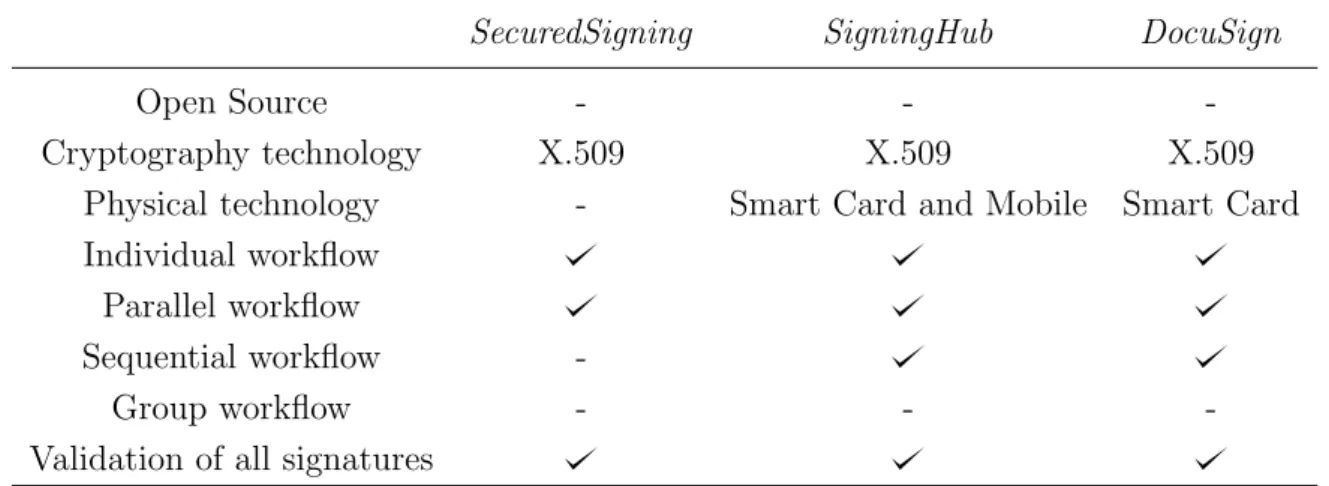
To compare the different systems analysed and see features that can be added to improve what already exists in the market, we decided to do a comparative table with the some features. There are many advantages of using Open Source Software, such as, freedom, quality, customisable and cost [19]. It is important to know if this type of software have support to physical technology like Universal Serial Bus (USB) tokens or smart cards, for example. There are some type of workflow: Individual Workflow (only one person), Sequential Workflow (follows a defined order), Parallel Workflow (any order allowed) or Group Workflow (the system create groups of registered users, that can be used for multiple documents for example). The validation of all signatures, a system that validate a document with multiple users, for example, and gives the information of how many signatures lacking for the document to be signed by everyone and ”accept” with a valid signature.
Table 2.2: Comparison of digital signature workflow systems
SecuredSigning SigningHub DocuSign
Open Source - -
-Cryptography technology X.509 X.509 X.509
Physical technology - Smart Card and Mobile Smart Card
Individual workflow Parallel workflow
Sequential workflow
-Group workflow - -
-Validation of all signatures
2.7
ECM systems with Digital Signatures
There are many Alfresco add-ons making digital signatures and there are also inde-pendent systems prepared to be integrated with Alfresco.
2.7.1
Independent systems
According of the authors of CoSign 24, many signers at security-minded businesses,
governments and cloud services are already using the CoSign digital signature solution to automate their signature-dependent processes. This system also adds a graphical image of the name to the digital signature. CoSign has a lot of benefits that allows complete freedom of choice, such as, allow users to sign from any device, location and at any time; integrate digital signatures into a DM or content management or workflow automation system, including Google Drive, Share Point, Alfresco, Nintex and K2 ; and work with the content authoring applications and file types which are known for the most users, including Word, Excel, Outlook, PDF and PDF/A. The system also ensures the user control and security through keeping user signed documents within user enterprise domain; adapting to user existing processes instead of forcing user to adopt rigid workflows; and integrating with the user directories and enrolment methods that meet user management and authentication requirements. CoSign allows complying with strict industry and government regulations, providing easily verifiable
24
About CoSign?: https://www.arx.com/cbosign/why-cosign/overview/, 2003. [Online; Accessed 2015-12-1]
proof of signer identity, signer intent and document integrity and offering signatures that can be validated by anyone at any time using applications such as Microsoft Office or any PDF reader like Adobe reader [15].
DocuSign system referred to in section 2.5.3 has a beta version for Alfresco. Using this system, allows to easily send a document directly to DocuSign for execution and signature. Once signed, the documents are automatically added back to Alfresco.
2.7.2
Digital Signatures Alfresco add-ons
Zylk 25 provides some add-ons for Alfresco, including digital signatures and validation
of a signature. The digital signature add-on provides an action for signing PDF files with a Java Applet (CryptoApplet). The applet allows to use a local software certificate or cryptographic hardware in the signature process, and it introduces a visible signature in the PDF, being also possible to sign several selected PDFs in the document library view. The signature validation of PDF files add-on provides the information of the signatures detailed, presenting the different information about signatures like signers, signature dates and the information about certificates (times-tamps, Online Certificate Status Protocol (OCSP) validation). However, this add-on no longer supports the new versions of Alfresco community from 4.2.x.
Emmanuel Roux provides an add-on to digitally signed documents with certificate and eventually the signature picture(for example, the hand signature picture)26. This
add-on allows to create/modify the signature (certificate and picture), this way, a key file is encrypted and protected with a random secret key, allowing also to view signature information with the certificate status. In the signing process, the user must mandatorily select the destination of the signed file and the key password. The user can define another parameters like sign reason, sign location, field, position of the signature and others. The user can sign multiple documents in one action. This add-on supports the new versions of Alfresco.
Alfresco PDF toolkit 27 allows the manipulation of PDF files, adding features to
Alfresco. This toolkit has digital signatures functionality but only has rudimentary signing features. This toolkit do not have validation and only use software certificates.
25
About Zylk: http://www.zylk.net/es/web/guest, 2012. [Online; Accessed 2015-12-3]
26
Alfresco add-ons by Emmanuel Roux :
https://addons.alfresco.com/addons/digital-signing[Online; Accessed 2015-12-3]
27
Alfresco PDF Toolkit: https://addons.alfresco.com/addons/alfresco-pdf-toolkit [Online; Accessed 2015-12-10]
![Figure 2.2: Alfresco system [1]](https://thumb-eu.123doks.com/thumbv2/123dok_br/15760956.1074822/34.892.145.752.446.816/figure-alfresco-system.webp)