Mathematics is one of the fields where there are multiple solutions for almost every need. However, most such applications are aimed at providing information, not improving learning processes. The main purpose of the application is to serve as an information source and self-assessment tool.
The results indicate that despite the fact that the initial goal of the application was achieved, the implemented version was just one of countless possible solutions. First, the background information of the chosen subject and the motivation for the choice are discussed.
Background Information and Motivation
Objectives and Scope
The second goal is to create a working version of the application with main functions, including the list of formulas and quizzes. Success in this stage guarantees the functionality of the application, which fulfills the main goal of the process. The final goal is to test the functionality of the application to fix the bugs found.
This thesis includes the description of the design and programming process with illustrations and code examples. Partial description of the errors encountered during the programming process is also included.
Research Methodology
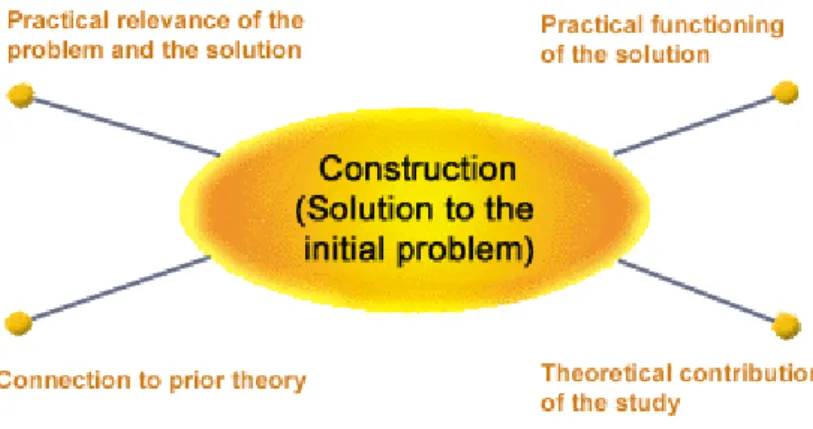
Completing the steps of the testing process will ensure that development is complete, opening an opportunity to go to market with the app. Dodig-Crnkovic (2010) draws attention to the fact that "the emphasis should be on the theoretical importance of the construct". However, only a few were implemented in the final version due to numerous failures in particular parameters.
Finally, testing had to be done at the end of the development process to verify the integrity of the application. Although its importance is further discussed in this paper, it must be said that one of the characteristics of constructive research is the attempt to explicitly test its results (Lukka 2000).
Assumptions and Limitations
Although the practical relevance has been described in previous subchapters, the construction and practical operation are discussed later in this document. Despite this, no theoretical contributions were made as the final product was based on adding new features based on existing solutions. The author's lack of knowledge and experience in working with Eclipse, MoSync software development kit (hereafter MoSync SDK) and jQuery is the main limitation.
The lack of physical devices limits the possibilities to test the outcome in real conditions.
Structure
Mobile Operating Systems
The reason is the amount of work and time required for the development, which will be multiplied by the amount of target operating systems.
MoSync SDK
Supporting Tools
Usability Studies
Since the amount of usability rules cannot be measured in double digits, the rules that were considered critical and used during the creation of the application are further mentioned when describing the design process.
Content Containing Pages
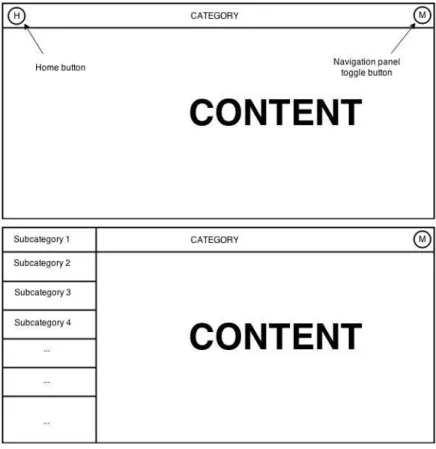
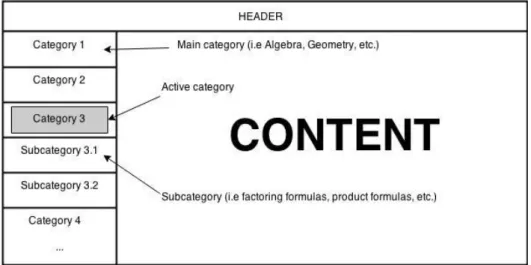
After clicking on any category, it would be highlighted, the user would be redirected to the relevant content and a list of subcategories would be opened for further navigation. There would be no need to create additional navigation links to the home page as they would not exist in this layout. The Home button would redirect the user to the main page, which should contain navigation between categories.
In addition, the menu button would be added to toggle the side panel, with a list of subcategories for navigation. The panel would close automatically after choosing a subcategory or manually, by clicking the menu button, clicking outside the panel or swiping to the left.
Other Pages
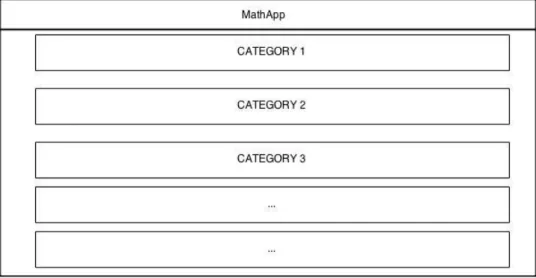
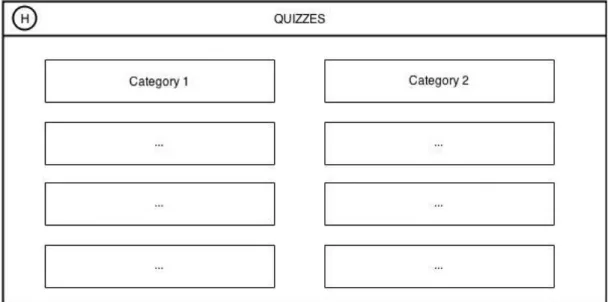
The changes for the main quiz page are the same as for the main page. The only difference between them is the decision to arrange the navigation images in two columns for the main quiz page, since we can later add arbitrary question compilations to the category quizzes. A Back button has been added in place of the side panel as a mechanism to return to the quiz list.
If there are four rows on the screen, it will be between the second and third option.
Implementing the UI
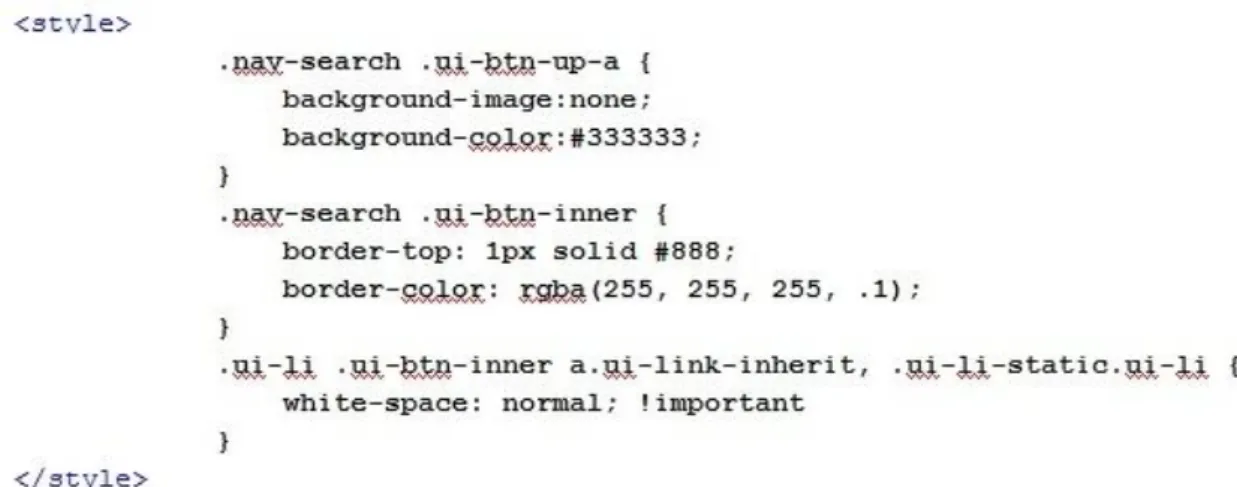
Due to the reasons described in chapter 3 of this paper, overlay was chosen and implemented with 'data-display="overlay"'. The second line is assigned to the class 'nav-search' and it defines the content of the panel, which, in the case of this application, is a list and is modified by 'style', presented in figure 12 below . Background of components of the list is defined in 'ui-btn-up-a' section, while 'ui-btn-inner' defines the rocks between those components.
Further steps of the implementation process include creating a list, adding content, and finally creating links between them. The content of the side panel fits perfectly to the height of the screen on vertically positioned devices with a screen resolution of 800x1280.
Quiz Pages
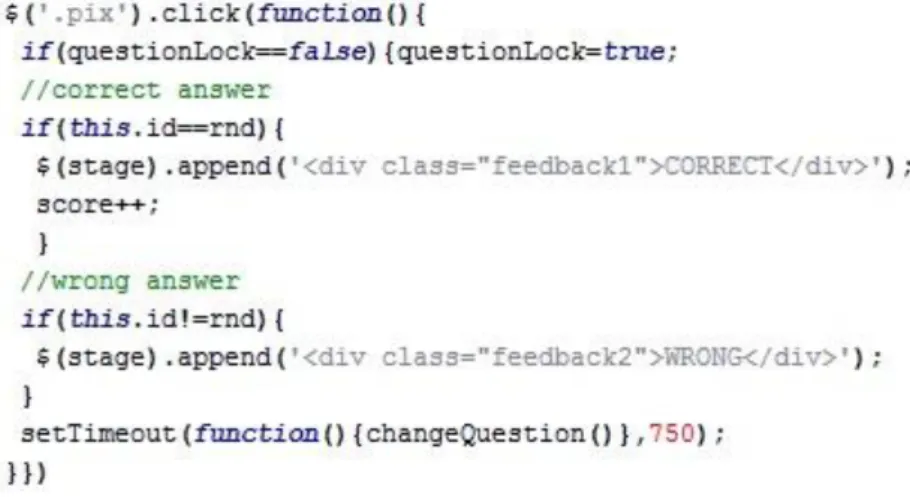
After accessing a JSON file from the server, its data is copied into an array of five elements - the question and the four answers, as depicted in Figure 15 above. The positions of the elements in the group are fixed, and thus their positioning within the defined area is randomized by another algorithm, which can be observed in figure 16 below. Since the data held in the JSON file is structured in such a way that the first option declared is always correct, the position of the corresponding answer is equal to a random number.
The quiz is displayed with two rows and three columns on vertically positioned devices with 800x1280 screen resolution. However, such an approach caused a shift in the layout during the transaction process, and the borders were removed.
Main.cpp
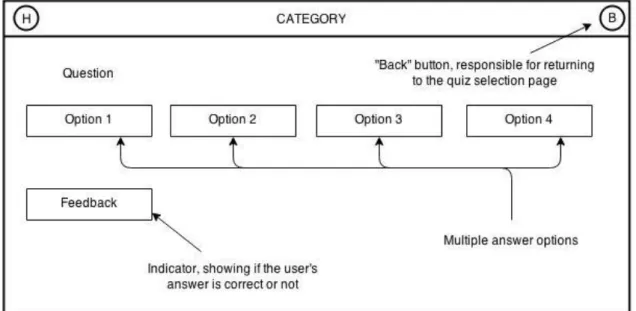
As specified during the design process, the feedback is displayed below the answer options. Testing was an important part of this development process as it allowed to verify the functionality of the product created. Therefore, this chapter presents the testing process and its results, while also stating the testing method used.
Testing Method
Different OS versions were used to check compatibility, and different screen resolutions helped ensure content readability. Although BlackBerry has its own OS, the Android version of the app can still be installed and run. It should also be noted that the application in its final form cannot be run on the HTC Wildfire due to the lack of Random Access Memory.
Test Cases
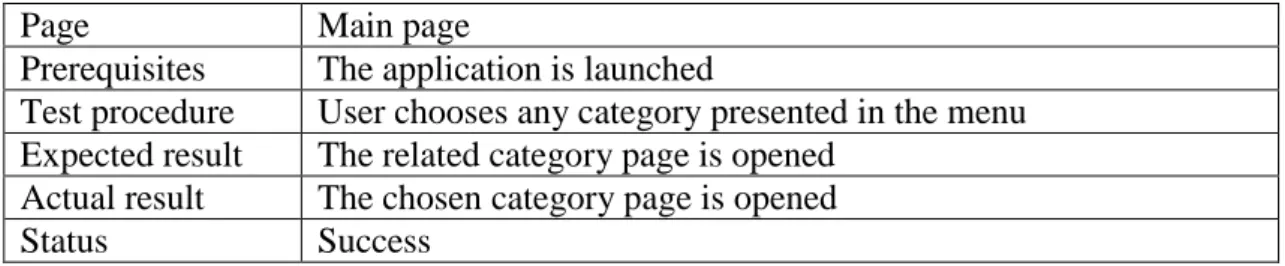
Test Procedure User selects any category presented in the menu. Expected Result The related category page opens. Upon selecting any category, located on the main page, the user is moved to the related category page. Prerequisites The application is launched and the user is located on one of the category pages.
Once on the category page, the user can open the side panel using the "menu" button located in the header. After selecting a subcategory, the user is redirected to it and closes the side menu. Prerequisites The application is launched and the "quiz" category is selected. Test Procedure The user selects any category displayed in the menu.
After selecting any category located on the main quiz page, the user is redirected to the related quiz page. Prerequisites The application starts and the user is on one of the quiz pages other than the main quiz page. Depending on the answer, feedback is displayed indicating whether the user is correct or not.
When the last question in the quiz is answered, the last slide is displayed, which contains information about the number of questions answered and the number of those answered correctly. After pressing the "back" button located in the header, the user is redirected to the main page of the quiz. The screen orientation problems mentioned in the first test case did not affect the functionality of the application.
General Monetization Possibilities
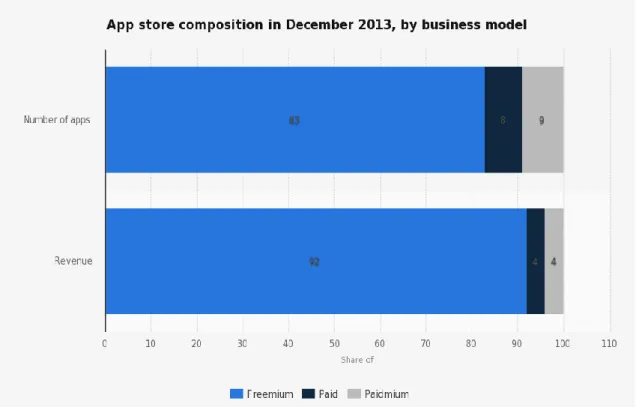
Although not shown in the figure above, freely distributed apps with in-app advertising are also prevalent in mobile markets. Since the app does not contain any in-app currency, incentivized traffic is the first type of ad to be excluded. Showing the video after completing each quiz could, in theory, be considered a valid option.
In practice, however, this would be a massive turn-off for a large portion of the potential audience, given the amount of time spent on passing. However, properly placed banners will be much less obtrusive to the users and still bring some revenue to the developer.
Possible Monetization Model for the Application
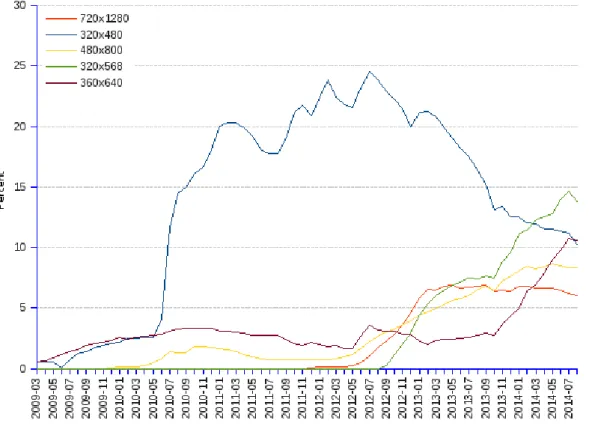
The objective of this thesis was to create the application, which contains a clear list of formulas and quizzes for different sections. The focus on three major mobile operating systems, the decision to pay attention to devices with small screen resolutions and, finally, the MoSync SDK support for current and previous versions of OSes maximized the number of potential users. A solid amount of draft options implemented in different ways with different solutions provided a basis for further implementation.
However, this does not mean that the implemented solution was the only way to the desired result. On the other hand, changing the content was a demanding and time-consuming process that also involved working with a solid amount of resources. Several draft options were also implemented, though a simple list was the best choice.
Although the application is fully functional at this point and can be distributed across the application markets, further development would be beneficial. Namespaces we want access to. using namespace NativeUI; // WebView widget. using namespace Wormhole; // Wormhole library.