The emergence of different JS frameworks is a big storm in the web development community as it is very frustrating for web developers to switch from one web technology to another. All these front-end technologies do not solve all the web developers' problems. Node.js developed as a server-side JS runtime environment makes it possible to use JS in the back-end [7].
Interactive web applications using Blaze and React, which implement CRUD operations in the back-end, are developed and deployed on Heroku. Currently, it uses Blaze, React and AngularJS as a view layer framework and Node.js and MongoDB in the back-end [10]. Instead of using a combination of traditional templates and jQuery, Blaze eliminates the need for all the update logic in the application that listens for data changes and manipulates the DOM by knowing template directives and integrating with Tracker's transparent reactivity and Minimongo's database markers so that the DOM is automatically updated when is a change.
As you can see in Listing 4, the leaderboard helper contains information about a set of players and two functions. In the next section, we will discuss another technology of Meteor's view layer, which is React. React is a front-end JS library and is one of the most popular front-end technologies for designing web applications [15].
Meteor capitalized on the greatness of Node.js by using it in the back-end to deliver content to the client.
![Figure 1: The Meteor architecture (Copied from fjaguero.com(2017) [13])](https://thumb-eu.123doks.com/thumbv2/9pdfco/1889775.265941/9.892.234.743.206.541/figure-meteor-architecture-copied-fjaguero-com.webp)
3 Technologies and Implementation
The shell script in Listing 8 shows that the application is running on the local machine at http://localhost:3000/ and that MongoDB is running. It is possible to modify the project and develop the application while the local hardware server is running. Codes running on the client will be in the client folder and codes running on the server will be in the server folder.
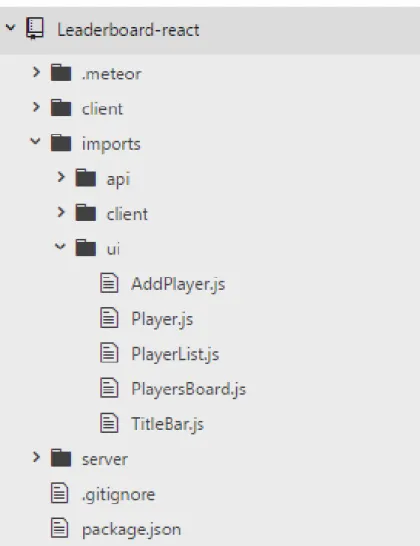
The name of the Blaze with Meteor app is Leaderboard-blaze while the React with Meteor app is Leaderboard-react. Therefore, once a Meteor project is created, the file structure in Listing 9 must be customized to avoid lazy loading. According to Meteor's official file structure, the files to be imported will be in the imports folder.
The following section will introduce the file structure of both Blaze and React with Meteor web applications. The default file structure is optional, but it is important to follow common practice. Theuifolder contains Blaze templates and template helpers for rendering the web application's user interface.
All files and source codes of the Blaze with Meteor web application are available on github under Meteor-Blaze-Leaderboard. It has a similar structure to the Blaze with Meter web app, but only changes within the uifolder. All files and source codes of the Blaze with Meteor web application will be found on github under repository2 React-Meteor-Leaderboard2 and Appendix 3.
Account-password, bootstrap, fontawesome, scss, simple-schema, moment and numeral were installed in the applications. Thefontawesome adds the fontawesome package to the app, which allows adding web icons such as delete icon, plus icon, and minus icon. Numeral adds a number pack to the application that is used to change the ranking system from cardinal to ordinal.
4 Results
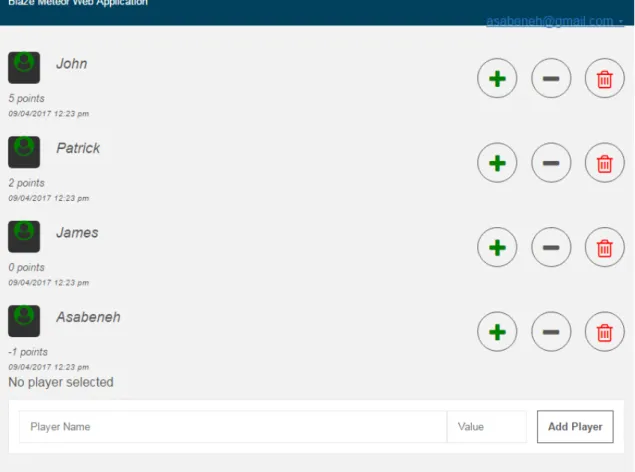
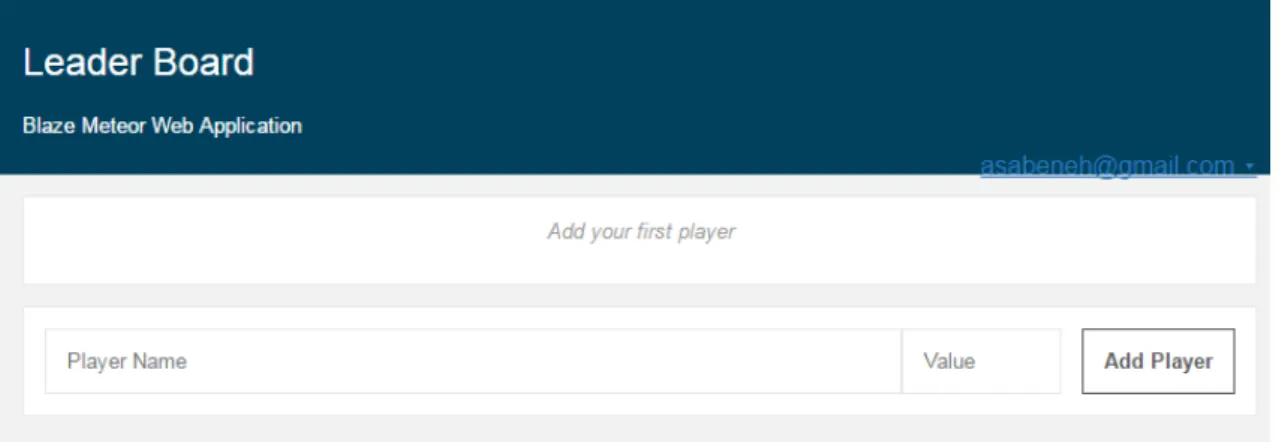
Other features of the application such as remove players, give point, take point and remove all players are visible when the user adds data to the application. Now the application in figure 8 shows plus button, minus button and delete button to perform CRUD operations. Players with the highest points move to the top, while players with a tie are ranked in ascending order of their name.
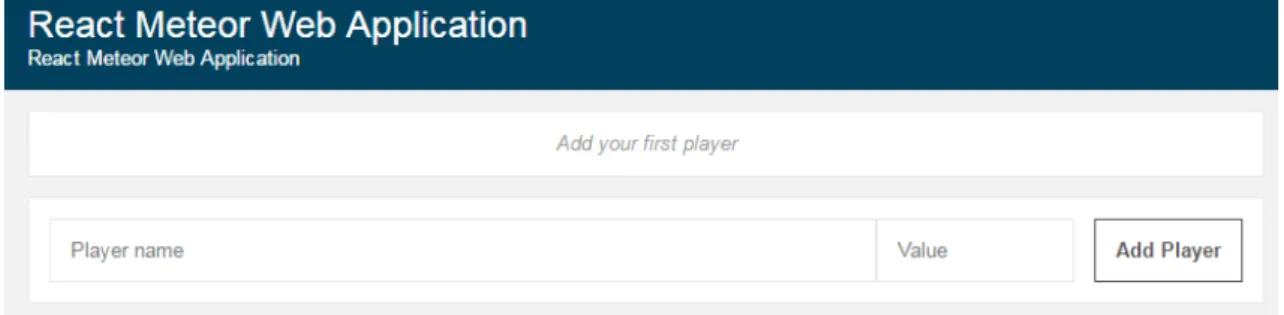
As Figure 9 illustrates, the landing page for the React web application is almost identical to the Blaze web application. One of the fields is to add a player name and the other to add the value of the player. Next to the value field, there is an add button to insert input data into the database collection.
As Figure 10 shows, the plus button, minus button, and delete button are available for use when data is entered on the React web application. Players with the highest points will go to the top and he will be the leader. React, Blaze and Meteor Stack Overflow search, Github Watch, Github Stars and Github Forks results are presented in Table 2 which can be used to learn more about the development community.
In table 2, a Stack Over flow search using the keyword React is 25 times higher than Blaze. This suggests that React Github repositories are followed by a larger number of developers than Blaze or Meteor. Pingdom has checked against all websites checked with Pingdom test and provides the grade of the web application in alphabet and percentage, page load speed and page size.
The full page loading of React is a bit faster than Blaze, but both have fast loading speed. Similar to the Pingdom test result in Table 3, the entire page load time of the React web application is slightly faster than Blaze, and the React page size is smaller than Blaze. The full page load time and file size of React is slightly smaller than Blaze. To summarize the website speed test results, React has a faster page load speed and small file size in all three page load performance tests.
5 Discussions
So there must be separate template file and JS file which is difficult to move from template file to JS file in Blaze application. This reduces the convenience during programming and increases the file size, in return the download speed decreases. This reduces file size and increases convenience during programming, making the page load faster.
The folder structure of both Blaze and React application is shown in Figure 4 and Figure 5 respectively. Website loading speed improves UX and it should be considered while developing web applications. In addition to UX, SEO or ranking from Google is also affected by the speed of page loading [22].
An application that can only run in the client side cannot provide HTML to crawlers, so it will have poor SEO by default. As Table 3 shows, the performance of both the Blaze and React web applications is rated 'A' and with an average performance of 92%. React's full page load time is lower than Blaze's, while the Blaze web application's page size is higher than React's in Pingdom's load speed test.
The Blaze file is larger than React because Blaze uses a separate file for the template and JS source code. Similar to the result of the Pingdom test, the GTmetrix test also showed that the React web app is lighter and faster than the Blaze web app. In general, the load time of Blaze and React in the GTmetrix test is higher than in the Pingdom speed test.
Like the Pingdom and GTmeterics speed test, the WEBPAGE TEST in Table 5 showed similar findings. To recap, the three different speed testing tools, the Pingdoom, GTmetrics, and WEB-PAGETEST, showed a similar result for both Blaze and React. The result of the three tests showed a similar trend for both Blaze and React web applications. The GTmetrix test showed exceptionally high page load times for both Blaze and React web applications.
6 Conclusions
1 Meteor Packages
2 MongoDB Queries
3 Blaze and React Source Codes