Input-Output Reference
What’s different about EnergyPlus Input and Output?
- EnergyPlus Input Processing
- General Input Rules
- EnergyPlus Output Processing
Rules about the Input Data Dictionary are shown in the Interface Developer's Guide (there is a lot of similarity and overlap), but most users can see the IDD (Input Data Dictionary) as an additional quick reference for EnergyPlus. The input data file is the primary file that EnergyPlus uses to create the building simulation. The inputs are order-independent; data can appear in any order and will be retrieved and sorted as needed by the EnergyPlus simulation modules.
Each alpha string in the input data file (also known as alpha field length) can be up to 100 characters long. Each alpha string (including Section and Class/Object keywords) is mapped to UPPERCASE during processing unless the "retaincase" flag flags the field in the IDD. The main drawback to this is that error messages coming from the input processor are in UPPERCASE and may not appear exactly as input.
Txt - .txt reports have spaces as a "delimiter", but only some of them are really formatted as you might expect: if more spaces result in printing with a non-proportional font, it would produce readable output.
IDD Conventions
- IDD – IP Units
Most EnergyPlus reports can be easily viewed in today's spreadsheet programs - or other software that can handle "separated variables" reports. These report files (directly from EnergyPlus) are named something like "eplus
Default values are only populated if the field is within \min -fields, or the actual. It can be used by input and output interfaces to display values in the IP system. As noted, if the IP units are "standard" (first block below), then no \ip units are expected in the field.
Input – Output Descriptions (Document)
- Input Descriptions
- Output Descriptions
The final field in an IDD class object or in an IDF object is terminated with a semicolon. The \ tags will display various information about objects as described above in the discussion of IDD conventions. Any violations of the \minimum, \maximum fields are automatically detected and messages will appear in the standard error file.
Even if items are not used for a specific object (eg Multiplier in the FenestrationSurface:Detailed and type = Door), the field must be included unless it is the last field in the object. In the descriptions below, we will attempt to display each object's output as well as describe each of the outputs. The IDF screen has the same information in an IDF ready form (ie you can copy and paste it into your input file using a text editor).
All the same information is displayed in a slightly different form and defaults to the "hourly" reporting frequency (which, of course, can be changed when you set it in your input file).
Using EnergyPlus as a Library
- State API
- Functional API
- Runtime API
- Data Exchange API
- Full Examples
- Building and Linking
As of version 9.4, the API was improved with the ability to more reliably "reset" the simulation state. By refactoring 17,000 global and static variables in the program, the state object now holds the entire program's state and threads will not cross talk. Interface developers who have built on top of EnergyPlus have primarily interacted with the simulation in a traditional way.
In the following subsections, the API is presented with examples in both C and Python. Everything from the current time step to the part load ratio of the water side economizer is tracked in the state of a functional simulation. Note that the variable to be used is required and if the api data is not completely ready in the callback, it just returns and waits.
Once the code is compiled, it must be linked to the EnergyPlus shared library, which also resides in the root of the EnergyPlus installation.
Group – Simulation Parameters
- Version
- Inputs
- Timestep
- Inputs
- ConvergenceLimits
- Inputs
- Building
- Inputs
- SurfaceConvectionAlgorithm:Inside
- Inputs
- SurfaceConvectionAlgorithm:Outside
- Inputs
- HeatBalanceAlgorithm
- Inputs
- Inputs
- ZoneAirHeatBalanceAlgorithm
- Inputs
- ZoneAirContaminantBalance
- Inputs
- Outputs
- Outputs
- ShadowCalculation
- Inputs
- Output:Diagnostics
- Inputs
- Output:DebuggingData
- Inputs
- Output:PreprocessorMessage
- Inputs
- Inputs
- SimulationControl
- Inputs
- Inputs
- Meter:Custom
- Inputs
- Meter:CustomDecrement
- Inputs
- Custom Meter Examples
- Simulation Parameter Outputs
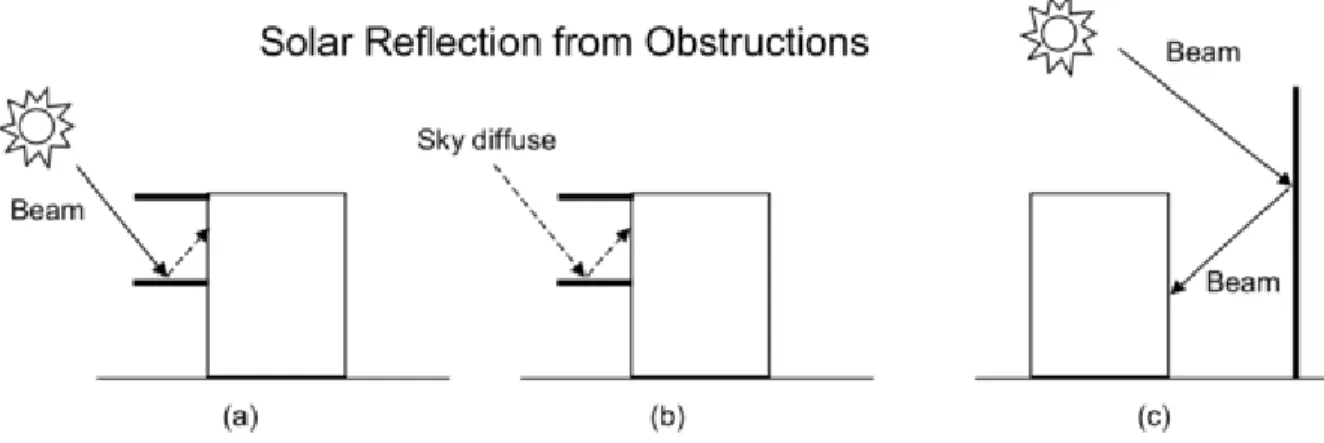
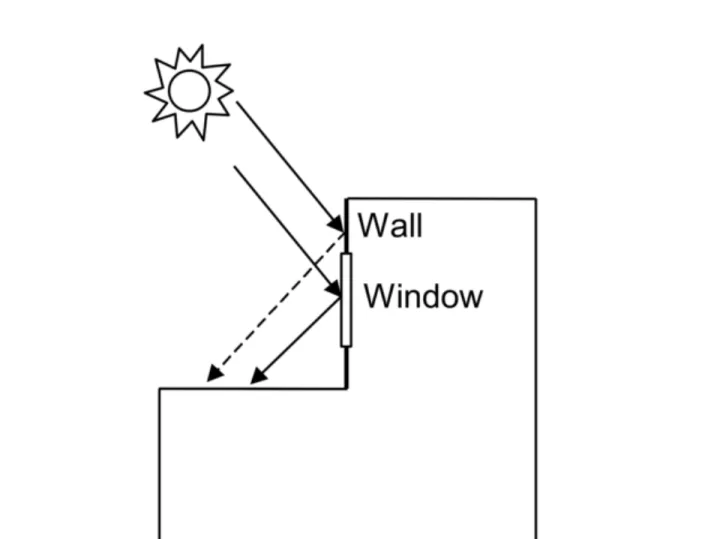
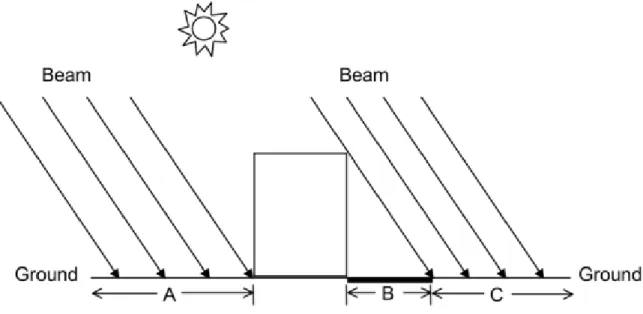
EnergyPlus repeatedly "runs" on the first day of the environment or until it reaches the "maximum number of heating days" or until the convergence criteria are met. The reflection from the ground is calculated even if the possibility of reflections is not used; l but then the grounding plane is considered unobstructed, i.e. shading of the ground by the building itself or by obstacles such as neighboring buildings is not taken into account. If you select Yes, the shading fraction per hour of all surfaces will be exported as a CSV file named as "output file prefix + shading" (default name is "eplusshading.csv" if no output file prefix is defined).
This field is used to change the effective heat capacitance of the zone air volume. This field is used to change the effective moisture capacitance of the zone air volume. This field is used to change the effective carbon dioxide capacitance of the zone air volume.
This field is used to change the effective overall contaminant capacity of the zone air volume.
Group – Compliance Objects
- Compliance:Building
- Inputs
Group – Location – Climate – Weather File Access
- Site:Location
- Inputs
- Site:VariableLocation
- Inputs
- Inputs
- Outputs
- Longer Design Periods
- Inputs
- Inputs
- RunPeriod
- Inputs
- Inputs
- Inputs
- Inputs
- Site:WeatherStation
- Inputs
- Site:HeightVariation
- Inputs
- Inputs
- Site:GroundTemperature:Shallow
- Inputs
- Site:GroundTemperature:Deep
- Inputs
- Inputs
- Field: Soil Thermal Conductivity The thermal conductivity of the soil, in W/m-K
- Field: Soil Density The bulk density of the soil, in kg/m3
- Field: Soil Specific Heat The specific heat of dry soil, in J/kg-K
- Field: Average Annual Ground Surface Temperature
- Field: Phase Shift of Minimum Surface Temperature This is day of the year which has the lowest ground surface temperature
- Inputs
- Site:GroundDomain:Slab
- Inputs
- Outputs
- Site:GroundDomain:Basement
- Inputs
- Outputs
- Inputs
- Site:GroundReflectance
- Inputs
- Inputs
- Site:WaterMainsTemperature
- Inputs
- Site:Precipitation
- Inputs
- RoofIrrigation
- Inputs
- Solar and Visible Spectrum Objects
- Site:SolarAndVisibleSpectrum
- Inputs
- Site:SpectrumData
- Inputs
- Climate Group Outputs
- Weather Data Related Outputs
- Site Outdoor Air Drybulb Temperature [C]
- Site Outdoor Air Dewpoint Temperature [C]
- Site Outdoor Air Wetbulb Temperature [C]
- Site Outdoor Air Humidity Ratio [kgWater/kgAir]
- Site Outdoor Air Relative Humidity [%]
- Site Outdoor Air Barometric Pressure [Pa]
- Site Wind Speed [m/s]
- Site Wind Direction [deg]
- Site Sky Temperature [C]
- Site Horizontal Infrared Radiation Rate per Area [W/m2]
- Site Diffuse Solar Radiation Rate per Area [W/m2]
- Site Direct Solar Radiation Rate per Area [W/m2]
- Site Total Sky Cover []
- Site Opaque Sky Cover []
- Site Precipitation Depth [m]
- Site Ground Reflected Solar Radiation Rate per Area [W/m2]
- Site Ground Temperature [C]
- Site Surface Ground Temperature [C]
- Site Deep Ground Temperature [C]
- Site Simple Factor Model Ground Temperature [C]
- Site Outdoor Air Enthalpy [J/kg]
- Site Outdoor Air Density [kg/m3]
- Site Solar Altitude Angle [deg]
- Site Solar Hour Angle [deg]
- Site Snow on Ground Status []
- Site Daylight Saving Time Status []
- Site Day Type Index []
- Site Mains Water Temperature [C]
- Site Precipitation Rate [m/s]
- Site Precipitation Depth [m]
- Water System Roof Irrigation Scheduled Depth[m]
- Water System Roof Irrigation Actual Depth[m]
- Outputs for local temperature/wind speed calculations
- Zone Outdoor Air Wetbulb Temperature [C]
- Zone Outdoor Air Wind Speed [m/s]
- Surface Ext Outdoor Dry Bulb [C]
- Surface Ext Outdoor Wet Bulb [C]
- Surface Ext Wind Speed [m/s]
- System Node Temperature [C]
This field represents the object's time zone (relative to Greenwich Mean Time or 0. meridian). You must enter valid days of the week (Sunday, Monday, Tuesday, Wednesday, Thursday, Friday, Saturday) or special days (SummerDesignDay, WinterDesignDay, CustomDay1, CustomDay2) in this field. You can enter valid days of the week (Sunday, Monday, Tuesday, Wednesday, Thursday, Friday, Saturday) in this field.
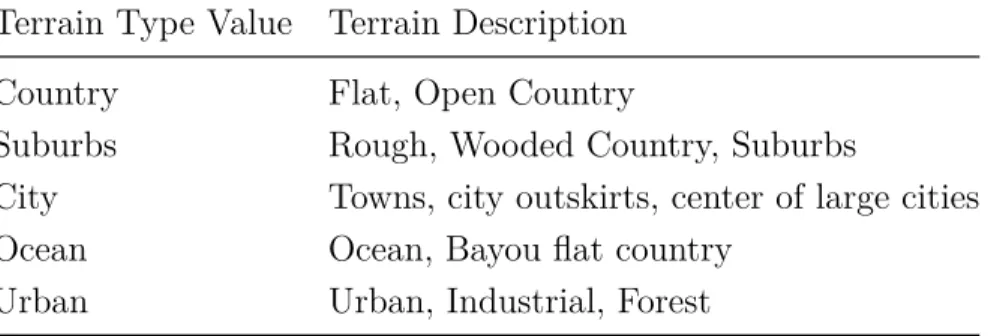
DifferenceScheduleDryBulbValue – values in the schedule are subtracted from the dry bulb temperature value (+ values then would be less than the dry bulb temperature, -values would be greater than the dry bulb temperature) for the temperature value of the resulting sky. DifferenceScheduleDewPointValue – values in the schedule are subtracted from the dew point temperature value (+ values then would be less than dew point temperature, -values would be later than dew point temperature) for the temperature value of the resulting sky. The measured conditions at the weather station (i.e. the weather file) are used by EnergyPlus in conjunction with the Terrain field of the Building object, or optionally with the Site:HeightVariation object (see below), to calculate the local variation in atmospheric properties in the function of height above the ground.
This is the name of the undisturbed soil temperature object used to determine the soil temperature. This is the heat flux value given to the GroundDomain as a boundary condition. This is the name of the other side boundary condition model used for the basement floor surface.
This is the value of the heat flow supplied to the soil domain as a boundary condition for the basement walls. This is the value of the heat flow supplied to the terrain domain as a boundary condition for the basement floor. Ground temperature is reported in degrees C – this is a user-specified input (object: . Site:GroundTemperature:Shallow) by month.
The ground temperature is reported in degrees C – this is a user-specified input (object: . Site:GroundTemperature:Deep) per month. The Site Simple Factor Model Ground temperature is reported in degrees C – this is a user-specified input (object: Site:GroundTemperature:FCfactorMethod) per month or obtained from the weather file as indicated in the description of the object. The outdoor dry bulb temperature calculated at the height above the ground of the zone centroid.
The dry bulb temperature of the outside air calculated on the height above ground of the center of gravity of the surface.
Group – Schedules
- Day Type
- ScheduleTypeLimits
- Inputs
- Day Schedules
- Schedule:Day:Hourly
- Inputs
- Schedule:Day:Interval
- Inputs
- Schedule:Day:List
- Inputs
- Week Schedule(s)
- Schedule:Week:Daily
- Inputs
- Schedule:Week:Compact
- Inputs
- Schedule:Year
- Inputs
- Schedule:Compact
- Inputs
- Schedule:Constant
- Inputs
- Schedule:File
- Inputs
- Outputs
- Schedule:File:Shading
- Inputs
In this field, the lower (minimum) limit value for the schedule type must be entered. In this field, the upper (maximum) limit value for the schedule type must be entered. For the same input entries but “no” for this field, the value at 10 minutes will be 0 and the value at 20 minutes will be .5.
This field allows you to specify the "list" interval in the number of minutes for each item. This field contains the name of the daily schedule (any of the names of the Schedule:Day objects) to be used for the days specified in the previous field. This field must contain a unique (between Schedule:Year, Schedule:Compact and Schedule:File) label for the schedule.
This field starts with "Through:" and contains the end date for the schedule period (can be more than one). This field starts with "To:" and contains the applicable days (refer to the week schedule compact object above for full description) for the 24 hour period to be described. This field contains the end time (again, refer to the interval day schedule discussion above) for the current days and the schedule for the days being defined.
This field contains the name of the file containing the schedule data. The value entered in this field must be either 8760 or 8784 as the number of data hours. This field represents the number of minutes for each item - in this case each line of the file.
Note that this is identical to an hourly file because there are 60 minutes per hour. element - the number of hours defaults to 8760 and the column separator defaults to a comma. This field contains the name of the file containing the data for the shadow planes.
Group – Surface Construction Elements
- Specifying the Building Envelope
- Material and Material Properties
- Material
- Inputs
- Material:NoMass
- Inputs
- Material:InfraredTransparent
- Inputs
- Material:AirGap
- Inputs
- Inputs
- Outputs
- Inputs
- Inputs
- Outputs
- Inputs
- Outputs
- Inputs
- Inputs
- Inputs
- Inputs
- Inputs
- Inputs
- Surface Outputs
- Internal Cell Outputs
- Materials for Glass Windows and Doors
- WindowMaterial:Glazing
- Inputs
- Inputs
- Glass Optical Properties Conversion
- Conversion from Glass Optical Properties Specified as Index of Refraction and Transmittance at Normal Incidence
- Inputs
- Outputs
- WindowMaterial:Gas
- Inputs
- Inputs
- WindowMaterial:Gap
- Inputs
- Inputs
- Inputs
- Inputs
- WindowMaterial:Shade
- Inputs
This field is used to enter the temperature-dependent coefficient for the thermal conductivity of the material. This field is used to specify the temperature of the temperature-enthalpy function for the base material. This field is used to specify the temperature of the temperature conductivity function for the base material.
The apparent transmission and reflection characteristics of the window are used in the daylight calculation. Transmission at normal incidence averaged over the solar spectrum and weighted by the response of the human eye. Front side reflectance at normal incidence averaged over the solar spectrum and weighted by the response of the human eye.
Backside reflectance at normal incidence averaged over the solar spectrum and weighted by the response of the human eye. Extinction coefficient averaged over the solar spectrum and weighted by the response of the human eye (m−1).