Tagging involves annotating metadata for specific video sequences and events, and this tagged metadata is subsequently used in the causal analysis process. Tagging involves annotating metadata for specific video sequences and events, and this tagged metadata is subsequently used in the causal analysis process.
Background and Motivation
Here it is possible to get “the best of both worlds”, since MSE is only used as long as the error is less than𝛿, and MAE otherwise. Each sub-part of the figure is indicated by (
Mearka Problem Definition
Methods
The engineer is expected to repeat these steps, for example, when tests show that the system does not meet the specified requirements. Finally, the system will be evaluated by experiments to determine whether the POC meets the mentioned requirements.
Scope and Limitations
This thesis is rooted in the design paradigm, as the requirement and specification are derived from the problem definition and the application domain.
Context
This study presents their experiences of using radio-based wearable positioning data systems in elite football clubs (ZXY [6]). This research is just a fraction of what the CSG at UiT, the Arctic University of Norway, has conducted over the years.
Outline
Mearka will be designed and developed in the context of the research already done by CSG on distributed systems, to work with video as a source, and to potentially detect positions to quantify soccer performance that can be used in analytics. These resources can be represented using Uniform Resource Identifiers (URIs), unique addresses used to identify them.
JavaScript Object Notation (JSON)
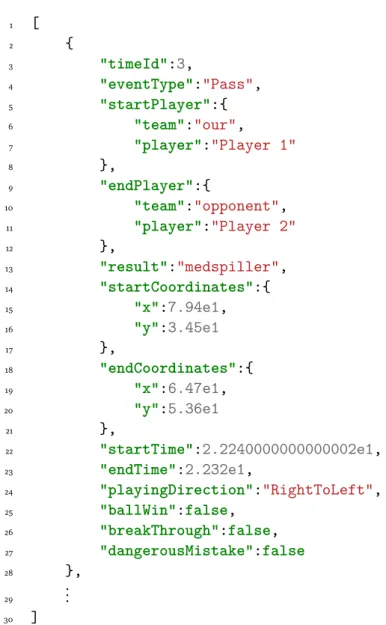
Because of the JSON structure, this data can be parsed and each field can be accessed based on the keys. Since it is treated as an object, one only needs to access the "eventType" attribute on that object to get the attached value, in this case "Pass".
FFMPEG
Machine Learning
- Supervised Learning
- Unsupervised Learning
- Reinforcement Learning
- OpenCV
- CVlib
- YOLOv4
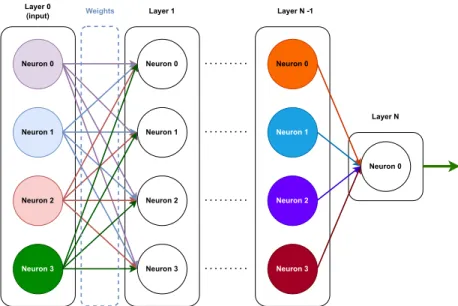
The model is trained on the training data, and gradually adjusts its weights using something like equation 2.1, based on how far from the labeled truth it is. MSE is a good algorithm to use if it is important that the model contains no outlier forecasts with significant errors.
Related Work
Muithu
Bagadus
Bagadus extends this with a static camera array that provides a panorama and adds positional data through ZXY tracking sensors [6], as well as an analytical subsystem that allows the user to pan around the panorama. Mearka aims to have a similarly intuitive app that the user can use to tag events as they happen during the game.
Summary
In addition, Bagadus has a sensor subsystem that tracks the location of each player on the court using ZXY tracking sensors [6]. Muihtu has an intuitive app that allows the user to tag events during a game, as well as record gameplay with consumer cameras that sync with post-game tags.
Functional
Based on the goals stated in section 1.2, we have specified a set of requirements that the system must fulfill in order to achieve the goal. Data deletion: The user owns their data, so Mearka must make it easy to delete which user data the system has temporarily stored.
Non-functional
Output: The output of Mearka after tracking positions should be soccer metadata that allows the user to have information about the positions of players at any given time in the video. The output should be at least pixel positions in the frame as illustrated by figure 3.1, with x,y coordinates for player positions at time t.
End user interactions
Summary
This means that it should be possible to download useful football metadata from the system within 12 hours. One-click export: Because the system is easy to use, the resulting football metadata that Mearka generates should be easy to download once generated.

Choosing A Camera For Development
Requirements
It should be possible to set up the camera, start recording and not worry about it until the session ends. Operation: The camera must be easy to use and operate, regardless of the user's technical level.
Options
However, an advertised battery life of 82 minutes is less than the required minimum of 105 minutes of battery life. The regular 4K sensor has an advertised battery life of 75 minutes, so it doesn't count.
Mearka-App
System Design
When the Mearka app starts recording, it sends a notification to the backend that it wants to start recording. If the backend is working and responding as expected, the Mearka app allows the user to start tagging.
User Interface
Pressing Stop Recording notifies the backend that the session has ended and prompts the backend to send any soccer metadata it has, tags and otherwise, back to the Mearka app. Upon receiving the metadata, the Mearka app prompts the user to share it wherever needed.

Mearka Web-Interface
User Interface
This thesis focuses on the position detection functionality, and therefore the essential part of the user interface shown in Figure 4.4 is the button to upload a video. When the button is pressed, a dialog box opens and the user can select one or more videos to upload, as Figure 4.5 illustrates.

Backend
- REST API
- Soccer Metadata
- Mearka-app
- Mearka Web-interface
- Position Detection Component Communication
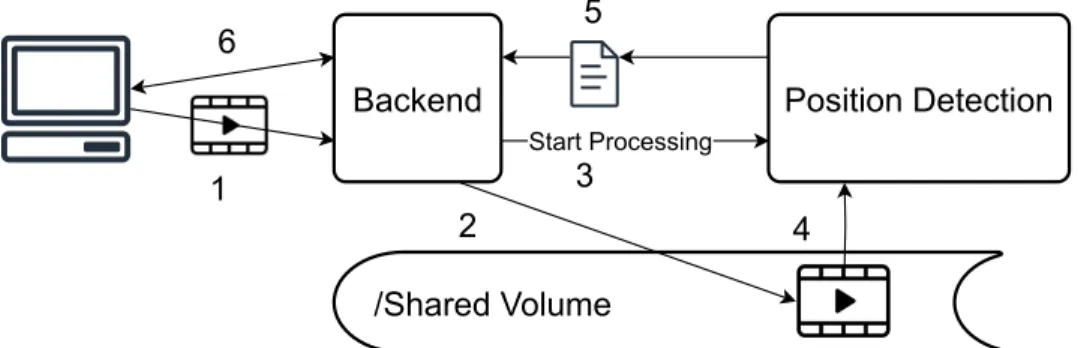
This folder is shared between the backend server and Mearka's position detection component. After the position detection component finishes detecting positions, it sends the positions file to the backend.
Position Detection Component
Concatinate Video
Once this file is created, FFMPEG is run with the appropriate command on the operating system and concatenates the videos listed in the file into a new video stored in the UUID folder. For this script to be useful, the videos must be named in ascending, alphabetical or numerical order.
Position Detection
For each frame, the time offset in the video is calculated and added together with a list of pixel positions. CVlib returns a list of labels describing what it found, a list of pixel positions, and a list of confidence levels.
Position Detection Component Server
This information is used to calculate the offset in the video where the positions are found, using equation 4.1. The tags are iterated, and if it has located people, those positions are stored in a position object along with the time offset in the video.
Summary
There are two separate REST APIs on the back end, one that communicates with the front end (2.1), as well as one for internal communication with the position detection component (2.2). Flask [69] is used to run the position detection server, implementing a small REST API (3.1) that enables communication with the backend.
Web
Api calls
If not, it obtains the UUID by requesting it from the backend via a GET request to the "/utils/get-uuid" endpoint. When the videos are in the backend, the backend makes sure that the multiple video segments are connected into one and starts detecting the position.
Mearka-App
When you upload a video or several video segments to the backend, the frontend counts how many files are being sent. Once the position detection is complete, it is possible to download the available football metadata from the back end.
Backend
Concatenated video is done when the user uploads multiple videos from the front end to the back end. The backend receives the video and stores it on a storage volume shared between the backend and the position detection component.

Position Detection Component
Concatenate video
Filtering is done by iterating through the list returned from the OS library and adding each file with the extension ".mov" or ".mp4" to a new list. FFMPEG starts through its CLI to create a new video with the same extension (“mp4” or “.mov”), which contains the content of the videos sent by the user.
Position detection
This script takes a path to the directory containing the video files as a command line argument from the server. Once the video concatenation is complete, the new file name is sent back to the backend. section 3), even if the positions are pixel coordinates in the frame.
Summary
Battery life
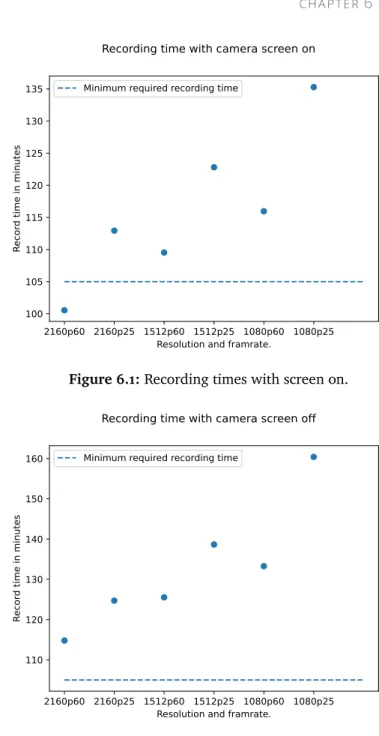
A requirement for the camera is that it be able to record for more than 105 minutes. From the graph in Figure 6.3, it can be concluded that recording with the screen off will increase the overall recording time of the camera.
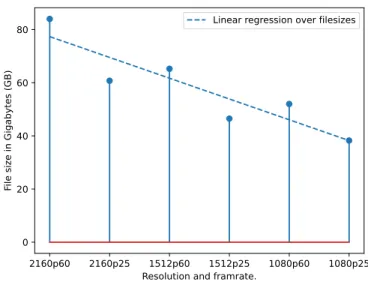
File size
If it is important to have the longest recording time possible, then “1080p25” is the best option. It doubles the resolution while still providing ample battery life and has the second best recording time to file size ratio.
Position detection
- Test system
- Resolution speed
- Framerate Speed
- Detection Accuracy
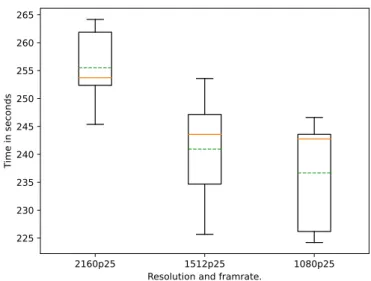
The result of this experiment is shown in Figure 6.6, and more detailed figures are listed in Table 6.4. The box plot in Figure 6.6 illustrates where the median, mean, and 25th and 75th percentiles lie.
Metadata Size
Having opening and closing tags for each element in the metadata means more characters need to be stored to convey the same information, compared to JSON, which is illustrated in 5.8. The table illustrates the file size difference between JSON and XML of metadata created from the same 30 and 60 second video clips.
Speedup
Summary
Unlike the web interface, the Mearka app does not need to request a UUID from the backend when you start a recording. The Mearka app has separate endpoints in the backend and the backend assumes a new recording means a new match or training session.
Mearka Web-interface
There were two options to use the video player on the web interface: play video directly from the frontend or send the video from the backend to play in the web interface. A third option could be to play the files as a playlist, but this functionality is not implemented to reduce the complexity of the web interface.
Backend
All soccer metadata found on the backend is stored in memory and not in persistent storage. But all soccer metadata is lost if the backend shuts down or something happens.
Position Detection Component
It is possible to develop a football marking system based on inexpensive, common off-the-shelf components. Common off the shelf (COTS) components: Mearka needs to be as cheap as possible, so uses COTS components to be implemented.
Summary
Future Work
- Streaming
- Tracking
- Extend Tagging Option
- Translate pixel-positions to real world positions
- Video queue
- Possible Real-Time
Soccer video and player position dataset.” In: Proceedings of the 5th ACM Multimedia Systems Conference. Supervised Machine Learning: A Survey.” In: 2021 4th International Conference on Advanced Communication Technologies and Networks (CommNet).

Example JSON
For-loop that prints the event type
Example machine learning model with steps and neurons
Example position detection x,y at time t
Example of positions at time t
Mearka data and communication illustration
App flowchart
Mearka-app UI overview
The backend and position sensing component have a reachable REST API that can be reached by other components in the system. In case the user uploads multiple files, the backend requires the position detection component to merge the videos.
Web UI
Web UI - upload multiple files
Web UI - confirm send to backend
Web UI - extracting-positions
Web UI - remove data or export metadata
Backend API endpoints
Data flow when using the Position Detection component
Component system overview
React typescript component example
Use a React Typescript component
React Native example
Setup backend endpoints using Gin for Golang
Example: soccer metadata used to know positions over time. 60
List of Python libraries used
Machine Learning endpoints
Example positional object for one offset
Example list of positional objects
Example JSON metadata
Recording times with screen on
Recording times with screen off
File sizes between resolutions and framerates
Recording time to file size ratio
Position detection time on 30s video
Accuracy example
Position detection accuracy
Alternative camera angle
Number of miss classification within six frames
Example XML Metadata
Example: Pixel-coordinate translated to field-positions
Progressive image
Interlaced video overview
Settings combination for camera and record options
Resolution pixel differences
Example: compare total pixels/second for 1512p25 and 1080p60. 72
Time difference between 25 and 60 FPS
Resolution accuracy
Size difference between JSON and XML