This manual describes the Oracle Database Gateway for Adabas, which enables Oracle client applications to access Adabas data through Structured Query Language (SQL). For more information, visit the Oracle Accessibility Program website at http://www.oracle.com/accessibility/. Note: You should understand the basics of Oracle Database Gateways before using this guide to install or manage the gateway.
Overview
Oracle Heterogeneous Services
Oracle Database Gateways
Gateway Architecture
Gateway Process Flow
Setup Flow
See: Oracle Database Gateway for IMS, VSAM, and Adabas Installation and Configuration Guide for Microsoft Windows or Oracle Database Gateway for IMS, VSAM, and Adabas Installation and Configuration Guide for AIX 5L-based Systems (64-bit), HP-UX Itanium, Solaris -operating system (SPARC 64-bit), Linux x86 and Linux x86-64. After the gateway is installed and configured, you can use the gateway to access the virtual storage access method (Adabas) data, pass Adabas commands from.
Accessing VSAM Data
SQL Support
The following topics provide more information about specific SQL functions and their support by the gateway.
Transaction Support
Pass-Through Feature
Naming Rules
Rules for Naming Objects
Case Sensitivity
Data Types
Binary Literal Notation
Data Type Conversion
SQL Execution
Row Selection
Empty Strings
Empty Bind Variables
Locking
Handling Non-Relational Data
Restrictions
SQL Restrictions
Unsupported SQL Functions
SQL Syntax
Transaction Capability
Transactional Integrity
COMMIT or ROLLBACK in PL/SQL Cursor Loops
Database Links
Encrypted Format Login
Data Dictionary Views and PL/SQL
VSAM Restrictions
General VSAM Restrictions
Restrictions Specific to VSAM (CICS)
Restrictions Specific to VSAM Batch
Overview of Normalizing Non-Relational Data
About Arrays
Representing Metadata
This section describes the support methods that Oracle Connect for IMS, VSAM, and Adabas Gateways apply to normalize non-relational data. When you import this metadata into Oracle Studio for IMS, VSAM, and Adabas Gateways, the import process creates a data dictionary definition that is equivalent to the original structure, typically mapping the fields one to one. Oracle Studio for IMS, VSAM, and Adabas Gateways represents the flattened view of the metadata on the Table Editor's Columns tab, as shown in Figure 3–2.
Figure 3-2 Presentation of metadata on the Columns tab in Oracle Studio for IMS, VSAM, and Adabas Gateways. The tree in the metadata view shows a normalized view of the tables, as shown in Figure 3-3, where STUDENT_BOOK, STUDENT_COURSE, and STUDENT_COURSE_. For decimal data types, this is the number of digits to the right of the decimal point.
V tej poizvedbi je vir podatkov ime vira podatkov, iz katerega so bili ustvarjeni metapodatki. STUDENT FIRST_NAME CHAR STUDENT LAST_NAME CHAR STUDENT DATE_OF_BIRTH CHAR STUDENT NUMOF_COURSES NUMBER STUDENT NUMOF_BOOKS NUMBER STUDENT_BOOK BOOK_ROWNUM NUMBER STUDENT_BOOK ISBN CHAR STUDENT_BOOK RETURN_DATE CHAR STUDENT_COURSE COURSE_ROWNUM NUMBER STUDENT_COURSE COURSE_ID ŠTEVILO STUDENT_COURSE COURSE_TITLE CHAR. STUDENT_COURSE INSTRUCTOR_ID NUMBER STUDENT_COURSE NUMOF_ASSIGNMENTS NUMBER STUDENT_COURSE_ASSIGNMENTS COURSE_ROWNUM NUMBER STUDENT_COURSE_ASSIGNMENTS ASSIGNMENTS_ROWNUM NUMBER STUDENT_COURSE_ASSIGNMENTS ASSIGNMENT_TYPE CHAR STUDENT_COURSE_ASSIGNMENTS NALOGA _TITLE CHAR STUDENT_COURSE_ASSIGNMENTS DUE_DATE CHAR STUDENT_COURSE_ASSIGNMENTS GRADE NUMBER STUDENT_ST __LEVEL VARCHAR2 STUDENT_ST __SEQUENCE NUMBER STUDENT_ST COURSE_ROWNUM NUMBER STUDENT_ST ASSIGNMENTS_ROWNUM NUMBER STUDENT_ST BOOK_ROWNUM NUMBER STUDENT_ST ID NUMBER STUDENT_ST FIRST_NAME CHAR STUDENT_ST LAST_NAME CHAR STUDENT_ST DATE_OF_BIRTH CHAR STUDENT_ST NUMOF_COURSES NUMBER STUDENT_ST NUMOF_BOOKS NUMBER STUDENT_ST COURSE_ID NUMBER STUDENT_ST COURSE_TITLE CHAR STUDENT_ST INSTRUCTOR_ID NUMBER STUDENT_ST NUMOF_ASSIGNMENTS NUMBER STUDENT_ST ASSIGNMENT_TYPE CHAR STUDENT_ST ASSIGNMENT_TITLE CHAR STUDENT_ST DUE_ DATE CHAR STUDENT_ST ŠTEVILKA RAZREDA STUDENT_ST ISBN CHAR STUDENT_ST RETURN_DATE CHAR 41 izbranih vrstic.
Oracle Studio for IMS, VSAM, and Adabas Gateways allows you to process arrays using the following methods:.
Virtual Views
For example, a parent table named STUDENT with an array named COURSE and a nested array named ASSIGNMENTS is represented by the virtual view STUDENT_COURSE_. The fields of the parent's first unique key, or all parent fields, depending on the choice you make during the import process or when configuring the virtual array policy at the table level. If all parent fields are included in the virtual view, the parent's indexes are available in the view definition and can be used for efficient optimization strategies.
If the view does not include all parent fields, the primary key fields (if the primary key is not the parent's first unique key). If selected, a column called _ROWNUM which identifies the row in the array. Figure 3–4 shows the STUDENT_BOOKS virtual view with the two array member columns (ISBN and RETURN_DATE) and the column that identifies the row in the array (BOOK_ROWNUM).
Oracle Studio for IMS, VSAM, and Adabas Gateways also maintains primary and foreign key definitions that connect between the parent table and the array tables. Including all parent fields in the virtual view greatly reduces the need to perform join operations because it is itself an implicit join. In general, the query processor can design efficient access strategies because Oracle Connect for IMS, VSAM, and Adabas Gateways copies all relevant indexes from the parent to the virtual view.
Oracle Studio for IMS, VSAM, and Adabas Gateways indicates virtual views by using a different color icon in the metadata view, as shown in Figure 3–5.
Sequential Flattening (Bulk Load of Array Data)
The flattened table is called
_ST, where
is the name of the parent table and ST indicates a single table. For example, if a parent table is named STUDENT, the single table or subsequent view is named STUDENT_ST. The single table structure is identical to the original table structure, except that Oracle Connect for IMS, VSAM, and Adabas Gateways removes all array dimensions and adds some control fields.
When reading a record, Oracle Connect for IMS, VSAM, and Adabas Gateways performs a tree traversal of its parent and group hierarchy. Each record in the resulting data set relates to a particular member of the set; other strings are invalid. For each array, an optional column named _ROWNUM, which identifies the row in the array.
Figure 3–6 shows the metadata that sequential flattening produces for a three-row data source (COURSE, ASSIGNMENT, and BOOK) in the SQL View window. Type LEVEL NOT NULL VARCHAR2(64) __SEQUENCE NOT NULL NUMBER(11) COURSE_ROWNUM NUMBER(10) ASSIGNMENTS_ROWNUM NUMBER(10) BOOK_ROWNUM NUMBER(10) ID NOT NULL NUMBER(8) FIRST_ROWNUM NUM3 ) DATE_OF_BIRTH NOT NULL CHAR(8) NUMBER_COURSE_ROWNUM NOT NULL NUMBER(10) NUMOF_BOOKS NOT NULL NUMBER(10) NUMBER OF COURSE_ID (8) COURSE_TITLE CHAR(48) INSTRUCTOR_ID NUMNIGNIGMENT TYFS_8) PE CHAR(12) ASSIGNMENT_TITLE CHAR( 48) DUE_DATE CHAR(8) CLASS NUMBER (2,1) ISBN CHAR(10) Size Indicates the maximum size allowed for data in . If the value has a scale of one or more, then the total number of digits allowed before the decimal point is the precision value minus the scale value.
Setting the Default Behavior for Array Handling
Modifying the Default Behavior During Metadata Import
Modifying the Array Handling Policy for a Specific Table
Generate Sequential View: Select this option if you want to map an unrelated file to a single table. Generate virtual view: Select this option if you want to create an individual table for each group in the non-relational file. Include row number column: Select this option if you want to include a column that specifies the row number in the virtual or sequential view.
Inherit all parent columns: Select this option if you want virtual views to include all columns of the parent record.
Conversion of Atomic Data Types
Where n specifies which bit (within a byte) to start from and m is the number of bits. If n is not specified, n defaults to 1 for the first occurrence of the field and its contiguous after.
Conversion of Non-Atomic Data Types
Conversion of Decimal Data Types
Conversion of Scaled Data Types
Supported SQL Statements
DELETE
INSERT
SELECT
UPDATE
Oracle Functions
Functions Not Supported by Adabas
Functions Supported by Adabas
Arithmetic Operators
Comparison Operators
Group Functions
String Functions
Other Functions
Oracle Database Gateway for Adabas translates a query that references an Oracle Database data dictionary table into a query that retrieves the data from an Adabas data dictionary. You query data dictionary tables over the database link in the same way you query data dictionary tables in the Oracle database. The Gateway data dictionary is similar in appearance and usage to the Oracle Database data dictionary.
Data Dictionary Support
Accessing the Gateway Data Dictionary
Can convert the retrieved data to give it the appearance of the Oracle database data dictionary table.
Supported Views and Tables
If you use an unsupported view, Oracle Database returns a message that no more rows are available. To select data dictionary views using SELECT FROM DBA_*, you must first connect as Oracle user SYSTEM or SYS. ORA-28506: Parse error in data dictionary translation for %s stored in %s Queries through the gateway to a data dictionary table or view beginning with ALL_ may return rows from Adabas even when access rights to those Adabas objects have not been granted.
When querying an Oracle database using the Oracle data dictionary, rows are returned only for those objects to which you are allowed.
Default Column Values
Adabas Data Dictionary Descriptions
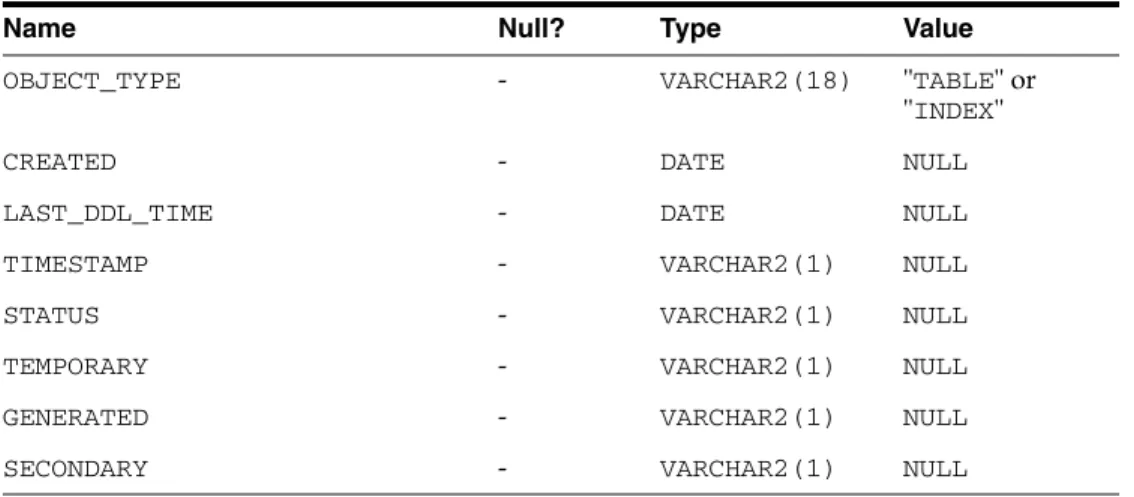
AVG_SPACE_FREELIST_BLOCKS NOT NULL NUMBER(10) 0 NUM_FREELIST_BLOCKS NOT NULL NUMBER(10) 0 Table C–26 (continued) USER_TAB_COLUMNS.
TABLE_TYPE NOT NULL CHAR(5) " TABLE "
Character Set Terminology
The main aspect of the globalization support in Oracle Connect for IMS, VSAM and Adabas Gateways is the recognition of the different characters associated with a language and the way they are encoded in various operating systems and data. For each supported language, a special definition file called a character set file is provided where all the language related information is stored. As a distributed product that accesses heterogeneous data sources on different platforms, Oracle Connect for IMS, VSAM and Adabas Gateways provides seamless conversion of text between the different character encodings used on the different platforms.
Conversion between ASCII-based encoding on open systems and EBCDIC-based encoding on IBM mainframes and AS/400 machines. Conversions of legacy data stored with old character encodings (such as 7-bit encoding) to the current platform encoding standard. Getting this kind of seamless globalization support requires properly setting the character set definitions according to the kind of encoding used in the different data sources and platforms.
This section discusses the different encoding schemes used, the character set definitions required and other Globalization Support related aspects, and contains information on the following topics:.
The resulting products are stored in the Payload Data Segment file format (PDS) which contains a Main Product Header (MPH) and a Specific Product Header (SPH) followed by