Preface
Audience
Documentation Accessibility
To reach Oracle Support Services, you must use a telecommunications relay service (TRS) to call Oracle Support. An Oracle Support Services engineer will handle technical issues and provide customer support according to the Oracle service request process.
Related Documents
Conventions
What's New in Oracle Database?
Oracle Database 11g Release 2 (11.2) New Features in Data Warehousing
Oracle Database 11g Release 1 (11.1) New Features in Data Warehousing
Finally, catalog views have been improved to contain information on the deadlock of separate materialized views. In this release, cubes can be refreshed using the DBMS_MVIEW.REFRESH program, just like table-based materialized views.
What is a Data Warehouse?
Subject Oriented
Integrated
Nonvolatile
Time Variant
Contrasting OLTP and Data Warehousing Environments
Data Warehouse Architectures
Data Warehouse Architecture: Basic
Data Warehouse Architecture: with a Staging Area
Data Warehouse Architecture: with a Staging Area and Data Marts
Extracting Information from a Data Warehouse
OLAP
Full Integration of Multidimensional Technology
Ease of Application Development
Ease of Administration
Security
Unmatched Performance and Scalability
Reduced Costs
Additionally, SQL access means that the power of Oracle OLAP analytics can be used by any database application, not just the traditional limited collection of OLAP applications. Hardware costs are reduced through Oracle OLAP's efficient management of aggregations, use of shared cursors, and Oracle RAC, enabling highly scalable systems to be built from low-cost commodity components.
Querying Dimensional Objects
Efficient Storage and Uniform Availability of Summary Data
Tools for Creating and Managing Dimensional Objects
Data Mining
Oracle Data Mining does not require the movement of data between the database and an external mining server, thus eliminating redundancy, improving efficient data storage and processing, ensuring the use of up-to-date data and maintaining the security of data.
Oracle Data Mining Functionality
Oracle Data Mining Interfaces
Oracle Data Mining allows the creation of a supermodel, that is, a model that contains the instructions for its own data preparation. SQL Data Mining functions support the evaluation of classification, regression, clustering and feature extraction models.
Logical Versus Physical Design in Data Warehouses
This chapter explains how to create a logical design for a data warehousing environment and includes the following topics:.
Creating a Logical Design
Data Warehousing Schemas
Star Schemas
Other Data Warehousing Schemas
Data Warehousing Objects
Data Warehousing Objects: Fact Tables
Requirements of Fact Tables
Data Warehousing Objects: Dimension Tables
Hierarchies
Logical design in data warehouses 2-5 levels range from general to specific, with the root level being the highest or most general level. Level Relationships Level relationships specify the top-down order of levels from the most general (the root) to the most specific information.
Typical Dimension Hierarchy
Data Warehousing Objects: Unique Identifiers
Data Warehousing Objects: Relationships
This chapter describes the physical design of a data warehousing environment and includes the following topics:.
Moving from Logical to Physical Design
Physical Design
Physical Design Structures
If you have four years of data, you can delete a month's worth of data as it gets older than four years with a single, quick DDL statement and load new data while only affecting 1/48th of the entire table. You can save disk space, increase memory efficiency, and improve query performance by compressing heap-organized tables.
Views
They are the container for the expected amount of raw data in your data warehouse. For example, data from one month can be assigned its own partition each month.
Integrity Constraints
Indexes and Partitioned Indexes
Materialized Views
Dimensions
This chapter explains some hardware and I/O issues in a data warehousing environment and covers the following topics:.
Overview of Hardware and I/O Considerations in Data Warehouses
Configure I/O for Bandwidth not Capacity
However, six drives may not provide enough I/O bandwidth to handle the average number of concurrent users on a 4-CPU server. So, while six drives provide enough storage space, a larger number of drives may be needed to provide acceptable performance for this system.
Stripe Far and Wide
The capacity of individual disk units grows faster than the I/O throughputs of those disks, leading to a situation where a small number of disks can store a large amount of data, but cannot provide the same I/O throughput as a larger number of small disks. With 72 GB drives, this data mart can be built with just six drives in a fully mirrored environment.
Use Redundancy
While it may not be practical to estimate the I/O bandwidth that will be required from a data warehouse before building a system, it is generally practical with the hardware manufacturer's guidelines to estimate how much I/O bandwidth can be can have a specific server. potentially leverage and ensure that the selected I/O configuration is able to successfully power the server. There are many variables in sizing I/O systems, but a rule of thumb is that your data warehouse system should have multiple drives per CPU (at least two drives per CPU at a minimum) in order to achieve performance optimal. .
Test the I/O System Before Building the Database
Hardware and I/O Considerations in Data Warehouses 4-3 When creating a data warehouse on a new system, the I/O bandwidth should be tested before creating all the database data files to confirm that the expected I/O levels be reached.
Plan for Growth
Storage Management
Partitioning offers support for very large tables and indexes by letting you decompose them into smaller and more manageable pieces called partitions. This support is especially important for applications that access tables and indexes with millions of rows and many gigabytes of data.
Using Bitmap Indexes in Data Warehouses
Since bitmaps from bitmap indexes can be combined quickly, it is usually better to use single-column bitmap indexes. Additionally, you should note that bitmap indexes are usually easier to destroy and recreate than to maintain.
Benefits for Data Warehousing Applications
Cardinality
Because cust_gender, cust_marital_status, and cust_income_level are low-cardinality columns (there are only three possible values for marital status, two possible values for gender, and 12 for income level), bitmap indexes are ideal for these columns. Bitmap indexes can efficiently handle this query by simply counting the number of ones in the bitmap shown in Figure 6-1.
How to Determine Candidates for Using a Bitmap Index
Bitmap Indexes and Nulls
Bitmap Indexes on Partitioned Tables
Using Bitmap Join Indexes in Data Warehouses
Four Join Models for Bitmap Join Indexes
WHERE sales.cust_id = customers.cust_id AND sales.prod_id = products.prod_id EDIT LOCAL NOLOGGING STATISTICS;. You can create a bitmap join index for more than one table, where the indexed column is joined to the indexed table by using another table.
Bitmap Join Index Restrictions and Requirements
Using B-Tree Indexes in Data Warehouses
Using Index Compression
Choosing Between Local Indexes and Global Indexes
Global indexes should be used when there is a specific requirement that cannot be met by local indexes (for example, a unique index on a non-partitioned key, or a performance requirement).
Why Integrity Constraints are Useful in a Data Warehouse
Overview of Constraint States
Typical Data Warehouse Integrity Constraints
UNIQUE Constraints in a Data Warehouse
However, there are tradeoffs that the data warehouse administrator must consider with DISABLE VALIDATE constraints. ALTER TABLE sales ADD CONSTRAINT sales_time_fk FOREIGN KEY (time_id) REFERENCES times (time_id) ENABLE NOVALIDATE;.
RELY Constraints
During the week, dimension tables and fact tables may actually ignore FOREIGN KEY constraints. However, the data warehouse administrator may want to keep this constraint enforced to prevent any changes that might affect the FOREIGN KEY constraint outside of the ETL process.
NOT NULL Constraints
However, in some situations you may choose to use a different state for FOREIGN KEY constraints, specifically the ENABLE NOVALIDATE state. Instead of having the database revalidate this FOREIGN KEY constraint, which would require time and database resources, the data warehouse administrator can create a FOREIGN KEY constraint using ENABLE NOVALIDATE.
Integrity Constraints and Parallelism
Integrity Constraints and Partitioning
View Constraints
Overview of Data Warehousing with Materialized Views
Although materialized views are typically accessed through a query rewriting mechanism, an end user or database application can construct queries that directly access materialized views. However, serious consideration should be given to whether users should be allowed to do so, because any changes to materialized views will affect queries that reference them.
Materialized Views for Data Warehouses
Materialized Views for Distributed Computing
Materialized Views for Mobile Computing
The Need for Materialized Views
For example, if you identify 20 queries that are frequently applied to the detail or fact tables, you may be able to answer them with five or six well-written materialized views. Note that the techniques shown in this chapter illustrate how materialized views can be used in data warehouses.
Components of Summary Management
If you are not sure which materialized views to create, Oracle provides the SQL Access Advisor, a set of advisory procedures in the DBMS_ADVISOR package to help design and evaluate materialized views for query rewriting. If you are having trouble getting your materialized views to work, use TUNE_MVIEW to get an optimized materialized view.
Data Warehousing Terminology
Materialized View Schema Design
In the case of tables of normalized or partially normalized dimensions (a dimension that is stored in more than one table), identify how these tables are joined. In the case of denormalized dimensions, determine whether the columns of the child side uniquely define the columns of the parent (or attribute) side.
Materialized View Schema Design Guidelines
Note whether the joins between the dimension tables can guarantee that each child-side row joins one and only one parent-side row. Therefore, as a designer, you must determine how clean the data is and whether the risk of incorrect results is too great.
Loading Data into Data Warehouses
Basic Materialized Views 8-7 If you are concerned about the time required to enable constraints and whether any constraints might be violated, use ENABLENOVALIDATE with the RELY clause to enable constraint checking without validating any of the existing constraints . The risk of this approach is that incorrect query results may occur if any constraints are broken.
Overview of Materialized View Management Tasks
Types of Materialized Views
However, you cannot define a materialized view with a subquery in the SELECT list of the defining query. However, you can include subqueries elsewhere in the defining query, such as in the WHERE clause.
Materialized Views with Aggregates
CREATE MATERIALIZED VIEW LOGIN ON sales WITH ROWID(prod_id, cust_id, time_id), COMMIT SCN INCLUDING NEW VALUES;. This example creates a materialized view product_sales_mv that calculates the sum of sales given prod_name.
Requirements for Using Materialized Views with Aggregates
Materialized Views Containing Only Joins
To achieve optimal refresh efficiency, you must ensure that the defining query does not use an outer join that behaves like an inner join. If the defining query contains such a join, consider rewriting the defining query to contain an inner join.
Materialized Join Views FROM Clause Considerations
Nested Materialized Views
Why Use Nested Materialized Views?
To create a nested materialized view on the join_sales_cust_time table, you need to create a materialized view log on the table. Since this will be a single table aggregated view at join_sales_cust_time, you must log all the necessary columns and use the INCLUDING NEW VALUES clause.
Nesting Materialized Views with Joins and Aggregates
You can create a nested materialized view on materialized views, but all parent and base materialized views must contain joins or aggregates. All child objects (realized views or tables) on which the materialized view is defined must have a materialized view log.
Nested Materialized View Usage Guidelines
Restrictions When Using Nested Materialized Views
Creating Materialized Views
Creating Materialized Views with Column Alias Lists
Although the definition query of a materialized view is almost identical and logically equivalent to the user's input query, query rewriting does not occur due to a full-text match failure, which is the only rewrite option for some queries (for example, a subquery in a WHERE clause). The column alias list explicitly resolves any column name conflicts without appending the aliases in the SELECT clause of the materialized view.
Naming Materialized Views
WHERE s.prod_id = p.prod_id AND c.prod_id = p.prod_id AND p.prod_name IN (SELECT prod_name FROM products);. Note that when aliases are specified in both the SELECT clause and the new alias-list clause, the alias-list clause replaces the aliases in the SELECT clause.
Storage And Table Compression
In this example, the sales_mv qualifier now exactly matches user query Q1, so the entire text is rewritten.
Build Methods
Enabling Query Rewrite
Query Rewrite Restrictions
Materialized View Restrictions
General Query Rewrite Restrictions
Refresh Options
For example, unconfirmed foreign-primary key relationships, functional dependencies defined in dimensions, or a materialized view in UNKNOWN state. Fast materialized view refresh is optimized by using available primary and foreign key constraints on joined columns.
General Restrictions on Fast Refresh
In the first case, the primary and foreign constraints are enforced by the Oracle Database. In the second case, the application guarantees the primary and foreign key relationships, so the constraints are declared RELY NOVALIDATE and the materialized view is defined with the REFRESH FAST USING TRUSTED CONSTRAINTS option.
Restrictions on Fast Refresh on Materialized Views with Joins Only
Without foreign key/primary key optimization, two joins would be required during refresh, a delta fact join to the dimension table and a delta dimension join to the fact table image before the inserts. Note that this optimized fast refresh using primary and foreign key constraints on joined columns is available with and without constraint enforcement.
Restrictions on Fast Refresh on Materialized Views with Aggregates
Materialized aggregate views with outer joins are quickly refreshable after conventional DML and direct loads, provided only the outer table is modified. The SELECT list must contain grouping discriminator which can be either a GROUPING_ID function on all GROUP BY expressions or GROUPING functions one for each GROUP BY expression.
Restrictions on Fast Refresh on Materialized Views with UNION ALL
Some features, such as outer joins, queries for aggregated materialized views with insert only, and external tables are not supported for materialized views with UNION ALL. The compatibility initialization parameter must be set to 9.2.0 or later in order to create a rapidly refreshable materialized view with UNION ALL.
Achieving Refresh Goals
Refreshing Nested Materialized Views
ORDER BY Clause
Materialized View Logs
Using the FORCE Option with Materialized View Logs
Materialized View Log Purging
Using Oracle Enterprise Manager
Using Materialized Views with NLS Parameters
Adding Comments to Materialized Views
Registering Existing Materialized Views
First the table is created, then the materialized view is defined with exactly the same name as the table. CREATE MATERIALIZED VIEW sum_sales_tab_mv ON PRE-BUILT TABLE WITHOUT REDUCED PRECISION ENABLE QUERY REWRITE AS.
Choosing Indexes for Materialized Views
Dropping Materialized Views
Analyzing Materialized View Capabilities
Basic Materialized Views 8-29 An explanation of the different possibilities is in Table 8–7 on page 8-32, and all possible messages are listed in Table 8–8 on page 8-33.
Using the DBMS_MVIEW.EXPLAIN_MVIEW Procedure
DBMS_MVIEW.EXPLAIN_MVIEW Declarations
Using MV_CAPABILITIES_TABLE
REFRESH_FAST_AFTER_INSERT is disabled REFRESH_FAST_AFTER_ONETAB_DML N COUNT(*) is not present in the menu REFRESH_FAST_AFTER_ONETAB_DML N SUM(expr) without COUNT(expr). REFRESH_FAST_AFTER_ONETAB_DML is disabled REFRESH_FAST_AFTER_ANY_DML N SH.TIMES mv log must have order.
MV_CAPABILITIES_TABLE.CAPABILITY_NAME Details
REFRESH_COMPLETE If this capability is enabled, complete refresh of the materialized view is possible. If this capability is not possible, no form of rapid refresh of a materialized view log is possible.
MV_CAPABILITIES_TABLE Column Details
Shift of the SELECT keyword to the first other selected item in the SELECT list.
Partitioning and Materialized Views
Partition Change Tracking
A materialized view must contain a partition key column or partition label or a detail table expression dependent on a ROWID or join. If you use a GROUP BY clause, a partition key column or partition label or a ROWID or join dependent expression must be present in the GROUP BY clause.
Partition Key
Oracle does not rewrite against stale partial materialized views if partition change tracking on the changed table is enabled by the presence of the join-dependent expression in the materialized view. At least one of the detail tables referenced by the materialized view must be partitioned.
Join Dependent Expression
VÆLG s.time_id, p.prod_id, p.prod_name, COUNT(*), SUM(s.quantity_sold), SUM(s.amount_sold), COUNT(s.quantity_sold), COUNT(s.amount_sold) FROM sales s, products p, gange t. HVOR s.time_id = t.time_id OG s.prod_id = p.prod_id GRUPPER EFTER t.calendar_month_name, p.prod_id, p.prod_name;.
Partition Marker
Here you can connect a detail table row to its corresponding materialized view row using the join-dependent table times and the relationship that times.calendar_ has. Additionally, PCT is enabled on the products table due to the presence of its prod_id partition key column in the materialized view.
Partial Rewrite
Partitioning a Materialized View
Partitioning a Prebuilt Table
In this example, the part_sales_tab_mv table was partitioned for three months, and then the materialized view was registered to use the prebuilt table. This materialized view is suitable for query rewriting because the ENABLEQUERYREWRITE clause is included.
Benefits of Partitioning a Materialized View
SELECT s.time_id, s.cust_id, SUM(s.samount_sold) AS sum_dollar_sales, SUM(s.sasi_sold) AS sum_unit_sales.
Rolling Materialized Views
Materialized Views in Analytic Processing Environments
Cubes
Benefits of Partitioning Materialized Views
And partition pruning for queries rewritten against this materialized view requires partitioning on GROUPING_ID column. So, the most effective partitioning scheme for these materialized views is to use composite partitioning (series list on (time, GROUPING_ID) columns).
Compressing Materialized Views
Partition pruning: Only relevant aggregate groups will be accessible, greatly reducing query processing overhead. If you don't want to use PCT refresh, you can simply partition by list on the GROUPING_ID column.
Materialized Views with Set Operators
A PCT refresh in a rolling window scenario requires top-level partitioning at some level from the time dimension.
Materialized Views and Models
Invalidating Materialized Views
Security Issues with Materialized Views
Querying Materialized Views with Virtual Private Database (VPD)
Using Query Rewrite with Virtual Private Database
The request query is subject to any VPD policies that are present against the relationships specified in the query. Specifically, the query rewrite must preserve and respect any VPD policies against the relationships specified in the request query.
Restrictions with Materialized Views and Virtual Private Database
Altering Materialized Views
What are Dimensions?
Within the time dimension, months roll into quarters, quarters roll into years, and years roll into whole years. Within the product dimension, products are aggregated into subcategories, subcategories are aggregated into categories, and categories are aggregated into all products.
Creating Dimensions
Nënkategoria LEVEL IS (products.prod_subcategory) Kategoria LEVEL IS (produktet.prod_category) HIERARCHY prod_rollup. ATTRIBUTE product_info NIVELI I produktit PËRCAKTON (products.prod_emri, products.prod_desc, prod_weight_class, prod_unit_of_measure, . Prod_pack_size, prod_status, prod_list_cmim, prod_min_price) ATTRIBUTE nënkategori. prod_subcategory, prod_subcategory_desc) kategoria ATRIBUTE PËRCAKTON. prod_category, prod_category_desc);.
Dropping and Creating Attributes with Columns
You must ensure (using database constraints if necessary) that the columns of each hierarchy level are not null, unless you use the SKIP WHEN NULL clause, and that hierarchical integrity is maintained. An optional join key is a join key that joins the immediate non-skipping child (if such a level exists), CHILDLEV, of a skipping level to its nearest non-skipping ancestor (again, if such a level exists), ANCLEV, the skip level in the hierarchy.
Multiple Hierarchies
Using Normalized Dimension Tables
Viewing Dimensions
Using the DESCRIBE_DIMENSION Procedure
Using Dimensions with Constraints
Validating Dimensions
Altering Dimensions
Deleting Dimensions
Environment
This chapter discusses the process of extracting, transporting, transforming, and loading data in a data warehouse environment.
Overview of ETL in Data Warehouses
ETL Basics in Data Warehousing
Extraction of Data
2 Oracle Database Data Storage Guide. sources), some transformations may occur during this extraction process. Web server log files, for example, can easily grow to hundreds of megabytes in a very short period of time.
Transportation of Data
ETL Tools for Data Warehouses
Daily Operations in Data Warehouses
Evolution of the Data Warehouse
Overview of extraction, transformation and loading 11-3 individual record in the warehouse can be reconstructed at any time in the future in an ideal case.
Overview of Extraction in Data Warehouses
Introduction to Extraction Methods in Data Warehouses
Logical Extraction Methods
Full Extraction
Incremental Extraction
Physical Extraction Methods
Online Extraction
Offline Extraction
Change Data Capture
Because change data capture is often desired as part of the extraction process, and it may not be possible to use a change data capture engine, this section describes several techniques for performing self-developed change capture on Oracle Database source systems:.
Timestamps
Partitioning
Triggers
Data Warehousing Extraction Examples
Extraction Using Data Files
Extracting into Flat Files Using SQL*Plus
The exact format of the output file can be specified using SQL*Plus system variables. To extract a single year of data from the orders table, you can start 12 concurrent SQL*Plus sessions, each extracting a single partition.
Extracting into Flat Files Using OCI or Pro*C Programs
Exporting into Export Files Using the Export Utility
Extracting into Export Files Using External Tables
REJECT LIMIT UNLIMITED AS
Note that extract parallelization does not automatically parallelize part of the SELECT statement. Unlike using any type of export/import, the metadata for an external table is not part of the generated files when you use data pump unloading of an external table.
Extraction Through Distributed Operations
Overview of Transportation in Data Warehouses
Introduction to Transportation Mechanisms in Data Warehouses
Transportation Using Flat Files
Transportation Through Distributed Operations
Transportation Using Transportable Tablespaces
Transportable Tablespaces Example
- Place the Data to be Transported into its own Tablespace
- Export the Metadata
- Copy the Datafiles and Export File to the Target System
- Import the Metadata
At this point, the tablespace ts_temp_sales and the table temp_sales_jan are accessible in the data mart. After this operation, you can delete the temp_sales_jan table (and even the entire ts_temp_sales tablespace).
Other Uses of Transportable Tablespaces
Copy the data files that make up ts_temp_sales as well as the export file jan_. Alternatively, if the data mart sales table is partitioned by month, then the new migrated tablespace and the temp_sales_jan table can become a permanent part of the data mart.
Overview of Loading and Transformation in Data Warehouses
Transformation Flow
Multistage Data Transformation
When using Oracle Database as a transformation engine, a common strategy is to implement each transformation as a separate SQL operation and to create a separate, temporary staging table (such as the new_sales_step1 and new_sales_ . step2 tables in Figure 14-1) to store step results for each step. It may also be possible to combine many simple logical transformations into a single SQL statement or PL/SQL procedure.
Pipelined Data Transformation
Loading Mechanisms
Loading a Data Warehouse with SQL*Loader
Loading a Data Warehouse with External Tables
PROD_ID NUMBER, CUST_ID NUMBER, TIME_ID DATE, CHANNEL_ID NUMBER, PROMO_ID NUMBER, QUANTITY_SOLD NUMBER,. KIES TIME_ID, PROD_ID, AVG(UNIT_COST), AVG(amount_sold/quantity_sold) FROM sales_transactions_ext GROUP BY time_id, prod_id;.
Loading a Data Warehouse with OCI and Direct-Path APIs
The external table can now be used from the database, accessing only some columns of the external data, grouping the data and inserting it into the cost fact table:.
Loading a Data Warehouse with Export/Import
Transformation Mechanisms
Transforming Data Using SQL
Transforming Data Using UPDATE
Transforming Data Using MERGE
Transforming Data Using Multitable INSERT
WHERE s.product_id = p.prod_id AND TRUNC(sales_date) = TRUNC(SYSDATE) GROUP BY TRUNC(sales_date), s.product_id, s.customer_id, s.promotion_id, p.prod_min_price*0,8, p.prod.list_price; GRUPPER EFTER TRUNC(salgsdato), s.product_id, s.customer_id, s.promotion_id, p.prod_min_price*0,8, p.prod_list_price;.
Transforming Data Using PL/SQL
The following example inserts new customers into the customers table and stores all new customers with cust_credit_limit higher than 4500 in an additional,. INSERT FIRST WHEN cust_credit_limit >= 4500 THEN INTO customers INTO customers_special VALUES (cust_id, cust_credit_limit) ELSE INTO customers.
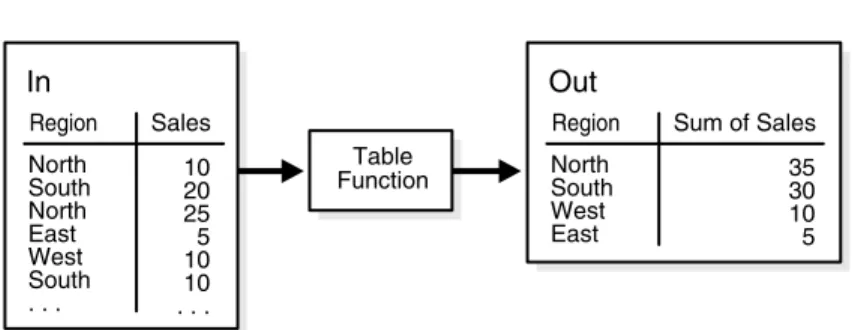
Transforming Data Using Table Functions
What is a Table Function?
FETCH cur INTO prod_id, prod_name, prod_desc, prod_subcategory, prod_subcategory_desc, prod_category, prod_category_desc,. PIPE ROW (product_t( prod_id, prod_name, prod_desc, prod_subcategory, prod_subcategory_desc, prod_category, prod_category_desc, prod_weight_class, prod_unit_of_measure, prod_pack_size, Supplier_id, prod_status, . prod_list_price, prod_min_ cena));.
Error Logging and Handling Mechanisms
Business Rule Violations
Data Rule Violations (Data Errors)
Handling Data Errors in PL/SQL
VÆRDIER (errm, crec.product_id, crec.customer_id, crec.sd, crec.promotion_id, crec.quantity, crec.amount);.
Handling Data Errors with an Error Logging Table
Loading and Transformation Scenarios
Key Lookup Scenario
CREATE TABLE temp_sales_step2 NOLOGGING PARALLEL AS SELECT sales_transaction_id, product.product_id sales_product_id, sales_customer_id, sales_time_id,. If the ETL process has guaranteed that each UPC code is valid, then this statement alone may be sufficient to apply the entire transformation.
Business Rule Violation Scenario
Some data warehouses may choose to insert null product ID values into their sales table, while others may not allow new data from the entire batch to be inserted into the sales table until all invalid UPC codes have been addressed. Regardless of the specific requirements, exception handling can be addressed with the same basic SQL techniques as transformations.
Data Error Scenarios
The contents in the error logging table are preserved for any DML operation, regardless of the success of the DML operation itself. The name of the error logging table, err$_sales_overall, is the default derived using the DBMS_ERRLOG package.
Pivoting Scenarios
The following example uses the multi-table insert syntax to insert some data from an input table with a different structure into the sh.sales demo table. VALUES (product_id, customer_id, weekly_start_date+6, sales_sat) SELECT product_id, customer_id, weekly_start_date, sales_sun, .
Using Partitioning to Improve Data Warehouse Refresh
The EXCHANGE operation preserves the indexes and constraints that were already present in the sales_01_2001 table. Until the data warehouse administrator exchanges the sales_01_2001 table for the sales table, end users cannot see the new data.
Refresh Scenarios
Maintaining the Data Warehouse 15-5 time is approximately the time to recreate the local bitmap index structures. In most cases this can be neglected because this part of the partitioned table should not be accessed too often.
Scenarios for Using Partitioning for Refreshing Data Warehouses
However, the CTAS approach minimizes the unavailability of index structures to almost zero, but there is a specific time window where the partitioned table does not contain all the data, because we dropped two partitions. Note that before adding single or multiple compressed partitions to a partitioned table for the first time, all local bitmap indexes must be removed or marked as unusable.
Refresh Scenario 1
Without existing global indexes, this time window is a matter of a fraction to a few seconds. After the first compressed partition is added, no further actions are necessary for all subsequent operations involving compressed partitions.
Refresh Scenario 2
Oracle supports composite range-list partitioning. The primary partitioning strategy of the sales table could be range partitioning based on time_id as shown in
Optimizing DML Operations During Refresh
Implementing an Efficient MERGE Operation
IN Products D2 -- Destination Table 2 ON (D2.PROD_ID = S.PROD_ID) -- Search/Join Condition WHEN NOT SET - insert if no join. USING Product_Changes S -- Source/Delta Table INTO Products P -- Destination Table 1 ON (P.PROD_ID = S.PROD_ID) -- Search/Close Condition WHEN THEN APPROPRIATE.
Maintaining Referential Integrity
Purging Data
Refreshing Materialized Views
If there is not enough temporary space available to rebuild the indexes, you must explicitly drop each index or mark it UNUSED before performing the update operation. If you expect to perform insert, update, or delete operations on tables referenced by a materialized view at the same time as the materialized view is updated, and the materialized view includes joins and aggregations, Oracle recommends that you use ON COMMIT fast update instead of ON DEMAND fast update.
Complete Refresh
In the case of full refresh, temporary sort space is needed to rebuild all indexes during refresh.
Fast Refresh
Partition Change Tracking (PCT) Refresh
Oracle can use TRUNCATE PARTITION on a materialized view if it meets the conditions in "Benefits of Partitioning a Materialized View" on page 9-6 and thus makes the PCT refresh process more efficient.
ON COMMIT Refresh
Manual Refresh Using the DBMS_MVIEW Package
Refresh Specific Materialized Views with REFRESH
If set to FALSE, the update of each specified materialized view is performed in a separate transaction. If the update method is not specified, the default update method as specified in the materialized view definition will be used.
Refresh All Materialized Views with REFRESH_ALL_MVIEWS
If set to FALSE then the default then update will stop when it encounters the first error and any remaining materialized views in the list will not be updated. If set to FALSE, Oracle can optimize the update by using parallel DML and truncate DDL on a materialized view.
Refresh Dependent Materialized Views with REFRESH_DEPENDENT
When a materialized view is refreshed in atomic mode, it is eligible for query rewrites if the rewrite integrity mode is set to stale_.
Using Job Queues for Refresh
The order in which materialized views are refreshed is determined by dependencies imposed by nested materialized views and capabilities for efficient refresh by rewriting queries compared to other materialized views (see "Schedule Refresh" on page 15-18 for more information ). If the process executing DBMS_MVIEW.REFRESH is interrupted or the instance is shut down, all refresh jobs that were running in job queue processes are suspended.
When Fast Refresh is Possible
Recommended Initialization Parameters for Parallelism
Monitoring a Refresh
Checking the Status of a Materialized View
SELECT MVIEW_NAME, STALENESS, LAST_REFRESH_TYPE, COMPILE_STATE FROM USER_MVIEWS ORDER BY MVIEW_NAME;. If the compile_state column shows NEEDS COMPILE, the other displayed column values cannot be trusted because they reflect the actual state.
Viewing Partition Freshness
VÆLG MVIEW_NAME, DETAILOBJ_NAME, DETAILOBJ_PCT, NUM_FRESH_PCT_PARTITIONS, NUM_STALE_PCT_PARTITIONS FRA USER_MVIEW_DETAIL_RELATIONS. VÆLG MVIEW_NAME, DETAILOBJ_NAME, DETAIL_PARTITION_NAME, DETAIL_SUBPARTITION_NAME, DETAIL_SUBPARTITION_POSITION, FRESHNESS.
Scheduling Refresh
Tips for Refreshing Materialized Views with Aggregates
Data Warehouse 15-19 storage occurs in all detail tables, then the materialized view log does not require the SEQUENCE clause. You can use fast refresh with conventional mixed DML (INSERT, UPDATE, and DELETE) on detail tables.
Tips for Refreshing Materialized Views Without Aggregates
For example, assume that the detail tables and materialized view are partitioned and have a parallel clause. That is, perform one type of change (direct-path INSERT or DML) and then refresh the materialized view.
Tips for Refreshing Nested Materialized Views
It is recommended that the same procedure be applied to this type of materialized view as for a single table aggregate. If REFRESH_DEPENDENT is applied to materialized view my_mv, only materialized views that directly depend on my_mv will be updated (that is, a materialized view that depends on a materialized view that depends on my_mv will not be updated) unless you specify nested => TRUE .
Tips for Fast Refresh with UNION ALL
If REFRESH is applied to a materialized view my_mv that is built on top of other materialized views, then my_mv will be refreshed relative to the current contents of the other materialized views (that is, the other materialized views will not become new first) unless you specify nested => TRUE. If REFRESH_ALL_MVIEWS is used, the order in which the materialized views will be refreshed is guaranteed to respect the dependencies between them.
Tips for Fast Refresh with Commit SCN-Based Materialized View Logs
GET_MV_DEPENDENCIES provides a list of the immediate (or direct) materialized rendering dependencies for an object. Existing materialized view logs cannot be modified to add COMMIT SCN unless they are deleted and recreated.
Tips After Refreshing Materialized Views
Using Materialized Views with Partitioned Tables
Fast Refresh with Partition Change Tracking
PCT Fast Refresh Scenario 1
VÆLG s.time_id, s.prod_id, SUM(s.quantity_sold), SUM(s.amount_sold), p.prod_name, t.calendar_month_name, COUNT(*),. VÆLG DBMS_MVIEW.PMARKER(s.rowid) s_marker, SUM(s.quantity_sold), SUM(s.amount_sold), p.prod_name, t.calendar_month_name, COUNT(*), COUNT(s.quantity_sold), COUNT(s.amount_sold) ).
PCT Fast Refresh Scenario 2
WHERE s.time_id = t.time_id AND s.prod_id = p.prod_id GROUP DOOR DBMS_MVIEW.PMARKER(s.rowid),.
PCT Fast Refresh Scenario 3
Fast Refresh with CONSIDER FRESH