Vol. 2 Issue 4 July 2013
497
ISSN: 2278-621X
Protection from Crawler using .htaccess
Technique
Sujata Yadav
Department of Computer Science and Engineering Gurgaon College of Engineering, Gurgaon, Haryana, India
Abstract- There are numerous website available, today , which are varied according to the information containing on the website, all the information are the copyrighted and important data of any corporate or individual, It is always a biggest fear to the owner that the website may be hacked, or there is chances that the data lose, or effecting the search engine position , that may lead to lose a mass of customers. The Hacker can take control of the website, see all data, the search engine position, and to the customers.
So it is carefully needed to having control on the website, by regularly checking and updating the script used in the website by using sophisticated passwords. It is also has be to taken care that the PC being used to transfer the files over FTP to the Website is virus free, it is also recommended to used up to date antivirus.
It is very important to take security measure to avoid hacking. Keywords – Hacking, Copyrighted, FTP, Antivirus
I. INTRODUCTION
A. Web Crawlers
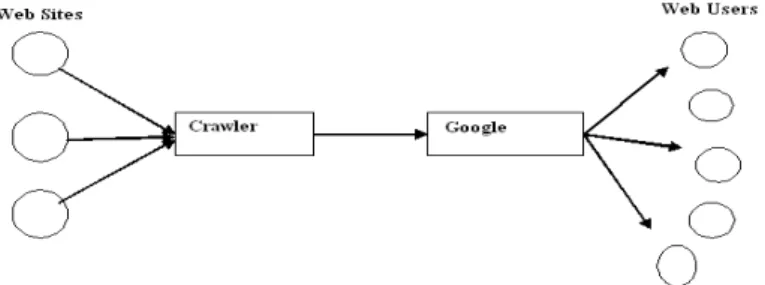
Web crawlers are programs that automatically find the website status, links, and also download pages from the website. It is an essential and important part of modern era. This is the result of many reasons, Like The Important of web for publishing and getting information, The uses of search engine like Google, Yahoo, Bing etc. to find any information available on the website. The search engine are depends on web crawler for majority of their data, as shown in Figure 1
who argues that they alone, and not the rest of the web, form a genuinely new mass media.
Figure 1. Google-centered information flows: the role of web crawlers.
Web users do not normally notice crawlers and other programs that automatically download information over the Internet. Yet, in addition to the owners of commercial search engines, they are increasingly used by a widening section of society including casual web users, the creators of email spam lists and others looking for information of commercial value. In addition, many new types of information science research rely upon web crawlers or automatically downloading pages. Web crawlers are potentially very powerful tools, with the ability to cause network problems and incur financial penalties to the owners of the web sites crawled. There is, therefore, a need for ethical guidelines for web crawler use. Moreover, it seems natural to consider together ethics for all types of crawler use, and not just information science research applications such as those referenced above.
Vol. 2 Issue 4 July 2013
498
ISSN: 2278-621X
browsers that are specifically designed for general users to crawl individual sites, A key new problem, then, is the lack of network knowledge by crawler owners. This is compounded by the complexity of the Internet, having broken out of its academic roots, and the difficulty to obtain relevant cost information (see below). In this paper, we review new and established moral issues in order to provide a new set of guidelines for web crawler owners. This is preceded by a wider discussion of ethics, including both computer and research ethics, in order to provide theoretical guidance and examples of more established related issues.
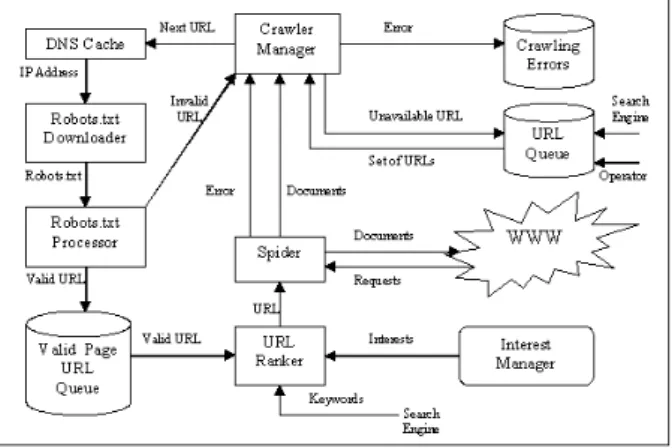
B. How WebCrawler works
A Web crawler starts with a list of URLs to visit, called the seeds. As the crawler visits these URLs, it identifies all the hyperlinks in the page and adds them to the list of URLs to visit, called the crawl frontier. URLs from the frontier are recursively visited according to a set of policies.
The large volume implies that the crawler can only download a limited number of the Web pages within a given time, so it needs to prioritize its downloads. The high rate of change implies that the pages might have already been updated or even deleted.
The number of possible crawlable URLs being generated by server-side software has also made it difficult for web crawlers to avoid retrieving duplicate content. Endless combinations of HTTP GET (URL-based) parameters exist, of which only a small selection will actually return unique content. For example, a simple online photo gallery may offer three options to users, as specified through HTTP GET parameters in the URL. If there exist four ways to sort images, three choices of thumbnail size, two file formats, and an option to disable user-provided content, then the same set of content can be accessed with 48 different URLs, all of which may be linked on the site. This mathematical combination creates a problem for crawlers, as they must sort through endless combinations of relatively minor scripted changes in order to retrieve unique content.
As Edwards et al. noted, "Given that the bandwidth for conducting crawls is neither infinite nor free, it is becoming essential to crawl the Web in not only a scalable, but efficient way, if some reasonable measure of quality or freshness is to be maintained." A crawler must carefully choose at each step which pages to visit next. The behavior of a Web crawler is the outcome of a combination of policies:
· a selection policy that states which pages to download,
· a re-visit policy that states when to check for changes to the pages,
· a politeness policy that states how to avoid overloading Web sites, and
· a parallelization policy that states how to coordinate distributed web crawlers.
Figure 2. Web Crawler Layout
1) Is crawler a threat?
• What do web crawlers/spiders do?
Browse the web in an automatic and systematic fashion
2) Various types:
• web indexers for search engines,
• link checkers for site veri_cation,
• but also scrapers to harvest the content of sites
• When does crawling become an abuse?
• Unauthorized large-scale crawls over web sites or social networks
Vol. 2 Issue 4 July 2013
499
ISSN: 2278-621X
• Use the collected data for social engineering or targeted attacksC. Crawler Protection Model
How crawlers are currently detected?
ü Learning techniques to extract crawlers' properties
ü HTTP header artifacts:
ü Betraying user-agent, missing referrer, ignored cookies
ü Stealthier crawlers already handle these shortcomings
ü Simple trac statistics:
ü Large request volume, short inter-arrival time, night trac
ü Large number of users behind a proxy show similar statistics
ü These statistics become inadequate with
\
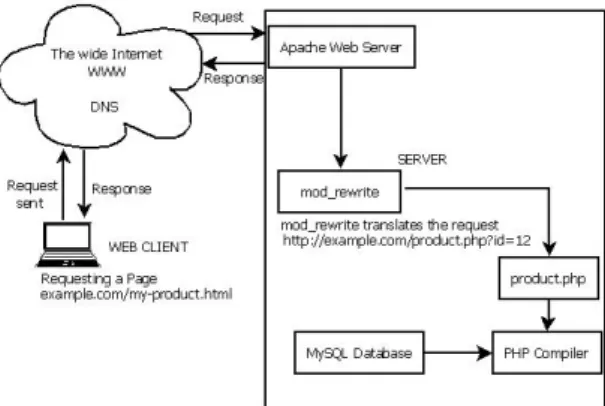
Figure 3. .htaccess Redirection
distributed crawling
ü Need robust properties to distinguish:
ü large proxies hosting a large number of users
ü stealthy crawlers mimicking browsers
ü distributed crawlers over multiple sources
II. IMPLEMENTATION DETAILS
A. What is .htaccess?
.htaccess is a configuration file for use on web servers running the Apache Web Server software. When a .htaccess file is placed in a directory which is in turn 'loaded via the Apache Web Server', then the .htaccess file is detected and executed by the Apache Web Server software. These .htaccess files can be used to alter the configuration of the Apache Web Server software to enable/disable additional functionality and features that the Apache Web Server software has to offer. These facilities include basic redirect functionality, for instance if a 404 file not found error occurs, or for more advanced functions such as content password protection or image hot link prevention.
B. How to use .htaccess
'.htaccess' is the filename in full, it is not a file extension. For instance, you would not create a file called, 'file.htaccess', it is simply called, '.htaccess'. This file will take effect when placed in any directory which is then in turn loaded via the Apache Web Server software. The file will take effect over the entire directory it is placed in and all files and subdirectories within the specified directory.
Vol. 2 Issue 4 July 2013
500
ISSN: 2278-621X
Here is an example of what you might include in a .htaccess file.
AuthName "Member's Area Name"
AuthUserFile /path/to/password/file/.htpasswd AuthType Basic
require valid-user
ErrorDocument 401 /error_pages/401.html AddHandler server-parsed .html
This is a fairly advanced example: it enables password protection on the directory; it offers redirection to a custom error page if a user fails to login correctly; and it enables SSI (server side includes) for use with '.html' files. Once you have created a .htaccess file, which may look similar to the one shown above (or may simply contain one line), you need to upload it. This should be done using a FTP (file transfer protocol) program. You should already have one which you will have used to upload your web site content. If not, many are available free of charge from web sites such as 'Download.com' and we can recommend 'CuteFTP' and 'WSFTP'.
When uploading your .htaccess files, it is very important you upload the file in 'ASCII' mode. 'ASCII' and 'BINARY' are different methods of transferring data and it is important .htaccess files are transferred in 'ASCII' mode and not 'BINARY'. It is likely your FTP software will default to 'BINARY' so look for a 'Transfer Mode' or 'Transfer Type' option in the menus.
Upload the .htaccess file to the directory you would like it to take effect over. Now visit this directory using your web browser as you would for any other document on your web site and check it has worked correctly. Note, when you upload your .htaccess file it may not appear in the directory listings for files on your web site. Do not worry; this means your server or FTP software is hiding them which should not be an issue.
A possible cause of error is if the file permissions on the .htaccess file are not set correctly. This only occurs on certain servers, but you may like to change the permissions on the file to '755' or 'executable'. You can do this with your FTP software, look for a 'File Permissions' or 'CHMOD' option, and input '0755'.
If your .htaccess file does not work, you should contact your system administrator or web hosting company and ensure they have enabled .htaccess within your account. Some web hosting companies do not allow use without permission.
C. Error documents
Creating custom error pages is very useful, it allows you to show web site visitors a friendly error message, for instance if a URL on your web site does not work. This avoids the unfriendly '404 File Not Found' error and allows you to display a friendly error, explaining possible solutions and guiding the visitor back into your web site content, rather than leaving them frustrated and lost.
To set-up custom error documents, create a .htaccess file following the main instructions and guidance which includes the following text:
ErrorDocument 404 /error_pages/404.html
The above line tells the Apache Web Server to display the document located at /error_pages/404.html (under your domain name/web site address) whenever a 404 (file not found) error occurs.
In this example, we have assumed you have created the error document and called it '404.html' and that you have placed it in a directory called 'error_pages' under your domain name. For example,
http://www.yourdomain.com/error_pages/404.html
The document 404.html is a normal HTML document like the others in your web site and can display whatever content you wish, however we recommend including a 'File Not Found' message.
Vol. 2 Issue 4 July 2013
501
ISSN: 2278-621X
ErrorDocument 401 /error_pages/401.html
ErrorDocument 404 /error_pages/404.html
ErrorDocument 500 /error_pages/500.html
It's all very well displaying a friendly error message, but more importantly you need to resolve the error. By using a CGI script instead of a static HTML document as the error document allows us to record errors in a database, and resolve them.
This can be achieved very easily thanks to a variety of pre-made solutions which can even show us which errors are received most frequently. Such products can be found on The CGI Resource Index and
D. Redirects
Redirects enable us to direct web site visitors from one document within your web site to another. This is useful for example, if you have moved your web site content and would like to redirect visitors from old links to the new content location.
To set-up redirects, create a .htaccess file following the main instructions and guidance which includes the following text:
Redirect /old_dir/ http://www.yourdomain.com/new_dir/index.html
The above line tells the Apache Web Server that if a visitor requests a documents located in the directory 'old_dir', then to display the document 'index.html' located in the directory 'new_dir'.
You see in this example, the 'old_dir' is the location of the document to be requested by the visitor, and is a document or directory located under your main domain. In this example, the directory 'old_dir' would be located at 'http://www.yourdomain.com/old_dir/'. However, you will also notice the location of the file that the visitor is to be redirected to is a full web site URL, not what is referred to as a relative URL in the case of 'old_dir'. This means we can redirect visitors to the 'old_dir' folder to any web site document, it doesn't have to be held within your web site content and could be any web site.
It is very important (and the most common cause of error) that you understand the difference between a relative URL and an absolute/full URL. A relative URL is the location of the document within the web site, and does not include the actual domain name of the web site. These are used for documents held within the web site to simplify and shorten the URL. A absolute or full URL is one which includes the full domain name.
For example, for a absolute/full URL, 'http://www.yourdomain.com/directory/file.html'. the relative URL for this document would be, '/directory/file.html'.
E. Password protection
The password protection and authentication systems offered by the Apache Web Server are probably the most important use of .htaccess files. Very easily, we can password protect a directory (or multiple) of a web site which require a username and password to access. The login procedure for these secure directories is handled automatically by the web browser using a pop-up login interface (you've probably seen these before). Passwords are also encrypted using one of the best encryption methods available which ensures login credentials are kept secure. In this section we will discuss the details of the .htaccess authentication system, we will explain how to set-up password protection, and a variety of helpful related information, we will also explain a variety of pre-made software which can be used to accomplish these tasks.
Vol. 2 Issue 4 July 2013
502
ISSN: 2278-621X
AuthName "Member's Area Name"AuthUserFile /path/to/password/file/.htpasswd AuthType Basic
require valid-user
The first line tells the Apache Web Server the secure directory is called 'Member's Area Name', this will be displayed when the pop-up login prompt appears. The second line specifies the location of the password file. The third line specifies the authentication type, in this example we are using 'Basic' because we are using basic HTTP authentication and finally the fourth line specifies that we require valid login credentials, this line can also be used to specify a specific username, e.g. 'require user username' would require the username 'username'. You would use this if you were password protecting an administration area, rather than setting up a public password protected directory.
The location of the password file can be anywhere on your web server, the '/location/of/password/file/' must be replaced with the full/absolute path to the directory containing the password file, and the '.htpasswd' file must exist, this can however be called anything. We use the filename '.htpasswd' because the server will recognise the filename and will hide it from visitors. Note, some servers do require the password file be located in the same directory as the .htaccess file. It is also important to use a full/absolute server path for the location of the password file, a relative path, or any variation of a URL will not work.
The password file would contain something similar to the following text:
username:encryptedpassword fred_smith:oCF9Pam/MXJg2
Setting up a password protected directory allows you to offer a member's area, offering a member's area on your web site is also a great way of tracking your web site visitors and a brilliant way of building a community feel on the web site. By asking visitors to register to access the content you are able to collect whatever information about the visitors that you require, whether it be the visitors country of residence, sex or professional status. Such a system can be setup very easily these days thanks to the vast array of pre-made solutions available on the Internet, most of which are as easy to setup as the initial web site content. ionix offers two other solutions to this scenario which have proven very popular, one is called 'Locked Area' which has been available on the Internet for over eight years and is now in use on over fifty thousand web sites. This a very simple but effective member's area management system which is available completely free of charge, it can be used to set-up a secure member's area to store your content, it includes a registration system for your web site visitors to register for member's area access, and it includes a fantastic administration panel to help you manage accounts and email your members.
A variety of other solutions are available to accomplish this task, our advice would be to use a piece of software written in preferably Perl, or alternatively PHP. In our experience we would not recommend the use of software written in ASP or ColdFusion particularly when looking for security related software. We have listed a number of web sites which you will find useful when looking for similar solutions, namely Hot Scripts, CGI Resources and The CGI-Index.com.
Note, it is not possible to offer a log-out facility, the login details are cached in the web browser until the browser is closed, so visitors may leave the web site and return later in the session without being prompted to login again. When the browser is closed and re-opened the login details are deleted from the cache and the pop-up prompt will be displayed. The log-out facility has been discussed for some time, various methods have been suggested but none are reliable enough to be worth discussing.
F. Deny visitors by IP address
The visitor blocking facilities offered by the Apache Web Server enable us to deny access to specific visitors, or allow access to specific visitors. This is extremely useful for blocking unwanted visitors, or to only allow the web site owner access to certain sections of the web site, such as an administration area.
Vol. 2 Issue 4 July 2013
503
ISSN: 2278-621X
order allow,denydeny from 255.0.0.0 deny from 123.45.6. allow from all
The above lines tell the Apache Web Server to block visitors from the IP address '255.0.0.0' and '123.45.6.', note the second IP address is missing the fourth set of digits, this means any IP address which matches the firth three set of digits will be blocked, e.g. '123.45.6.10' and '123.45.6.255' would be blocked.
To set-up blocking of all visitors except yourself, create a .htaccess file following the main instructions and guidance which includes the following text:
order allow,deny allow from 255.0.0.0 deny from all
The above lines tell the Apache Web Server to block all visitors except those with the IP address '255.0.0.0', which you should replace with your own IP address.
You may add any number of 'deny from' and 'allow from' records after the 'order allow,deny'. Note the change from 'allow from all' to 'deny from all' on the bottom line, this is important and must be changed depending on your requirements. If you want to allow your visitor access, you would use 'allow from all' and place 'deny from' lines above.
Blocked visitors will be shown a '403 Forbidden' error message. You can customise this error message by following the 'Error Documents' section of this article.
G. Deny visitors by referrer
The visitor blocking facilities offered by the Apache Web Server enable us to deny access to specific visitors based on where they have come from. If you've ever looked at your logs and noticed a surprising increase in traffic, yet no increases in actual file requests it's probably someone pinching content (such as CSS files) or someone attempting to hack your web site (this may simply mean trying to find non public content).
Note, this functionality requires that 'mod_rewrite' is enabled on your server. Due to the demands that can be placed on system resources, it is unlikely it is enabled so be sure to check with your system administrator or web hosting company.
To set-up block a single referrer, create a .htaccess file following the main instructions and guidance which includes the following text:
RewriteEngine on
# Options +FollowSymlinks
RewriteCond %{HTTP_REFERER} otherdomain\.com [NC] RewriteRule .* - [F]
The above lines tell the Apache Web Server to block traffic from the URL 'otherdomain.com'. The '[NC]' text after the referrer specifies it as not case-sensitive. Which prevents traffic from 'OtherDomain.com', 'otherdomain.com', 'OTHERDOMAIN.COM' and so on.
Vol. 2 Issue 4 July 2013
504
ISSN: 2278-621X
RewriteEngine on# Options +FollowSymlinks
RewriteCond %{HTTP_REFERER} otherdomain\.com [NC,OR] RewriteCond %{HTTP_REFERER} anotherdomain\.com RewriteRule .* - [F]
The above lines tell the Apache Web Server to block traffic from the URL 'otherdomain.com' and 'anotherdomain.com'. Note the backslash before the dot, this is important, e.g. 'domain\.com'. The only difference between blocking a single referrer and multiple referrers is the modified [NC, OR] flag in the multiple referrers example, this should be added to every domain except the last.
You might have noticed the line "Options +FollowSymlinks" above, which is commented with a '#'. Uncomment this line if your server returns a '500 Internal Server' error. This means your server isn't configured with FollowSymLinks in the '' section of the 'httpd.conf'.
III. CONCLUSION
As Day by day technologies and researches are increasing. We must had to robust the techniques for protection from the unwanted crawler to get the important data from the website.
• To help other crawler designers, because most of the problems we found are related to the characteristics of the Web, independent of the Web crawler architecture chosen.
• To encourage Web application developers to check their software and configurations for compliance to standards, as this can improve their visibility on search engine’s results and attract more traffic to their Web sites.
· Every single day, there are countless bots, spiders and crawlers perusing the internet on behalf of major search engines that are collecting information about each site and page they come across. Web site – especially if it has many backlinks – may be indexed several times per day by bots that are looking for any changes that have been made to the website. If you want to take advantage of these bots and their constant patrolling, you will want to make sure that your site is optimized for their presence. These tips will provide you with ways to augment your site’s indexing potential and allow you to get properly indexed.
REFERENCES
[1] ACM (1992). “ACM code of ethics and professional conduct”.
[2] Ess, C., & Committee, A. E. W. (2002). “Ethical decision-making and Internet research”. [3] Koster, M. (1993). “Guidelines for robot writers”.
[4] Wronkiewicz, K. (1997).” Spam like fax. Internet World, 8(2), 10”.
[5] Wouters, P., & de Vries, R. (2004). ‘Formally citing the web“. Journal of the American Society for Information Science and Technology, 55(14), 1250-1260.
[6] Vaughan, L. & Thelwall, M. (2004). “Search engine coverage bias: evidence and possible causes”. Information Processing & Management, 40(4), 693-707.
[7] Sullivan, D. (2004). “Search engines and legal issues”. SearchEngineWatch. [8] Stitt, R. (2004). “Curbing the Spam problem”. IEEE Computer, 37(12), 8.
[9] Jones, R. A. (1994). “The ethics of research in cyberspace”. Internet Research: Electronic Networking Applications and Policy, 4(3), 30-35.