“main” 2005/1/11 page i ✐
✐ ✐
BETA Version, January 10th,
2005:
Introduction to Computing and
Programming in Java:
A Multimedia Approach
Mark Guzdial and Barbara Ericson
College of Computing/GVU
Georgia Institute of Technology
“main” 2005/1/11 page ii ✐
✐ ✐
ii
“main” 2005/1/11 page iii ✐
✐ ✐
iii
“main” 2005/1/11 page iv ✐
✐ ✐
Contents
Contents iv
Preface 1
I
Introduction
7
1 Introduction to Computer Science and Media Computation 8
1.1 What is Computer Science About? . . . 8
1.2 What Computers Understand . . . 13
1.3 Media Computation: Why Digitize Media? . . . 15
1.4 Computer Science for Everyone . . . 16
1.4.1 It’s About Communication . . . 17
1.4.2 It’s About Process . . . 17
2 Introduction to Java 19 2.1 Java . . . 19
2.1.1 History of Java . . . 19
2.1.2 Introduction to Objects and Classes . . . 20
2.2 Introduction to DrJava . . . 21
2.2.1 Starting DrJava . . . 21
2.3 Java Basics . . . 24
2.3.1 Math Operators . . . 24
2.3.2 Printing the Result of a Statement . . . 24
2.3.3 Types in Math Expressions . . . 27
2.3.4 Casting . . . 27
2.3.5 Relational Operators . . . 27
2.3.6 Strings . . . 29
2.4 Variables . . . 31
2.4.1 Declaring Variables . . . 31
2.4.2 Using Variables in Calculations . . . 31
2.4.3 Memory Maps of Variables . . . 32
2.4.4 Object Variables . . . 34
2.4.5 Reusing Variables . . . 36
2.4.6 Multiple References to an Object . . . 37
2.5 Concepts Summary . . . 39
2.5.1 Statements . . . 39
2.5.2 Relational Operators . . . 40
2.5.3 Types . . . 40
2.5.4 Casting . . . 40
“main” 2005/1/11 page v ✐
✐ ✐
v
3 Introduction to Programming 43
3.1 Programming is About Naming . . . 43
3.2 Files and their Names . . . 45
3.3 Class and Object Methods . . . 46
3.3.1 Invoking Class Methods . . . 46
3.3.2 Invoking Object Methods . . . 47
3.4 Working with Turtles . . . 48
3.4.1 Defining Classes . . . 48
3.4.2 Creating Objects . . . 48
3.4.3 Sending Messages to Objects . . . 51
3.4.4 Objects Control Their State . . . 52
3.4.5 Additional Turtle Capabilities . . . 53
3.5 Creating Methods . . . 56
3.5.1 Methods that Take Input . . . 61
3.6 Working with Media . . . 64
3.6.1 Creating a Picture Object . . . 64
3.6.2 Showing a Picture . . . 66
3.6.3 Variable Substitution . . . 68
3.6.4 Object references . . . 70
3.6.5 Playing a Sound . . . 71
3.6.6 Naming your Media (and other Values) . . . 72
3.6.7 Naming the Result of a Method . . . 72
3.7 Concepts Summary . . . 74
3.7.1 Invoking Object Methods . . . 74
3.7.2 Invoking Class Methods . . . 74
3.7.3 Creating Objects . . . 74
3.7.4 Creating new Methods . . . 75
II
Pictures
79
4 Modifying Pictures using Loops 80 4.1 How Pictures are Encoded . . . 804.1.1 Color Respresentations . . . 84
4.2 Manipulating Pictures . . . 88
4.2.1 Exploring Pictures . . . 94
4.3 Changing color values . . . 95
4.3.1 Using While Loops in Pictures . . . 96
4.3.2 Increasing/Decreasing Red (Green, Blue) . . . 100
4.3.3 Creating a Sunset . . . 113
4.3.4 Making Sense of Methods . . . 115
4.3.5 Variable Name Scope . . . 118
4.3.6 Using a For Loop . . . 122
4.3.7 Lightening and Darkening . . . 124
4.3.8 Creating a Negative . . . 125
4.3.9 Converting to Grayscale . . . 127
“main” 2005/1/11 page vi ✐
✐ ✐
vi
4.4.1 Arrays . . . 129
4.4.2 Loops . . . 130
4.4.3 Comments . . . 131
5 Modifying Pixels in a Matrix 136 5.1 Copying Pixels . . . 136
5.1.1 Looping Across the Pixels with a Nested Loop . . . 137
5.1.2 Mirroring a Picture . . . 139
5.2 Copying and Transforming Pictures . . . 147
5.2.1 Copying . . . 148
5.2.2 Creating a Collage . . . 154
5.2.3 Blending Pictures . . . 159
5.2.4 Rotation . . . 162
5.2.5 Scaling . . . 166
5.3 Concepts Summary . . . 171
5.3.1 Two-dimensional Arrays . . . 171
5.3.2 Nested Loops . . . 172
5.3.3 Returning a Value from a Method . . . 173
5.3.4 Method Overloading . . . 174
5.4 Color Figures . . . 176
6 Conditionally Modifying Pixels 185 6.1 Conditional Pixel Changes . . . 186
6.1.1 Comparing Colors . . . 187
6.1.2 Replacing Colors . . . 187
6.1.3 Reducing Red-Eye . . . 192
6.2 Simple Edge Detection: conditionals with two options . . . 194
6.2.1 Negation . . . 194
6.2.2 Testing for Both Conditions . . . 195
6.2.3 Conditionals with Two Options . . . 195
6.2.4 Simple Edge Detection . . . 196
6.3 Sepia-Toned and Posterized Pictures: Using multiple conditionals to choose the color . . . 198
6.4 Highlighting Extremes . . . 206
6.5 Combining Pixels: Blurring . . . 207
6.6 Background Subtraction . . . 210
6.7 Chromakey . . . 214
6.8 Concepts Summary . . . 218
6.8.1 Boolean Expressions . . . 218
6.8.2 Combining Boolean Expressions . . . 219
6.8.3 Conditional Execution . . . 220
7 Drawing 224 7.1 Drawing on Images Using the Graphics Class . . . 224
7.1.1 Drawing withGraphicsmethods . . . 227
7.1.2 Vector and bitmap representations . . . 233
“main” 2005/1/11 page vii ✐
✐ ✐
vii
7.2 Programs as Specifying Drawing Process . . . 239
7.2.1 Why do we write programs? . . . 242
7.3 Using Graphics2D for Advanced Drawing . . . 242
7.3.1 Setting the Brush Width . . . 243
7.3.2 Copying Pictures by Drawing Images . . . 244
7.3.3 General Scaling . . . 248
7.3.4 Shearing . . . 249
7.3.5 Drawing with a GradientPaint . . . 251
7.3.6 Interfaces . . . 251
7.3.7 Blending Pictures Using AlphaComposite . . . 253
7.3.8 Clipping . . . 255
7.4 Concept Summary . . . 257
7.4.1 Packages . . . 257
7.4.2 Predefined Java Classes . . . 258
7.4.3 Inheritance . . . 258
7.4.4 Interfaces . . . 259
III
Sounds
263
8 Modifying all Samples in a Sound 264 8.1 How Sound is Encoded . . . 2648.1.1 The Physics of Sound . . . 265
8.1.2 Exploring Sounds . . . 268
8.1.3 Encoding Sounds . . . 270
8.2 Manipulating Sounds . . . 274
8.2.1 Opening Sounds and Manipulating Samples . . . 275
8.2.2 Using MediaTools for Looking at Sounds . . . 279
8.2.3 Introducing Loops . . . 280
8.3 Changing the Volume of Sounds . . . 284
8.3.1 Increasing Volume . . . 284
8.3.2 Did that Really Work? . . . 286
8.3.3 Decreasing Volume . . . 290
8.3.4 Using a For Loop . . . 292
8.3.5 Making Sense of Methods . . . 293
8.4 Normalizing Sounds . . . 294
8.4.1 Generating Clipping . . . 296
8.5 Concepts Summary . . . 298
8.5.1 Arrays . . . 298
8.5.2 Loops . . . 298
8.5.3 Conditional Execution . . . 300
9 Modifying Samples using Ranges 304 9.1 Manipulating Different Sections of the Sound Differently . . . 304
9.2 Create a Sound Clip . . . 306
9.3 Splicing Sounds . . . 308
“main” 2005/1/11 page viii ✐
✐ ✐
viii
9.5 Mirroring a Sound . . . 317
9.6 Concepts Summary . . . 318
9.6.1 Ranges in Loops . . . 318
9.6.2 Returning a Value from a Method . . . 318
10 Combining and Creating Sounds 321 10.1 Composing Sounds Through Addition . . . 321
10.2 Blending Sounds . . . 323
10.3 Creating an Echo . . . 324
10.3.1 Creating Multiple Echoes . . . 327
10.4 How Sampling Keyboards Work . . . 328
10.4.1 Sampling as an Algorithm . . . 334
10.5 Additive Synthesis . . . 334
10.5.1 Making Sine Waves . . . 334
10.5.2 Creating Sounds Using Static Methods . . . 335
10.5.3 Adding Sine Waves Together . . . 337
10.5.4 Checking our Result . . . 338
10.5.5 Square Waves . . . 339
10.5.6 Triangle Waves . . . 342
10.6 Modern Music Synthesis . . . 343
10.6.1 MP3 . . . 343
10.6.2 MIDI . . . 344
10.6.3 Private Methods . . . 346
10.7 Concepts Summary . . . 352
10.7.1 Class Methods . . . 352
10.7.2 Private Methods . . . 353
“main” 2005/1/11 page ix ✐
✐ ✐
List of Figures
1.1 A cooking recipe–you can always double the ingredients, but throw-ing in an extra cup of flour won’t cut it, and don’t try to brown the
chickenafter adding the tomato sauce! . . . 11
1.2 Comparing programming languages: A common simple program-ming task is to print the words “Hello, World!” to the screen. . . 12
1.3 Eight wires with a pattern of voltages is a byte, which gets inter-preted as a pattern of eight 0’s and 1’s, which gets interinter-preted as a decimal number. . . 13
2.1 DrJava Preferences Window . . . 22
2.2 DrJava Splash Screen . . . 22
2.3 DrJava (with annotations) . . . 23
2.4 A calculator with a number in memory . . . 31
2.5 Declaring primitive variables and memory assignment . . . 33
2.6 Showing the parent and child relationship between mammal and dog (left) andObjectandString(right) . . . 34
2.7 Declaring object variables and memory assignment . . . 35
2.8 Shows creation and reuse of an object variable. . . 37
2.9 An object with multiple references to it . . . 38
2.10 An object with no references to it . . . 38
3.1 A window that shows aWorldobject. . . 49
3.2 A window that shows aTurtleobject in aWorld object. . . 50
3.3 A window that shows twoTurtleobjects in aWorldobject. . . 51
3.4 The result of messages to the firstTurtleobject. . . 52
3.5 The result of messages to the secondTurtleobject. . . 53
3.6 The turtle won’t leave the world . . . 54
3.7 Drawing two squares with a turtle. . . 55
3.8 Defining and executingdrawSquare() . . . 59
3.9 Diagram of an object . . . 60
3.10 Showing the result of sending the width as a parameter todrawSquare 63 3.11 Creating a Pictureobject usingnew Picture() . . . 64
3.12 The File Chooser . . . 65
3.13 File chooser with media types identified . . . 67
3.14 Picking, making, and showing a picture, using the result of each method in the next method. The picture used is matt-spaceman.jpg. 68 3.15 Picking, making, and showing a picture, when naming the pieces. The picture shown is katie.jpg. . . 71
4.1 A depiction of the first five elements in an array . . . 81
4.2 An example matrix (two-dimensional array) of numbers . . . 82
“main” 2005/1/11 page x ✐
✐ ✐
x LIST OF FIGURES
4.5 Image shown in the picture explorer: 100% image on left and 500%
on right (close-up of the branch over the mountain) . . . 84
4.6 Merging red, green, and blue to make new colors . . . 85
4.7 Picking colors using the HSB color model . . . 85
4.8 The ends of this figure are the same colors of gray, but the middle two quarters contrast sharply so the left looks darker than the right 86 4.9 The Macintosh OS X RGB color picker . . . 87
4.10 Picking a color using RGB sliders from Java . . . 87
4.11 RGB triplets in a matrix representation . . . 88
4.12 Directly modifying the pixel colors via commands: Note the small black line on the left under the line across the leaf . . . 94
4.13 Exploring the caterpillar with the line . . . 94
4.14 Using the MediaTools image exploration tools . . . 95
4.15 Flowchart of a while loop . . . 98
4.16 The original picture (left) and red-decreased version (right) . . . 103
4.17 Using the picture explorer to convince ourselves that the red was decreased . . . 110
4.18 Overly blue (left) and red increased by 30% (right) . . . 112
4.19 Original (left) and blue erased (right) . . . 114
4.20 Original beach scene (left) and at (fake) sunset (right) . . . 115
4.21 Flowchart of a for loop . . . 123
4.22 Original picture, lightened picture, and darkened picture . . . 126
4.23 Negative of the image . . . 127
4.24 Color picture converted to grayscale . . . 128
5.1 Once we pick a mirror point, we can just walk xhalfway and sub-tract/add to the mirror point . . . 140
5.2 Original picture (left) and mirrored along the vertical axis (right) . . 141
5.3 A motorcycle mirrored horizontally, top to bottom (left) and bottom to top (right) . . . 143
5.4 Temple of Hephaistos from the ancient agora in Athens, Greece . . . 143
5.5 Coordinates where we need to do the mirroring . . . 144
5.6 The manipulated temple . . . 145
5.7 Copying a picture to a canvas . . . 149
5.8 Copying a picture midway into a canvas . . . 150
5.9 Copying part of a picture onto a canvas . . . 152
5.10 Flowers in the mediasourcesfolder . . . 154
5.11 Collage of flowers . . . 157
5.12 Blending the picture of Katie and Jenny . . . 162
5.13 Rotating some numbers in a table to the left 90 degrees . . . 163
5.14 Copying a picture to a blank page rotated to the left 90 degrees . . . 164
5.15 Scaling the picture down . . . 167
5.16 Scaling up a picture . . . 169
5.17 Merging red, green, and blue to make new colors . . . 176
5.18 Color: RGB triplets in a matrix representation . . . 176
5.19 Color: The original picture (left) and red-decreased version (right) . 177 5.20 Color: Overly blue (left) and red increased by 30% (right) . . . 177
“main” 2005/1/11 page xi ✐
✐ ✐
LIST OF FIGURES xi
5.22 Original beach scene (left) and at (fake) sunset (right) . . . 178
5.23 Color: Lightening and darkening the original picture . . . 178
5.24 Color: Negative of the image . . . 178
5.25 Color: Color picture converted to grayscale . . . 179
5.26 Color: Increasing reds in the browns . . . 179
5.27 Color: Increasing reds in the browns, within a certain range . . . 180
5.28 Finding the range where Jenny’s eyes are red, then changing them to black . . . 180
5.29 Frames from the slow sunset movie . . . 181
5.30 Frames from the slow fade-out movie . . . 181
5.31 Frames from the Mommy watching Katie movie . . . 182
5.32 Frames from the original too dark movie . . . 182
5.33 Frames from the modified lighter movie . . . 183
5.34 Frames from the original movie with kids crawling in front of a blue screen . . . 183
5.35 Frames from the kids on the moon movie . . . 184
6.1 Flowchart of an if statement . . . 186
6.2 Increasing reds in the browns . . . 188
6.3 On left the couch color changes, on right the couch color doesn’t change190 6.4 Finding the range of where Jenny’s eyes are red . . . 193
6.5 After fixing red-eye. . . 194
6.6 Flowchart of an if with an else . . . 195
6.7 Original picture and after edge detection . . . 198
6.8 Flowchart of an if, else if, and an else . . . 199
6.9 Original scene (left) and using our sepia-tone program . . . 200
6.10 Reducing the colors (right) from the original (left) . . . 202
6.11 Pictures posterized to two levels (left) and four levels (right) . . . . 205
6.12 Original picture (left) and light or dark areas highlighted (right)) . . 207
6.13 Making the flower bigger, then blurring to reduce pixellation . . . . 210
6.14 A picture of a child (Katie), and her background without her . . . . 210
6.15 A new background, the moon . . . 211
6.16 Katie on the moon . . . 212
6.17 Two people in front of a wall, and a picture of the wall . . . 214
6.18 Swapping a beach for the wall, using background subtraction, with a threshold of 50 . . . 215
6.19 Mark in front of a blue sheet . . . 215
6.20 Mark on the moon . . . 217
6.21 Mark on the beach . . . 218
6.22 Student in front of a red background, and with flash on . . . 219
6.23 Using chromakey program with a red background . . . 219
7.1 Adding a grid of lines to a picture (barbara.jpg) . . . 226
7.2 Viewing the Java API for java.awt.Graphics . . . 229
7.3 A box washed up on the shore of the beach . . . 229
7.4 An example drawn picture . . . 232
7.5 A drawn face (left) and the face with enclosing rectangles (right) . . 233
7.6 Shows font information including the baseline . . . 235
“main” 2005/1/11 page xii ✐
✐ ✐
xii LIST OF FIGURES
7.8 Drawing a string centered on a picture . . . 238
7.9 A programmed gray scale effect . . . 239
7.10 Nested colored rectangles . . . 241
7.11 Nested outlined rectangles . . . 242
7.12 Drawing a red X on a picture . . . 245
7.13 Drawing a turtle on a beach . . . 246
7.14 Documentation for Graphics2D . . . 247
7.15 Original picture and picture scaled up 2 times in x and down by half in y . . . 249
7.16 Picture sheared by 1.0 in x . . . 251
7.17 A beach with a sun that is filled with a gradient from yellow to red . 253 7.18 Two pictures with a horizontal overlap . . . 256
7.19 Clip picture using an ellipse . . . 257
8.1 Raindrops causing ripples in the surface of the water, just as sound causes ripples in the air . . . 265
8.2 One cycle of the simplest sound, a sine wave . . . 266
8.3 The note A above middle C is 440 Hz . . . 267
8.4 Some synthesizers using triangular (orsawtooth) or square waves. . . 268
8.5 Sound editor main tool . . . 268
8.6 Viewing the sound signal as it comes in . . . 269
8.7 Viewing the sound in a spectrum view . . . 270
8.8 Viewing a sound in spectrum view with multiple “spikes” . . . 271
8.9 Viewing the sound signal in a sonogram view . . . 272
8.10 Area under a curve estimated with rectangles . . . 272
8.11 A depiction of the first five elements in a real sound array . . . 274
8.12 A sound recording graphed in the MediaTools . . . 274
8.13 The sound editor open menu in MediaTools application . . . 279
8.14 MediaTools application open file dialog . . . 280
8.15 A sound opened in the editor in MediaTools application . . . 280
8.16 Exploring the sound in the editor in MediaTools application . . . 281
8.17 Comparing the graphs of the original sound (left) and the louder one (right) . . . 286
8.18 Comparing specific samples in the original sound (left) and the louder one (right) . . . 287
8.19 Comparing the original sound with the normalized one . . . 296
8.20 Comparing the original sound with one with all values set to extremes.298 9.1 Exploring the ”This is a test” to find the end of the first word . . . 307
9.2 Exploring the sound clip . . . 309
9.3 Comparing the original sound (left) to the spliced sound (right) . . . 314
9.4 Comparing the original sound (left) to the reversed sound (right) . . 317
9.5 Comparing the mirror point in the original sound (left) to the mir-rored sound (right) . . . 318
10.1 The top and middle waves are added together to create the bottom wave . . . 322
“main” 2005/1/11 page xiii ✐
✐ ✐
LIST OF FIGURES xiii
10.3 The original “This is a test” sound (left), and the sound with an echo (right) . . . 326 10.4 The original sound (left), and the sound with the frequency doubled
(right) . . . 329 10.5 The sine wave with a frequency of 880 and a maximum amplitude of
4000 . . . 337 10.6 The raw 440 Hz signal on top, then the 440+880+1320 Hz signal on
the bottom . . . 339 10.7 FFT of the 440 Hz sound . . . 339 10.8 FFT of the combined sound . . . 339 10.9 The 440 Hz square wave (top) and additive combination of square
waves (bottom) . . . 341 10.10FFT’s of the 440 Hz square wave (top) and additive combination of
“main” 2005/1/11 page xiv ✐
✐ ✐
“main” 2005/1/11 page 1 ✐
✐ ✐
Preface
One of the clearest lessons from the research on computing education is that one doesn’t just “learn to program.” One learns to programsomething [4, 15]. How motivating that something is can make the difference between learning to program or not [6].
In this book students will learn about programming by writing programs to manipulate media. Students will create and modify images, such as the image collage on the front cover of this book. Students will modify sounds, like splicing words into sentences or reversing sounds to make interesting effects. Students will write programs to generate web pages from data in databases, in the same way that CNN.com and Amazon.com do. They will create animations and movies using special effects like the ones students see on television and in movies.
Students in courses taught at Georgia Tech have found these programs inter-esting and motivating. Students have even reported that they sometimes turn in their programs and then keep working on them to see what else they can do.
People want to communicate. We are social creatures, and the desire to communicate is one of our primal motivations. Increasingly, the computer is used as a tool for communication, even more than as a tool for calculation. Virtually all published text, images, sounds, music, and movies today are prepared using computing technology.
This book is about teaching people to program in order to communicate. The book focuses on how to manipulate images, sounds, text, and movies as professionals might, but with programs written by the students. We realize that most people will use professional-grade applications to perform these same manipulations. But knowinghow to do it with your own programs means that youcan do it if you need to. You may want to say something with your media, but you may not know how to make PhotoShop or Final Cut Pro do what you want. Knowing how to program means that you have power of expression that is not limited by your application software.
This book is notjust about programming to manipulate media. Media ma-nipulation programs can be hard to write, or behave in unexpected ways. Questions arise like “Why is this same image filter faster in Photoshop?” and “That was hard to debug–are there ways of writing programs that areeasierto debug?” Answering questions like these is what computer scientists do. There are several chapters at the end of the book that are aboutcomputing, not just programming.
The computer is the most amazingly creative device that humans have ever conceived of. It is literally completely made up of mind-stuff. The notion “Don’t just dream it, be it” is really possible on a computer. If you can imagine it, you can make it “real” on the computer. Playing with programming can be andshould be enormous fun.
TO TEACHERS
“main” 2005/1/11 page 2 ✐
✐ ✐
2 LIST OF FIGURES
We then explain programming and computing in terms of these activities. We want students to visit Amazon (for example) and think, “Here’s a catalog website–and I know that this is implemented with a database and a set of programs that format the database entries as Web pages.” Starting from a relevant context makes transfer of knowledge and skills more likely, and it also helps with retention.
The media computation approach spends about 2/3 of the time on giving students experiences with a variety of media in contexts that they find motivating. After that 2/3, though, they start to develop questions. “Why is it that Photoshop is faster than my program?” and “Movie code is slow – how slow do programs get?” are typical. At that point, we introduce the abstractions and the valuable insights from Computer Science that answertheir questions. That’s what the last part of this book is about.
Researchers in computing education have been exploring why withdrawal or failure rates in college-level introductory computing courses have been so high. The rate of students withdrawing from college-level introductory computing courses or receiving a D or F grade (commonly called the WDF rate) has been reported in the 30–50% range, or even higher. One of the common themes from research into why the WDF rate is so high is that computing courses seem “irrelevant” and unnecessarily focusing on “tedious details” such as efficiency [20][1].
However, students have found media computation to be relevant as evidenced by survey responses and the reduction in our WDF rate from an average of 28% to 11.5% for the pilot offering of this course. Spring 2004 was the first semester taught by instructors other than Mark Guzdial, and the WDF rate dropped to 9.5% for the 395 students who enrolled. Charles Fowler at Gainesville College in Georgia has been having similar results in his courses there.
The approach in this book is different than in many introductory programming books. We teach the same computing concepts but not necessarily in the usual order. For example, while we create and use objects early we don’t have students defining new classes till fairly late. Studies have shown that learning to program is hard and that students often have trouble with the basics (variables, iteration, and conditionals). We focus on the basics for eight chapters, two introductory, three on images, and three on sounds. We introduce new concepts only after setting the stage for why we would need them. For example, we don’t introduce iteration until after we change pixel colors one-by-one. We don’t introduce procedural decomposition until after our methods get too long to easily be debugged.
Memory is associative–we remember things based on what else we relate to those things. People can learn concepts and skills on the promise that it will be useful some day, but those concepts and skills will be related only to those promises, not to everyday life. The result has been described as “brittle knowledge” [7]–the kind of knowledge that gets you through the exam, but promptly gets forgotten because it doesn’t relate to anything but being in that class. If we want students to gaintransferable knowledge (knowledge that can be applied in new situations), we have to help them to relate the knowledge to more general problems, so that the memories get indexed in ways that associate with those kinds of problems [18]. Thus, we teach with concrete experiences that students can explore and relate to (e.g., iteration for removing red-eye in pictures).
stu-“main” 2005/1/11 page 3 ✐
✐ ✐
LIST OF FIGURES 3
dents. Ann Fleury has shown that novice students just don’t buy what we tell them about encapsulation and reuse (e.g., [10]). Students prefer simpler code that they can trace easily, and actually think that code that an expert would hate is better. It takes time and experience for students to realize that there is value in well-designed systems, and without experience, it’s very difficult for students to learn the abstractions.
Another unusual thing about this book is that we start using arrays in chapter 4, in our first significant programs. Typically, introductory computing courses push arrays off until later, since they’re obviously more complicated than variables with simple values. But a relevant context is very powerful [15]. The matrices of pixels in images occur in the students’ everyday life–a magnifying glass on a computer monitor or television makes that clear.
Our goal is to teach programming in a way that students find relevant, moti-vating, and social. To be relevant we have the students write programs to do things that students currently use computers for: i.e. image, sound, and text manipula-tion. For motivation we assign open-ended creative assignments such as: create an image collage with the same image at least 4 times using 3 different image manip-ulations and a mirroring. As for the social aspect we encourage collaboration on assignments and posting of student work. Students learn from each other and try to outdo each other.
Ways to Use This Book
This book is based on content that we teach at Georgia Tech. Individual teachers may skip some sections (e.g., the section on additive synthesis, MIDI, and MP3), but all of the content here has been tested with our students.
However, we can imagine using this material in many other ways:
• A short introduction to computing could be taught with just chapters 2-4. We have taught even single day workshops on media computation using just this material.
• Chapters 8 and 9 replicate the computer science basics from chapters 4 through 6, but in the context of sounds rather than images. We find the replication useful–some students seem to relate better to the concepts of iter-ation and conditionals better when working with one medium than the other. Further, it gives us the opportunity to point out that the samealgorithm can have similar effects in different media (e.g., scaling a picture up or down and shifting a sound higher or lower in pitch is the same algorithm). But it could certainly be skipped to save time.
• Chapter 12 (on movies) introduces no new programming or computing con-cepts. While motivating, movie processing could be skipped for time. • We do recommend getting to at least some of the chapters in the last unit, in
“main” 2005/1/11 page 4 ✐
✐ ✐
4 LIST OF FIGURES
TYPOGRAPHICAL NOTATIONS
Examples of Java code look like this: x = x + 1;. Longer examples look look like this:
public c l a s s G r e e t e r {
public s t a t i c void main ( S t r i n g [ ] argv ) {
// show t h e s t r i n g ” H e l l o World” on t h e c o n s o l e System . out . p r i n t l n ( ” H e l l o World” ) ;
} }
When showing something that the user types in the interactions pane with DrJava’s response, it will have a similar font and style, but the user’s typing will appear after a DrJava prompt (>):
> 3 + 4 7
User interface components of DrJava will be specified using a smallcaps font, like File menu item and the Compile All button. DrJava is the development environment we use in the book and we do recommend that you use it. It is a free development environment that has an interactions pane which allows users to type Java statements and get immediate results. Of course, you can use other development environments with this book.
There are several special kinds of sidebars that you’ll find in the book.
Program 1: An Example Program
Programs (recipes) appear like this:
public s t a t i c void main ( S t r i n g [ ] argv ) {
// show t h e s t r i n g ” H e l l o World” on t h e c o n s o l e System . out . p r i n t l n ( ” H e l l o World” ) ;
“main” 2005/1/11 page 5 ✐
✐ ✐
LIST OF FIGURES 5
Computer Science Idea: An Example Idea
Key computer science concepts appear like this.
✤
✣
✜
✢
Common Bug: An Example Common Bug
Common things that can cause your program to fail appear like this.
Debugging Tip: An Example Debugging Tip
If there’s a good way to keep those bugs from creeping into your programs in the first place, they’re highlighted here.
✤
✣
✜
✢
Making it Work Tip: An Example How To Make It Work
Best practices or techniques that really help are highlighted like this.
Java
The programming language used in this book is Java. Java is a high-level object-oriented programming language that runs on most computers and many small elec-tronic devices. It is widely used in industry and in universities.
The development environment used in this book is DrJava. It is a free and easy to use development environment. DrJava lets the student focus on learning to program in Java and not on how to use the development environment. An advantage of DrJava is that you can try out Java code in the interactions pane without having to write a ”main” method.
You don’t have to use this development environment. There are many de-velopment environments that are available for use with Java. If you use another development environment just add the directory that has the Java classes devel-oped for this book to the classpath. See the documentation for your development environment for how to do this.
ACKNOWLEDGEMENTS
Our sincere thanks go out to the following:
“main” 2005/1/11 page 6 ✐
✐ ✐
6 LIST OF FIGURES
• Matthew, Katherine, and Jennifer Guzdial all contributed pictures for use in this book.
• Thanks for permission to use their snapshots from class in examples are for-merMedia Computationstudents Constantino Kombosch, Joseph Clark, and Shannon Joiner.
“main” 2005/1/11 page 7 ✐
✐ ✐
P A R T
O N E
INTRODUCTION
Chapter 1
Introduction to Computer Science and
Me-dia Computation
Chapter 2
Introduction to Java
“main” 2005/1/11 page 8 ✐
✐ ✐
C H A P T E R
1
Introduction to Computer
Science and Media
Computation
1.1 WHAT IS COMPUTER SCIENCE ABOUT? 1.2 WHAT COMPUTERS UNDERSTAND
1.3 MEDIA COMPUTATION: WHY DIGITIZE MEDIA? 1.4 COMPUTER SCIENCE FOR EVERYONE
Chapter Learning Objectives
• To explain what computer science is about and what computer scientists are concerned with.
• To explain why we digitize media.
• To explain why it’s valuable to study computing. • To use the concept of anencoding.
• To explain the basic components of a computer.
1.1 WHAT IS COMPUTER SCIENCE ABOUT?
Computer science is the study ofprocess: How we do things, how we specify what we do, how we specify what the stuff is that you’re processing. But that’s a pretty dry definition. Let’s try a metaphorical one.
Computer Science Idea: Computer science is the study of recipes (programs)
They’re a special kind of recipe—one that can be exe-cuted by a computational device, but that point is only of importance to computer scientists. The important point overall is that a computer science program definesexactly what’s to be done.
“main” 2005/1/11 page 9 ✐
✐ ✐
Section 1.1 What is Computer Science About? 9
position, then being able to write a program that specifiesexactly what happens, in terms that can be completely defined and understood, isvery useful. This exactness is part of why computers have radically changed so much of how science is done and understood.
It may sound funny to callprograms or algorithms a recipe, but the analogy goes a long way. Much of what computer scientists study can be defined in terms of recipes:
• Some computer scientists study how recipes are written: Are there better or worse ways of doing something? If you’ve ever had to separate whites from yolks in eggs, you know that knowing the right way to do it makes a world of difference. Computer science theoreticians worry about the fastest and shortest recipes, and the ones that take up the least amount of space (you can think about it as counter space — the analogy works). How a recipe works, completely apart from how it’s written, is called the study of algorithms. Software engineers worry about how large groups can put together recipes that still work. (The recipe for some programs, like the one that keeps track of Visa/MasterCard records has literally millions of steps!)
• Other computer scientists study the units used in recipes. Does it matter whether a recipe uses metric or English measurements? The recipe may work in either case, but if you have the read the recipe and you don’t know what a pound or a cup is, the recipe is a lot less understandable to you. There are also units that make sense for some tasks and not others, but if you can fit the units to the tasks well, you can explain yourself more easily and get things done faster—and avoid errors. Ever wonder why ships at sea measure their speed inknots? Why not use things like meters per second? There are places, like at sea, where more common terms aren’t appropriate or don’t work as well. The study of computer science units is referred to as data structures. Computer scientists who study ways of keeping track of lots of data in lots of different kinds of units are studyingdatabases.
• Can recipes be written for anything? Are there some recipes that can’t be written? Computer scientists actually do know that there are recipes that can’t be written. For example, you can’t write a recipe that can absolutely tell, for any other recipe, if the other recipe will actually work. How about intelligence? Can we write a recipe that, when a computer followed it, the computer would actually be thinking (and how would you tell if you got it right)? Computer scientists in theory, intelligent systems, artificial intelli-gence, andsystems worry about things like this.
“main” 2005/1/11 page 10 ✐
✐ ✐
10 Chapter 1 Introduction to Computer Science and Media Computation
• Just as some chefs specialize in certain kinds of recipes, like crepes or barbe-cue, computer scientists also specialize in special kinds of recipes. Computer scientists who work in graphics are mostly concerned with recipes that pro-duce pictures, animations, and even movies. Computer scientists who work in computer music are mostly concerned with recipes that produce sounds (often melodic ones, but not always).
• Still other computer scientists study theemergent propertiesof recipes. Think about the World Wide Web. It’s really a collection of millions of recipes (programs) talking to one another. Why would one section of the Web get slower at some point? It’s a phenomena that emerges from these millions of programs, certainly not something that was planned. That’s something that networking computer scientists study. What’s really amazing is that these emergent properties (that things just start to happen when you have many, many recipes interacting at once) can also be used to explain non-computational things. For example, how ants forage for food or how termites make mounds can also be described as something that just happens when you have lots of little programs doing something simple and interacting.
The recipe metaphor also works on another level. Everyone knows that some things in a recipe can be changed without changing the result dramatically. You can always increase all the units by a multiplier (say, double) to make more. You can always add more garlic or oregano to the spaghetti sauce. But there are some things that you cannot change in a recipe. If the recipe calls for baking powder, you may not substitute baking soda. If you’re supposed to boil the dumplings then saute’ them, the reverse order will probably not work well (Figure 1.1.
Similarly, for software recipes (programs), there are usually things you can easily change: The actual names of things (though you should change names con-sistently), some of the constants (numbers that appear as plain old numbers, not as variables), and maybe even some of the dataranges (sections of the data) being manipulated. But the order of the commands to the computer, however, almost always has to stay exactly as stated. As we go on, you’ll learn what can be changed safely, and what can’t.
Computer scientists specify their programs withprogramming languages (Fig-ure 1.2). Different programming languages are used for different purposes. Some of them are wildly popular, like Java and Visual Basic. Others are more obscure, like Squeak and T. Others are designed to make computer science ideas very easy to learn, like Scheme or Python, but the fact that they’re easy to learn doesn’t always make them very popular nor the best choice for experts building larger or more complicated programs. It’s a hard balance in teaching computer science to pick a language that is easy to learnand is popular and useful enough that students are motivated to learn it.
“main” 2005/1/11 page 11 ✐
✐ ✐
Section 1.1 What is Computer Science About? 11
FIGURE 1.1: A cooking recipe–you can always double the ingredients, but throwing in an extra cup of flour won’t cut it, and don’t try to brown the chickenafter adding the tomato sauce!
recipe (program). When was the last time you told someone how a videogame like Doom or Quake or Super Mario Brothers worked in such minute detail that they could actually replicate the game (say, on paper)? English isn’t good for that kind of task.
There are so many different kinds of programming languages because there are so many different kinds of programs to write. Programs written in the programming languageC tend to be very fast and efficient, but they also tend to be hard to read, hard to write, and require units that are more about computers than about bird migrations or DNA or whatever else you want to write your program about. The programming languageLisp(and its related languages like Scheme, T, and Common Lisp) is very flexible and is well suited to exploring how to write programs that have never been written before, but Lisplooks so strange compared to languages like C that many people avoid it and there are (natural consequence) few people who know it. If you want to hire a hundred programmers to work on your project, you’re going to find it easier to find a hundred programmers who know a popular language than a less popular one—but that doesn’t mean that the popular language is the best one for your task!
The programming language that we’re using in this book is Java (http: //java.sun.com for more information on Java). Java is a very popular pro-gramming language. Delta uses it to handle its web site (http://www.delta. com). NASA used it on the Mars Rover ”Spirit” (http://www.sun.com/aboutsun/ media/features/mars.html). It has been used in touchscreen kiosks for Super Bowl fans (http://java.sun.com/features/1998/01/superbowl.html).
com-“main” 2005/1/11 page 12 ✐
✐ ✐
12 Chapter 1 Introduction to Computer Science and Media Computation
Python/Jython
def hello():
print "Hello World"
Java
class HelloWorld {
static public void main( String args[] ) { System.out.println( "Hello World!" ); }
}
C++
#include <iostream.h>
main() {
cout << "Hello World!" << endl; return 0;
}
Scheme
(define helloworld (lambda ()
(display "Hello World") (newline)))
FIGURE 1.2: Comparing programming languages: A common simple programming task is to print the words “Hello, World!” to the screen.
puters and electronic devices), robust, and secure. An early drawback to Java was that programs written in Java often had a slower execution time than ones written in C or C++. However, current Java compilers and interpreters have essentially eliminated this problem.
“main” 2005/1/11 page 13 ✐
✐ ✐
Section 1.2 What Computers Understand 13
1.2 WHAT COMPUTERS UNDERSTAND
Programs are written to run on computers. What does a computer know how to do? What can we tell the computer to do in the program? The answer is “Very, very little.” Computers are exceedingly stupid. They really only know about numbers. Actually, even to say that computersknow numbers is a myth, or more ap-propriately, anencoding. Computers are electronic devices that react to voltages on wires. We group these wires into sets (a set of eight of these wires is called a byte and one wire is called a bit). If a wire has a voltage on it, we say that it encodes a 1. If it has no voltage on it, we say that it encodes a 0. So, from a set of eight wires (a byte), we get a pattern of eight 0’s and 1’s, e.g., 01001010. Using the binarynumber system, we can interpret this byte as adecimal number (Figure 1.3). That’s where we come up with the claim that a computer knows about numbers1.
Computer Science Idea: Binary Number System
Binary numbers are made up of only 2 digits (0 and 1). We usually work in the decimal number system which has the digits (0 to 9). The value of a decimal number is calculated by multiplying each digit by a power of 10 and summing the result. The powers of 10 start at 0 and increase from right to left. The value of a binary number is calculated by multiplying each digit by a power of 2 and summing the result (Figure 1.3).
The computer has amemoryfilled with bytes. Everything that a computer is working with at a given instant is stored in its memory. That means that everything that a computer is working with is encoded in its bytes: JPEG pictures, Excel spreadsheets, Word documents, annoying Web pop-up ads, and the latest spam email.
FIGURE 1.3: Eight wires with a pattern of voltages is a byte, which gets interpreted as a pattern of eight 0’s and 1’s, which gets interpreted as a decimal number.
“main” 2005/1/11 page 14 ✐
✐ ✐
14 Chapter 1 Introduction to Computer Science and Media Computation
A computer can do lots of things with numbers. It can add them, subtract them, multiply them, divide them, sort them, collect them, duplicate them, filter them (e.g., “make a copy of these numbers, but only the even ones”), and compare them and do things based on the comparison. For example, a computer can be told in a program “Compare these two numbers. If the first one is less than the second one, jump to step 5 in this program. Otherwise, continue on to the next step.”
It sounds like computers are incredible calculators, and that’s certainly why they were invented. The first use of computers was during World War II for calcu-lating trajectories of projectiles (“If the wind is coming from the SE at 15 MPH, and you want to hit a target 0.5 miles away at an angle of 30 degrees East of North, then incline your launcher to. . .”). The computer is an amazing calculator. But what makes it useful for general programs is the concept ofencodings.
Computer Science Idea: Computers can layer en-codings
Computers can layer encodings to virtually any level of complexity. Numbers can be interpreted as characters, which can be interpreted in groups as Web pages. But at the bottommost level, the computeronly “knows” volt-ages which we interpret as numbers.
If one of these bytes is interpreted as the number 65, it could just be the number 65. Or it could be the letterA using a standard encoding of numbers-to-letters called the American Standard Code for Information Interchange (ASCII). If that 65 appears in a collection of other numbers that we’re interpreting as text, and that’s in a file that ends in “.html” it might be part of something that looks like this<a href=. . ., which a Web browser will interpret as the definition of a link. Down at the level of the computer, thatAis just a pattern of voltages. Many layers of programs up, at the level of a Web browser, it defines something that you can click on to get more information.
If the computer understands only numbers (and that’s a stretch already), how does it manipulate these encodings? Sure, it knows how to compare numbers, but how does that extend to being able to alphabetize a class list? Typically, each layer of encoding is implemented as a piece or layer of software. There’s software that understands how to manipulate characters. The character software knows how to do things like compare names because it has encoded that a comes before b and so on, and that the numeric comparison of the order of numbers in the encoding of the letters leads to alphabetical comparisons. The character software is used by other software that manipulates text in files. That’s the layer that something like Microsoft Word or Notepad or TextEdit would use. Still another piece of software knows how to interpret HTML (the language of the Web), and another layer of that software knows how to take HTML and display the right text, fonts, styles, and colors.
“main” 2005/1/11 page 15 ✐
✐ ✐
Section 1.3 Media Computation: Why Digitize Media? 15
the computer is working with the right units (recall back to our recipe analogy) for a given problem is the task of data representation or defining the right data structures.
If this sounds like lots of software, it is. When software is layered like this, it slows the computer down some. But the amazing thing about computers is that they’reamazingly fast—and getting faster all the time!
Computer Science Idea: Moore’s Law
Gordon Moore, one of the founders of Intel (maker of com-puter processing chips for comcom-puters running Windows op-erating systems), made the claim that the number of tran-sistors (a key component of computers) would double at the same price every 18 months, effectively meaning that the same amount of money would buy twice as much com-puting power every 18 months. This Law has continued to hold true for decades.
Computers today can execute literally BILLIONS of program steps per sec-ond! They can hold in memory entire encyclopedias of data! They never get tired nor bored. Search a million customers for a particular card holder? No problem! Find the right set of numbers to get the best value out of an equation? Piece of cake!
Process millions of picture elements or sound fragments or movie frames? That’smedia computation.
1.3 MEDIA COMPUTATION: WHY DIGITIZE MEDIA?
Let’s consider an encoding that would be appropriate for pictures. Imagine that pictures were made up of little dots. That’s not hard to imagine: Look really closely at your monitor or at a TV screen and see that your images arealready made up of little dots. Each of these dots is a distinct color. You may know from physics that colors can be described as the sum ofred,green, andblue. Add the red and green to get yellow. Mix all three together to get white. Turn them all off, and you get a black dot.
What if we encoded each dot in a picture as a collection of three bytes, one each for the amount of red, green, and blue at that dot on the screen? We could collect a bunch of these three-byte-sets to specify all the dots of a given picture. That’s a pretty reasonable way of representing pictures, and it’s essentially how we’re going to do it in Chapter 4.
Manipulating these dots (each referred to as apixel or picture element) can take a lot of processing. There can be thousands or even millions of them in a picture. But, the computer doesn’t get bored and it’s mighty fast.
The encoding that we will be using for sound involves 44,100 two-byte-sets (called asample) for eachsecondof time. A three minute song requires 158,760,000 bytes. Doing any processing on this takes a lot of operations. But at a billion operations per second, you can do lots of operations to every one of those bytes in just a few moments.
“main” 2005/1/11 page 16 ✐
✐ ✐
16 Chapter 1 Introduction to Computer Science and Media Computation
Look at the real world: It isn’t made up of lots of little dots that you can see. Listen to a sound: Do you hear thousands of little bits of sound per second? The fact that you can’t hear little bits of sound per second is what makes it possible to create these encodings. Our eyes and ears are limited: We can only perceive so much, and only things that are just so small. If you break up an image into small enough dots, your eyes can’t tell that it’s not a continuous flow of color. If you break up a sound into small enough pieces, your ears can’t tell that the sound isn’t a continuous flow of auditory energy.
The process of encoding media into little bits is calleddigitization, sometimes referred to as “going digital.” Digital means (according to the American Heritage Dictionary) “Of, relating to, or resembling a digit, especially a finger.” Making things digital is about turning things from continuous, uncountable, to something that we can count, as if with our fingers.
Digital media, done well, feel the same to our limited human sensory appara-tus as the original. Phonograph recordings (ever seen one of those?) capture sound continuously, as ananalog signal. Photographs capture light as a continuous flow. Some people say that they can hear a difference between phonograph recordings and CD recordings, but to my ear and most measurements, a CD (whichis digi-tized sound) sounds just the same—maybe clearer. Digital cameras at high enough resolutions produce photograph-quality pictures.
Why would you want to digitize media? Because it’s easier to manipulate, to replicate, to compress, and to transmit. For example, it’s hard to manipulate images that are in photographs, but it’s very easy when the same images are digitized. This book is about using the increasingly digital world of media and manipulating it— and learning computation in the process.
Moore’s Law has made media computation feasible as an introductory topic. Media computation relies on the computer doing lots and lots of operations on lots and lots of bytes. Modern computers can do this easily. Even with slow (but easy to understand) languages, even with inefficient (but easy to read and write) programs, we can learn about computation by manipulating media.
1.4 COMPUTER SCIENCE FOR EVERYONE
But why should you? Why should anyone who doesn’t want to be a computer scientist learn about computer science? Why should you be interested in learning about computation through manipulating media?
Most professionals today do manipulate media: Papers, videos, tape record-ings, photographs, drawings. Increasingly, this manipulation is done with a com-puter. Media are very often in a digitized form today.
We use software to manipulate these media. We use Adobe Photoshop for manipulating our images, and Macromedia SoundEdit to manipulate our sounds, and perhaps Microsoft PowerPoint for assembling our media into slideshows. We use Microsoft Word for manipulating our text, and Netscape Navigator or Microsoft Internet Explorer for browsing media on the Internet.
“main” 2005/1/11 page 17 ✐
✐ ✐
Section 1.4 Computer Science for Everyone 17
questions.
1.4.1 It’s About Communication
Digital media are manipulated with software. If you can only manipulate media with software that someone else made for you, you are limiting your ability to communicate. What if you want to say something or say it in some way that Adobe, Microsoft, Apple, and the rest don’t support you in saying? If you know how to program, even if it would take you longer to do it yourself, you have that freedom.
What about learning those tools in the first place? In my years in computers, I’ve seen a variety of software come and go as the package for drawing, painting, word-processing, video editing, and beyond. You can’t learn just a single tool and expect to be able to use that your entire career. If you knowhow the tools work, you have a core understanding that can transfer from tool to tool. You can think about your media work in terms of thealgorithms, not thetools.
Finally, if you’re going to prepare media for the Web, for marketing, for print, for broadcast, for any use whatsoever, it’s worthwhile for you to have a sense of what’s possible, what can be done with media. It’s even more important as a consumer of media that you know how the media can be manipulated, to know what’s true and what could be just a trick. If you know the basics of media computation, you have an understanding that goes beyond what any individual tool provides.
1.4.2 It’s About Process
In 1961, Alan Perlis gave a talk at MIT where he made the argument that com-puter science, and programming explicitly, should be part of a general, liberal education [12]. Perlis is an important figure in the field of computer science. The highest award that a computer scientist can be honored with is the ACM Turing Award. Perlis was the first recipient of that award. He’s also an important fig-ure in software engineering, and he started several of the first computer science departments in the United States.
Perlis’ argument can be made in comparison with calculus. Calculus is gen-erally considered part of a liberal education: Not everyone takes calculus, but if you want to be well-educated, you will typically take at least a term of calculus. Calculus is the study ofrates, which is important in many fields. Computer science, as we said before (page 8), is the study ofprocess. Process is important to nearly every field, from business to science to medicine to law. Knowing process formally is important to everyone.
PROBLEMS
1.1. Everyprofession uses computers today. Use a Web browser and a search engine likeGoogleto find sites that relate your field of study with computer science or computing or computation. For example, search for “biology computer science” or “management computing.”
“main” 2005/1/11 page 18 ✐
✐ ✐
18 Chapter 1 Introduction to Computer Science and Media Computation
ASCII values make up your name.
1.3. Find a Unicode table on the Web. What’s the difference between ASCII and Unicode?
1.4. Consider the representation for pictures described in Section 1.3, where each “dot” (pixel) in the picture is represented by three bytes, for the red, green, and blue components of the color at that dot. How many bytes does it take to represent a 640x480 picture, a common picture size on the Web? How many bytes does it take to represent a 1024x768 picture, a common screen size? (What do you think is meant now by a “3 megapixel” camera?)
1.5. How many different numbers can be represented by one byte? In other words, eight bits can represent from zero to what number? What if you have two bytes? Four bytes?
*1.6. How might you represent afloating point number in terms of bytes? Do a search on the Web for “floating point” and see what you find.
1.7. Look up Alan Kay and theDynabook on the Web. Who is he, and what does he have to do with media computation?
1.8. Look up Alan Turing on the Web. Who was he, and what does he have to do with our notion of what a computer can do and how encodings work?
1.9. Look up Kurt Goedel on the Web. Who was he, and what amazing things did he do with encodings?
TO DIG DEEPER
James Gleick’s bookChaosdescribes more on emergent properties–how small changes can lead to dramatic effects, and the unintended impacts of designs because of difficult-to-foresee interactions.
Mitchel Resnick’s bookTurtles, Termites, and Traffic Jams: Explorations in Massively Parallel Microworlds [21] describes how ants, termites, and even traffic jams and slime molds can be described pretty accurately with hundreds or thou-sands of very small processes (programs) running and interacting all at once.
“main” 2005/1/11 page 19 ✐
✐ ✐
C H A P T E R
2
Introduction to Java
2.1 JAVA
2.2 INTRODUCTION TO DRJAVA 2.3 JAVA BASICS
2.4 VARIABLES
2.5 CONCEPTS SUMMARY
Chapter Learning Objectives
The computer science goals for this chapter are: • To introduce objects and classes.
• To use DrJava to execute Java statements. • To use Java math and relational operators.
• To recognize different types (encodings) of data, such as integers, floating point numbers, booleans, characters, and strings.
• To introduce casting.
• To introduce variables and show the difference between primitive and object variables.
2.1 JAVA
The programming language that we’re going to be using in this book is calledJava. It’s a language invented by James Gosling (http://java.sun.com/people/jag/) at Sun Microsystems.
2.1.1 History of Java
Back in 1990 Sun created project Green to try and predict the next big thing in computers. The goal of the project was to try and develop something to position Sun ahead of its competitors. They thought that the next big thing would be networked consumer electronics devices like set-top boxes for downloading video on demand. They tried to develop a prototype using C++ but after many problems they decided to develop a newobject-orientedlanguage which they originally named Oak, after a tree outside James Gosling’s office. They created a demonstration but the cable companies weren’t really interested and the future of the project was in doubt.
“main” 2005/1/11 page 20 ✐
✐ ✐
20 Chapter 2 Introduction to Java
(applets) embedded in HTML pages to do 3D rotation of a molecule and animation of a sorting algorithm. They showed this at a conference. At that time web pages didn’t respond to user action. They simply displayed text and unchanging graphics. The audience was amazed to see the user rotate the 3d molecule on a web page. Later they renamed Oak to Java and released it for free in 1995. Since then it has become one of the fastest adopted technologies of all times. It is now used for more than just web pages. It is used in many devices from cell phones to web servers. For more on the history of Java see http://java.sun.com/features/1998/05/ birthday.html.
2.1.2 Introduction to Objects and Classes
Java is an object-oriented programming language. This means that the focus is on objects (who) as well as procedures (what). Objects are persons, places, or things that do the action in a situation or are acted upon.
An example might help you to understand what focusing on the objects means. When customers enter a restaurant a greeter will welcome them to the restaurant and show them to their table. A waiter will take the order and bring the drinks and food. One or more chefs will cook the food. The waiter will create the bill and give it to the customers. The customers will pay the bill.
How many people does it take to get a customer fed in a restaurant? Well, you need at least a customer, greeter, waiter, and a chef. What other things are doing action or being acted upon? We mentioned order, table, drink, food, and bill. Each of these are objects. The objects in this situation are working together to feed the customer.
What types of objects are they? We have given names to each thing we mentioned: customer, waiter, food, etc. The names we gave are how we classify these objects. You probably know what I mean by a customer or food. But the computer doesn’t know what we mean by these things. The way that we get the computer to understand what we mean is by defining aclass. A class in Java tells the computer what data we expect objects of the class to have and what they can do. We would expect that food would have a name, a price, and a way to prepare it. We would expect that a customer would know what they can afford to pay and how to pay a bill.
Every object of the same class will have the same skills or operations (things it can do) and data or variables (things it knows about). For example, each object of the order class should know which customer placed that order and what food is in the order. An object of the chef class should know how to prepare the food.
There can be many objects of a class. A restaurant might have 3 chefs, 10 waiters, 2 greeters, and 100 food objects on its menu. On a given day and time it might have 100 customers.
“main” 2005/1/11 page 21 ✐
✐ ✐
Section 2.2 Introduction to DrJava 21
can be efficient and effective. Object-oriented programs also try to distribute the tasks to be done so that no one object does all the work. This makes it easier to maintain and extend the program. It can also make the program more efficient.
2.2 INTRODUCTION TO DRJAVA
You’ll actually be programming using a tool called DrJava. DrJava is a simple editor (tool for entering program text) and interaction space so that you can try things out in DrJava and create new programs (methods) and classes. DrJava is available for free under the DrJava Open Source License, and it is under active development by the JavaPLT group at Rice University.
If you don’t wish to use DrJava you can use this book with another devel-opment environment. Simply set the classpath (place to look for classes that you are using in your program) to include the classes used in this book. Check your documentation for your development environment to see how to do this. We rec-ommend using DrJava because it is free, easy to use, has an interactions pane for trying out Java statements, is written in Java so it works on all platforms, and it includes a debugger.
To install DrJava, you’ll have to do these things:
1. Make sure that you have Java 1.4 or above installed on your computer. If you don’t have it, load it from the CD, or you can get it from the Sun site at http://www.java.sun.com.
2. You’ll need to install DrJava. You can either load it from the CD or get it fromhttp://drjava.org/.
3. Add the Java classes that come with the book to the extra classpaths for DrJava. Start DrJava (see the next section for how to do this), click onEdit and thenPreferences. This will show the Preferences window (Figure 2.1). Click on theAddbutton below theExtra Classpathtextarea and add the path to the directory where the classes that come with the book are, such as: c:/intro-prog-java/bookClasses.
2.2.1 Starting DrJava
How you start DrJava depends on your platform. In Windows, you’ll have aDrJava icon that you’ll simply double-click. In Linux, you’ll probably cd into your Dr-Java directory and type a command likejava -jar drjava-DATE-TIME.jarwhere DATE-TIME are values for the release of DrJava that you are using. On the Mac-intosh, you’ll probably have to type commands in yourTerminal application where you cd to the correct directory then type ./DrJava. See the instructions on the CD for what will work for your kind of computer.
✤
✣
✜
✢
Common Bug: DrJava is slow to start
“main” 2005/1/11 page 22 ✐
✐ ✐
22 Chapter 2 Introduction to Java
FIGURE 2.1: DrJava Preferences Window
FIGURE 2.2: DrJava Splash Screen
✬
✫
✩
✪
Common Bug: Making DrJava run faster
As we’ll talk more about later, when you’re running Dr-Java, you’re actually running Java. Java needs memory. If you’re finding that DrJava is running slowly, give it more memory. You can do that by quitting out of other ap-plications that you’re running. Your email program, your instant messenger, and your digital music player all take up memory (sometimes lots of it!). Quit out of those and DrJava will run faster.
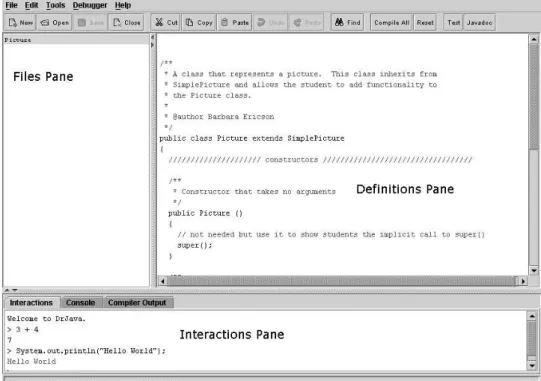
Once you start DrJava, it will look something like Figure 2.3. There are three main areas in DrJava (the bars between them move so that you can resize the areas):
“main” 2005/1/11 page 23 ✐
✐ ✐
Section 2.2 Introduction to DrJava 23
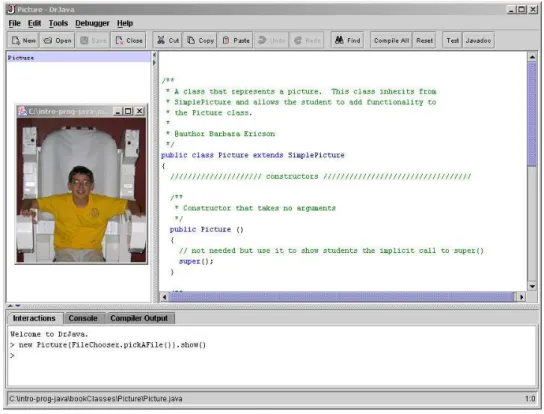
• The top right part is the definitions pane. This is where you write your classes: a collection of related data and methods. This area is simply a text editor—think of it as Microsoft Word for your programs. The computer doesn’t actually try to interpret the names that you type up in the program area until you compile. You cancompile all the current files open in the files pane by clicking on the Compile All button near the top of the DrJava window. Compiling your code changes it into instructions that the computer understands and can execute.
• The bottom part is the interactions pane. This is where you can literally command the computer to do something. You type your commands at the > prompt, and when you hit return, the computer will interpret your words (i.e., apply the meanings and encodings of the Java programming language) and do what you have told it to do. This interpretation will include whatever you typed and compiled in the definitions pane as well.
FIGURE 2.3: DrJava (with annotations)
“main” 2005/1/11 page 24 ✐
✐ ✐
24 Chapter 2 Introduction to Java
documentation from theJavadoc commentsin your files (comments that start with ’/**’ and end with ’*/’.
✬
✫
✩
✪
Making it Work Tip: Get to know your Help!
An important feature to already start exploring is the Help. If you click onHelpand then click onHelpagain when a menu is displayed you will see a help window. Start exploring it now so that you have a sense for what’s there.
2.3 JAVA BASICS
We’re going to start out by simply typing commands in the interactions pane—not defining new names yet, but simply using the names and symbols that Java knows.
2.3.1 Math Operators
Try typing the following in the interactions pane. > 34 + 56
90 > 26 - 3 23 > 3 * 4 12 > 4 / 2 2
As you can see Java understands how to recognize numbers, add, subtract, multiply and divide. You can type a mathematical expression in the interactions pane and then hit the “Enter” key and it will display the result of the expression. Go ahead and try it.
2.3.2 Printing the Result of a Statement
In English you end sentences with a period. In Java you typically end a program-ming statement with a semicolon. However, in the interactions pane you can leave off the semicolon and it will print the result of whatever you have typed (as you saw in the interactions pane). If you do add the semicolon at the end of a Java state-ment in the interactions pane it will execute the statestate-ment but not automatically print the result in the interactions pane.
Even though you do not have to type the semicolon after statements in the interactions pane youmust type the semicolon at the end of your statements in the definitions pane or the code will not compile.
“main” 2005/1/11 page 25 ✐
✐ ✐
Section 2.3 Java Basics 25
forSystem.out.println() is “Use thePrintStreamobject known asouton the System class to print out the value of whatever is in the parentheses followed by an end-of-line character.” DrJava will print the result of an expression in the interactions pane when you useSystem.out.println(expression).
You can have nothing in the parentheses which will just move the output to a new line, or it can be a name that the computer knows, or anexpression (literally, in the algebraic sense). Try typingSystem.out.println(34 + 56)by clicking in the interactions area, typing the command, and hitting return—like this:
> System.out.println(34 + 56); 90
> System.out.println(26 - 3); 23
> System.out.println(3 * 4); 12
> System.out.println(4 / 2); 2
> System.out.println(9 % 4); 1
> System.out.println(9 / 5 * -3 + 32); 29
> System.out.println(3 + 2 * 4); 11
> System.out.println((3 + 2) * 4); 20
The code34 + 56is a numeric expression that Java understands. Obviously, it’s composed of two numbers and an operation that Java knows how to do, ’+’ meaning “add.” In Java we call math symbols like ’+’ and ’-’ operators. The operator ’-’ means subtract. The operator ’*’ means multiply. The operator ’/’ means divide. The operator ’%’ means calculate the remainder of the first number divided by the second one.