Augmented Reality Birdwatching in Mindo
Master degree in Computer Engineering – Mobile Computing
Genaro Sebastián Sulca Villamarín
Augmented Reality Birdwatching in Mindo
Master degree in Computer Engineering – Mobile Computing
Genaro Sebastián Sulca Villamarín
Dissertation Report under the supervision of Professor Alexandrino José Marques Gonçalves, Professor Rita Margarida Teixeira Ascenso and Professor Nuno Carlos Sousa Rodrigues.
This project report is original, made only for this purpose, and all authors whose studies and publications were used to complete it are duly acknowledged.
Partial reproduction of this document is authorized, provided that the Author is explicitly mentioned, as well as the study cycle, i.e., Master degree in Computer Engineering – Mobile Computing, 2017/2019 academic year, of the School of Technology and Management of the Polytechnic Institute of Leiria, and the date of the public presentation of this work.
I thank my parents and sister who have been my support and my example during the study of the master course and all my life.
I thank the teachers who were part of this process, from the beginning of classes until the end of the development and defense of the dissertation.
I thank the friends who were with me, helped me and encouraged me during my stay in Portugal.
The project reported in this dissertation presents the development of an Android mobile application to be used for birdwatching in Mindo - Ecuador. The application has as target audience tourists and as main goal to share information about the species that inhabit the aforementioned place to improve tourist experience; it provides routes to follow with points of interest in which the users can find bird species. In addition to this, the application provides scientific information and highlights the most important characteristics of bird species, information about the threats that may be exposing these species to extinction and multimedia content like images, videos and sounds of those species.
As a distinctive feature, this application uses augmented reality to enhance birdwatching experience; it allows the user to interact in a different way with nature and offers the opportunity to perceive virtual 3D models of some birds and take photos of it to share on social networks or simply to save on the device.
To manage all the content of the application, a web-based backoffice was also developed, to add, edit or remove routes, spots and species including their information, images, videos and sounds.
The augmented reality, together with the user-friendly interface make the application very interactive and attractive to the user, likewise, the backoffice allows a simple administration of the content.
List of Figures ... xiii
List of Tables ... xvii
List of Abbreviations and Acronyms ... xix
Introduction ... 1
1.1. Motivation and Objectives ... 1
1.1.1. Tourism ... 2 1.1.2. Objectives ... 4 1.2. Schedule ... 5 1.3. Scientific paper ... 6 1.4. Dissertation structure ... 6 State of Art ... 7 2.1. Augmented Reality ... 7 2.2. How AR Works ... 8 2.2.1. Tracking techniques ... 8 2.2.2. Superimposition techniques ... 9 2.3. Current technologies ... 10 2.3.1. Plane detection ... 10 2.3.2. Extended tracking ... 10 2.4. AR performance ... 11 2.4.1. Static vs. Dynamic AR ... 11
2.4.2. User Interaction Capabilities ... 12
2.4.3. Composition Strategies ... 12 2.5. AR Design Guidelines ... 12 2.5.1. Environment ... 13 2.5.2. User ... 13 2.5.3. Content ... 14 2.5.4. Interaction ... 16 2.6. Frameworks/SDKs ... 17 2.6.1. Google ARCore ... 17 2.6.2. Vuforia ... 18 2.6.3. Wikitude ... 18 2.6.4. EasyAR ... 18
2.6.6. Framework/SDK Comparison ... 19
2.7. Geolocation ... 20
2.7.1. Global Positioning System (GPS) ... 20
2.7.2. Cell-ID ... 20
2.7.3. Wi-Fi ... 20
2.8. Similar works ... 20
2.8.1. AR in zoology ... 21
2.8.2. AR for Studying the Lives of Animals ... 21
2.8.3. AR to increase learning in museums ... 22
2.8.4. AR as education by using animal announcer ... 23
2.8.5. AR to support the experiential quality of life-like in a museum ... 24
2.8.6. Warbler Guide App ... 25
2.8.7. South American Birds Sounds ... 26
2.8.8. Bird Data - Ecuador ... 27
2.8.9. Similar works analysis ... 28
Development ... 31
3.1. Methodology ... 31
3.2. Acceptance survey ... 31
3.3. Acquired materials ... 31
3.4. Requirements ... 32
3.4.1. Android app requirements ... 32
3.4.2. Backoffice requirements ... 33 3.5. Project Architecture ... 33 3.6. App scope ... 34 3.7. Development tools ... 35 3.7.1. ARCore ... 35 3.7.2. Sceneform ... 35 3.7.3. Adobe XD ... 35
3.7.4. Android API level 24 ... 35
3.7.5. Angular 2 and Angular CLI ... 36
3.7.6. Google Material Design ... 36
3.7.7. Firebase ... 37
3.10. Database structure ... 39
3.11. App development ... 44
3.11.1. Permissions ... 44
3.11.2. Colors and dimensions ... 45
3.11.3. Location and Geofences ... 45
3.11.4. Main menu ... 46 3.11.5. Show images ... 46 3.11.6. Hotspots ... 46 3.11.7. Routes ... 47 3.11.8. Bird families ... 47 3.11.9. Load database ... 48 3.12. Backoffice development ... 49 3.12.1. Login ... 49 3.12.2. Common components ... 50 3.12.3. Hotspot ... 52 3.12.4. Routes ... 52 3.12.5. Families ... 52 3.12.6. Birds ... 53
3.12.7. Notify version change ... 55
3.12.8. Language ... 55
3.13. Test cases ... 55
3.14. Usability test survey ... 58
Results ... 59 4.1. Acceptance survey ... 59 4.2. Android application ... 61 4.2.1. Load database ... 61 4.2.2. Main menu ... 64 4.2.3. Hotspot ... 67 4.2.4. Routes ... 70 4.2.5. Bird library ... 73 4.2.6. Discover hotspot ... 80 4.2.7. Configuration menu ... 88 4.3. Backoffice ... 88 4.3.1. Login ... 89 4.3.2. Main page ... 89 4.3.3. Hotspot ... 90
4.3.5. Families ... 97
4.3.6. Birds ... 100
4.3.7. Database ... 107
4.4. App test ... 108
Conclusion and future work ... 111
Bibliographic References ... 113
Figure 1 - Spectacled bear ... 3
Figure 2 - Green Violetear (Colibri thalassinus) ... 3
Figure 3 - Work development schedule ... 5
Figure 4 - Marker-based AR ... 8
Figure 5 - Marker-less AR ... 9
Figure 6 - Projection-based AR ... 9
Figure 7 – Moving an object from the real world [14] ... 10
Figure 8 - Augmented reality applied in the design of learning activities in zoology ... 21
Figure 9 - An Augmented Reality Application for Studying the Lives of Animals ... 22
Figure 10 - Use of augmented reality to increase learning in museums ... 23
Figure 11 - Augmented reality as education by using animal announcer based on android application ... 24
Figure 12 - The design of a smartphone-based AR application to support the experiential quality of life-like in a museum ... 25
Figure 13 - The warbler guide ... 26
Figure 14 - South American Birds Sound ... 27
Figure 15 - Bird Data – Ecuador ... 28
Figure 16 - Project architecture ... 34
Figure 17 - Android version distribution (to February 3, 2019) ... 36
Figure 18 - Main menu prototype ... 38
Figure 19 - Menu and app bars prototype ... 39
Figure 20 - Hotspot document ... 40
Figure 21 - Route document ... 41
Figure 22 - Family document ... 42
Figure 23 - Bird document ... 44
Figure 24 - Version document ... 44
Figure 25 - Repeated species validation ... 54
Figure 28 - Question: What kind of cellphone do you have? ... 60
Figure 29 - Verify new version ... 61
Figure 30 - Confirm new version download ... 62
Figure 31 - Download progress ... 63
Figure 32 - Main menu ... 64
Figure 33 - First time notifications configuration ... 65
Figure 34 - Sidebar menu ... 66
Figure 35 - Hotspot list ... 67
Figure 36 - Hotspot info ... 68
Figure 37 - Hotspot map ... 69
Figure 38 - Routes list ... 70
Figure 39 - Route info ... 71
Figure 40 - Route map ... 72
Figure 41 - Families list ... 73
Figure 42 - Search feature ... 74
Figure 43 - Bird species list ... 75
Figure 44 - Species info ... 76
Figure 45 - Species image gallery ... 77
Figure 46 - Species video gallery ... 78
Figure 47 - Species sounds gallery ... 79
Figure 48 - Geofence entering, notification and discover hotspot option displayed ... 80
Figure 49 - Hotspot list with actual hotspot ... 81
Figure 50 - Bird species list with AR available sign ... 82
Figure 51 - Bird info in discover hotspot ... 83
Figure 52 - AR camera scanning flat surfaces ... 84
Figure 53 - AR help ... 85
Figure 57 - Login page ... 89
Figure 58 - Main page ... 90
Figure 59 - Hotspot list ... 91
Figure 60 - Add/Edit hotspot ... 92
Figure 61 - Hotspot menu image preview ... 92
Figure 62 - Hotspot related birds list ... 93
Figure 63 – Hotspot, add related birds ... 94
Figure 64 - Routes list ... 95
Figure 65 - Add/Edit route ... 95
Figure 66 - Route menu image preview ... 96
Figure 67 - Route related hotspots list ... 97
Figure 68 - Route, add related hotspot ... 97
Figure 69 - Families list ... 98
Figure 70 - Add/Edit families ... 99
Figure 71 - Families menu image preview ... 99
Figure 72 - Birds list ... 100
Figure 73 - Add/Edit bird – Search family ... 101
Figure 74 - Add/Edit bird - Info ... 101
Figure 75 - Bird menu image preview ... 102
Figure 76 - Add/Edit bird images - Gallery ... 103
Figure 77 - Add/Edit bird images – Image preview ... 103
Figure 78 - Add/Edit bird images - Upload image ... 104
Figure 79 - Add / edit bird videos - Gallery ... 104
Figure 80 - Add/Edit bird videos - Video preview ... 105
Figure 81 - Add/Edit bird videos - Upload video ... 105
Figure 82 - Add/Edit bird sounds - Gallery ... 106
Figure 83 - Add/Edit bird sounds – Upload ... 106
Figure 84 - Upload percentage component ... 107
Table 1 - Framework/SDK comparison ... 19 Table 2 - Similar works analysis ... 29 Table 3 - Test cases ... 55
AR Augmented Reality
IBA Important Bird Area
DB Data base
XML Extensible Mark-up Language
HTML Hypertext Mark-up Language
Introduction
Mindo is a region located in the canton San Miguel de los Bancos in the Pichincha province, Ecuador. Its main town bears same name and is known for its natural beauty and great variety of flora and fauna, which makes it a jewel for tourism, attracting hundreds of tourists both national and foreign all time. It is a place recognized by the large number of birds that inhabit the ecosystem, which makes it a perfect place for birdwatching, a widely practiced activity by tourists, either as a recreational way or to socialize by using old fashion methods to share and learn more about birds. Currently, the instruments used for birdwatching are a notebook or field notebook, pencil, pen, or ballpoint pen to write down when watching, binoculars or telescope and cameras or video as well.
“Bird-watching, the observation of live birds in their natural habitat, a popular pastime and scientific sport that were developed almost entirely in the 20th century” [1].
Nowadays, technology is a great ally for outdoor activities since it increases the possibility of easily get information from a mobile app or internet. This is perfectly suited for birdwatching, the main topic of this project, where, along with other scientific information, it is intended to use Augmented Reality (AR) technology in mobile devices to support birdwatching. AR has become a very affordable technology for this activity, offering the possibility to create enhanced experiences for the user and providing the ability to educate or share knowledge with people through this means.
It should be considered that Ecuador is a rich country in terms of nature, but it is not a place where technological innovation is an explored field. With this statement, there is a competitive advantage which makes this project attractive.
1.1. Motivation and Objectives
Mindo, specifically the Protected Forest Mindo Nambillo, is a place with great natural wealth, it has numerous birds species coexisting in the ecosystem what led it to be declared the first Important Bird Area (IBA) of South America in 1977, making it a perfect place for birdwatching [2].
It is a popular tourist place visited either by local and foreign people, which causes the displacement of some species and is one of the main reasons that makes a great importance to raise awareness among tourists and all people about the preservation of the ecosystem and the maintenance of its biodiversity.
There are many birds and birdwatching tours in Mindo, but sometimes, due to bird’s nature, it is difficult to watch and identify some species. Consequently, there is the need to provide the possibility of bird observation and provide full information about species through a customized mobile application of these touristic spots.
Considering the dissemination and easy access to technology, in addition to the low costs of smartphones with Android as operative system, it would be desirable to use an application to share information, educate people and promote tourism in the area to increase the interest in birdwatching and introduce the risks to which the birds are exposed.
1.1.1. Tourism
In order to promote tourism on the country, the government of Ecuador launched in 2014 the most aggressive tourism campaign to date named “All you need is Ecuador”, starting on February 28, with content in digital media using the hashtag #ALLYOUNEEDIS. Then, on April 1, officially launches the campaign with physical means around the world and in mid-April through mass media. After this campaign, the Ecuadorian government has launched multiple campaigns focused on tourism, in which Mindo stands out as one of the country's great attractions [3].
Mindo is in the Pichincha province, two hours away from the capital city of Ecuador, Quito, at 1250 meters above sea level, with temperatures that vary between 16 °C and 22 °C. It is considered one of the places with the greatest biodiversity on the planet. In 1998, it was declared as a protective forest and conservation area for species. In addition, the water resource of Mindo is one of the most valued of the place, being an important part of the protected area [4].
Figure 1 - Spectacled bear
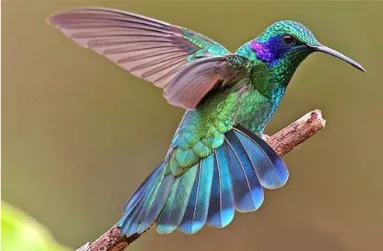
Due to the large number of birds that inhabit Ecuador, this is one of the main destinations for birdwatchers around the world. Being surrounded by nature, Mindo is a perfect place to watch wildlife. Many mammals can be found, like spectacled bear (figure 1), tapirs, armadillos, cougars and about 500 to 550 species of birds like the Colibri thalassinus (figure 2), many of which are endemic [5]. Currently, there are several companies that offer tourist packages for birdwatching, with guides and using traditional non-technological resources.
Figure 2 - Green Violetear (Colibri thalassinus)
There can be found also approximately 2000 species of plants and about 40 species of butterflies [6].
In addition to birdwatching, Mindo offers other tourist activities, such as:
• Canopy: It consists of crossing over the trees hanging from a cable system with safety equipment;
• Canyoning: It consists of descents in rocky canyons, rivers, and waterfalls with help of a cable system, safety equipment and specialized clothing;
• Butterfly garden: This is a place where can be seen a different variety of butterflies in captivity;
• Waterfalls: The Mindo Nambillo reserve has many medium-height waterfalls and clearings in which it is possible to bathe;
• Tarabita: It consists of a chair or basket held by a cable and driven by a motor, which is used to cross over canyons;
• Nightlife: There are some bars and night clubs to enjoy nightlife;
• Hotels/hostels: There are many hotels and hostels where, in addition to offering accommodation, these offer exclusive tourist activities.
These are some of the reasons why Mindo is a place widely frequented by tourists, especially by foreign, where birdwatching activities are one of the most attractive activities to do and must be promoted worldwide [7].
1.1.2. Objectives
The main goal was to develop an Android application to share information and multimedia content about some Mindo hotspots for birdwatching and show bird species to facilitate the access to scientific information to tourists and public in general, also, to implement a feature with augmented reality to create different and new experiences for the user.
To achieve this goal, several requirements have been specified: • Highlight useful information about bird species;
• Provide image, video, and sound galleries about bird species; • Provide virtual bird models to work with AR;
• Provide hotspots and routes to serve as virtual guide for the tourists; • Make the app work offline;
• Make the app bilingual (English – Spanish);
1.2. Schedule
The work was scheduled to be completed in 360 days, as can be seen in figure 3.
This project began to be developed on October 2018, as presented in figure 3, it has as main tasks: the data collection in-situ and perform the surveys, the application development, the backoffice development, the tests, and the dissertation writing along all the period.
1.3. Scientific paper
As a contribution to the scientific community, a scientific paper was produced based on the conducted work, which was presented at the 1st International Congress on Advances in Emerging Trends and Technologies in Quito, Ecuador ( https://icaett-conferences.org/icaett2019/), on May 29, 2019.
1.4. Dissertation structure
In chapter 1, it is made an introduction to the project, together with objectives and the schedule to develop it.
In chapter 2, it is discussed the state of art, an analysis of AR technology and of the available frameworks/SDKs and finally some similar work
the state of art is discussed, it is analyzed the AR technology and available frameworks/SDKs to find one that fits the requirements of this project and finally some similar works.
In chapter 3, there is an analysis of the tools used to develop the application, followed by the development of the application and backoffice.
In chapter 4, the results obtained in this work are presented and the app tests analyzed. Chapter 5 presents the conclusions and future work.
State of Art
In chapter 2, it is discussed the state of art, an analysis of AR technology and of the available frameworks/SDKs and finally some similar work.
2.1. Augmented Reality
The use of AR enrich user's experience in several fields, from Civil and Infrastructure to Engineering and Education to offer interaction with the environment without the need for physical objects but through the use of digital objects [8] [9].
The word “augmentation” from AR means creating new virtual objects and placing them in the scene, it could imply superimpose 3D virtual objects over the real ones. It is about creating new environments from the real world. For this, AR may be applied to all senses, like the use of 3D sound to give the user the sensation of being in that new environment surrounded with new things and which is in harmony with the real world [10].
The AR could also offer the possibility of bidding personalized content, that is, in an environment in which some interaction with AR has been implemented, content can be provided for children and adults, without the need to make any changes in the real-world objects.
AR is a variation of Virtual Environments (known as virtual reality) with the difference that in Virtual Environments, all objects are virtual, so the user does not see the real world. In AR the user perceives the world with superimposed virtual objects that coexist in the same space and can even appear to change or affect the objects of the real world [10].
Currently, AR is a technology that is in a mature stage of development, however technology continues to be improved, making it more efficient in terms of processing, recognition of images and surfaces and positioning.
In the next section will be made a study of existing AR technologies (applicable to this work), available frameworks/SDKs and a comparison of them considering their advantages and disadvantages.
2.2. How AR Works
AR consists of three steps: Recognition, Tracking and Mixing [11].
In the recognition stage, an image, object, body, or space is analyzed. Next, in the Tracking stage, the spatial context is analyzed in real-time, that is, the whole scene included around the object that was analyzed in the first stage. Finally, in the third stage, Mix, a virtual object like video, 2D, 3D, text, etc., is superimposed on the scene.
2.2.1. Tracking techniques
Tracking is the process to determine the user position and orientation in the environment, this is important to get more realistic and accurate results when placing virtual objects in the environment [12].
Marker-based tracking
Marker-based AR uses objects from the physical world as a point of reference to superimpose virtual objects, as can be seen on figure 4. For this, the camera constantly captures the objective to process and estimate the position of virtual object related to the real world [11].
Figure 4 - Marker-based AR
Marker-less AR tracking
Marker-less AR uses a combination of electronic devices such as accelerometer, compass, and GPS to process and estimate the position of the virtual object related to the real world [11], as can be seen on figure 5.
Figure 5 - Marker-less AR 2.2.2. Superimposition techniques
The way in which AR is projected into the virtual world determines the level of interaction that the user could have, these ways are: Projection-based superimposition and Object superimposition-based AR.
Projection-based superimposition
Projection-based AR works using artificial light onto real world surfaces, this allows a more direct interaction with the user thanks to the possibility of sensing the change of light, to work, this calculates the distance at which the virtual object was initially projected with the distance at which the projection is located when the user interacts, thus offering a similar sensation to touching the said virtual objects [13], as can be seen on figure 6.
Figure 6 - Projection-based AR
Object superimposition-based AR
Object superposition based on AR totally or partially replaces the objects of the real world, this can be done in two ways [13]:
• Completely hide the object of the real world, for which it has a total mapping of the environment to recreate it by removing the desired object.
• Move the object of the real world, for this, in addition to fully recognize the environment must recognize the object to be moved [14], as can be seen in image 7.
Figure 7 – Moving an object from the real world [14]
2.3. Current technologies
There are several ways to implement applications with AR, with different technologies. For this work it will be used plane detection and extended tracking.
2.3.1. Plane detection
The plane detection is based on detecting characteristic points on the surface with texture recognition and depth to determine if the object is a plane [15].
2.3.2. Extended tracking
the objective has gone out of focus, allowing the user to move freely, almost without limits, without losing virtual objects, it also allows creating content in 360° [16].
This technology is supported by electronic sensors such as the compass and the accelerometer to detect the movement of the device, calculate its position and keep the virtual object in the same place that, in the real world, was created [16].
2.4. AR performance
In the context of mobile applications development, the performance that AR must have is closely related to the way it is implemented. Several factors must be considered, but some that affect the most to the performance of an application were selected and the following considerations were done: static vs. dynamic AR, user interaction capabilities and composition strategies [10].
2.4.1. Static vs. Dynamic AR
The static implementation is based on the superposition of static objects on the real world, while in the dynamic are used animations or videos. Both use motion tracking to track the real world and place the virtual object over this so, the performance is related to the streaming capabilities of the devices. Below will be analyzed some advantages of each one: • Simplicity: Implementing static AR is much simpler than with video, this is because the transmission of the static object is lighter than the transmission of several frames per second, as it would be the implementation by video, in this case, a delay in the transmission of frames could be caused, which would lead to a distortion of the video, making the experience less satisfactory;
• Resolution: The video limits the resolution that can be presented for the user to see, it may occur because of the size of the display is not large enough or because the size of the objects in the video are smaller than it is supposed to be. The harmony with the real world is achieved with the combination of objects that compose a video scene, this makes more complicated to implement it in comparison to the static object, in which a single element is created and in which is easier to define its size to fit in harmony with the real world.
• Experience: Dynamic AR can contain videos, animations, interaction with the user and sounds while Static AR does not contain any of these properties, by this, using
Static AR could not cause the sensation of interaction with the real world and become boring or monotonous for the user.
2.4.2. User Interaction Capabilities
The possibility that a virtual object can interact with the user, whether by touch, voice recognition or specific movements, requires constant analysis of the user interface and sensors, by this reason it could be overloaded if a group of too many interaction listeners attached to too many objects are enabled. To avoid this problem, it is advisable to limit the interaction with the user to a static interface in which actions can act on a specific object but are not necessarily tied to it. In addition, it should always be aware that the scene is being analyzed in real time, which could further overload the processing and decrease the performance of the app.
2.4.3. Composition Strategies
The AR provides the possibility to create environments up to 360° which can be very useful to create an immersive experience for the user, however, it must be considered the number of virtual objects that will compose the scene and the points or reference images or planes that will be used to create it. In addition, apart from the purely technical analysis, advantages or disadvantages should be considered when presenting a user with a 360° scene and considering factors such as: user orientation, the possibility of physically moving within the environment, security, blind spots and sounds. This could cause that the scene offers a poor immersive experience due to the scene performance, which not only does not meet the expectations but lead to the rejection by the user.
2.5. AR Design Guidelines
The development of AR applications proposes a design challenge, not only in terms of interfaces, but also the content that is presented and the way in which the virtual objects interact with the environment and the user.
For this, it is necessary to consider some design guidelines, for the application to be aesthetically pleasing, so the user intends to use it again. Some guidelines recommended by Google are [17]:
2.5.1. Environment
These are the guidelines to be considered when positioning virtual objects and interacting with the environment.
Physical environments
The space in which the user is going to make use of augmented reality must be considered, whether large or small, indoors or outdoors, the design of augmented reality must be the same for any of the spaces in which the user can make use of this feature.
Define size
Depending on the purpose of the application it must be defined the space that will be used to project the virtual objects. Developer must find the right size, not too big or too small for the user to view the real world and virtual objects correctly.
2.5.2. User
The guidelines to be considered regarding the user and the environment in which the user is using the application.
Encourage movement
Since most users have not experienced 360° applications as AR applications are, they should be encouraged to move to discover more than they can see in a static position.
Types of movement
According to the type of movement that is desirable to interact with the application, the app must indicate and guide the user through the different types of movement that are available.
Accessibility
Different methods of interacting with the augmented reality application must be implemented to provide accessibility, these methods should always be explained to the user in order to give them the possibility to use it.
Safety & Comfort
It is important to keep users safe and comfortable while using the application, for this, the following points should be considered:
• Keep the user safe: remind the user to constantly check their surroundings; • Do not make users walk backward;
• Avoid long play sessions; • Get comfortable;
• Take a break.
2.5.3. Content
The guidelines to be considered regarding the content of the application are directly related to the user interests, so it could be said that the application may be attractive to the user, some criteria to be considered are:
Modeling
It is better to use life-size objects and modify their size as necessary, as well as detailed objects even if the user is not going to see all details at first sight.
Texturing
The texture of the objects should be as like the real world, without repetitive patterns since they look false to the human eye. However, the textures should not be heavy, the resolution should be at most 2k.
Light, ambient occlusion and shadow planes
The lighting of the environment must interact or change the virtual object, in addition, the handling of the shadows should be as realistic as possible, otherwise the object will look more like a still image than a virtual object.
Depth and presence
The depth perception should be used when making an app with AR, it can be achieved changing the lighting and/or shadows. The perspective should change too, this can be achieved by managing the location and size of the virtual object, always considering the environment, so the objects are correctly located and it feels like they are really located in it.
Plane discovery
Surfaces must be detected whether horizontal, vertical, or inclined, and this will be communicated to the user to know that the virtual object can be positioned on it. Depending on the surface the objects will be located and interact differently with the user and the environment.
Optimal placement range
The positioning of the object must be in a range and distance in which the visualization of it is the most comfortable and convenient to interact as needed by the application. Three existing positions must be considered: low position, high position and medium position; it should be considered that these positions could change depending on the inclination of the device.
Placement
Depending on the behavior that is desired for the application, the way of positioning the objects must be considered, which can be: automatic, manual, or dragging.
Anchoring
If there are objects composed of several other objects (for example a chess board with its pieces), the objects that compose the big one must be anchored, such as the chess board pieces anchored to the board.
Selection
The user must be able to select and interact with the object, for this, user should always receive a confirmation that it is interacting with the object.
Translation, multiple surfaces, and translation limits
The user must first select the object and then drag the object to move it. The surfaces to which it can move and the limits on which the object can move must be considered, either by distance or by plane change (for example from horizontal to vertical).
Rotation
The user must select the object first and then, either via gestures or by buttons, rotate the object as the user wishes.
Scaling
The user must select the object and scale it, however, the developer must limit the minimum and maximum sizes (or deny scaling), considering the objective of the application.
2.5.4. Interaction
The developer must previously define what levels of interaction the application is intended to have.
Initialization
The transition to the AR function must be clear to the user and indicate that it is started, it can be achieved using an icon or visual effects.
Offscreen and audio exploration
If virtual objects are positioned outside the user's visual field, clues of where they are located must be provided so that the user moves and finds them.
Haptic feedback
Vibration is commonly used as haptic feedback, but this is not recommended to be used on applications with AR, low frequency sounds can be used instead.
Reset
The user must be able to reset the AR experience, either using the back button or using a specific interface button.
Interface
The experience must be immersive and not distract the user, the developer should use the least amount of 2D components or alerts (as popups) and make the interface components as simple and comprehensive as possible, so the user does not have to think about the behavior of the buttons before using them.
Onboarding & instructions
Landscape & portrait
The possibility of using the device in portrait and landscape mode should be provided, but if not possible due to the requirements of the application, it should be clearly established the mode of use of the app.
Errors
The user must be notified when there is an error such as: low light, camera movement is too fast or camera sensor blocked, and allow the user to recover as soon as possible from them.
2.6. Frameworks/SDKs
This sub-chapter analyzes available frameworks and presents a comparison of these to determine which is the most appropriate to use in the present project.
2.6.1. Google ARCore
ARCore is the Google framework for building applications with AR and its operation could be summarized in that it basically does two things: tracks the position of the device, whether it moves or is static, and creates its own version of the real world to its understanding. To achieve this, ARCore uses the camera to identify points of interest named "features" and tracks how these points move over time, along with other sensors such as the accelerometer and compass, it determines the position and orientation of the device as it moves through space [18]. Some of the ARCore APIs are available for Android and iOS.
Google ARCore has 3 fundamental characteristics to integrate the virtual with the real world, this are [18]:
• Motion tracking, that allows the phone to understand and track its position relative to the world;
• Environmental understanding, that allows the phone to detect the size and location of all types of surfaces: horizontal, vertical, and even angled surfaces like the ground, a coffee table, or walls;
• Light estimate, that allows the phone to estimate environment's current lighting conditions to project this into the virtual objects.
2.6.2. Vuforia
Vuforia is the most complete and used framework to develop applications with AR, incorporating technologies such as image and object recognition, supported by a database that can be in the cloud (cloud recognition) or in-device, recognition of several images at the same time (multi-image recognition), plane detection, extended tracking, video playback and virtual interfaces [19] [20].
Vuforia is available for development with programming common tools such as Visual Studio, XCode, and Visual Studio and it is integrated natively in Unity [20].
Likewise, Vuforia is compatible with a wide variety of phones and tablets with Android and iOS and for several smart lenses like Microsoft HoloLens, ODG R7 and Vuzix M300 [20].
2.6.3. Wikitude
Wikitude incorporates technologies such as object recognition, SLAM (Simultaneous Localization and Mapping), instant tracking for plane detection, image recognition, recognition of several images at the same time (multi-image recognition), Geo-AR (Geo-localization + AR), extended tracking and cloud recognition. In addition, it is available for multiple platforms such as Android, iOS, Windows and several smart lenses [21].
Wikitude is available for development in various frameworks such as: Unity, Cordoba, Titanum and Xamarin.
2.6.4. EasyAR
EasyAR is an SDK that incorporates technologies such as SLAM, 3D object tracking, screen recording and image tracking, however, some of these technologies are available only for the paid version. It is available for Android and iOS via API and offers integration with Unity [22].
2.6.5. MaxST
MaxST is an SDK that incorporates technologies such as instant tracker, SLAM, object tracker, image tracker, marker tracker and QR / Barcode Scanner. It is available for Android and iOS and is optimized for Smart glasses. A prominent service of MaxST is AR
generate virtual objects, draw or write in the scene and this will be presented to the counterpart of the video call [23].
2.6.6. Framework/SDK Comparison
In the table below, there is a list of some of the best Framework/SDK to develop this kind of project. For this analysis only the features needed to accomplish this project have been considered, plus the cost and watermark.
Table 1 - Framework/SDK comparison
ARCore Vuforia Wikitude EasyAR MaxST
Image recognition ✓ ✓ ✓ ✓ ✓ 3D recognition ✓ ✓ ✓ - ✓ Geo-location ✓ - ✓ - - SLAM ✓ ✓ ✓ - ✓ Extended tracking ✓ ✓ ✓ - ✓ Free with Watermark - ✓ ✓ - ✓ Free (no watermark) ✓ - - - -
Cost Free $42/month $2490 Free $499
per-app
Considering the advantage of no watermark, available features, engine power, ease of use and costs shown in the comparative table, in addition to being a Google tool and Android compatibility is the best among others, it is concluded that the best framework/SDK to develop this work is ARCore.
2.7. Geolocation
Geolocation is used to know where the user is located, this allows to create smarter applications with more and better features. Geolocation is based on the use of several sensors such as GPS, network location and / or Wi-Fi to determine the location of the device [24].
2.7.1. Global Positioning System (GPS)
Considered the most accurate positioning system but the one that consumes more energy, GPS uses satellites to fix the position of the mobile unit. To get the position, the device receives several signals of a segment of satellites, then it calculates the time taken to receive the signal with nanoseconds precision, whit this information it calculates the device position on the earth surface [25].
2.7.2. Cell-ID
Cell identification (Cell-ID) determines the device location related to the location of the control cell or base station, this method is the less precise because of the coverage of the cell and therefore, the accuracy of the location of the device can vary from 2km to 20km [25].
2.7.3. Wi-Fi
This is less accurate than the GPS but more accurate than cell ID, it uses the location of the connection point to which the device is connected plus the distance to where the Wi-Fi sender is located to provide information about the location. The accuracy of this also depends on the information provided in the database about the locations of the access points in the network supplying the service [26].
2.8. Similar works
There are some works developed with AR that integrate animals in education, some published as thesis/dissertation, others as papers and others simply provided by a company with profit intentions. There are also some works without AR focused on birdwatching. Below is the analysis of some of them.
2.8.1. AR in zoology
The work called “Augmented reality applied in the design of learning activities in zoology” (AR in zoology) is an application developed to support the teaching of zoology. This application operates with cards used in common classes in schools as targets for AR. When a card is focused, a digital model of the corresponding animal is projected over it, as can be seen on figure 8.
The app uses animal sounds and has two modes of operation to make learning activity even more interactive, however, through an analysis it was noticed that the sound is not a great contribution to the application and could even be counterproductive when using the application inside of a classroom [27]. This application uses:
• Framework: Vuforia • Android API: 19 (KitKat) • Target devices: Smartphones • AR activators format: Cards
Figure 8 - Augmented reality applied in the design of learning activities in zoology
As this app is intended to be used mainly by children, the interfaces have bright colors and striking shapes.
2.8.2. AR for Studying the Lives of Animals
The work called “An Augmented Reality Application for Studying the Lives of Animals” (AR for studying the Lives of Animals) is an application about the life of animals. It uses some animals, but it is focused mainly on the life of a lion. The operation of the application is the following: when the marker that activates the AR of the lion is detected, the scene
begins. Using animations, sounds and time markers, the life of a lion is shown, including activities such as hunting food, eating, being attacked and dying [28], as can be seen on figure 9. This application uses:
• Development: Visual Studio, C#, Unity • Graphic design: Adobe Illustrator • AR activators format: Book
Figure 9 - An Augmented Reality Application for Studying the Lives of Animals
Although the characteristic of AR is the strong part of this application, the interface is saturated with letters, which makes it less user friendly.
2.8.3. AR to increase learning in museums
The work called “User of augmented reality to increase learning in museums” (AR to increase learning in museums) is an application that uses AR inside a museum. Focused on the section of a rainforest, it has three modes of operation: the first is a section with static information about the animals, the second one uses AR with image targets to create virtual objects of the corresponding animal and the third, as can be seen on figure 10, uses a book with illustrations that activate the AR, this one offers interactive playing activities designed for learning [29]. This application uses:
• Framework: Vuforia • Development: Unity
Figure 10 - Use of augmented reality to increase learning in museums
Both the interface and the AR are a good design example in this application, however, when reading the text when using the AR, the contrast of the letters could prevent it from being well distinguished in certain circumstances, such as white backgrounds.
2.8.4. AR as education by using animal announcer
The work called “Augmented reality as education by using animal announcer based on Android application” (AR as education by using animal announcer) is an application focused on initial teaching about animals. Using cards as image targets, the AR is activated and shows a virtual model of the animal and reproduces its’ sound [30], as can be seen on figure 11. This application uses:
• Framework: Vuforia • Development: Unity • Modeling: Blender
Figure 11 - Augmented reality as education by using animal announcer based on android application
Since this application is intended to be used by children, the design is very simple, also the use of AR is simple and quite basic.
2.8.5. AR to support the experiential quality of life-like in a museum
The work called “The design of a smartphone-based AR application to support the experiential quality of like in a museum” (AR to support the experiential quality of life-like museum) is an application to be used inside of a museum [31]. It has various modes of use:
• Adding on with an AR environment: Create an AR environment simulating that the user is surrounded by several animals, as can be seen on figure 12, here it is used: ground plane detection and extended tracking;
• Virtual guide: Activated by an image target, it presents a virtual model of an animal and information about it;
• Looking at the showcased animals through AR: Activated by an image target, it presents a virtual model of the animal corresponding to the exhibition;
• Interacting with the virtual animals: When an animal has appeared, through gestures on the screen is creates an interaction with the animal, this can be a movement or even follow the user;
• Adding fictitious elements of hybrid animals: When two animals approach each other, an animation is presented and, with the use of an algorithm, the animal parts are mixed, generating a hybrid of these.
This application uses: • Framework: ArKit • Development: Unity
Figure 12 - The design of a smartphone-based AR application to support the experiential quality of life-like in a museum
This app is totally focused on the use of AR, it is a good example of using AR indoors with very useful and striking features.
2.8.6. Warbler Guide App
Warbler Guide App was developed as a companion of The Warbler Guidebook, by Tom Stephenson and Scott Whittle, it was developed by the Princeton University Press and it is available for Android and iOS.
Figure 13 - The warbler guide
This app presents relevant information of the warblers, such as specific characteristics, sounds, place where they are, migration routes, among others. It offers the feature of doing searches by sound, color, and specific details of the bird. It also has high resolution 3D models and offers an interactive view of them [32].
2.8.7. South American Birds Sounds
It is an application that has information about over 11400 species divided into families. With the use of an internet connection, it provides information about birds and multimedia content with sounds, images and videos [33].
Figure 14 - South American Birds Sound
An application with very useful content, the only negative, is the need of an internet connection to view the multimedia content.
2.8.8. Bird Data - Ecuador
This app offers information about birds in Ecuador, scientific information, range, subspecies and other information about more than 1600 species with an option to download photos, maps and sounds [34].
Figure 15 - Bird Data – Ecuador
A simple application with bird information from Ecuador, with a fairly basic interface.
2.8.9. Similar works analysis
An analysis was made to evaluate which are the characteristics that make this work the better option for users. For this purpose, numbers were used instead of the complete names to represent the apps in the following table (Table 2):
1. AR in zoology;
2. AR for Studying the Lives of Animals; 3. AR to increase learning in museums;
4. AR as education by using animal announcer;
5. AR to support the experiential quality of life-like in a museum; 6. Warbler Guide App;
7. South American Birds Sounds; 8. Bird Data – Ecuador.
Table 2 - Similar works analysis AR Animal Bio Animal Gallery Animal Videos Animal sounds Touristic routes Works Offline 1 ✓ X X X ✓ X ✓ 2 ✓ ✓ X X ✓ X ✓ 3 ✓ ✓ X X X X ✓ 4 ✓ X X X ✓ X ✓ 5 ✓ X X X X X ✓ 6 X X ✓ X ✓ X - 7 X ✓ ✓ ✓ ✓ X - 8 X ✓ ✓ X ✓ X -
✓: Feature exist X: Feature doesn’t exist -: Feature exists partially
Once made this analysis, it can be evidenced that this project has some unique and relevant characteristics that will offer the user a better experience than those offered by other related works.
Development
This section describes the methodology used to develop this work, the scope of this work, as well as the functionalities identified in the requirements, prototypes, app development and test cases.
3.1. Methodology
This work was developed with an agile approach, but it does not use a defined methodology, however, the methodology was based on iterations. For this it was held meetings every 2 or 3 weeks, in which the work status and tasks were reviewed. When changes were requested, new tasks are defined for the next iteration.
3.2. Acceptance survey
It was developed a survey using some variables of the UTAUT model to define if the application to be developed would be interesting for users and if they intend to use it. To achieve the needed requisites [35], the number of respondents was defined considering the Central Limit Theorem, which indicates that if you have a large group of independent variables and all of them follow the same distribution model, its sum is distributed according to a normal distribution [36]. This survey was reviewed over some iterations until the final version was obtained. The survey consisted of 24 questions and was conducted online through google forms (Appendix A and B).
3.3. Acquired materials
Since there are skills that are not mastered, such as graphic design and 3D animation, the logo, brand book and 3D models were developed by a third party.
A freelancer was hired to develop the logo and the brand book of the application, for the logo, it was provided several versions of it until reaching the final one. For brand book it was described the essence of the app.
For 3D models, the hummingbird was purchased at https://www.turbosquid.com, and the toucan was downloaded from a free repository: https://poly.google.com.
3.4. Requirements
To collect and define the requirements of the app, the potential client in Mindo’s tourism office was contacted, as well as the dissertation supervisors, to define a feasible scope to be realized within the available timeline. The requirements where defined for the Android app, with and without AR; and a backoffice to manage the contents.
3.4.1. Android app requirements
• Offline: The app must work offline, with local files that must be downloaded at the first time of use. If there is an update, this will be made at the starting of the app; • Multilanguage: The app must be bilingual (Spanish – English), not only in interfaces
but also, if applicable, in the multimedia content; • Content with AR: The app should offer AR content;
• Content without AR: The app must also offer content without AR such as information about species, images, sounds and videos;
• Easy to use: The interfaces of the application must be intuitive and user-friendly.
Functionalities with AR
These functionalities must work for each spot/bird that activates AR:
• Detect horizontal planes: The augmentation will be made if a horizontal plane is detected;
• Show virtual animated objects: The object should be animated to get more attention from the user;
• Take a photo: Option to take a photo of user’s screen view;
• Share content on social networks: Option to share content on social networks.
Functionalities without AR
These functionalities must work for each bird species.
• Provide birdwatching routes: It must provide routes for the user to follow, aided by the GPS;
• Display when bird species are in danger of extinction: The user must display an alert when a specie is in danger of extinction;
• Display why species are endangered: If is the case, the user must have complete information about why the specie is in danger of extinction;
• Display photo/image gallery: If it is available, the user must have a photo/image gallery of bird species;
• Display photo/image in full screen: If it is available, the user must have the possibility to see the photo/image in full screen;
• Display video gallery: If it is available, the user must have a video gallery of bird species;
• Display video in full screen: If it is available, the user must have the possibility to watch the video in full screen;
• Display sound gallery: If it is available, the user must have a sound gallery of bird species.
3.4.2. Backoffice requirements
The backoffice must provide the capability to manage and update app information. • Use a login page: The access to the backoffice must have access control;
• Add/Edit bird bibliographic information: Must be capable of adding/editing bird bibliographic info;
• Allow to Upload and Delete bird images: Must be capable of adding/editing bird images;
• Allow to Upload and Delete bird videos: Must be capable of adding/editing bird videos;
• Allow to Add/Edit info about bird species danger: Must be capable of adding/editing in danger bird species information;
• Add/Edit hotspot info: Must be capable of adding/editing hotspot info; • Add/Edit route info: Must be capable of adding/editing route info.
3.5. Project Architecture
Considering the requirements of the project, 3 scenarios have been defined in which the development and implementation should be conducted, which were: Android application,
Cloud services with Firebase and website (for the backoffice). For the android application, the SQLite database (included in Android) was used for storage and internal storage to store the multimedia content downloaded from the cloud. For cloud storage Firebase was used, with Cloud Firestore services for information storage and Cloud Storage to store multimedia content. Finally, for the backoffice, Angular 2 was used to develop the user interface.
Figure 16 - Project architecture
Figure 16 depicts the architecture of the project, emphasizing on the communication between the backoffice and the Android application that is conducted through cloud services.
3.6. App scope
This project is focused on birdwatching in Mindo, it should be considered that even though it seeks to promote tourism in the area does not seek to promote any tourist establishment. The scope regarding the number of bird species that will be included in the application is
3.7. Development tools
Considering the analysis conducted in section 2.6, it has been decided to use ARCore to develop the AR functionality, along with Sceneform to import and render the virtual objects to the application, and Android API level 24. For the prototypes was used Adobe XD and for the backoffice Angular 2 with Angular CLI. The standards of Google Material Design were used to define the design of the app.
3.7.1. ARCore
ARCore allows to make an AR application with Android native libraries to provide the best performance to it. There is a plugin in Android studio to make even easier the development of apps with AR.
3.7.2. Sceneform
Sceneform allows to render 3D scenes without any knowledge on OpenGL. Using the plugin for Android Studio it is easy to import, view and build 3D objects [37].
3.7.3. Adobe XD
Adobe XD is an easy free tool that provides templates to follow the guidelines of Google Material. In addition, Adobe XD provides the option to publish an online app prototype for review, available worldwide to anyone who requires it.
3.7.4. Android API level 24
The Android API level used for this work is 24 that stands for Android Nougat. With this API level it is ensured that 57.9% of existing Android devices will be able to execute the application (to February 3, 2019) [38], as can be seen on figure 17.
Figure 17 - Android version distribution (to February 3, 2019)
We may notice that this percentage is not considerable, but it needed to be limited to this version of Android due to the ARCore constrains that require an Android API 24 or higher.
3.7.5. Angular 2 and Angular CLI
Angular is a development platform for building mobile and desktop web applications using TypeScript/JavaScript [39]. The angular CLI is a tool that allows the developer to create the application structure in an easy and standard way.
3.7.6. Google Material Design
“Material Design is a visual language that synthesizes the classic principles of good design with the innovation of technology and science” [40].
Android material aims to unify the design through different platforms offering the developer the possibility to customize interfaces to create an own and innovative enterprise image. Inspired by objects, textures, and colors of the real world, it creates hierarchy, meaning and focus on such a way that users are immersed when viewing applications.
Material design offers to developers a complete guide to build apps and web sites in which describes every feature of material design and how to implement it.
3.7.7. Firebase
Firebase provides services for data storage with high availability and efficiency in data transmission. Its API is simple to integrate with native Android and, in addition, it offers plans with very affordable costs. For this work it was used the Blaze plan (pay per use), which allows us to integrate the project with Google Cloud Platform too [41].
3.8. Prototyping
It was used Adobe XD to build the prototypes considering the guidelines provided by Google in Material Design and inspired on Adobe Portfolio designs.
3.8.1. App design
It is needed to get the Google Material UI Kit for Adobe XD to build Android prototypes in this application.
Figure 18 - Main menu prototype
The main menu, top app bar and bottom app bar follows the guidelines of Google Material as well as font sizes, the colors were selected in accordance with the Material Color pallet and, most of the icons were provided by Google Material, as can be seen on figure 19.
Figure 19 - Menu and app bars prototype
Once the prototypes met the requirements, the development of the application was started based on these and using the technologies previously exposed.
3.9. Development
The development was primarily focused on the main features of the app: main menu, hotspots, routes and bird library with location and maps, reading/saving files from/to internal storage, multi-language, storing and reading information from SQLite.
After these, it was implemented the Geofences with notifications and the AR option with plane detection and virtual objects. Finally, for the option to share or save a photo it was used PixelCopy to take the screenshot (SurfaceView object) and transform it into a bitmap [42], to allow to treat it as desired, either share or save it into the mobile device.
3.10. Database structure
By using Firebase Cloud Firestore that is a NoSQL database it was defined a simple structure to facilitate search for information, as well as the facility to store information in several languages. In addition, in this database is stored the information of the location where the
images, videos and sounds are, to locate them later when using Firebase storage in a simple way.
Five main collections were created for this, which are:
HOTSPOT
This document contains the hotspot information, grouped in maps for each language and an array with available birds, as references, for the hotspot (birdColRef), as can be seen on figure 20.
ROUTE
This document contains the route information, grouped in maps for each language, an array with available birds, as references (birdColRef) and an array with available hotspots, as references too, on the route (poiColRef), as can be seen on figure 21.
Figure 21 - Route document
FAMILIES
The family document contains the information of the bird family, grouped in maps for each language, as can be seen on figure 22.
Figure 22 - Family document
BIRD
This document contains the information of the bird grouped in maps for each language, a matrix with the information of the image gallery, another one for videos and another one for sounds, as can be seen on figure 23. In addition, there is the field “activateAR”, which serves to indicate whether or not it will be AR implementation available in the application, it should be noted that this field will not be accessible for modification from anywhere other than the firebase console.
Figure 23 - Bird document
VERSION
This document contains the information of the current version of the database, as can be seen on figure 24.
It should be noted that all documents have the “lastModifiedBy” field, which registers the last user that make changes to the document.
Figure 24 - Version document
3.11. App development
The development of the application was done in native Android, with Java language to process logic and XML to build the interface.
3.11.1. Permissions
• Read / write in external storage • Internet access
• Access to location / change of location • State of the network
• Using the camera
3.11.2. Colors and dimensions
To standardize colors throughout the application, this were defined in colors.xml: • Primary: #2e7d32
• Primary dark: #1b5e20
Likewise, some measures were defined to be used in several parts so that if there is the need to change them, it can be done in a simple and fast way, those were defined in dimens.xml, it is worth to say that this was defined according to Material specification [43]:
• body_text_size: 16sp • title_text_size: 20sp • main_card_text_title: 34sp • sub_card_text_title: 25sp • sub_card_text_description: 16sp • title_card_size: 70dp • title_big_card_size: 40dp • list_card_size: 220dp • bottom_nav: 56dp • ic_size: 20dp • layout_margin: 15dp
3.11.3. Location and Geofences
To get the location it was used the Android LocationManager and LocationRequest to update it frequently in a range of 5 to 10 seconds with high precision.
Subsequently the geofence monitoring was started, with a radius of 25m and transitions to enter and exit geolocations defined to show or hide notifications.
When entering a geofence, a notification with high priority is displayed, in which it is defined that the touch action opens the application in the “Discover hotspot” menu. This menu is only available when the user enters to a geofence. When leaving the geofence the notification and respective characteristics are hidden.
3.11.4. Main menu
For the main menu it was used cards in which the image and the respective text were placed, in addition it was implemented the feature to hide or show the option “Discover hotspot” when necessary.
A sidebar which allows the access to all main options of the application was also implemented, in addition, an option to change the language and the app info in an “Configuration” section.
For the “About” section it was used a popup to show the information about the application, namely context of the Master dissertation, supervisors, and dissertation academic year date. The configuration section displays the current language and offers the option to change it between English and Spanish. For the implementation of this feature it was used the Android feature using strings.xml files for each language.
3.11.5. Show images
To show the images, those are read as files from the internal storage, transformed into a drawable and placed in an ImageView.
3.11.6. Hotspots
In the hotspot list, the information of all the hotspots is read from the internal DB to show it as a list with images. When entering to a hotspot it is shown the information pertaining to it. It was used a bottom bar to separate the description and map section, and it uses fragments to show each section.