U
NIVERSIDADE DE
L
ISBOA
Faculdade de Ciˆencias
Departamento de Inform´atica
PHASED - PHYSIOLOGIC ADVANCED SENSING
DEPLOYED
Andr´e Filipe Feiteiro Justo
DISSERTAC
¸ ˜
AO
MESTRADO EM ENGENHARIA INFORM ´
ATICA
Especializac¸˜ao em Engenharia de Software
2014
U
NIVERSIDADE DE
L
ISBOA
Faculdade de Ciˆencias
Departamento de Inform´atica
PHASED - PHYSIOLOGIC ADVANCED SENSING
DEPLOYED
Andr´e Filipe Feiteiro Justo
DISSERTAC
¸ ˜
AO
MESTRADO EM ENGENHARIA INFORM ´
ATICA
Especializac¸˜ao em Engenharia de Software
Dissertac¸˜ao orientada pelo Prof. Doutor Lu´ıs Manuel Pinto da Rocha Afonso Carric¸o e co-orientado por Lu´ıs Miguel Santos Duarte
Acknowledgments
First and foremost, I would like to express my gratitude to my supervisor, Professor Lu´ıs Carric¸o and to my co-supervisor Lu´ıs Duarte, not only for accepting me as their student and introducing me to the world of research, but also for their guidance, advice and for being patient with me during the elaboration of this master thesis.
A huge “thank you” to my family. I am immensely grateful for their support, guidance and specially for providing me with this opportunity. I thank my father, Ant´onio Justo, that inspired me to learn and be curious. To my mother, Helena Justo, for the understan-ding and for being always there for me. To my brother, Daniel, with whom i share some of the best moments of my life.
I would like to thank all the participants in my work’s evaluation, who have willingly shared their precious time to help me.
Last but not least, I want to thank my friends and colleagues for sharing all of the good and the bad moments and making my day better when I needed it the most.
Resumo
Atualmente os dispositivos m´oveis tˆem uma enorme importˆancia em v´arios aspetos das nossas vidas, pois a sua evoluc¸˜ao ao longo dos ´ultimos anos fez com que estes dispo-sitivos agregassem in´umeras funcionalidades que anteriormente apenas existiam em equi-pamentos mais especializados. Os smartphones de ´ultima gerac¸˜ao destacam-se pelo facto de possu´ırem um grande leque de tecnologias e sensores, tais como o Wi-Fi, GPS, ace-ler´ometro, entre outros. Apesar de grande parte destes mecanismos terem sido integrados nos smartphones para melhorar as funcionalidades do mesmo, hoje em dia tornaram-se fundamentais para, entre outras coisas, obter informac¸˜oes sobre o contexto do utilizador e do ambiente que o rodeia.
Com a evoluc¸˜ao das capacidades dos dispositivos e com a facilidade de difus˜ao de aplicac¸˜oes nos principais sistemas operativos m´oveis, tˆem surgido imensas aplicac¸˜oes m´oveis sens´ıveis ao contexto. Estas aplicac¸˜oes utilizam as informac¸˜oes recolhidas por sensores para adaptar os seus servic¸os face a um determinado contexto ou atividade do uti-lizador. Com a possibilidade de integrac¸˜ao de sensores nas aplicac¸˜oes m´oveis, tˆem surgido tamb´em diferentes cen´arios em diferentes dom´ınios onde esta integrac¸˜ao se revela uma mais-valia. Por exemplo, no dom´ınio da sa´ude surgiram aplicac¸˜oes para monitorizac¸˜ao remota de pacientes atrav´es de sensores fisiol´ogicos, permitindo uma abordagem proa-tiva em caso de emergˆencia. Outro cen´ario comum ´e o desenvolvimento de jogos com recurso a sensores e atuadores, proporcionando uma experiˆencia de jogo mais imersiva. No entanto, um problema pertinente ´e o facto de que para criar este tipo de aplicac¸˜oes ´e muitas das vezes necess´ario trabalhar com v´arios sensores de diferentes fabricantes e com diferentes especificac¸˜oes, tornando o processo mais dif´ıcil e moroso. Outro problema ´e o facto destas aplicac¸˜oes serem criadas com um prop´osito espec´ıfico, invalidando a hip´otese de serem adaptadas para funcionarem em distintos cen´arios.
Existem dom´ınios em que a necessidade de criar e adaptar as aplicac¸˜oes ´e uma ati-vidade recorrente. Muitas das vezes, os requisitos impostos pelo dom´ınio variam rapi-damente o que torna invi´avel o desenvolvimento de novas soluc¸˜oes num curto espac¸o de tempo. Por exemplo no dom´ınio da sa´ude, ´e necess´ario que as aplicac¸˜oes sejam facil-mente adapt´aveis para acompanhar a evoluc¸˜ao dos pacientes. Uma potencial soluc¸˜ao para ultrapassar estes obst´aculos ´e a criac¸˜ao de ferramentas de autoria que juntam
dores e n˜ao programadores, em que os primeiros fornecem os mecanismos necess´arios para que os ´ultimos possam rapidamente criar soluc¸˜oes que satisfac¸am as suas reais ne-cessidades. Apesar de algumas ferramentas deste tipo se terem revelado bem-sucedidas, atualmente nenhuma permite a criac¸˜ao de aplicac¸˜oes Android com recurso a sensores, de uma forma pr´atica e acess´ıvel a utilizadores sem experiˆencia em programac¸˜ao.
O principal objetivo deste trabalho ´e aproveitar o potencial dos smartphones e das informac¸˜oes de contexto recolhidas atrav´es de sensores para tornar as aplicac¸˜oes m´oveis reativas e proativas. Estas informac¸˜oes podem ser utilizadas para, entre outras coisas, ini-ciar interac¸˜oes adicionais com o utilizador. As principais contribuic¸˜oes desta dissertac¸˜ao s˜ao:
1. Um ambiente de execuc¸˜ao de aplicac¸˜oes m´oveis que permite que as aplicac¸˜oes cri-adas atrav´es de uma ferramenta de autoria possam ser executcri-adas nos dispositivos m´oveis. Para al´em disso, este ambiente de execuc¸˜ao cont´em ainda os mecanis-mos necess´arios para recolher informac¸˜oes dos sensores existentes nos smartpho-nes ou sensores externos. Esta informac¸˜ao ´e depois processada e utilizada para despoletar eventos que s˜ao utilizados para iniciar interac¸˜oes entre os utilizadores e as aplicac¸˜oes. Esta abordagem permite que as aplicac¸˜oes se tornem reativas (rea-gindo com uma determinada ac¸˜ao face a um contexto espec´ıfico) e/ou proativas (as aplicac¸˜oes podem, por exemplo, iniciar-se automaticamente).
2. A integrac¸˜ao de um conjunto de componentes e melhorias numa ferramenta de au-toria j´a existente, com vista a permitir que utilizadores sem experiˆencia na ´area da programac¸˜ao possam rapidamente criar aplicac¸˜oes m´oveis que utilizam sensores para despoletar ac¸˜oes nas aplicac¸˜oes em func¸˜ao de um determinado contexto. O trabalho desenvolvido nesta dissertac¸˜ao assentou sobre uma plataforma de autoria j´a existente denominada DETACH (DEsign Tool for smartphone Application Composition - Ferramenta de Desenho para a Composic¸˜ao de Aplicac¸˜oes para Smartphones). Embora esta plataforma j´a possibilitasse a criac¸˜ao de aplicac¸˜oes m´oveis, estas n˜ao suportavam o uso de sensores e, portanto, numa primeira fase foi necess´ario identificar as limitac¸˜oes deste sistema face `a integrac¸˜ao de sensores. Uma vez que o sistema DETACH ´e com-posto por um ambiente de autoria e um ambiente de execuc¸˜ao de aplicac¸˜oes m´oveis, foi necess´ario avaliar at´e que ponto estes ambientes suportavam os mecanismos necess´arios para a inclus˜ao de sensores nas aplicac¸˜oes. As limitac¸˜oes encontradas permitiram perce-ber as alterac¸˜oes necess´arias e identificar um conjunto de requisitos que serviram de base para o desenvolvimento deste trabalho.
O maior foco deste trabalho foi o desenvolvimento do ambiente de execuc¸˜ao das aplicac¸˜oes m´oveis. Este ambiente foi desenvolvido em Android e ´e respons´avel tanto pela execuc¸˜ao das aplicac¸˜oes como pela recolha de dados atrav´es de sensores. Para
portar aplicac¸˜oes reativas e proativas, foi necess´ario identificar uma abordagem que per-mitisse recolher informac¸˜oes de contexto, avali´a-la e posteriormente despoletar determi-nadas ac¸˜oes nas aplicac¸˜oes. Como tal, foi necess´ario escolher uma arquitetura baseada em eventos, por forma a dar o comportamento reativo e proativo `as aplicac¸˜oes. Foram tamb´em tidos em conta outros aspetos como a modularidade, uma vez que a capacidade de adicionar novos componentes `a ferramenta de autoria ´e um requisito fundamental para o sucesso da mesma.
Ap´os o desenvolvimento do ambiente de execuc¸˜ao das aplicac¸˜oes m´oveis, foi ne-cess´ario melhorar o ambiente de autoria. Neste ambiente, foram introduzidos os mecanis-mos que permitem a criac¸˜ao de aplicac¸˜oes que utilizam sensores. Os utilizadores podem, atrav´es de programac¸˜ao visual, utilizar um conjunto de eventos oferecidos pelos sensores para definir o comportamento das suas aplicac¸˜oes com base nesses eventos. Com base em feedback obtido em avaliac¸˜oes do DETACH (pr´evias a este trabalho), foram ainda feitas algumas alterac¸˜oes na interface da ferramenta por forma a melhorar a usabilidade da mesma.
Na ´ultima fase deste trabalho, e com o objetivo de validar o mesmo, pedimos a um conjunto de programadores que realizassem uma avaliac¸˜ao em que tinham de adicio-nar um novo sensor ao sistema. Este processo envolveu os dois ambientes do ecos-sistema e permitiu-nos perceber se no futuro os programadores conseguem garantir a implementac¸˜ao de novos sensores. Posteriormente, os mesmos utilizadores tiveram de executar todo o processo de criac¸˜ao de uma nova aplicac¸˜ao para testar se o sensor im-plementado estava a funcionar corretamente. Este processo consistiu na criac¸˜ao de uma aplicac¸˜ao atrav´es da ferramenta de autoria, sincronizac¸˜ao da aplicac¸˜ao para o smartphone e execuc¸˜ao da mesma. Embora este grupo de utilizadores n˜ao fosse o principal p´ublico alvo desta ferramenta de autoria, esta tarefa permitiu-nos observar e tirar algumas con-clus˜oes sobre os novos mecanismos introduzidos e que suportam a criac¸˜ao de aplicac¸˜oes com sensores. Todos os participantes conseguiram terminar com sucesso as tarefas pro-postas, validando a nossa abordagem com vista a garantir a modularidade e capacidade de adicionar novos sensores `a plataforma de autoria.
Palavras-chave: Sensores, Sistemas sens´ıveis ao contexto, Sistemas baseados em eventos, Ferramentas de autoria, Plataformas de execuc¸˜ao
Abstract
The latest technological innovations contributed to the evolution of smartphones and the availability of embedded sensors, such as the accelerometer, digital compass, gyro-scope, GPS, microphone, and camera are creating new application scenarios. Nowadays, mobile devices also come with a large set of resources that offer third-party programmers the tools to develop sensing applications.
Even though several domains capitalized this information to improve their applica-tions capabilities, there are others where applicaapplica-tions’ requirements change quickly and it becomes important to have an easy and flexible development environment in such a way that the applications deployed can be rapidly tailored to each situation. Authoring tools proved to be a successful approach to overcome those problems; however, currently there is a lack of tools that support the creation of mobile sensing applications. We also believe that we can go one step further and combine the potential of smartphones and sensors’ context-data to create reactive and proactive mobile applications.
This work aims at addressing the previous problems with the introduction of an ecosys-tem that comprises: a) an Android runtime environment that runs the applications created and uses a set of sensors to collect informations about the context of the user; b) a web authoring-tool that enables non-expert users to create mobile applications that rely on sensors. Supported sensors encompass the chronometer, GPS and a set of third-party physiological sensors (electromyography and electrocardiography).
To validate our work we conducted an evaluation encompassing developers in order to assess the complexity of adding new sensors to the platform. All participants were able to complete the proposed tasks, validating our approach and thus ensuring that in future developers are capable of expanding the authoring environment with additional sensors.
Keywords: Sensors, Context-aware systems, Event-based systems, Authoring tools, Runtime environments
Contents
Figures List xix
Tables List xxi
Listings xxiii 1 Introduction 1 1.1 Motivation . . . 2 1.2 Goals . . . 3 1.3 Contributions . . . 4 1.4 Planning . . . 4 1.5 Document organization . . . 5 2 Related work 7 2.1 Context-aware computing . . . 7 2.1.1 Sensors . . . 8
2.2 Sensor Runtime environments . . . 10
2.2.1 Context in event processing modelling . . . 11
2.2.2 Event filtering approaches . . . 12
2.3 Sensor Programming environments . . . 14
2.3.1 Context-aware prototyping environments . . . 15
2.3.2 DETACH . . . 17
2.4 Summary . . . 17
3 DETACH Analysis 19 3.1 System architecture . . . 19
3.2 DETACH Authoring Tool . . . 20
3.2.1 Applications’ anatomy . . . 20 3.2.2 Interface . . . 21 3.2.2.1 Screen templates . . . 22 3.2.2.2 Screen triggers . . . 23 3.2.2.3 Runtime Emulator . . . 24 xiii
3.3 DETACH Mobile . . . 24
3.4 Constraints in sensor integration . . . 25
3.4.1 Runtime environment . . . 25 3.4.2 Authoring environment . . . 27 3.5 Summary . . . 28 4 Adding Sensors 29 4.1 Architecture . . . 29 4.2 DETACH Mobile . . . 34
4.3 Adding sensors to the runtime environment . . . 37
4.3.1 Adding a new sensor . . . 38
4.3.2 Implemented Sensors . . . 43
4.4 Adding sensors to the authoring environment . . . 46
4.5 Summary . . . 50
5 Authoring Sensors 51 5.1 DETACH interface . . . 51
5.2 Quality of life improvements . . . 53
5.2.1 Creating connections . . . 54
5.2.2 Editing connection details . . . 56
5.2.3 Deleting screens . . . 58 5.3 Using Sensors . . . 58 5.3.1 UI characteristics . . . 59 5.3.2 Connection types . . . 59 5.3.3 Available Sensors . . . 61 5.3.4 Scenario . . . 63 5.4 Run-Time Emulator . . . 66 5.4.1 Scenario . . . 68 5.5 Summary . . . 70 6 Evaluation 73 6.1 Participants . . . 73
6.2 Equipment and Tools . . . 74
6.3 Metrics . . . 74 6.4 Procedure . . . 75 6.5 Results . . . 76 6.6 Discussion . . . 80 7 Conclusions 85 7.1 Future work . . . 86 xiv
Bibliography 92
List of Figures
1 DETACH’s system architecture . . . 20
2 Anatomy of a DETACH application . . . 21
3 DETACH interface . . . 22
4 DETACH mobile screen templates . . . 22
5 Connection rules specification . . . 23
6 Example screen configuration and respective run-time result . . . 24
7 Application running in DETACH Mobile . . . 25
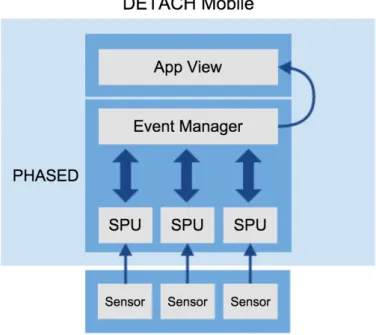
8 Runtime environment updated architecture . . . 30
9 PHASED architecture . . . 31
10 Sensor’s workflow . . . 33
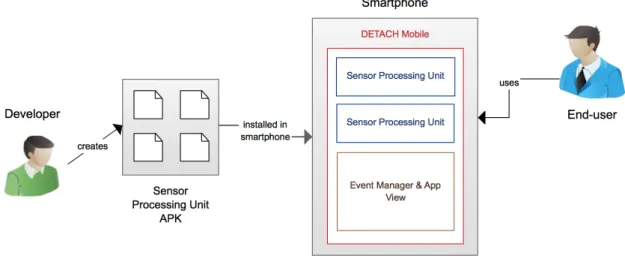
11 Development and installation process of a new Sensor Processing Unit, and related stakeholders . . . 34
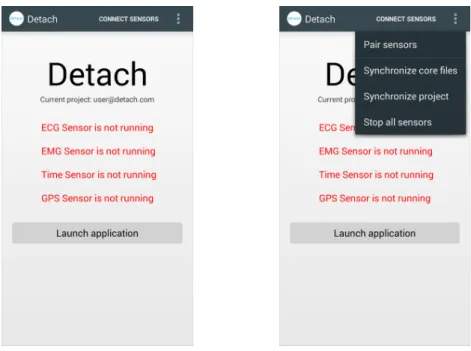
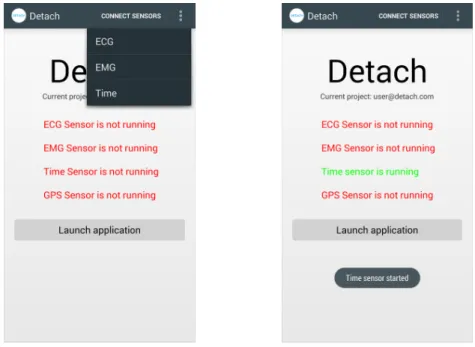
12 DETACH Mobile status screen (left), DETACH Mobile menu options (right) 35 13 List of available sensors (left), Sensor status updated (right) . . . 36
14 DETACH Mobile authentication screen . . . 36
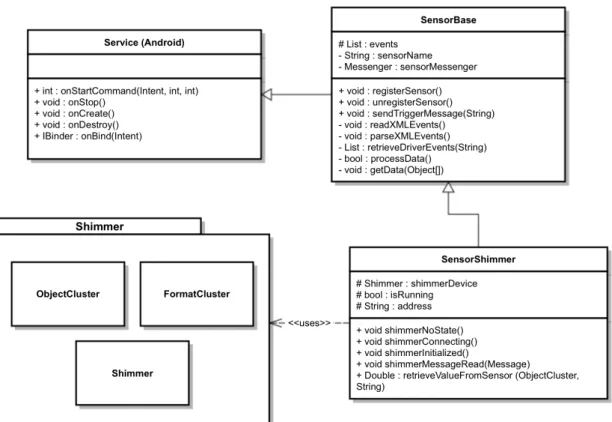
15 UML Class diagram . . . 38
16 Shimmer EMG sensor . . . 44
17 Sample output of Shimmer EMG . . . 44
18 Shimmer ECG sensor . . . 45
19 ECG waveform of a heart beat. . . 45
20 Sample electrocardiogram output of Shimmer ECG . . . 45
21 Emulator tabs . . . 49
22 Alternative interfaces to simulate user’s current location . . . 49
23 Comparison between initial and improved DETACH’s interface . . . 52
24 Panel which allows the configuration of a new transition between screens 53 25 Button to create connections (old interface) . . . 54
26 Visual feedback when creating connections . . . 55
27 AND/OR evaluation mode . . . 55
28 Alternative ways to transit from one screen to another . . . 56
29 Information displayed in transition’s label . . . 56 xvii
30 Screen configuration panel . . . 57
31 Transition details displayed in the right side panel . . . 57
32 Button to delete selected screens . . . 58
33 Trash can area, with visual feedback when deleting a screen . . . 58
34 Available sensors templates . . . 59
35 Transition between screens (without the use of sensors) and correspond-ing triggers . . . 60
36 Transition between two screens using a sensor and corresponding triggers 60 37 External transition using an ECG sensor and corresponding trigger . . . . 61
38 Time sensor representation . . . 61
39 Time sensor condition trigger example . . . 61
40 Location sensor representation . . . 62
41 Location sensor condition trigger example . . . 62
42 ECG sensor representation . . . 63
43 ECG sensor condition trigger example . . . 63
44 EMG sensor representation . . . 63
45 EMG sensor condition trigger examples . . . 63
46 Scenario application - phase 1 . . . 64
47 Scenario application - phase 2 . . . 65
48 Specifying a location to trigger an event when the user goes inside it . . . 65
49 Scenario final application . . . 66
50 DETACH application running in the DETACH Run-Time emulator . . . . 67
51 DETACH run-time emulator with an extra section to simulate sensor’s events . . . 67
52 DETACH run-time emulator after pressing the ”Simulate values” button . 68 53 Scenario application emulation (left), new screen shown after answering the question (right) . . . 69
54 Screen activated (right) when Jo˜ao arrives at the airport (left) . . . 69
55 Screen activated (right) when Jo˜ao’s heart rate goes above 140bpm (left) . 70 56 EMG electrodes placement . . . 74
57 Average time per task (task 1 to 4, respectively) . . . 77
58 Frequency of unsuccessful attempts in template creation . . . 78
59 Feedback about adding a new template in DETACH . . . 78
60 Frequency of unsuccessful attempts when developing the Android module 79 61 Feedback about adding a new sensor module in Android . . . 80
62 External trigger and a transition between screens based on a sensor trig-ger, respectively . . . 82
63 Sketch of an alternative way to use sensors in transitions . . . 82
64 Context menu after right-clicking in a screen/sensor template . . . 83 xviii
List of Tables
1 Map between events and actions . . . 32
Listings
4.1 Android Manifest XML file example . . . 39 4.2 Sensor Service skeleton . . . 40 4.3 Location service implementation . . . 41 4.4 Sensor XML file structure . . . 47 4.5 Example of an Event representation in XML . . . 48 4.6 Location sensor JavaScript file . . . 50
Chapter 1
Introduction
Sensors are becoming increasingly important in interaction design and sensing tech-nologies are becoming pervasive. A significant effort in human-computer interaction has been dedicated to create user-interfaces that rely on sensorial mechanisms.
Nowadays we have a lot of different sensor types such as environmental sensors (e.g. light, temperature, noise), motion sensors, physiological sensors, among others. In addi-tion, most recent smartphones offer numerous technologies, such as the mobile network, Wi-Fi and internal sensors (e.g. GPS1, accelerometer, gyroscope). This proliferation of sensors has created many usage scenarios, which can be enabled with their proper inte-gration into devices of all kinds.
With the evolution and dissemination of smartphones, the integration of sensors in mobile applications becomes more and more a reality. One of the promising fields is in the domain of healthcare and wellness management. New application scenarios have emerged, such as mobile and remote healthcare services for elderly people, self-monitoring services on physical exercise or physical rehabilitation, remote health monitoring services in emergency situations, among others [1]. Over the years, healthcare evolved to a more proactive approach where it is essential to have the ability to detect and prevent certain conditions in patients, and manage their well-being over time [2]. Another scenario, with fewer clinic concerns, is the development of games which use sensors and actuators (e.g. vibration) to interact with the environment of the game, providing an immersive game experience.
Despite the numerous existing scenarios, the need to create and adapt applications for mobile devices is in some areas a recurring activity. In addition, it is also necessary to take into account the complexity to integrate the different sensors available in a practical and fast way, in order to match the needs of each application. This issue can be addressed by creating an environment encompassing programmers and non-programmers, in which
1Global Positioning System
Chapter 1. Introduction 2
the former provide the necessary mechanisms so that the latter can create applications that fulfill their needs, even without programming experience.
To achieve our goals, we developed a set of components responsible for collecting data from sensors. We also extended an existing authoring tool by developing a set of features which enable non-expert users to access sensor’s data and use it in their applications.
1.1
Motivation
The evolution of smartphones and proliferation of all kinds of sensors enabled new applications across a wide variety of domains, such as healthcare [3], social networks [4], environmental monitoring [5] and transportation [6]. Until recently, research in mobile sensing activities, such as user’s activity recognition (e.g. walking, driving, sitting) re-quired specialized mobile devices or platforms to be fabricated. However, the availability of cheap embedded sensors initially included in smartphones (e.g. accelerometer used to change the display orientation) are creating possible new applications [7]. In addition, smartphones come with a large set of resources that offer third-party programmers the tools to develop sensing applications, such as monitoring a user’s well being, tracking sport’s performance, among others [7]. In the health field, several cardiac monitoring systems emerged, such as iRhythm [8], Corventis [9] and Toumaz [10]. In general they have sensors for vital sign monitoring (e.g., ECG2, blood pressure) and motion monitoring through accelerometers, gyroscopes and similar sensors.
Despite using new technologies, the main shortcoming of these systems is the fact that they continue to be dedicated systems, with a very well defined purpose. While this may not be an issue in some domains, there are some cases where the requirements imposed by the domain, change so quickly that it becomes important to create an easy and flexible development environment in such a way that the applications deployed can be rapidly adapted to each situation, without expensive development costs. We also believe that we can combine the potential of smartphones and sensors to create richer and proactive applications. We intend to use smartphones as a personal activity coordination device with many capabilities such as scheduling (e.g. calendaring), personal and generic context-awareness (e.g, GPS location), and others. This context information may be used to adapt the process of sensor data collection and also to initiate additional interactions with the user [11]. Some challenges for context-aware sensing are the diversity of context environments, the range of physiological conditions and issues related to sensors, such as overcoming sensor noise, sensor failure and smooth context recognition [12].
Our motivation is to create a tool that allows users to easily and rapidly prototype
Chapter 1. Introduction 3
mobile applications, addressing the lack of authoring tools that supports the creation of mobile sensing applications. We believe that there are a lot of applications that can be supported by context-information provided by sensors. That information can either be used for simple analysis or for more complex situations. A few examples are:
• Continuous heart monitoring, using sensors like ECG and store the information for later access - typical passive use of sensor data.
• Monitor a user’s chronic disease and in case of failure, automatically call for help -typical active use of sensor data.
• Use motion sensors to create custom movements and match them with specific ac-tions.
We want to collect and transform that information, and provide users with a set of events that can trigger specific behaviours in an application.
1.2
Goals
The main goal of this work is the development of an ecosystem that provides the nec-essary tools to let users compose mobile applications and afterwards, run them in Android devices. Moreover, our work focuses in integrating sensors in the applications created, to collect user’s context-information and create context-aware mobile applications.
To achieve this, our system must provide two different tools:
• A web authoring-tool which allows users without programming skills to create mobile applications. This tool let users customize the applications’ look and feel. Users can also customize the applications’ behavior and use sensors to create appli-cations that adapt to the context of the user.
• An Android run-time environment that interprets and runs the applications cre-ated with the web authoring-tool. In addition, the run-time environment is respon-sible to provide a set of sensors that collect informations about the context of the user. Therefore, it should be able to:
– Collect data from external sensors that are connected to the smartphone via Bluetooth or internal sensors that exist in smartphones (e.g. GPS, accelerom-eter).
– Work with several types of sensors and be flexible in order to easily allow the addition of new sensors to the system.
Chapter 1. Introduction 4
– After the collection of data, optionally, it should be possible to apply some types of processing. This means that for example, we can use the ECG raw data to draw a graph of the user’s heart rhythm or process it to get user’s heart rate.
– Work like an event-based system: Each sensor has a user-defined set of rules that define the system events. This will allow the applications to react differently when facing different contextual information.
1.3
Contributions
This work’s main contributions are:
• Development of an Android runtime environment capable of collecting context data from sensors (internal or external to the smartphone). Additionally, this data can be used to trigger events within mobile applications, making them not only reactive but also proactive.
• Improvements in DETACH’s authoring environment3 to support the creation of sensor-based mobile applications. We included the required mechanisms to allow non-expert users to design applications that can have different flows according to conditional transitions based on sensor’s data.
The following publication emerged from this work:
• Andr´e Justo, Lu´ıs Duarte, Lu´ıs Carric¸o (2014). Integrating Sensors in a Mobile Application Authoring Environment. HCI 2014 - 28th International British Com-puter Society Human ComCom-puter Interaction Conference, SouthPort, UK, Septem-ber, 2014.
1.4
Planning
The development of this thesis work was divided in the following phases:
• Phase 1 - September and October 2013: learning process of the functioning of the sensors and definition of PHASED system
The purpose of this phase was to learn how to work with the sensors available and how to work with some of the technologies that were used in the development process. Additionally, it was also necessary to start working on some aspects related to PHASED, such as the system requirements and the system architecture.
3
Chapter 1. Introduction 5
• Phase 2 - November 2013 until January 2014: development of PHASED During this phase, we started the development of the system. It also included the writing of a preliminary report describing the work made until then and how the work should evolve until the end.
• Phase 3 - February and March 2014: development of DETACH Mobile
This phase consisted on the improvement of several DETACH Mobile functionali-ties.
• Phase 4 - April until July 2014: DETACH’s interface improvements and inte-gration of PHASED and DETACH
During this phase, several interface improvements were made. Some of those im-provements were the result of feedback obtained in previous DETACH trials, while others were related with the inclusion of sensors in the tool.
• Phase 5 - August to October 2014: System evaluation and writing of the Mas-ter’s thesis
Establishment of an experiment to evaluate the work done. Writing of this docu-ment with all the developed work and results achieved.
1.5
Document organization
This document is organized as follows: • Chapter 2 - Related work
In this chapter we focus in some topics and definitions related to the work domain. • Chapter 3 - DETACH Analysis
This chapter gives an overview of the DETACH System. • Chapter 4 - Adding sensors
This chapter describes PHASED - an Android runtime environment to collect user’s context data from sensors and run applications created with DETACH. Here, we also explain the architecture used to tackle the requirements of this work. In the end, this chapter explains how new sensors can be added to the system, from developers’ point of view.
• Chapter 5 - Authoring Sensors
In this chapter we present several DETACH’s interface improvements, mostly due to the integration of sensors in the authoring environment. We also present the process of creating applications with sensors.
Chapter 1. Introduction 6
This chapter presents the results of an experiment done with developers, to evaluate the process of adding new sensors to the system.
• Chapter 7 - Conclusions
This chapter presents a discussion of the full work accomplished and point out possible future work.
Chapter 2
Related work
This chapter presents some aspects related to this project domain. We start by defining context-aware computing and the importance of context in this field of research. After, we present an overview of a wide range of sensors available today, either embedded in modern smartphones or trough dedicated sensor platforms. Since one of the goals of our work is to use context-data to create an event-based system, we also describe the importance of context in these type of systems and explore some approaches used to create systems of this kind. At the end, a description about programming environments is given.
2.1
Context-aware computing
Context is an important factor in human behaviour because people act based on that. The context may relate to external conditions, location, weather conditions and time of the day, among others [13].
In the last years, several context-aware applications emerged, incorporating various kinds of relevant context information in order to improve their usability. Context aware-ness describes the ability of a system to sense user’s state and the environment, and modify its behavior based on this information [12]. Gartner [14] defines “context-aware comput-ing” as the concept of taking advantage of information about the end-user to improve the quality of the interactions. Most of the software only uses direct relevant information like direct inputs, while context-aware systems also acts upon indirect relevant information. The utilization of context in processing is a big step towards modelling the real world be-haviour. Current technology can provide us with information such as user location, user activity and light and noise levels [2]. Location context coupled with user’s identity can be very useful for various service applications [13] and for example a few location-aware guides have been designed for city tours [15].
Chapter 2. Related work 8
An architecture that is aware of the end user’s context and delivers relevant informa-tion was first presented by Gartner as Context Delivery Architecture (CoDA) [14]. CoDA is aimed for event-driven applications and in summary, the functioning of the software elements (e.g., services or event handlers) is determined by the input to the element and by secondary sources of information – the context offered by external sources such as weather or traffic services. That means that two invocation of the same service with the same parameters may yield different results in different circumstances. It also introduces the concept of creating applications through reusable components and aims to enhance user’s experience using the knowledge of context and adapt the application behaviour to it.
2.1.1
Sensors
Context can be acquired by means of different sensors that gather pieces of context information and supply the information for interpretation and utilization in applications. With the deployment of sensor networks it is not only possible to obtain real-time infor-mation about the physical world but also act upon that inforinfor-mation. The accuracy and the timeliness of this information is important since actions are usually taken based upon these sensed values. In general, the quality and the reliability of this data are important issues that have received attention [16, 17]. Acquiring context information can mainly be done in two ways:
1. Explicit acquisition - user is aware that context information is being collected for use by an application and usually needs to give consent for the information to be collected. For example, location sensors in web browsers require authorization to obtain information about the user’s current location.
2. Implicit acquisition - user is normally unaware that context information is being collected either for use by an application or for storage. For example, when the ap-plication uses an accelerometer to implicitly determine the speed at which the user is travelling while accessing the application. Another example of implicit context information acquisition include the recording of a user’s previous interaction with the system [18, 19].
In 2004, Michael Beigl et. al [20] conducted a survey to identify the most typical sensors needed for applications in Ubiquitous and Pervasive Computing. Through a sur-vey of 12 typical existing and implemented applications, they identified 7 general types of sensors - namely movement, light, force, temperature, audio, humidity and proximity. The distribution of sensors among the analyzed applications showed a preference to sen-sors for movement, followed by light and force/pressure. These sensen-sors are especially suited for activity recognition of the object to which the sensor is attached (e.g. to derive
Chapter 2. Related work 9
the general internal context of an object). However, two more sensors must be added to the list of most used sensors: temperature and audio. Both sensors are commonly used to derive information about the environment of the object. These sensors are therefore useful for deriving the situational context of an object.
Since then, mobile phones evolved as a computing platform and acquired richer func-tionalities and these advancements often have been paired with the introduction of new sensors. For example, accelerometers have become common after being initially intro-duced to enhance the user interface and use of the camera. Now, among other things, they are used to automatically determine the orientation in which the user is holding the phone and use that information to automatically re-orient the display between a landscape and portrait view or correctly orient captured photos.
Most modern smartphones include several dedicated sensors, such as gyroscope, com-pass, accelerometer, proximity sensor and ambient light sensor. They also include other more conventional devices that can be used to sense, such as front and back facing cam-eras, microphones, GPS, WiFi, and Bluetooth radios. Many of the newer sensors are added to support the user interface (e.g. the accelerometer) or augment location-based services (e.g. the digital compass).
Several domains capitalized the potential of sensors to improve their application’s ca-pabilities. One of the most common type of context-aware applications are based on user’s location. Applications such as Foursquare1 and museum or tourist guides heavily rely on this information to adapt the information that is presented to the user and are very popular nowadays. GPS is also commonly used in applications to track sport’s performance, such as Runstatic2 and Endomondo3. Non-phone-based mobile sensing devices such as the Intel/University of Washington Mobile Sensing Platform (MSP) [21] have shown value from using other sensors not found in phones today (e.g., barometer, temperature, humid-ity sensors) for activhumid-ity recognition; for example, the accelerometer and barometer make it easy to identify not only when someone is walking, but when they are climbing stairs and in which direction. Other researchers have embedded sensors in standard mobile phone earphones to read a person’s blood pressure [22] or used neural signals from cheap off-the-shelf wireless electroencephalography (EEG) headsets to control mobile phones for hands-free human-mobile phone interaction [23].
Even though it’s evident that sensor capabilities heavily contributed to improve appli-cations used in our daily lives, there is also a problem associated with such appliappli-cations targeted to the general population: most of them are not flexible in order to meet some domain’s requirements. If a user requires a specific functionality, it would be necessary
1http://foursquare.com
2https://www.runtastic.com
Chapter 2. Related work 10
to deploy a whole new version of the system, which is not practical. Instead of creat-ing custom made applications from scratch, a possible solution may be the development of sensor runtime environments where multiple sensors can be integrated to provide an easier way of creating mobile sensing applications.
2.2
Sensor Runtime environments
Event driven architectures have evolved in the last years, changing the traditional com-puting architectures that are based on synchronous request-response interactions between clients and servers. This paradigm shift brings two critical changes:
• Event-based systems support applications that are reactive in nature. Being reactive means that the processing is triggered in response to events, instead of the tradi-tional responsive applications in which processing is done in response to a specific request [24];
• Event-driven architectures adopt the decoupling principle, in which there are event producers, event consumers and event processing agents [24].
The next phase of the evolution of those systems introduces a conceptual architecture known as proactive event-driven computing [24]. Proactivity refers to the ability to iden-tify desired future events and take advantage of future situations by applying prediction and automated decision making technologies.
The growing availability of cheap and pervasive sensor technology, the spreading of broadband connectivity and the developments in predictive analytics technology are some factors that make those systems possible [24]. Analytics has evolved from being descrip-tive (understanding of historical data), to being predicdescrip-tive (providing forecasts of future behaviour). The next step is prescriptive analytics which means the use of data to pre-scribe the best course of action to realize the best outcome [25]. This way, reactive com-puting coupled with predictive analytics brings the ability to react to events before they occur, which is the main objective of proactive event-driven computing.
The conceptual model of proactive event-driven applications is built over the existing work in event processing architectures. The core of this model is the notion of event processing network (EPN). This notion has been defined by Luckham [26] and refined by Etzion and Niblett [27] as a collection of event processing agents (EPA), producers and consumers. Those agents are in an intermediary layer that stands between the event producers and consumers. The main types of event processing agents are:
• Filter - decides whether an event continues to flow in the system, based on satisfac-tion of an assersatisfac-tion;
Chapter 2. Related work 11
• Transformation - derives events as function of input in various ways (for example, aggregation);
• Pattern detection - derives events based on detection of patterns.
This work follows the guidelines of an event-based system and will focus mainly on filter and transformation agents. Filter agents will be used to process events triggered by rules with one condition only, such as the current location of the user. Transformation agents are useful to process more complex events and will be essentially used to aggregate various rules (e.g., current location of the user and time of the day). The agents will use the data collected by the sensors and analyze each sensor’s rules in order to trigger, or not, the action attached to the event.
2.2.1
Context in event processing modelling
In event processing, context plays the same role that it plays in real life: a particular event is processed in a different way depending on the context in which it occurs and may be ignored in some contexts. In context aware computing it might be useful to take a set of events and group them into context partitions so that they can be processed in a related way. The way events are grouped is defined by context dimensions that tell us what aspect of the event is used to do the grouping. There are various context dimensions, such as temporal, spatial, state oriented and segmentation oriented [13].
Temporal context
This type of context is aimed to partition the temporal space into time intervals. The typical use of temporal context is to group events to process them together based on the fact they have occurred during the same time interval.
Spatial context
Spatial context groups events according to their geospatial characteristics. There are three types of spatial contexts:
• Fixed location - context partitions are associated with the location of a reference entity called geofence. An event is classified into a context partition if its location is inside the spatial entity.
• Entity distance location - context partition is based on the distance between the event’s location and some other entity.
Chapter 2. Related work 12
• Event distance location - this type specifies an event type and a matching expression predicate. If an event occurrence that matches the predicate is detected, then a new partition is created.
Segmentation oriented context
State-oriented context differs from the previous dimensions because the context is determined by the state of some entity that is external to the event processing system.
Our work will mainly use temporal and segmentation oriented context dimensions. When an event is triggered by a rule with one condition only (e.g. heart rate above 80bpm) it is not required to use any context dimension presented above. However, when using rules with several conditions (e.g. heart rate above 80bpm and current location of the user) it is required to group those events in a temporal context (to ensure that both events occurred in the same time span) and in a segmentation oriented context (to ensure that both events belong to the same rule).
2.2.2
Event filtering approaches
The approach chosen by each system is very important because it defines how things work and therefore it defines key aspects of the system such as the importance of the mobile device or the amount of data retrieved from the sensors (and consequently the amount of processing needed to compute it all).
Many health monitoring systems use a 3-tier remote monitoring architecture [28, 29] where a personal device such as a smartphone acts as a hub that collects data from body-worn biomedical sensors and later transmit the data (with or without additional process-ing) to a backend server. Some prototypes that rely on the 3-tier architecture are geared towards low-intensity sensors (e.g., weight scales or glucose readings) [30]. In these cases the mobile device doesn’t do any local processing and the data is sent to the remote server for either real-time or offline analysis.
In [31], a middleware known as HARMONI (Healthcare-Oriented Remote Monitor-ing) uses a rule engine on the mobile device to support context-aware distributed event processing where the mobile device dynamically changes its processing of the sensor streams based on changes in both local and external context. Processing refers to opera-tions that may be performed on the sensor data, such as filtering (e.g., heart rate between 70-90), statistical summarization (e.g., average of heart rate readings over a period of
Chapter 2. Related work 13
time) or feature extraction (e.g., obtain the QRS4 components of an ECG signal). HAR-MONI also supports the concept of adaptive sensor event processing. As monitoring ap-plications are typically interested only in higher-layer events (e.g., arrhythmia from ECG readings) or statistical summarization, HARMONI uses a spatio-temporal processing on the mobile device to filter relevant data. In [11] there’s also another approach denoted as activity-triggered deep monitoring (ATDM) that focus on applications that need to trans-mit potentially high-rate data streams of data, but only when a specific contextual activity of the patient is detected.
The activity-triggered deep monitoring and HARMONI approaches have the advan-tage of reducing the amount of data collected by each sensor. This is very helpful to reduce the amount of processing that has to be done and avoids wasting unnecessary re-sources. However, in order to dynamically change the process of collection of data, other techniques are required to understand the activity or the context of the user (e.g. if user is walking, running or sleeping). This can be a limitation if we don’t have the resources to achieve that.
Other approaches focus on the continuous transmission of data from various ’always-on’ sensors. To reduce the higher volumes of sensor data that will arise from the use of continually-transmitting sensors (such as ECG or EMG), Mohomed et al. [31] proposes the use of data management middleware that distributes the processing across both the mobile device and the backend. The principal focus is the exploration of the user’s con-text (both physiological and activity) to adapt the stream processing logic on the client device. This focus is motivated by the fact that both the medical events being observed and the expected values for medical parameters (e.g., heart rate) are often a function of an individual’s activity (e.g., walking or running) and her medical context (e.g., prescribed medication).
Continuous sensing raises considerable challenges in comparison to sensing applica-tions that require a short time window of data. There is an energy tax associated with continuously sensing and potentially uploading in real time to the cloud for further pro-cessing. Solutions that limit the cost of continuous sensing and reduce the communication overheard are necessary. If the interpretation of the data can tolerate delays of an entire day, it might be acceptable if the phone can collect and store the sensor data until the end of the day and upload when the phone is being charged. However, this delay-tolerant model of sensor sampling and processing severely limits the ability of the phone to react and be aware of its context. Successful sensing applications will have to be smart enough to adapt to situations. There is a need to study the trade-off of continuous sensing with the goal of minimizing the energy cost while offering sufficient accuracy and real-time
4The QRS complex is a name for the combination of three of the graphical deflections seen on a typical
Chapter 2. Related work 14
responsiveness to make the application useful.
In our work, users have the ability to manually start and stop sensors. When a sen-sor is started, it uses a ’always-on’ approach to constantly collect and process data, and eventually fire events. However, our system also supports the ability to use context infor-mation from ”low-cost” (in terms of resources consumption) sensors (e.g. Time sensor) to activate ”heavier” sensors (e.g. GPS) that usually drain considerable amounts of bat-tery when used. As an example, users can personalize the activation of sensors based on his/her daily activities. The main benefit of this approach is to reduce sensors’ uptime and consequently reduce the amount of processing that needs to be done and minimize the energy problem associated with continuous sensing.
2.3
Sensor Programming environments
End-user programming allows people who are not professional developers to create and modify software. The programming environments used by end-users include spread-sheet systems, authoring tools and visual programming languages. With these tools, users are able to write and edit formulas, drag and drop objects to create their programs [32]. Visual programming consists in moving graphical elements instead of typing code to pro-gram something. This type of propro-gramming is very attractive to young people who have the goal to create simple applications or simple interactive games and is very popular in educational technology. Scratch [33] is a visual programming environment that allows users to use event driven programming to create interactive projects. Users have at their disposal a set of blocks that can be snapped together to create a sequence of commands and the blocks visually fit together like puzzle pieces. There are four kinds of blocks: command blocks, function blocks, trigger blocks and control structure blocks. Scratch is a powerful tool and allows to create a wide range of projects, including animated stories, games and educational projects.
Inspired by Scratch programming language and environment, Catroid [34] is a similar tool intended for the use by kids and runs on smartphones and tablets. Programs are con-structed using visual Lego-style pieces where commands are stuck together by arranging them visually. Catroid focus on devices with multi-touch screens and take advantages of many sensors built into smartphones/tablets such as acceleration or gyroscope sensors, or GPS for location based programs. Catroid also allow to wirelessly control external hardware such as Lego robots and other devices.
In [35], a programming environment to create physics-based games (such as Angry Birds) called Fizz is presented. This system allows children to produce games and simula-tions using events and drag and drop programming. The main idea of Fizz is that scenes of
Chapter 2. Related work 15
games, stories or simulations are created from toys which have properties and behaviours. The properties include colour and the 2D physics simulation characteristics shape, mass, and elasticity. There are default properties so that children do not need to modify them unless they wish to. Behaviours are lists of actions the toys perform when certain events occur. A careful combination of these foundations enables children to produce interesting and engaging programs.
Although none of the presented tools is related to this project main goal, this research shows that visual programming tools can be useful to domains where stakeholders are non-expert programmers and therefore can create personalized applications if they are supported by the necessary tools. Having said that, we believe that applications can take advantage of using sensors in many ways if non-expert users have the ability to control those using only visual elements, making the production of applications much simpler and richer.
2.3.1
Context-aware prototyping environments
Over the years, several systems and infrastructures have been developed to provide developers with toolkits that enables the creation of context-aware applications. Even though those tools and technological advances for acquiring contextual information con-tributed to the development of numerous context-aware applications, there was still a lack of authoring environments supporting both programmers and end-users. This lack of support closes off the context-aware application design space to a larger group of users. Without a proper authoring environment, developing a context-aware application requires developers and end-users to work together to either build an application from scratch (in-volving direct interaction with hardware sensors and devices) or to use low-level sensor toolkits. Either way, in order to acquire context information, large amounts of code must be written to develop simple sensor-based applications. Those limitations narrow the design of interesting applications because end-users have less control over how the appli-cations behave. Since they have more knowledge about their activities and surrounding environments than anyone else, they need the ability to create and modify applications as those activities and environments change. In summary, end-users without technical expertise must be able to rapidly prototype applications and have control over such appli-cations, or else they might fail to meet users’ needs.
To address this problem, some systems were created to empower end-users in building context-aware applications by lowering barriers and allowing the development of appli-cations that match their needs without requiring them to write code [36, 37, 38]. iCAP (Interactive Context-aware Application Prototyper) [36] is a system that allows end-users to visually design a variety of context-aware applications based on if-then rules,
tem-Chapter 2. Related work 16
poral and spatial relationships and environment personalization. iCAP allows users to prototype applications by describing situations and associate specific actions to it which results in exerting control over sensing systems and dictate application behavior. Topi-ary [37] was created to enable the rapid prototyping of location-enhanced applications. Topiary builds storyboards from scenarios that represent local contexts. These scenar-ios are demonstrated by the end-user and the constructed storyboards describe interaction sequences that can run on mobile devices. “a CAPella” [38] is a context-aware proto-typing environment that gives the end-user the ability to program by demonstration. Its main components are: a recording system, an event detection engine, a user interface and a machine learning system. More recently, Realinho et. al [39, 40] developed the IVO (Integrated Virtual Operator) platform which also enables end-users to build and deploy context-aware applications. This platform is composed by a visual programming appli-cation builder available on the web (IVO Builder) where users can define a set of context conditions (spatial and temporal) and workflows of activities, which are later triggered when the user is in the presence of those contexts. There is also a smartphone runtime layer (IVO Client) that loads the developed applications and provides a Workflow Engine to enable the coordination of the flow of activities.
Most of the systems stated above were developed when the research in context-aware computing started to become more important. Even though they provided important con-tributions in empowering end-users to create context-aware applications, all the systems (except IVO) are outdated and don’t support the newest mobile OS. In addition, the ma-jority have a big focus in location-based scenarios which narrows the domains where such applications can be used. Another important difference when compared with our work is that it seems the applications created with those systems are just a set of context scenarios (without any relationship) which triggers actions when facing those contexts. With our work, we want to create an authoring environment where users can create and customize the screens of the application and create transitions between them. In addition, the context information collected will be used to either trigger those transitions or automatically start additional interactions with the user (e.g. automatically open the application and prompt the user to fill a form).
As far as we are concerned, there are few authoring tools that enable end-users with-out programming expertise to create mobile applications that: a) support sensor based interactions; b) use context-information to adapt application’s behavior based on different scenarios. Even though sensors are becoming important in interaction design, specify-ing the relationship between sensor values and application logic still remains an exercise of trial-and-error [41]. Hartmann et al. [41] introduces techniques for authoring sensor-based interactions by demonstration. A combination of direct manipulation and pattern recognition techniques enables designers to control how demonstrated examples are
gen-Chapter 2. Related work 17
eralized to create interaction rules. In our work, we aim at providing a set of sensor events that can be easily used by non-expert users. Even though we try to use a higher level of abstraction, some events may require additional configuration (e.g. define a range of values in which the event may occur).
2.3.2
DETACH
DETACH5 [42, 43] is an authoring tool which was created to target therapists that need to design and deploy mobile applications for Cognitive Behavioral Therapy (CBT) procedures. This type of therapy is usually divided in two different kinds of sessions: there are sessions where the therapist and the patient are both inside an office; and sessions where the patient needs to follow some homework tasks. In this domain, the ability for those homework tasks to adapt to the patient’s evolution is crucial to ensure the success of the treatment. The use of technology solutions proved to improve patient engagement as well as improving registry organization, since paper artefacts can be replaced with digital ones. However, the diversity of pathologies and the fast change of application’s requirements undermines the common approach of creating dedicated solutions to each patient. To address these limitations, DETACH allows therapists without programming experience to quickly create applications tailored to each patient’s needs.
The development of DETACH started with a series of participatory design and think-ing aloud trials with non-programmer users aimthink-ing to understand how they conceptualized programming. The results of interacting with low and high fidelity prototypes provided a set of interaction patterns and behaviors used to design the final DETACH tool. Final evaluations showed that the tool fulfilled all the initials requirements by allowing health professionals, and people with no programming experience, to create applications and run them in a mobile runtime environment.
Even though DETACH was developed to provide solutions in the health domain, there are other domains where DETACH’s applications can be useful. In this work we are going to extend DETACH’s capabilities by integrating sensors in the environment. A detailed explanation about DETACH is given in Chapter 3.
2.4
Summary
In this chapter we started by presenting the importance of context in ubiquitous appli-cations that are developed nowadays. With the evolution of smartphones and the availabil-ity of sensors (either embedded or external) obtaining context information about user’s
Chapter 2. Related work 18
tivity or user’s surrounding environments becomes easier. Even though numerous context-aware applications have been developed, most of them are dedicated applications with a well-defined purpose and don’t provide any expandability (in terms of adding new sen-sors to the application) or customization to fit several scenarios. There are domains where applications’ requirements are often changing and developing a context-aware tion from scratch is expensive and time consuming. In addition, creating such applica-tions involve working with several sensors from different manufacturers and with different hardware specifications which requires some expertise. Another problem is the fact that end-users have a deeper knowledge of their activities and surrounding environments that everyone else; however, they may fail to translate this knowledge to applications require-ments.
In order to overcome the problems stated above, there is a need to develop a visual prototyping environment that enables end-users to build context-aware applications with-out writing any code. The goal of this environment is to empower end-users and let them have an active role in application’s composition. The literature presented in this chapter shown us that existing visual programming environments produced positive results when used by non-expert users. This motivate us to create an environment where users can use sensor’s context information to create reactive and proactive applications. This environ-ment also provides two benefits: expand the design space of context-aware application design to a larger group of users and give end-users the ability to control what should happen in those applications. Some challenges to create an ecosystem that allows the development and execution of applications with sensors are:
• Providing an easy and flexible way to let users customize application’s behavior by using events provided by sensors.
• Collecting context informations from sensors and transform it in higher-level events that can be easily understood by non-expert users.
• Creating a rule engine that sits between the visual authoring environment and the mobile runtime environment. Most context-aware applications can be described as a collection of rule-based conditions where if some condition is matched then some behavior is triggered in the application.
• Creating a versatile runtime environment that works with all kinds of sensors, in order to match the requirements of different domains.
Chapter 3
DETACH Analysis
In this chapter we present a global overview of the DETACH system. This overview provides the necessary background about the current state of DETACH, presenting some important concepts which allows the reader to understand how the system works.
In the end, we discuss several constraints related to the integration of sensors in the system. Overcoming these constraints by providing the required mechanisms to com-pose sensor-based applications and collect context-data from sensors are our goals in later chapters.
3.1
System architecture
This system comprises three different components:
• a web tool to create mobile applications, denominated DETACH.
• a mobile runtime environment capable of running the created applications called DETACH Mobile.
• a database in which applications and user data is stored.
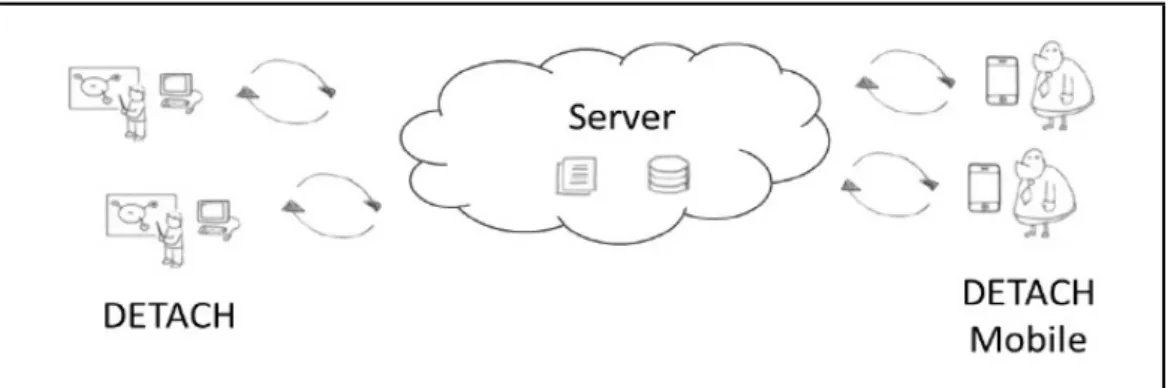
DETACH and DETACH Mobile use a thin client/fat server architecture. This archi-tecture is shown in Figure 1.
Chapter 3. DETACH Analysis 20
Figure 1: DETACH’s system architecture
This architecture covers three types of stakeholders:
• Non-Expert Programmers: should be able to easily create mobile applications using the available screen templates, personalizing their contents and behavior as they want in order to satisfy their needs.
• IT Professionals: responsible for the creation and maintenance of DETACH’s com-ponents.
• Mobile Application End-Users: should be able to use the mobile application that was assigned to them.
3.2
DETACH Authoring Tool
Having in mind that DETACH is aimed at people without programming experience, the tool was developed as a web application to ensure that no installations or configu-rations were necessary prior to using the tool to create applications. This choice also ensures that all users working on different operating systems and different devices can use the authoring tool without any constraint.
DETACH’s interface was built with HTML5, CSS3 and Javascript. DETACH server also uses PHP and MySQL to handle some functionalities such as user and application management.
3.2.1
Applications’ anatomy
Like any mobile application, each DETACH application is comprised by a set of screens. To ease and guide the authoring process, users have at their disposal a set of template screens, each one with different content elements and a purpose (e.g. display a
Chapter 3. DETACH Analysis 21
message, display images, ask a question). The content elements of each screen are cus-tomizable by users; however, users can’t add additional content elements to the screen. Screen templates are developed and maintained by developers. To control the behavior of an application, users must specify transitions between screens. Transitions may de-pend on simple navigation elements (e.g. navigation buttons) or content elements (e.g. radio buttons) and are represented as arrows. The anatomy of a DETACH application is summarized in Figure 2.
Figure 2: Anatomy of a DETACH application
3.2.2
Interface
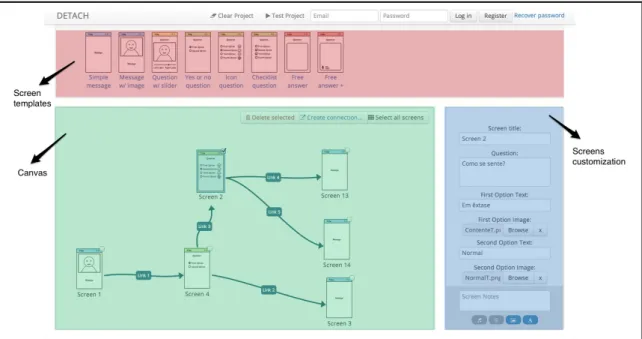
The interface of the web application (Figure 3) is divided in three distinct areas: • A top section containing the available screen templates which can be used to
com-pose applications (red layer in Figure 3).
• A central canvas to which screen templates can be dragged and organized (green layer).
• A configuration panel on the right side that enables the customization of the selected screen(s) in the canvas (blue layer).
Chapter 3. DETACH Analysis 22
Figure 3: DETACH interface
3.2.2.1 Screen templates
To create applications, users can choose from a set of available screen templates (Fig-ure 4):
• Screens containing only messages (blue color).
• Screens containing dynamic content that changes according to user answers (yellow color).
• Screens containing questions with possible choices (green color). • Screens containing free answer questions (red color).
Figure 4: DETACH mobile screen templates
When a screen template is clicked or dragged into the canvas, that screen is added to the current application. Each screen template contains different elements that can be
Chapter 3. DETACH Analysis 23
customized, using the configuration panel located on the right side of the interface. Com-mon to all screens are the screen title, screen notes (small appointments, only visible to the user which is creating the application) and screen add-ons (audio, subliminal content, background and text customization). Each screen template may have other fields that can be personalized by the user.
3.2.2.2 Screen triggers
In addition to dragging screens to the canvas, users also need to specify transitions between screens (represented in the canvas as blue arrows, linking one screen to another). Even though each screen template offers different triggers, we can group them in two categories:
• Triggers based on navigation elements: These triggers allow actions based on navigation elements, such as clicking the ”next button” available in all screen tem-plates. They are particularly used with screen templates that only display static content (such as text and images) that don’t provide additional user interactions. • Triggers based on screen content: Some screen templates have content elements
(e.g. radio buttons, check boxes, sliders) that provide additional user interactions, and therefore give users the possibility to control the transitions based on the current state of the contents (e.g. if radio button 1 is selected goes to screen 2, otherwise goes to screen 3).
Transition can be customized through a connection definition panel that appears after a connection is created (Figure 5).
Chapter 3. DETACH Analysis 24
3.2.2.3 Runtime Emulator
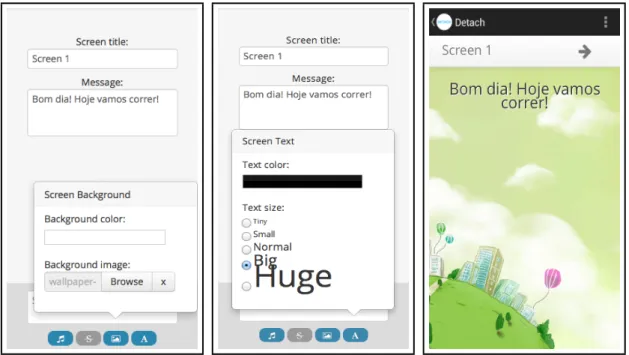
DETACH also provides a runtime emulator that let users quickly preview how a mo-bile application created with DETACH would look in a smartphone. This emulator allows a person to test the application’s interface, content, sound, styling and behavior without the hassle of deploying the application to a smartphone, which is very handy when proto-typing new applications.
Figure 6: Example screen configuration and respective run-time result
3.3
DETACH Mobile
DETACH Mobile is a runtime environment, built on top of Android OS, capable of running applications created with DETACH. It uses Java with an Android WebView that handles HTML5, CSS3 and Javascript content the same way as DETACH Runtime Em-ulator. This solution requires an active internet connection to authenticate users and load application’s contents from server in real-time.
Users can navigate through the application screens (Figure 7) back and forward and this information is appended to a log file which can be viewed later by the application’s author.
Chapter 3. DETACH Analysis 25
Figure 7: Application running in DETACH Mobile
3.4
Constraints in sensor integration
In order to better perceive most of the requirements of our work, first we must un-derstand current DETACH limitations regarding the integration of sensors in the system. Including sensor-based interactions requires improvements and modifications in both DE-TACH’s environments: authoring and mobile runtime. In this section we individually discuss the constraints of each environment, which are addressed in later chapters.
3.4.1
Runtime environment
Context awareness is widely used in ubiquitous computing in order to perceive user’s activity or surrounding environment, and react accordingly. Being ’context aware’ means that raw data from sensors have to be analyzed and converted into a description that makes sense for both applications and users. Our goal in this work goes beyond collecting con-text data from users; we want to take advantage of such information to create more dy-namic and proactive applications.
Currently DETACH Mobile, the runtime environment, merely contains a way to run DETACH applications. Until now, the capabilities of this environment were enough to address the existing requirements; however, integrating sensors to collect context data and control the behavior of an application arises several problems: