A Beginner’s Guide to FreeBasic
Richard D. Clark
Ebben Feagan
Copyright (c) Ebben Feagan and Richard Clark.
Permission is granted to copy, distribute and/or modify this document under the terms of the GNU Free Documentation License, Version 1.2 or any later version published by the Free Software Foundation;
with no Invariant Sections, no Front-Cover Texts, and no Back-Cover Texts. A copy of the license is included in the section entitled "GNU
Free Documentation License".
The source code was compiled under version .17b of the FreeBasic compiler and tested under Windows 2000 Professional and Ubuntu Linux 6.06. Later compiler versions may require changes to the source code to compile successfully and results may differ under different operating systems. All source code is released under version 2 of the Gnu Public License (http://www.gnu.org/copyleft/gpl.html). The source code is provided AS IS,
WITHOUT ANY WARRANTY; without even the implied warranty of MERCHANTABILITY or FITNESS FOR A PARTICULAR PURPOSE.
Microsoft Windows®, Visual Basic® and QuickBasic® are registered trademarks and are copyright © Microsoft Corporation. Ubuntu is a registered trademark of Canonical
Acknowledgments
Writing a book is difficult business, especially a book on programming. It is impossible to know how to do everything in a particular language, and everyone learns something from the programming community. I have learned a multitude of things from the FreeBasic community and I want to send my thanks to all of those who have taken the time to post answers and examples to questions.
I would also like to say a big thanks to the developers of FreeBasic. Without your continual hard work in development, we wouldn’t have what I consider the premier Open Source BASIC language for today.
About the Book
FBeginner is a concise, hands-on beginner’s guide to FreeBasic and is aimed at the novice programmer. The book assumes no prior programming knowledge. The goal of the book is to create a solid foundation in the basics of programming in FreeBasic that the programmer can build and expand upon.
FreeBasic is a cross-platform compiler, however this book concentrates on using FreeBasic under the 32-bit Microsoft Windows™ and GNU/Linux operating systems. However, other than the installation and setup portions of this book, most of the code should run under any of the supported platforms.
All of the source code presented in this book is original code, and can be
Conventions Used in the Book
The various styles used in the book along with their meaning, are listed below. The basic paragraph format is the font you see here with each paragraph indented.
Information that is supplemental to the topic being discussed will be presented in the format below.
These colored boxes have additional, supplemental or historical information associated with the current topic being discussed.
Source code is listed in a fixed font with borders to delimit the code segment. You should always type in the programs. Most are small and can be entered into the editor in just a couple of minutes. The physical act of typing in the programs will help you learn the vocabulary and structure of FreeBasic. You do not type in the line numbers; they are only for referencing the code in the text. The file name for the program is located after the code segment.
1 2 3
4 5
Option Explicit Cls
Print "Hello World From FreeBasic!"
Sleep End
Listing 1: helloworld.bas
Following each listing is an analysis paragraph which explains how the program works. It is marked by the word Analysis: in bold with a fixed font. Even though many of the keywords you will see may have not be discussed in detail in the text, seeing these keywords in action will help you become familiar with the vocabulary of FreeBasic.
Analysis: This will mark the beginning of an analysis section. The code will be discussed using the line numbers referenced in the listing. You do not type the numbers in the editor.
The output of a program is listed in a fixed font and enclosed in a gray box as shown below. This output is given so you can compare the results to see if you have entered the program correctly.
Hello World from FreeBasic!
Output 1: program.bas
A potential problem is shown with a Caution paragraph. It is formatted similarly to the Analysis paragraph.
Table of Contents
1 A Brief Introduction to FreeBASIC...14
DIFFERENCES FROM QUICKBASIC...14
KEY FEATURES OF FREEBASIC...15
2 Numeric Data Types...18
SIGNED VERSUS UNSIGNED DATA TYPES...18
THE FLOATING POINT DATA TYPE...19
POINTER DATA TYPES...19
NUMERIC VARIABLES...19
THE DIM STATEMENT...20
SHARED VARIABLES...20
STATIC VARIABLES...21
COMMON VARIABLES...22
EXTERNAND IMPORT VARIABLES...22
DATA TYPE SUFFIXES...22
CHANGING THE DEFAULT DATA TYPE...23
USING DIFFERENT NUMBER FORMATS...24
Hexadecimal Numbers...24
Binary Numbers...24
Octal Numbers...24
Exponential Numbers...24
WHICH DATA TYPE TO USE?...25
OPTION EXPLICIT...25
A NOTEABOUT OPTION EXPLICIT ...26
A LOOK AHEAD...26
EXCERCISES...27
3 Converting Numeric Data Types...28
IMPLICIT DATA CONVERSION...28
EXPLICIT DATA CONVERSION...30
Numeric Data Conversion Functions...30
Using Conversion Functions in Macros...33
Decimal Rounding Functions...36
A LOOK AHEAD...37
EXERCISES...38
4 Introduction to the C Runtime Library...39
THE DECLARATION STATEMENT...41
RUNTIME CONVERSION FUNCTIONS...42
THE ADDRESSOF OPERATOR @...43
TESTINGTHE RUNTIME CONVERSION FUNCTIONS...45
A LOOK AHEAD...46
5 Arithmetic Operators...47
ARITHMETIC OPERATORS...47
SHORTCUT ARITHMETIC OPERATORS...51
BINARY NUMBER SYSTEM...52
THE SIGN BIT...52
A LOOK AHEAD...54
6 Bitwise Operators...55
THE NOT OPERATOR...55
THE AND OPERATOR...56
THE OR OPERATOR...58
THE XOR OPERATOR...60
THE EQV OPERATOR...61
THE IMP OPERATOR...63
SHORTCUT BITWISE OPERATORS...63
THE SHL AND SHR OPERATORS...64
BITWISE MACROS... ...66
A LOOK AHEAD...67
7 Mathematical Functions...68
TRIGONOMETRIC FUNCTIONS ...69
ABSOLUTE VALUEAND THE SGN FUNCTION...70
LOGARITHMS...71
THE C RUNTIME LIBRARY MATH CONSTANTSAND FUNCTIONS...72
CRT Math Constants...72
Selected CRT Math Functions...74
A LOOK AHEAD...75
8 Pointer Data Type...76
POINTERSAND MEMORY...76
TYPEDAND UNTYPED POINTERS...78
POINTER OPERATORS...78
MEMORY FUNCTIONS...78
POINTER FUNCTIONS...82
SUBROUTINEAND FUNCTION POINTERS...83
CREATING A CALLBACK FUNCTION...85
POINTERTO POINTER...89
A LOOK AHEAD...92
9 String Data Types...93
DYNAMIC STRINGS... ...94
FIXED LENGTH STRINGS...96
ZSTRINGS... ...97
WSTRINGS... ...99
STRING FUNCTIONS...99
LEN VERSUS SIZEOF...101
USING STRING FUNCTIONSWITH ZSTRING POINTERS...103
THE MK* AND CV* STRING FUNCTIONS...104
NUMERIC STRING CONVERSION FUNCTIONS...107
WIDE STRING FUNCTIONS...108
STRING OPERATORS...109
CRT CHARACTERAND STRING FUNCTIONS...109
Character Functions...109
Strtok Function...113
A LOOK AHEAD...115
10 Composite Data Types...116
TYPES...116
Types Within Types...118
Type Assignments...121
Pointers to Types...124
Type Memory Arrays...127
Dynamic Arrays in Types...129
Function Pointers in Types...134
Forward References...137
Bit Fields...137
The Field Property...138
TYPE INITIALIZATION...139
UNIONS...140
Types in Unions...141
Unions in Types...142
11 Symbolic Constants...145
#DEFINE ASA CONSTANT...145
THE CONST KEYWORD...146
CONST VERSUS #DEFINE...146
ENUMERATIONS...146
A LOOK AHEAD...147
12 Arrays...149
ONE-DIMENSIONAL ARRAYS...149
One-Dimensional Array Indexes...149
TWO-DIMENSIONAL ARRAYS...150
Two-Dimensional Array Indexes...150
MULTI-DIMENSIONAL ARRAYS...150
DYNAMIC ARRAYS... ...152
ARRAY FUNCTIONS...155
ARRAYSOF TYPES...158
ARRAYSIN TYPES...162
ARRAY INITIALIZATION...166
TYPE ARRAY INITIALIZATION...168
CRT ARRAY FUNCTIONS...170
USINGTHE -EXX COMPILER SWITCH...172
A LOOK AHEAD...173
13 Date and Time Functions...174
INTRINSIC DATEAND TIME FUNCTIONS...174
EXTENDED DATEAND TIME FUNCTIONS...176
DateAdd Function...176
DateDiff Function...180
DatePart Function...181
DateSerial Function...183
DateValue Function...184
Day Function...185
Hour Function...185
Minute Function...187
Month Function...187
MonthName Function...187
Now Function...188
Second Function...188
TimeValue Function...190
Year Function...190
Weekday Function...190
WeekDayName Function...191
A LOOK AHEAD...191
14 The Format Function...192
STRING FORMAT CHARACTERS...192
NUMERIC FORMAT CHARACTERS...192
DATE FORMAT CHARACTERS...194
TIME FORMAT CHARACTERS...196
A LOOK AHEAD...197
15 Console Programming...199
THE CONSOLE SCREEN...199
THE CONSOLE FUNCTIONS... ...199
CONSOLE COLORS...201
POSITIONING TEXT...203
PRINTING TEXT...204
DETERMINING AND SETTINGTHE SIZEOFTHE CONSOLE...204
GETTING USER INPUT...206
INKEY...207
GETKEY...209
INPUT...209
LINE INPUT...210
USINGTHE MOUSE...210
CREATING A TEXT VIEW PORT...212
A LOOK AHEAD...216
16Control Structures...217
A PROGRAMIS A STATE MACHINE...217
THE IF STATEMENT BLOCK...218
Using Bitwise Operators in an If Statement...219
The Not Problem...219
The Single-Line If Statement...219
The If Code Block...220
Nested If Statements...220
The Else Statement...221
The ElseIf Statement...221
THE SELECT CASE STATEMENT BLOCK...226
17 Appendix A: GNU Free Documentation License...229
18 Appendix B: Setting Up FreeBasic Under Microsoft Windows...236
INSTALLING FBIDE...238
SETTING UP FBIDE...238
COMPILING YOUR FIRST PROGRAM...239
ADDITIONAL RESOURCES...240
INTRODUCTIONTO FBIDE...241
GENERAL SETTINGS...241
MOST RECENT USED FILES LIST...243
SYNTAX HIGHLIGHTING...243
THEMES...244
KEYWORDS...245
TABBED INTERFACE...246
LINE NUMBERS...246
RESULTS WINDOW...247
SUBROUTINE AND FUNCTION FOLDING...247
SAVE FILE INDICATOR...248
QUIT TAB SELECT AND CLOSE TAB...248
EDITINGAND FORMAT FUNCTIONS...248
BLOCK COMMENT-UNCOMMENT...249
BRACKET MATCHING...250
SUBROUTINE AND FUNCTION BROWSER...251
RUNNING PROGRAMS AND CREATING EXECUTABLES...251
ADDING AN ICON TO YOUR PROGRAM...252
FREEBASIC HELP FILE...253
If we look at the fact, we shall find that the great inventions of the age are not, with us at least, always produced in universities.
1
A Brief Introduction to FreeBASIC
FreeBASIC is a 32-bit BASIC compiler that outputs native code for Microsoft Windows, Linux and DOS via DJGPP. FreeBASIC is also Open Source, which means any one may freely view and edit the source to suit their needs. Quickbasic Compatibility is FreeBASIC's call to fame, for it is the most compatible compiler available.
Differences from QuickBASIC
● Default (DEF###) type of not explicitly declared variables
● FreeBASIC: INTEGER
● QuickBASIC: Single
● INTEGER's size
● FreeBASIC: 32-bit, use SHORT type for 16-bit integers
● QuickBASIC: 16-bit
● Function calling
● FreeBASIC: All functions must have been declared, even with CALL. ● QuickBASIC: With CALL it is possible to invoke prototype-less functions.
● Arrays not declared
● FreeBASIC: All functions must be explicitly declared.
● QuickBASIC: Arrays are automagically created with up to 10 indexes.
● Variables with the same names as keywords
● FreeBASIC: Not allowed, even with suffixes.
● QuickBASIC: Allowed if no suffix is used (ie, dim LEFT as integer).
● Alignment / Padding of TYPE fields
● FreeBASIC: Same as in C, use FIELD=constant to change. ● QuickBASIC: Never done.
● Fixed-Length strings
● FreeBASIC: Real length is the given len plus one (null char), even on TYPE fields. Strings are filled with nulls, so strings can't contain null characters.
Key Features of FreeBASIC
● Built-in Graphics library
● Completely compatible with old QB Graphics commands, but it builds on this to offer much more.
● Support for high resolutions and any color depth, and any number of offscreen pages.
● All drawing functions can operate on screen as well as on offscreen surfaces (GET/PUT buffers) of any size.
● Advanced sprites handling, with clipping, transparency, alpha and custom blending.
● Direct access to screen memory.
● BMP loading/saving capabilities.
● OpenGL support: init an OpenGL mode with a single command, then use GL instructions directly.
● Keyboard, mouse and joystick handling functions.
● The Graphics library is fast: MMX optimized routines are used if MMX is available.
● Small footprint: when using Graphics commands, your EXEs will grow in size by a minimum of 30/40K only.
● Stand-aloness: generated EXEs will depend only upon system libs, no
external libraries required.
● As all of FB, also gfxlib is completely multiplatform: underneath it uses
DirectX or GDI (if DX is not available) under Win32, direct VGA/ModeX/VESA access under DOS, or raw Xlib under Linux.
● Create OBJ's, LIB's, DLL's, and console or GUI EXE's ● You are in no way locked to an IDE or editor of any kind.
● You can create static and dynamic libraries adding just one command-line option (-lib or -dll).
● Debugging support
● Full debugging support with GDB (the GNU debugger) or Insight (the GDB
GUI frontend)
● Array bounds checking (only enabled by the -exx command-line option) ● Null pointers checking (same as above)
● Function overloading
● DECLARE SUB Test OVERLOAD (a AS DOUBLE)
● DECLARE SUB Test (a AS SINGLE)
● DECLARE SUB Test (a AS INTEGER, b AS INTEGER = 1234)
● Inline Assembly ● Intel syntax.
● Reference variables directly by name with no "trick code" needed.
● Most of the known C libraries can be used directly, without wrappers ● GTK+ 2.0: cross-platform GUI Toolkit (over 1MB of headers, including
support for Glade, libart and glGtk)
● libxml and libxslt: defacto standard XML and XSL libraries
● GSL - GNU Scientific library: complex numbers, vectors and matrices, FFT linear algebra, statistics, sorting, differential equations, and a dozen other sub-libraries with mathematical routines
● GMP - GNU Multiple Precision Arithmetic Library: known as the fastest bignum library
● SDL - Simple DirectMedia Layer: multimedia library for audio, user input, 3D and 2D gfx (including the sub-libraries such as SDL_Net, SDL_TTF, etc)
● OpenGL: portable library for developing interactive 2D and 3D graphics games and applications (including support for frameworks such as GLUT and GLFW)
● Allegro: game programming library (graphics, sounds, player input, etc)
● GD, DevIL, FreeImage, GRX and other graphic-related libraries
● OpenAL, Fmod, BASS: 2D and 3D sound systems, including support for mod,
mp3, ogg, etc
● ODE and Newton - dynamics engines: libraries for simulating rigid body dynamics
● cgi-util and FastCGI: web development
● DirectX and the Windows API - the most complete headers set between the BASIC compilers available, including support for the Unicode functions
● DispHelper - COM IDispatch interfaces made easy
● And many more!
● Support for numeric (integer or floating-point) and strings types
● DECLARE SUB Test(a AS DOUBLE = 12.345, BYVAL b AS BYTE = 255, BYVAL s AS STRING = "abc")
● Unicode support
● Besides ASCII files with Unicode escape sequences (\u), FreeBASIC can parse
UTF-8, UTF-16LE, UTF-16BE, UTF-32LE and UTF-32BE source (.bas) or header (.bi) files, they can freely mixed with other sources/headers in the same project (also with other ASCII files).
● Literal strings can be typed in the original non-latin alphabet, just use an text-editor that supports some of the Unicode formats listed above.
● The WSTRING type holds wide-characters, all string functions (like LEFT,
● Unlimited number of symbols
● Being a 32-bit application, FreeBASIC can compile source code files up to 2 GB long.
2
Numeric Data Types
When starting out with a new programming language, one of the first things you should learn is the language’s data types. Virtually every program manipulates data, and to correctly manipulate that data you must thoroughly understand the available data types. Data type errors rank second to syntax errors but they are a lot more troublesome. The compiler can catch syntax errors and some data type errors, but most data type errors occur when the program is running, and often only when using certain types of data. These kind of intermittent errors are difficult to find and difficult to fix. Knowing the kind, size and limits of the data types will help keep these kinds of errors to a minimum.
FreeBasic has all the standard numeric data types that you would expect for a Basic compiler, as well as pointers which you usually only find in lower-level languages such as C. Table 3.1 lists all the numeric data types that FreeBasic supports. In the list below, you will notice that Integer and Long are grouped together. This is because a Long is just an alias for Integer. They are exactly the same data type.
Numeric Data Types Size Limits
Byte 8-bit signed, 1 byte -128 to 127
Double 64-bit, floating point, 8
bytes
-2.2E-308 to +1.7E+308
Integer (Long) 32-bit, signed, 4 bytes -2,147,483,648 to
2,147,483,647
LongInt 64-bit, signed, 8 bytes -9,223,372,036,854 775 808
to 9,223 372,036,854,775,807
Short 16-bit, signed, 2 bytes -32,768 to 32,767
Single 32-bit, floating point, 4
bytes
1.1 E-38 to 3.43 E+38
UByte 8-bit, unsigned, 1 byte 0 to 255
UInteger 32-bit, unsigned , 4 bytes 0 to 4,294,967,295
ULongInt 64-bit, unsigned, 8 bytes 0 to
18,446,744,073,709,551,61 5
Ushort 16-bit, unsigned, 2 bytes 0 to 65365
Pointer 32-bit, memory address, 4
bytes
Must be initialized at runtime
Table 2.1: FreeBasic Numeric Data Types
Signed Versus Unsigned Data Types
than their signed counterparts. If your data will never be negative, using the unsigned data types will allow you to store larger numbers in the same size variable.
The Floating Point Data Type
The floating point data types, Single and Double are able to store numbers with decimal digits. Keep in mind that floating-point numbers are subject to rounding errors, which can accumulate over long calculations. You should carry more than the number of decimal digits than you need to ensure the greatest accuracy.
Pointer Data Types
Pointer data types are unlike the other data types in that they store a memory address and not data. Since pointers are handled differently than regular data types, a separate chapter has been devoted to the subject and will not be examined in this chapter.
Numeric Variables
The numeric data types define what numbers you can work with in your program, but you must create variables to actually hold the numbers. A variable is a name
composed of letters, numbers or the underscore character such as MyInteger, or MyInteger2. There are rules for variable naming though, that you must keep in mind.
• Variable names must start with a letter or the underscore character. It is not recommended however, to use the underscore character, as this is generally used to indicate a system variable, and it is best to avoid it in case there may be
conflicts with existing system variable names.
• Most punctuation marks have a special meaning in FreeBasic and cannot be used in a variable name. While the period can be used, it is also used as a deference operator in Types, and so should not be used to avoid confusion or potential problems with future versions of the compiler.
• Numbers can be used in a variable name, but cannot be the first character. MyVar1 is legal, but 1MyVar will generate a compiler error.
The compiler creates variables in two ways. The first method, which isn’t
The term “bug” for a software error has a long, and somewhat disputed history. The term predates modern computers and was used to describe industrial or electrical defects. Its use in relation to software errors is credited to Grace Hopper, a pioneer in the field of software design. According to the story, a moth was discovered between two electrical relays in a Mark II computer. Hopper made a note of it in her journal, along with the moth, and the term became associated with software errors after the incident. The moth is now on display at the Smithsonian.1
The Dim Statement
The second, and preferred method is to explicitly declare variables in your program using the Dim statement. The Dim statement instructs the compiler to set aside some memory for a variable of a particular data type. For example, the statement Dim myInteger as Integer instructs the compiler to set aside 4 byes of storage for the variable myInteger. Whenever you manipulate myInteger in a program, the compiler will manipulate the data at the memory location set aside for myInteger. Just as with variable names, there are some rules for the use of Dim as well.
1. Dim myVar As Integer. This will create a single integer-type variable. 2. Dim As Integer myVar, myVar2. This will create two integer-type
variables.
3. Dim myVar As Double, myVar2 As Integer. This will create a double-type variable and an integer-double-type variable.
4. Dim myVar as Integer = 5. This will create an integer-type variable and set the value of the variable to 5.
5. Dim myVar As Double = 5.5, myVar2 As Integer = 5. This will create a double-type variable and set the value to 5.5, and an integer-type variable and set the value to 5.
6. Dim Shared as Integer myInt. This will create a shared (global) variable myInt accessible anywhere within your program.
Caution Dim myVar, myVar2 As Double. This may look like it creates two double-type variables, however myVar will not be defined and will result in compilation errors. Use rule 2 if you want to create multiple variables of the same type.
Shared Variables
As you can see in rule 6 above, using the Dim Shared version of Dim creates a shared variable. This means that any variable you create as Shared can be accessed anywhere within the program’s current module. To put it another way, the scope of a shared variable is module level scope. Scope refers to the visibility of a variable, where you can access a particular variable within a program. There are different levels of scope and each are discussed in detail later in this book.
The number of variables in your program (as well as the program itself) is limited only by your available memory, up to 2 gigabytes.
Static Variables
Static variables are used within subroutines and functions and retain their values between calls to the subroutine or functions. The following program demonstrates using a static variable as a counter within a subroutine.
1 2
3 4 5
6 7 8 9
10 11 12 13
14 15 16 17
18 19 20
21
Sub StaticSub()
'Dimension a static variable
Static cnt As Integer
'Increment the count
cnt += 1
Print "In StaticSub";cnt;" time(s)." End Sub
'Dimension working variable Dim i As Integer
'Call sub 10 times
For i = 1 To 10 StaticSub Next
Sleep End
Listing 2.1: static.bas
Analysis: In line 1 the subroutine StaticSub is defined. A subroutine is code that is executed only when called by the subroutine name which, in this case, is StaticSub. Line 3 dimensions a static variable cnt, which is incremented when the subroutine is called in line 6. Line 7 prints out the current value of cnt to the console screen.
In line 10 a working varible that will be used in the For-Next is declared. Lines 14 through 16 define the For-Next loop which will call StaticSub 10 times. Line 18 waits for a key press and line 19 ends the program.
Running the program in FBIde, you should get the following output.
In StaticSub 1 time(s).
In StaticSub 2 time(s).
In StaticSub 3 time(s).
In StaticSub 5 time(s).
In StaticSub 6 time(s).
In StaticSub 7 time(s).
In StaticSub 8 time(s).
In StaticSub 9 time(s).
In StaticSub 10 time(s).
Output 2.1: Output of static.bas
As you can see from the output, the value of cnt is preserved between calls to the subroutine. Static variables can only be defined within a subroutine or function. Variables declared outside of a subroutine or function, that is at the module level, will maintain their values and are static by default.
Common Variables
Variables declared as Common can be shared between multiple code modules, that is between multiple bas files in the same program. Common variables will be discussed in detail later in this book.
Extern and Import Variables
Extern and Import are used when creating DLL's and like Common, are designed to share variables in different modules. Extern and Import will be discussed in detail in the chapter on creating DLLs with FreeBasic.
Data Type Suffixes
You can use QuickBasic style data type suffixes in FreeBasic, although this feature was implemented mainly to support QuickBasic legacy code and is only available when compiling with the “-lang qb” or “-lang deprecated” compiler options. Table 3.2 lists the data type suffixes.
Data Type Suffix
Byte b
Short s
Integer %
Long &, l
Ulong ul
LongInt ll
UlongInt ull
Single !
Double #
String $
Changing The Default Data Type
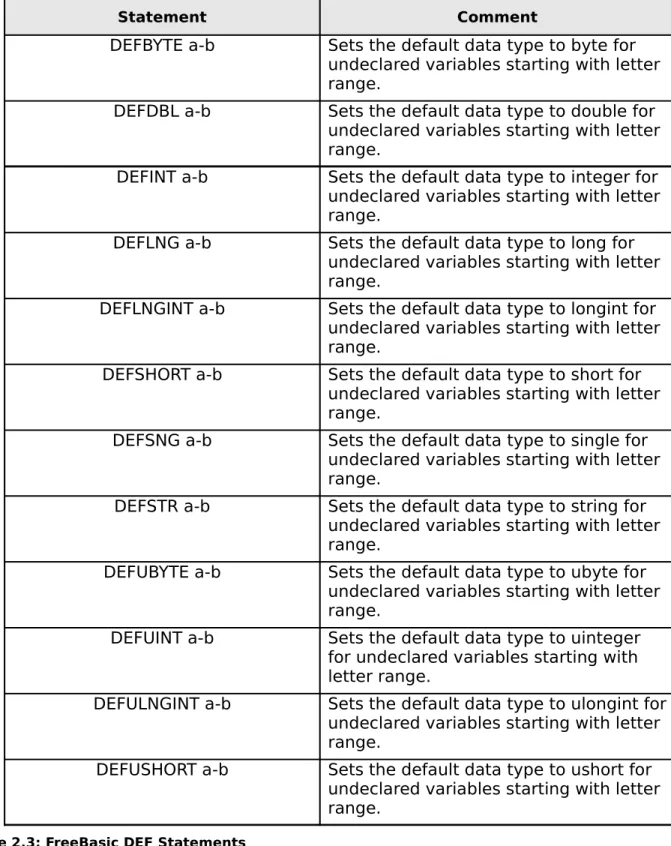
As already mentioned, the default data type for an undeclared variable is an integer. The default data type can be changed for a range of variables by using one of the DEF statements. Table 3.3 lists all the DEF statements available in FreeBasic.
Statement Comment
DEFBYTE a-b Sets the default data type to byte for
undeclared variables starting with letter range.
DEFDBL a-b Sets the default data type to double for
undeclared variables starting with letter range.
DEFINT a-b Sets the default data type to integer for
undeclared variables starting with letter range.
DEFLNG a-b Sets the default data type to long for
undeclared variables starting with letter range.
DEFLNGINT a-b Sets the default data type to longint for
undeclared variables starting with letter range.
DEFSHORT a-b Sets the default data type to short for
undeclared variables starting with letter range.
DEFSNG a-b Sets the default data type to single for
undeclared variables starting with letter range.
DEFSTR a-b Sets the default data type to string for
undeclared variables starting with letter range.
DEFUBYTE a-b Sets the default data type to ubyte for
undeclared variables starting with letter range.
DEFUINT a-b Sets the default data type to uinteger
for undeclared variables starting with letter range.
DEFULNGINT a-b Sets the default data type to ulongint for
undeclared variables starting with letter range.
DEFUSHORT a-b Sets the default data type to ushort for
undeclared variables starting with letter range.
The DEF statement will affect all variables that start with a letter in the given range. So if you add DEFDBL m-n to your program, any variable starting with m or n, will default to a double-type. All other variables that start with different numbers will default to an integer-type. A Dim statement will override any DEF statement, so if you declare an integer variable starting with m, it will be an integer, even though the DEFDBL is in
effect.
Using Different Number Formats
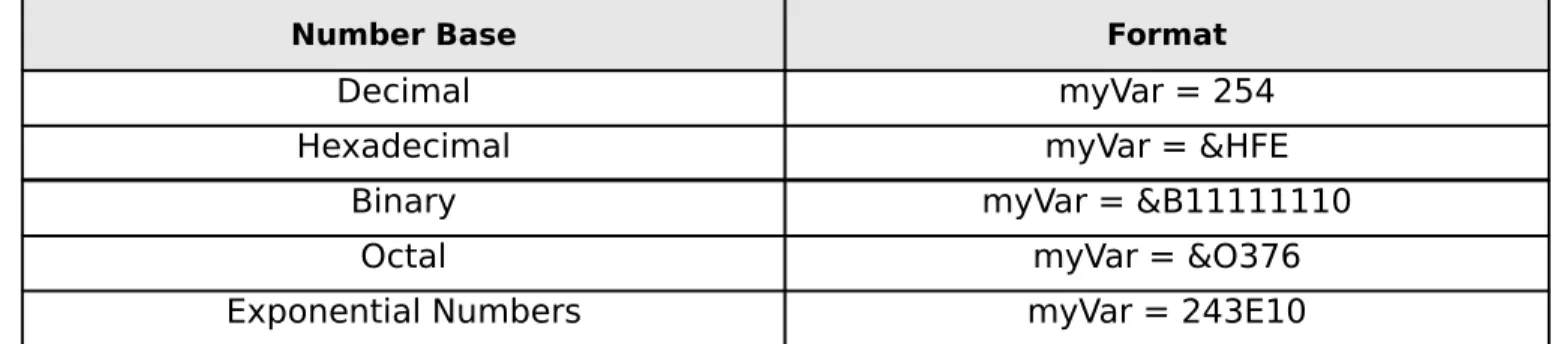
Besides decimal numbers, FreeBasic is able to recognize numbers in hexadecimal, binary and octal formats. Table 3.4 lists the number base and format to use.
Number Base Format
Decimal myVar = 254
Hexadecimal myVar = &HFE
Binary myVar = &B11111110
Octal myVar = &O376
Exponential Numbers myVar = 243E10
Table 2.4: Format of Number Bases
Hexadecimal Numbers
Hexadecimal is a base 16 numbering scheme and have digits in the range of 0 to F. Hexadecimal numbers are commonly used as constant values in the Windows API and many third party libraries as it is a compact way to represent a large value. To indicate a hexadecimal number, use the &H prefix.
Binary Numbers
Binary is a base 2 numbering scheme and have digits in the range of 0 and 1. Binary is the language of the computer. Although we can enter numbers and letters into the computer, it all must be translated into binary before the computer can understand it. To indicate a binary number, use the &B prefix.
Octal Numbers
Octal is a base eight numbering scheme and have digits in the range of 0 to 7. Octal numbers were very popular in early computer systems, but aren’t used much today except in some specialized applications. To indicate an octal number, use the &O prefix.
Exponential Numbers
You can use exponential numbers in your program by adding the E suffix followed by the power. To use the number 105, you would write the number as 10E05. You can
Which Data Type To Use?
There are a number of different data types available, so how do you choose the right data type for any given application? The rule of thumb is to use the largest data type you need to hold the expected range of values. This may seem like stating the obvious, but many programs fail because the programmer did not fully understand the range of data in their program. When you crate a program, you should map out not only the logic of the program, but the data associated with each block of logic. When you map out the data ahead of time, you are less likely to run into data-type errors.
For example, if you were working with ASCII codes, which range from 0 to 255, an ubyte would be a good choice since the range of an ubyte is the same as the range of ASCII codes, and you are only using 1 byte of memory. There is another consideration though, the “natural” data size of the computer. On a 32-bit system, the natural data size is 4 bytes, or an integer. This means that the computer is optimized to handle an integer, and does so more efficiently, even though you are “wasting” 3 bytes of memory by using an integer for an ASCII code.
In most cases an integer is a good general-purpose choice for integer data. The range is quite large, it handles both negative and positive numbers and you benefit from using the computer’s natural data type. For floating point data, a double is a good choice since, like the integer, it has a good range of values and better precision than a single. For large integer data you should use a uinteger for positive data or a longint for large negative and positive numbers. These are only suggestions; what data type you end up using will be dictated by the needs of your program.
These “rules of thumb” apply to single variable declarations where a few wasted bytes are not critical. However, as you will see in the chapter on arrays, choosing the right sized data type is critical in large arrays where a few wasted bytes can add up to a large amount of wasted memory.
Option Explicit
You may notice when looking at other people's source code, the compiler directive Option Explicit has been used at the top of each program. A compiler directive is code that instructs the compiler to do something. In the case of Option Explicit, it instructs the compiler to make sure that any variable being used has been properly Dim’ed. Although you can write a program without using Option Explicit and explicitly Dim’ing each
variable, you run the risk of introducing nasty, hard-to-find bugs as the following short program illustrates.
1 2
3 4 5
6 7 8
Dim myInteger as Integer 'set myInteger to a value
myInteger = 5
'Oops we mispelled the variable name
Print "The output of myInteger is";myIntger
'wait for a keypress Sleep
End
Analysis: In line 1 myInteger is being declared to the compiler. The compiler will use this declaration to allocate space for the variable. In line 3 the variable is being initialized to a value, in this case 3. The Print statement in line 5 will print out the result to the console screen. Sleep, listed in line 7, will wait for a keypress and the End keyword in line 8 will end the program. The End statement isn't mandatory at the end of a
program but should be used especially if you want to return an exit code to the operating system.
After typing this program into FBIde and running the program, you should see the following output.
The output of myInteger is 0
Output 2.2: nooptionexplicit.bas
The output should be 5, but as you can see, the result isn’t what was expected or wanted. Since Option Explicit wasn’t used in the program, the compiler created a new variable when it encountered the misspelled variable name, myIntger, in the print
statement. If this was large and complicated program, you can see how difficult it would be to track this error down and fix it.
Now, add Option Explicit at the top of the program and run it again. You should see the following error message in the results pane of FBIde.
Variable not declared, found: 'myIntger'
Print "The output of myInteger is";myIntger
^
Output 2.3: Modified nooptionexplicit.bas
Here the compiler detected the misspelled variable name and informed us of the problem. You should always use Option Explicit in your programs. A few seconds of extra typing will save you hours of frustration.
A Note about Option Explicit
Recent versions of the FreeBASIC compiler do not allow OPTION commands
including OPTION EXPLICIT. From now on OPTION EXPLICIT is implied and your programs will behave as if you used OPTION EXPLICIT. It is a good rule of thumb to always implicitly declare your variables, so get in the habit now. To compile a source file that uses OPTION EXPLICIT, either use “-lang deprecated” or remove the OPTION EXPLICIT line from the source file.
A Look Ahead
Excercises
1) What data type would be the best to store the number 196?
2) What data type would be the best to store the number 2.134?
3) What data type is the best for general usage on 32-bit systems?
4) What is the difference between signed and unsigned data types?
5) What prefix would you use to designate a binary number?
6) What prefix would you use to designate a hexidecimal number?
7) What Alphabetic letters are allowed in a hexidecimal number?
3
Converting Numeric Data Types
When you work with numbers there will come a time when you will need to convert a variable from one data type to another data type. In FreeBasic there are two types of data conversion. Implicit, where the compiler will automatically convert the data types during an assignment or calculation, and explicit using one of the predefined conversion functions.
Implicit Data Conversion
Implicit data conversion occurs either through an assignment statement, or as the result of a calculation. Where implicit data conversion can cause a problem is in the loss of precision that can result when converting a large data type to a smaller data type. While implicit data conversion eases the programming process somewhat, you want to make sure that the results you are getting are what you expect. You should always check the result of an implicit conversion to make sure the range of values being converted is in the expected range.
The following short program illustrates the conversion that takes place during an assignment statement.
1
2 3 4 5
6 7 8 9
10
Dim As Double myDbl
Dim As Integer myInt
'Set myDbl to a float value myDbl = 5.56
'Assign myInt the float, will be converted to int
myInt = myDbl
Print "myInt ="; myInt Sleep
End
Listing 3.1: assignconv.bas
Analysis: In lines 1 and 2 two variable are being declared, myDbl, a double-type varibale and myInt, an integer-type variable. Line 3 is a comment which, as you can see, starts with the ' (single quote) character. In line 4 the double-type variable is being initialized to the floating-point value 5.56. In line 6 the double is being assigned to an integer variable, invoking the implicit conversion. In line 7 the Print displays the result on the console window. In line 8 the program waits for a key press with the Sleep statement and in line 9 the End statement is used to end the program.
Running the program will result in the following output.
myInt = 6
In the program, the value of myDbl which is a double-type variable, was set to 5.56. When myInt was assigned this float value, the compiler converted the value to an integer, and then rounded it up to 6. Maybe you were just looking for the whole number portion of 5? In this case, your result would be incorrect, although you may not know until later in the program. This type of subtle bug is another one of those problems that are hard to track down and fix.
Caution Even if the compiler is producing the correct result, there is no guarantee that future versions of the compiler will. It may be necessary to change the behavior of the compiler to add features or fix a bug, and you may find yourself with a program that suddenly quits working.
The next little program illustrates the implicit conversion that takes place during a calculation. In this example, the two integer operands are converted to double-types during the division calculation.
1
2 3 4 5
6 7 8
9 10
Dim As Double myDbl
Dim As Integer myInt1, myInt2 'Assign values to myInt1, myInt2 myInt1 = 5
myInt2 = 3
myDbl = myInt1 / myInt2 Print "myDbl ="; myDbl Sleep
End
Listing 3.2: calcconv.bas
Analysis: Line 1 and 2 in the program are the alternate Dim statement formats. You can use this format to declare multiple variables of the same type. In line 4 and 5, the variables are initialized. In line 6 the / character is the division operator. The result of the division operation will be implicitly converted to a double-type in the assignment
statement. Line 7 prints the newly converted value to the screen and in lines 8 and 9, the program will wait for a key press and then end.
Running the program produces the following output. myDbl = 1.66666666666667
Output 3.2: calconv.bas
1
2 3 4 5
6 7 8 9
10
Dim As Double myDbl1, myDbl2
Dim As Integer myInt
'Assign values to myInt1, myInt2 myDbl1 = 5.6
myDbl2 = 3.1
myInt = myDbl1 / myDbl2 Print "myInt ="; myInt Sleep
End
Listing 3.3: calcconv2.bas
Analysis: This program is similar to the program in Listing 4.2 except the
conversion process is from two double-type variables to an integer. Lines 1 and 2 declare the working variables. Lines 4 and 5 set the values of the two double-type variables. In line 6 the double-type division result is implicitly converted to an integer, resulting in precision loss. Line 7 prints the result to the console window and lines 8 and 9 wait for a key press and end the program.
The output of the program:
myInt = 2
Output 3.3: calconv2.bas
In this example, the two double-type variables were converted to integers and then the division operation was performed. Since 5.6 was rounded up to 6 during the conversion, the result is 2 rather than 1. This may not be a problem, but you should be aware that these types of conversions occur when working with mixed precision types.
Explicit Data Conversion
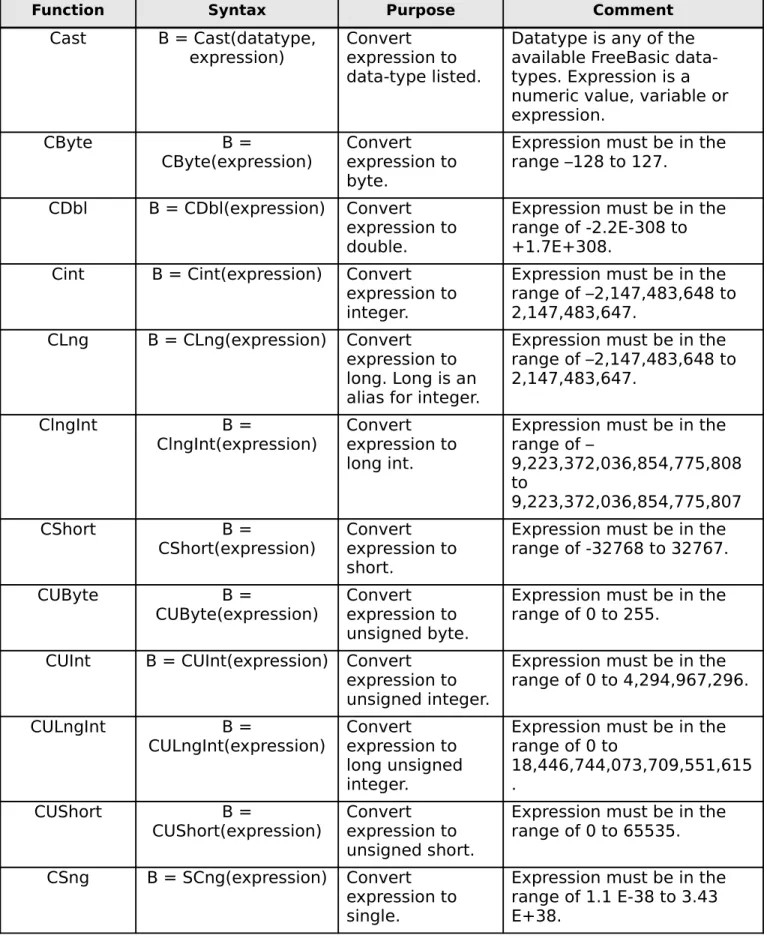
There is an alternative to implicit data conversion, explicit data conversion where you use one of FreeBasic’s built-in conversion functions. Since these functions are
designed for conversion, they return consistent results and are unlikely to change even if the implicit rules of the compiler change. Even though it is more work, it is always safer to explicitly convert data to the needed data type before carrying out operations on that data.
Numeric Data Conversion Functions
Function Syntax Purpose Comment
Cast B = Cast(datatype,
expression)
Convert expression to data-type listed.
Datatype is any of the available FreeBasic data-types. Expression is a numeric value, variable or expression.
CByte B =
CByte(expression)
Convert expression to byte.
Expression must be in the range –128 to 127.
CDbl B = CDbl(expression) Convert
expression to double.
Expression must be in the range of -2.2E-308 to +1.7E+308.
Cint B = Cint(expression) Convert
expression to integer.
Expression must be in the range of –2,147,483,648 to 2,147,483,647.
CLng B = CLng(expression) Convert
expression to long. Long is an alias for integer.
Expression must be in the range of –2,147,483,648 to 2,147,483,647.
ClngInt B =
ClngInt(expression)
Convert expression to long int.
Expression must be in the range of –
9,223,372,036,854,775,808 to
9,223,372,036,854,775,807
CShort B =
CShort(expression)
Convert expression to short.
Expression must be in the range of -32768 to 32767.
CUByte B =
CUByte(expression)
Convert expression to unsigned byte.
Expression must be in the range of 0 to 255.
CUInt B = CUInt(expression) Convert
expression to unsigned integer.
Expression must be in the range of 0 to 4,294,967,296.
CULngInt B =
CULngInt(expression)
Convert expression to long unsigned integer.
Expression must be in the range of 0 to
18,446,744,073,709,551,615 .
CUShort B =
CUShort(expression)
Convert expression to unsigned short.
Expression must be in the range of 0 to 65535.
CSng B = SCng(expression) Convert
expression to single.
Expression must be in the range of 1.1 E-38 to 3.43 E+38.
When examining conversion functions it is important to understand how the function rounds with both negative and positive numbers. The FreeBasic conversion functions round numbers up, making positive number more positive and negative numbers more negative. The following program illustrates the rounding with Cast and Cint, as well as demonstrating that the conversion functions will work with expressions as well as numbers.
1 2 3
4 5 6 7
8 9 10 12
13 14 15
16 17 18 19
20 21 22
23 24 25 26
27 28 29 30
31 32
Dim as Double myDouble1, myDouble2, myDouble3 Dim as Integer myInt
'Set variable ranges myDouble1 = 143.5 myDouble3 = 143.4 myDouble2 = -143.5
myInt = 12
'Show cast in action Print "** Cast **"
Print "Double1 ";myDouble1;" cast to integer ";Cast(Integer, myDouble1) Print "Double2 ";myDouble2;" cast to integer ";Cast(Integer, myDouble2) Print "Double3 ";myDouble3;" cast to integer ";Cast(Integer, myDouble3)
Print "Expression ";myDouble1;" + ";myInt;" cast to double "; Print Cast(Double, myDouble1 + myInt)
'Show cint in action Print "** CInt **"
Print "Double1 ";myDouble1;" cint to integer ";CInt(myDouble1)
Print "Double2 ";myDouble2;" cast to integer ";CInt(myDouble2) Print "Double3 ";myDouble3;" cast to integer ";CInt(myDouble3)
Print "Expression ";myDouble1;" + ";myInt;" cast to integer ";CInt(myDouble1 + myInt) Print "Expression ";myDouble2;" + ";myInt;" cast to integer ";CInt(myDouble2 + myInt)
Sleep End
Listing 3.4: convert.bas
print a carriage return after the print statement, so that when the value of Cast is printed in line 17, the value will appear on the same line as the data printed in line 16. The
program is closed in the usual way using Sleep and End.
Running the program will produce the output shown below.
** Cast **
Double1 143.5 cast to integer 144
Double2 -143.5 cast to integer -144
Double3 143.4 cast to integer 143
Expression 143.5 + 12 cast to double 155.5
** CInt **
Double1 143.5 cint to integer 144
Double2 -143.5 cast to integer -144
Double3 143.4 cast to integer 143
Expression 143.5 + 12 cast to integer 156
Expression -143.5 + 12 cast to integer –132
Output 3.4: convert.bas
As you can see from the program, you can use both numbers and expressions in the conversion functions. Keep in mind that if you pass an expression to a conversion function, the evaluated expression must not exceed the limit of the target data type, or an overflow will occur. Looking at the output you can see that the rounding for middle values is up or greater in magnitude. 143.5 rounds up, making the resulting number more positive and –143.5, more negative.
Using Conversion Functions in Macros
One area where the conversion functions listed in Table 4.1 are useful is in the creation of macros. A macro is a small piece of executable code that the compiler inserts into the program at designated areas. Macros are defined using the #Define compiler directive. #Define has the format #Define name symbol. When the compiler encounters name within the program code, it is replaced with symbol.
1 2 3 4 5 6 7 8 9 10 11 12 13 14 15 16 17 18 19 20 21 22 23 24 25 26 27 28 29 30 31 32 33 34 35 36 37 38 39 40 41 42 43 44
'Macro created by v1ctor
#define MAKDWORD(x,y) (cint(x) shl 16 or cint(y))
Dim myInt As Uinteger Dim As Integer i, cnt
'Store row 5 column 5 in a single uinteger myInt = MAKDWORD(5, 5)
'Set the width and height of the console window Width 80, 25
'Print column headers cnt = 1
For i = 1 To 80
'Print columns as 12345678901... If cnt = 10 Then
cnt = 0
End If Locate 1, i
'Convert to string so we don't get leading space Print Str(cnt)
'Increment our counter cnt += 1
Next
'Print row headers cnt = 2
For i = 2 To 25
'Row numbers will be like col numbers
If cnt = 10 Then cnt = 0 End If
Locate i, 1
'Convert to string so we don't get leading space 'We need the semi-colon so a line feed isn't printed 'on line 25 which would scroll screen.
Print Str(cnt);
'Increment our counter cnt += 1
Next
'Print out string on saved location Locate Hiword(myInt), Loword(myInt)
45
46 47 48
Sleep
End
Listing 3.5: makdword.bas
Analysis: In line 2 the #define compiler directive is used to create a macro. A macro is an snippet of executable code that the compiler will insert into the code when it finds the macro name, MAKDWORD. In lines 4 and 5 the working variables are declared. In line 8, the variable myInt is initialized with the macro previously defined. The macro stores the screen locations, row 5 and column 5 in the high and low word of the integer variable.
In line 11 the Width statement is used to set the console screen to 80 columns and 25 rows. The variable cnt, which will be used to print out the column and row headers, is set to 1. Lines 14 through 24 prints out the column headers using a For-Next loop. Line 19 uses the Locate statement to set the cursor position and line 36 prints out the value. The numbers will range from 1 to 0 and then repeat.
In line 36 the Str function is used to convert the numeric value of cnt to a string so that the Print statement will not insert a leading space. Print inserts a leading space when printing numeric variables so they can accommodate a leading negative sign. Lines 26 through 39 print out the row headers in the same fashion as the column headers.
In line 42 the two functions Hiword and Loword are used to retrieve the high and low bytes of the integer variable, which contain the row and column respectively. Line 45 and 46 wait for a key press and end the program in the usual fashion.
The macro is defined in line 2 takes two parameters, x and y. The compiler will substitute MAKDWORD(x,y) with (cint(x) shl 16 or cint(y)) replacing x with the first number and y with the second number. Cint is used within the macro so that no matter what values are passed through x and y, the macro will always be working with integers. The operators or and shl will be discussed later in the book.
The Locate statement expects a row number and column number to position text on the screen. In line 42 we are using the two functions Hiword and Loword to return the high (most significant) and low (least significant) words of the integer myInt, which contain the row and column numbers respectively.
Running the program will produce the following output.
12345678901234567890123456789012345678901234567890123456789012345678901234567890
2 3 4
5 We stored the screen location in a single uinteger!
9 0
1 2 3 4
5 6 7
8 9 0
Output 3.5: makdword.bas
#Define is fully explored in the chapter on symbolic constants later in the book.
Decimal Rounding Functions
FreeBasic has two built-in rounding functions for use with decimal numbers. Table 4.2 lists the functions along with their explanations.
Function Syntax Comment
Int B = Int(expression) Returns an integer value less than or equal to
the input.
Fix B = Fix(expression) Returns the integer part of the input.
Table 3.2: FreeBasic Rounding Functions
As with the other conversion functions, this should be tested with both negative and positive numbers to see how the function behaves. The program intfix.bas listed below illustrates the results returned by the functions as well as their use with
calculations.
1 2
3 4 5 6
7 8 9
10 11
'Create some double variables
Dim As Double myDouble1 = -5.5, myDouble2 = 5.9
'Show rounding on negative and positive values Print "Doubles:", myDouble1, myDouble2
Print "Int:", Int(myDouble1), Int(myDouble2) Print "Fix:", Fix(myDouble1), Fix(myDouble2)
'Try some calculation expressions myDouble1 = -15.78
myDouble2 = 22.12
12
13 14 15 16
17 18
Print "Int:", Int(myDouble1 + myDouble2)
Print "Fix:", Fix(myDouble1 + myDouble2)
'Wait for keypress Sleep
End
Listing 3.6: intfix.bas
Analysis: Line 2 uses the alternative syntax for Dim to declare and initialize the working variables. Line 4 through 6 display the results of the conversion function suing both positive and negative numbers. Line 9 and 10 set the values for the variables to be used in calculations. Lines 12 through 14 display the results of the conversion functions using calculations so FreeBasic resolves the calculations before invoking the functions. Lines 17 and 18 end the program in the usual way.
The result of running the program is shown in Output 4.6.
Doubles: -5.5 5.9
Int: -6 5
Fix: -5 5
Expression: -15.78 + 22.12 = 6.34
Int: 6
Fix: 6
Output 3.6: infix.bas
Notice that in the output Int returns a –6 for the input –5.5, since 6 is less than – 5.5, and 5 for 5.9 since 5 is less than 6. Fix on the other hand truncates the decimal and returns the integer portion of the double. As you can see both functions will also work with an expression, in this myDouble1 + myDouble2. Which function you would use depends on what behavior you would need with negative numbers, as they both return similar results with positive numbers.
A Look Ahead
Exercises
1) How do you stop your program from printing a carriage return at the end of a line?
2) What function would you use to convert an unknown value to a Double?
3) What function would you use to convert an unknown value to an Integer?
4) What would be the result of the equation 5 / 2 if assigned to an Integer?
4
Introduction to the C Runtime Library
One of the original motivations for creating FreeBasic was to provide an easy-to-use wrapper for the C Runtime Library according to Andre Victor, the language creator. FreeBasic is as advanced as it is today because many of the functions are wrappers for the runtime functions, which simplified the creation of the language.
Since FreeBasic uses the C runtime library, you can use it as well in your programs, and there are a number of very useful conversion functions available. The function
definitions are contained in the header file crt.bi, and you gain access to those functions by using the #Include directive.
Caution Not all the functions listed in the various bi files in the crt folder have been implemented in FreeBasic. If you get an error similar to the following
[path/filename].o:fake:(.text+0x16c): undefined reference to `rint', where path/filename is your program's path and filename, then the function you are trying to use is not supported. This is a linker error and indicates that the linker was not able to find the referenced function. There are also a number of functions and structures that will only work in Windows and some that are GNU Extensions and will only work on Linux.
The #Include Directive
The syntax for the #Include directive is #Include [Once] “filename.ext”. Remember that a compiler directive instructs the compiler to do something, and in his case, it instructs the compiler to include the file “filename.ext” when compiling. When the compiler reads this directive, it stops reading the current file and starts reading the
included file. If the included file also has an #Include directive, then that file is read in as well. You can have up to 16 nested includes per program. To use the runtime conversion functions in your own program you would add #Include Once “crt.bi” at the top of your program.
The file extension bi stands for “basic include” and is usually declaration
statements and/or subroutines and functions. The crt.bi file is located in the inc folder of your FreeBasic installation. If a bi file is not located in the folder where the program is being compiled, the compiler will look in the inc folder for the file. If it can’t find the file, it will issue an error. You can also include a path with the filename if you keep your include files in a common folder besides the inc folder.
If you look at the contents of crt.bi you see that the file simply includes other files and references the library that contains the actual function code.
1 2 3
4 5 6 7
8
#ifndef __CRT_BI__ #define __CRT_BI__
#ifdef __FB_WIN32__ # inclib "msvcrt" #endif
9
10 11 12 13
14 15 16 17
#include once "crt/math.bi"
#include once "crt/time.bi" #include once "crt/wchar.bi" #include once "crt/stdlib.bi" #include once "crt/stdio.bi"
#include once "crt/io.bi" #include once "crt/errno.bi"
#endif ' __CRT_BI__
Listing 4.1: crt.bi
Analysis: Crt.bi contains a number of compiler directives, the statements that start with the # character to control the compilation process. In line the directive #ifndef means “if not defined”. If the symbol __CRT_BI__ has not already been defined, then line 2 will define the symbol. The #ifdef directive in line 4 means “if defined”. If the compiler is running on a Win32 machine, the symbol __FB_WIN32__ will be defined which will include the library "msvcrt" on line 5 with the #inclib directive which means “include library”. The #endif on line 6 closes the opening #ifdef on line 4. Under Windows,
FreeBasic uses the Microsoft Runtime which is contained in the dynamic link library (DLL) msvcrt.dll.
Line 8 through 15 include each of the individual declaration files that make up the C runtime library. The “#include once” directive ensures that the individual include files are only added once, even if another module includes them. The #endif on line 17 is used to close the #ifndef on line 1.
Notice that the #Include directive use the Once modifier which tells the compiler that this file should only be loaded once, even if a subsequent file uses the same
#Include. This is to prevent duplicate definition errors. It is always good practice to use the Once modifier in your own includes.
Notice that the different files being included are located in the inc/crt folder. This is an example of setting the path for the #Include if they should be in a different folder. Many of the third-party library bi files are in their own subfolders, just to keep things a bit more organized. The conversion functions we will be examining in this chapter are
contained the file crt/math.bi.
The #Inclib directive above the include list tells the compiler what library contains the functions. Library files are compiled subroutines, functions and symbols that define the functionality of the library. Lib files located in the lib folder of your FreeBasic installation. They are usually named filename.a for static libraries and filename.dll.a for dynamic link libraries. If you look in the lib folder you will also see some filename.o files. These are object files. Object files contain pre-parsed code that can be linked to an executable file or to a library file.
a function, be sure not to change anything in the file. You should always open the files in read-only mode if your editor provides that functionality.
The Declaration Statement
If you look at math.bi you will see a number of Declaration statements. A declaration statement is a function prototype that tells the compiler that there is a
function definition somewhere in the program code, or in a library or an external dll. This forward reference is used so that the compiler won’t complain if the function or sub is called before it finds the actual code for the function. Once you understand how to interpret a declaration statement, you will be able to use any function in the runtime library.
To understand the components of a declaration statement, here is the declaration statement for the ceil function in math.bi. The ceil function rounds a decimal value up to the nearest integer. That is, 1.5 would become 2.
Declare function ceil cdecl Alias "ceil" (byval as double) as double
You can break this declare down into the following functional sections.
• Declare: This is the keyword for a declare statement.
• Function: This can either be Function, to indicate that this procedure returns a value, or Sub, which indicates that the procedure does not return a value.
• Ceil: This is the name of the function and the name that you would use in your code. Do not use the name after Alias.
• Cdecl: This is the function's method of passing arguments. When calling an
external function, parameters must be pushed on the stack in the correct order so that the function can pop the parameters off the stack correctly. Cdecl stands for C Declare, and passes the arguments from right to left using the C convention of parameter passing. The Pascal calling convention pushes arguments from left to right and is used when calling functions created in the Pascal language. The
Stdcall calling convention pushes arguments from right to left and is used in Basic libraries and Windows API.
• Alias: This is an alternate name that is used by the linker when your code is linked to other languages. You use an alias in case there is a function in the target
language that has the same name as your function.
• ( ): The values inside the parenthesis are the parameters that the function or sub expects. Ceil expects one parameter, a double-type value. If the function expects multiple parameters, then commas will separate them. A parameter can be any of the FreeBasic data types or a composite type. Many of the runtime functions require pointers to other data types or data structures.
• As [data type]: The As keyword after the parameter list indicates the return type of the function. Subs do not have a return type so there isn’t an As clause after the parameter list.
Notice that the ceil function returns a double and not an integer, even though the conversion function rounds off the decimal portion. This is to prevent integer overflow for very large numbers. Even though ceil, and the other runtime conversion functions return a double you can implicitly convert them to integers by simply assigning the return to an integer variable or using the Cast function. Be sure to use an integer data type with a large enough range for the result.
To use Ceil in your program you would write myDouble = Ceil(aDouble) or myInt = Ceil(aDouble). All declaration statements follow the same pattern as Ceil.
DLLs created with Visual Basic 6tm and below are COM objects and not standard
DLLs. In order to use VB6 DLLs with FreeBasic you will need to create a COM interface to access the DLL functions. Creating a COM interface is a complicated topic and is beyond the scope of this book.
Runtime Conversion Functions
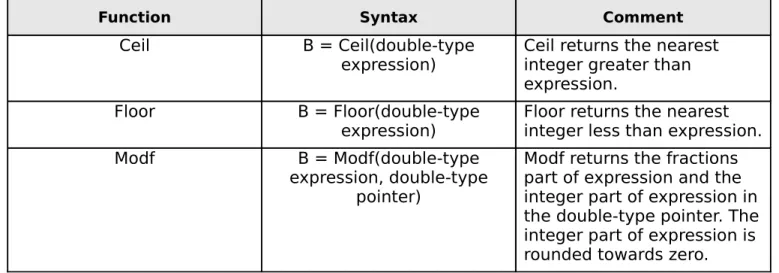
Table 5.1 lists some of the more useful conversion routines contained within the runtime library along with he syntax and some comments about the function.
Function Syntax Comment
Ceil B = Ceil(double-type
expression)
Ceil returns the nearest integer greater than expression.
Floor B = Floor(double-type
expression)
Floor returns the nearest integer less than expression.
Modf B = Modf(double-type
expression, double-type pointer)
Modf returns the fractions part of expression and the integer part of expression in the double-type pointer. The integer part of expression is rounded towards zero.
Table 4.1: Runtime Conversion Functions
It would require another book to examine all the functions in the runtime library. The runtime functions presented in this book were selected because of their usefulness and to supplement FreeBasic’s built-in functions.
calling procedures, so pointers are used instead. There are two ways to pass pointer data to a function; by explicitly declaring a pointer data type which you will see in the chapter on pointers, or by using the AddressOf operator which is explained here.
The AddressOf Operator @
When the compiler creates a variable, it allocates a portion of memory equal to the size of the data type. For an integer it would allocate 4 bytes and for a double it would allocate 8 bytes. Each memory location has an address associated with it so that the CPU can move data into and out of the memory location. When the compiler allocates the memory, the operating system returns an address for the memory location so that the compiler can access that location. When you are working with variables you are actually working with an addressable memory location in the computer. You don't have to worry about the address since the compiler handles all those details for you; you can just use the variable in your program.
However, when you need to call a function like Modf that requires a pointer to a variable, then you need to know the address of the variable so you can pass it to the function. Why can't you just use the variable name, since it is an alias for the memory location? The answer is in the declaration of Modf shown in listing 5.3.
1 declare function modf cdecl alias "modf" (byval as double, byval as double ptr) as double
Listing 4.2: Modf Declaration
Notice that the second parameter is defined as byval and the data type is a pointer (ptr) to a double-type variable. Remember that byval means “make a copy of the
contents of the parameter and use it in the function.” If you were to simply use the
variable name, you would be passing the contents of the memory location, whatever is in the variable,and not its address.
When you use a regular variable in your program, you are working with the actual data in the memory location associated with the variable. That is, a variable = data. If you define myInt as an integer and set it equal to 5, when you print myInt to the screen you will see 5. The pointer data type is unique in that what it contains isn't data, that is a value like 134, rather it contains the address of a memory location. A pointer = memory address. If you were to print a pointer to the screen you would see a number that doesn't make much sense, since what you are looking at isn't the data in the memory location, but the address of the data in memory.
When you first create a pointer, it doesn't point to anything. This is called a NULL pointer. There are a number of ways to initialize the pointer, but one method is to use the AddressOf operator. If you create a pointer variable such as myIntPtr you could initialize that pointer with code like myIntPtr = @myInt. The @ is the AddressOf operator, and this code snippet sets myIntPtr to the address of myInt. In other words, an initialized pointer variable and the AddressOf operator both return the same value, a memory address.
We can use this concept in the Modf function. Rather than creating a pointer variable, we can create a double-type variable and then use this variable with the AddressOf operator for the return parameter. Remember that you were able to use
The following short program illustrates this concept.
1 2 3
4 5 6 7
8 9 10 11
12 13 14
15 16 17 18
19 20
'Need to include the runtime library #include "crt.bi"
'Set up some variables
Dim As Double myDouble, FracPart, IntPart
'Set the value we want to convert
myDouble = 12.56
'Call the function. Notice that we are using the addressof 'operator @ on IntPart.
FracPart = modf(myDouble, @IntPart)
'Get the result.
Print "myDouble = ";myDouble Print "Fractional part:";FracPart
Print "Integer part:";IntPart
Sleep End
Listing 4.3: addressof.bas
Analysis: In line 1 the crt.bi is included in this program so that all the supported functions will be available to the program. In line 5 all of the working variables are declared. In line 8, the variable to be operated on is set to a decimal value. The Modf function is called in line 11 using the AddressOf operator to retrieve the integer portion of the return value. The fractional portion of the return value is loaded into the FracPart variable. Line 13 through 15 print out the values returned from the function. The program is closed in the usual way in lines 17 and 18.
In line 5 we dimension the variables we will use: myDouble is the value we want to convert, FracPart is the value returned by the function and IntPart is the return value that will be passed through the second parameter, the pointer. Notice in line 11 we are using the AddressOf operator in conjunction with our regular double-type variable.
Here is the output of the program. myDouble = 12.56
Fractional part: 0.560000000000001
Integer part: 12
Output 4.1: addressof.bas
.56 is the result of the precision conversion you will get with a double value. Remember in the previous sections it was mentioned that double and single data types are prone to rounding errors. Here you see why this is true.
Caution When you are dealing with a pointer parameter, you must be sure to pass the correct data type to the parameter. In the case of Modf, it is expecting a double-type pointer which is 8 bytes. If you pass the incorrect pointer type to a function, it may not do anything at all, or it may try to write to 8 bytes of memory. If the function tries to write to more memory than has been allocated you will see the infamous General Protection Fault message and your program will be shut down. Always use the proper pointer type with pointer parameters. General Protection Fault is a Windows term and is equivalent to a Segmentation Fault on Linux.
Testing the Runtime Conversion Functions
As you did with the other conversion functions, you should test these functions with both positive and negative numbers to see how they behave.
1 2 3
4 5 6 7
8 9 10
11 12 13 14
15 16 17
18 19 20
'Need to include the runtime library #include "crt.bi"
'Set up some variables
Dim As Double myDouble = 12.56, myDouble2 = -12.56
'Show the various conversion functions with
'positive and negative numbers.
Print "Ceil with";myDouble;" returns ";Ceil(myDouble) Print "Ceil with ";myDouble2;" returns ";Ceil(myDouble2)
Print "Floor with";myDouble;" returns ";Floor(myDouble) Print "Floor with ";myDouble2;" returns ";Floor(myDouble2) Print
'Wait for a keypress Sleep
End
Listing 4.4: crtfunc.bas