OCR Application on Smartphone for Visually Impaired People
EPELEA Laviniu
1, GAVRILU Ioan
1, TIPONU Virgil
2,
SZOLGAY Péter
3, GACSÁDI Alexandru
11University of Oradea, Romania, Electronic and Telecommunications Department, Oradea, Romania, [email protected] 2Politehnica University from Timi oara, Timi oara, Romania, Applied Electronic Department
3Pázmány Peter Catholic University, Budapest, Hungary, Faculty of Information Technology and Bionics
Abstract – This paper explain the possibility of interaction between visually impaired people and a smartphone especially to replace the sense of sight with help of an android based OCR application. The application can accept voice commands or touch commands on the screen of smartphone and the result is communicated on speaker or headphones. OCR process occurs on a server on the internet to be faster and consume fewer hardware resources.
Keywords:- OCR, android, smartphone, visually impaired people
I. INTRODUCTION
Visually impaired people are quite numerous today. Due to lack of sight or visual impairments these people have problem in moving especially in public places like markets or stations and unstructured environments like buildings or offices. Traditional methods of aiding are not always the best choice. Trained dogs are expensive and not always is available a person to help. In last years were developed different sensorial solutions using methods used in robotics, but even these methods of aiding are not the most efficient solutions.
On the other side mobile phones became an inevitable part of our lives. It have became more and more performant and useful. Very large number of applications was developed on different mobile phone operating systems like Android, iOS, Windows and so on. Such an application makes optical character recognition or OCR from images taken by the camera.
Optical character recognition can be defined as electronic analysis of images in order to extract or recognize the text. To do this, an OCR application need to perform a few steps like preprocessing, feature extraction, matching and discrimination for recognizer [1]. At beginning we need images with high resolution like 300dpi or more but smartphones have nowadays touchscreen with resolution higher than 300dpi.
In comparison with optical scanners digital cameras have sensors exposed to less light and get more noise due to a smaller aperture. Some pre-processing actions may be required like noise reduction or other action for image enhancement [2][3][12]. Perspective distortion is inevitable in such images so its correction is very important for efficiency of segmentation and feature
extraction steps. Also a conversion from color or grayscale to binary image is necessary to be ready for feature extraction. Because of very large variation of light in these images, a threshold method for binarization is not the best idea but adaptive thresholding is more useful. There are many local thresholding techniques available [4].
Perspective correction is another step because picture is taken from a camera in moving and from an angle. Very important is autofocus of camera before achieving photos. Skew correction (rotation correction) and perspective correction are very important steps for feature extraction.
Because of smartphones hardware limitations compared to a PC, optical character recognition is a challenge. Smartphones have less computing power, less energy and because of limited storage the pictures are taken often in jpeg, that is lossy compression and not in raw manner.
Android operating system is made by Google and is opensource, which means the code of the platform is available for all, it can be modified and mandatory distributed to others. It is made for portable devices like smartphone or tablet, which is very useful for visually impaired people. It is designed for low power consumption and immediate using. Applications are maintained in RAM memory to be used immediately.
Android comes from Linux so it is a very stable and secure operating system. But the most important property that meets blind or visually impaired people is possibility to give touch or vocal commands to portable devices. The user interface in android system is based on direct interaction using touch inputs corresponding to real-world actions like swiping, tapping, pinching and reverse pinching to interact with objects and applications.
Hardware structure has plenty of sensors like accelerometer, gyroscope, proximity, compass, light, GPS and other sensors.
Over this opensource operating system can run a very large variety of application, available even in central manner in Google Play Store, very handy to install for everyone. It is possible to use one or more sensors to help visually impaired people in everyday life. But most important thing is to adapt applications or even android system for easy and handy interaction between these people and such mobile devices.
_____________________________________________________________________________________________________________
II. APPLICATION STRUCTURE AND IMPLEMENTATION
Digital camera from smartphones has nowadays good performance. And is not important the big number of pixels but the speed of camera, quality of autofocus, brightness of images and less noise in taken images.
The OCR engine can be choose from different authors but is preferable a low cost or even a free one.
Tesseract is an open source OCR engine firstly developed by HP and now is available free from Google. It claims to be the most accurate open source OCR engine available that convert images to text in over than 60 languages [5].
Because Tesseract need some processing power and take some time to get the result, we prefer to use on online engine made available at different remote servers on the internet. To stream images over the internet very fast and thinking about data traffic that is paid, we need to take picture in jpeg format, even that is lossy compression.
The most important problem to solve is communication between visually impaired people and android phone. Android operating system is not made especially for such people. There are some phones or more complex systems [13][14] and android techniques [6],[9],[10] made on small scale for these people but it not covers all their needs and is difficult to obtain. On the other side was realized some application for these persons like amazing VizWiz Social, made over iOS. This iPhone application lets a blind person to take a picture from phone camera then he can speak a question he would like to know about the picture and get an answer back. This application is made to get a report of a large-scale study over visual questions that blind people would like to have answered [7]. Another application made by authors of paper [8] can help people with visual impairments to send text messages and listen the messages received.
To help these persons to use a smartphone, application must be created in such manner to involve other senses that they can rely, which are: sense of sight, sense of hearing and speech. The architecture of application can be seen in figure 1.
Nowadays Google offer text to speech engine (TTS) for many languages and is very useful for applications and we use this engine to communicate information from system to people. Communication can be made at speaker but it can be disturbing to others so is preferable to use headphones. Also when people go in noisy
environments like an office or outside, information can’t be heard clearly to understand from a speaker.
TTS engine from Google come with smartphone so it can be used immediately but it cannot offer any languages. Only a few languages are available to download from Google [11]. To use it in Romanian for example we need another engine we can get freely from IVONA. It can be downloaded from Google Play Store. According to the authors IVONA for Android replaces the synthesized text-to-speech (TTS) voices currently available on your Android device with more natural sounding, accurate and easy-to-understand voices. The base engine named IVONA Text-to-Speech HQ needs
another application IVONA Carmen to use it in
Romanian.
To give commands to system, people can use voice recognition engine from Google or other sources. Similarly Google offer only a few languages to process offline but all languages can be recognized online on Google servers if the phone has an internet connection.
But voice recognition cannot be done with good results in noisy environments. A solution can be speaking on headphones microphone but sometime the noise can be louder.
Another method that people with visual impairments can give commands to android smartphones is using touchscreen. Usually to use a touchscreen you need to see it, to see buttons, objects and text. We decide to modify the application to replace the need of sight. All the buttons in application speak the function it did when the user touch it. So the user can explore the touchscreen without seeing it and when the finger touch the button he need, the function can be activated with double click on it. Immediately a function is activated, an audio feedback is delivered to user because these special users must know all the times the status of application [15].
Because the users with visual impairments don’t see clearly the screen or even not at all, the application must be putted handy, in multiple copies on the screen or in lockscreen. Once the user enters in application it is necessary to make the screen awake all the time or the lockscreen can block function of application. But the phone has a limited power of battery so the screen must stay at minimum brightness.
When the user hit smartphone back button by
mistake, application does nothing but when he wants to exit the application, he must push home button from
smartphone. Thus the application runs continuously. For OCR function we need to make pictures as good as we can. After the user double click Take picture and send button, phone camera make autofocus, take the
Fig. 1.Architecture of application
Commands at Touchscreen
Autofocus and Take picture
Send picture and get Results
OCR results or error communication through TTS engine
_____________________________________________________________________________________________________________
picture and send it through the internet in a stream to a remote webserver that use an OCR engine with good results. Response from webserver came quickly although not real-time but in less than a half minute.
In figure 2 is presented the application window with a preview image of a magazine.
Fig. 2. Preview image in Application window
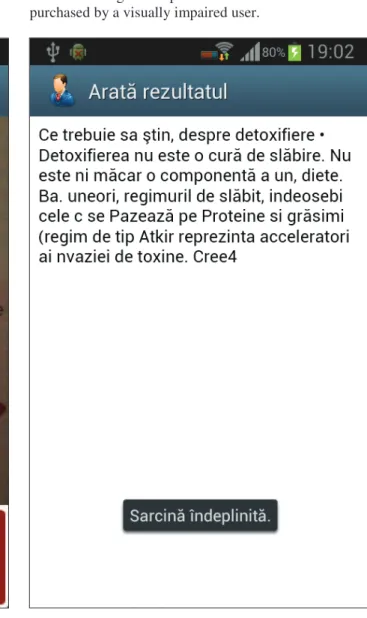
Result is presented in a webview with text recognized from image and can be read from screen. In figure 3 can be viewed the result of image taken. But text resulted from OCR function is communicated to user through Text-To-Speech engine in headphones. Also if an error occurs in streaming process or server does not respond, the information is submitted to user.
Application can check if there is an internet connection before submitting a request to remote webserver and if isn’t than application goes to wifi settings or data connection settings from android to make a connection to the internet and after that you get back to OCR application.
The whole process, I mean taking an image, sending it to a webserver and getting the result not last too long. In tests we made the whole process can last between a few seconds to a half minute, depending of internet connection type, webserver load and internet traffic. So
the OCR function is not made instantly but not last long time. Results can’t be obtained faster from an application installed on smartphone because the OCR process can take a lot of time on hardware resources from an average smartphone with low cost that can be purchased by a visually impaired user.
Fig. 3. Result of OCR
III. TESTING THE APPLICATION
To make an android application with OCR function especially for visually impaired people we tried to get fastest response possible.
For the first time we tried Tesseract engine application to make OCR function without having internet connection in order to save battery but tests made on an average performance smartphone that is Samsung Galaxy S2 takes long time to get a result. In comparison, tests made with application querying a remote webserver on the internet takes between 8 seconds when internet connection was made over wifi and 20 seconds when internet connection was made over 3G data connection. So preferred methods was remote OCR even having more power consumption, issue that was resolved with an optional powerbank that can be _____________________________________________________________________________________________________________
connected to the smartphone. The powerbank can have also a charger with solar cells area to eliminate the need of frequent battery charging.
The main problem for OCR function efficiency is how the picture is taken. We are speaking about people with visual impairments and the quality of image can modify the result of OCR. To obtain better result we need to take pictures with certain level of luminosity, good weather conditions, small rotation of image and a little perspective distortion obtained positioning the camera at optimized distance (a few centimeters) for good autofocus and close to perpendicular position over the target. Finally the result obtained in OCR function depends on the OCR engine used by the remote server. Some servers use Tesseract engine or other freeware engines but other servers use proprietary engine. In tests we made, proprietary engine from remote server www.ocrwebservice.com give better results than other with Tesseract engine.
IV. CONCLUSIONS
The application made for visually impaired people can be very useful when they need to read an office poster or a magazine or even a banknote. The use of application by blind users can be difficult but it doesn’t create problem for people with low sight.
Interaction between people with visual impairments and application was assured with help of touch commands on the screen and audio communication of application state, error and OCR results from smartphone to user. Voice recognition can also be used to give commands to application but in noisy environments it can give errors of understanding. Audio information is delivered at headphones because using the speaker can also create problems of understanding in noisy environments and can disturb other people.
OCR function can be made locally, on the smartphone, but tests shows that it takes long time, so preferred method was the use of a remote webserver on the internet. Using internet connection we have a higher consumption of battery but this issue can be resolved using an optional powerbank that can have a charger with a solar cells area.
Speaking about needed time for the whole process, tests made shows that results was obtained in acceptable time. The time for the process was between 8 seconds with internet connection through wifi and 20 seconds with internet connection through 3G.
REFERENCES
[1] A. Jain, A. Dubey, R. Gupta, N. Jain, P. Tripathi, Fundamental Challenges to Mobile Based OCR, Elsevier, International Journal of Innovative Research and Studies, Vol. 2, Issues 5, pp. 86-101, May, 2013 [2] D. Nuzillard, S. Curil , M. Curil , Blind Separation in
low frequencies using Wavelet analysis, Application to artificial vision, Fourth International Symposium on Independent Component Analysis and Blind Signal
Separation, Nara, Japan, ISBN 4-9901531-1-1, ICA2003 Proceedings, pp. 77 - 82, Avril 1-4, 2003
[3] V. Kulyukin, A. Vanka, H. Wang, Skip Trie Matching: A Greedy Algorithm for Real-Time OCR Error Correction on Smartphones, International Journal of Digital Information and Wireless Communications (IJDIWC), The Society of Digital Information and Wireless Communications, (ISSN: 2225-658X), pp. 56-65, 2013 [4] M. Curil , S. Curil , O. Novac, Mihaela Novac, A new
Artificial Vision Method for Bad Atmospheric Conditions, International Joint Conferences on Computer, Information, and Systems Sciences, and Engineering (CIS2E 08), December 5 - 13, 2008, USA,
articol 292, Publisher: Springer-Verlag Berlin, Germany, ISBN: 978-90-481-3659-9, pp. 227-331, Published: 2010 [5] R. Mithe, S. Indalkar, N. Divekar, Optical Character Recognition, International Journal of Recent Technology and Engineering (IJRTE), ISSN: 2277-3878, Volume-2, Issue-1, pp. 72-75, March 2013
[6] F. Li, D. Dearman, K. N. Truong, Leveraging Proprioception to Make Mobile Phones More Accessible to Users with Visual Impairments, ASSETS’10, Orlando, Florida, USA, October 25 - 27, 2010
[7] E. Brady, M. R. Morris, Y. Zhong, S. White, J. P. Bigham, Visual Challenges in the Everyday Lives of Blind People, CHI 2013, Paris, France, April 27–May 2, 2013
[8] S. R. Baravkar, M. R. Borde, M. K. Nivangune, Android text messaging application for visually impaired people, IRACST – Engineering Science and Technology: An International Journal (ESTIJ), ISSN: 2250-3498, Vol.3, No.1, pp. 58-61, February 2013
[9] G. Venugopal, ANDROID NOTE MANAGER
APPLICATION FOR PEOPLE WITH VISUAL
IMPAIRMENT, International Journal of Mobile Network Communications & Telematics ( IJMNCT) Vol. 3, No.5, pp. 13-18, October 2013
[10] D. Kumar, M. A. Qadeer, Mobile Application and E-Classes for Increasing the Availability of Information for Visually Impaired Persons, International Journal of Machine Learning and Computing, Vol. 1, No. 3, pp. 284-290, August 2011
[11] J. S. Cha, D. K. Lim, Y.-N. Shin, Design and Implementation of a Voice Based Navigation for Visually Impaired Persons, International Journal of Bio-Science and Bio-Technology, Vol. 5, No. 3, pp. 61-68, June, 2013
[12] S. S. Saha, D. S. Hagawane, P. C. Kulkarni, S. R. Dhamane, Prof. S. A. Agrawal, Mobile Based Text Detection and Extraction from an Image, International Journal of Emerging Technology and Advanced Engineering, ISSN 2250-2459, Volume 3, Issue 11, pp. 79-82, November 2013
[13] K. Yatani, N. Banovic, K. N. Truong, SpaceSense: Representing Geographical Information to Visually Impaired People Using Spatial Tactile Feedback, CHI 2012, pp. 415-424, Austin, Texas, USA, May 5–10, 2012 [14] D. Sreenivasan, Dr. S. Poonguzhali, An Electronic Aid for Visually Impaired in Reading Printed Text, International Journal of Scientific & Engineering Research, Volume 4, Issue 5, ISSN 2229-5518, pp. 198-203, May-2013
[15] J. Sánchez, M. Sáenz, A. Pascual-Leone, L. Merabet, Navigation for the blind through audio-based virtual environments, Ext. Abstracts on Human Factors in Computing Systems, CHI 2010, pp. 3409-3414, Atlanta, April 2010
_____________________________________________________________________________________________________________