F
ACULDADE DEE
NGENHARIA DAU
NIVERSIDADE DOP
ORTOA framework to adapt WIMP interfaces
to No-Touch
João da Silva Fernandes
Mestrado Integrado em Engenharia Informática e Computação Supervisor: Jorge Alves da Silva
A framework to adapt WIMP interfaces to No-Touch
João da Silva Fernandes
Mestrado Integrado em Engenharia Informática e Computação
Approved in oral examination by the committee:
Chair: José Manuel de Magalhães Cruz (Assistant Professor at Faculdade de Engenharia da Universidade do Porto)
External Examiner: Teresa Isabel Lopes Romão (Assistant Professor at Faculdade de Ciências e Tecnologia da Universidade Nova de Lisboa)
Supervisor: Jorge Alves da Silva (Assistant Professor at Faculdade de Engenharia da Universidade do Porto)
Abstract
The introduction of technology in hospitals resulted in an increase of health-care associated infec-tions, as doctors would use poorly sterilized computers before interacting with the patient. There are workarounds to these infections, such as better sterilization procedures for technology, which is still imperfect, sterilization procedures for the doctor, which is time consuming and use of an assistant to interact with he computer at the doctor’s orders, which is also time consuming and can be frustrating for the doctor. No-touch interfaces provide an opportunity to solve these infections. However, resources for developers who wish to implement these interfaces are scarce, with science fiction movies such as Minority Report still acting as one of the main guidelines for interaction design.
A collaboration was made with Glintt HS to understand the interactions required by doctors in the operating room, using Glintt’s eResults application as a study case for the development of a framework to easily adapt any web-based interface to a no-touch interface. This application allows doctors to browse through the patient’s clinical history and view results, which may be documents, images or videos.
Literature in this area shows that there are very few guidelines for the development of no-touch interfaces and the only existing frameworks are simple mouse replacements with no impact on the interface itself. Regarding the operating room, the Microsoft Kinect has been successfully used for image manipulation in the past two years. The technological alternatives are standard RGB cameras and the LeapMotion, but the Microsoft Kinect proves itself more adequate as it possesses a depth sensor and a maximum range of 4 meters.
A web framework was developed that allowed developers to create the no-touch interfaces by merely adding the classes offered by the framework to the HTML elements they wish to make in-teractive via no-touch. Furthermore, the framework offers an API that can receive JSON messages representing input from a no-touch device and processes the interaction, and a native program was made to pass the Kinect’s tracking data to the API.
Development followed a Rapid Iterative Testing and Evaluation (RITE) methodology, where various interactions were implemented and tested with one or two users, for each of the vari-ous interaction components, such as button pressing, list scrolling or image rotation. After each component had satisfactory interactions, a no-touch prototype of Glintt’s eResults was made and, finally, larger usability tests were done on this prototype to measure the efficiency of the adapta-tion.
Resumo
A introdução de tecnologia nos hospitais veio acompanhada de um aumento de infeções rela-cionadas com cuidados de saúde, uma vez que os médicos utilizam computadores mal esterilizados antes de interagir com o paciente. Existem formas de contornar estas infeções, tais como melhorar os procedimentos desinfeção do equipamento, que ainda mostram várias falhas, procedimentos de desinfeção do médico, que consome bastante tempo, e o uso de um assistente para interagir com os computadores seguindo as ordens do médico„ que também é pouco eficiente a nível de tempo e pode ser frustrante para o médico. As interfaces no-touch ofrecem uma oportunidade para resolver este problema. No entanto, os recursos para desenvolver estas interfaces são escassos, sendo que filmes de ficção científica como o Minority Report ainda são dos melhores pontos de referência disponíveis para desenhar a interação.
Foi feita uma colaboração com a Glintt HS, no sentido de perceber quais os casos de uso que os médicos necessitam numa cirurgia, utilizando a aplicação eResults da Glintt como o caso de estudo para o desenvolvimento de uma framework para adaptar facilmente qualquer interface web para uma interface no-touch que utiliza tecnologias web. Esta aplicação permite aos médicos navegar pelo historial clínico e consultar resultados, que podem ser documentos, imagens ou vídeos.
A literatura nesta área revela que existem poucas linhas de apoio ao desenvolvimento de in-terfaces sem-toque e, no que diz respeito ao seu uso na sala de operações, o Microsoft Kinect tem sido usado com sucesso na manipulação de imagens nos últimos dois anos. As alternativas tecnologicas são câmeras RGB comuns e o LeapMotion. No enanto, o Microsoft Kinect revela-se mais adequado, uma vez que possui um sensor de profunidade e um alcance máximo de 4 metros. Foi desenvolvida uma framework web que permite a criação de interfaces no-touch, adicio-nando apenas as classes oferecidas pela framework aos elementos HTML que se pertende tornar interactivos via no-touch. A framework oferece ainda uma API que recebe mensagens JSON representando movimento capturado por um dispositivo para interação no-touch e processa a in-teração e foi desenvolvido um programa nativo para passar os dados capturados pelo Kinect para a API.
O desenvolvimento seguiu uma metodologia RITE, onde as várias interações foram implemen-tadas e tesimplemen-tadas com um ou dois utilizadores para cada um dos componentes, tais como a seleção de elementos e manipulaçãod e imagens. Quando todos os componentes tiveram interações satis-fatórias, foi criado um protótipo de uma versão no-touch do eResults da Glintt e, no final, foram realizados testes de usabilidade numa escala maior para medir a eficiência da adaptação.
Acknowledgements
I would obviously like to thank my parents for giving me all the opportunities and support they could to get me to this point. They may not be perfect, but who is? They always did what they believed was best for me, often casting aside their own convenience and I am most thankful for that.
I would also like to thank all my friends who I met during my path through university, both those that I befriended earlier and later, those that accompanied me through bad times and good times. They are like a family to me and I hope to keep them by my side during my future. I also wish them best of luck during the future, both for those that are about to start their career and those that still have to endure a few more years before they reach the point where they have to write a document like this one. I also have to thank the people responsible to unite us by maintaining a centenary tradition, despite all the hardships that I now know come associated with it.
I should also thank all professors from my academic path, all the way back to the grade school professor that taught me how to read and calculate. I learned lessons from all of them that extend beyond the academic materials they taught, either from their virtues or their flaws. In particular, I would like to thank professor Jorge Silva for accepting to supervise me and showing concern with my work and being very helpful throughout both this semester and the preparation semester.
Additionally, I would also like to thank Pedro Rocha from Glintt for giving me the opportunity to work on this thesis and my supervisor at Glintt, Pedro Pinto, for continuously discouraging me from taking the easiest path, which made me create better solutions to the problems that arose.
Finally, I would like to thank my friend and brother Eduardo Jesus, who passed away earlier this year. A man of outstanding intellect and moral integrity, he was a major help throughout my academic path on this course and a grim reminder that one should take care of himself and not give in to the pessimistic side of the mind. May he rest in peace.
“Watch your thoughts for they become words, watch your words for they become actions, watch your actions, for they become habits, watch your habits for they become your character, watch your character for it becomes your destiny.”
Contents
1 Introduction 1 1.1 Context . . . 1 1.2 Problem to solve . . . 1 1.3 Objectives . . . 2 1.4 Expected benefits . . . 2 1.5 Document structure . . . 2 2 Problem description 3 2.1 Gesture Vocabulary . . . 32.2 The eResults components . . . 4
2.3 Interaction constraints . . . 6
3 State of the art 7 3.1 Intervention domain . . . 7
3.2 Existing works . . . 7
3.2.1 Gesture research . . . 7
3.2.2 Developer Guidelines . . . 9
3.2.3 No-touch interfaces in the operating room . . . 9
3.3 Technology . . . 11 3.3.1 Existing options . . . 11 3.3.2 Choice of technology . . . 12 3.3.3 Existing SDKs . . . 13 3.3.4 Web frameworks . . . 14 3.3.5 Gesture recognition . . . 15 3.4 Usability testing . . . 15
4 Implementation and result evaluation 17 4.1 Technical implementation . . . 17
4.1.1 Native application architecture . . . 18
4.1.2 Gesture recognition . . . 19
4.1.3 Framework architecture . . . 20
4.1.4 API specification . . . 20
4.2 Component implementation and gesture vocabulary . . . 22
4.2.1 Engagement . . . 24
4.2.2 Pressable elements . . . 24
4.2.3 Drop-down lists . . . 25
4.2.4 Scrolling . . . 26
CONTENTS
4.2.6 Document manipulation . . . 30
4.2.7 Video manipulation . . . 31
4.2.8 Navigation . . . 31
4.3 Feedback and display . . . 33
4.3.1 Element dimensions . . . 33
4.3.2 User cursor . . . 34
4.3.3 Two handed interaction . . . 36
4.3.4 Interaction feedback . . . 39
4.4 Building the eResults prototype . . . 40
4.5 Result validation . . . 43
4.5.1 Test methodology . . . 43
4.5.2 Results . . . 45
5 Conclusions and future work 49 5.1 Improvement of the video functionality . . . 49
5.2 Additional functionality . . . 50
5.3 Improvements brought by the Kinect for Windows v2 . . . 51
References 53 A Native application class diagram 57 B Two handed image interaction pseudocode 59 C Individual usability test results 61 C.1 Individual group A results . . . 61
List of Figures
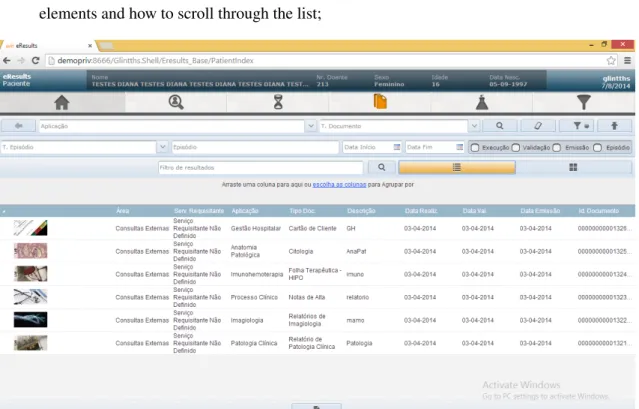
2.1 Results listing in eResults. . . 4
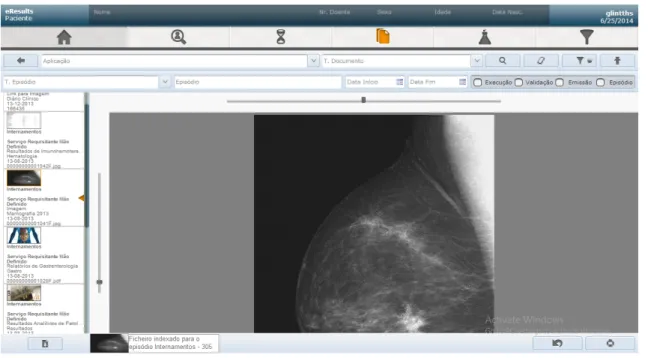
2.2 Sample image result in eResults. . . 5
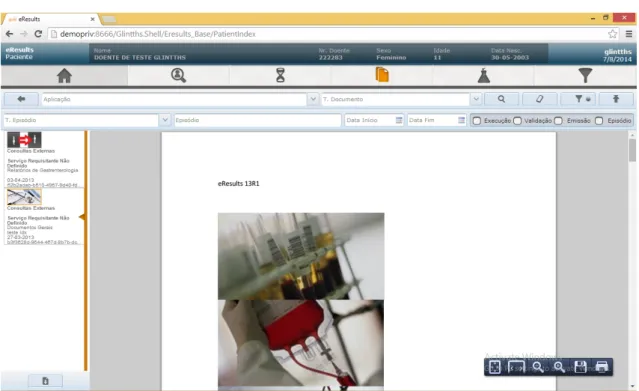
2.3 Sample document in eResults. . . 6
3.1 Gestures proposed by Wachs et al. for image interaction . . . 11
3.2 The Leap Motion . . . 12
3.3 The Microsoft Kinect’s components . . . 12
3.4 The physical interaction zone, as described by Microsoft . . . 14
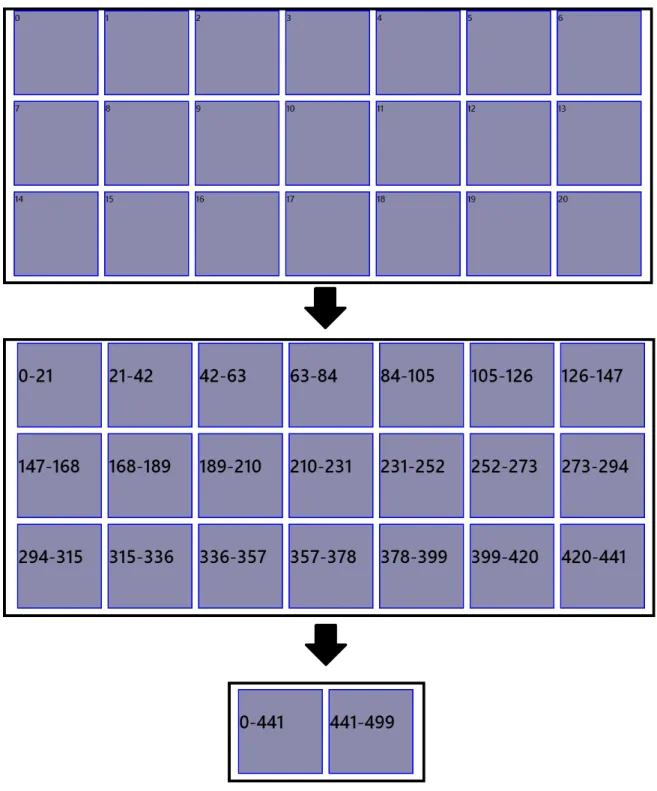
4.1 Example of the multi layered solution to carousel scrolling, in a situation with 500 elements where only 21 can be fit on the screen. . . 27
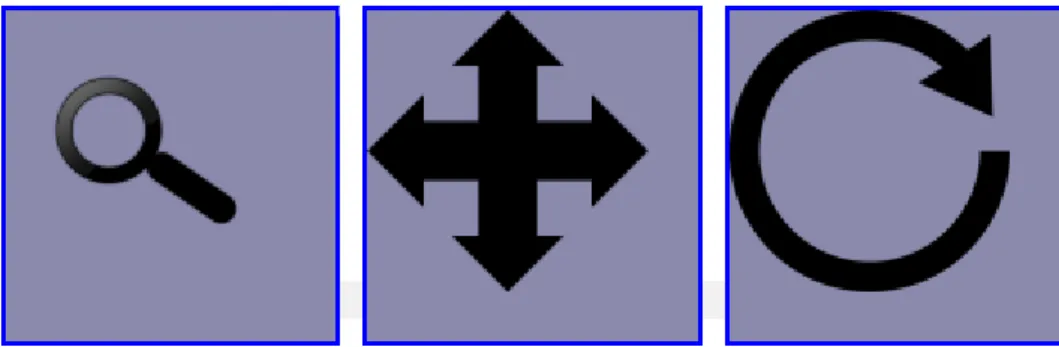
4.2 Controls used to switch between operations when manipulating an image. . . 29
4.3 Navigation buttons in the lateral menu. These appear on the right edge of the screen when the user moves their hand to the edge of the screen. . . 32
4.4 Lateral menu with the navigation buttons and contextual manipulation buttons. . 32
4.5 Cursor for an open left and right hands, followed by a right hand cursor with the arm extended at 50% of the necessary amount for a press and by a closed hand cursor. . . 34
4.6 Example of a problem caused by not adapting the hand coordinates . . . 37
4.7 Example of a problem caused by switching the coordinate system on the fly. The suddenness of the movement is what makes this situation troubling. . . 38
4.8 Intended behaviour for two handed interaction, which was implemented in the framework by forbidding crossings. . . 38
4.9 Example of a image larger than its container, with scrollbars indicating the amount of unseen content. . . 40
4.10 Engagement text in the developed prototype. . . 40
4.11 Patient listing in the eResults application. . . 41
4.12 Patient listing in the implemented prototype. . . 42
4.13 Diagram of the Kinect placement during the usability tests. . . 44
4.14 Comparison between the display of a video element in Google Chrome (top) and Internet Explorer (bottom). . . 46
5.1 Mockup of a radial keyboard . . . 51
List of Tables
3.1 The recommended button dimensions for use with the Microsoft Kinect . . . 10
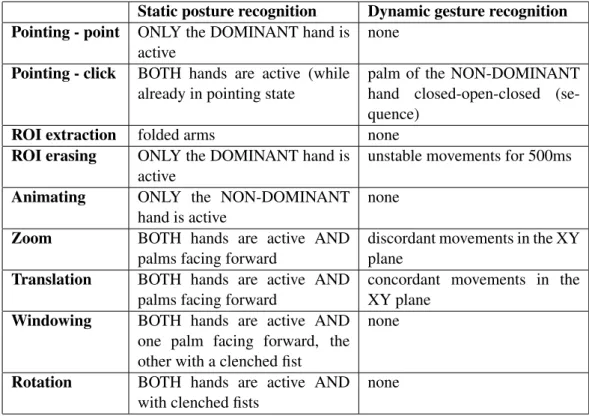
3.2 Gestures proposed by Galo et al. for image interaction . . . 10
4.1 Operations supported by the API . . . 21
4.2 Summary of the attempted implementation of a gesture vocabulary . . . 23
4.3 Table with the results of the usability tests for the elements common for both group A and group B. . . 46
4.4 Average results of the usability tests for the group A. . . 47
Abbreviations
HAI Health-care Associated Infection RGB Red Green Blue
FPS Frames Per Second
API Application Programming Interface IR Infrared
LED Light Emitting Diode SDK Software Development Kit ROI Region Of Interest
HCI Human-Computer Interaction WIMP Windows, Icons, Menus, Pointer NUI Natural User Interface
SDK Software Development Kit DOM Document Object Model
Chapter 1
Introduction
This thesis, called no-touch interfaces, consists in the definition of rules for the development of no-touch interfaces and the implementation of a framework to ease the development of such inter-faces, using a clinical history application as the case study. It was proposed by Glintt Healthcare Solutions and the work was conducted at this same company. This document details the proposed problem, the existing work related to this topic and the implemented solution, as well as the results derived from this solution.
1.1
Context
With the introduction of computer technology in hospitals, the number of HAIs (Health-care As-sociated Infections) has been increasing due to poor sterilization methods of this technology. In the USA alone there were approximately 1.7 million HAIs in 2007 [RB12]. One environment that is particularly prone to these occurrences is the operating room, where a doctor may need to use a computer to obtain more information about the patient. However, not only is this prone to an HAI, but it is very time costly, as the sterilization processes may add up to 2 hours to an operation [Bau11]. One possible solution is the use of an assistant to interact with the computer in the way desired by the doctor. Nevertheless, this solution proves itself ineffective as it is prone to mistakes and still cost ineffective, where in an extreme case, a simple instruction can take several minutes to be executed [JOS+11].
1.2
Problem to solve
With the advent of inexpensive technology for no-touch input, such as the Microsoft Kinect and the LeapMotion, there is an opportunity to solve the problem of computer interaction in the operating room. However, developing applications using these interfaces is still troublesome as there are only a few guidelines available and the only existing framework is exclusive to native applications
Introduction
using the Microsoft Kinect, which is particularly limiting with the increasing popularity of web applications. Therefore, the objectives of this thesis are the definition of a set of rules of the best interaction methods for no-touch interfaces and the implementation a framework that allows the developers to skip on the interaction design and implementation.
1.3
Objectives
The objectives of this thesis are as follows:
1. Find the best methods to apply no-touch interfaces in a series of use cases defined by Glintt Healthcare Solutions as necessary for a doctor during surgery;
2. Implement a Javascript framework implementing these methods, so that future developers can develop applications with no-touch interfaces by merely importing the framework’s stylesheet and scripts, adding the appropriate classes to the HTML and initializing the framework;
3. Create a prototype with a no-touch interface, using the developed framework, of Glintt’s eResults application, which allows a medic to view a patient’s clinical history;
4. Execute usability studies to verify whether the adaptation was successful.
1.4
Expected benefits
Upon successful completion of this thesis there will be gains for both doctors (and by extension their patients) and developers. Doctors will be able to access information during surgeries, faster while being able to avoid HAIs, resulting in overall better healthcare. Developers will also save time by skipping the interaction design portion of the application development and by using the developed framework.
1.5
Document structure
Besides the introduction, this document contains four more chapters. In chapter2, the problems to be solved are explored in further depth and Glintt’s eResults application is detailed. Afterwards, in chapter3, there is a presentation of the technology and research publications available in this area. In chapter 4the implemented framework is described and examined, both from technical and usability viewpoints, the eResults adaptation is exposed along with the challenges that arose despite the aid from the framework. Finally, in chapter5there is a small review of the contents discussed in this thesis, a discussion of the results and a listing of possible improvements that fell out of the scope of this work.
Chapter 2
Problem description
As previously mentioned, this thesis intends to discover the best way to translate components of WIMP (Windows Icons Menus Pointer) interfaces into no-touch interfaces, which requires both the creation of a gesture vocabulary and rules for element display. This chapter will describe the challenges that arise upon the development of a gesture vocabulary for no-touch interfaces, followed by a description of the components required by eResults and should therefore be adapted to a no-touch interface and concluding with a description of the additional constraints required for this application.
2.1
Gesture Vocabulary
No-touch interfaces are a subgroup of Natural User Interfaces(NUIs) and, as such, it was necessary to define a gesture vocabulary for all the implemented components, which refers to the set of gestures used to interact with the application. This set must take the following issues into account:
• False positives, where the system recognizes a gesture that the user didn’t preform, should be avoided. This kind of errors causes the system to react without the users understanding the reason for this, leaving them confused and having a negative impact in the user experience. If there is a risk of false positives, the users should be able to easily undo the action.
• False negatives, where the system fails to recognize a gesture preformed by the user, should be avoided as well. This kind of errors make the user lose confidence in the system but since they do not change the application state, they won’t have a big impact in the user experience if they are not frequent and the users are able to correct the error and are aware of what they must do in order to correctly perform the gesture.
• Gesture vocabulary collision, where similar gestures have different results, should also be avoided, since this is a driving force to cause false positives.
Problem description
• The user should also feel comfortable using the gesture vocabulary. Ideally, this translates into being able to guess the gestures, but, otherwise, the user required action should feel nat-ural to the user. As Wixon and Wigdor [WW11] mention, the "Natural User" and "Interface" parts in NUI should be separated, rather than "Natural" and "User Interface".
• The gesture vocabulary should not be tiresome, in order to allow the users to interact with the system for long periods.
2.2
The eResults components
The eResults application is the study case for this thesis, as it has the necessary features for doctors in the operating room, and, therefore, it defines the components that need to be adapted. The most basic component to adapt, and one that should be transversal to all applications is element selection. This encompasses buttons, checkboxes, list elements and anything else that would be clickable in a WIMP interface. In addition to this basic element, the following components were established as necessary by Glintt, as they either exist in the current eResults platform:
• The eResults platform uses lists of elements either occupying the page’s full width or a smaller rectangle. Figure 2.1shows a listing for results of a given patient, along with the filters associated with it. However, the implemented framework should be able to work with lists of any style and number of elements, which brings up questions in how to space the elements and how to scroll through the list;
Problem description
• These lists should be able to be filtered, which is achieved in eResults via drop-down lists, as seen in figure2.1. These drop-down lists can have as little as 5 and as many as 500 elements and may contain a whole HTML div, rather than simple text. Under these conditions, it would be naive to assume that it is sufficient to drop down the elements in a list, having only applied the same changes as the ones for a regular list;
• The patient records in eResults may be images representing, for example, x-rays or snap-shots of an ecography, as seen in figure2.2, which the user should be able to view, as well as move, rotate and zoom in and out. It is necessary to determine the best way to apply these transformations with gestures;
Figure 2.2: Sample image result in eResults.
• There may also be records pertaining to documents regarding the patient, such as analysis or certificates passed by a doctor, as seen in figure2.3, which shows an example of a document inserted in eResults for testing purposes. These documents are stored as PDF files, where the user should be able to scroll horizontally and vertically, as well as zoom in and out, identically to images;
• Although eResults does not currently support video elements, Glintt established that his feature could be desirable in the near future, in order to allow the users to review previous interventions on the patient, surgical or otherwise. In this type of results, the user should be able to pause or play the video at will, as well as seek within the video, in order to see what happens at a certain point within it.
Additionally, eResults also makes use of text introduction in order to filter through results. Nevertheless, several authors recommend a multimodal approach to this problem, using speech
Problem description
Figure 2.3: Sample document in eResults.
recognition as an auxiliary modality. This would not be a favourable solution for text input in eResults, since much of the text introduction refers to medical and pharmaceutical terms and products, most of which are not found in common voice recognition dictionaries. Although gesture based keyboards were considered, making them usable without being tiring would prove itself a much bigger challenge that would fall out of the scope of this thesis.
2.3
Interaction constraints
All of the defined interaction and gesture vocabulary should also take into account the following constraints:
• The user should be able to interact with the system at a distance of three meters. This means that the chosen technology should correctly identify user motion and state at this distance; • There should be a procedure for the users to signal their intention to start interacting with
the system, in order to avoid false positives when the users are moving their hands as part of a conversation or interaction with the environment;
• The system should also be able to assert when the user has stopped interacting with it, either by an explicit user action signalling the disengagement or by a contextual assertion from the system. This thesis should also answer which of these is the best approach to the problem.
Chapter 3
State of the art
This chapter will start by further specifying the context of the problem. Then, a literature review follows, explaining what has been done within this domain. Finally, there is an overview of the possible technology options and a decision regarding which one to use.
3.1
Intervention domain
This thesis belongs to the HCI (Human-Computer Interaction) domain, more specifically to the sub-domains of medical computer interaction and NUIs and,within this sub-domain, the area of gesture interaction. More precisely, there are problems in medical computer interaction that may be solved through gesture interaction while extracting lessons for the gesture interaction scientific community and developing a framework that implements these lessons.
3.2
Existing works
The existing works can be divided into three main areas: the research done attempting to find universal gesture sets, the documents that already help developers creating no-touch interfaces and the work done in the use of no-touch interfaces in surgery.
3.2.1 Gesture research
One important work when studying this area is Karam and Schraefel’s taxonomy of gestures [Ks05]. These authors did a revision of the literature about gesture interaction and divided gesture interaction into 4 types:
• Deictic Gestures - Gestures that involve pointing to identify the location of an object; • Manipulative Gestures - Gestures that mimic interaction with a physical object, such as
State of the art
• Symbolic Gestures - Gestures where the user controls the system by performing a gesture or a pose with implicit meaning, usually of cultural significance, such as telling it to stop by holding the hand with the palm facing forward;
• Gesticulation - Reading of gestures during verbal communication in order to better identify the user’s intention.
This taxonomy helps identifying the most adequate type of gestures for a given context. For example, for a situation that mimics a real world situation, manipulative gestures would be more fitting, while for giving instructions, symbolic gestures might be more adequate.
There are also a number of works trying to find some sort of consensus regarding optimal gesture interaction. Notably, Nielsen et al., in 2003 claimed that it is impossible to find an universal gesture vocabulary [NSMG03]. Wachs et al. made similar claims in 2008 [SWE08]. Although this may be true, their experiences are mostly done with symbolic gestures, which are more prone to cultural differences.
Contrary to these claims, Shedroff and Noesel [SN12] have studied science fiction movies that feature no-touch interfaces, such as Minority Report, and found patterns from gestures their char-acters use to interact with their interfaces. They assume that if these gestures are commonly used in science fiction, it is because all their creators found them intuitive, which may be representative of what users will also find intuitive. They make the following conclusions relevant to this thesis: • Physical analogies are always used when possible, such as pushing to move or turning the hands to rotate the object. This means that the previously described manipulative gestures are common in these interfaces;
• Objects should have inertia similar to their physical counterparts and should move according to the force applied in the gesture;
• Since there is no physical action to scale an object, grabbing an object and spreading the hands tends to make them larger, while bringing the hands together tends to make them smaller, as these actions are equivalent to stretching or compressing an object;
• Waving is commonly used to activate the interface or system, such as waving other a water faucet to start the water;
• Swiping in either horizontal direction is commonly used to dismiss objects; • Pointing and touching the objects in the air is commonly used to select them;
Additionally, in no-touch interfaces, the sensor, or input method, is always on, which needs to be addressed in order to prevent false positives, without making the gesture vocabulary so convoluted that false negatives are frequent. Wixon and Wigdor [WW11] address this issue by suggesting the use of a clutch analogous that acts as an analogous action to touching the screen
State of the art
for the LeapMotion as an example and also suggests cooldown periods for actions that cannot use a clutch, such as a swipe, in order to prevent false positives when the user is returning to the base state. Additionally, both these authors and Microsoft [Mic13b] put a heavy emphasis in the iteratively testing prototypes and alternative gesture vocabularies and interfaces with users, followed by engineering of a new iteration, as opposed to the definition of a gesture vocabulary with statistic basis on user suggestions.
3.2.2 Developer Guidelines
There exist surprisingly few guidelines for the development of no-touch interfaces and they are mainly offered by the companies that provide the technologies for no-touch interfaces. One of these guidelines is offered by LeapMotion, the company responsible for the development of the no-touch technology of the same name, that provide guidelines for menus and user experience in general. The user experience guidelines [Lea13b] are vague and offer common-sense rules for the development of no-touch interfaces. However, the menu design guidelines [Lea13a] offer some specific alternatives for the creation of a menu to be used with the LeapMotion, by recommending touch emulation using a touch zone and using grid or radial menus. Although these rules are made with the LeapMotion in mind, they should port fairly well to any technology used for a no-touch interface and can be used in this work, for example, to filter results.
The Microsoft Kinect User Interface Guidelines [Mic13b] is a one size fits all document that gives usability recommendations for developers intending to use the Kinect. Table3.1comes from these guidelines and it recommends button dimensions for different screen resolutions. The 1080p resolution is highlighted, as the Kinect interface elements provided by Microsoft were built for this resolution. This document also gives a specific recommendation for targeting and selecting a button, by recommending hovering the hand and pushing it towards the screen, and for starting interacting with the application while avoiding false positives. However, outside of these specific situations, it mostly gives generic usability recommendations, such as the use of brighter colors for feedback and reminding the developer to keep in mind the environment in which the application will be used.
Overall, these guidelines are a good base for this thesis, but they need to be built upon for developers to be able to directly produce an application with a no-touch interface by merely fol-lowing a set of rules, minimizing the need to consider the gestures and layouts to be used.
3.2.3 No-touch interfaces in the operating room
During the past decade there have been attempts at solving the sterile computer interaction prob-lem, with the usage of conventional cameras and even pedals [GFG+04][WSE+07]. However, these saw little exploration due to the technological limitations at the time.
In the last three years there has been some research on the usage of the Kinect in surgery. Galo et al. developed a hand posture recognition system for use in 3D medical visualization that suc-cessfully recognized the user’s actions with an accuracy of 73.53% using 10-fold cross-validation
State of the art
Sceen Type Screen Width(px) Screen Height(px) Button dimensions(px)
UHDTV 7680 4320 880 (W)QHD 2560 1440 294 1080p 1920 1080 220 WSXGA+ 1680 1050 214 HD+ 1600 900 184 WXGA+ 1440 900 184 WXGA 1366 768 157 720p 1280 720 147 XGA 1024 768 157 SD 720 480 98 HVGA 480 320 66
Table 3.1: The recommended button dimensions for use with the Microsoft Kinect
on distances up to 2 meters[GPP12], and in another study they suggest a 2-hand approach for interaction[GPC11]. Table3.2lists the gestures proposed in this later work, where the Kinect is used for navigating a 3D image and selecting a single ROI (region of interest).
Static posture recognition Dynamic gesture recognition Pointing - point ONLY the DOMINANT hand is
active
none Pointing - click BOTH hands are active (while
already in pointing state
palm of the NON-DOMINANT hand closed-open-closed (se-quence)
ROI extraction folded arms none ROI erasing ONLY the DOMINANT hand is
active
unstable movements for 500ms Animating ONLY the NON-DOMINANT
hand is active
none Zoom BOTH hands are active AND
palms facing forward
discordant movements in the XY plane
Translation BOTH hands are active AND palms facing forward
concordant movements in the XY plane
Windowing BOTH hands are active AND one palm facing forward, the other with a clenched fist
none
Rotation BOTH hands are active AND with clenched fists
none
Table 3.2: Gestures proposed by Galo et al. for image interaction
Juhnke [Juh13] refers to studies done in the area of gesture interaction for the choice of ges-tures, but never reveals what those selected gestures were. The results in her study do, however, suggest that the Kinect can achieve better interaction times, at an accuracy of 85%.
State of the art
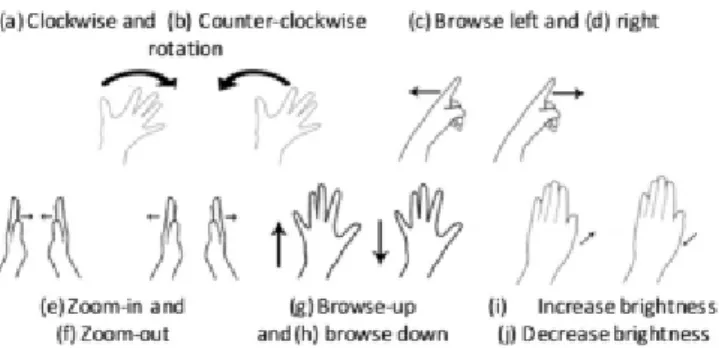
gestures. Although this seems like an interesting approach, it lies within the area of artificial intelligence and, therefore, is out of the scope of this thesis. Nevertheless, he suggests a series of gestures, as seen in Figure 3.1 which still achieve over 90% accuracy when used without a contextual approach.
Figure 3.1: Gestures proposed by Wachs et al. for image interaction
All of these works take only image manipulation into account and, therefore, are insufficient to cover all cases needed for Glintt HS’s clinical history application. Nevertheless, Galo and Wach’s gesture proposals will be taken into account when proposing gestures for image and document manipulation.
3.3
Technology
The choice of hardware for gesture recognition is critical in this work, as each one has unique characteristics that define limitations of the gesture precision precision and range.
3.3.1 Existing options
When discussing technology for no-touch interaction, there are three main possibilities: RGB (Red Green Blue) cameras, the Microsoft Kinect and the LeapMotion.
RGB cameras allow the capture of images, which can then be analysed via computer vision, by employing techniques such as Hidden Markov Models or Naive Bayes’ Classifier [HKR+10], to recognize a human shape and gestures. Then, methods such as machine learning can be used to translate a sequence of human shapes into gestures and there are multiple open-source APIs (Application Programming Interface) that already implement these methods.
The LeapMotion is a small rectangular device as seen in the Figure3.2, equipped with three IR (Infrared) LEDs (Light-emitting diodes) and two IR cameras. These are facing upwards and the cameras capture IR reflections which are used by the device to perform calculations that accurately determine the hand and finger positions[Gor12]. It also has an API that allows the developer to obtain the finger and hand positions and detect a few predefined gestures [LM13].
The Microsoft Kinect is a device containing a RGB camera that can record at 30 FPS (Frames per second), which is an acceptable rate to uniquely identify gestures that takes longer than 200ms
State of the art
Figure 3.2: The Leap Motion
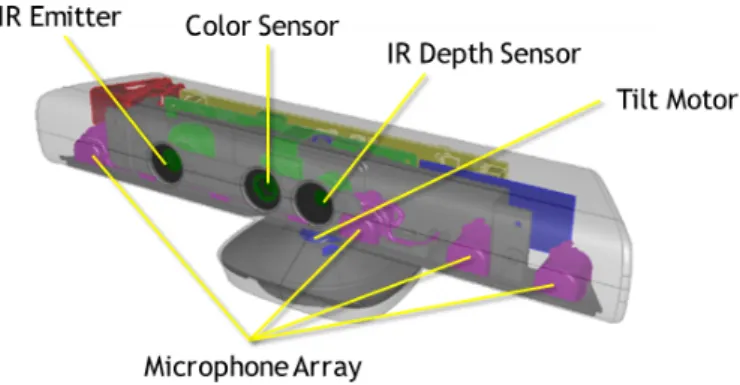
to perform, since in that time it can capture 6 frames. It also contains an IR emitter and IR sensor, a tilt motor and a microphone array [Mic12a], as seen in the Figure3.3. In practice, this allows for the functionalities of an RGB camera with the added possibility of depth mapping, thanks to the IR emitter and sensor. The tilt motor allows for adjustments depending on the user’s height and the microphone array is used for voice recognition. There are several SDK for the Microsoft Kinect, including Microsoft’s own Kinect for Windows [Mic13c] and open-source alternatives [Ope12a][Ope12b].
Figure 3.3: The Microsoft Kinect’s components
3.3.2 Choice of technology
For this thesis the Microsoft Kinect will be used, since the depth mapping provided by the Kinect allows for an extra degree of freedom in user gestures, by allowing the users to approach their hand as an input method. It is also able to capture image and depth up to a range of 4 meters [Mic12b], as opposed to the LeapMotion, which can only capture information in a radius of 1 meter around
State of the art
3.3.3 Existing SDKs
There are two SDKs available for the Microsoft Kinect: the official Microsoft SDK and OpenNI. OpenNI is an all-purpose SDK for body tracking and natural interaction, capable of working with any depth camera[Str14]. PrimeSense, the company behind the motion-sensing technology of the Kinect, is one of the main members behind OpenNI and developed a middleware for it, called NITE, to enable development for the Kinect with OpenNI [Fai12]. The main advantage of this framework over the Microsoft Kinect is the in-built gesture recognition, the automatic calibration offered and the wider array of programming languages that it supports, since it has wrappers for Java and Python. Its disavantages are the lack of documentation and support, as well as difficulty of instalation.
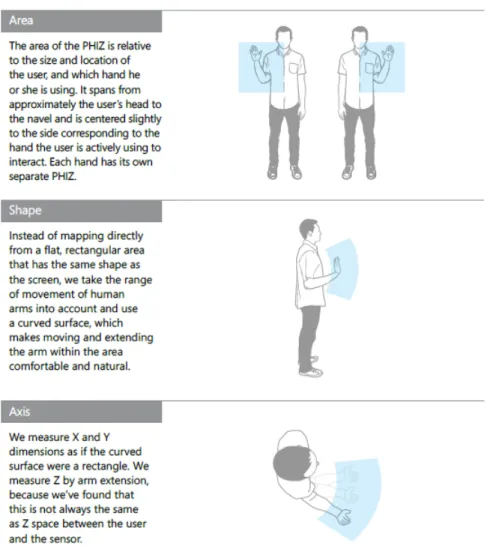
The Microsoft SDK, on the other hand, features numerous tutorials and samples, along with satisfactory documentation. This SDK is exclusive to Windows operating systems and the C++ and C# languages. It features body tracking and as of version 1.7, it offers a KinectInteraction API meant to facilitate the development of applications where the Kinect is used as the primary mean of interaction [Mic13d]. This API provides refined hand tracking, by being able to detect whether the hand is gripped or open and by being able to detect a press action and map the hand coordinates according to a physical interaction zone. Figure3.4shows Microsoft’s description of the physical interaction zone, and it can be seen that it consists of two curved areas, one for each hand, in which interaction is considered comfortable. For each of these areas, the coordinates provided by the API should range from 0, at the leftmost or top points of the zone, to 1, at the rightmost or bottom points of the zone. However, in practice, the values frequently escape this range and the programmer must bind these values in the range or ignore values outside the range. Another drawback of this implementation is that the hand state is lost if it leaves the physical interaction zone, that is, for example, if the right hand is closed and the user moves it all the way to the left shoulder, the hand will be considered open and there is nothing the user or programmer can do until the hand is returned to the physical interaction zone. As such, the hand should never be show on the screen if it is outside the physical interaction zone, in order to prevent incorrect feedback. It should also be noted that this system is designed for the user to interact with only a single hand. Finally, the KinectInteraction API also provides UI components, optimized for interaction with the Kinect. However, these are meant only for native applications and therefore unusable in this work.
The Microsoft SDK was chosen for this work because its documentation is more extensive than OpenNI’s and because the KinectInteraction API eases the mapping of the hand position to screen coordinates and its grip and press detection enable many more possible interactions. However, gestures such as swipes and waves, which are already implementes on OpenNI, would have to be implemented manually.
State of the art
Figure 3.4: The physical interaction zone, as described by Microsoft
3.3.4 Web frameworks
The Microsoft Kinect cannot natively comunicate with webpages and, as such, there was a need to address this issue.
Microsoft offers a solution, as of Kinect SDK 1.8, which handles the communication, presents the hand cursors and includes pre-defined UI components to interact with the Kinect [Mic13e]. Although an attempt was made to use this API for the thesis, since this API allows the Javascript to fully control the Kinect and receive data from all its streams, it requires extensive setup for any page and performs poorly: the sample webpage provided takes well over 300ms to respond to any movement. In conclusion, a more simplified and efficient API is needed.
Another available solution is KinectJS [Kal12a], which proves itself to be more efficient and easier to set up. However, this solution is based on the Kinect SDK 1.0 [Kal12b] and has not been updated since 2012, which results in more jitter, worse support for arm extension and a complete lack of support for hand grip. These features open a lot of possibilities for interaction, which
State of the art
Finally, Vangos Pterneas presents instructions to implement Kinect-javascript communications based on websockets and the C# Fleck library [Pte13]. The sample project has no noticeable lag and the usage of JSON for messages makes it simple to extend the framework by including an operation type in every message. As such, the communication between the webpage and the Microsoft Kinect was implemented following Vangos Pterneas’s tutorial.
3.3.5 Gesture recognition
The Kinect SDK together with the KinectInteraction API offer the possibility to track the position of multiple skeleton joints and whether the hand is gripped or not. However, it was also necessary to identify gestures, such as swipes or waves and gesture recognition libraries were investigated in order to simplify the implementation work and focus the thesis work on the gesture vocabulary design and usability. However, the existing libraries proved themselves to be hindering to the work: Kinect Dynamic Time Warping [Ste11] and Kinect Toolbox [Cat12], which made use of machine learning techniques to identify a performed gesture out of a set of pre-recorded gestures, were built upon older versions of the Kinect SDK, while GesturePak requires a paid license and is not clear regarding the computability with the latest SDK. Since these external libraries were not viable, gesture recognition was implemented using only the skeletal tracking provided by the Kinect SDK.
3.4
Usability testing
Since the goal of this work was to define and implement usability guidelines for no-touch in-terfaces, it is natural that usability testing would be performed with users in order to assess its success.
Regarding the moderation of usability testing, which refers to the interaction between the user and the person conducting the experiment, Bergstrom [Ber13] suggests four different techniques: • In concurrent think aloud, users are asked to to report their thought process throughout the test session, in order for the moderator to obtain more precise feedback. However, this technique may interfere in usability metrics, as users may take more time to perform the actions because they are reporting the thought process, and their though process may change because they have to verbalize it;
• In retrospective think aloud, the session is recorded and when it is complete, users are asked to watch the recording and report on their thought process at the time. This technique does not have the risk of interfering in usability metrics, but it doubles the session length; • In concurrent probing, the moderator will ask questions when the user does something
inter-esting or abnormal, in order to understand the cause for that action. This technique is highly intrusive in the usability metrics, since it will interfere with the user thought process;
State of the art
• In retrospective probing, users are questioned regarding interesting or abnormal actions and regarding their thought process after the session is over, in order to asses their opinion and understand any problems that occurred. While this method does not interfere with usability metrics, users may have difficulty remembering their reasoning during the session.
Since it was undesirable to interfere with the usability metrics and user time was limited, the moderation technique used for this thesis was retrospective probing, whose negative points were mitigated by the short projected session length.
Chapter 4
Implementation and result evaluation
The implementation followed a rapid iterative testing and evaluation (RITE) approach, where each component would be tested with one or two users for quick feedback and iterated upon until an intuitive and efficient solution was found. However, this meant that new and unforeseen problems would arise that would require changes in the framework that affected previously implemented components, either for technical reasons or to maintain consistency within the gesture vocabulary. This chapter will overview the framework from a technical perspective, explaining the architecture choices of the final result. Afterwards, there is an explanation of how the various individual user interaction components were implemented, followed by a description of the interface changes required to provide proper feedback to the user and ensure the accuracy is retained in the no-touch interface. It is then followed by a description of the process of adapting Glintts eResults to a no-touch interface using the implemented framework, along with the challenges that arose during this step. Finally, there is a section dedicated to the usability tests executed on the final prototype, describing how their process, results and retrieved conclusions.
4.1
Technical implementation
The Microsoft Kinect cannot natively interact with webpages, as the SDK is only available for C++ and C#. An initial approach for this problem consisted in a naive emulation of the mouse, where the native application would translate the hand movement into mouse movement at the level of the operating system, a grip and release would trigger a mouse press and mouse release event respectively and additional functionality could be added by emulating the scroll wheel and keyboard presses. This approach allowed users to press buttons without a problem, but had issues that caused it to be discarded:
• Handling two hands was out of the question. Since it was impossible to have two cursors on the screen, the user could not have feedback regarding the position of their second hand,
Implementation and result evaluation
and neither could the webpage. Any event in the second hand would have to be dealt by the application.
• This approach added an unneeded layer of abstraction both for the native application and the webpage, since values other than cursor position could not be passed. This would later mean that, for example, changes in hand proximity to the screen would have to be abstracted to key presses.
• There were modularity limitations in this approach. This is a consequence of the lack of communication of values, but also because it meant a change in technology would result in a full re-implementation of the system.
It was clear that the Kinect data would have to be passed to the webpage and handled by it in order to optimize the feedback that would be served to the user and improve the accuracy of the data available to handle events. Following the study shown in chapter3.3.4, it was decided that the communication would have to be implemented from scratch, using websockets.
4.1.1 Native application architecture
The native application makes use of the Kinect SDK 1.8 to retrieve the user data from the Mi-crosoft Kinect and the Fleck library to set up websockets to which the framework connects in order to receive the user information. This application contains aConnectionManagerwhich is responsible for keeping track of all the connected clients and providing a static method for the rest of the framework to send messages. In addition, it is also ready to read any incoming mes-sages from the clients, although, in the end, communication was kept unidirectional. In order to handle the Kinect, the aptly namedKinectHandleris responsible for initializing the sensor and storing the information from the skeleton, depth and interaction data streams offered by the SDK, while also processing the skeleton info to determine the number of active hands and, in inter-mediate iterations of the framework, to process the hand positions when both hands were active. However, regardless of the fact that gesture detection makes use of skeleton data, gesture detec-tion is not handled by theKinectHandler, but rather by theGestureController, because of the complexity of this operation which is best left to its own module, as explained the next section. TheGestureControllerholds multiple instances of theGestureclass, which itself contains multiple segments, represented by theIRelativeGestureSegmentinterface, and a name, represented by theGestureTypeenumeration. On the other hand, the interaction stream, which contains data pertaining to the users hand state adjusted for interaction, is handled by the InteractionHandler, which sends both grip events and movement updates to the framework. When constructing the messages, the application makes use of theUtilitiesclass, which was implemented to provide static utility methods that would be used throughout the whole application, but, in the end, was only used to properly convertdoubleprecision numbers to string bypassing regional decimal point settings, by enforcing a dot, which Javascript uses as the decimal
separa-Implementation and result evaluation
The Kinect initialization was another problem that had to be solved by theKinectHandler, be-cause the interaction stream offered by the Kinect Developer Toolkit is normally reserved for WPF applications and because the Kinect itself may have hardware issues that should be solved at run-time. In order to solve the first of these two problems, a dummyIInteractionClient, which normally binds an interface component as interactive, was created to affect the entire screen, as suggested by András Velvárt [Vel13]. As for the hardware issues, these were mitigated by adding a listener to state changes in the Kinect sensor, which stops the streams from receiving data if the sensor is not ready, and re-initializes them if the sensor is ready. Nevertheless, irreversible hardware failures, such as the sensor shutting down due to insufficient power from the USB ports require reconnecting the Kinect and restarting the program.
4.1.2 Gesture recognition
In addition to the information offered by the Kinect SDK, of the hand position, pressure and grip, it was necessary to determine when the users waved their hands and when they made a pinch or swipe, in addition to the direction of the swipe or the pinch. In addition, it was desirable to make this recognition as expansible as possible, in order to accommodate future gestures.
It was decided that gesture recognition would be implemented in the native application rather than in Javascript because with the Microsoft Kinect, data from the elbow, shoulder and hip po-sition was required to correctly identify these gestures and it was desirable to minimize the data sent and processed by the framework by sending only the hand data and the events. All the ex-isting libraries for gesture recognition proved themselves outdated and, as a consequence, gesture recognition had to be implemented from scratch.
The implementation closely followed the one suggested by Vangos Pterneas [Pte14], where each gesture is specified as a sequence of gesture parts, where each of those parts acts as a state of a state machine, providing a common method that may return either a successful passage to the next part, a continuation of the current part, which is described as a pause in the gesture execution, or a return to the initial state, which represents a failure executing the gesture. Using this algorithm, the wave gesture was implemented as a repeated sequence of the hand being located to the left of its corresponding shoulder and then being located to the right of the same shoulder. On the other hand, an horizontal swipe is defined as a motion starting left of the left shoulder or right of the right shoulder, followed by the same hand between both shoulders and, finally, by having the hand beyond the shoulder opposite of the initial one. For this purpose, the left and right swipe have different parts, in order to make both the gesture validation and direction recognition easier. Lastly, the vertical swipe, which goes from top to bottom, is defined as a sequence where the hand starts above the shoulder, moves to a position between the shoulder and the hip, follows by going below the hip and finishes by returning to the position between the shoulder and the hip. This last step was added to avoid false positives, where the users would trigger a vertical swipe when disengaging or switching the hand they were using to interact. The pinch gesture, on the other hand, was not handled using this algorithm, because this gesture could be detected using only hand data and works more fluidly if the consequences of the pinch are triggered before the
Implementation and result evaluation
gesture is complete, that is, if a zoom starts as soon as the user starts moving the hands away from each other and the zoom amount directly follows the distance between the hands.
4.1.3 Framework architecture
The framework follows a modular design, allowing the developers to change the implementation of how the interaction with a given component works, by swapping the values inKinectOptions module, which lists the possible modules in the comments.
The document, image and video modules offer a common interface that allows the devel-oper to place one of these elements in a page by specifying the container div and the path to the file with the image, PDF or video content, by calling the functioninit(container_div, source). When the module is no longer needed, theclean() function should be called to undo any changes performed on the container div when the module was initialized. However, the KinectNavigationmodule automatically handles this task, which means that if the developer uses the navigation module offered by the framework, the module cleanup process is opaque.
Despite the chosen modules, theKinectConnectionmodule is always used to receive the JSON messages from the API, process the instruction and pass it on to the appropriate handlers. In addition, the kinect-framework.js file is also used as well, as it provides common utility that is necessary in all the states that the page may be, such as updating cursor position, pressure and grip, as well as triggering the appropriate events in the DOM elements annotated with classes relative to the framework. This file also initializes these elements accordingly and, as such, offers the initializeKinectElementsfunction, that the developer should invoke when the page has loaded in order to allow the page to work via no-touch.
The framework also offers a lateral menu that is invisible until the user moves his or her hand to the right edge of the screen, and, to add buttons to this lateral menu, it is possible to register buttons in theKinectSideMenumodule before initialization, so that they get properly initialized after being added to the DOM.
Finally, the framework also provides a stylesheet which defines the minimum dimensions for the elements interactive via no-touch and defines attributes for the elements that are necessarily used: the lateral menu and the cursors.
In conclusion, the framework offers a number of Javascript modules that can be swapped as the developer requires. The only interaction required by the developer to offer no-touch functionality to the application is to perform a general initialization when the page is loaded and to initialize the image, document and video modules as necessary. It should also be noted that the framework is completely compatible with Google Chrome, Firefox and Internet Explorer of version 10 and upwards.
4.1.4 API specification
Implementation and result evaluation
Operation Arguments
grip hand_side, grip_event hand_n_update n_hands
movement hand_side, x, y, press_extent, raw_press_extent swipe direction, time_taken
wave none
Table 4.1: Operations supported by the API
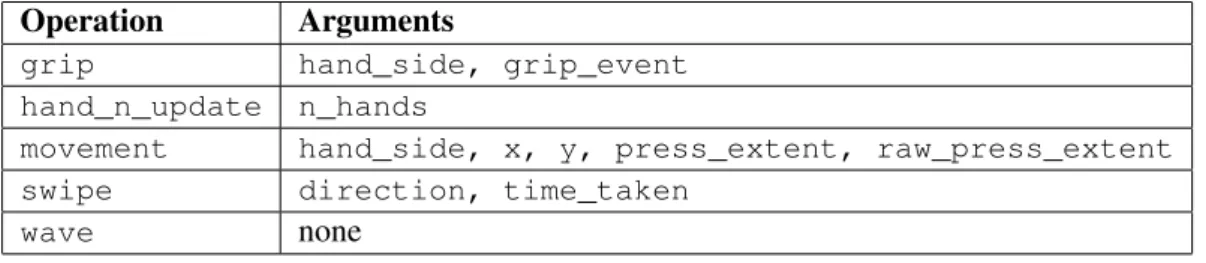
contain a string labelled operation, indicating the type of information contained within the message. Table4.1summarizes the supported operations and their arguments.
Thegripmessage represents a change in the hand state and, therefore, may represent either a grip or a grip release. The grip is an event, rather than a state passed along with the movement because the Kinect SDK provides the grip information in this manner. In these messages, the hand_sidemay be eitherleftorright, depending on whether the information pertains to the right or left hand and thegrip_eventargument may be eithergriporrelease, depending on whether the hand opened or closed the grip.
The hand_n_update message serves to inform the system of the number of active hands used. This message is needed so that the system can hide the cursor of the inactive hand or start displaying the cursor of the second hand, and to know when the user is disengaged from the system. The reason for this being handled by a message sent from a native application, rather than at the level of the framework itself is to ensure that the users hand goes beneath the hip before labelling it as inactive.
The movementmessage describes the current hand position and, as such, is the most fre-quently sent message, since, in order to offer smooth animation, the Kinect offers this information thirty times per second. Once again, thehand_sideattribute represents the hand to which the message refers, whilex andyare floating point numbers representing the position of the hand, ranging between zero and one, where zero represents the top-left corner of the screen and one rep-resents the bottom-right corner. Both thepress_extentandraw_press_extentattributes refer to the proximity of the hand to the screen, but, whereas theraw_press_extentis a direct measure of how much the arm is stretched, which is used by the framework for zoom operations using hand pressure, thehand_pressureis adjusted to make pressing a button smoother, by the means of calculations done by the Kinect SDK.
The swipe message describes, as the name suggests, a swipe by the user, which may be vertical or horizontal, as represented by thedirectionattribute, which may beleft,rightor top-bottom. This message is sent only when the motion has been completely registered by the native application and thetime_takenattribute holds the time, in milliseconds, taken to perform the motion, which would be used to scroll in proportion to this time, if it had not proved itself an ineffective way to scroll.
Finally, thewavemessage represents a wave and, since it is used for engagement, it holds no arguments, because the only variables in a wave motion, which are the hand used and the time
Implementation and result evaluation
taken to perform the wave, are irrelevant in the engagement process.
4.2
Component implementation and gesture vocabulary
In order to implement all the required components, a gesture vocabulary had to be designed for the whole system, in order to maintain consistency and to avoid overlaps between the various components. Table4.2 summarizes the attempted components of the gesture vocabulary and the conclusions obtained from each one of them. An interesting conclusion from this table is that every gesture that was kept in the framework was of manipulative nature, where the user interacts with the element as if it were present in the air, with the exception of engagement, which made use of a symbolic gesture. The following sections details their design process, implementation and framework integration.
Context Hand state
Hand motion System Response Conclusions
Images One hand gripped
Omnidirectional movement
Image translation Maintained in the frame-work, as it was intuitive and efficient Images Two hands gripped Circular move-ment
Image rotation Maintained in the frame-work, as it was intuitive and efficient Images Two hands gripped Omnidirectional movement in the same di-rection in both hands
Image translation Maintained in the frame-work, but generally less used than one handed translation Images and documents Two hands gripped Hand move-ment in oppo-site directions, also known as a pinch
Zoom in or out Maintained in the frame-work, as it was intuitive and efficient
Images and documents
One hand gripped
Move the hand towards or away from the screen
Zoom in or out of the image or docu-ment
Maintained in the frame-work as an alternative to the two handed approach Scrollable elements One hand gripped Omnidirectional movement Scroll equal to the movement ammount
Discarded because repeat-ing the movement was tiresome
Implementation and result evaluation Scrollable elements One hand gripped Maintaining the hand at a certain position Continuous scroll equal to the dis-tance to the original grip position
Maintained in the frame-work, as it was intuitive and not tiresome
Scrollable elements
One hand gripped
Vertical move-ment of the non-gripped hand
Continuous ver-tical scroll equal to the vertical distance between the two hands
Discarded because it was asymmetrical and there-fore unintuitive and could register false positives when the user intended to proceed to another gesture Clickable el-ements Hand grip fol-lowed by a release
None Simulate a click Maintained in the frame-work, as it was intuitive and efficient Clickable el-ements Open hand Push towards the screen
Simulate a click Maintained in the frame-work, as it was effi-cient and the user would become more proficient with it
Disengaged user
Irrelevant Hand wave System engage-ment
Maintained in the frame-work, as it caused few false positives
Videos Hand gripped
Horizontal movement
Time seek within the video
Maintained in the frame-work, as it was efficient and intuitive
Videos Hand open
Push towards the screen
Play or pause the video
Maintained in the frame-work, as it was effi-cient and the user would become more proficient with it
Any context Irrelevant Horizontal swipe
Navigate to the pre-vious element in the page
Maintained as an alterna-tive to button based navi-gation, as it was intuitive Any context Irrelevant Vertical swipe Navigate to the
ini-tial element in the page
Maintained as an alterna-tive to button based navi-gation, as it was intuitive Table 4.2: Summary of the attempted implementation of a gesture vocabulary
Implementation and result evaluation
4.2.1 Engagement
In No-Touch Interfaces, the user is always tracked and, as such, may accidentally interact with the system when they have another intent. Because of this, there is a necessity for a gesture or signal that the user intends to interact with the system. Science fiction suggests that a wave by the user should initialize interaction and it is trivial to see the reason for this: a wave, as defined by the repeated sequence of moving the hand from left of the corresponding shoulder to the right, followed by a return to the left, is unlikely to be used in common conversation or actions. At the same time, waving is not tiresome if it is correctly recognized by the system, making it an intuitive choice for engagement implementation.
Another point that needs to be addressed is the disengagement, that is, when the user should be labelled as not interacting with the system. A naive approach would be to disengage the user when both of their hands are lowered beyond the interaction area or when the user is no longer found. This approach caused false positives when the user wished to switch hands and when the user attempted to perform a vertical swipe. This problem was mitigated with a timer, that would only trigger the disengagement if the user lowered their hands for three or more seconds, which eliminated false positives and had a minimal amount of false negatives.
An alternative approach to disengagement was considered to allow the user to rest their arms without disengaging the system. A use case for this would be during surgery, where the doctor may wish to interact with the system, interact with the patient and, later, interact with the system again without having to engage. While it seemed natural to use the same gesture for disengagement as the one for engagement, the wave gesture caused false positives during interaction or when the user would casually move their hand while browsing results. Due to the extensive gesture vocabulary, it was impossible to find another universal gesture that would not collide with other interactions and, as such, it is not recommended to use gestures to trigger a disengagement.
In summary, the implemented framework allows users to move their hands and see the hand projection replicating the movement, but they cannot press any buttons, nor are they highlighted, until the user waves to engage the system. This state is accompanied by a message indicated what the user should do, which fades out when the user engages the system and returns when the user disengages. To disengage, both the hands down and swipe approaches were implemented and the developer can alter the disengagement method in theKinectOptionsmodule, although waving to disengage is not recommended.
4.2.2 Pressable elements
The interaction with pressable elements was designed with the goal of being analogous to a mouse click. This meant that there should be an action analogous to pressing the mouse down and another action analogous to a mouse release, which should result in a click if the user did not move the cursor outside the element. This analogy allows user to confirm whether their action was inten-tional and, since there is no fixed wait time, as found in hover based approaches, the users can
Implementation and result evaluation
With this concept in mind, two complementary approaches were implemented: the press and the grip. The press works in the same manner as the one Microsoft uses and recommends, where the user can extends their arm towards the screen to trigger the mouse down portion of the click and contract it again to trigger the mouse up. The grip, on the other hand, was implemented because the two state nature of a grip and release could easily be compared to the mouse down and up states, respectively. In both these approaches, the cursor becomes anchored to the clicked element during the mouse down state and it is only released form the anchor if the user proceeds with the click or if his hand movement exceeds a threshold of 10% of the screen width. This anchoring was implemented to compensate for the jitter in the Kinect and involuntary movements by the user, thus increasing confidence that the element is still being pressed or gripped.
In conclusion, the framework offers thekinect-pressableclass for any HTML element, which will adjust its dimensions to those necessary in order to achieve high accuracy, and trigger a click when the user presses it or grips and releases it, so that the developer can define the behaviour of the element by adding a listener to the click event, as they normally would in a WIMP inter-face. In addition, the element will also be the target of thehandenterandhandleaveevents, where the developer should add visual feedback that the hand is hovering over the element. The framework does not provide this behaviour by default, because the feedback may change from application to application, for design purposes.
4.2.3 Drop-down lists
What is commonly known in WIMP interfaces as drop-down lists could not work by dropping down in NUIs. This is already evident in touchscreen interfaces, such as in phones using the An-droid operating system, where drop-down lists cause a pop up with the available options. As such, the first step was to create this sort of pop up, which was achieved using the jQuery plugin color-box, which allows inline HTML to be used inside a lightbox that darkens the screen outside the colorbox it generates and, as a consequence, maintains state changes between pop ups. However, since these drop-down lists could contain any number of elements, there was a need for a solution that could hold for any number of options of any size and merely listing the options would make them troublesome to navigate. To this effect, the framework calculates the number of options it can fit on the screen and creates a carousel, using the jQuery plugin Owl Carousel, where each page of the carousel contains as many options as possible. Nevertheless, navigation within the carousel was still problematic. The first implementation that attempted to solve this used an hor-izontal swipe to change the active carousel element. This implementation was unsuccessful, as it was tiring to repeatedly swipe in order navigate through a large amount of elements and moving a number of elements dependant on the swipe speed, where a faster swipe would move advance a larger number of elements than a slower one, caused precision issues, where it would be diffi-cult for the user to move through a shorter number of elements. From this approach it could be concluded that it was necessary for a navigation that did not involve repeating gestures and, if the users accidentally skipped past their goal, they could easily undo the movement. With these con-clusions in mind, two arrows, pointing left and right, were added bellow the listed elements, that