Augmented Reality and Holograms for the Visualization of Mechanical
Engineering parts
Mauro J. G. Figueiredo
1,2,4, Pedro J.S. Cardoso
3,4, C´esar Gonc¸alves
4, J.M.F. Rodrigues
3,41Centro de Investigac¸˜ao Marinha e Ambiental – CIMA 2Centro de Investigac¸˜ao em Artes e Comunicac¸˜ao – CIAC
3
LARSyS, University of the Algarve
4
Instituto Superior de Engenharia, University of the Algarve, 8005-139 Faro, Portugal {mfiguei,pcardoso,cgoncal,jrodrig}@ualg.pt
Abstract
There is an increasing number of students using tablets in schools. Mobile devices gained popularity as an educa-tional tool and there are many schools that use them fre-quently in educational activities to improve learning. We found that first year students of mechanical engineering in general have difficulties in understanding 3D shapes from 2D views. There are many Augmented Reality (AR) ap-plications available that can be used to create educational contents for these mobile devices. On the other hand, there is an increasing interest in making holograms. In this pa-per we studied the most popular AR systems and show ex-amples of using an AR system for the visualization of 3D models. We also present the creation of a low cost proto-type, the EducHolo, that enables the visualization of holo-grams supported by tablets. With this prototype students can visualize the hologram of mechanical parts, providing a better perception of the model 3D shape and improving the ability of making the 2D orthographic views and per-spectives that they study in the first year of mechanical en-gineer.
Keywords— Visualisation; Augmented Reality; Holo-grams; 3D models; m-learning.
1
Introduction
The introduction of Apple iPad and Android tablets around 2010, made it possible the use of these mobile devices in news ways for teaching and learning. Tablets are becoming less expensive and many students already bring themselves to classes. The increased availability of tablets with Internet connectivity and increasing power comput-ing makes possible the use of augmented reality (AR) ap-plications and the visualization of holograms using these mobile devices. This opens new possibilities for teachers to develop educational activities that can take advantage of augmented reality technologies and holograms for
improv-ing learnimprov-ing activities.
There are many augmented reality applications that can be used in a tablet device [2]. Similarly, there are many ways to produce an hologram [4]. Widely used in the amusement area (e.g., theatres, magic illusion, thematic parks), properly explored, holograms deliver an excellent education tool by providing a depth impression of the ana-lysed three-dimensional (3D) objects which can be further useful if interactive features are implemented.
In this paper, we present several examples of augmented reality, available for iOS and Android tablets, and holo-grams usage that helps students understand the 3D shape of a model from two-dimensional (2D) views. When stu-dents start learning technical drawing, in the first year of their mechanical engineering degree, they commonly have many difficulties in understanding and drawing the shape of three-dimensional objects from two-dimensional repres-entations. The same is also true when they have a 3D model perspective representation of a mechanical part and they need to draw the two-dimensional front, side and top views.
Our first goal is to choose an augmented reality applic-ation that enables the teacher to prepare 3D models that can be show on top of a 2D drawing in an efficient way and that do not require programming knowledge. Addi-tionally, we were interested in finding an augmented reality application for this educational project that is open source or free, without any type of water marks. In this context, the most appropriate augmented reality systems and low cost hologram prototype, that we choose to be used by teachers to build examples that help students of mechan-ical engineering to visualise 3D models, are presented. We also exemplify the augmented reality and holograms usage, that helped students to understand the 3D shape of a model from 2D views. In this way, they succeed in the drawing of the orthographic or the isometric views.
The paper is organised as follows. Section 2 surveys the most common augmented reality eco-systems. An intro-duction to the different holograms systems is discussed in Section 3. It is also presented in Section 4 a marker based example for improving the learning of orthographic views by showing the 3D model in an augmented reality applic-ation. Section 5 presents the EducHolo prototype that en-ables students to visualize holograms with an iPad. Finally, conclusions are presented in Section 6.
2
Augmented Reality
Augmented reality applications combine 3-D virtual ob-jects with a 3-D real environment in real time. Virtual and real objects appear together in a real time system in a way that the user sees the real world and the virtual objects su-perimposed with the real objects. The user’s perception of the real world is enhanced and the user interacts in a more natural way. The virtual objects can be used to dis-play additional information about the real world that are not directly perceived.
Paul Milgram and Fumio Kishino [5] introduced the concept of a Virtuality Continuum (Fig. 1) classifying the different ways that virtual and real objects can be realised. In this taxonomy scheme augmented reality is closer to the real world.
Ronald Azuma [2] defines augmented reality systems as those that have three characteristics: 1) combines real and virtual; 2) are interactive in real time; and 3) are registered in 3-D.
Figure 1: The Virtuality continuum [5].
In general, augmented reality applications fall in two categories: geo-base and computer vision based.
Geo-based applications use the mobile’s GPS, acceler-ometer, gyroscope, and other technology to determine the location, heading, and direction of the mobile device. The user can see 3D objects that are superimposed to the world in the direction he is looking at. However, this techno-logy has some problems. The major problem is imprecise location which makes difficult for example the creation of photo overlays.
Computer vision based applications use image recogni-tion capabilities to recognise images and overlay informa-tion on top of this image. These can be based on markers, such as QR (Quick Response), Microsoft tags or LLA (lat-itude/longitude/altitude), or marker less that recognise an image that triggers the overlay data.
There are currently many augmented reality applic-ations and development systems for Android and iOS (iPhone Operating System) smartphones and tablets. The most popular ones are: Wikitude1, Layar2, Metaio3, Aur-asma4and Augment5.
Wikitude delivers the Wikitude World Browser for free, which is an augmented reality web browser application, and the Wikitude SDK (software development kit) for de-velopers which is free for educational projects. However, the educational version of the Wikitude SDK always dis-plays a splash screen and the Wikitude logo.
The Wikitude browser presents users with data about their points of interest, which can be the surroundings, nearby landmarks or target images, and overlays inform-ation on the real-time camera view of a mobile device.
Augmented reality learning activities can be realised with the Wikitude SDK. The Wikitude SDK can be used to display a simple radar that shows radar-points related to the location based objects. It is also possible to recognise target images and superimpose 2D or 3D information on top of them. The developer can also combines image re-cognition and geo-base augmented reality. However, the building of these capabilities using the Wikitude SDK re-quires programming knowledge.
Layar has the Layar App, an augmented reality web browser, and the Layar Creator, which is a tool for creating interactive printing documents. With the Layar Creator it is very easy to make an interactive document for a teach-ing activity. There is no need to do any programmteach-ing and, in this way, it does not require any developers with pro-gramming skills. The teacher can easily upload the trigger page to which he wants to associate augmented informa-tion. Marker less image recognition techniques are used and with the Layar Creator interface the teacher can easily associate a video, for example. Later, with the Layar App, the student can view, on the camera of his mobile device, the overlaid information associated to the page. These ap-plications are both free. However, every trigger image pub-lished within the Layar’s publishing environment is paid. For this reason, it is not affordable for developing interact-ive printing documents for teaching. Geo-location based augmented reality information is free of charge.
1http://www.wikitude.com/ 2http://www.layar.com/ 3http://www.metaio.com/ 4http://www.aurasma.com/ 5http://augmentedev.com/
Metaio delivers the junaio, metaio Creator and a devel-opment SDK. Junaio is the metaio’s free augmented reality browser and is free. The metaio Creator is an augmented reality tool to create and publish augmented reality scen-arios and experiences within minutes. With the metaio Creator the teacher can connect 3-D content, videos, au-dio, and web pages to any form of printed medium or 3D map (object-based or environment-based). However this tool is paid. If a user wants to develop augmented reality applications for iOS or Android, the developer can use the metaio SDK. However, this development SDK is also paid. Aurasma delivers the Aurasma App and the Aurasma Studio. The Aurasma App is available for Android and iOS and uses advanced image recognition techniques to augment the real-world with interactive content such as videos, 3D objects or animations associated to trigger im-ages or geo-based information. The Aurasma Studio is an online platform that lets the teacher create and publish their own augmented reality information in an intuitive and user friendly environment. It is not required any programming knowledge and every teacher can easily upload trigger im-ages that can be associated to videos, imim-ages, 3D objects or other information. The Aurasma eco-system delivers these application for free.
Augment is a free application for Android and iOS that uses augmented reality to visualise 3D models triggered by QR codes and recently it also enables the use of a trig-ger image. After registering at the augment website, the teacher can easily upload a 3D model that is triggered by a QR code or an image.
Our concern is to find augmented reality eco-systems that do not require programming, that are free and easy to use for learning activities. For this reason, we chose the Augment systems which is free, do not require program-ming and teachers can prepare required learning activities in an easy way.
3
Holograms brief introduction
In Time Machine movie (2002), directed by Simon Wells, the library scene features a hologram that hosts, communicates and interacts naturally with a time traveller. Amazingly a product of this kind to operate in its fullness does not yet exist, although there is the technology needed to develop it. On the other hand, the global communic-ation market is increasingly demanding. Alone the exist-ing creativity in education, media, design, advertisexist-ing and marketing companies is no longer enough, especially for those companies that focus on the global market. A solu-tion might be the use of holography to draw the attensolu-tion of more users.
Holography is a technique for recording interference patterns of light which can generate or display images in three dimensions [1, 4]. Unlike photography, which only
allows the record of the different intensities of light from the scene being photographed, holograms also record the phase of the light radiation from the object. The phase contains information on the relative position of each point of the illuminated object, enabling to reconstruct a three-dimensional image from that information.
Some times, an hologram is also defined as a photo-graphic image that is 3D and appears to have depth. In this case, holograms work by creating an image composed of two superimposed 2D pictures of the same object seen by different reference points. The use of slightly offset ref-erence points is designed to mimic the image interpreted by the human brain, which likewise receives a distinct, slightly offset image from each eye that the brain combines into a 3D image [6].
One of the most common technique to generate so called “holograms” is the Pepper’s Ghost [8], due to John Henry Pepper that popularised effect. The Pepper’s Ghost is an illusion technique used in theatre and in some magic tricks. In its basics, a large piece of glass at a 45 degrees angle to the audience and special lighting techniques are used, showing the audience a combination o light passing through from behind the glass and light reflecting off the glass at a 90 degree angle from the line of sight. The so called “hologram” actually is an object or image hidden from the audience and reflected off of the screen. A better effect is achieved by using dark backgrounds. An example applied to the theatre and holography illustrating the entire length technique can be found in [7]. Another example is the D’Strict 3D Sensing Hologram Installation [3] product which incorporates a hologram and a monitor in a small box, that you can interact with through gestures.
4
Augmented 3D models to improve
ortho-graphic views learning
This section presents an example of using augmented reality to create an overlay with a 3D model that is used by the teacher to help students improve learning of ortho-graphic views.
Students of Mechanical Engineering learn the basic concepts and techniques of technical drawing as a language definition and transmission characteristics of systems and industrial products, with gradual introduction of the use of computer aided design (CAD) systems. However, when students start learning technical drawing, in the first year of their studies, they commonly have many difficulties in understanding and drawing the shape of objects from two-dimensional representations. The same is also true when they have a representation of the 3D model of a mechan-ical part and they need to draw the front, left and top views. Wu and Chiang [9] show that applying animations provided more enthusiasm for the learning activity, better performance in understanding the appearances and features
of objects and improve the spatial visualisation capabilit-ies.
We decided to use augmented reality tools to help stu-dents visualise the 3D models for better understanding of their shapes. For this purpose, the first thing the teacher needs is a 3D modelling tool. At our faculty, most teachers use AutoCAD which is free for education. With AutoCAD, teachers can create 3D models that are stored as dwg files. If the teacher wants, it is also possible to add textures to the model and make it look like a real object made of wood, for example.
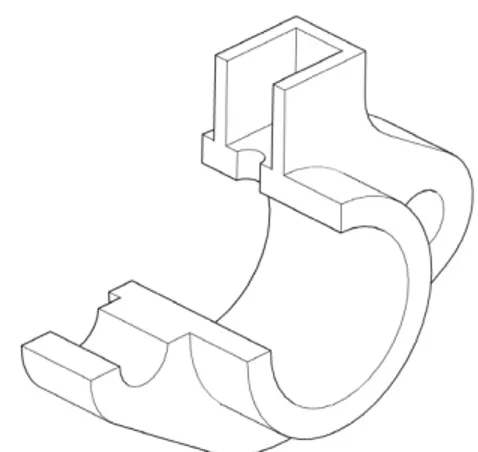
In this way, it was easy to create the 3D model that is represented in an isometric view (see Figures 2 and 3) and the corresponding front and top orthographic views (Fig-ures 4 and 5, respectively) that are given as an exercise to students.
To help students visualise and understand this 3D model, we used augment reality to render the 3D model in a mobile device triggered by a QR code, an image trig-ger or a url link. Figures 7 and 6 presents the visualisation of the 3D models corresponding to the previous represent-ations of the 3D models that the student can use to draw the isometric projection or the orthographic views.
In present time, using the Augment application we are replacing educational materials with virtual ones. Students can feel as if they have the actual material by watching the 3D virtual object from various orientations with a tablet or a smartphone. In this way, we provide various educational materials for each student rapidly, easily and with no extra cost.
Figure 2: The isometric drawing of a cannon assembly model.
Figure 3: The isometric drawing of a bushing part.
Figure 4: The front and top views of a cannon 3D model.
Figure 6: Visualisation of the 3D model of a bushing with the Augment application.
Figure 7: Visualisation of the 3D model of a cannon with the Augment application.
5
Holograms Visualisation of Mechanical
parts
A different, but complementary tool to help students visualise the 3D models for better understanding of their shapes, is the use of holograms.
In this case, the same device used before for the AR, tablet (or smartphone), can now be used for the visualisa-tion of the hologram using Pepper’s ghost technique. For that, the only material needed is a transparent polyester film, for a cheap and easy implementation solution, or a sheet of glass. Fig. 8 show a diagram of the structure were the film/glass is placed at at roughly 45 degree angle relat-ive to the tablet, which is placed horizontally at the top of a table. Then tablet presents the models (preferably over a dark background for a finest experience) and the person is placed such that he can see the reflection of the object’s image on the film/glass, which gives an 3D illusion of the model. To improve the illusion, the background behind the film/glass should be a dark hall and the model displayed in the tablet is animated. In the future, the animation of the models will be controlled using interactions between the
viewer and the tablet. Another important factor to improve the illusion, common to this kind of solutions, is to keep the room in a blackish environment, factor which is even more important due to the relatively low light intensity emitted by the tablet.
transparent polyester lm
Phablet
Figure 8: Diagram of the structure used to implement the holographic display.
To improve the visualisation a computer monitor or a projector below the table (projecting to a rear projection screen material) can be used, allowing a larger structure.
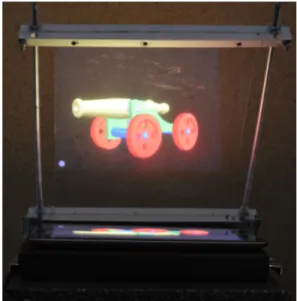
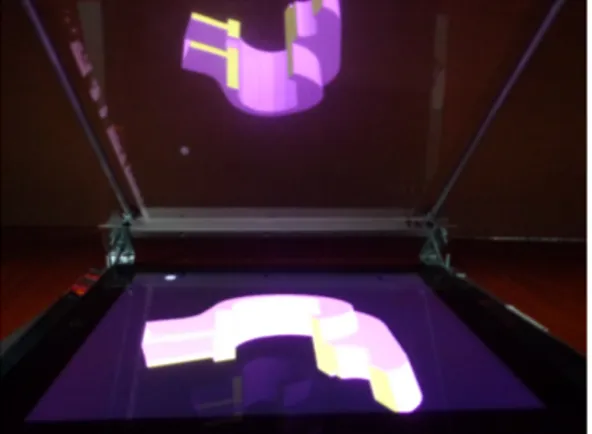
Figures 9 and 10 show two examples of holograms achieved with the describe device. In the first case the pre-viously explored cannon was used with a more appropriate texture and, in the second case, the also already presented bushing. It is important to note at this point that the proto-type presented in Figures 9 and 10 cost less than 10Euros, it is made simply of an aluminum structure with some bolts and one acetate usually used in any classroom. Better res-ults can be achieved when using a Mylar film.
Figure 9: Hologram visualisation of the 3D model of a can-non with the EducHolo and an iPad.
6
Conclusions
The increasing processing power of tablets (including smartphones and phablets), the increasing number of
aug-mented reality applications and the reducing prices of tab-lets, makes possible the use of augmented reality in the classroom.
Figure 10: Hologram visualisation of the 3D model of a bushing using an iPad.
In this paper we explored the most popular augmen-ted reality applications available for tablet devices. We looked augmented reality applications that could be used for teaching technical drawing in the first year of mechan-ical engineering. Such application should be user friendly, free and do not require programming knowledge, such that, every teacher can use them in everyday learning activities. We chose the Augment application to show 3D mod-els on top of trigger image or a QR code. The examples presented helps students to visualise the 3D model and draw the orthographic or the isometric views.
Complementary to the use of the AR, we also show that with the same device and with a low cost installation is also possible the holographic visualisation of the 3D model. This will improve the comprehension of the model before and during the process of learning how to draw it. The pro-totype makes use of easy achievable materials (polyester films or glass) that in conjunction with the tablets capa-city to display good quality images and videos produce an helpful device to help the students in the visualisation of the studied models.
In the future we pretend to test these two technologies in a full classroom context, creating two groups: one of control, and the other where these technologies are going the be applied during a semester. At the beginning and at the end of the semester inquiries are going to be applied to the two groups and final conclusion will be taken for a final validation of this “prove of concept”.
Acknowledgements
This work was partly supported by the Portuguese Foundation for Science and Technology, projects LARSyS OE/EEI/LA0009/2013), and CIAC (PEst-OE/EAT/UI4019/2013) and project PRHOLO QREN I&DT, n. 33845. We also thanks to project leader SPIC -Creative Solutions [www.spic.pt].
References
[1] S´anchez Antonio, Rodolfo Herrera, and Erik Enriquez. Projection’s panel of models for touch screen. In-ternational Journal of Innovative Research in Com-puter and Communication Engineering, 1(9):2057– 2064, November 2013.
[2] Ronald T. Azuma. A survey of augmented reality. Presence: Teleoperators and Virtual Environments, 6(4):355–385, August 1997.
[3] D’Strict. 3D sensing holographic installation. http://global.dstrict.com/projects/j4.php (retrieved 26/2/2014), 2014.
[4] Emilia Mihaylova, editor. Holography - Basic Prin-ciples and Contemporary Applications. InTech, 2013. [5] P. Milgram and F. Kishino. A taxonomy of mixed
real-ity visual displays. IEICE Trans. Information Systems, E77-D(12):1321–1329, December 1994.
[6] Jana M. Moser. Tupac lives! what hologram au-thors should know about intellectual property law. http://www.americanbar.org/publications/blt/2012/09/-02 moser.html (retrieved 26/2/2014), American Bar Association, 2014.
[7] John Rennie. The tupac hologram,
virtual ebert, and digital immortality.
http://www.smartplanet.com/blog/the-savvy- scientist/the-tupac-hologram-virtual-ebert-and-digital-immortality/454 (retrieved 26/2/2014), 2014. [8] Julien C Sprott. Physics Demonstrations: A
source-book for teachers of physics. Univ of Wisconsin Press, 2006.
[9] Chih-Fu Wu and Ming-Chin Chiang. Effectiveness of applying 2D static depictions and 3D animations to or-thographic views learning in graphical course. Com-put. Educ., 63:28–42, April 2013.