DIGITAL NATIVES: A GENERATION ZAPPING THE LESS FUN
TECHNOLOGY
Sónia Rolland Sobral
11
Universidade Portucalense (Portugal)
Abstract
The widespread idea that young people under 18 are experts in technology can be controversial. In fact, the digital natives [1] live surrounded by technology, using technology to communicate and have fun. The generation Z [2], designation used for people who were born in the 90s, and that "zap" between various devices and electronic applications. All with a strong use of digital devices, including smartphones, PCs, iPads and a lot of ultra-sophisticated game consoles (devices personal and not transferable). Social networks are used by all young people around the world. Actually this generation is very different from previous ones: digital immigrants do not use technology such innately. A professor who speaks to an audience of students can not in any way attract the attention of people who are used to seeing fantastic videos from YouTube. And what about “more serious” work? Does a student in the 1st year know how to properly use MS Word? Almost any child is born knowing how to use a computer. But good use? Does a young man who joins the University know how to use features such as automatic index, cross reference, caption and label a picture or insert a new font for a quote? Does this young man know what the slide master of MS PowerPoint is? Or does he do school presentations by changing the settings of each of the slides? Is MS Excel a useful tool or just an application much like naval battle? I've been teaching for 22 years in higher education, always in the computer area. Often I teach courses to other degrees, including law. From what I've seen, students arrive at university with very few competences in terms of the MS Office tool that they will have to use all of the following years, especially when they are in the labour market. In the last semester I taught technological concepts (such as devices, memories, emerging technologies, disruptive technologies and so on) to students of the first year of a university degree in law. At first I asked them to complete a survey to know what computer equipment they possessed, what social networks they used, what kind of access applications they had, whether they liked technology or not and many other relates questions. One of the items for evaluation of this course consisted of a work on any emerging technology. The work for evaluation consisted of a document in MS Word and its presentation and discussion using MS PowerPoint or Prezi. There was an initial guide that they would have to follow, in particular the element that had to appear on the cover, the bibliographic references, indexes, the images labelled and tagged... Students sent their work via MOODLE and made a presentation. After the presentation they answered a survey (56 students). After the presentation they already were aware of their own difficulties. Despite the document containing several requisites, many of them didn't make it automatically. There is a curriculum awarded in high schools but not all students had computer science disciplines. It seems that the MS Office tools are a poor cousin of technology, when in reality they are very powerful means of working. This document shows the results of the answered inquiry of the day of the presentation and makes some recommendations about which competences the students should already have before coming to the University or, if not possible, what are the competencies that the University must give to their students.
Keywords: ICT Skills, Generation Z.
1
FRAMEWORK
The widespread idea that young people under 18 are all experts in technology can be controversial. In fact, the digital natives [1] lives surrounded by technology, they use technology to communicate and to have fun. As they were born at a time when there already was internet, for them surfing the web is usual, it is part of life. They are part of the generation Z [2], which is a designation used for young people who were born in the 90s, and that "zap" between various devices and electronic applications. The letter Z is originally from the term “zap”, which means to constantly change TV channels, as this generations tends to constantly change activities in life. These young people are usually multi-task: they watch television and listen to music on their iPods while exchanging SMS with friends on their smartphones and see YouTube videos on their portable computers. All at the same time.
There were several studies done and they all point out to a large use in digital devices such as smartphones, portable computers, iPads, as well as series of ultra-sophisticated game consoles. Social networks are used by all young people: Facebook, Instagram, Snapchat and a number of other applications are used by young people around the world. Actually this generation is very different from previous generations, which means that digital immigrants do not use technology in an innately way and have a harder time getting to be aware of various technologies at the same time.
And if we talk about "more serious" work? Does a student at the beginning of university know how to properly use MsWord? I'm not talking about creating a document, changing the font, writing, recording and print: any child born almost knows how to use a word processor. I’m thinking about a good use, using the features that MsWord provides. Can they use the functionalities, know how to create an automatic index or a cross reference, insert captions for a picture or insert a new font for a quote? Do they know what the MsPowerPoint slide master or their school presentations are made manually changing through settings of each of the slides? Do they think MsExcel is a useful tool or just an application where you put numbers, much like the naval battle?
I have 22 years of teaching in higher education in the information technology area. Often I teach other courses, like Law. From what I've seen, students arrive at the university with very few competences in terms of MsOffice, tool that they will have to use in subsequent years. The advantage is that they learn quickly because they have great technology dexterity. The downside is that they not knowing how to use this feature well, they’ll still attempt to do it in the wrong way.
They’ll need to know how to properly use several working tools during their university studies and future working life. Will students who begin the university have these competences? Is it not essential to that these competences as an integral part of the curriculum of a university course?
2
THE STUDY
In the last school year I taught technological concepts (memories, emerging, disruptive and related technologies) to students of the first year of the university course of law. At first I asked them to complete a survey on what computer equipment possessed, social networks they used, the kind of applications they acceded, and so on. It was a portrayal of the students, know what their habits and technological competences. This survey is another target document ("Generation Z and technology" imprint).
One of the items evaluation of this course consisted on a paper on a chose emerging technology. The work for evaluation consisted of a document MsWord and the corresponding MsPowerPoint presentation or Prezi. There was a guide that had to follow, with the elements that had to appear on the cover, format of bibliographic references (much I told about plagiarism in these lessons!), Various indexes, indicating that all images would have to be labelled as well as other requirements.
Students sent work via MOODLE and made a presentation on the appointed day. On that day, and after the presentation and discussion of the work, they were asked to answer a questionnaire. 56 students responded.
Purposely responses were only given after the presentation of the work at that stage they were already aware of their own difficulties. That work had several requisites and many of them had not done automatically. And in the discussion I made sure to tell them that.
In Portugal there are several disciplines of informatics in secondary education but not all students were included. And often what is taught in those of secondary education discipline is related to internet, blogs or websites. It seems that MsOffice tools are a poor uncle of technology, when in reality they are very powerful in means of working (and not only).
3
THE SURVEYS
The original investigation accounted 217 students of various courses, 117 students belong to law school.
At the final survey answered 56 students of the law school. Three responses were excluded three students who were born in 1971, 1981 and 1986 because we wanted to study only the generation born in the 90s.
This document does not focus on the first survey. This document is intended only to know what knowledge of law students regarding the MsOffice. Both surveys form replied in Google Drive, and the link was placed on the MOODLE platform that was available to students and with which they were encouraged to work. Surveys intended to be anonymous for obvious reasons, but was asked the student number to be filled in order to verify that no student responded to more than one inquiry and to be able to cross to the original investigation where it asked other information that could be useful (the subject of an article "University of law and technology," imprint).
In this second survey we asked:
a) Personal information: Number of student, Year of Birth, Gender.
b ) In MsWord you can do (1- Nothing to 4 - Much) : different Headers / Footers, different Number of pages by section, table of contents, Caption figures / tables, Table of figures / tables, Manage bibliographic references, Cross-reference.
c) In MS Excel you can do (Yes / No): Enter formulas / functions, using filters, create graphics, sort. d) In MsPowerPoint you can do (Yes / No): Timings, Animations, Use the Slide Master, Transitions. e) Do you think I that you should take classes on MsWord / Prezi and other tools at the beginning of the semester? If yes answer why?
4
SURVEYS RESULTS
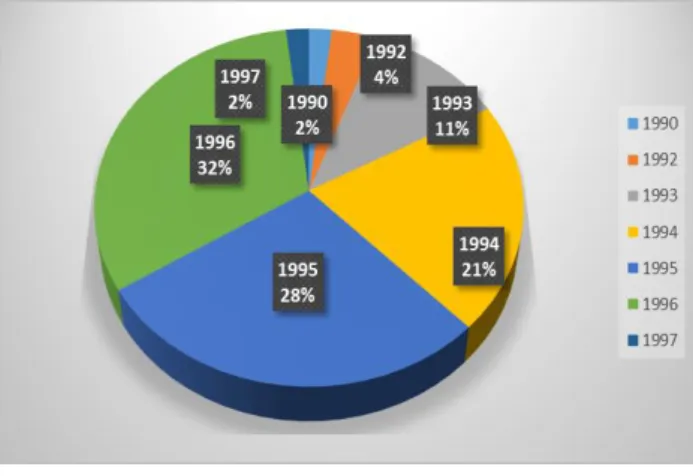
Year of birth: 11 students born in 1994, 15 students in 1995 and another 17 in 1996. The average stood at 1994.717 (21/22 years). The survey was done in the year that students were between 18 and 25 years.
Fig. 1 - Year of birth.
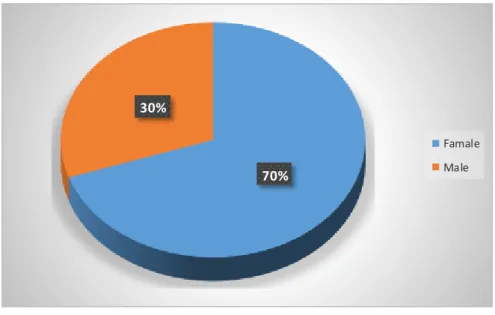
70% 30%
Famale Male
Fig. 2 - Gender.
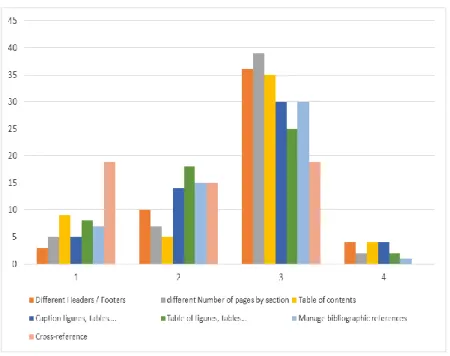
MsWord: as can be seen from the nest table and the next figure, the average of each one of the items is located between 2.00 (cross-reference) and 2.77 (headers / footers different). Two students were placed at level 1 (nothing) in all and no answer 4 (much) to all questions about MsWord features.
Table 1 - MsWord: you know how to…
MsWord: you know how to… 1 2 3 4 Average Different Headers / Footers 3 10 36 4 2,77
Different Number of pages by section 5 7 39 2 2,72
Table of contents 9 5 35 4 2,64
Caption figures, tables…. 5 14 30 4 2,62 Table of figures, tables… 8 18 25 2 2,40 Manage bibliographic references 7 15 30 1 2,47
Fig. 3 - MsWord: you know how to…
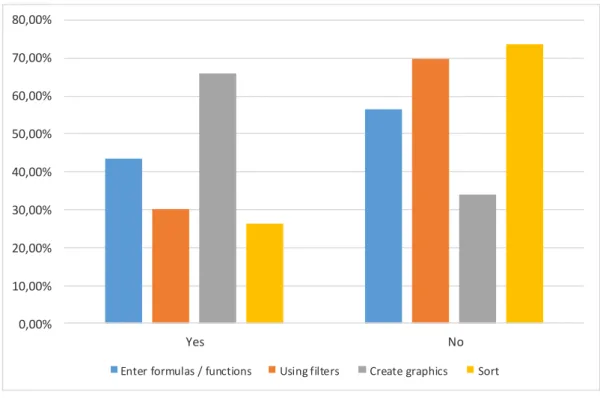
MsExcel: as shown by the following table and figures, only create graph has a positive percentage of positive answers, and use filters and make ordinations has a huge percentage of students unaware of this MsExcel functionality. 15 students answered no to everything and 5 answered yes to everything.
Table 2 - MsExcel: you know how to...
MsExcel you know: Yes No
Enter formulas / functions 23 43,40% 30 56,60% Using filters 16 30,19% 37 69,81% Create graphics 35 66,04% 18 33,96%
0,00% 10,00% 20,00% 30,00% 40,00% 50,00% 60,00% 70,00% 80,00% Yes No
Enter formulas / functions Using filters Create graphics Sort
Fig. 4 - MsExcel: you know how to...
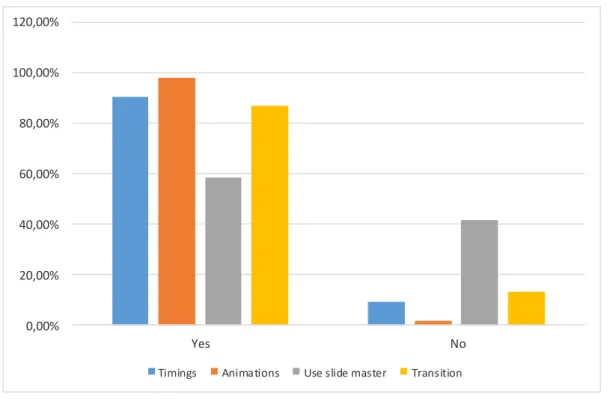
The items associated with MsPowerPoint, we have percentages that shows that students know how to use this tool. But 41.51 % do not know how to use the slide master. 28 answered yes to all, and none answered no to everything.
Table 3 - MsPowerPoint: you know how to...
MsPowerPoint: you know how
to... Yes No
Timings 48 90,57% 5 9,43%
Animations 52 98,11% 1 1,89% Use slide master 31 58,49% 22 41,51% Transition 46 86,79% 7 13,21%
0,00% 20,00% 40,00% 60,00% 80,00% 100,00% 120,00% Yes No
Timings Animations Use slide master Transition
Fig. 5 - MsPowerPoint: you know how to...
To the question "Do you think you should take lessons about MsWord / Prezi and other tools at the beginning of the semester?” 44 replied yes and 7 answered no. I.e. 83% realized that they needed help in technological tools.
The answer " if so, why? We obtained the following answers:
I think we should take lessons from MsWord given that is an important part (practice) to perform work / reports.
It would be a help to the academic work.
To achieve better use these programs in the works for the different disciplines.
Because is important to know to structure a work properly and know how to do references.
Working with word and Prezi is very useful, not only for the academic, but professional and personal life.
Since it is the tools that will accompany us throughout our academic and professional life. Because they are essential tools for our course and our future career
Rather improve performance in these tools.
Most students have little basis in relation to these tools being and would be very advantageous to our academic life and working life.
In order to improve the presentation of my work.
Yes, in order to improve the quality of the papers presented.
Because, for example, in Word, most students cannot do more than the basics.
Undoubtedly it is my will very useful for future work and presentations along the degree and in the labour market since today any independent from their field work "risk-free" using market studies, business and target population niche.
Because it is a new way of developing students' work, as it always has more knowledge! Relative to the Word, we should improve the skills to perform a job, in structure.
Other tools that can be considered interesting and functional to carry out the course and for the future, I believe that to be an asset.
I think the word is an important tool for working life, and it is important to know handle it well
In the technological world we live in, it is increasingly important to know how to work with technology and tools such as Prezi is increasingly used by companies.
In my opinion it helped the students enough to improve their techniques for these two programs to the future knowing use them in the best possible way in order to contribute to the future technologic. Because I never learned to use Prezi.
I think my knowledge of all Microsoft Office mode could be further developed and thicker. I think fundamental to my personal and academic life
Yes to improve my presentation
I think as law students lack the part of word etc.... Relevant in the near future.
For more insights.
After all I do not know to use the word.
It is a way to improve the work of this and other disciplines.
5
CONCLUSIONS
Despite the young people who responded to the survey have ages between 18 and 25 years , and already belong to university, they denote a weak knowledge of MsWord and especially the MsExcel . They say they have a reasonable knowledge of MsPowerPoint.
It appears that realize they need help in technological tools to improve their competence.
A generation that was born in the Internet age , which is surrounded by technology and has many technological devices , still need to learn to know and use some tools that will be very useful during your academic career and obviously in their future working life.
REFERENCES
[1] Prensky, Marc.(2001). Digital Natives, Digital Immigrants. On The Horizon 9.5 (2001): n. pag. Web. 30 July 2015.
[2] Schmidt, Lucinda, and Peter Hawkins (2018). "Children of the Tech Revolution."Life & Style. N.p., 15 July 2008. Web. 30 July 2015.