1
UNIVERSIDADE DO ALGARVE
Diversifying medical imaging of breast lesions
Diversifying medical imaging of breast lesions
Diversifying medical imaging of breast lesions
Diversifying medical imaging of breast lesions
Master thesis
Riyadh Mohammed Al-Tam 2015
Supervisors:
Profa Doutora Maria Margarida da Cruz Silva Andrade Madeira e Carvalho de Moura
2
Statement of Originality
Diversifying medical imaging of breast lesions
Diversifying medical imaging of breast lesions
Diversifying medical imaging of breast lesions
Diversifying medical imaging of breast lesions
Statement of authorship: The work presented in this thesis is, to the best of my knowledge and belief, original, except as acknowledged in the text. The material has not been submitted, either in whole or in part, for a degree at this or any other university.
Candidate:
Copyright © Riyadh Mohammed Al-Tam. A Universidade do Algarve tem o direito, perpétuo e sem limites geogracós, de arquivar e publicitar este trabalho através de exemplares impressos reproduzidos em papel ou de forma digital, ou por qualquer outro meio conhecido ou que venha a ser inventado, de o divulgar através de repositórios científico e de admitir a sua cópia e distribuicão com objetivos educacionais ou de investigação, não comerciais, desde que seja dado crédito ao autor e editor.
3
Abstract
Breast cancer is the most frequent cancer in women and remains the main cause of woman mortality, having also registered an increased incidence worldwide. Early detection of breast cancer is of major importance to increase the survival rate. Ultrasound, mammography and magnetic resonance modalities are used to increase the efficiency and accuracy of diagnose. The goal of the work described here is the implementation of a repository of medical images of the breast regardless of origin that can be used by medical doctors, researchers or in a medical faculty, to collect, anonymize, share, annotate and classify. Available standard and tools were used and integrated with the special-purpose ones developed. DICOM, an international standard for medical digital image format and communications protocol, was used. dcm4chee was selected to implement a Picture Archiving and Communication System (PACS) and was integrated within a MySQL server to provide the required functionalities of the data repository. In order to increase the security of the whole system, VPN (IPsec) is used to create a secure channel between the MySQL server and the client solutions. Patient privacy is guaranteed by the deletion of identifiers and use of anonymisation algorithms before upload. Annotation is achieved using the image application FIJI complemented with a modified “DICOM Exporter” class from the Tudor application. Interaction with the repository is facilitated by client side solutions that integrate some tools and extend them by implementing new desired functionalities. These solutions, integrating FJII, connectors to dccm4chee and MySQL and using VPN (IPsec), support the activities of each of the user roles considered, namely, main doctor, hospital doctor, teacher, student, researcher and admin. Testing was done with more than one hundred files uploaded to the repository.
Keywords: Annotation, Anonymisation, Security, Dcm4chee, FIJI, Breast lesion,
4
Resumo
O Cancro da Mama é o cancro mais frequente no sexo feminino e a permanece com a principal causa de mortalidade para as mulheres, tendo também registado um aumento da incidência em todo o mundo. A deteção precoce do cancro da mama é muito importante para aumentar a probabilidade de sobrevivência. As modalidades de ultrassom, mamografia, ressonância magnética são utilizadas a fim de aumentar a eficiência e a eficácia de um diagnóstico. O objetivo do trabalho aqui descrito é a implementação de um repositório de imagens médicas que, independentemente da origem dessas imagens e usado por médicos, investigadores ou em contexto de ensino, seja usado em recolha, anonimização, partilha, anotação e classificação. Standards e ferramentas disponíveis foram usadas e integradas com umas de propósito particular desenvolvidas. DICOM, um standard internacional para o formato de imagens médicas e protocolo de comunicação, foi usado. A aplicação dcm4chee foi selecionada para implementar um PACS (do inglês, Picture Archiving and Communication System, um sistema de arquivo e comunicação) e foi integrada num servidor MySQL para prover às funcionalidades requeridas do repositório de dados. Para aumentar a segurança do sistema, VPN (IPsec) foi usado para criar um canal seguro entre o servidor e as soluções clientes. A privacidade dos pacientes é garantida pela eliminação de identificadores e uso de algoritmos de anonimização antes do carregamento para o repositório. A anotação é conseguida com a aplicação de imagem FIJI complementada com a modificação de uma classe “DCOM Exporter” proveniente da aplicação Tudor. A interação com o repositório é facilitada por soluções clientes que integram algumas ferramentas e as estendem implementando as funcionalidades desejadas. Estas soluções, integrando FIJI, conetores a dcm4chee e MySQL e usando VPN (IPsec), suportam as atividades de cada papel de utilizador considerado, nomeadamente médico principal, médico hospitalar, professor, aluno, investigador e administrador. O teste foi feito com mais de uma centena de ficheiros no repositório.
Palavras-chave: Anotação, anonimização, Segurança, dcm4chee, Fiji, câncer de mama, de
5
Acknowledgments
I would like to express my gratitude to my supervisors Profa Doutora Maria Margarida
Madeira e Moura and Dra Teresa Figueiredo for the useful comments, remarks and engagement
through this work. Profa Doutora Margarida helped me challenge myself and push towards
higher goals. She taught me the right approach of looking at problems, formulating a good design and grounding myself in the core tenets of self-belief, consistency and coherence. This thesis would have been impossible to complete without her support, encouragement, and insight.
Special thanks for all teachers of the University of Algarve who taught me different topics, which in turn helped me to complete this thesis.
Lastly, I thank my ever-awesome family for supporting and encouraging me through the entire period and bearing with me for periods of minimal communication. Their endless love, unconditional support and encouragement have given me the strength to accomplish this thesis.
6
Contents
Abstract ... 3 Resumo ... 4 Acknowledgments ... 5 1 Introduction ... 10 1.1 Motivation ... 10 1.2 Goal ... 11 1.3 Thesis outline ... 11 2 Background ... 13 2.1 Breast Imaging ... 13 2.1.1 Breast Cancer ... 132.1.2 Breast Cancer Causes ... 13
2.1.3 Breast Anatomy ... 14
2.1.4 Breast Cancer Types ... 15
2.1.5 Mammography ... 15
2.1.6 Ultrasound ... 16
2.1.7 Elastography ... 16
2.1.8 Picture Archiving and Communication System ... 16
2.2 Selected Issues on Medical Informatics ... 17
2.2.1 PACS Servers ... 17
2.2.2 DICOM file format ... 25
2.2.3 PACS viewers ... 31
2.2.4 Dcm4chee ... 32
2.2.5 MySQL server overview ... 36
2.2.6 Overview of gluing technologies ... 37
3 System Analysis and Requirements... 39
3.1 Introduction ... 39
3.2 Glossary of Terms ... 40
3.3 Functional requirements ... 43
3.3.1 Use case diagram ... 43
3.3.2 Use case descriptions ... 46
3.4 Data base diagram ... 51
4 Medical Applications ... 54
7
4.2 MAA (Medical Admin Application) ... 56
4.3 MMA (Medical Main Application) ... 57
4.4 MDA (Medical Doctor Application) ... 57
4.5 MTA (Medical Teacher Application) ... 57
4.6 MSA (Medical Student Application) ... 58
4.7 MRA (Medical Researcher Application) ... 58
4.8 Methodology ... 58
4.8.1 Ordering DICOM files... 58
4.8.2 Anonymization ... 60
4.8.3 Grouping files ... 65
4.8.4 Security ... 65
5 Discussion, conclusion, and future work ... 68
5.1 Discussion ... 68
5.2 Conclusion ... 69
5.3 Future work ... 70
6 User Manuals ... 71
6.1 MedDoctor plugin User Manual ... 71
6.2 Server side ... 71
6.2.1 The installation steps ... 71
6.2.2 The configuration steps for dcm4chee ... 73
6.2.3 The usage steps for server side ... 74
6.3 Client side ... 80
6.3.1 The installation steps for a doctor, a student, a teacher, a hospital doctor, or a researcher... 80
6.3.2 The usage steps for a doctor, a student, a teacher, a hospital doctor, or a researcher 82 Bibliography ... 97
8
List of Figures
Figure 2.1: Breast anatomy (National Institutes of Health, 2014) ... 15
Figure 2.2: MRIdb components (Woodbridge, 2013) ... 18
Figure 2.3: Dicoogle components and interfaces (Costa, 2011) ... 20
Figure 2.4: DICOM model (Evans, 2008) ... 27
Figure 2.5: DICOM element (NEMA, 2014) ... 28
Figure 2.6: Interlaced way ... 30
Figure 2.7: Separated way ... 30
Figure 2.8: Dcm4chee architecture (Evans, 2008) ... 34
Figure 2.9: Dcm4chee workflow ... 35
Figure 3.1: System requirements ... 40
Figure 3.2: The system registration ... 43
Figure 3.3: A main user tasks ... 44
Figure 3.4: Sending/retrieving DICOM files to/from the archive ... 44
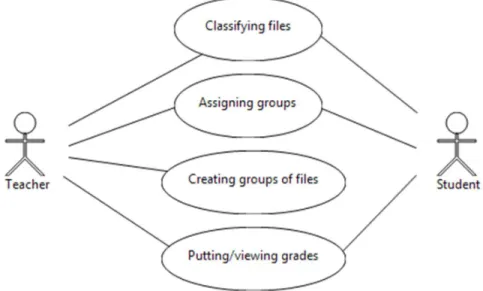
Figure 3.5: The workflow between a teacher and a student ... 45
Figure 3.6: Basic tasks of doctor and researcher ... 45
Figure 3.7: Classify a patient study ... 46
Figure 3.8: The proposed database to keep classifications, reports, DICOM files parameters, methods, and groups. ... 53
Figure 4.1: The architecture of the system ... 56
Figure 4.2: Anonymize DICOM header ... 62
Figure 4.3: An example of the proposed views to give limited access to some rows in a table ... 67
Figure 6.1: An admin login interface ... 74
Figure 6.2: Add users and configure the connection interface ... 75
Figure 6.3: The interface of inserting a user to the system. ... 76
Figure 6.4: Using the default configuration of dcm4chee ... 76
Figure 6.5: Add new role in decm4chee ... 78
Figure 6.6: Assign a role to the admin user ... 78
Figure 6.7: Receive and run commands of the researcher application at the server. ... 79
Figure 6.8: A web site for download FIJI for windows 7 (32bit). ... 80
Figure 6.9: Put a Zipped FIJI file into a folder ... 81
Figure 6.10: FIJI extracting... 81
Figure 6.11: FIJI application path ... 82
Figure 6.12: FIJI interface ... 82
Figure 6.13: Login interface of a doctor ... 83
Figure 6.14: Anonymize and send DICOM files and reports to dcm4chee ... 84
Figure 6.15: The Criteria of retrieve DICOM files from dcm4chee ... 84
Figure 6.16: Classifying DICOM files ... 85
Figure 6.17: Drawing shapes on DICOM images ... 86
Figure 6.18: Classify a study date for a patient ... 87
Figure 6.19: Create a group ... 88
Figure 6.20: Add elements to a group ... 88
Figure 6.21: Assign a group to another group ... 89
9
Figure 6.23 : Review the classification of students and put grades ... 90
Figure 6.24 : Export students’ grades to csv files ... 91
Figure 6.25 : Modified batch processer to apply a group of plugins on DICOM files. ... 92
Figure 6.26: Retrieve a group of DICOM files parameters. ... 94
Figure 6.27: Apply a group of plugins to a group of DICOM files. ... 95
Figure 6.28: Read a csv file and send its lines to PACS server. ... 96
List of Tables
Table 2.1: Summary of PACS servers' pros and cons ... 21Table 2.2: Different transfer syntaxes (NEMA, 2014): ... 29
Table 3.1: Anonymization procedure ... 46
Table 3.2: Classify a DICOM file ... 47
Table 3.3: Classify a patient study ... 47
Table 3.4: Send or retrieve a DICOM file from/to PACS ... 48
Table 3.5: A group of users, files, or reports ... 49
Table 3.6: Putting a grade of student ... 49
Table 3.7: Assign a group to another group ... 50
10
1
Introduction
Breast cancer is a disease that afflicts a significant number of women worldwide. Whenever a suspicion is raised or above a certain age, periodical exams usually including mammography and sonography are recommended.
In the last decade, the technological advances have introduced into the practice Elastography, a complementary imaging technique using ultrasound, which produces real-time qualitative images representing the relative stiffness of the tissue. In spite of being promising, the use of elastography is not widespread and, due to its relative novelty, elastography is not yet a mature technology. Other imaging technologies, such as mammography or MRI, are used to evaluate the medical conditions in some particular cases.
Although several viewers are available, from the manufacturers or from the medical informatics community, these viewers lack the capability to present images from different sources. The set of available solutions is small if, beyond viewing, one wants to add marks and classification to the files.
Many medical images can be collected for long-terms and may be for short-terms, so in general, PACS systems are used to collect such images and allowing for high-performance and high-speed access.
The ability to diagnose is enhanced by the knowledge that comes from experience. The opportunity to work on many cases and to be able to know how accurate the diagnose was is an important tool for students and young doctors. The available databases of medical images are few, and fewer have the classification of the lesions.
1.1
Motivation
The main idea behind this project is to create a repository that keeps all the medical images of patients with different cases of breast lesions. It can be used at a hospital or at the medical faculty. It not only helps doctors or radiologists to collect images of patients that have been taken from mammography, ultrasound, or MRI modalities, but also allows them to annotate, anonymize, send, retrieve, share and classify these files. Different medical files might be classified and reviewed by different doctors or radiologists, which helps to suggest suitable treatments for patients. Many medical images can be accessed by students to be classified, which it increases the knowledge of students. To support teachers at the faculty of medicine with a real medical images with different cases of breast lesions to be used for teaching purposes and to create tutorials. Developers cannot only get a group of medical images to apply
11
the technique of image processing to detect breast lesions, but also compare theirs results with the correct classification of doctors at a hospital.
1.2
Goal
Nowadays, there are a lot of tools that prepared to detect and diagnose diseases in the medical area. For this dissertation, we want to create a system that supports radiologists, doctors, teachers, students, or researchers for classifying breast lesions. Medical files will be collected as data repository and can be accessed through the Internet. The ability to annotate DICOM files should be available. The personal data inside medical files must be anonymized. Different users will be available; some of them work at a hospital, others work at a medicine faculty, while the rest work outside of medical area such as developers. This system must work on different operating systems and be able to integrate methods and tools previously developed by other authors aiming image pre-processing, segmentation, and image conversion.
1.3
Thesis outline
The organization of this thesis is uncommon. It consists of six chapters, including the current one. The current chapter introduces the work done, presents the goal and motivation of this project and the thesis outline.
Chapter 2 presents the background of the work, namely in what concerns breast imaging and some selected issues in medical informatics. Included is general medical information about breast cancer, its types and causes, and the changes that occur in the breast of a female after puberty and some imaging modalities used in the early diagnose of breast cancer such as Ultrasound, Mammography, and Elastography. In what concerns medical informatics, an introduction to a PACS system and its uses and the reviewing of advantages and disadvantages of PACS servers and DICOM files viewers. The DICOM standard and the components of its DICOM file are discussed in more detail to allow a developer to get a general idea about how to deal correctly with a DICOM file, especially in reading or writing data. The selected PACS server (dcm4chee) is shown with its components tools for retrieving or sending DICOM files. A small brief review about the gluing techniques of this system is presented.
System analysis and requirements are discussed in Chapter 3, introducing the extra requirements that should be considered beyond those supported by the chosen tools, FIJI and Dcm4chee, to achieve the requirements of the work presented here.
12
Chapter 4 presents how the proposed client solutions work together. The advantages of each is presented and the approaches studied to the issues of anonymization and security are also discussed.
In Chapter 5, a discussion of alternative approaches is presented and some concluding remarks and suggestions of future work are presented.
The uncommon choice of including the user manuals as the Chapter 6 was deemed necessary to convey the work done on the development of this project. The user manuals contain the necessary information to install, configure, and use the developed plugins.
13
2
Background
2.1
Breast Imaging
2.1.1
Breast Cancer
Breast cancer occurs when some cells of the breast start to be a malignant tumour, usually in the ducts and lobules (Radiological Society of North America, Inc, 2013). It is one of the leading causes of cancer mortality among women in the United States (Radiological Society of North America, Inc, 2013). During the life of a woman, the approximately of developing invasive breast cancer is one in eight (Radiological Society of North America, Inc, 2013). Many studies show that early detection of suspicious lesions is crucial for the diagnosis of a patient. The tumour typically grows into nearby tissues and enters the bloodstream or lymphatic system, which can spread out to other organs. The mammography and ultrasonography (USG) are used to depict the breast and to detect breast cancer. There are several types of breast cancers. Ductal carcinoma in situ (DCIS) is the most frequent type of breast cancer eight (Radiological Society of North America, Inc, 2013). DCIS has frequent markers called clusters of micro-calcification. The mammography equipment is not enough to diagnose the breast lesions for all cases, especially when a large amount of glandular tissue exists, because the produced breast image will be very bright, which significantly decreases the visibility of micro-calcification (Radiological Society of North America, Inc, 2013). There are many studies show that mammography cannot give a clear screen image for all types of breast lesions, so ultrasound and magnetic resonance imaging (MRI) are used to help supplement mammography to give better results (Radiological Society of North America, Inc, 2013). MRI or ultrasound screening is not appropriate for all women, so a doctor or a radiologist determines which one is suitable.
2.1.2
Breast Cancer Causes
There are many factors that might influence the appearance of breast cancer, but until now the scientific community cannot know exactly which factors cause atypical cells to become cancer Certain inherited DNA mutations, breast density, and hormones in many cases can increase the risk for the appearance of cancer (American Cancer Society, Inc., 2013). This disease can appear in men, however it is about a hundred times more common in women than men. The age can increase the possibility of breast cancer, for example, in women younger than 45 there is about one out of eight invasive breast cancers, while in women's age 55 or older there are about two of three invasive breast cancers (American Cancer Society, Inc., 2013).
14
Under 45 years, the breast cancer is more common in African-American women than Asian, Hispanic, and Native-American women. Women with dense breasts can develop the cancer more than women with less dense breasts. Drinking alcohol increases the risk of developing breast cancer. The breastfeeding at a young age reduce breast cancer. Walking for a period between 1.25 to 2.5 hours per week reduces the risk of developing breast cancer by 18% cancers (American Cancer Society, Inc., 2013).
2.1.3
Breast Anatomy
The breasts are located in the left and right sides of the upper abdominal region of the trunk. The base of the breast extends from the lateral border of the sternum to the midaxillary line and from the 2nd to the 6th ribs (Hall, 2012). Figure 2.1 shows an anatomical image of a female breast and a profile image of the mammary gland (Gray, 2014). The mammary gland is responsible for producing milk. Both males and females have the glandular tissue in the breast, but after puberty, the glandular tissue begins to develop in response to the release of estrogen and progesterone in females (Gray, 2014). The surface of each breast is convex and has a small conical nipple on the top (Gray, 2014). The nipple’s base is surrounded by an areola, which has a slightly rough surface due to the presence of rudimentary mammary glands and areolar glands. The breast composes not only of the mammary gland tissue, but also fibrous and fatty tissue, ducts, blood and lymph vessels, nerves, and 15 – 20 lobes (Gray, 2014). Each lobe consists of a group of lobules, which hold bulbs that actually produce breast milk. (University of Connection, 2014). lactiferous ducts enlarge during lactation to form a small lactiferous sinus, which carry milk from the lobes of each breast to the nipple. The fibrous tissue connects lobes together and extend over the entire surface of the breast. The surface of the gland tissue covers with the fatty tissue, except for the areola. The breast shape and size depends on the fatty tissue density. The weight and dimension of breast vary from person to another and at different periods of life (Gray, 2014). The development of breast is increased during pregnancy, when oestrogen level is raised, or when mammary glands are secreting milk for lactation. In the old age, the breast becomes with more lipomatousis tissue. The breast in children consists mainly of ducts with scattered alveoli, and these ducts in females and males are the same. The breast is made up mostly of fibrous tissue and glands in adolescents, but in adults, the fat replaces some of the fibrous and glandular tissue.
15
Figure 2.1: Breast anatomy (National Institutes of Health, 2014)
2.1.4
Breast Cancer Types
There are many types of breast cancer, but some of them are rare. The most common types are Lobular carcinoma in situ, Ductal carcinoma in situ (DCIS), Invasive (or infiltrating) ductal carcinoma, and Invasive (or infiltrating) lobular carcinoma (American Cancer Society, Inc., 2013). The majority of breast tumours detected by mammography are benign. There are some less common types of breast cancer, such as inflammatory breast cancer, Triple-negative breast cancer, Paget disease of the nipple, Phyllodes tumour, and Angiosarcoma. The cancer is called non-invasive if the malignant cells have not gone through the basal membrane, but is contained entirely in the lobule of the ducts. And, called invasive if the cancer has broken through the basal membrane and spread into the surrounding tissue.
2.1.5
Mammography
Mammography is an imaging technology that allows to evaluate the breast tissue. (National Library of Medicine, 2013). Mammography is performed to screen a woman breast to detect an early breast cancer, which helps for a better treatment and early diagnosis. The
16
result of mammography is a mammogram to be used by a radiologist or a doctor to diagnose the beast disease (National Library of Medicine, 2013). It is recommends for women at age 40 or older to do this test once or twice a year. A woman should consider yearly mammograms if she has a mother or sister who had breast cancer at a younger age. Mammography is also used to follow a woman who has had an abnormal mammogram and symptoms of breast cancer. There are different symptoms such as a lump, breast pain, nipple discharge, changes in the nipple, dimpling of the skin on the breast, or other symptoms (National Library of Medicine, 2013).
2.1.6
Ultrasound
It is increasingly used for diagnostic purposes by using sound waves to create images of the organs and structures inside the human body (Leighton, 2007). Ultrasound is used in many different fields such as veterinary and human medicine. Ultrasound instrumentation allows monitoring of the moving structures inside the body, for example, foetal movement and blood flow. It is a sound wave higher than 20 kHz and this means that its frequencies are above the range of human audible frequencies.
2.1.7
Elastography
It is a dynamic technique that uses ultrasound to noninvasively assess the mechanical stiffness of tissue by measuring tissue distortion in response to external compression (Analogic, 2015). Ultrasound Elasticity Imaging or elastography is used for breast examination with a number of high-resolution linear transducers to differentiate between benign from malignant breast lesions. It helps to reduce the number of biopsies.
2.1.8
Picture Archiving and Communication System
Nowadays, a PACS (Picture archiving and communication system) is used for storing, sending, and retrieving medical images. It can directly acquire the medical images from different imaging instruments and be accessed from workstations for viewing and reporting. In general, PACS systems have both high-performance and high-speed requirements. Most of PACS systems use databases to keep some information of medical images (information of patients, doctors, images, and son.) to be retrieved or viewed later, and also keep the original medical images in special folders on the server. A lot of PACS systems were prepared to work internally not in the Internet. Therefore, some of them use TLS (Transport Layer Security) certificates to make sure a user is authorized to send or retrieve medical images through the
17
Internet, while other use a user name and password for the same function. A user is able to send/retrieve medical images through some tools that establish a connection to the PACS. To view the medical images, the user needs to use a web browser or install any DICOM viewer that is able to retrieve files from a PACS server.
2.2
Selected Issues on Medical Informatics
2.2.1
PACS Servers
Because of the urgent need for a system to provide a convenient and efficient access to medical images from different modalities for doctors or radiologists, PACS systems were developed. This project needs a PACS system to collect medical files, so a survey for the best PACS server with characteristics obeying to the goals of this work was done. A lot of PACS servers are available with different working mechanisms: Dcm4chee, CDMEDIC, MRIdb, Orthanc, Dicoogle, OSPACS, OpenSourcePACS, ClearCanvas, Conquest DICOM, DCMTK. Some of these servers are working with relational databases, while the rest are not, but all servers have the same mechanism in collecting DICOM files in folders inside operating systems. The following part discusses advantages and disadvantages for each PACS server.
Dcm4chee is an open source tool that collects some applications for supplying the healthcare enterprise (Morate, 2012). These applications are written in Java. The portability, performance, deployment, and implementation of DICOM files are supported. Many robust services are available for a user such as storing and querying DICOM files, web access to DICOM files, make commitment, notification, and write DICOM files to CD media. Recently, some software are created based on this tool such as CDMEDIC and MRIdb servers.
MRIdb is an open source software, which consists of server and client components. These components are written in Java. The server side works in Linux, while the client works in a web browser (Woodbridge, 2013). The source and binary version are freely available from the MRIdb website (Woodbridge, 2013). MRIdb was designed based on a number of other software, including dcm4chee DICOM server, a storage system, an authentication service and a relational database system, as shown in Figure 2.2. A user-friendly interface is provided for converting, searching, and viewing imported images. This software was developed by Mark Woodbridge at Imperial College London (Woodbridge, 2013). This system stores some information about DICOM files in PostgreSQL database and allows a user to view a DICOM image on Weasis DICOM viewer or on ImageJ, send DICOM files to the server archive, or download them with automatically anonymization from the archive (Mwoodbri, 2014). Since
18
this server just only do automatically anonymization during the download operation, consequently, a DICOM file with original data exist at the archive and another DICOM file with anonymisation data will be available after downloading. This operation has two drawbacks: first, personal data still in DICOM files at the archive because this server do only anonymise DICOM files after downloading but this is not acceptable for health privacy especially if an attacker or a developer can view these data. Second, if a user wants to classify a DICOM file for detecting breast lesion, first the DICOM file should be downloaded, and then classify the DICOM file and send it back to the archive. Here a problem will occur, two DICOM files with different information are in the archive and both of them are related to the same patient. In this situation, researchers, or doctors cannot follow different classifying methods or compare results for the same patient.
Figure 2.2: MRIdb components (Woodbridge, 2013)
DCMTK is an open source software written in ANSI C and C++. Many libraries and applications are collected to perform large parts of the DICOM standard such as examining, constructing and converting DICOM files, handling offline media, sending and receiving the
MRIdb Server Scanner Console Scanner Console Scanner Console dcm4che e Workstation DICOM HTTP NFS PostgreSQ L MRIdb JDBC WADO JDBC LDAP serve r Storag e system LDAP
19
DICOM files (OFFIS, 2014). DCMTK’s components are executed by the command line. Since this software was written in C and C++, it is platform-dependant. Based on this server, Orthanic and CDMEDIC are created. The first server is Orthanic. It is a free and open source DICOM server software written in C++ by Sebastien Jodogne (Jodogne, 2013). It works as standalone and runs in different platforms at least works on Windows or Linux. Since the architecture of this software is designed to be compliant with the DICOM standard, the operations of sending, storing, and retrieving of DICOM files are available. Clients can use a graphical interface called Orthanc explorer to view and interact with the content of Orthanc remote server (Jodogne, 2013). The second server is CDMEDIC, which it is created based on DCMTK, dem4chee, and MySQL (M.D., 2007). It is an open source software written in Java and works as a server-client application. Where the server side works on Debian, Mac OSX, or Ubuntu, while the web browser acts as the client side to send or retrieve DICOM files. This server does not work on windows platforms.
ClearCanvas is an open source software written in C#, JavaScript, Ruby (Synaptive Medical, 2014). A user can store, view, and manage DICOM files. It is designed to be easy to use, easy to access, highly customizable de-identification, collaborate and share with others, whether you are an administrator, a clinician, a researcher or a commercial innovator (Synaptive Medical, 2014). This server is good at first glance but the facilities that are given to users are too limited, and a user may have access to all DICOM files or not, i.e. the system does not allow some of DICOM be accessible to a special user (ClearCanvas Inc., 2009). Besides, annotation on DICOM files are not supported. The anonymization procedure is prepared to change the original information of a patient manually and also it cannot change the patient information in the pixels of DICOM images (ClearCanvas Inc, 2013).
Open Source Picture Archiving and Communication System (OSPACS) was designed to store and display DICOM files. It is an open source tool written in C#. Currently it has been used to store more than 100,000 ultrasound images by the Institute of Women's Health (University College London) (Medfloss.org, 2014). The last version of this tool was version 2 in May 23, 2007 by WillStott and only support windows operating system (Medfloss.org, 2014).
Conquest DICOM is an open source software developed by Mark Oskin. Many features are supported since it has been developed based on the public domain UCDMC DICOM code (Marcel van Herk, 2013). UCDMC allows storing, verifying, sending and retrieving by means of the programmable SQL database (Marcel van Herk, 2013). This server allows a user to
20
convert, view, select images. The annotation and classification on DICOM images are not supported.
OpenSourcePACS is an open source software designed to store and retrieve images. Now, it is retired, no longer supported, and not available for download. (Bui, 2007)
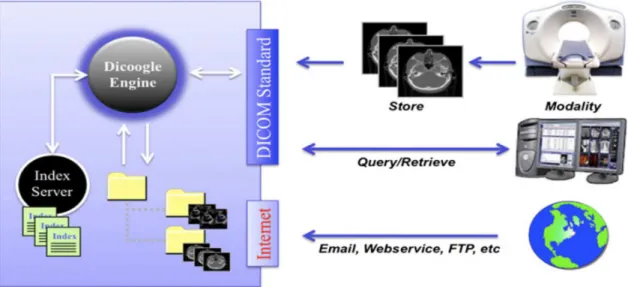
Dicoogle is a PACS archive supported by a document-based indexing system and by peer-to-peer (P2P) techniques (Costa, 2011). This system does not use the traditional approach of relational databases to collect information, rather than it gathers and indexes data from files over a set of distributed repositories (Costa, 2011). Since this system keeps medical imaging with their information, the operation of query and retrieval will be fast (Costa, 2011). It could also complement the traditional centralized database with more agile indexing and retrieving mechanism (Costa, 2011). In this way, there is no need to create tables, relations, fields because it collects DICOM textual data elements. FTP or email is used to access to indexed medical data on the target system as shown in Figure 2.3.
Figure 2.3: Dicoogle components and interfaces (Costa, 2011)
This system is suitable for small or medium-sized organizations and it can be used in regular clinical workflow, research, or teaching (Costa, 2011). Institutions of PASC can also be installed in parallel with this system and indexing all exist image information. This system does not care either about restricting access to DICOM files or creating different users with different privileges. Since this system uses p2p architecture, it difficult to manage DICOM files and also viruses might be transformed from a computer to another. The search in this application needs to remember patients’ names in DICOM files because it asks a user to enter
21
the patient name manually. Also, this system is not suitable for a lot of users or a big organization.
Table 2.1 summarizes the previous considerations (2.2.1) and presents the pros and cons for each PACS server.
Table 2.1: Summary of PACS servers' pros and cons
PACS Server Pros Cons
Dcm4chee
1-An open source 2-Written in Java
3-Support multi-platform
4-It was created to be compliant with DICOM standard.
5-Other servers are created based on it such as CDMEDIC and MRIdb. 6-It supports different image types such
as US, CT, MR, SC, DX, XA, VL, RT. 7-It is supplied with command lines
tools for sending or retrieving files. 8-Hanging Protocol, Storage
Commitment are available.
9-DICOM viewer: Weasis, ImageJ, TUDOR DICOM, FIJI, and web browser acts as viewer to connect and retrieve files .
10-Supported database(s) engines: PostgreSQL 8.1+, MySQL 4.1+, Oracle 9i+, SQL Server 2000+, DB2 8.1+, and Firebird 2.1+.
11-Transport Layer Security (TLS) encryption is used to create a secure connection.
1- Annotation on DICOM images is not supported. 2- Restrict access to users is
limited.
3- Anonymization is not included.
4- Security through untrusted network is not enough. 5- Classify DICOM files are
not available.
MRIdb
1-An open source 2-Written in Java
1- Not work in multi-platform.
22
3-It is created based on dcm4chee DICOM server, a storage system, an authentication service and a relational database system.
4- The server works on Linux, while the web browser acts as the client side. 5- It uses PostgreSQL database to store
some data of DICOM files.
6- DICOM viewers can connect to this server such as Weasis, ImageJ, TUDOR DICOM, and FIJI to retrieve or send files.
7-Automatically anonymization occur during the download files.
2- Annotate and classify DICOM files are not supported.
3- Restrict access to users is limited.
4- Anonymization happed only during downloading a file, which make the classification is difficult to be followed by users. 5- Security through
untrusted network is not enough.
6- Classify DICOM files are not available.
DCMTK
1- An open source.
2- Written in ANSI C and C++.
3- Many libraries and applications are collected to perform large parts of the DICOM standard.
4- Orthanic and CDMEDIC are created based on this server.
5- Support different image types such as US, CT, MR, SC, DX, XA, VL, RT.
6- Transport Layer Security (TLS) encryption is supported.
7- DICOM viewer: DICOMscope
1- Platform-dependant. 2- Annotation on DICOM
images is not supported. 3- Restrict access to users is
limited.
4- Anonymization is not included.
5- Security through untrusted network is not enough.
6- Classify DICOM files are not available.
7- No Hanging Protocol support.
Orthanic
Has the same pros of DCMTK but a client uses a graphical interface called
Has the same cons of DCMTK server.
23
Orthanc explorer to retrieve or send files.
CDMEDIC
It is an open source software written in Java. It is created based on DCMTK, dem4chee, and MySQL. The server side works on Debian, Mac OSX, or Ubuntu, while the web browser acts as the client side.
This server does not work on windows platforms. Also it has the same cons of DCMTK.
ClearCanvas
1- An open source software written in C#, JavaScript, Ruby.
2- It is designed to be easy to use, easy to access, highly customizable de-identification, and it is able to collaborate and share with others. 3- It uses MS SQL Express 2008.
1- The facilities that are given to users are too limited, 2- The annotation on DICOM
files are not supported. 3- The anonymization
procedure is prepared to change the original information of a patient manually.
4- The anonymization procedure cannot change the patient information in the pixels of DICOM images.
5- Classification of DICOM files is not available.
OSPACS
1- An open source tool written in C# using Visual Studio 2005 tools (Stott, 2008).
2- It has been used to store more than 100,000 ultrasound images by the Institute of Women's Health.
3- Microsoft SQL Server database is used.
1- The last version of this tool was version 2 in May 23, 2007.
2- It only supports windows operating system.
3- The annotation uses white pixels
24
4- The classification of a DICOM file is not supported.
5- It removes all patient-identifying information from the DICOM header data
6- Documentation is not enough.
Conquest DICOM
1- Written in C/C++.
2- It has been developed based on the public domain UCDMC DICOM code
(Marcel van Herk, 2013). UCDMC allows storing, verifying, sending and
retrieving by means of the programmable SQL database. 3- This server allows a user to convert,
view, select images.
1- Only Windows, UNIX are supported.
2- Only support US, CT, MR, SC, DX, XA images. 3- The annotation and
classification on DICOM images are not supported. 4- No Hanging Protocol
support.
OpenSourcePACS
It an open source software designed to store and retrieve images.
It is retired, no longer supported, and not available for download.
Dicoogle
1- Supported by a document-based indexing system and by peer-to-peer (P2P) techniques.
2- It gathers and indexes data from files over a set of distributed repositories. 3- The query operations will be faster
through free text or metadata.
4- FTP or email is used to access to indexed medical data on the target system.
5- This system is suitable for small or medium-sized organizations and it
1- This system does not care either about restricting access to DICOM files or creating different users with different privileges. 2- Since this system uses p2p
architecture, it is difficult to manage DICOM files and also viruses might be transformed from a computer to another.
25
can be used in regular clinical workflow, research, or teaching.
3- The search in this application needs to remember patients’ names in DICOM files because it asks a user to enter the patient name manually. 4- Also, this system is not
suitable for a lot of users or a big organization.
5- Annotation and
classification on DICOM files are not supported
2.2.2
DICOM file format
2.2.2.1 Introduction
Recently, most of the modalities in a hospital generate medical images, handled using the DICOM (Digital Imaging and Communications in Medicine) files standard. DICOM is the international standard for digital image format, and biomedical images’ file structure and related information (Bidgood, Horii, Prior, & Van Syckle, 1997). For clinical use, it uses a special file format and a network communications protocol with necessary data and quality. It is implemented in many devices such as X-ray, CT, MRI, ultrasound, and increasingly used in ophthalmology and dentistry devices. Therefore, tens of thousands of imaging devices implement this standard, so it is one of the important standards for healthcare in the world (NEMA, 2015). This standard allows many devices (scanners, servers, workstations, printers, and network hardware.) to integrate and communicate from different manufacturers using a picture archiving and communication system (PACS). Information of patients, procedures, doctors, and images will be supported for shared management. The standard addresses some areas such as network image, network image interpretation, network print, imaging procedure, and off-line storage media management. The essence of DICOM is a file format and a networking protocol. A DICOM viewer will be necessary to display DICOM images, to diagnose and classify them, and maybe to read or modify some elements of the DICOM header. The medical imaging applications in the hospital network use the DICOM protocol to exchange
26
DICOM images, and retrieve some information of DICOM file from the PACS to a workstation in order to display or modify them.
2.2.2.2 DICOM File Components
DICOM file contains a file header portion, File Meta Information portion, and a single SOP instance. This header consists of a 128 byte preamble available for a special using such as enabling a multi-media application to randomly access images stored in a DICOM data set; followed by a 4 byte DICOM prefix, followed by the File Meta Elements (data set) (Evans, A Very Basic DICOM Introduction - dcm4che-2.x - Confluence, 2008), (NEMA, 2013). The preamble should be initialized with zeros if it is not used. This header shall be present in every DICOM file. Figure 2.4 shows a DICOM file (image IOD (Information Object Definition)), which consists of a list of attributes. Some DICOM files contain image and other not. DICOM files contain more than just images. Every DICOM file holds patient information (name, ID, sex and birth date), important acquisition data (e.g., type of equipment used and its settings), and general study (date, time, referring physician, accession number). A PACS system uses some of DICOM file header elements to create indexing data to be used for queries by DICOM viewers.
27
28 2.2.2.3 DICOM Elements or Attributes
In reality, a DICOM object is comprised of DICOM elements or DICOM attributes. Each DICOM element has a tag, VR (value representation), length and value as shown in Figure 2.5 (NEMA, 2014). Each tag uniquely defines the element and its properties and has a special form (gggg,eeee) where gggg is a group value and eeee is an element value, and both of them start from 0000 to 9999. For example, (0010,0010) is the element that specified for patient’s name. The second component of DICOM element is VR (value representation), which defines the data type of element. There are different data types such as UI which is abbreviation of unique identifier data type, US for unsigned short data type, CS for Coded String and OB for other byte (NEMA, 2014). All elements have length and this length should be even, but there are some elements that have a single value such as patient’s sex, it might be a ‘M’ value for male or ‘F’ value for female or ‘O’ value for other. In this situation, the element length should be 2 (even number) and this value will be padded by a space (ASCII 0x20) value. This padding is for string types like CS or UI, but if the data type is binary like US, the padding should be null (0x0) value.
Figure 2.5: DICOM element (NEMA, 2014)
2.2.2.4 Important DICOM Elements
There are thousands of DICOM elements and just some of them will be appeared in a DICOM file according to the necessary information. Therefore, the elements of DICOM files from one DICOM file to another might be different. In this work, we will focus in the important elements according to the requirements of this project. The DICOM elements have many groups but we will use some of the important groups: patient, study, series, equipment, and image
29
groups as depicted in figure 2.4. Each of these groups have UID (unique identifiers) elements and also can help in the query/retrieve operations. For example, patient’s ID uses to identify the patient group, study instance UID for study group, series instance UID for series, and sop(service object pair) instance UID for an image or for a DICOM file (NEMA, 2014). Transfer syntax is an important element inside DICOM file, which uses to describe the format of a DICOM file and the network transfer methods. Many transfer syntaxes are available such as Implicit VR Little-endian, Explicit VR Little-endian, Explicit VR Big-endian, or JPEG Lossless (Medical Connections Ltd, 2014) as shown in Table 2.2. Transfer syntax is required during creating a new DICOM file or convert a file (jpeg, png, pdf, etc.) into a DICOM file.
Table 2.2: Different transfer syntaxes (NEMA, 2014):
Number Transfer syntax Value
1 Implicit VR Little-endian 1.2.840.10008.1.2
2 Explicit VR Little-endian 1.2.840.10008.1.2.1
3 Explicit VR Big-endian 1.2.840.10008.1.2.2
4 JPEG Lossless 1.2.840.10008.1.2.4.57
5 JPEG Lossless First Order 1.2.840.10008.1.2.4.70
6 RLE Lossless 1.2.840.10008.1.2.5 7 JPEG 2000 (Lossless) 1.2.840.10008.1.2.4.90 8 JPEG-LS (Lossless) 1.2.840.10008.1.2.4.80 9 JPEG Baseline 1.2.840.10008.1.2.4.50 10 JPEG Extended 1.2.840.10008.1.2.4.51 11 JPEG 2000 (lossy) 1.2.840.10008.1.2.4.91 12 JPEG-LS (Lossy) 1.2.840.10008.1.2.4.81 13 MPEG-2 1.2.840.10008.1.2.4.100 & 1.2.840.10008.1.2.4.101 14 MPEG-4 1.2.840.10008.1.2.4.102 & 1.2.840.10008.1.2.4.103 15 Deflate 1.2.840.10008.1.2.1.99 16 JPIP 1.2.840.10008.1.2.4.94 17 JPIP-Deflate 1.2.840.10008.1.2.4.95
As we mentioned above, there are some DICOM files that contain images and others are not, so if a DICOM file contains an image, the image elements should be included in the DICOM header such as sample per pixel, photometric interpretation, planar configuration, rows, columns, bits allocated. These elements describe the pixels of the image of DICOM file. The image pixels store in the pixel data element (7FE0,0010). The size of the image can be defined by the height element (0028,0010) and the width element (0028,0011). Samples per pixel element (0028,0002) defines the number of colour channels. Two values represent the colour in an image, 1 for the single channel (black/white) and 3 for the three colour channels (red, green and blue). The photometric interpretation (0028,0004) element defines what every
30 0 1 2 3 4
colour channel holds. It can refer to the colour space that used to encode an image and show how the image should be displayed (Medical Connections Ltd, 2014). This element has different values: MONOCHROME2, MONOCHROME1, PALETTE COLOUR, RGB, YBR_FULL, YBR_FULL_422, YBR_PARTIAL_422, YBR_RCT, or YBR_ICT (Medical Connections Ltd, 2014). RGB is the most colour format and should start with red, green and blue respectively. MONOCHROME2 or MONOCHROME1 are usually used in grayscale images (like CT, MR, or fluoroscopic images). "YBR_FULL" and "YBR_FULL_422" are commonly used in JPEG. Planar configuration element (0028,0006) uses with colourful images to show how the colour channels are arranged in the pixel data. It has two values: either ‘0’ means the channels are interlaced where the order of colour is one by one, first red, then green, and then blue to get the colour of one pixel as depicted in Figure 2.6; ‘1’ means the channels are separated, where first all the reds, then all the greens and then all the blues as shown in Figure 2.7. The separated way is rather rare and it usually used with RLE(Run-Length encoding) compression.
Figure 2.6: Interlaced way
Figure 2.7: Separated way
The pixel structure defined by Bits Allocated (0028,0100), Bits Stored (0028,0101), and high bit (0028,0102) elements. Bits Allocated (0028,0100) element is responsible for determining the allocated space or the size of a pixel cell for every sample in bits. For example, every channel is encoded in 8 bits in 24 bit RGB image. Bits Stored (0028,0101) determines a number of allocated bits that are actually used. While high bit (0028,0102) specifies how stored bits are aligned inside the allocated bits (NEMA, 2014).
0 1 2 3
First pixel Second Third pixel
31
Pixel Representation (0028,0103) element has two values, either ‘0’ which refers to unsigned values or ‘1’ which refers to signed values. The default is unsigned values. All attributes of group 0028 will be encoded in signed short (SS) values or unsigned short (US) values according to the value of this element. Number of frames (0028,0008) element determines the number of frames in an image. Usually if there's only one frame, this element will be omitted, but in case of multi-frames for a DICOM file, the value of this element should be appeared and set.
2.2.3
PACS viewers
A user wants to view medical images from a local or remote system to classify, analysis, or whatever she/he wants, therefore, a DICOM viewer is necessary now. Some viewers work as a standalone application, while the rest work based on a web browser as mentioned above in PACS server 2.1.1 section. There are some DICOM servers that use a web browser as a client interface for a user to connect and display DICOM files such as Cleanconvas, Dcm4chee, MRIdb, Conquest DICOM, Dicoogle, Orthanc or CDMEDIC. While other servers use a command line tool, or a standalone application to connect and send, retrieve, or view DICOM files such as DCMTK, OSPACS, or dcm4chee. Recently, there are plenty of free tools that work as a standalone viewer for DICOM files.
TUDOR DICOM is an open source Java application, contains interfaces to perform some DICOM operations such as anonymous one or a group of DICOM files’ headers, send/retrieve DICOM files from/to a PACS server, read/write DICOM files from/to a disc (Hermena, 2008), (Hermen, 2009). Also other features of showing DICOM images are supported such as windowing, zooming, shifting, and measuring. It has two versions: one works as standalone and another works as a plugin in ImageJ. It was created based on dcm4che version 2, Java Advanced Imaging (JAI) API, and ImageJ.
ImageJ is an open source package written in Java for image processing field (Rasband 1997). At least, it needs Java 1.4 virtual machine or later to run on different operating systems such as Windows, Mac OS, Mac OS X and Linux. A friendly-interface is supported with menus and tool bars to view, modify, analyse, and process images. Different commands are available to support researcher or student from different areas like segmentation, contrast manipulation, sharpening, smoothing, edge detection, median filtering, etc. Many image formats can be supported like TIFF, GIF, JPEG, BMP, DICOM, FITS. It is useful for graphic designers because it helps in calculating the area and pixel values, measuring distances angles, creating
32
density histograms, or lining profile plots (Rasband, 2012). ImageJ is able to read and annotate a DICOM file but it keeps the modification with different formats such as JPEJ, TIFF format. FIJI is an open source software written in Java to support image processing operations. It is created based on ImageJ (MediaWIKI, 2013). Many image processing procedures can be used specially for image registration, image segmentation, 3D reconstruction, and 3D visualization. A developer can read, add, modify, and rebuild all the internals libraries and plugins. Not only are the previous plugins of ImageJ are available in FIJI, but also new plugins too. Recently, different fields are used FIJI like biology, genetics, image processing, life science, and material science. A friendly-interface is supplied with menu bar and tools for processing and analysing data. Fiji works on many platforms such as Windows, Linux, MacOSX, Intel 32-bit or 64-bit.
Matlab is a high-level language and interactive environment for developing algorithms, analysing and viewing data, and performing numerical computation (Tutorialspoint, 2015). It is supported with a group of tools for building applications. External applications that written in Java, C++, or .net can be integrated with Matlab by some Matlab functions (Tutorialspoint, 2015). Many areas use Matlab such as mathematics, chemistry, physics, and image process. DICOM files are supported by a special tool in Matlab called “Image Processing Toolbox”, which is responsible to read and write data to/from a DICOM file. Unfortunately, “Image Processing Toolbox” does not support dealing with DICOM files through a network (MathWorks, Inc., 2015).
2.2.4
Dcm4chee
2.2.4.1 Introduction
In recent decades, development occurred in the area of digital imaging and rapid adoption of picture archiving and communication systems (PACS), so the exchange of information within the radiology departments has become very crucial and influential. And, since the DICOM has become the standard for medical imaging, it is necessary to have tools that manipulate and store DICOM files. According to these requirements, JDICOM was created to deal with DICOM files, is a server written in Java. After that, DCM4CHEE was appeared, which is an archive system for DICOM files with the possibility of modifying, collecting, and retrieving of DICOM objects. The following part explains the advantages of the selected PACS server (dcm4chee) with its components.
33 2.2.4.2 Dcm4chee’s architecture
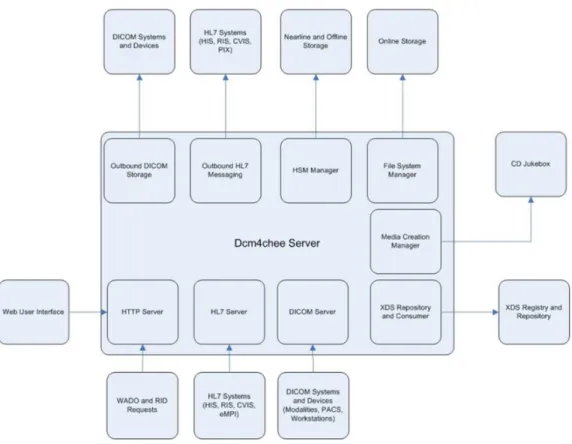
The architecture of dcm4chee was designed as a modular for supporting different services such as a web-based user interface, DICOM interface, HL7(healthcare messaging protocol), web access to DICOM object (WADO), Audit Record Repository(ARR), media creation, and XDS/XDS-l(Image document sharing protocol) (Evans, Home - dcm4chee-2.x - Confluence, 2012) as shown in Figure 2.8. Dcm4chee uses the web interface of JMX console to enable or disable each of these services. There are many features of dcm4chee, the following are some of them:
1. C-ECHO SCP/SCU (ping) 2. C-STORE SCP/SCU (storage) 3. C-FIND SCP (query)
4. C-MOVE SCP (retrieve)
5. N-ACTION SCP/SCU (storage commitment) 6. Create new users
7. Grant or revoke the users some authorities to access to the DICOM files 8. Export DICOM files
Where C-ECHO is a command to check if the DICOM server is listening in a special port or not, C-STORE is a command to store DICOM files in dcm4chee, C-FIND is a command to find images or data in dcm4chee, C-MOVE is a command from client (SCU) to dcm4chee to retrieve a DICOM file, and finally N-ACTION is a command to check if a DICOM file is stored successfully or not.
34 2.2.4.3 Installation
Preferably, install this software on a computer with High specifications. This system needs at least 512 MB RAM, 100 MB hard disk space, and 400 MHz CPU or better. A database to store some DICOM information for a web-based interface is compulsory. Many databases engines are supported such as PostgreSQL 8.1.x, MySQL 4.1+, Oracle 9i/10g, SQL Server, and DB2 8.1+. In this work, MySQL 5.5 and dcm4chee 2.0.18 are implemented. For more information about the steps of installation with the necessary packages, please review the appendix.
2.2.4.4 The Technology
Dcm4chee is supported with a set of command line tools that allow sending, retrieving manipulating DICOM objects. Dcm4che implements apache maven project to perform the basic functions of managements (monitoring dependencies, package building, etc.). Maven is a management and comprehensive tool based on the concept of a project object model (POM) (Apache Software Foundation, 2002-2014). It is responsible for managing and building any
35
java-based projects, reports, and documentations. Additionally, Maven uses different projects to supports users with easily management processes such as Ant, Archetype, Doxia, JXR, Plugin Tools, SCM, and Wagon (Apache Software Foundation, 2002-2014). For modifying and building the source code of dcm4chee, maven is necessary. The binary version of dcm4chee is used in this work, not the source code.
2.2.4.5 Dcm4chee’s Tools
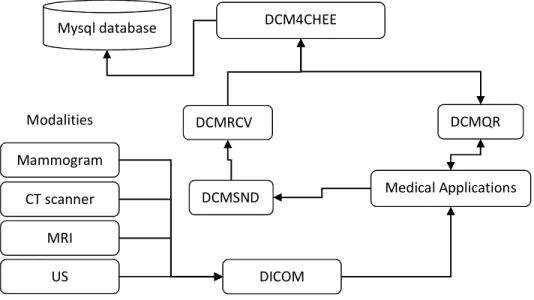
Since dcm4chee is an archive system with collection of open source applications and tools for the healthcare enterprise, the integration of the work between these tools is very important. Figure 2.9 shows the workflow of dcm4chee with different tools to support sending, retrieving, and manipulating DICOM files.
Figure 2.9: Dcm4chee workflow
2.2.4.5.1
DCMRCV utility
Is one of the supporting command line tools, it is responsible for listening on a TCP port and determine the name of application entity title (AET) to listen for incoming DICOM files from the senders, and to store them in a folder (Evans, Dcmrcv - dcm4che-2.x - Confluence, 2006). This tool is an open source written in Java ®.
2.2.4.5.2
DCMSND
DCM4CHEE DCMSND DCMRCV CT scanner DICOM MRI US Mammogram Modalities Medical Applications DCMQR Mysql database36
An open source command line tool that used to send one or more DCIOM files to the listening port of dcmrcv utility. It is possible to send a group of DICOM files in a folder one time to dcm4chee by using this tool (Evans, Dcmsnd - dcm4che-2.x - Confluence, 2008).
2.2.4.5.3
DCMQR
Is used to create a query to ask dcm4chee for retrieving some information of DICOM header or retrieving a DICOM file (Chetan Uberoy, 2010). Two commands are available to retrieve DICOM image: c-get and c-move. C-move allows to send images from one AET to other AETs, while c-get cannot do that. C-move SCP (Service Class Provider) or the server needs to establish a TCP connection to the end point of SCU (Service Class User) or the client, but this is impossible in some cases such as if SCU uses dynamic IP (DHCP), or if there is intervening firewalls. C-get is able to retrieve data from dcm4chee to special folder at SCU. Therefore, c-get is used to retrieve data from dcm4chee.
2.2.4.5.4
Weasis
Weasis is a standalone application responsible for viewing DICOM files from dcm4chee data repository. It is an open source package written in Java ®. A user can search the archive without the need of in-depth DICOM knowledge. A number of different operations are available to users, including showing some information as patient's name, age, study date, series date, and import and export DICOM files.
2.2.5
MySQL server overview
A free, open source tool and compliant with the standard form of SQL data language (Tutorialspoint, 2015). It supports a user with database management system with ability to connect and query any desired data. Each database has one or more tables and each table has one or more rows and columns to store data in. It can handle and deal with large databases reliably and quickly. The ability to work in different operating systems is available. The connectivity, speed, security of MySQL server makes it suitable for accessing databases and make it the most populardatabase to be used by a lot of applications (Tutorialspoint, 2015) , (Oracle Corporation, 2015).
37
2.2.6
Overview of gluing technologies
2.2.6.1 JAVA
Java is a high level, object-oriented, platform independent language, developed by Sun Microsystems in 1995 (Tutorialspoint, 2013). It was originally designed for interactive television, but it was too advanced for the digital cable television industry at that time. It is robust and secure, architecture-neutral and portable, interpreted, threaded, and dynamic programming language (Tutorialspoint, 2013). The flexibility of Java is high; a lot of applications and applets are created based on Java. Unlike some other languages such as C and C++, a created program can be run on various operating systems without having to rewrite or recompile the code because of the Java run-time environment, which interprets the Java code and tells the operating system what to do (Tutorialspoint, 2013). The syntax of Java is similar to the C/C++ syntax, so programmers of C/C++ can learn it fast. Since Java is one of the most popular programming languages in use, different applications are created such as client-server web, game, mobile, and TV applications (Tutorialspoint, 2013). Basically, Java virtual machine (JVM) is necessary to run the byte codes (class files) of the compiled programs for running on any computer regardless of the computer architecture.
2.2.6.2 Python
Python is one of the high-level programming languages, used for general purposes and used to deal with a wide range of problems (Python Software Foundation, 2013). An object oriented programming, multiple programming paradigms, and imperative and functional programming are supported. Because of its high-level data structures, interpreted nature, dynamic typing, and elegant syntax, it can be used in rapid application development, large applications, and web applications. Program maintenance cost is reduced because its simplicity, readable and learn its syntax easily (Python Software Foundation, 2013). Programmers can write smaller code than some other languages like C. The execution time for running is slower than to some other languages such as C/C++, because it needs an interpreter to interpret a code, while C and C++ need a compiler. Therefore, it can be easily extended with C/C++ to make the run time of the applications almost at the same speed of C/C++ applications. Programmers usually have a steep learning curve because of the increased productivity that provides. The extensive standard libraries and interpreter of Python are free and available in binary or source form for the most important platforms and can be freely distributed. The cycle of edit-test-debug is quick because of there is no compilation step in this programming language. An
38
exception will be raised when the interpreter catches an error, so the python’s debugging programs will never cause a segmentation fault if there is a bug or bad input. The debugger allows evaluation of arbitrary expressions, inspection of the local and global variables, breakpoints setting, and line stepping through a code.
Pydicom is a python package, which allows to modify or read DICOM files. Pyhton uses this package for manipulating data elements inside DICOM files. The main disadvantage of the current version is, the compressed pixel data cannot easily altered as in uncompressed pixel data (Mason, 2012).
Enthought Canopy is an appropriate python environment for scientific and analytic computing (Enthought, Inc., 2013). The Canopy provides tools and interfaces for data management and analysis, scripting, and testing. Its text editor provides auto completion and error checking for the code. It has IPython window that lets us easily test the code and see the results after running the code. The IPython console allows to execute the entire script or selected lines. Plenty of python packages are available to support the technical and scientific computing, such as Traits, TraitsUI, Pyface, BlockCanvas, GraphCanvas, and SciMath.
2.2.6.3 OpenCV
OpenCV is a library that collects a lot of algorithms to be used by industry and academia for computer vision applications and researches (Itseez, 2013). It is an open source written in C and C++. Many interfaces such as C++, C, Python, Matlab, Java, and other languages are supported and it can be run on different operating systems such as Windows, Linux, Mac OS, iOS and Android operating systems. It was designed for computational efficiency, real-time image processing, and computer vision. The library takes the advantage of multi-core processing because it is written in optimized C/C++. A lot of algorithms are supported in many areas in vision, factory product inspection, medical imaging, security, user interface, camera calibration, stereo vision, and robotics (Bradski, 2008).
39
3
System Analysis and Requirements
3.1
Introduction
Actually, the selected tools at Chapter 2 are not enough to accomplish all requirements of this thesis, so this part will analyse the missing requirements to be created and integrated with the selected tools: dcm4chee, FIJI, and MySQL server. In order to facilitate the understanding of the working mechanism of this system, Figure 3.1 shows the general requirements of the system, which consists from different levels. Three levels are proposed in the system: input, processing, and output. The input level is responsible for collecting reports and DICOM files to the system archive. These reports can be images or pdf files. All DICOM files and reports should be anonymized before sending them to the archive. In the processing level, some DICOM files can be retrieved from the archive to apply pre-processing or segmentation methods by a researcher, while others can be retrieved to annotate or classify them manually by a doctor, teacher, or student. Finally, in the output level, different classification results for different users (doctors, researchers) can be shared. Besides, the classifications will be graded by a teacher and viewed by students. This means that, many users such as doctors at hospital, students or teachers at medicine faculty, or researchers can interact with this system. Many users can classify a DICOM file, so many derived DICOM files will be generated for each original DICOM file.
Report DICOM
Anonymisation
Archive Pre-processing
Segmentation & Filter
Grades Annotation Results Classification Input Level Processing Level Output Level