Harshkumar Bhupendrakumar Thaker
BlueEyes: Using Beacon and Smart Phone for Visually
Impaired/Blind People
Master's Dissertation [Masters in Human Computer Interaction], presented to the Department of Art and Technology da Escola Superior de Educação de Coimbra to obtain the
degree of Master
Constituição do júri
Presidente: Prof. Doutor Fernando Martins Arguente: Prof. Doutora Ana Rita Teixeira Orientador: Prof. Doutor Joao Orvalho
3
Acknowledgement
I would first like to thank Prof. Dr. Joao Orvalho of the Masters in Human
Computer Interaction at ESEC. The door to Prof. Joao Orvalho's office was
always open whenever I ran into a trouble spot or had a question about my
research or writing. He consistently allowed this paper to be my own work, but
steered me in the right the direction whenever he thought I needed it.
Finally, I must express my very profound gratitude to my parents and to my
spouse for providing me with unfailing support and continuous encouragement
throughout my years of study and through the process of researching and
writing this thesis. This accomplishment would not have been possible without
them. Thank you.
Author
5
Abstract
There are currently few options for navigational aids for the blind and visually impaired (BVI) in large indoor and outdoor spaces. Such indoor and outdoor spaces can be difficult to navigate even for the general sighted population if they are disoriented due to unfamiliarity or other reasons. This paper presents an indoor wayfinding system called GuideBeacon for the blind, visually impaired, and disoriented (BVID) that assists people in navigating between any two points within indoor environments. The GuideBeacon system allows users equipped with smartphones to interact with low cost Bluetooth-based beacons deployed strategically within the indoor space of interest to navigate their surroundings. This paper describes the technical challenges faced in designing such a system, the design decisions made in building the current version of the GuideBeacon system, the solutions developed to meet the technical challenges, and results from the evaluation of the system. Results presented in this paper obtained from field testing GuideBeacon with BVI and sighted participants suggests that it can be used by the BVID for navigation in large indoor spaces independently and effectively.
This paper presents novel structure for visually impaired/blind people using beacon and smart phone. The proposed structure is consisted of three parts. In the first part esp8266 module due to ultra-low power consumption, in the second part configurator application to configure these beacon and last part is mobile application to detect these beacons. The aim is to help visually impaired/blind people to knowledge the environment in which they live by. Three tests applied in real environment. The results show good performance for the suggested scheme help the visually impaired/blind people reach the desired devices location successfully without error. In conclusion, beacon and smart phone were a valid and reliable method to help the visually impaired/blind people to know the location of devices that are nearest from him in indoor and outdoor environment.
Keywords:
GuideBeacon, Beacons, smart phone, visually impaired/blind people, RSSI, esp8266 module and indoor navigation.
6
INDEX
1 Introduction 7
2 State of the Art 8
3 Literature review and Related work 14
4 Project Aim and Objectives 18
5 Direction and Strategy 24
6 Goal 27
7 Methodology 28
8 User Task Scenario 36
9 Conclusion 38
7
Introduction
Blind people confront a number of visual challenges everyday - from reading the label on a frozen dinner to figuring out if they are at the right bus stop. While many tools have been introduced to help address these problems using computer vision and other sensors, their capabilities are dictated as much by the state-of-the-art in technology as they are by real human problems. A deeper understanding of the questions that blind people would like to ask in their day-to-day lives may help to direct innovations to solve them.
Blindness is a qualitative term that describes the clinical condition whereby individuals have no light perception as a result of total vision loss. Blindness also refers to those who have so little vision that they have to rely predominantly on other senses as vision substitution skills. On the other hand, visual impairments is a qualitative term used when the condition of vision loss is characterized by a loss of visual functions at the organ level, such as the loss of visual acuity or the loss of visual field. This report presents the related work and state of the art devices and apps in the field to help visually impaired people.
In the recent years, in the Human Computer Interaction (HCI) research area the capturing of user experience has been seen as an important and interesting research issue. In general, user experience has been captured with techniques like interviews, observations, surveys, storytelling and diaries among others [1] . However in the HCI research area, the understanding of user experience and its evaluation has not been established. One reason for this may be the shortcomings in the definitions of user experience and its relation to usability issues.
User Experience (UX) refers to a person's emotions and attitudes about using a particular product, system or service. It includes the practical, experiential, affective, meaningful and valuable aspects of human–computer interaction and product ownership. Additionally, it includes a person’s perceptions of system aspects such as utility, ease of use and efficiency. User experience may be considered subjective in nature to the degree that it is about individual perception and thought with respect to the system. User experience is dynamic as it is constantly modified over time due to changing usage circumstances and changes to individual systems as well as the wider usage context in which they can be found. The international standard on ergonomics of human system interaction, ISO 9241-210, defines user experience as "a person's perceptions and responses that result from the use or anticipated use of a product, system or service". According to the ISO definition, user experience includes all the users' emotions, beliefs, preferences, perceptions, physical and psychological responses, behaviors and accomplishments that occur before, during and after use. The ISO also list three factors that influence user experience: system, user and the context of use.
8
State of the Art
It is very important to know and understand the existing technologies, applications, devices and ongoing projects that have been carried out in our interested topic area. It is very important as to collect and examine the state of current knowledge in a field by examining the work of scholars and researchers whose work has been recognized as valuable. And in this sections I would like to discuss about some of the state of the art which are as below:
NavCog App: The new app that serves as eyes for the blind
As computers get better at navigating the world around them, they are also helping humans better navigate that world as well. Thanks to advances in AI and robotics, scientists from IBM Research are working on new types of real-world accessibility solutions for the visually impaired.
The goal is as audacious as it is inspiring: coming up with a technological platform that can help the visually impaired navigate the world around them as effortlessly as everyone else. The first pilot in the program is a smartphone app for iOS and Android called NavCog, which helps blind people navigate their surroundings by whispering into their ears through earbuds or by creating subtle vibrations on their smartphones and Users have the option of either setting the app to “voice mode” or “vibration mode.
Similar to the turn-by-turn directions offered by car GPS systems, the app offers its own version of turn-by-turn directions for the visually impaired. The app analyzes signals from Bluetooth beacons located along walkways and from smartphone sensors to help enable users to move without human assistance, whether inside campus buildings or outdoors.
The magic happens when algorithms are able to help the blind identify in near real-time where they are, which direction they are facing and additional surrounding environmental information.
The cognitive assistance research that went into creating the NavCog app has some parallels with the cognitive computing work being performed by IBM Watson. In both cases, there is a growing attempt to improve the cognitive abilities of humans on a real-time basis.
Moreover, sensors capable of recognizing emotions on these faces — work that’s part of other Carnegie Mellon research into autism – could make it possible to recognize when those people passing you are smiling or frowning. Researchers also are exploring the use of computer vision to characterize the activities of people in the vicinity and ultrasonic technology to help identify locations more accurately. [2]
9
How New Technology Helps Blind People Explore The World
In the 1990s Chieko Asakawa created a voice browser that enables blind people to access the Internet using text-to-speech translations. Now, working with scientists at Carnegie Mellon University (CMU), the IBM Fellow is developing technologies aimed at helping the blind “see” and interact more fully with the world around them.
“I want technology to substitute for vision to help the blind manage in the real world,” says Chieko. “Blind people want to be independent, and I want to help achieve that goal.”
In essence, she and her CMU colleagues are combining Internet of Things sensors with smartphones and cognitive technologies to create digital guide dogs for the blind.
Their goal is to not only develop systems that harness the combined power of these technologies, but to create a platform of open source software that developers can use to add a new generation of accessibility capabilities for a wide range of situations and, environments -- shopping malls, airports, hospitals, stadiums, offices, etc.
Prof. Martial Hebert, director of The Robotics Institute at CMU, who is collaborating with Chieko, says the project is a natural extension of what he and his colleagues do every day. “One of the most important uses for robots will be operating alongside people, helping people and living with people -- and that will include guiding blind people,” he says.
10
NavCog, tells blind people about the world around them by whispering into their ears through earbuds. Chieko wants to be able to connect blind people with rich sources of data about what’s going on in the the world around them. For instance, she imagines them being able to go shopping in a mall and tapping into information about what’s for sale in the stores they pass.
“In this way, a blind person would be able to go window shopping,” she says.(Chieko Asakawa, 2015)
Smart Public Transport: large scale iBeacons network guides visually
impaired people to use the public transportation service
An initial fleet of 40 Enterprise iBeacons was installed in late May 2015 by the Onyx Beacon technical team on all buses and trolleybuses circulating in Bucharest, Romania on two public transport lines. The solution will use an infrastructure of 500 iBeacons and will guide people with visual disabilities to independently use the public transport network in the Romanian capital area, without having a personal assistant, and without relying on other passengers or the transportation company personnel.
Bucharest is the first city in the world to officially develop a large-scale technological solution for independent guidance and orientation of the visually-impaired people within the public transport network. The Smart Public Transport (SPT) solution designed and delivered by Onyx Beacon is the first in the world to exceed the experimental stage, being based on Bluetooth Low Energy hardware units, and managed by a cloud-based platform that communicates effectively and interactively with mobile devices via a dedicated application that works simultaneously on iOS and Android operating systems. Smart Public Transport is an integrated solution delivering multimedia notifications and guiding the access to the transportation vehicles.
The SPT solution is based on the transfer of information and interaction between three entities: the hardware components (iBeacons mounted on RATB buses and trolleybuses), the Onyx Beacon CMS cloud platform and the smartphones and mobile devices owned by users, having a dedicated mobile application installed. All communication process is coordinated by the Onyx Beacon Content Management System, which receives real-time data from users’ smartphones that communicate with the iBeacons when they appear in the specified range. The functional process, seen from the perspective of the user, follows these steps:
1. The user leaves from home after setting the mobile application to follow the bus lines that are covering the route he wants to move on. The user’s smartphone has the Bluetooth Low Energy option enabled and data traffic access.
2. The bus (equipped with a uniquely identified iBeacon) approaches the station where the user is already waiting. The iBeacon installed on the bus continuously emits a Bluetooth Low Energy signal, at a steady standard frequency.
3. When the vehicle is approaching at a distance of 50-60 meters (depending on the architecture of the area), the user’s mobile phone receives a notification saying that the wanted bus is coming. The notification is delivered with a specific audio signal and the voice-over application on the phone reads the notification’s text to the user.
11 4. When the bus arrives in the station, the iBeacon’s buzzer will repeatedly broadcast a Beep signal, knowing from the mobile application and the cloud platform that a passenger interested in that bus line is in the station. Thus, the user can precisely identify the desired bus, if more vehicles arrive simultaneously in the same station.
5. After the user goes on the bus, notifications and buzzer sound signals will automatically stop. The process repeats when the person reaches another bus station and notifies the application that he expects a vehicle from another transit line. [3]
SMART GLASSES
There is a lot of work and research being done to find ways to improve life for partially-sighted and blind people. Reading and recognition devices could make smart glasses into indispensable aids for the visually impaired.
A pair of glasses that can enable someone who has got very little sight to allow them to walk around unfamiliar places, to recognize obstacles, and to get a greater independence,“ Dr Stephen Hicks from the University of Oxford, recently explained to The Royal Society as he showed off his smart glasses.
Since the vast majority of blind people have some remaining sight, these smart glasses can be tuned to make the most of it. They are constructed using transparent OLED displays, two small cameras, a gyroscope, a compass, a GPS unit, and a headphone.
The incoming data can be processed and then used in various ways, for example, brightness can be used to show depth. Most visually impaired people can distinguish light and dark, these glasses can make anything that’s close to the wearer brighter, so they can discern people and obstacles.
The cameras could also work with the computing module and the right software to recognize the number on an approaching bus, or to read a sign. The GPS module can be used to give directions. The gyroscope helps the glasses to calculate changes in perspective as the wearer moves. All of the information is spoken aloud through the built-in ear piece. [4]
12
AI GLASSES
There is another smart glasses project in progress called AI GLASSES. It combines computational geometry, artificial intelligence, and ultrasound techniques, amongst other things, to create a useful aid for the visually impaired.
They currently have a light weight, ergonomically acceptable prototype since it almost looks like a normal pair of glasses and can work in real time with batteries that last approximately four hours in continuous use.
The prototype combines glasses with stereo sound sensors and GPS technology attached to a tablet, which can give spoken directions and recognize denominations of currency, read signs, identify colors, and other things. It also employs machine learning to recognize different places and objects. Because it uses ultrasound, it can also detect translucent obstacles, like glass doors. [5]
Ubibus: Ubiquitous Computing to Help Blind People in Public Transport
Ubibus is an application designed to help blind or visually impaired people to take public transport. The application allows the user to request in advance the bus of his choice to stop, and to be notified when the right bus has arrived. The user may use either a PDA (equipped with a WLAN interface) or a Bluetooth mobile phone. The system is designed to be13 integrated discretely in the bus service via ubiquitous computing principles. It tries to minimize both the amount of required changes in the service operation, and explicit interactions with the mobile device. This is done by augmenting real-life interactions with data processing, through a programming paradigm called spatial programming.
The main purpose of this approach is to support the creation of applications that are directly driven by physical interactions, which naturally reduce the need of interactions with the device. UbiBus, which relies on spatial programming. The main objective of this application is to help blind or partially blind people to take the public transport. [6]
Integrated Smart Shoes For Blind People
This project presents a prototype model and a system concept to provide a smart electronic aid for blind people. This system is intended to provide overall measures object detection, and real-time Assistance via Global Positioning System. The system consist of microcontroller, ultrasonic sensor and a smart phone ( GSM Module) and vibratory circuit and Bluetooth unit. This project aims at the development of an Electronic Travelling Aid (ETA) kit to help the blind people to find obstacle free path. This ETA is fixed to the shoe. When the object is detected near to the shoe and if any person coming in front it alerts them with the help of vibratory circuit and also in advancement with help of speakers or head phones that is voice command. Here the power supply is main criteria the shoe is integrated with self-power generation unit such that there is no power backup problem.
Prototype of Smart Shoe
The Figure shows the prototype of the Smart Shoe for blind people which consists of Ultrasonic Sensor, Vibrating Sensor, Arduino UNO, Audio Playback Device, Speaker, Water Detector, GSM, GPS, Headset, Power Adapter and Power Generation Unit. The benefits of this project is that it has a low production cost, the system is applicable in both indoor and outdoor environments, takes less space and low power consumption. [7]
14
Literature review and Related work
We live in an information age touched by technology in all aspects of our existence, be it work, entertainment, travel or communication. The extent to which information pervades our lives today is evident in the growing size of personal and community footprints on the web, ever improving modes of communication, and fast evolving internet communities (such as Flickr, Twitter, and Facebook) promoting virtual interactions. In some aspects, man has transformed from a social being into an e-social being. Images and video constitute a huge proportion of the Web information that is being added or exchanged every second. The popularity of digital cameras and camera phones has contributed to this explosion of personal and Web multimedia data.
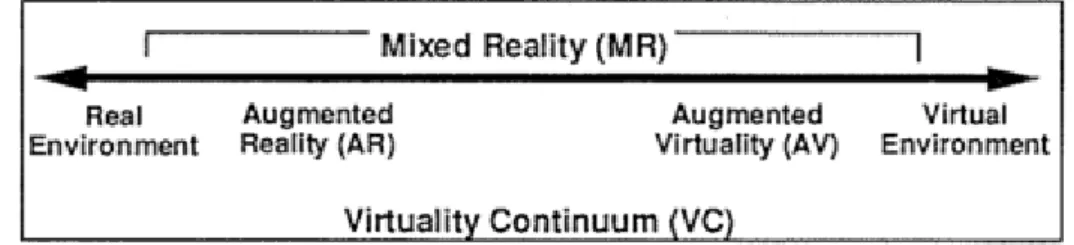
In the summer of 2016 a technology revolution swept the world from an unsuspecting place, a mobile game called Pokémon: Go. Almost immediately upon release, this application reached white-hot growth with a user-base spanning the globe, sparking new methods of interacting with communities. Behind the app, a driving force of the popularity, is the technology known as augmented reality (AR). This innovative medium, which intersects the “real-world” with the “digital-world,” is set to impact many aspects of life [8]. 'Augmentare' is a Latin word for enlarge, enhance and enrich. In that sense, the 'Augmented Reality' (AR) describes a technology, which is used to provide a user with information which enriches his/her perception of the real world in such a way that this information is perceived to be a part of the spatial environment of the user. AR is an extended environment created through the amalgamation of real world and computer generated world supplements the real world with virtual (computer generated) objects that appear to coexist in the same space as real world. On the reality-virtuality continuum by Milgram and Kishino [9] (Fig.1), AR is one part of the general area of Mixed reality.
Fig. 1 Reality-Virtuality Continuum
With the advances in computer technologies and the advent of the World Wide Web, there has been an explosion in the amount and complexity of the multimedia data that is being generated, transmit- ted, stored and accessed. Large-scale online photo and video repositories, such as Flickr or Youtube, constitute a paradigmatic case. On the other hand, the boost of the mobile Web has showed a growing interest in geotagging, means the process of adding geographical information to various media in the form of metadata, and geolocation,
15 that is, the possibility of associating and exploiting geographical information related to both the user and the information available on the web [10]. Examples of this include advertising (i.e. product or service offers located near the user’s current location) or geo-search (the adaptation of geo-search engine results based on geographical criteria).
The history of the AR starts in 1960, when the first AR prototype of head mounted display, called 'The Sword of Domocles' was developed by Evan Sutherland and his students, used see through to present 3D graphics [11]. The term 'Augmented Reality' was first used by Caudell and Mizell in the early 1990s. Since then there have been many researches and advancement in the AR field that has drastically changed the designs and interactions with the technology. Since the evolution of the AR technology, researchers and developers around the world have developed many AR devices which have many advantages in many aspects of our real world mobile application scenarios, such as industrial assemble and maintenance, location based information systems, navigation aids, computer supported cooperative work and entertainment [12]. Some of the latest wearable AR devices are Microsoft Hololens, Google Glass, Vuzix M3000, Epson Moverio BT-300, Sony's SmartEyeglass (FIG 2) and many more. Microsoft Hololens and Google Glass have been described below:
(a) (b) (c)
(d) (e)
Fig 2(a) Microsoft Hololens, (b)Google Glass, (c)Vuzix M3000, (d)Epson Moverio BT300, (e)Sony SmartEyeglass
Microsoft Hololens
Microsoft Hololens is an augmented reality computing platform, features see-through, holographic, high definition lenses and spatial sound so that user can see and hear holograms in the world around him/her. Microsoft hololens is more than a simple heads-up display, and its transparency means you never lose sight of the world around you. High definition holograms integrated with your real world will unlock all new ways to create, communicate, work and play [13].
16
Google Glass
The Google Glass is a technology that has been long rumored about. The Google Glass is a pimped out pair of glasses means it comes with a optical head mounted display (OHMD) which allows the wearer to see through and look at the projected images coming from a small component on the glasses themselves. The Google Glass has several other capabilities like user can ask the headset questions, prompt it to Google words, take photo and video by the prompt of your voice, get directions and view GPS, and even participate in group web conversations via a Wi-Fi connections. The Google Glass takes Hands-Free to a whole new level.
Same way there are many mobile applications available that utilize and provide the users with the Augmented Reality experiences. AR apps run the complete range, from interactive map overlays and virtual showrooms to massive multiplayer skirmishes. More and more AR apps are rolling out on app stores of Apple and Google. Here I have discussed some of the top AR apps available
Pokémon Go As mentioned earlier, it is a game that has quickly captured everyone's attention and given them a reason to go out into the world, walk around and catch Pokémon. The game uses GPS to mark location and move in game avatar, while the Smartphone's camera is used to show Pokémon in real world.
Ink Hunter Ink Hunter is an app that when someone is deciding on the design of tattoo and where to put it. The app lets the user try-out pre-made tattoos or create own design and they can be oriented in whatever position the user like and place on the body part. Tattoos placed on the body part using the camera looks as real as the real tattoo without going through the pain-less process of tattoo.
17 Holo
Holo app allows the user using the camera of the phone to take characters from both fictional worlds and real world, and drag and drop them into the surroundings, a process Holo refers to as 'Holo Mixing'. Each of the characters perform a range of set animations and sounds when placed in the real world, and can be shrunk and expanded to match ideal placement.
18
The Project Aims and Objectives
After carefully understanding the concept of Geo-tagging and Geo-location, Augmented Reality and mobile applications providing AR experiences, Why not utilize these three technologies together and create a service that can be available for all type of users whether personal or commercial. For instance, a user is at a tourist location or a cafe or can be anywhere and he/she can tag the location with the virtual information he would like to put there in form of text, picture, video or drawing. So by doing that the location will have that information virtually there. That information can be accessed by any user or the same user whenever they visit that place. The users can also access the virtual information left by other users on the different locations using the map.
The objective of this project it to let people use and experience the power of Augmented reality, and let them leave their footprints on the locations they like or they visit regularly and let others know what they feel or what they want to say through this medium. As people generally like to share their locations on social networking platforms. With the help of this medium they can not only share the location through social media platforms but also they can leave their footprints in form of text, picture, video or drawing.
Advantages of the project
After the completion and the release of the project, it will benefit users in many ways.
It will provide a new platform to the users where they can experience the AR in their real world.
The information tagged on the location by the users will also be helpful for other users to know more about the location and to know what other people think or have to say or what they did at the location.
It can help the tourism industry by providing virtual information of that location to users in most attractive way.
It can help small businesses also in a way that they can advertise or do publicity of their business in a new and latest way.
These are the main advantages what can be seen now but there can be many more unidentified advantages of this project that can be identified in the future when used.
Ethical Issues and Challenges
As the project is intended to be made available for users around the world, there can be some issues that may lead to the misuse of the service. Users can misuse the service and can tag the locations with wrong information or misleading information. The location can be too popular among the users that too many users can tag the same location with too many information which can create a overcrowdings of information. There can be some other issues that are still undiscovered at this stage.
19 Most of the issues can be overcome the same way Facebook, Twitter and other platforms are monitoring the activities of the users and responding to the queries raised by other users by reporting such activities.
Usability
Usability is a part of Human-Computer Interaction study where it defines the relationship between humans and computer [14]. Informally, usability issues can be thought of as pertaining to how easy a product is to use, i.e. they are to do with the 'user-friendliness' of the products. More formally, the international standards organisation (ISO) defines usability as: 'the effectiveness, efficiency and satisfaction with which specified users can achieve specified
goals in particular environments.' (ISO DIS 9241-11)
Effectiveness refers to the extent to which a goal or task is achieved. In some cases, the distinction between a task being achieved successfully or not may be success or failure in that task. Efficiency, meanwhile, refers to the amount of effort required to accomplish a goal. The less effort required, the higher the efficiency. Satisfaction refers to the level of comfort that the users feel when using a product and how acceptable the product is to users as a means to achieving their goals. This is more subjective aspect of usability than effectiveness or efficiency.
Designing for Usability
Usability is not a hardware or a code that is used in the design once but usability is more of a tool that is kept in center while design process is carried to make sure that the design is efficient, effective and satisfactory to the users [15]. Therefore it must be applied from the beginning of the process to ensure usability. To ensure usability, it can be applied into through an iterative design and development process, making sure the involvement of the users in the process, design decisions should be driven by needs of users and usability, include usability experts, interface designers and technical communicator in the designing team, setting usability goals in the process from the beginning and regularly and often carrying usability testing and also integrating with other usability methods to make sure the usability. According to John Gould and Clayton Lewis [16] four principles for developing usable product, an early and continuous focus on usability has many benefits, including, creating functionality that is likely to be used, making changes before they become too expensive, making documentation and training easier to develop and reducing the need for updates and maintenance releases.
Usability Evaluation Methods
During the designing process, it is very important to do the usability evaluation in order to find out usability issues and or to collect usability measurements. The goal of the evaluation is to make better usability out of a product during the development process and to see if the desired or targeted usability is met or not. There are many types of usability evaluations methods for all the stages of design and development process where some rely on data from users while others rely on usability experts. There are many different types of usability
20
evaluation methods. The three main types of evaluation methods are inspection, testing and inquiry. But according to Hix and Hartson (1993) [17] there are two kinds of evaluation: analytic and empirical. Analytic evaluation is based on analysis of the characteristics of a design, through examination of a design representation, prototype of implementation. Empirical is based on observation of the performance on the design in use. Perhaps Scriven (1967), as described by Carroll, Singley, and Rosson (1992), gets at the essence of the differences better by calling these types of evaluation, respectively, intrinsic evaluation and pay-off evaluation. Intrinsic evaluation is accomplished by way of an examination and analysis of the attributes of a design without actually putting the design to work, whereas pay-off evaluation is evaluation situated in observed usage [18] [19] . According to [20] there are two types of usability evaluation formative and summative. The formative evaluation is used during the designing and development of a product or service in order to detect and eliminate usability problems early in the process. While on the other hand the summative evaluation is done when the process of designing and development is complete or close to completion in order to find out if the design provides expected usability objectives and satisfaction.
There are mainly four usability evaluation methods. First is the usability inspection method which includes methods like Pluralistic walkthrough, Heuristic evaluation, Cognitive walkthrough, Heuristic walkthrough, Metaphors of human thinking(MOT) and persona based inspection. Second is usability testing with users which include methods like usability testing, benchmark testing, competitive usability testing, summative usability testing, remote evaluation, think aloud testing and wizard of oz. Third is evaluating usability of an existing system which includes methods like critical incident technique(CIT), user edit and web analytics. And the last is questionnaire and survey methods which includes methods like rating scales, satisfaction questionnaire and system usability scale [21].
Professional Organizations
There are a wide range of organizations that support user experience practitioners and researchers, as well as further disciplines that are more generally related to UX skills area. Alongside the UPA (Usability Professionals' Association), there are many other professional organizations in the following related field areas:
HCI and Human Factors
Technical Communication and Information Design
Information Architecture and Design
Training And Human Performance
Software Development and Project Management
Such organizations and associations support people and professionals with research and development in their related field by holding seminars and gatherings where professionals present their work and papers and discuss about the issues and solutions about the present and future. Such organizations help growing awareness about some specific fields that has a huge
21 impact on the businesses and organizations in the present or the coming future. They also provide a great source of motivation and inspiration for the students and training institutions by providing methodologies and research works used or established by previous professionals, for example, [22] [23] [24] [25] [26] [27] [28].
In today's world, the science has made our life so easy with the range of inventions, equipments and products. But this products or the equipments have price depending on their usage and importance, plus there are many products and equipments that require large space for storage. People buy this things and make a continuous use or for one time use and later it sits in their house or garage for the rest of the time. Also some of them items are very costly or very large or very rare to find. So the point is, what if this items can be given or taken for rent and this way the owner can make some money out of it and the person who is renting it can make use of it for a little amount of money instead of buying it, making our lives more easier.
Brainstorming
what will be the items?
The items can be anything for example electronic items, equipments, books, household items, clothes, furniture, vehicles, etc,.
who will be the users?
The users can be anyone who has any of the items that can put up for rent and anyone who has a requirement for such items.
what will be the way of communication?
how will the monetary transactions be done?
Investigation and Discovery (Research and investigation)
To begin the research and investigate the concept of RAT, it is very important to understand 'why' this concept. There are many items and products are available in the world market that people buy or like to buy. Many of these are multi-purpose use or single purpose use items. People buy them and make use of them and when their purpose of use is fulfilled the items sits in their storage nor nothing. So basically people invest their hard earned income in such items and when such investments are not used or doesn't give any kind of returns in terms of usability or monetary, the money spent on such items is wasted. It is also a bad investment of money for the people who want an item but only going to use it for just one time or for only single purpose.
On the other hand, with the help of this service one can gain access to any item or space available for rent. As a lender one can earn extra money by listing his or her item or space for rent and as a borrower/renter one can save costs by renting items or spaces all while keeping the wealth in the community and can spend on something nice.
22
Interviews
An interview is a conversation for gathering information. A research interview involves an interviewer, who coordinates the process of the conversation and asks questions, and an interviewee, who responds to those questions. Interviews can be conducted face-to-face or over the telephone. The internet is also emerging as a tool for interviewing.
Interviews are an appropriate method when there is a need to collect in-depth information on people’s opinions, thoughts, experiences, and feelings. Interviews are useful when the topic of inquiry relates to issues that require complex questioning and considerable probing. Face-to-face interviews are suitable when your target population can communicate through face-to-face conversations better than they can communicate through writing or phone conversations (e.g., children, elderly or disabled individuals).
Interviews can be designed differently depending on the needs being addressed and the information. They can be grouped into three types: Structured interviews: In a structured interview, the interviewer asks a set of standard, predetermined questions about particular topics, in a specific order. The respondents need to select their answers from a list of options. The interviewer may provide clarification on some questions. Structured Interviews are typically used in surveys (see our “Survey Research Methods” Tip Sheet for more information). Semi-structured interviews: In a semi-structured interview, the interviewer uses a set of predetermined questions and the respondents answer in their own words. Some interviewers use a topic guide that serves as a checklist to ensure that all respondents provide information on the same topics. The interviewer can probe areas based on the respondent’s answers or ask supplementary questions for clarification. Semi-structured interviews are useful when there is a need to collect in-depth information in a systematic manner from a number of respondents or interviewees (e.g., teachers, community leaders). Unstructured interviews: In an unstructured interview, the interviewer has no specific guidelines, restrictions, predetermined questions, or list of options. The interviewer asks a few broad questions to engage the respondent in an open, informal, and spontaneous discussion. The interviewer also probes with further questions and/or explores inconsistencies to gather more in-depth information on the topic. Unstructured interviews are particularly useful for getting the stories behind respondents’ experiences or when there is little information about a topic.
Competitive Analysis of the Project
In the competitive analysis, the investigation was carried on both the physical sources and digital sources. The physical sources include ads in newspaper, placards in buildings or shops. But it is very difficult to find a lender or a borrower with such sources as people hardly look for such things in newspaper ads or placards placed in shops and buildings. Also people can ask their friends and relatives for their items to lend them for a short period of time but it is very embarrassing for someone to ask someone for their item to borrow as there are chances that they can get negative reply and that can affect their relationship.
23 While the digital sources seem convincing as it is very easy to connect to people. There are many digital sources like OLX, EBAY Classified, Craigslist, Gumtree. These websites offer renting ads services but they are mostly for vehicles and real estate properties. Generally people don't tend to look for renting other items over these digital sources. But the concept of the service is similar to these sources as it will be available for only renting items where people can list anything anywhere and the renter can find or browse the items for rent in chosen range of area or locality.
24
Direction and Strategy
In order to put the direction and strategy of our RAT( Rent Any Thing) concept we have used a set of steps to describe the journey of the customers both borrowers and lenders. Also to win the trust of the lenders, we have a guarantee for the safety of the items for the lenders. All the items that will be listed on this platform will be covered by the insurance up to 25000 euro. So the lenders can be rest assured about their items. But the responsibility of the item will be fully on the borrower.
Lenders
1. Enter the name and details of your item 2. Upload some photos of your items
3. We will verify your id
4. Set a rental price, location and availability
5. Someone wants your item? Click 'Approve Request' 6. Arrange a handover via our messaging service
7. Arrange a convenient time for the item return
25 BORROWERS
1. To start, request an item or Browse Listings
2. Found what you need? Enter the dates you would like it 3. Enter your digits into our secure payment system
4. The lender approves your request to borrow 5. We process your payment
6. Arrange a convenient handover via our messaging service 7. Return the item at a convenient time
8. Go spend the money you saved on something nice
Development of the Concept
It is really very essential to understand the needs, wants and the requirements of the targeted customer for the concept and its development. For this we have to develop the concept
26
completely focusing the customers putting them into the center of the concept. Both the lenders and borrowers play an vital role in the concept. The lenders are the primary sources for the business as they list the range of items to provide the borrowers the options of items they can borrow. What are the needs, wants and requirements of the lender? As a lenders' point of view, the need of the lender is to make use of the extra items that are not on continuous use for them. Their want is to make some extra money from it so to cover the investment made in purchasing the item. Their requirement is the safety of their item from lost, stolen or damage. As a borrowers' point of view, their need is to find or get an item that can fulfill their purpose. Their want is to save money. And their requirement is to find the right item at right cost at convenient place.
User Task Scenario
LenderDavid Lee is a 38year old professional photographer. He has been in this profession since he was 24years old. During these years he bought many cameras and equipments like lenses, tripods, flash light tools etc,. So he decides to put up for rent his equipments and for that he visits the RAT website on his computer and creates an account by filling his personal details including his phone number, home address, bank account details and id proof. After finishing this process he uploads the photos and videos, writes the description of the item or items and puts the rental price he wishes to get and the availability. After few days, he receives a request for the camera for rent from Miss Pooja for two days, so he selects the 'Accept Request' option and then they both decides the pickup time through the messaging service of the website. After two days he gets his camera back from Miss Pooja and selects the 'Complete Transaction' option in the website and he receives the rental money in his account. Borrower
Mrs Amanda Robinson is having a birthday party at her home and she wants a music system for the party, but she does not want to spend a lot of money on just the music system as she is only going to use it for this occasion only. So she visits the RAT website and browses for the music system. She gets many options and then she selects the best suitable for her and wants to book it for the occasion. So she selects the sign up and fills in her personal details including her phone number, bank account details, id proof and address. On the website it take 2mins for verify the id proofs and other details. So after completing the verification process, she selects the 'Request to Rent' option and fills in the details for the duration she intends to rent it for and agrees with the rental price and waits for the lenders approval. There is also an option for her to negotiate the rental price with the lender through the messaging service. After few time the lender accepts the request and the money from her account gets deducted which confirms that the item is booked for her. She picks the item form the lender on the day and time agreed between them and she returns the item on the promised day and time.
27
Goal
In the recent years, in the Human Computer Interaction (HCI) research area the capturing of user experience has been seen as an important and interesting research issue. In general, user experience has been captured with techniques like interviews, observations, surveys, storytelling and diaries among others [29] . However in the HCI research area, the understanding of user experience and its evaluation has not been established. One reason for this may be the shortcomings in the definitions of user experience and its relation to usability issues.
User Experience (UX) refers to a person's emotions and attitudes about using a particular product, system or service. It includes the practical, experiential, affective, meaningful and valuable aspects of human–computer interaction and product ownership. Additionally, it includes a person’s perceptions of system aspects such as utility, ease of use and efficiency. User experience may be considered subjective in nature to the degree that it is about individual perception and thought with respect to the system. User experience is dynamic as it is constantly modified over time due to changing usage circumstances and changes to individual systems as well as the wider usage context in which they can be found. The international standard on ergonomics of human system interaction, ISO 9241-210, defines user experience as "a person's perceptions and responses that result from the use or anticipated use of a product, system or service". According to the ISO definition, user experience includes all the users' emotions, beliefs, preferences, perceptions, physical and psychological responses, behaviours and accomplishments that occur before, during and after use. The ISO also list three factors that influence user experience: system, user and the context of use.
User experience is everything that happens to your users when they interact with your business or organization through your website, online communication or application and so it is important to have clear user experience goals.
User experience is very important because of the following: It helps to increase sale on online conversion
Improves ranking in search engines
It reduces the cost of development and support It reduces customer dissatisfaction and churn It improves brand perception.
To have effective user experience you must set goals that will enable you run and operate your user experience efficiently.
The most useful and important goals of user experience are such as “Satisfying, clear language, informative feedback, consistent, enjoyable”. Which are use in everywhere like in business or organization through website, online communication, and application etc.
28
Methodology
Basically, user experience refers to the experience that a person gets when he/she interacts with a product in particular conditions. In practice, there are numerous different kinds of people, products and environments that influence the experience that interaction evokes. The user and the product interact in the particular context of use that social and cultural factors are influencing. The user has the following aspects: values, emotions, expectations and prior experiences, among others. Also, the product has influential factors, for example, mobility and adaptivity. All these factors influence the experience that user-product interaction evokes. [30] [31]
Heuristic of UX
Describing an approach to learning by trying without necessarily having an organized hypothesis or way of proving that the results proved or disproved the hypothesis. That is, "seat-of-the-pants" or "trial-by-error" learning.
There are ten (10) usability heuristic are most important for user interface design. They were developed by Jakob Nielsen together with Rolf Molich in the early 90's. [32]
1. Visibility of system status
The system should always keep users informed about what is going on, through appropriate feedback within reasonable time.
2. Match between system and the real world
The system should speak the users' language, with words, phrases and concepts familiar to the user, rather than system-oriented terms. Follow real-world conventions, making information appear in a natural and logical order.
3. User control and freedom
Users often choose system functions by mistake and will need a clearly marked "emergency exit" to leave the unwanted state without having to go through an extended dialogue. Support undo and redo.
4. Consistency and standards
Users should not have to wonder whether different words, situations, or actions mean the same thing. Follow platform conventions.
5. Error prevention
Even better than good error messages is a careful design which prevents a problem from occurring in the first place. Either eliminate error-prone conditions or check for them and present users with a confirmation option before they commit to the action.
6. Recognition rather than recall
Minimize the user's memory load by making objects, actions, and options visible. The user should not have to remember information from one part of the dialogue to another.
29
Instructions for use of the system should be visible or easily retrievable whenever appropriate.
7. Flexibility and efficiency of use
Accelerators -- unseen by the novice user -- may often speed up the interaction for the expert user such that the system can cater to both inexperienced and experienced users. Allow users to tailor frequent actions.
8. Aesthetic and minimalist design
Dialogues should not contain information which is irrelevant or rarely needed. Every extra unit of information in a dialogue competes with the relevant units of information and diminishes their relative visibility.
9. Help users recognize, diagnose, and recover from errors
Error messages should be expressed in plain language (no codes), precisely indicate the problem, and constructively suggest a solution.
10. Help and documentation
Even though it is better if the system can be used without documentation, it may be necessary to provide help and documentation. Any such information should be easy to search, focused on the user's task, list concrete steps to be carried out, and not be toolarge.
The Golden Rules of Interface Design
These Golden Rules of Interface Design are taken from the book, Designing the User Interface, which Ben Shneiderman co-authored. They were originally created in 1987 from the research Shneiderman done in Human Computer Interaction. They are applicable for most interactive systems. [33]
1. Strive for consistency
Consistent sequences of actions should be required in similar situations; identical terminology should be used in prompts, menus, and help screens; and consistent commands should be employed throughout.
2. Enable frequent users to use shortcuts
As the frequency of use increases, so do the user's desires to reduce the number of interactions and to increase the pace of interaction. Abbreviations, function keys, hidden commands, and macro facilities are very helpful to an expert user.
3. Offer informative feedback.
For every operator action, there should be some system feedback. For frequent and minor actions, the response can be modest, while for infrequent and major actions, the response should be more substantial.
30
Sequences of actions should be organized into groups with a beginning, middle, and end. The informative feedback at the completion of a group of actions gives the operators the satisfaction of accomplishment, a sense of relief, the signal to drop contingency plans and options from their minds, and an indication that the way is clear to prepare for the next group of actions.
5. Offer simple error handling.
As much as possible, design the system so the user cannot make a serious error. If an error is made, the system should be able to detect the error and offer simple, comprehensible mechanisms for handling the error.
6. Permit easy reversal of actions
This feature relieves anxiety, since the user knows that errors can be undone; it thus encourages exploration of unfamiliar options. The units of reversibility may be a single action, a data entry, or a complete group of actions.
7. Support internal locus of control.
Experienced operators strongly desire the sense that they are in charge of the system and that the system responds to their actions. Design the system to make users the initiators of actions rather than the responders.
8. Reduce short-term memory load.
The limitation of human information processing in short-term memory requires that displays be kept simple, multiple page displays be consolidated, window-motion frequency be reduced, and sufficient training time be allotted for codes, mnemonics, and sequences of actions.
Severity Ratings in Heuristic Evaluation
Severity ratings can be used to allocate the most resources to fix the most serious problems and can also provide a rough estimate of the need for additional usability efforts. If the severity ratings indicate that several disastrous usability problems remain in an interface, it will probably be unadvisable to release it. But one might decide to go ahead with the release of a system with several usability problems if they are all judged as being cosmetic in nature. It is difficult to get good severity estimates from the evaluators during a heuristic evaluation session when they are more focused on finding new usability problems. Also, each evaluator will only find a small number of the usability problems, so a set of severity ratings of only the problems found by that evaluator will be incomplete. Instead, severity ratings can be collected by sending a questionnaire to the evaluators after the actual evaluation sessions, listing the complete set of usability problems that have been discovered, and asking them to rate the severity of each problem. Since each evaluator has only identified a subset of the problems included in the list, the problems need to be described in reasonable depth, possibly using screendumps as illustrations. The descriptions can be synthesized by the evaluation observer from the aggregate of comments made by those evaluators who had found each problem (or, if written evaluation reports are used, the descriptions can be synthesized from the descriptions in the reports). These descriptions allow the evaluators to assess the various problems fairly easily even if they have not found them in their own evaluation session. Typically, evaluators need only spend about 30 minutes to provide their severity ratings. It is
31 important to note that each evaluator should provide individual severity ratings independently of the other evaluators.
Often, the evaluators will not have access to the actual system while they are considering the severity of the various usability problems. It is possible that the evaluators can gain additional insights by revisiting parts of the running interface rather than relying on their memory and the written problem descriptions. At the same time, there is no doubt that the evaluators will be slower at arriving at the severity ratings if they are given the option of interacting further with the system. Also, scheduling problems will sometimes make it difficult to provide everybody with computer access at convenient times if special computer resources are needed to run a prototype system or if software distribution is limited due to confidentiality considerations.
Severity ratings from a single evaluator are too unreliable to be trusted. As more evaluators are asked to judge the severity of usability problems, the quality of the mean severity rating increases rapidly, and using the mean of a set of ratings from three evaluators is satisfactory for many practical purposes.
Severity ratings can be used to allocate the most resources to fix the most serious problems and can also provide a rough estimate of the need for additional usability efforts. If the severity ratings indicate that several disastrous usability problems remain in an interface, it will probably be unadvisable to release it. But one might decide to go ahead with the release of a system with several usability problems if they are all judged as being cosmetic in nature. The severity of a usability problem is a combination of three factors:
The frequency with which the problem occurs: Is it common or rare?
The impact of the problem if it occurs: Will it be easy or difficult for the users to overcome?
The persistence of the problem: Is it a one-time problem that users can overcome once they know about it or will users repeatedly be bothered by the problem?
Finally, of course, one needs to assess the market impact of the problem since certain usability problems can have a devastating effect on the popularity of a product, even if they are "objectively" quite easy to overcome. Even though severity has several components, it is common to combine all aspects of severity in a single severity rating as an overall assessment of each usability problem in order to facilitate prioritizing and decision-making.
The following 0 to 4 rating scale can be used to rate the severity of usability problems: 0 = I don't agree that this is a usability problem at all
1 = Cosmetic problem only: need not be fixed unless extra time is available on project 2 = Minor usability problem: fixing this should be given low priority
3 = Major usability problem: important to fix, so should be given high priority 4 = Usability catastrophe: imperative to fix this before product can be released
What is Usability?
Usability is the ease of use and learnability of a human-made object such as a tool or device. Informally, usability issues can be thought of as pertaining to how easy a product is to use, i.e. they are to do with the 'user-friendliness' of the products. More formally, the international standards organisation (ISO) defines usability as:
32
'the effectiveness, efficiency and satisfaction with which specified users can achieve specified goals in particular environments.' (ISO DIS 9241-11)
Effectiveness refers to the extent to which a goal or task is achieved. In some cases, the distinction between a task being achieved successfully or not may be success or failure in that task. Efficiency, meanwhile, refers to the amount of effort required to accomplish a goal. The less effort required, the higher the efficiency. Satisfaction refers to the level of comfort that the users feel when using a product and how acceptable the product is to users as a means to achieving their goals. This is more subjective aspect of usability than effectiveness or efficiency.
Designing for Usability
Usability is not a surface gloss that can be applied at the last minute. Usability is deeply affected by every decision in design and development. Therefore, usability has to be built in from the beginning. Usability can be ensured by:
engineering it into a product through an iterative design and development process involving users throughout the process
allowing usability and users' needs to drive design decisions
working in teams that include skilled usability specialists, interface designers and technical communicators
setting quantitative usability goals early in the process
testing products for usability, but also integrating usability testing with other methods for ensuring usability
being committed to making technology work for people
Any system or device designed for use by people should be easy to use, easy to learn, easy to remember and helpful to users. John Gould and Clayton Lewis(1985) give us four principles for developing usable products:
Focus early and continuously on users
Integrate consideration of all aspects of usability Test versions with users early and continuously Iterate the design
An early and continuous focus on usability has many benefits, including, creating functionality that is likely to be used, making changes before they become too expensive, making documentation and training easier to develop and reducing the need for updates and maintenance releases.
33 Usability Evaluation Method
Usability evaluation means assessing the usability of a product with the purpose of identifying usability problems and/or obtaining usability measures. The purpose of evaluation can be to improve the usability of the product as part of design and development or to access the extent to which usability objectives have been achieved.
There are variety of usability evaluation methods. Certain methods use data from users while others rely on usability experts. There are usability evaluation methods for all stages of design and development, from product definition to final design modifications. When choosing a method, consider cost, time constraints, and appropriateness. The types of usability evaluation methods are as follows:
Cognitive Modelling Method
Cognitive modelling involves creating a computational model to estimate how long it takes people to perform a given task. Models are based on psychological principles and experimental studies to determine times for cognitive processing and motor movements. Cognitive models can be used to improve user interfaces or predict problem errors and pitfalls during the design process. A few examples of cognitive models include parallel design, GOMS, human processor model and keystroke level modelling.
Inspection Methods
These usability evaluation methods involve observation of users by an experimenter, or the testing and evaluation of a program by an expert reviewer. They provide more quantitative data as tasks can be timed and recorded. They are card sorts, tree tests, ethnography, heuristics evaluation, usability inspection, pluralistic inspection, consistency inspection and activity analysis.
Inquiry Methods
The following usability evaluation methods involve collecting qualitative data from users. Although the data collected is subjective, it provides valuable information on what the user wants. They are task analysis, focus groups and questionnaire/surveys.
Prototyping Methods
It is often very difficult for designers to conduct usability tests with the exact system being designed. Cost constraints, size, and design constraints usually lead the designer to creating a prototype of the system. Instead of creating the complete final system, the designer may test different sections of the system, thus making several small models of each component of the system. The types of usability prototypes may vary from using paper models, index cards, hand drawn models, or storyboards. Prototypes are able to be modified quickly, often are faster and easier to create with less time invested by designers and are more apt to change design; although sometimes are not an adequate representation of the whole system, are often not durable and testing results may not be parallel to those of the actual system.
34
Metrics
While conducting usability tests, designers must use usability metrics to identify what it is they are going to measure, or the usability metrics. These metrics are often variable, and change in conjunction with the scope and goals of the project. The number of subjects being tested can also affect usability metrics, as it is often easier to focus on specific demographics. Qualitative design phases, such as general usability (can the task be accomplished?), and user satisfaction are also typically done with smaller groups of subjects. Using inexpensive prototypes on small user groups provides more detailed information, because of the more interactive atmosphere, and the designer's ability to focus more on the individual user. As the designs become more complex, the testing must become more formalized. Testing equipment will become more sophisticated and testing metrics become more quantitative. With a more refined prototype, designers often test effectiveness, efficiency, and subjective satisfaction, by asking the user to complete various tasks. These categories are measured by the percent that complete the task, how long it takes to complete the tasks, ratios of success to failure to complete the task, time spent on errors, the number of errors, rating scale of satisfactions, number of times user seems frustrated, etc.
Cognitive Walk Through
Cognitive walkthrough is a method of evaluating the user interaction of a working prototype or final product. It is used to evaluate the system's ease of learning. Cognitive walk through is useful to understand the user's thought processes and decision making when interacting with a system, specially for first-time or infrequent users.
Benchmarking
Benchmarking creates standardized test materials for a specific type of design. Four key characteristics are considered when establishing a benchmark: time to do the core task, time to fix errors, time to learn applications, and the functionality of the system. Once there is a benchmark, other designs can be compared to it to determine the usability of the system. Many of the common objectives of usability studies, such as trying to understand user behaviour or exploring alternative designs, must be put aside. Unlike many other usability methods or types of labs studies, benchmark studies more closely resemble true experimental psychology lab studies, with greater attention to detail on methodology, study protocol and data analysis.
Persona
Personas are fictitious characters created to represent a site or product's different user types and their associated demographics and technographics. Personas are a usability evaluation method that can be used at various design stages. The most typical time to create personas is at the beginning of designing so that designers have a tangible idea of who the users of their product will be. Personas are the archetypes that represent actual groups of users and their needs, which can be a general description of person, context, or usage scenario.