Universidade Nova de Lisboa
Faculdade de Ciências e Tecnologia
Departamento de Informática
Dissertação de Mestrado em Engenharia Informática 2º Semestre, 2011/2012
Gesture Based Persuasive Interfaces for Public Ambient Displays
Ricardo Manuel da Silva Salvador Nº 32514Orientadora
Prof. Doutora Teresa Romão
Gesture Based Persuasive Interfaces for Public Ambient Displays
Copyright © Ricardo Manuel da Silva Salvador, Faculdade de Ciências e Tecnologia, Universidade Nova de Lisboa
A Faculdade de Ciências e Tecnologia e a Universidade Nova de Lisboa têm o direito, perp
étuo e sem limites geográficos, de arquivar e publicar esta dissertação através de exemplares impressos reproduzidos em papel ou de forma digital, ou por qualquer outro meio conhecido
Nº do aluno: 32514
Nome: Ricardo Manuel da Silva Salvador
Título da dissertação:
Gesture Based Persuasive Interfaces for Public Ambient Displays
Palavras-Chave:
• Sistemas de computação persuasiva
• Mudança comportamental
• Public Ambient Displays
• Sensores 3D
• Interfaces Gestuais
Keywords:
• Persuasive Systems • Behaviour change
• Public Ambient Displays
• 3D Sensores
Acknowledgments
I’d first like to express my appreciation to my advisor Dra.Teresa Romão. Thank
you for giving me the opportunity to work in the DEAP project, and of course for your time, patience and guidance.
I‘d like to thank all of the members of the DEAP project, particularly Dr. António Eduardo Dias and Pedro Centeiro, for their constant and priceless feedback throughout the dissertation. I’d also like to thank the CITI- IMG team for sharing their resources and their
stimulating work environment. I give great thanks to Bárbara Teixeira for her amazing
contribution on the graphic design of the MAID. I also have to thank my brother António Salvador for is last minute proof-reading of this document.
I am also very grateful to my colleagues and friends that provided moral and technical support throughout this journey: Vítor Pereira Rui Felizardo, João Araújo, Filipe Araújo, Rui Rosendo , among others.
Last but not least, I’d like to thank my family, specially my parents, for their ever present support throughout my life. And of course a special thanks to my girlfriend, Marta Sousa, who gave me her unconditional support during this process.
Resumo
Esta dissertação estuda como Public Ambient Displays (PAD) podem ser usados como ferramentas para atingir uma mudança comportamental, através de tecnologia
persuasiva.
Para atingir os objectivos desta dissertação, um sistema PAD interativo, chamado Motion-based Ambient Interactive Display (MAID), foi desenvolvido. MAID tem como objectivo motivar mudanças comportamentais em relação ao consumo de energia doméstico,
através de um interface de jogo persuasivo baseado em tecnologia de reconhecimento de
gestos. O protótipo desenvolvido guia o jogador através das várias divisões de uma casa,
onde este terá que descobrir o que está errado de forma a praticar as acções correctas para
poupar energia, usando gestos semelhantes aos que usaria no mundo real para desempenhar a mesma acção. O sistema retorna informação de contexto sobre as repercussões de cada tarefa desempenhada, para que os utilizadores se apercebam das consequências das suas
acções
A implementação do MAID é baseada numa estrutura altamente configurável e
modular construída para o efeito. Permite que administrador afine a aplicação de acordo
com as necessidades do local de instalação, através de ajustes às propriedades do ecrã,
modificação dos conteúdos de imagem ou até alterando o próprio guião do jogo. O sistema
de guião de jogo é flexível o suficiente para permitir que esta estrutura seja reutilizada para
outros estudos, para além do âmbito desta dissertação
O MAID foi sujeito a testes de utilização, para demonstrar que é possível criar um
sistema de PAD persuasivo, usando métodos de interacção seamless, com a tecnologia
actualmente disponível e usá-lo para sensibilizar os utilizadores para a causa, levando a
Abstract
This Master thesis studies how Public Ambient Displays (PAD) can be used as a tool to achieve behaviour change, through persuasive technology.
In order to reach the goals of the thesis, an interactive public ambient display system called Motion-based Ambient Interactive Display (MAID) was developed. MAID is driven to motivate behaviour changes regarding domestic energy consumption, through a
persuasive game interface based on gesture recognition technology. The developed
prototype guides players through the different rooms of a house, where they have to find out what is wrong and practice the correct actions to save energy, using similar gestures to the ones they would use in real life to achieve the same goals. The system provides feedback regarding the consequences of each action, in order to make users aware of the
consequences of their actions.
The implementation of MAID is based on a purpose built, highly configurable and modular framework. It allows the administrator to fine tune and tweak the application to the
necessities of the setup location constraints, by adjusting basic display properties, change image content or even modify the scripted gameplay itself. The scripted game system is flexible enough to allow the repurposing of the framework, beyond the previously defined theme, for future studies.
Table of Contents
1. INTRODUCTION 1
1.1. A brief introduction to Human-Computer Interfaces 2
1.2. Motivation 3
1.3. Goal 5
1.4. Contribution 6
1.5. Document Structure 6
2. RELATED WORK 7
2.1. Persuasive Systems 7
2.2. Persuasion methods applied to Environmental Causes 9
2.3. Persuasion Through Social Networks 12
2.4. Interactive Public Ambient Displays 15
3. EARLY WORK IN THE DEVELOPMENT OF THE PROTOTYPE CONCEPT. 18
3.1. First concept designs: 18
3.1.1. Approach 18
3.1.2. Technologies applied 18
3.1.3. Concept 18
3.1.4. Explored Technologies 19
3.1.5. Interface 19
3.1.6. Early testing 21
3.1.7. Conclusions 21
3.2. Early 3D sensor based approach 22
3.2.1. Bridging previous concepts 22
3.2.2. Technologies considered 22
3.2.3. Proposed Technological Solution 23
3.2.4. Interface 24
3.2.5. Early testing: KPong 24
3.2.6. Early testing: ROS 26
3.2.7. Conclusions 27
4. THE MAID 28
4.2. Interface 35
4.2.1. Stage 1 - Idle 35
4.2.2. Stage 2 - Greeting 36
4.2.3. Stage 3 - Calibration 37
4.2.4. Stage 4 - MAID Home Screen 38
4.2.5. Game Terrain 39
4.2.6. HUD 39
4.2.7. Pointer 41
4.2.8. Direct Interaction Mode 41
4.2.9. Facebook Interaction 42
4.2.10. Implemented gesture set for direct interaction mode 44
5. EVALUATION 46
5.1. First User study 46
5.1.1. Questionnaire 47
5.1.2. Results and Discussion 49
5.2. Expo FCT User Study 56
5.2.1. Questionnaire 56
5.2.2. Results and Discussion 57
List of Figures
Figure 1.1 - Why do we leave it up to others? ... 1
Figure 1.2 - Apple Lisa Commercial ... 2
Figure 1.3 - Xerox Light-Pen ... 2
Figure 1.4 – Apple I-Pad tablet ... 3
Figure 1.5 - Microsoft Surface ... 3
Figure 1.6 - Cigarette pack warning labels ... 4
Figure 1.7 - Recycling bins ... 4
Figure 2.1 - Persuasive Technology: Roles ... 7
Figure 2.2 - Faucet with proximity sensor ... 9
Figure 2.4 - Persuasive displays designed, and deployed in field studies ... 10
Figure 2.3 - (top) a polar bear with lots of ice (bottom) a polar bear with little ice. ... 10
Figure 2.5 - The Power Agent game ... 11
Figure 2.6 - The main view of Power Explorer (the habitat). ... 11
Figure 2.7 - Barack Obama's Facebook Profile ... 12
Figure 2.8 - Facebook's Farmville App ... 12
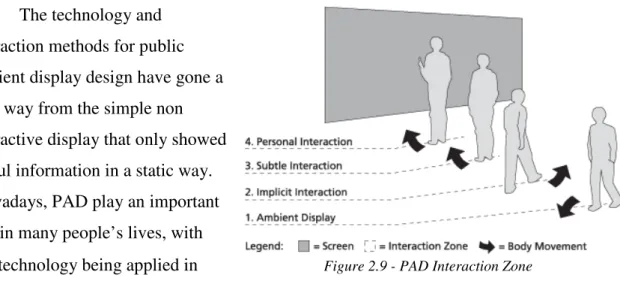
Figure 2.9 - PAD Interaction Zone ... 15
Figure 2.10 - Prototype sharable interactive ambient display. ... 15
Figure 2.11 - Shadow Reaching: An interaction technique ... 16
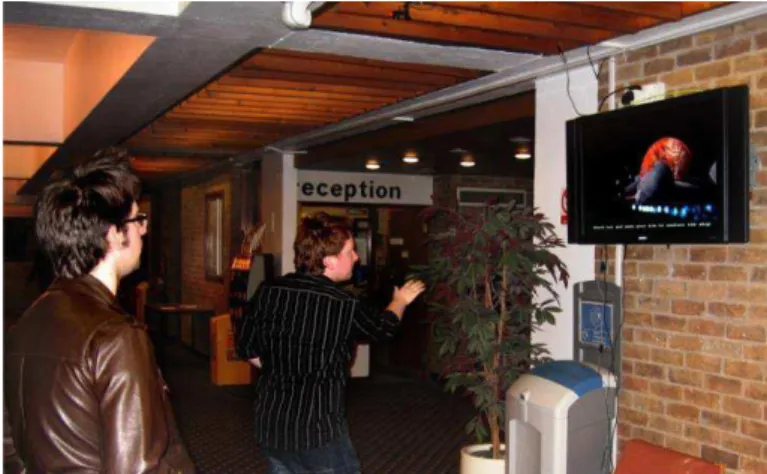
Figure 2.12 - A participant using a space game in a public setting ... 17
Figure 3.1 - Hand contour detection with openCV ... 19
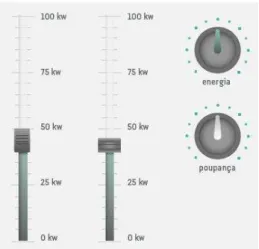
Figure 3.3 - Gages ... 20
Figure 3.2 – Interface Knobs... 20
Figure 3.4 - Microsoft Kinect for Xbox 360 ... 22
Figure 3.5 - NITE Skeleton Tracking ... 22
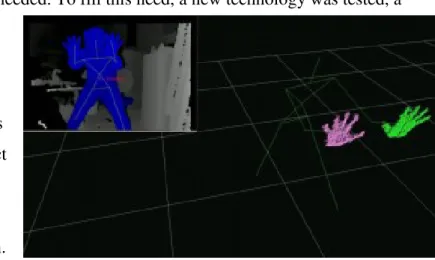
Figure 3.6 - ROS hand detection ... 23
Figure 3.7 - NITE Skeleton calibration position ... 24
Figure 3.8 - The Original Pong ... 24
Figure 3.9 - KPong at ExpoFCT in 2D mode ... 25
Figure 3.10 - KPong in 2D paddle movement mode ... 26
Figure 4.1 - MAID logo ... 28
Figure 4.2 - MAID Architecture ... 31
Figure 4.3 - MAID Stage 1 composed with a webcam output pointed at the user ... 35
Figure 4.4 - MAID Stage 2 composed with a webcam output pointed at the user ... 36
Figure 4.5 - MAID Stage 3 composed with a webcam output pointed at the user ... 37
Figure 4.6 - MAID Stage 4 composed with a webcam output pointed at the user ... 38
Figure 4.7 - Needle Gage ... 39
Figure 4.8 - Counter Gage ... 40
Figure 4.9 - House floor plan ... 40
Figure 4.10 - Maid direct interaction mode ... 41
Figure 4.11 - The MAID's main interface. ... 42
Figure 4.12 - Facebook picture capturing interface ... 43
Figure 4.14 - Pushing and/or pushing motion ... 44
Figure 4.15 - Vertical sweeping motion... 44
Figure 4.16 - Horizontal sweeping motion ... 45
Figure 4.17 - Circular motion ... 45
List of Charts
Chart 1.1 - Carbon Dioxide emissions vs. average world surface temperature ... 1
Chart 2.1 - The Fogg Behaviour Model has three factors: motivation, ability, and triggers. ... 8
Chart 5.1 - User Academic degrees ... 49
Chart 5.2 - Gaming Console usage ... 49
Chart 5.3 - Kinect usage ... 49
Chart 5.4 - General feedback ... 50
Chart 5.5 - Usability feedback ... 51
Chart 5.6 - Usability feedback regarding gesture types ... 52
Chart 5.7 - Did you obtain new knowledge with the given data? ... 53
Chart 5.8 - Did the user experience alert you to the consequences of the usage patterns ... 53
Chart 5.9 – Did you already implement any of the sugestions? ... 53
Chart 5.10 - Did MAID motivate you to implement given suggestions? ... 53
Chart 5.11 - Reaction to MAID ... 54
Chart 5.12 - MAID usage ... 55
Chart 5.13 - Kinect usage ... 57
Chart 5.14 - Summary of results from general feedback and usability... 58
Chart 5.15 - Summary of results regarding gestures commands. ... 59
1
1.
Introduction
The human influence over the environment has been a widely discussed and
documented issue for decades, since it may cause irreversible damages. An important issues is the increase of greenhouse gas
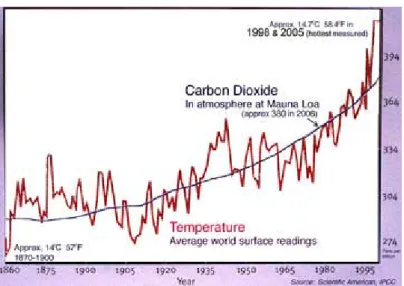
emissions, caused for example by use of fossil fuel as an energy source that are resulting in a global climate change, increasing the average world surface temperature at an alarming rate (Chart 1.1) (Global Warming Articles News and Facts, 2011). It is important to
save energy, since it helps to reduce the consumption of environmental resources and the
CO2 emissions, contributing to a sustainable environment.
The destructive pattern of human behavior will have to change dramatically very soon, and in some cases, it may even be too late to avoid irreparable damage. This may be the case for the Antarctic ice sheets, where specialists believe “there is a 50% chance that widespread ice sheet loss "may no longer be avoided" because of greenhouse gases in the atmosphere”, which will “raise sea levels by four to six meters”. This would result in the flooding of coastal regions, endangering cities like Tokyo, London or New Your City (Adam, 2007).
Throughout the years, environmental concerns have been publicized in many different formats in practically every media channel available, and now-a-days almost everybody that has access to the media is informed of the current situation, but one thing is to be informed, and another is to take action. Sometimes it is hard to
grasp the impact of the actions of only one person in a global cause, but why should we all expect others to take action, when we are not willing to (Figure 1.1)?
This thesis shall explore new means of delivering a persuasive experience to the users, in
Figure 1.1 - Why do we leave it up to others?
2
order to motivate a behavior change. This experience will be in the form of an interactive public ambient display, taking advantage of the latest technology available in the field of Human-Computer Interface.
1.1.
A brief introduction to Human-Computer Interfaces
Human-Computer interaction is a melting pot of behavioural sciences, design, computer science and other fields (Human–computer interaction, 2011). It involves the study of how a user interacts with a computer and the evaluation of the degree of success obtained. To do so, the machine side of the interface draws wisdom from techniques in computer graphics, operating systems, and programming languages among other. As for the human side, graphic
design, communication and cognitive psychology theory are the dominant fields.
Traditional interfaces are based on a computer keyboard, mouse and screen for hardware and a window based operative system interface, popularized by Xerox and Apple (Figure 1.2) in the early 80’s in their widely available machines, derived from the early light pen (Figure 1.3) and sketchpad projects (Myers, 1998). This interface paradigm turned into an
industry standard, for better or worse. It made multipurpose systems possible, many kinds of
applications could be controlled throw it, from text editing to assisted drawing. In the following years many new concepts for HCI have been documented, but none have been able to reach the popularity of the keyboard, mouse, display and window based OS. One of the reasons is that the use of this model “stuck”
with the users, just like entering a car and expecting to find a steering wheel, a shifter and a set of pedals. Another reason is related to the price of this technology, a mouse and keyboard setup is inexpensive nowadays and can handle most of the tasks that are needed in a common PC setup.
This scenario has changed in recent years, with purpose build interfaces, engineered to fit the needs of the target device. We can now find practical capacitive touchscreens that
do not require the use of a stylus, in common mobile phones and Pads, running operative
Figure 1.2 - Apple Lisa Commercial
3
systems specifically design with that mean of interaction in mind. Nowadays, the hardware can fit in a very slim device, like the Apple I-Pad (Figure 1.4), with a battery that lasts up to 10 hours, keeping the total weight of the device between 500g and 800g. So, the interface has to take into account the fact that this device is engineered not to be physically hooked up to any peripheral devices, and capacitive display fits the need for an affordable technology that allows a user to take
full advantage of the device anywhere he wishes to use it. It is now common to see people using touch-screen based devices on the street, but this kind of technology still lacks the precision needed for tasks that require typing and pointer based interaction, needed for the average office job, where the keyboard and mouse combination is still the popular option.
Public Ambient Display interaction is one of the cases where the keyboard and mouse interface are just not practical enough. In a public environment, like a street, for brief spontaneous interaction, the current and most popular solution is the use of interactive displays, like touch-screens or even multi-touch screens, like the Microsoft Surface (Figure 1.5), persuading users to explore the system through a clean and hassle free interface
technology. But there are many limitations in these technologies, like the wear and tear from the many users. Another limitation is the size the screen, limiting the maximum number of simultaneous users.
In this thesis I shall explore the HCI problem posed by the PAD Interaction and tackle it using pervasive technology. The technology that was chosen was depth sensors, to detect user gestures through 3D processing. This technology had recent developments that resulted in new hardware tools available on the market.
1.2.
Motivation
Many environmental problems occur due to our erroneous and exaggerated use of Earth resources. Recent studies suggest that, within USA, 22% of domestic energy
consumption could be eliminated, if people engage in more appropriate behaviours, such as replacing traditional light bulbs with low-consumption bulbs or adjusting thermostats and
4
turning off lights when leaving rooms (Laitner, 2009). Each one of us can contribute to reduce domestic energy consumptions and consequently CO2 emissions. Small individual actions may seem insignificant, but together everyone's efforts can have a great impact on the environment.
Huge amounts of resources are used every year in these kinds of actions, with efforts
being made by many governmental and non-governmental institutions. Most of these effort may inform their targets, but do not motivate a real and lasting behavior change. Most of the successful examples of these campaigns try to pass their message through the everyday life of their targets, with a constant and direct influence, imposing a behavior change.
These kinds of measures are applied on many causes, like anti-tabaco campaigns, with the objective of reducing the number of active smokers. These campaigns can go as far as Nazi Germany in the early 1930’s, where Adolf Hitler’s personal distaste for tobacco, among other reasons, fueled some of the first anti-tabaco campaigns. Nowadays, it is almost impossible for a smoker not to know the consequences of this habit, but it is common
knowledge that in many cases there is no real behavior change until he is faced with the consequences. With that in mind, in the early 2000’s a new simple strategy was devised, where each package of cigarettes was branded with a direct and harsh phrase or image that demonstrated the consequences of smoking, so
that each time a smoker held the pack, he would be reminded of the consequences of smoking (Figure 1.6). It is hard to evaluate the results of this kind of campaign, since there are so many other campaigns and other
factors that influence the results. But this format of delivering a persuasive message has been implemented in many countries
throughout the world, with a variety of
messages and never stopped evolving in order to increase its effect.
Some initiatives to promote a behavior change, for the good of the environment, have
also taken a more active path. One example is the new waste management policy in the city of Lisbon: Non distinct domestic trash used to be retrieved every day from the street trash
5
bins. In order to influence people to recycle their domestic trash, the street bins were
replaced by appropriate recycling bins (Figure 1.7), and the retrieving of the trash is done by categories (Plastic, Paper, Glass and Non distinct), at different days of the week. This action had a direct influence in the life of the citizens of Lisbon, leading to a behavior change where people included recycling habits in their daily routine, making it a lasting one.
The modern day dependencies on technology, and the globalization phenomenon associated with the dawn of the internet, lead to new means for persuasion and behavior changes. Computer based technology plays an intricate role in our day to day life, from the office computer to the cash register in our local department store. These technologies are
breaching new boundaries by the second, connecting people all over the world, through structured social networks that facilitate human social interaction through the internet. These modern social networks, like the well-known Hi5, Facebook or Bebo, allow the users to do more than the traditional profile with pictures and basic friendship bond. They can be used for direct chats, competitive virtual gaming, publishing of many art forms and so many other things.
It never ceases to amaze how the versatility of modern technology can be put to good use, in order to allow the delivery of messages in a fun, practical and creative way.
Technology can be used to influence people’s behavior, regarding the environmental concerns, in order to lead them to a sustainable usage of the resources of our planet.
1.3.
Goal
The Goal of this thesis is to research new means of human-computer interface in the context of Public Ambient Displays (PAD). Exploring new ways to deliver a persuasive experience, through the development of a PAD prototype, motivated by environment related concerns. By using seamless means of interaction, the interface was designed to persuade the user to implement a behaviour change. The objective behind the persuasion
methodology is to lead users to realise how a simple action can have a big impact, when applied in a large scale, and to show how it contributes to the big picture.
The PAD implementation is based on a purpose built, highly configurable framework that enables the PAD installation to adapt to its surroundings. It allows the administrator of the PAD to configure as much as possible, not only to tune the interface to a site specific set of constraints, but also to edit the content of the user interface itself. The interface
6
prototype goes beyond the simple novelty gadget with single event demonstration logic. It enables the study of persuasive technology in different settings, where the PAD
configurations are fine-tuned for each setup at each particular location.
The prototype also underwent user studies to evaluate the system’s usability, gameplay and reactions of users.
1.4.
Contribution
This thesis was developed in the scope of Project DEAP
(PTDC/AAC-AMB/104834/2008), which aims to introduce new paradigms for environmental awareness, helping to motivate citizens to become more environmentally responsible in their everyday lives and engaging them in environmental preservation activities.
One of the main contributions is the development of a versatile public ambient display framework, which can be used as a mean to deliver a persuasive interface, with few constraints regarding the installation’s surrounding environment. It can be used as a tool to study persuasion methodologies in a public setting. It applies a new interaction
methodology for PAD, using current widely available technology, asserting the viability of this kind of interfaces as a mean of effectively deliver a behaviour changing persuasive experience to the user.
Another contribution is the use of gesture based interface methodology, exploring the correlation between the simplicity of the gestures with the corresponding action in the real world. Accentuating the idea that small gestures can have a deep impact.
The system developed in the scope of this thesis was demonstrated, as a creative showcase, at the 8th International conference on Advanced in Computer Entertainment Technology (ACE), originating a publication on ACM DL (Salvador & Romão, 2011). A full paper will also be presented at the ACE 2012 and published by Springer (Salvador, Romão, & Centieiro, 2012) (see Annex 3).
1.5.
Document Structure
7
2.
Related Work
This chapter summarises the state of the art of the main areas covered by this thesis. Section 2.1 is dedicated to the design principles of persuasive systems and their influence on behaviour change. Section 2.2 shows how persuasive technology can be applied to
environmental causes and current work in this field of study. Section 2.3 illustrates how an online social network can be used as a mean to deliver persuasive messages. Section 2.4 is dedicated to interactive public ambient displays design principles and current work in this field of study.
2.1.
Persuasive Systems
”Fifteen years ago, there were relatively few examples of persuasive technologies in our lives. The web wasn’t ubiquitous and software wasn’t designed to change behaviour. But today (…) we are surrounded by digital products designed to change what we think and do” (Fogg B. J., 2009) . Persuasive technology can be found in many different forms, from shopping suggestions on sites like Amazon, which persuades users to buy items related to the ones that the user selected, to modern massive multiplayer games, that persuade us to never stop playing, through social pressure, because the success of other users in the game environment are depending upon cooperative initiatives. Or even modern cars, persuading the users to have a driving
behaviour that favours low fuel consumption, by displaying many
statistics of fuel consumption in the heads-up displays. Persuasive
technologies can be categorized by their functional roles. B.J. Fogg
proposes three “basic ways that people view or respond to
computing technologies” (Fogg B. J., 2002). Computing products can take the role of social actors, tools or media (Figure 2.1):
As a tool, persuasive technologies can be used to increase people’s ability to perform a target behaviour, by making it easier to achieve the goal or/and by organizing the tasks needed to reach a goal. For example, the ticket vending machines, located in almost every train station, use persuasive technology as a tool, in order to guide a user through the task of buying a ticket, from selecting the type of ticket and the destination of the user to collecting
8
the money and issuing a receipt. This way the user is persuaded to avoid the ticket vending office.
As medium, persuasive technology can be used for rehearsing behaviour, in order to persuade the user to change it. For example, there are some driving schools that are
equipped with educational driving simulators, with the goal of rehearsing everyday driving situations, so that the user can learn the proper behaviour for the simulated scenarios. As social actors, an application will try to interact with the user , because “when people perceive social presence, they naturally respond in social ways—feeling empathy or anger, or following social rules such as taking turns” (Fogg B. J., 2002). For example, in many
modern video games, the user is motivated to progress in the game story through interaction with virtual companions, whose virtual lives are depending on our success in the game.
Nowadays there are so many forms that persuasive technology can take that many researchers are investing on studying the dynamics and principles of persuasive technology (Fogg B. J., 2002). With that in mind, B.J. Fogg created the eight step Design process (Fogg B. J., 2002), using successful examples of persuasive technology as a basis for developing new forms of persuasion. Starting with
simple behaviours as targets for persuasion, identifying current examples of successful persuasive technology in that area, implementing the persuasive system based on the examples and expanding on results obtained. It is quite easy nowadays to build a persuasive system, using tools like social network systems, but many fail because people don’t understand what factors lead to behaviour change
(Fogg B. , (A), 2009) (Fogg B. , (B), 2009) (Penny & Underwood, 2008). Behaviour changes can be achieved through the conciliation of three main factors: Motivation, ability
and trigger (Fogg B. , (A), 2009): The system must motivate the user to act towards a target behaviour; it must have the ability to accomplish the target behaviour; there also must be a trigger so the user can act upon it to accomplish the target behaviour (Chart 2.1).For example, I would love to learn to play piano, given the love that I have for music, I am motivated to practice and I have enough ability to practice just by following an instructional book. The trigger for me to practice playing is having every week a friend to practice with.
9
These simple principles are applied as the foundation blocks for the development of the thesis prototype, in order to build a persuasive system. Using modern new means of interaction, together with a stimulating and visually appealing design to supply motivation to the user, combined with the use of natural and context appropriate gesture based interface to illustrate how simple and accessible the target behaviour is. The final component would be the supplied feedback, the impact of the data supplied by the system should act as trigger.
2.2.
Persuasion methods applied to Environmental Causes
Persuasion technologies can and have been applied within several contexts, such as commerce, health care (de Oliveira, Cherubini, & Oliver, 2010), education (Revelle, Reardon, Green, Betancourt, & Kotler, 2007) and environment (Froehlich, et al., 2009) (Reitberger, Ploderer, Obermair, & Tscheligi, 2007) (IJsselsteijn, de Kort, Midden, Eggen, & van den Hoven, 2006) (Miller, Rich, & Davis, 2009) (Stein, 2008) (Sutaria & Deshmukh, 2008) (Takayama, Lehdonvirta, Shiraishi, Washio, Kimura, & Nakajima, 2009) (Spaargaren & Van Vliet, 2000).
Several approaches explore the use of games as persuasive tools to influence players to change certain behaviors, there are four roles that should be considered as a perspective to design persuasive system (Midden, Kaiser, & Teddy McCalley, 2007,):
As an intermediary, where the technology, that is used for attaining a goal, defines the ecological impact.
As an amplifier, where technology amplifies the human potential to attain goals.
As a determinant, where behaviour is shaped and activated on the basis of the affordances, constraints and cues provided by the
technological environment
As a promoter where technology is designed to influence behavioural choices.
In the effort to produce behaviour changes, there are many possibilities for the
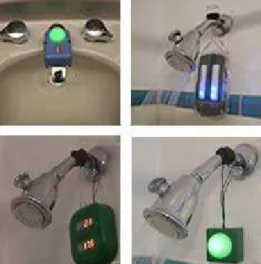
implementation of persuasive systems. One of the solutions is the purely technological approach. One example of this approach is the use of devices that limit the users’ behaviour to an acceptable level, like faucets that have proximity sensors, so that the water flow is only turned on when the users have their hands in front of the sensor (Figure 2.2). This is also one of the most ineffective approaches, in terms of producing a real and lasting behaviour change, given that the user is forced to act in a certain way instead of maintaining the target
10 Figure 2.4 - (top) a polar bear with
lots of ice (bottom) a polar bear with little ice.
behaviour from its own free will. This is mainly due to human nature, people tend to resist to changes: “resistance to new systems and negative experiences (…) has frustrated the high hopes of innovative technologies” (Midden, McCalley,
Ham, & Zaalberg, 2008).
Using the four roles mentioned earlier, technology can be used as an effective motivational tool to help people visualize the consequences of their behaviour and explore the effects of their actions. Persuasive systems can be planed beyond the traditional level of specific
appliances or systems and aim towards integrated systems that monitor multiple resources and advise the users on how to adjust their behaviour or invest in more efficient equipment. These systems can even go beyond the scope of the common household and coordinate efforts within the society, coordinating contributions. One recent example of a persuasive system aiming towards
behaviour changes was based on the users’ attachment to a virtual pet “persuading
individuals to change their behaviour, and maintain those changes over time…” (Dillahunt, Becker, Mankoff, & Kraut, 2008). In this experiment, a group of individuals were selected to test an application where a social actor, a Polar Bear, was used to create an attachment. The actor’s environment was the polar ice caps, and the ice would melt, making the actor sad, or grow, making the actor happy, according to the behaviour of the user (Figure 2.4).
There are also other recent experiments comprising a more sensor based approach, with the objective of contributing to the users’ awareness of their domestic
consumptions and the respective consequences, aiming towards behaviour changes (Loke, Singh, & Le, 2008). An example of this approach is the UpStream project, with the goal of “immediate reduction in water use …through unobtrusive low-cost water flow sensing and several persuasive displays” (Kuznetsov & Paulos, 2010). This project experimented with different means of passing the information to the user, regarding current water usage, in order to persuade them to reduce their water consumption. These means were separated in
Figure 2.3 - Persuasive displays designed,
11
two groups, Ambient Displays that use sound or light patterns to alert the user, and numeric displays that show a precise value (Figure 2.3).
The results lead to the conclusion that both methods are effective, but numeric visualization was less effective than ambient. This was probably “due to the display’s lack of a clear-cut threshold for appropriate consumption: participants did not see an appropriate stopping point”, so the users did not have a clear notion of progress and immediate goals that visual feedback would supply.
These conclusions and results were taken in consideration for the development of this thesis, so that the prototypes take advantage of the available forms of delivering feedback to maintain the user informed on their status and drawing clear objectives for the interaction, using
visual as well as audio output to deliver an engaging gameplay.
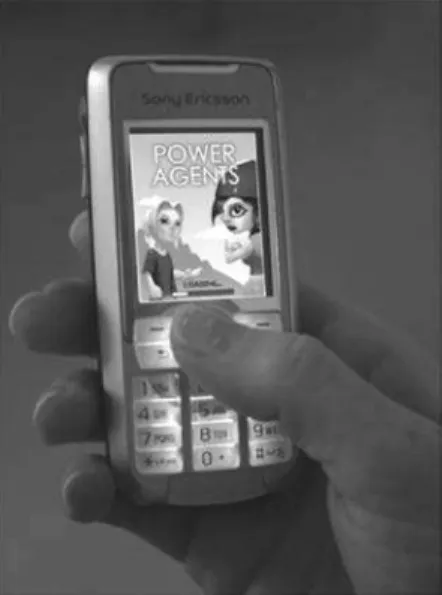
Regarding domestic energy consumption, some applications have been developed. Power Agent (Bang, Gustafsson, & Katzeff, 2007) is a mobile pervasive game for teenagers, designed to influence their everyday activities and electricity usage patterns in the household. Power Agent is played on standard Java-enabled mobile phones (Figure 2.5) and uses real power consumption data collected via existing metering equipment used by the energy
company. The underlying design idea is to let players (one for each house) compete in teams (cooperate with their families) and learn hands-on how to save energy in their homes. Power Explorer (Gustafsson, BÃ¥ng, & Svahn, 2009) builds on the
previous research on Power Agent and uses a similar technological set-up, but focuses on real-time feedback (Figure 2.6). The game design teaches the players about the consumption of their devices and encourages them to adopt good habits. Some other applications focus on providing feedback based on real-time domestic energy consumptions measurements (Jahn, 2010) (Mattern, Staake, & Weiss, 2010) (Reeves, Cummings, Scarborough, Flora, & Anderson, 2012).
Although these approaches seem to produce positive results, they rely on the use of mobile devices and the deployment of specific energy consumption devices (connected to
Figure 2.5 - The Power Agent game
12
the home central electric power meter or appliances), which involves additional costs and set-up. We aim at using players’ free time in public spaces, such as shopping centers or waiting rooms, to both motivate and educate them towards home energy saving behaviors. Our approach is based on the assumption that a change in behavior requires both motivation to act as well as knowledge of what to do.
2.3.
Persuasion Through Social Networks
In the last few years, a new form of persuasion emerged, the mass interpersonal persuasion (MIP), through the evermore popular social network systems. One of the main contributors to this phenomenon was Facebook, a social networking service, that “created a new way for third parties to develop and
distribute interactive applications (web apps) …” (Fogg B. J.,(A), 2008).
Applications on Facebook are available with a wide range of objectives, including sharing
contents and social gaming.
The social networks have turned out to be a prolific way to be heard. Nowadays
many people that seek publicity (Figure 2.7) use large social networks to achieve it. For instance, the Facebook social network has a functionality that allows the users to promote causes, that other users can join and support. This resource has been used even by non-profit
organizations to promote causes like animal rights, environmental concerns, cultural movements and so many others.
The social networks systems are always adding new features to their lists. One of the popular features, that is now available in all the major social networks, is the support for third party applications. These applications can bind external systems to the power of the social graphs.
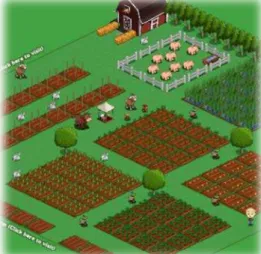
One of the means of interaction that are gathering popularity in the social networks is the competitive virtual games, constructed as third party applications. These games are simple in nature, like FarmVille, where users compete to achieve the most beautiful and productive farm (Figure 2.8). Each game has a set of achievements and levels that the users compete to
Figure 2.7 - Barack Obama's Facebook Profile
13
achieve. Each achievement is shown in the users profile/page, like a professional athlete and his set of cups and medals in his trophy room. Users invest considerable amounts of time using these applications, to reach these achievements.
This typical competitive environment of these applications can be used as a mean of persuasion that would lead to behaviour changes, using the influence that social networks can have over users to steer them towards a more environmentally sustainable living. According to B.J. Fogg (Fogg B. J., (A), 2008), there are six components in MIP:
• Persuasive experience - The Persuasive experience in the MIP is characterized by social influence. Many applications on Facebook are an example of this, by action on social pressure. For example, one of the most successful applications, the “Top Friends” application, sends this invitation message to the users friends: “John Smith has added you as a Top Friend! Does John Smith make your Top Friends?”. This message is designed to persuade the user to use the application by leveraging the fact that the message comes from a friend that the user probably trusts.
• Automated Structure - One of the most important aspects of MIP is the
automated structure of the system, constantly delivering a persuasive experience. So once a persuasive experience is designed and implemented, it is applied repeatedly with no need of human assistance.
• Social Distribution -Persuasive experience and automated structures have been used in many occasions, like web application based marketing, but one of the main innovations in persuasive systems, regarding MIP, is the adding of social distribution where the persuasion influence can cascade through the social network, from friend to the friends of the friends and so on. One of the most important examples of this is the growth of the social network systems, with the invitation system, where a user invites his friends to join the network, which cascades to the friends of the friends and so on.
• Rapid Cycle -Another component is the rapid cycle, “what this means is that the time between invitation, acceptance and a subsequent invitation needs to be small” (Fogg B. J., Mass Interpersonal Persuasion: An Early View of a New
Phenomenon, 2008). One of the best examples is the Facebook group system, where a group can represent a cause, and users can join the group to support the cause. These groups tend to gather huge followings trough rapid cycle spreading of the information.
14
of the components described depends on the size of the social graph that in the case of networks like Facebook, tie millions of people together. In the future, there may even be some form of connection between different social graphs, linking specific components of different social networks, expanding the social graph even further.
• Measured Impact - The final component would be the measuring of impact, so the user can observe the effects of their actions. One of the ways is through social proof, where the success of, for example, a group on Facebook can be confirmed by the amount of followers the group acquired. Another way is through statistic information. Using the same example, a user that joined a group can get
information on the average number of users that joins the group per day. One of the most useful ways of measuring the impact of an application, for the creators, is by monitoring the user interaction with it. Counting how many times a user pressed a particular button, how much time a user spent on a window and so on. This information is priceless for the developers to adjust their product to fit the users’ behaviour.
15
2.4.
Interactive Public Ambient Displays
The technology and interaction methods for public ambient display design have gone a long way from the simple non interactive display that only showed useful information in a static way. Nowadays, PAD play an important role in many people’s lives, with
this technology being applied in many different environments.
Some more simple PAD are applied in environments like airports, for displaying flight related information, where users congregate to be informed of departure time, gates and state of their flights, and a stock market PAD were investors can gather most of the data related to the market’s up’s and down’s. Other, more complex PAD’s, support human interaction, like interactive class room boards, that assist teachers on their daily lessons.
The PAD system paradigms are evolving to the point of contemplating “exchanging specific information with individuals as they pass by” (Figure 2.9) (Vogel & Balakrishnan, 2004). As the information networks begin to solve privacy issues, and users start to trust and relay upon them, visualization of personal information will be possible through PAD, avoiding the need for Laptops and other devices to access personal information. Although there is still a long way to go, many efforts have been made to breach this barrier.
Following these ideas, in order to guide the designing process of an interactive PAD system, there is a set of design principles we should follow (Vogel & Balakrishnan, 2004):
• An ambient display should be designed according to the context of its surroundings, considering the aesthetic aspect
and the interface reactions, in order not to attract too much attention or to pass unnoticed. • The information transmitted by
the PAD should be
comprehensive, even if the user has to interact with the system to obtain more details.
Figure 2.9 - PAD Interaction Zone
16
• The display should communicate with the user in a socially acceptable way, avoiding a too invasive approach. In order to maintain the ambient nature of the display, the
interaction with the user should be short, limiting the interaction to information gathering as opposed to activities.
• The system should not require prior training, aiming at immediate usage, and for more advanced interaction, the PAD should demonstrate in a straightforward way the method for interaction.
• Multiple users should also be able to use the system, either individually or simultaneously (Figure 2.10).
• The PAD should reason which personal information should be appropriate to display in a public environment, avoiding displaying information that is inadequate, like user’s e-mails or personal messages.
• And finally, methods for users to control their privacy, in the PAD, should be made available, so that a user can choose what will be
displayed in the system when he interacts with it.
Based on these principles, Vogel & Balakrishnan also created a framework for interaction phases on PAD, which range from the distant implicit public interaction to the up-close explicit personal interaction, with fluid
inter-phase of transitions (Figure 2.10).
The use of a keyboard and mouse is unrealistic for the modern PAD systems. Future ambient display
technology should merge with its surrounding as perfectly as possible. In order to achieve that, the means of interactions should be as natural as possible. There are many on-going projects, studying new ways to interact with PAD’s (Jacucci, et al., 2010) (Shoemaker, Tsukitani, Kitamura, & Booth, 2010) (Eisenhauer, Lorenz, & Zimmermann, 2008). For example, there is a project focused on Whole-Body Interactions (Shoemaker, Tsukitani, Kitamura, & Booth, 2010), where the whole human body is used for interaction, based on the projection of the users shadow on a wall, in order to detect the users body gestures (Figure 2.11). Another project studies the possibility of separating the user interface from the PAD system, in order to create a common interaction platform that would enable the developers’ to concentrate on the design of the PAD system itself and not the interface method (Eisenhauer, Lorenz, & Zimmermann, 2008). This common interface should be modular enough to accept many combinations of different input devices, like cameras and
17
pointers. The concept of separating the graphical interface from the HCI makes more sense than ever, with technological advances creating new HCI devices with different approaches, the interfaces developed for a HCI framework can be applied to new input device by only updating the HCI side.
According to (Hardy, Rukzio, & Davies, 2011) gestures are a viable method of interaction with public digital. Their work con-tributes to the understanding of how people
perceive, respond to and interact with interactive gesture based public displays outside the controlled
environment of a research lab (Figure 2.12). Their findings support both
the observe-and-learn model (Rubegni, Memarovic, & Langheinrich, 2011) and the
Honeypot effect (Brignull & Rogers, 2003) and we followed the recommendations that were appropriate for our case study. A public display allows for a broader dissemination of a message, since besides the user directly interacting with it, all members of the audience can receive the output from the public display.
Implementing a successful gesture-based interface also requires the challenging task of designing a set of effective gesture commands that allows users to interact in a natural, familiar and effortless manner. This is particularly important in the context of sporadic interaction with public displays when users have limited time to learn and explore the application (Vatavu, 2012).
Our gesture set was designed to resemble the corresponding real world actions, so the gestures would be easier to understand and recall.
18
3.
Early work in the development of the Prototype Concept.
3.1.
First concept designs:
This chapter will describe the first stage of the creations of the thesis prototype. At
this point, the main concern was to run through the first ideas for the concept, test their viability and assert the necessary technology.
3.1.1. Approach
Given the goal of building a public ambient display system, as a mean to deliver a persuasive interface, through innovative and seamless human-computer interface technology,
the first step taken was to research the available technologies that could fit the needs. This stage of development was really focused on testing technologies, in order to find the one that is the best match, given the goals established, with particular infuses in the flexibility
requirements (see chapter 1.3). The first immerging ideas’ include the exploration of
computer vision techniques that allowed the users to interact with the PAD without the use of any direct physical contact with an HCI device.
3.1.2. Technologies applied
The first approach was based on computer vision, using the OpenCV library for
real-time video feed processing. The image capturing was done by an inexpensive webcam. OpenCV was chosen not only because of its list of features, but also because it is very well documented and supported, a priceless advantage in this early stage. The interface was developed using the open-framework libraries, supplying important abstractions that allowed the quick development of an early prototype.
3.1.3. Concept
The basic interface concept was to create simple games, based on environmental related topics, that would draw a non-optimized scenario that the user could explore. Persuasive technology works as a medium, so the user can learn and practise the target behaviour by optimizing the scenario (Fogg B. J., 2002).
19
would be studied, to work out which combination had the best effect (Kuznetsov & Paulos, 2010), for example, a combination of dials that show the current power and water usage could be combined with ambient light effect in the game scenario, that with the game progress would go from a greyish game environment to a more “happy” and green lighting.
The user would also be given the possibility of publishing the results on a social network, like Facebook. Each game would have a presence on the social network, in the form of a third-party application, and each user could participate in spreading the word about the project, tapping into the established social graph. The use of the social graph would allow us to further publicise the cause, it would also increase the effectiveness of the
persuasive technology. The expansion of the persuasive experience from the PAD to the social network would be subjected to study.
3.1.4. Explored Technologies
For this early concept, I decided to limit the interaction to hand gestures, since 2D visual recognition technology, using a webcam, clearly had limitations to the shape
identification process, due to lighting, shading and colour contrast. So, by using hand gestures, I minimized the impact of these issues, by narrowing the field of vision, with the hands occupying most of the
captured frame (Figure 3.1),
obtaining the best correct detection rate possible.
In order to process the computer vision information, OpenCV libraries were applied to the camera data stream, to extract the
hand gesture information. The extrapolation of the hand position was mainly based on the detection of the convex shape supplied by OpenCV. This shape is created by the space between the user’s fingers, combined with colour segmentation based on skin colour, it is possible to calculate the hand contour (Figure 3.1). With the position of the most essential
points of the hand, like the finger tips, it is possible to detect gestures, based on hand/finger position and direction shifting.
3.1.5. Interface
Working with the limitations imposed by the technology, it wasn’t practical to develop an interface based on pointers, like we would if developing an interface for a mouse based interaction. Given that the hands of the user occupied most of the capture frame of the
20
camera, it didn’t leave much room for that kind of interaction. Also the hand-eye coordination demand would be too high for a PAD interface setup, were the interaction time of each user is normally very small, and a frustrating user interface would reduce that span even further.
The interaction was developed by
reproducing fine hand gestures that involve mainly finger and wrist movement, in order to adjust a set
of control knobs of different shapes and purposes
(Figure 3.3). The user would be presented with a scenario that would be fine-tuned using a set of knobs and switches. A possible scenario would be a house where the objective could be to optimize the power consumption. To do that, the user is presented with a set of
different knobs, for example: one to control the number of light bulbs that are on; another to control the level of a thermostat and another controlling the number of electrical appliances connected to the power grid. In this scenario, the user would have to adjust the knobs to save as much energy as possible, but also maintaining the house comfortable and functional: the number of light bulbs should be reduced but not to the point where the house is too dark; the thermostat should be reduced, but maintaining the house with an acceptable and comfortable
temperature. Each knob would have a different gesture associated to it, like a vertical or horizontal sweeping motion for a sliding knob (left on Figure 3.3), or a rotating motion (right on Figure 3.3). The
motions are distinct so that the user does not have to select the knob that he wants to use, in a pointer-like action, he would only have to perform the gesture associated with a
particular knob.
The information would be presented to the user through a set of gages (Figure 3.2) that would translate the action taken by the user into measures that he could relate to, like the amount of money that he would save in a year by applying the changes to the scenario, the amount of greenhouse gases that would not be emitted or the amount of energy being used in the scenario. The application would take the role of medium, leading the user to test different variations of the presented scenario, and possibly persuading the user to implement the same behaviour in his daily life, contemplating the knowledge
Figure 3.3 – Interface Knobs
21
acquired from the interaction (Fogg B. J., 2002).
Further work on the interface concept was postponed until the early testing of the technology was done.
3.1.6. Early testing
Small scale, informal tests were done to assert the technologies features and limitations. The work started with a simple application that was based on OpenCV and written in C++ with the purpose of testing the effectiveness of a basic hand contour recognition algorithm. The user would present a hand in front of the camera, and the program would draw the contour of the hand and show complementary information, like count who many finger were up, draw circles around each hand and identify hand joint points (similar to Figure 3.1). The setup was composed of a white background in a well
light room, to assure the best working condition for the detection process. The camera used
was a webcam, with a maximum resolution of 640x480 pixels.
The results were mixed, with the application working very well for some users and
not so wellfor others. The recognition process had an irregular performance, with many constraints involved in the detection process. Simple details like glimmering finger nail polish, would cause a reflection that would be picked up by the camera, giving the
application a hard time identifying the contour of the hand. Same result for users with hand accessories, like rings or wrist watches. Other phenomenon’s like loss of finger tracking due to shadows produced by jacket sleeves, or even by the hand itself, also produced
unacceptable accuracy. Even after tweaking the prototype’s parameters, the results were still unsatisfactory. In a test scenario, outside of a laboratory environment, where the background for the camera shots was not constant, or the lighting wasn’t perfect, the results could
potentially get worse. The testing and development based on this technology was seized, deeming it inadequate for the implementation of the previously described prototype concept.
3.1.7. Conclusions
The technologies applied for this test stage had their limitations, but if the conditions for the prototype testing were controlled, they could be a applicable for the final PAD prototype. But given the concept defined earlier, this technology would not offer a viable solution for the development of the prototype.
22
3.2.
Early 3D sensor based approach
3.2.1. Bridging previous concepts
In this stage the application concept presented in the previous chapter is maintained, but a new technological solution for the development is proposed. For this stage the
objective was to select a new method for gesture recognition that did not have the
constraints that the webcam based approach had, regarding reliability, precision and setup.
3.2.2. Technologies considered
By the time we were finishing the development of the first stage, a new device was conveniently put on the market, the Microsoft Kinect, a "controller-free gaming and entertainment experience" by Microsoft
for the Xbox 360 video game platform” (Kinect, 2011) (Figure 3.4). One of the first widely available, PC enabled devices equipped with a depth sensor, RGB camera and multi-array microphone
“which provide full-body 3D motion capture, facial recognition and voice
recognition capabilities”. The Kinect has very few limitations for the depth sensor, a distance of about 1,8 meters from the sensor to the users is needed, as well as the area around the users’ needs to be as free has possible of objects like furniture for best results. There are also no lighting constraints, it can even be used in a pitch black environment, a
frequent problem encountered on other vision based technologies.
This sensor was also chosen for this project, because of the open source support offered by the manufacturer of the 3D sensor technology, an Israeli company called
PrimeSense that supplied a driver for this equipment. They also released a middleware,
called NITE, for the driver that handles basic presence detection/position, supporting full body skeleton tracking (Figure 3.5), granting liberty for HCI designers to explore means of
interaction. This software is based on the OpenNI framework specification, “which provides
Figure 3.4 - Microsoft Kinect for Xbox 360
23
an application programming interface (API) for writing applications utilizing natural interaction” .This framework is based on the necessity to “certify and promote the compatibility and interoperability of Natural Interaction (NI) devices, applications and middleware”.
NITE does not fully implement the OpenNI specification, since it does not support the tracking of all the main body joints (Figure 3.6), like the finger joints of the hands. The main reason for this is the low resolution of the device, the 3D camera has a resolution of only 640 by 480 pixels. Given that the user has to stand 2 meters from the sensor, the stream quality is not enough to reliably support a great number of joint tracking.
In order to bridge the previous prototype concept, a mean of extracting the missing joint points of the hands was needed. To fill this need, a new technology was tested, a Kinect plugin was being
developed to integrate MIT’s Robot Operative
System(ROS), that allowed us to process the extracted Kinect point cloud, together with the NITE joint information, to obtain the needed information. The ROS supplies a virtual environment that allows us to
reproduce, even graphically, the captured live action of the Kinect (Figure 3.6). The main constraint identified during testing was the short distance to sensor that the hands needed to be placed, in order to extract enough information to be able to consistently calculate and track the position of all the fingers. The user needs to produce the gestures at a distance of 0.6 to 1 meter from the device, and the hands would occupy most of the captured frame. Since this particular constraint would fit the needs for the presented concept, the
development proceeded.
3.2.3. Proposed Technological Solution
The main element of the architecture of this prototype is the Kinect. The feed of the camera is processed by the NITE middleware, which extracts the main skeleton joints and the full 3D point cloud of the feed. This information is processed through the ROS
framework, via the Kinect plugin, used to extract precise hand positioning. The hand tracking results are used to identify hand gestures that are applied to the PAD interface.
24
3.2.4. Interface
The interface concept remains the same as the previous prototype concept, with an added element: a calibration phase. This technology needs the user to perform a calibration gesture, so that the NITE middleware can identify the user, and calibrate the dimensions and proportions of the user’s body. To
calibrate the full body joint detection, the user needs to stand in front of the sensor with his hands in the air, flexing the elbows in a 90º angle and with his legs apart
(Figure 3.7). The calibration phase precedes the main interface phase, and needs to be repeated each time the user is lost and tracking stops, a limitation that further interface designs have to take in consideration.
3.2.5. Early testing: KPong
The first test phase was dedicated to evaluate the reliability of the basic Kinect technology and the NITE middleware, avoiding in this early phase the complexity layer that the ROS framework would add. The main points that were addressed were: How many users could the system support? How much effort was needed to calibrate and maintain the joint tracking system? And how accurate and reliable was the detection?
To answer these questions a test application was created based on the hand detection demo that was supplied by the NITE setup. Inspired by the use of simple computer games to test new HCI platforms (Eisenhauer, Lorenz, & Zimmermann, 2008), we reinvented a classic video game called PONG, but
instead of the original analogue controllers, we used hand tracking for controlling the paddles instead of the
classic handheld input device. Pong is a crude ping-pong simulator created in the early 1970’s for the arcade market. It consisted of a game environment that resembled a ping-pong table viewed from the top, with a paddle on each side, represented by two straight vertical lines (Figure 3.8). The gameplay was limited to each player moving the paddle up or down to make contact with the ball, and depending on the point of impact with the paddle, the ball would invert its trajectory with a specific angle and it would accelerate with each hit. The player would win a point for each time the ball passed by the paddle line of the opponent. Our implementation,
Figure 3.7 - NITE Skeleton calibration position
25
that we called KPong, resembled the original concept, with the same game environment and gameplay. The KPong would detect if a potential user was in the field of vision and ask him to perform a calibration gesture. When that was completed it would then ask a second player to perform the calibration and then the game could start. If a player leaves the camera field of vision, or the hand tracking was lost, the game would pause and wait for recalibration to be complete. For this test only hand detection was used, involving less effort to calibrate (only a small hand waving gesture). An extra game play mode was also implemented, where the user could freely control the paddle in 2D along his side of the game field. This mode was added for further precision testing. Another issue that was tested was the need for a
mirror-like representation of the camera feed, so the user can centre himself in the camera field of vision. KPong has a small frame, where the mirror camera feed was projected, on the top-centre area of the game environment, and could be toggled via a keyboard key.
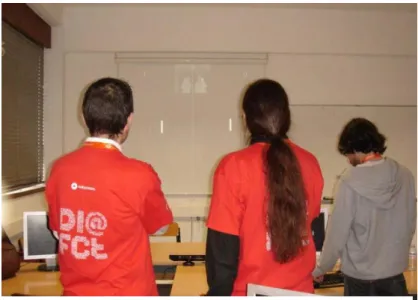
The application was tested on an open-day event, aimed at a young crowed of school students, called ExpoFCT. In
this event the Faculdade de Ciências e Tecnologias
receives students from all over Portugal to show what the faculty has to offer in terms of education, allowing future college students to get a brief glimpse of each course. The setup was done in a classroom with a cleared area and an
overhead mounted projector. The students arrived in groups, and were paired to play the game, so there was always an audience in the field of vision of the device. The event supplied a steady stream of users to interact with this installation, with ages ranging from 4 to 17, playing the game in one-on-one matches, with some users interacting with more ease then others, but the reactions were always positive. The calibration of multiple hands was
one of the main problems. The first hand calibrated easily, while the second sometimes took a little more effort, resulting in a frustrated user franticly waving his hand in front of the sensor. But once the hands were calibrated, as long as the players kept their hands in range of the camera, there were no problems. Normally most of the situations where the hand tracking was lost occurred when players rested their hands by lowering them and keeping them against their bodies for a couple of seconds. The users normally had a good sense of
26
the camera’s field of vision, so the mirror frame was only toggled-on in the calibration stage, for the users to grasp the concept of the interface more easily. When the game started it was normally switched-off. Since the interaction time was limited to five minutes, we had many eager players waiting in line, including even the teachers that accompanied the students.
The 2D paddle controlling mode (Figure 3.10) posed a different challenge to the players, it required more accuracy, but surprisingly that factor ended up not being the most relevant, compared with the challenge of maintaining the players hand in reach of the device.
With the new challenge presented, the players hurrying to race the paddle
across the screen to reach the ball did not pose any difficulty to the tracking system, unless the hands were out of sight of the Kinect. With the pressure of the game, this was frequent, but after a couple of times having to recalibrate the hand tracking, the players would
learn to keep their hands within the game area.
The hand tracking revealed to be accurate up to 6 meters from the capture device, so the reliability and accuracy was enough to suit the needs of the project. The calibration of the first players’ hand was easy for this case, but the second player revealed to be more complicated and time consuming, requiring assistance from the supervisors most of the times. It was also difficult in more challenging gameplay settings to keep the users from reaching beyond the field of vision of the camera, thus losing hand tracking. During this day of testing, body types and sizes, with different types of clothing seemed not to take relevant effect on the recognition accuracy
3.2.6. Early testing: ROS
After the success of KPong, it was time to further test the target architecture, which involved testing the ROS framework and the Kinect plugin for it. The test started using the demos that the setup supplied, that allowed full hand detection (Figure 3.6). This application used the skeleton detection of the NITE middleware (Figure 3.7). This revealed to be a major constraint, since the calibration was not as easy to explain as the hand tracking
calibration. It had a low success rate and it consumed a lot of space to reproduce. In order to use the ROS based hand detection, after the user calibrated the skeleton tracking, he then
27
had to present his hand fairly close to the sensor for it to detect the hands.
After some further testing, the combination of the ROS framework and the Kinect plugin was deemed very unstable, with frequent crashes. Despite these flaws, the hand detection was very accurate, leaving hope for a future version of the software that addressed the mentioned issues. No further testing was done with this technology.
3.2.7. Conclusions
The stability issues of the ROS framework, combined with the unpractical and frustrating calibration procedure of the full skeleton tracking, lead to the conclusion that this architecture was not the ideal for reaching the goal of a flexible setup that could be used in multiple conditions, like crowded spaces. But the basic hand tracking of the NITE
framework worked quite well, and would be further used in the development of the next prototype due to its easy calibration, good accuracy and reliability, proven in these early
tests. But the use of this technology involved redesigning the interface concept for the prototype, from hand/finger gesture to a pointer based approach, where the position of the
user’s hand is translated in to a single point position in the interface.