Since finding partners can sometimes be complicated, this solution aims to make this easier. Since it is a common problem, it might be interesting to gather all these people in an application that helps them find opponents.
The background of the project
Every racquet sports club has a booking system, so it may be relevant to rethink it to make it more efficient. As a consequence, if a sports club offers a solution to meet new people, it can be a really effective added value.
Work statement
Objectives and deliverables of the project
Out of scope
The different chapters below are about the tools that will be used for the creation of the application. First it will be about a tool that helps to manage the project as a whole, then some tools used for the front end will be presented and finally the backend tools will be introduced.
What is Git?
What is the branch and what is merge?
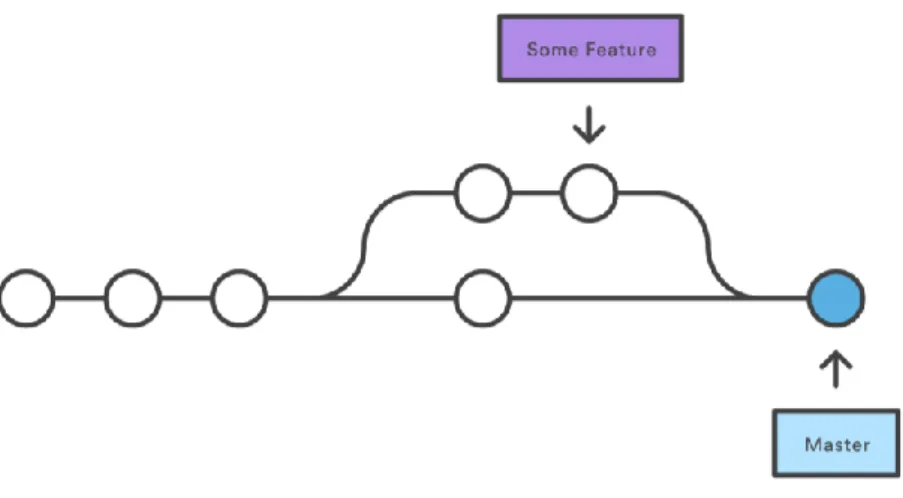
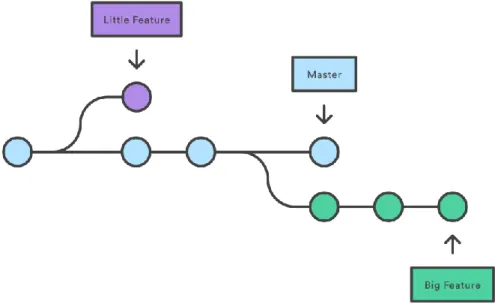
With a merge, two branches can be merged to make one, so that the work of both of them will be unified. As you can see in Figure 2, a second branch has been created from the master branch.
React
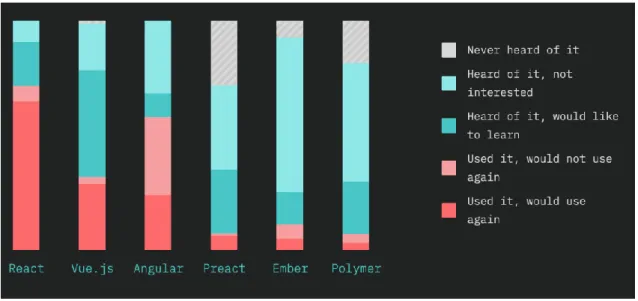
- React vs Angular vs Vue
- Redux
- JSX
- React-router
That's why you need to be aware of them when you're thinking about which framework you want to use. TypeScript will be the first big part to learn and then MVC should be understood really well.
NodeJS
- RESTful API
- HAPI
- JOI
- Knex
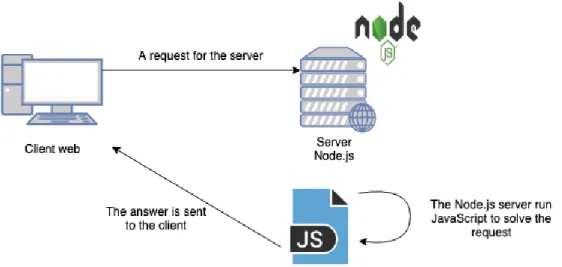
As you can see, the "img" element will be created and assigned in the "elementImg" constant, and then the variable can be used wherever you want. JavaScript is the most widely used language for building front-end web applications these days, so it's now possible to write both front-end and back-end seamlessly. Another advantage is that it is very fast, thanks to its V8 engine and non-blocking model.
Since it is open source, Node.js chooses to use it and is then able to work very quickly with JavaScript code. HAPI is a solid framework used primarily to build backend APIs, but it is possible to build HTTP proxy and server applications as well. For example, it is possible to tell the type or length of the object.
Database
This is to make sure you're progressing in the right direction and it's easier to change something in the design if it's done before the coding part. The tools used will be similar to the tools I used for the Multidisciplinary Software Project, it will reinforce the skills I learned from this lesson, and the app has the same needs as the app we created for the project. The backend will be an API that will be used to interact with the database.
This API is coded in Node.js using the HAPI framework. HAPI offers many features that may be of interest to the project that are not included in some other frameworks such as Express.js for example. The Knex package is used for the query builder, so no SQL is typed directly into the backend.
Frontend
Tools
View mock-ups and navigation
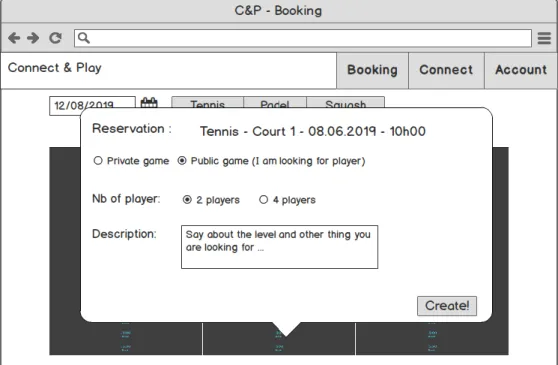
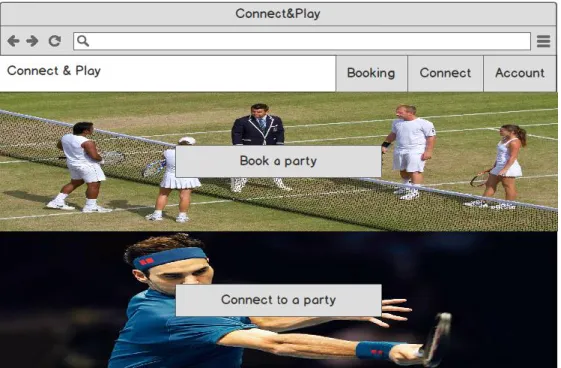
It shows all the options that the user can do and he can use the menu buttons to navigate or the two buttons in the middle of the page. Clicking on an available time will bring up a pop-up to enter all the information for the booking. If it is a private player, you must specify each player, and for a public player, you must specify the number of the player and provide a description.
Finally, the account page that appears when you click the "Account" button shows all the information about the connected user. You can change your email address and password using two buttons (a pop-up window will appear). It describes how the entire application is structured and then how each part (database, back-end and front-end) was developed.
Structure
The database and api are both in this file as they are part of the backend, and the SQL scripts can be used to initialize the database directly in the API to make it faster. With this global structure I can easily switch between the three parts, because it often happens that a change has to be made in the API or in the database when working on the frontend. The structure of the API is shown in figure 15, a folder "src" is created containing each API file.
In this folder there is an index.js file that will serve to configure the server, start it and mount the rest of the files. These files are split into several directories: "db" contains the files to mount the database, "route" contains each available route, "handlers" contains the handlers used by the routes, "models" contains the files that make requests to the database and finally "schemas" contains all the schemas used to manage the request and response. The last structure to build is the frontend and Figure 16 shows how that works.
Setting up the environment
After this step, I initialized a git repository to get a version control of this project. I did it in the root path as specified in the structure. After I set up the API by installing Node.js on my local machine and created the directory for the API, I ran the "npm init" command to create the "package.json" file. Finally I wrote a file to automatically reset the database, to do this I needed something to read SQL script file, I chose to use "fs" (Szabo, 2019a).
I used "create-react-app" to create a React app that included the tools so I could start writing code directly. The Roboto font links and font icons have been saved in the “index.html” file.
Database
Backend
If the model receives a successful response, they will return the data otherwise they return an error depending on what actually happened. The SQL queries are built with knex in the template files, I configured knex in the "knex" file. Finally, I am using Schema files to validate the data received from the payload, parameters and database with Joi.
The documentation uses the Joi validation I wrote in the schema to write what each request needs and what they provide. When this action occurs, the old password mentioned by the user must be compared with the hash located in the database, this comparison is done with the compare function of bcrypt. If the old password is correct, it returns a success response and then the frontend knows it can do the update correctly.
Frontend
For example, an insert in the "join" table cannot have more than one row per game, which is what the game expects. So this solution reverts to the old state if there is a problem during the variable declaration. When the signature is successful, the rest of the application becomes available and you are redirected to the Booking view.
If the game is private, you will need to enter each player's username. To create a game, I first requested the API to create the game and after it returned the game ID. Then the result is compared with what was expected at the beginning of the thesis.
Usability testing
How the test was done?
It contains a usability test where it can be noted how users are able to use this application. They then had to create a private party on a specific date to see if they were able to choose the sport correctly and navigate between dates. I could then see if they were able to handle the errors, if any, and if they were able to understand how everything worked.
Results
After this test, he gave the eighth grader and said he liked the design and simplicity, but didn't really like the informational message he got from the talk page. After this test, he gave the grade nine and said he liked the user interface and the speed of the application. After this test, he gave the eighth grader and said that he found the application easy to use and handle, but he needed time to understand how it works.
To the last question, he replied by telling me that he would like to have this application in his club. He gave the questions a mark of 10 and said that the application is very intuitive and easy to use and did not find anything he did not like. With these tests, I saw that the application is quite easy to use, as they all managed to perform the requested actions.
Results against goals
Method
Validity of results
Own learning
This thesis aimed to create a first version of an application with which it is possible to book a game to search for players and participate in a game. This application has been tested with a usability test and it revealed that the application was quite easy to use and understand. Some points were very clear to me, but with the usability test I quickly understood that it can be puzzling when you have not developed the application.
With this creation, it would be possible to make new meetings and it is no longer necessary to find a player to practice, since the application can find someone for you.
Personal conclusion
Further development
A payment method can be interesting and thus everything related to the membership can be entered into the application. With this it may be possible to make more options when creating an open game, for example only allowing people on your friends list to join. Retrieved from https://medium.com/@rossbulat/joi-for-node-exploring-javascript-object-schema-validation-50dd4b8e1b0f.
Hentet fra https://www.codeinwp.com/blog/angular-vs- vue-vs-react/#part-2-community-and-development. Hentet fra Medium: https://medium.com/zerotomastery/react-vs-angular-vs-vue-who-wins-in- 2019-5d9acd0843e8. Hentet fra https://openclassrooms.com/fr/courses/2504541- ultra-fast-applications-using-node-js/2504696-node-js-what-is-it-for-exactly.